Info display LEXUS RC300H 2017 User Guide
[x] Cancel search | Manufacturer: LEXUS, Model Year: 2017, Model line: RC300H, Model: LEXUS RC300H 2017Pages: 640, PDF Size: 35.53 MB
Page 122 of 640

1222. Instrument cluster
RC300h_EE(OM24740E)
■Menu icons
Displays the following information when an icon is selected.
Drive information ( P. 124)
Select to display various drive data.
Navigation system-linked display (if equipped)
Select to display the following navigation system-linked information. • Route guidance• Compass display (north-up display/heading-up display)
Audio system-linked display
Select to enable selection of an audio source or track on the meter using themeter control switches.
Dynamic radar cruise control operation guide
(vehicles with dynamic radar cruise control)
• Select to display operation procedures of the dynamic radar cruise control. ( P. 257) • When the vehicle is in constant speed control mode ( P. 263), the menu
icon will change to .
• Vehicles with LDA (Lane Departure Alert): If the LDA system ( P. 275) is
activated, its operational stat us will also be displayed.
LDA (Lane Departure Alert) operational status
(vehicles with LDA but without a dynamic radar cruise control)
Select to display the operational status of the LDA system. ( P. 275)
Warning message display (P. 542)
Select to display warning messages and measures to be taken if a malfunction is
detected.
Settings display ( P. 126)
Select to change the meter display settings.
Page 123 of 640
1232. Instrument cluster
2
Instrument cluster
RC300h_EE(OM24740E)
◆Operating the meter control switches
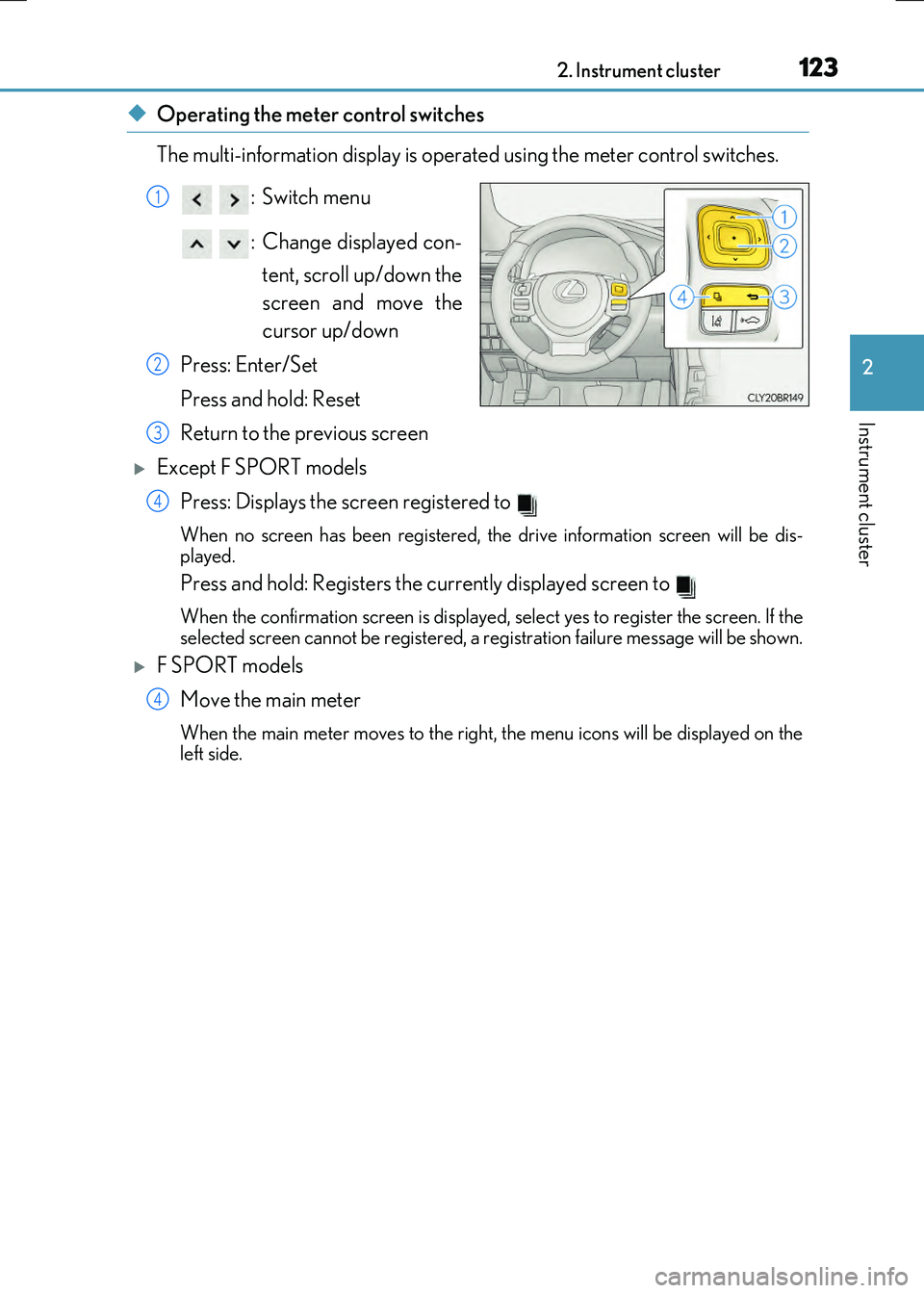
The multi-information display is operated using the meter control switches.
:Switch menu
: Change displayed con- tent, scroll up/down the
screen and move the
cursor up/down
Press: Enter/Set
Press and hold: Reset
Return to the previous screen
Except F SPORT models Press: Displays the screen registered to
When no screen has been registered, the drive information screen will be dis-
played.
Press and hold: Registers the currently displayed screen to
When the confirmation screen is displayed, select yes to register the screen. If the
selected screen cannot be registered, a re gistration failure message will be shown.
F SPORT models
Move the main meter
When the main meter moves to the right, the menu icons will be displayed on the
left side.
1
2
3
4
4
Page 124 of 640
1242. Instrument cluster
RC300h_EE(OM24740E)
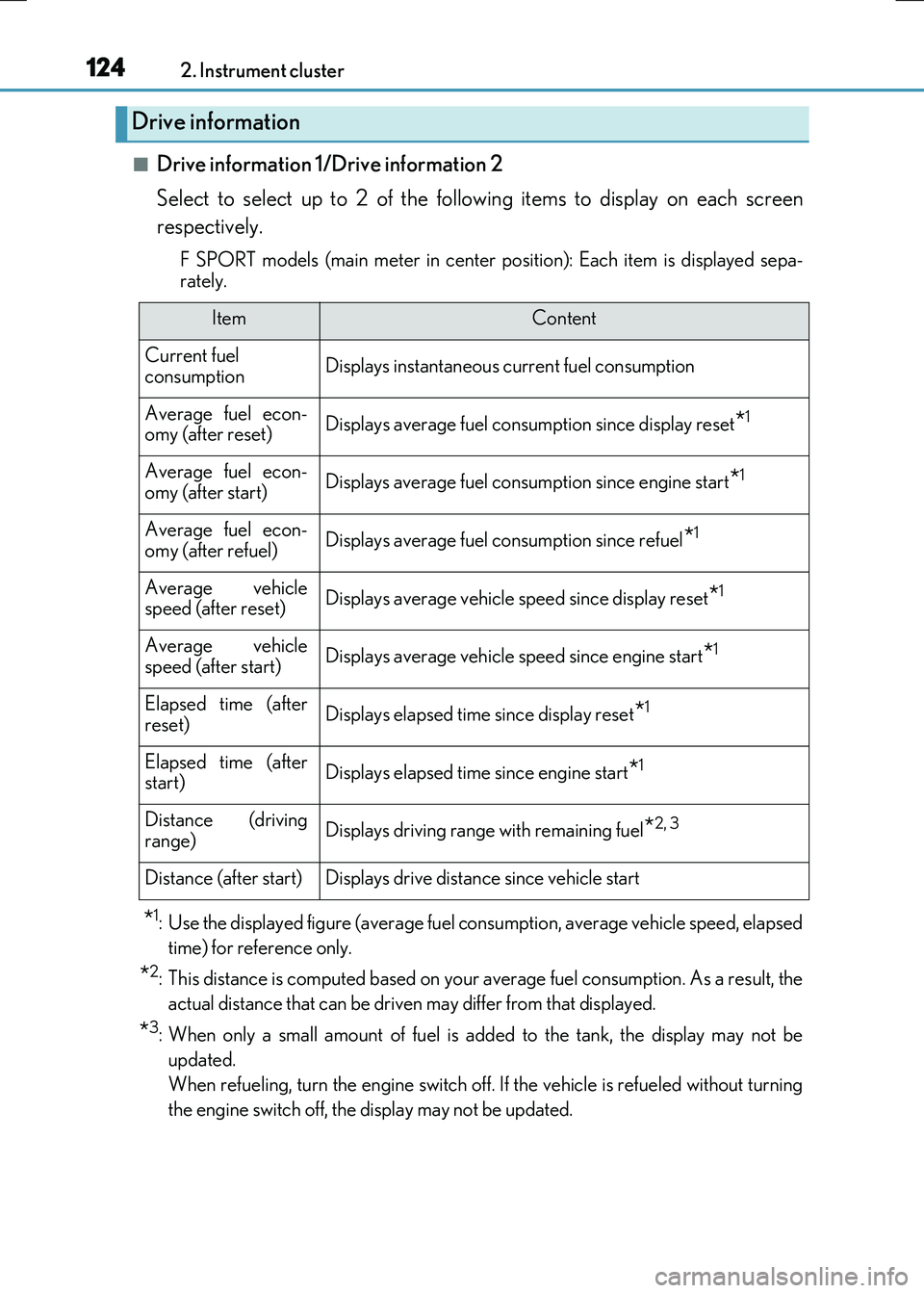
■Drive information 1/Drive information 2
Select to select up to 2 of the following items to display on each screen
respectively.
F SPORT models (main meter in center po sition): Each item is displayed sepa-
rately.
*1: Use the displayed figure (average fuel consumption, average vehicle speed, elapsed
time) for reference only.
*2: This distance is computed based on your average fuel consumption. As a result, the
actual distance that can be driven may differ from that displayed.
*3: When only a small amount of fuel is added to the tank, the display may not be
updated.
When refueling, turn the engine switch off. If the vehicle is refueled without turning
the engine switch off, the display may not be updated.
Drive information
ItemContent
Current fuel consumptionDisplays instantaneous current fuel consumption
Average fuel econ-omy (after reset)Displays average fuel consumption since display reset*1
Average fuel econ-
omy (after start)Displays average fuel cons umption since engine start*1
Average fuel econ- omy (after refuel)Displays average fuel consumption since refuel*1
Average vehiclespeed (after reset)Displays average vehicle speed since display reset*1
Average vehicle
speed (after start)Displays average vehicle speed since engine start*1
Elapsed time (after reset)Displays elapsed time since display reset*1
Elapsed time (afterstart)Displays elapsed time since engine start*1
Distance (driving
range)Displays driving range with remaining fuel*2, 3
Distance (after start)Displays drive distance since vehicle start
Page 126 of 640
1262. Instrument cluster
RC300h_EE(OM24740E)
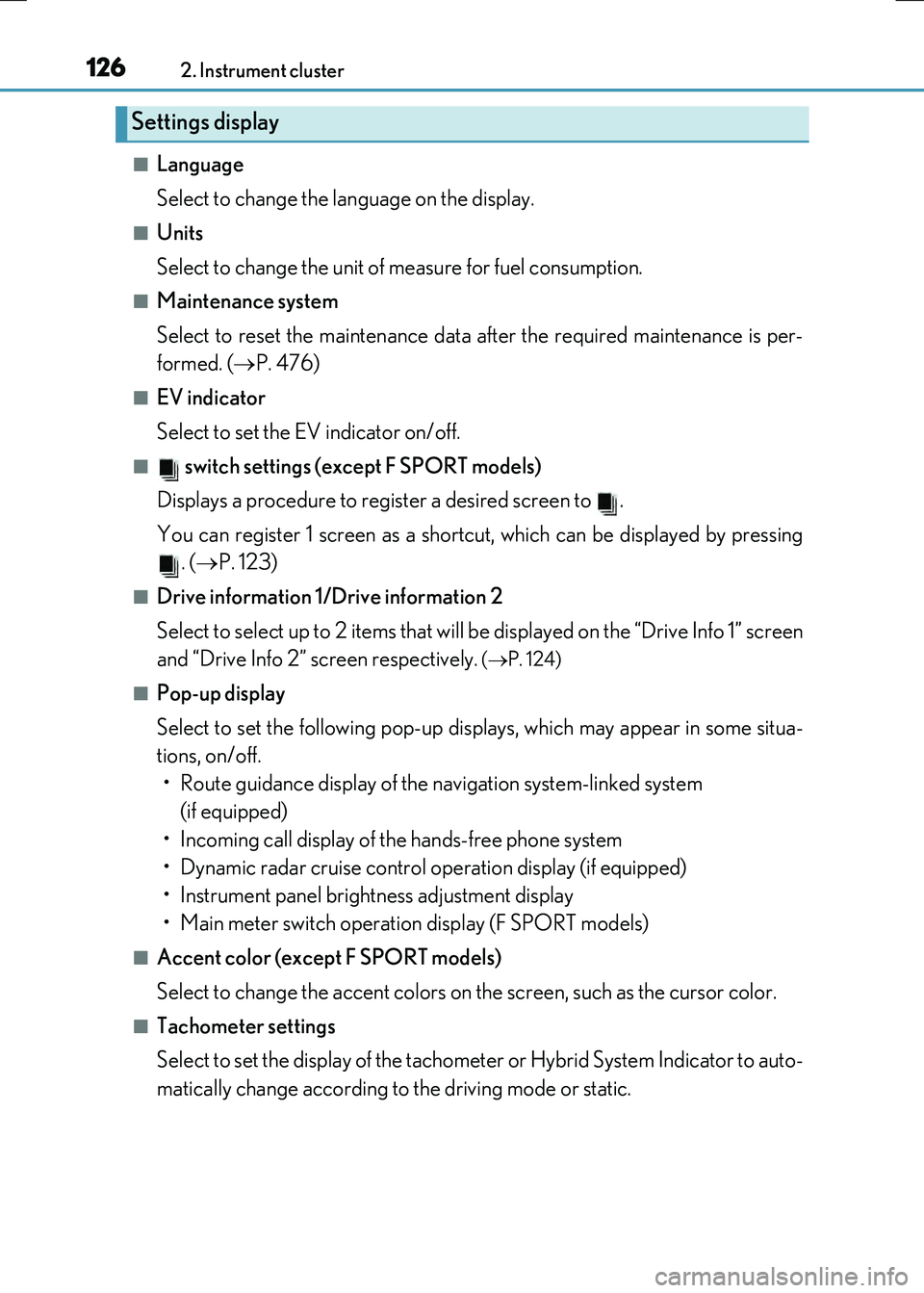
■Language
Select to change the language on the display.
■Units
Select to change the unit of measure for fuel consumption.
■Maintenance system
Select to reset the maintenance data after the required maintenance is per-
formed. ( P. 476)
■EV indicator
Select to set the EV indicator on/off.
■ switch settings (except F SPORT models)
Displays a procedure to register a desired screen to .
You can register 1 screen as a shortcut, which can be displayed by pressing . ( P. 123)
■Drive information 1/Drive information 2
Select to select up to 2 items that will be displayed on the “Drive Info 1” screen
and “Drive Info 2” screen respectively.
( P. 124)
■Pop-up display
Select to set the following pop-up displays, which may appear in some situa-
tions, on/off.
• Route guidance display of the navigation system-linked system (if equipped)
• Incoming call display of the hands-free phone system
• Dynamic radar cruise control operation display (if equipped)
• Instrument panel brightness adjustment display
• Main meter switch operation display (F SPORT models)
■Accent color (except F SPORT models)
Select to change the accent colors on the screen, such as the cursor color.
■Tachometer settings
Select to set the display of the tachomet er or Hybrid System Indicator to auto-
matically change according to the driving mode or static.
Settings display
Page 127 of 640
1272. Instrument cluster
2
Instrument cluster
RC300h_EE(OM24740E)
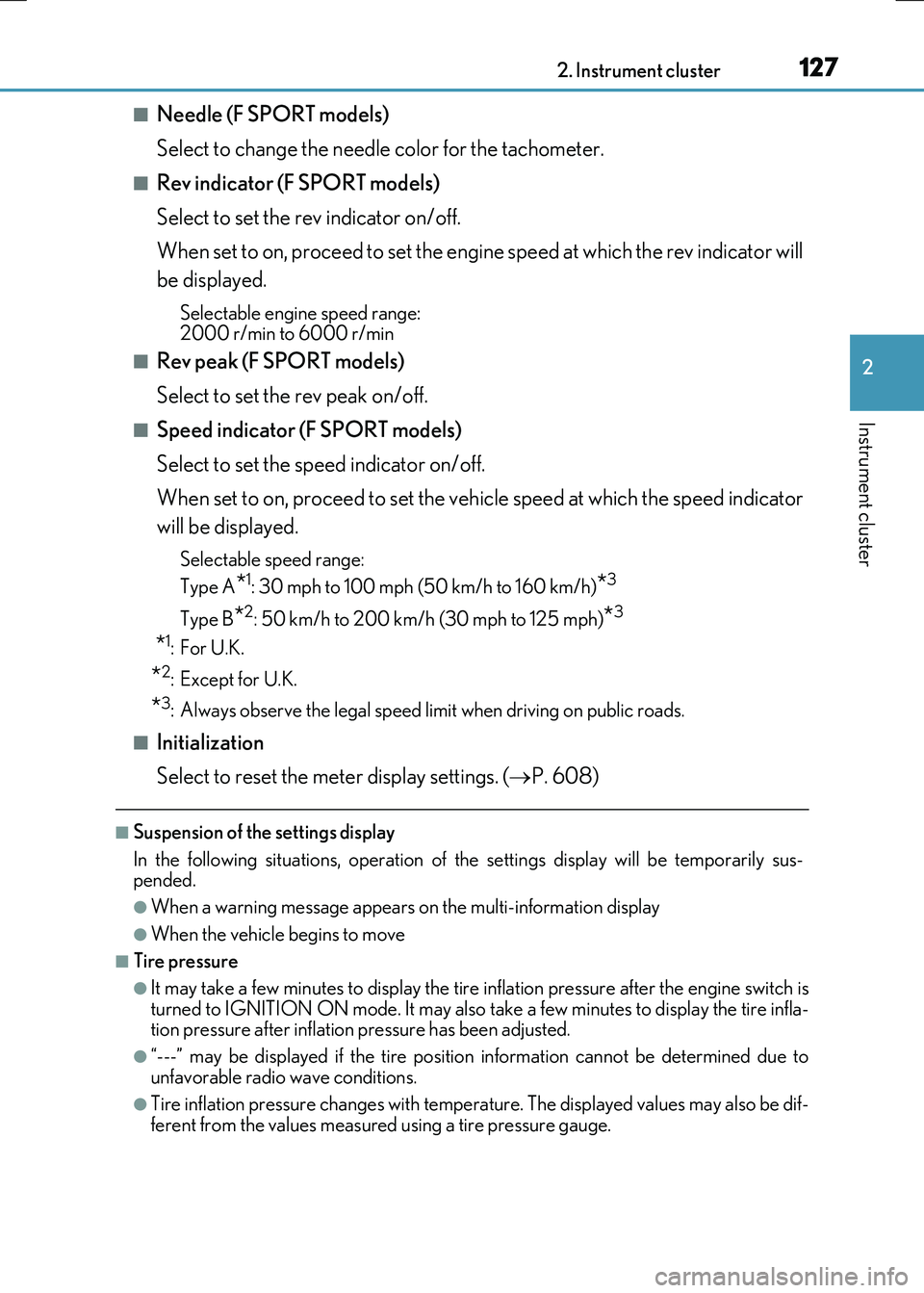
■Needle (F SPORT models)
Select to change the needle color for the tachometer.
■Rev indicator (F SPORT models)
Select to set the rev indicator on/off.
When set to on, proceed to set the engine speed at which the rev indicator will
be displayed.
Selectable engine speed range: 2000 r/min to 6000 r/min
■Rev peak (F SPORT models)
Select to set the rev peak on/off.
■Speed indicator (F SPORT models)
Select to set the speed indicator on/off.
When set to on, proceed to set the vehicle speed at which the speed indicator
will be displayed.
Selectable speed range:
Type A*1: 30 mph to 100 mph (50 km/h to 160 km/h)*3
Type B*2: 50 km/h to 200 km/h (30 mph to 125 mph)*3
*1:For U.K.
*2:Except for U.K.
*3: Always observe the legal speed limit when driving on public roads.
■Initialization
Select to reset the meter display settings. ( P. 608)
■Suspension of the settings display
In the following situations, operation of th e settings display will be temporarily sus- pended.
●When a warning message appears on the multi-information display
●When the vehicle begins to move
■Tire pressure
●It may take a few minutes to display the tire inflation pressure after the engine switch is
turned to IGNITION ON mode. It may also take a few minutes to display the tire infla- tion pressure after inflation pressure has been adjusted.
●“---” may be displayed if the tire position information cannot be determined due to
unfavorable radio wave conditions.
●Tire inflation pressure changes with temperature. The displayed values may also be dif- ferent from the values measured using a tire pressure gauge.
Page 128 of 640
1282. Instrument cluster
RC300h_EE(OM24740E)
■When disconnecting and reconnecting battery terminals
The drive information data will be reset.
■Liquid crystal display
P. 120
WARNING
■Caution for use while driving
●When operating the multi-information display while driving, pay extra attention to the safety of the area around the vehicle.
●Do not look continuously at the multi-info rmation display while driving as you may fail to see pedestrians, objects on the road, etc. ahead of the vehicle.
■The information display at low temperatures
Allow the interior of the vehicle to warm up before using the liquid crystal information display. At extremely low temperatures, th e information display monitor may respond slowly, and display changes may be delayed.
For example, there is a lag between the dr iver’s shifting and the new gear number appearing on the display. This lag could cau se the driver to downshift again, causing rapid and excessive engine braking and po ssibly an accident resulting in death or
injury.
■Cautions during setting up the display
As the hybrid system needs to be running during setting up the display, ensure that the
vehicle is parked in a place with adequate ventilation. In a closed area such as a garage, exhaust gases including harmful carbon monoxide (CO) may collect and enter thevehicle. This may lead to death or a serious health hazard.
NOTICE
■While setting up the display
To prevent battery discharge, ensure that the engine is running while setting up the dis- play features.
Page 129 of 640
1292. Instrument cluster
2
Instrument cluster
RC300h_EE(OM24740E)
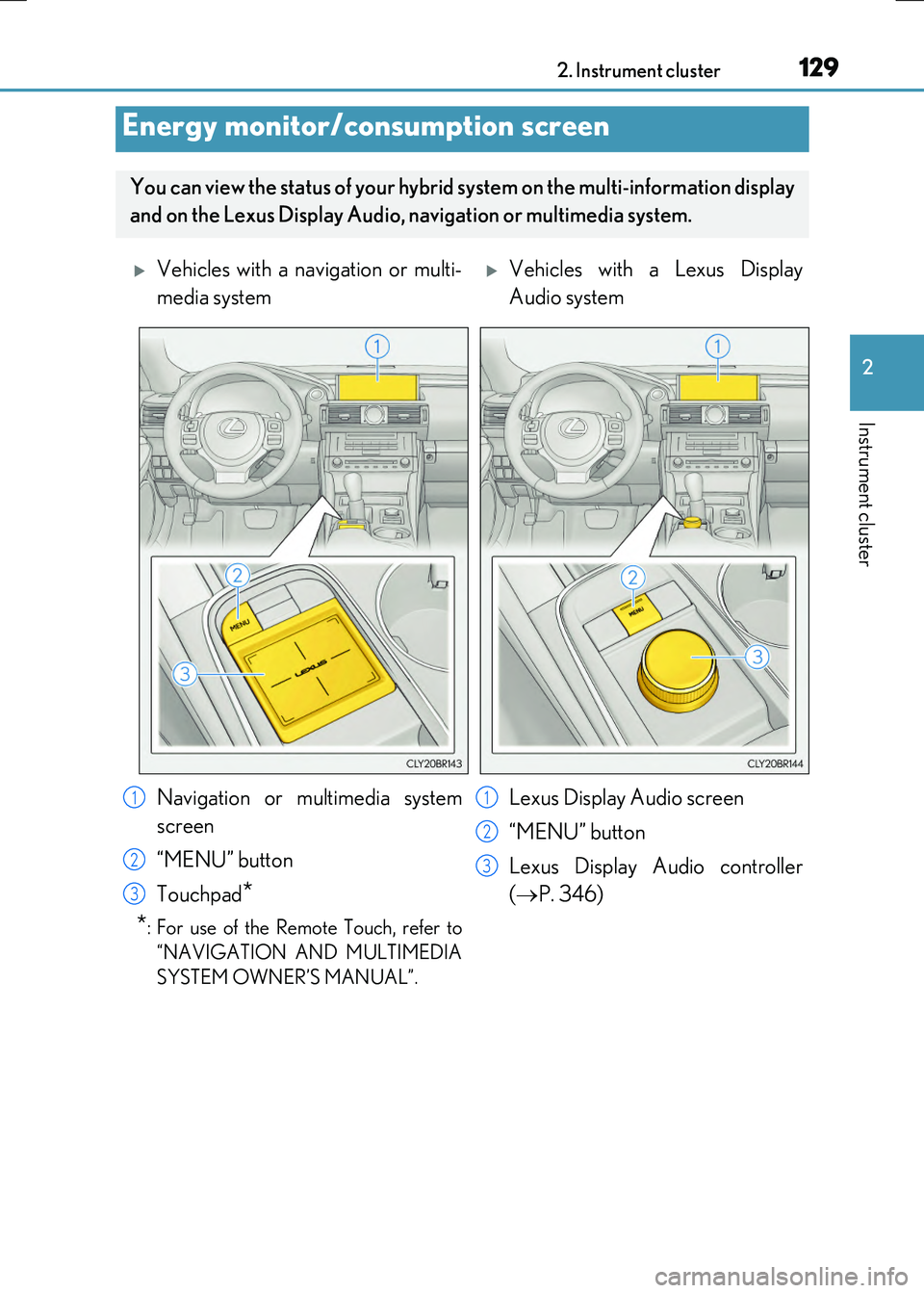
Energy monitor/consumption screen
You can view the status of your hybrid system on the multi-information display
and on the Lexus Display Audio, na vigation or multimedia system.
Vehicles with a navigation or multi-
media system
Vehicles with a Lexus Display
Audio system
Navigation or multimedia system
screen
“MENU” button
Touchpad*
*: For use of the Remote Touch, refer to
“NAVIGATION AND MULTIMEDIA
SYSTEM OWNER’S MANUAL”.
Lexus Display Audio screen
“MENU” button
Lexus Display Audio controller
( P. 346)
1
2
3
1
2
3
Page 130 of 640
1302. Instrument cluster
RC300h_EE(OM24740E)
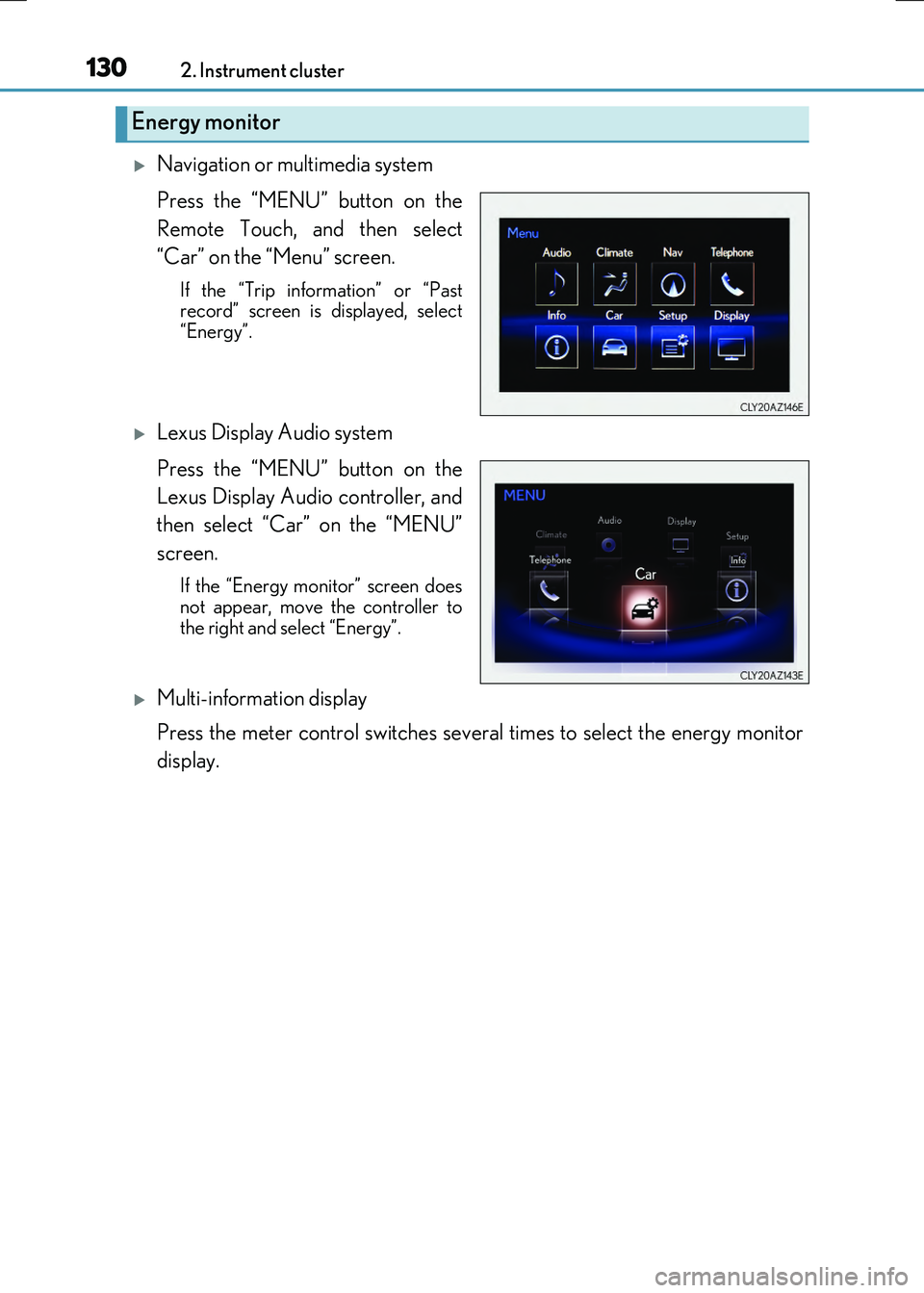
Navigation or multimedia system
Press the “MENU” button on the
Remote Touch, and then select
“Car” on the “Menu” screen.
If the “Trip information” or “Past record” screen is displayed, select
“Energy”.
Lexus Display Audio system
Press the “MENU” button on the
Lexus Display Audio controller, and
then select “Car” on the “MENU”
screen.
If the “Energy monitor” screen does
not appear, move the controller to the right and select “Energy”.
Multi-information display
Press the meter control switches several times to select the energy monitor
display.
Energy monitor
Page 131 of 640
1312. Instrument cluster
2
Instrument cluster
RC300h_EE(OM24740E)
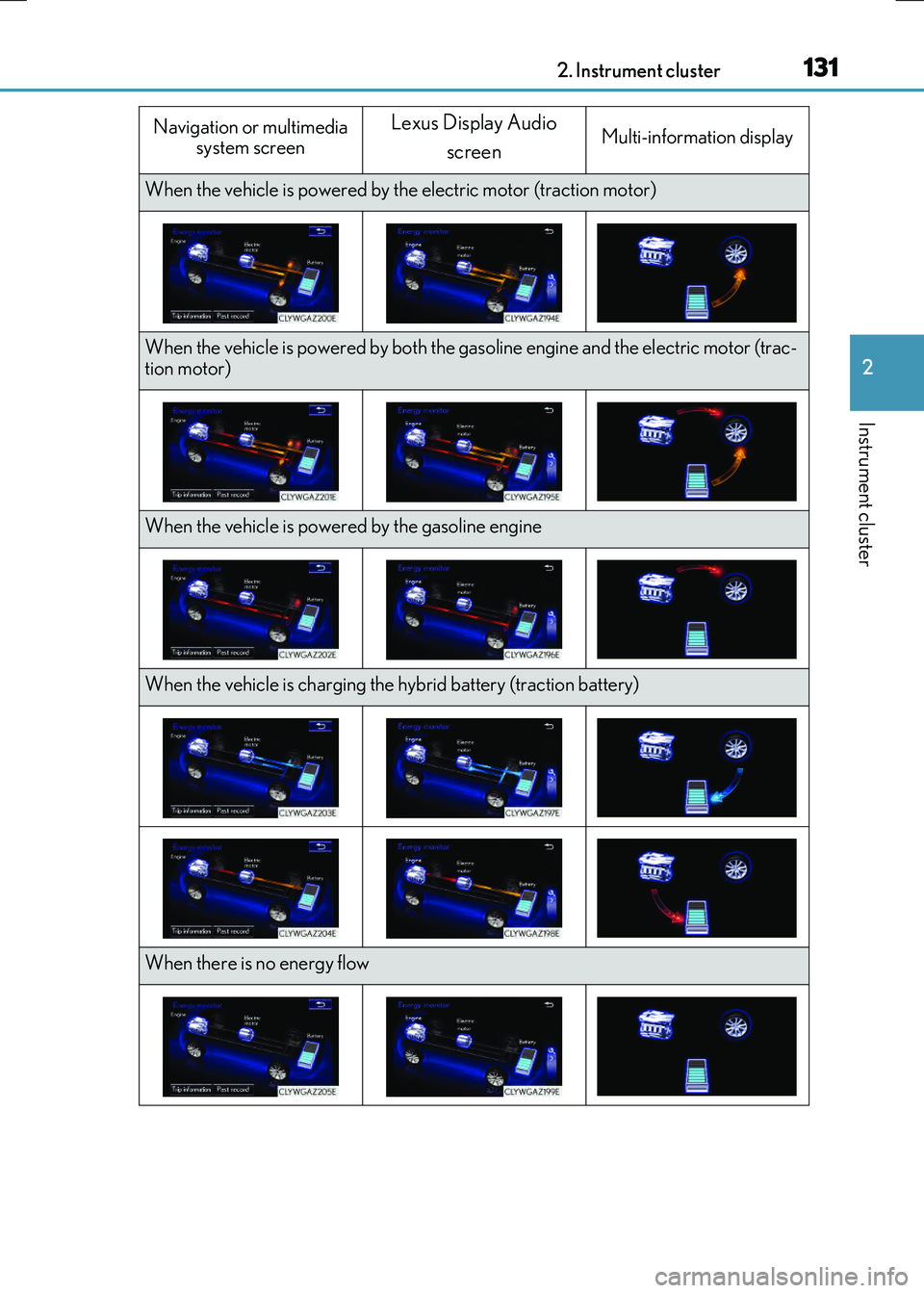
Navigation or multimedia system screen
Lexus Display Audio
screenMulti-information display
When the vehicle is powered by th e electric motor (traction motor)
When the vehicle is powered by both the gasoline engine and the electric motor (trac- tion motor)
When the vehicle is powered by the gasoline engine
When the vehicle is charging the hybrid battery (traction battery)
When there is no energy flow
Page 132 of 640
1322. Instrument cluster
RC300h_EE(OM24740E) These images are examples only.
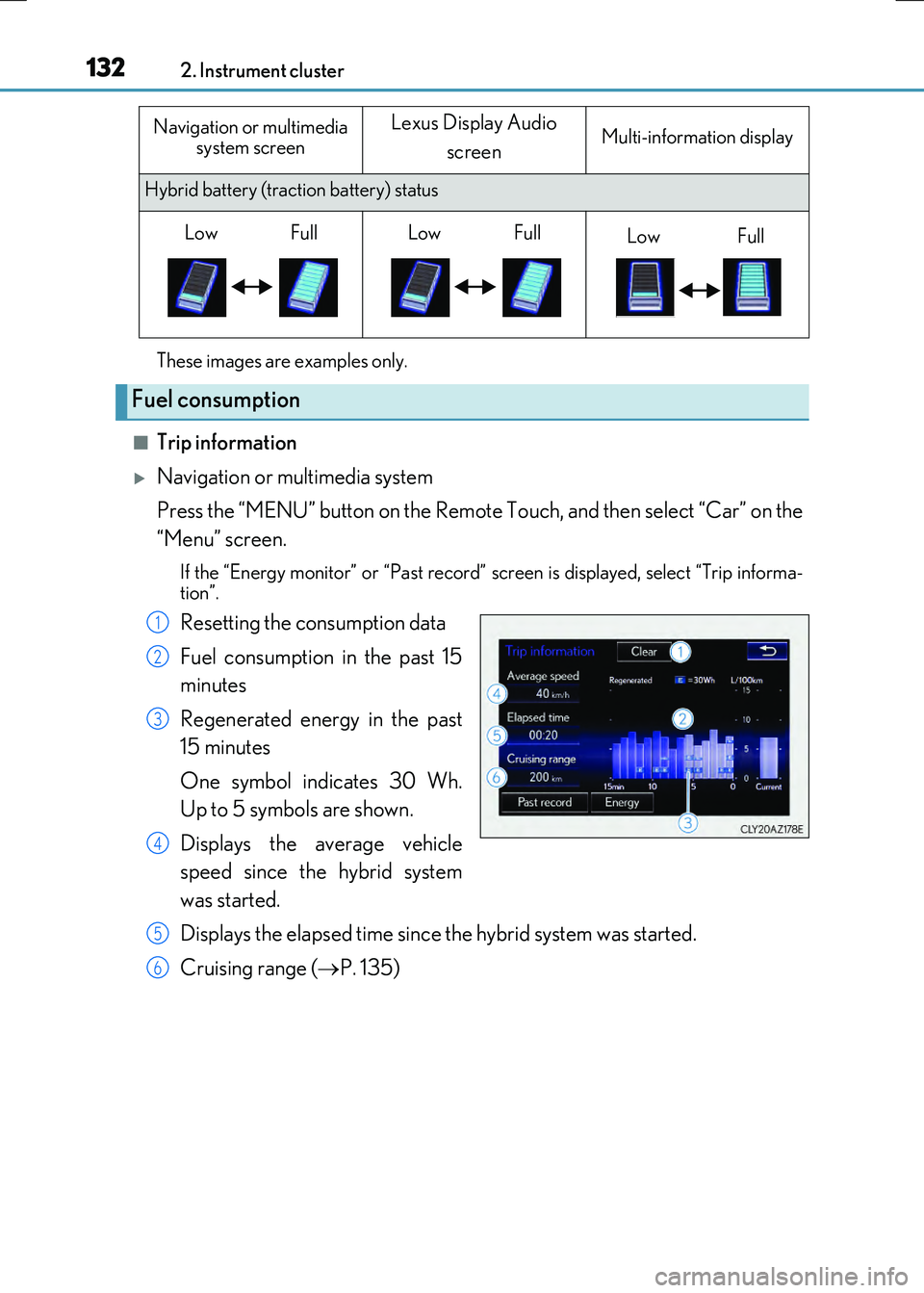
■Trip information
Navigation or multimedia system
Press the “MENU” button on the Remote Touch, and then select “Car” on the
“Menu” screen.
If the “Energy monitor” or “Past record” sc reen is displayed, select “Trip informa-
tion”.
Resetting the consumption data
Fuel consumption in the past 15
minutes
Regenerated energy in the past
15 minutes
One symbol indicates 30 Wh.
Up to 5 symbols are shown.
Displays the average vehicle
speed since the hybrid system
was started.
Displays the elapsed time since the hybrid system was started.
Cruising range ( P. 135)
Hybrid battery (traction battery) status
Fuel consumption
Navigation or multimedia
system screenLexus Display Audio
screenMulti-information display
LowFullLowFullLowFull
1
2
3
4
5
6