Info display LEXUS RC300H 2017 Service Manual
[x] Cancel search | Manufacturer: LEXUS, Model Year: 2017, Model line: RC300H, Model: LEXUS RC300H 2017Pages: 640, PDF Size: 35.53 MB
Page 281 of 640

2814-5. Using the driving support systems
4
Driving
RC300h_EE(OM24740E)
■Multi-information display and Lexus Display Audio screen
Sensors that detect an obstacle will illuminate continuously or blink.
*1: Multi-information display
*2: Lexus Display Audio screen
Sensor detection display, obstacle distance
Display
Insert display
(Lexus Display Audio screen only)Approximate distance to obstacle
Corner sensor/front center sensorRear center sensor
(continuous)(blinking slowly)
Front center sensor
only:
100 cm (3.3 ft.) to 50
cm (1.6 ft.)150 cm (4.9 ft.) to 60
cm (2.0 ft.)
(continuous)(blinking)
50 cm (1.6 ft.) to 40 cm
(1.3 ft.)60 cm (2.0 ft.) to 45
cm (1.5 ft.)
(continuous)(blinking rapidly)
40 cm (1.3 ft.) to 30 cm
(1.0 ft.)45 cm (1.5 ft.) to 35 cm
(1.1 ft.)
(blinking*1 or
continuous
*2)
(continuous)
Less than 30 cm (1.0 ft.)Less than 35 cm (1.1 ft.)
Page 284 of 640

2844-5. Using the driving support systems
RC300h_EE(OM24740E)
■If a message is displayed on the multi-information display
P. 545
WARNING
■When using the Lexus parking assist-sensor
Observe the following precautions.
Failing to do so may result in the vehicle be ing unable to be driven safely and possibly cause an accident.
●Do not use the sensor at speeds in excess of 10 km/h (6 mph).
●The sensors’ detection areas and reaction times are limited. When moving forward or reversing, check the areas surrounding the vehicle (especially the sides of the vehi-cle) for safety, and drive slowly, using the brake to control the vehicle’s speed.
●Do not install accessories within the sensors’ detection areas.
■Limitations of the sensors
●The detection areas of the sensors are limited to the areas around the vehicle’s front
and rear bumpers.
●Certain vehicle conditions and surrounding environments, such as the following, may affect the ability of the sensors to correctly detect objects. Pay particular attention in
the following situations. Failure to do so may result in the vehicle being driven unsafely, possibly leading to an accident.
• When there is dirt, snow or ice on a sens or (Cleaning the sensor will resolve this
problem.) • When the sensor is frozen (Thawing the area will resolve this problem.)In especially cold weather, if a sensor is frozen the screen may show an abnormal
display, or objects may not be detected • When a sensor is covered in any way• When the vehicle is leaning considerably to one side
• When driving on an extremely bumpy road, incline, gravel, or grass • When the vicinity of the vehicle is noisy due to vehicle horns, motorcycle engines,air brakes of large vehicles, or other loud noises producing ultrasonic waves
• When there is another vehicle equipped with parking assist sensor in the vicinity • When the sensor is coated with a sheet of spray or heavy rain• When the vehicle is equipped with a fender pole or wireless antenna
• When a towing eyelet is installed • When a bumper or sensor receives a strong impact• When the vehicle is approaching a tall or curved curb
• When driving in harsh sunlight or intense cold weather • When an object is directly under a bumper• When objects become too close to the sensors
• When a non-genuine Lexus suspension (l owered suspension, etc.) is installed In addition to the situations above, there are instances in which, because of theirshape, signs and other objects may be judged by the sensor to be closer than they
are.
Page 306 of 640
3064-5. Using the driving support systems
RC300h_EE(OM24740E)
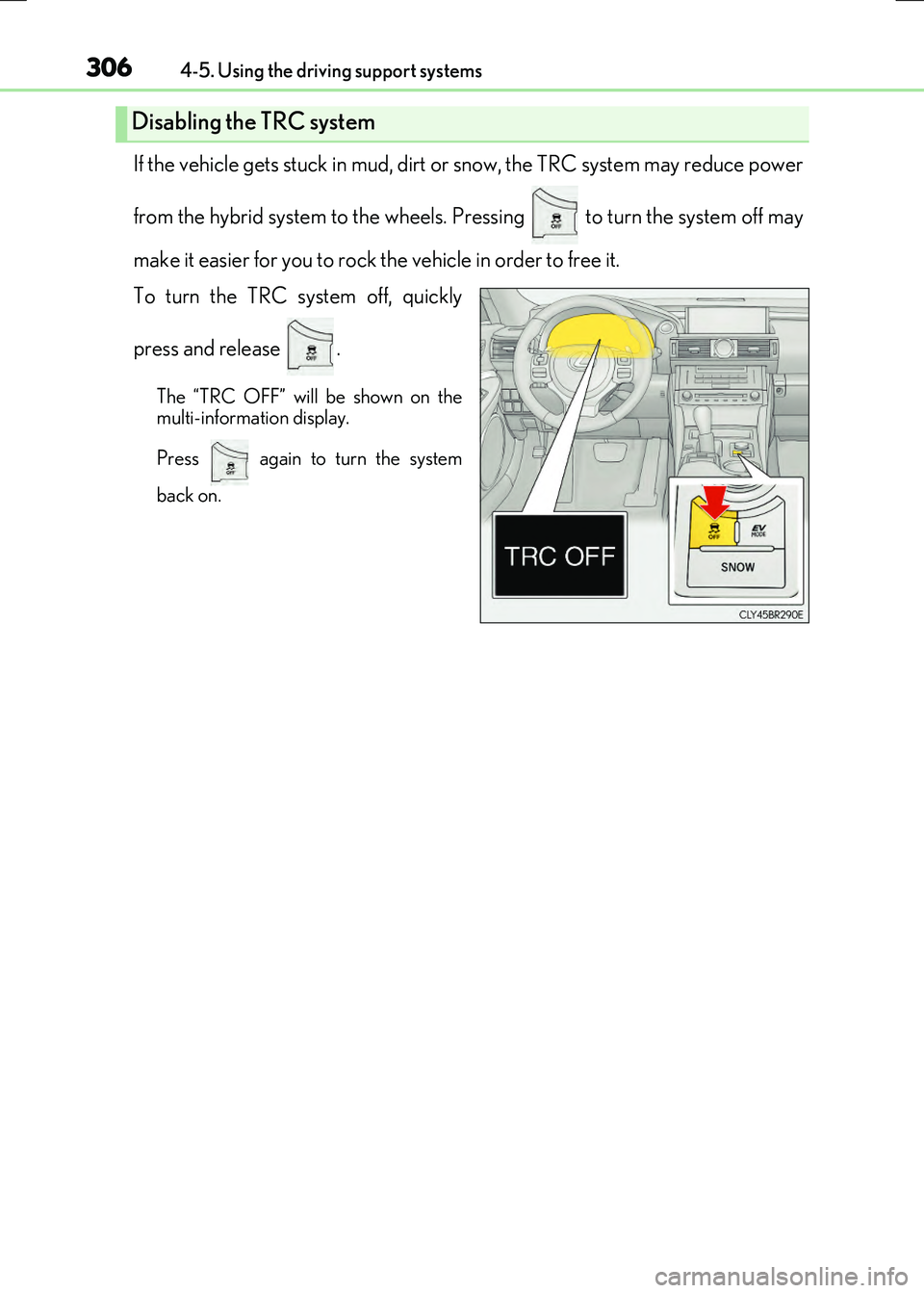
If the vehicle gets stuck in mud, dirt or snow, the TRC system may reduce power
from the hybrid system to the wheels. Pressing to turn the system off may
make it easier for you to rock the vehicle in order to free it.
To turn the TRC system off, quickly
press and release .
The “TRC OFF” will be shown on the
multi-information display.
Press again to turn the system
back on.
Disabling the TRC system
Page 307 of 640
3074-5. Using the driving support systems
4
Driving
RC300h_EE(OM24740E)
■Turning off both TRC and VSC systems
To turn the TRC and VSC systems off, press and hold for more than 3 seconds
while the vehicle is stopped.
The VSC OFF indicator light will come on and the “TRC OFF” will be shown on the
multi-information display.
*
Press again to turn the systems back on.
*: On vehicles with PCS (Pre-Crash Safety system), pre-crash brake assist and pre-
crash braking will also be disabled. The pr e-crash safety system warning light will
come on and a message will be displaye d on the multi-information display. (P. 554)
■When the message is displayed on the mult i-information display showing that TRC has
been disabled even if has not been pressed
TRC and hill-start assist control cannot be operated. Contact any authorized Lexus
dealer or repairer, or another duly qualified and equipped professional.
Page 311 of 640
3114-5. Using the driving support systems
4
Driving
RC300h_EE(OM24740E)
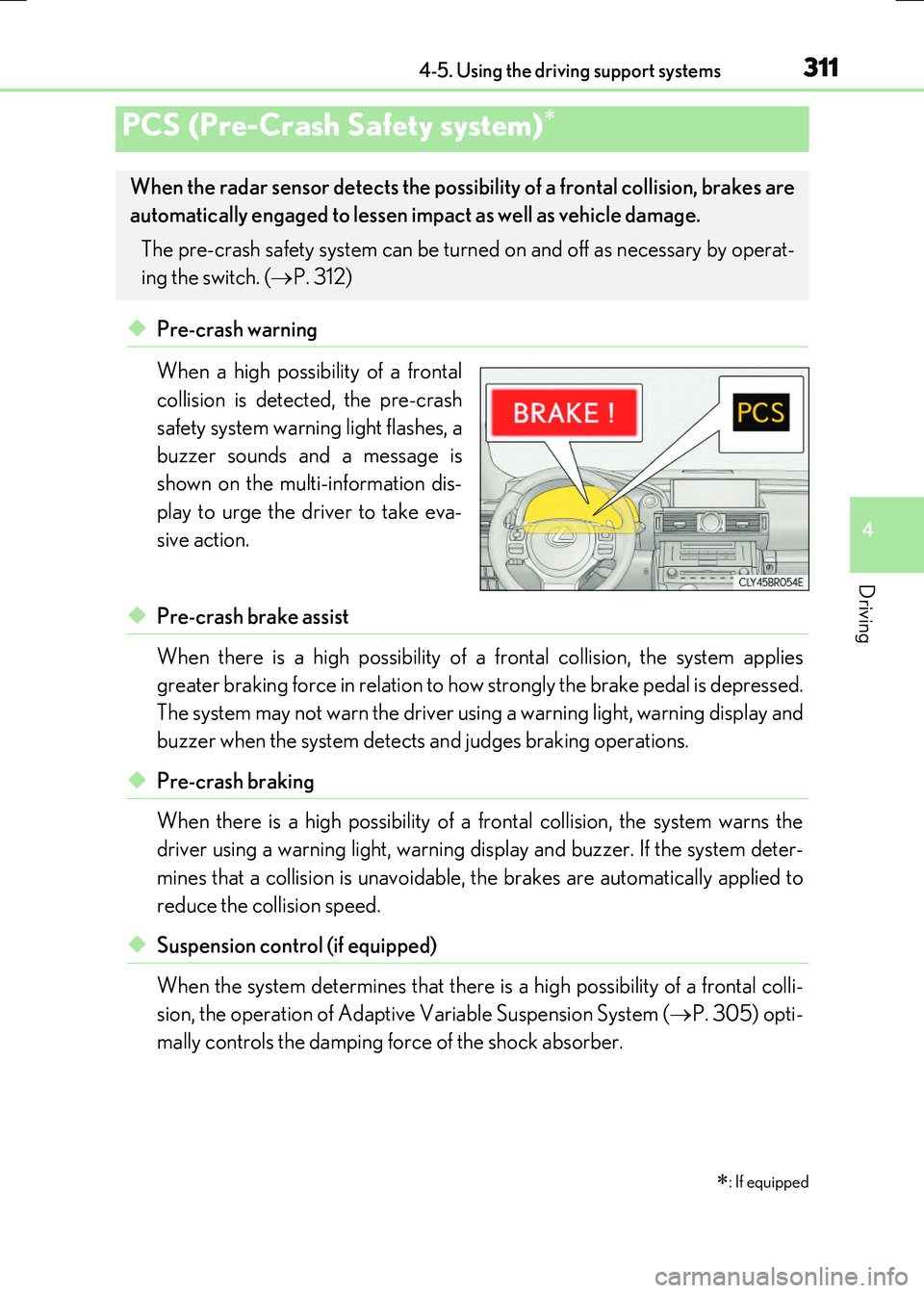
◆Pre-crash warning
When a high possibility of a frontal
collision is detected, the pre-crash
safety system warning light flashes, a
buzzer sounds and a message is
shown on the multi-information dis-
play to urge the driver to take eva-
sive action.
◆Pre-crash brake assist
When there is a high possibility of a frontal collision, the system applies
greater braking force in relation to how strongly the brake pedal is depressed.
The system may not warn the driver using a warning light, warning display and
buzzer when the system detects and judges braking operations.
◆Pre-crash braking
When there is a high possibility of a frontal collision, the system warns the
driver using a warning ligh t, warning display and buzzer. If the system deter-
mines that a collision is unavoidable, the brakes are automatically applied to
reduce the collision speed.
◆Suspension control (if equipped)
When the system determines that there is a high possibility of a frontal colli-
sion, the operation of Adaptive Variable Suspension System ( P. 305) opti-
mally controls the damping force of the shock absorber.
PCS (Pre-Crash Safety system)
: If equipped
When the radar sensor detects the possibil ity of a frontal collision, brakes are
automatically engaged to lessen im pact as well as vehicle damage.
The pre-crash safety system can be turn ed on and off as necessary by operat-
ing the switch. ( P. 312)
Page 343 of 640
343
5
Lexus Display
Audio system
RC300h_EE(OM24740E)
5-6. Using an external device
Listening to an iPod................... 377
Using USB memory
device............................................ 381
Using the AUX port ................ 386
5-7. Connecting Bluetooth®
Steps for using Bluetooth®
devices.........................................387
Registering a Bluetooth®
device.......................................... 389
Selecting a Bluetooth®
device.......................................... 390
Connecting a Bluetooth®
audio player ................................ 391
Connecting a Bluetooth®
phone ...........................................392
Displaying a Bluetooth®
device details ............................393
Detailed Bluetooth®
settings.........................................394
5-8. Bluetooth® Audio
Listening to Bluetooth®
Audio............................................395
5-9. Bluetooth® Phone
Using a Bluetooth®
Phone........................................... 397
Making a call................................ 399
Receiving a call ........................... 402
Speaking on the phone ...........403
Using a Bluetooth®
phone messages .....................405
Using the steering wheel
switches.......................................408
Bluetooth® phone
settings ........................................409
5-10. Phonebook
Contact settings ............................ 411
Messaging setting .......................414
5-11. Bluetooth®
What to do if...
(Troubleshooting).................... 415
Bluetooth®.................................... 418
5-12. Other function
“Information” screen................. 423
MirrorLink ................................ 424
USB photo .................................... 427
Speech command
system .......................................... 429
Some of the functions cannot be operated while driving.
Page 345 of 640
3455-1. Basic Operations
5
Lexus Display Audio system
RC300h_EE(OM24740E)
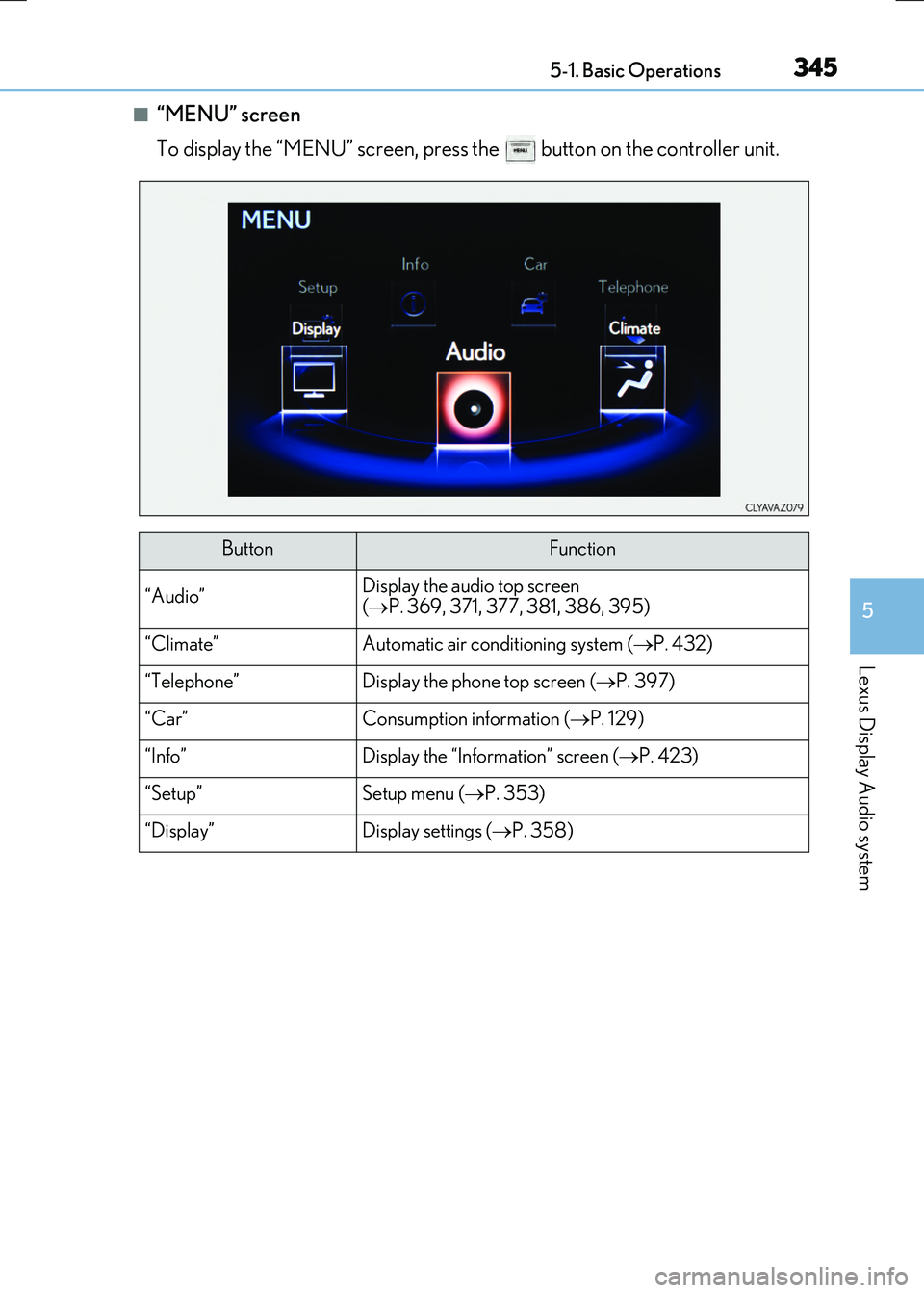
■“MENU” screen
To display the “MENU” screen, press the button on the controller unit.
ButtonFunction
“Audio”Display the audio top screen
( P. 369, 371, 377, 381, 386, 395)
“Climate”Automatic air conditioning system (P. 432)
“Telephone”Display the phone top screen (P. 397)
“Car” Consumption information (P. 129)
“Info”Display the “Information” screen (P. 423)
“Setup”Setup menu (P. 353)
“Display”Display settings (P. 358)
Page 356 of 640
3565-2. Setup
RC300h_EE(OM24740E)
“Setup” “General” “Delete personal data”
Select “Delete”.
Check carefully beforehand, as data cannot be retrieved once deleted.
The following personal data will be deleted or changed to its default settings. • Phonebook data
•Voice tag
• Call history data
•Favorite data
• Bluetooth
® devices data
• Phone sound settings
• Detailed Bluetooth
® settings
• Audio/video setting
• Preset switch data
• Last used radio station
• Customized image data
• Software update history
• Software update detail information
• Phone display setting
• Contact/call history setting
• Messaging setting
NOTICE
■To prevent damage to the USB memory device or its terminals
P. 385
Deleting personal data
1
2
Page 363 of 640
3635-3. Using the audio system
5
Lexus Display Audio system
RC300h_EE(OM24740E)
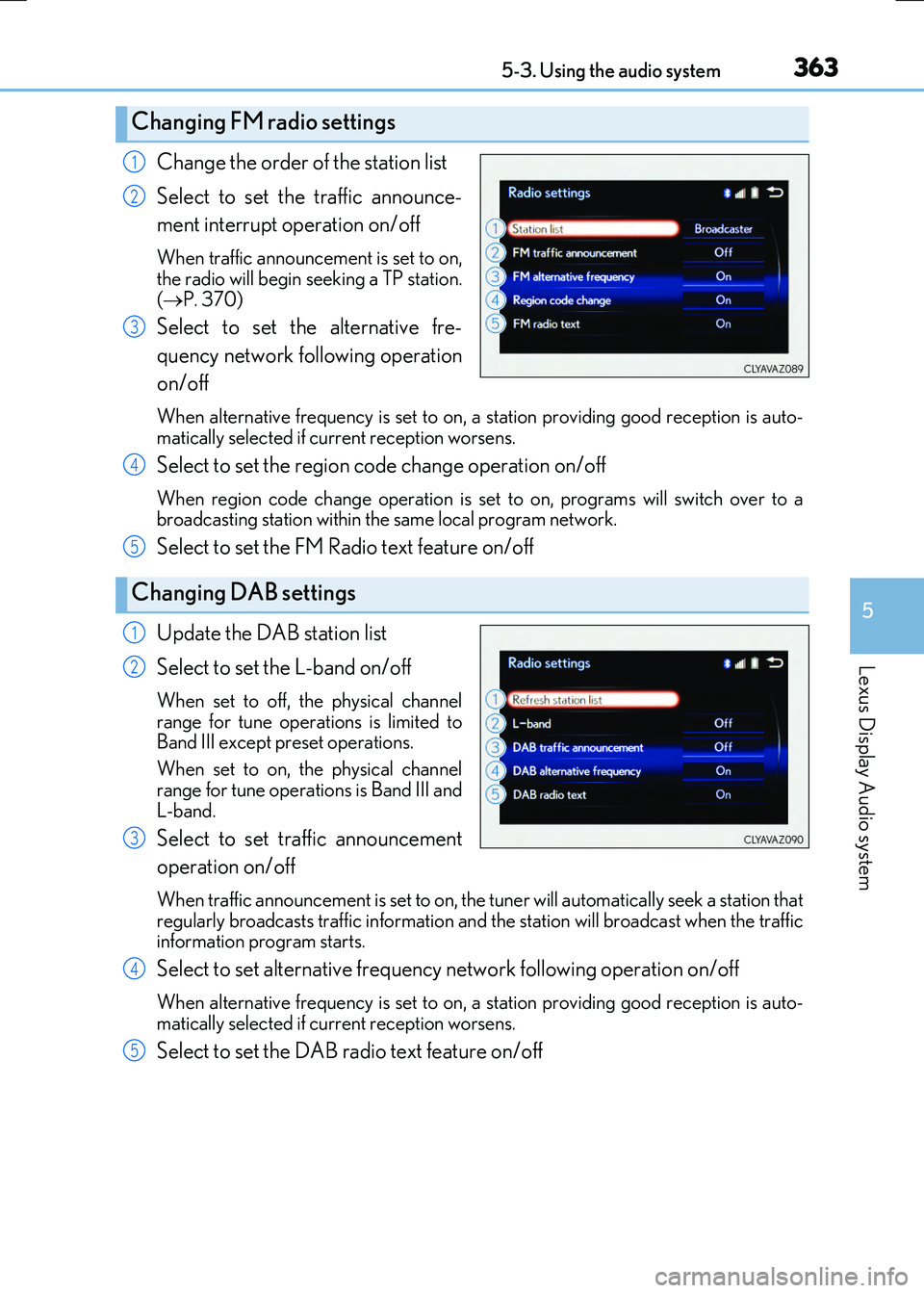
Change the order of the station list
Select to set the traffic announce-
ment interrupt operation on/off
When traffic announcement is set to on, the radio will begin seeking a TP station.
( P. 370)
Select to set the alternative fre-
quency network following operation
on/off
When alternative frequency is set to on, a station providing good reception is auto-
matically selected if current reception worsens.
Select to set the region code change operation on/off
When region code change operation is se t to on, programs will switch over to a broadcasting station within th e same local program network.
Select to set the FM Radio text feature on/off
Update the DAB station list
Select to set the L-band on/off
When set to off, the physical channel
range for tune operations is limited to Band III except preset operations.
When set to on, the physical channel
range for tune operations is Band III and L-band.
Select to set traffic announcement
operation on/off
When traffic announcement is set to on, the tuner will automatically seek a station that
regularly broadcasts traffic information and the station will broadcast when the traffic information program starts.
Select to set alternative frequency network following operation on/off
When alternative frequency is set to on, a station providing good reception is auto-matically selected if current reception worsens.
Select to set the DAB radio text feature on/off
Changing FM radio settings
1
2
3
Changing DAB settings
4
5
1
2
3
4
5
Page 370 of 640
3705-4. Using the radio
RC300h_EE(OM24740E)
■Manual tuning (manual screen)
Turn the right side knob (left-hand drive vehicle), left side knob (right-hand
drive vehicle) on the audio panel or turn the controller.
■Station list (preset or station list screen)
Select the desired station by pressing “ ” or “” button, turn the right side
knob (left-hand drive vehicle), left side knob (right-hand drive vehicle) on the
audio panel or controller.
Radio stations can be preset.
Search for desired stations.
Turn the controller to select one of the stations and then press the controller
until you hear a beep while on the preset selection screen.
The broadcast you are currently listening to can be re-listened to at any time.
Move the controller to the right and then select “Time shift”.
Turn the right side knob (left-hand drive vehicle) or left side knob (right-hand
drive vehicle) on the audio panel to set the desired offset.
An offset playback time can also be set on the menu screen. ( P. 366)
To cancel the time shift operation while in time shift mode, move the controller to the left and select “Time shift off”. If the time shift display is left showing “-0' 00”” for 6
seconds without any operation, the time shift operation will be canceled.
■Reception sensitivity
●Maintaining perfect radio recept ion at all times is difficult due to the continually chang- ing position of the antenna, differences in signal strength and surrounding objects, suchas trains, transmitters, etc.
●The radio antenna is mounted inside the rear window. To maintain clear radio reception, do not attach metallic window tinting or other metallic objects to the antenna wire mounted inside the rear window.
■Traffic announcement operation
When traffic announcement is set to on, “TP” will appear on the screen and the radio will begin seeking a TP station. If the radio seeks out a TP station, the program name will
appear on the screen. If a traffic announcement station is received, the radio will be switched to the traffic information program automatically. When the program ends, theinitial operation will resume.
Setting station presets (preset screen)
Time shift operation (DAB)
1
2
1
2