Info system LEXUS RC300H 2017 User Guide
[x] Cancel search | Manufacturer: LEXUS, Model Year: 2017, Model line: RC300H, Model: LEXUS RC300H 2017Pages: 640, PDF Size: 35.53 MB
Page 69 of 640
691-1. For safe use
1
For safety and security
RC300h_EE(OM24740E)
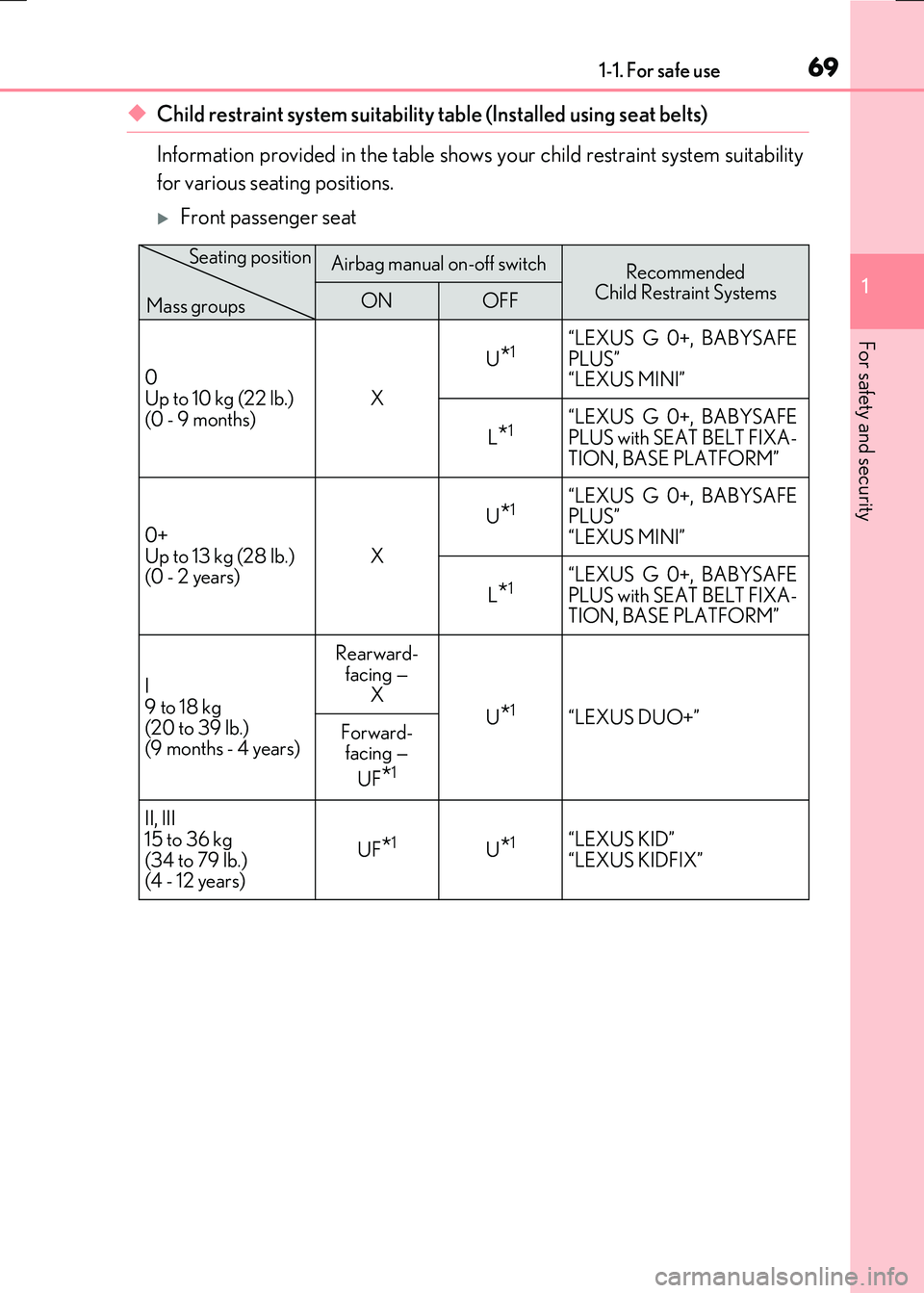
◆Child restraint system suitability table (Installed using seat belts)
Information provided in the table shows your child restraint system suitability
for various seating positions.
Front passenger seat
Airbag manual on-off switchRecommended Child Restraint SystemsONOFF
0 Up to 10 kg (22 lb.)
(0 - 9 months)
X
U*1 “LEXUS G 0+, BABYSAFE PLUS”“LEXUS MINI”
L*1“LEXUS G 0+, BABYSAFE
PLUS with SEAT BELT FIXA- TION, BASE PLATFORM”
0+
Up to 13 kg (28 lb.) (0 - 2 years) X
U*1 “LEXUS G 0+, BABYSAFE PLUS”
“LEXUS MINI”
L*1“LEXUS G 0+, BABYSAFE PLUS with SEAT BELT FIXA-TION, BASE PLATFORM”
I
9 to 18 kg (20 to 39 lb.)(9 months - 4 years)
Rearward-
facing — X
U*1“LEXUS DUO+” Forward- facing —
UF*1
II, III
15 to 36 kg (34 to 79 lb.)(4 - 12 years)
UF*1U*1 “LEXUS KID” “LEXUS KIDFIX”
Seating position
Mass groups
Page 78 of 640
![LEXUS RC300H 2017 User Guide 781-1. For safe use
RC300h_EE(OM24740E)
■Child restraint system suitability table
(Installed using ISOFIX [Child restraint system conforms with ECE R44])
Information provided in the table shows y](/img/36/58021/w960_58021-77.png "LEXUS RC300H 2017 User Guide 781-1. For safe use
RC300h_EE(OM24740E)
■Child restraint system suitability table
(Installed using ISOFIX [Child restraint system conforms with ECE R44])
Information provided in the table shows y")
781-1. For safe use
RC300h_EE(OM24740E)
■Child restraint system suitability table
(Installed using ISOFIX [Child restraint system conforms with ECE R44])
Information provided in the table shows your child restraint system suitability
for various seating positions.
Rear seat
Mass groupsSize classFixture
Vehicle ISOFIX
positionsRecommended
Child Restraint SystemsRight-handLeft-hand
Carrycot FISO/L1X X —
GISO/L2X X —
0 Up to 10 kg (22 lb.)
(0 - 9 months)
EISO/R1IL*1IL*1“LEXUS MINI” “LEXUS MIDI”
0+
Up to 13 kg (28 lb.) (0 - 2 years)
EISO/R1IL*1IL*1
“LEXUS MINI” “LEXUS MIDI” DISO/R2X X
CISO/R3X X
I 9 to 18 kg (20 to 39 lb.)(9 months - 4 years)
DISO/R2X X —CISO/R3X X
BISO/F2 IUF*2IUF*2—
IL*2IL*2“LEXUS MIDI”
B1 ISO/F2X IUF*2IUF*2“LEXUS DUO+”
IL*2IL*2“LEXUS MIDI”
AISO/F3X X —
Page 90 of 640
901-2. Hybrid system
RC300h_EE(OM24740E)
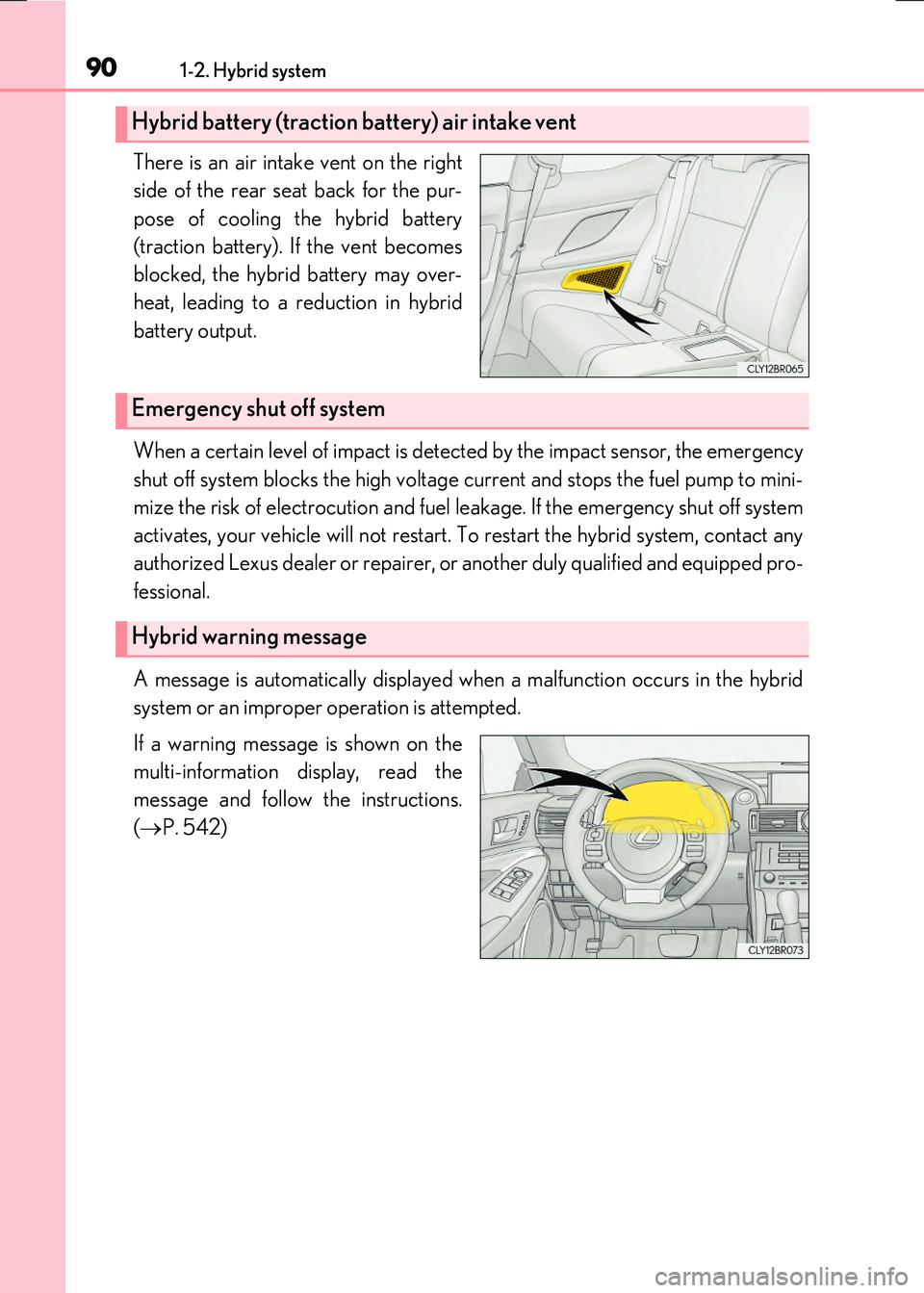
There is an air intake vent on the right
side of the rear seat back for the pur-
pose of cooling the hybrid battery
(traction battery). If the vent becomes
blocked, the hybrid battery may over-
heat, leading to a reduction in hybrid
battery output.
When a certain level of impact is detected by the impact sensor, the emergency
shut off system blocks the high voltage current and stops the fuel pump to mini-
mize the risk of electrocution and fuel leakage. If the emergency shut off system
activates, your vehicle will not restart. To restart the hybrid system, contact any
authorized Lexus dealer or repairer, or another duly qualified and equipped pro-
fessional.
A message is automatically displayed when a malfunction occurs in the hybrid
system or an improper operation is attempted.
If a warning message is shown on the
multi-information display, read the
message and follow the instructions.
( P. 542)
Hybrid battery (traction battery) air intake vent
Emergency shut off system
Hybrid warning message
Page 105 of 640
1051-3. Theft deterrent system
1
For safety and security
RC300h_EE(OM24740E)
●The intrusion sensor detects intruders or movement in the vehicle.
●The tilt sensor detects changes in vehicle inclination, such as when the vehicle
is towed away.
This system is designed to deter and pr event vehicle theft but does not guarantee
absolute security against all intrusions.
■Setting the intrusion sensor and tilt sensor
The intrusion sensor and tilt sensor will be set automatically when the alarm is
set. ( P. 102)
■Canceling the intrusion sensor and tilt sensor
If you are leaving pets or other moving things inside the vehicle, make sure to
disable the intrusion sensor and tilt sensor before setting the alarm, as they will
respond to movement inside the vehicle.
Turn the power switch off.
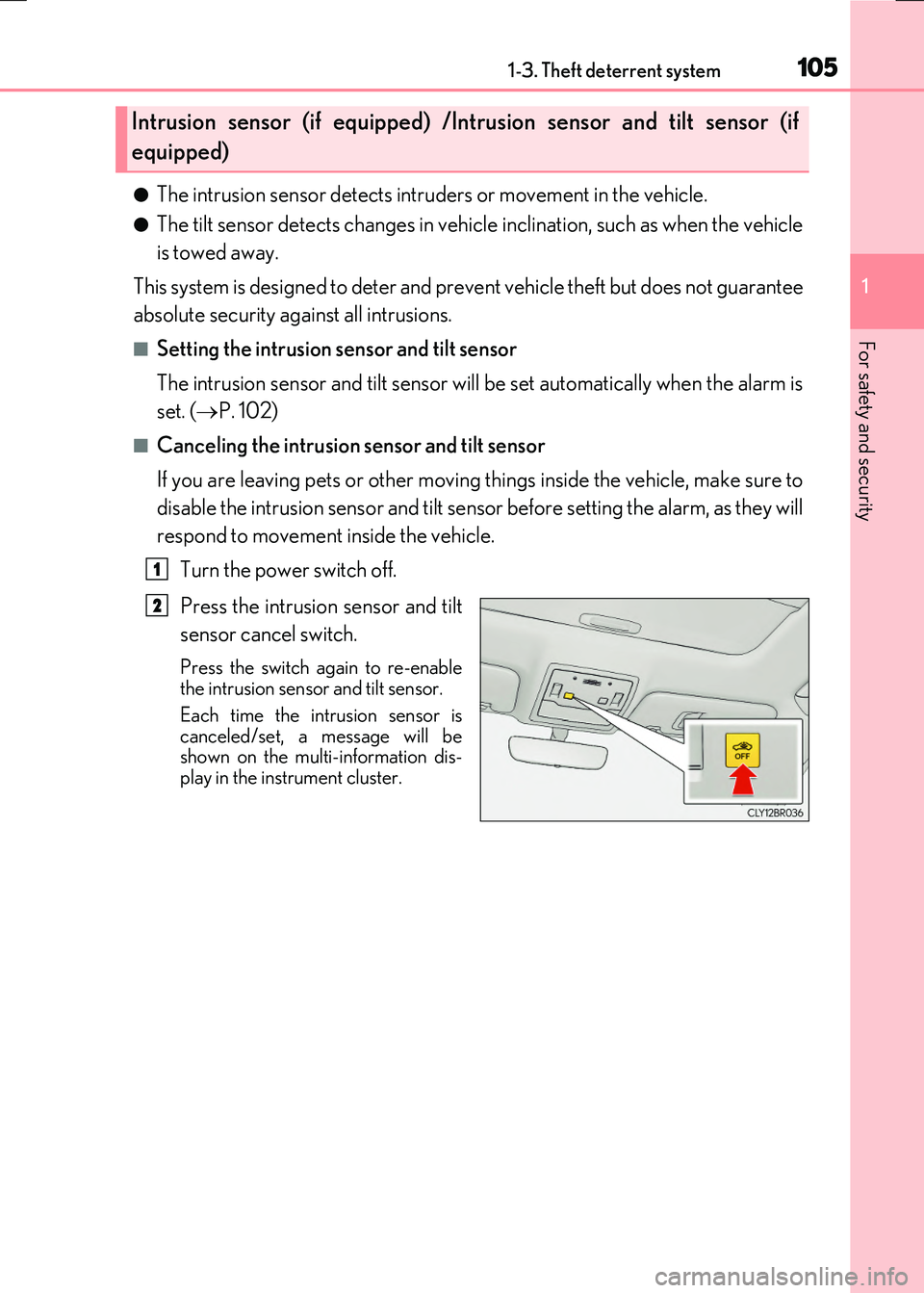
Press the intrusion sensor and tilt
sensor cancel switch.
Press the switch again to re-enable the intrusion sensor and tilt sensor.
Each time the intrusion sensor is canceled/set, a message will beshown on the multi-information dis-
play in the instrument cluster.
Intrusion sensor (if equipped) /Intrusion sensor and tilt sensor (if
equipped)
1
2
Page 110 of 640
110
RC300h_EE(OM24740E)
2. Instrument cluster
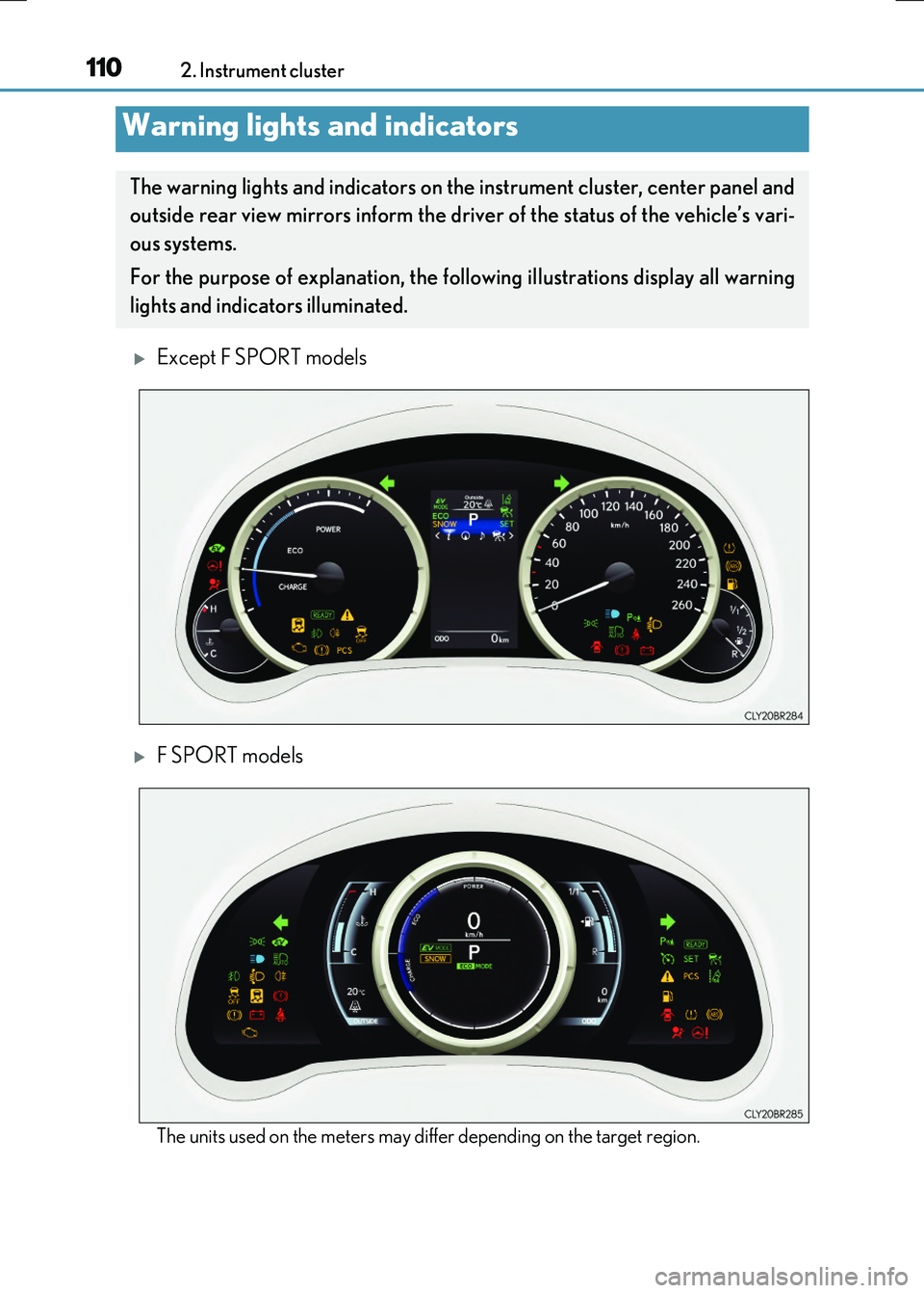
Except F SPORT models
F SPORT models
The units used on the meters may differ depending on the target region.
Warning lights and indicators
The warning lights and indicators on th e instrument cluster, center panel and
outside rear view mirrors inform the driver of the status of the vehicle’s vari-
ous systems.
For the purpose of explanation, the fo llowing illustrations display all warning
lights and indicators illuminated.
Page 111 of 640
1112. Instrument cluster
2
Instrument cluster
RC300h_EE(OM24740E)
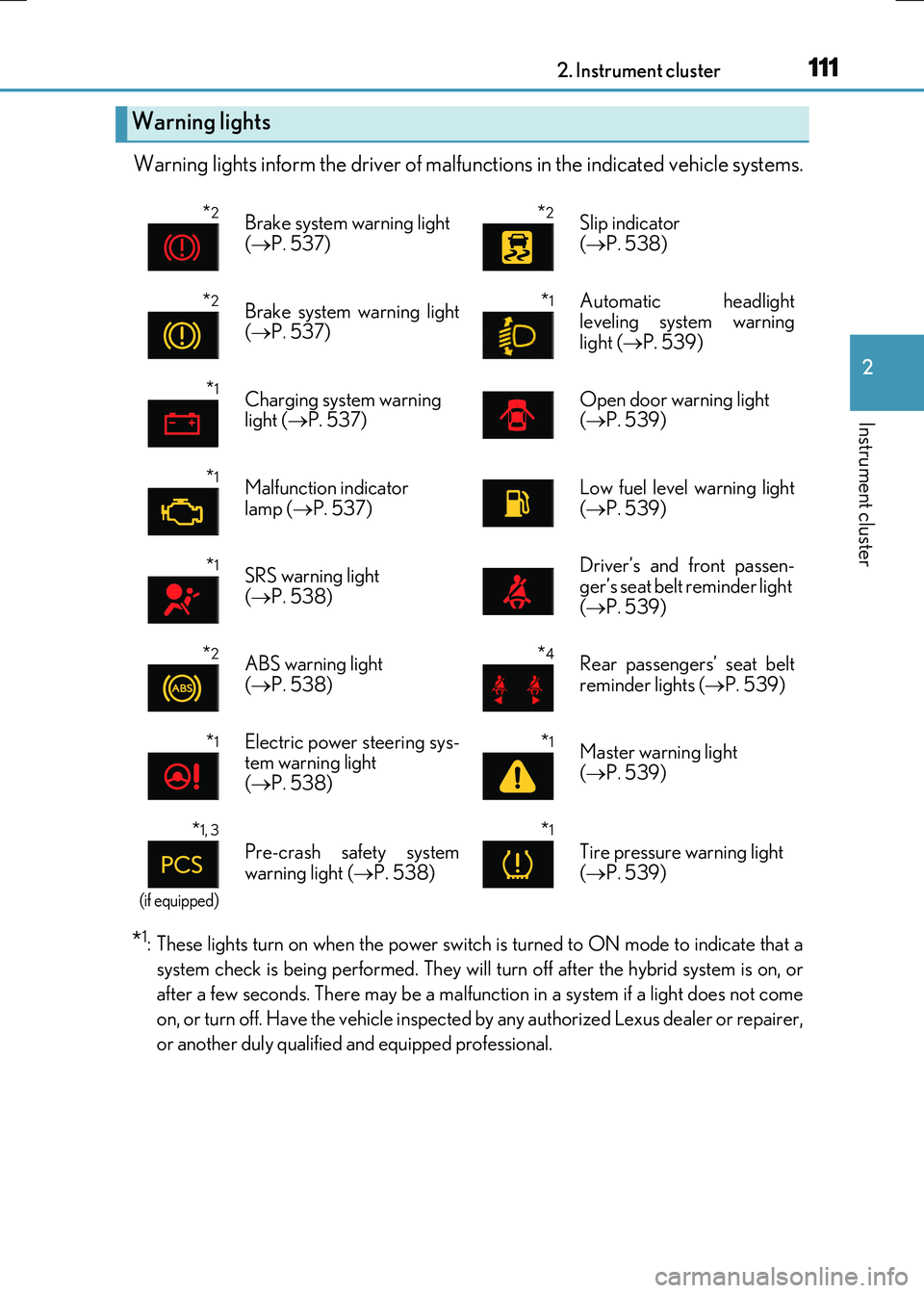
Warning lights inform the driver of malfunctions in the indicated vehicle systems.
*1: These lights turn on when the power switch is turned to ON mode to indicate that a
system check is being performed. They will turn off after the hybrid system is on, or
after a few seconds. There may be a malfunct ion in a system if a light does not come
on, or turn off. Have the vehicle inspected by any authorized Lexus dealer or repairer,
or another duly qualified and equipped professional.
Warning lights
*2Brake system warning light
( P. 537)
*2Slip indicator
( P. 538)
*2Brake system warning light ( P. 537)
*1 Automatic headlight leveling system warning
light ( P. 539)
*1Charging system warning light ( P. 537)Open door warning light ( P. 539)
*1Malfunction indicator
lamp ( P. 537)
Low fuel level warning light
( P. 539)
*1SRS warning light ( P. 538)
Driver’s and front passen- ger’s seat belt reminder light
( P. 539)
*2ABS warning light ( P. 538)
*4Rear passengers’ seat belt reminder lights ( P. 539)
*1Electric power steering sys- tem warning light( P. 538)
*1Master warning light
( P. 539)
*1, 3
(if equipped)
Pre-crash safety system
warning light ( P. 538)
*1
Tire pressure warning light
( P. 539)
Page 112 of 640
1122. Instrument cluster
RC300h_EE(OM24740E)
*2: These lights turn on when the power switch is turned to ON mode to indicate that a
system check is being perfor med. They will turn off after the “READY” indicator turns
on. There may be a malfunction in a system if a light does not come on, or turn off.
Have the vehicle inspected by any authorized Lexus dealer or repairer, or another
duly qualified and equipped professional.
*3: The light flashes to indicate a malfunction.
*4: This light illuminates on the center panel.
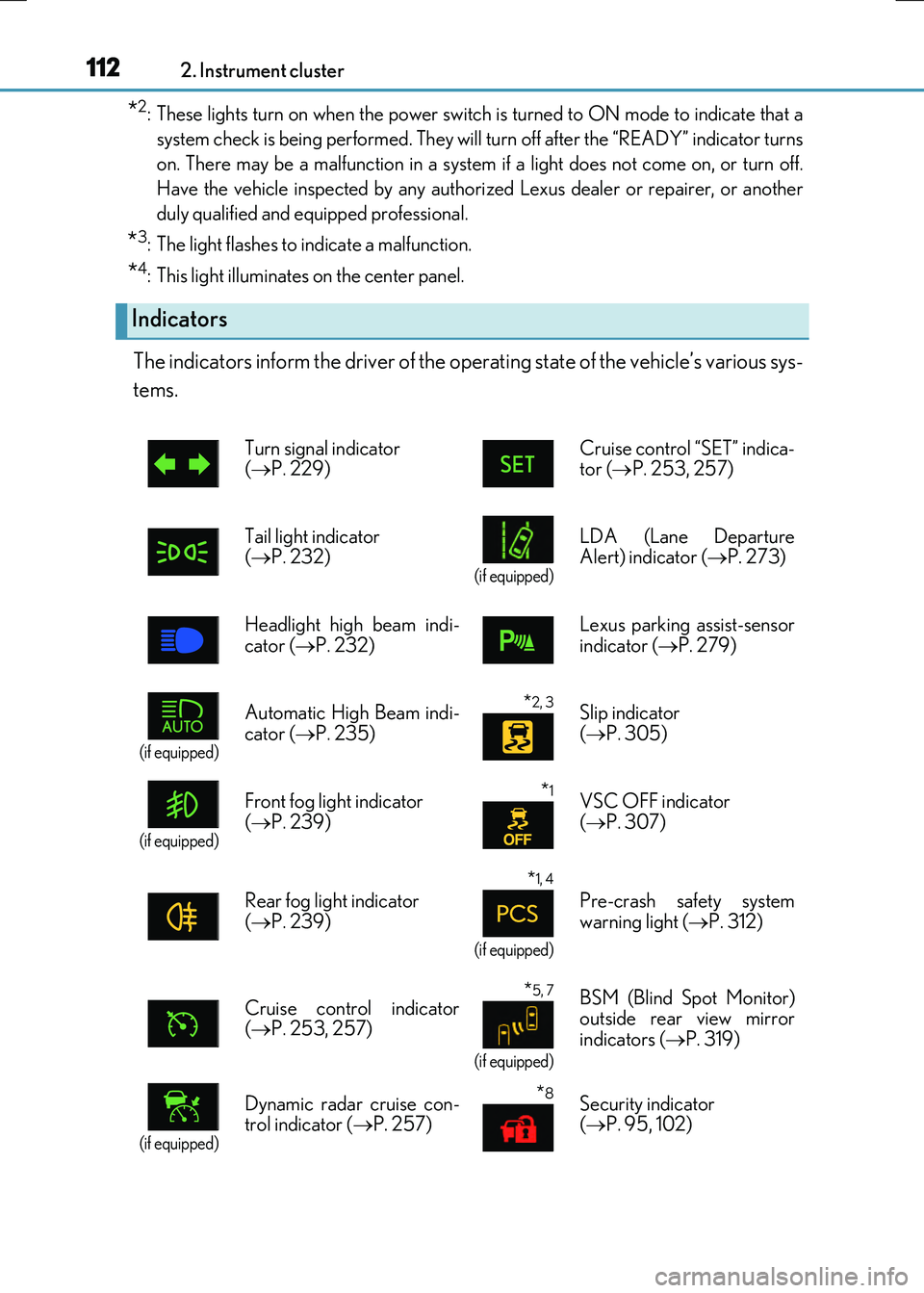
The indicators inform the driver of the operating state of the vehicle’s various sys-
tems.
Indicators
Turn signal indicator ( P. 229) Cruise control “SET” indica- tor ( P. 253, 257)
Tail light indicator ( P. 232) (if equipped)
LDA (Lane Departure Alert) indicator ( P. 273)
Headlight high beam indi-
cator ( P. 232)
Lexus parking assist-sensor
indicator ( P. 279)
(if equipped)
Automatic High Beam indi-
cator ( P. 235)
*2, 3 Slip indicator
( P. 305)
(if equipped)
Front fog light indicator
( P. 239)
*1VSC OFF indicator
( P. 307)
Rear fog light indicator ( P. 239)
*1, 4
(if equipped)
Pre-crash safety system warning light ( P. 312)
Cruise control indicator ( P. 253, 257)
*5, 7
(if equipped)
BSM (Blind Spot Monitor) outside rear view mirror
indicators ( P. 319)
(if equipped)
Dynamic radar cruise con- trol indicator ( P. 257)
*8Security indicator ( P. 95, 102)
Page 116 of 640
1162. Instrument cluster
RC300h_EE(OM24740E)
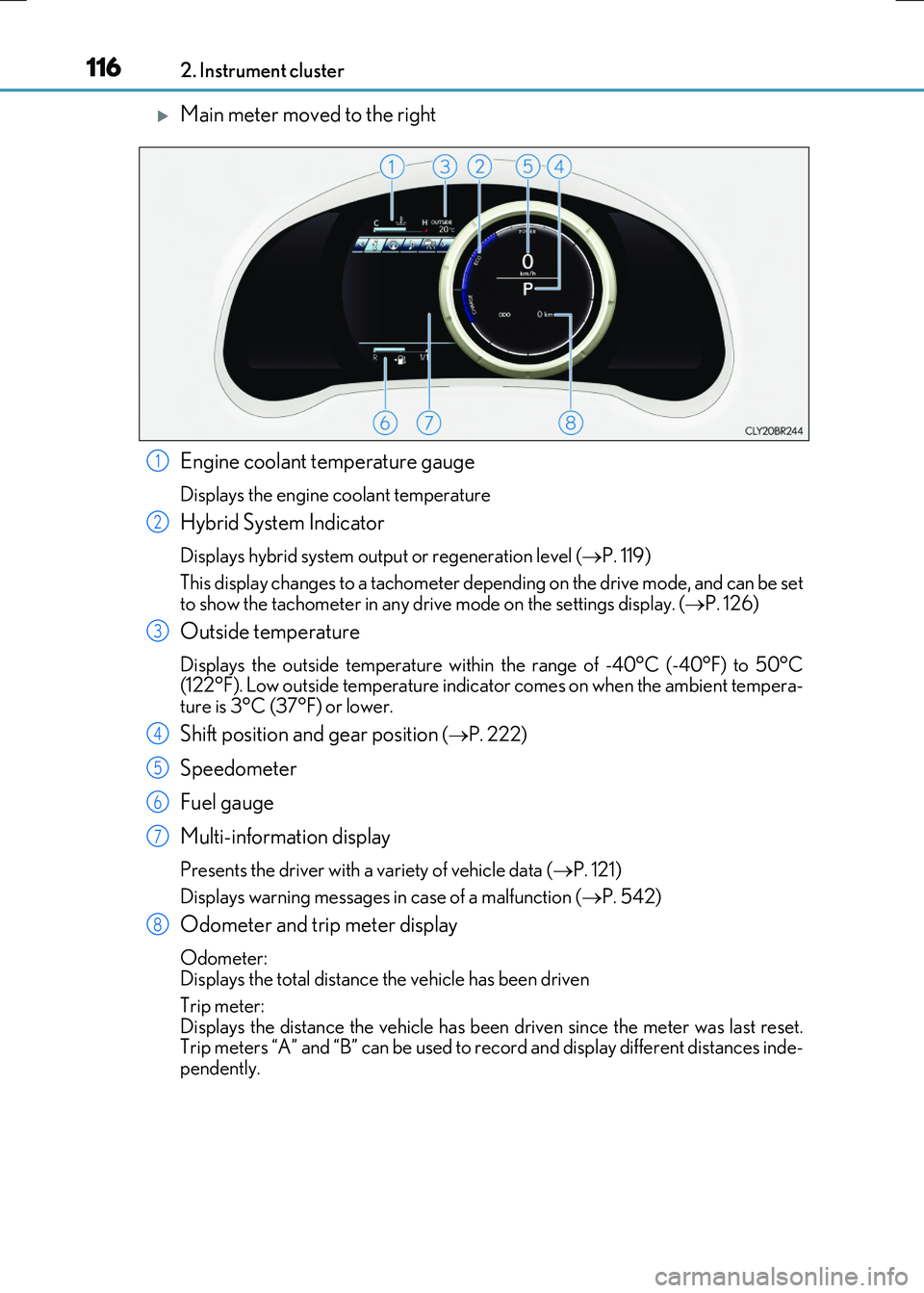
Main meter moved to the right
Engine coolant temperature gauge
Displays the engine coolant temperature
Hybrid System Indicator
Displays hybrid system output or regeneration level ( P. 119)
This display changes to a tachometer depending on the drive mode, and can be set
to show the tachometer in any drive mode on the settings display. ( P. 126)
Outside temperature
Displays the outside temperature within the range of -40°C (-40°F) to 50°C (122°F). Low outside temperature indicator comes on when the ambient tempera-ture is 3°C (37°F) or lower.
Shift position and gear position ( P. 222)
Speedometer
Fuel gauge
Multi-information display
Presents the driver with a variety of vehicle data ( P. 121)
Displays warning messages in case of a malfunction ( P. 542)
Odometer and trip meter display
Odometer: Displays the total distance the vehicle has been driven
Trip meter: Displays the distance the vehicle has been driven since the meter was last reset. Trip meters “A” and “B” can be used to record and display different distances inde-
pendently.
1
2
3
4
5
6
7
8
Page 122 of 640

1222. Instrument cluster
RC300h_EE(OM24740E)
■Menu icons
Displays the following information when an icon is selected.
Drive information ( P. 124)
Select to display various drive data.
Navigation system-linked display (if equipped)
Select to display the following navigation system-linked information. • Route guidance• Compass display (north-up display/heading-up display)
Audio system-linked display
Select to enable selection of an audio source or track on the meter using themeter control switches.
Dynamic radar cruise control operation guide
(vehicles with dynamic radar cruise control)
• Select to display operation procedures of the dynamic radar cruise control. ( P. 257) • When the vehicle is in constant speed control mode ( P. 263), the menu
icon will change to .
• Vehicles with LDA (Lane Departure Alert): If the LDA system ( P. 275) is
activated, its operational stat us will also be displayed.
LDA (Lane Departure Alert) operational status
(vehicles with LDA but without a dynamic radar cruise control)
Select to display the operational status of the LDA system. ( P. 275)
Warning message display (P. 542)
Select to display warning messages and measures to be taken if a malfunction is
detected.
Settings display ( P. 126)
Select to change the meter display settings.
Page 126 of 640
1262. Instrument cluster
RC300h_EE(OM24740E)
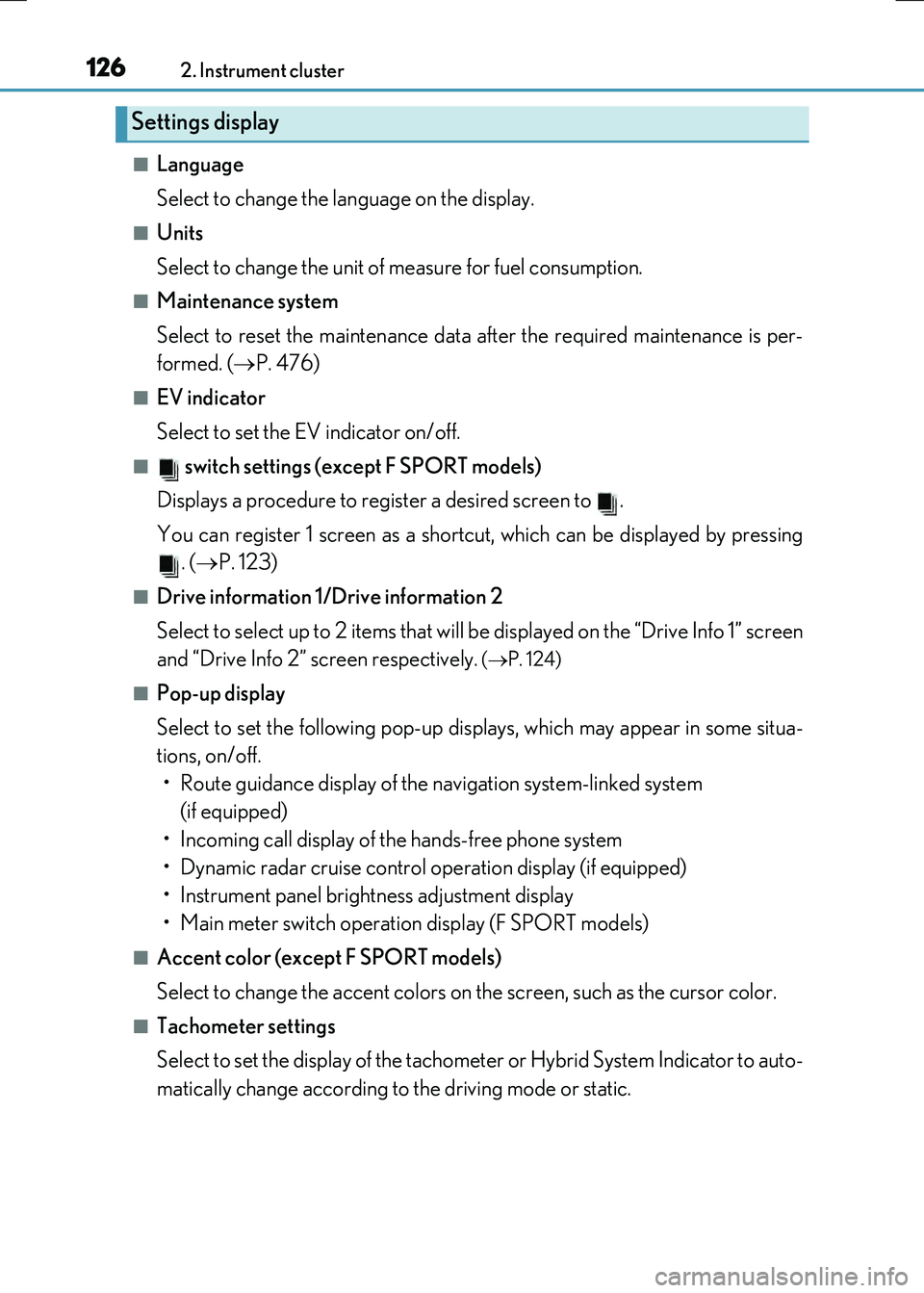
■Language
Select to change the language on the display.
■Units
Select to change the unit of measure for fuel consumption.
■Maintenance system
Select to reset the maintenance data after the required maintenance is per-
formed. ( P. 476)
■EV indicator
Select to set the EV indicator on/off.
■ switch settings (except F SPORT models)
Displays a procedure to register a desired screen to .
You can register 1 screen as a shortcut, which can be displayed by pressing . ( P. 123)
■Drive information 1/Drive information 2
Select to select up to 2 items that will be displayed on the “Drive Info 1” screen
and “Drive Info 2” screen respectively.
( P. 124)
■Pop-up display
Select to set the following pop-up displays, which may appear in some situa-
tions, on/off.
• Route guidance display of the navigation system-linked system (if equipped)
• Incoming call display of the hands-free phone system
• Dynamic radar cruise control operation display (if equipped)
• Instrument panel brightness adjustment display
• Main meter switch operation display (F SPORT models)
■Accent color (except F SPORT models)
Select to change the accent colors on the screen, such as the cursor color.
■Tachometer settings
Select to set the display of the tachomet er or Hybrid System Indicator to auto-
matically change according to the driving mode or static.
Settings display