Info system LEXUS RC300H 2017 Owner's Manual
[x] Cancel search | Manufacturer: LEXUS, Model Year: 2017, Model line: RC300H, Model: LEXUS RC300H 2017Pages: 640, PDF Size: 35.53 MB
Page 128 of 640
1282. Instrument cluster
RC300h_EE(OM24740E)
■When disconnecting and reconnecting battery terminals
The drive information data will be reset.
■Liquid crystal display
P. 120
WARNING
■Caution for use while driving
●When operating the multi-information display while driving, pay extra attention to the safety of the area around the vehicle.
●Do not look continuously at the multi-info rmation display while driving as you may fail to see pedestrians, objects on the road, etc. ahead of the vehicle.
■The information display at low temperatures
Allow the interior of the vehicle to warm up before using the liquid crystal information display. At extremely low temperatures, th e information display monitor may respond slowly, and display changes may be delayed.
For example, there is a lag between the dr iver’s shifting and the new gear number appearing on the display. This lag could cau se the driver to downshift again, causing rapid and excessive engine braking and po ssibly an accident resulting in death or
injury.
■Cautions during setting up the display
As the hybrid system needs to be running during setting up the display, ensure that the
vehicle is parked in a place with adequate ventilation. In a closed area such as a garage, exhaust gases including harmful carbon monoxide (CO) may collect and enter thevehicle. This may lead to death or a serious health hazard.
NOTICE
■While setting up the display
To prevent battery discharge, ensure that the engine is running while setting up the dis- play features.
Page 129 of 640
1292. Instrument cluster
2
Instrument cluster
RC300h_EE(OM24740E)
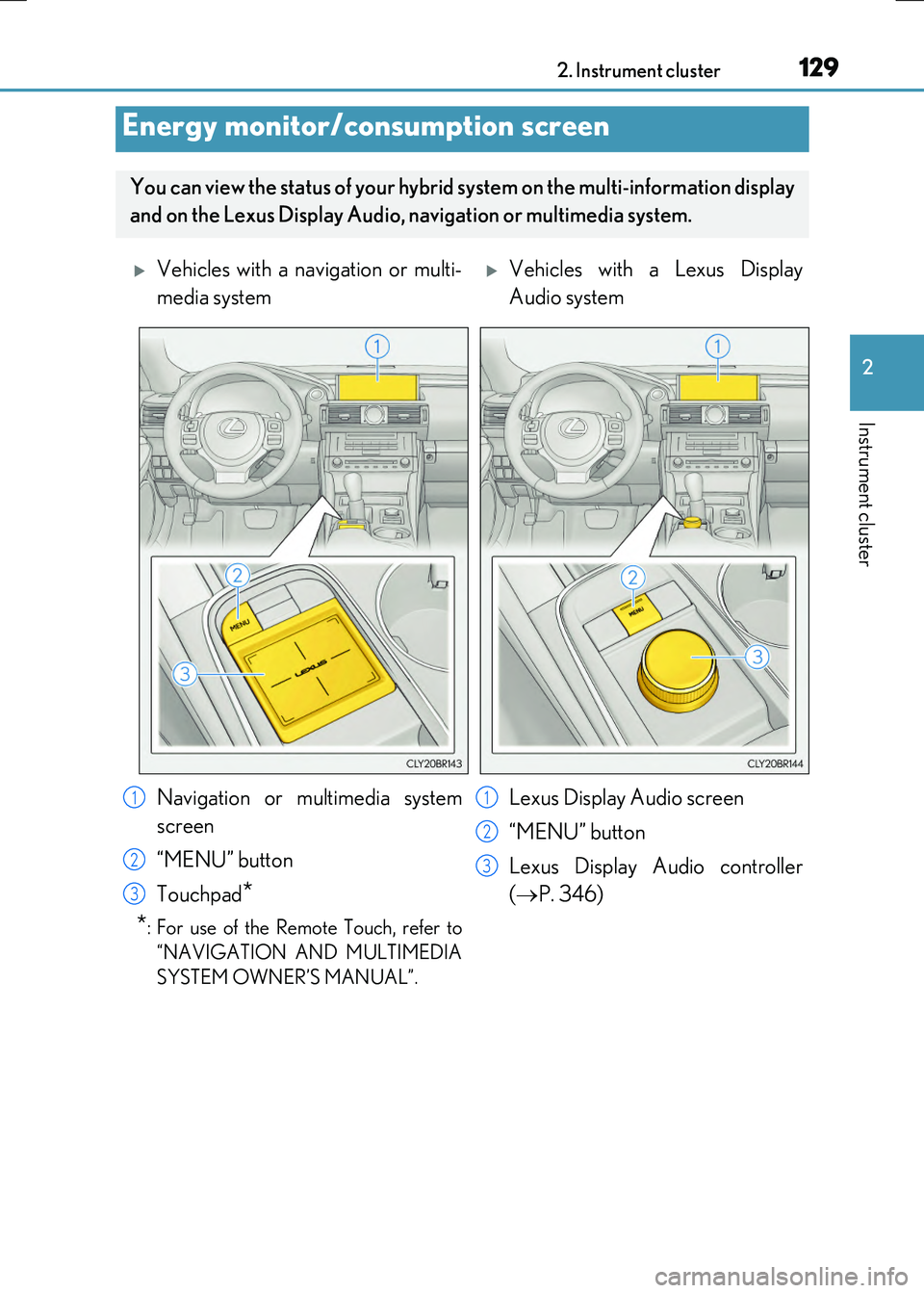
Energy monitor/consumption screen
You can view the status of your hybrid system on the multi-information display
and on the Lexus Display Audio, na vigation or multimedia system.
Vehicles with a navigation or multi-
media system
Vehicles with a Lexus Display
Audio system
Navigation or multimedia system
screen
“MENU” button
Touchpad*
*: For use of the Remote Touch, refer to
“NAVIGATION AND MULTIMEDIA
SYSTEM OWNER’S MANUAL”.
Lexus Display Audio screen
“MENU” button
Lexus Display Audio controller
( P. 346)
1
2
3
1
2
3
Page 130 of 640
1302. Instrument cluster
RC300h_EE(OM24740E)
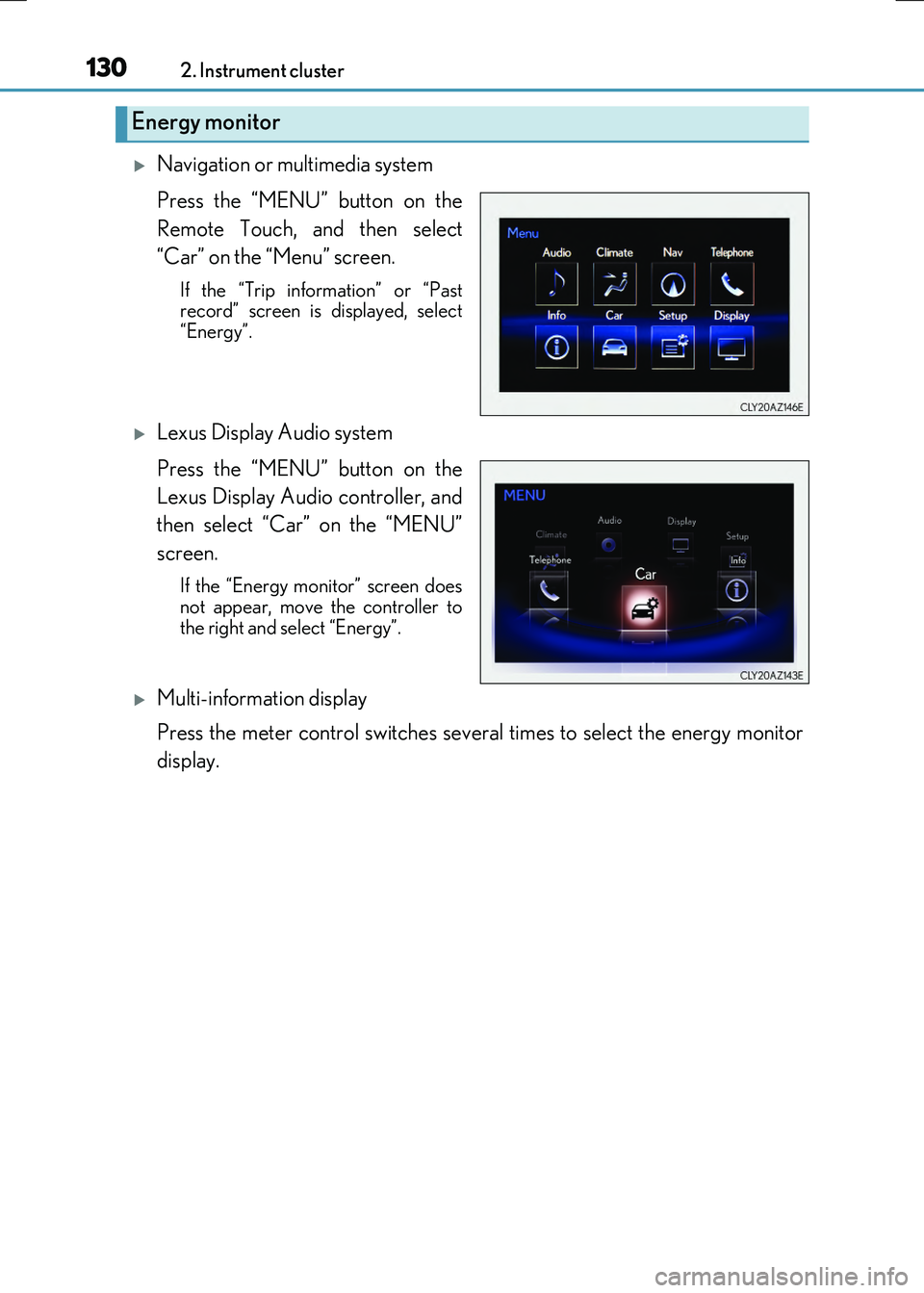
Navigation or multimedia system
Press the “MENU” button on the
Remote Touch, and then select
“Car” on the “Menu” screen.
If the “Trip information” or “Past record” screen is displayed, select
“Energy”.
Lexus Display Audio system
Press the “MENU” button on the
Lexus Display Audio controller, and
then select “Car” on the “MENU”
screen.
If the “Energy monitor” screen does
not appear, move the controller to the right and select “Energy”.
Multi-information display
Press the meter control switches several times to select the energy monitor
display.
Energy monitor
Page 131 of 640
1312. Instrument cluster
2
Instrument cluster
RC300h_EE(OM24740E)
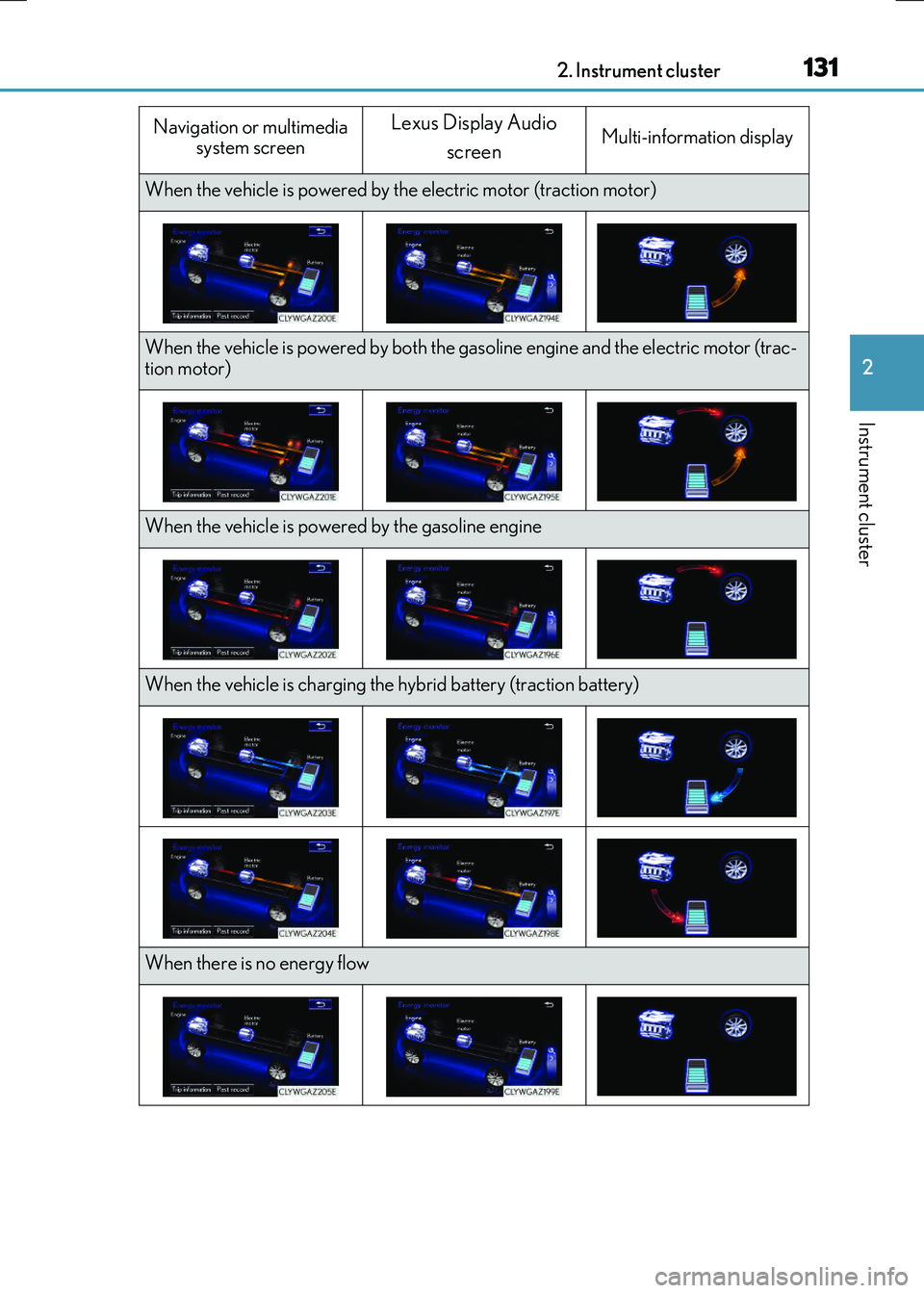
Navigation or multimedia system screen
Lexus Display Audio
screenMulti-information display
When the vehicle is powered by th e electric motor (traction motor)
When the vehicle is powered by both the gasoline engine and the electric motor (trac- tion motor)
When the vehicle is powered by the gasoline engine
When the vehicle is charging the hybrid battery (traction battery)
When there is no energy flow
Page 132 of 640
1322. Instrument cluster
RC300h_EE(OM24740E) These images are examples only.
■Trip information
Navigation or multimedia system
Press the “MENU” button on the Remote Touch, and then select “Car” on the
“Menu” screen.
If the “Energy monitor” or “Past record” sc reen is displayed, select “Trip informa-
tion”.
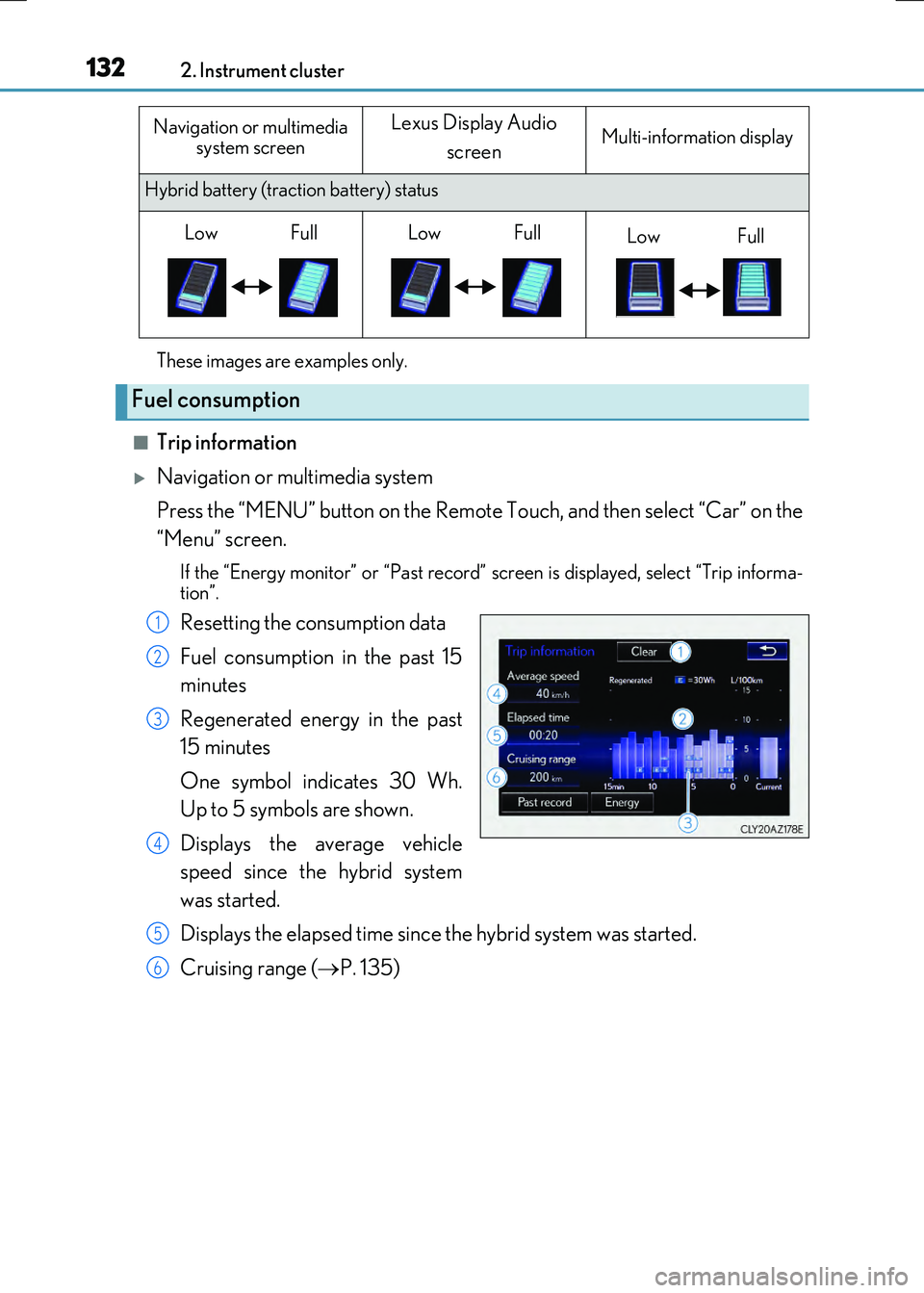
Resetting the consumption data
Fuel consumption in the past 15
minutes
Regenerated energy in the past
15 minutes
One symbol indicates 30 Wh.
Up to 5 symbols are shown.
Displays the average vehicle
speed since the hybrid system
was started.
Displays the elapsed time since the hybrid system was started.
Cruising range ( P. 135)
Hybrid battery (traction battery) status
Fuel consumption
Navigation or multimedia
system screenLexus Display Audio
screenMulti-information display
LowFullLowFullLowFull
1
2
3
4
5
6
Page 133 of 640
1332. Instrument cluster
2
Instrument cluster
RC300h_EE(OM24740E)
Lexus Display Audio system
Press the “MENU” button on the Lexus Display Audio controller, and then
select “Car” on the “MENU” screen.
If the “Trip information” screen does no t appear, move the controller to the right
and select “Trip information”.
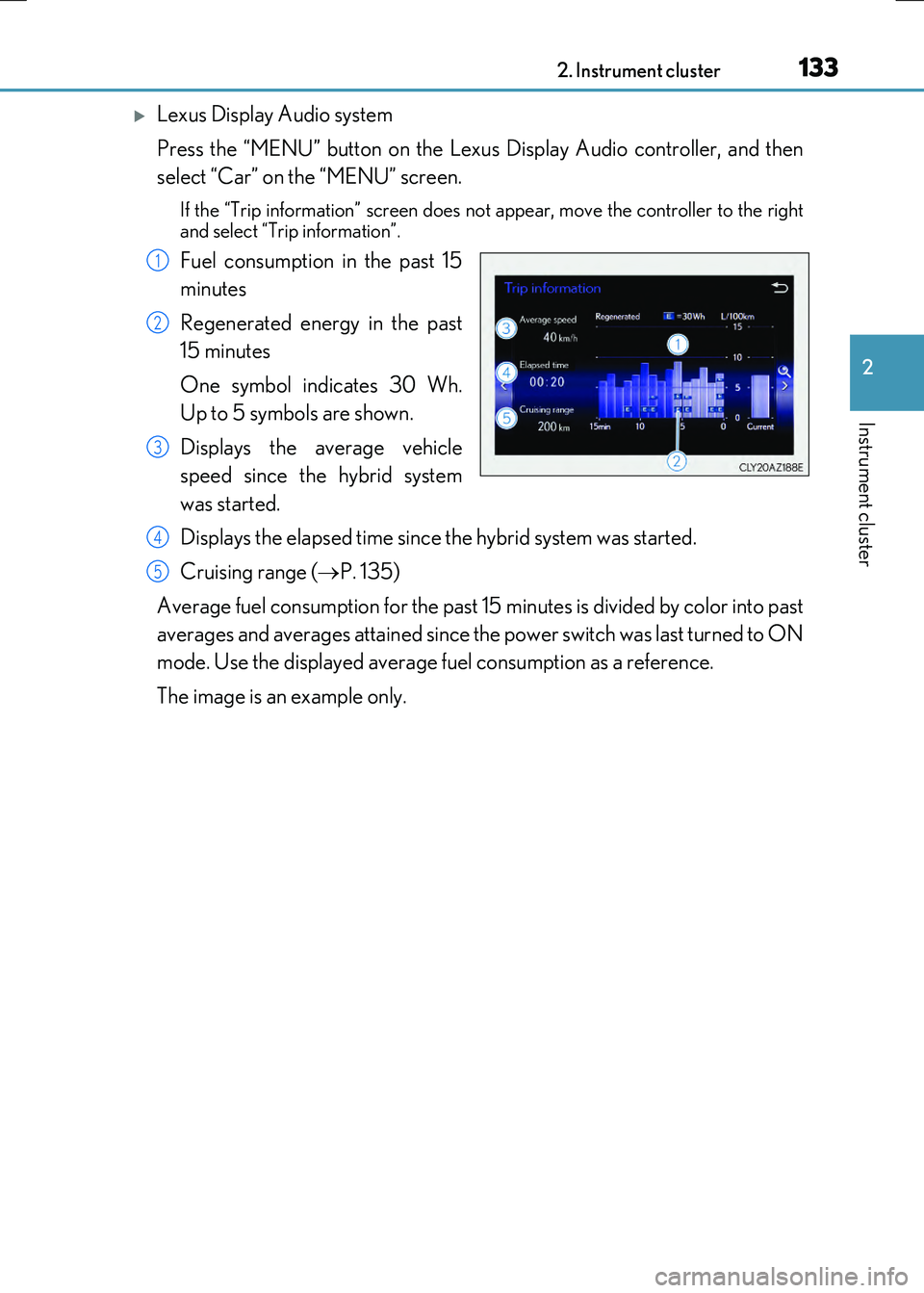
Fuel consumption in the past 15
minutes
Regenerated energy in the past
15 minutes
One symbol indicates 30 Wh.
Up to 5 symbols are shown.
Displays the average vehicle
speed since the hybrid system
was started.
Displays the elapsed time since the hybrid system was started.
Cruising range ( P. 135)
Average fuel consumption for the past 15 minutes is divided by color into past
averages and averages attained since the power switch was last turned to ON
mode. Use the displayed average fuel consumption as a reference.
The image is an example only.
1
2
3
4
5
Page 134 of 640
1342. Instrument cluster
RC300h_EE(OM24740E)
■Past record
Navigation or multimedia system
Press the “MENU” button on the Remote Touch, and then select “Car” on the
“Menu” screen.
If the “Energy monitor” or “Trip informatio n” screen is displayed, select “Past record”.
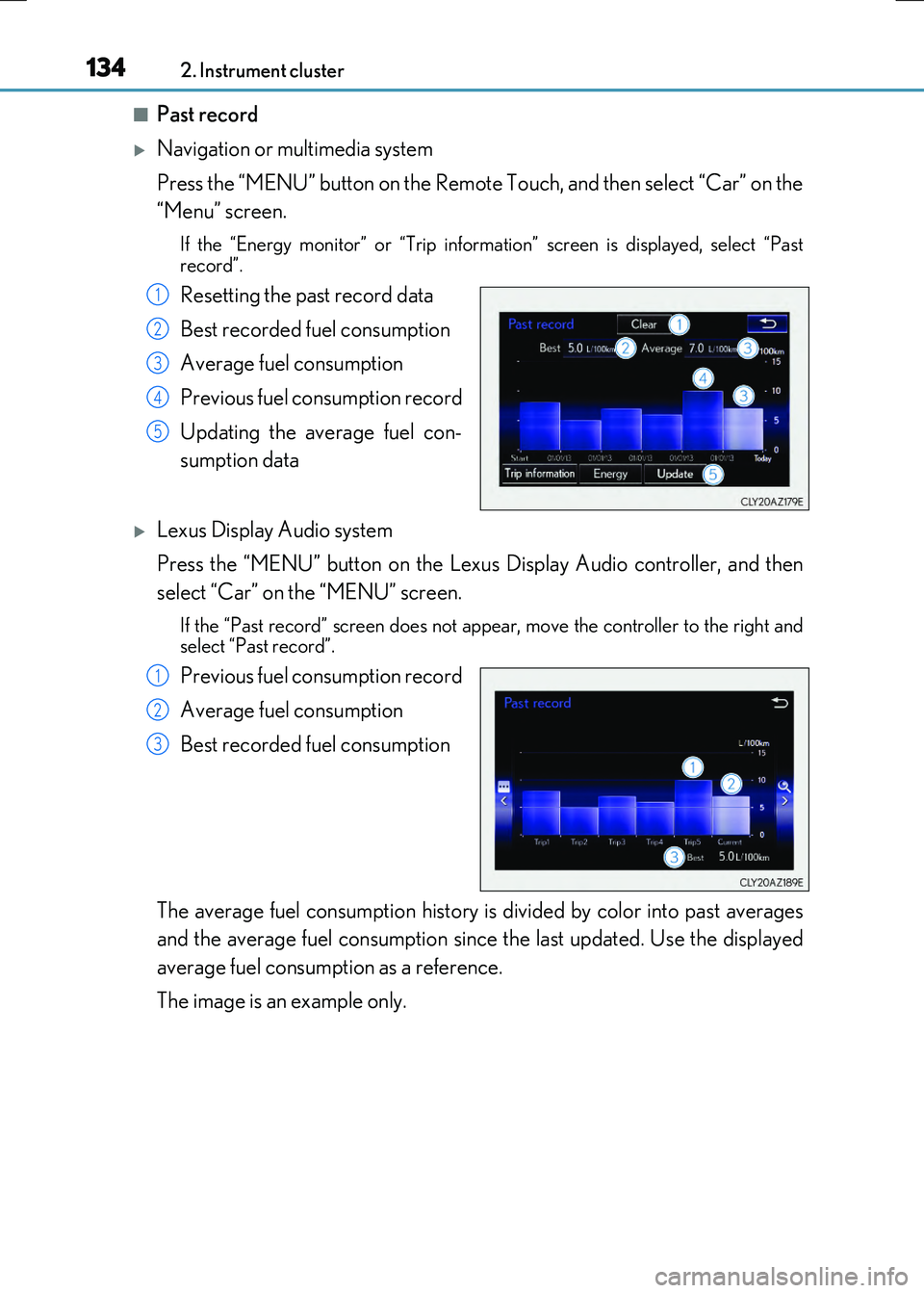
Resetting the past record data
Best recorded fuel consumption
Average fuel consumption
Previous fuel consumption record
Updating the average fuel con-
sumption data
Lexus Display Audio system
Press the “MENU” button on the Lexus Display Audio controller, and then
select “Car” on the “MENU” screen.
If the “Past record” screen does not appear, move the controller to the right and select “Past record”.
Previous fuel consumption record
Average fuel consumption
Best recorded fuel consumption
The average fuel consumption history is divided by color into past averages
and the average fuel consumption since the last updated. Use the displayed
average fuel consumption as a reference.
The image is an example only.
1
2
3
4
5
1
2
3
Page 137 of 640
137
3
Operation of
each component
RC300h_EE(OM24740E)
3-1. Key information
Keys .................................................. 138
3-2. Opening, closing and locking
the doors and trunk
Doors ................................................144
Trunk ................................................ 150
Smart entry & start
system ........................................... 155
3-3. Adjusting the seats
Front seats...................................... 178
Rear seats.........................................181
Driving position memory ......... 183
Head restraints ............................ 186
3-4. Adjusting the steering
wheel and mirrors
Steering wheel ............................. 189
Inside rear view mirror ............... 191
Outside rear view
mirrors .......................................... 193
3-5. Opening, closing the
windows and moon roof
Power windows ........................... 196
Moon roof .....................................200
Page 138 of 640
138
RC300h_EE(OM24740E)
3-1. Key information
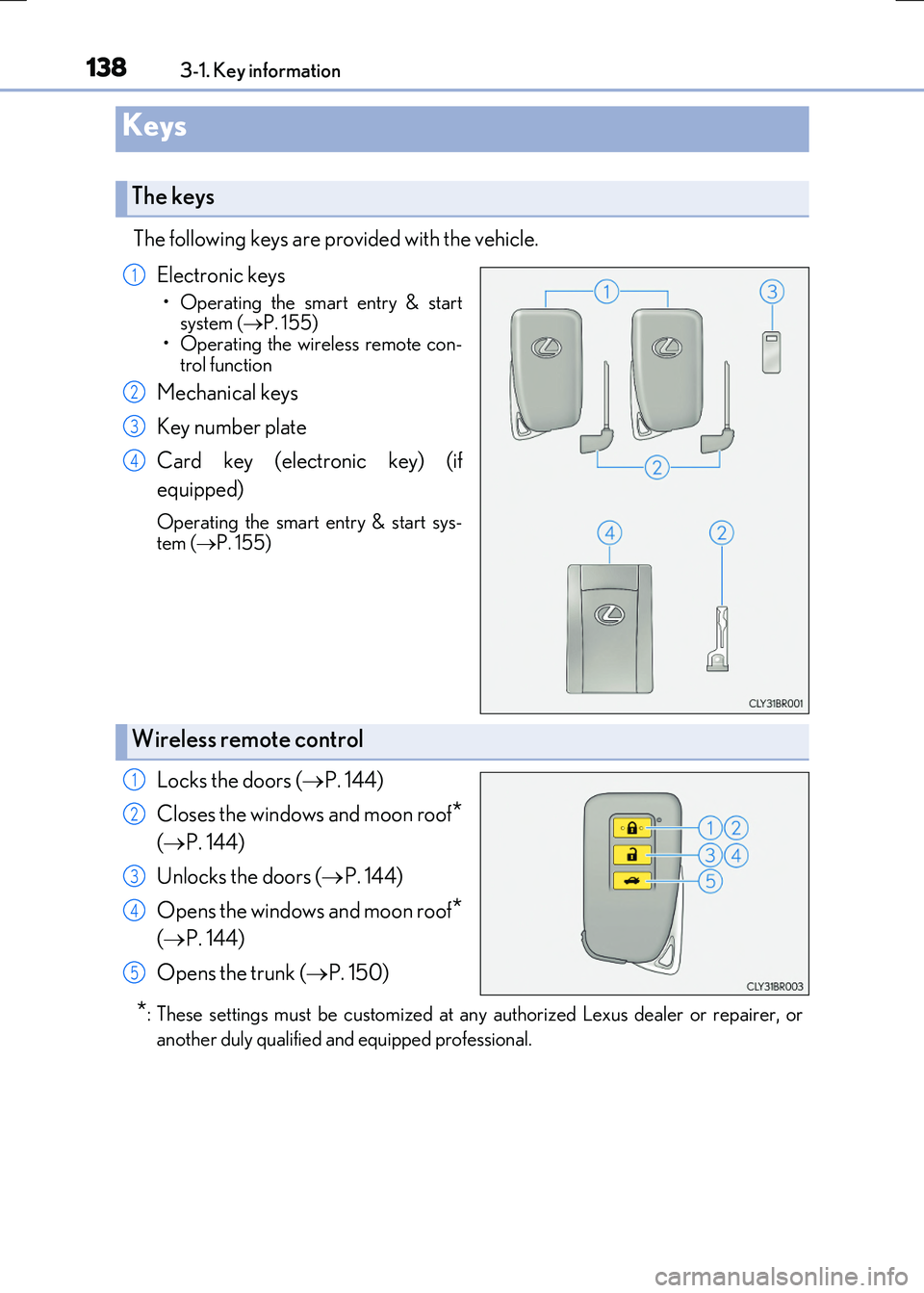
The following keys are provided with the vehicle.
Electronic keys
• Operating the smart entry & start system ( P. 155)
• Operating the wireless remote con- trol function
Mechanical keys
Key number plate
Card key (electronic key) (if
equipped)
Operating the smart entry & start sys-
tem ( P. 155)
Locks the doors (P. 144)
Closes the windows and moon roof*
( P. 144)
Unlocks the doors ( P. 144)
Opens the windows and moon roof*
( P. 144)
Opens the trunk ( P. 150)
*: These settings must be customized at any authorized Lexus dealer or repairer, or
another duly qualified an d equipped professional.
Keys
The keys
1
2
3
4
Wireless remote control
1
2
3
4
5
Page 140 of 640
1403-1. Key information
RC300h_EE(OM24740E)
■Card key (if equipped)
●The card key is not waterproof.
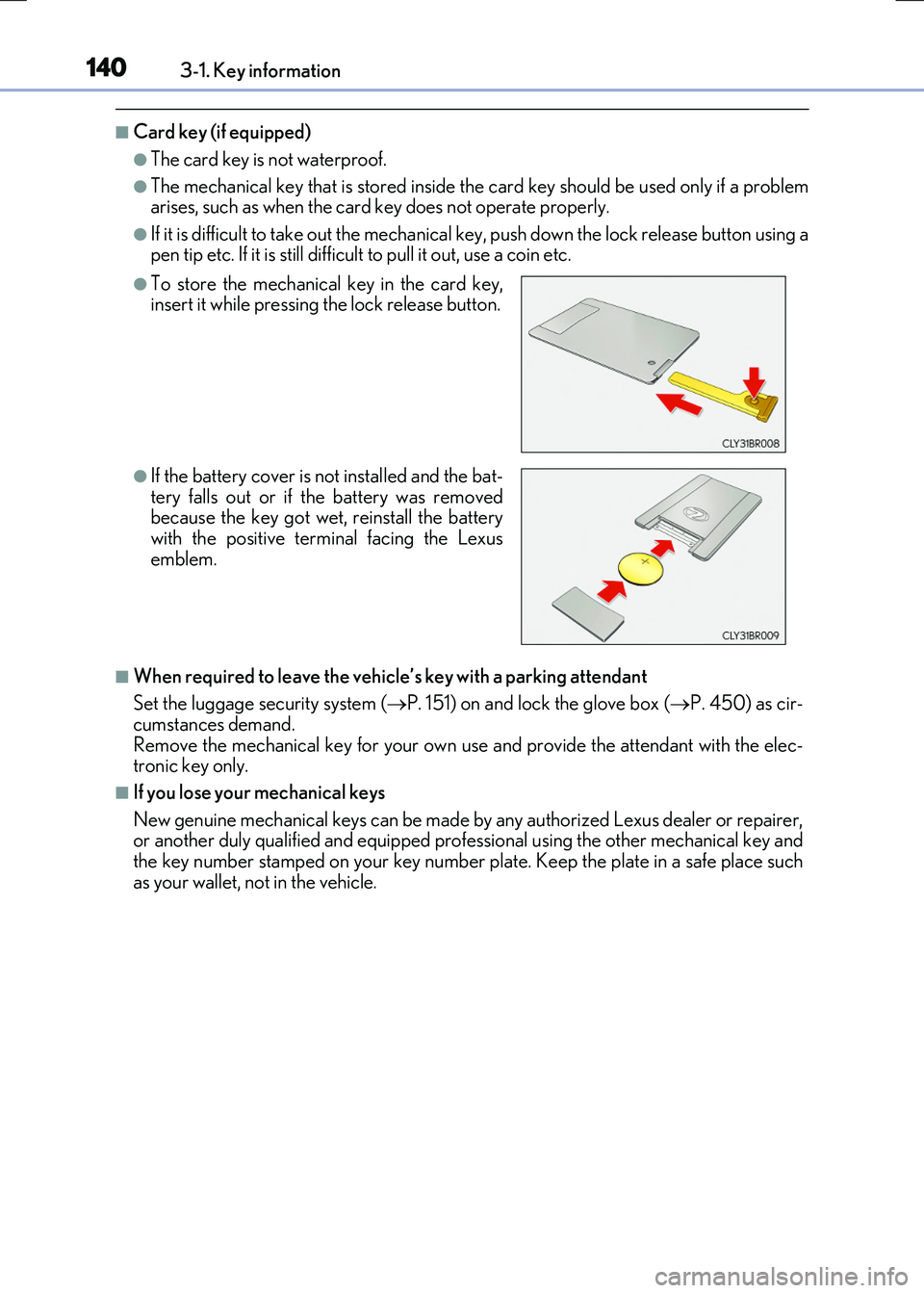
●The mechanical key that is stored inside the card key should be used only if a problem arises, such as when the card key does not operate properly.
●If it is difficult to take out the mechanical key, push down the lock release button using apen tip etc. If it is still difficu lt to pull it out, use a coin etc.
■When required to leave the vehicle’s key with a parking attendant
Set the luggage security system ( P. 151) on and lock the glove box (P. 450) as cir- cumstances demand.
Remove the mechanical key for your own use and provide the attendant with the elec- tronic key only.
■If you lose your mechanical keys
New genuine mechanical keys can be made by any authorized Lexus dealer or repairer, or another duly qualified and equipped professional using the other mechanical key andthe key number stamped on your key number plate. Keep the plate in a safe place such
as your wallet, not in the vehicle.
●To store the mechanical key in the card key, insert it while pressing the lock release button.
●If the battery cover is not installed and the bat-tery falls out or if the battery was removedbecause the key got wet, reinstall the battery
with the positive terminal facing the Lexus emblem.