deactivate LEXUS RC300H 2017 User Guide
[x] Cancel search | Manufacturer: LEXUS, Model Year: 2017, Model line: RC300H, Model: LEXUS RC300H 2017Pages: 640, PDF Size: 35.53 MB
Page 259 of 640
2594-5. Using the driving support systems
4
Driving
RC300h_EE(OM24740E)
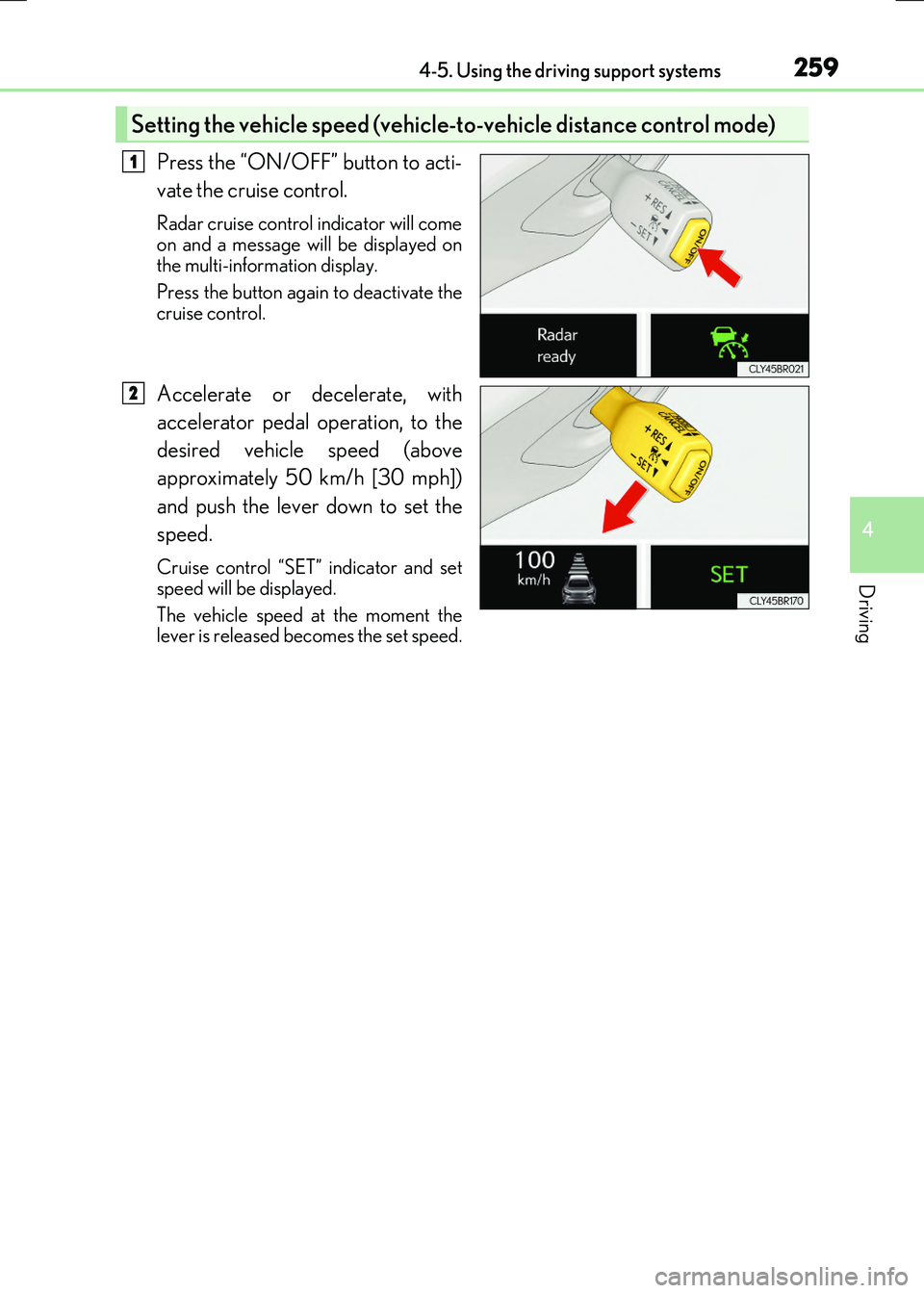
Press the “ON/OFF” button to acti-
vate the cruise control.
Radar cruise control indicator will come
on and a message will be displayed on the multi-information display.
Press the button again to deactivate the
cruise control.
Accelerate or decelerate, with
accelerator pedal operation, to the
desired vehicle speed (above
approximately 50 km/h [30 mph])
and push the lever down to set the
speed.
Cruise control “SET” indicator and set
speed will be displayed.
The vehicle speed at the moment the lever is released be comes the set speed.
Setting the vehicle speed (vehicle-to-vehicle distance control mode)
1
2
Page 263 of 640
2634-5. Using the driving support systems
4
Driving
RC300h_EE(OM24740E)
When constant speed control mode is selected, your vehicle will maintain a set
speed without controlling the vehicle-to-vehicle distance. Select this mode only
when vehicle-to-vehicle distance control mode does not function correctly due
to dirt, etc.
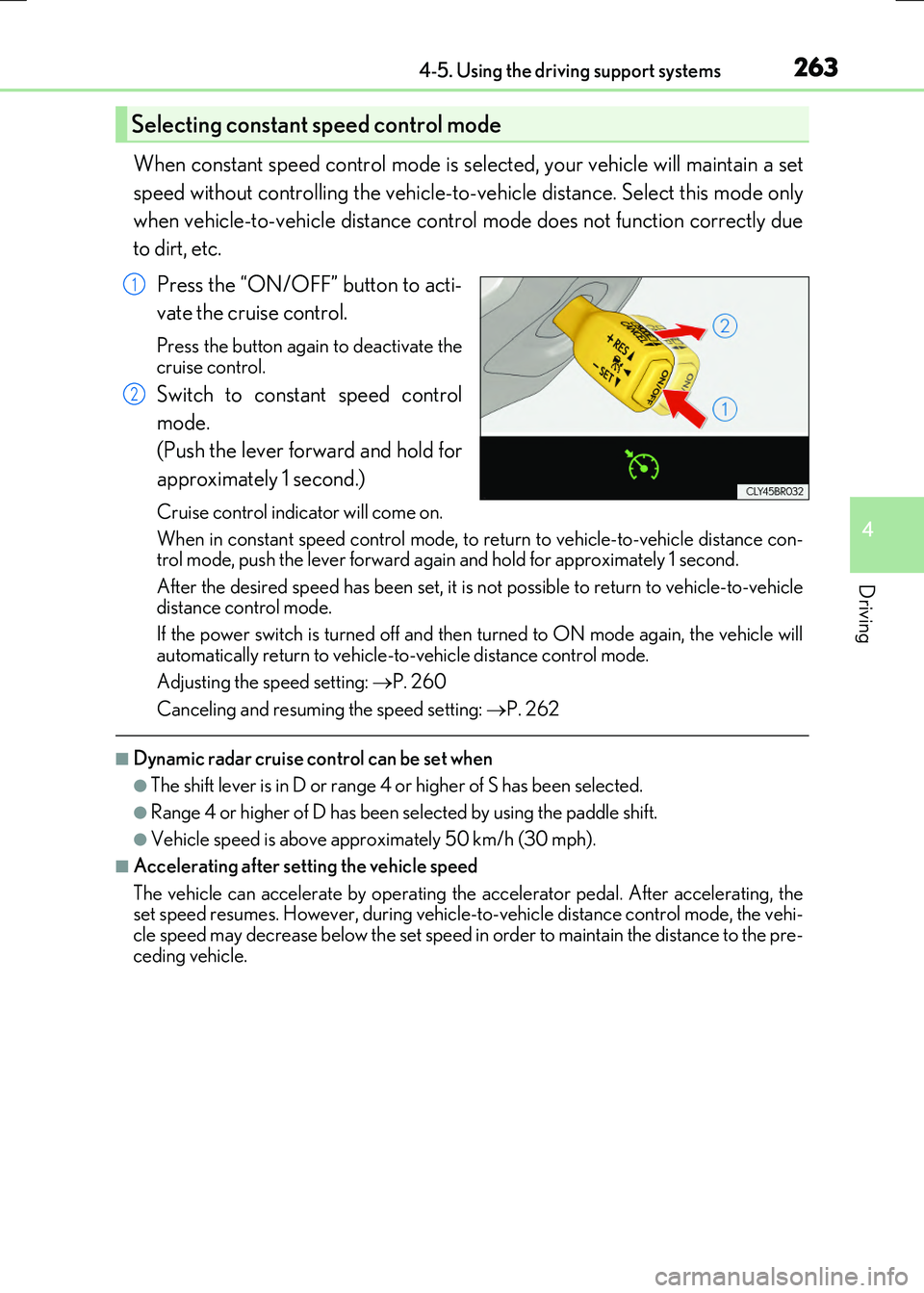
Press the “ON/OFF” button to acti-
vate the cruise control.
Press the button again to deactivate the cruise control.
Switch to constant speed control
mode.
(Push the lever forward and hold for
approximately 1 second.)
Cruise control indicator will come on.
When in constant speed control mode, to return to vehicle-to-vehicle distance con- trol mode, push the lever forward again and hold for approximately 1 second.
After the desired speed has been set, it is not possible to return to vehicle-to-vehicle distance control mode.
If the power switch is turned off and then turned to ON mode again, the vehicle will
automatically return to vehicle-to-vehicle distance control mode.
Adjusting the speed setting: P. 260
Canceling and resuming the speed setting: P. 262
■Dynamic radar cruise control can be set when
●The shift lever is in D or range 4 or higher of S has been selected.
●Range 4 or higher of D has been selected by using the paddle shift.
●Vehicle speed is above approximately 50 km/h (30 mph).
■Accelerating after setting the vehicle speed
The vehicle can accelerate by operating the accelerator pedal. After accelerating, the set speed resumes. However, during vehicle-to-vehicle distance control mode, the vehi-cle speed may decrease below the set speed in order to maintain the distance to the pre-
ceding vehicle.
Selecting constant speed control mode
1
2
Page 286 of 640

2864-5. Using the driving support systems
RC300h_EE(OM24740E)
The rear view image is displayed when
the shift lever is in R and the power
switch is in ON mode.
The parking assist monitor system will be deactivated when the shift lever is inany position other than R.
When the shift lever is shifted to the R position and any mode button (such as“MENU”) is pressed, the Lexus parking
assist monitor is canceled, and the screen is switched to the mode of thebutton that was pressed.
■Screen display
The parking assist monitor screen
will be displayed if the shift lever is
shifted to R while the power switch is
in ON mode.
Insert display (if equipped)
Lexus parking assist-sensor dis-
play: P. 279
Lexus parking assist monitor
: If equipped
The parking assist monitor assists the driver by displaying an image of the view
behind the vehicle while backing up, for example while parking.
Owners of models equipped with a navi gation system should refer to the
“NAVIGATION SYSTEM OWNER’S MANUAL”.
The screen illustrations used in this text are intended as examples, and may
differ from the image that is ac tually displayed on the screen.
Using the Lexus parking assist monitor
A
Page 303 of 640
3034-5. Using the driving support systems
4
Driving
RC300h_EE(OM24740E)
■Operation of the air conditioning system in Eco drive mode
Eco drive mode controls the heating/cooling operations and fan speed of the air condi- tioning system to enhance fuel efficiency ( P. 432). To improve air conditioning perfor- mance, adjust the fan speed or turn off Eco drive mode.
■Sport mode automatic deactivation
Sport mode is automatically deactivated if the power switch is turned off after driving in sport mode.
Page 548 of 640
5488-2. Steps to take in an emergency
RC300h_EE(OM24740E)
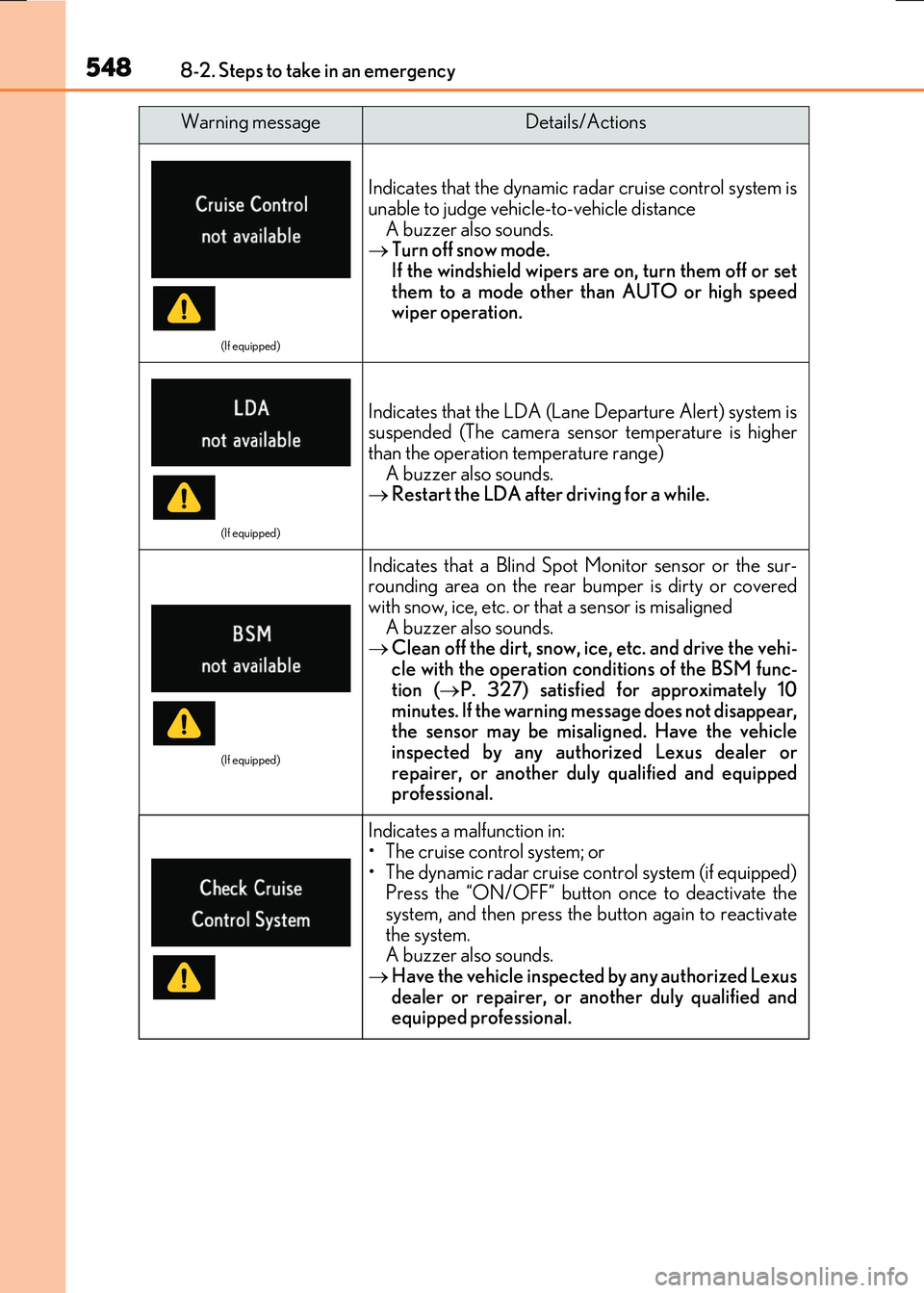
(If equipped)
Indicates that the dynamic radar cruise control system is
unable to judge vehicle-to-vehicle distance A buzzer also sounds. Turn off snow mode.
If the windshield wipers are on, turn them off or set them to a mode other than AUTO or high speedwiper operation.
(If equipped)
Indicates that the LDA (Lane Departure Alert) system issuspended (The camera sensor temperature is higher
than the operation temperature range) A buzzer also sounds. Restart the LDA after driving for a while.
(If equipped)
Indicates that a Blind Spot Monitor sensor or the sur- rounding area on the rear bumper is dirty or covered
with snow, ice, etc. or that a sensor is misaligned A buzzer also sounds. Clean off the dirt, snow, ice, etc. and drive the vehi-
cle with the operation conditions of the BSM func- tion ( P. 327) satisfied for approximately 10
minutes. If the warning message does not disappear, the sensor may be misaligned. Have the vehicleinspected by any authorized Lexus dealer or
repairer, or another duly qualified and equipped professional.
Indicates a malfunction in:• The cruise control system; or
• The dynamic radar cruise control system (if equipped) Press the “ON/OFF” button once to deactivate thesystem, and then press the button again to reactivate
the system. A buzzer also sounds. Have the vehicle inspected by any authorized Lexus
dealer or repairer, or another duly qualified and equipped professional.
Warning messageDetails/Actions
Page 580 of 640
5808-2. Steps to take in an emergency
RC300h_EE(OM24740E)
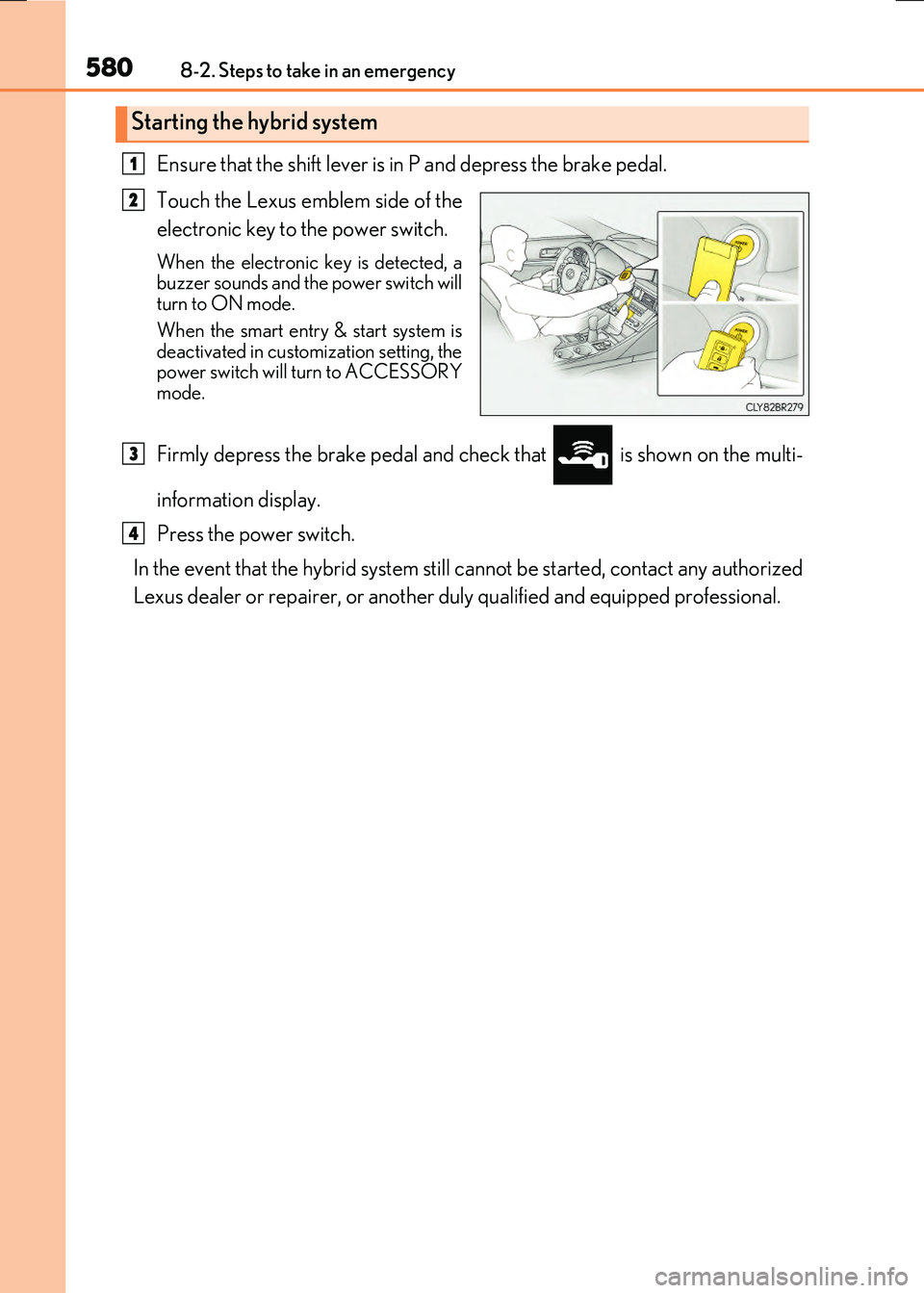
Ensure that the shift lever is in P and depress the brake pedal.
Touch the Lexus emblem side of the
electronic key to the power switch.
When the electronic key is detected, a buzzer sounds and the power switch willturn to ON mode.
When the smart entry & start system is deactivated in customization setting, thepower switch will turn to ACCESSORY
mode.
Firmly depress the brake pedal and check that is shown on the multi-
information display.
Press the power switch.
In the event that the hybrid system still cannot be started, contact any authorized
Lexus dealer or repairer, or another duly qualified and equipped professional.
Starting the hybrid system
1
2
3
4
Page 581 of 640
5818-2. Steps to take in an emergency
8
When trouble arises
RC300h_EE(OM24740E)
■Stopping the hybrid system
Shift the shift lever to P and press the power switch as you normally do when stopping the hybrid system.
■Replacing the key battery
As the above procedure is a temporary measur e, it is recommended that the electronic key battery be replaced immediately when the battery is depleted. ( P. 511)
■Alarm (if equipped)
Using the mechanical key to lock the doors will not set the alarm system. If a door is unlocked using the mechanical key when the alarm system is set, the alarm may be triggered.
■Changing power switch modes
Release the brake pedal and press the power switch in step above. The hybrid system does not start and modes will be changed each time the switch is
pressed. ( P. 216)
■When the electronic key does not work properly
●Make sure that the smart entry & start system has not been deactivated in the
customization setting. If it is off, turn the function on. (Customizable features P. 607)
●Check if battery-saving mode is set. If it is set, cancel the function. (P. 157)
WARNING
■When using the mechanical key and operating the power windows or moon roof
Operate the power window or moon roof after checking to make sure that there is no possibility of any passenger having any of their body parts caught in the window or moon roof.
Also, do not allow children to operate the me chanical key. It is possible for children and other passengers to get caught in the power window or moon roof.
3
Page 622 of 640
622What to do if... (Troubleshooting)
RC300h_EE(OM24740E)
●Is the window lock switch pressed?
The power window except for the one at the driver’s seat cannot be operated
if the window lock switch is pressed. ( P. 196)
●The auto power off function will be operated if the vehicle is left in ACCES-
SORY or ON mode (the hybrid system is not operating) for a period of time.
( P. 217)
●The seat belt reminder light is flashing
Are the driver and the front passenger wearing the seat belts? ( P. 539)
●The parking brake indicator is on
Is the parking brake released? ( P. 230)
Depending on the situation, other types of warning buzzer may also sound.
( P. 537, 542)
●Did anyone inside the vehicle open a door or anything move inside the vehicle
during setting the alarm?
The sensor detects them and the alarm sounds. ( P. 102)
Do one of the following to deactivate or stop the alarm:
• Unlock the doors or open the trunk using the entry function or wireless remote con-
trol. • Start the hybrid system.
The windows do not open or close by operating the power window
switches
The power switch is turned off automatically
A warning buzzer sounds during driving
An alarm is activated and th e horn sounds (if equipped)