tire LEXUS RC300H 2017 User Guide
[x] Cancel search | Manufacturer: LEXUS, Model Year: 2017, Model line: RC300H, Model: LEXUS RC300H 2017Pages: 640, PDF Size: 35.53 MB
Page 207 of 640
2074-1. Before driving
4
Driving
RC300h_EE(OM24740E)
■When starting off on an uphill
The hill-start assist co ntrol will activate. (P. 304)
■For fuel-efficient driving
Keep in mind that hybrid vehicles are similar to conventional vehicles, and it is necessary
to refrain from activities such as sudden acceleration. ( P. 334)
■Driving in the rain
●Drive carefully when it is raining, because visibility will be reduced, the windows may
become fogged-up, and the road will be slippery.
●Drive carefully when it starts to rain, because the road surface will be especially slip- pery.
●Refrain from high speeds when driving on an expressway in the rain, because there maybe a layer of water between the tires and the road surface, preventing the steering andbrakes from operating properly.
■Restraining the hybrid system output (brake override system)
●When the accelerator and brake pedals are de pressed at the same time, the hybrid sys- tem output may be restrained.
●A warning message is displayed on the multi-information display while the system is operating. ( P. 552)
■Breaking in your new Lexus
To extend the life of the vehicle, observing the following precautions is recommended:
●For the first 300 km (186 miles): Avoid sudden stops.
●For the first 1000 km (621 miles):
• Do not drive at extremely high speeds. • Avoid sudden acceleration.
• Do not drive continuously in low gears. • Do not drive at a constant speed for extended periods.
■Drum-in-disc type parking brake system
Your vehicle has a drum-in-disc type parkin g brake system. This type of brake system needs bedding-down of the brake shoes periodically or whenever the parking brakeshoes and/or drum are replaced. Have any authorized Lexus dealer or repairer, or
another duly qualified and equipped professional, perform the bedding down operation.
■Operating your vehicle in a foreign country
Comply with the relevant vehicle registration laws and confirm the availability of the cor-
rect fuel. ( P. 598)
Page 209 of 640
2094-1. Before driving
4
Driving
RC300h_EE(OM24740E)
WARNING
Observe the following precautions. Failure to do so may result in death or serious injury.
■When driving on slippery road surfaces
●Sudden braking, acceleration and steering may cause tire slippage and reduce your ability to control the vehicle.
●Sudden acceleration, engine braking due to shifting, or changes in engine speed
could cause the vehicle to skid.
●After driving through a puddle, lightly depress the brake pedal to make sure that the brakes are functioning properly. Wet brak e pads may prevent the brakes from func-
tioning properly. If the brakes on only one side are wet and not functioning properly, steering control may be affected.
■When shifting the shift lever
●Do not let the vehicle roll backward while the shift lever is in a driving position, or roll forward while the shift lever is in R.Doing so may result in an accident or damage to the vehicle.
●Do not shift the shift lever to P while the vehicle is moving. Doing so can damage the transmission and may result in a loss of vehicle control.
●Do not shift the shift lever to R while the vehicle is moving forward.
Doing so can damage the transmission and may result in a loss of vehicle control.
●Do not shift the shift lever to a driving position while the vehicle is moving backward. Doing so can damage the transmission and may result in a loss of vehicle control.
●Shifting the shift lever to N while the vehicle is moving will disengage the hybrid sys- tem. Engine braking is not available when N is selected.
●Be careful not to shift the shift lever with the accelerator pedal depressed. Shifting the
shift lever to any position other than P or N may lead to unexpected rapid accelera- tion of the vehicle that may cause an accident and result in death or serious injury.
■If you hear a squealing or scraping noise (brake pad wear indicators)
Have the brake pads checked and replaced by any authorized Lexus dealer or repairer, or another duly qualified and equi pped professional as soon as possible. Rotor damage may result if the pads are not replaced when needed.
Moderate levels of the brake pad and disc wear allow enhanced braking power. As a result, the discs may wear more quickly than conventional brake discs. Therefore, when replacing the brake pads, Lexus recommends that you also have the thickness of the
discs measured. It is dangerous to drive the vehicle when th e wear limits of the brake pads and/or those of the brake discs are exceeded.
Page 211 of 640
2114-1. Before driving
4
Driving
RC300h_EE(OM24740E)
WARNING
Observe the following precautions. Failure to do so may result in death or serious injury.
■When taking a nap in the vehicle
Always turn the hybrid system off. Otherwis e, if you accidentally move the shift lever or depress the accelerator pedal, this could cause an accident or fire due to hybrid systemoverheating. Additionally, if the vehicle is parked in a poorly ventilated area, exhaust
gases may collect and enter the vehicle, lead ing to death or a serious health hazard.
■When braking
●When the brakes are wet, drive more cautiously.
Braking distance increases when the brakes are wet, and this may cause one side of the vehicle to brake differently than the other side. Also, the parking brake may notsecurely hold the vehicle.
●If the electronically controlled brake system does not operate, do not follow othervehicles closely and avoid hills or sharp turns that require braking.In this case, braking is still possible, bu t the brake pedal should be depressed more
firmly than usual. Also, the braking distance will increase. Have your brakes fixed immediately.
●The brake system consists of 2 or more individual hydraulic systems; if one of the sys-
tems fails, the other(s) will still operate. In this case, the brake pedal should be depressed more firmly than usual and the braking distance will increase. Have your brakes fixed immediately.
■If the vehicle becomes stuck
Do not spin the wheels excessively when any of the tires is up in the air, or the vehicle is stuck in sand, mud, etc. This may damage th e driveline components or propel the vehi-
cle forward or backward, causing an accident.
Page 212 of 640
2124-1. Before driving
RC300h_EE(OM24740E)
NOTICE
■When driving the vehicle
●Do not depress the accelerator and brake pedals at the same time while driving, as this may restrain the hybrid system output.
●Do not use the accelerator pedal or depress the accelerator and brake pedals at thesame time to hold the vehicle on a hill.
■When parking the vehicle
Always set the parking brake, and shift the sh ift lever to P. Failure to do so may cause the vehicle to move or the vehicle may accelerate suddenly if the accelerator pedal isaccidentally depressed.
■Avoiding damage to vehicle parts
●Do not turn the steering wheel fully in either direction and hold it there for anextended period of time.
Doing so may damage the power steering motor.
●When driving over bumps in the road, driv e as slowly as possible to avoid damaging the wheels, underside of the vehicle, etc.
■If you get a flat tire while driving
A flat or damaged tire may cause the following situations. Hold the steering wheel firmly and gradually depress the brake pedal to slow down the vehicle.
●It may be difficult to control your vehicle.
●The vehicle will make abnormal sounds or vibrations.
●The vehicle will lean abnormally.
Information on what to do in case of a flat tire ( P. 563)
■When encountering flooded roads
Do not drive on a road that has flooded after heavy rain etc. Doing so may cause the
following serious damage to the vehicle:
●Engine stalling
●Short in electrical components
●Engine damage caused by water immersion
In the event that you drive on a flooded road and the vehicle is flooded, be sure to have any authorized Lexus dealer or repairer, or another duly qualified and equipped pro-
fessional check the following:
●Brake function
●Changes in quantity and quality of oil and fluid used for the engine, hybrid transmis-
sion, differentials, etc.
●Lubricant condition for the propeller shaft, bearings and suspension joints (where possible), and the function of all joints, bearings, etc.
Page 217 of 640
2174-2. Driving procedures
4
Driving
RC300h_EE(OM24740E)
■Auto power off function
If the vehicle is left in ACCESSORY mode for more than 20 minutes or ON mode (the hybrid system is not operating) for more than an hour with the shift lever in P, the power switch will automatically turn off. However, th is function cannot entirely prevent 12-volt
battery discharge. Do not leave the vehicle with the power switch in ACCESSORY or ON mode for long periods of time when the hybrid system is not operating.
■Sounds and vibrations specific to a hybrid vehicle
P. 88
■Electronic key battery depletion
P. 141
■When the ambient temperature is low, such as during winter driving conditions
When starting the hybrid system, the flashing time of the “READY” indicator may be long. Leave the vehicle as it is until the “REA DY” indicator is steady on, as steady means
the vehicle is able to move.
■Conditions affecting operation
P. 157
■Notes for the entry function
P. 158
■If the hybrid system does not start
●Check that the shift lever is securely set in P. The hybrid system may not start if the shift lever is displaced out of P.
●The immobilizer system may not have been deactivated. ( P. 95)
Contact any authorized Lexus dealer or repairer, or another duly qualified and equipped professional.
■Steering lock
After turning the power switch off and openin g and closing the doors, the steering wheel will be locked due to the steering lock func tion. Operating the power switch again auto- matically cancels the steering lock.
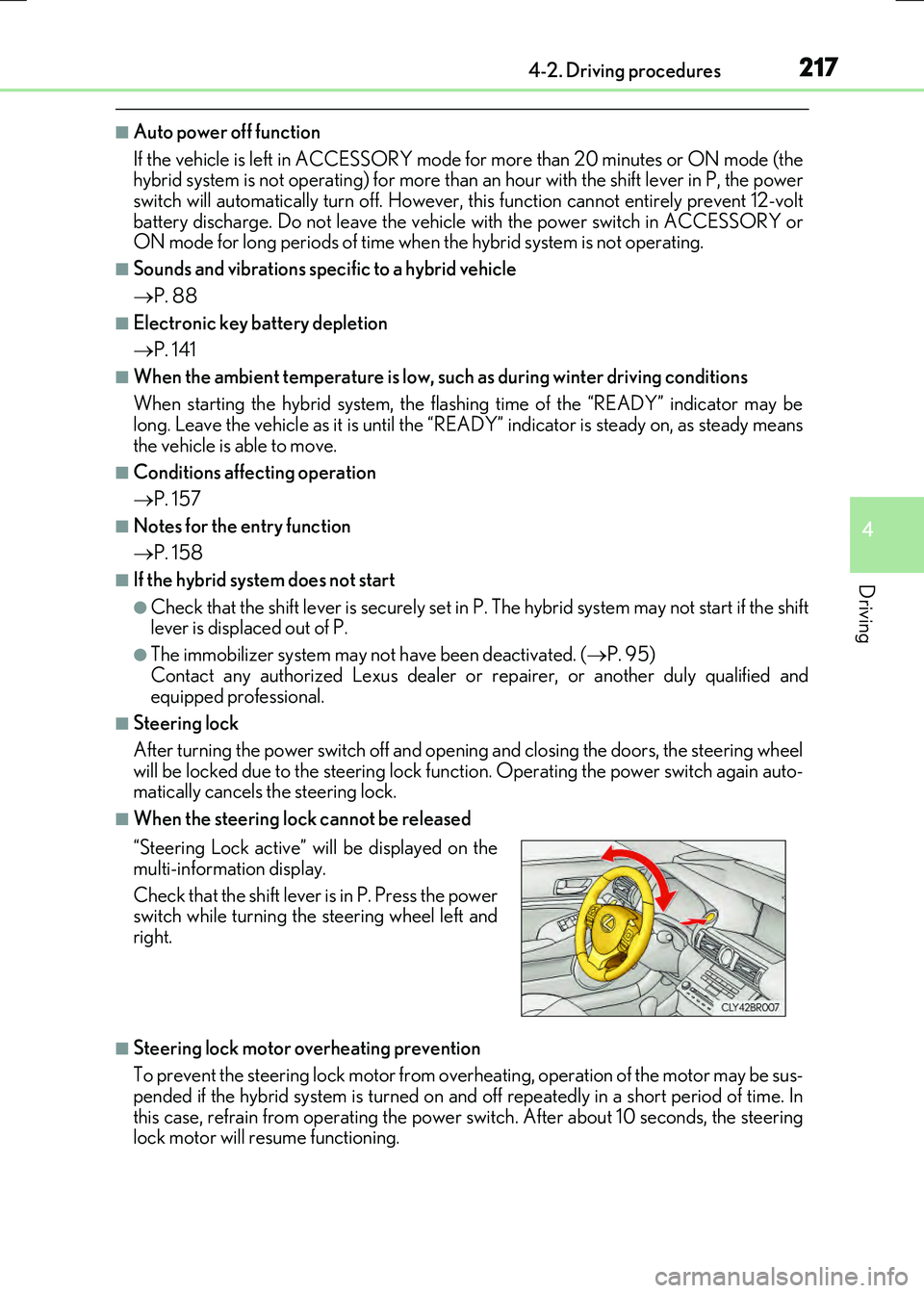
■When the steering lock cannot be released
■Steering lock motor overheating prevention
To prevent the steering lock motor from over heating, operation of the motor may be sus- pended if the hybrid system is turned on an d off repeatedly in a short period of time. In
this case, refrain from operating the power switch. After about 10 seconds, the steering lock motor will resume functioning.
“Steering Lock active” will be displayed on the
multi-information display.
Check that the shift lever is in P. Press the power switch while turning the steering wheel left and
right.
Page 231 of 640
2314-2. Driving procedures
4
Driving
RC300h_EE(OM24740E)
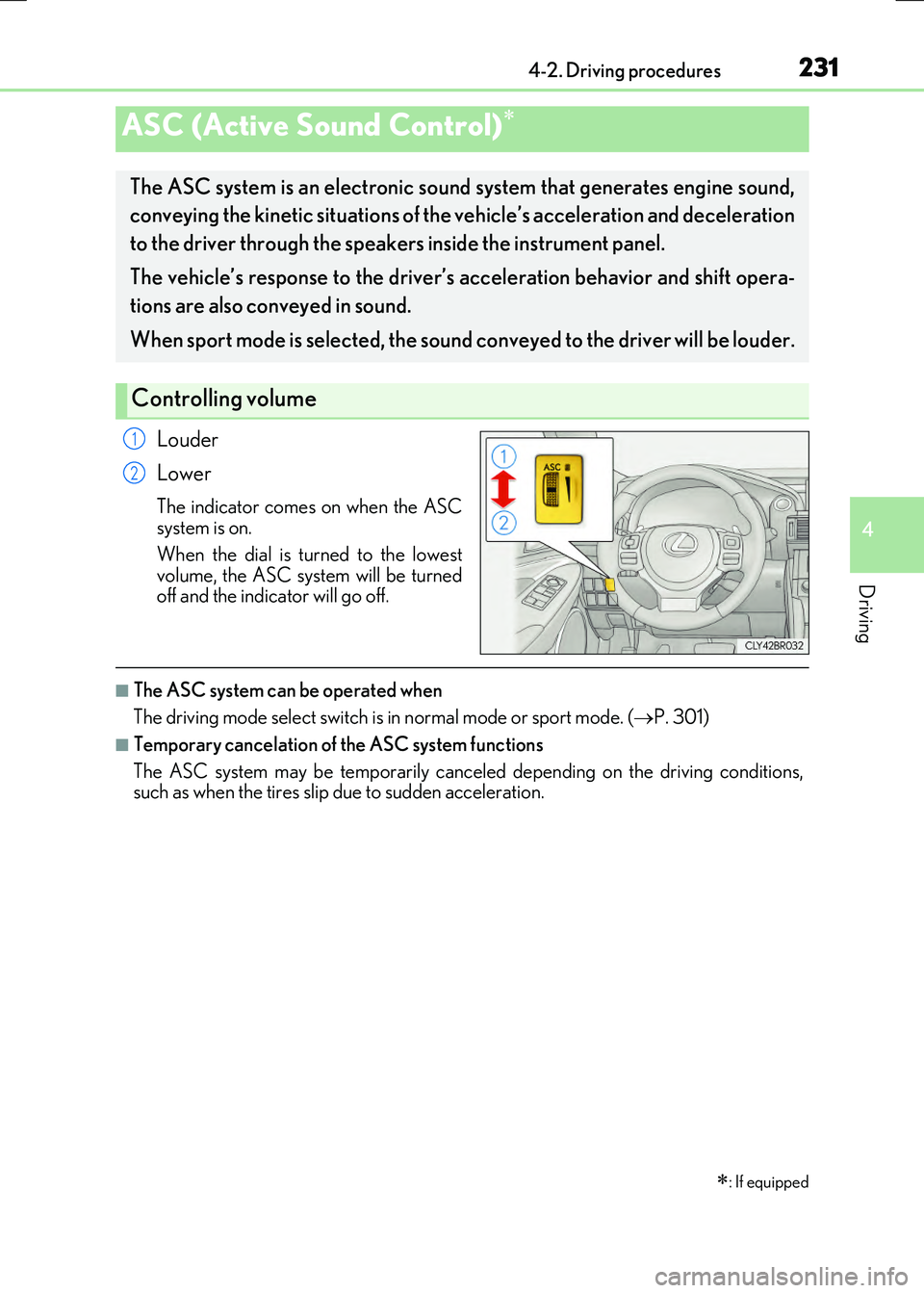
Louder
Lower
The indicator comes on when the ASC system is on.
When the dial is turned to the lowest volume, the ASC system will be turnedoff and the indicator will go off.
■The ASC system can be operated when
The driving mode select switch is in normal mode or sport mode. (P. 301)
■Temporary cancelation of the ASC system functions
The ASC system may be temporarily cancel ed depending on the driving conditions, such as when the tires slip due to sudden acceleration.
ASC (Active Sound Control)
: If equipped
The ASC system is an electronic soun d system that generates engine sound,
conveying the kinetic situations of the vehicle’s acceleration and deceleration
to the driver through the speakers inside the instrument panel.
The vehicle’s response to the driver’s acceleration behavior and shift opera-
tions are also conveyed in sound.
When sport mode is selected, the sound conveyed to the driver will be louder.
Controlling volume
1
2
Page 237 of 640
2374-3. Operating the lights and wipers
4
Driving
RC300h_EE(OM24740E)
■The Automatic High Beam can be operated when
The power switch is in ON mode.
■Camera sensor detection information
●High beam may not be automatically turned off in the following situations:
• When oncoming vehicles suddenly appear from a curve • When the vehicle is cut in front of by another vehicle• When oncoming or preceding vehicles are hidden from sight due to repeated
curves, road dividers or roadside trees
●High beam may be turned off if an oncoming vehicle that is using fog lights without
using the headlights is detected.
●House lights, street lights, red traffic sign als, and illuminated billboards or signs may cause the high beam to turn off.
●The following factors may affect the amount of time taken to turn high beam on or off:
• The brightness of headlights, fog lights, and tail lights of oncoming and preceding vehicles
• The movement and direction of oncoming and preceding vehicles • When an oncoming or preceding vehicle only has operational lights on one side • When an oncoming or preceding vehicle is a two-wheeled vehicle
• The condition of the road (gradient, curve, condition of the road surface etc.) • The number of passengers and amount of luggage
●High beam may be turned on or off when unexpected by the driver.
●Small vehicles, such as bicycles, may not be detected.
●In the situations below, the system may not be able to correctly detect the surrounding
brightness levels, and may flash or expose nearby pedestrians to the high beam. There- fore, you should consider turning the high be ams on or off manually rather than relying on the Automatic High Beam system.
• In bad weather (rain, snow, fog, sandstorms etc.) • The windshield is obscured by fog, mist, ice, dirt etc.• The windshield is cracked or damaged.
• The camera sensor is deformed or dirty. • Surrounding brightness levels are equal to those of headlights, tail lights or fog lights. • Vehicles ahead have headlights or tail lights that are either switched off, dirty, chang-
ing color, or have improperly adjusted aim. • When driving through an area of interm ittently changing brightness and darkness. • When frequently and repeatedly driving ascending/descending roads, or roads with
rough, bumpy or uneven surfaces (such as stone-paved roads, gravel tracks etc.). • When frequently and repeatedly taking curves or driving on a winding road.• There is a highly reflective object ahead of the vehicle, such as a sign or a mirror.
• The vehicle’s headlights are damaged or dirty. • The vehicle is listing or titling, due to a flat tire, a trailer being towed etc.
• The driver believes that the high beam may be causing problems or distress to other drivers or pedestrians nearby.• The vehicle is used in a territory in which vehicles travel on the opposite side of the
road of the country for which the vehicle is approved, for example using a vehicle designed for right-hand traffic in a left-hand traffic territory, or vice versa.
Page 276 of 640
2764-5. Using the driving support systems
RC300h_EE(OM24740E)
■Temporary cancelation of the LDA system functions
If any of the following occurs, the LDA system functions will be temporarily canceled. The functions will resume after the necessary operating conditions have returned.
●The turn signal lever is operated.
●The vehicle speed deviates from the operating range of the LDA system functions.
●When the lane lines cannot be recognized while driving.
●When the lane departure warning sounds.
The lane departure warning function will not operate again for a several seconds after it has been activated, even if the vehicle leaves the lane again.
■The lane departure warning
Depending on the audio system sound level or air conditioning fan noise while the audio system or air conditioning system is in use, it may be difficult to hear the warning sound.
■After the vehicle has been parked in the sun
The LDA system may not be available and a warning message ( P. 548) will be dis- played for a while after driving has started. When the temperature in the cabin decreasesand the temperature around the camera sensor ( P. 273) becomes suitable for its
operation, the functions will begin to operate.
■If there are lane markers on only one side of the vehicle
The lane departure warning will not operate fo r the side on which lane markers could not
be recognized.
■Conditions in which the function may not operate correctly
In the following situations, the camera sensor may be unable to recognize lane markers
causing the lane departure warning function to operate incorrectly. However, this does not indicate a malfunction.
●When driving through an area with no lane markers, such as a tollbooth, a crossing or
before a ticket checkpoint
●When driving on a sharp curve
●When lane markers are extremely narrow or extremely wide
●When the vehicle leans to one side an unusual amount due to a heavy load or improper tire inflation pressure
●When the following distance between your vehicle and the vehicle ahead is extremely
short
●When the lane markers are yellow (These ma y be more difficult for the system to rec- ognize compared to white markers.)
●When the lane markers are broken, Botts’ dots (raised pavement markers) or stones
●When the lane markers are on a curb etc.
●When lane markers are obscured or partially obscured by sand, dirt, etc.
●When there are shadows on the road running parallel with lane markers, or if a shadow covers the lane markers
●When driving on a partic ularly bright road surface, such as concrete
●When driving on a road surface that is bright due to reflected light
●When driving in a location where the light level changes rapidly, such as the entrance to
or exit from a tunnel
Page 277 of 640
2774-5. Using the driving support systems
4
Driving
RC300h_EE(OM24740E)
●When sunlight or the headlights of oncoming vehicles are shining directly into the cam- era lens
●When driving on roads that are branching or merging
●When driving on a road surface that is wet du e to rain, previous rainfall, standing water, etc.
●When the vehicle experiences strong up-and-down motion such as when driving on an
extremely rough road or on a seam in the pavement
●When headlight brightness at nighttime is reduced due to dirt on the lenses, or when the headlights are misaligned
●When driving on winding roads or roads that are uneven
●When driving on rough or unpaved roads
■When changing the tires
Depending on the tires used, sufficient performance may not be maintainable.
■Warning messages for the LDA system
Warning messages are used to indicate a syst em malfunction or to inform the driver of
the need for caution while driving. ( P. 549)
WARNING
■Before using the LDA system
Do not rely solely on the LDA system. The LDA system does not drive the vehicle auto- matically, nor does it reduce the amount of care you need to take. As such, the driver
must always assume full responsibility fo r understanding his/her surroundings, for operating the steering wheel to correct the driving line, and for driving safely.
Inappropriate or negligent driving could lead to an accident.
■To avoid operating the LDA by mistake
Switch the LDA system off using the LDA switch when not in use.
■Situations unsuitable for LDA system
Do not use the LDA system in any of the following situations.
Otherwise, the system may not function correctly and could result in an accident.
●When driving with tire chains, a spare tire, or similar equipment
●When there are objects or structures along the roadside that might be misinterpreted as lane markers (such as guardrails, a curb, reflector posts, etc.)
●When driving on snowy roads
●When pavement lane markers are difficult to see due to rain, snow, fog, sand, dirt, etc.
●When there are visible lines on the pavement from road repairs, or if the remains of old lane markers are still visible on the road
●When driving on a road with lane closures due to maintenance, or when driving in a temporary lane
Page 297 of 640
2974-5. Using the driving support systems
4
Driving
RC300h_EE(OM24740E)
■If you notice any symptoms
If you notice any of the following symp toms, refer to the likely cause and the
solution, and re-check.
If the symptom is not resolved by the solution, have the vehicle inspected by
any authorized Lexus dealer or repairer, or another duly qualified and
equipped professional.
Things you should know
Likely causeSolution
The image is difficult to see
• The vehicle is in a dark area • The temperature around the lens iseither high or low
• The outside temperature is low • There are water droplets on the cam-era
• It is raining or humid • Foreign matter (mud, etc.) is adheringto the camera
• Sunlight or headlights are shining directly into the camera• The vehicle is under fluorescent lights,
sodium lights, mercury lights etc.
Back up while visually checking the vehi- cle’s surroundings. (Use the monitor
again once conditions have been improved.)The procedure for adjusting the picture
quality of the parking assist monitor is the same as the procedure for adjusting thescreen.( P. 358)
The image is blurry
Dirt or foreign matter (such as water droplets, snow, mud, etc.) is adhering to
the camera.
Flush the camera with a large quantity of water and wipe the camera lens clean
with a soft and wet cloth.
The image is out of alignment
The camera or surrounding area has
received a strong impact.
Have the vehicle inspected by any autho- rized Lexus dealer or repairer, or anotherduly qualified and equipped professional.
The guide lines are very far out of alignment
The camera position is out of alignment.
Have the vehicle inspected by any autho-
rized Lexus dealer or repairer, or another duly qualified and equipped professional.
• The vehicle is tilted (there is a heavyload on the vehicle, tire pressure is low
due to a tire puncture, etc.) • The vehicle is used on an incline.
If this happens due to these causes, itdoes not indicate a malfunction.
Back up while visually checking the vehi- cle’s surroundings.