turn LEXUS RC300H 2017 User Guide
[x] Cancel search | Manufacturer: LEXUS, Model Year: 2017, Model line: RC300H, Model: LEXUS RC300H 2017Pages: 640, PDF Size: 35.53 MB
Page 95 of 640
95
1
For safety and security
RC300h_EE(OM24740E)
1-3. Theft deterrent system
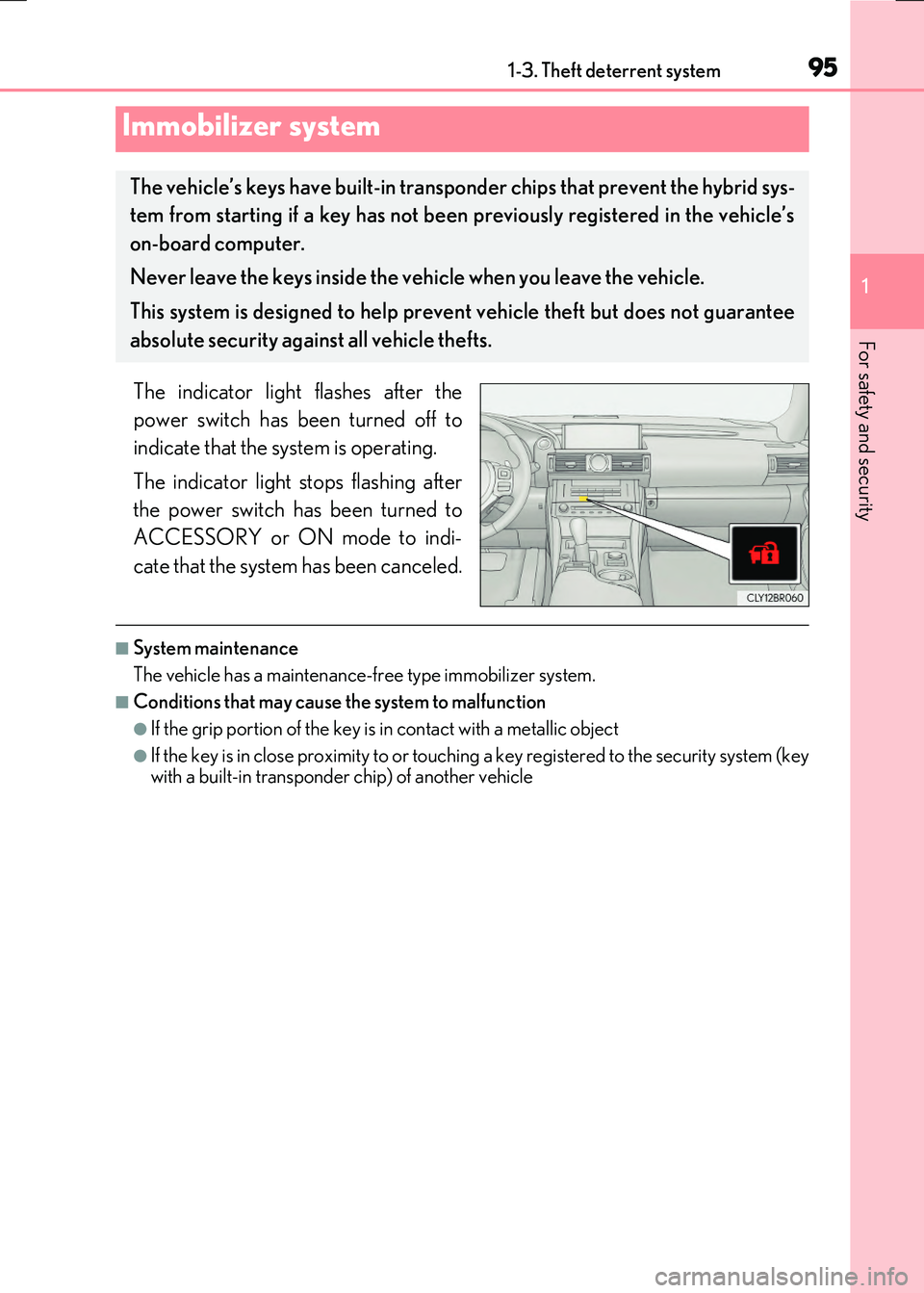
The indicator light flashes after the
power switch has been turned off to
indicate that the system is operating.
The indicator light stops flashing after
the power switch has been turned to
ACCESSORY or ON mode to indi-
cate that the system has been canceled.
■System maintenance
The vehicle has a maintenance-free type immobilizer system.
■Conditions that may cause the system to malfunction
●If the grip portion of the key is in contact with a metallic object
●If the key is in close proximity to or touching a key registered to the security system (key
with a built-in transponder chip) of another vehicle
Immobilizer system
The vehicle’s keys have built-in transpon der chips that prevent the hybrid sys-
tem from starting if a key has not been previously registered in the vehicle’s
on-board computer.
Never leave the keys inside the vehicle when you leave the vehicle.
This system is designed to help prev ent vehicle theft but does not guarantee
absolute security agai nst all vehicle thefts.
Page 101 of 640
1011-3. Theft deterrent system
1
For safety and security
RC300h_EE(OM24740E)
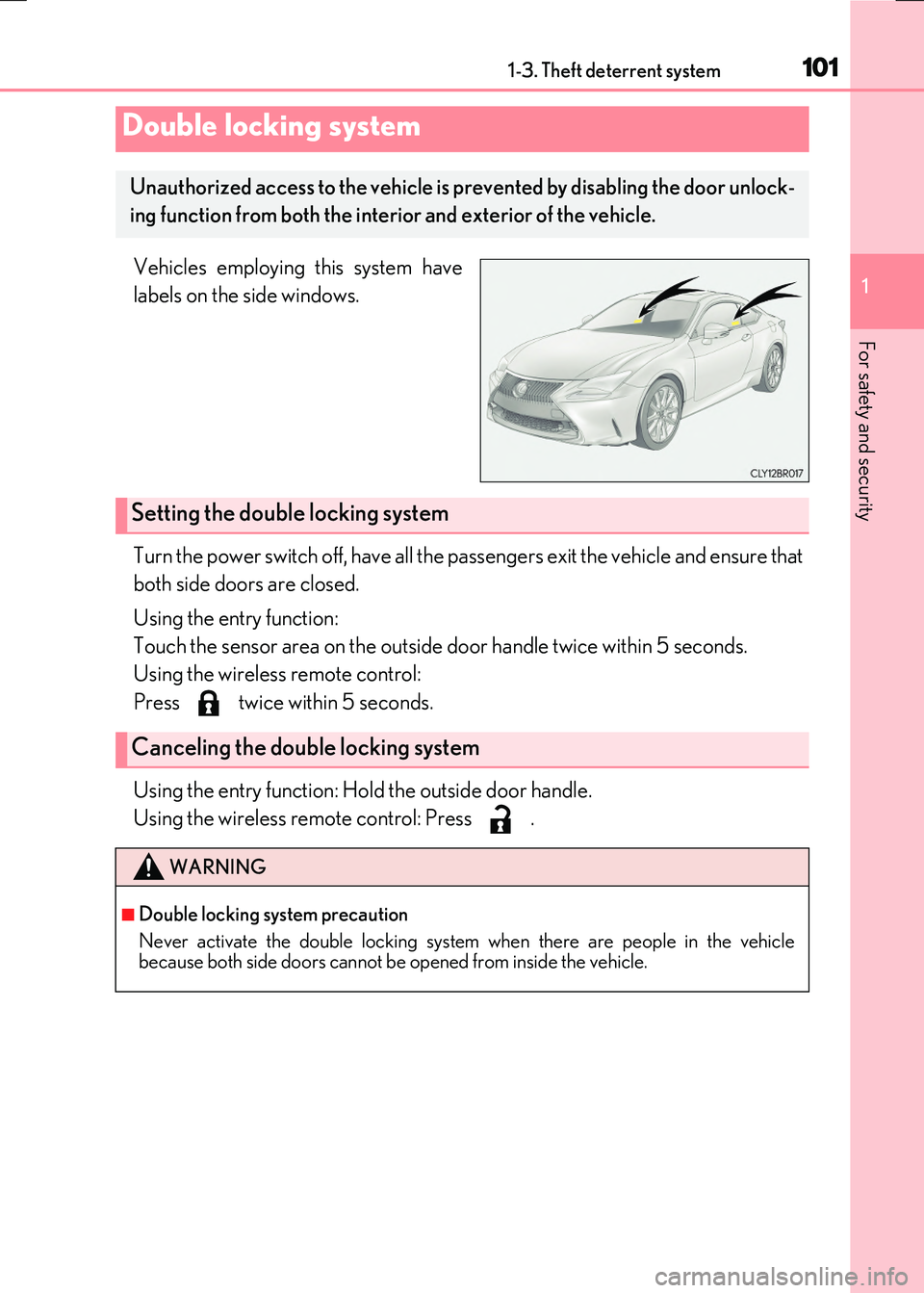
Vehicles employing this system have
labels on the side windows.
Turn the power switch off, have all the passengers exit the vehicle and ensure that
both side doors are closed.
Using the entry function:
Touch the sensor area on the outside door handle twice within 5 seconds.
Using the wireless remote control:
Press twice within 5 seconds.
Using the entry function: Hold the outside door handle.
Using the wireless remote control: Press .
Double locking system
Unauthorized access to the vehicle is pr evented by disabling the door unlock-
ing function from both the interior and exterior of the vehicle.
Setting the double locking system
Canceling the double locking system
WARNING
■Double locking system precaution
Never activate the double locking system when there are people in the vehicle because both side doors cannot be opened from inside the vehicle.
Page 105 of 640
1051-3. Theft deterrent system
1
For safety and security
RC300h_EE(OM24740E)
●The intrusion sensor detects intruders or movement in the vehicle.
●The tilt sensor detects changes in vehicle inclination, such as when the vehicle
is towed away.
This system is designed to deter and pr event vehicle theft but does not guarantee
absolute security against all intrusions.
■Setting the intrusion sensor and tilt sensor
The intrusion sensor and tilt sensor will be set automatically when the alarm is
set. ( P. 102)
■Canceling the intrusion sensor and tilt sensor
If you are leaving pets or other moving things inside the vehicle, make sure to
disable the intrusion sensor and tilt sensor before setting the alarm, as they will
respond to movement inside the vehicle.
Turn the power switch off.
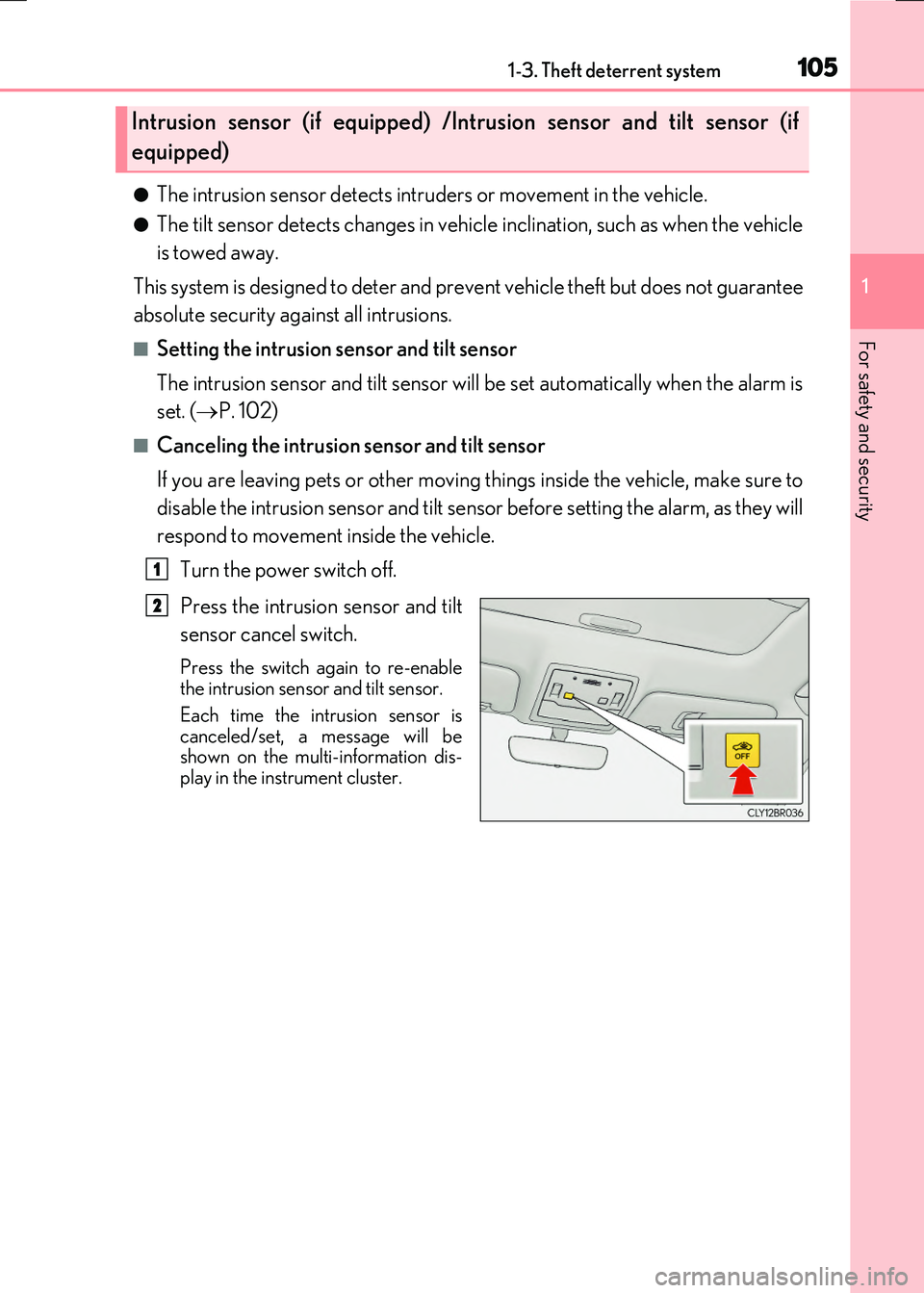
Press the intrusion sensor and tilt
sensor cancel switch.
Press the switch again to re-enable the intrusion sensor and tilt sensor.
Each time the intrusion sensor is canceled/set, a message will beshown on the multi-information dis-
play in the instrument cluster.
Intrusion sensor (if equipped) /Intrusion sensor and tilt sensor (if
equipped)
1
2
Page 111 of 640
1112. Instrument cluster
2
Instrument cluster
RC300h_EE(OM24740E)
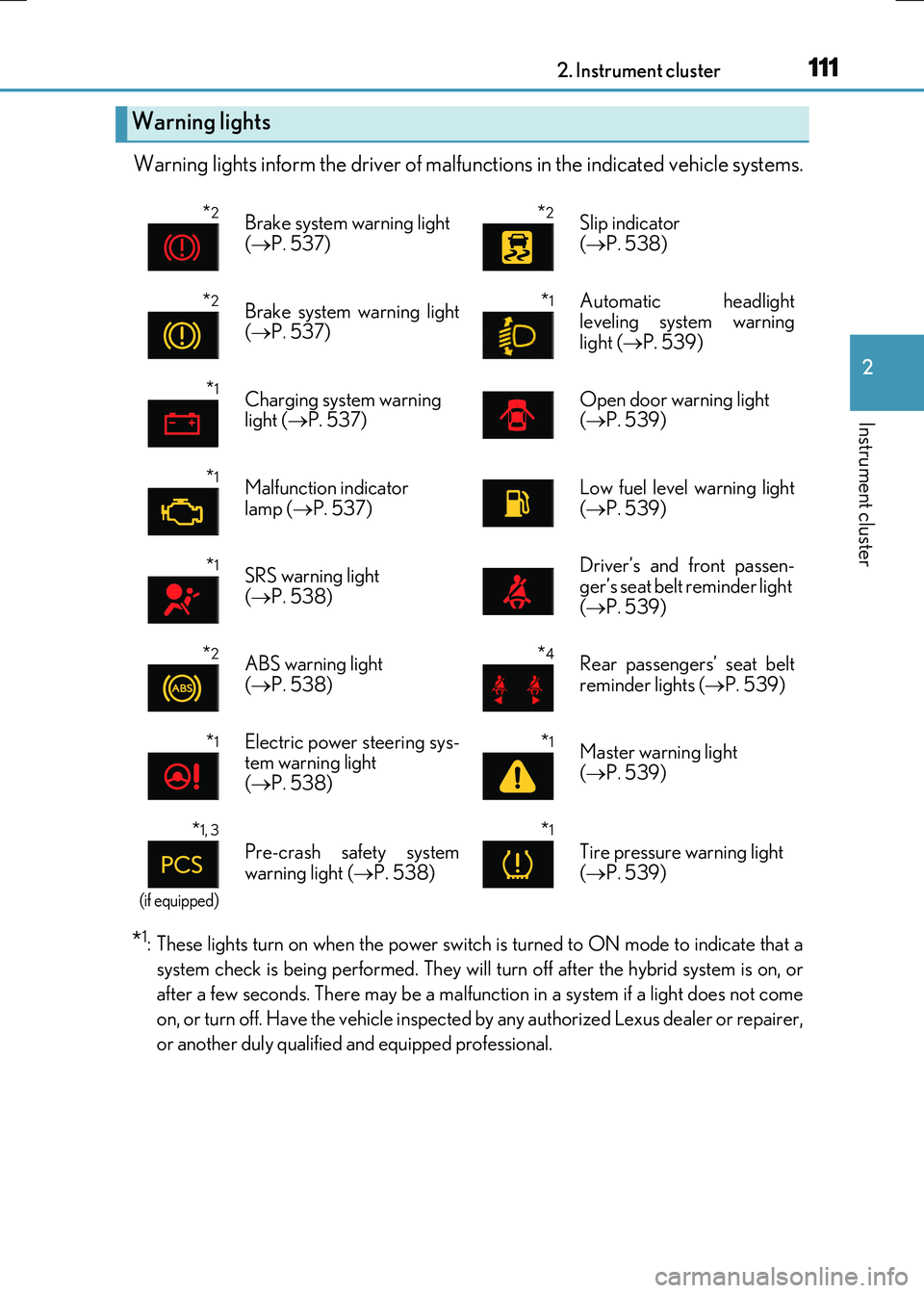
Warning lights inform the driver of malfunctions in the indicated vehicle systems.
*1: These lights turn on when the power switch is turned to ON mode to indicate that a
system check is being performed. They will turn off after the hybrid system is on, or
after a few seconds. There may be a malfunct ion in a system if a light does not come
on, or turn off. Have the vehicle inspected by any authorized Lexus dealer or repairer,
or another duly qualified and equipped professional.
Warning lights
*2Brake system warning light
( P. 537)
*2Slip indicator
( P. 538)
*2Brake system warning light ( P. 537)
*1 Automatic headlight leveling system warning
light ( P. 539)
*1Charging system warning light ( P. 537)Open door warning light ( P. 539)
*1Malfunction indicator
lamp ( P. 537)
Low fuel level warning light
( P. 539)
*1SRS warning light ( P. 538)
Driver’s and front passen- ger’s seat belt reminder light
( P. 539)
*2ABS warning light ( P. 538)
*4Rear passengers’ seat belt reminder lights ( P. 539)
*1Electric power steering sys- tem warning light( P. 538)
*1Master warning light
( P. 539)
*1, 3
(if equipped)
Pre-crash safety system
warning light ( P. 538)
*1
Tire pressure warning light
( P. 539)
Page 112 of 640
1122. Instrument cluster
RC300h_EE(OM24740E)
*2: These lights turn on when the power switch is turned to ON mode to indicate that a
system check is being perfor med. They will turn off after the “READY” indicator turns
on. There may be a malfunction in a system if a light does not come on, or turn off.
Have the vehicle inspected by any authorized Lexus dealer or repairer, or another
duly qualified and equipped professional.
*3: The light flashes to indicate a malfunction.
*4: This light illuminates on the center panel.
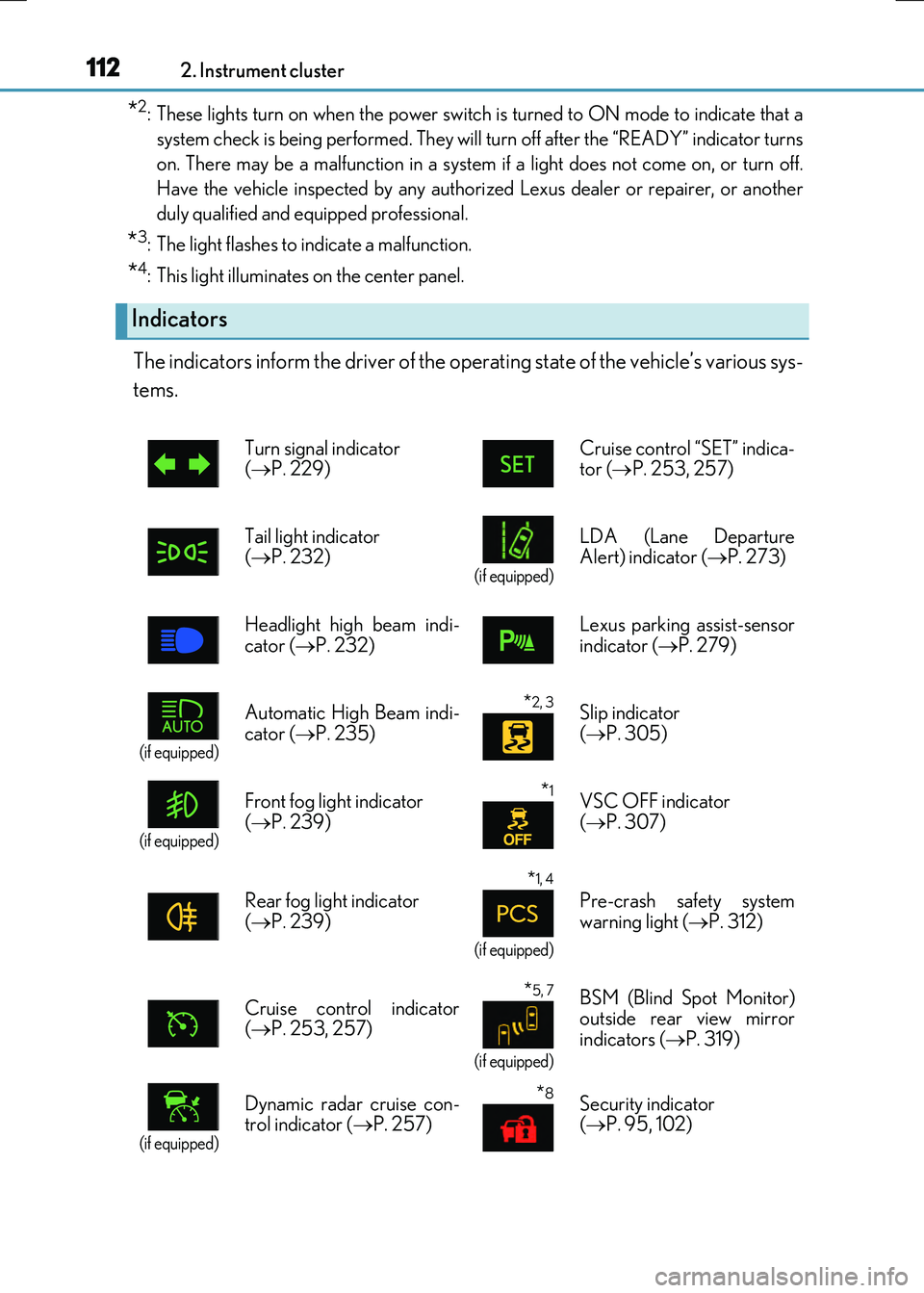
The indicators inform the driver of the operating state of the vehicle’s various sys-
tems.
Indicators
Turn signal indicator ( P. 229) Cruise control “SET” indica- tor ( P. 253, 257)
Tail light indicator ( P. 232) (if equipped)
LDA (Lane Departure Alert) indicator ( P. 273)
Headlight high beam indi-
cator ( P. 232)
Lexus parking assist-sensor
indicator ( P. 279)
(if equipped)
Automatic High Beam indi-
cator ( P. 235)
*2, 3 Slip indicator
( P. 305)
(if equipped)
Front fog light indicator
( P. 239)
*1VSC OFF indicator
( P. 307)
Rear fog light indicator ( P. 239)
*1, 4
(if equipped)
Pre-crash safety system warning light ( P. 312)
Cruise control indicator ( P. 253, 257)
*5, 7
(if equipped)
BSM (Blind Spot Monitor) outside rear view mirror
indicators ( P. 319)
(if equipped)
Dynamic radar cruise con- trol indicator ( P. 257)
*8Security indicator ( P. 95, 102)
Page 113 of 640
1132. Instrument cluster
2
Instrument cluster
RC300h_EE(OM24740E)
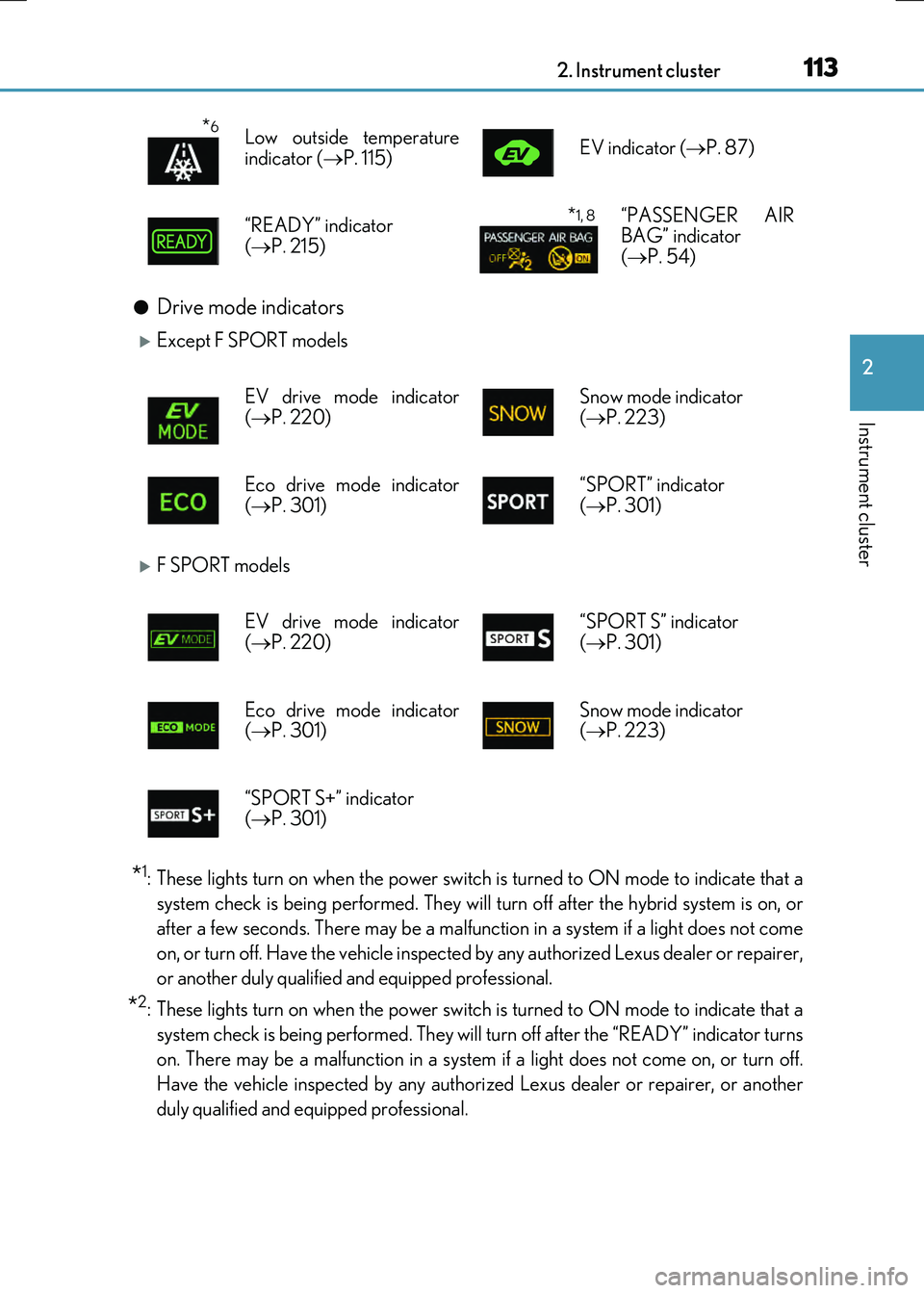
●Drive mode indicators
Except F SPORT models
F SPORT models
*1: These lights turn on when the power switch is turned to ON mode to indicate that a
system check is being performed. They will turn off after the hybrid system is on, or
after a few seconds. There may be a malfunct ion in a system if a light does not come
on, or turn off. Have the vehicle inspected by any authorized Lexus dealer or repairer,
or another duly qualified and equipped professional.
*2: These lights turn on when the power switch is turned to ON mode to indicate that a
system check is being perfor med. They will turn off after the “READY” indicator turns
on. There may be a malfunction in a system if a light does not come on, or turn off.
Have the vehicle inspected by any authorized Lexus dealer or repairer, or another
duly qualified and equipped professional.
*6Low outside temperature
indicator ( P. 115) EV indicator ( P. 87)
“READY” indicator
( P. 215)
*1, 8“PASSENGER AIR BAG” indicator ( P. 54)
EV drive mode indicator ( P. 220) Snow mode indicator ( P. 223)
Eco drive mode indicator
( P. 301)
“SPORT” indicator
( P. 301)
EV drive mode indicator
( P. 220)
“SPORT S” indicator
( P. 301)
Eco drive mode indicator ( P. 301) Snow mode indicator ( P. 223)
“SPORT S+” indicator ( P. 301)
Page 114 of 640
1142. Instrument cluster
RC300h_EE(OM24740E)
*3: The light flashes to indicate that the system is operating.
*4: The light comes on when the system is turned off. The light will flash quickly when the
system is operating.
*5: In order to confirm operation, the BSM outside rear view mirror indicators illuminate
in the following situations:
• When the power switch is turned to ON mode while the BSM main switch is turned on.• When the BSM main switch is turned on while the power switch is in ON mode.
If the system is functioning correctly, the BSM outside rear view mirror indicators will turn off after a few seconds. If the BSM outside rear view mirror indicators do not illuminate or do not turn off,
there may be a malfunction in the system. If this occurs, have the vehicle inspected by any authorized Lexus dealer or repairer,or another duly qualified and equipped professional.
*6: When the outside temperature is approximately 3°C (37°F) or lower, the indicator
will flash for approximately 10 seconds, then stay on.
*7: This light illuminates on the outside rear view mirrors.
*8: This light illuminates on the center panel.
WARNING
■If a safety system warning light does not come on
Should a safety system light such as the ABS and SRS warning light not come on when you start the hybrid system, this could mean that these systems are not available to helpprotect you in an accident, which could result in death or serious injury. Have the vehi-
cle inspected by any authorized Lexus dealer or repairer, or another duly qualified and equipped professional immediately if this occurs.
Page 118 of 640
1182. Instrument cluster
RC300h_EE(OM24740E)
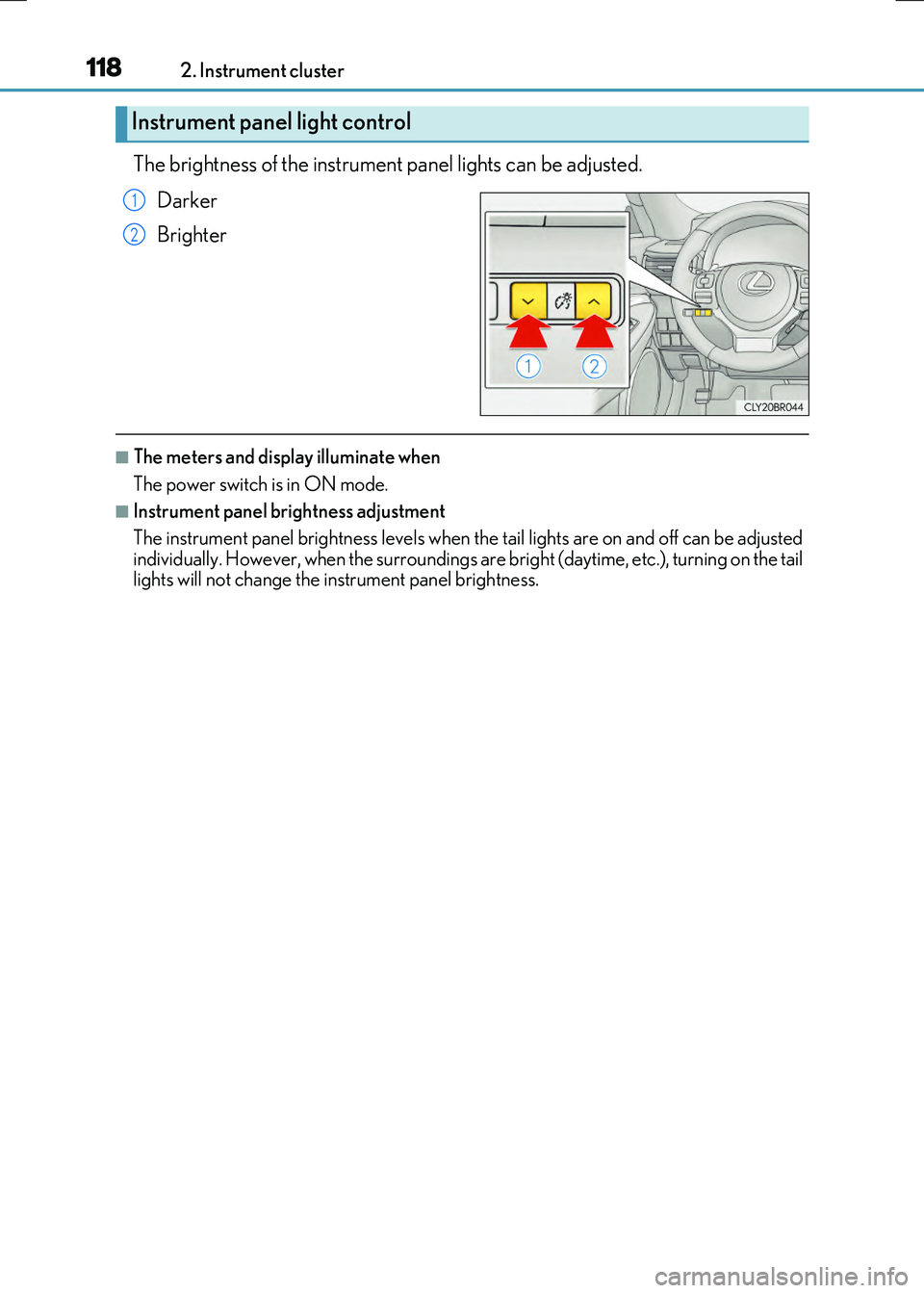
The brightness of the instrument panel lights can be adjusted.
Darker
Brighter
■The meters and display illuminate when
The power switch is in ON mode.
■Instrument panel brightness adjustment
The instrument panel brightness levels when th e tail lights are on and off can be adjusted
individually. However, when the surroundings ar e bright (daytime, etc.), turning on the tail lights will not change the in strument panel brightness.
Instrument panel light control
1
2
Page 123 of 640
1232. Instrument cluster
2
Instrument cluster
RC300h_EE(OM24740E)
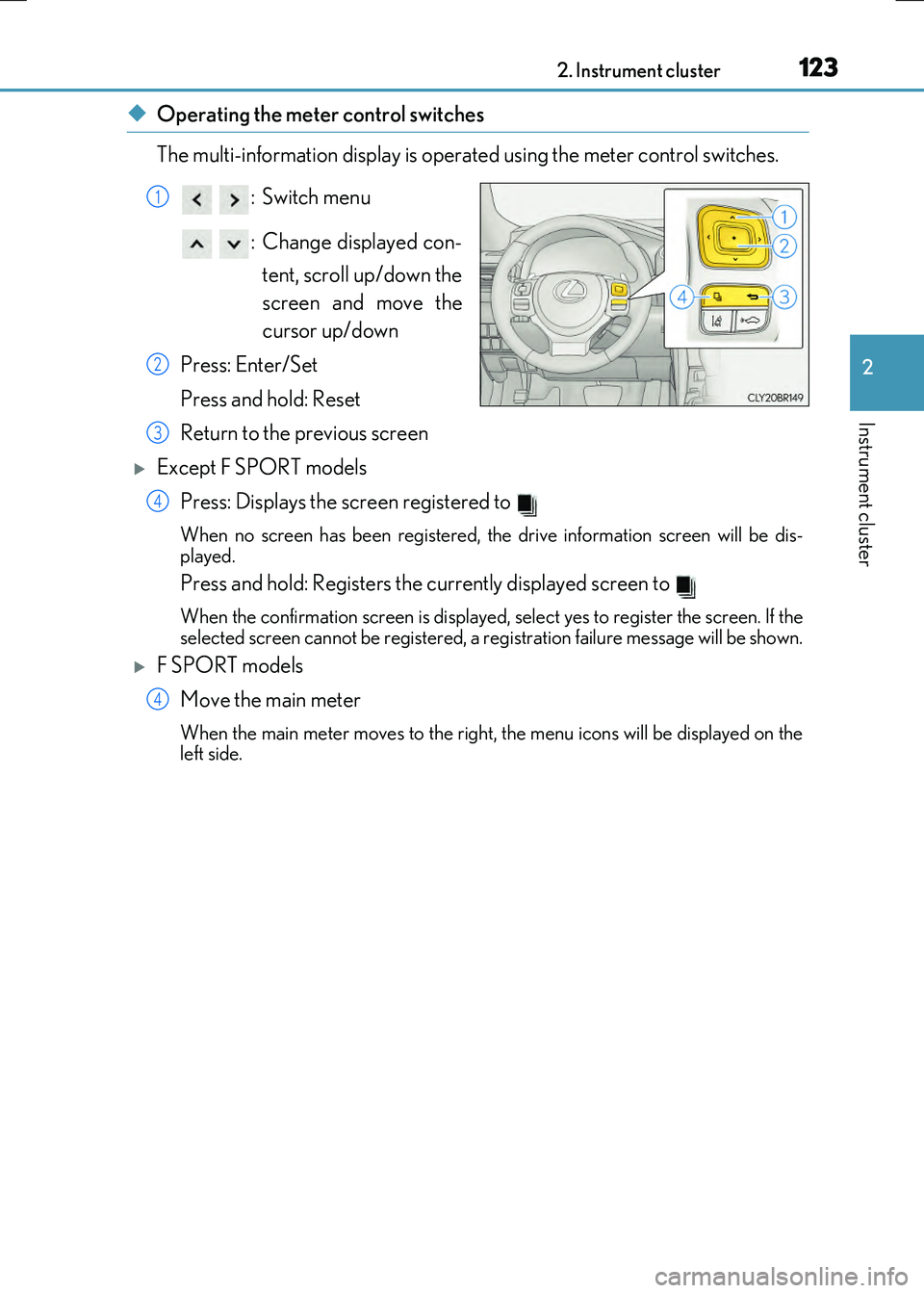
◆Operating the meter control switches
The multi-information display is operated using the meter control switches.
:Switch menu
: Change displayed con- tent, scroll up/down the
screen and move the
cursor up/down
Press: Enter/Set
Press and hold: Reset
Return to the previous screen
Except F SPORT models Press: Displays the screen registered to
When no screen has been registered, the drive information screen will be dis-
played.
Press and hold: Registers the currently displayed screen to
When the confirmation screen is displayed, select yes to register the screen. If the
selected screen cannot be registered, a re gistration failure message will be shown.
F SPORT models
Move the main meter
When the main meter moves to the right, the menu icons will be displayed on the
left side.
1
2
3
4
4
Page 124 of 640
1242. Instrument cluster
RC300h_EE(OM24740E)
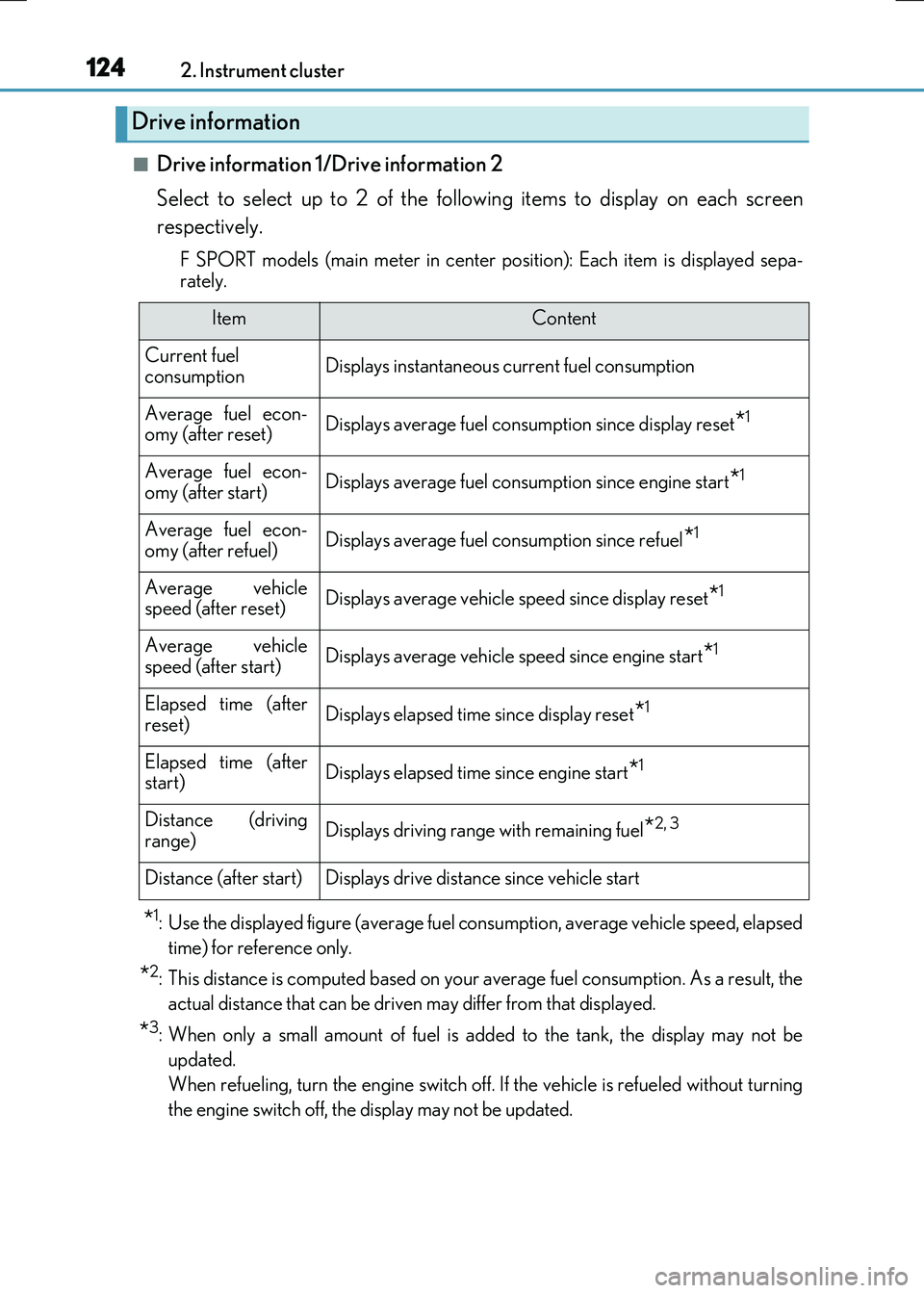
■Drive information 1/Drive information 2
Select to select up to 2 of the following items to display on each screen
respectively.
F SPORT models (main meter in center po sition): Each item is displayed sepa-
rately.
*1: Use the displayed figure (average fuel consumption, average vehicle speed, elapsed
time) for reference only.
*2: This distance is computed based on your average fuel consumption. As a result, the
actual distance that can be driven may differ from that displayed.
*3: When only a small amount of fuel is added to the tank, the display may not be
updated.
When refueling, turn the engine switch off. If the vehicle is refueled without turning
the engine switch off, the display may not be updated.
Drive information
ItemContent
Current fuel consumptionDisplays instantaneous current fuel consumption
Average fuel econ-omy (after reset)Displays average fuel consumption since display reset*1
Average fuel econ-
omy (after start)Displays average fuel cons umption since engine start*1
Average fuel econ- omy (after refuel)Displays average fuel consumption since refuel*1
Average vehiclespeed (after reset)Displays average vehicle speed since display reset*1
Average vehicle
speed (after start)Displays average vehicle speed since engine start*1
Elapsed time (after reset)Displays elapsed time since display reset*1
Elapsed time (afterstart)Displays elapsed time since engine start*1
Distance (driving
range)Displays driving range with remaining fuel*2, 3
Distance (after start)Displays drive distance since vehicle start