change time LEXUS RC300H 2017 Owner's Manual
[x] Cancel search | Manufacturer: LEXUS, Model Year: 2017, Model line: RC300H, Model: LEXUS RC300H 2017Pages: 640, PDF Size: 35.53 MB
Page 434 of 640
4346-1. Using the air conditioning system
RC300h_EE(OM24740E)
■Adjusting the temperature setting
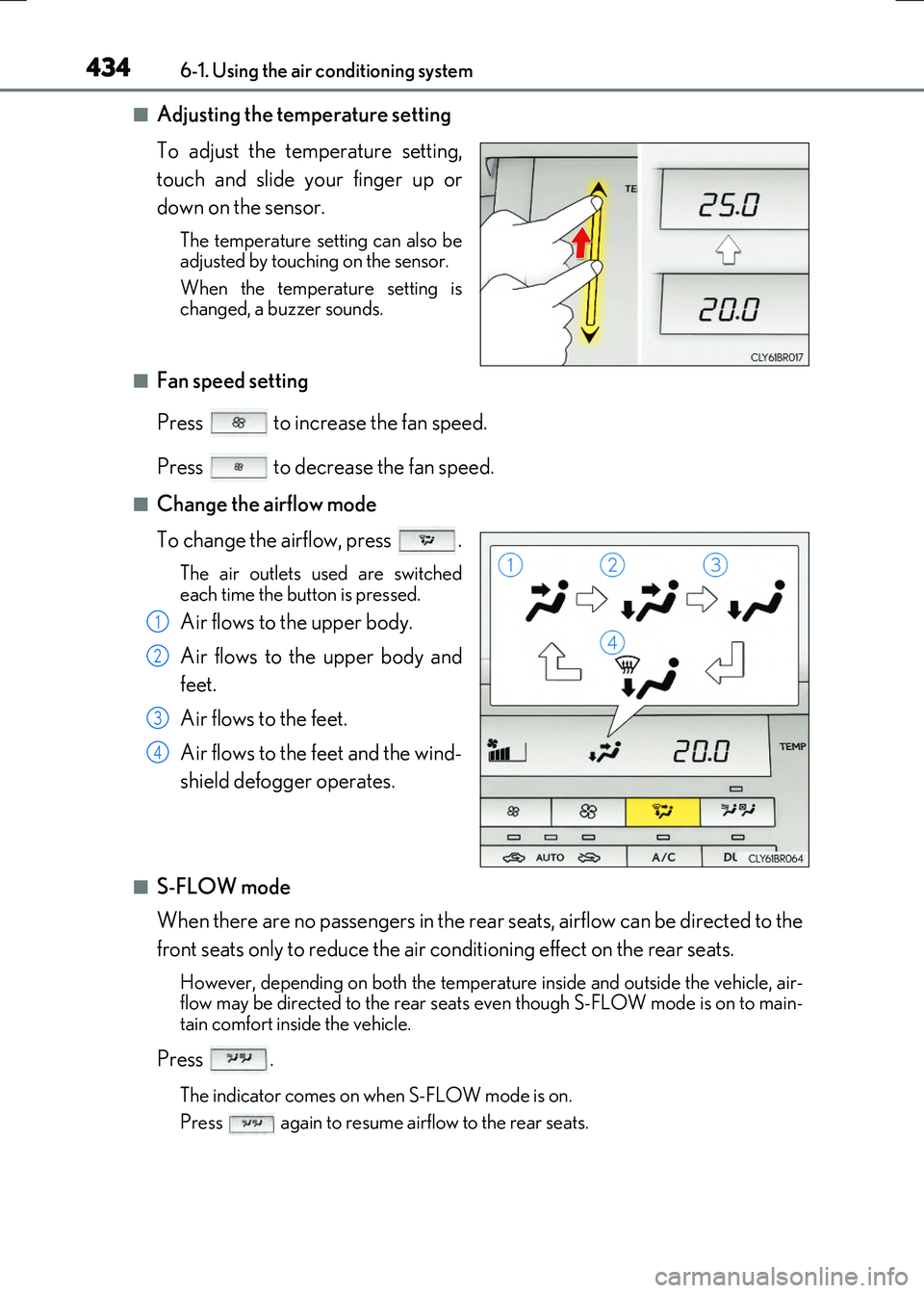
To adjust the temperature setting,
touch and slide your finger up or
down on the sensor.
The temperature setting can also be adjusted by touching on the sensor.
When the temperature setting is changed, a buzzer sounds.
■Fan speed setting
Press to increase the fan speed.
Press to decrease the fan speed.
■Change the airflow mode
To change the airflow, press .
The air outlets used are switched
each time the button is pressed.
Air flows to the upper body.
Air flows to the upper body and
feet.
Air flows to the feet.
Air flows to the feet and the wind-
shield defogger operates.
■S-FLOW mode
When there are no passengers in the rear seats, airflow can be directed to the
front seats only to reduce the air conditioning effect on the rear seats.
However, depending on both the temperat ure inside and outside the vehicle, air- flow may be directed to the rear seats even though S-FLOW mode is on to main- tain comfort inside the vehicle.
Press .
The indicator comes on when S-FLOW mode is on.
Press again to resume airflow to the rear seats.
1
2
3
4
Page 439 of 640
4396-1. Using the air conditioning system
6
Interior features
RC300h_EE(OM24740E)
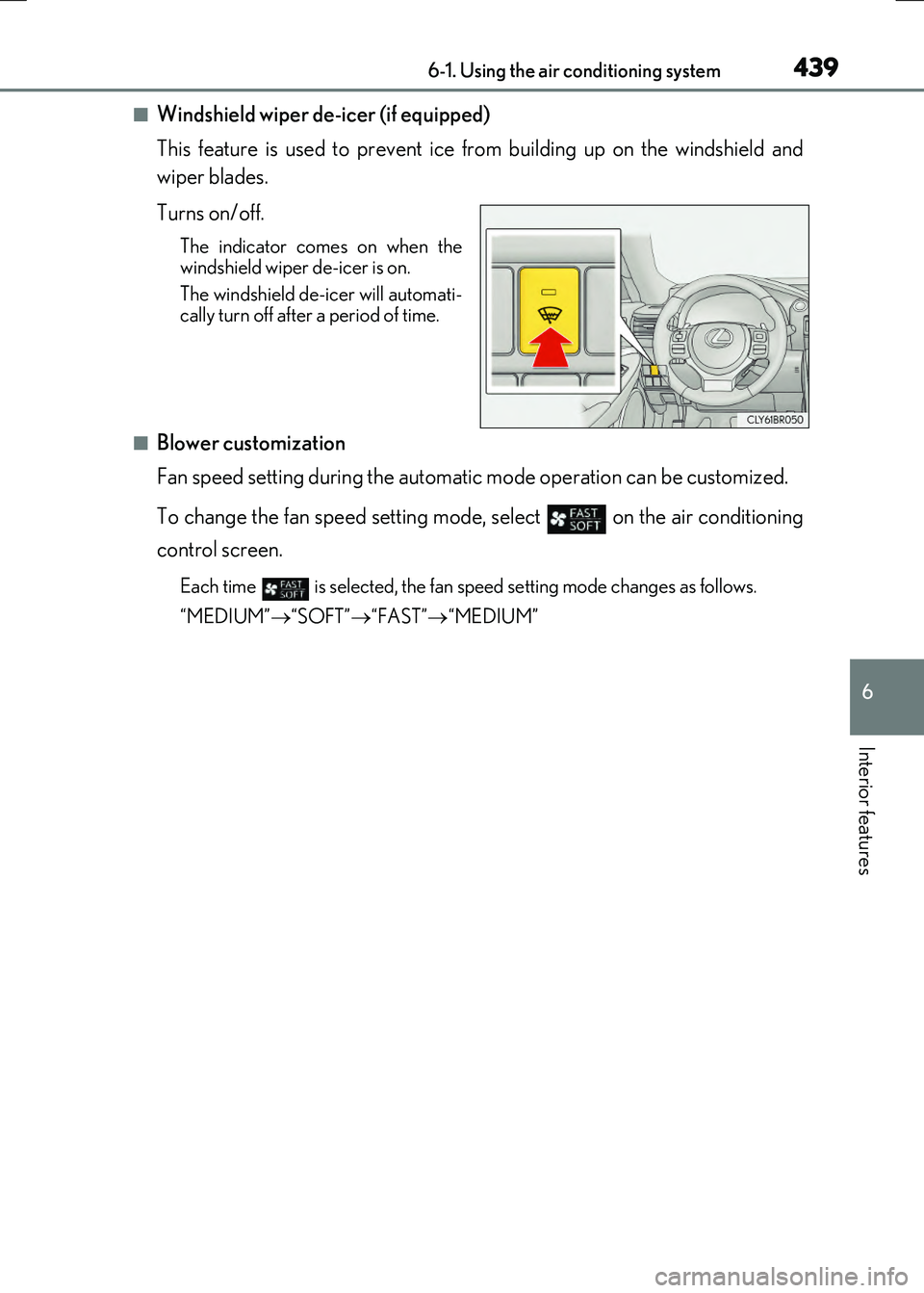
■Windshield wiper de-icer (if equipped)
This feature is used to prevent ice from building up on the windshield and
wiper blades.
Turns on/off.
The indicator come s on when the windshield wiper de-icer is on.
The windshield de-icer will automati- cally turn off after a period of time.
■Blower customization
Fan speed setting during the automatic mode operation can be customized.
To change the fan speed setting mode, select on the air conditioning
control screen.
Each time is selected, the fan speed setting mode changes as follows.
“MEDIUM” “SOFT”“FAST”“MEDIUM”
Page 441 of 640
4416-1. Using the air conditioning system
6
Interior features
RC300h_EE(OM24740E)
■Registering air conditioning settings to electronic keys (vehicles with driving position
memory)
●Unlocking the vehicle using an electronic key and turning the power switch to ON
mode will recall that key's registered air conditioning settings.
●When the power switch is turned off, the cu rrent air conditioning settings will automati-
cally be registered to the electronic key that was used to unlock the vehicle.
●The system may not operate correctly if more than one electronic key is in the vicinity or
if the smart entry & start system is used to unlock a passenger door.
●The doors that can recall the air conditioning setting* when unlocked using the smart
entry & start system can be changed. For details, contact any authorized Lexus dealer
or repairer, or another duly qu alified and equipped professional.
*: The doors that can recall the driving position memory are changed at the same time.
■Using automatic mode
Fan speed is adjusted automatically according to the temperature setting and the ambi-
ent conditions.
Therefore, the fan may stop for a while until wa rm or cool air is ready to flow immediately
after is pressed or “AUTO” is selected.
■Fogging up of the windows
The windows will easily fog up when the hu midity in the vehicle is high. Turning
(“A/C”) on will dehumidify the air from the ou tlets and defog the windshield effectively.
●If you turn (“A/C”) off, the windows may fog up more easily.
●The windows may fog up if the recirculated air mode is used.
■Outside/recirculated air mode
●When driving on dusty roads such as tunnels or in heavy traffic, set the outside/recircu-
lated air mode button to the recirculated air mode. This is effective in preventing out-
side air from entering the vehicle interior . During cooling operation, setting the
recirculated air mode will also cool the vehicle interior effectively.
●Outside/recirculated air mode may automati cally switch depending on the tempera-
ture setting or the inside temperature.
■Automatic mode for air intake control
In automatic mode, the system detects exhaust gas and other pollutants and automati-
cally switches between outside air and recirculated air modes.
When the dehumidification function is off, and the fan is operating, turning automatic
mode on will activate the dehumidification function.
■Operation of the air conditioning system in Eco drive mode
In Eco drive mode, the air conditioning system is controlled as follows to prioritize fuel
efficiency:
●Engine speed and compressor operation controlled to restrict heating/cooling capac-
ity
●Fan speed restricted when automatic mode is selected
To improve air conditioning performanc e, perform the following operations:
●Adjust the fan speed
●Turn off Eco drive mode
Page 442 of 640
4426-1. Using the air conditioning system
RC300h_EE(OM24740E)
■When the outside temperature falls to nearly 0C (32F)
The dehumidification function may not operate even when is pressed or “A/C” is
selected.
■Ventilation and air conditioning odors
●To let fresh air in, set the air conditioning system to the outside air mode.
●During use, various odors from inside and outside the vehicle may enter into and accu- mulate in the air conditioning system. This may then cause odor to be emitted from the
vents.
●To reduce potential odors from occurring:
• It is recommended that the air conditioning system be set to outside air mode prior
to turning the vehicle off. • The start timing of the blower may be dela yed for a short period of time immediately after the air conditioning system is started in automatic mode.
■Air conditioning filter
P. 509
■Customization
Settings (e.g. A/C auto switch operation) can be changed. (Customizable features P. 614)
WARNING
■To prevent the windshield from fogging up
●Do not use during cool air operation in extremely humid weather. The differ-
ence between the temperature of the outside air and that of the windshield can cause the outer surface of the windshield to fog up, blocking your vision.
■To prevent burns
●Do not touch the rear view mirror surfaces when the outside rear view mirror defog-gers are on.
●Do not touch the glass at lower part of the windshield or to the side of the front pillarswhen the windshield wiper de-icer is on.
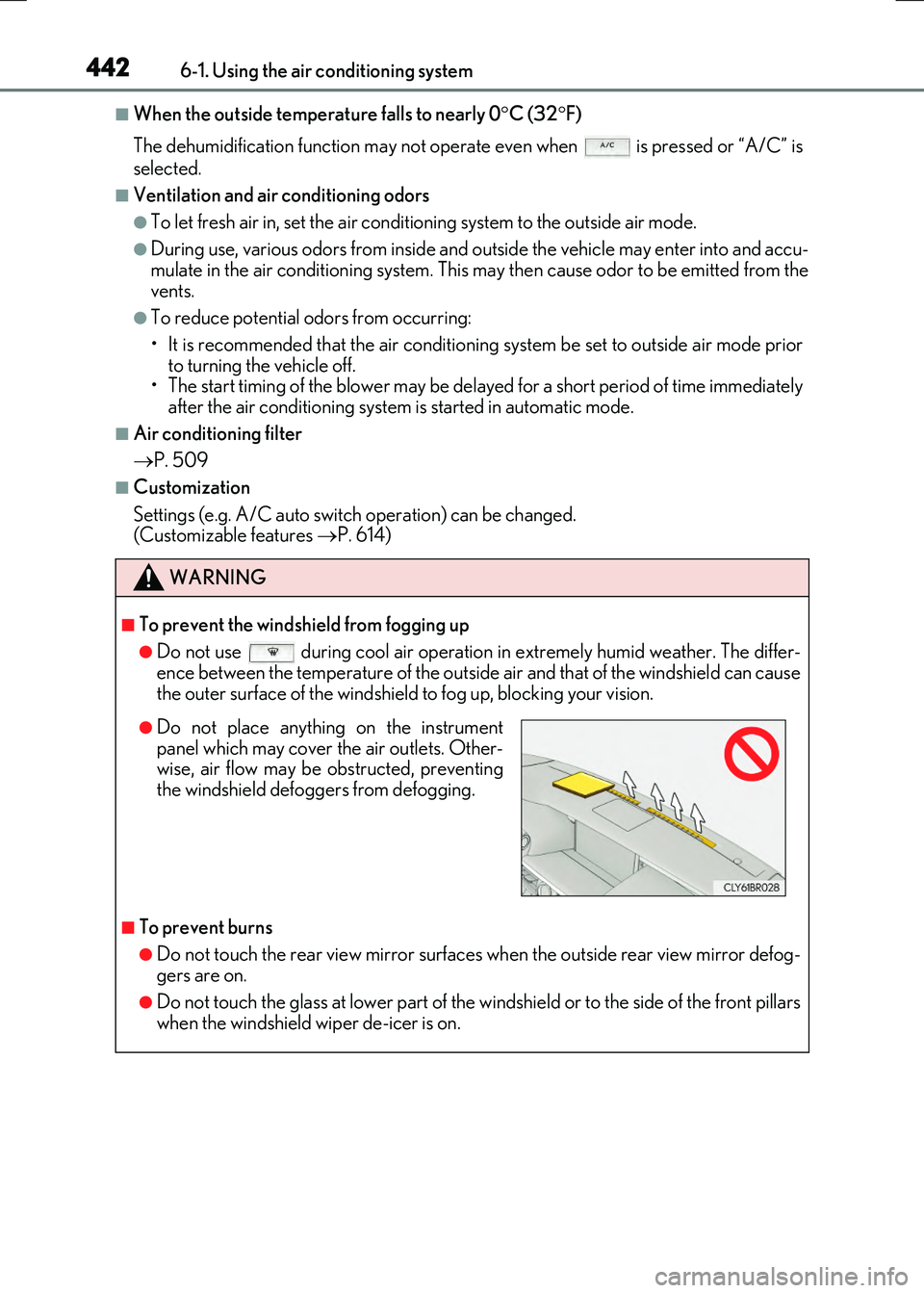
●Do not place anything on the instrumentpanel which may cover the air outlets. Other-wise, air flow may be obstructed, preventing
the windshield defoggers from defogging.
Page 445 of 640
4456-1. Using the air conditioning system
6
Interior features
RC300h_EE(OM24740E)
●The heated steering wheel can be used when the power switch is in ON mode.
●The heated steering wheel will automatically turn off after about 30 minutes.
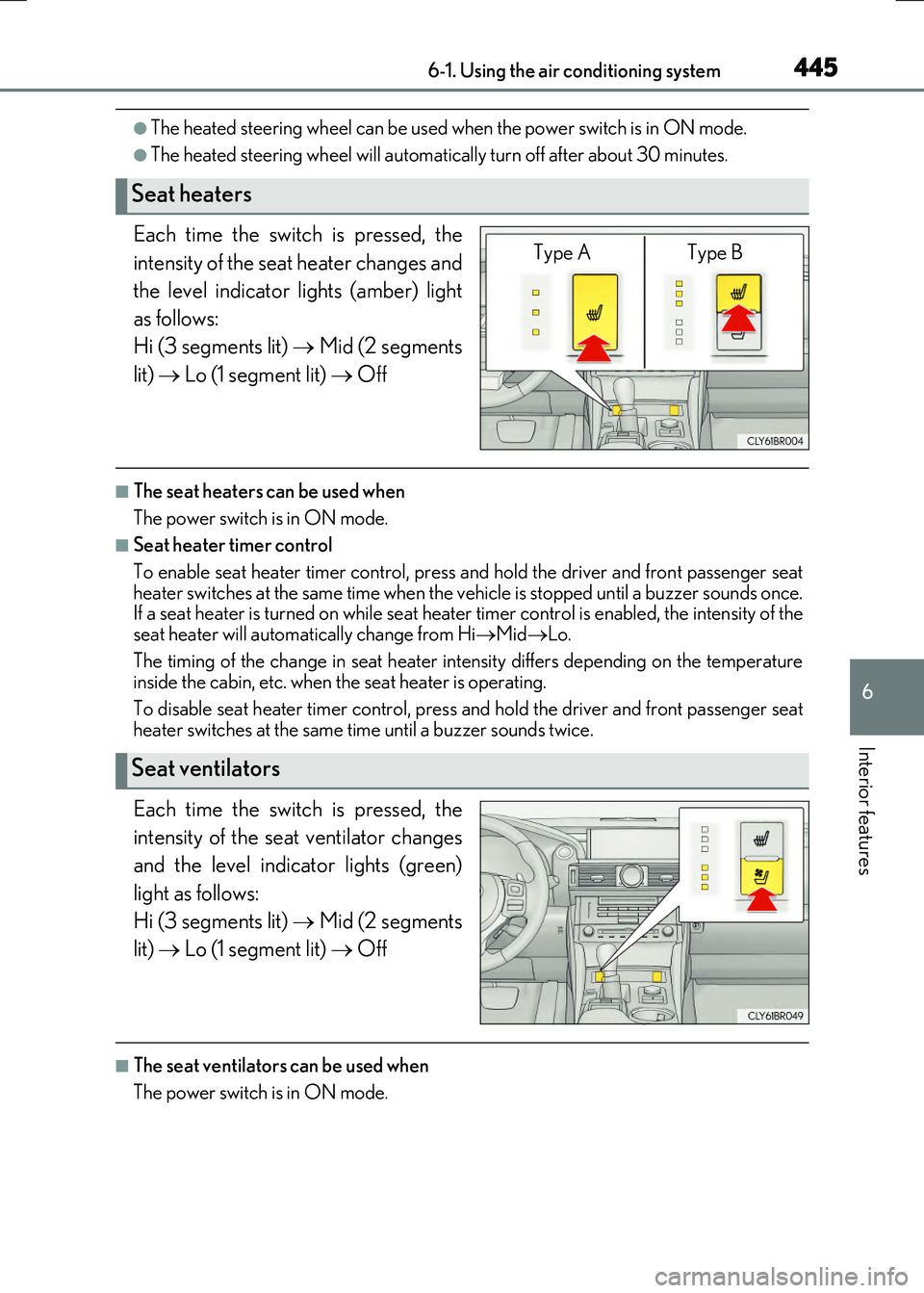
Each time the switch is pressed, the
intensity of the seat heater changes and
the level indicator lights (amber) light
as follows:
Hi (3 segments lit) Mid (2 segments
lit) Lo (1 segment lit) Off
■The seat heaters can be used when
The power switch is in ON mode.
■Seat heater timer control
To enable seat heater timer control, press and hold the driver and front passenger seat heater switches at the same time when the vehicle is stopped until a buzzer sounds once.If a seat heater is turned on while seat heater timer control is enabled, the intensity of the
seat heater will automa tically change from HiMidLo.
The timing of the change in seat heater intensity differs depending on the temperature inside the cabin, etc. when the seat heater is operating.
To disable seat heater timer control, press and hold the driver and front passenger seat heater switches at the same time until a buzzer sounds twice.
Each time the switch is pressed, the
intensity of the seat ventilator changes
and the level indicator lights (green)
light as follows:
Hi (3 segments lit) Mid (2 segments
lit) Lo (1 segment lit) Off
■The seat ventilators can be used when
The power switch is in ON mode.
Seat heaters
Type A Type B
Seat ventilators
Page 448 of 640
4486-2. Using the interior lights
RC300h_EE(OM24740E)
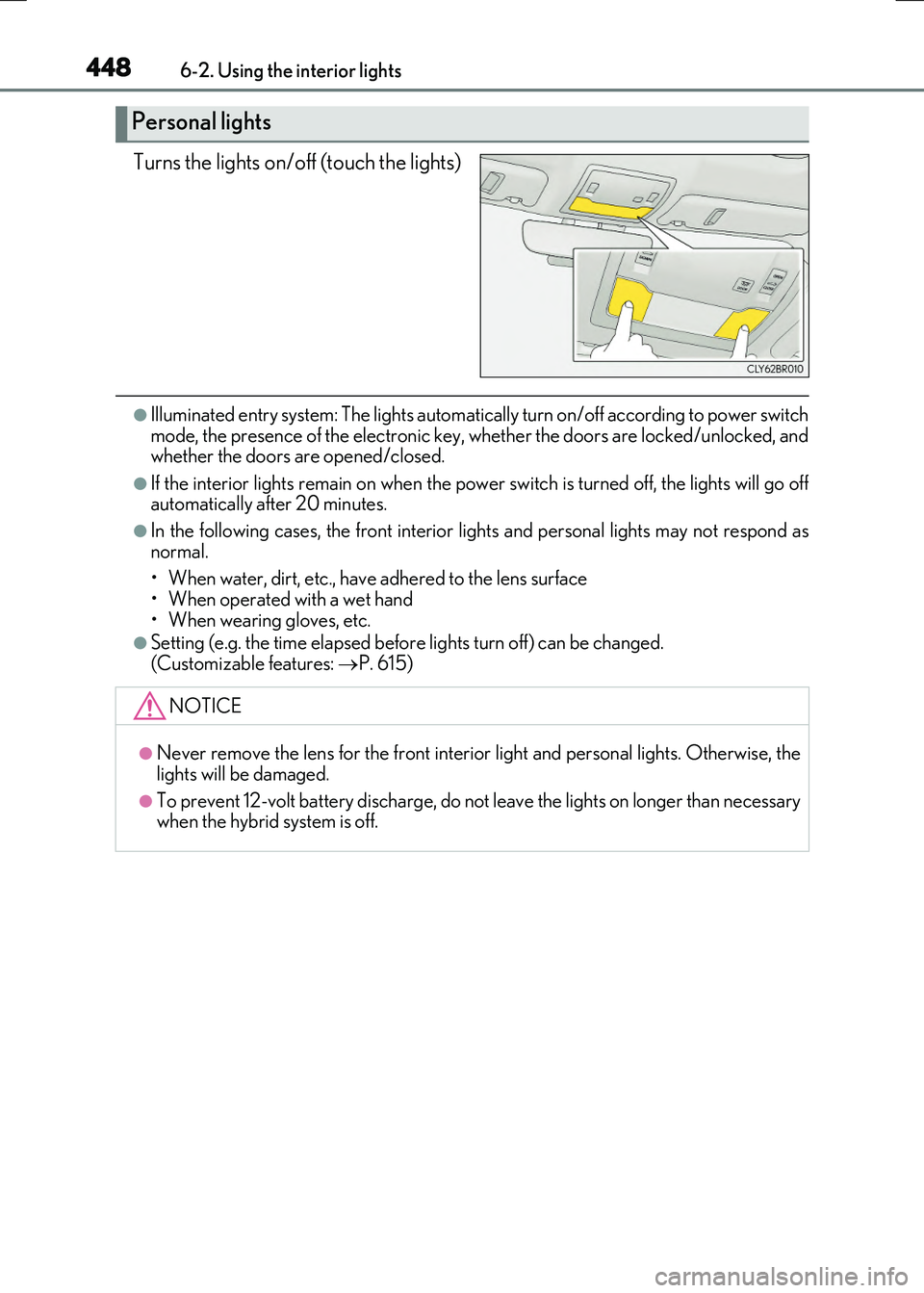
Turns the lights on/off (touch the lights)
●Illuminated entry system: The lights automatically turn on/off according to power switch mode, the presence of the electronic key, whether the doors are locked/unlocked, andwhether the doors are opened/closed.
●If the interior lights remain on when the powe r switch is turned off, the lights will go off automatically after 20 minutes.
●In the following cases, the front interior lights and personal lights may not respond as
normal.
• When water, dirt, etc., have adhered to the lens surface • When operated with a wet hand
• When wearing gloves, etc.
●Setting (e.g. the time elapsed before lights turn off) can be changed.
(Customizable features: P. 615)
Personal lights
NOTICE
●Never remove the lens for the front interior light and personal lights. Otherwise, the
lights will be damaged.
●To prevent 12-volt battery discharge, do not leave the lights on longer than necessary when the hybrid system is off.
Page 487 of 640
4877-3. Do-it-yourself maintenance
7
Maintenance and care
RC300h_EE(OM24740E)
◆Initializing the tire pressure warning system
■The tire pressure warning system must be initialized in the following circum-
stances:
●When rotating the tires.
●When the tire inflation pressure is changed such as when changing
traveling speed.
●When changing the tire size.
When the tire pressure warning system is initialized, the current tire inflation
pressure is set as the benchmark pressure.
■How to initialize the tire pressure warning system
Park the vehicle in a safe place and turn the power switch off.
Initialization cannot be perfor med while the vehicle is moving.
Adjust the tire inflation pressure to the specified cold tire inflation pressure
level. ( P. 604)
Make sure to adjust the tire pressure to the specified cold tire inflation pressure
level. The tire pressure warning system will operate based on this pressure level.
Turn the power switch to ON mode.
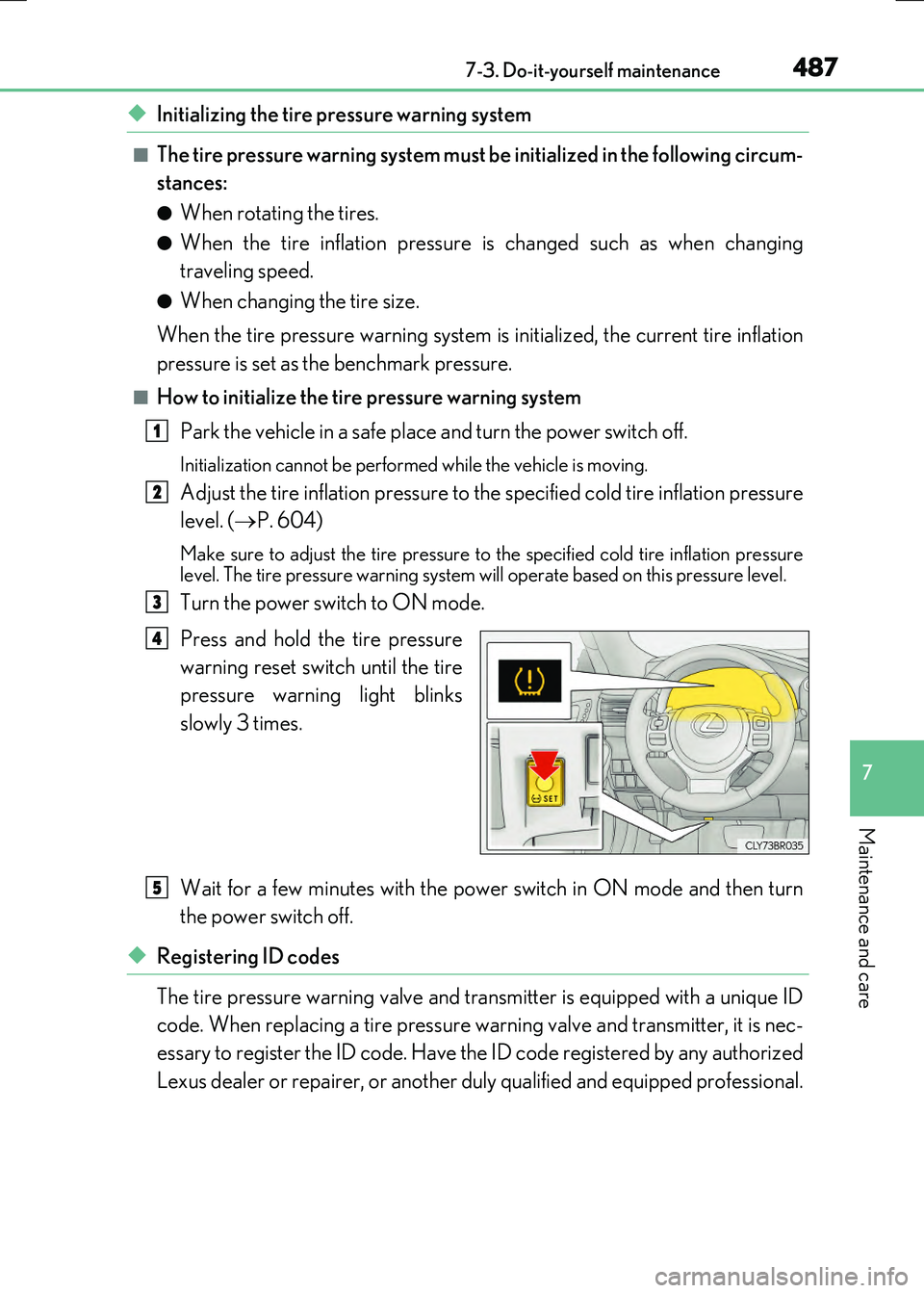
Press and hold the tire pressure
warning reset switch until the tire
pressure warning light blinks
slowly 3 times.
Wait for a few minutes with the power switch in ON mode and then turn
the power switch off.
◆Registering ID codes
The tire pressure warning valve and transmitter is equipped with a unique ID
code. When replacing a tire pressure wa rning valve and transmitter, it is nec-
essary to register the ID code. Have the ID code registered by any authorized
Lexus dealer or repairer, or another duly qualified and equipped professional.
1
2
3
4
5
Page 489 of 640
4897-3. Do-it-yourself maintenance
7
Maintenance and care
RC300h_EE(OM24740E)
■Situations in which the tire pressure warning system may not operate properly
●In the following cases, the tire pressure warning system may not operate properly.
• If non-genuine Lexus wheels are used.
• A tire has been replaced with a tire that is not an OE (Original Equipment) tire. • A tire has been replaced with a tire that is not of the specified size.• Tire chains etc. are equipped.
• An auxiliary-supported run-flat tire is equipped. • If a window tint that affects the radio wave signals is installed.• If there is a lot of snow or ice on the vehi cle, particularly around the wheels or wheel
housings. • If the tire inflation pressure is extr emely higher than the specified level. • If tires not equipped with tire pressure warning valves and transmitters are used.
• If the ID code on the tire pressure warning valves and transmitters is not registered in the tire pressure warning computer.
●Performance may be affected in the following situations.
• Near a TV tower, electric power plant, gas station, radio station, large display, air- port or other facility that generates st rong radio waves or electrical noise
• When carrying a portable radio, cellular phone, cordless phone or other wireless communication deviceIf tire position information is not correctly displayed due to the radio wave conditions,
the display may be corrected by driving and changing the radio wave conditions.
●When the vehicle is parked, the time taken for the warning to start or go off could be extended.
●When tire inflation pressure declines rapi dly for example when a tire has burst, the warning may not function.
■The initialization operation
●Make sure to carry out initialization af ter adjusting the tire inflation pressure. Also, make sure the tires are cold before carry ing out initialization or tire inflation pres-
sure adjustment.
●If you have accidentally turned the power switch off during initialization, it is not neces- sary to press the reset switch again as init ialization will restart automatically when the
power switch has been turned to ON mode for the next time.
●If you accidentally press the reset switch when initialization is not necessary, adjust the tire inflation pressure to the specified leve l when the tires are cold, and conduct initial-
ization again.
■Warning performance of the tire pressure warning system
The warning of the tire pressure warning syst em will change in accordance with the con-
ditions under which it was initialized. For this reason, the system may give a warning even if the tire pressure does not reach a low enough level, or if the pressure is higher than the pressure that was adjusted to when the system was initialized.
Page 581 of 640
5818-2. Steps to take in an emergency
8
When trouble arises
RC300h_EE(OM24740E)
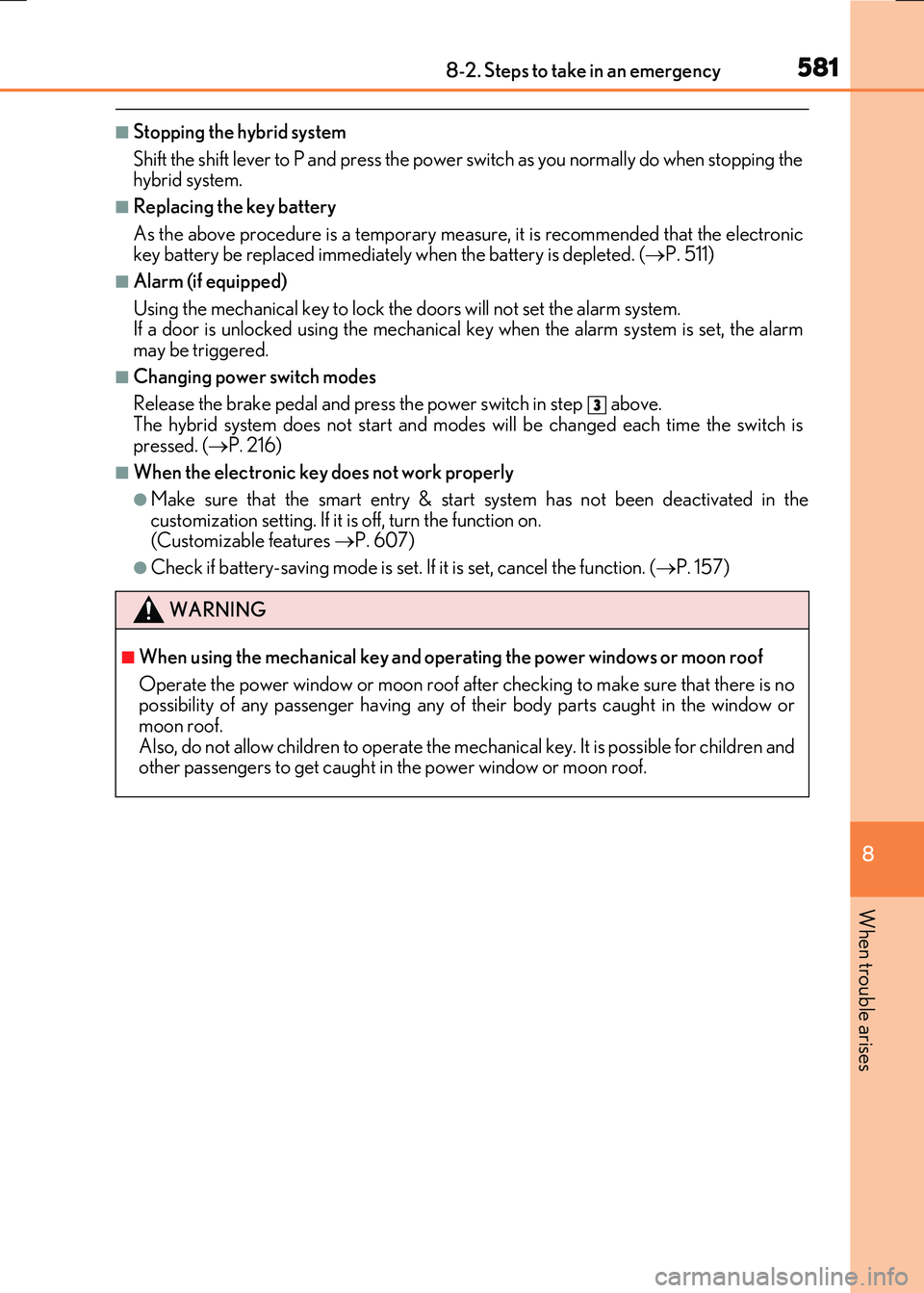
■Stopping the hybrid system
Shift the shift lever to P and press the power switch as you normally do when stopping the hybrid system.
■Replacing the key battery
As the above procedure is a temporary measur e, it is recommended that the electronic key battery be replaced immediately when the battery is depleted. ( P. 511)
■Alarm (if equipped)
Using the mechanical key to lock the doors will not set the alarm system. If a door is unlocked using the mechanical key when the alarm system is set, the alarm may be triggered.
■Changing power switch modes
Release the brake pedal and press the power switch in step above. The hybrid system does not start and modes will be changed each time the switch is
pressed. ( P. 216)
■When the electronic key does not work properly
●Make sure that the smart entry & start system has not been deactivated in the
customization setting. If it is off, turn the function on. (Customizable features P. 607)
●Check if battery-saving mode is set. If it is set, cancel the function. (P. 157)
WARNING
■When using the mechanical key and operating the power windows or moon roof
Operate the power window or moon roof after checking to make sure that there is no possibility of any passenger having any of their body parts caught in the window or moon roof.
Also, do not allow children to operate the me chanical key. It is possible for children and other passengers to get caught in the power window or moon roof.
3
Page 613 of 640
613
9
9-2. Customization
Vehicle specifications
RC300h_EE(OM24740E)
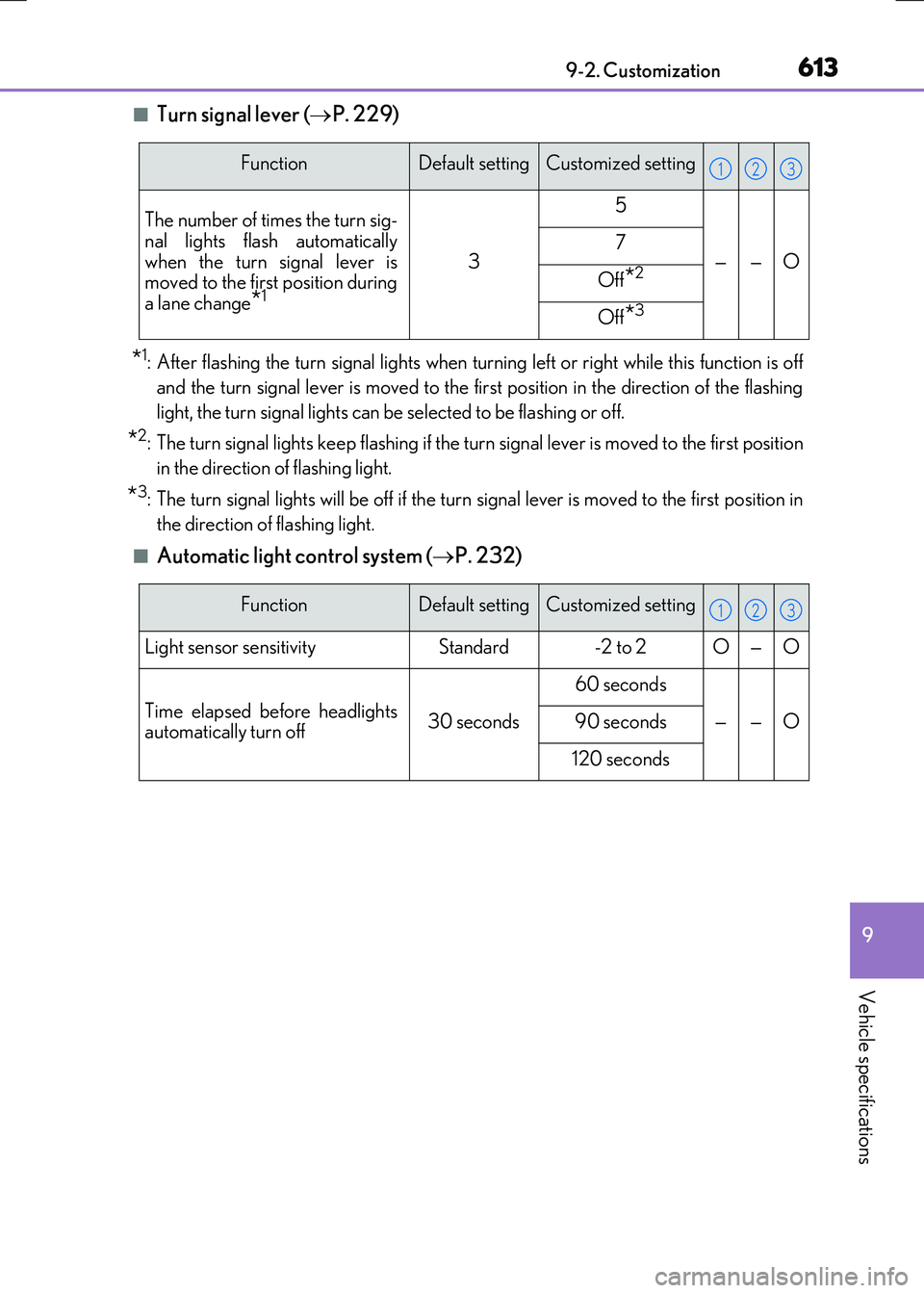
■Turn signal lever ( P. 229)
*1: After flashing the turn signal lights when turning left or right while this function is off
and the turn signal lever is moved to the fi rst position in the direction of the flashing
light, the turn signal lights can be selected to be flashing or off.
*2: The turn signal lights keep flashing if the turn signal lever is moved to the first position
in the direction of flashing light.
*3: The turn signal lights will be off if the turn signal lever is moved to the first position in
the direction of flashing light.
■Automatic light control system ( P. 232)
FunctionDefault settingCustomized setting
The number of times the turn sig- nal lights flash automatically
when the turn signal lever is moved to the first position duringa lane change*1
3
5
——O7
Off*2
Off*3
123
FunctionDefault settingCustomized setting
Light sensor sensitivityStandard-2 to 2O—O
Time elapsed before headlightsautomatically turn off30 seconds
60 seconds
——O90 seconds
120 seconds
123