Info system LEXUS RC300H 2017 Repair Manual
[x] Cancel search | Manufacturer: LEXUS, Model Year: 2017, Model line: RC300H, Model: LEXUS RC300H 2017Pages: 640, PDF Size: 35.53 MB
Page 345 of 640
3455-1. Basic Operations
5
Lexus Display Audio system
RC300h_EE(OM24740E)
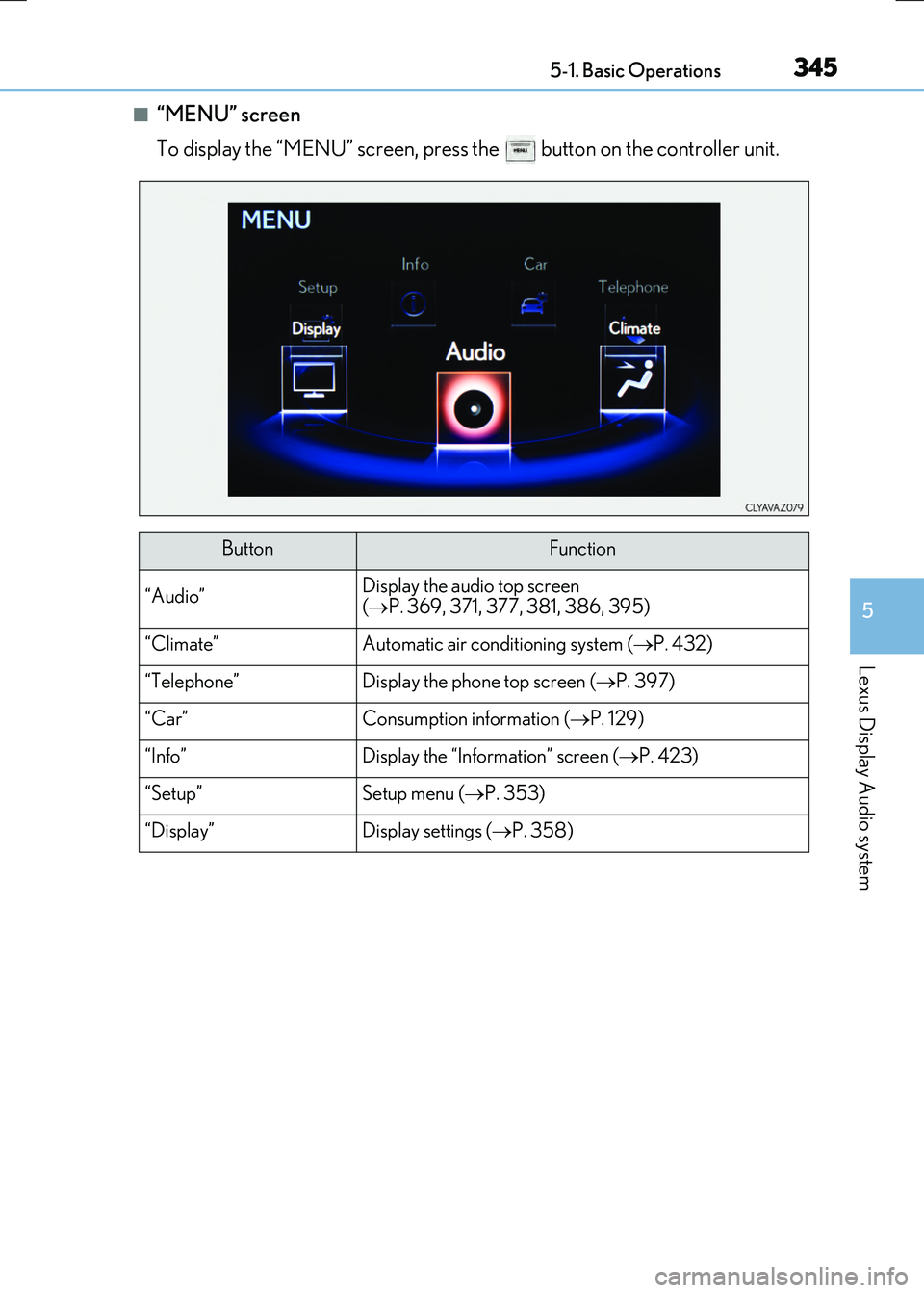
■“MENU” screen
To display the “MENU” screen, press the button on the controller unit.
ButtonFunction
“Audio”Display the audio top screen
( P. 369, 371, 377, 381, 386, 395)
“Climate”Automatic air conditioning system (P. 432)
“Telephone”Display the phone top screen (P. 397)
“Car” Consumption information (P. 129)
“Info”Display the “Information” screen (P. 423)
“Setup”Setup menu (P. 353)
“Display”Display settings (P. 358)
Page 363 of 640
3635-3. Using the audio system
5
Lexus Display Audio system
RC300h_EE(OM24740E)
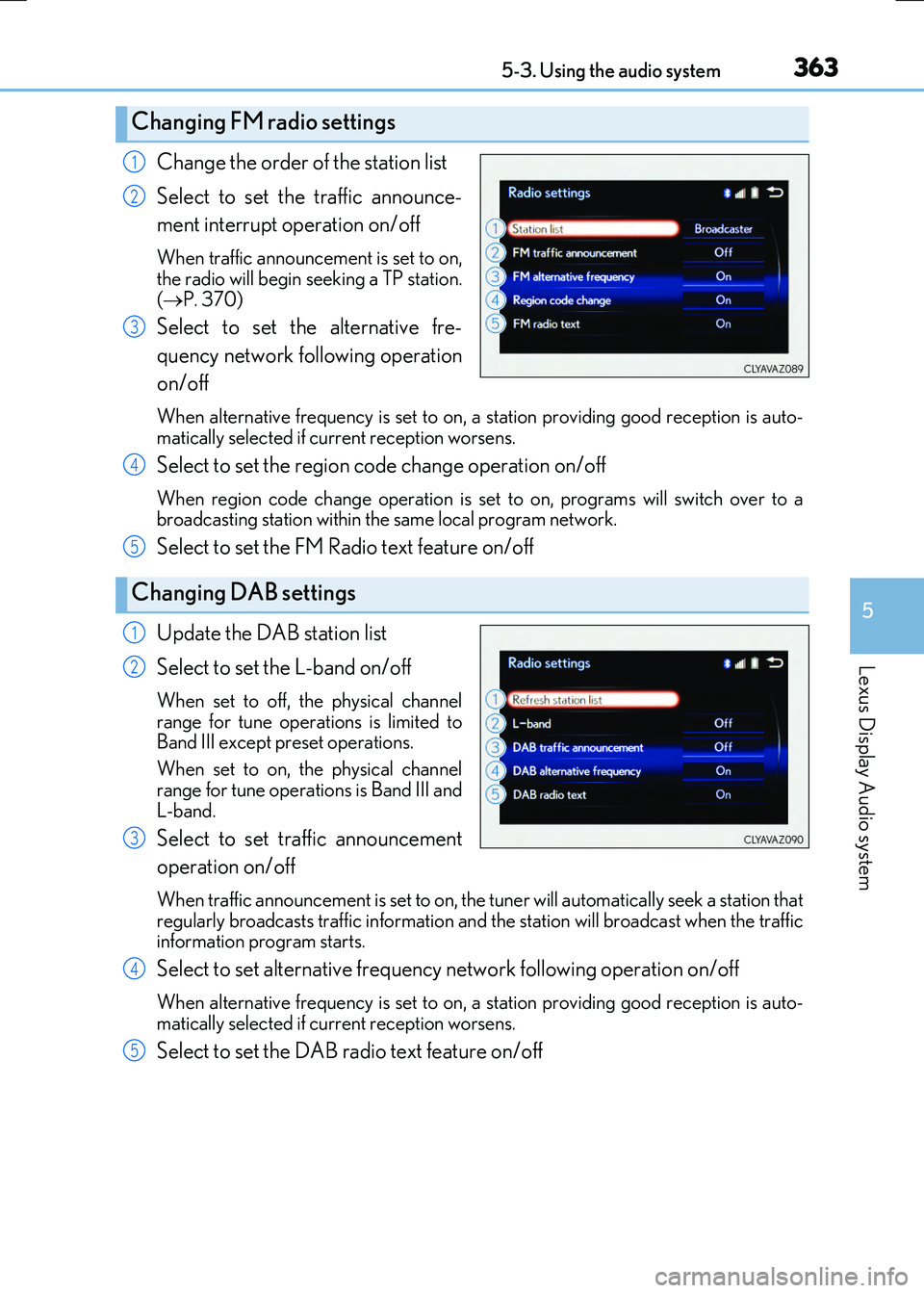
Change the order of the station list
Select to set the traffic announce-
ment interrupt operation on/off
When traffic announcement is set to on, the radio will begin seeking a TP station.
( P. 370)
Select to set the alternative fre-
quency network following operation
on/off
When alternative frequency is set to on, a station providing good reception is auto-
matically selected if current reception worsens.
Select to set the region code change operation on/off
When region code change operation is se t to on, programs will switch over to a broadcasting station within th e same local program network.
Select to set the FM Radio text feature on/off
Update the DAB station list
Select to set the L-band on/off
When set to off, the physical channel
range for tune operations is limited to Band III except preset operations.
When set to on, the physical channel
range for tune operations is Band III and L-band.
Select to set traffic announcement
operation on/off
When traffic announcement is set to on, the tuner will automatically seek a station that
regularly broadcasts traffic information and the station will broadcast when the traffic information program starts.
Select to set alternative frequency network following operation on/off
When alternative frequency is set to on, a station providing good reception is auto-matically selected if current reception worsens.
Select to set the DAB radio text feature on/off
Changing FM radio settings
1
2
3
Changing DAB settings
4
5
1
2
3
4
5
Page 393 of 640
3935-7. Connecting Bluetooth®
5
Lexus Display Audio system
RC300h_EE(OM24740E)
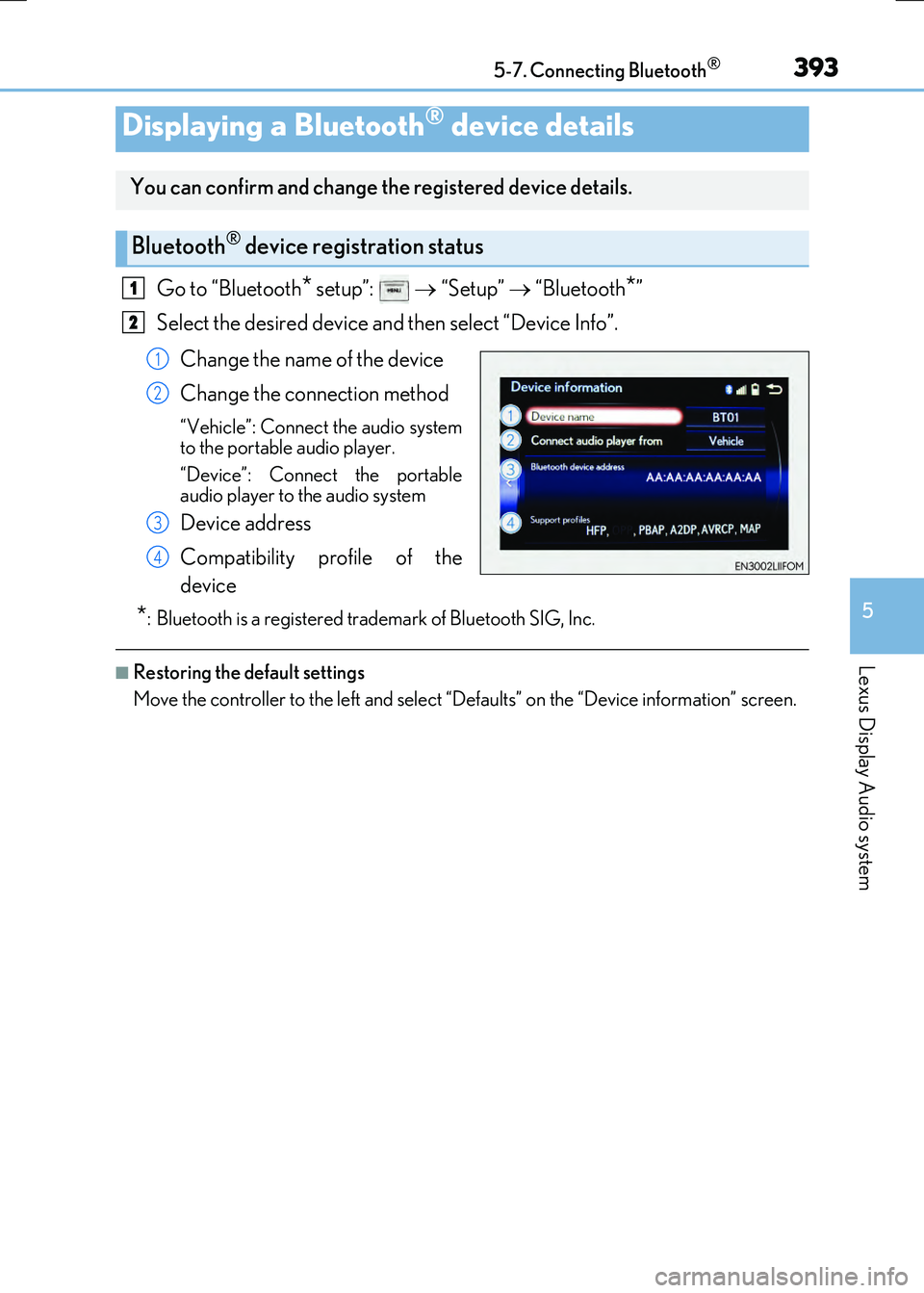
Go to “Bluetooth* setup”: “Setup” “Bluetooth*”
Select the desired device and then select “Device Info”.
Change the name of the device
Change the connection method
“Vehicle”: Connect the audio system
to the portable audio player.
“Device”: Connect the portable
audio player to the audio system
Device address
Compatibility profile of the
device
*: Bluetooth is a registered trademark of Bluetooth SIG, Inc.
■Restoring the default settings
Move the controller to the left and select “D efaults” on the “Device information” screen.
Displaying a Bluetooth® device details
You can confirm and change the registered device details.
Bluetooth® device registration status
1
2
1
2
3
4
Page 415 of 640
415
5
Lexus Display Audio system
RC300h_EE(OM24740E)
5-11. Bluetooth®
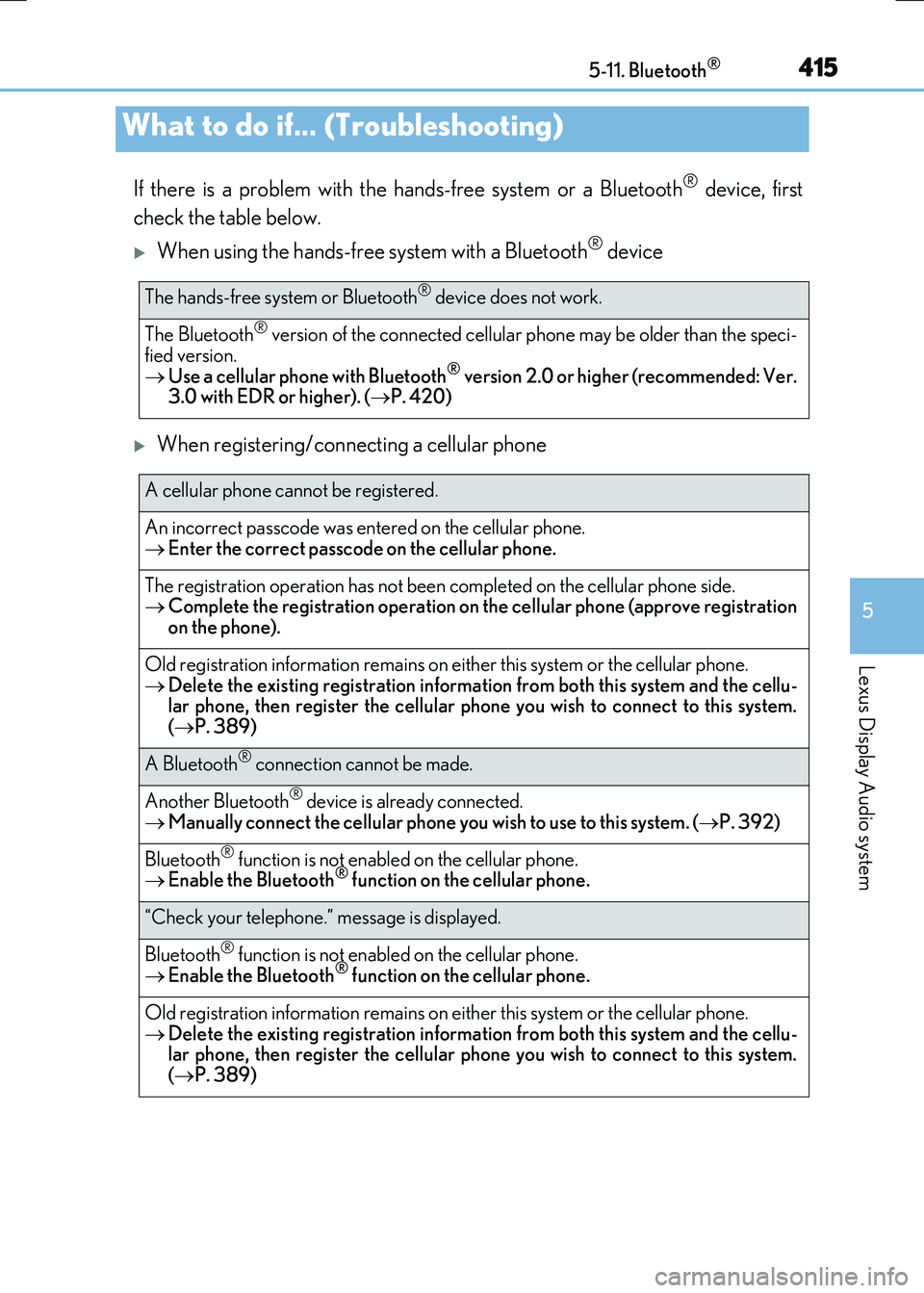
If there is a problem with the hands-free system or a Bluetooth® device, first
check the table below.
When using the hands-free system with a Bluetooth® device
When registering/connecting a cellular phone
What to do if... (Troubleshooting)
The hands-free system or Bluetooth® device does not work.
The Bluetooth® version of the connected cellular phone may be older than the speci-
fied version. Use a cellular phone with Bluetooth® version 2.0 or higher (recommended: Ver. 3.0 with EDR or higher). ( P. 420)
A cellular phone cannot be registered.
An incorrect passcode was entered on the cellular phone.
Enter the correct passcode on the cellular phone.
The registration operation has not been completed on the cellular phone side. Complete the registration operation on the cellular phone (approve registration on the phone).
Old registration information remains on ei ther this system or the cellular phone.
Delete the existing registration information from both this system and the cellu- lar phone, then register the cellular phone you wish to connect to this system.( P. 389)
A Bluetooth® connection cannot be made.
Another Bluetooth® device is already connected.
Manually connect the cellular phone you wish to use to this system. (P. 392)
Bluetooth® function is not enabled on the cellular phone. Enable the Bluetooth® function on the cellular phone.
“Check your telephone.” message is displayed.
Bluetooth® function is not enabled on the cellular phone. Enable the Bluetooth® function on the cellular phone.
Old registration information remains on either this system or the cellular phone.
Delete the existing registration information from both this system and the cellu- lar phone, then register the cellular phone you wish to connect to this system.( P. 389)
Page 422 of 640
4225-11. Bluetooth®
RC300h_EE(OM24740E)
WARNING
■While driving
Do not operate the portable audio player, cellular phone or connect a device to the Bluetooth® system.
■Caution regarding interference with electronic devices
●Your audio unit is fitted with Bluetooth® antennas. People with implantable cardiacpacemakers, cardiac resynchronization therapy-pacemakers or implantable cardioverter defibrillators should maintain a reasonable distance between them-
selves and the Bluetooth® antennas. The radio waves may affect the operation of such devices.
●Before using Bluetooth® devices, users of any electrical medical device other than
implantable cardiac pacemakers, cardiac resynchronization therapy-pacemakers or implantable cardioverter defibrillators should consult the manufacturer of the device for information about its operation under th e influence of radio waves. Radio waves
could have unexpected effects on the operation of such medical devices.
NOTICE
■When leaving the vehicle
Do not leave your portable audio player or cellular phone in the vehicle. The inside of the vehicle may become hot, causing damage to the portable audio player or cellular
phone.
Page 423 of 640
423
5
Lexus Display Audio system
RC300h_EE(OM24740E) 5-12. Other function
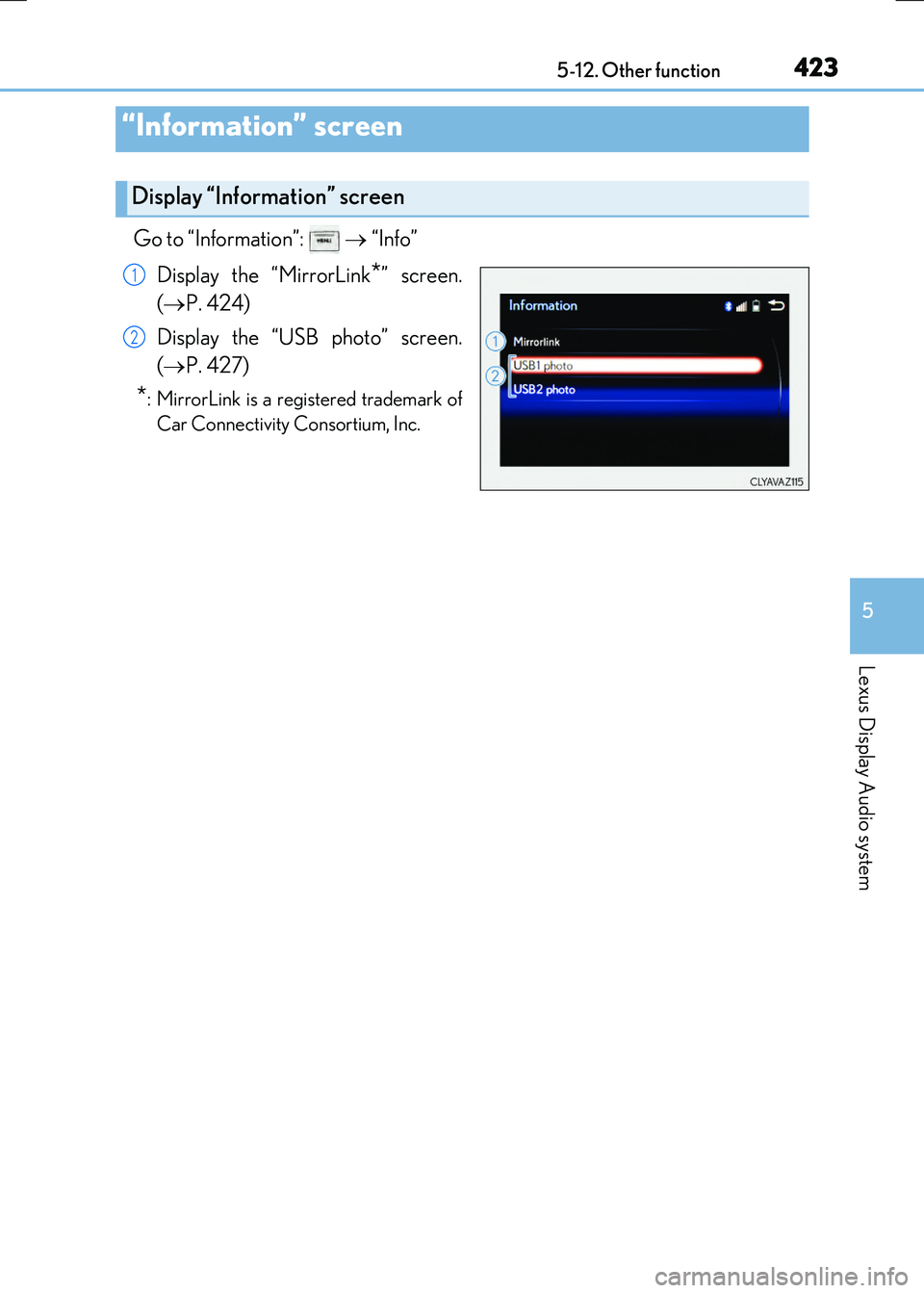
Go to “Information”:
“Info”
Display the “MirrorLink
*” screen.
( P. 424)
Display the “USB photo” screen.
( P. 427)
*: MirrorLink is a registered trademark of
Car Connectivity Consortium, Inc.
“Information” screen
Display “Information” screen
1
2
Page 425 of 640
4255-12. Other function
5
Lexus Display Audio system
RC300h_EE(OM24740E)
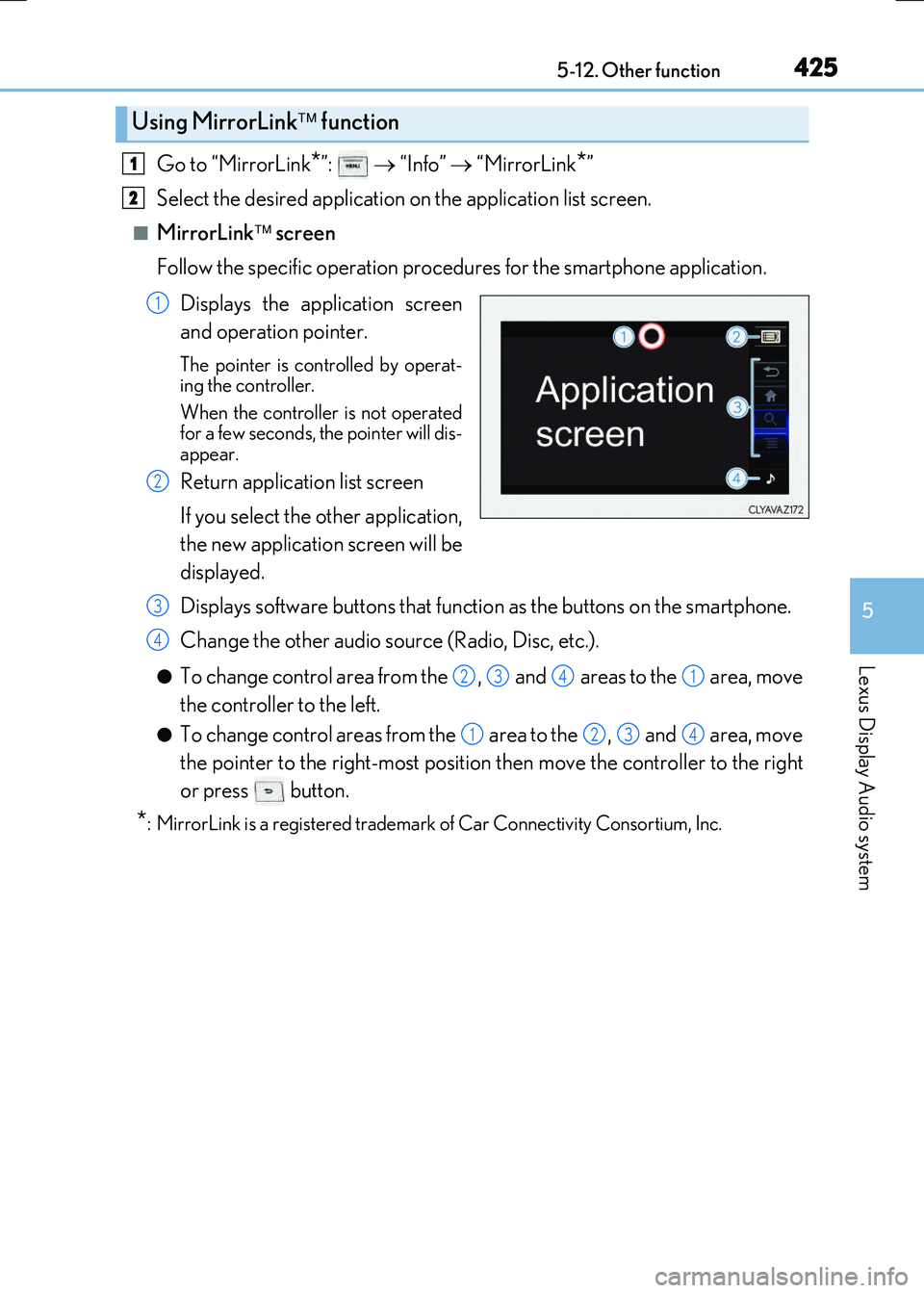
Go to “MirrorLink*”: “Info” “MirrorLink*”
Select the desired application on the application list screen.
■MirrorLink screen
Follow the specific operation procedures for the smartphone application.
Displays the application screen
and operation pointer.
The pointer is controlled by operat-
ing the controller.
When the controller is not operated
for a few seconds, the pointer will dis-
appear.
Return application list screen
If you select the other application,
the new application screen will be
displayed.
Displays software buttons that function as the buttons on the smartphone.
Change the other audio source (Radio, Disc, etc.).
●To change control area from the , and areas to the area, move
the controller to the left.
●To change control areas from the area to the , and area, move
the pointer to the right-most position then move the controller to the right
or press button.
*: MirrorLink is a registered trademark of Car Connectivity Consortium, Inc.
Using MirrorLink function
1
2
1
2
3
4
2341
1234
Page 427 of 640
4275-12. Other function
5
Lexus Display Audio system
RC300h_EE(OM24740E)
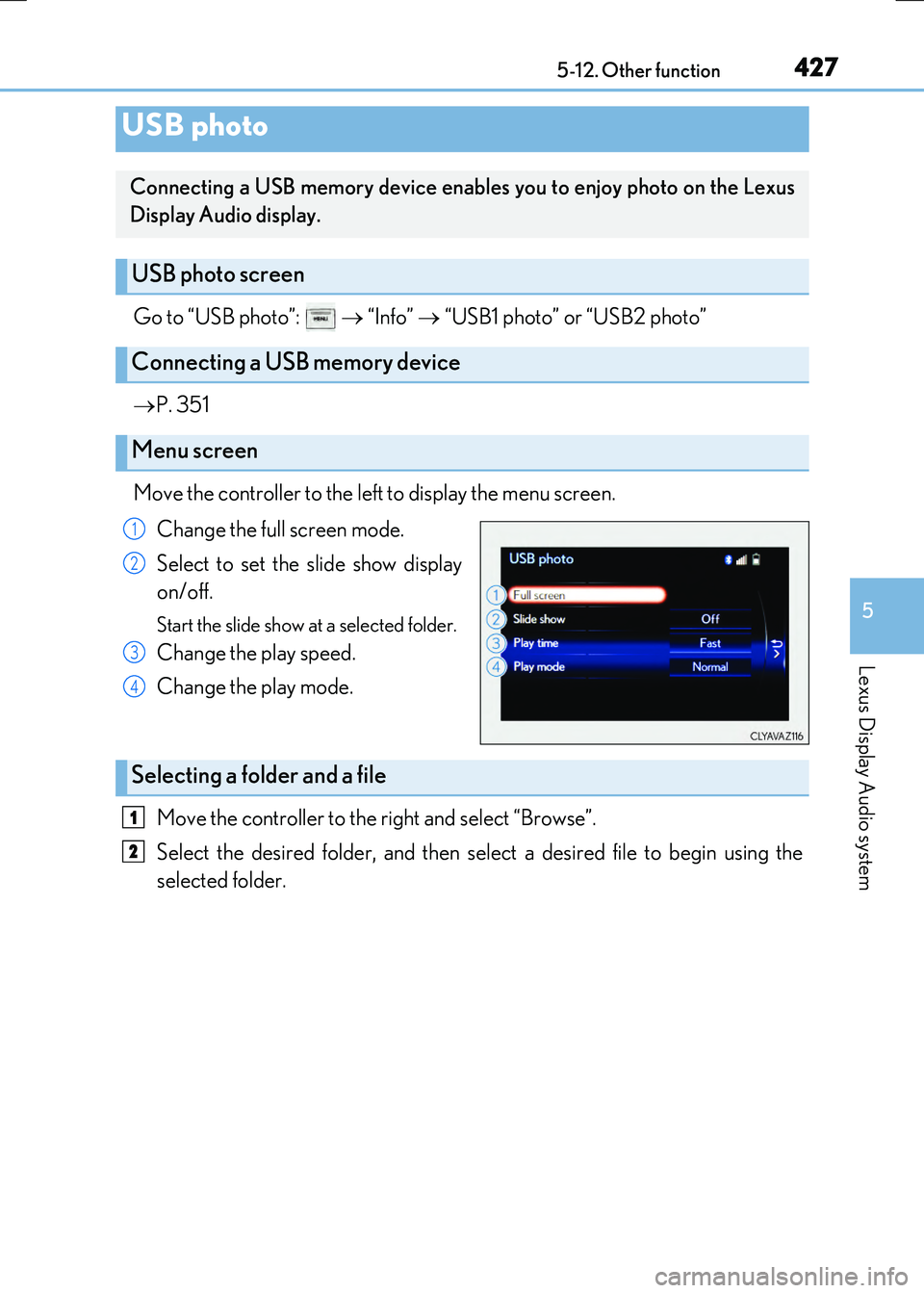
Go to “USB photo”: “Info” “USB1 photo” or “USB2 photo”
P. 351
Move the controller to the left to display the menu screen. Change the full screen mode.
Select to set the slide show display
on/off.
Start the slide show at a selected folder.
Change the play speed.
Change the play mode.
Move the controller to the right and select “Browse”.
Select the desired folder, and then select a desired file to begin using the
selected folder.
USB photo
Connecting a USB memory device enables you to enjoy photo on the Lexus
Display Audio display.
USB photo screen
Connecting a USB memory device
Menu screen
1
2
3
4
Selecting a folder and a file
1
2
Page 480 of 640
4807-3. Do-it-yourself maintenance
RC300h_EE(OM24740E)
Check the radiator and condenser and clear away any foreign objects.
If either of the above parts is extremely dirty or you are not sure of their condi-
tion, have your vehicle inspected by any authorized Lexus dealer or repairer, or
another duly qualified and equipped professional.
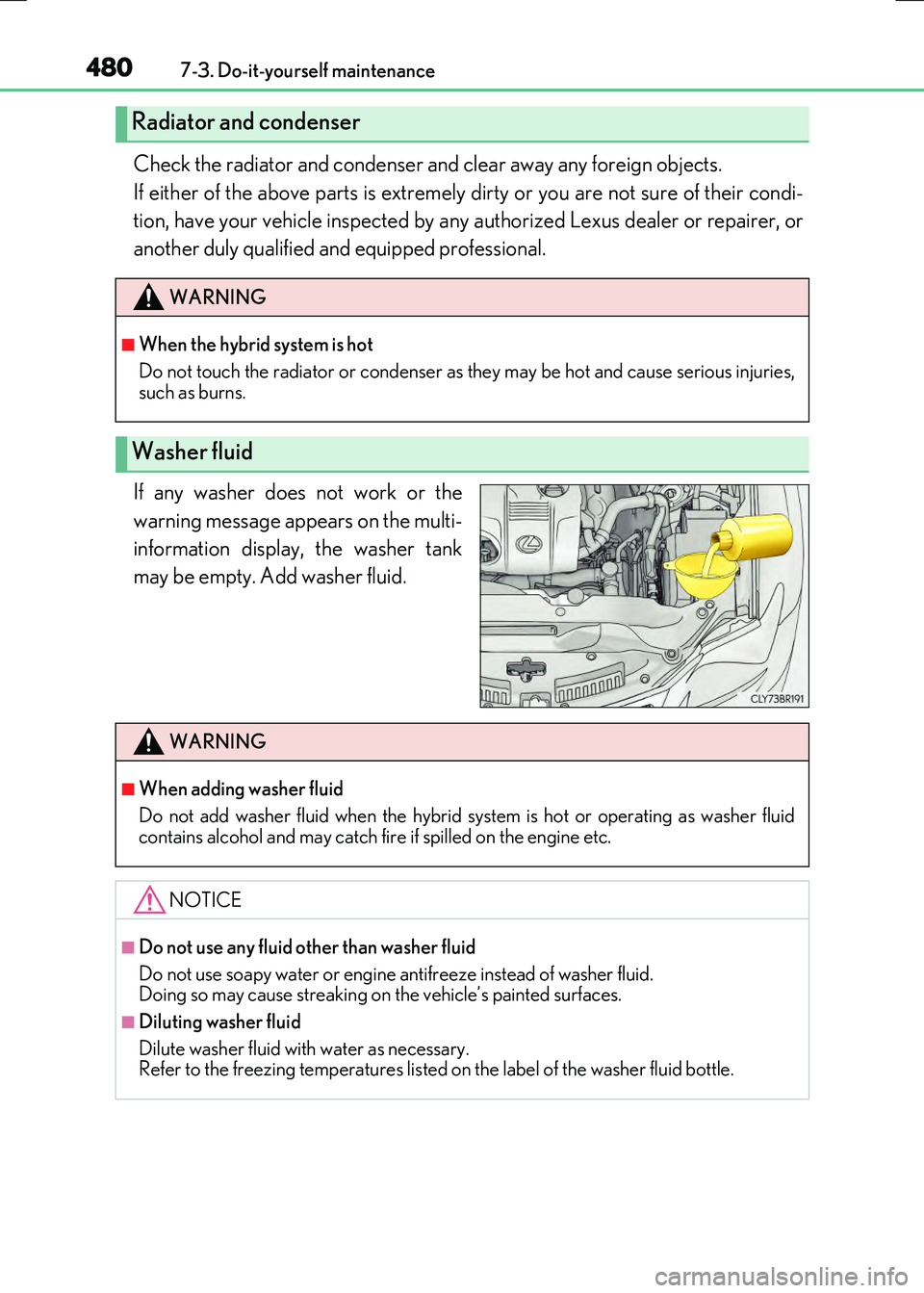
If any washer does not work or the
warning message appears on the multi-
information display, the washer tank
may be empty. Add washer fluid.
Radiator and condenser
WARNING
■When the hybrid system is hot
Do not touch the radiator or condenser as they may be hot and cause serious injuries, such as burns.
Washer fluid
WARNING
■When adding washer fluid
Do not add washer fluid when the hybrid sy stem is hot or operating as washer fluid
contains alcohol and may catch fi re if spilled on the engine etc.
NOTICE
■Do not use any fluid other than washer fluid
Do not use soapy water or engine antifreeze instead of washer fluid. Doing so may cause streaking on the vehicle’s painted surfaces.
■Diluting washer fluid
Dilute washer fluid with water as necessary. Refer to the freezing temperatures listed on the label of the washer fluid bottle.
Page 486 of 640
4867-3. Do-it-yourself maintenance
RC300h_EE(OM24740E)
Your vehicle is equipped with a tire pressure warning system that uses tire pres-
sure warning valves and transmitters to detect low tire inflation pressure before
serious problems arise.
●If the tire pressure drops below a predetermined level, the driver is warned by
a screen display and a warning light. ( P. 539, 552)
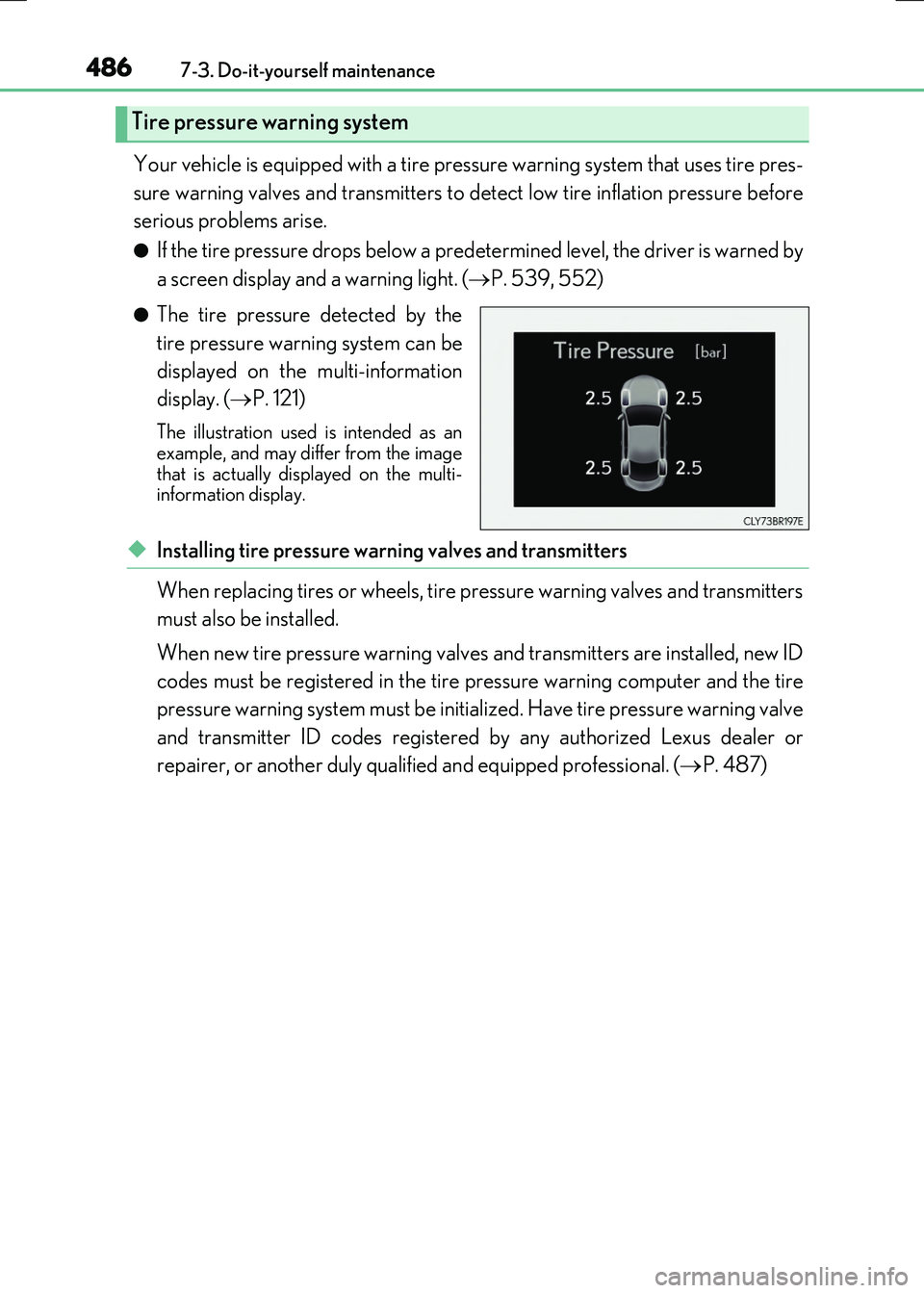
●The tire pressure detected by the
tire pressure warning system can be
displayed on the multi-information
display. ( P. 121)
The illustration used is intended as an example, and may differ from the image
that is actually displayed on the multi- information display.
◆Installing tire pressure warning valves and transmitters
When replacing tires or wheels, tire pressure warning valves and transmitters
must also be installed.
When new tire pressure warning valves and transmitters are installed, new ID
codes must be registered in the tire pressure warning computer and the tire
pressure warning system must be initialized. Have tire pressure warning valve
and transmitter ID codes registered by any authorized Lexus dealer or
repairer, or another duly qualified and equipped professional. ( P. 487)
Tire pressure warning system