driver LEXUS RC350 2015 Owners Manual
[x] Cancel search | Manufacturer: LEXUS, Model Year: 2015, Model line: RC350, Model: LEXUS RC350 2015Pages: 684, PDF Size: 9.31 MB
Page 591 of 684
5918-2. Steps to take in an emergency
8
When trouble arises
RC350/RCF_U (OM24636U)
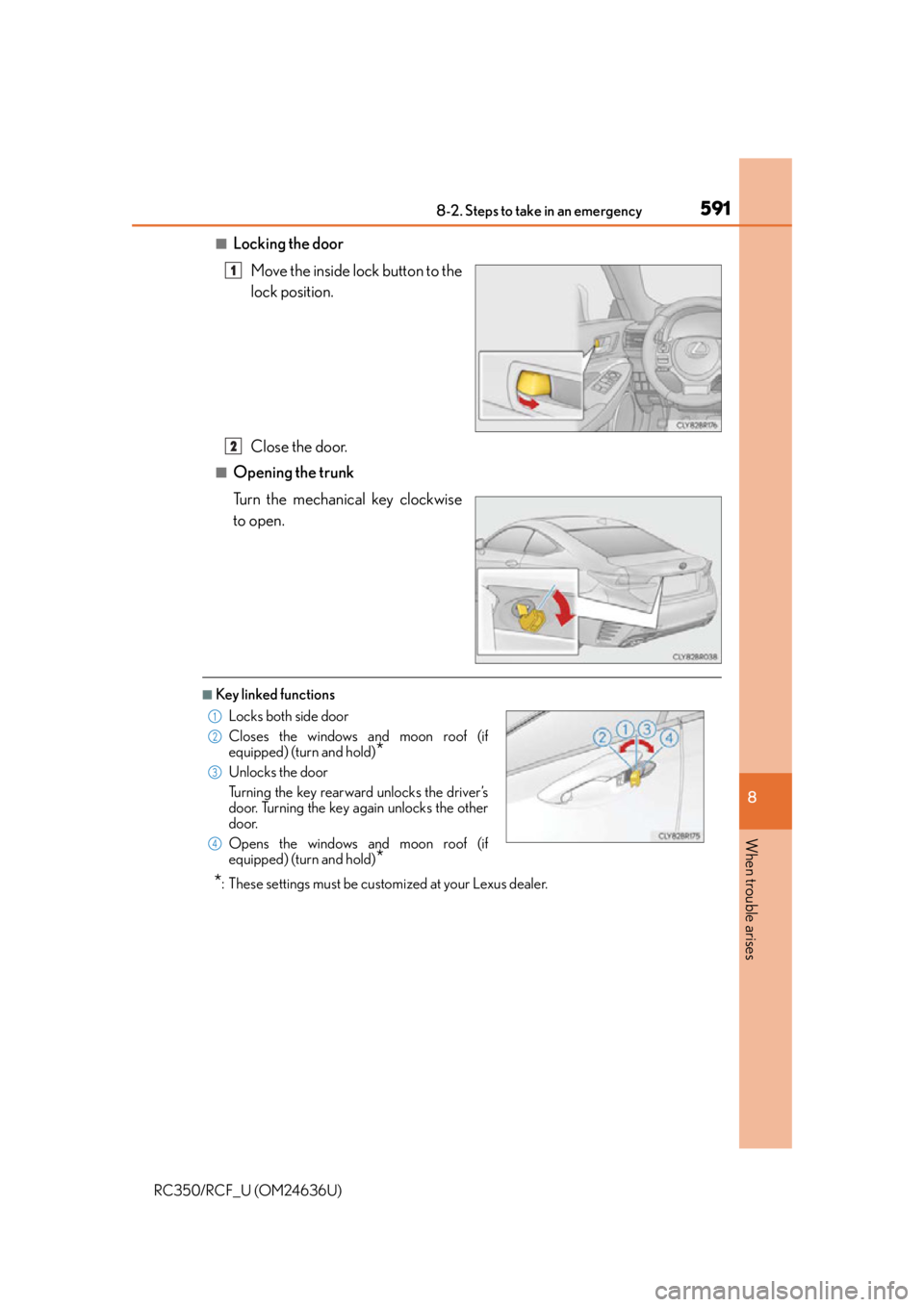
■Locking the doorMove the inside lock button to the
lock position.
Close the door.
■Opening the trunk
Turn the mechanical key clockwise
to open.
■Key linked functions
*: These settings must be cust omized at your Lexus dealer.
1
2
Locks both side door
Closes the windows and moon roof (if
equipped) (turn and hold)
*
Unlocks the door
Turning the key rearward unlocks the driver’s
door. Turning the key again unlocks the other
door.
Opens the windows and moon roof (if
equipped) (turn and hold)
*
1
22
33
44
Page 639 of 684
6399-2. Customization
9
Vehicle specifications
RC350/RCF_U (OM24636U)
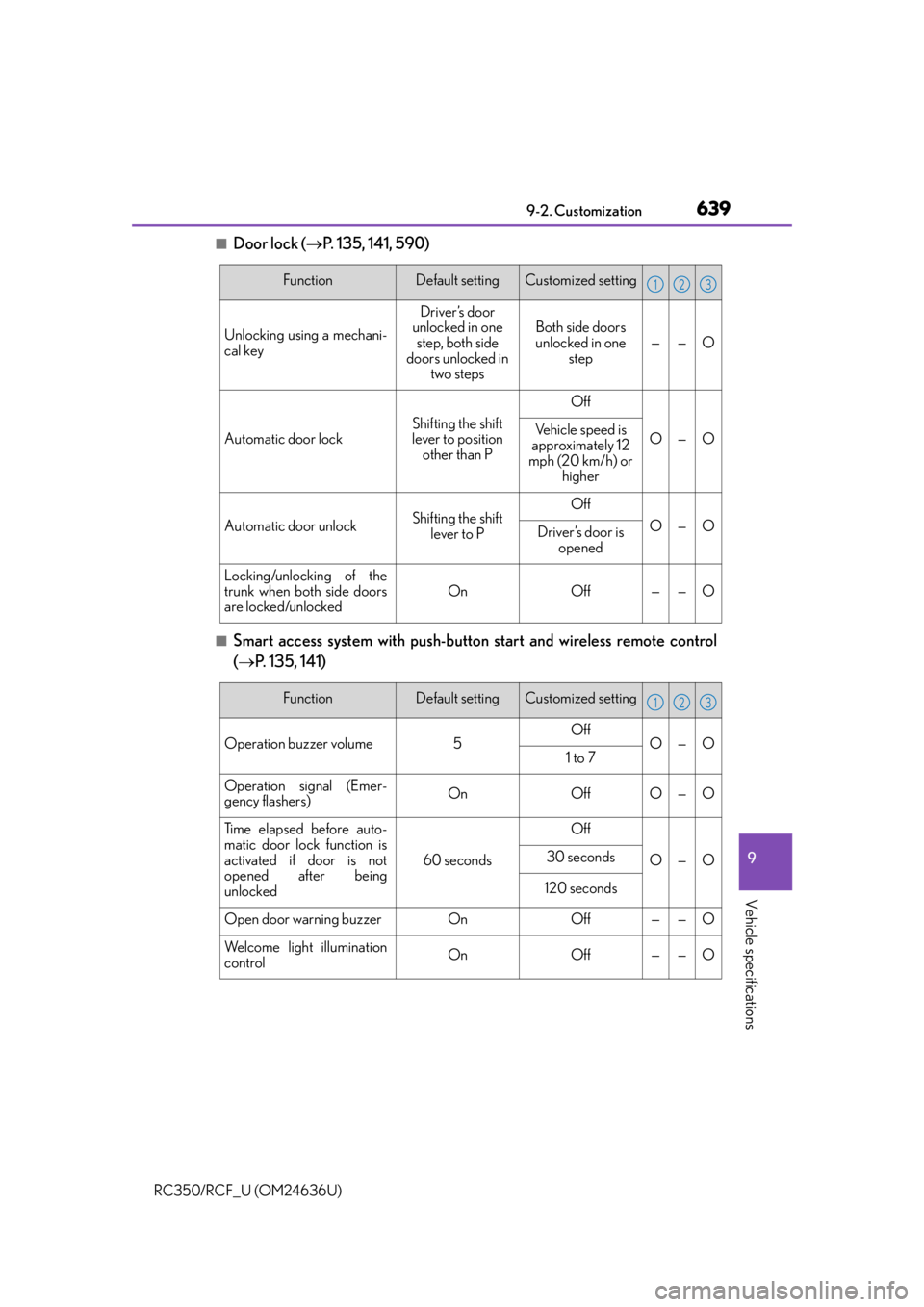
■Door lock (P. 135, 141, 590)
■Smart access system with push-button start and wireless remote control
( P. 135, 141)
FunctionDefault settingCustomized setting
Unlocking using a mechani-
cal key
Driver’s door
unlocked in one
step, both side
doors unlocked in two stepsBoth side doors
unlocked in one step
——O
Automatic door lockShifting the shift
lever to position
other than P
Off
O—OVehicle speed is
approximately 12
mph (20 km/h) or higher
Automatic door unlockShifting the shift
lever to POff
O—ODriver’s door is opened
Locking/unlocking of the
trunk when both side doors
are locked/unlocked
OnOff——O
123
FunctionDefault settingCustomized setting
Operation buzzer volume5OffO—O1 to 7
Operation signal (Emer-
gency flashers)OnOffO—O
Time elapsed before auto-
matic door lock function is
activated if door is not
opened after being
unlocked
60 seconds
Off
O—O30 seconds
120 seconds
Open door warning buzzerOnOff——O
Welcome light illumination
controlOnOff——O
123
Page 640 of 684
6409-2. Customization
RC350/RCF_U (OM24636U)
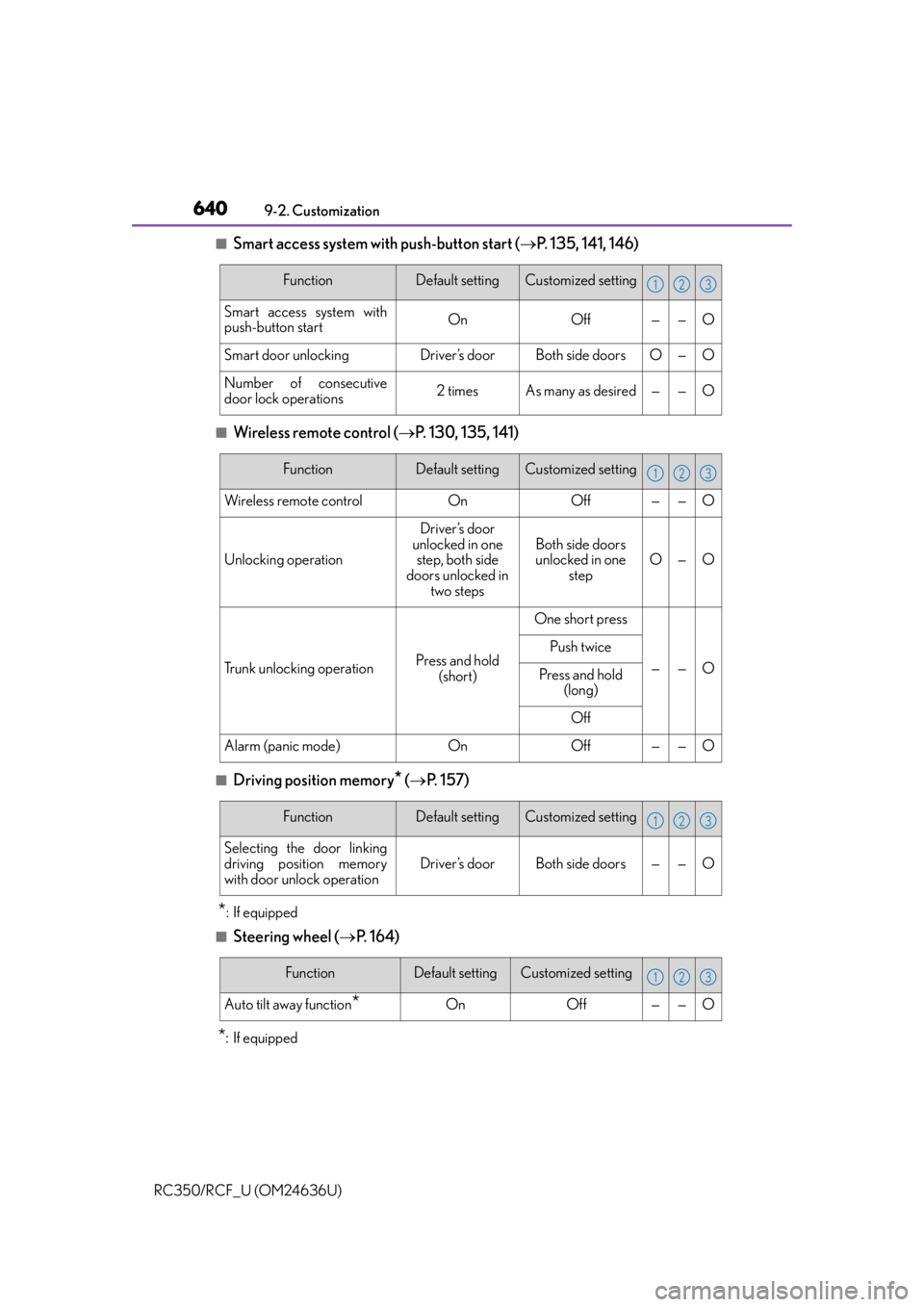
■Smart access system with push-button start ( P. 135, 141, 146)
■Wireless remote control ( P. 130, 135, 141)
■Driving position memory* ( P. 1 5 7 )
*: If equipped
■Steering wheel ( P. 1 6 4 )
*:If equipped
FunctionDefault settingCustomized setting
Smart access system with
push-button startOnOff——O
Smart door unlockingDriver’s doorBoth side doorsO—O
Number of consecutive
door lock operations2 timesAs many as desired——O
123
FunctionDefault settingCustomized setting
Wireless remote controlOnOff——O
Unlocking operation
Driver’s door
unlocked in one step, both side
doors unlocked in two steps
Both side doors
unlocked in one
stepO—O
Trunk unlocking operationPress and hold (short)
One short press
——O
Push twice
Press and hold (long)
Off
Alarm (panic mode)OnOff——O
123
FunctionDefault settingCustomized setting
Selecting the door linking
driving position memory
with door unlock operation
Driver’s doorBoth side doors——O
123
FunctionDefault settingCustomized setting
Auto tilt away function*OnOff——O
123
Page 661 of 684
661What to do if... (Troubleshooting)
RC350/RCF_U (OM24636U)
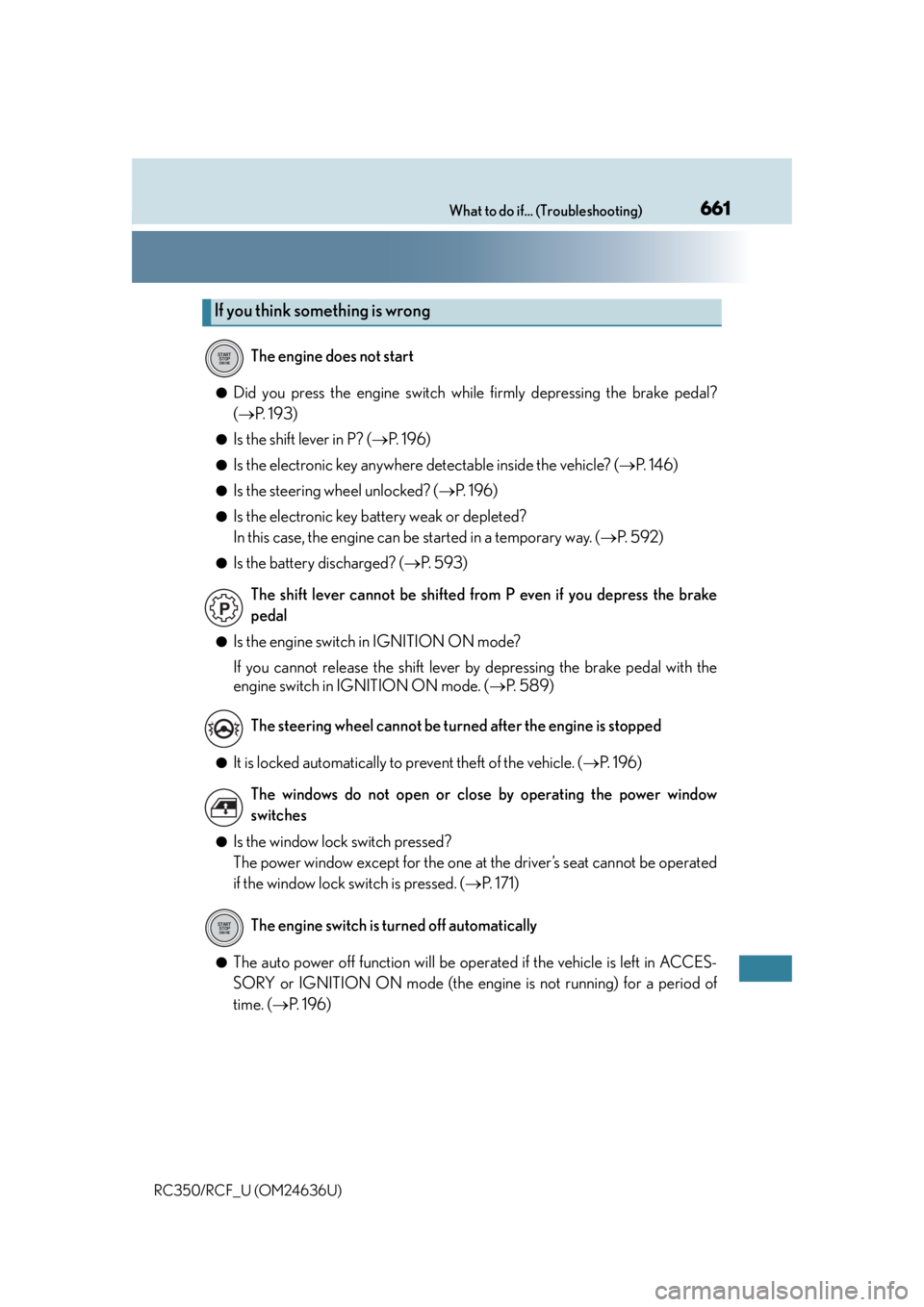
●Did you press the engine switch while firmly depressing the brake pedal?
(P. 1 9 3 )
●Is the shift lever in P? ( P. 1 9 6 )
●Is the electronic key anywhere detectable inside the vehicle? ( P. 1 4 6 )
●Is the steering wheel unlocked? ( P. 1 9 6 )
●Is the electronic key battery weak or depleted?
In this case, the engine can be started in a temporary way. (P. 5 9 2 )
●Is the battery discharged? ( P. 5 9 3 )
●Is the engine switch in IGNITION ON mode?
If you cannot release the shift lever by depressing the brake pedal with the
engine switch in IGNITION ON mode. ( P. 5 8 9 )
●It is locked automatically to prevent theft of the vehicle. ( P. 1 9 6 )
●Is the window lock switch pressed?
The power window except for the one at the driver’s seat cannot be operated
if the window lock switch is pressed. ( P. 171)
●The auto power off function will be oper ated if the vehicle is left in ACCES-
SORY or IGNITION ON mode (the engine is not running) for a period of
time. ( P. 1 9 6 )
If you think something is wrong
The engine does not start
The shift lever cannot be shifted from P even if you depress the brake
pedal
The steering wheel cannot be turned after the engine is stopped
The windows do not open or close by operating the power window
switches
The engine switch is turned off automatically
Page 662 of 684
662What to do if... (Troubleshooting)
RC350/RCF_U (OM24636U)
●The seat belt reminder light is flashing
Are the driver and the front passenger wearing the seat belts? ( P. 5 3 4 )
●The parking brake indicator is on
Is the parking brake released? ( P. 2 0 5 )
Depending on the situation, other type s of warning buzzer may also sound.
( P. 533, 539)
●Did anyone inside the vehicle open a door during setting the alarm?
The sensor detects it and the alarm sounds. ( P. 7 8 )
To stop the alarm, turn the engine switch to IGNITION ON mode or start the
engine.
●Is the electronic key left inside the vehicle or the moon roof opened?
Check the message on the multi-information display. ( P. 5 3 9 )
●When a warning light turns on or a warning message is displayed, refer to
P. 533, 539. A warning buzzer sounds during driving
An alarm is activated and the horn sounds
A warning buzzer sounds when leaving the vehicle
A warning light turns on or a warning message is displayed
Page 668 of 684

668Alphabetical index
RC350/RCF_U (OM24636U)
Daytime running light system .......... 209
DefoggerOutside rear view mirrors .............420
Rear window ........................................420
Windshield ............................................420
Differential Front differential ..................................... 611
Rear differential .................................... 612
Dimension ............................................... 604
Dinghy towing..........................................192
Display Drive information ....................... 106, 112
Dynamic radar cruise control...... 233
LDA (Lane Departure Alert) .......249
Multi-information display ....... 103, 110
Warning message ............................ 539
Distance .......................................... 106, 107
Do-it-yourself maintenance ............. 473
Door courtesy lights Location ..................................................428
Wattage ................................................... 619
Door lock Doors ........................................................ 135
Smart access system with push-button start ............................. 146
Wireless remote control ................. 130 Doors .......................................................... 135
Automatic door locking and unlocking system ................... 138
Door lock................................................. 137
Open door warning buzzer ..........136
Open door warning light .............. 534
Outside rear view mirrors ............. 168
Side windows ..........................................171
Drive info 1/Drive info 2 ............. 107, 119
Drive information .......................... 106, 112 Resetting ......................................... 106, 112
Driver’s seat position memory.......... 157
Driving ....................................................... 180 Break-in tips ............................................ 181
Correct driving posture .....................32
Driving mode select switch .......... 278
Procedures ............................................ 180
Winter drive tips ..................................315
DRS (Dynamic Rear Steering) ....... 282 Warning message.............................539
Dynamic radar cruise control ......... 233
Dynamic Rear Steering (DRS) ....... 282 Warning message.............................539
D