driver LEXUS RC350 2015 Repair Manual
[x] Cancel search | Manufacturer: LEXUS, Model Year: 2015, Model line: RC350, Model: LEXUS RC350 2015Pages: 684, PDF Size: 9.31 MB
Page 295 of 684
2954-5. Using the driving support systems
4
Driving
RC350/RCF_U (OM24636U)
WA R N I N G
■Limitations of the pre-collision system
●The driver is solely responsible for safe driving. Always drive safely, taking care to
observe your surroundings.
Never use the pre-collision safety system instead of normal braking operations. This
system is not designed to avoid or reduce collisions in every situation. Overly relying
on the system or entrusting it with safety may lead to an accident resulting in death or
serious injury.
Although this system is designed to suppor t in avoiding a collision or reducing the
damage of a collision, its effectiveness may change according to various conditions
( P. 292, 293). Therefore, the system may not always provide the same perfor-
mance. Also, pre-collision braking function may not operate depending on the oper-
ations of the driver. If the driver is stepping on the brake pedal or is operating the
steering wheel, the system may determine th at the driver is taking evasive action and
pre-collision braking func tion may not operate.
●As the pre-collision system is designed to assi st the driver in safe driving, it may oper-
ate under sporty driving conditions, whic h may cause an accident. For this reason
under sporty driving conditions, it is reco mmended that this system be disabled by
using the PCS OFF switch.
■Handling the radar sensor
Observe the following to ensure the pre-collision system can function effectively.
Otherwise, the system may not function correctly and could result in an accident.
●Keep the sensor and grille cover clean at all times.
Clean the sensor and grille cover with a soft cloth so you do not mark or damage
them.
●Do not subject the sensor or surr ounding area to a strong impact.
If the sensor moves even slightly off posi tion, the system may become inaccurate or
malfunction. If the sensor or surrounding area is subject to a strong impact, always
have the area inspected and adjusted by your Lexus dealer.
●Do not disassemble the sensor.
●Do not attach accessories or stickers to the sensor, grille cover or surrounding area.
●Do not modify or paint the sensor and grille cover.
●If the radar sensor needs to be replaced, contact your Lexus dealer.
Page 296 of 684
2964-5. Using the driving support systems
RC350/RCF_U (OM24636U)
WA R N I N G
■Cautions regarding the assist contents of the system
By means of alarms and brake control, the pre- collision system is intended to assist the
driver in avoiding collisions through the process of LOOK-JUDGE-ACT. There are
limits to the degree of assistance the system can provide, so please keep in mind the
following important points.
●Assisting the driver in watching the road
The pre-collision system is only able to detect obstacles directly in front of the vehicle,
and only within a limited range. It is not a mechanism that allows careless or inatten-
tive driving, and it is not a system that can assist the driver in low-visibility conditions. It
is still necessary for the driver to pay cl ose attention to the vehicle’s surroundings.
●Assisting the driver in making correct judgment
When attempting to estimate the possibility of a collision, the only data available to
the pre-collision system is that from obstacle s it has detected directly in front of the
vehicle. Therefore, it is absolutely necess ary for the driver to remain vigilant and to
determine whether or not there is a possib ility of collision in any given situation.
●Assisting the driver in taking action
The pre-collision brake assist function of th e pre-collision safety system is designed to
help reduce the severity of a collision, an d will only operate when the system deter-
mines that a collision is unavoidable. Withou t proper input from the driver, this system
is not capable of avoiding a collision or brin ging the vehicle to a stop safely. For this
reason, when encountering a dangerous situation the driver must take direct and
immediate action in order to ensu re the safety of all involved.
Page 297 of 684
2974-5. Using the driving support systems
4
Driving
RC350/RCF_U (OM24636U)
The Blind Spot Monitor is a system that has 2 functions:
●The BSM (Blind Spot Monitor) function
Assists the driver in making a decision when changing lanes
●The RCTA (Rear Cross Traffic Alert) function
Assists the driver when backing up
These functions use same sensors.
BSM (Blind Spot Monitor)
: If equipped
Summary of the Blind Spot Monitor
Page 301 of 684
3014-5. Using the driving support systems
4
Driving
RC350/RCF_U (OM24636U)
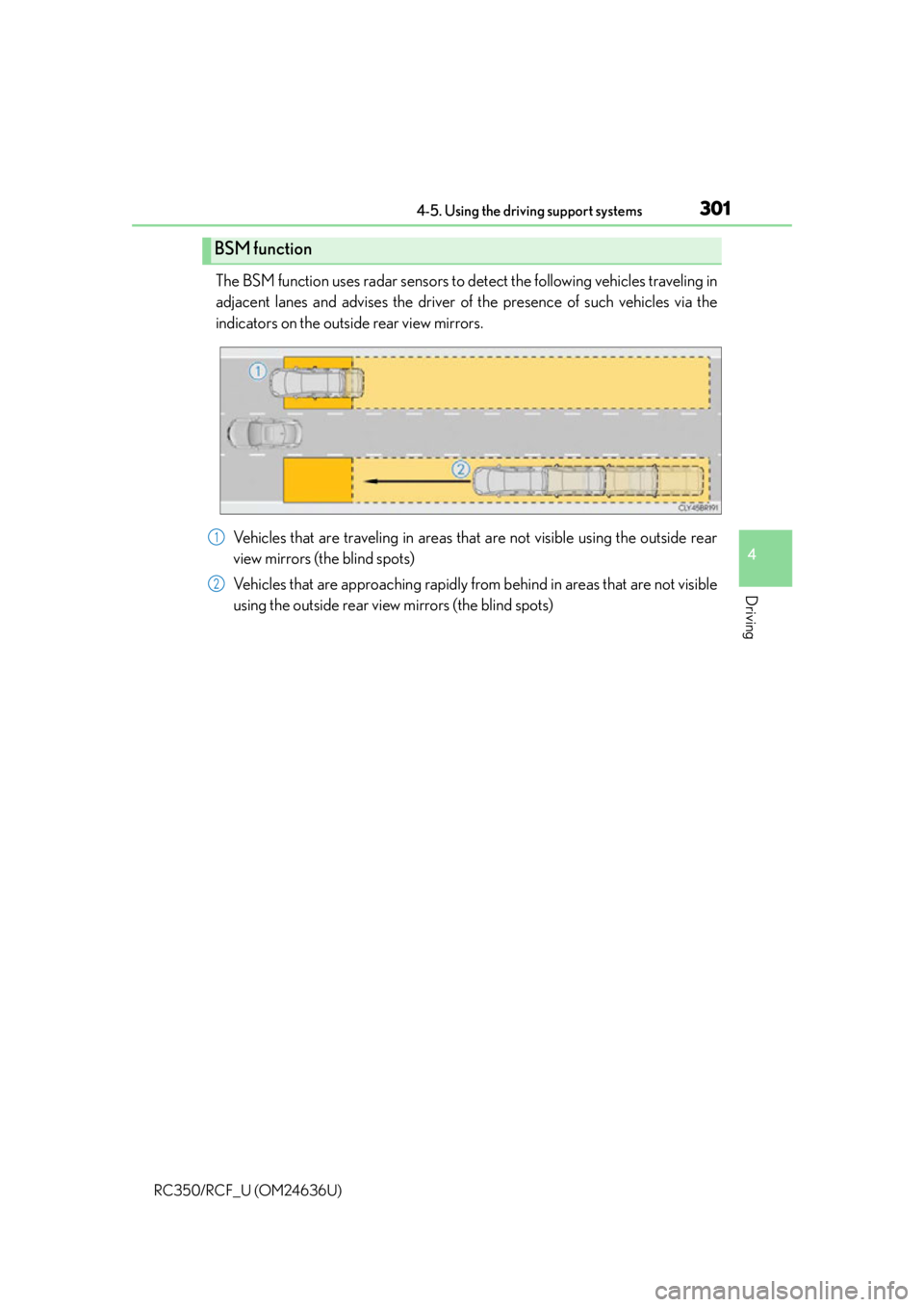
The BSM function uses radar sensors to detect the following vehicles traveling in
adjacent lanes and advises the driver of the presence of such vehicles via the
indicators on the outside rear view mirrors.Vehicles that are traveling in areas that are not visible using the outside rear
view mirrors (the blind spots)
Vehicles that are approaching rapidly from behind in areas that are not visible
using the outside rear view mirrors (the blind spots)
BSM function
1
2
Page 302 of 684
3024-5. Using the driving support systems
RC350/RCF_U (OM24636U)
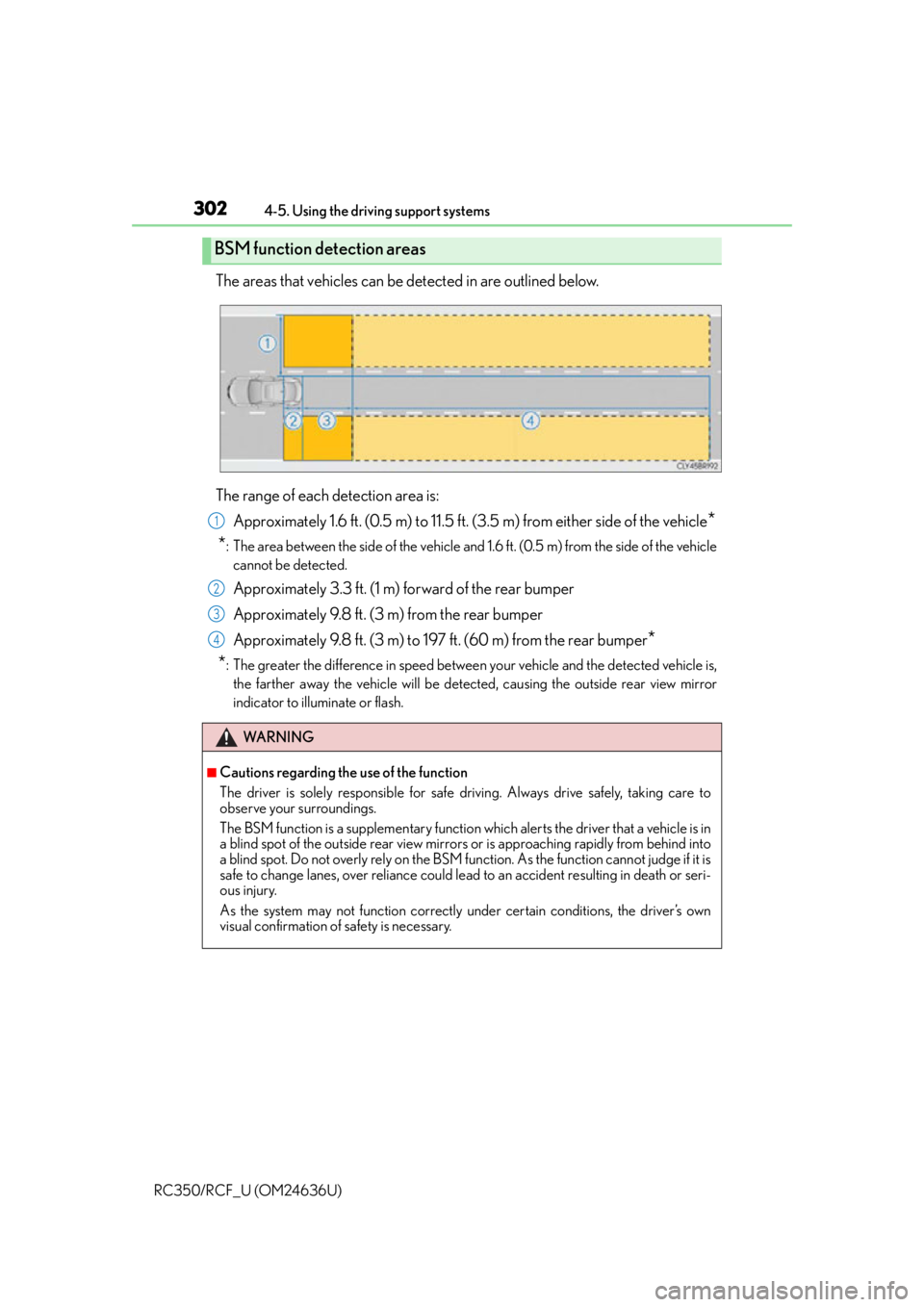
The areas that vehicles can be detected in are outlined below.
The range of each detection area is: Approximately 1.6 ft. (0.5 m) to 11.5 ft. (3.5 m) from either side of the vehicle
*
*
: The area between the side of the vehicle and 1.6 ft. (0.5 m) from the side of the vehicle cannot be detected.
Approximately 3.3 ft. (1 m) forward of the rear bumper
Approximately 9.8 ft. (3 m) from the rear bumper
Approximately 9.8 ft. (3 m) to 197 ft. (60 m) from the rear bumper
*
*
: The greater the difference in speed between your vehicle and the detected vehicle is, the farther away the vehicle will be detected, causing the outside rear view mirror
indicator to illuminate or flash.
BSM function detection areas
WA R N I N G
■Cautions regarding the use of the function
The driver is solely responsible for safe driving. Always drive safely, taking care to
observe your surroundings.
The BSM function is a supplementary function which alerts the driver that a vehicle is in
a blind spot of the outside rear view mirror s or is approaching rapidly from behind into
a blind spot. Do not overly rely on the BSM fu nction. As the function cannot judge if it is
safe to change lanes, over reliance could lead to an accident resulting in death or seri-
ous injury.
As the system may not function correctly under certain conditions, the driver’s own
visual confirmation of safety is necessary.
1
2
3
4
Page 305 of 684
3054-5. Using the driving support systems
4
Driving
RC350/RCF_U (OM24636U)
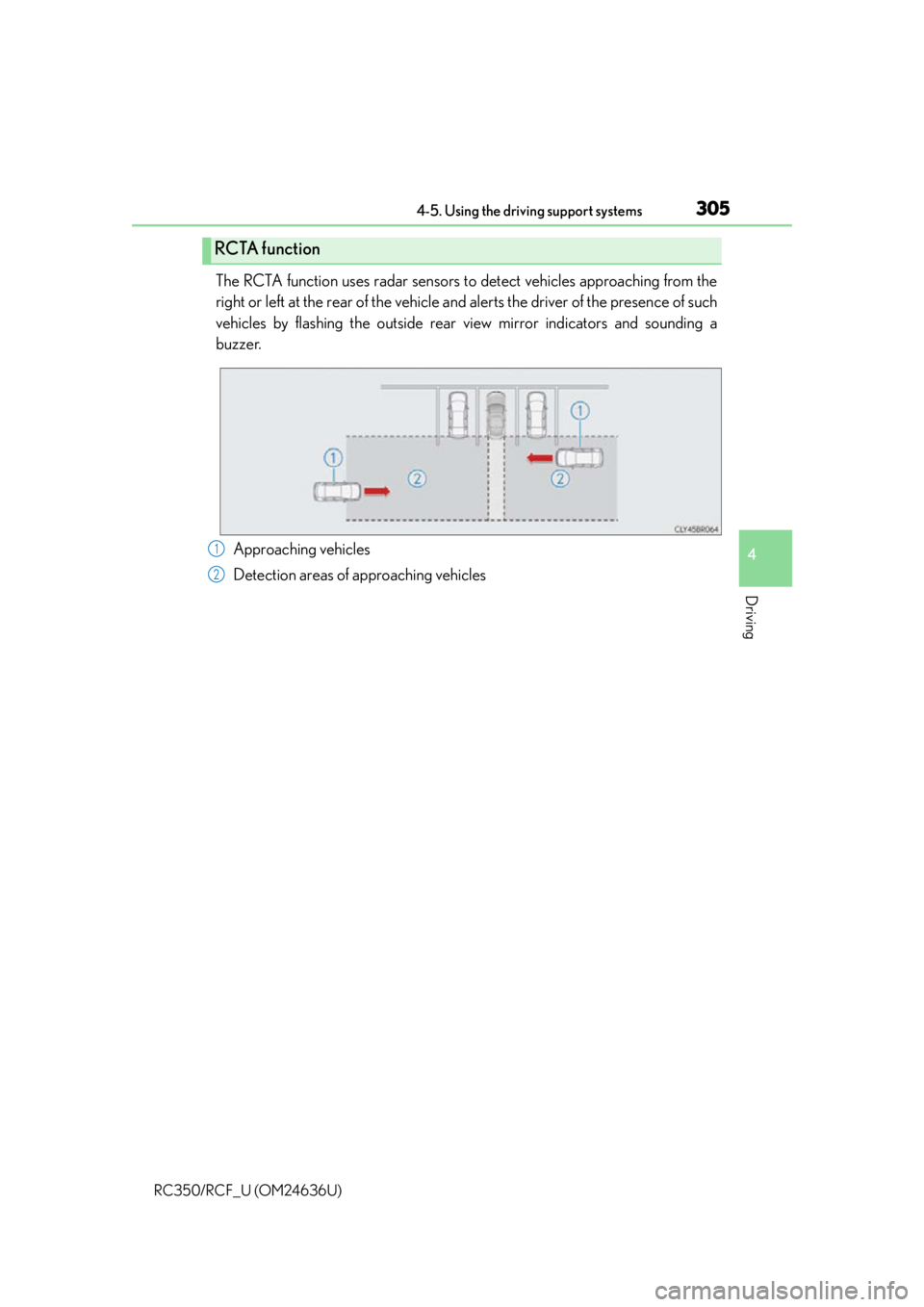
The RCTA function uses radar sensors to detect vehicles approaching from the
right or left at the rear of the vehicle and alerts the driver of the presence of such
vehicles by flashing the outside rear view mirror indicators and sounding a
buzzer.
Approaching vehicles
Detection areas of approaching vehicles
RCTA function
1
2
Page 306 of 684
3064-5. Using the driving support systems
RC350/RCF_U (OM24636U)
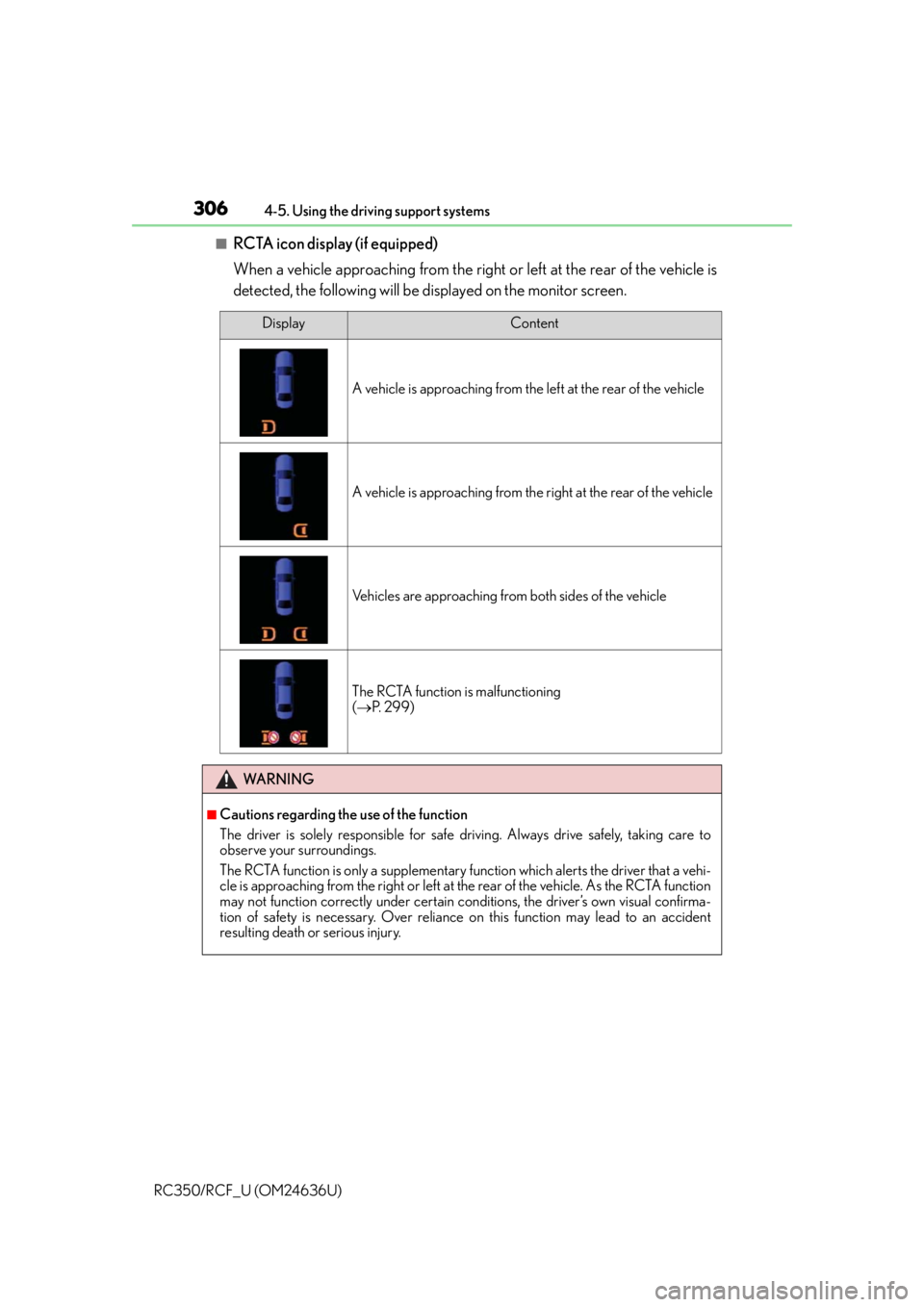
■RCTA icon display (if equipped)
When a vehicle approaching from the right or left at the rear of the vehicle is
detected, the following will be displayed on the monitor screen.
DisplayContent
A vehicle is approaching from the left at the rear of the vehicle
A vehicle is approaching from the right at the rear of the vehicle
Vehicles are approaching from both sides of the vehicle
The RCTA function is malfunctioning
( P. 299)
WA R N I N G
■Cautions regarding the use of the function
The driver is solely responsible for safe driving. Always drive safely, taking care to
observe your surroundings.
The RCTA function is only a supplementary fu nction which alerts the driver that a vehi-
cle is approaching from the right or left at the rear of the vehicle. As the RCTA function
may not function correctly under certain conditions, the driver’s own visual confirma-
tion of safety is necessary. Over reliance on this function may lead to an accident
resulting death or serious injury.
Page 307 of 684
3074-5. Using the driving support systems
4
Driving
RC350/RCF_U (OM24636U)
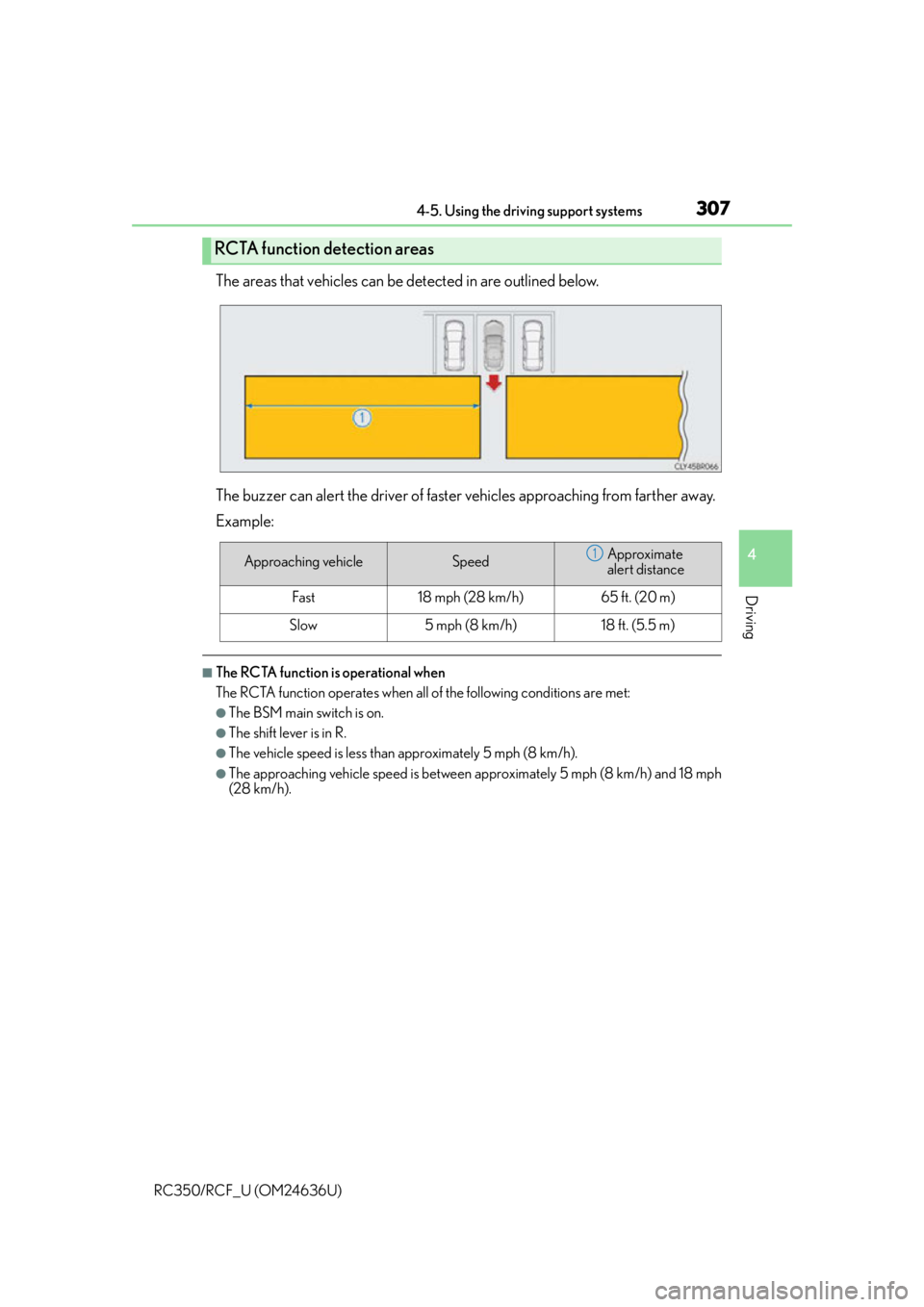
The areas that vehicles can be detected in are outlined below.
The buzzer can alert the driver of faster vehicles approaching from farther away.
Example:
■The RCTA function is operational when
The RCTA function operates when all of the following conditions are met:
●The BSM main switch is on.
●The shift lever is in R.
●The vehicle speed is less than approximately 5 mph (8 km/h).
●The approaching vehicle speed is between approximately 5 mph (8 km/h) and 18 mph
(28 km/h).
RCTA function detection areas
Approaching vehicleSpeedApproximate
alert distance
Fast18 mph (28 km/h)65 ft. (20 m)
Slow5 mph (8 km/h)18 ft. (5.5 m)
1
Page 314 of 684
3144-5. Using the driving support systems
RC350/RCF_U (OM24636U)
■Automatic cancelation of the selected TVD control mode
SLALOM and TRACK mode are canceled when the engine switch is turned off. When
the engine switch is turned to IGNITION ON mode, the TVD system will be in STAN-
DARD mode.
■Automatic disabling of the TVD system
If a malfunction is de tected in the TVD system, a warn ing message will be displayed on
the multi-information display ( P. 548) and the TVD system will be disabled automati-
cally. If the system is disabled, driving force will not be distributed by the TVD but through
normal differential operation.
■To protect the system
The TVD fluid temperature may become excessively high when driving for a long time
under extremely high load conditions. In th is case, a warning message will be displayed
on the multi-information display. ( P. 5 4 9 )
WA R N I N G
■Cautions regarding the use of the system
The driver is solely responsible for safe driv ing. Do not overly rely on the TVD system.
Always drive safely, taking care to observe your surroundings.
Page 419 of 684
4196-1. Using the air conditioning system
6
Interior features
RC350/RCF_U (OM24636U)
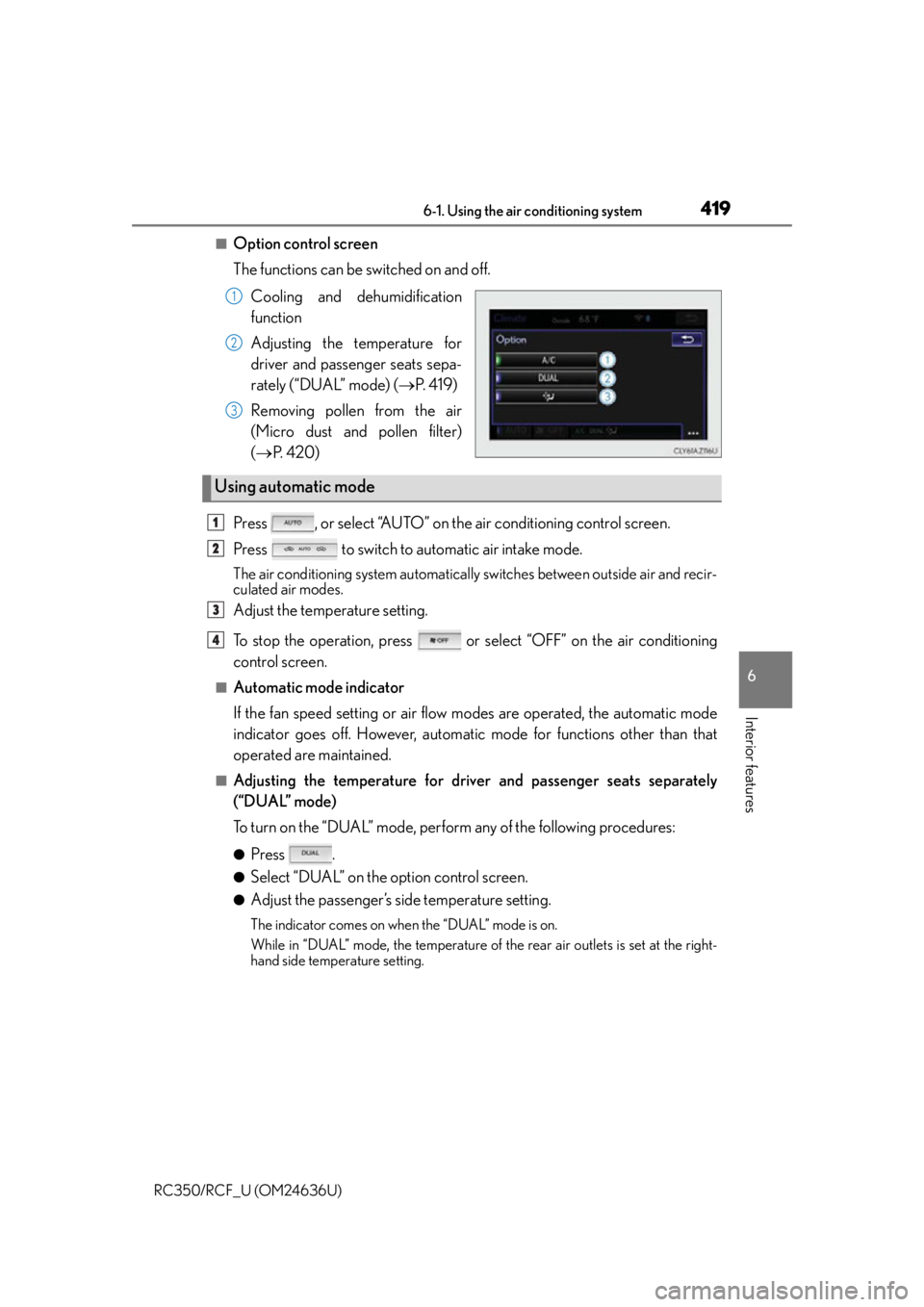
■Option control screen
The functions can be switched on and off.Cooling and dehumidification
function
Adjusting the temperature for
driver and passenger seats sepa-
rately (“DUAL” mode) ( P. 4 1 9 )
Removing pollen from the air
(Micro dust and pollen filter)
( P. 4 2 0 )
Press , or select “AUTO” on the air conditioning control screen.
Press to switch to automatic air intake mode.
The air conditioning system automatically switches between outside air and recir-
culated air modes.
Adjust the temperature setting.
To stop the operation, press or select “OFF” on the air conditioning
control screen.
■Automatic mode indicator
If the fan speed setting or air flow modes are operated, the automatic mode
indicator goes off. However, automati c mode for functions other than that
operated are maintained.
■Adjusting the temperature for driver and passenger seats separately
(“DUAL” mode)
To turn on the “DUAL” mode, perform any of the following procedures:
●Press .
●Select “DUAL” on the option control screen.
●Adjust the passenger’s side temperature setting.
The indicator comes on when the “DUAL” mode is on.
While in “DUAL” mode, the temperature of the rear air outlets is set at the right-
hand side temperature setting.
1
2
3
Using automatic mode
1
2
3
4