lane LEXUS RC350 2018 Owners Manual
[x] Cancel search | Manufacturer: LEXUS, Model Year: 2018, Model line: RC350, Model: LEXUS RC350 2018Pages: 636, PDF Size: 6.92 MB
Page 4 of 636
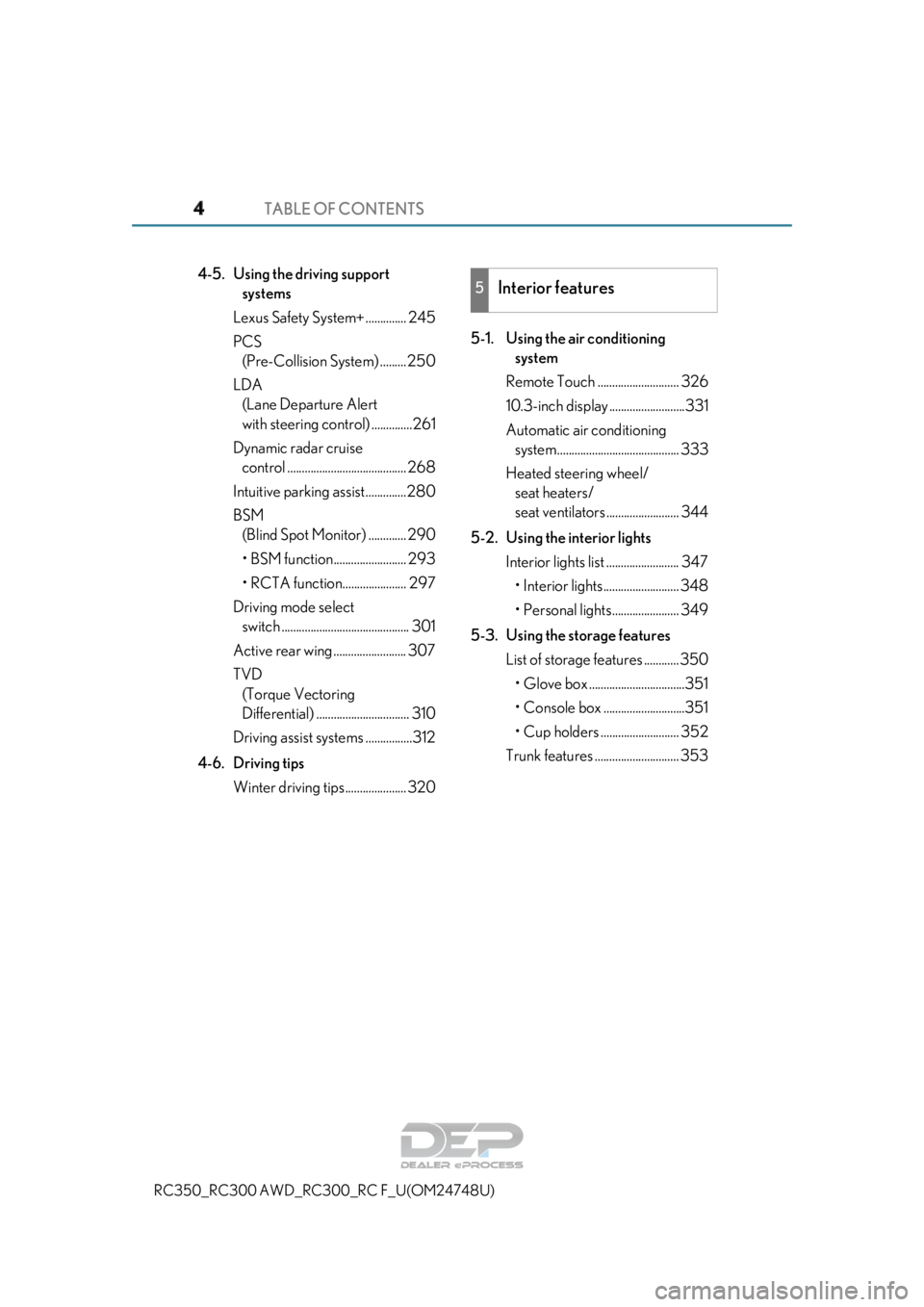
TABLE OF CONTENTS4
RC350_RC300 AWD_RC300_RC F_U(OM24748U)
4-5. Using the driving support
systems
Lexus Safety System+ .............. 245
PCS (Pre-Collision System) ......... 250
LDA (Lane Departure Alert
with steering control) ..............261
Dynamic radar cruise control ......................................... 268
Intuitive parking assist..............280
BSM (Blind Spot Monitor) ............. 290
• BSM function......................... 293
• RCTA function...................... 297
Driving mode select switch ............................................ 301
Active rear wing ......................... 307
TVD (Torque Vectoring
Differential) ................................ 310
Driving assist systems ................312
4-6. Driving tips Winter driving tips ..................... 320 5-1. Using the air conditioning
system
Remote Touch ............................ 326
10.3-inch display ..........................331
Automatic air conditioning system.......................................... 333
Heated steering wheel/ seat heaters/
seat ventilators ......................... 344
5-2. Using the interior lights Interior lights list ......................... 347
• Interior lights.......................... 348
• Personal lights....................... 349
5-3. Using the storage features List of storage features ............ 350
• Glove box .................................351
• Console box ............................351
• Cup holders ........................... 352
Trunk features ............................. 3535Interior features
Page 23 of 636
23Pictorial index
RC350_RC300 AWD_RC3 00_RC F_U(OM24748U)
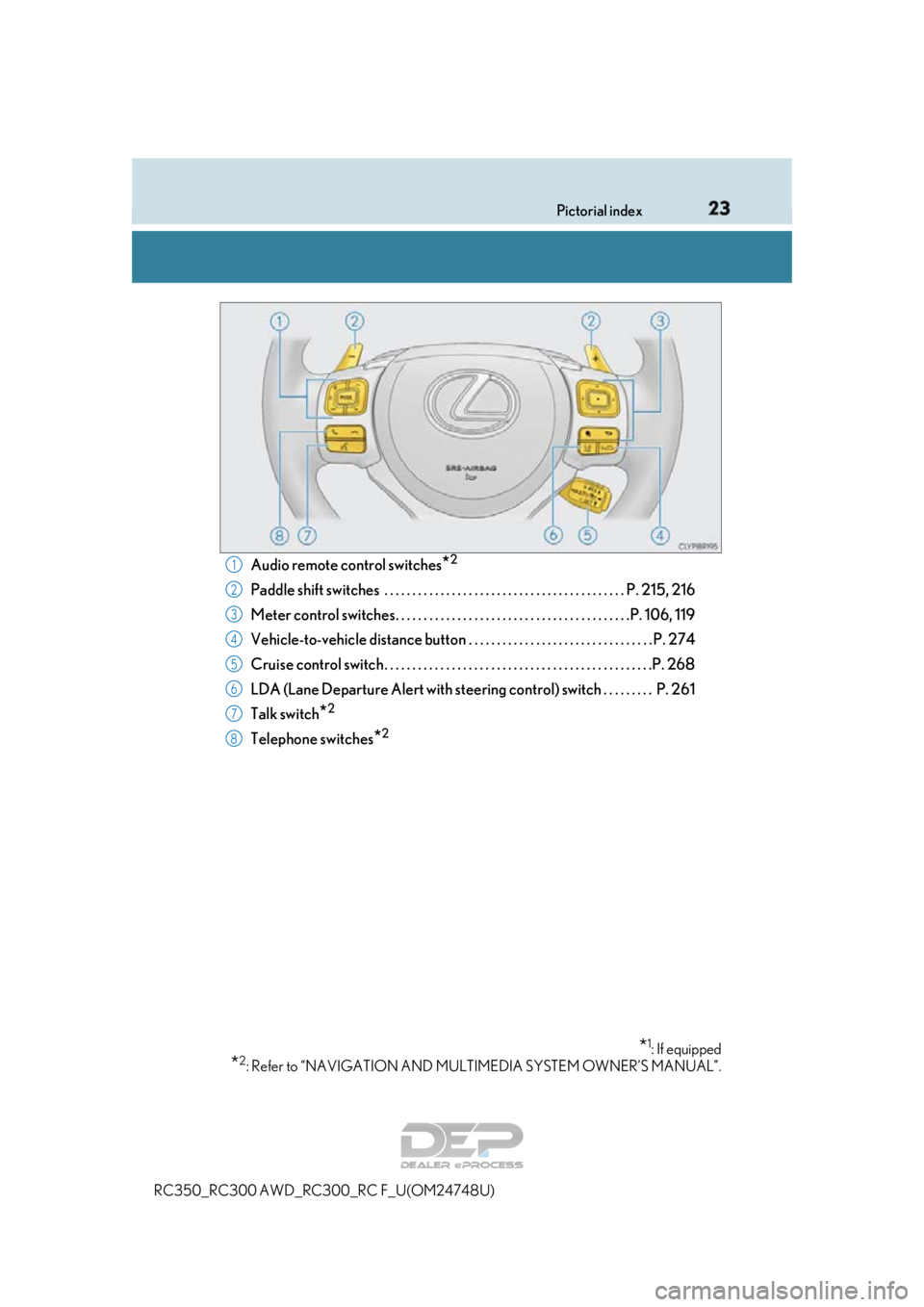
Audio remote control switches*2
Paddle shift switches . . . . . . . . . . . . . . . . . . . . . . . . . . . . . . . . . . . . . . . . . . . P. 215, 216
Meter control switches. . . . . . . . . . . . . . . . . . . . . . . . . . . . . . . . . . . . . . . . . .P. 106, 119
Vehicle-to-vehicle distance button . . . . . . . . . . . . . . . . . . . . . . . . . . . . . . . . . P. 274
Cruise control switch . . . . . . . . . . . . . . . . . . . . . . . . . . . . . . . . . . . . . . . . . . . . . . . .P. 268
LDA (Lane Departure Alert with steering co ntrol) switch . . . . . . . . . P. 261
Talk switch
*2
Telephone switches*2
*1: If equipped
*2: Refer to “NAVIGATION AND MULT IMEDIA SYSTEM OWNER’S MANUAL”.
1
2
3
4
5
6
7
8
Page 86 of 636
862. Instrument cluster
RC350_RC300 AWD_RC3 00_RC F_U(OM24748U)
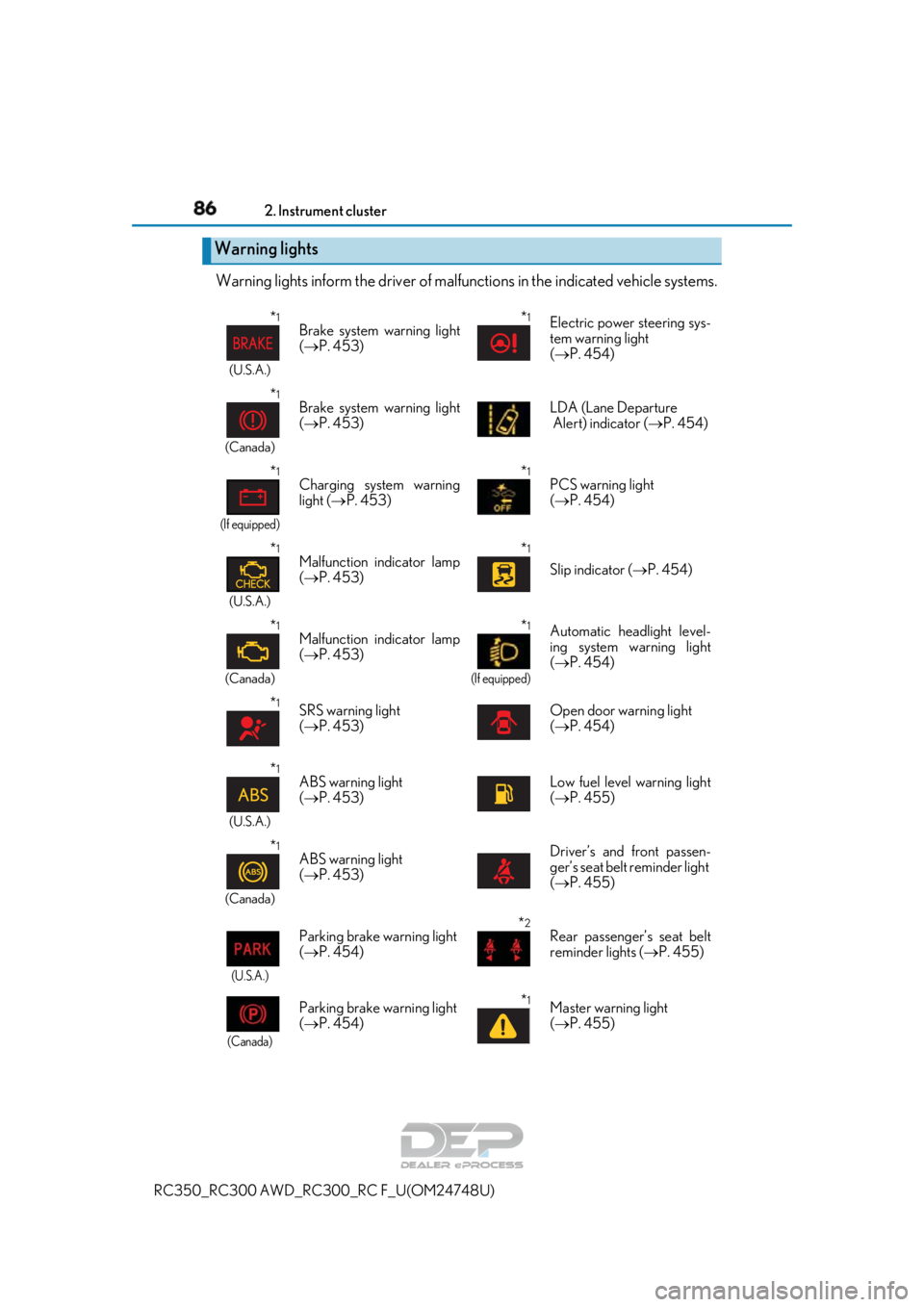
Warning lights inform the driver of malfunctions in the indicated vehicle systems.
Warning lights
*1
(U.S.A.)
Brake system warning light
( P. 453)*1Electric power steering sys-
tem warning light
( P. 454)
*1
(Canada)
Brake system warning light
( P. 453) LDA (Lane Departure
Alert) indicator (
P. 454)
*1
(If equipped)
Charging system warning
light ( P. 453)*1PCS warning light
( P. 454)
*1
(U.S.A.)
Malfunction indicator lamp
( P. 453)*1
Slip indicator ( P. 454)
*1
(Canada)
Malfunction indicator lamp
( P. 453)*1
(If equipped)
Automatic headlight level-
ing system warning light
( P. 454)
*1SRS warning light
( P. 453)Open door warning light
( P. 454)
*1
(U.S.A.)
ABS warning light
( P. 453)Low fuel level warning light
( P. 455)
*1
(Canada)
ABS warning light
( P. 453)Driver’s and front passen-
ger’s seat belt reminder light
( P. 455)
(U.S.A.)
Parking brake warning light
( P. 454)*2Rear passenger’s seat belt
reminder lights ( P. 455)
(Canada)
Parking brake warning light
( P. 454)*1Master warning light
( P. 455)
Page 87 of 636
872. Instrument cluster
2
Instrument cluster
RC350_RC300 AWD_RC300_RC F_U(OM24748U)
*1: These lights turn on when the engine switch is turned to IGNITION ON mode to
indicate that a system check is being performed. They will turn off after the engine is
started, or after a few seconds. There may be a malfunction in a system if a light does
not come on, or turn off. Have the ve hicle inspected by your Lexus dealer.
*2: This light illuminates on the center panel.
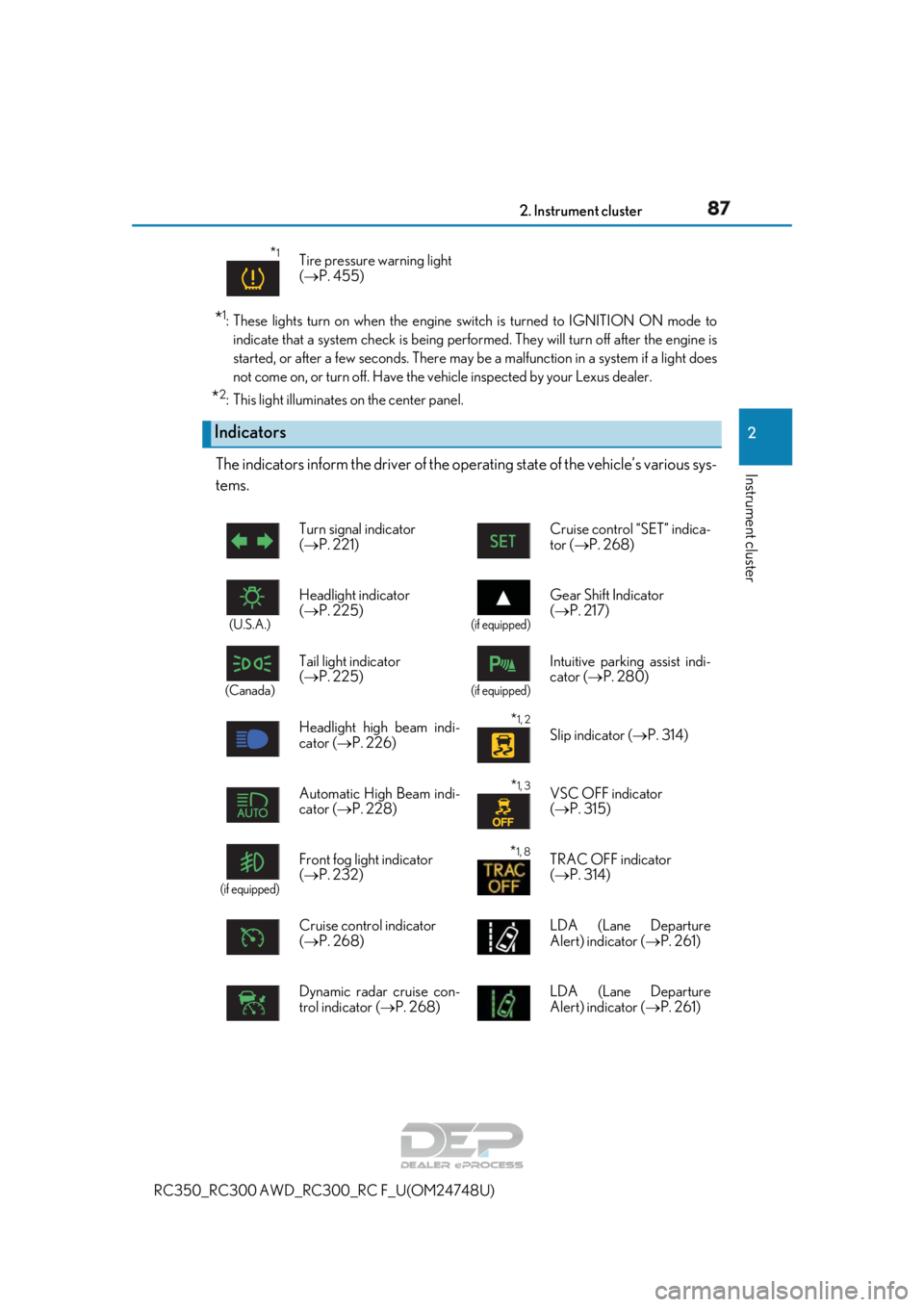
The indicators inform the driver of the op erating state of the vehicle’s various sys-
tems.
*1Tire pressure warning light
( P. 455)
Indicators
Turn signal indicator
( P. 221) Cruise control “SET” indica-
tor (P. 268)
(U.S.A.)
Headlight indicator
(
P. 225)
(if equipped)
Gear Shift Indicator
( P. 217)
(Canada)
Tail light indicator
( P. 225)
(if equipped)
Intuitive parkin g assist indi-
cator ( P. 280)
Headlight high beam indi-
cator ( P. 226)
*1, 2 Slip indicator ( P. 314)
Automatic High Beam indi-
cator ( P. 228)
*1, 3VSC OFF indicator
( P. 315)
(if equipped)
Front fog light indicator
( P. 232)*1, 8TRAC OFF indicator
( P. 314)
Cruise control indicator
( P. 268) LDA (Lane Departure
Alert) indicator (
P. 261)
Dynamic radar cruise con-
trol indicator ( P. 268) LDA (Lane Departure
Alert) indicator (
P. 261)
Page 88 of 636
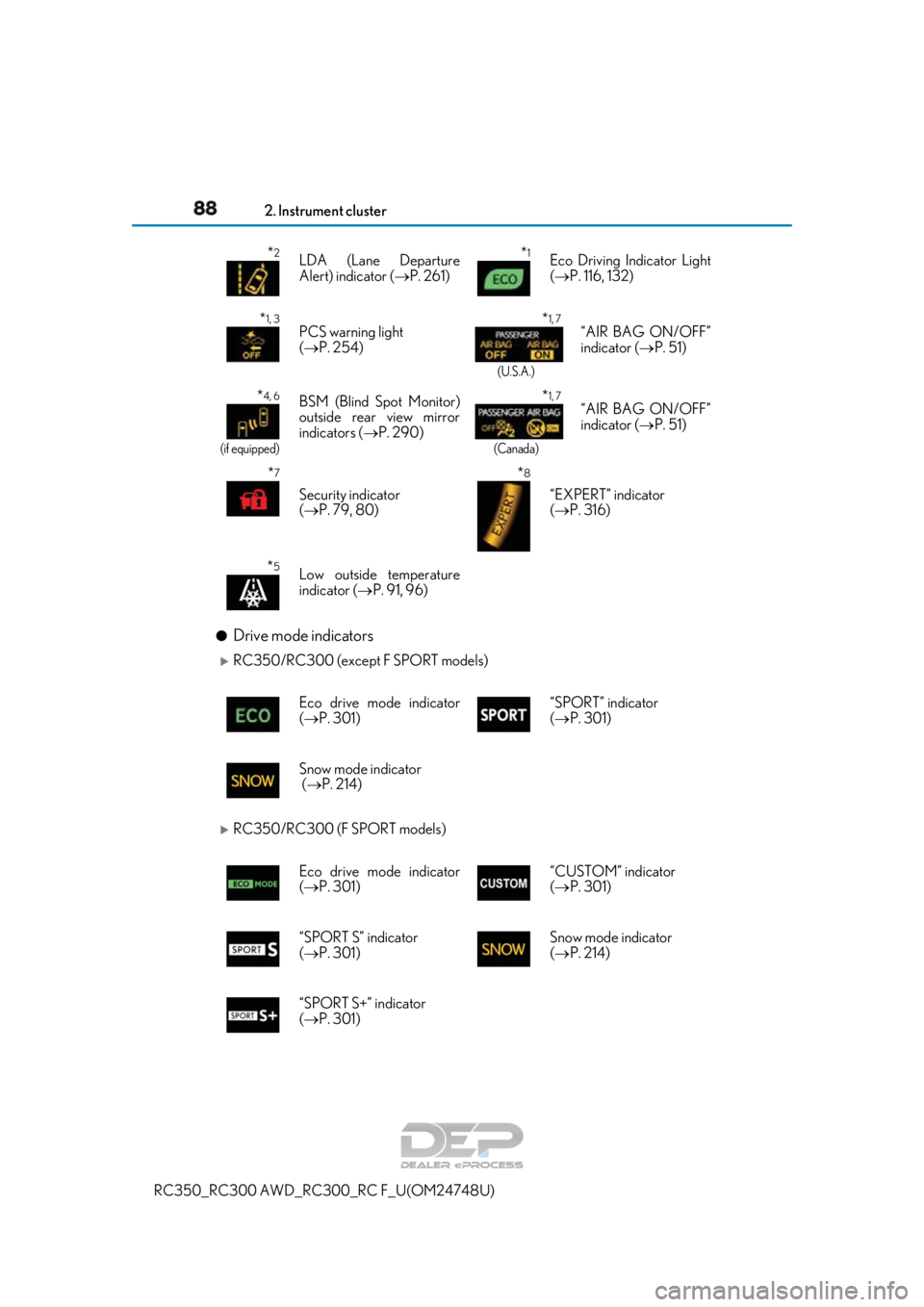
882. Instrument cluster
RC350_RC300 AWD_RC3 00_RC F_U(OM24748U)
●Drive mode indicators
RC350/RC300 (except F SPORT models)
RC350/RC300 (F SPORT models)
*2LDA (Lane Departure
Alert) indicator (P. 261)*1Eco Driving Indicator Light
( P. 116, 132)
*1, 3PCS warning light
( P. 254) *1, 7
(U.S.A.)
“AIR BAG ON/OFF”
indicator ( P. 51)
*4, 6
(if equipped)
BSM (Blind Spot Monitor)
outside rear view mirror
indicators ( P. 290)*1, 7
(Canada)
“AIR BAG ON/OFF”
indicator ( P. 51)
*7
Security indicator
( P. 79, 80)
*8
“EXPERT” indicator
( P. 316)
*5Low outside temperature
indicator ( P. 91, 96)
Eco drive mode indicator
( P. 301) “SPORT” indicator
(
P. 301)
Snow mode indicator
( P. 214)
Eco drive mode indicator
( P. 301) “CUSTOM” indicator
(
P. 301)
“SPORT S” indicator
( P. 301) Snow mode indicator
(
P. 214)
“SPORT S+” indicator
( P. 301)
Page 107 of 636
1072. Instrument cluster
2
Instrument cluster
RC350_RC300 AWD_RC300_RC F_U(OM24748U)
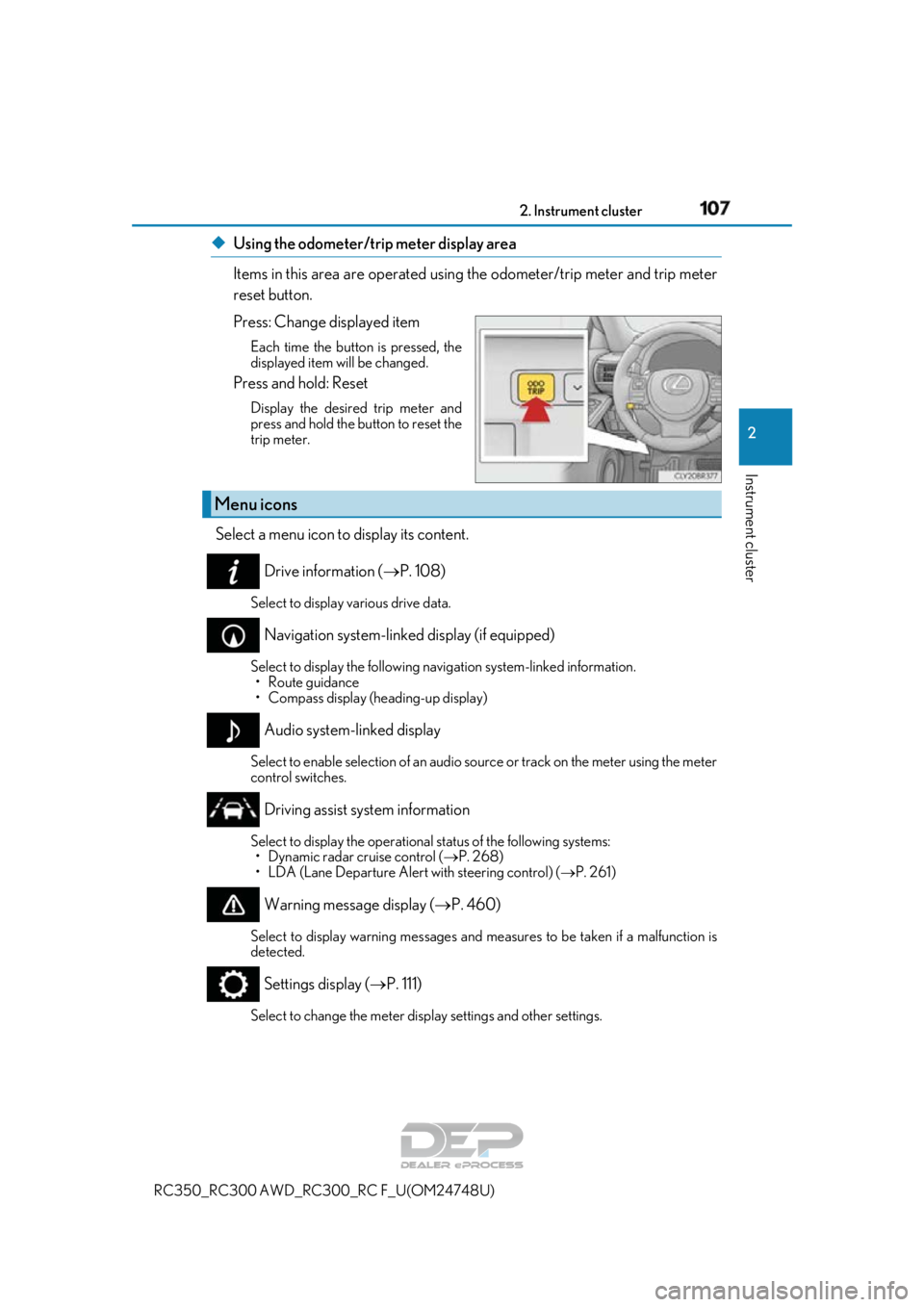
◆Using the odometer/trip meter display area
Items in this area are operated using the odometer/trip meter and trip meter
reset button.
Press: Change displayed item
Each time the button is pressed, the
displayed item will be changed.
Press and hold: Reset
Display the desired trip meter and
press and hold the button to reset the
trip meter.
Select a menu icon to display its content.
Drive information ( P. 108)
Select to display various drive data.
Navigation system-linked display (if equipped)
Select to display the following na vigation system-linked information.
•Route guidance
• Compass display (heading-up display)
Audio system-linked display
Select to enable selection of an audio source or track on the meter using the meter
control switches.
Driving assist system information
Select to display the operational status of the following systems: • Dynamic radar cruise control ( P. 268)
• LDA (Lane Departure Alert with steering control) ( P. 261)
Warning message display ( P. 460)
Select to display warning messages and me asures to be taken if a malfunction is
detected.
Settings display ( P. 111)
Select to change the meter display settings and other settings.
Menu icons
Page 110 of 636
1102. Instrument cluster
RC350_RC300 AWD_RC3 00_RC F_U(OM24748U)
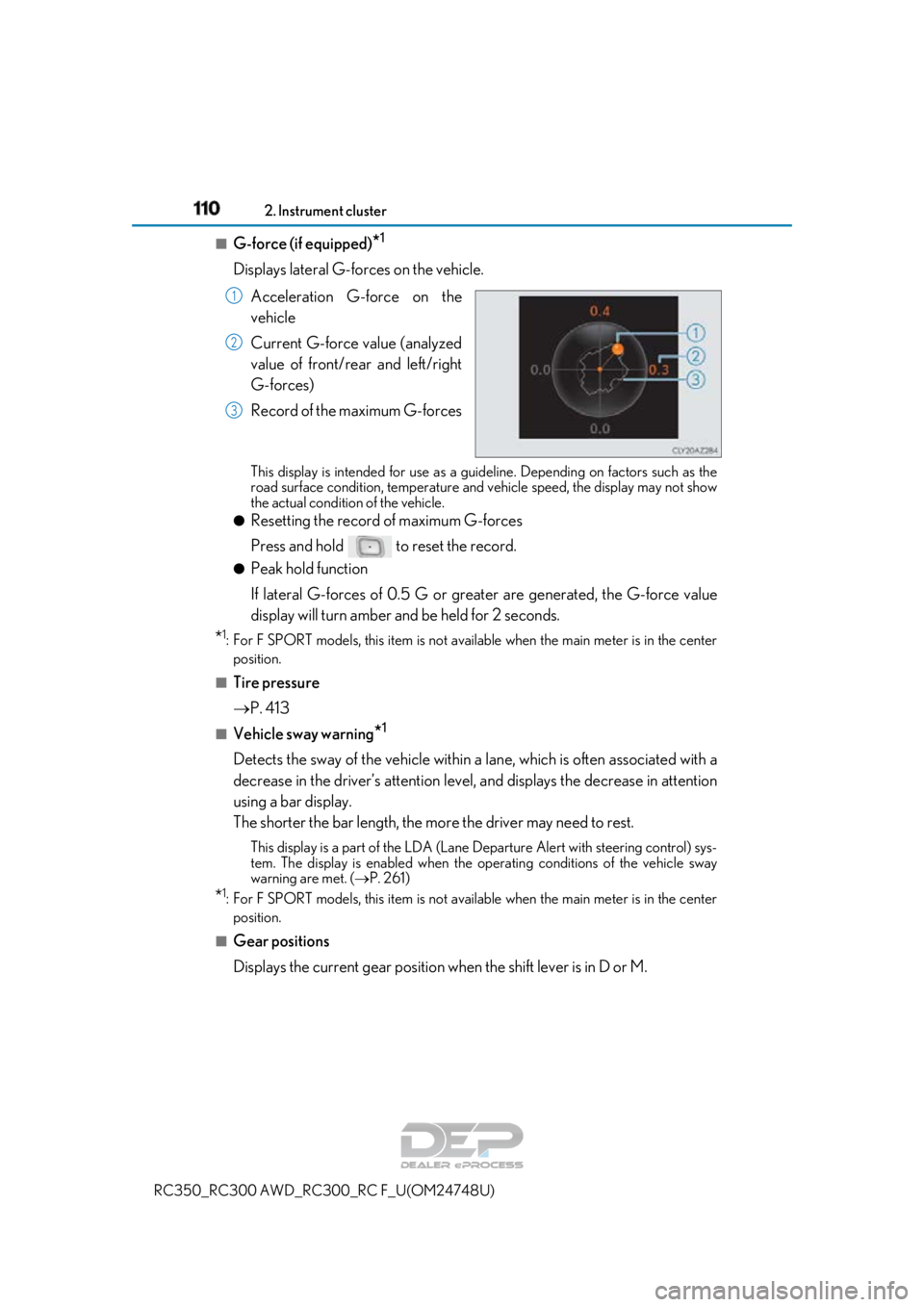
■G-force (if equipped)*1
Displays lateral G-forces on the vehicle.
Acceleration G-force on the
vehicle
Current G-force value (analyzed
value of front/rear and left/right
G-forces)
Record of the maximum G-forces
This display is intended for use as a guideline. Depending on factors such as the
road surface condition, temperature and vehicle speed, the display may not show
the actual condition of the vehicle.
●Resetting the record of maximum G-forces
Press and hold to reset the record.
●Peak hold function
If lateral G-forces of 0.5 G or grea ter are generated, the G-force value
display will turn amber and be held for 2 seconds.
*1: For F SPORT models, this item is not ava ilable when the main meter is in the center
position.
■Tire pressure
P. 413
■Vehicle sway warning*1
Detects the sway of the vehicle within a lane, which is often associated with a
decrease in the driver’s at tention level, and displays the decrease in attention
using a bar display.
The shorter the bar length, the more the driver may need to rest.
This display is a part of the LDA (Lane Departure Alert with steering control) sys-
tem. The display is enabled when the op erating conditions of the vehicle sway
warning are met. ( P. 261)
*1: For F SPORT models, this item is not ava ilable when the main meter is in the center
position.
■Gear positions
Displays the current gear position when the shift lever is in D or M.
1
2
3
Page 111 of 636
1112. Instrument cluster
2
Instrument cluster
RC350_RC300 AWD_RC300_RC F_U(OM24748U)
■Units (if equipped) *2
The units of measure used can be changed while driving.
Unlike the units setting performed on , the units setting performed on can
be changed while driving.
*2: For F SPORT models, this item is not available when the main meter is in the right-side
position.
■Blank (No items)
Displays no drive information contents.
◆Changing settings
Use the meter control switches on th e steering wheel to change settings.
Press or to select .
Operate the switches to select a desired item.
Change the setting by referring to the message displayed on the screen.
◆Setting items
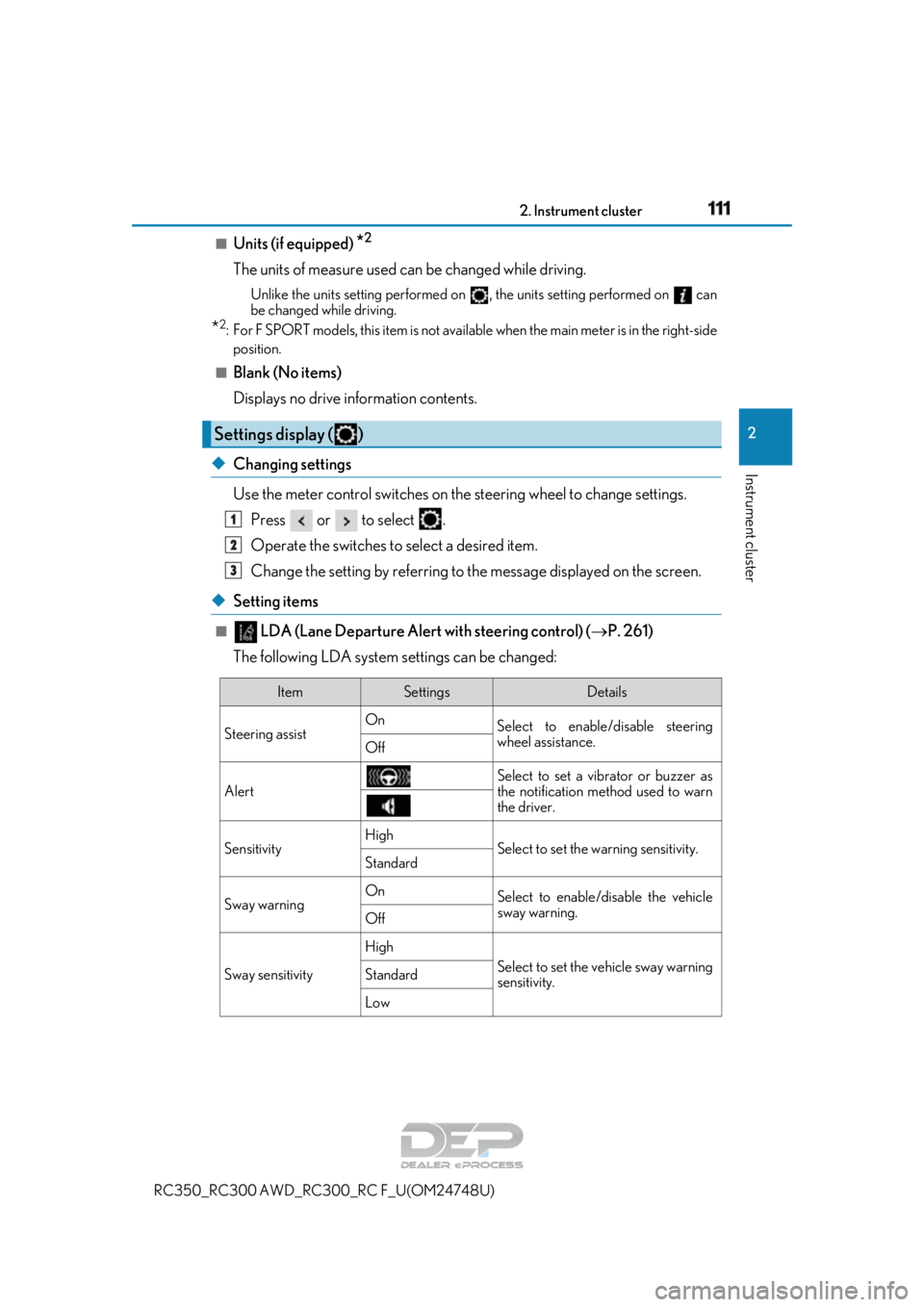
■ LDA (Lane Departure Alert with steering control) ( P. 261)
The following LDA system settings can be changed:
Settings display ( )
1
2
3
ItemSettingsDetails
Steering assist On
Select to enable/disable steering
wheel assistance.
Off
AlertSelect to set a vibrator or buzzer as
the notification method used to warn
the driver.
SensitivityHighSelect to set the warning sensitivity.Standard
Sway warningOnSelect to enable/disable the vehicle
sway warning.
Off
Sway sensitivity
High
Select to set the vehicle sway warning
sensitivity.Standard
Low
Page 121 of 636
1212. Instrument cluster
2
Instrument cluster
RC350_RC300 AWD_RC300_RC F_U(OM24748U)
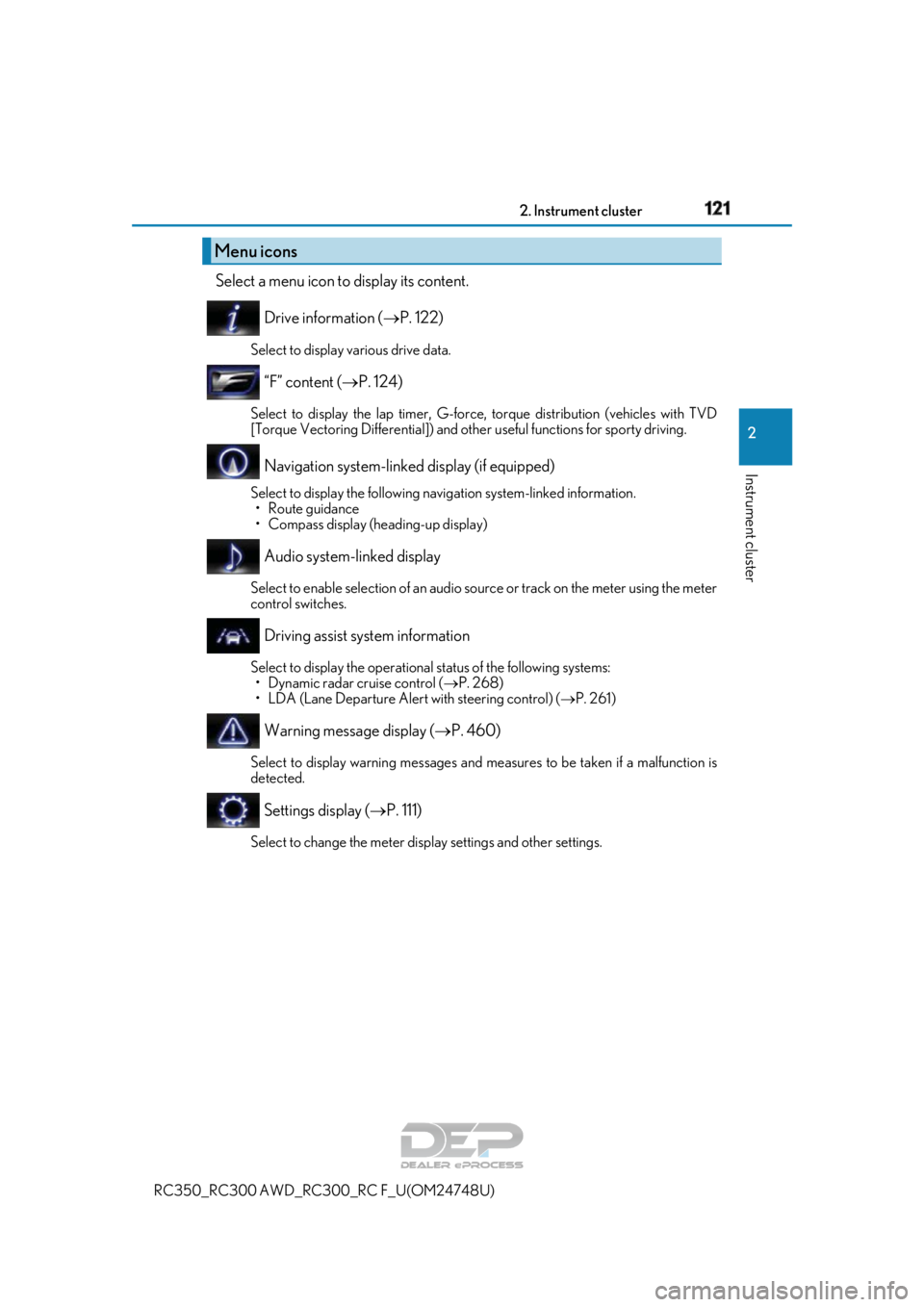
Select a menu icon to display its content.
Drive information ( P. 122)
Select to display various drive data.
“F” content ( P. 124)
Select to display the lap timer, G-force, torque distribution (vehicles with TVD
[Torque Vectoring Differential]) and othe r useful functions for sporty driving.
Navigation system-linked display (if equipped)
Select to display the following navigation system-linked information.
•Route guidance
• Compass display (heading-up display)
Audio system-linked display
Select to enable selection of an audio source or track on the meter using the meter
control switches.
Driving assist system information
Select to display the operational status of the following systems: • Dynamic radar cruise control ( P. 268)
• LDA (Lane Departure Alert with steering control) ( P. 261)
Warning message display ( P. 460)
Select to display warning messages and me asures to be taken if a malfunction is
detected.
Settings display ( P. 111)
Select to change the meter display settings and other settings.
Menu icons
Page 123 of 636
1232. Instrument cluster
2
Instrument cluster
RC350_RC300 AWD_RC300_RC F_U(OM24748U)
*1:Resetting: P. 119
*2: Use the displayed fuel consumption as a reference.
*3: When only a small amount of fuel is added to the tank, the display may not be
updated.
When refueling, turn the engine switch off. If the vehicle is refueled without turning the
engine switch off, the display may not be updated.
*4: This distance is computed based on your average fuel consumption. As a result, the
actual distance that can be driven may differ from that displayed.
■Tire pressure
P. 413
■Gear positions
Displays the current gear position when the shift lever is in D or M.
■Vehicle sway warning
Detects the sway of the vehicle within a lane, which is often associated with a
decrease in the driver’s at tention level, and displays the decrease in attention
using a bar display.
The shorter the bar length, the more the driver may need to rest.
This display is a part of the LDA (Lane Departure Alert with steering control) sys-
tem. The display is enabled when the op erating conditions of the vehicle sway
warning are met. ( P. 261)
■Units
The units of measure used can be changed while driving.
Unlike the units setting performed on , the units setting performed on can
be changed while driving.
■Blank (No items)
Displays no drive information contents.