lane LEXUS RC350 2018 User Guide
[x] Cancel search | Manufacturer: LEXUS, Model Year: 2018, Model line: RC350, Model: LEXUS RC350 2018Pages: 636, PDF Size: 6.92 MB
Page 129 of 636
1292. Instrument cluster
2
Instrument cluster
RC350_RC300 AWD_RC300_RC F_U(OM24748U)
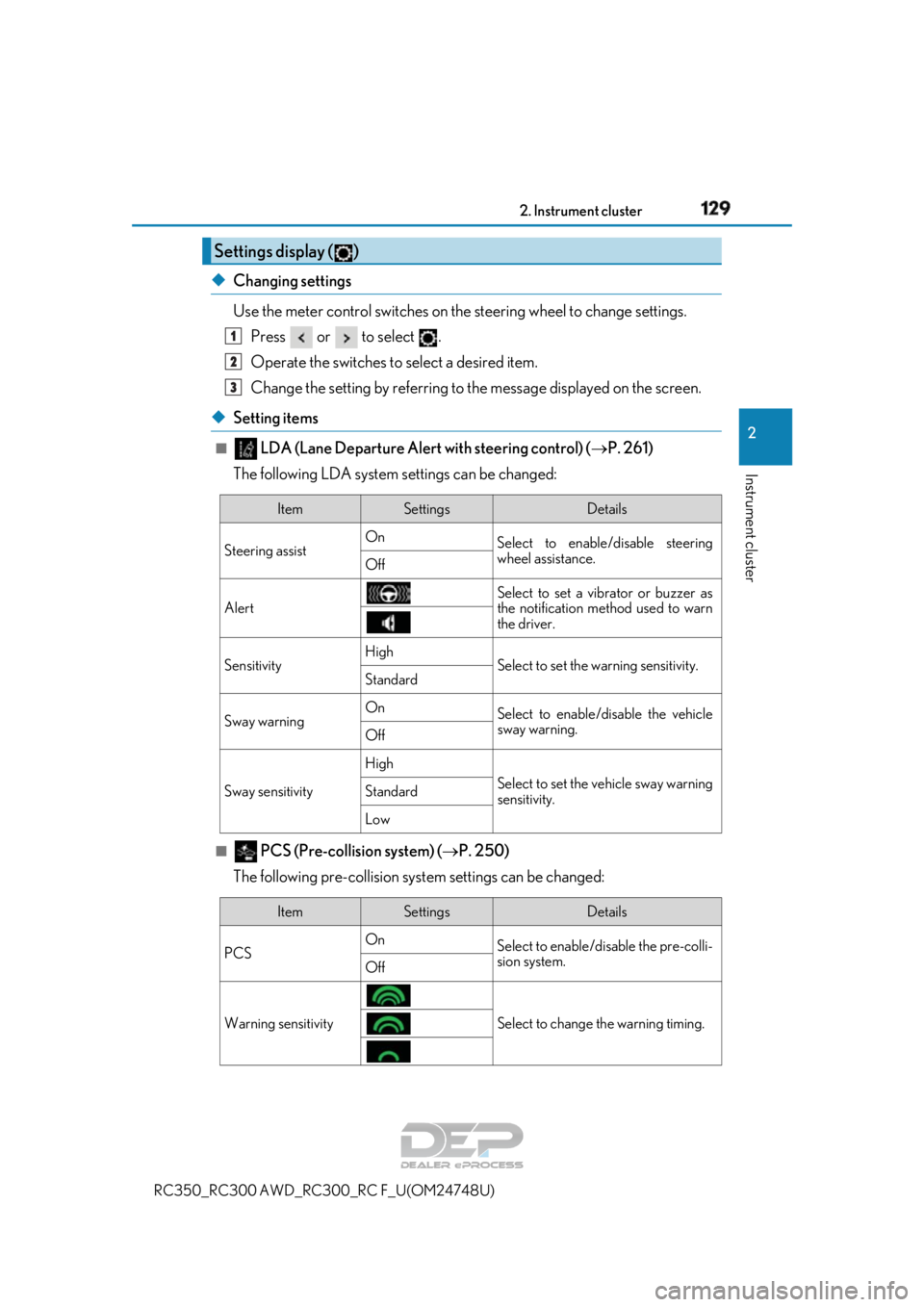
◆Changing settings
Use the meter control switches on th e steering wheel to change settings.
Press or to select .
Operate the switches to select a desired item.
Change the setting by referring to the message displayed on the screen.
◆Setting items
■ LDA (Lane Departure Alert with steering control) ( P. 261)
The following LDA system settings can be changed:
■ PCS (Pre-collision system) ( P. 250)
The following pre-collision syst em settings can be changed:
Settings display ( )
1
2
3
ItemSettingsDetails
Steering assist On
Select to enable/disable steering
wheel assistance.
Off
Alert
Select to set a vibrator or buzzer as
the notification method used to warn
the driver.
SensitivityHighSelect to set the warning sensitivity.Standard
Sway warningOnSelect to enable/disable the vehicle
sway warning.
Off
Sway sensitivity
High
Select to set the vehicle sway warning
sensitivity.Standard
Low
ItemSettingsDetails
PCS On
Select to enable/disable the pre-colli-
sion system.
Off
Warning sensitivitySelect to change the warning timing.
Page 191 of 636
191
Driving4
RC350_RC300 AWD_RC300_RC F_U(OM24748U)
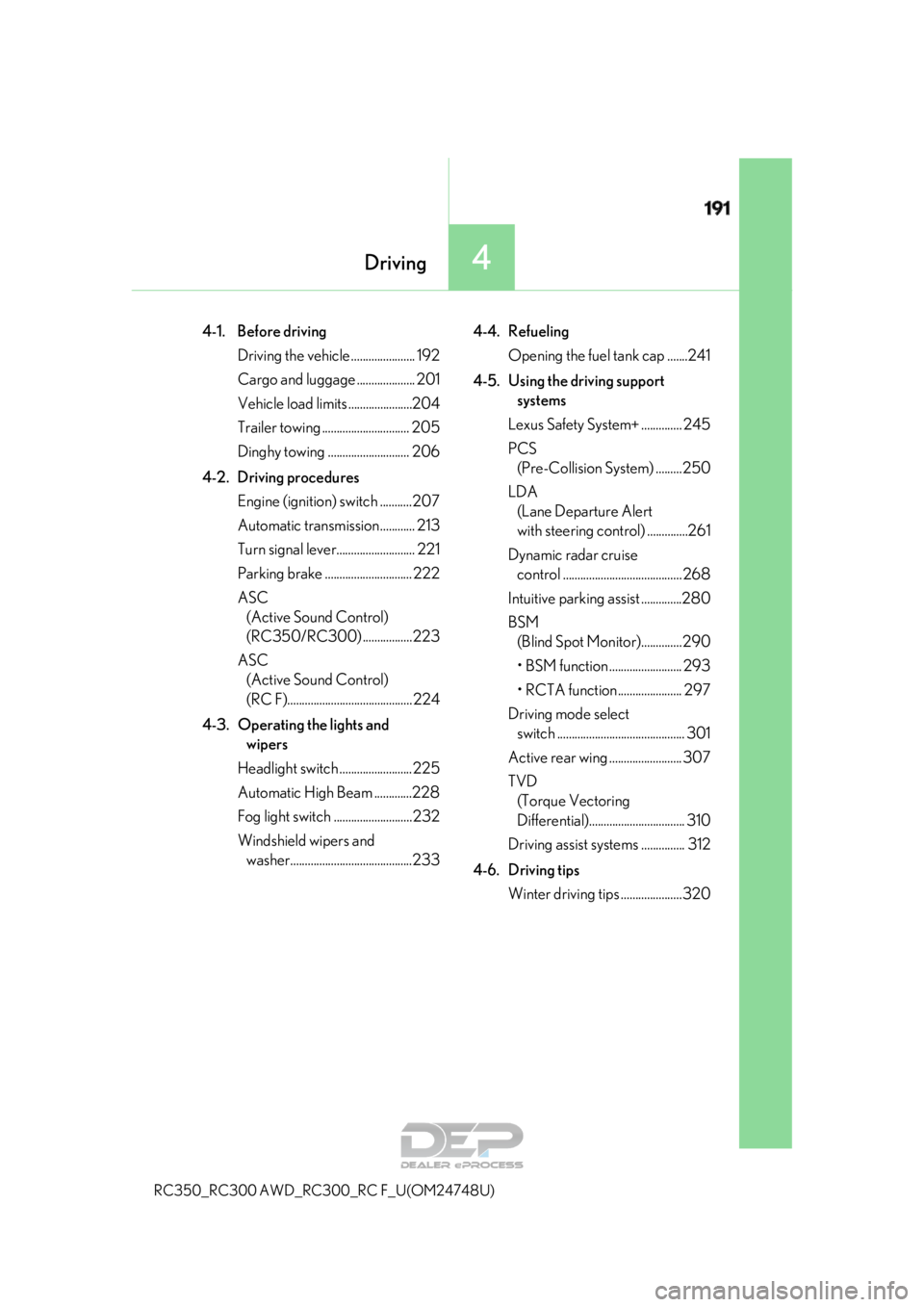
4-1. Before driving
Driving the vehicle ...................... 192
Cargo and luggage .................... 201
Vehicle load limits ......................204
Trailer towing .............................. 205
Dinghy towing ............................ 206
4-2. Driving procedures Engine (ignition) switch ...........207
Automatic transmission............ 213
Turn signal lever........................... 221
Parking brake .............................. 222
ASC (Active Sound Control)
(RC350/RC300) .................223
ASC (Active Sound Control)
(RC F)........................................... 224
4-3. Operating the lights and wipers
Headlight switch .........................225
Automatic High Beam .............228
Fog light switch ...........................232
Windshield wipers and washer..........................................233 4-4. Refueling
Opening the fuel tank cap .......241
4-5. Using the driving support systems
Lexus Safety System+ .............. 245
PCS (Pre-Collision System) .........250
LDA (Lane Departure Alert
with steering control) ..............261
Dynamic radar cruise control ......................................... 268
Intuitive parking assist ..............280
BSM (Blind Spot Moni tor)..............290
• BSM function ......................... 293
• RCTA function...................... 297
Driving mode select switch ............................................ 301
Active rear wing ......................... 307
TVD (Torque Vectoring
Differential) ................................. 310
Driving assist systems ............... 312
4-6. Driving tips Winter driving tips .....................320
Page 221 of 636
2214-2. Driving procedures
4
Driving
RC350_RC300 AWD_RC300_RC F_U(OM24748U)
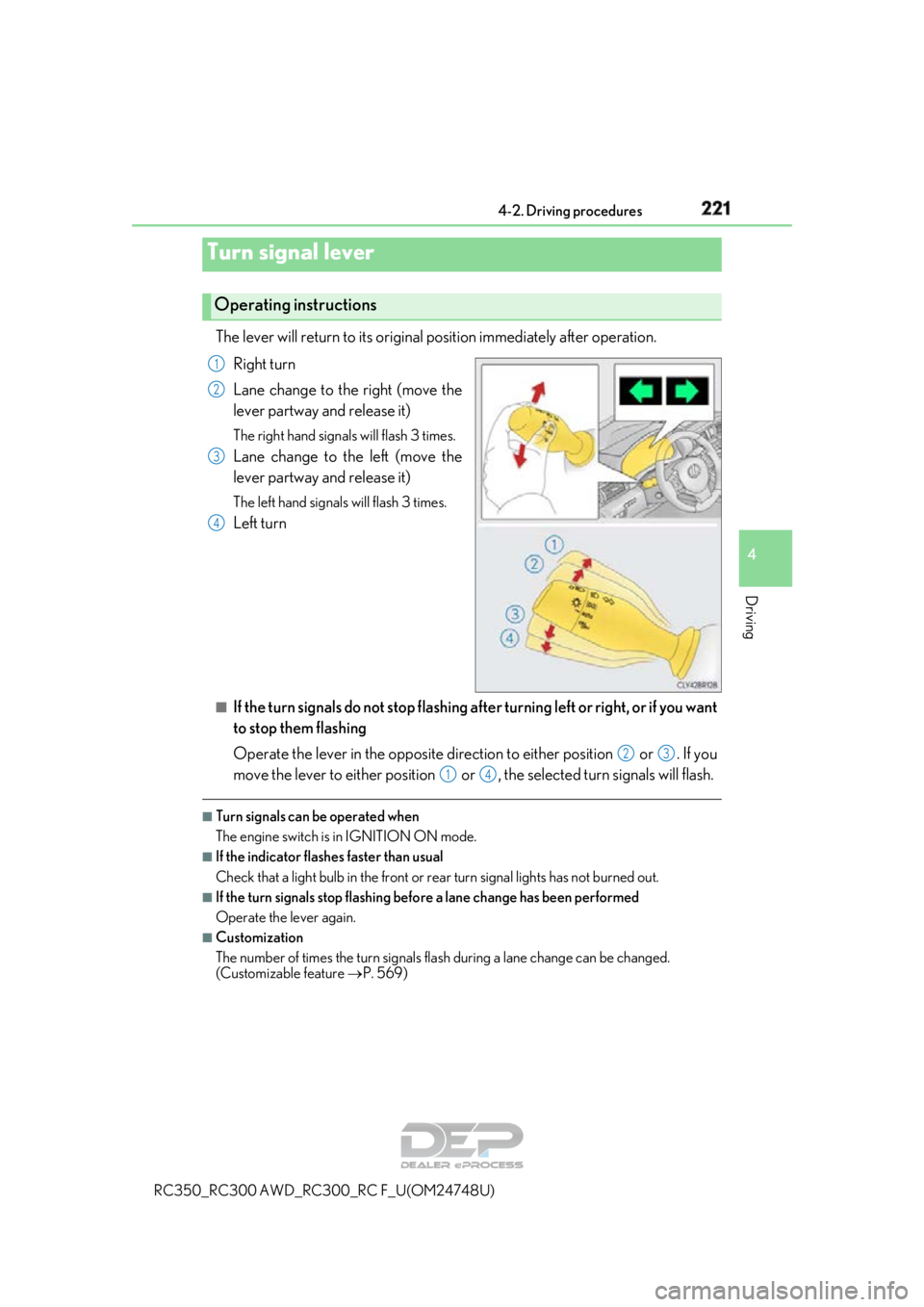
The lever will return to its original position immediately after operation.
Right turn
Lane change to the right (move the
lever partway and release it)
The right hand signals will flash 3 times.
Lane change to the left (move the
lever partway and release it)
The left hand signals will flash 3 times.
Left turn
■If the turn signals do not stop flashing af ter turning left or right, or if you want
to stop them flashing
Operate the lever in the opposite direct ion to either position or . If you
move the lever to either position or , the selected turn signals will flash.
■Turn signals can be operated when
The engine switch is in IGNITION ON mode.
■If the indicator flashes faster than usual
Check that a light bulb in the front or rear turn signal lights has not burned out.
■If the turn signals stop flashing befo re a lane change has been performed
Operate the lever again.
■Customization
The number of times the turn signals flas h during a lane change can be changed.
(Customizable feature P. 569)
Turn signal lever
Operating instructions
1
2
3
4
23
14
Page 230 of 636

2304-3. Operating the lights and wipers
RC350_RC300 AWD_RC3 00_RC F_U(OM24748U)
■Conditions to turn the high beams on/off automatically
●When all of the following conditions are met, the high beams will be turned on automat-
ically (after approximately 1 second):
• The vehicle speed is approximately 21 mph (34 km/h) or more.
• The area ahead of the vehicle is dark.
• There are no vehicles ahead with headlights or tail lights turned on.
• There are few streetlights on the road ahead.
●If any of the following condit ions is met, the high beams will turn off automatically:
• The vehicle speed is below ap proximately 17 mph (27 km/h).
• The area ahead of the vehicle is not dark.
• Vehicles ahead have th eir headlights or tail lights turned on.
• There are many streetlights on the road ahead.
■Camera sensor detection information
●The high beams may not be automatically turned off in the following situations:
• When a vehicle suddenly appears from around a curve
• When the vehicle is cut in front of by another vehicle
• When vehicles ahead cannot be detected du e to repeated curves, road dividers or
roadside trees
• When vehicles ahead appear in a faraway lane on a wide road
• When the lights of vehicles ahead are not on
●The high beams may be turned off if a vehicl e ahead that is using fog lights without its
headlights turned on is detected.
●House lights, street lights, traffic signals, and illuminated billboards or signs and other
reflective objects may cause the high beams to change to the low beams, or the low
beams to remain on.
●The following factors may affect the amount of time taken for the high beams to turn on
or off:
• The brightness of the headlights, fog lights, and tail lights of vehicles ahead
• The movement and direction of vehicles ahead
• When a vehicle ahead only has operational lights on one side
• When a vehicle ahead is a two-wheeled vehicle
• The condition of the road (gradient, cu rve, condition of the road surface, etc.)
• The number of passengers and amount of luggage in the vehicle
●The high beams may turn on or off unexpectedly.
Page 245 of 636
245
4
Driving
RC350_RC300 AWD_RC300_RC F_U(OM24748U)4-5. Using the driving support systems
◆PCS (Pre-Collision System)
P. 250
◆LDA (Lane Departure Alert with steering control)
P. 261
◆Automatic High Beam
P. 228
◆Dynamic radar cruise control
P. 268
Lexus Safety System+
The Lexus Safety System+ consists of the following drive assist systems and
contributes to a safe and comfo rtable driving experience:
WARNING
■Lexus Safety System+
The Lexus Safety System+ is designed to operate under the assumption that the driver
will drive safely, and is designed to help reduce the impact to the occupants and the
vehicle in the case of a collision or assist the driver in normal driving conditions.
As there is a limit to the degree of reco gnition accuracy and control performance that
this system can provide, do not overly rely on this system. The driver is always responsi-
ble for paying attention to the vehicle's surroundings and driving safely.
Page 256 of 636
2564-5. Using the driving support systems
RC350_RC300 AWD_RC3 00_RC F_U(OM24748U)
■Conditions under which the system may operate even if th ere is no possibility of a colli-
sion
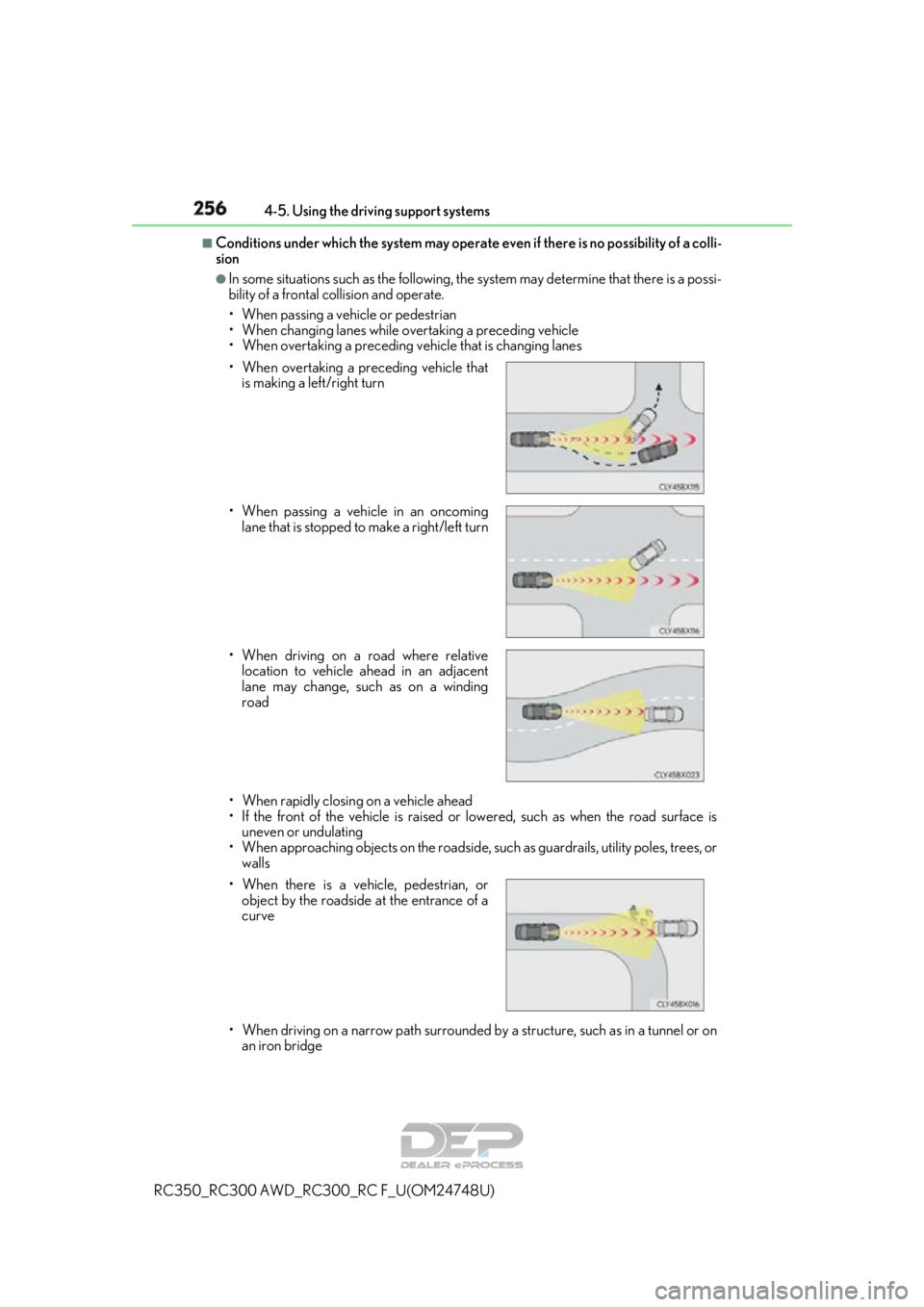
●In some situations such as the following, th e system may determine that there is a possi-
bility of a frontal collision and operate.
• When passing a vehicle or pedestrian
• When changing lanes while overtaking a preceding vehicle
• When overtaking a preceding vehicle that is changing lanes
• When rapidly closing on a vehicle ahead
• If the front of the vehicle is raised or lowered, such as when the road surface is uneven or undulating
• When approaching objects on the roadside, such as guardrails, utility poles, trees, or walls
• When driving on a narrow path surrounded by a structure, such as in a tunnel or on
an iron bridge
• When overtaking a preceding vehicle that
is making a left/right turn
• When passing a vehicle in an oncoming lane that is stopped to make a right/left turn
• When driving on a road where relative location to vehicle ahead in an adjacent
lane may change, such as on a winding
road
• When there is a vehicle, pedestrian, or object by the roadside at the entrance of a
curve
Page 261 of 636
2614-5. Using the driving support systems
4
Driving
RC350_RC300 AWD_RC300_RC F_U(OM24748U)
When driving on highways and freeways wi th white (yellow) lines, this function
alerts the driver when the vehicle might depart from its lane and provides assis-
tance by operating the steering whee l to keep the vehicle in its lane.
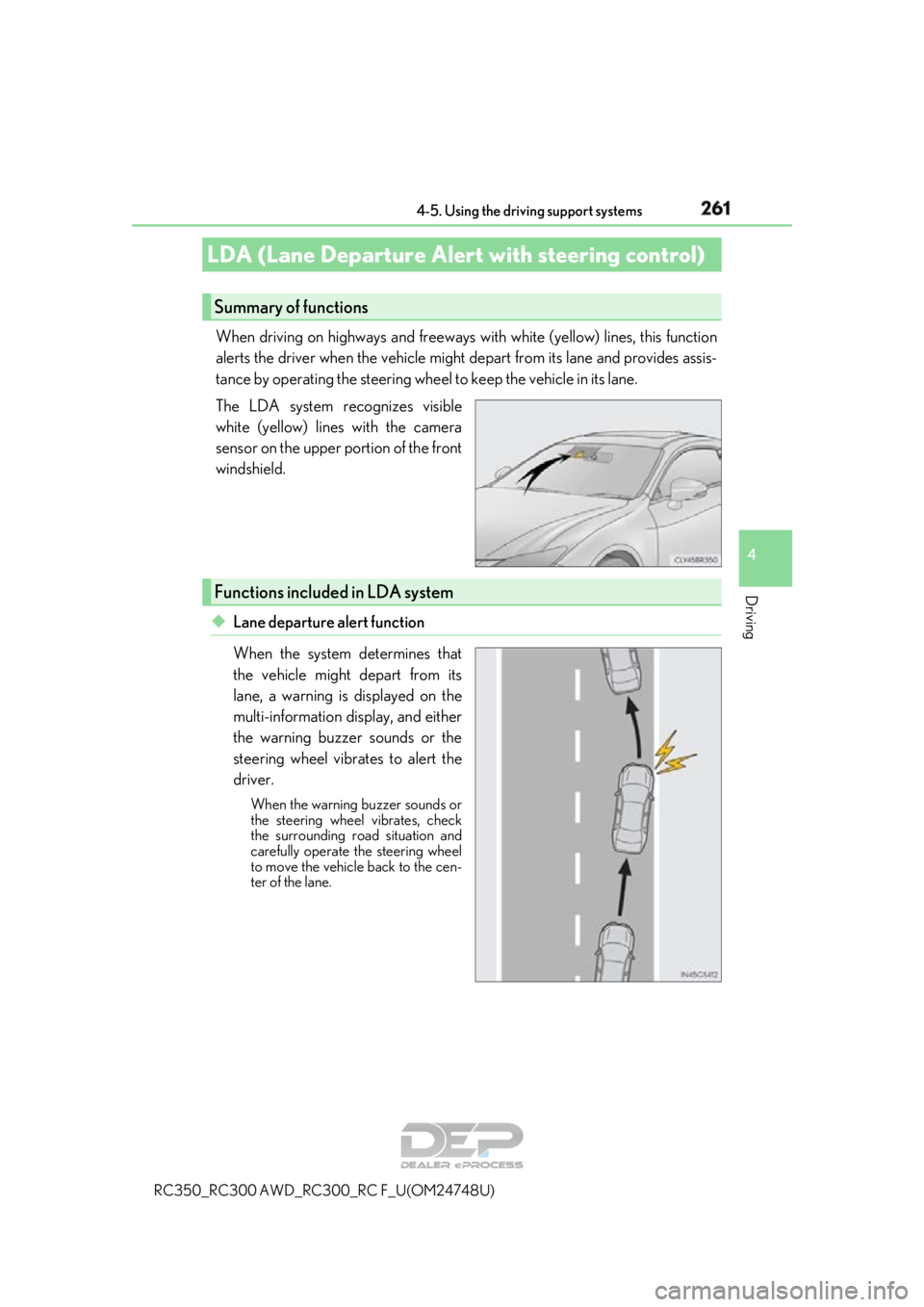
The LDA system recognizes visible
white (yellow) lines with the camera
sensor on the upper portion of the front
windshield.
◆Lane departure alert function
When the system determines that
the vehicle might depart from its
lane, a warning is displayed on the
multi-information display, and either
the warning buzzer sounds or the
steering wheel vibrates to alert the
driver.
When the warning buzzer sounds or
the steering wheel vibrates, check
the surrounding road situation and
carefully operate the steering wheel
to move the vehicle back to the cen-
ter of the lane.
LDA (Lane Departure Alert with steering control)
Summary of functions
Functions included in LDA system
Page 262 of 636
2624-5. Using the driving support systems
RC350_RC300 AWD_RC3 00_RC F_U(OM24748U)
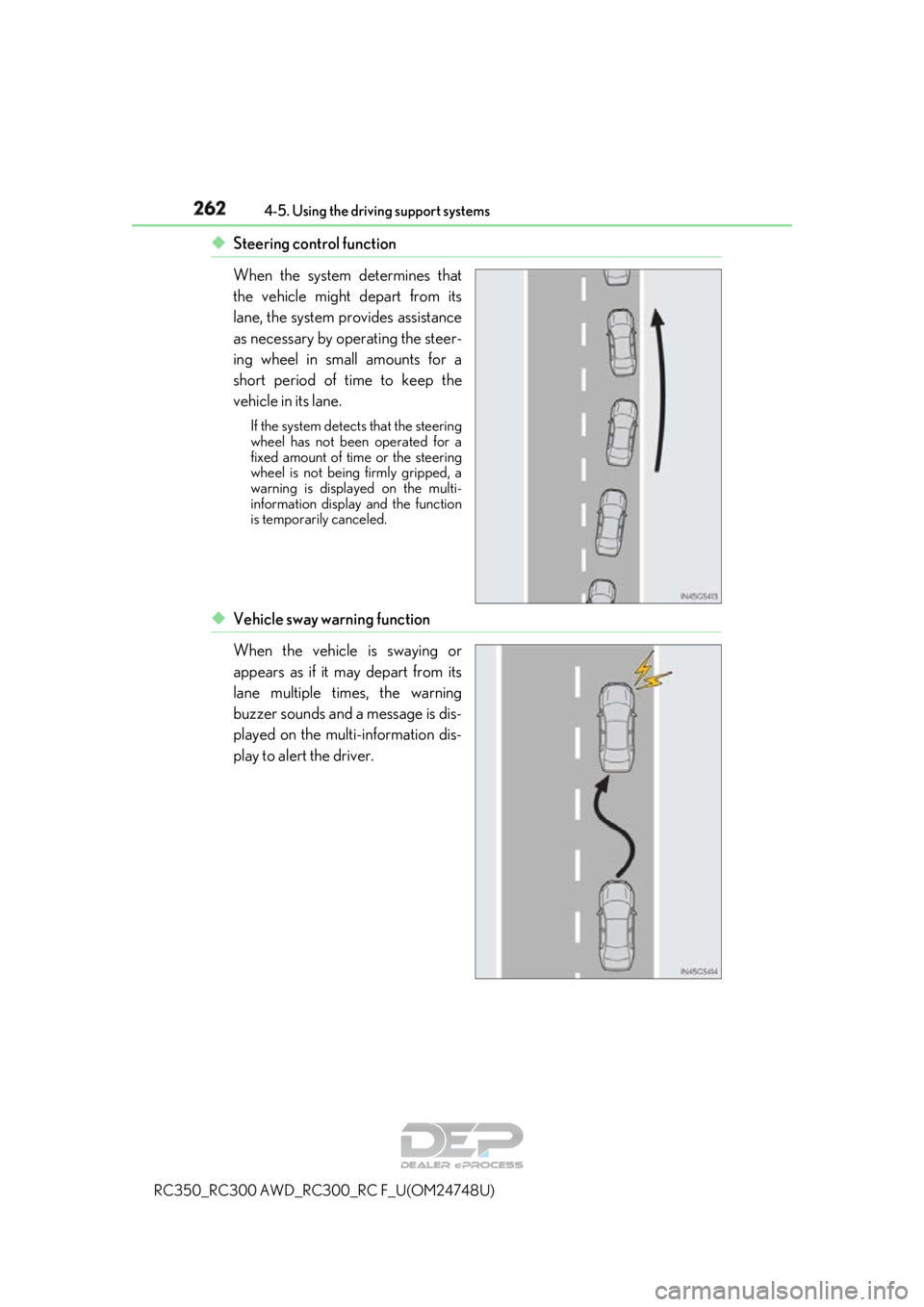
◆Steering control function
When the system determines that
the vehicle might depart from its
lane, the system provides assistance
as necessary by operating the steer-
ing wheel in small amounts for a
short period of time to keep the
vehicle in its lane.
If the system detects that the steering
wheel has not been operated for a
fixed amount of time or the steering
wheel is not being firmly gripped, a
warning is displayed on the multi-
information display and the function
is temporarily canceled.
◆Vehicle sway warning function
When the vehicle is swaying or
appears as if it may depart from its
lane multiple times, the warning
buzzer sounds and a message is dis-
played on the multi-information dis-
play to alert the driver.
Page 263 of 636
2634-5. Using the driving support systems
4
Driving
RC350_RC300 AWD_RC300_RC F_U(OM24748U)
WARNING
■Before using LDA system
Do not rely solely upon the LDA system. The LDA system does not automatically drive
the vehicle or reduce the amount of attention that must be paid to the area in front of
the vehicle. The driver must always assume full responsibility for driving safely by pay-
ing careful attention to the surrounding cond itions and operating the steering wheel to
correct the path of the vehicle. Also, the driver must take adequate breaks when
fatigued, such as from driving for a long period of time.
Failure to perform appropriate driving operat ions and pay careful attention may lead to
an accident, resulting in death or serious injury.
■To avoid operating LDA system by mistake
When not using the LDA system, use the LDA switch to turn the system off.
■Situations unsuitable for LDA system
Do not use the LDA system in the following situations.
The system may not operate properly and lead to an accident, resulting in death or
serious injury.
●A spare tire, tire chains, etc. are equipped.
●When the tires have been excessively worn, or when the tire inflation pressure is low.
●Tires which differ by structure, manufacturer, brand or tread pattern are used.
●Objects or patterns that could be mistaken for white (yellow) lines are present on the
side of the road (guardrails, cu rbs, reflective poles, etc.).
●Vehicle is driven on a snow-covered road.
●White (yellow) lines are difficult to see due to rain, snow, fog, dust, etc.
●Asphalt repair marks, white (yellow) line marks, etc. are present due to road repair.
●Vehicle is driven in a temporary lane or restricted lane due to construction work.
●Vehicle is driven on a road surface which is slippery due to rainy weather, fallen snow,
freezing, etc.
●Vehicle is driven in traffic lanes ot her than on highways and freeways.
●Vehicle is driven in a construction zone.
●During emergency towing
■Preventing LDA system malfunctions and operations performed by mistake
●Do not modify the headlights or place stickers, etc. on the surface of the lights.
●Do not modify the suspension etc. If the suspension etc. needs to be replaced, con-
tact your Lexus dealer.
●Do not install or place anything on the hood or grille. Also, do not install a grille guard
(bull bars, kangaroo bar, etc.).
●If your windshield needs repair s, contact your Lexus dealer.
Page 265 of 636
2654-5. Using the driving support systems
4
Driving
RC350_RC300 AWD_RC300_RC F_U(OM24748U)
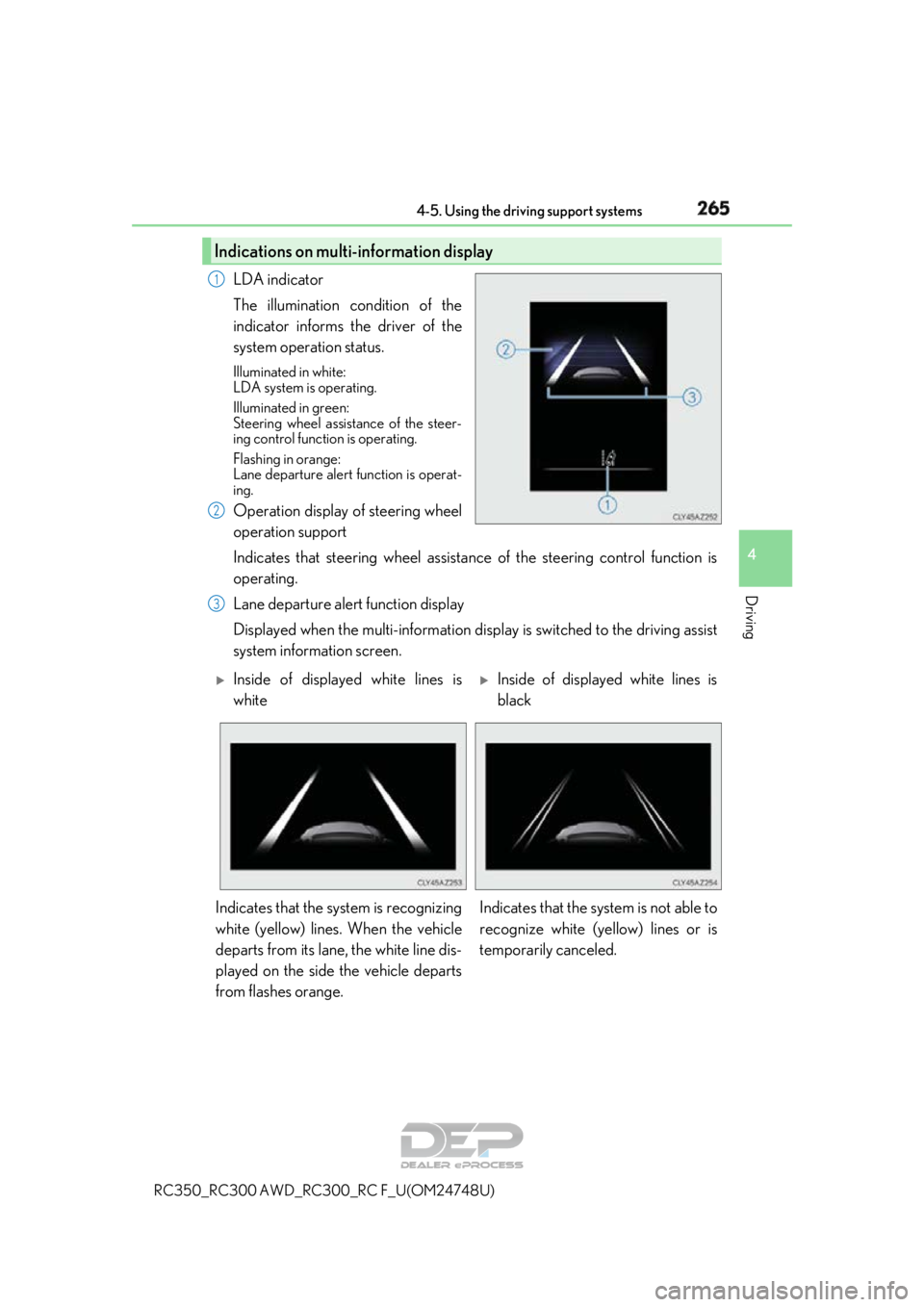
LDA indicator
The illumination condition of the
indicator informs the driver of the
system operation status.
Illuminated in white:
LDA system is operating.
Illuminated in green:
Steering wheel assistance of the steer-
ing control function is operating.
Flashing in orange:
Lane departure alert function is operat-
ing.
Operation display of steering wheel
operation support
Indicates that steering wheel assistance of the steering control function is
operating.
Lane departure alert function display
Displayed when the multi-information disp lay is switched to the driving assist
system information screen.
Indications on multi-information display
1
2
3
Inside of displayed white lines is
whiteInside of displayed white lines is
black
Indicates that the system is recognizing
white (yellow) lines. When the vehicle
departs from its lane, the white line dis-
played on the side the vehicle departs
from flashes orange. Indicates that the system is not able to
recognize white (ye
llow) lines or is
temporarily canceled.