ESP LEXUS RC350 2019 User Guide
[x] Cancel search | Manufacturer: LEXUS, Model Year: 2019, Model line: RC350, Model: LEXUS RC350 2019Pages: 390, PDF Size: 7.88 MB
Page 70 of 390
702-1. Instrument cluster
RC350AWD_RC350_RC300AWD_RC30
0_OM_(U)_1810outside temperature may not be dis-
played, or the display may take longer
than normal to change:
• When stopped, or driving at low speeds (less than 12 mph [20 km/h])
• When the outside temperature has
changed suddenly (at the entrance/exit of
a garage, tunnel, etc.)
●When “_ _”or “E” is displayed, the system
may be malfunctioning.
Take your vehicle to your Lexus dealer.
■Pop-up display
●In some situations, su ch as when a switch
operation is performed, a pop-up display
will be temporarily displayed on the
multi-information display or the odome-
ter/trip meter screen (F SPORT models).
●Some pop-up displays can be set on/off.
( P.76)
■Customization
The meter display can be customized on
the multi-information display. ( P.339)
■Display items
Odometer
Displays the total distance the vehicle has
been driven.
Trip meter A/trip meter B
Displays the distance the vehicle has been
driven since the meter was last reset. Trip
meters A and B can be used to record and
display different distances independently.
Distance until next engine oil
change
Displays the distance the vehicle can be
driven until an oil change is necessary.
■Changing the display
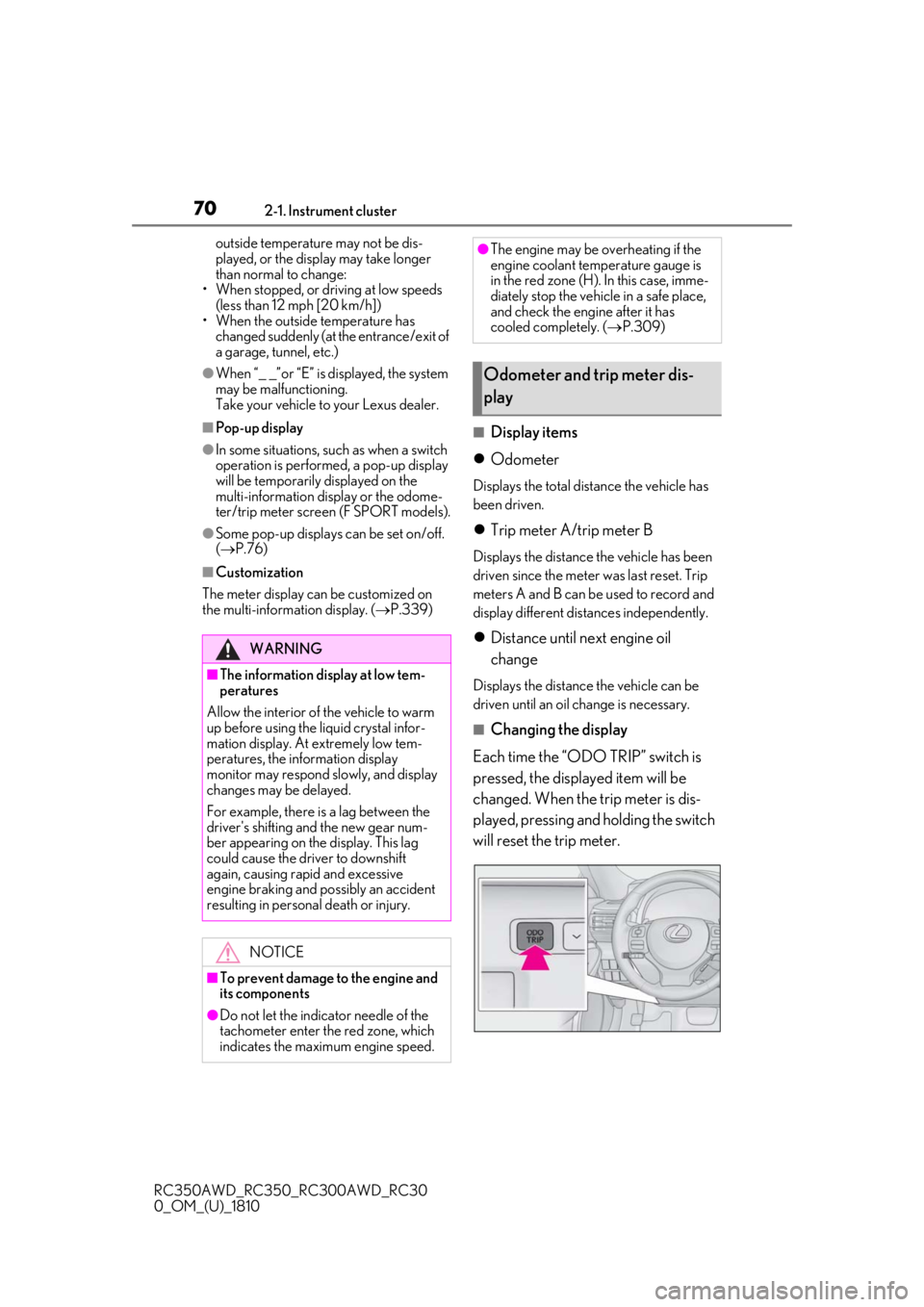
Each time the “ODO TRIP” switch is
pressed, the displayed item will be
changed. When the trip meter is dis-
played, pressing and holding the switch
will reset the trip meter.
WARNING
■The information display at low tem-
peratures
Allow the interior of the vehicle to warm
up before using the liquid crystal infor-
mation display. At extremely low tem-
peratures, the information display
monitor may respond slowly, and display
changes may be delayed.
For example, there is a lag between the
driver's shifting and the new gear num-
ber appearing on the display. This lag
could cause the driver to downshift
again, causing rapid and excessive
engine braking and possibly an accident
resulting in personal death or injury.
NOTICE
■To prevent damage to the engine and
its components
●Do not let the indicator needle of the
tachometer enter the red zone, which
indicates the maximum engine speed.
●The engine may be overheating if the
engine coolant temperature gauge is
in the red zone (H). In this case, imme-
diately stop the vehicle in a safe place,
and check the engine after it has
cooled completely. ( P.309)
Odometer and trip meter dis-
play
Page 72 of 390
722-1. Instrument cluster
RC350AWD_RC350_RC300AWD_RC30
0_OM_(U)_1810
■Menu icons
■Liquid crystal display
P.70
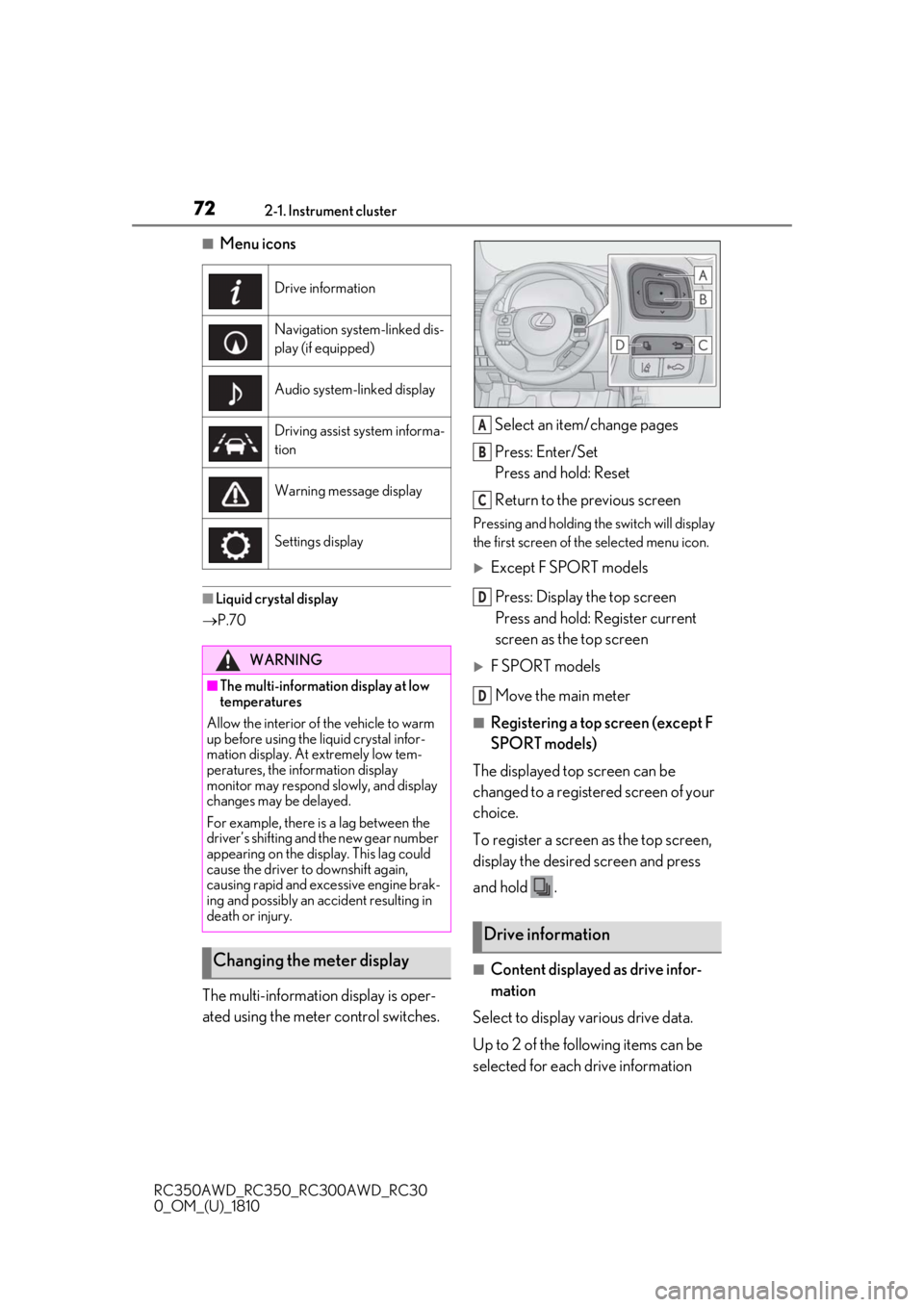
The multi-information display is oper-
ated using the meter control switches. Select an item/change pages
Press: Enter/Set
Press and hold: Reset
Return to the previous screen
Pressing and holding the switch will display
the first screen of the selected menu icon.
Except F SPORT models
Press: Display the top screen
Press and hold: Register current
screen as the top screen
F SPORT modelsMove the main meter
■Registering a top screen (except F
SPORT models)
The displayed top screen can be
changed to a registered screen of your
choice.
To register a screen as the top screen,
display the desired screen and press
and hold .
■Content displayed as drive infor-
mation
Select to display various drive data.
Up to 2 of the following items can be
selected for each drive information
Drive information
Navigation system-linked dis-
play (if equipped)
Audio system-linked display
Driving assist system informa-
tion
Warning message display
Settings display
WARNING
■The multi-information display at low
temperatures
Allow the interior of the vehicle to warm
up before using the liquid crystal infor-
mation display. At extremely low tem-
peratures, the information display
monitor may respond slowly, and display
changes may be delayed.
For example, there is a lag between the
driver’s shifting and the new gear number
appearing on the display. This lag could
cause the driver to downshift again,
causing rapid and excessive engine brak-
ing and possibly an accident resulting in
death or injury.
Changing the meter display
Drive information
A
B
C
D
D
Page 77 of 390
772-1. Instrument cluster
RC350AWD_RC350_RC300AWD_RC30
0_OM_(U)_1810
2
Vehicle status information and indicators
information (message indicating mainte-
nance is required and distance until the
next oil change) after engine oil mainte-
nance is performed.
■Meter settings
Language
Select to change the language on the dis-
play.
Units
Select to change the units of measure dis-
played.
Eco Driving Indicator Light
( P.73)
Select to enable/disable the Eco Driving
Indicator Light.
Switch settings (except F
SPORT models)
Displays a procedure to register a desired
screen to
.
You can register 1 screen as a shortcut,
which can be displayed by pressing
.
Drive information screen ( P.72)
Select to choose betwee n 2 items that will
be displayed on each drive information
screen (“Drive info 1”, “Drive Info 2” and
“Drive Info 3”) respectively.
Pop-up display ( P.70)
Select to enable/dis able the pop-up dis-
play.
• Intersection guidance (if equipped)
• Incoming calls
• Audio Feedback (F SPORT)
• Volume Feedback (F SPORT)
•Brightness adjustment
Color (except F SPORT models)
Select to set the color of the cursor on the
multi-information display.
Needle (F SPORT models)
Select to set the tachometer needle color.
Rev indicator (F SPORT models)
( P.69)
• Select to enable/disable the Rev indica-
tor.
• Select to set the desired engine speed at which the Rev indicator will begin to be
displayed.
Rev peak (F SPORT models)
( P.69)
Select to enable/disable the Rev peak.
Default setting
Select to reset the meter display settings to
the default setting.
■Background color of the indicator/shift
position display area (except F SPORT
models)
The background color of the indicator/shift
position display area is changed according
to the driving mode as follows ( P.190):
●Eco drive mode: Blue
●Sport mode: Red
■G-force display (if equipped)
The G-force values may not be zero even
when the vehicle is parked, such as when it
is parked on an incline.
■Suspension of the settings display
●Some settings cannot be changed while
driving. When changing settings, park
the vehicle in a safe place.
●If a warning message is displayed, opera-
tion of the settings display will be sus-
pended.
Page 103 of 390
1033-3. Adjusting the seats
RC350AWD_RC350_RC300AWD_RC30
0_OM_(U)_1810
3
Before driving
that has been registered to the driv-
ing position, and then unlock and
open the driver’s door using the
smart access system with push-but-
ton start or wireless remote control.
The driving position will move to the
recorded position (not including the steer-
ing wheel). However, the seat will move to
a position slightly behind the recorded
position in order to make entering the vehi-
cle easier.
If the driving position is in a position that
has already been recorded, the seat and
outside rear view mirrors will not move.
2Turn the engine switch to ACCES-
SORY mode or IGNITION ON
mode, or fasten a seat belt.
The seat and steering wheel will move to
the recorded position.
■Recalling the driving position using the
memory recall function
●Different driving positions can be regis-
tered for each electronic key. Therefore,
the driving position that is recalled may
be different depending on the key being
carried.
●If a door other than the driver’s door is
unlocked with the smart access system
with push-button start, the driving posi-
tion cannot be recalled. In this case, press
the driving position button which has
been set.
■Customization
Some functions can be customized.
( P.339)
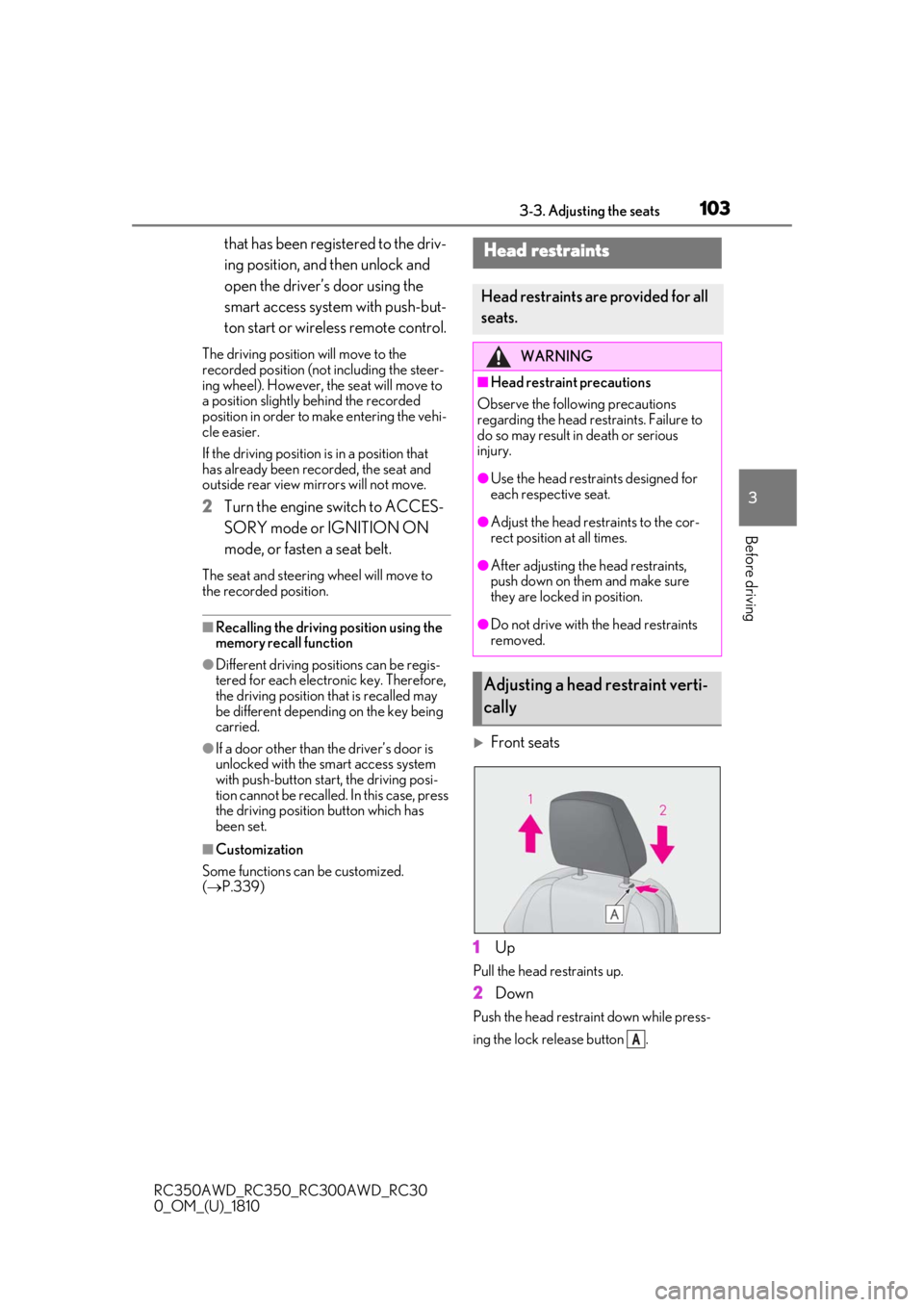
Front seats
1
Up
Pull the head restraints up.
2Down
Push the head restraint down while press-
ing the lock release button .
Head restraints
Head restraints are provided for all
seats.
WARNING
■Head restraint precautions
Observe the following precautions
regarding the head re straints. Failure to
do so may result in death or serious
injury.
●Use the head restraints designed for
each respective seat.
●Adjust the head restraints to the cor-
rect position at all times.
●After adjusting the head restraints,
push down on them and make sure
they are locked in position.
●Do not drive with the head restraints
removed.
Adjusting a head restraint verti-
cally
A
Page 107 of 390
1073-4. Adjusting the steering wheel and mirrors
RC350AWD_RC350_RC300AWD_RC30
0_OM_(U)_1810
3
Before driving
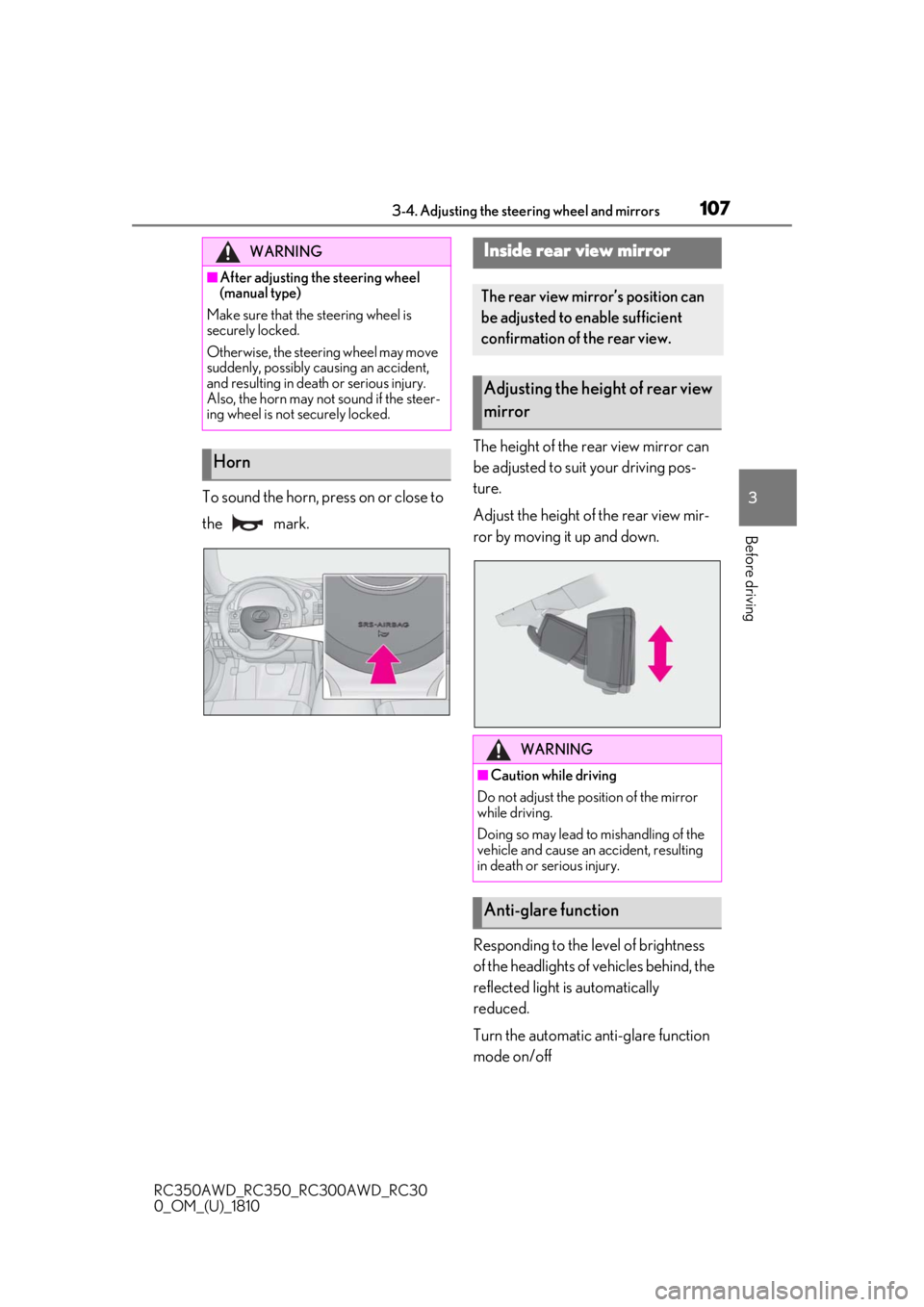
To sound the horn, press on or close to
the mark. The height of the rear view mirror can
be adjusted to suit your driving pos-
ture.
Adjust the height of the rear view mir-
ror by moving it up and down.
Responding to the level of brightness
of the headlights of vehicles behind, the
reflected light is automatically
reduced.
Turn the automatic anti-glare function
mode on/off
WARNING
■After adjusting the steering wheel
(manual type)
Make sure that the steering wheel is
securely locked.
Otherwise, the steering wheel may move
suddenly, possibly causing an accident,
and resulting in death or serious injury.
Also, the horn may not sound if the steer-
ing wheel is not securely locked.
Horn
Inside rear view mirror
The rear view mirror’s position can
be adjusted to enable sufficient
confirmation of the rear view.
Adjusting the heig ht of rear view
mirror
WARNING
■Caution while driving
Do not adjust the position of the mirror
while driving.
Doing so may lead to mishandling of the
vehicle and cause an accident, resulting
in death or serious injury.
Anti-glare function
Page 111 of 390

1113-5. Opening, closing the windows and moon roof
RC350AWD_RC350_RC300AWD_RC30
0_OM_(U)_1810
3
Before driving
If you release the switch while the window is
moving, start again from the beginning.
If the window reverses and cannot be fully
closed or opened, have the vehicle
inspected by your Lexus dealer.
■Door lock linked window operation
●The power windows can be opened and
closed using the mechanical key.*
( P.305)
●The power windows can be opened using
the wireless remote control.* ( P.86)
*: These settings must be customized at
your Lexus dealer.
■Power windows open warning buzzer
A buzzer sounds and a message is shown
on the multi-information display in the
instrument cluster when the engine switch
is turned off and the driver’s door is opened
with the power windows open.
■Customization
Some functions can be customized.
( P.339)
This function can be used to prevent
children from accidentally opening or
closing a passenger window.
Press the switch.
The indicator will come on and the pas-
WARNING
Observe the following precautions.
Failure to do so may result in death or
serious injury.
■Closing the windows
●The driver is responsible for all the
power window operations, including
the operation for the passengers. In
order to prevent accidental operation,
especially by a child, do not let a child
operate the power windows. It is possi-
ble for children and other passengers
to have body parts caught in the power
window. Also, when riding with a child,
it is recommended to use the window
lock switch. ( P.111)
●Check to make sure that all passen-
gers do not have any part of their body
in a position where it could be caught
when a window is being operated.
●When using the wireless remote con-
trol or mechanical key and operating
the power windows, operate the
power window after checking to make
sure that there is no possibility of any
passenger having any of their body
parts caught in the window. Also do
not let a child operate window by the
wireless remote control or mechanical
key. It is possible for children and other
passengers to get caught in the power
window.
●When exiting the vehicle, turn the
engine switch off, carry the key and
exit the vehicle along with the child.
There may be accidental operation,
due to mischief, etc., that may possibly
lead to an accident.
■Jam protection function
●Never use any part of your body to
intentionally activa te the jam protec-
tion function.
●The jam protection function may not
work if something gets jammed just
before the window is fully closed. Be
careful not to get any part of your body
jammed in the window.
■Catch protection function
●Never use any part of your body or
clothing to intentionally activate the
catch protection function.
●The catch protection function may not
work if something gets caught just
before the window is fully opened. Be
careful not to get any part of your body
or clothing caught in the window.
Preventing accidental operation
(window lock switch)
A
Page 114 of 390
1143-5. Opening, closing the windows and moon roof
RC350AWD_RC350_RC300AWD_RC30
0_OM_(U)_1810is turned off and the driver’s door is opened
with the moon roof open.
■Customization
Some functions can be customized.
( P.339)
WARNING
Observe the following precautions.
Failure to do so may cause death or seri-
ous injury.
■Opening the moon roof
●Do not allow any passengers to put
their hands or heads outside the vehi-
cle while it is moving.
●Do not sit on top of the moon roof.
■Opening and closing the moon roof
●The driver is responsible for moon roof
opening and closing operations. In
order to prevent accidental operation,
especially by a child, do not let a child
operate the moon roof. It is possible for
children and other passengers to have
body parts caught in the moon roof.
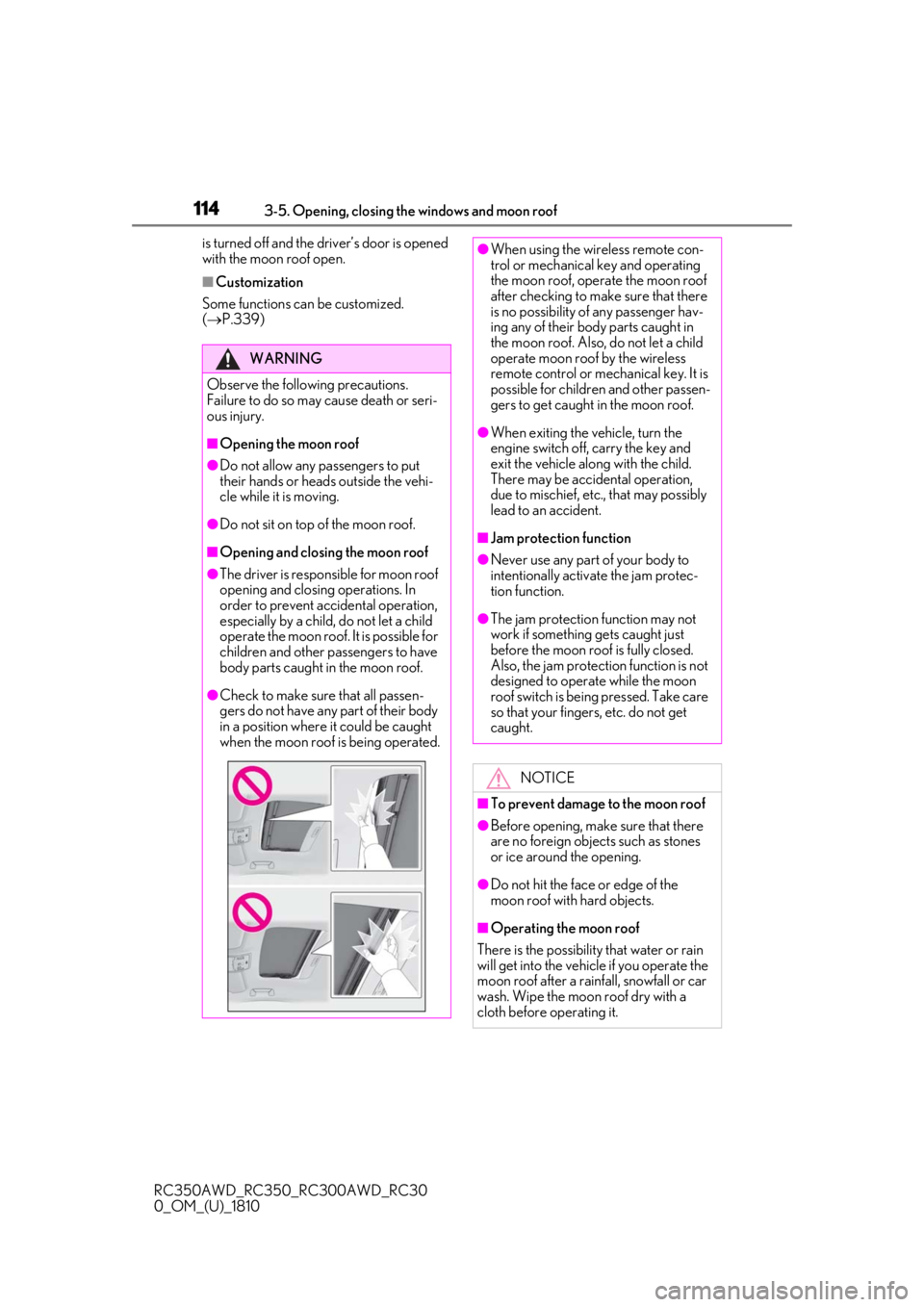
●Check to make sure that all passen-
gers do not have any part of their body
in a position where it could be caught
when the moon roof is being operated.
●When using the wireless remote con-
trol or mechanical key and operating
the moon roof, operate the moon roof
after checking to make sure that there
is no possibility of any passenger hav-
ing any of their body parts caught in
the moon roof. Also, do not let a child
operate moon roof by the wireless
remote control or mech anical key. It is
possible for children and other passen-
gers to get caught in the moon roof.
●When exiting the vehicle, turn the
engine switch off, carry the key and
exit the vehicle along with the child.
There may be accidental operation,
due to mischief, etc., that may possibly
lead to an accident.
■Jam protection function
●Never use any part of your body to
intentionally activa te the jam protec-
tion function.
●The jam protection function may not
work if something gets caught just
before the moon roof is fully closed.
Also, the jam protection function is not
designed to operate while the moon
roof switch is being pressed. Take care
so that your fingers, etc. do not get
caught.
NOTICE
■To prevent damage to the moon roof
●Before opening, make sure that there
are no foreign objects such as stones
or ice around the opening.
●Do not hit the face or edge of the
moon roof with hard objects.
■Operating the moon roof
There is the possibility that water or rain
will get into the vehicle if you operate the
moon roof after a rainfall, snowfall or car
wash. Wipe the moon roof dry with a
cloth before operating it.
Page 116 of 390
1164-1. Before driving
RC350AWD_RC350_RC300AWD_RC30
0_OM_(U)_1810
4-1.Before driving
■Starting the engine
P.125
■Driving
1 With the brake pedal depressed,
shift the shift lever to D. ( P.128)
2 Release the parking brake.
(P.134)
3 Gradually release the brake pedal
and gently depress the accelerator
pedal to accelerate the vehicle.
■Stopping
1 With the shift lever in D, depress the
brake pedal.
2 If necessary, set the parking brake.
If the vehicle is to be stopped for an
extended period of time, shift the shift lever
to P or N. ( P.128)
■Parking the vehicle
1 With the shift lever in D, depress the
brake pedal.
2 Set the parking brake ( P.134),
and shift the shift lever to P
( P.128).
3 Press the engine switch to stop the
engine.
4 Lock the door, making sure that you
have the electronic key on your
person.
If parking on a hill, block the wheels as
needed.
■Starting off on a steep uphill
1 Make sure that the parking brake is
set and shift the shift lever to D.
2 Gently depress the accelerator
pedal.
3 Release the parking brake.
■When starting off on an uphill
The hill-start assist control will activate.
( P.192)
■Driving in the rain
●Drive carefully when it is raining, because
visibility will be reduced, the windows
may become fogged-up, and the road
will be slippery.
●Drive carefully when it starts to rain,
because the road surface will be espe-
cially slippery.
●Refrain from high speeds when driving on
an expressway in the rain, because there
may be a layer of wa ter between the tires
and the road surface, preventing the
steering and brakes from operating prop-
erly.
■Engine speed while driving
In the following conditions, the engine
speed may become high while driving. This
is due to automatic up-shifting control or
down-shifting implementation to meet driv-
ing conditions. It does not indicate sudden
acceleration.
●The vehicle is judged to be driving uphill
or downhill
●When the accelerato r pedal is released
●When the brake pedal is depressed while
sport mode is selected
■Restraining the engine output (Brake
Override System)
●When the accelerator and brake pedals
are depressed at the same time, the
engine output may be restrained.
●A warning message is displayed on the
multi-information display while the sys-
tem is operating.
Driving the vehicle
The following procedures should be
observed to ensure safe driving:
Driving procedure
Page 118 of 390
1184-1. Before driving
RC350AWD_RC350_RC300AWD_RC30
0_OM_(U)_1810
WARNING
• Depress the brake pedal using your right foot. Depressing the brake pedal
using your left foot may delay
response in an emergency, resulting in
an accident.
●Do not drive the vehicle over or stop
the vehicle near flammable materials.
The exhaust system and exhaust gases
can be extremely hot. These hot parts
may cause a fire if there is any flamma-
ble material nearby.
●During normal driving, do not turn off
the engine. Turning the engine off
while driving will not cause loss of
steering or braking control, but the
power assist to these systems will be
lost. This will make it more difficult to
steer and brake, so you should pull
over and stop the vehicle as soon as it
is safe to do so.
However, in the event of an emer-
gency, such as if it becomes impossible
to stop the vehicle in the normal way:
P.274
●Use engine braking (downshift) to
maintain a safe speed when driving
down a steep hill.
Using the brakes continuously may
cause the brakes to overheat and lose
effectiveness. ( P.128)
●Do not adjust the positions of the
steering wheel, the seat, or the inside
or outside rear view mirrors while driv-
ing.
Doing so may result in a loss of vehicle
control.
●Always check that all passengers’
arms, heads or other parts of their
body are not outside the vehicle.
●Do not drive in excess of the speed
limit. Even if the legal speed limit per-
mits it, do not drive over 85 mph (140
km/h) unless your vehicle has
high-speed capability tires. Driving
over 85 mph (140 km /h) may result in
tire failure, loss of control and possible
injury. Be sure to consult a tire dealer
to determine whether the tires on your
vehicle are high-speed capability tires
or not before driving at such speeds.
■When driving on slippery road sur-
faces
●Sudden braking, acceleration and
steering may cause tire slippage and
reduce your ability to control the vehi-
cle.
●Sudden acceleration, engine braking
due to shifting, or changes in engine
speed could cause the vehicle to skid.
●After driving through a puddle, lightly
depress the brake pedal to make sure
that the brakes are functioning prop-
erly. Wet brake pads may prevent the
brakes from functioning properly. If the
brakes on only one side are wet and
not functioning properly, steering con-
trol may be affected.
■When shifting the shift lever
●Do not let the vehicle roll backward
while the shift lever is in a driving posi-
tion, or roll forward while the shift lever
is in R.
Doing so may cause the engine to stall
or lead to poor brake and steering
performance, resulting in an accident
or damage to the vehicle.
●Do not shift the shif t lever to P while
the vehicle is moving.
Doing so can damage the transmission
and may result in a loss of vehicle con-
trol.
●Do not shift the shift lever to a driving
position while the vehicle is moving
backward.
Doing so can damage the transmission
and may result in a loss of vehicle con-
trol.
Page 134 of 390
1344-2. Driving procedures
RC350AWD_RC350_RC300AWD_RC30
0_OM_(U)_1810
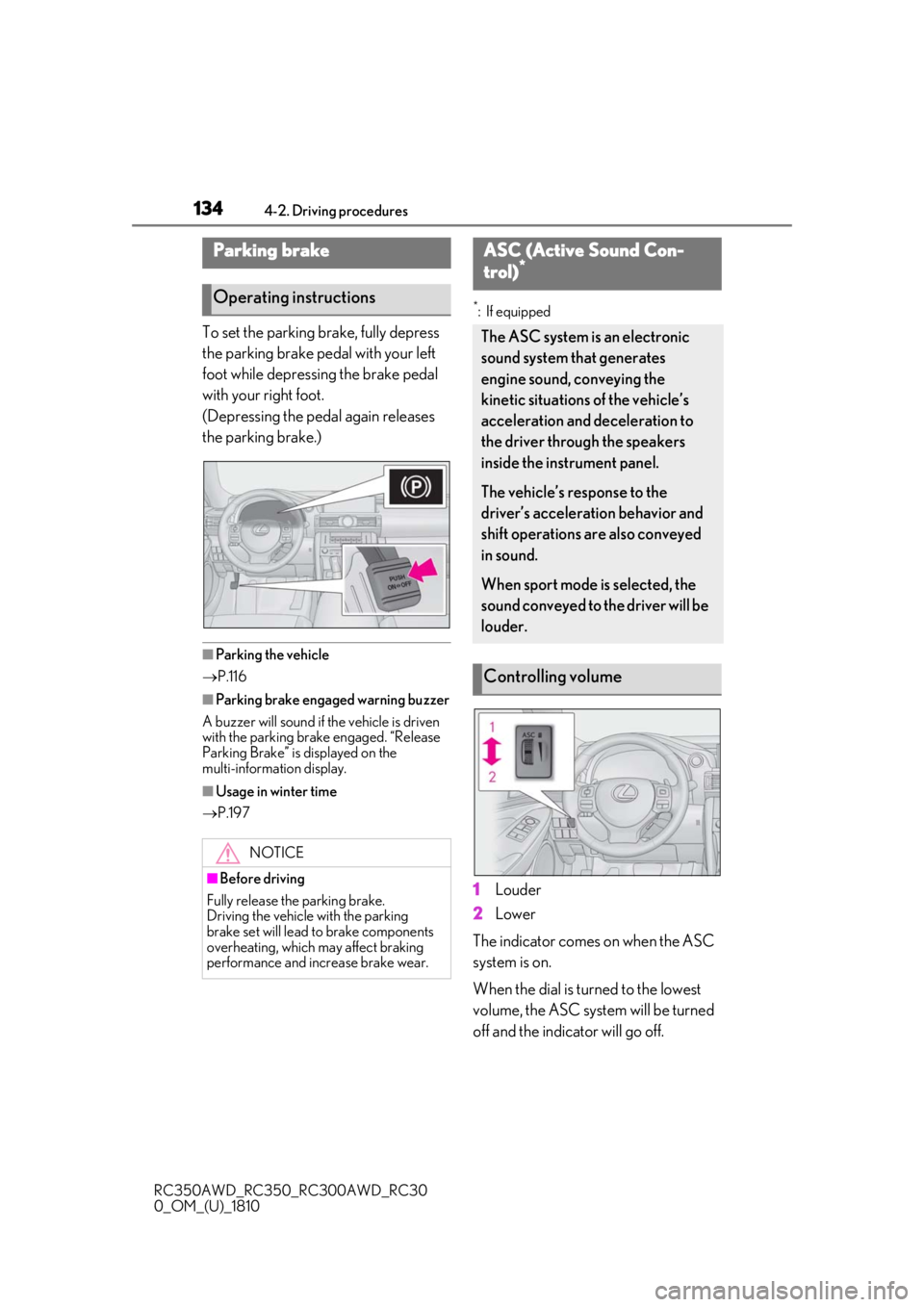
To set the parking brake, fully depress
the parking brake pedal with your left
foot while depressing the brake pedal
with your right foot.
(Depressing the pedal again releases
the parking brake.)
■Parking the vehicle
P.116
■Parking brake engaged warning buzzer
A buzzer will sound if the vehicle is driven
with the parking brake engaged. “Release
Parking Brake” is displayed on the
multi-information display.
■Usage in winter time
P.197
*: If equipped
1Louder
2
Lower
The indicator comes on when the ASC
system is on.
When the dial is turned to the lowest
volume, the ASC system will be turned
off and the indicator will go off.
Parking brake
Operating instructions
NOTICE
■Before driving
Fully release the parking brake.
Driving the vehicle with the parking
brake set will lead to brake components
overheating, which may affect braking
performance and increase brake wear.
ASC (Active Sound Con-
trol)*
The ASC system is an electronic
sound system that generates
engine sound, conveying the
kinetic situations of the vehicle’s
acceleration and deceleration to
the driver through the speakers
inside the instrument panel.
The vehicle’s response to the
driver’s acceleration behavior and
shift operations are also conveyed
in sound.
When sport mode is selected, the
sound conveyed to the driver will be
louder.
Controlling volume