ECU LEXUS RC350 2019 Owner's Manual
[x] Cancel search | Manufacturer: LEXUS, Model Year: 2019, Model line: RC350, Model: LEXUS RC350 2019Pages: 390, PDF Size: 7.88 MB
Page 49 of 390
491-1. For safe use
RC350AWD_RC350_RC300AWD_RC30
0_OM_(U)_1810
1
For safety and security
system.
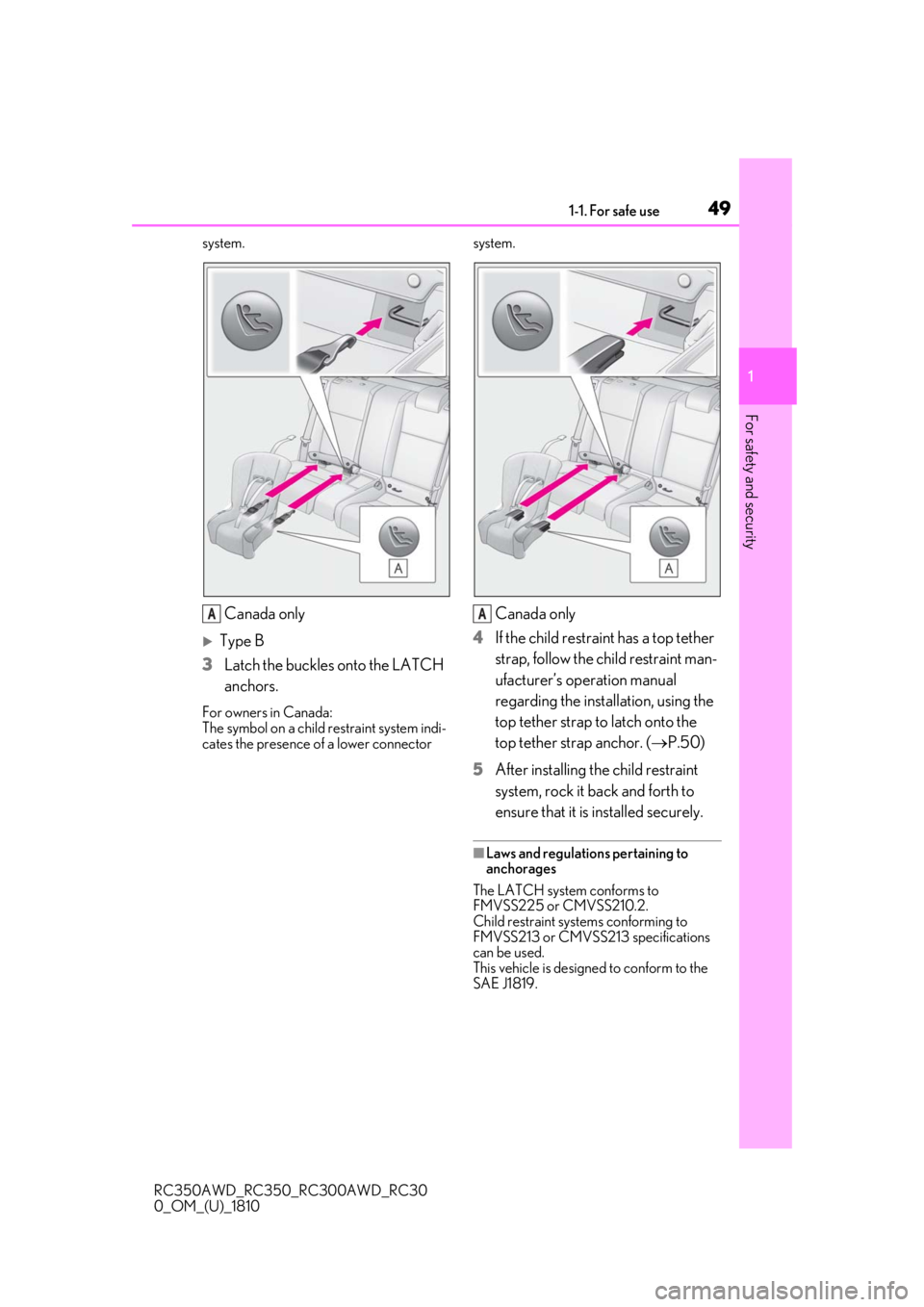
Canada only
Type B
3 Latch the buckles onto the LATCH
anchors.
For owners in Canada:
The symbol on a child restraint system indi-
cates the presence of a lower connector system.
Canada only
4 If the child restraint has a top tether
strap, follow the child restraint man-
ufacturer’s operation manual
regarding the installation, using the
top tether strap to latch onto the
top tether strap anchor. ( P.50)
5 After installing the child restraint
system, rock it back and forth to
ensure that it is installed securely.
■Laws and regulations pertaining to
anchorages
The LATCH system conforms to
FMVSS225 or CMVSS210.2.
Child restraint systems conforming to
FMVSS213 or CMVSS213 specifications
can be used.
This vehicle is designed to conform to the
SAE J1819.
AA
Page 50 of 390
501-1. For safe use
RC350AWD_RC350_RC300AWD_RC30
0_OM_(U)_1810
■Anchor brackets (for top tether
strap)
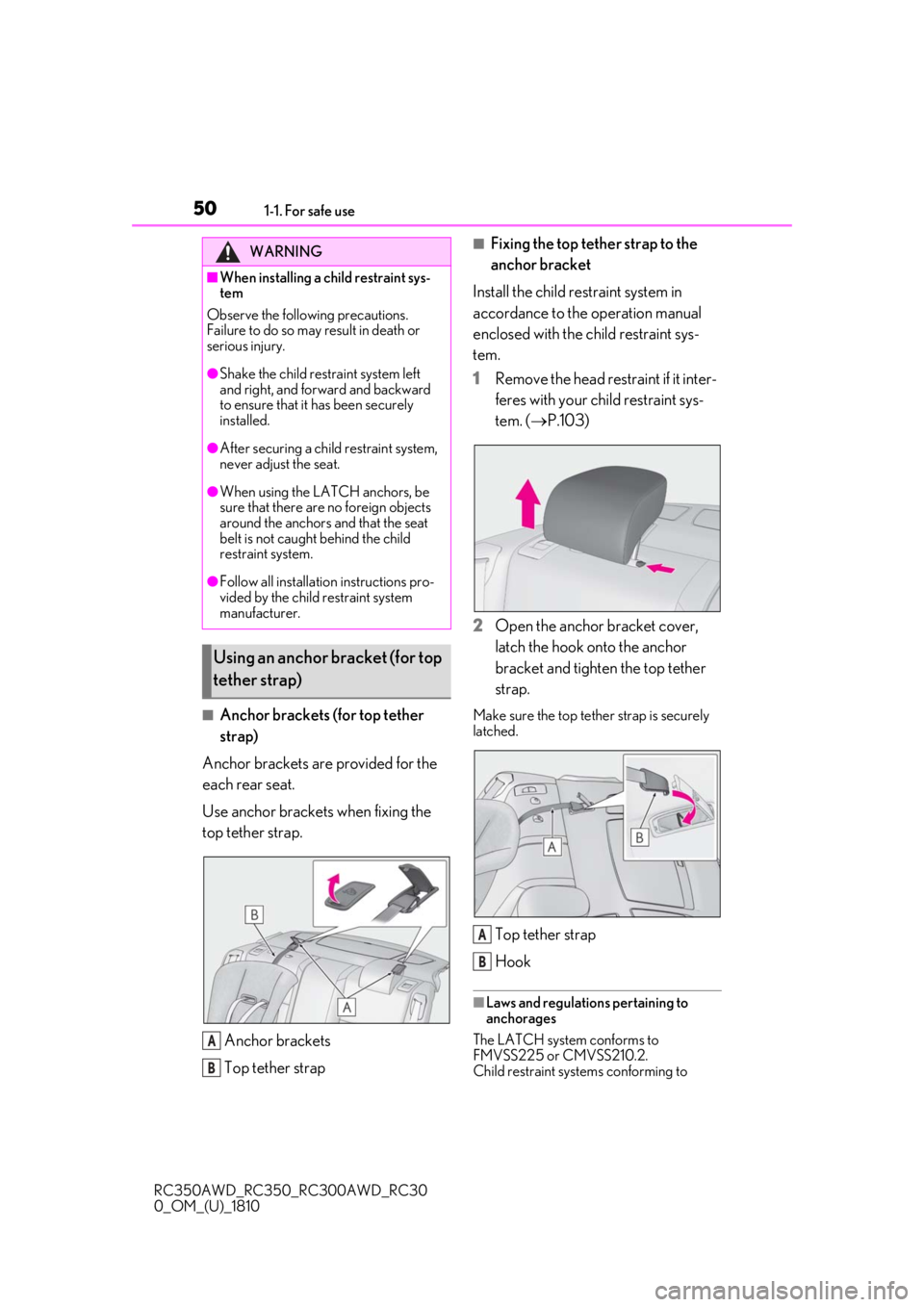
Anchor brackets are provided for the
each rear seat.
Use anchor brackets when fixing the
top tether strap.
Anchor brackets
Top tether strap
■Fixing the top tether strap to the
anchor bracket
Install the child restraint system in
accordance to the operation manual
enclosed with the child restraint sys-
tem.
1
Remove the head restraint if it inter-
feres with your child restraint sys-
tem. ( P.103)
2
Open the anchor bracket cover,
latch the hook onto the anchor
bracket and tighten the top tether
strap.
Make sure the top tether strap is securely
latched.
Top tether strap
Hook
■Laws and regulations pertaining to
anchorages
The LATCH system conforms to
FMVSS225 or CMVSS210.2.
Child restraint systems conforming to
WARNING
■When installing a child restraint sys-
tem
Observe the following precautions.
Failure to do so may result in death or
serious injury.
●Shake the child restraint system left
and right, and forward and backward
to ensure that it has been securely
installed.
●After securing a child restraint system,
never adjust the seat.
●When using the LATCH anchors, be
sure that there are no foreign objects
around the anchors and that the seat
belt is not caught behind the child
restraint system.
●Follow all installation instructions pro-
vided by the child restraint system
manufacturer.
Using an anchor bracket (for top
tether strap)
A
B
A
B
Page 51 of 390
511-1. For safe use
RC350AWD_RC350_RC300AWD_RC30
0_OM_(U)_1810
1
For safety and security
FMVSS213 or CMVSS213 specifications
can be used.
This vehicle is designed to conform to the
SAE J1819.
WARNING
■When installing a child restraint sys-
tem
Observe the following precautions.
Failure to do so may result in death or
serious injury.
●Firmly attach the top tether strap and
make sure that the belt is not twisted.
●Do not attach the top tether strap to
anything other than the anchor
bracket.
●Shake the child restraint system left
and right, and forward and backward
to ensure that it has been securely
installed.
●After securing a child restraint system,
never adjust the seat.
●Follow all installation instructions pro-
vided by the child restraint system
manufacturer.
NOTICE
■Anchor brackets (for top tether
strap)
When not in use, make certain to close
the lid. If it remains open, the lid may be
damaged.
Exhaust gas precautions
Harmful substance to the human
body is included in exhaust gases if
inhaled.
WARNING
Exhaust gases include harmful carbon
monoxide (CO), which is colorless and
odorless. Observe the following precau-
tions.
Failure to do so may cause exhaust gases
enter the vehicle and may lead to an
accident caused by light-headedness, or
may lead to death or a serious health
hazard.
■Important points while driving
●Keep the trunk lid closed.
●If you smell exhaust gases in the vehi-
cle even when the trunk lid is closed,
open the windows and have the vehi-
cle inspected at your Lexus dealer as
soon as possible.
■When parking
●If the vehicle is in a poorly ventilated
area or a closed area, such as a
garage, stop the engine.
●Do not leave the vehicle with the
engine on for a long time.
If such a situation cannot be avoided,
park the vehicle in an open space and
ensure that exhaust fumes do not enter
the vehicle interior.
●Do not leave the engine running in an
area with snow build-up, or where it is
snowing. If snowbanks build up around
the vehicle while the engine is running,
exhaust gases may collect and enter
the vehicle.
Page 53 of 390
531-2. LEXUS Enform
RC350AWD_RC350_RC300AWD_RC30
0_OM_(U)_1810
1
For safety and security
1-2.LEXUS Enform
*:If equipped
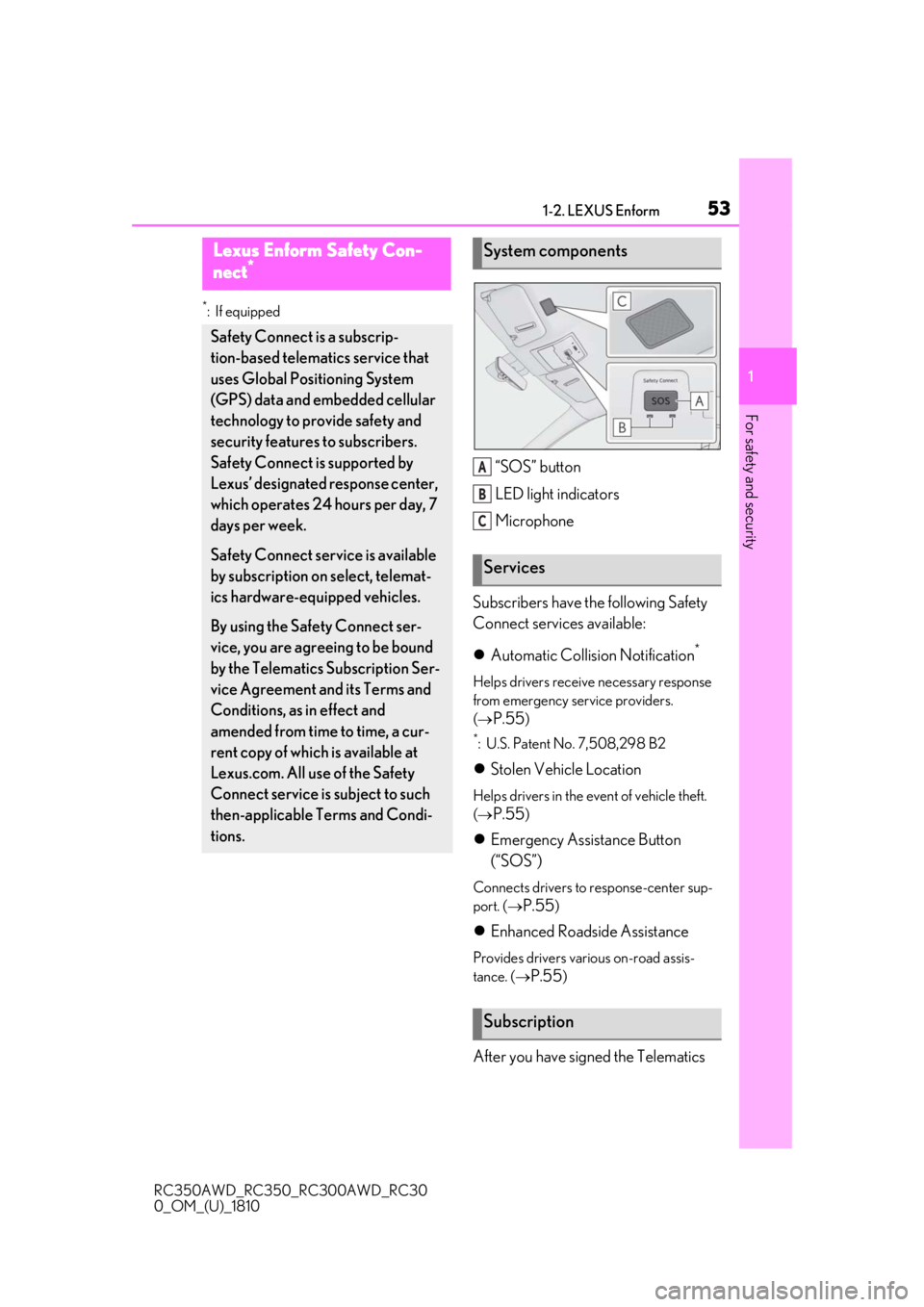
“SOS” button
LED light indicators
Microphone
Subscribers have the following Safety
Connect services available:
Automatic Collision Notification
*
Helps drivers receive necessary response
from emergency service providers.
(
P.55)
*: U.S. Patent No. 7,508,298 B2
Stolen Vehicle Location
Helps drivers in the event of vehicle theft.
(
P.55)
Emergency Assistance Button
(“SOS”)
Connects drivers to response-center sup-
port. (
P.55)
Enhanced Roadside Assistance
Provides drivers various on-road assis-
tance. (
P.55)
After you have signed the Telematics
Lexus Enform Safety Con-
nect*
Safety Connect is a subscrip-
tion-based telematics service that
uses Global Positioning System
(GPS) data and embedded cellular
technology to provide safety and
security features to subscribers.
Safety Connect is supported by
Lexus’ designated response center,
which operates 24 hours per day, 7
days per week.
Safety Connect service is available
by subscription on select, telemat-
ics hardware-equipped vehicles.
By using the Safety Connect ser-
vice, you are agreeing to be bound
by the Telematics Subscription Ser-
vice Agreement and its Terms and
Conditions, as in effect and
amended from time to time, a cur-
rent copy of which is available at
Lexus.com. All use of the Safety
Connect service is subject to such
then-applicable Terms and Condi-
tions.
System components
Services
Subscription
A
B
C
Page 55 of 390
551-2. LEXUS Enform
RC350AWD_RC350_RC300AWD_RC30
0_OM_(U)_1810
1
For safety and security
Connect service not active
■Automatic Collision Notification
In case of either airbag deployment or
severe rear-end collision, the system is
designed to automatically call the
response center. The responding agent
receives the vehicle’s location and
attempts to speak with the vehicle
occupants to assess the level of emer-
gency. If the occupants are unable to
communicate, the ag ent automatically
treats the call as an emergency, con-
tacts the nearest emergency services
provider to describe the situation, and
requests that assistance be sent to the
location.
■Stolen Vehicle Location
If your vehicle is stolen, Safety Connect
can work with local authorities to assist
them in locating and recovering the
vehicle. After filing a police report, call
the Safety Connect response center at
1-800-25-LEXUS
(1-800-255-3987) in the United
States, 1-877-539-8777 in Puerto
Rico or 1-800-265- 3987 in Canada,
and follow the prompts for Safety Con-
nect to initiate this service.
In addition to assisting law enforce-
ment with recovery of a stolen vehicle,
Safety-Connect-equipped vehicle
location data may, under certain cir-
cumstances, be shared with third par-
ties to locate your vehicle. Further
information is available at Lexus.com.
■Emergency Assistance Button
(“SOS”)
In the event of an emergency on the
road, push the “SOS” button to reach
the Safety Connect response center.
The answering agent will determine
your vehicle’s location, assess the
emergency, and dispatch the neces-
sary assistance required.
If you accidentally press the “SOS” button,
tell the response-center agent that you are
not experiencing an emergency.
■Enhanced Roadside Assistance
Enhanced Roadside Assistance adds
GPS data to the already included war-
ranty-based Lexus roadside service.
Subscribers can press the “SOS” but-
ton to reach a Safety Connect
response-center agent, who can help
with a wide range of needs, such as:
towing, flat tire, fuel delivery, etc. For a
description of the Roadside Assistance
services and their limitations, please
see the Safety Connect Terms and
Conditions, which are available at
Lexus.com.
Important! Read this information about
exposure to radio frequency signals
before using Safety Connect;
The Safety Connect system installed in
your vehicle is a low-power radio trans-
mitter and receiver. It receives and also
sends out radio frequency (RF) signals.
In August 1996, the Federal Commu-
Safety Connect services
Safety information for Safety
Connect
Page 57 of 390
571-3. Theft deterrent system
RC350AWD_RC350_RC300AWD_RC30
0_OM_(U)_1810
1
For safety and security
1-3.Theft deterrent system
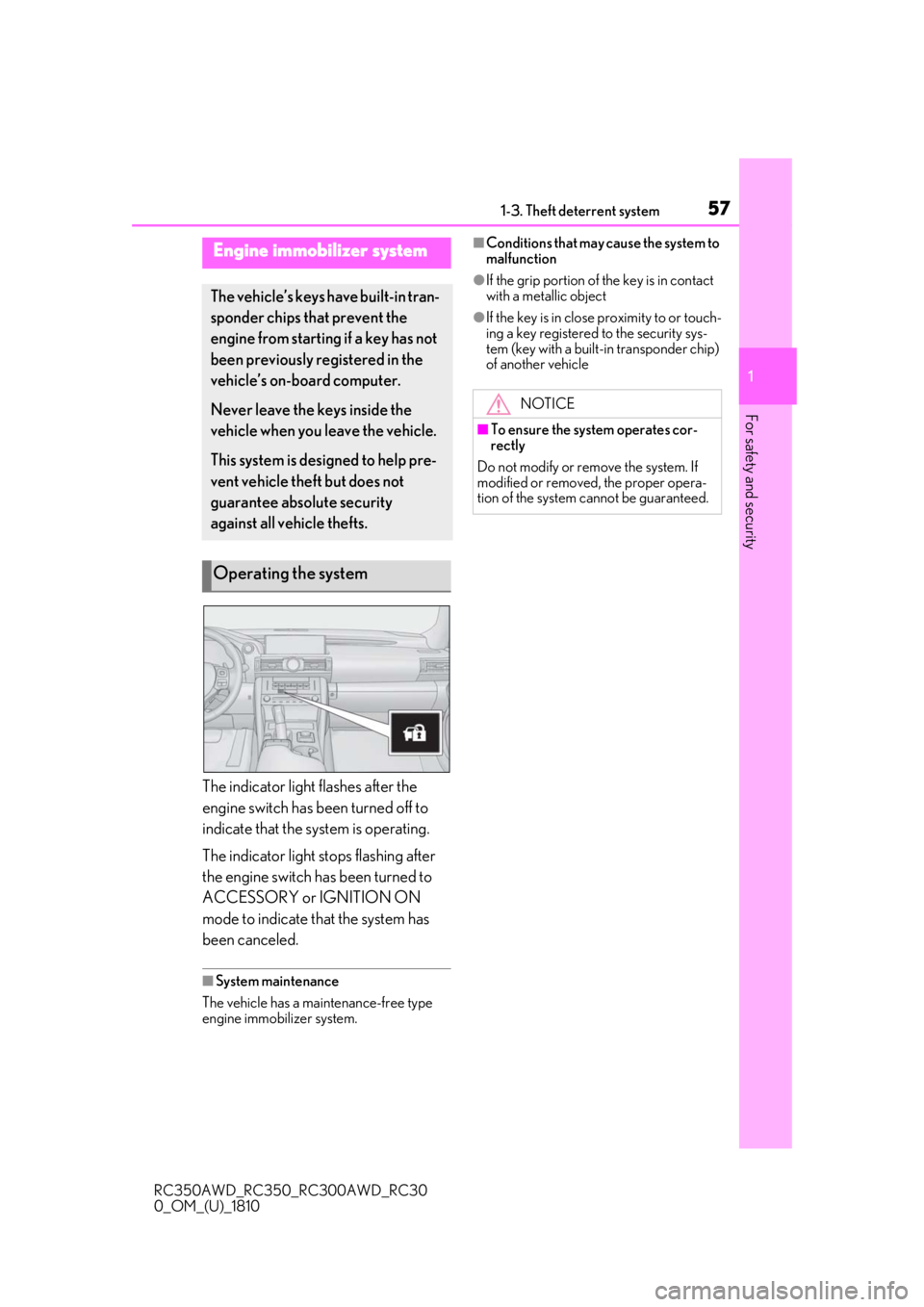
The indicator light flashes after the
engine switch has been turned off to
indicate that the system is operating.
The indicator light stops flashing after
the engine switch has been turned to
ACCESSORY or IGNITION ON
mode to indicate that the system has
been canceled.
■System maintenance
The vehicle has a maintenance-free type
engine immobilizer system.
■Conditions that may cause the system to
malfunction
●If the grip portion of the key is in contact
with a metallic object
●If the key is in close proximity to or touch-
ing a key registered to the security sys-
tem (key with a built-in transponder chip)
of another vehicle
Engine immobilizer system
The vehicle’s keys have built-in tran-
sponder chips that prevent the
engine from starting if a key has not
been previously registered in the
vehicle’s on-board computer.
Never leave the keys inside the
vehicle when you leave the vehicle.
This system is designed to help pre-
vent vehicle theft but does not
guarantee absolute security
against all vehicle thefts.
Operating the system
NOTICE
■To ensure the system operates cor-
rectly
Do not modify or remove the system. If
modified or removed, the proper opera-
tion of the system cannot be guaranteed.
Page 59 of 390
591-3. Theft deterrent system
RC350AWD_RC350_RC300AWD_RC30
0_OM_(U)_1810
1
For safety and security
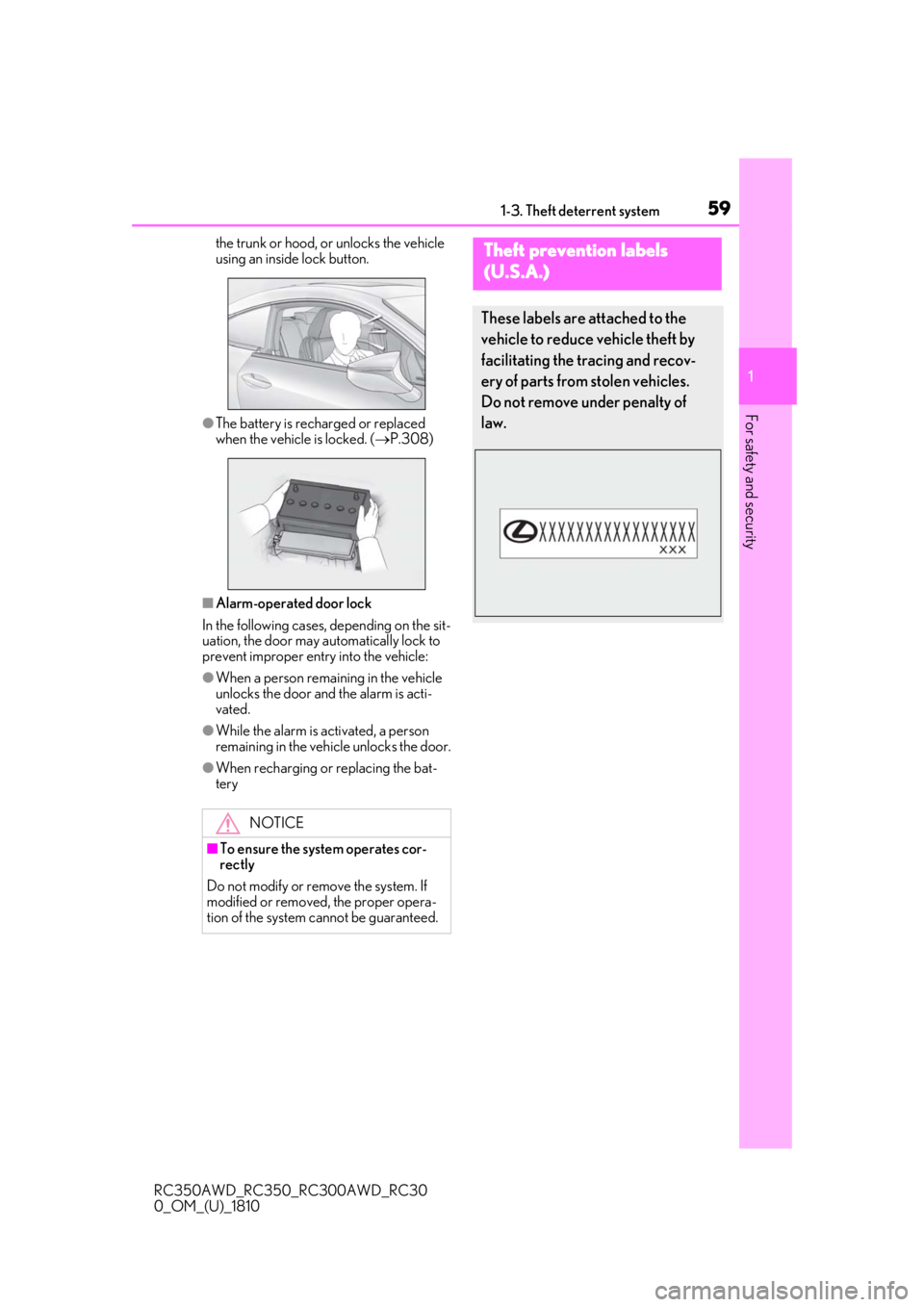
the trunk or hood, or unlocks the vehicle
using an inside lock button.
●The battery is rech arged or replaced
when the vehicle is locked. ( P.308)
■Alarm-operated door lock
In the following cases, depending on the sit-
uation, the door may automatically lock to
prevent improper entry into the vehicle:
●When a person remaining in the vehicle
unlocks the door and the alarm is acti-
vated.
●While the alarm is activated, a person
remaining in the vehicle unlocks the door.
●When recharging or replacing the bat-
tery
NOTICE
■To ensure the system operates cor-
rectly
Do not modify or remove the system. If
modified or removed, the proper opera-
tion of the system cannot be guaranteed.
Theft prevention labels
(
U.S.A.)
These labels are attached to the
vehicle to reduce vehicle theft by
facilitating the tracing and recov-
ery of parts from stolen vehicles.
Do not remove under penalty of
law.
Page 64 of 390
642-1. Instrument cluster
RC350AWD_RC350_RC300AWD_RC30
0_OM_(U)_1810
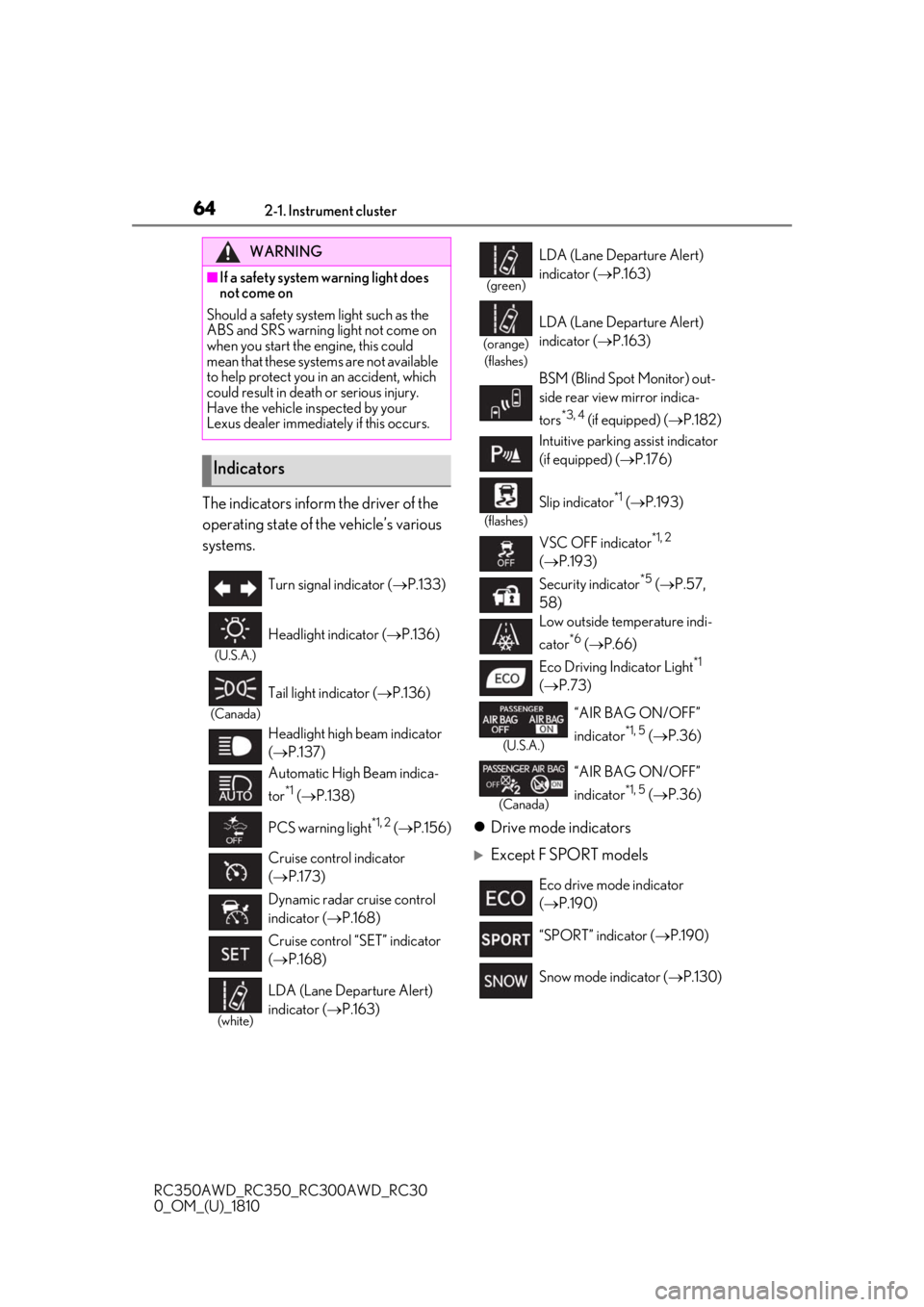
The indicators inform the driver of the
operating state of the vehicle’s various
systems.Drive mode indicators
Except F SPORT models
WARNING
■If a safety system warning light does
not come on
Should a safety system light such as the
ABS and SRS warning light not come on
when you start the engine, this could
mean that these systems are not available
to help protect you in an accident, which
could result in death or serious injury.
Have the vehicle inspected by your
Lexus dealer immediately if this occurs.
Indicators
Turn signal indicator ( P.133)
(U.S.A.)
Headlight indicator ( P.136)
(Canada)
Tail light indicator ( P.136)
Headlight high beam indicator
( P.137)
Automatic High Beam indica-
tor
*1 ( P.138)
PCS warning light
*1, 2 ( P.156)
Cruise control indicator
( P.173)
Dynamic radar cruise control
indicator ( P.168)
Cruise control “SET” indicator
( P.168)
(white)
LDA (Lane Departure Alert)
indicator ( P.163)
(green)
LDA (Lane Departure Alert)
indicator ( P.163)
(orange)
(flashes)
LDA (Lane Departure Alert)
indicator ( P.163)
BSM (Blind Spot Monitor) out-
side rear view mirror indica-
tors
*3, 4 (if equipped) ( P.182)
Intuitive parking assist indicator
(if equipped) ( P.176)
(flashes)
Slip indicator*1 ( P.193)
VSC OFF indicator
*1, 2
( P.193)
Security indicator
*5 ( P.57,
58)
Low outside temperature indi-
cator
*6 ( P.66)
Eco Driving Indicator Light
*1
( P.73)
(U.S.A.)
“AIR BAG ON/OFF”
indicator
*1, 5 ( P.36)
(Canada)
“AIR BAG ON/OFF”
indicator
*1, 5 ( P.36)
Eco drive mode indicator
( P.190)
“SPORT” indicator ( P.190)
Snow mode indicator ( P.130)
Page 85 of 390
853-1. Key information
RC350AWD_RC350_RC300AWD_RC30
0_OM_(U)_1810
3
Before driving
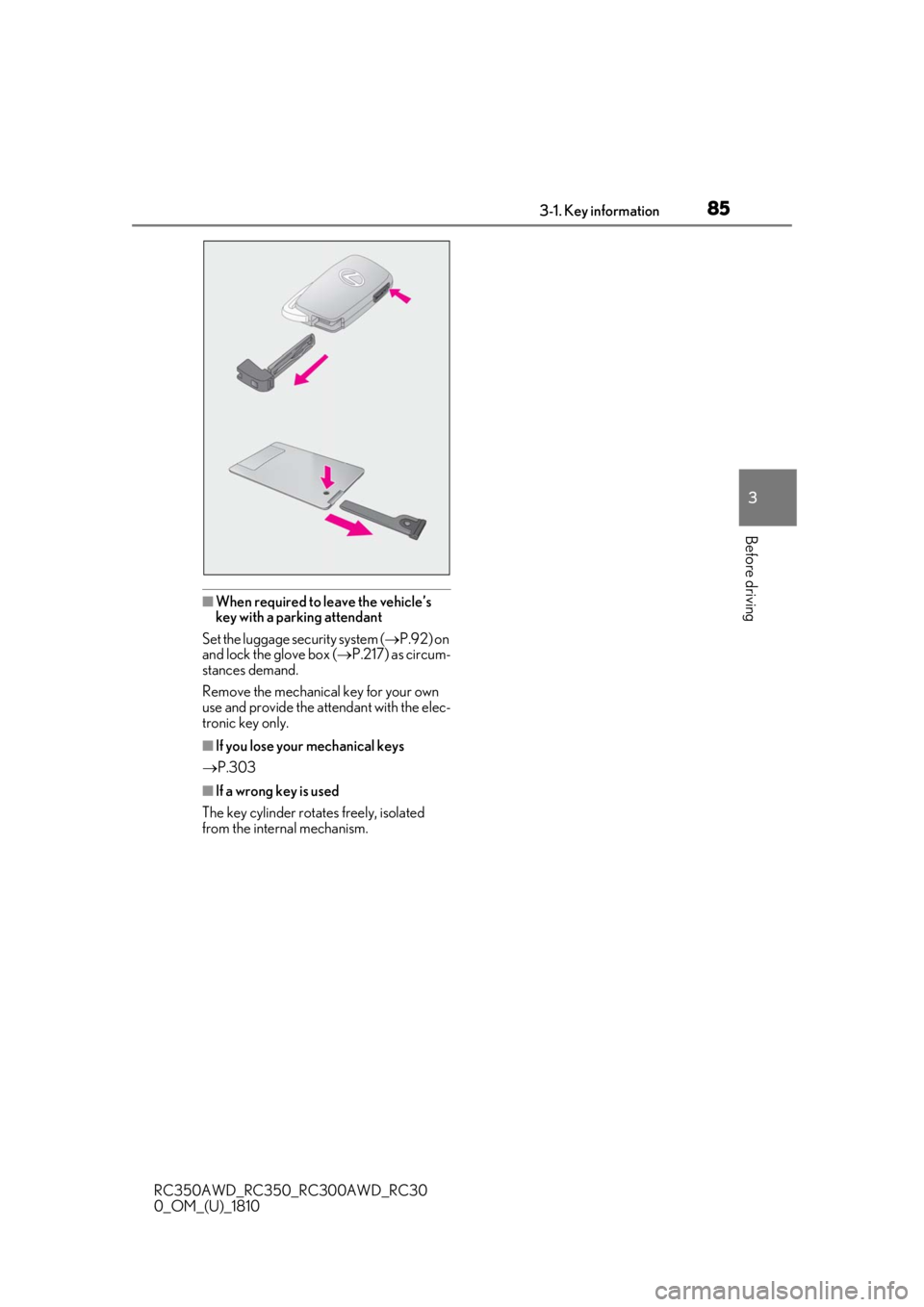
■When required to leave the vehicle’s
key with a parking attendant
Set the luggage security system ( P.92) on
and lock the glove box ( P.217) as circum-
stances demand.
Remove the mechanical key for your own
use and provide the attendant with the elec-
tronic key only.
■If you lose your mechanical keys
P.303
■If a wrong key is used
The key cylinder rotates freely, isolated
from the internal mechanism.
Page 86 of 390
863-2. Opening, closing and locking the doors and trunk
RC350AWD_RC350_RC300AWD_RC30
0_OM_(U)_1810
3-2.Opening, closing and locking the doors and trunk
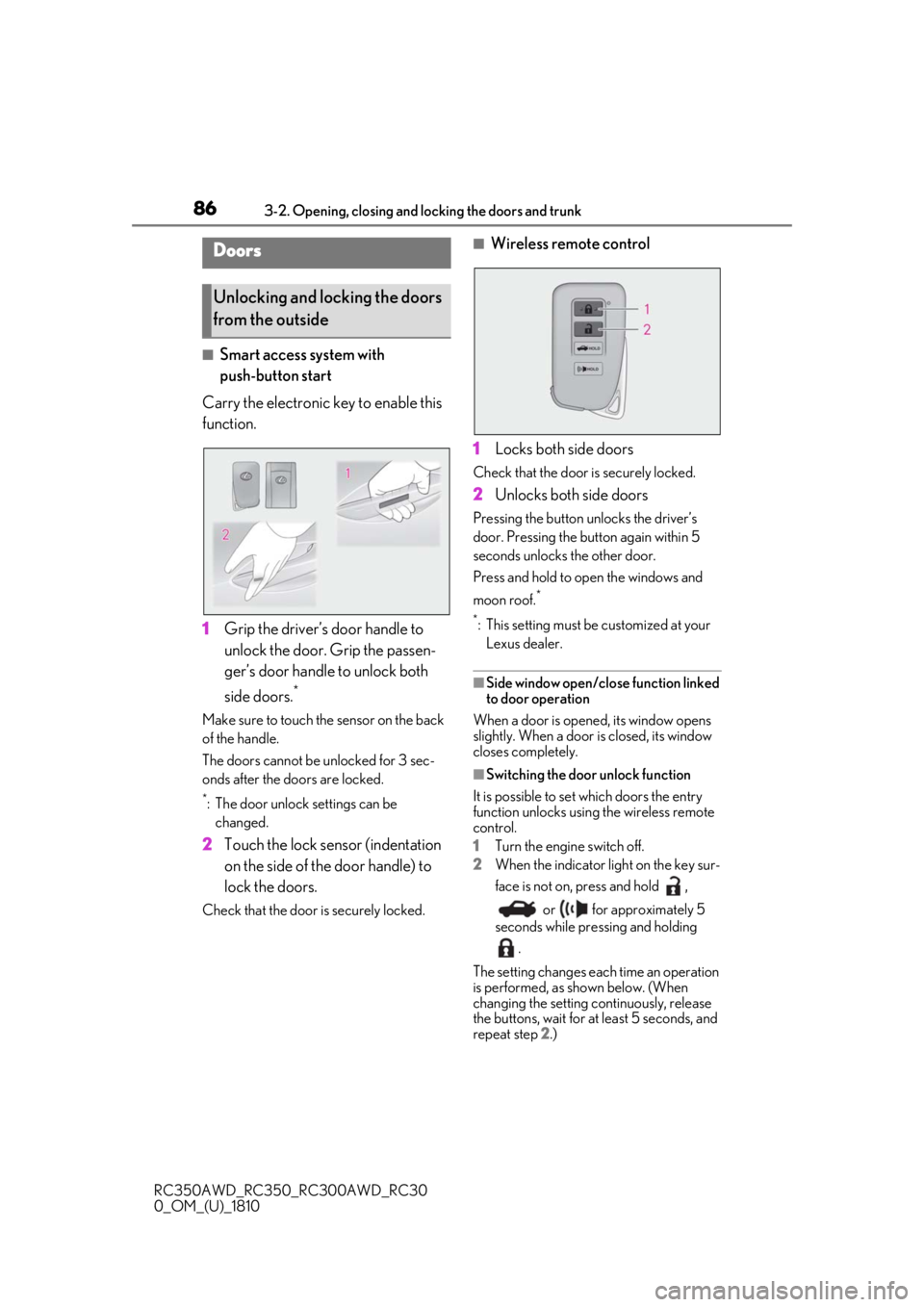
■Smart access system with
push-button start
Carry the electronic key to enable this
function.
1 Grip the driver’s door handle to
unlock the door. Grip the passen-
ger’s door handle to unlock both
side doors.
*
Make sure to touch the sensor on the back
of the handle.
The doors cannot be unlocked for 3 sec-
onds after the doors are locked.
*: The door unlock settings can be
changed.
2 Touch the lock sensor (indentation
on the side of the door handle) to
lock the doors.
Check that the door is securely locked.
■Wireless remote control
1 Locks both side doors
Check that the door is securely locked.
2Unlocks both side doors
Pressing the button unlocks the driver’s
door. Pressing the button again within 5
seconds unlocks the other door.
Press and hold to open the windows and
moon roof.
*
*
: This setting must be customized at your Lexus dealer.
■Side window open/close function linked
to door operation
When a door is opened, its window opens
slightly. When a door is closed, its window
closes completely.
■Switching the door unlock function
It is possible to set which doors the entry
function unlocks using the wireless remote
control.
1 Turn the engine switch off.
2 When the indicator light on the key sur-
face is not on, press and hold ,
or for approximately 5
seconds while pre ssing and holding
.
The setting changes each time an operation
is performed, as shown below. (When
changing the setting continuously, release
the buttons, wait for at least 5 seconds, and
repeat step 2 .)
Doors
Unlocking and locking the doors
from the outside