wheel LEXUS RC350 2021 Service Manual
[x] Cancel search | Manufacturer: LEXUS, Model Year: 2021, Model line: RC350, Model: LEXUS RC350 2021Pages: 400, PDF Size: 7.9 MB
Page 184 of 400
1844-5. Using the driving support systems
multi-information display, read the message
and follow the instructions.
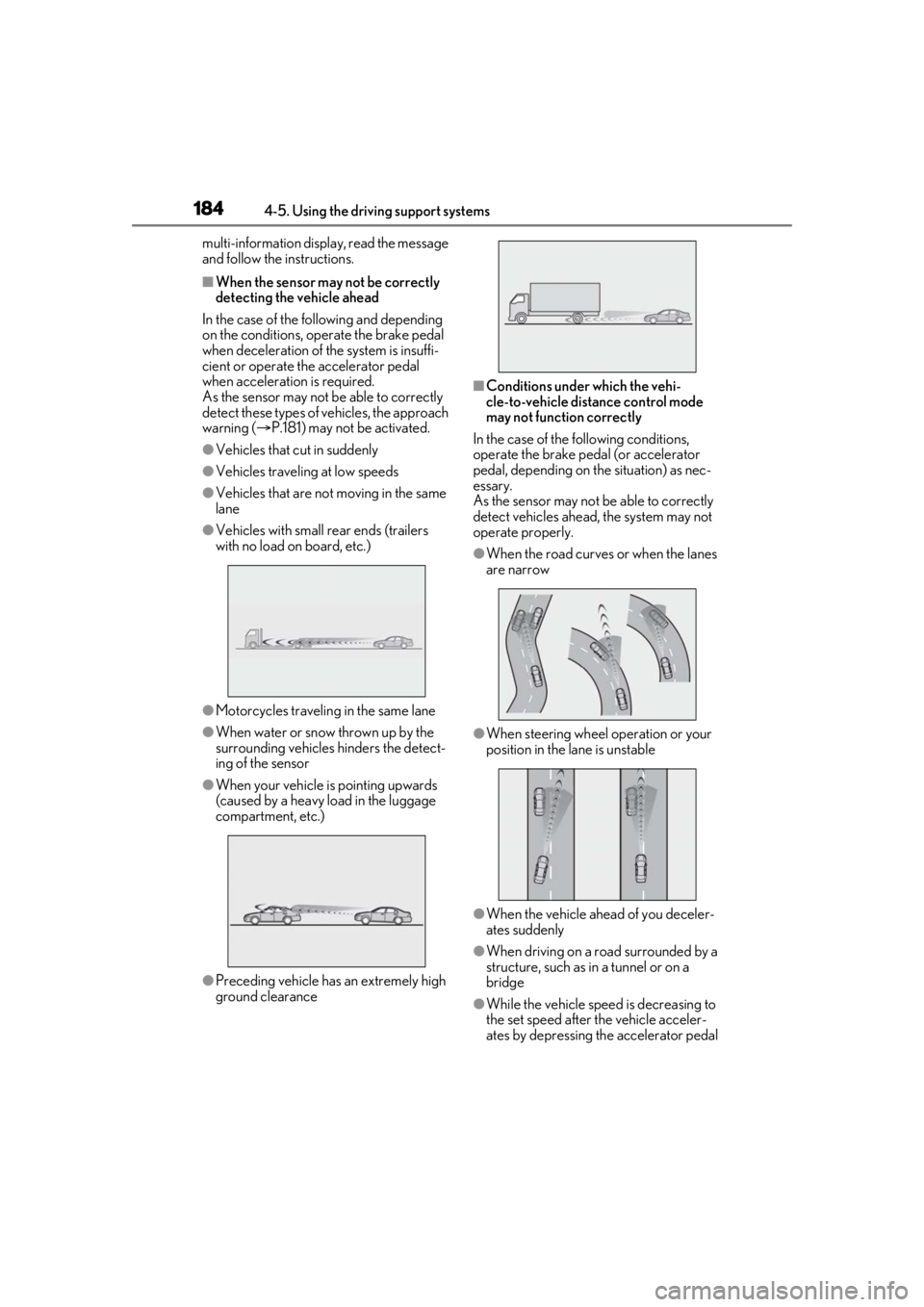
■When the sensor may not be correctly
detecting the vehicle ahead
In the case of the following and depending
on the conditions, operate the brake pedal
when deceleration of the system is insuffi-
cient or operate the accelerator pedal
when acceleration is required.
As the sensor may not be able to correctly
detect these types of vehicles, the approach
warning ( P.181) may not be activated.
●Vehicles that cut in suddenly
●Vehicles traveling at low speeds
●Vehicles that are not moving in the same
lane
●Vehicles with small rear ends (trailers
with no load on board, etc.)
●Motorcycles travelin g in the same lane
●When water or snow thrown up by the
surrounding vehicles hinders the detect-
ing of the sensor
●When your vehicle is pointing upwards
(caused by a heavy load in the luggage
compartment, etc.)
●Preceding vehicle has an extremely high
ground clearance
■Conditions under which the vehi-
cle-to-vehicle distance control mode
may not function correctly
In the case of the following conditions,
operate the brake pedal (or accelerator
pedal, depending on the situation) as nec-
essary.
As the sensor may not be able to correctly
detect vehicles ahead, the system may not
operate properly.
●When the road curves or when the lanes
are narrow
●When steering wheel operation or your
position in the lane is unstable
●When the vehicle ahead of you deceler-
ates suddenly
●When driving on a road surrounded by a
structure, such as in a tunnel or on a
bridge
●While the vehicle speed is decreasing to
the set speed after the vehicle acceler-
ates by depressing the accelerator pedal
Page 201 of 400

2014-5. Using the driving support systems
4
Driving
■ABS (Anti-lock Brake System)
Helps to prevent wheel lock when the
brakes are applied suddenly, or if the
brakes are applied while driving on a
slippery road surface
■Brake assist
Generates an increased level of brak-
ing force after the brake pedal is
depressed when the system detects a
panic stop situation
■VSC (Vehicle Stability Control)
Helps the driver to control skidding
when swerving sudden ly or turning on
slippery road surfaces
■Enhanced VSC (Enhanced Vehi-
cle Stability Control)
Provides cooperative control of the
ABS, TRAC, VSC and EPS.
Helps to maintain directional stability
when swerving on slippery road sur-
faces by controlling steering perfor-
mance.
■TRAC (Traction Control)
Helps to maintain drive power and pre-
vent the drive wheels from spinning
when starting the vehicle or accelerat-
ing on slippery roads
■Hill-start assist control
Helps to reduce the backward move-
ment of the vehicle when starting on an
uphill
■VGRS (Variable Gear Ratio Steer-
ing) (if equipped)
Adjusts the front wheel turning angle in
accordance with the vehicle speed and
steering wheel movement
■DRS (Dynamic Rear Steering) (if
equipped)
Contributes to the turning characteris-
tics and responsiveness of the vehicle
by adjusting the rear wheel angle of the
vehicle in accordance with steering
wheel movement.
■EPS (Electric Power Steering)
Employs an electric motor to reduce
the amount of effort needed to turn the
steering wheel
■Adaptive Variable Suspension Sys-
tem (if equipped)
By independently controlling the
damping force of th e shock absorbers
for each of the 4 wheels according to
the road and driving conditions, this
system combines riding comfort with
superior vehicle stability, and helps
good vehicle posture.
Driving assist systems
To keep driving safety and perfor-
mance, the following systems oper-
ate automatically in response to
various driving situations. Be aware,
however, that these systems are
supplementary and should not be
relied upon too heavily when oper-
ating the vehicle.
Summary of the driving assist
systems
Page 202 of 400

2024-5. Using the driving support systems
■LDH (Lexus Dynamic Handling
system) (if equipped)
Provides integrated control of the
VGRS, DRS and EPS. Contributes to
turning characteristics at low speeds,
responsiveness at medium speeds and
safety at high speeds by controlling the
steering angle of the front and rear
wheels in accordance with the steering
wheel operation and vehicle speed.
■VDIM (Vehicle Dynamics Inte-
grated Management)
Provides integrated control of the
ABS, brake assist, TRAC, VSC,
hill-start assist cont rol, EPS and VGRS
systems
Helps to maintain vehicle stability when
swerving on slippery road surfaces by
controlling the brakes, engine output,
steering assist, and steering ratio
■When the TRAC/VSC systems are
operating
The slip indicator light will flash while the
TRAC/VSC systems are operating.
■Disabling the TRAC system
If the vehicle gets stuck in mud, dirt or snow,
the TRAC system may reduce power from
the engine to the wheels. Pressing the
switch to turn the system off may make it
easier for you to rock the vehicle in order to
free it.
To turn the TRAC system off, quickly press and release the switch.
The “Traction Co
ntrol Turned Off” will be
shown on the multi-information display.
Press the switch ag ain to turn the sys-
tem back on.
■Turning off both TRAC and VSC sys-
tems
To turn the TRAC and VSC systems off,
press and hold the switch for more
than 3 seconds while the vehicle is stopped.
The VSC OFF indicator light will come on
and the “Traction Control Turned Off” will
be shown on the multi-information display.
*
Press the switch ag ain to turn the sys-
tems back on.
*: On vehicles with PCS (Pre-Collision System), pre-collision brake assist,
pre-collision braking, and steering con-
trol (performed through cooperative
control of PCS and LDH) (if equipped)
will also be disabled. The Pre-Collision
System warning light will come on and a
message will be di splayed on the
multi-information display. ( P.168)
Page 203 of 400

2034-5. Using the driving support systems
4
Driving
■When the message is displayed on the
multi-information display showing that
TRAC has been disabled even if the switch has not been pressed
TRAC is temporary deactivated. If the infor-
mation continues to show, contact your
Lexus dealer.
■Operating conditions of hill-start assist
control
When the following four conditions are met,
the hill-start assist control will operate:
●The shift lever is in a position other than P
or N (when starting off forward/back-
ward on an upward incline).
●The vehicle is stopped.
●The accelerator pedal is not depressed.
●The parking brake is not engaged.
●Engine switch is turned to IGNITION
ON mode
■Automatic system cancelation of
hill-start assist control
The hill-start assist control will turn off in any
of the following situations:
●The shift lever is moved to P or N.
●The accelerator pedal is depressed.
●The parking brake is engaged.
●2 seconds at maximum elapsed after the
brake pedal is released
●Engine switch is turned to off
■VGRS is disabled when
VGRS may stop operating in the following
situations.
In this event, the steering wheel may move
from its straight forward position, but it will
return when the system restarts.
●When the steering wheel is operated for
an extended period of time while the
vehicle is stopped or is moving very
slowly
(on vehicles with LDH, DRS is disabled
together with VGRS)
●When the steering wheel has been held
fully to the left or right
The center position of the steering wheel
may change when VGRS is disabled. How- ever, the position will return to normal after
VGRS is reactivated.
■When the battery is disconnected (vehi-
cles with VGRS)
The steering wheel may move from its
straight forward position, but this will be
corrected automatically when driving.
■Sounds and vibrations caused by the
ABS, brake assist, VSC, TRAC, hill-start
assist control and VGRS systems
●A sound may be heard from the engine
compartment when the brake pedal is
depressed repeatedly, when the engine is
started or just after the vehicle begins to
move. This sound does not indicate that a
malfunction has occurred in any of these
systems.
●Any of the following conditions may
occur when the above systems are oper-
ating. None of these indicates that a mal-
function has occurred.
• Vibrations may be felt through the vehicle body and steering.
• A motor sound may be heard also after the vehicle comes to a stop.
• The brake pedal may pulsate slightly after
the ABS is activated.
• The brake pedal may move down slightly after the ABS is activated.
■EPS, VGRS and DRS operation sound
When the steering wheel is operated, a
motor sound (whirring sound) may be
heard. This does not indicate a malfunction.
■Automatic reactivation of TRAC/VSC
systems
After turning the TRAC and VSC systems
off, the systems will be automatically
re-enabled in the following situations:
●When the engine switch is turned off
●If only the TRAC system is turned off, the
TRAC will turn on when vehicle speed
increases
If both the TRAC and VSC systems are
turned off, automatic re-enabling will not
occur when vehicle speed increases.
Page 204 of 400

2044-5. Using the driving support systems
■Reduced effectiveness of the EPS sys-
tem
The effectiveness of the EPS system is
reduced to prevent the system from over-
heating when there is frequent steering
input over an extended period of time. The
steering wheel may feel heavy as a result.
Should this occur, re frain from excessive
steering input or stop the vehicle and turn
the engine off. The EPS system should
return to normal within 10 minutes.
WARNING
■The ABS does not operate effectively
when
●The limits of tire gripping performance
have been exceeded (such as exces-
sively worn tires on a snow covered
road).
●The vehicle hydroplanes while driving
at high speed on wet or slick roads.
■Stopping distance when the ABS is
operating may exceed that of normal
conditions
The ABS is not designed to shorten the
vehicle’s stopping di stance. Always main-
tain a safe distance from the vehicle in
front of you, especially in the following
situations:
●When driving on dirt, gravel or
snow-covered roads
●When driving with tire chains
●When driving over bumps in the road
●When driving over roads with potholes
or uneven surfaces
■TRAC/VSC may not operate effec-
tively when
Directional control and power may not
be achievable while driving on slippery
road surfaces, even if the TRAC/VSC
system is operating. Drive the vehicle
carefully in conditions where stability and
power may be lost.
■Hill-start assist control does not oper-
ate effectively when
●Do not overly rely on hill-start assist
control. Hill-start assist control may
not operate effectively on steep
inclines and roads covered with ice.
●Unlike the parking brake, hill-start
assist control is not intended to hold
the vehicle stationary for an extended
period of time. Do not attempt to use
hill-start assist control to hold the vehi-
cle on an incline, as doing so may lead
to an accident.
■When the TRAC/VSC is activated
The slip indicator light flashes. Always
drive carefully. Reckless driving may
cause an accident. Exercise particular
care when the indicator light flashes.
■When the TRAC/VSC systems are
turned off
Be especially careful and drive at a speed
appropriate to the road conditions. As
these are the systems to help ensure
vehicle stability and driving force, do not
turn the TRAC/VSC systems off unless
necessary.
■Replacing tires
Make sure that all ti res are of the speci-
fied size, brand, tread pattern and total
load capacity. In addition, make sure that
the tires are inflated to the recom-
mended tire inflation pressure level.
The ABS, TRAC and VSC systems will
not function correctly if different tires are
installed on the vehicle.
Contact your Lexus dealer for further
information when replacing tires or
wheels.
■Handling of tires and the suspension
Using tires with any kind of problem or
modifying the suspensi on will affect the
driving assist systems, and may cause a
system to malfunction.
Page 205 of 400
2054-6. Driving tips
4
Driving
4-6.Driving tips
Use fluids that are appropriate to
the prevailing outside temperatures.
•Engine oil
• Engine coolant
•Washer fluid
Have a service technician inspect
the condition of the battery.
Have the vehicle fitted with four
snow tires or purchase a set of tire
chains for the rear tires.
*
Ensure that all tires are the specified size
and brand, and that chains match the size
of the tires.
*: Tire chains cannot be mounted on vehi-
cles with front and rear tires of differing
sizes and vehicles with LDH and 19-inch
tires.
Perform the following according to the
driving conditions:
Do not try to forcibly open a window
or move a wiper that is frozen. Pour
Winter driving tips
Carry out the necessary prepara-
tions and inspections before driving
the vehicle in winter. Always drive
the vehicle in a manner appropriate
to the prevailing weather condi-
tions.
Preparation for winter
WARNING
■Driving with snow tires
Observe the following precautions to
reduce the risk of accidents.
Failure to do so may result in a loss of
vehicle control and cause death or seri-
ous injury.
●Use tires of the specified size.
●Maintain the recommended level of air
pressure.
●Do not drive in excess of 75 mph (120
km/h), regardless of the type of snow
tires being used.
●Use snow tires on all, not just some
wheels.
■Driving with tire chains
Observe the following precautions to
reduce the risk of accidents.
Failure to do so may result in the vehicle
being unable to be driven safely, and may
cause death or serious injury.
●Do not drive in excess of the speed
limit specified for the tire chains being
used, or 30 mph (50 km/h), which-
ever is lower.
●Avoid driving on bumpy road surfaces
or over potholes.
●Avoid sudden acceleration, abrupt
steering, sudden br aking and shifting
operations that cause sudden engine
braking.
●Slow down sufficiently before entering
a curve to ensure that vehicle control is
maintained.
●Do not use LDA (Lane Departure
Alert with steering control) system.
NOTICE
■Repairing or replacing snow tires
Request repairs or replacement of snow
tires from Lexus dealers or legitimate tire
retailers.
This is because the removal and attach-
ment of snow tires affects the operation
of the tire pressure warning valves and
transmitters.
Before driving the vehicle
Page 206 of 400
2064-6. Driving tips
warm water over the frozen area to
melt the ice. Wipe away the water
immediately to prevent it from
freezing.
To ensure proper operation of the
climate control system fan, remove
any snow that has accumulated on
the air inlet vents in front of the
windshield.
Check for and remove any excess
ice or snow that may have accumu-
lated on the exterior lights, vehicle’s
roof, chassis, around the tires or on
the brakes.
Remove any snow or mud from the
bottom of your shoes before getting
in the vehicle.
Accelerate the vehicle slowly, keep a
safe distance between you and the
vehicle ahead, and drive at a reduced
speed suitable to road conditions.
Park the vehicle and move the shift
lever to P without setting the park-
ing brake. The parking brake may
freeze up, preventing it from being
released. If the vehicle is parked
without setting the parking brake,
make sure to block the wheels.
Failure to do so may be dangerous
because it may cause the vehicle to
move unexpectedly, possibly lead-
ing to an accident.
When the parking brake is in automatic mode, release the parking brake after shift-
ing the shift lever to P. (
P.137)
If the vehicle is parked without set-
ting the parking brake, confirm that
the shift lever cannot be moved out
of P
*.
*: The shift lever will be locked if it is
attempted to be shifted from P to any
other position with out depressing the
brake pedal. If the shift lever can be
shifted from P, there may be a problem
with the shift lock system. Have the vehi-
cle inspected by your Lexus dealer
immediately.
Vehicles with front and rear tires of
the same size except for vehicles
with LDH and 19-inch tires
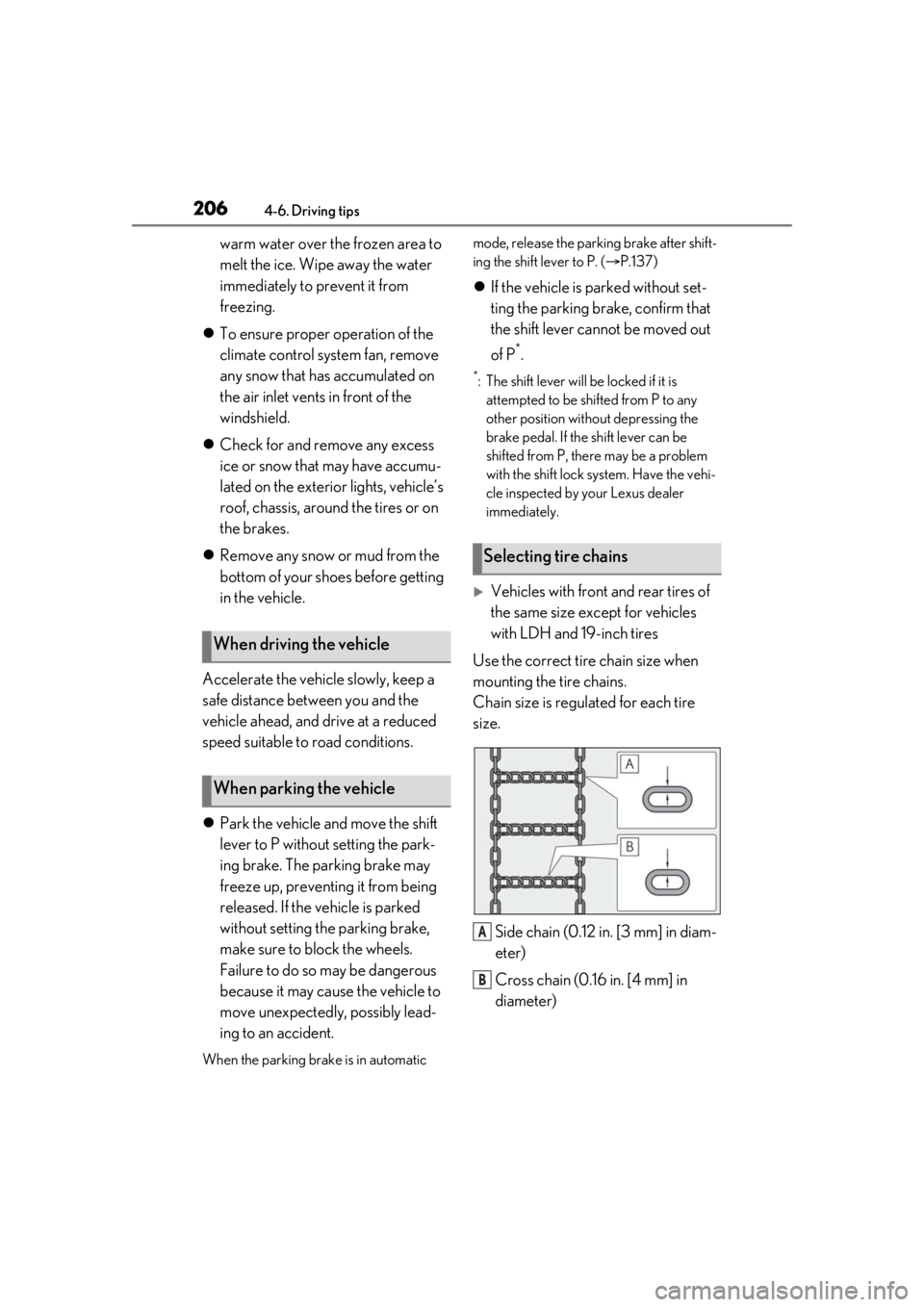
Use the correct tire chain size when
mounting the tire chains.
Chain size is regulated for each tire
size.
Side chain (0.12 in. [3 mm] in diam-
eter)
Cross chain (0.16 in. [4 mm] in
diameter)
When driving the vehicle
When parking the vehicle
Selecting tire chains
A
B
Page 209 of 400

209
5
5
Interior features
Interior features
.5-1. Remote Touch/DisplayRemote Touch ............................. 210
Center Display ............................ 212
5-2. Using the air conditioning system Automatic air conditioning system......................................................... 215
Heated steering wheel/seat heat- ers/seat ventilators ................ 223
5-3. Using the interior lights Interior lights list......................... 225
5-4. Using the storage features List of storage features............ 227
Trunk features............................. 229
5-5. Using the other interior features
Other interior features ........... 230
Garage door opener............... 232
Compass....................................... 237
Page 223 of 400
2235-2. Using the air conditioning system
5
Interior features
*:If equipped
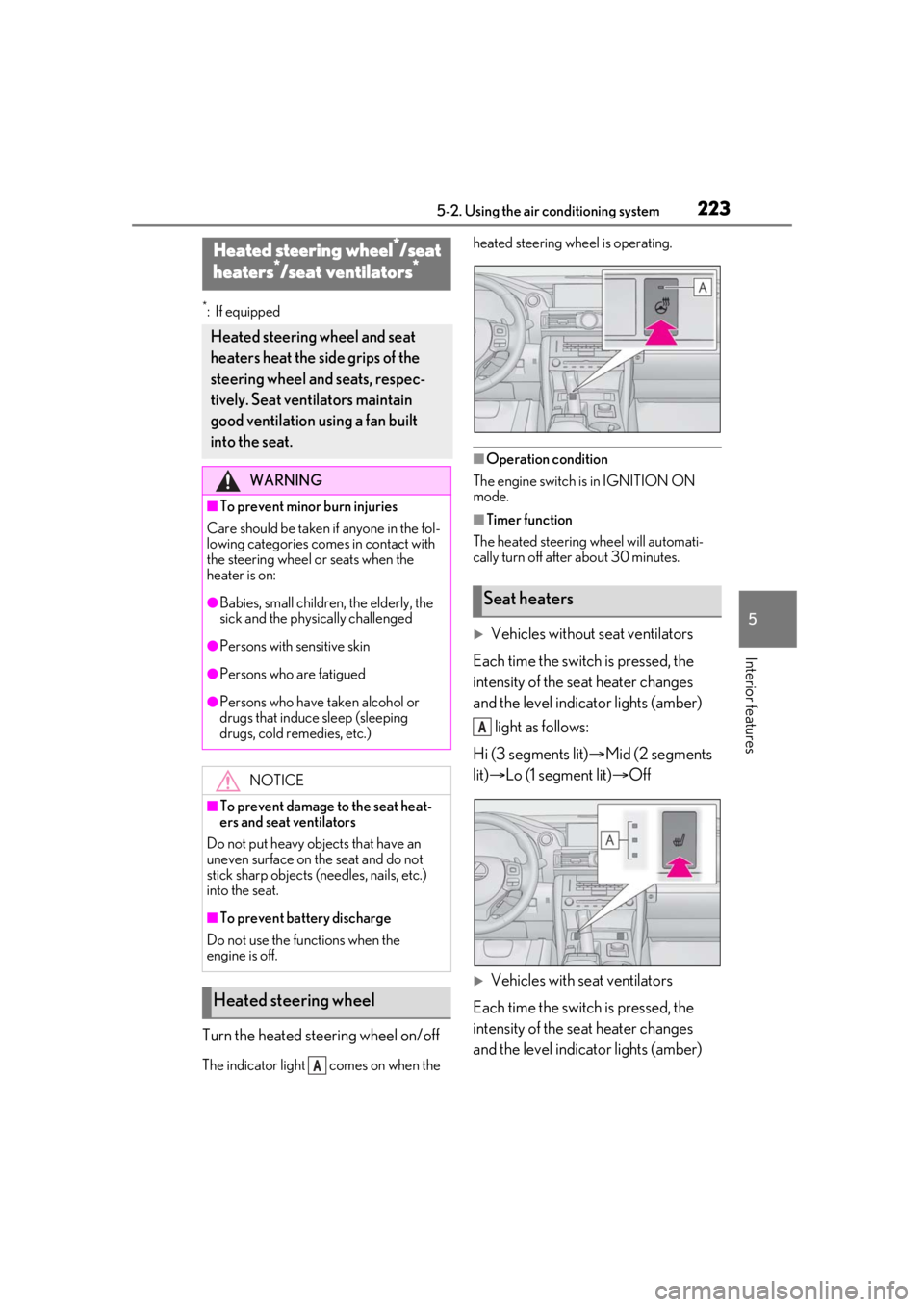
Turn the heated steering wheel on/off
The indicator light comes on when the heated steering wheel is operating.
■Operation condition
The engine switch is in IGNITION ON
mode.
■Timer function
The heated steering wheel will automati-
cally turn off after about 30 minutes.
Vehicles without seat ventilators
Each time the switch is pressed, the
intensity of the seat heater changes
and the level indicator lights (amber) light as follows:
Hi (3 segments lit) Mid (2 segments
lit) Lo (1 segment lit) Off
Vehicles with seat ventilators
Each time the switch is pressed, the
intensity of the seat heater changes
and the level indicator lights (amber)
Heated steering wheel*/seat
heaters*/seat ventilators*
Heated steering wheel and seat
heaters heat the side grips of the
steering wheel and seats, respec-
tively. Seat ventilators maintain
good ventilation using a fan built
into the seat.
WARNING
■To prevent minor burn injuries
Care should be taken if anyone in the fol-
lowing categories comes in contact with
the steering wheel or seats when the
heater is on:
●Babies, small children, the elderly, the
sick and the phys ically challenged
●Persons with sensitive skin
●Persons who are fatigued
●Persons who have taken alcohol or
drugs that induce sleep (sleeping
drugs, cold remedies, etc.)
NOTICE
■To prevent damage to the seat heat-
ers and seat ventilators
Do not put heavy objects that have an
uneven surface on the seat and do not
stick sharp objects (needles, nails, etc.)
into the seat.
■To prevent battery discharge
Do not use the functions when the
engine is off.
Heated steering wheel
A
Seat heaters
A
Page 241 of 400

241
6
6
Maintenance and care
Maintenance and care
.6-1. Maintenance and careCleaning and protecting the vehi-cle exterior ................................ 242
Cleaning and protecting the vehi- cle interior ................................. 245
6-2. Maintenance Maintenance requirements........................................................ 248
General maintenance ............. 249
Emission inspection and mainte- nance (I/M) programs ......... 252
6-3. Do-it-yourself maintenance Do-it-yourself service precautions........................................................ 253
Hood............................................... 255
Positioning a floor jack............ 255
Engine compartment............... 257
Tires ................................................ 265
Tire inflation pressure .............. 273
Wheels........................................... 274
Air conditioning filter...............275
Electronic key battery ............. 277
Checking and replacing fuses ........................................................ 278
Headlight aim.............................. 280
Light bulbs ..................................... 281