parking brake LEXUS RCF 2018 User Guide
[x] Cancel search | Manufacturer: LEXUS, Model Year: 2018, Model line: RCF, Model: LEXUS RCF 2018Pages: 636, PDF Size: 6.88 MB
Page 207 of 636
207
4
Driving
RC350_RC300 AWD_RC3 00_RC F_U(OM24748U) 4-2. Driving procedures
Check that the parking brake is set.
Check that the shift lever is in P.
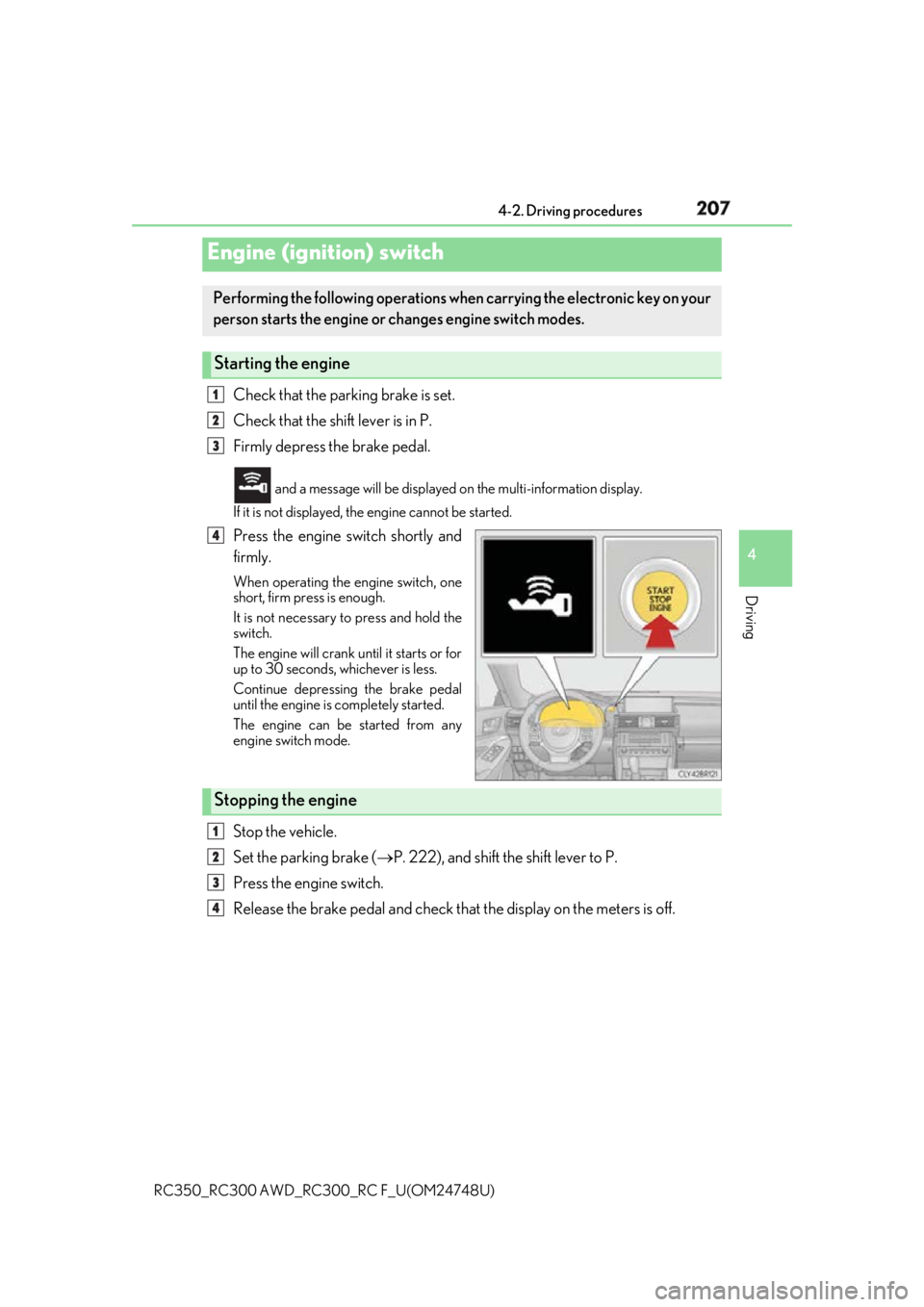
Firmly depress the brake pedal. and a message will be displayed on the multi-information display.
If it is not displayed, th e engine cannot be started.
Press the engine switch shortly and
firmly. When operating the engine switch, one
short, firm press is enough.
It is not necessary to press and hold the
switch.
The engine will crank until it starts or for
up to 30 seconds, whichever is less.
Continue depressing the brake pedal
until the engine is completely started.
The engine can be started from any
engine switch mode.
Stop the vehicle.
Set the parking brake ( P. 222), and shift the shift lever to P.
Press the engine switch.
Release the brake pedal and check that the display on the meters is off.Engine (ignition) switch Performing the following operations wh en carrying the electronic key on your
person starts the engine or changes engine switch modes.
Starting the engine 1
2
3
4
Stopping the engine 1
2
3
4
Page 209 of 636
2094-2. Driving procedures
4
Driving
RC350_RC300 AWD_RC3 00_RC F_U(OM24748U)
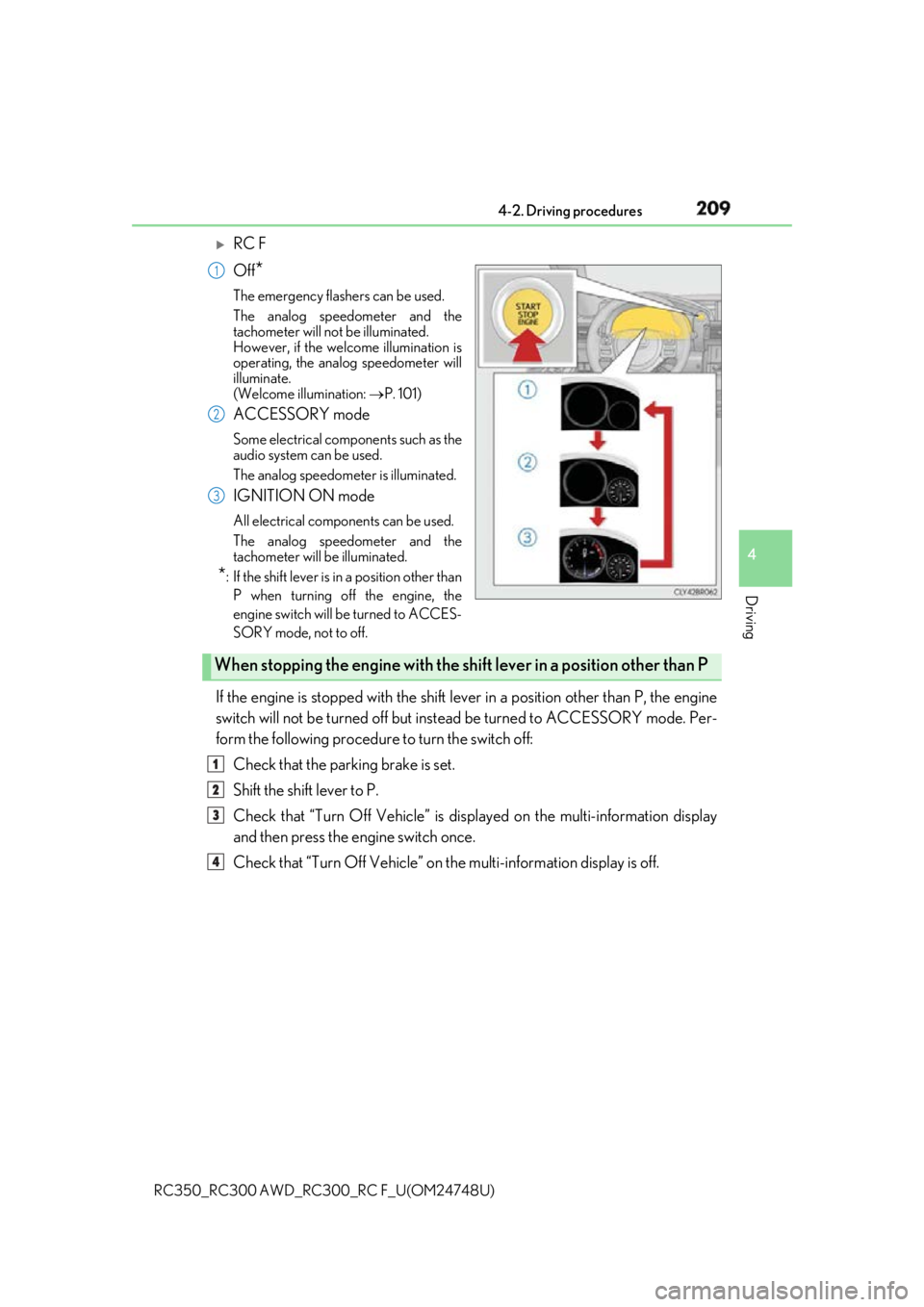
RC F
Off
* The emergency flashers can be used.
The analog speedometer and the
tachometer will not be illuminated.
However, if the welcome illumination is
operating, the analog speedometer will
illuminate.
(Welcome illumination: P. 101)
ACCESSORY mode Some electrical components such as the
audio system can be used.
The analog speedometer is illuminated.
IGNITION ON mode All electrical components can be used.
The analog speedometer and the
tachometer will be illuminated.
* : If the shift le ver is in a position other than
P when turning off the engine, the
engine switch will be turned to ACCES-
SORY mode, not to off.
If the engine is stopped with the shift le ver in a position other than P, the engine
switch will not be turned off but inst ead be turned to ACCESSORY mode. Per-
form the following procedure to turn the switch off:
Check that the parking brake is set.
Shift the shift lever to P.
Check that “Turn Off Vehicle” is disp layed on the multi-information display
and then press the engine switch once.
Check that “Turn Off Vehicle” on th e multi-information display is off.1
2
3
When stopping the engine with the shift lever in a position other than P1
2
3
4
Page 219 of 636
2194-2. Driving procedures
4
Driving
RC350_RC300 AWD_RC3 00_RC F_U(OM24748U)■
If the shift lever cannot be shifted from P
First, check whether the brak e pedal is being depressed.
If the shift lever cannot be shifted with your foot on the brake pedal, there may be a prob-
lem with the shift lock system. Have the vehi cle inspected by your Lexus dealer immedi-
ately.
The following steps may be used as an emergency measure to ensure that the shift lever
can be shifted.
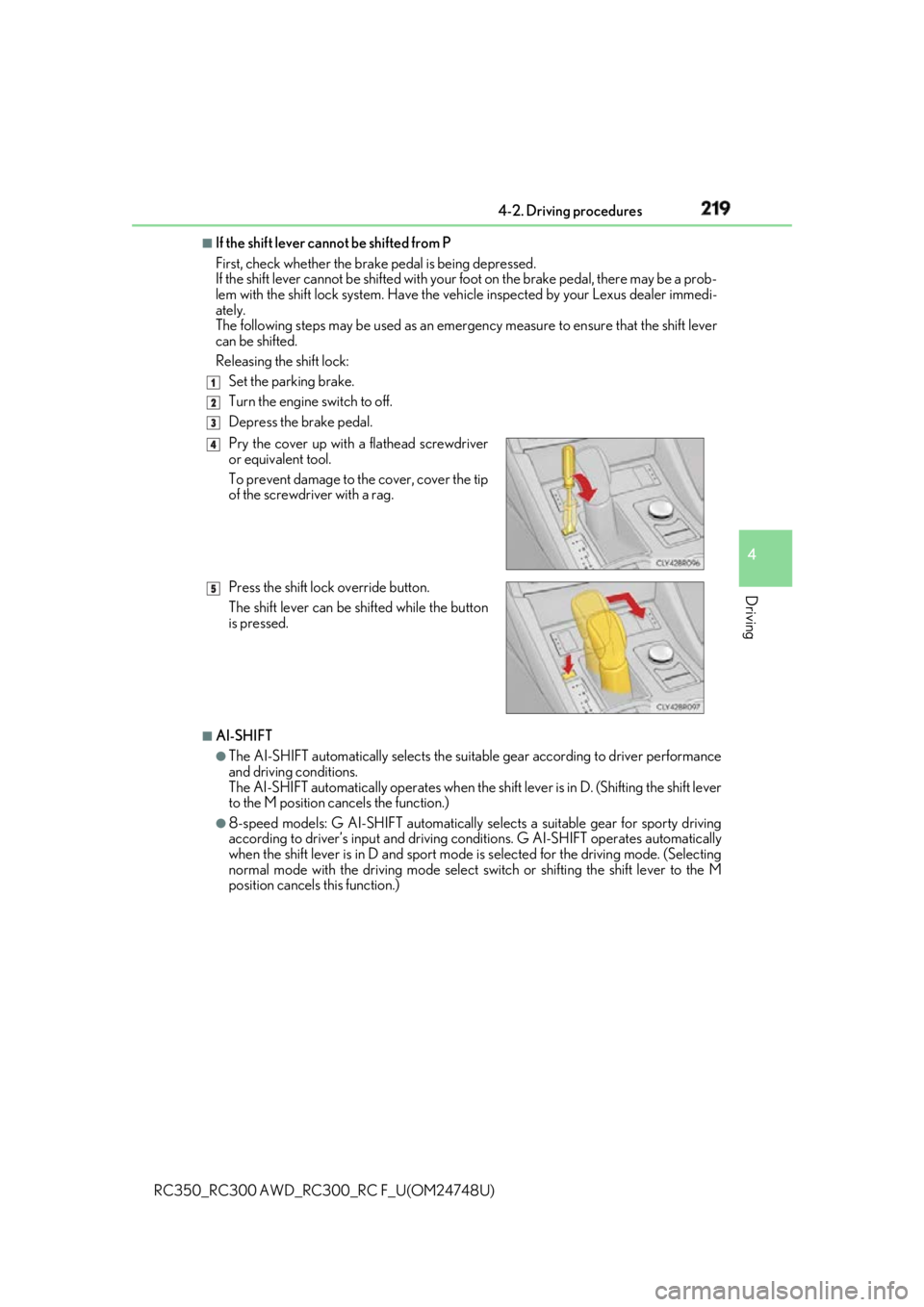
Releasing the shift lock:
Set the parking brake.
Turn the engine switch to off.
Depress the brake pedal.
■
AI-SHIFT ●
The AI-SHIFT automatically selects the suitab le gear according to driver performance
and driving conditions.
The AI-SHIFT automatically operates when the sh ift lever is in D. (S hifting the shift lever
to the M position cancels the function.) ●
8-speed models: G AI-SHIFT automatically selects a suitable gear for sporty driving
according to driver’s input and driving co nditions. G AI-SHIFT operates automatically
when the shift lever is in D and sport mode is selected for the driving mode. (Selecting
normal mode with the driving mode select switch or shifti ng the shift lever to the M
position cancels this function.) 1
2
3
Pry the cover up with a flathead screwdriver
or equivalent tool.
To prevent damage to the cover, cover the tip
of the screwdriver with a rag.
Press the shift lock override button.
The shift lever can be shifted while the button
is pressed. 4
5
Page 220 of 636

220 4-2. Driving procedures
RC350_RC300 AWD_RC3 00_RC F_U(OM24748U)WARNING ■
When driving on slippery road surfaces
Be careful of downshifting an d sudden acceleration, as this could result in the vehicle
skidding to the side or spinning. ■
To prevent an accident wh en releasing the shift lock
Before pressing the shift lock override butto n, make sure to set the parking brake and
depress the brake pedal.
If the accelerator pedal is accidentally depressed instead of the brake pedal when the
shift lock override button is pressed and the shift lever is shifted out of P, the vehicle
may suddenly start, possibly leading to an a ccident resulting in death or serious injury.
Page 222 of 636
222 4-2. Driving procedures
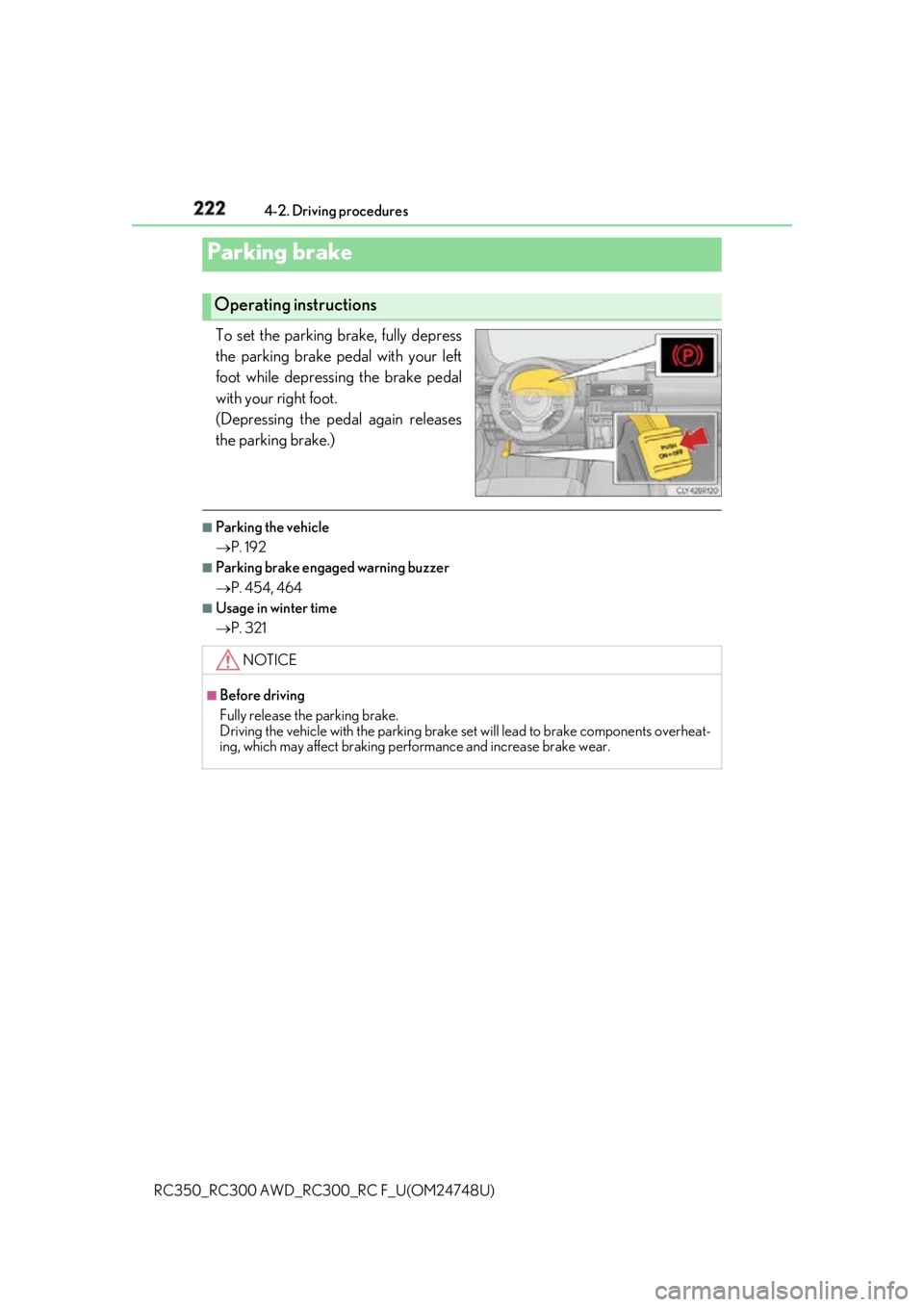
RC350_RC300 AWD_RC3 00_RC F_U(OM24748U)To set the parking brake, fully depress
the parking brake pedal with your left
foot while depressing the brake pedal
with your right foot.
(Depressing the pedal again releases
the parking brake.) ■
Parking the vehicle
P. 192 ■
Parking brake engaged warning buzzer
P. 454, 464 ■
Usage in winter time
P. 321Parking brake Operating instructions
NOTICE ■
Before driving
Fully release the parking brake.
Driving the vehicle with the parking brake se t will lead to brake components overheat-
ing, which may affect braking performance and increase brake wear.
Page 226 of 636
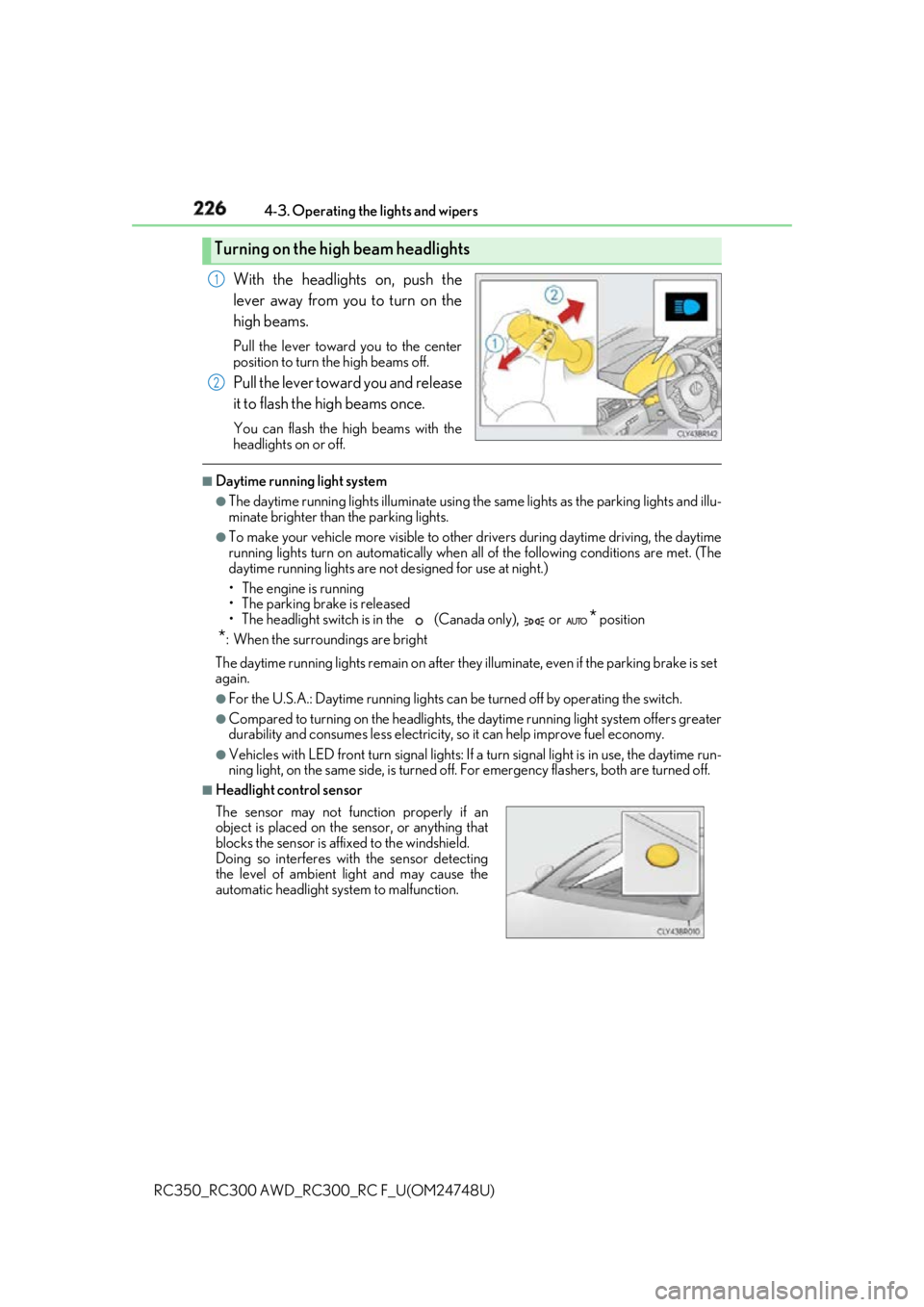
226 4-3. Operating the lights and wipers
RC350_RC300 AWD_RC3 00_RC F_U(OM24748U)With the headlights on, push the
lever away from you to turn on the
high beams. Pull the lever toward you to the center
position to turn the high beams off.
Pull the lever toward you and release
it to flash the high beams once. You can flash the high beams with the
headlights on or off. ■
Daytime running light system ●
The daytime running lights illuminate using th e same lights as the parking lights and illu-
minate brighter than the parking lights. ●
To make your vehicle more visible to other drivers during daytime driving, the daytime
running lights turn on automatically when a ll of the following conditions are met. (The
daytime running lights are not designed for use at night.)
• The engine is running
• The parking brake is released
• The headlight switch is in the (Canada only), or
* position
* : When the surroundings are bright
The daytime running lights remain on after they illuminate, even if the parking brake is set
again. ●
For the U.S.A.: Daytime running lights can be turned off by operating the switch.●
Compared to turning on the headlights, the daytime running light system offers greater
durability and consumes less electricity, so it can help improve fuel economy.●
Vehicles with LED front turn signal lights: If a turn signal light is in use, the daytime run-
ning light, on the same side, is turned off. For emergency flashers, both are turned off. ■
Headlight control sensorTurning on the high beam headlights 1
2
The sensor may not function properly if an
object is placed on the sensor, or anything that
blocks the sensor is affixed to the windshield.
Doing so interferes with the sensor detecting
the level of ambient li ght and may cause the
automatic headlight system to malfunction.
Page 288 of 636

288 4-5. Using the driving support systems
RC350_RC300 AWD_RC3 00_RC F_U(OM24748U)WARNING ■
When using the intuitive parking assist
Observe the following precautions.
Failing to do so may result in the vehicle be ing unable to be driv en safely and possibly
cause an accident. ●
Do not use the sensor at speeds in excess of 6 mph (10 km/h). ●
The sensors’ detection areas and reaction ti mes are limited. When moving forward or
reversing, check the areas surrounding the vehicle (especially th e sides of the vehi-
cle) for safety, and drive slowly, using the brake to control the vehicle’s speed. ●
Do not install accessories within the sensors’ detection areas.■
Limitations of the sensors ●
RC350/RC300: The detection areas of the sensors are limited to the areas around
the vehicle’s front and rear bumpers. ●
RC F: The detection areas of the sensors are limited to the areas around the vehicle’s
front corners and the rear bumpers. ●
Certain vehicle conditions and surrounding environments, such as the following, may
affect the ability of th e sensors to correctly detect obje cts. Pay particul ar attention in
the following situations. Failure to do so may result in the vehicle being driven
unsafely, possibly leading to an accident.
• When there is dirt, snow or ice on a se nsor (Cleaning the sensor will resolve this
problem.)
• When the sensor is frozen (Thawing the area will resolve this problem.)
In especially cold weather, if a sensor is frozen the screen may show an abnormal
display, or objects may not be detected
• When a sensor is covered in any way
• When the vehicle is leaning considerably to one side
• When driving on an extremely bump y road, incline, gravel, or grass
• When the vicinity of the vehicle is noisy due to vehicle horns, motorcycle engines,
air brakes of large vehicles, or other loud noises producing ultrasonic waves
• When there is another vehicle equipped with parking assist sensor in the vicinity
• When the sensor is coated with a sheet of spray or heavy rain
• When the vehicle is equipped with a fender pole or wireless antenna
• When a towing eyelet is installed
• When a bumper or sensor receives a strong impact
• When the vehicle is approaching a tall or curved curb
• When driving in harsh sunlig ht or intense cold weather
• When an object is directly under a bumper
• When objects become too close to the sensors
• When a non-genuine Lexus suspension (lowered suspension, etc.) is installed
In addition to the situations above, there are instances in which, because of their
shape, signs and other objects may be judged by the sensor to be closer than they
are.
Page 317 of 636

3174-5. Using the driving support systems
4
Driving
RC350_RC300 AWD_RC3 00_RC F_U(OM24748U)■
Sounds and vibrations caused by the ABS, brake assist, VSC, TRAC, hill-start assist
control and VGRS systems ●
A sound may be heard from the engine compartment when the brake pedal is
depressed repeatedly, when the engine is started or just after the vehicle begins to
move. This sound does not indicate that a malfunction has occurred in any of these sys-
tems. ●
Any of the following conditions may occur when the above systems are operating.
None of these indicates that a malfunction has occurred.
• Vibrations may be felt through the vehicle body and steering.
• A motor sound may be heard afte r the vehicle comes to a stop.
• The brake pedal may pulsate slig htly after the ABS is activated.
• The brake pedal may move down s lightly after the ABS is activated.■
EPS, VGRS and DRS operation sound
When the steering wheel is operated, a motor sound (whirring sound) may be heard.
This does not indicate a malfunction. ■
Reactivation of the TRAC/VSC systems
Even after the TRAC/VSC systems have been turned off, turning the engine off and then
on again will automatically reactivate the TRAC/VSC systems. ■
Reactivation of the TRAC sy stem linked to vehicle speed
When only the TRAC system is turned off, the TRAC system will turn on when vehicle
speed increases. However, wh en both TRAC/VSC systems are turned off, the systems
will not turn on even when vehicle speed increases.■
Reduced effectiveness of the EPS system
The effectiveness of the EPS system is reduced to prevent the system from overheating
when there is frequent steering input over an extended period of time. The steering
wheel may feel heavy as a result . Should this occur, refrain from excessive steering input
or stop the vehicle and turn the engine off. The EPS system should return to normal
within 10 minutes. ■
Operating conditions of hill-start assist control
When the following four conditions are met, the hill-start assist control will operate:●
The shift lever is in a position other than P or N (when starting off forward/backward on
an upward incline). ●
The vehicle is stopped. ●
The accelerator pedal is not depressed. ●
The parking brake is not engaged. ■
Automatic system cancelation of hill-start assist control
The hill-start assist control will turn off in any of the following situations: ●
The shift lever is moved to P or N. ●
The accelerator pedal is depressed. ●
The parking brake is engaged. ●
Approximately 2 seconds elapse af ter the brake pedal is released.
Page 318 of 636

318 4-5. Using the driving support systems
RC350_RC300 AWD_RC3 00_RC F_U(OM24748U)WARNING ■
The ABS does not operate effectively when ●
The limits of tire gripping performance have been exceeded (such as excessively
worn tires on a snow covered road). ●
The vehicle hydroplanes while driving at high speed on wet or slick roads.■
Stopping distance when the ABS is operating may exceed that of normal conditions
The ABS is not designed to shorten the vehi cle’s stopping distance . Always maintain a
safe distance from the vehicle in front of you, especially in the following situations: ●
When driving on dirt, grav el or snow-covered roads●
When driving with tire chains ●
When driving over bumps in the road ●
When driving over roads with potholes or uneven surfaces■
TRAC may not operate effectively when
Directional control an d power may not be achievable wh ile driving on slippery road
surfaces, even if the TRAC system is operating.
Drive the vehicle carefully in conditions where stability and power may be lost.■
Hill- start assist control does not operate effectively when ●
Do not overly rely on hill-start assist control. Hill-start assist control may not operate
effectively on steep inclines and roads covered with ice. ●
Unlike the parking brake, hill-start assist co ntrol is not intended to hold the vehicle
stationary for an exte nded period of time. Do not atte mpt to use hill-start assist con-
trol to hold the vehicle on an incline, as doing so may lead to an accident.■
When the VSC is activated
The slip indicator light flashes. Always drive carefully. Reckle ss driving may cause an
accident. Exercise particular care when the indicator light flashes.
Page 321 of 636

3214-6. Driving tips
4
Driving
RC350_RC300 AWD_RC3 00_RC F_U(OM24748U)Perform the following according to the driving conditions: ●
Do not try to forcibly open a window or move a wiper that is frozen. Pour
warm water over the frozen area to me lt the ice. Wipe away the water imme-
diately to prevent it from freezing. ●
To ensure proper operation of the c limate control system fan, remove any
snow that has accumulated on the air inlet vents in front of the windshield. ●
Check for and remove any excess ice or snow that may have accumulated on
the exterior lights, vehicle’s roof, chassi s, around the tires or on the brakes.●
Remove any snow or mud from the bottom of your shoes before getting in the
vehicle.
Accelerate the vehicle slowly, keep a sa fe distance between you and the vehicle
ahead, and drive at a reduced spee d suitable to road conditions.●
Park the vehicle and move the shift lever to P without setting the parking
brake. The parking brake may freeze up, preventing it from being released. If
the vehicle is parked without setting the parking brake, make sure to block the
wheels.
Failure to do so may be dangerous because it may cause the vehicle to move
unexpectedly, possibly leading to an accident. ●
If the vehicle is parked without setting the parking brake, confirm that the shift
lever cannot be moved out of P
* .
* : The shift lever will be locked if it is atte mpted to be shifted from P to any other posi-
tion without depressing the brake pedal. If the shift lever can be shifted from P, there
may be a problem with the shift lock sy stem. Have the vehicle inspected by your
Lexus dealer immediately.Before driving the vehicle
When driving the vehicle
When parking the vehicle