remote LEXUS RCF 2018 Owner's Manual
[x] Cancel search | Manufacturer: LEXUS, Model Year: 2018, Model line: RCF, Model: LEXUS RCF 2018Pages: 636, PDF Size: 6.88 MB
Page 184 of 636

184 3-5. Opening, closing the windows and moon roof
RC350_RC300 AWD_RC3 00_RC F_U(OM24748U)■
Door lock linked window operation ●
The power windows can be opened an d closed using the mechanical key.
*( P. 519) ●
The power windows can be opened using the wireless remote control.
* ( P. 145)
* : These settings must be cust omized at your Lexus dealer.■
When the battery is disconnected
The window lock switch is disabled. If nece ssary, press the window lock switch after
reconnecting the battery. ■
Power windows open warning buzzer
The buzzer sounds and a message is shown on the multi-information display in the instru-
ment cluster when the engine switch is turned off and the driver’s door is opened with the
power windows open. ■
Customization
Settings (e.g. linked door lock operation) can be changed.
(Customizable features: P. 569)
Page 185 of 636
1853-5. Opening, closing the windows and moon roof
3
Operation of each component
RC350_RC300 AWD_RC3 00_RC F_U(OM24748U)WARNING
Observe the following precautions.
Failure to do so may result in death or serious injury. ■
Closing the windows ●
The driver is responsible for all the power window operations, including the operation
for the passengers. In order to prevent acci dental operation, espe cially by a child, do
not let a child operate the power windows. It is possible for children and other passen-
gers to have body parts caught in the powe r window. Also, when riding with a child, it
is recommended to use the window lock switch. ( P. 182)●
Check to make sure that all passengers do not have any part of their body in a posi-
tion where it could be caught wh en a window is being operated.●
When using the wireless remote control or mechanical key and operating the power
windows, operate the power window after checking to make sure that there is no pos-
sibility of any passenger having any of their body parts caught in the window. Also do
not let a child operate window by the wirele ss remote control or mechanical key. It is
possible for children and other passengers to get caught in the power window. ●
When exiting the vehicle, turn the engine sw itch off, carry the ke y and exit the vehicle
along with the child. There may be accidental operation, due to mischief, etc., that
may possibly lead to an accident. ■
Jam protection function ●
Never use any part of your body to intentionally activate the jam protection function. ●
The jam protection function may not work if something gets jammed just before the
window is fully closed. Be careful not to get any part of your body jammed in the win-
dow. ■
Catch protection function ●
Never use any part of your body or clothing to intentionally activate the catch protec-
tion function. ●
The catch protection function may not work if something gets caught just before the
window is fully opened. Be ca reful not to get any part of your body or clothing caught
in the window.
Page 187 of 636

1873-5. Opening, closing the windows and moon roof
3
Operation of each component
RC350_RC300 AWD_RC3 00_RC F_U(OM24748U)■
The moon roof can be operated when
The engine switch is in IGNITION ON mode. ■
Operating the moon roof after turning the engine off
The moon roof can be operated for approximat ely 45 seconds after the engine switch is
turned to ACCESSORY mode or turned off. It cannot, however, be operated once either
door is opened. ■
Jam protection function
If an object is detected between the moon r oof and the frame while the moon roof is clos-
ing or tilting down, travel is stopped and the moon roof opens slightly. ■
Sunshade
The sunshade can be opened and closed manually. Howe ver, the sunshade will open
automatically when the moon roof is opened. ■
Door lock linked moon roof operation ●
The moon roof can be opened and closed using the mechanical key.
* ( P. 519)●
The moon roof can be opened us ing the wireless remote control.
* ( P. 145)
* : These settings must be cust omized at your Lexus dealer.■
If the moon roof does not close normally
Perform the following procedure:
Stop the vehicle.
Press and hold the “CLOSE” switch.
*The moon roof will close, reopen and pause for approximately 10 seconds. Then it will
close again and stop at the completely closed position.
Check to make sure that the moon roof is completely closed and then release the
switch.
* : If the switch is released at the incorrect time, the procedure will have to be performed
again from the beginning.
If the moon roof does not fully close even after performing the above procedure cor-
rectly, have the vehicle inspected by your Lexus dealer. 1
2
3
Page 189 of 636
1893-5. Opening, closing the windows and moon roof
3
Operation of each component
RC350_RC300 AWD_RC3 00_RC F_U(OM24748U)WARNING
Observe the following precautions.
Failure to do so may cause death or serious injury. ■
Opening the moon roof ●
Do not allow any passengers to put their hands or heads outside the vehicle while it is
moving. ●
Do not sit on top of the moon roof. ■
Closing the moon roof ●
The driver is responsible for moon roof opening and closing operations.
In order to prevent accidental operation, especially by a child, do not let a child oper-
ate the moon roof. It is possible for child ren and other passengers to have body parts
caught in the moon roof. ●
Check to make sure that all passengers do not have any part of their body in a posi-
tion where it could be caught when the moon roof is being operated. ●
When using the wireless remote control or mechanical key and operating the moon
roof, operate the moon roof af ter checking to make sure th at there is no possibility of
any passenger having any of their body part s caught in the moon roof. Also, do not let
a child operate moon roof by the wireless remote control or mechanical key. It is pos-
sible for children and ot her passengers to get caught in the moon roof.●
When exiting the vehicle, turn the engine sw itch off, carry the ke y and exit the vehicle
along with the child. There may be accidental operation, due to mischief, etc., that
may possibly lead to an accident. ■
Jam protection function ●
Never use any part of your body to intentionally activate the jam protection function. ●
The jam protection function may not work if something gets caught just before the
moon roof is fully closed. Also, the jam prot ection function is not designed to operate
while the moon roof switch is being pressed. Take care so that your fingers, etc. do not
get caught.
NOTICE ■
To prevent damage to the moon roof●
Before opening, make sure that there are no foreign objects such as stones or ice
around the opening. ●
Do not hit the face or edge of the moon roof with hard objects.■
Operating the moon roof
There is the possibility that water or rain will get into the vehicle if you operate the
moon roof after a rainfall, snowfall or car wash. Wipe the moon roof dry with a cloth
before operating it.
Page 286 of 636
286 4-5. Using the driving support systems
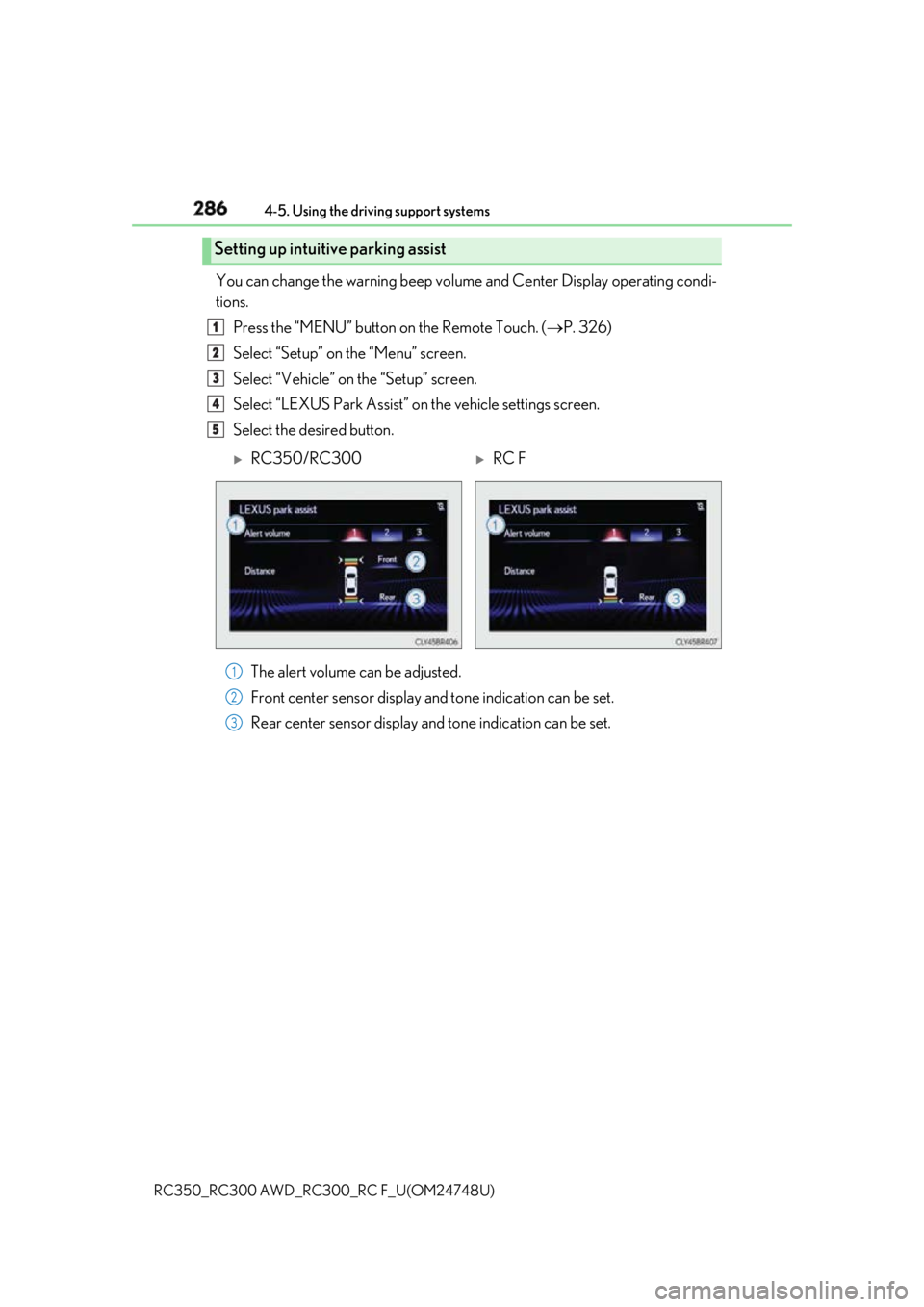
RC350_RC300 AWD_RC3 00_RC F_U(OM24748U)You can change the warning beep volum e and Center Display operating condi-
tions.
Press the “MENU” button on the Remote Touch. ( P. 326)
Select “Setup” on the “Menu” screen.
Select “Vehicle” on the “Setup” screen.
Select “LEXUS Park Assist” on the vehicle settings screen.
Select the desired button.
The alert volume can be adjusted.
Front center sensor display an d tone indication can be set.
Rear center sensor display and tone indication can be set.Setting up intuitive parking assist 1
2
3
4
5
RC350/RC300
RC F
1
2
3
Page 325 of 636

325
Interior features
5
RC350_RC300 AWD_RC3 00_RC F_U(OM24748U)5-1. Using the air conditioning
system
Remote Touch .............................326
10.3-inch display ......................... 331
Automatic air conditioning
system ......................................... 333
Heated steering wheel/
seat heaters/
seat ventilators .........................344
5-2. Using the interior lights
Interior lights list.......................... 347
• Interior lights ......................... 348
• Personal lights .......................349
5-3. Using the storage features
List of storage features............ 350
• Glove box ................................ 351
• Console box ............................ 351
• Cup holders............................352
Trunk features............................. 353 5-4. Using the other interior
features
Other interior features ............ 354
• Sun visors ................................ 354
• Vanity mirrors ....................... 354
• Clock ........................................355
• Power outlet...........................355
• Armrest .................................... 356
•Trunk storage
extension ................................. 357
• Assist grips..............................358
• Coat hooks .............................358
Garage door op ener ...............359
Compass ....................................... 366
LEXUS Enform Safety
Connect ...................................... 370
Page 326 of 636
326
RC350_RC300 AWD_RC3 00_RC F_U(OM24748U)5-1. Using the air conditioning system
Vehicles with a 10.3-inch display
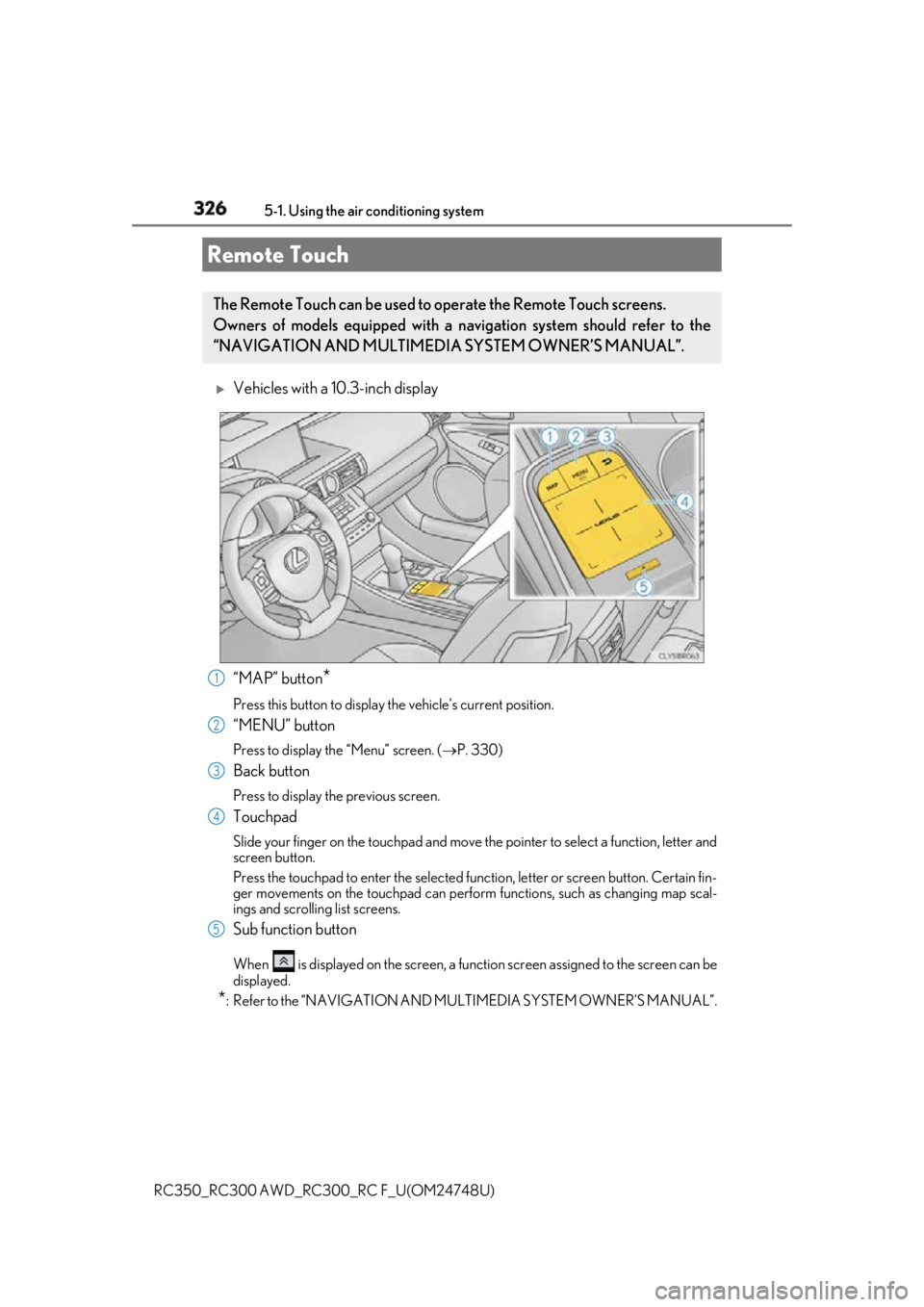
“MAP” button
*Press this button to display the vehicle’s current position.
“MENU” button Press to display th e “Menu” screen. ( P. 330)
Back button Press to display the previous screen.
Touchpad Slide your finger on the touchpad and move the pointer to select a function, letter and
screen button.
Press the touchpad to enter the selected function, letter or screen button. Certain fin-
ger movements on the touchpad can perform functions, such as changing map scal-
ings and scrolling list screens.
Sub function button When is displayed on the screen, a functi on screen assigned to the screen can be
displayed.
* : Refer to the “NAVIGATION AND MU LTIMEDIA SYSTEM OWNER’S MANUAL”.Remote Touch The Remote Touch can be used to operate the Remote Touch screens.
Owners of models equipped with a navi gation system should refer to the
“NAVIGATION AND MULTIMEDIA SYSTEM OWNER’S MANUAL”.
1
2
3
4
5
Page 328 of 636
328 5-1. Using the air conditioning system
RC350_RC300 AWD_RC3 00_RC F_U(OM24748U)■
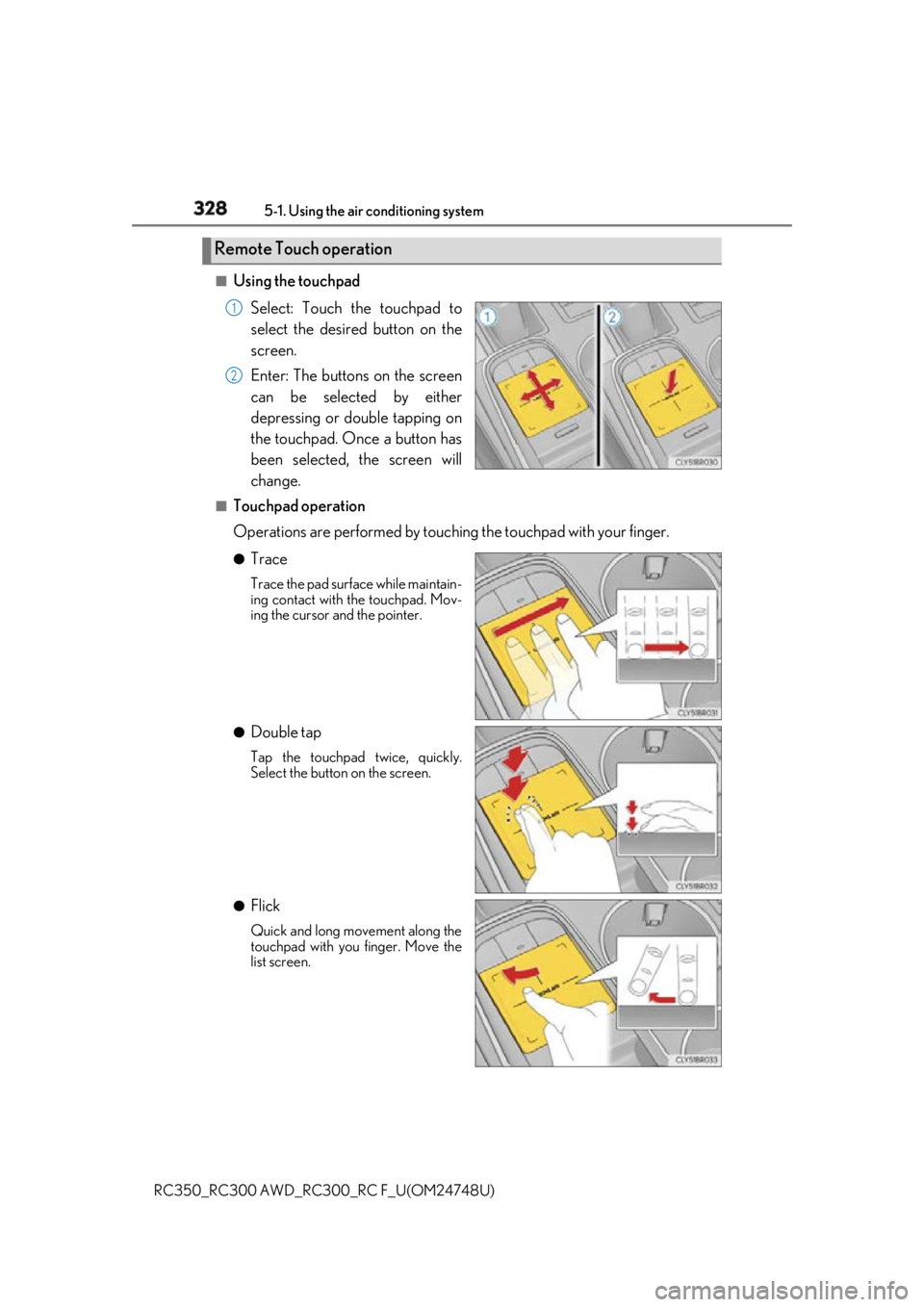
Using the touchpad
Select: Touch the touchpad to
select the desired button on the
screen.
Enter: The buttons on the screen
can be selected by either
depressing or double tapping on
the touchpad. Once a button has
been selected, the screen will
change.■
Touchpad operation
Operations are performed by touching the touchpad with your finger.●
Trace Trace the pad surface while maintain-
ing contact with the touchpad. Mov-
ing the cursor and the pointer.
●
Double tap Tap the touchpad twice, quickly.
Select the button on the screen.
●
Flick Quick and long movement along the
touchpad with you finger. Move the
list screen.Remote Touch operation 1
2
Page 329 of 636
3295-1. Using the air conditioning system
5
Interior features
RC350_RC300 AWD_RC3 00_RC F_U(OM24748U)●
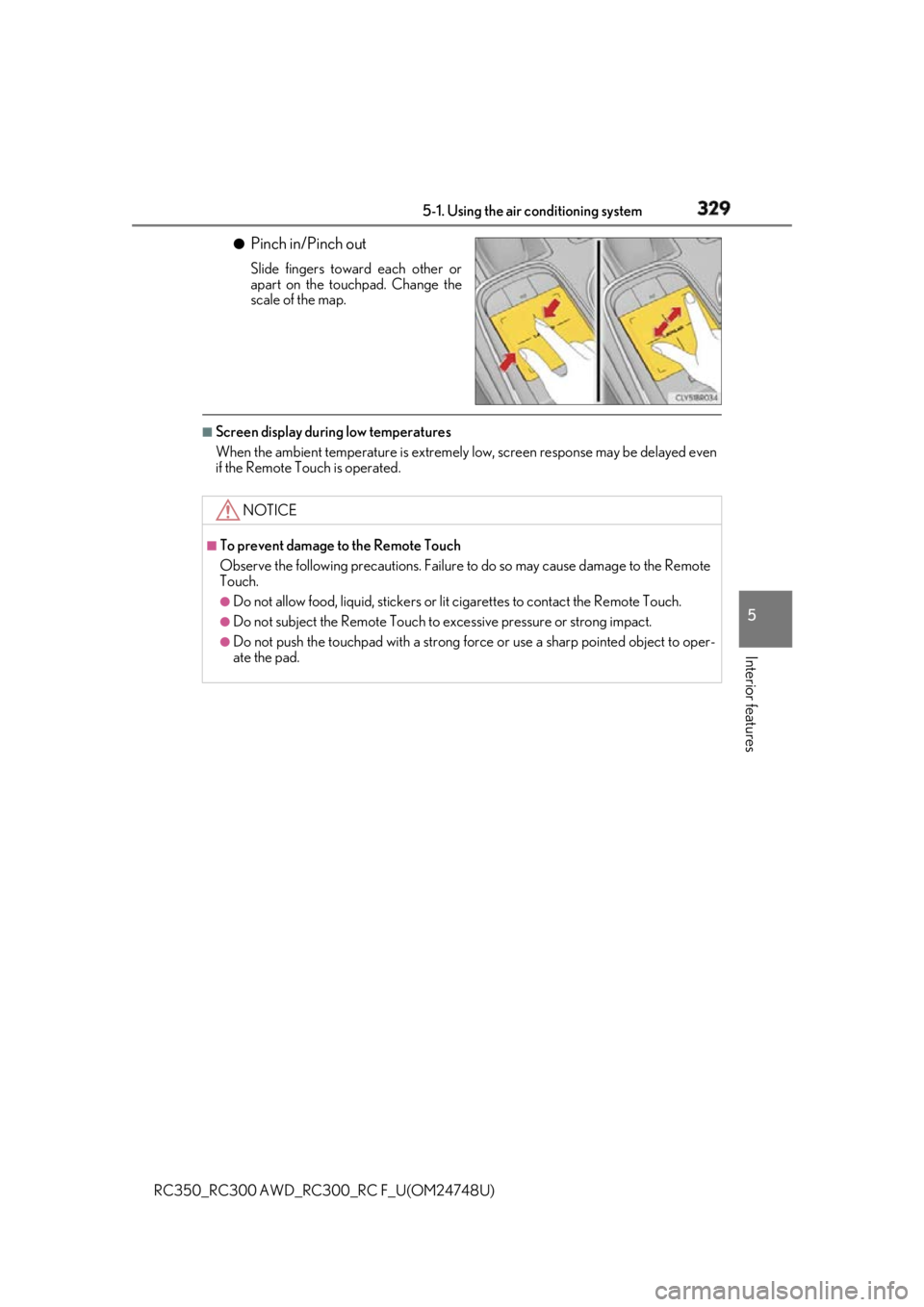
Pinch in/Pinch out Slide fingers toward each other or
apart on the touchpad. Change the
scale of the map.■
Screen display during low temperatures
When the ambient temperature is extremely low, screen response may be delayed even
if the Remote Touch is operated.
NOTICE ■
To prevent damage to the Remote Touch
Observe the following precautions. Failure to do so may cause damage to the Remote
Touch. ●
Do not allow food, liquid, stickers or lit cigarettes to contact the Remote Touch.●
Do not subject the Remote Touch to ex cessive pressure or strong impact.●
Do not push the touchpad with a strong force or use a sharp pointed object to oper-
ate the pad.
Page 330 of 636
330 5-1. Using the air conditioning system
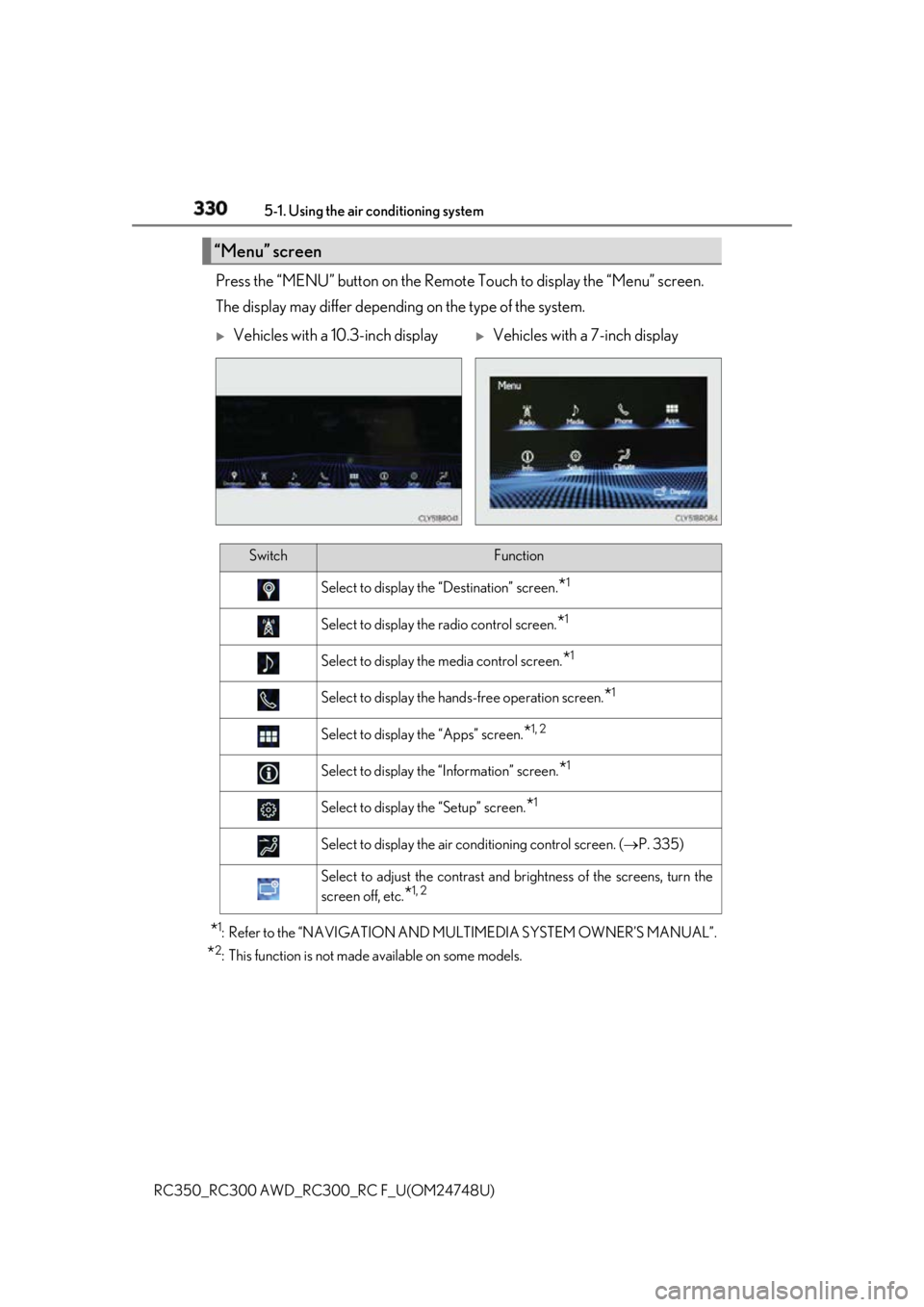
RC350_RC300 AWD_RC3 00_RC F_U(OM24748U)Press the “MENU” button on the Remote Touch to display the “Menu” screen.
The display may differ depending on the type of the system.
* 1
: Refer to the “NAVIGATION AND MULTIMEDIA SYSTEM OWNER’S MANUAL”.
* 2
: This function is not made available on some models.“Menu” screen
Vehicles with a 10.3-inch display
Vehicles with a 7-inch display
Switch Function
Select to display the “Destination” screen.
* 1
Select to display the radio control screen.
* 1
Select to display the media control screen.
* 1
Select to display the hand s-free operation screen.
* 1
Select to display the “Apps” screen.
* 1, 2
Select to display the “Information” screen.
* 1
Select to display the “Setup” screen.
* 1
Select to display the air conditioning control screen. ( P. 335)
Select to adjust the contrast and brightness of the screens, turn the
screen off, etc.
* 1, 2