remote LEXUS RCF 2018 Service Manual
[x] Cancel search | Manufacturer: LEXUS, Model Year: 2018, Model line: RCF, Model: LEXUS RCF 2018Pages: 636, PDF Size: 6.88 MB
Page 569 of 636
569
RC350_RC300 AWD_RC3 00_RC F_U(OM24748U) 8
Vehicle specifications 8-2. Customization
■
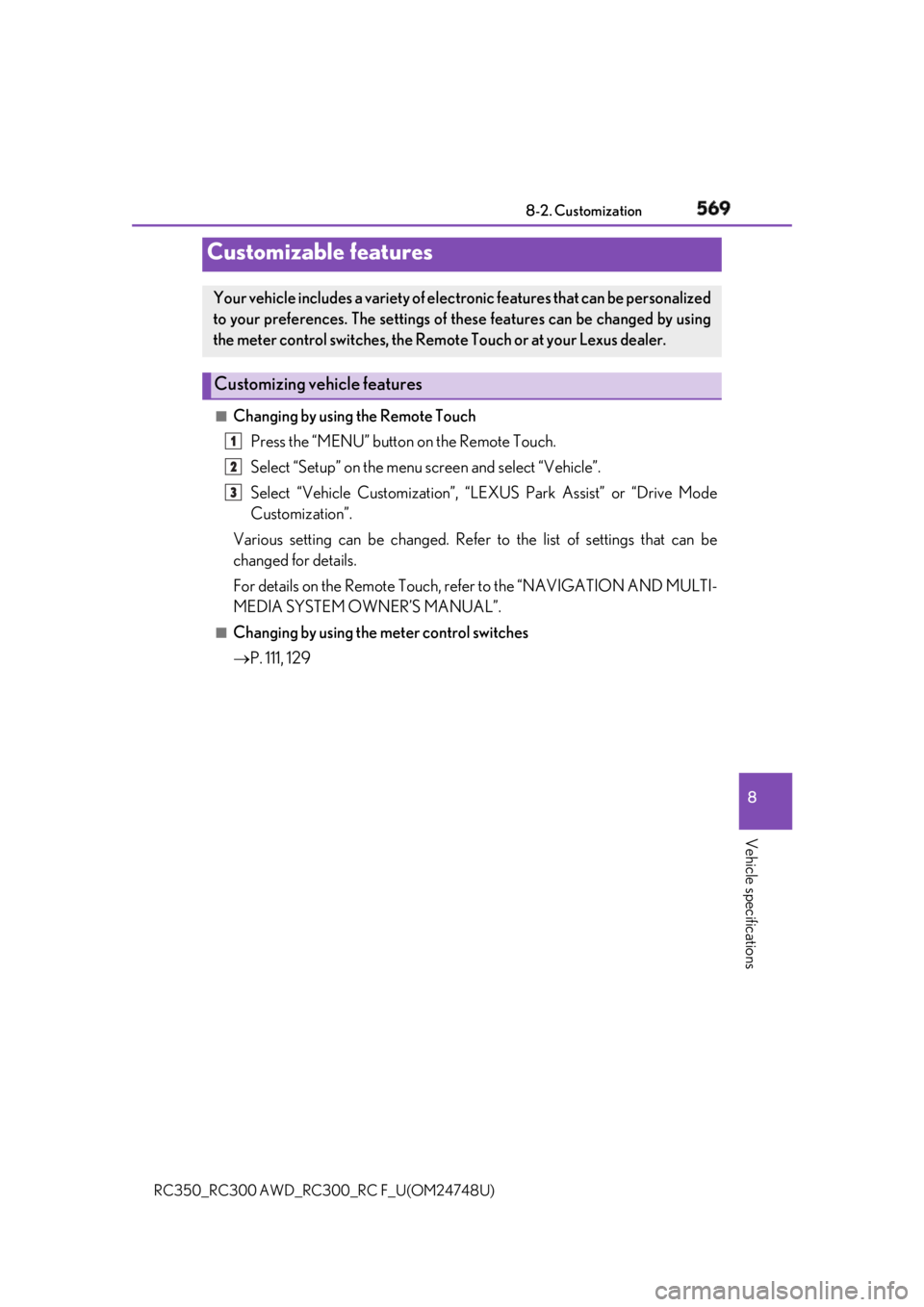
Changing by using the Remote Touch
Press the “MENU” button on the Remote Touch.
Select “Setup” on the menu screen and select “Vehicle”.
Select “Vehicle Customization”, “L EXUS Park Assist” or “Drive Mode
Customization”.
Various setting can be changed. Refer to the list of settings that can be
changed for details.
For details on the Remote Touch, refer to the “NAVIGATION AND MULTI-
MEDIA SYSTEM OWNER’S MANUAL”. ■
Changing by using the meter control switches
P. 111, 129Customizable features Your vehicle includes a variety of elec tronic features that can be personalized
to your preferences. The settings of these features can be changed by using
the meter control switches, the Remote Touch or at your Lexus dealer.
Customizing vehicle features 1
2
3
Page 570 of 636
570 8-2. Customization
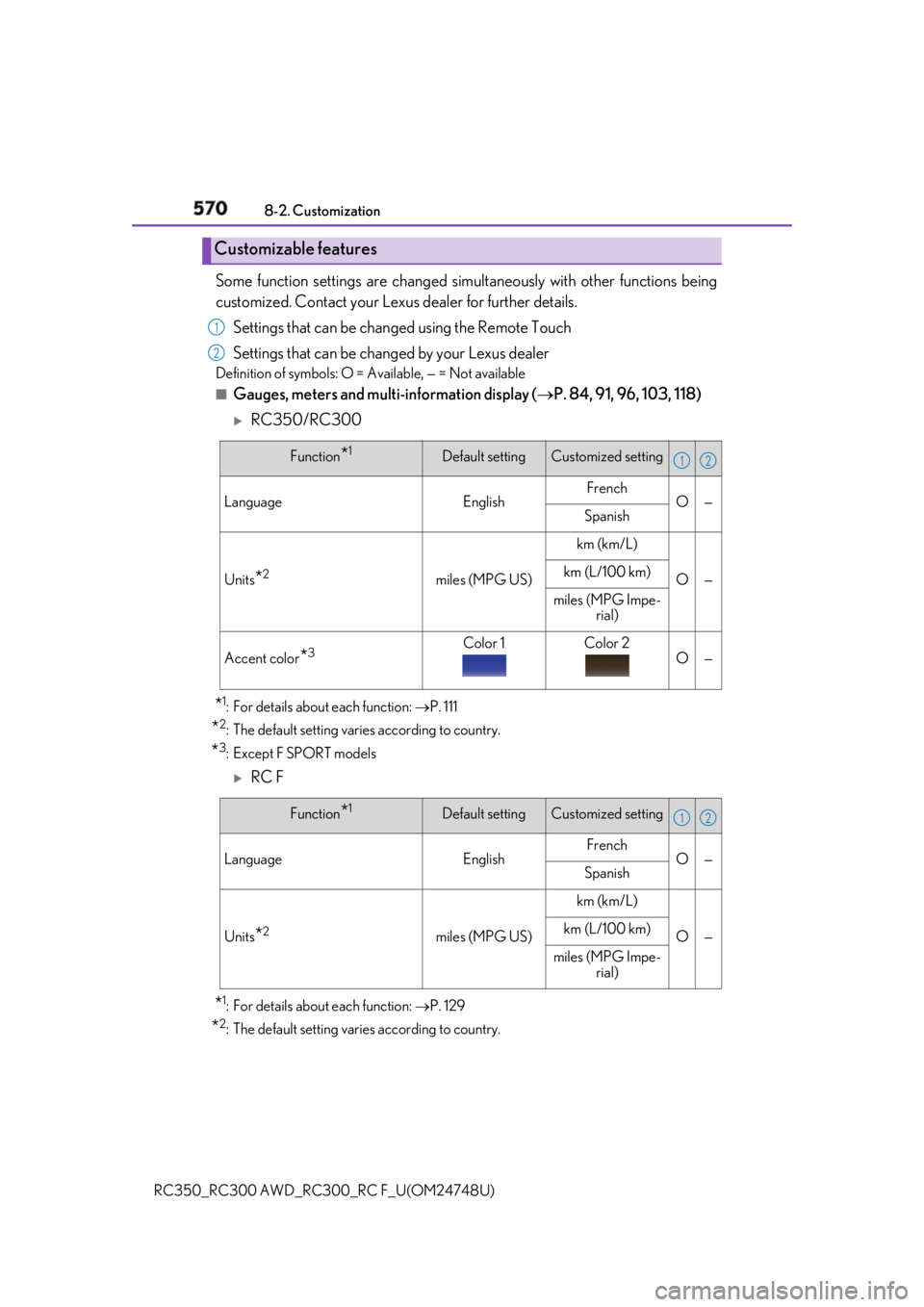
RC350_RC300 AWD_RC3 00_RC F_U(OM24748U)Some function settings are changed simultaneously with other functions being
customized. Contact your Lexu s dealer for further details.
Settings that can be changed using the Remote Touch
Settings that can be changed by your Lexus dealer Definition of symbols: O = Available, — = Not available■
Gauges, meters and multi-information display ( P. 84, 91, 96, 103, 118)
RC350/RC300
* 1
: For details about each function: P. 111
* 2
: The default setting varies according to country.
* 3
:Except F SPORT models
RC F
* 1
: For details about each function: P. 129
* 2
: The default setting varies according to country.Customizable features 1
2
Function
* 1
Default setting Customized setting
Language English French
O —
Spanish
Units
* 2
miles (MPG US) km (km/L)
O —km (L/100 km)
miles (MPG Impe-
rial)
Accent color
* 3
Color 1 Color 2
O — 1 2
Function
* 1
Default setting Customized setting
Language English French
O —
Spanish
Units
* 2
miles (MPG US) km (km/L)
O —km (L/100 km)
miles (MPG Impe-
rial) 1 2
Page 571 of 636
5718-2. Customization
RC350_RC300 AWD_RC3 00_RC F_U(OM24748U) 8
Vehicle specifications ■
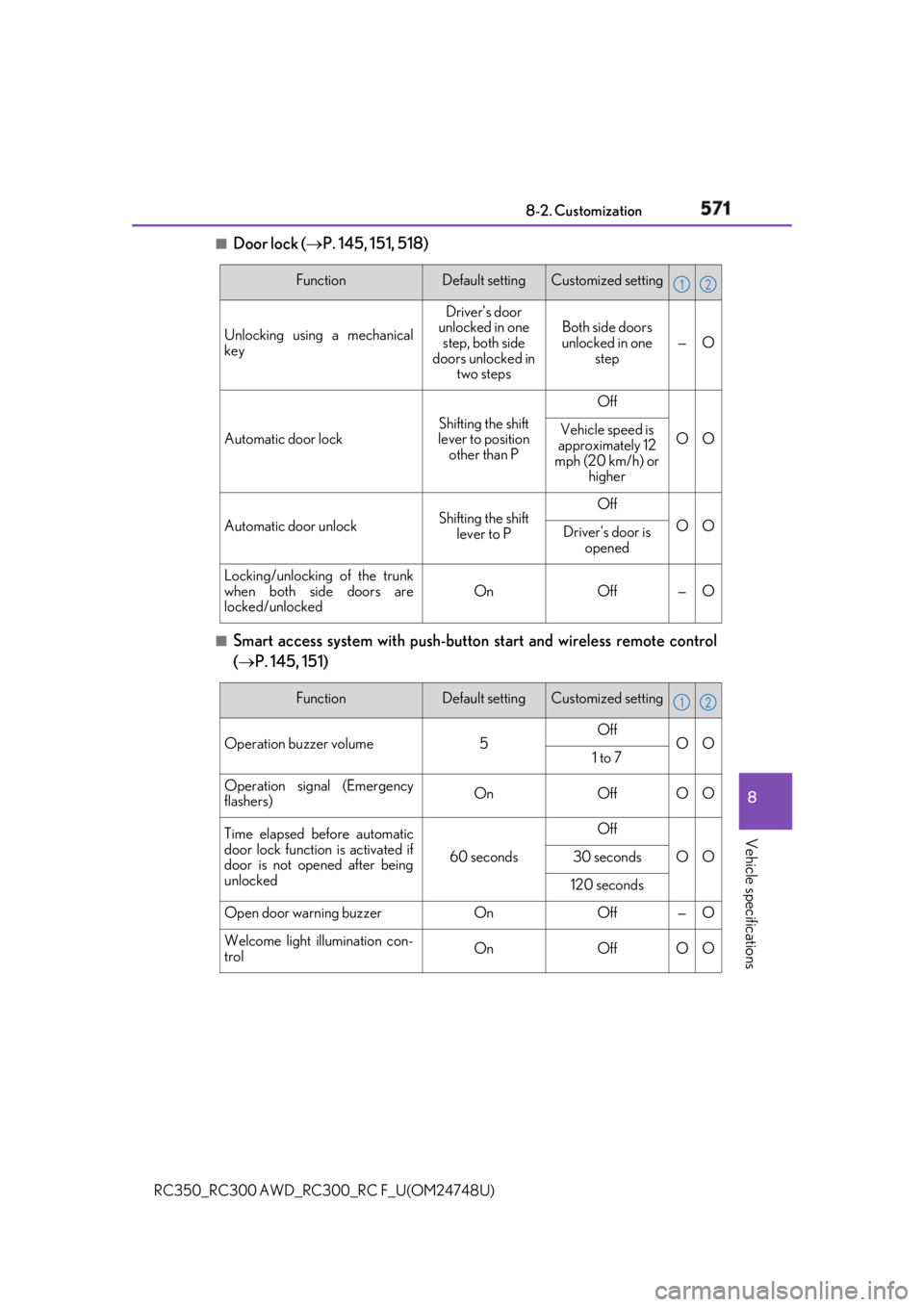
Door lock ( P. 145, 151, 518)
■
Smart access system with push-button start and wireless remote control
( P. 145, 151) Function Default setting Customized setting
Unlocking using a mechanical
key Driver’s door
unlocked in one
step, both side
doors unlocked in
two steps Both side doors
unlocked in one
step — O
Automatic door lock Shifting the shift
lever to position
other than P Off
O OVehicle speed is
approximately 12
mph (20 km/h) or
higher
Automatic door unlock Shifting the shift
lever to P Off
O O
Driver’s door is
opened
Locking/unlocking of the trunk
when both side doors are
locked/unlocked On Off — O 1 2
Function Default setting Customized setting
Operation buzzer volume 5 Off
O O
1 to 7
Operation signal (Emergency
flashers) On Off O O
Time elapsed before automatic
door lock function is activated if
door is not opened after being
unlocked 60 seconds Off
O O30 seconds
120 seconds
Open door warning buzzer On Off — O
Welcome light illumination con-
trol On Off O O 1 2
Page 572 of 636
572 8-2. Customization
RC350_RC300 AWD_RC3 00_RC F_U(OM24748U)■
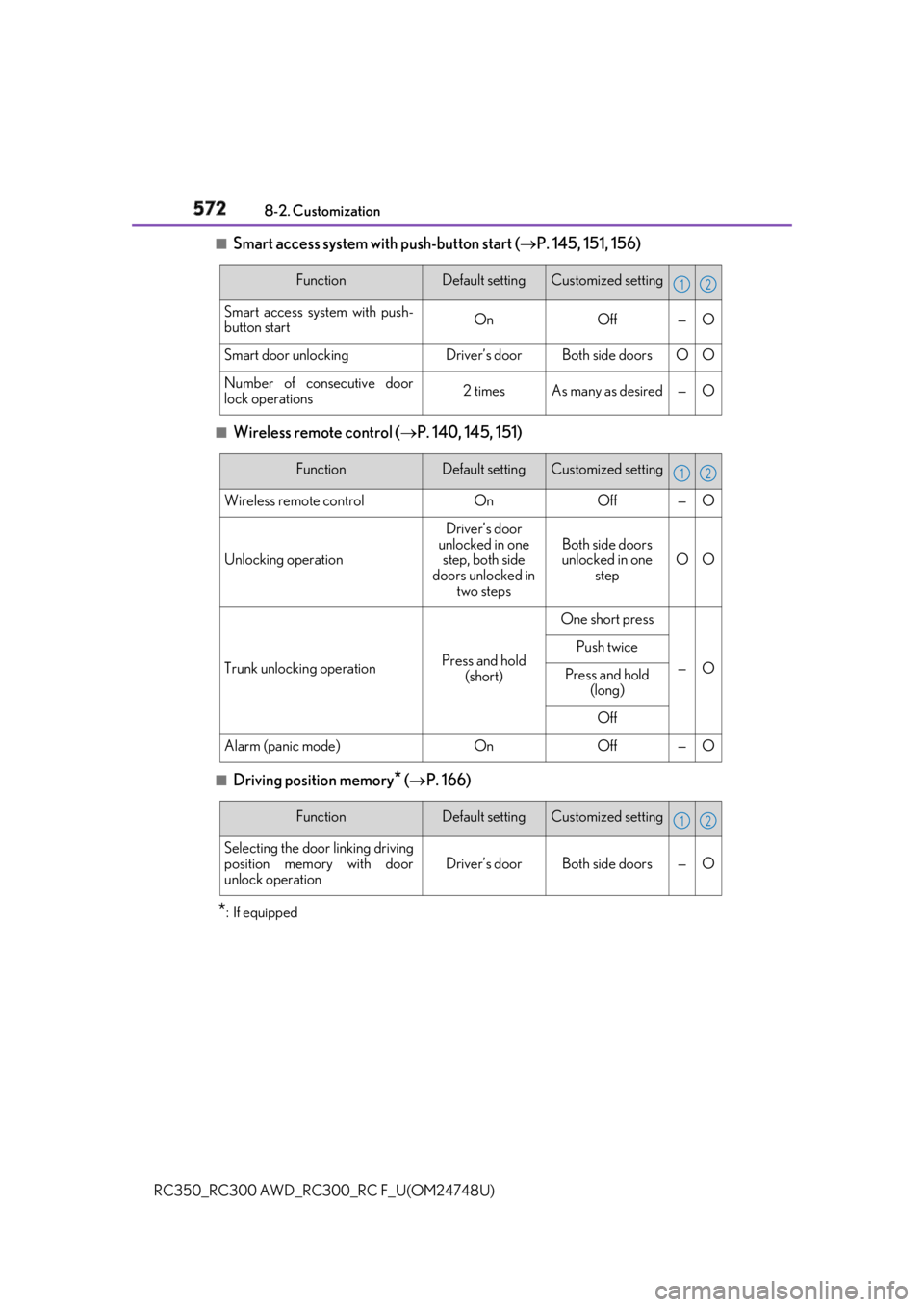
Smart access system with push-button start ( P. 145, 151, 156)
■
Wireless remote control ( P. 140, 145, 151)
■
Driving position memory
* ( P. 166)
* : If equipped Function Default setting Customized setting
Smart access system with push-
button start On Off — O
Smart door unlocking Driver’s door Both side doors O O
Number of consecutive door
lock operations 2 times As many as desired — O 1 2
Function Default setting Customized setting
Wireless remote control On Off — O
Unlocking operation Driver’s door
unlocked in one
step, both side
doors unlocked in
two steps Both side doors
unlocked in one
step O O
Trunk unlocking operation Press and hold
(short) One short press
— OPush twice
Press and hold
(long)
Off
Alarm (panic mode) On Off — O 1 2
Function Default setting Customized setting
Selecting the door linking driving
position memory with door
unlock operation Driver’s door Both side doors — O 1 2
Page 573 of 636
5738-2. Customization
RC350_RC300 AWD_RC3 00_RC F_U(OM24748U) 8
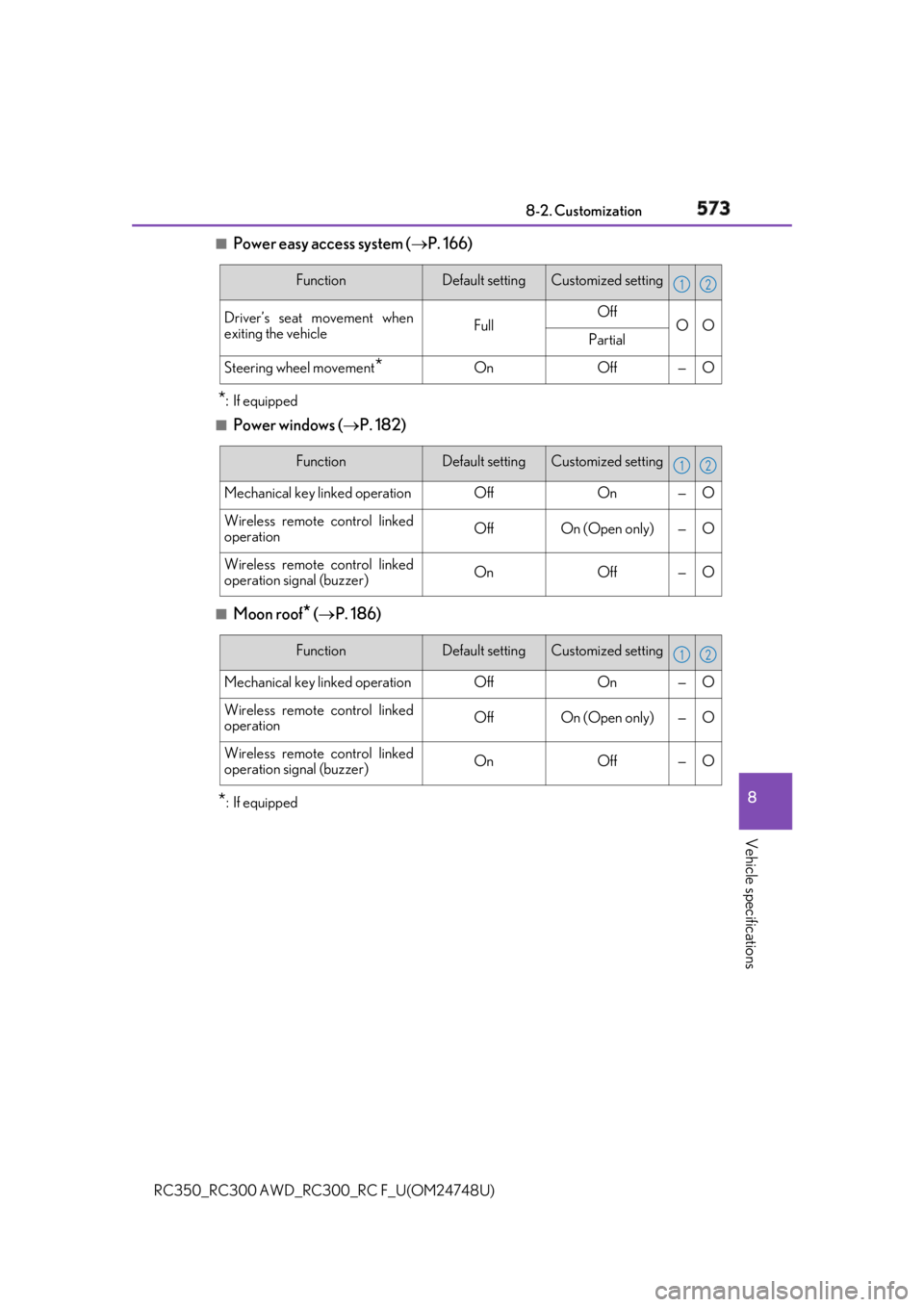
Vehicle specifications ■
Power easy access system ( P. 166)
* : If equipped■
Power windows ( P. 182)
■
Moon roof
* ( P. 186)
* : If equipped Function Default setting Customized setting
Driver’s seat movement when
exiting the vehicle Full Off
O O
Partial
Steering wheel movement
* On Off — O 1 2
Function Default setting Customized setting
Mechanical key linked operation Off On — O
Wireless remote control linked
operation Off On (Open only) — O
Wireless remote control linked
operation signal (buzzer) On Off — O 1 2
Function Default setting Customized setting
Mechanical key linked operation Off On — O
Wireless remote control linked
operation Off On (Open only) — O
Wireless remote control linked
operation signal (buzzer) On Off — O 1 2
Page 576 of 636
576 8-2. Customization
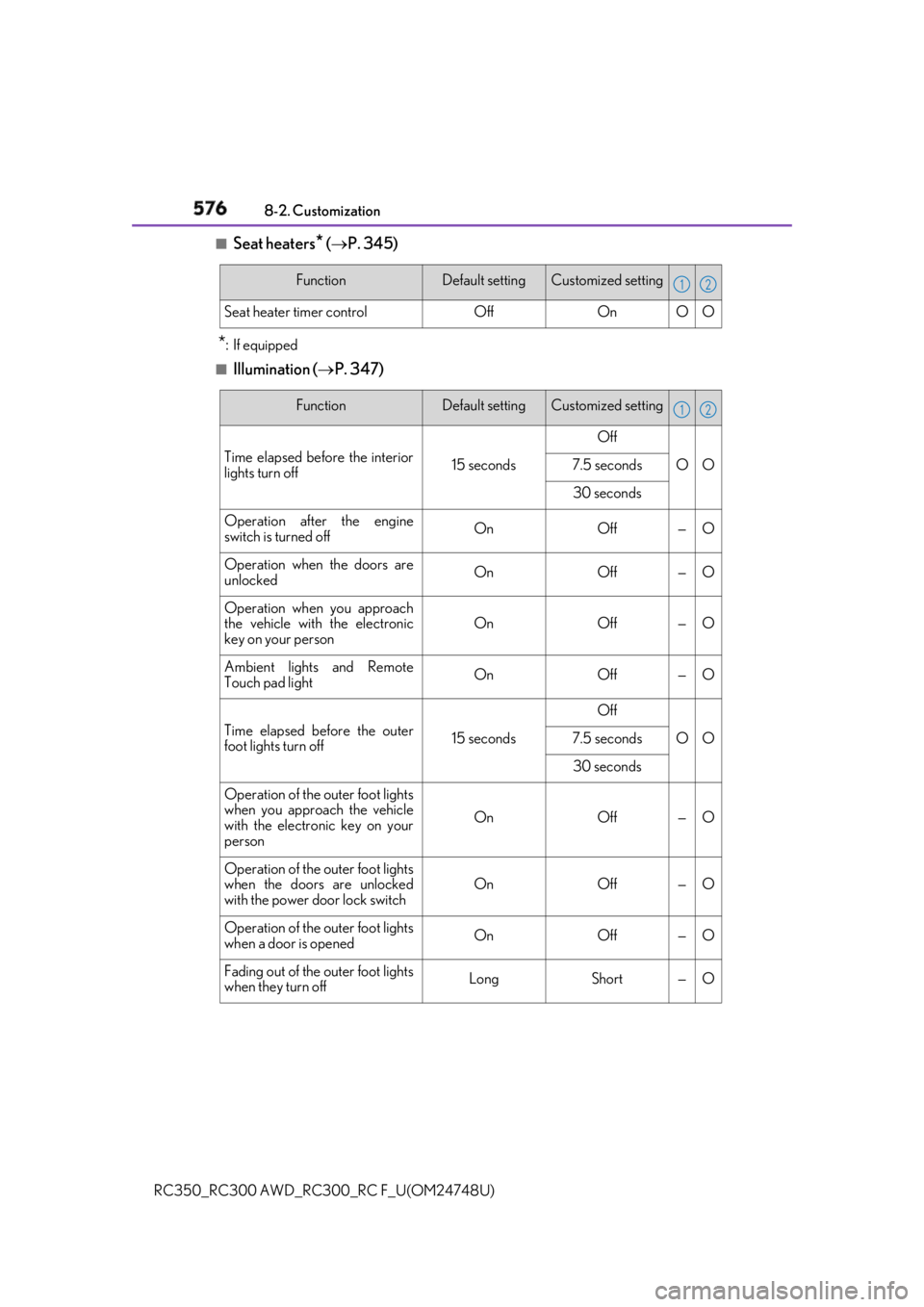
RC350_RC300 AWD_RC3 00_RC F_U(OM24748U)■
Seat heaters
* ( P. 345)
* : If equipped■
Illumination ( P. 347)Function Default setting Customized setting
Seat heater timer control Off On O O 1 2
Function Default setting Customized setting
Time elapsed before the interior
lights turn off 15 seconds Off
O O7.5 seconds
30 seconds
Operation after the engine
switch is turned off On Off — O
Operation when the doors are
unlocked On Off — O
Operation when you approach
the vehicle with the electronic
key on your person On Off — O
Ambient lights and Remote
Touch pad light On Off — O
Time elapsed before the outer
foot lights turn off 15 seconds Off
O O7.5 seconds
30 seconds
Operation of the outer foot lights
when you approach the vehicle
with the electronic key on your
person On Off — O
Operation of the outer foot lights
when the doors are unlocked
with the power door lock switch On Off — O
Operation of the outer foot lights
when a door is opened On Off — O
Fading out of the outer foot lights
when they turn off Long Short — O 1 2
Page 577 of 636
5778-2. Customization
RC350_RC300 AWD_RC3 00_RC F_U(OM24748U) 8
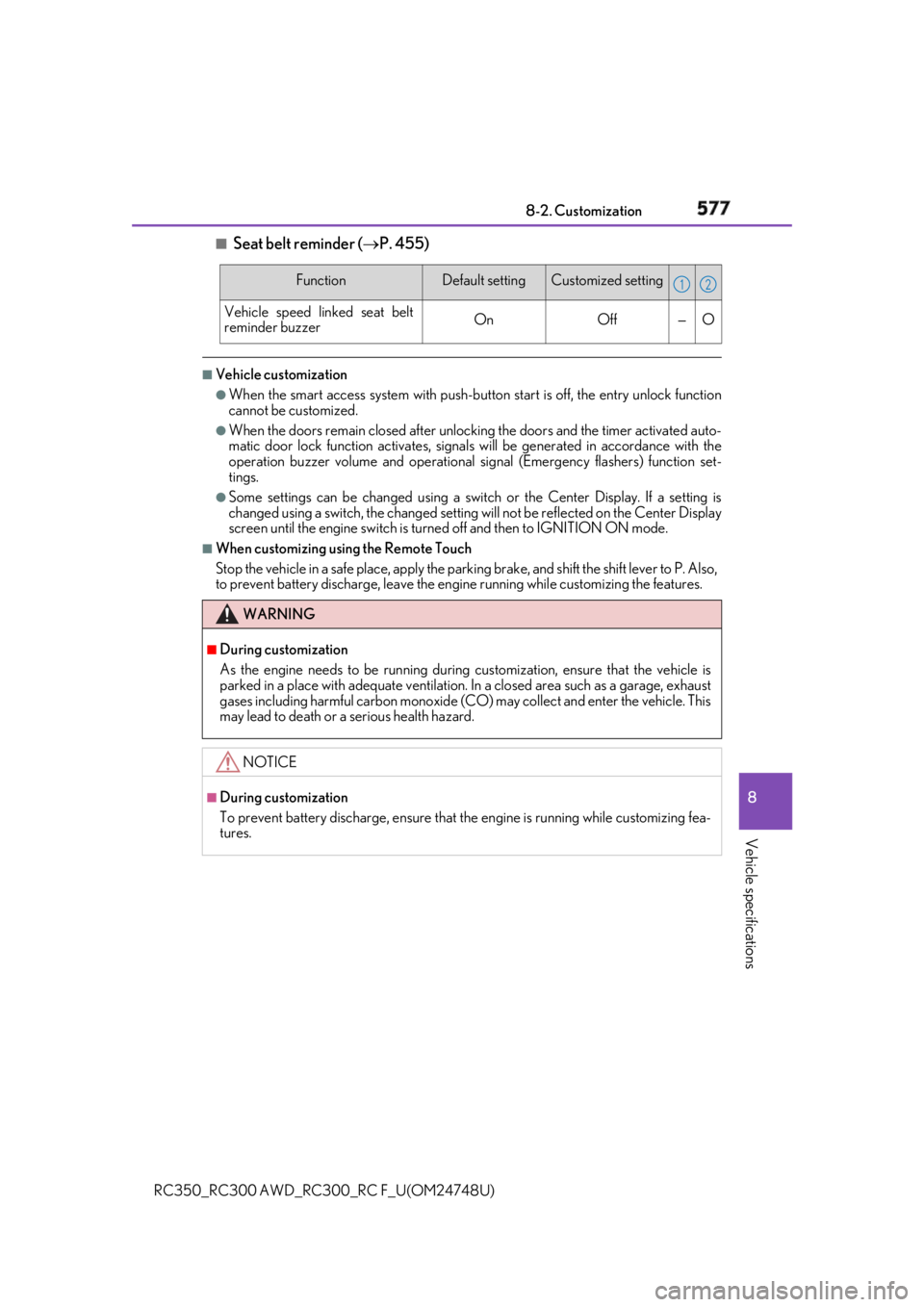
Vehicle specifications ■
Seat belt reminder ( P. 455)■
Vehicle customization ●
When the smart access system with push-button start is off, the entry unlock function
cannot be customized. ●
When the doors remain closed after unlocking the doors and the timer activated auto-
matic door lock function activates, signals will be generated in accordance with the
operation buzzer volume and operational si gnal (Emergency flashers) function set-
tings. ●
Some settings can be changed using a switch or the Center Display. If a setting is
changed using a switch, the ch anged setting will not be refl ected on the Center Display
screen until the engine switch is turn ed off and then to IGNITION ON mode.■
When customizing usin g the Remote Touch
Stop the vehicle in a safe place, apply the parking brake, and shift the shift lever to P. Also,
to prevent battery discharge, leave the engine running while customizing the features. Function Default setting Customized setting
Vehicle speed linked seat belt
reminder buzzer On Off — O 1 2
WARNING ■
During customization
As the engine needs to be running during customization, ensure that the vehicle is
parked in a place with adequate ventilation. In a closed area such as a garage, exhaust
gases including harmful carbon monoxide (CO) may collect and enter the vehicle. This
may lead to death or a serious health hazard.
NOTICE ■
During customization
To prevent battery discharge, ensure that the engine is running while customizing fea-
tures.
Page 614 of 636
614 What to do if... (Troubleshooting)
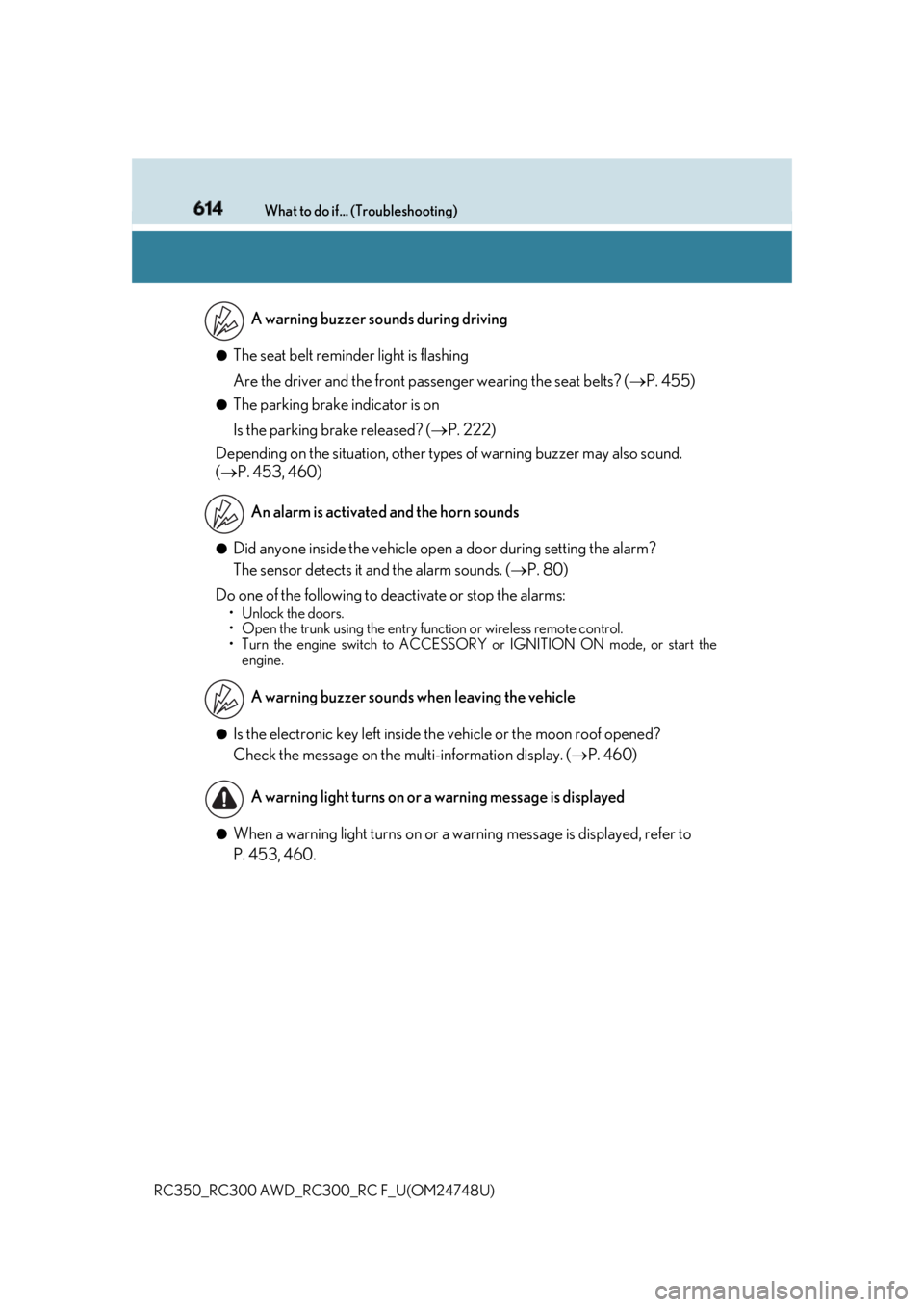
RC350_RC300 AWD_RC3 00_RC F_U(OM24748U)●
The seat belt reminder light is flashing
Are the driver and the front passe nger wearing the seat belts? ( P. 455)●
The parking brake indicator is on
Is the parking brake released? ( P. 222)
Depending on the situation, other type s of warning buzzer may also sound.
( P. 453, 460)
●
Did anyone inside the vehicle open a door during setting the alarm?
The sensor detects it and the alarm sounds. ( P. 80)
Do one of the following to de activate or stop the alarms:• Unlock the doors.
• Open the trunk using the entry function or wireless remote control.
• Turn the engine switch to ACCESSORY or IGNITION ON mode, or start the
engine.
●
Is the electronic key left inside th e vehicle or the moon roof opened?
Check the message on the multi-information display. ( P. 460)
●
When a warning light turns on or a wa rning message is displayed, refer to
P. 453, 460. A warning buzzer sounds during driving
An alarm is activated and the horn sounds
A warning buzzer sounds when leaving the vehicle
A warning light turns on or a warning message is displayed
Page 619 of 636
619Alphabetical index
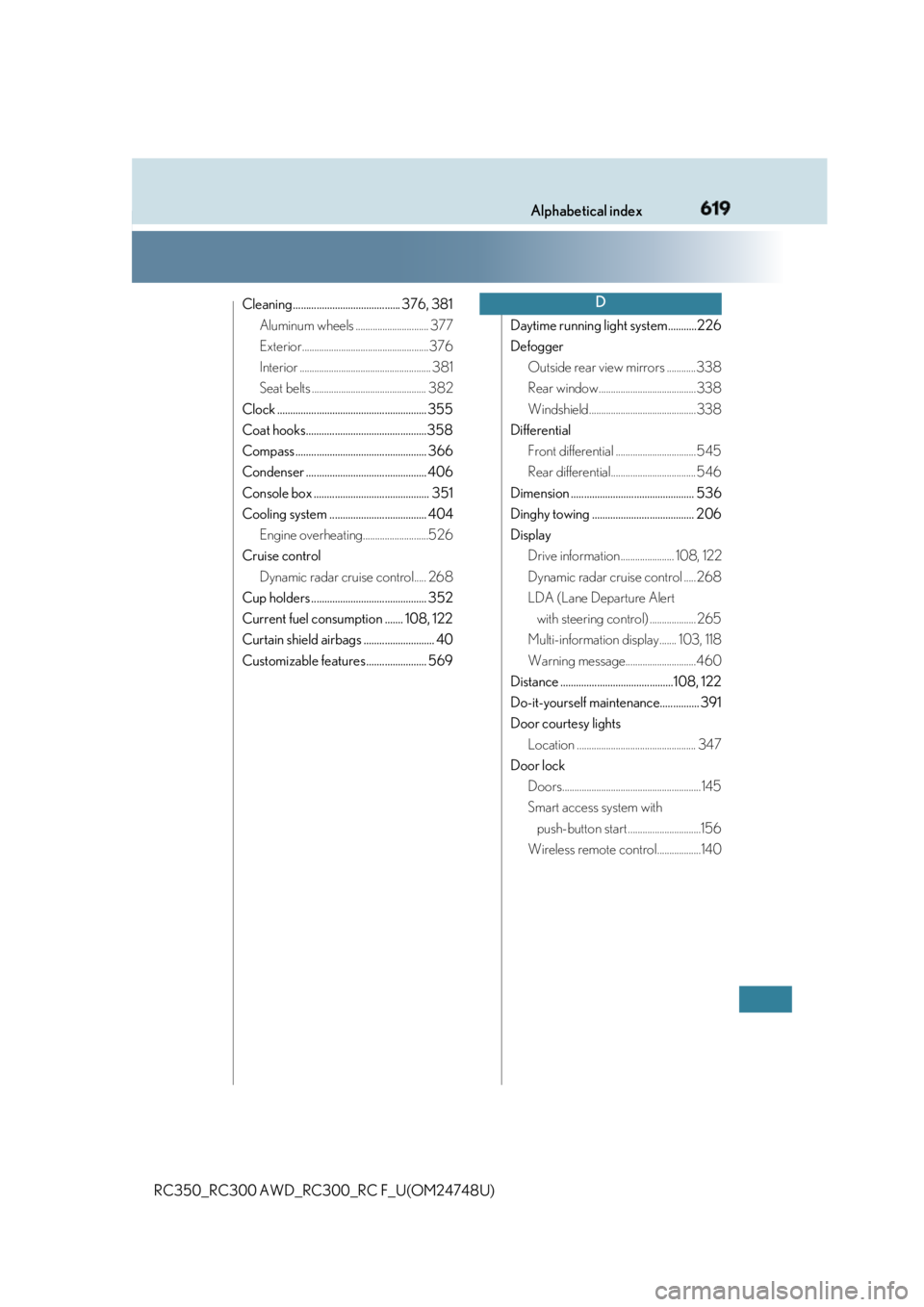
RC350_RC300 AWD_RC3 00_RC F_U(OM24748U)Cleaning......................................... 376, 381
Aluminum wheels .............................. 377
Exterior....................................................376
Interior ...................................................... 381
Seat belts ............................................... 382
Clock ......................................................... 355
Coat hooks..............................................358
Compass .................................................. 366
Condenser .............................................. 406
Console box ............................................ 351
Cooling system ..................................... 404
Engine overheating...........................526
Cruise control
Dynamic radar cruise control..... 268
Cup holders ............................................ 352
Current fuel consumption ....... 108, 122
Curtain shield airbags ........................... 40
Customizable features ....................... 569 Daytime running light system...........226
Defogger
Outside rear view mirrors ............338
Rear window........................................338
Windshield............................................338
Differential
Front differential .................................545
Rear differential................................... 546
Dimension ............................................... 536
Dinghy towing ....................................... 206
Display
Drive information...................... 108, 122
Dynamic radar cruise control .....268
LDA (Lane Departure Alert
with steering control) ................... 265
Multi-information display....... 103, 118
Warning message.............................460
Distance ...........................................108, 122
Do-it-yourself maintenance............... 391
Door courtesy lights
Location ................................................. 347
Door lock
Doors.........................................................145
Smart access system with
push-button start ..............................156
Wireless remote control..................140 D
Page 624 of 636

624 Alphabetical index
RC350_RC300 AWD_RC3 00_RC F_U(OM24748U)Jack
Positioning a floor jack ....................394
Vehicle-equipped jack ......489, 502
Jack handle ................................. 489, 502
Jam protection function
Front seats .............................................. 162
Moon roof .............................................. 187
Power windows ................................... 183 Keyless entry
Smart access system
with push-button start........... 145, 151
Wireless remote control......... 145, 151
Keys ............................................................. 140
Battery-saving function ................... 158
Electronic key ........................................140
Engine switch ...................................... 207
If the electronic key
does not operate properly ......... 518
Key number plate ................................140
Keyless entry ..........................................140
Mechanical key.......................................141
Replacing the battery .......................427
Warning buzzer...................................146
Wireless remote control..................140
Knee airbags ............................................. 40J K