ESP LEXUS RCF 2019 Owner's Guide
[x] Cancel search | Manufacturer: LEXUS, Model Year: 2019, Model line: RCF, Model: LEXUS RCF 2019Pages: 636, PDF Size: 12.48 MB
Page 288 of 636

288 4-5. Using the driving support systems
RC F_U WARNING ■
When using the intuitive parking assist
Observe the following precautions.
Failing to do so may result in the vehicle be ing unable to be driv en safely and possibly
cause an accident. ●
Do not use the sensor at speeds in excess of 6 mph (10 km/h). ●
The sensors’ detection areas and reaction ti mes are limited. When moving forward or
reversing, check the areas surrounding the vehicle (especially th e sides of the vehi-
cle) for safety, and drive slowly, using the brake to control the vehicle’s speed. ●
Do not install accessories within the sensors’ detection areas.■
Limitations of the sensors ●
RC350/RC300: The detection areas of the sensors are limited to the areas around
the vehicle’s front and rear bumpers. ●
RC F: The detection areas of the sensors are limited to the areas around the vehicle’s
front corners and the rear bumpers. ●
Certain vehicle conditions and surrounding environments, such as the following, may
affect the ability of th e sensors to correctly detect obje cts. Pay particul ar attention in
the following situations. Failure to do so may result in the vehicle being driven
unsafely, possibly leading to an accident.
• When there is dirt, snow or ice on a se nsor (Cleaning the sensor will resolve this
problem.)
• When the sensor is frozen (Thawing the area will resolve this problem.)
In especially cold weather, if a sensor is frozen the screen may show an abnormal
display, or objects may not be detected
• When a sensor is covered in any way
• When the vehicle is leaning considerably to one side
• When driving on an extremely bump y road, incline, gravel, or grass
• When the vicinity of the vehicle is noisy due to vehicle horns, motorcycle engines,
air brakes of large vehicles, or other loud noises producing ultrasonic waves
• When there is another vehicle equipped with parking assist sensor in the vicinity
• When the sensor is coated with a sheet of spray or heavy rain
• When the vehicle is equipped with a fender pole or wireless antenna
• When a towing eyelet is installed
• When a bumper or sensor receives a strong impact
• When the vehicle is approaching a tall or curved curb
• When driving in harsh sunlig ht or intense cold weather
• When an object is directly under a bumper
• When objects become too close to the sensors
• When a non-genuine Lexus suspension (lowered suspension, etc.) is installed
In addition to the situations above, there are instances in which, because of their
shape, signs and other objects may be judged by the sensor to be closer than they
are.
Page 292 of 636
292 4-5. Using the driving support systems
RC F_U ■
Outside rear view mirro r indicator visibility
In strong sunlight, the outside rear view mirror indicator may be difficult to see.■
Hearing the RCTA buzzer
The RCTA buzzer may be difficult to hear over loud noises, such as if the audio system
volume is high. ■
When there is a malfunction in the Blind Spot Monitor
If a system malfunction is detected due to any of the following, a warning message will be
displayed: ( P. 460)●
A sensor is malfunctioning ●
A sensor is dirty or covere d with snow or a sticker●
The outside temperature is extremely high or low ●
Sensor voltage is abnormal ●
A sensor is misaligned
WARNING ■
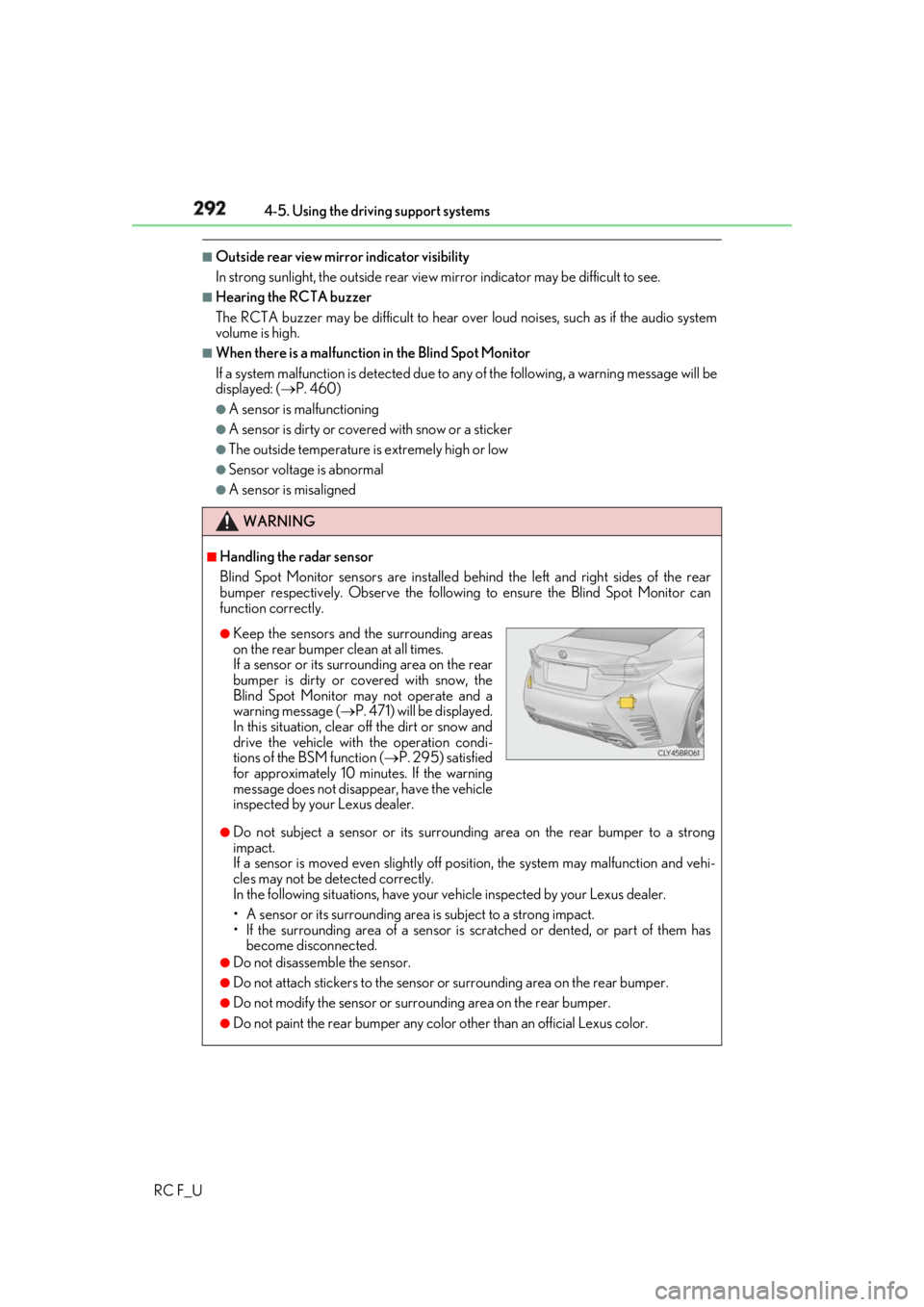
Handling the radar sensor
Blind Spot Monitor sensors ar e installed behind the left and right sides of the rear
bumper respectively. Observe the following to ensure the Blind Spot Monitor can
function correctly.
●
Do not subject a sensor or its surrounding area on the rear bumper to a strong
impact.
If a sensor is moved even slightly off po sition, the system may malfunction and vehi-
cles may not be detected correctly.
In the following situations , have your vehicle inspected by your Lexus dealer.
• A sensor or its surrounding area is subject to a strong impact.
• If the surrounding area of a sensor is sc ratched or dented, or part of them has
become disconnected. ●
Do not disassemble the sensor. ●
Do not attach stickers to the sensor or surrounding area on the rear bumper.●
Do not modify the sensor or surro unding area on the rear bumper.●
Do not paint the rear bumper any colo r other than an official Lexus color.●
Keep the sensors and the surrounding areas
on the rear bumper clean at all times.
If a sensor or its surrounding area on the rear
bumper is dirty or covered with snow, the
Blind Spot Monitor may not operate and a
warning message ( P. 471) will be displayed.
In this situation, clear off the dirt or snow and
drive the vehicle with the operation condi-
tions of the BSM function ( P. 295) satisfied
for approximately 10 minutes. If the warning
message does not disappear, have the vehicle
inspected by your Lexus dealer.
Page 294 of 636
294 4-5. Using the driving support systems
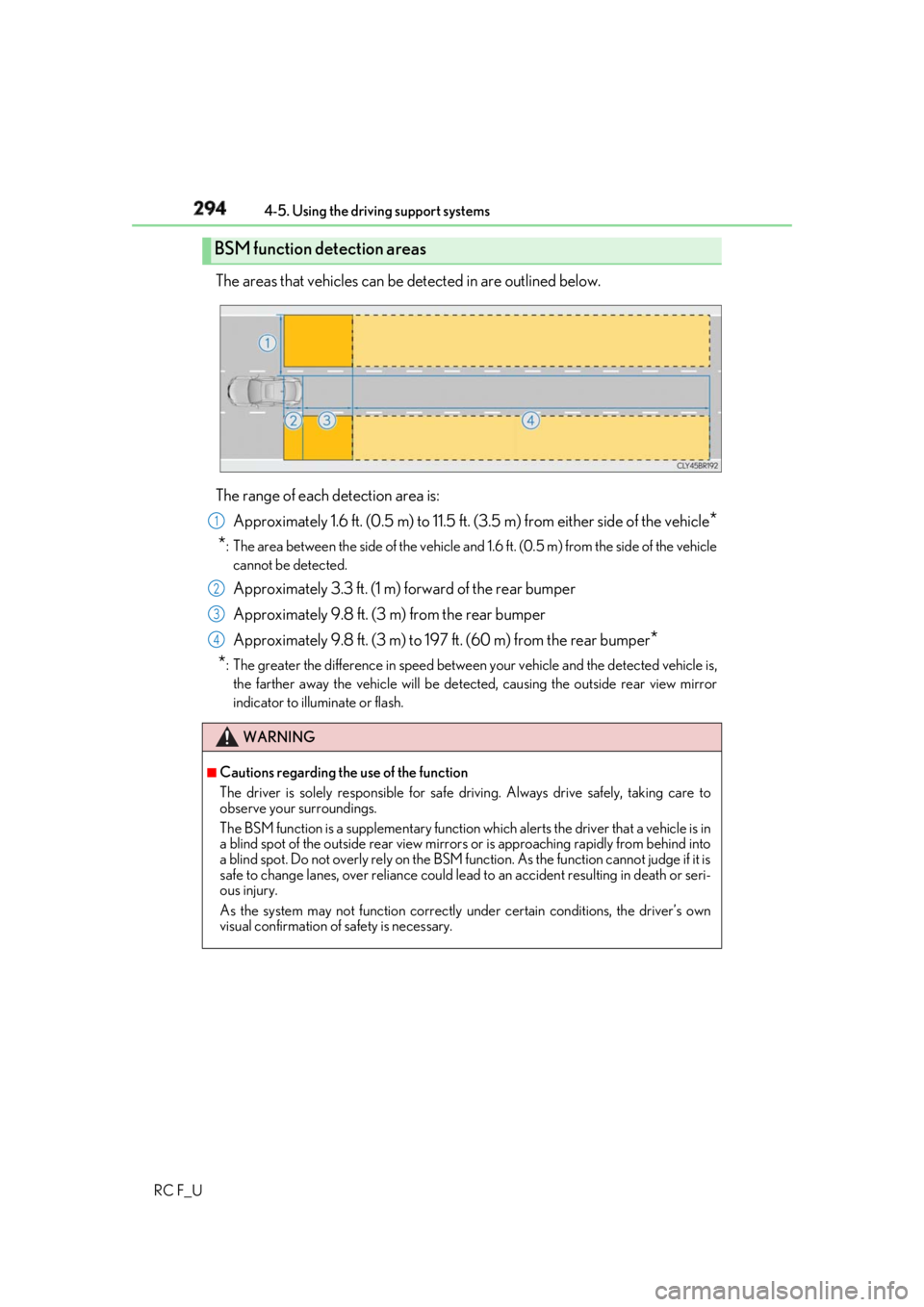
RC F_U The areas that vehicles can be detected in are outlined below.
The range of each detection area is:
Approximately 1.6 ft. (0.5 m) to 11.5 ft. (3 .5 m) from either side of the vehicle
*
* : The area between the side of the vehicle and 1.6 ft. (0.5 m) from the side of the vehicle
cannot be detected.
Approximately 3.3 ft. (1 m) forward of the rear bumper
Approximately 9.8 ft. (3 m) from the rear bumper
Approximately 9.8 ft. (3 m) to 197 ft. (60 m) from the rear bumper
*
* : The greater the difference in speed betwee n your vehicle and the detected vehicle is,
the farther away the vehicle will be detect ed, causing the outside rear view mirror
indicator to illuminate or flash.BSM function detection areas
WARNING ■
Cautions regarding the use of the function
The driver is solely responsible for safe driving. Always drive safely, taking care to
observe your surroundings.
The BSM function is a supplementary function which alerts the driver that a vehicle is in
a blind spot of the outside rear view mirrors or is approaching rapidly from behind into
a blind spot. Do not overly rely on the BSM function. As the function cannot judge if it is
safe to change lanes, over reliance could lead to an accident resulting in death or seri-
ous injury.
As the system may not function correctly under certain conditions, the driver’s own
visual confirmation of safety is necessary. 1
2
3
4
Page 297 of 636
2974-5. Using the driving support systems
4
Driving
RC F_U ■
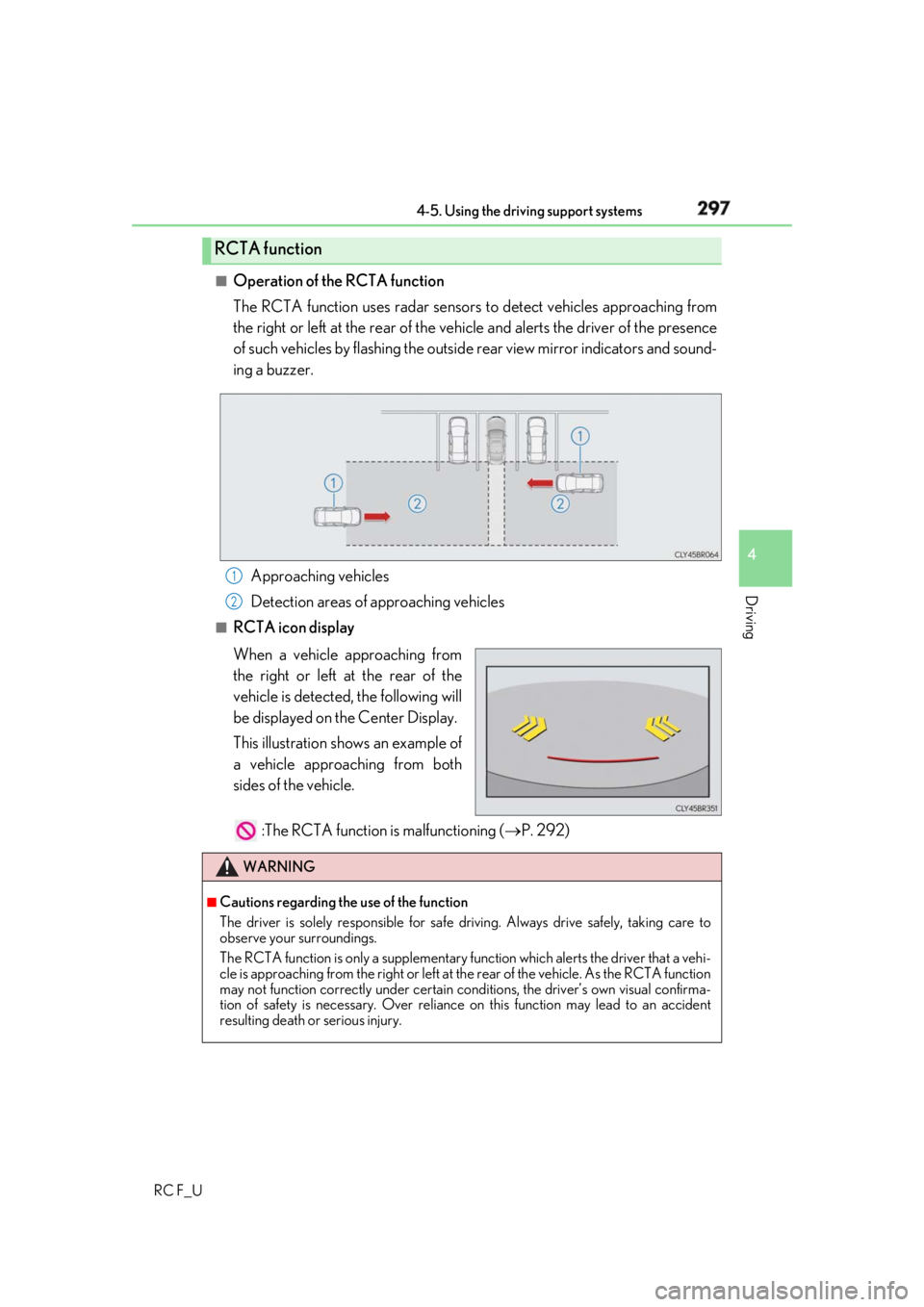
Operation of the RCTA function
The RCTA function uses radar sensors to detect vehicles approaching from
the right or left at the rear of the vehicle and alerts the driver of the presence
of such vehicles by flashing the outsid e rear view mirror indicators and sound-
ing a buzzer.
Approaching vehicles
Detection areas of approaching vehicles■
RCTA icon display
When a vehicle approaching from
the right or left at the rear of the
vehicle is detected, the following will
be displayed on the Center Display.
This illustration shows an example of
a vehicle approaching from both
sides of the vehicle.
:The RCTA function is malfunctioning ( P. 292)RCTA function
1
2
WARNING ■
Cautions regarding the use of the function
The driver is solely responsible for safe driving. Always drive safely, taking care to
observe your surroundings.
The RCTA function is only a supplementary function which alerts the driver that a vehi-
cle is approaching from the right or left at the rear of the vehicle. As the RCTA function
may not function correctly under certain cond itions, the driver’s own visual confirma-
tion of safety is necessary. Over reliance on this function may lead to an accident
resulting death or serious injury.
Page 301 of 636
3014-5. Using the driving support systems
4
Driving
RC F_U
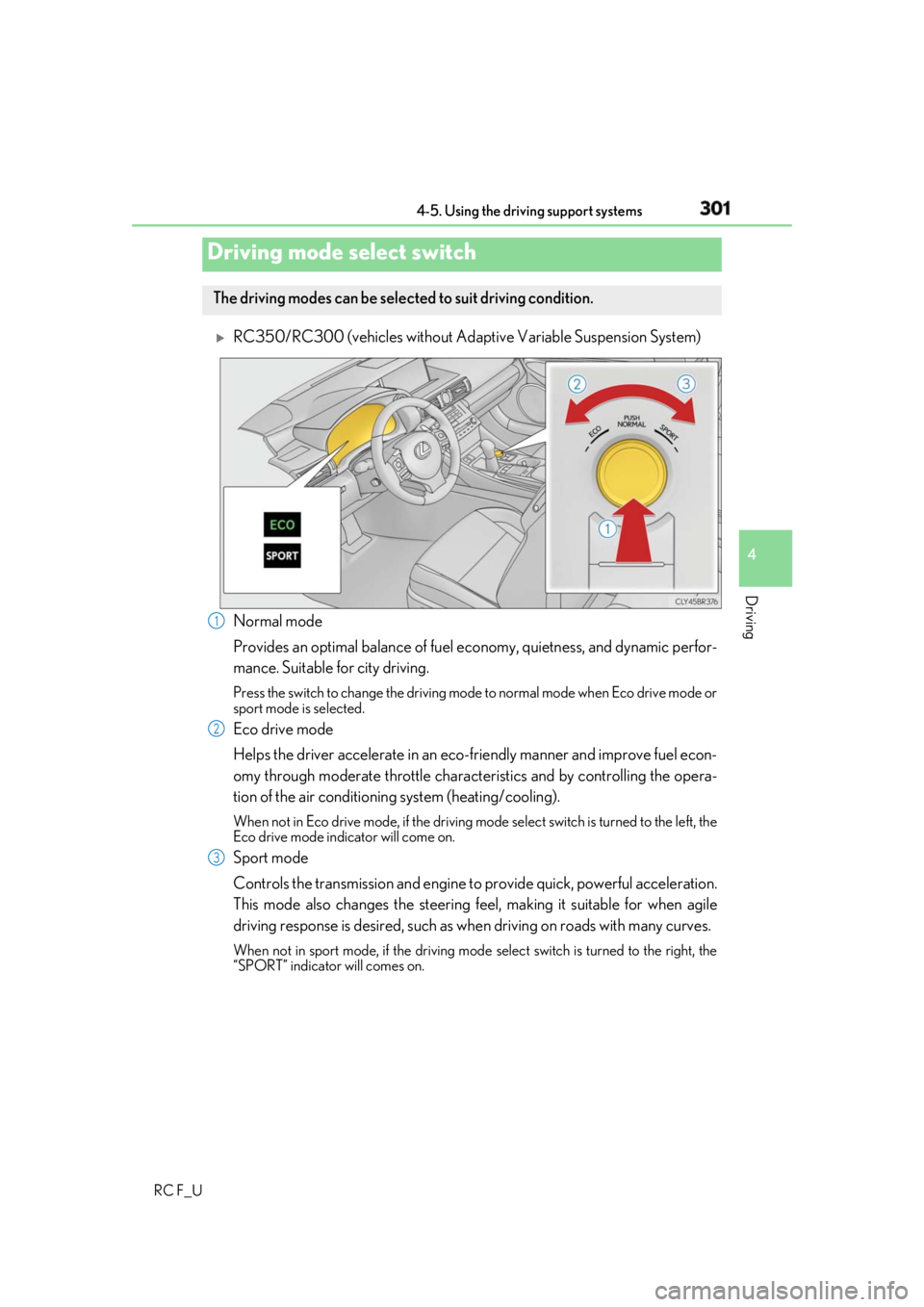
RC350/RC300 (vehicles without Adapti ve Variable Suspension System)
Normal mode
Provides an optimal balance of fuel ec onomy, quietness, and dynamic perfor-
mance. Suitable for city driving. Press the switch to change the driving mode to normal mode when Eco drive mode or
sport mode is selected.
Eco drive mode
Helps the driver accelerate in an eco-fr iendly manner and improve fuel econ-
omy through moderate throttle charact eristics and by controlling the opera-
tion of the air conditioning system (heating/cooling). When not in Eco drive mode, if the driving mode select switch is tu rned to the left, the
Eco drive mode indicator will come on.
Sport mode
Controls the transmission and engine to provide quick, powerful acceleration.
This mode also changes the steering feel, making it suitable for when agile
driving response is desired, such as wh en driving on roads with many curves.When not in sport mode, if the driving mode select switch is turned to the right, the
“SPORT” indicator will comes on.Driving mode select switch The driving modes can be selected to suit driving condition.
1
2
3
Page 303 of 636
3034-5. Using the driving support systems
4
Driving
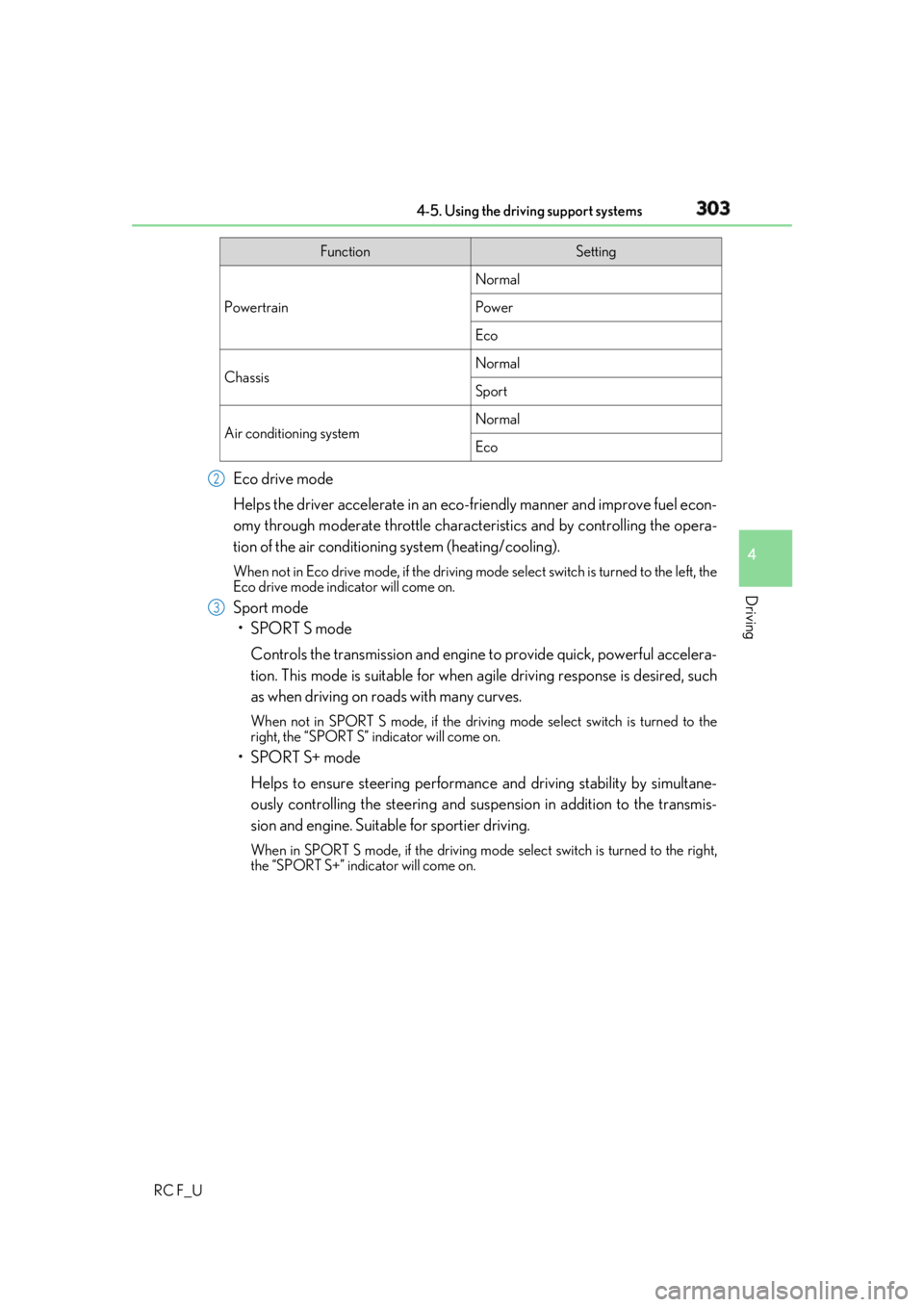
RC F_U Eco drive mode
Helps the driver accelerate in an eco-fr iendly manner and improve fuel econ-
omy through moderate throttle charact eristics and by controlling the opera-
tion of the air conditioning system (heating/cooling). When not in Eco drive mode, if the driving mode select switch is tu rned to the left, the
Eco drive mode indicator will come on.
Sport mode
•SPORT S mode
Controls the transmission and engine to provide quick, powerful accelera-
tion. This mode is suitable for when agile driving response is desired, such
as when driving on roads with many curves. When not in SPORT S mode, if the driving mode select switch is turned to the
right, the “SPORT S” indicator will come on.
•SPORT S+ mode
Helps to ensure steering performanc e and driving stability by simultane-
ously controlling the steeri ng and suspension in addition to the transmis-
sion and engine. Suitable for sportier driving. When in SPORT S mode, if the driving mode select switch is turned to the right,
the “SPORT S+” indicator will come on. Function Setting
Powertrain Normal
Power
Eco
Chassis Normal
Sport
Air conditioning system Normal
Eco2
3
Page 305 of 636
3054-5. Using the driving support systems
4
Driving
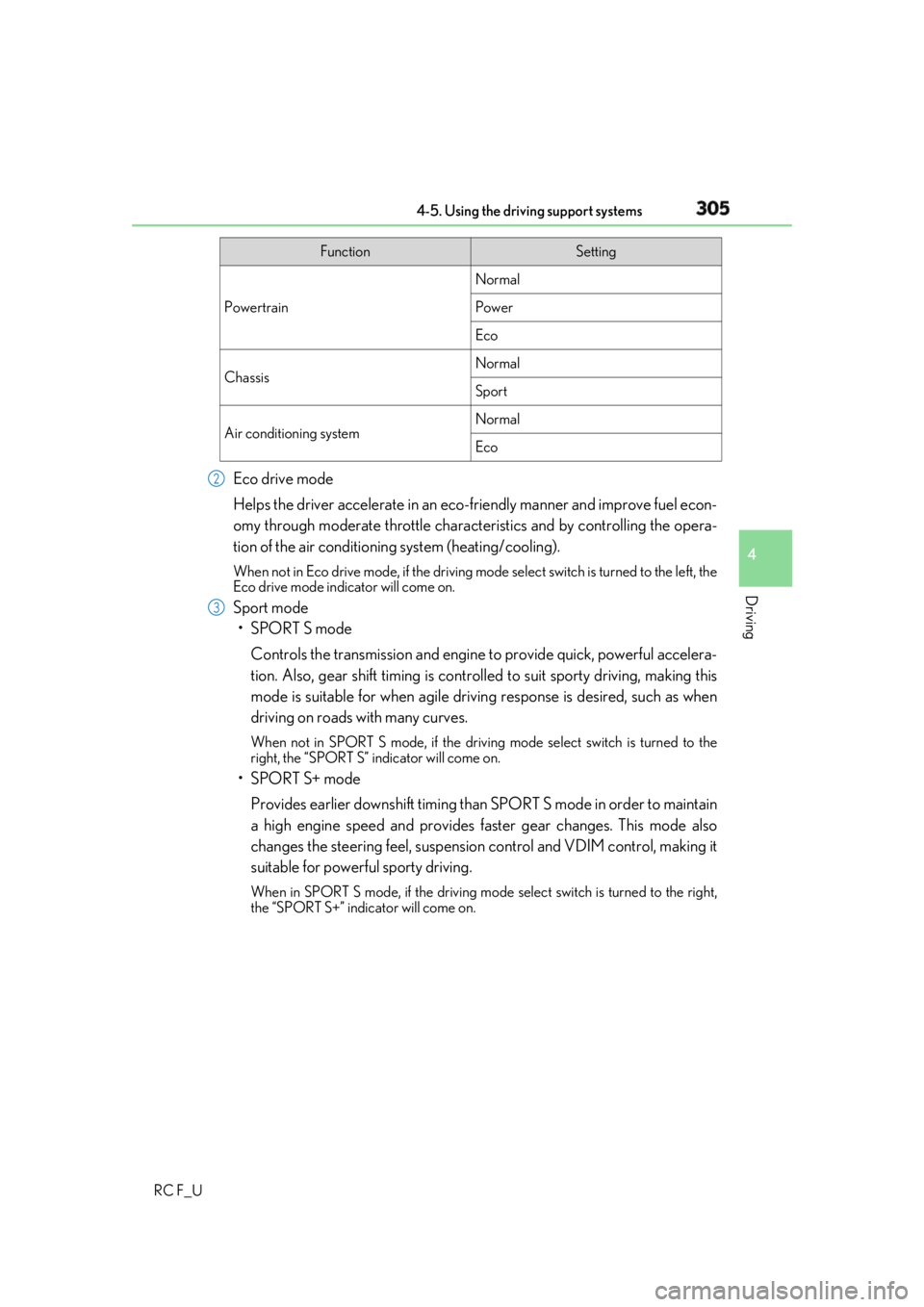
RC F_U Eco drive mode
Helps the driver accelerate in an eco-fr iendly manner and improve fuel econ-
omy through moderate throttle charact eristics and by controlling the opera-
tion of the air conditioning system (heating/cooling). When not in Eco drive mode, if the driving mode select switch is tu rned to the left, the
Eco drive mode indicator will come on.
Sport mode
•SPORT S mode
Controls the transmission and engine to provide quick, powerful accelera-
tion. Also, gear shift timing is controlle d to suit sporty driving, making this
mode is suitable for when agile drivin g response is desired, such as when
driving on roads with many curves. When not in SPORT S mode, if the driving mode select switch is turned to the
right, the “SPORT S” indicator will come on.
•SPORT S+ mode
Provides earlier downshift timing than SPORT S mode in order to maintain
a high engine speed and provides faster gear changes. This mode also
changes the steering feel, suspension control and VDIM control, making it
suitable for powerful sporty driving. When in SPORT S mode, if the driving mode select switch is turned to the right,
the “SPORT S+” indicator will come on. Function Setting
Powertrain Normal
Power
Eco
Chassis Normal
Sport
Air conditioning system Normal
Eco2
3
Page 307 of 636
3074-5. Using the driving support systems
4
Driving
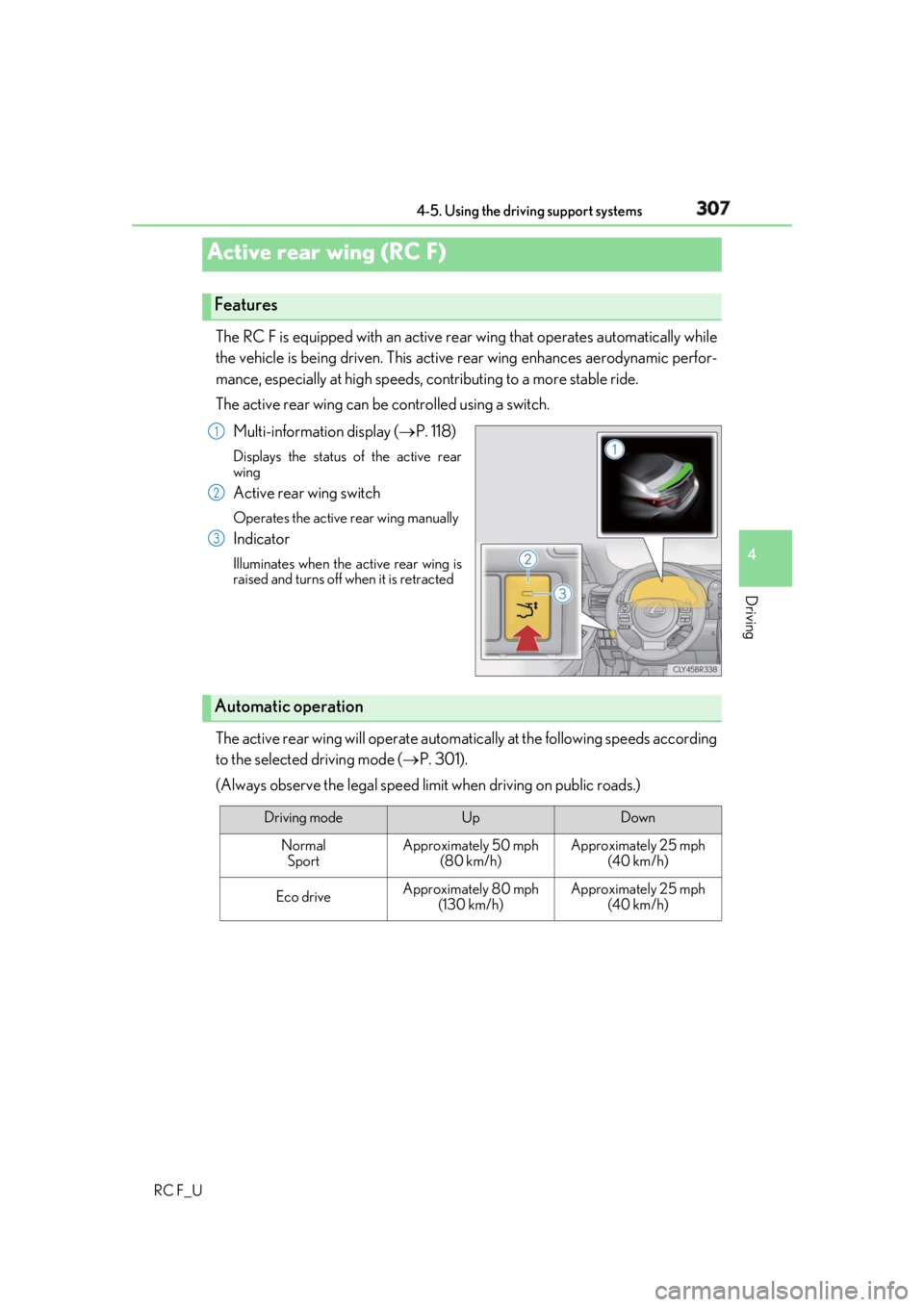
RC F_U The RC F is equipped with an active rear wing that operates automatically while
the vehicle is being driven. This active rear wing enhances aerodynamic perfor-
mance, especially at high speeds, co ntributing to a more stable ride.
The active rear wing can be controlled using a switch.
Multi-information display ( P. 118)Displays the status of the active rear
wing
Active rear wing switch Operates the active rear wing manually
Indicator Illuminates when the active rear wing is
raised and turns off when it is retracted
The active rear wing will operate automatically at the following speeds according
to the selected driving mode ( P. 301).
(Always observe the legal speed limit when driving on public roads.)Active rear wing (RC F) Features 1
2
3
Automatic operation
Driving mode Up Down
Normal
Sport Approximately 50 mph
(80 km/h) Approximately 25 mph
(40 km/h)
Eco drive Approximately 80 mph
(130 km/h) Approximately 25 mph
(40 km/h)
Page 309 of 636
3094-5. Using the driving support systems
4
Driving
RC F_U WARNING ■
When manually operating the active rear wing
Observe the following precautions before operating the active rear wing. Failure to do
so may result in death or serious injury. ●
Ensure that the surrounding area is free of any objects that may come into contact
with or get caught on the active rear wing.
●
If there is a risk that an object may become caught on the active rear wing during
operation, stop operation immediately.
NOTICE ■
To prevent system damage ●
Do not apply pressure to the active rear wing when pushing or pulling the vehicle.●
Do not lean on the active rear wing. ●
Do not attach any accessories or othe r objects to the active rear wing.●
Do not modify or disassemble the active rear wing. ●
Do not subject the active rear wing to severe impact.■
To prevent battery discharge
Do not operate the active rear wing repeatedly while the engine is turned off. ●
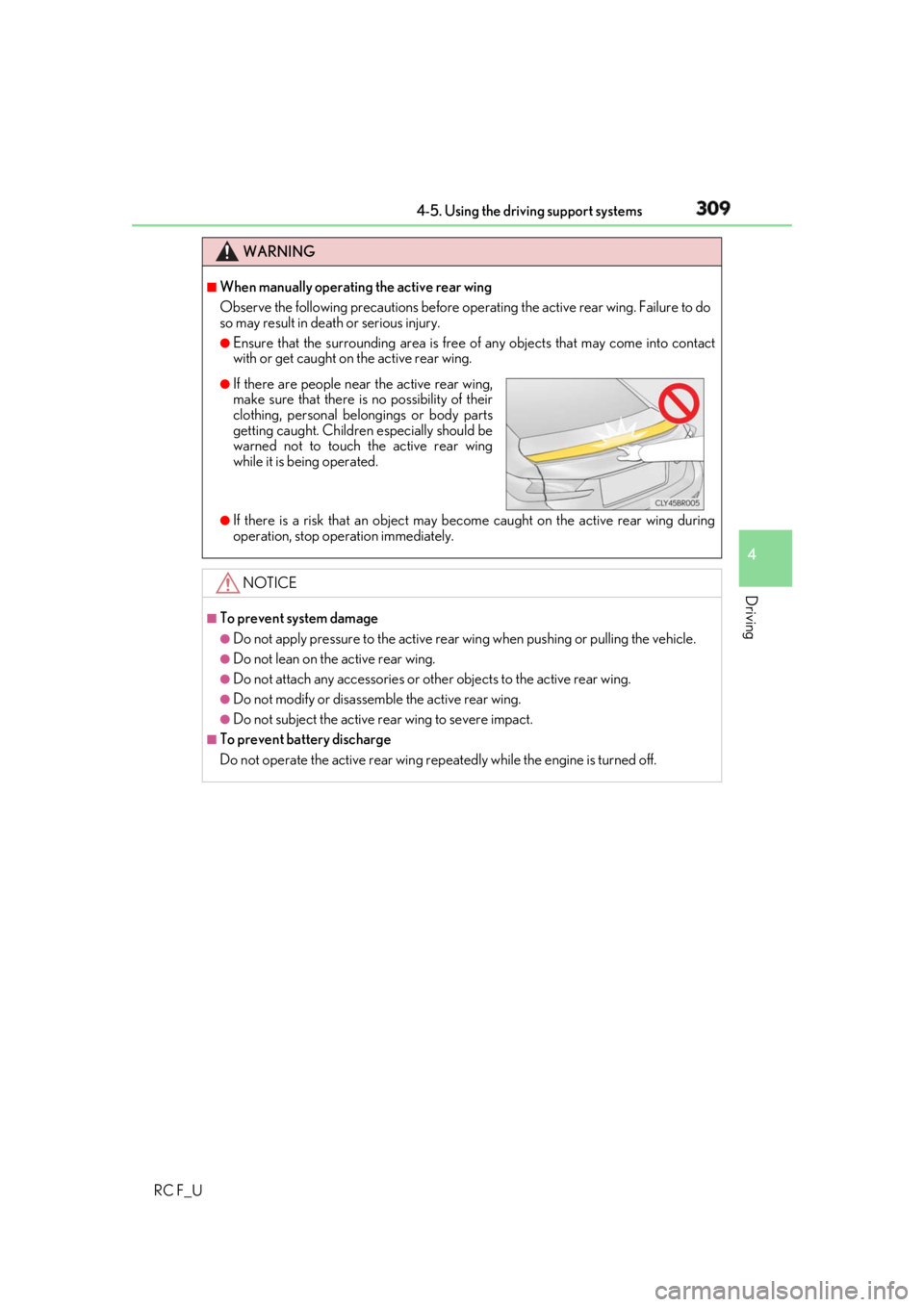
If there are people near the active rear wing,
make sure that there is no possibility of their
clothing, personal belongings or body parts
getting caught. Children especially should be
warned not to touch the active rear wing
while it is be ing operated.
Page 310 of 636
310 4-5. Using the driving support systems
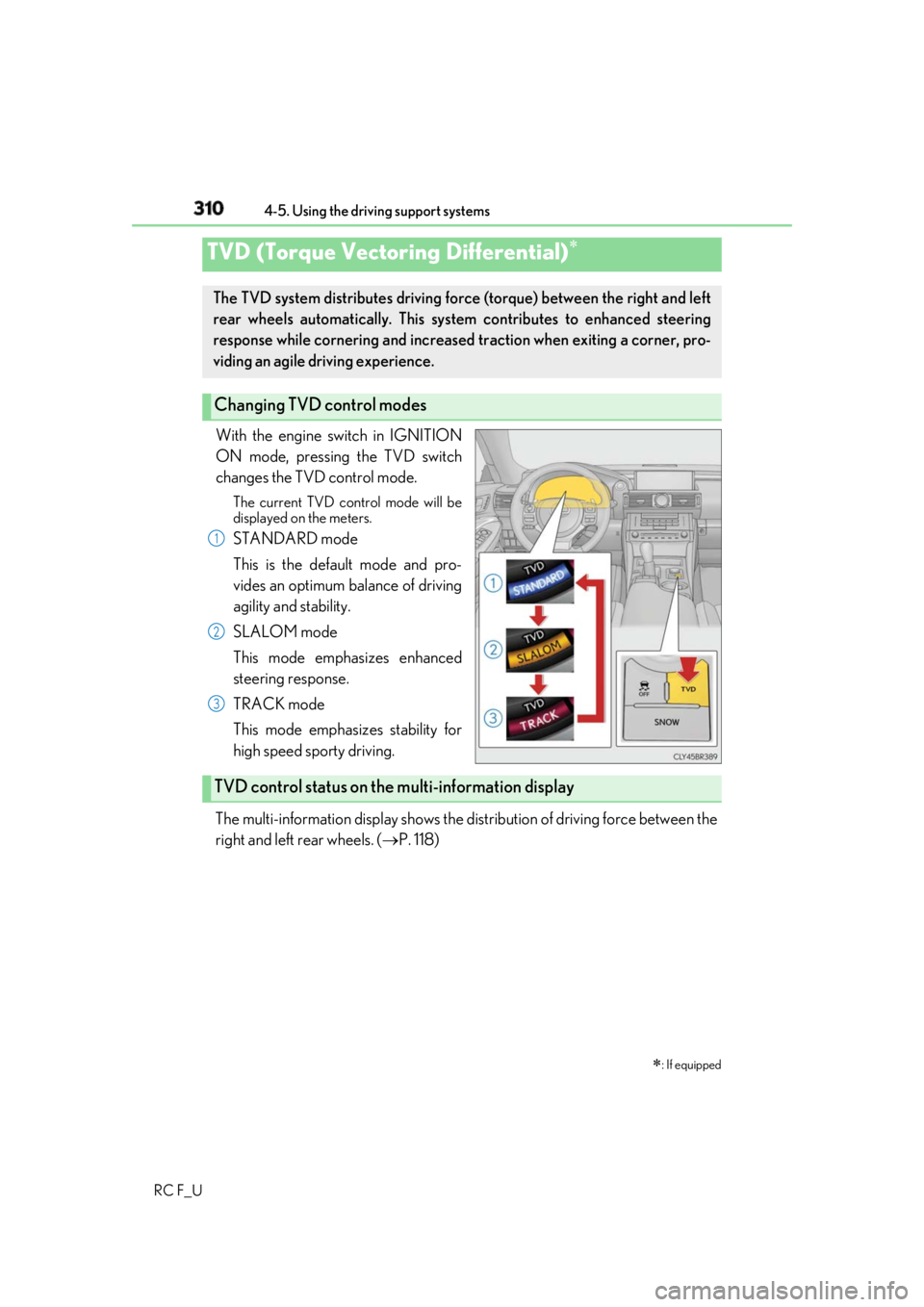
RC F_U With the engine switch in IGNITION
ON mode, pressing the TVD switch
changes the TVD control mode. The current TVD control mode will be
displayed on the meters.
STANDARD mode
This is the default mode and pro-
vides an optimum balance of driving
agility and stability.
SLALOM mode
This mode emphasizes enhanced
steering response.
TRACK mode
This mode emphasizes stability for
high speed sporty driving.
The multi-information display shows the di stribution of driving force between the
right and left rear wheels. ( P. 118)TVD (Torque Vectoring Differential)
: If equippedThe TVD system distributes driving force (torque) between the right and left
rear wheels automatically. This syst em contributes to enhanced steering
response while cornering and increased traction when exiting a corner, pro-
viding an agile driving experience.
Changing TVD control modes 1
2
3
TVD control status on the multi-information display