air condition LEXUS RCF 2021 User Guide
[x] Cancel search | Manufacturer: LEXUS, Model Year: 2021, Model line: RCF, Model: LEXUS RCF 2021Pages: 408, PDF Size: 8.25 MB
Page 159 of 408
1594-5. Using the driving support systems
4
Driving
■Enabling/disabling the pre-colli-
sion system
The pre-collision system can be
enabled/disabled on ( P.73) of
the multi-information display.
The system is automatically enabled each
time the engine switch is turned to IGNI-
TION ON mode.
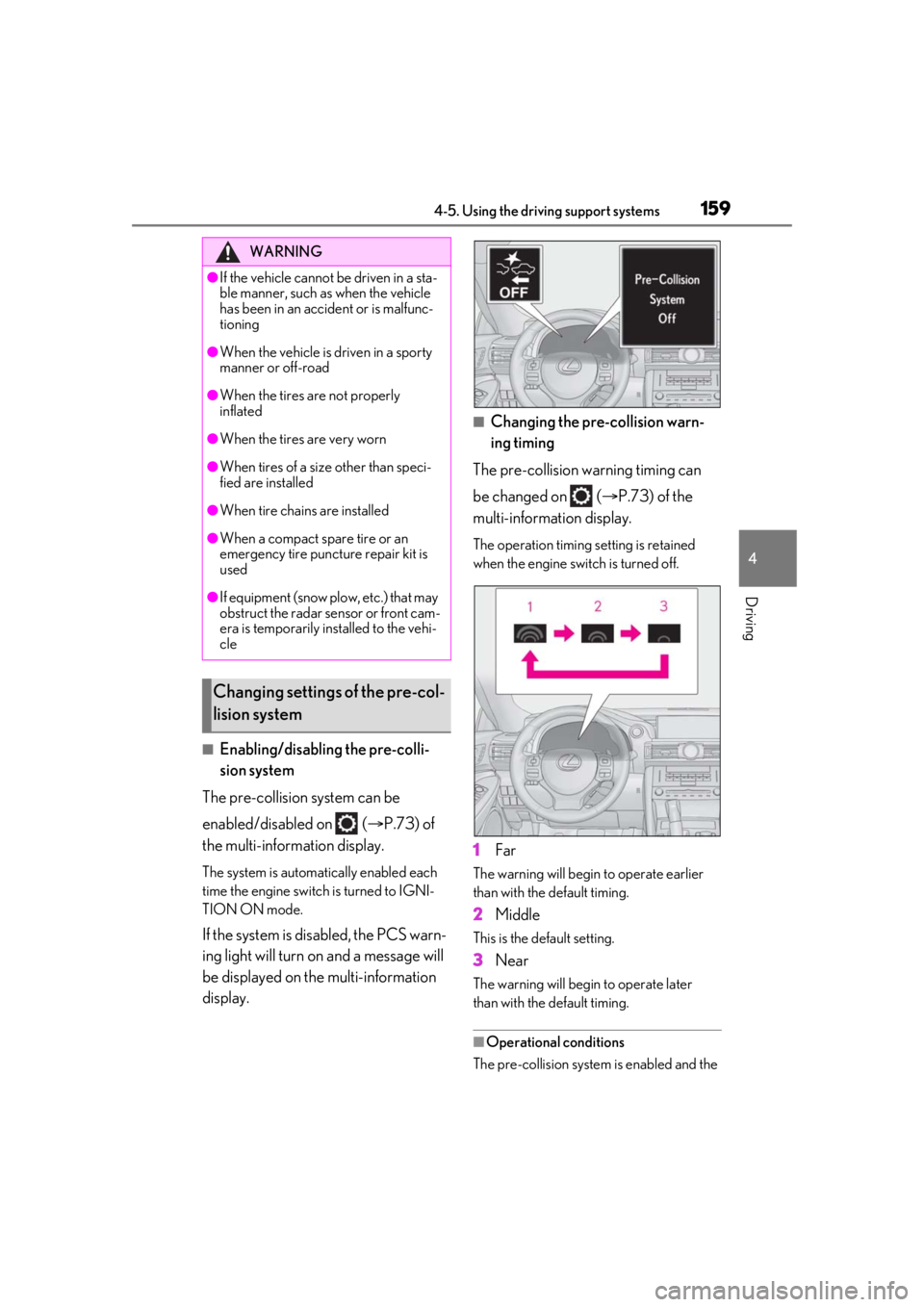
If the system is disabled, the PCS warn-
ing light will turn on and a message will
be displayed on the multi-information
display.
■Changing the pre-collision warn-
ing timing
The pre-collision warning timing can
be changed on ( P.73) of the
multi-information display.
The operation timing setting is retained
when the engine switch is turned off.
1 Far
The warning will begin to operate earlier
than with the default timing.
2Middle
This is the default setting.
3Near
The warning will begi n to operate later
than with the default timing.
■Operational conditions
The pre-collision system is enabled and the
WARNING
●If the vehicle cannot be driven in a sta-
ble manner, such as when the vehicle
has been in an accident or is malfunc-
tioning
●When the vehicle is driven in a sporty
manner or off-road
●When the tires are not properly
inflated
●When the tires are very worn
●When tires of a size other than speci-
fied are installed
●When tire chains are installed
●When a compact spare tire or an
emergency tire puncture repair kit is
used
●If equipment (snow plow, etc.) that may
obstruct the radar sensor or front cam-
era is temporarily installed to the vehi-
cle
Changing settings of the pre-col-
lision system
Page 166 of 408
1664-5. Using the driving support systems
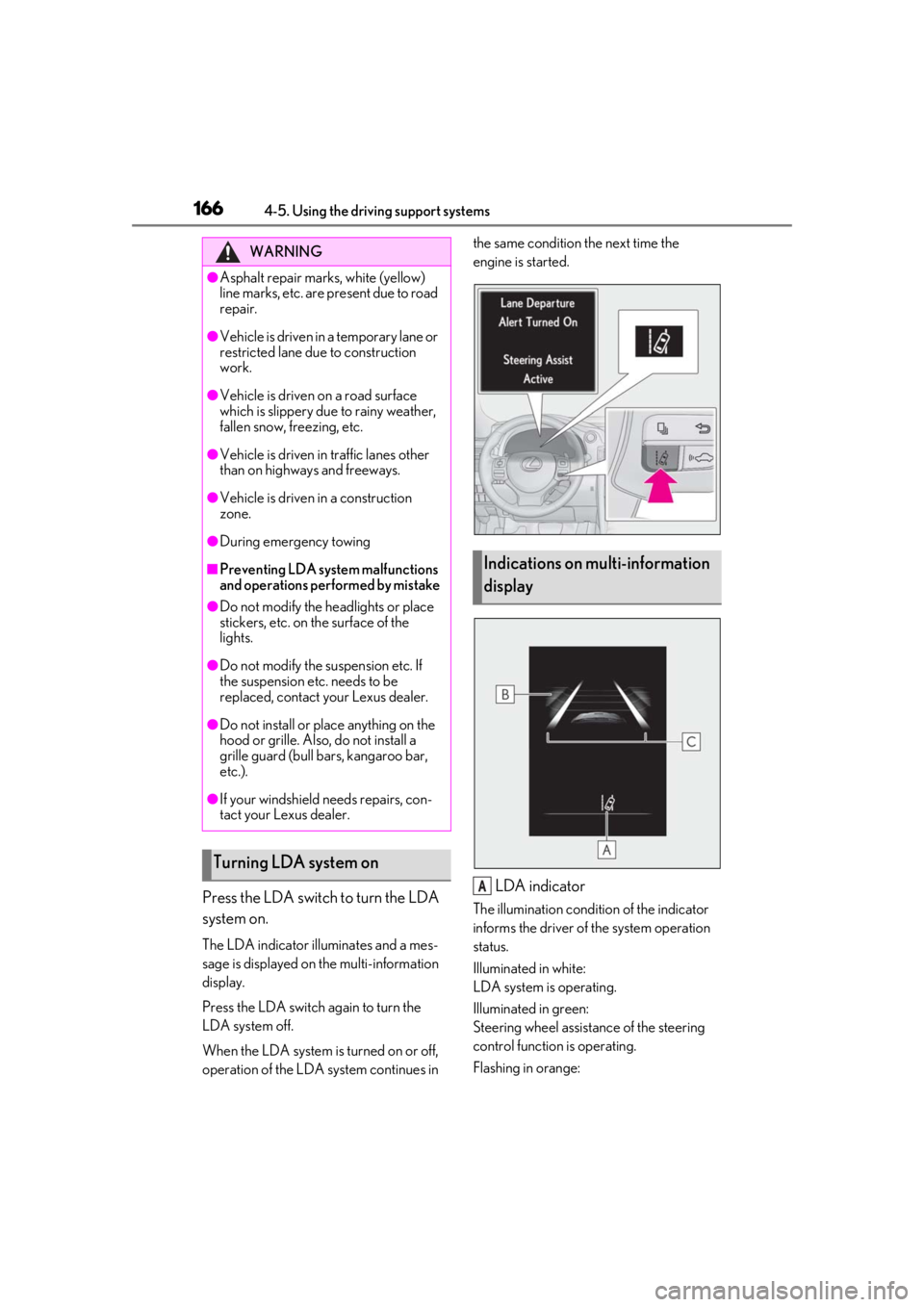
Press the LDA switch to turn the LDA
system on.
The LDA indicator illuminates and a mes-
sage is displayed on the multi-information
display.
Press the LDA switch again to turn the
LDA system off.
When the LDA system is turned on or off,
operation of the LDA system continues in the same condition the next time the
engine is started.
LDA indicator
The illumination condition of the indicator
informs the driver of the system operation
status.
Illuminated in white:
LDA system is operating.
Illuminated in green:
Steering wheel assistance of the steering
control function is operating.
Flashing in orange:
WARNING
●Asphalt repair marks, white (yellow)
line marks, etc. are present due to road
repair.
●Vehicle is driven in a temporary lane or
restricted lane due to construction
work.
●Vehicle is driven on a road surface
which is slippery due to rainy weather,
fallen snow, freezing, etc.
●Vehicle is driven in traffic lanes other
than on highways and freeways.
●Vehicle is driven in a construction
zone.
●During emergency towing
■Preventing LDA system malfunctions
and operations performed by mistake
●Do not modify the headlights or place
stickers, etc. on the surface of the
lights.
●Do not modify the suspension etc. If
the suspension etc. needs to be
replaced, contact your Lexus dealer.
●Do not install or place anything on the
hood or grille. Also, do not install a
grille guard (bull bars, kangaroo bar,
etc.).
●If your windshield needs repairs, con-
tact your Lexus dealer.
Turning LDA system on
Indications on multi-information
display
A
Page 189 of 408

1894-5. Using the driving support systems
4
Driving
■The intuitive parking assist can be oper-
ated when
●Front corner sensors:
• The engine switch is in IGNITION ON
mode.
• The shift lever is in a position other than P.
• The vehicle speed is less than about 6
mph (10 km/h).
(At any speed when the shift lever is in R)
●Rear corner and rear center sensors:
• The engine switch is in IGNITION ON mode.
• The shift lever is in R.
■Muting the buzzer sound
●To mute the buzzer sound:
The buzzer can be temporarily muted by
pressing “OK” of the meter control
switches while an obstacle detection dis-
play is shown on the multi-information dis-
play.
●To cancel the mute:
Mute will be automatically canceled in the
following situations.
•When the shift lever is changed (except shifting from D to N, or N to D).
• When the vehicle speed has reached or exceeded 6 mph (10 km/h) with the shift
lever in D.
• When the intuitive par king assist is turned
off once and turned on again.
• When the engine switch is turned off once and turned to IGNITION ON
mode again.
■If “Clean Parking Assist Sensor” is dis-
played on the multi-information display
A sensor may be covered with ice, snow,
dirt, etc. Remove the ice, snow, dirt, etc.,
from the sensor to return the system to nor-
mal.
Also, due to ice forming on a sensor at low
temperatures, a warning message may be
displayed or the sensor may not be able to
detect an object. Once the ice melts, the
system will return to normal.
■Sensor detectio n information
●The following situations may occur
during use.
• The sensors may be able to only detect objects near the fron
t and rear bumpers.
• Depending on the shape of the object and other factors, the detection distance
may shorten, or detection may be impos-
sible.
• There will be a short delay between
object detection and di splay. Even at low
speeds, there is a possibility that the
object will come within the sensor’s
detection areas befo re the display is
shown and the warning beep sounds.
• It might be difficult to hear the buzzer due
to the volume of the audio system or air
flow noise of the air conditioning system.
• It may be difficult to hear the buzzer if
buzzers for other systems are sounding.
■Conditions under wh ich the function
may not function correctly
Certain vehicle conditions and the sur-
rounding environment may affect the ability
of a sensor to correctly detect objects. Par-
ticular instances where this may occur are
listed below.
●There is dirt, snow or ice on a sensor.
(Cleaning the sensors will resolve this
problem.)
●A sensor is frozen. (Thawing the area will
resolve this problem.)
In especially cold weather, if a sensor is
frozen the sensor display may be dis-
played abnormally, or objects, such as a
wall, may not be detected.
●A sensor is covered in any way.
●When a sensor or the area around a sen-
sor is extremely hot or cold.
●On an extremely bumpy road, on an
incline, on gravel, or on grass.
●The vicinity of the vehicle is noisy due to
vehicle horns, motorcycle engines, air
brakes of large vehicles, or other loud
noises producing ultrasonic waves.
●There is another vehicle equipped with
parking assist sensors in the vicinity.
●A sensor is coated with a sheet of spray
or heavy rain.
●If a sensor is hit by a large amount of
water, such as when driving on a flooded
road.
●If the vehicle is significantly tilted.
Page 193 of 408
1934-5. Using the driving support systems
4
Driving
2Eco drive mode
Helps the driver accelerate in an
eco-friendly manner and improve fuel
economy through moderate throttle char-
acteristics and by controlling the operation
of the air conditioning system (heat-
ing/cooling).
When not in Eco drive mode, if the driving
mode select switch is turned to the left, the
Eco drive mode indicator will come on.
3Sport mode
•SPORT S mode
Controls the transmission and engine to
provide quick, powerful acceleration. Also,
gear shift timing is co ntrolled to suit sporty
driving, making this mode is suitable for
when agile driving response is desired,
such as when driving on roads with many
curves.
When not in SPORT S mode, if the driving
mode select switch is turned to the right,
the “SPORT S” indicator will come on.
•SPORT S+ mode
Provides earlier down shift timing than
SPORT S mode in order to maintain a high
engine speed and provides faster gear
changes. This mode also changes the
steering feel, suspension control and
VDIM control, making it suitable for pow-
erful sporty driving. When in SPORT S mode, if the driving
mode select switch is turned to the right,
the “SPORT S+” indicator will come on.
■Operation of the air conditioning sys-
tem in Eco drive mode
Eco drive mode controls the heating/cool-
ing operations and fan speed of the air con-
ditioning system to enhance fuel efficiency
( P.213). To improve air conditioning per-
formance, adjust the fan speed or turn off
Eco drive mode.
■Automatic deactivation of sport mode
and custom mode
If the engine switch is turned off after driv-
ing in sport mode or custom mode, the
drive mode will be changed to normal
mode.
■Driving mode pop-up display (vehicles
with a 10.3-inch display)
When the driving mode is changed, the
selected driving mode will be temporarily
displayed on the side display. ( P.210)
FunctionSetting
Powertrain
Normal
Power
Eco
ChassisNormal
Sport
Air conditioning sys-
temNormal
Eco
Page 203 of 408

2034-6. Driving tips
4
Driving
4-6.Driving tips
Use fluids that are appropriate to
the prevailing outside temperatures.
•Engine oil
• Engine coolant
•Washer fluid
Have a service technician inspect
the condition of the battery.
Have the vehicle fitted with four
snow tires.
Ensure that all tires are the specified size
and the same brand.
Perform the following according to the
driving conditions:
Do not try to forcibly open a window
or move a wiper that is frozen. Pour
warm water over the frozen area to
melt the ice. Wipe away the water
immediately to prevent it from
freezing.
To ensure proper operation of the
climate control system fan, remove
any snow that has accumulated on
the air inlet vents in front of the
windshield.
Check for and remove any excess
ice or snow that may have accumu-
lated on the exterior lights, vehicle’s
roof, chassis, around the tires or on
the brakes.
Remove any snow or mud from the
bottom of your shoes before getting
in the vehicle.
Accelerate the vehicle slowly, keep a
safe distance between you and the
vehicle ahead, and drive at a reduced
speed suitable to road conditions.
Winter driving tips
Carry out the necessary prepara-
tions and inspections before driving
the vehicle in winter. Always drive
the vehicle in a manner appropriate
to the prevailing weather condi-
tions.
Preparation for winter
WARNING
■Driving with snow tires
Observe the following precautions to
reduce the risk of accidents.
Failure to do so may result in a loss of
vehicle control and cause death or seri-
ous injury.
●Use tires of the specified size.
●Maintain the recommended level of air
pressure.
●Do not drive in excess of 75 mph (120
km/h), regardless of the type of snow
tires being used.
●Use snow tires on all, not just some
wheels.
NOTICE
■Repairing or replacing snow tires
Request repairs or replacement of snow
tires from Lexus dealers or legitimate tire
retailers.
This is because the removal and attach-
ment of snow tires affects the operation
of the tire pressure warning valves and
transmitters.
Before driving the vehicle
When driving the vehicle
Page 207 of 408
207
5
5
Interior features
Interior features
.5-1. Remote Touch/DisplayRemote Touch ............................ 208
Center Display ............................ 210
5-2. Using the air conditioning system Automatic air conditioning system......................................................... 213
Heated steering wheel/seat heat- ers/seat ventilators ................. 221
5-3. Using the interior lights Interior lights list......................... 223
5-4. Using the storage features List of storage features............ 225
Trunk features............................. 227
5-5. Using the other interior features
Other interior features ........... 228
Garage door opener................ 231
Compass....................................... 236
Page 211 of 408

2115-1. Remote Touch/Display
5
Interior features
*1: Refer to the “NAVIGATION AND MULTIMEDIA SYSTEM OWNER’S
MANUAL”.
*2: This function is not available on some models.
■Split-screen display (Vehicles with a 10.3-inch display)
Different information can be displayed on the left and right sides of the screen. For
example, air conditioning system screen can be displayed and operated while the
fuel consumption information screen is be ing displayed. The large screen on the
left of the display is called the main display, and the small screen to the right is
called the side display.
Select to display the
hands-free control
screen.
*1
Select to display the
“Apps” screen.
*1, 2
/
/
When an Apple
CarPlay/Android
Auto connection is
established and this
button displays
“Apple Car-
Play”/“Android
Auto”, select to dis-
play the Apple Car-
Play/Android Auto
screen.
*1, 2
Select to display the
information screen.
*1
( P.83)
SwitchFunction
Select to display the
setup screen.
*1
Select to display the
air conditioning con-
trol screen.
( P.214)
Select to adjust the
contrast and bright-
ness of the screens,
turn the screen off,
etc.
*1, 2
SwitchFunction
Page 212 of 408
2125-1. Remote Touch/Display
■Main display (Vehicles with a
10.3-inch display)
For details about the functions and
operation of the main display, refer to
the respective section and “NAVIGA-
TION AND MULTIMEDIA SYSTEM
OWNER’S MANUAL”.
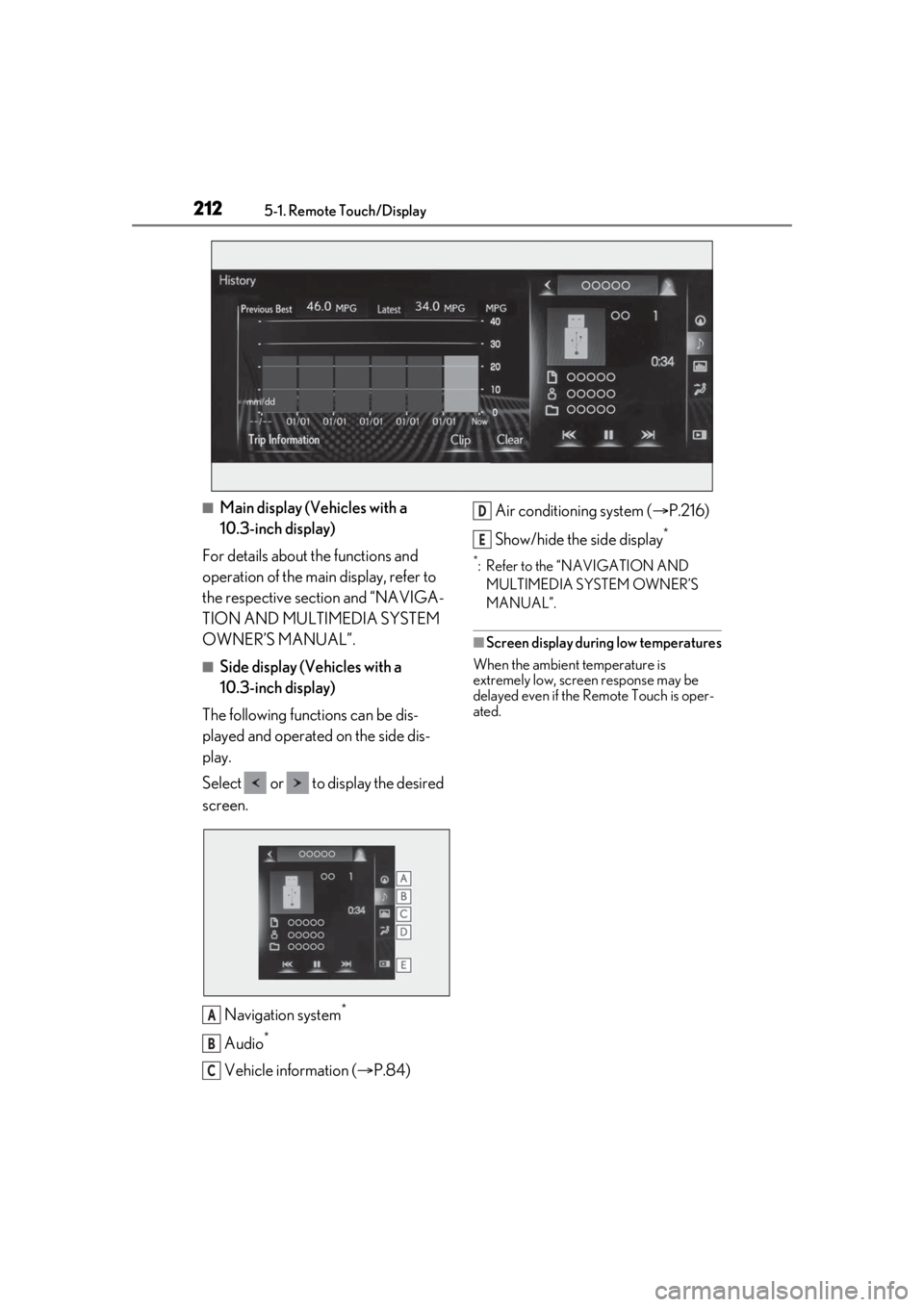
■Side display (Vehicles with a
10.3-inch display)
The following functions can be dis-
played and operated on the side dis-
play.
Select or to display the desired
screen.
Navigation system
*
Audio*
Vehicle information ( P.84) Air conditioning system (
P.216)
Show/hide the side display
*
*: Refer to the “NAVIGATION AND MULTIMEDIA SYSTEM OWNER’S
MANUAL”.
■Screen display during low temperatures
When the ambient temperature is
extremely low, screen response may be
delayed even if the Remote Touch is oper-
ated.
A
B
C
D
E
Page 213 of 408

2135-2. Using the air conditioning system
5
Interior features
5-2.Using the air conditioning system
Left-hand side temperature control switch
Automatic mode switch
Off switch
Fan speed down switch
Fan speed up switch
Air flow mode switch
Right-hand side temperature control switch
DUAL mode switch
A/C switch
Outside/recirculated air mode switch
Rear window defogger and outside rear view mirror defoggers switch
Windshield defogger switch
Automatic air conditioning system
Air outlets and fan speed are automati cally adjusted according to the tem-
perature setting.
Press the “MENU” button on the Remote Touch, then select “Climate” to dis-
play the air conditioning control screen. ( P.210)
The air conditioning system can be displayed and operated on the side display.
Air conditioning controls
A
B
C
D
E
F
G
H
I
J
K
L
Page 214 of 408
2145-2. Using the air conditioning system
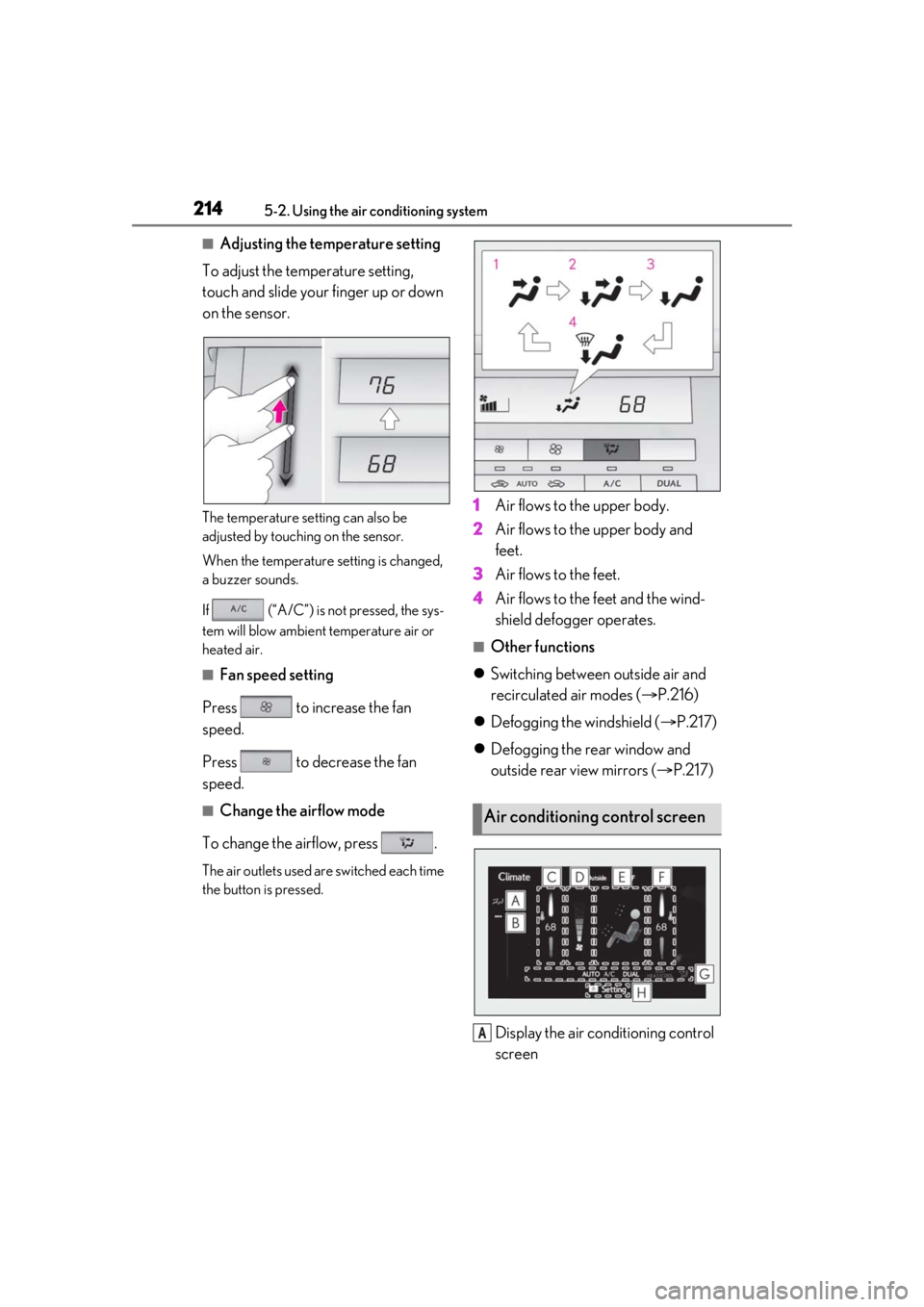
■Adjusting the temperature setting
To adjust the temperature setting,
touch and slide your finger up or down
on the sensor.
The temperature setting can also be
adjusted by touching on the sensor.
When the temperature setting is changed,
a buzzer sounds.
If (“A/C”) is not pressed, the sys-
tem will blow ambient temperature air or
heated air.
■Fan speed setting
Press to increase the fan
speed.
Press to decrease the fan
speed.
■Change the airflow mode
To change the airflow, press .
The air outlets used are switched each time
the button is pressed.
1 Air flows to the upper body.
2 Air flows to the upper body and
feet.
3 Air flows to the feet.
4 Air flows to the feet and the wind-
shield defogger operates.
■Other functions
Switching between outside air and
recirculated air modes ( P.216)
Defogging the windshield ( P.217)
Defogging the rear window and
outside rear view mirrors ( P.217)
Display the air conditioning control
screen
Air conditioning control screen
A