air condition LEXUS RCF 2021 Owners Manual
[x] Cancel search | Manufacturer: LEXUS, Model Year: 2021, Model line: RCF, Model: LEXUS RCF 2021Pages: 408, PDF Size: 8.25 MB
Page 1 of 408

RCF_U
1
2
3
4
5
6
7
8
9
Pictorial indexSearch by illustration
For safety
and securityMake sure to read through them
(Main topics: Child seat, theft deterrent system)
Vehicle status
information and
indicatorsReading driving-related information
(Main topics: Meters, multi-information display)
Before drivingOpening and closing the doors and windows,
adjustment before driving
(Main topics: Keys, doors, seats)
DrivingOperations and advice which are necessary for driving
(Main topics: Starting engine, refueling)
Interior featuresUsage of the interior features
(Main topics: Air conditioner, storage features)
Maintenance
and careCaring for your vehicle and maintenance procedures
(Main topics: Interior and exterior, light bulbs)
When trouble
arisesWhat to do in case of malfunction and emergency
(Main topics: Battery discharge, flat tire)
Vehicle
specificationsVehicle specifications, customizable features
(Main topics: Fuel, oil, tire inflation pressure)
For ownersReporting safety defects for U.S. owners, and seat belt,
SRS airbag and headlight aim instructions for Canadian
owners
IndexSearch by symptom
Search alphabetically
Page 3 of 408

3TABLE OF CONTENTS
1
2
3
4
5
6
7
8
9
Automatic transmission..............132
Turn signal lever............................. 136
Parking brake ................................. 137
ASC (Active Sound Control) .. 137
4-3. Operating the lights and wipers Headlight switch ............................ 138
AHB (Automatic High Beam) ............................................................ 140
Windshield wipers and washer ............................................................ 143
4-4. Refueling Opening the fuel tank cap......... 150
4-5. Using the driving support systems Lexus Safety System + ................ 153
PCS (Pre-Collision System)..... 157
LDA (Lane Departure Alert with steering control) ......................... 164
Dynamic radar cruise control ... 171
BSM (Blind Spot Monitor) ........ 179
Intuitive parking assist ................. 187
Driving mode select switch....... 192
Launch control ............................... 194
Active rear wing ............................ 195
TVD (Torque Vect oring Differen-
tial) .................................................... 198
Driving assist systems .................. 199
4-6. Driving tips Winter driving tips ....................... 204
5-1. Remote Touch/Display Remote Touch ............................... 208
Center Display ............................... 2105-2. Using the air conditioning system
Automatic air conditioning system............................................................ 213
Heated steering wheel/seat heat- ers/seat ventilators..................... 221
5-3. Using the interior lights Interior lights list ............................ 223
5-4. Using the storage features List of storage features ............... 225
Trunk features ................................ 227
5-5. Using the other interior features Other interior features .............. 228
Garage door opener ................... 231
Compass ......................................... 236
6-1. Maintenance and care Cleaning and protecting the vehi-cle exterior................................... 240
Cleaning and protecting the vehi- cle interior .................................... 245
6-2. Matte paint care guide (if equipped)
Basic knowledge about matte clear coat ................................................. 248
Washing your vehicle ................ 252
Frequently Asked Questions .......................................................... 254
6-3. Maintenance Maintenance re quirements .....257
General maintenance................ 258
Emission inspection and mainte- nance (I/M) programs .............. 261
6-4. Do-
it-yourself maintenance
Do-it-yourself service precautions ........................................................... 262
5Interior features
6Maintenance and care
Page 4 of 408

4TABLE OF CONTENTS
Hood..................................................264
Positioning a floor jack............... 265
Engine compartment.................. 267
Tires ................................................... 273
Tire inflation pressure ................. 279
Wheels............................................... 281
Air conditioning filter..................282
Electronic key battery ................ 283
Checking and replacing fuses ........................................................... 285
Headlight aim................................. 287
Light bulbs ....................................... 288
7-1. Essential information Emergency flashers..................... 294
If your vehicle has to be stopped in an emergency ............................. 294
If the vehicle is trapped in rising water............................................... 295
7-2. Steps to take in an emergency If your vehicle needs to be towed........................................................... 297
If you think something is wrong ........................................................... 300
Fuel pump shut off system ......... 301
If a warning light turns on or a warn- ing buzzer sounds ..................... 302
If a warning message is displayed ............................................................ 310
If you have a flat tire (vehicles with a spare tire) ...................................... 313
If you have a flat tire (vehicles with an emergency tire puncture
repair kit) ....................................... 319
If the engine wi ll not start .......... 329If you lose your keys.....................
331
If the fuel filler door cannot be opened ........................................... 331
If the electronic key does not oper- ate properly ................................. 332
If the vehicle battery is discharged .......................................................... 334
If your vehicle overheats ........... 337
If the vehicle becomes stuck ... 339
8-1. Specifications Maintenance data (fuel, oil level, etc.) ................................................. 342
Fuel information............................ 349
Tire information ............................. 351
8-2. Customization Customizable features .............. 360
8-3. Items to initialize Items to initialize ........................... 369
8-4. Certifications Certifications ................................. 370
9-1. For owners Reporting safety defects for U.S. owners ........................................... 380
Seat belt instructions for Canadian owners (in French) ................... 380
SRS airbag instructions for Cana- dian owners (in French) ......... 382
Headlight aim instructions for Canadian owners (in French)... .......
................................................ 388
7When trouble arises
8Vehicle specifications
9For owners
Page 15 of 408

15Pictorial index
Parking brake........................................................................................................... P.137
Applying/releasing ............................................................................................................P.137
Precautions for winter season .. ...................................................................................P.205
Warning buzzer/message............................................................................................. P.310
Headlight switch .....................................................................................................P.138
Turn signal lever ...................................................................................................... P.136
Headlights/parking lights/tail lights/license plate lig hts/daytime running lights
................................................................................................................................................... P.138
Windshield wiper and washer switch ................................................................ P.143
Usage.......................................................................................................................... ............ P.143
Adding washer fluid ......................................................................................................... P.2 72
Warning messages ........................................................................................................... P.31 0
Headlight cleaners
*1......................................................................................................... P.143
Emergency flasher switch ...................................................................................P.294
Trunk opener switch................................................................................................. P.96
Hood lock release lever ....................................................................................... P.264
Tilt and telescopic steering control switch
*1.................................................. P.108
Adjustment ..................................................................................................................... ...... P.108
Driving position memory
*1............................................................................................. P.105
Tilt and telescopic steeri ng lock release lever
*1........................................... P.108
Air conditioning system ........................................................................................P.213
Usage.......................................................................................................................... .............P.213
Rear window defogger..................................................................................................... P.217
Audio system
*2
Trunk opener main switch ..................................................................................... P.98
*1: If equipped
*2: Refer to “NAVIGATION AND MULTIMEDIA SYSTEM OWNER’S MANUAL”.
E
F
G
H
I
J
K
L
M
N
O
Page 30 of 408

301-1. For safe use
shown in the system components diagram above. This information includes crash
severity and occupant information. As the airbags deploy, a chemical reaction in
the inflators quickly fills the airbags with no n-toxic gas to help restrain the motion of
the occupants.
■If the SRS airbags deploy (inflate)
●Slight abrasions, burns, bruising etc., may
be sustained from SRS airbags, due to the
extremely high speed deployment (infla-
tion) by hot gases.
●A loud noise and white powder will be
emitted.
●Parts of the airbag module (steering
wheel hub, airbag cover and inflator) as
well as the front seat s, parts of the front
and rear pillars, and roof side rails, may
be hot for several minutes. The airbag
itself may also be hot.
●The windshield may crack.
●For Lexus Enform Safety Connect sub-
scribers, if the SRS airbags deploy or in
the event of a severe rear-end collision,
the system is designed to send an emer-
gency call to the response center, notify-
ing them of the vehicl e’s location (without
needing to push the “SOS” button) and
an agent will attempt to speak with the
occupants to ascertain the level of emer-
gency and assistance required. If the
occupants are unable to communicate,
the agent automatically treats the call as
an emergency and helps to dispatch the
necessary emergency services. ( P.53)
■SRS airbag deployment conditions (SRS
front airbags)
●The SRS front airbags will deploy in the
event of an impact that exceeds the set
threshold level (the level of force corre-
sponding to an approximately 12 - 18
mph [20 - 30 km/h] frontal collision with
a fixed wall that does not move or
deform).
However, this threshold velocity will be
considerably higher in the following situa-
tions:
• If the vehicle strikes an object, such as a
parked vehicle or sign pole, which can
move or deform on impact
• If the vehicle is involved in an underride collision, such as a collision in which the
front of the vehicle “underrides”, or goes
under, the bed of a truck
●Depending on the type of collision, it is
possible that only the seat belt preten-
sioners will activate.
●The SRS front airbags for the front pas-
senger will not activate if there is no pas-
senger sitting in the front passenger seat.
However, the SRS front airbags for the
front passenger may deploy if luggage is
put in the seat, even if the seat is unoccu-
pied.
■SRS airbag deployment
conditions (SRS
side and curtain shield airbags)
●The SRS side and curtain shield airbags
will deploy in the event of an impact that
exceeds the set threshold level (the level
of force corresponding to the impact
force produced by an approximately
3300 lb. [1500 kg] vehicle colliding with
the vehicle cabin from a direction per-
pendicular to the vehicle orientation at an
approximate speed of 12 - 18 mph [20 -
30 km/h]).
●The SRS curtain shield airbags will deploy
in the event of vehicle rollover.
●The SRS side and curtain shield airbags
will deploy in the event of a severe frontal
collision.
■Conditions under which the SRS air-
bags may deploy (inflate), other than a
collision
The SRS front airbags and SRS side and
curtain shield airbags may also deploy if a
serious impact occurs to the underside of
your vehicle. Some examples are shown in
the illustration.
●Hitting a curb, edge of pavement or hard
surface
●Falling into or jumping over a deep hole
●Landing hard or falling
Page 36 of 408
361-1. For safe use
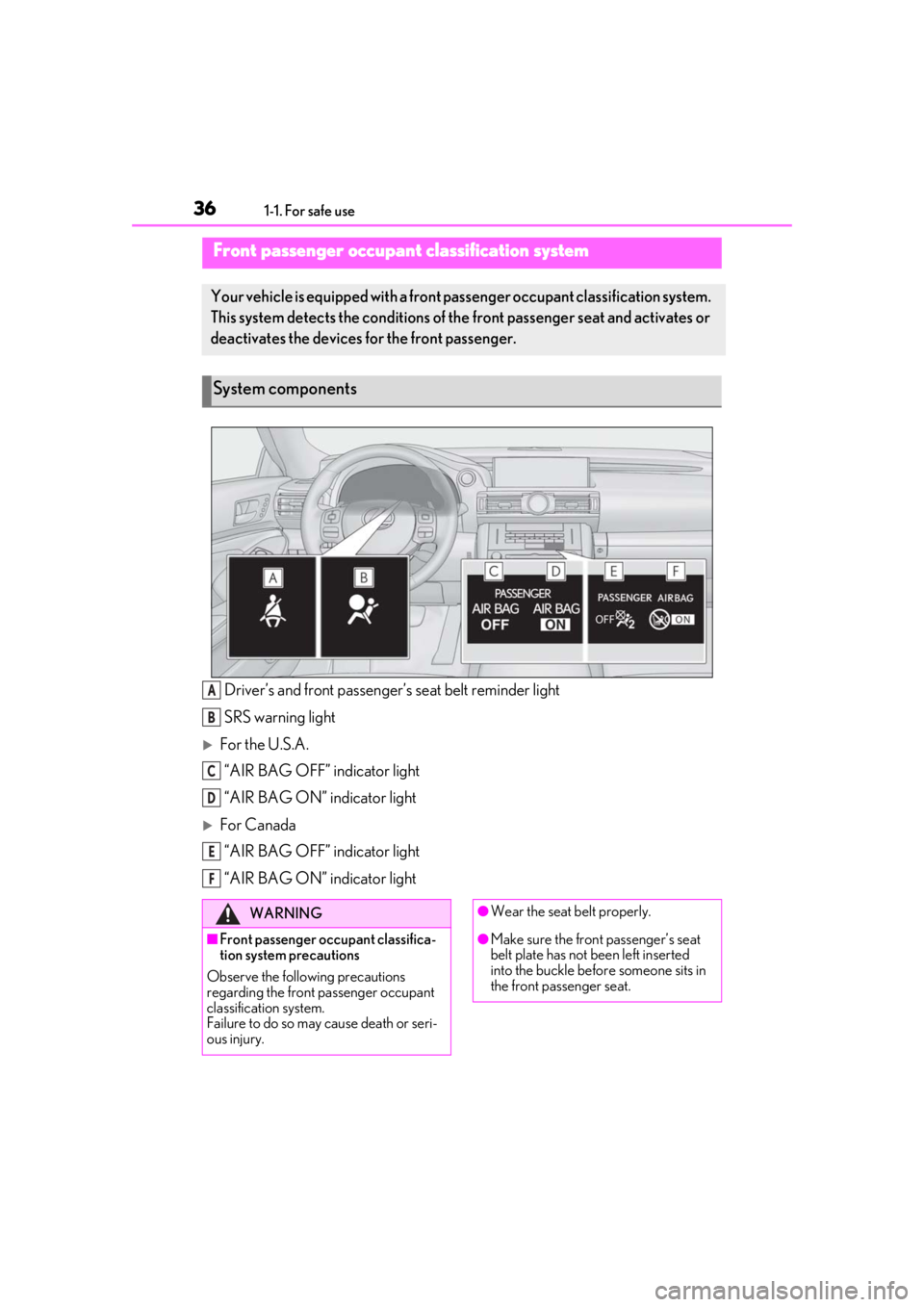
Driver’s and front passenger’s seat belt reminder light
SRS warning light
For the U.S.A. “AIR BAG OFF” indicator light
“AIR BAG ON” indicator light
For Canada“AIR BAG OFF” indicator light
“AIR BAG ON” indicator light
Front passenger occupant classification system
Your vehicle is equipped with a front pa ssenger occupant classification system.
This system detects the conditions of th e front passenger seat and activates or
deactivates the devices for the front passenger.
System components
A
B
C
D
E
F
WARNING
■Front passenger occupant classifica-
tion system precautions
Observe the following precautions
regarding the front passenger occupant
classification system.
Failure to do so may cause death or seri-
ous injury.
●Wear the seat belt properly.
●Make sure the front passenger’s seat
belt plate has not been left inserted
into the buckle before someone sits in
the front passenger seat.
Page 38 of 408
381-1. For safe use
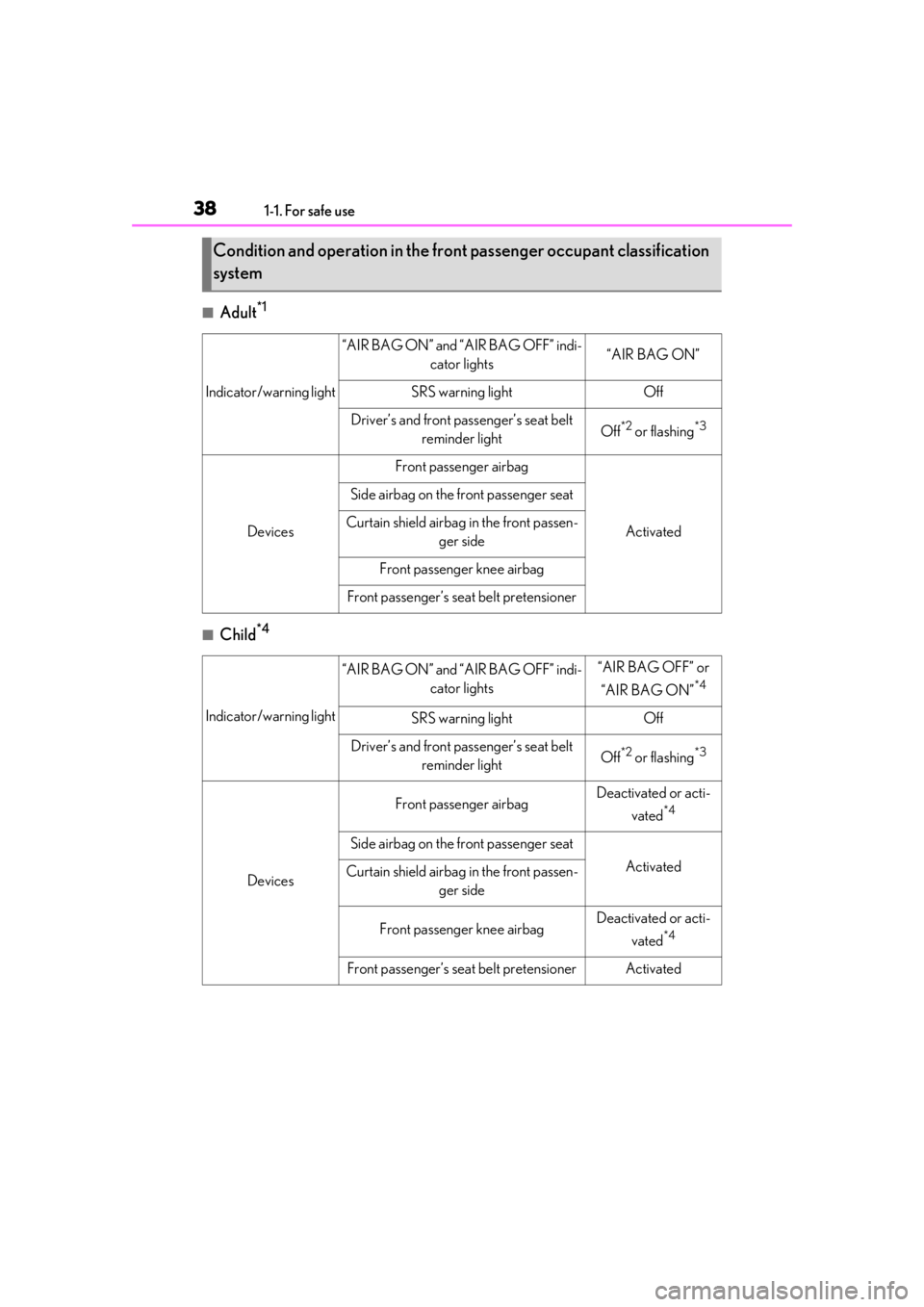
■Adult*1
■Child*4
Condition and operation in the front passenger occupant classification
system
Indicator/warning light
“AIR BAG ON” and “AIR BAG OFF” indi-cator lights“AIR BAG ON”
SRS warning lightOff
Driver’s and front passenger’s seat belt reminder lightOff*2 or flashing*3
Devices
Front passenger airbag
Activated
Side airbag on the front passenger seat
Curtain shield airbag in the front passen-
ger side
Front passenger knee airbag
Front passenger’s seat belt pretensioner
Indicator/warning light
“AIR BAG ON” and “AIR BAG OFF” indi- cator lights“AIR BAG OFF” or
“AIR BAG ON”
*4
SRS warning lightOff
Driver’s and front passenger’s seat belt reminder lightOff*2 or flashing*3
Devices
Front passenger airbagDeactivated or acti-
vated
*4
Side airbag on the front passenger seat
ActivatedCurtain shield airbag in the front passen-
ger side
Front passenger knee airbagDeactivated or acti-
vated
*4
Front passenger’s seat belt pretensionerActivated
Page 55 of 408

551-3. LEXUS Enform
1
For safety and security
Connect service not active
■Automatic Collision Notification
In case of either airbag deployment or
severe rear-end collision, the system is
designed to automatically call the
response center. The responding agent
receives the vehicle’s location and
attempts to speak with the vehicle
occupants to assess the level of emer-
gency. If the occupants are unable to
communicate, the ag ent automatically
treats the call as an emergency, con-
tacts the nearest emergency services
provider to describe the situation, and
requests that assistance be sent to the
location.
■Stolen Vehicle Location
If your vehicle is stolen, Safety Connect
can work with local authorities to assist
them in locating and recovering the
vehicle. After filing a police report, call
the Safety Connect response center at
1-800-25-LEXUS
(1-800-255-3987) in the United
States, 1-877-539-8777 in Puerto
Rico or 1-800-265- 3987 in Canada,
and follow the prompts for Safety Con-
nect to initiate this service.
In addition to assisting law enforce-
ment with recovery of a stolen vehicle,
Safety-Connect-equipped vehicle
location data may, under certain cir-
cumstances, be shared with third par-
ties to locate your vehicle. Further
information is available at Lexus.com.
■Emergency Assistance Button
(“SOS”)
In the event of an emergency on the
road, push the “SOS” button to reach
the Safety Connect response center.
The answering agent will determine
your vehicle’s location, assess the
emergency, and dispatch the neces-
sary assistance required.
If you accidentally press the “SOS” button,
tell the response-center agent that you are
not experiencing an emergency.
■Enhanced Roadside Assistance
Enhanced Roadside Assistance adds
GPS data to the already included war-
ranty-based Lexus roadside service.
Subscribers can press the “SOS” but-
ton to reach a Safety Connect
response-center agent, who can help
with a wide range of needs, such as:
towing, flat tire, fuel delivery, etc. For a
description of the Roadside Assistance
services and their limitations, please
see the Safety Connect Terms and
Conditions, which are available at
Lexus.com.
Important! Read this information about
exposure to radio frequency signals
before using Safety Connect;
The Safety Connect system installed in
your vehicle is a low-power radio trans-
mitter and receiver. It receives and also
sends out radio frequency (RF) signals.
In August 1996, the Federal Commu-
Safety Connect services
Safety information for Safety
Connect
Page 100 of 408

1003-2. Opening, closing and locking the doors and trunk
longer, the doors cannot be unlocked at
the passenger door. In this case, take hold
of the driver’s door handle, or use the
wireless remote control or mechanical
key, to unlock the doors.
■Electronic Key Battery-Saving Function
When battery-saving mode is set, battery
depletion is minimized by stopping the elec-
tronic key from re ceiving radio waves.
Press twice while pressing and holding . Confirm that the electronic key indica-
tor flashes 4 times.
While the battery-saving mode is set, the
smart access system with push-button start
cannot be used. To cancel the function,
press any of the electronic key buttons.
■Conditions affe cting operation
The smart access system with push-button
start uses weak radio waves. In the following
situations, the communication between the
electronic key and the vehicle may be
affected, preventing the smart access sys-
tem with push-button start, wireless remote
control and engine immobilizer system
from operating properly.
(Ways of coping: P.332)
●When the electronic key battery is
depleted
●Near a TV tower, electric power plant,
gas station, radio stat ion, large display,
airport or other faci lity that generates
strong radio waves or electrical noise
●When carrying a portable radio, cellular
phone, cordless phone or other wireless
communication device
●When the electronic key is in contact
with, or is covered by the following metal-
lic objects
• Cards to which aluminum foil is attached • Cigarette boxes that have aluminum foil
inside
• Metallic wallets or bags
•Coins
• Hand warmers made of metal
• Media such as CDs and DVDs
●When other wireless keys (that emit radio
waves) are being used nearby
●When carrying the electronic key
together with the following devices that
emit radio waves
• Another vehicle’s electronic key or a wireless key that emits radio waves
• Personal computers or personal digital assistants (PDAs)
• Digital audio players
• Portable game systems
●If window tint with a metallic content or
metallic objects are attached to the rear
window
●When the electronic key is placed near a
battery charger or electronic devices
■Note for the entry function
●Even when the electronic key is within the
effective range (detection areas), the sys-
tem may not operate properly in the fol-
lowing cases:
• The electronic key is too close to the win- dow or outside door handle, near the
ground, or in a high place when the doors
are locked or unlocked.
• The electronic key is near the ground or
in a high place, or too close to the rear
bumper center when the trunk is opened.
• The electronic key is on the instrument
panel, rear package tray or floor, or in the
door pockets or glove box when the
engine is started or engine switch modes
are changed.
●Do not leave the electronic key on top of
the instrument panel or near the door
pockets when exiting the vehicle.
Depending on the radio wave reception
conditions, it may be detected by the
antenna outside the cabin and the doors
will become lockable from the outside,
possibly trapping the electronic key
inside the vehicle.
●As long as the electronic key is within the
effective range, the doors may be locked
or unlocked by anyone. However, only
Page 156 of 408
1564-5. Using the driving support systems
●In the following situations, if the situation has changed (or the vehicle has been driven for
some time) and the normal operating conditions are detected, the message will disappear
and the system will become operational.
If the message does not disappear, contact your Lexus dealer.
• When the temperature around the radar sensor is outside of the operational range, such as when the vehicle is in the sun or in an extremely cold environment
• When the front camera cannot detect objects in front of the vehicle, such as when driving
in the dark, snow, or fog, or when brig ht lights are shining into the front camera
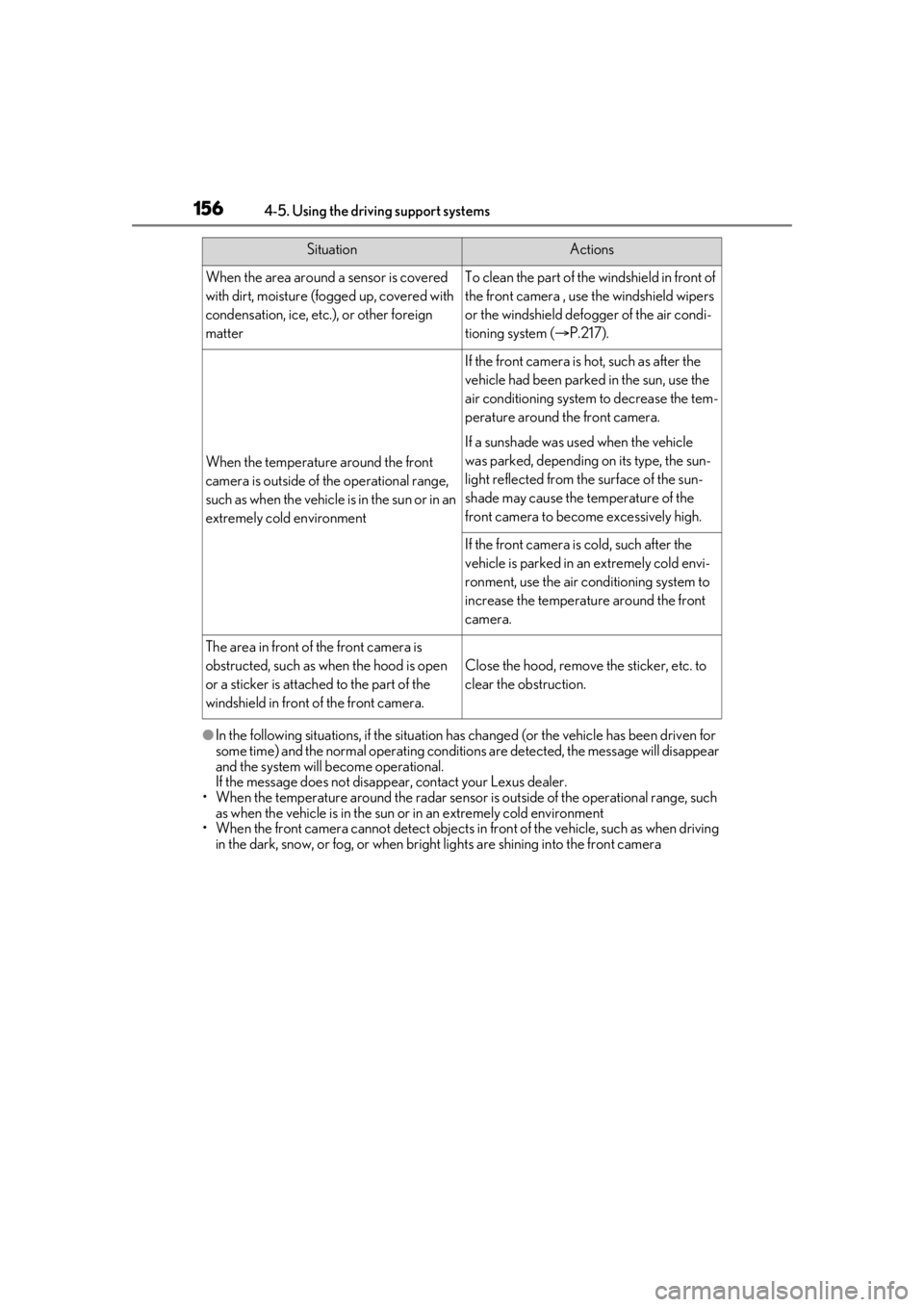
SituationActions
When the area around a sensor is covered
with dirt, moisture (f ogged up, covered with
condensation, ice, etc.), or other foreign
matterTo clean the part of the windshield in front of
the front camera , use the windshield wipers
or the windshield defo gger of the air condi-
tioning system ( P.217).
When the temperature around the front
camera is outside of the operational range,
such as when the vehicle is in the sun or in an
extremely cold environment
If the front camera is hot, such as after the
vehicle had been parked in the sun, use the
air conditioning system to decrease the tem-
perature around the front camera.
If a sunshade was used when the vehicle
was parked, depending on its type, the sun-
light reflected from the surface of the sun-
shade may cause the temperature of the
front camera to become excessively high.
If the front camera is cold, such after the
vehicle is parked in an extremely cold envi-
ronment, use the air conditioning system to
increase the temperature around the front
camera.
The area in front of the front camera is
obstructed, such as when the hood is open
or a sticker is attached to the part of the
windshield in front of the front camera.
Close the hood, remove the sticker, etc. to
clear the obstruction.