steering wheel LEXUS RCF 2021 Owner's Manual
[x] Cancel search | Manufacturer: LEXUS, Model Year: 2021, Model line: RCF, Model: LEXUS RCF 2021Pages: 408, PDF Size: 8.25 MB
Page 120 of 408
1204-1. Before driving
WARNING
●During normal driving, do not turn off
the engine. Turning the engine off
while driving will not cause loss of
steering or braking control, but the
power assist to these systems will be
lost. This will make it more difficult to
steer and brake, so you should pull
over and stop the vehicle as soon as it
is safe to do so.
However, in the event of an emer-
gency, such as if it becomes impossible
to stop the vehicle in the normal way:
P.294
●Use engine braking (downshift) to
maintain a safe speed when driving
down a steep hill.
Using the brakes continuously may
cause the brakes to overheat and lose
effectiveness. (
P.132)
●Do not adjust the positions of the
steering wheel, the seat, or the inside
or outside rear view mirrors while driv-
ing.
Doing so may result in a loss of vehicle
control.
●Always check that all passengers’
arms, heads or other parts of their
body are not outside the vehicle.
●Do not drive in excess of the speed
limit. Even if the legal speed limit per-
mits it, do not drive over 85 mph (140
km/h) unless your vehicle has
high-speed capability tires. Driving
over 85 mph (140 km/h) may result in
tire failure, loss of control and possible
injury. Be sure to consult a tire dealer
to determine whether the tires on your
vehicle are high-speed capability tires
or not before driving at such speeds.
■When driving on slippery road sur-
faces
●Sudden braking, acceleration and
steering may cause tire slippage and
reduce your ability to control the vehi-
cle.
●Sudden acceleration, engine braking
due to shifting, or changes in engine
speed could cause the vehicle to skid.
●After driving through a puddle, lightly
depress the brake pedal to make sure
that the brakes are functioning prop-
erly. Wet brake pads may prevent the
brakes from functioning properly. If the
brakes on only one side are wet and
not functioning properly, steering con-
trol may be affected.
■When shifting the shift lever
●Do not let the vehicle roll backward
while the shift lever is in a driving posi-
tion, or roll forward while the shift lever
is in R.
Doing so may cause the engine to stall
or lead to poor brake and steering
performance, resulting in an accident
or damage to the vehicle.
●Do not shift the shift lever to P while
the vehicle is moving.
Doing so can damage the transmission
and may result in a loss of vehicle con-
trol.
●Do not shift the shift lever to a driving
position while the vehicle is moving
backward.
Doing so can damage the transmission
and may result in a loss of vehicle con-
trol.
●Do not shift the shift lever to R while
the vehicle is moving forward.
Doing so can damage the transmission
and may result in a loss of vehicle con-
trol.
●Moving the shift lever to N while the
vehicle is moving will disengage the
engine from the transmission. Engine
braking is not available when N is
selected.
Page 123 of 408
1234-1. Before driving
4
Driving
NOTICE
●Do not use the accelerator pedal or
depress the accelerator and brake
pedals at the same time to hold the
vehicle on a hill.
■When parking the vehicle
●Always set the parking brake and shift
the shift lever to P. Failure to do so may
cause the vehicle to move or the vehi-
cle may accelerate suddenly if the
accelerator pedal is accidentally
depressed.
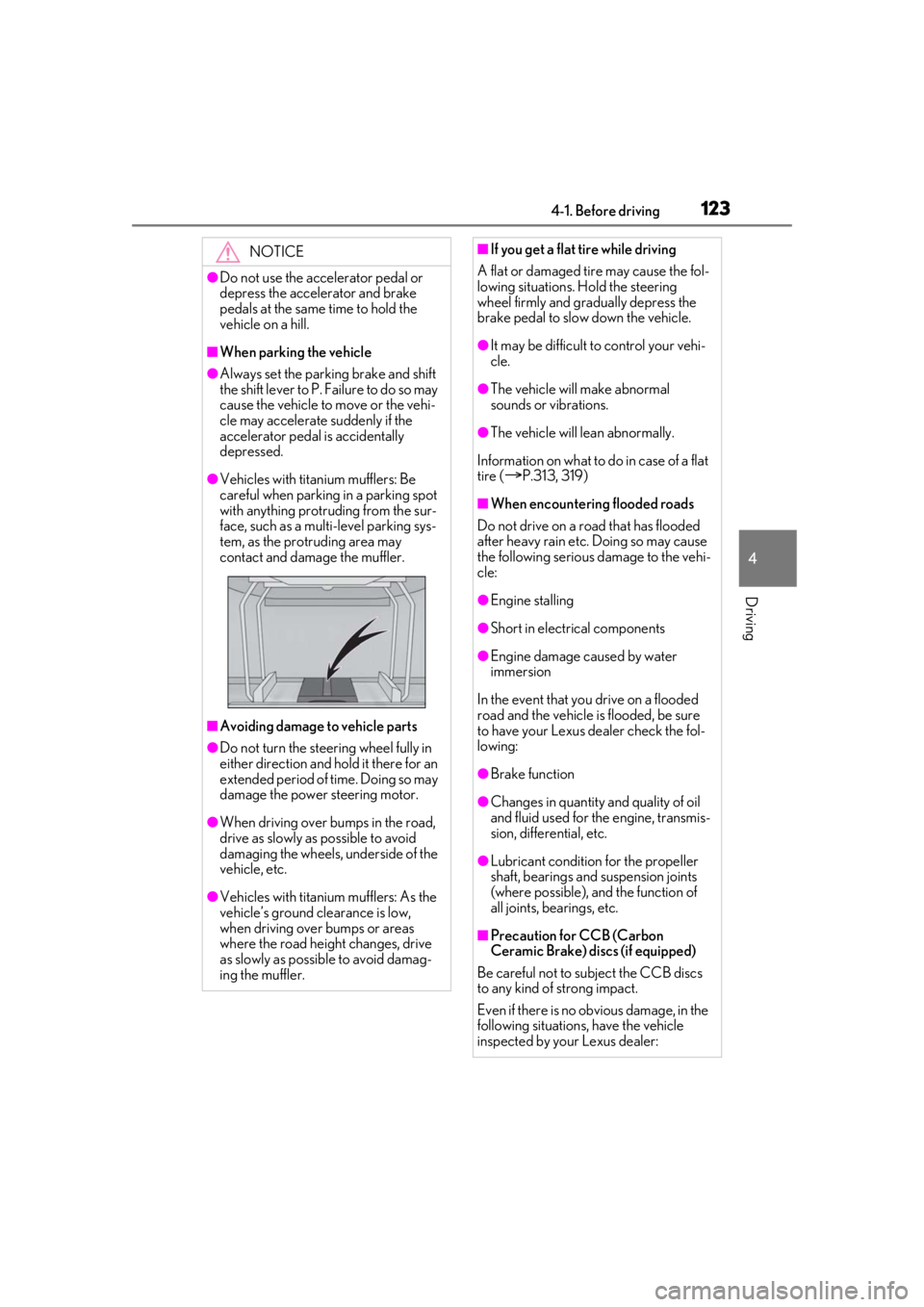
●Vehicles with titanium mufflers: Be
careful when parking in a parking spot
with anything protruding from the sur-
face, such as a multi-level parking sys-
tem, as the protruding area may
contact and damage the muffler.
■Avoiding damage to vehicle parts
●Do not turn the steering wheel fully in
either direction and hold it there for an
extended period of time. Doing so may
damage the power steering motor.
●When driving over bumps in the road,
drive as slowly as possible to avoid
damaging the wheels, underside of the
vehicle, etc.
●Vehicles with titanium mufflers: As the
vehicle’s ground clearance is low,
when driving over bumps or areas
where the road height changes, drive
as slowly as possible to avoid damag-
ing the muffler.
■If you get a flat tire while driving
A flat or damaged tire may cause the fol-
lowing situations. Hold the steering
wheel firmly and gradually depress the
brake pedal to slow down the vehicle.
●It may be difficult to control your vehi-
cle.
●The vehicle will make abnormal
sounds or vibrations.
●The vehicle will lean abnormally.
Information on what to do in case of a flat
tire (
P.313, 319)
■When encountering flooded roads
Do not drive on a road that has flooded
after heavy rain etc. Doing so may cause
the following serious damage to the vehi-
cle:
●Engine stalling
●Short in electrical components
●Engine damage caused by water
immersion
In the event that you drive on a flooded
road and the vehicle is flooded, be sure
to have your Lexus dealer check the fol-
lowing:
●Brake function
●Changes in quantity and quality of oil
and fluid used for the engine, transmis-
sion, differential, etc.
●Lubricant condition for the propeller
shaft, bearings and suspension joints
(where possible), and the function of
all joints, bearings, etc.
■Precaution for CCB (Carbon
Ceramic Brake) discs (if equipped)
Be careful not to subject the CCB discs
to any kind of strong impact.
Even if there is no obvious damage, in the
following situations, have the vehicle
inspected by your Lexus dealer:
Page 128 of 408
1284-2. Driving procedures
4-2.Driving procedures
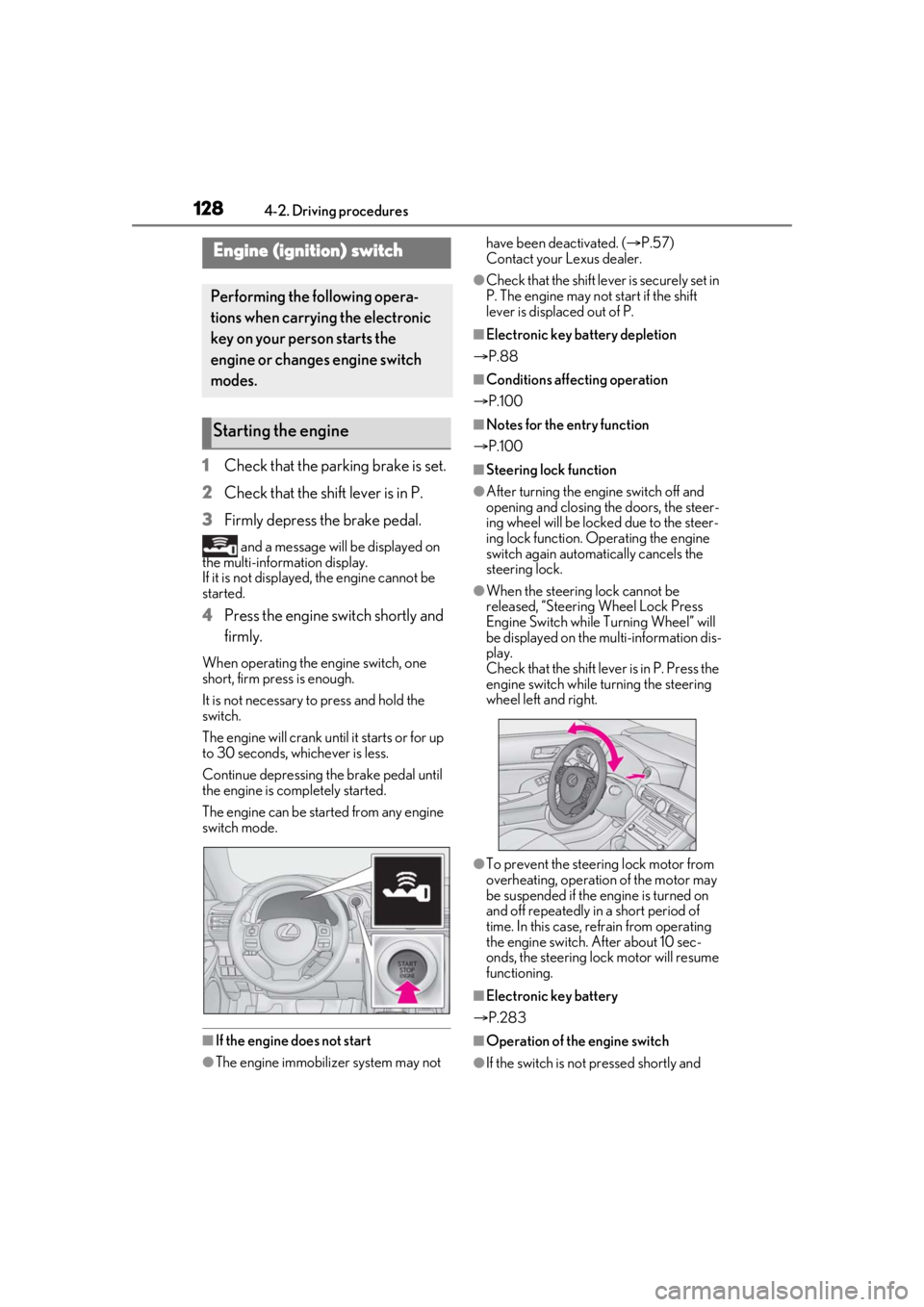
1Check that the parking brake is set.
2 Check that the shift lever is in P.
3 Firmly depress the brake pedal.
and a message will be displayed on
the multi-information display.
If it is not displayed, the engine cannot be
started.
4 Press the engine switch shortly and
firmly.
When operating the engine switch, one
short, firm press is enough.
It is not necessary to press and hold the
switch.
The engine will crank until it starts or for up
to 30 seconds, whichever is less.
Continue depressing the brake pedal until
the engine is completely started.
The engine can be started from any engine
switch mode.
■If the engine does not start
●The engine immobilizer system may not have been deactivated. (
P.57)
Contact your Lexus dealer.
●Check that the shift leve r is securely set in
P. The engine may not start if the shift
lever is displaced out of P.
■Electronic key battery depletion
P.88
■Conditions affecting operation
P.100
■Notes for the entry function
P.100
■Steering lock function
●After turning the engine switch off and
opening and closing the doors, the steer-
ing wheel will be lock ed due to the steer-
ing lock function. Operating the engine
switch again automatically cancels the
steering lock.
●When the steering lock cannot be
released, “Steering Wheel Lock Press
Engine Switch while Turning Wheel” will
be displayed on the multi-information dis-
play.
Check that the shift lever is in P. Press the
engine switch while turning the steering
wheel left and right.
●To prevent the steering lock motor from
overheating, operation of the motor may
be suspended if the engine is turned on
and off repeatedly in a short period of
time. In this case, refrain from operating
the engine switch. After about 10 sec-
onds, the steering lock motor will resume
functioning.
■Electronic key battery
P.283
■Operation of the engine switch
●If the switch is no t pressed shortly and
Engine (ignition) switch
Performing the following opera-
tions when carryin g the electronic
key on your person starts the
engine or changes engine switch
modes.
Starting the engine
Page 158 of 408
1584-5. Using the driving support systems
WARNING
■Limitations of the pre-collision system
●The driver is solely responsible for safe
driving. Always drive safely, taking
care to observe your surroundings.
Do not use the pre-collision system
instead of normal braking operations
under any circumstances. This system
will not prevent collisions or lessen col-
lision damage or injury in every situa-
tion. Do not overly rely on this system.
Failure to do so may lead to an acci-
dent, resulting in death or serious
injury.
●Although this system is designed to
help avoid a collision or help reduce
the impact of the collision, its effective-
ness may change according to various
conditions, therefore the system may
not always be able to achieve the same
level of performance.
Read the following conditions care-
fully. Do not overly rely on this system
and always drive carefully.
• Conditions under which the system may operate even if there is no possi-
bility of a collision:
P.160
• Conditions under which the system may not operate properly:
P.162
●Do not attempt to test the operation of
the pre-collision system yourself.
Depending on the objects used for
testing (dummies, cardboard objects
imitating detectable objects, etc.), the
system may not operate properly, pos-
sibly leading to an accident.
■Pre-collision braking
●When the pre-collision braking func-
tion is operating, a large amount of
braking force will be applied.
●If the vehicle is stopped by the opera-
tion of the pre-collision braking func-
tion, the pre-collision braking function
operation will be canceled after
approximately 2 seco nds. Depress the
brake pedal as necessary.
●The pre-collision braking function may
not operate if certain operations are
performed by the driver. If the acceler-
ator pedal is being depressed strongly
or the steering wheel is being turned,
the system may determine that the
driver is taking evasive action and pos-
sibly prevent the pre-collision braking
function from operating.
●In some situations, while the pre-colli-
sion braking function is operating,
operation of the function may be can-
celed if the accelerator pedal is
depressed strongly or the steering
wheel is turned and the system deter-
mines that the driver is taking evasive
action.
●If the brake pedal is being depressed,
the system may determine that the
driver is taking evasive action and pos-
sibly delay the operat ion timing of the
pre-collision braking function.
■When to disable the pre-collision sys-
tem
In the following situations, disable the
system, as it may not operate properly,
possibly leading to an accident resulting
in death or serious injury:
●When the vehicle is being towed
●When your vehicle is towing another
vehicle
●When transporting the vehicle via
truck, boat, train or similar means of
transportation
●When the vehicle is raised on a lift with
the engine running and the tires are
allowed to rotate freely
●When inspecting the vehicle using a
drum tester such as a chassis dyna-
mometer or speedometer tester, or
when using an on vehicle wheel bal-
ancer
●When a strong impact is applied to the
front bumper or front grille, due to an
accident or other reasons
Page 160 of 408
1604-5. Using the driving support systems
system determines that the possibility of a
frontal collision with a vehicle or pedestrian
is high.
Each function is operational at the following
speeds:
●Pre-collision warning:
• Vehicle speed is be tween approximately
7 and 110 mph (10 and 180 km/h). (For
detecting a pedestrian, vehicle speed is
between approximately 7 and 50 mph
[10 and 80 km/h].)
• The relative speed between your vehicle and the vehicle or pedestrian ahead is
approximately 7 mph (10 km/h) or more.
●Pre-collision brake assist:
• Vehicle speed is be tween approximately
20 and 110 mph (30 and 180 km/h). (For
detecting a pedestrian, vehicle speed is
between approximately 20 and 50 mph
[30 and 80 km/h].)
• The relative speed between your vehicle
and the vehicle or pedestrian ahead is
approximately 20 mph (30 km/h) or
more.
●Pre-collision braking:
• Vehicle speed is be tween approximately
7 and 110 mph (10 and 180 km/h). (For
detecting a pedestrian, vehicle speed is
between approximately 7 and 50 mph
[10 and 80 km/h].)
• The relative speed between your vehicle and the vehicle or pedestrian ahead is
approximately 7 mph (10 km/h) or more.
The system may not operate in the following
situations:
●If a battery terminal has been discon-
nected and reconnected and then the
vehicle has not been driven for a certain
amount of time
●If the shift lever is in R
●If VSC is disabled (only the pre-collision
warning function will be operational)
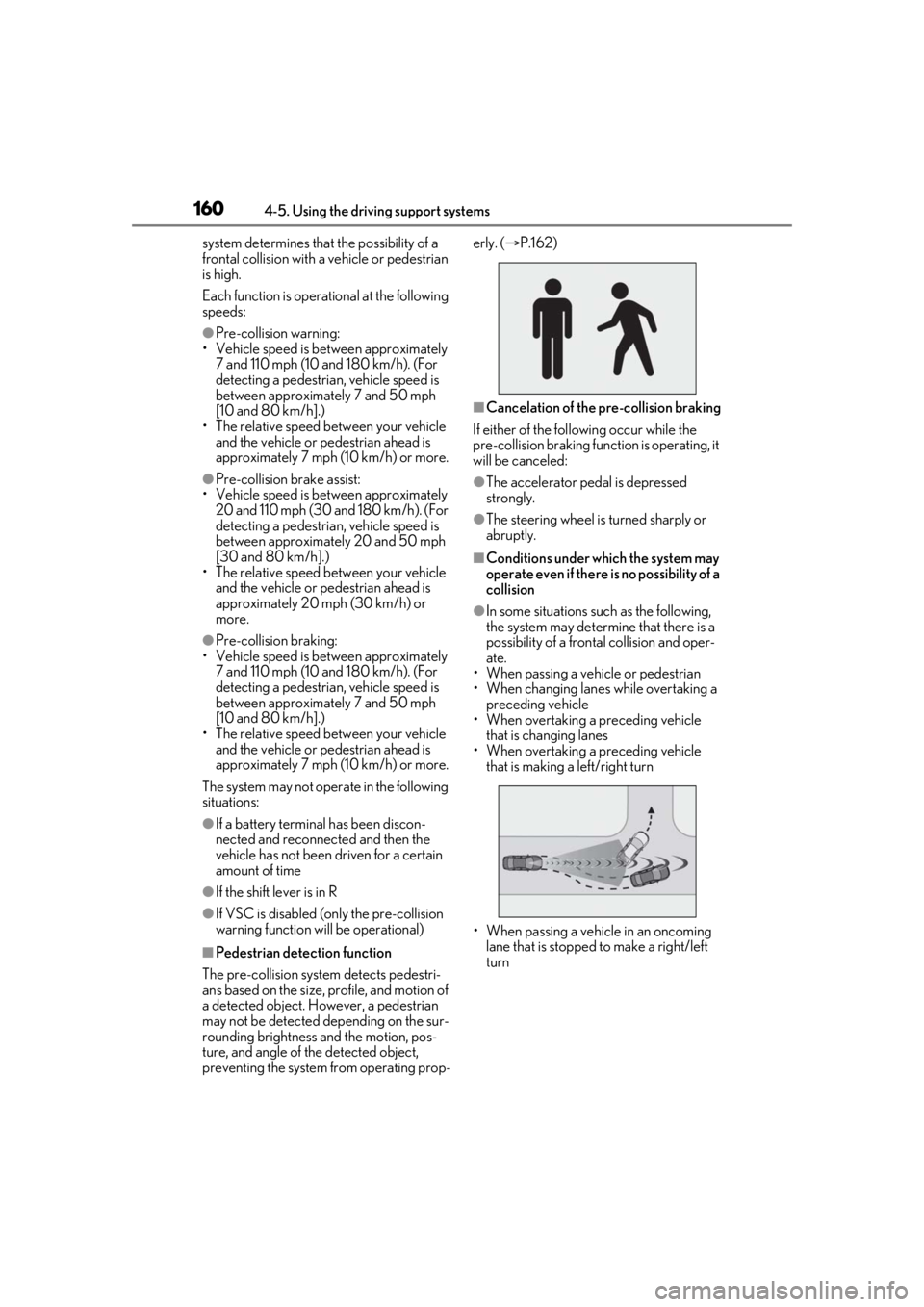
■Pedestrian detection function
The pre-collision system detects pedestri-
ans based on the size, profile, and motion of
a detected object. However, a pedestrian
may not be detected depending on the sur-
rounding brightness and the motion, pos-
ture, and angle of the detected object,
preventing the system from operating prop- erly. (
P.162)
■Cancelation of the pre-collision braking
If either of the following occur while the
pre-collision braking function is operating, it
will be canceled:
●The accelerator pedal is depressed
strongly.
●The steering wheel is turned sharply or
abruptly.
■Conditions under which the system may
operate even if there is no possibility of a
collision
●In some situations su ch as the following,
the system may determine that there is a
possibility of a frontal collision and oper-
ate.
• When passing a vehicle or pedestrian
• When changing lanes while overtaking a
preceding vehicle
• When overtaking a preceding vehicle
that is changing lanes
• When overtaking a preceding vehicle that is making a left/right turn
• When passing a vehicle in an oncoming lane that is stopped to make a right/left
turn
Page 164 of 408
1644-5. Using the driving support systems
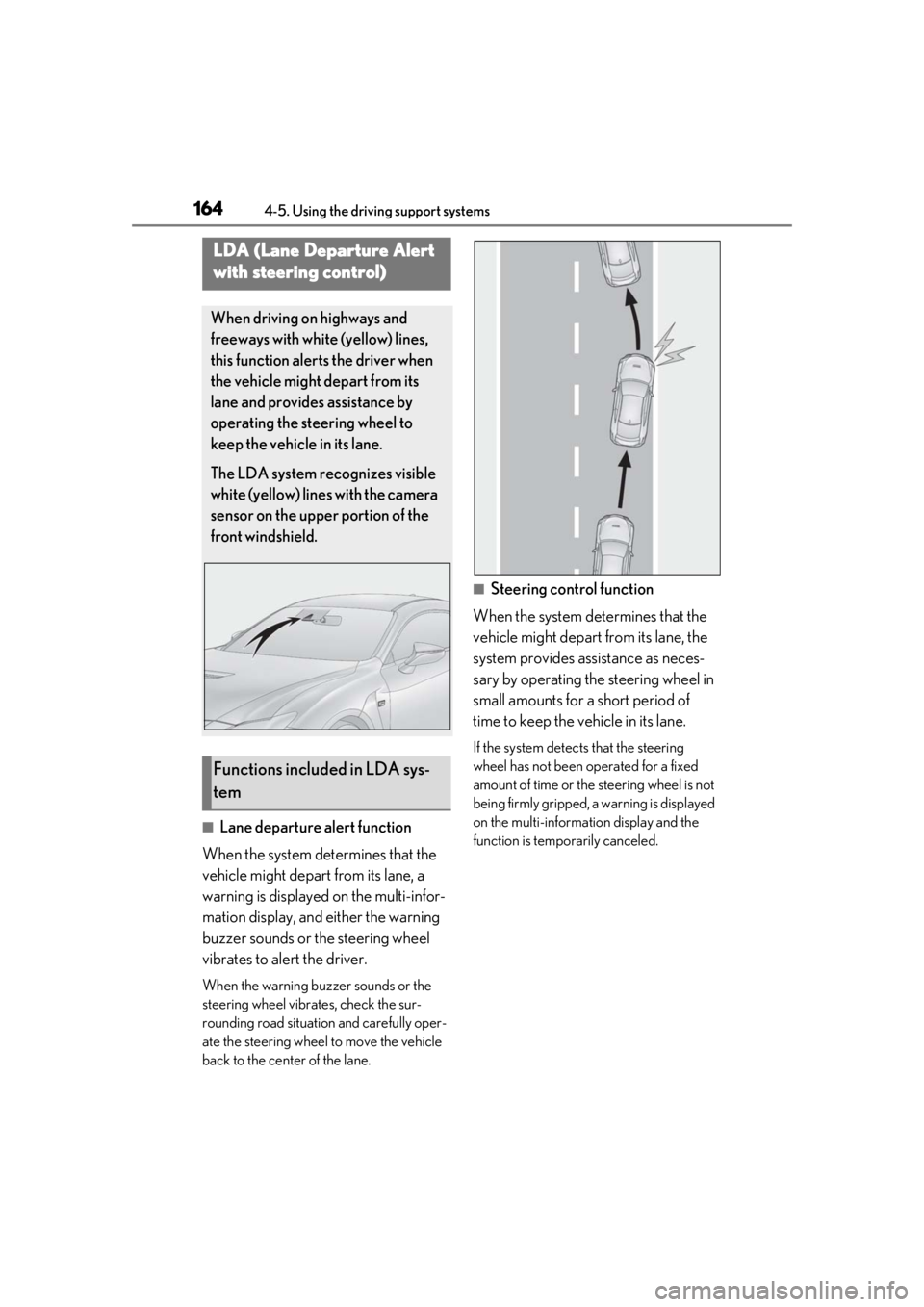
■Lane departure alert function
When the system determines that the
vehicle might depart from its lane, a
warning is displayed on the multi-infor-
mation display, and either the warning
buzzer sounds or the steering wheel
vibrates to alert the driver.
When the warning buzzer sounds or the
steering wheel vibrates, check the sur-
rounding road situation and carefully oper-
ate the steering wheel to move the vehicle
back to the center of the lane.
■Steering control function
When the system determines that the
vehicle might depart from its lane, the
system provides assistance as neces-
sary by operating the steering wheel in
small amounts for a short period of
time to keep the vehicle in its lane.
If the system detects that the steering
wheel has not been operated for a fixed
amount of time or the steering wheel is not
being firmly gripped, a warning is displayed
on the multi-informat ion display and the
function is temporarily canceled.
LDA (Lane Departure Alert
with steering control)
When driving on highways and
freeways with white (yellow) lines,
this function alerts the driver when
the vehicle might depart from its
lane and provides assistance by
operating the steering wheel to
keep the vehicle in its lane.
The LDA system recognizes visible
white (yellow) lines with the camera
sensor on the upper portion of the
front windshield.
Functions included in LDA sys-
tem
Page 165 of 408
1654-5. Using the driving support systems
4
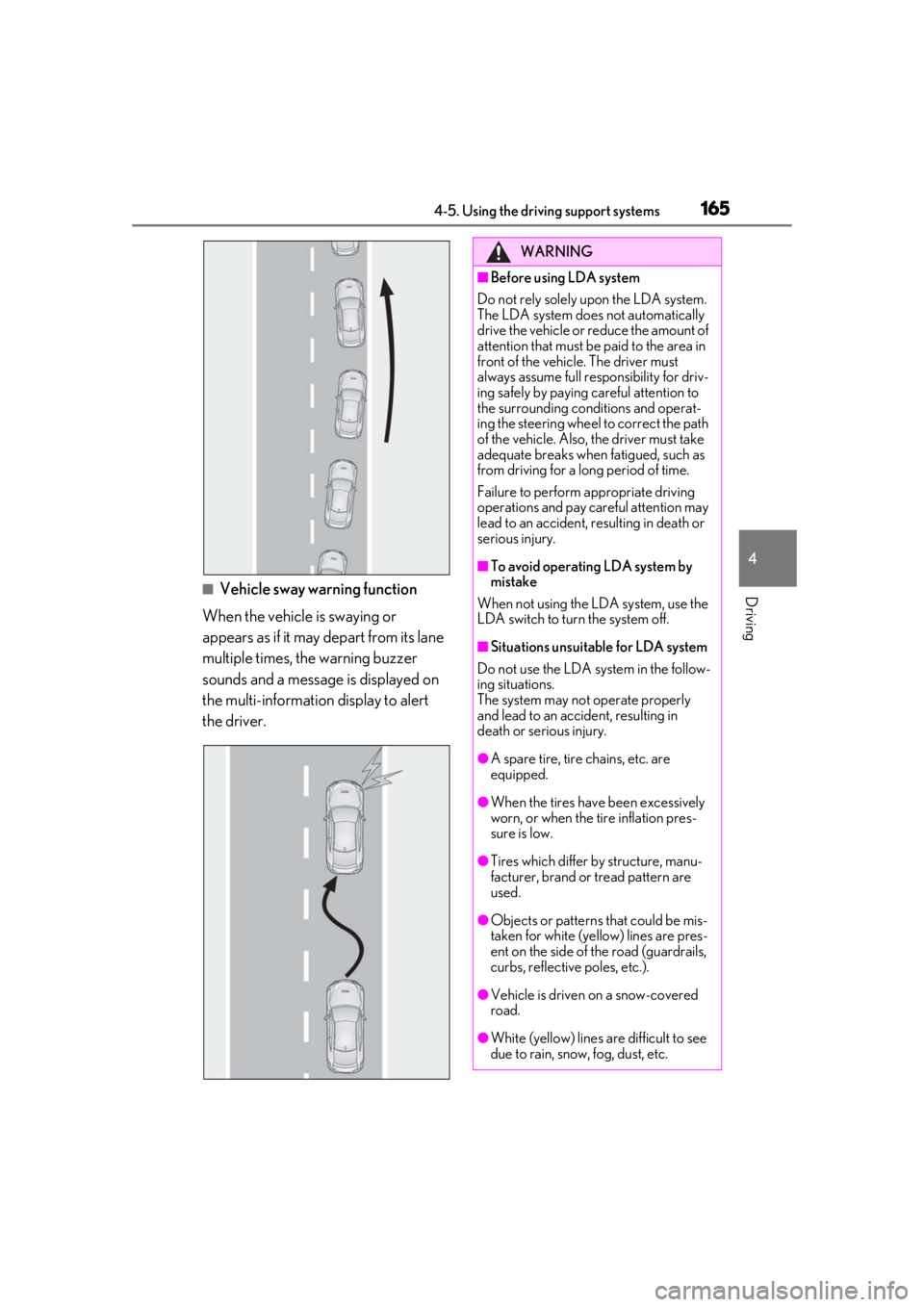
Driving■Vehicle sway warning function
When the vehicle is swaying or
appears as if it may depart from its lane
multiple times, the warning buzzer
sounds and a message is displayed on
the multi-information display to alert
the driver.
WARNING
■Before using LDA system
Do not rely solely upon the LDA system.
The LDA system does not automatically
drive the vehicle or reduce the amount of
attention that must be paid to the area in
front of the vehicle. The driver must
always assume full responsibility for driv-
ing safely by paying careful attention to
the surrounding conditions and operat-
ing the steering wheel to correct the path
of the vehicle. Also, the driver must take
adequate breaks when fatigued, such as
from driving for a long period of time.
Failure to perform appropriate driving
operations and pay careful attention may
lead to an accident, resulting in death or
serious injury.
■To avoid operating LDA system by
mistake
When not using the LDA system, use the
LDA switch to turn the system off.
■Situations unsuitable for LDA system
Do not use the LDA system in the follow-
ing situations.
The system may not operate properly
and lead to an accident, resulting in
death or serious injury.
●A spare tire, tire chains, etc. are
equipped.
●When the tires have been excessively
worn, or when the tire inflation pres-
sure is low.
●Tires which differ by structure, manu-
facturer, brand or tread pattern are
used.
●Objects or patterns that could be mis-
taken for white (yellow) lines are pres-
ent on the side of the road (guardrails,
curbs, reflective poles, etc.).
●Vehicle is driven on a snow-covered
road.
●White (yellow) lines are difficult to see
due to rain, snow, fog, dust, etc.
Page 166 of 408
1664-5. Using the driving support systems
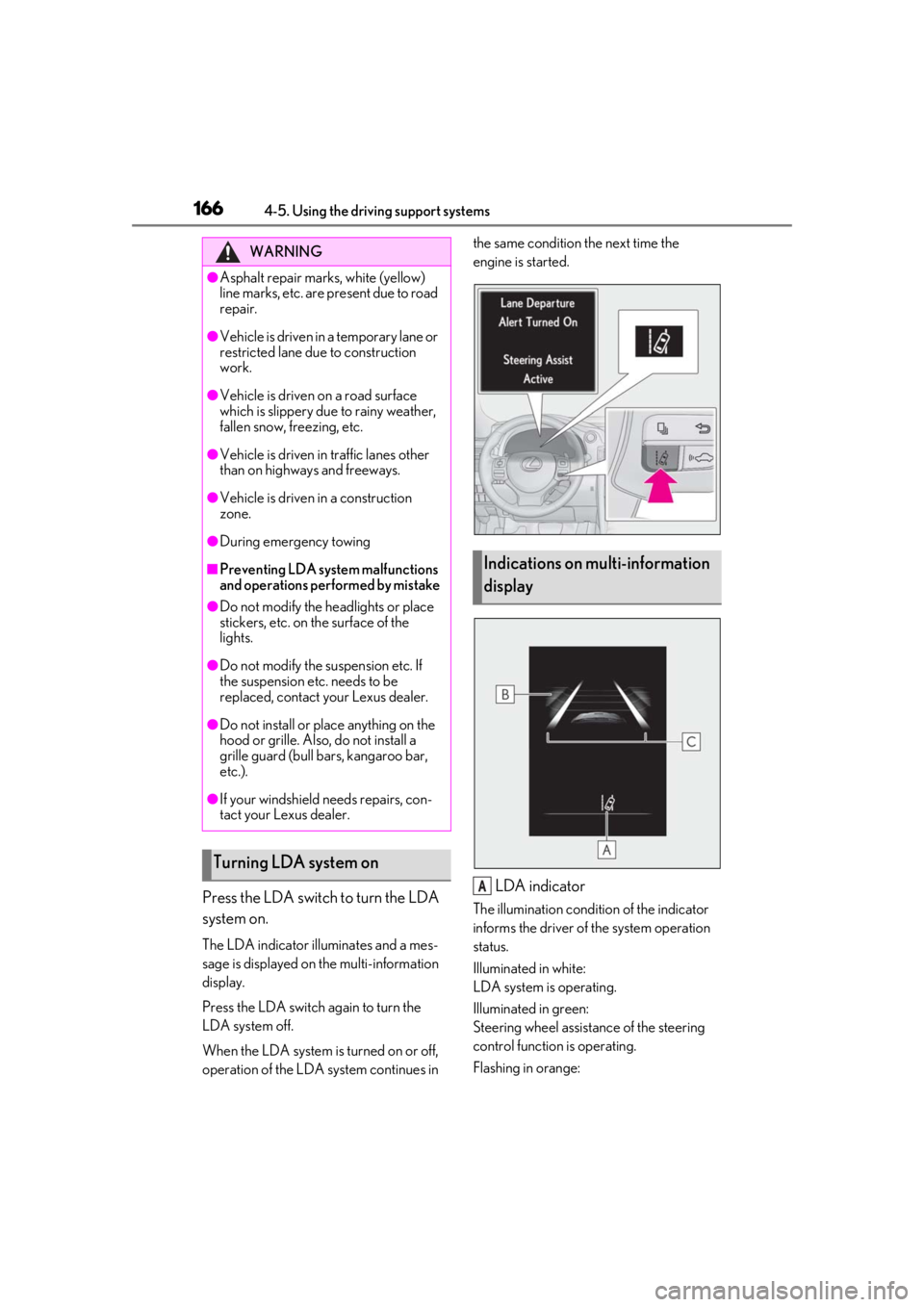
Press the LDA switch to turn the LDA
system on.
The LDA indicator illuminates and a mes-
sage is displayed on the multi-information
display.
Press the LDA switch again to turn the
LDA system off.
When the LDA system is turned on or off,
operation of the LDA system continues in the same condition the next time the
engine is started.
LDA indicator
The illumination condition of the indicator
informs the driver of the system operation
status.
Illuminated in white:
LDA system is operating.
Illuminated in green:
Steering wheel assistance of the steering
control function is operating.
Flashing in orange:
WARNING
●Asphalt repair marks, white (yellow)
line marks, etc. are present due to road
repair.
●Vehicle is driven in a temporary lane or
restricted lane due to construction
work.
●Vehicle is driven on a road surface
which is slippery due to rainy weather,
fallen snow, freezing, etc.
●Vehicle is driven in traffic lanes other
than on highways and freeways.
●Vehicle is driven in a construction
zone.
●During emergency towing
■Preventing LDA system malfunctions
and operations performed by mistake
●Do not modify the headlights or place
stickers, etc. on the surface of the
lights.
●Do not modify the suspension etc. If
the suspension etc. needs to be
replaced, contact your Lexus dealer.
●Do not install or place anything on the
hood or grille. Also, do not install a
grille guard (bull bars, kangaroo bar,
etc.).
●If your windshield needs repairs, con-
tact your Lexus dealer.
Turning LDA system on
Indications on multi-information
display
A
Page 167 of 408

1674-5. Using the driving support systems
4
Driving
Lane departure alert function is operating.
Operation display of steering
wheel operation support
Indicates that steering wheel assistance of
the steering control function is operating.
Lane departure alert function dis-
play
Displayed when the mu lti-information dis-
play is switched to the driving assist system
information screen.
Inside of displayed white lines is
white
Indicates that the system is recognizing
white (yellow) lines. When the vehicle
departs from its lane , the white line dis-
played on the side the vehicle departs from
flashes orange.
Inside of displayed white lines is
black
Indicates that the system is not able to rec-
ognize white (yellow) lines or is temporar-
ily canceled.
■Operation conditions of each function
●Lane departure alert function
This function operates when all of the fol-
lowing conditions are met.
• LDA is turned on.
• Vehicle speed is approximately 32 mph (50 km/h) or more.
• System recognizes white (yellow) lines.
• Width of traffic lane is approximately 9.8 ft. (3 m) or more.
• Turn signal lever is not operated.
• Vehicle is driven on a straight road or around a gentle curve with a radius of
more than approximately 492 ft. (150 m).
• No system malfunctions are detected.
( P.169)
●Steering control function
This function operates when all of the fol-
lowing conditions are met in addition to the
operation conditions for the lane depar-
ture alert function.
• Setting for “Steering Assist” in of the multi-information display is set to “On”.
( P.73)
• Vehicle is not acceler ated or decelerated
by a certain amount or more.
• Steering wheel is not operated with a steering force level su itable for changing
lanes.
• ABS, VSC, TRAC and PCS are not oper- ating.
• TRAC or VSC is not turned off.
• Hands off steering wheel warning is not displayed. ( P.168)
●Vehicle sway warning function
This function operates when all of the fol-
lowing conditions are met.
• Setting for “Sway Warning” in of the multi-information display is set to “On”.
( P.73)
• Vehicle speed is approximately 32 mph
(50 km/h) or more.
• Width of traffic lane is approximately 9.8 ft. (3 m) or more.
• No system malfunctions are detected. ( P.169)
■Temporary cancellation of functions
When the operation conditions are no lon-
ger met, a function may be temporarily can-
B
C
Page 168 of 408
1684-5. Using the driving support systems
celed. However, when the operation
conditions are met again, operation of the
function is automatically restored. ( P.167)
■Steering control function
Depending on the vehicle speed, lane
departure situation, ro ad conditions, etc.,
the driver may not feel the function is oper-
ating or the function may not operate at all.
■Lane departure alert function
The warning buzzer may be difficult to hear
due to external noise, audio playback, etc.
Also, it may be difficult to feel steering
wheel vibrations due to the road conditions
etc.
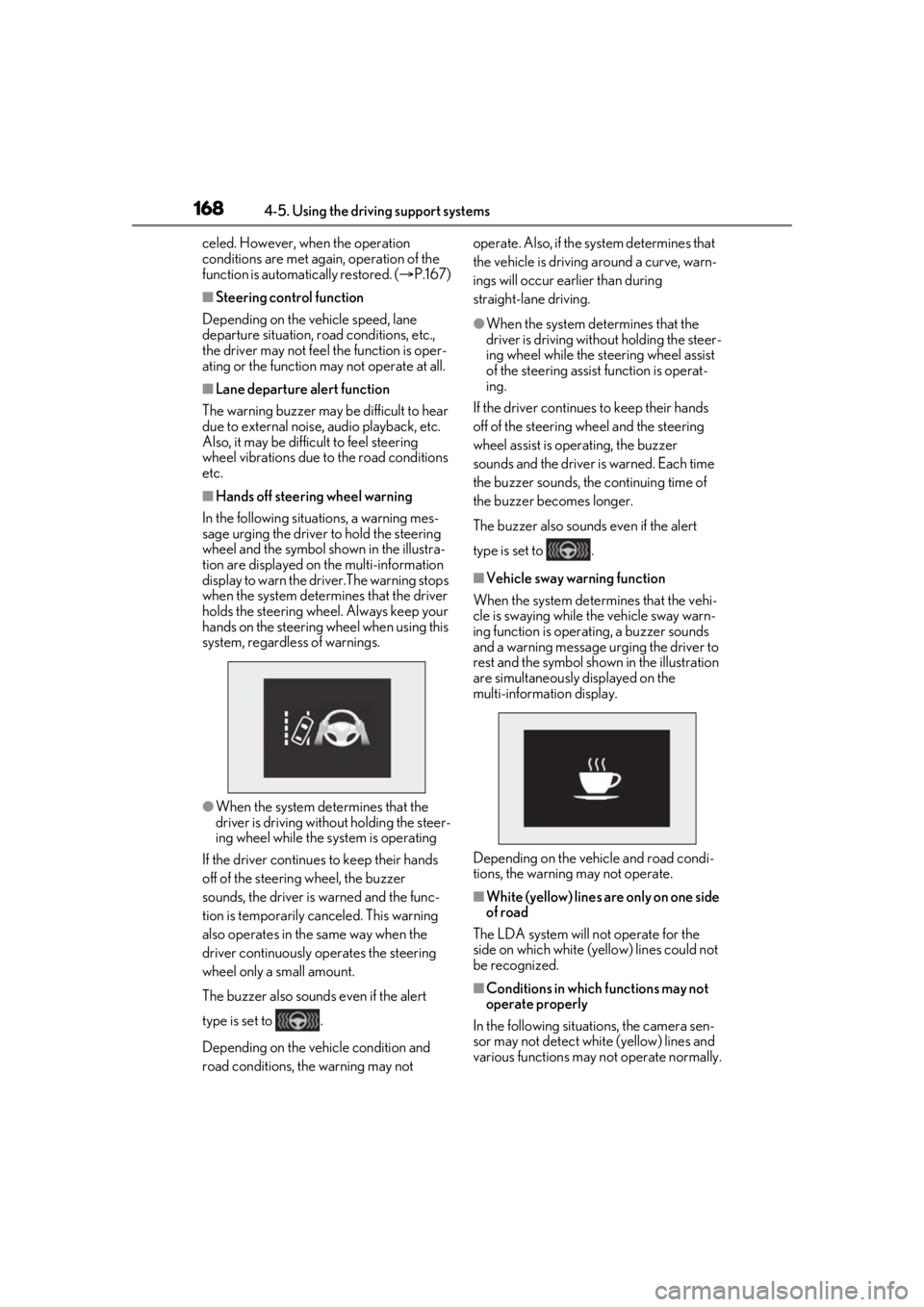
■Hands off steering wheel warning
In the following situations, a warning mes-
sage urging the driver to hold the steering
wheel and the symbol shown in the illustra-
tion are displayed on the multi-information
display to warn the driver.The warning stops
when the system determines that the driver
holds the steering wheel. Always keep your
hands on the steering wheel when using this
system, regardless of warnings.
●When the system determines that the
driver is driving without holding the steer-
ing wheel while the sy stem is operating
If the driver continue s to keep their hands
off of the steering wheel, the buzzer
sounds, the driver is warned and the func-
tion is temporarily ca nceled. This warning
also operates in the same way when the
driver continuously operates the steering
wheel only a small amount.
The buzzer also sounds even if the alert
type is set to .
Depending on the vehicle condition and
road conditions, the warning may not operate. Also, if the sy
stem determines that
the vehicle is driving around a curve, warn-
ings will occur earlier than during
straight-lane driving.
●When the system determines that the
driver is driving with out holding the steer-
ing wheel while the st eering wheel assist
of the steering assist function is operat-
ing.
If the driver continues to keep their hands
off of the steering wheel and the steering
wheel assist is operating, the buzzer
sounds and the driver is warned. Each time
the buzzer sounds, the continuing time of
the buzzer becomes longer.
The buzzer also sounds even if the alert
type is set to .
■Vehicle sway warning function
When the system determines that the vehi-
cle is swaying while the vehicle sway warn-
ing function is operating, a buzzer sounds
and a warning message urging the driver to
rest and the symbol sh own in the illustration
are simultaneously displayed on the
multi-information display.
Depending on the vehicle and road condi-
tions, the warning may not operate.
■White (yellow) lines are only on one side
of road
The LDA system will not operate for the
side on which white (yellow) lines could not
be recognized.
■Conditions in whic h functions may not
operate properly
In the following situations, the camera sen-
sor may not detect white (yellow) lines and
various functions may not operate normally.