steering wheel LEXUS RCF 2021 Owner's Guide
[x] Cancel search | Manufacturer: LEXUS, Model Year: 2021, Model line: RCF, Model: LEXUS RCF 2021Pages: 408, PDF Size: 8.25 MB
Page 170 of 408
1704-5. Using the driving support systems
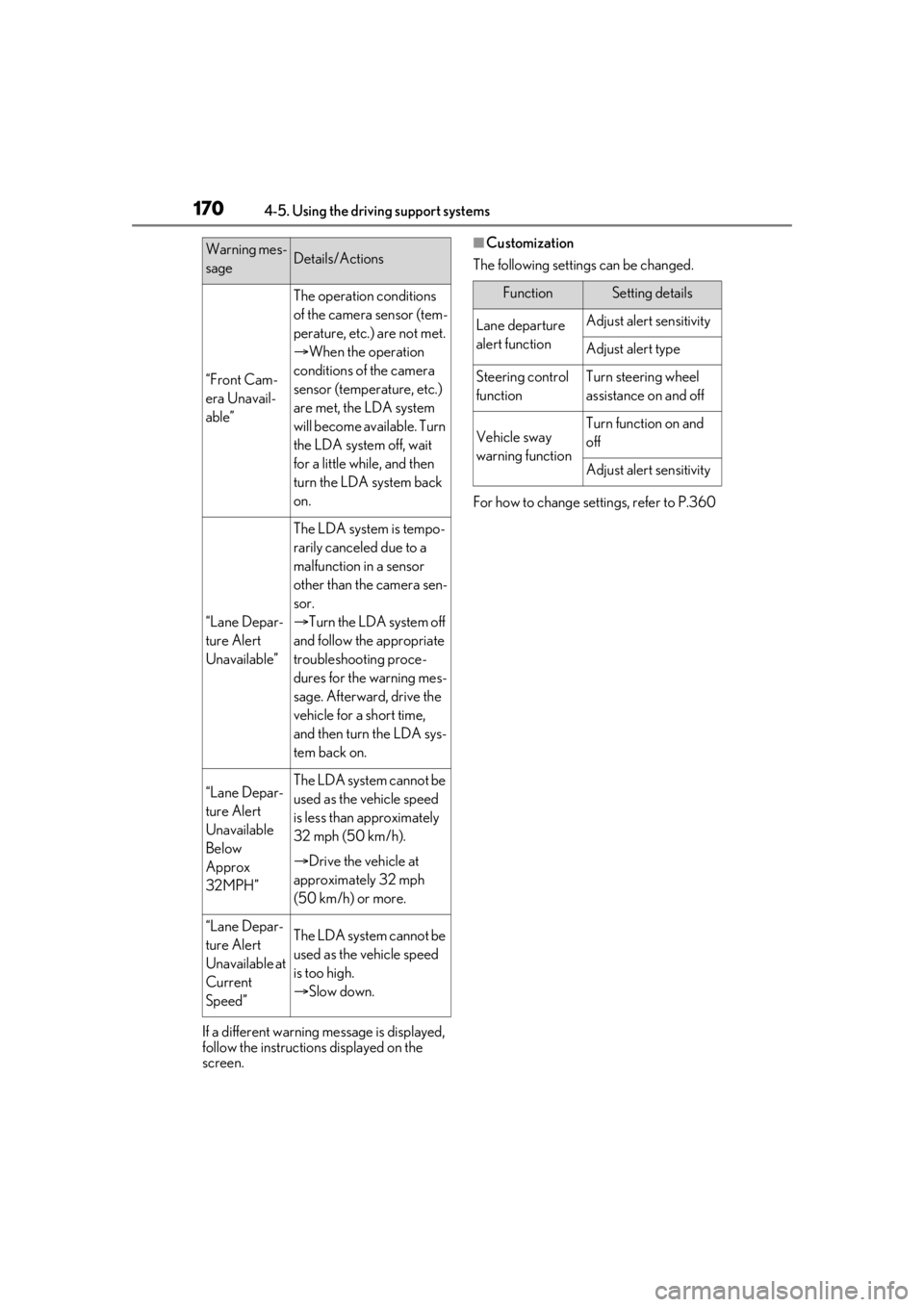
If a different warning message is displayed,
follow the instructions displayed on the
screen.
■Customization
The following settings can be changed.
For how to change settings, refer to P.360
“Front Cam-
era Unavail-
able”
The operation conditions
of the camera sensor (tem-
perature, etc.) are not met.
When the operation
conditions of the camera
sensor (temperature, etc.)
are met, the LDA system
will become available. Turn
the LDA system off, wait
for a little while, and then
turn the LDA system back
on.
“Lane Depar-
ture Alert
Unavailable”
The LDA system is tempo-
rarily canceled due to a
malfunction in a sensor
other than the camera sen-
sor.
Turn the LDA system off
and follow the appropriate
troubleshooting proce-
dures for the warning mes-
sage. Afterward, drive the
vehicle for a short time,
and then turn the LDA sys-
tem back on.
“Lane Depar-
ture Alert
Unavailable
Below
Approx
32MPH”The LDA system cannot be
used as the vehicle speed
is less than approximately
32 mph (50 km/h).
Drive the vehicle at
approximately 32 mph
(50 km/h) or more.
“Lane Depar-
ture Alert
Unavailable at
Current
Speed”The LDA system cannot be
used as the vehicle speed
is too high.
Slow down.
Warning mes-
sageDetails/Actions
FunctionSetting details
Lane departure
alert functionAdjust alert sensitivity
Adjust alert type
Steering control
functionTurn steering wheel
assistance on and off
Vehicle sway
warning functionTurn function on and
off
Adjust alert sensitivity
Page 178 of 408
1784-5. Using the driving support systems
■Brake system operation sound
If the brakes are applied automatically while
the vehicle is in vehicle-to-vehicle distance
control mode, a brake system operation
sound may be heard. This does not indicate
a malfunction.
■Warning messages and buzzers for
dynamic radar cruise control
Warning messages and buzzers are used to
indicate a system malfunction or to inform
the driver of the need for caution while driv-
ing. If a warning message is shown on the
multi-information display, read the message
and follow the instructions.
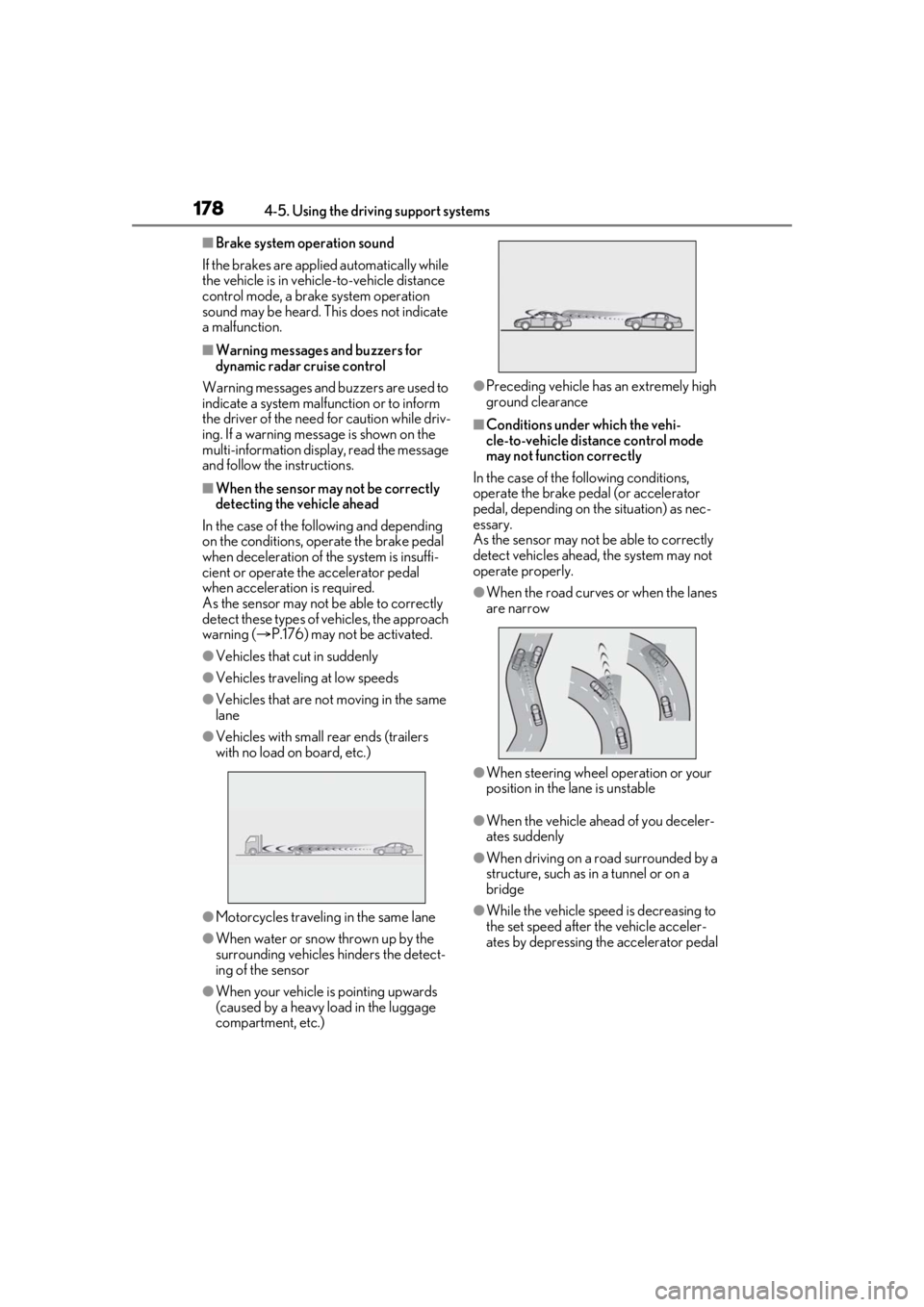
■When the sensor may not be correctly
detecting the vehicle ahead
In the case of the following and depending
on the conditions, operate the brake pedal
when deceleration of the system is insuffi-
cient or operate the accelerator pedal
when acceleration is required.
As the sensor may not be able to correctly
detect these types of vehicles, the approach
warning ( P.176) may not be activated.
●Vehicles that cut in suddenly
●Vehicles traveling at low speeds
●Vehicles that are not moving in the same
lane
●Vehicles with small rear ends (trailers
with no load on board, etc.)
●Motorcycles travelin g in the same lane
●When water or snow thrown up by the
surrounding vehicles hinders the detect-
ing of the sensor
●When your vehicle is pointing upwards
(caused by a heavy load in the luggage
compartment, etc.)
●Preceding vehicle has an extremely high
ground clearance
■Conditions under which the vehi-
cle-to-vehicle distance control mode
may not function correctly
In the case of the following conditions,
operate the brake pedal (or accelerator
pedal, depending on the situation) as nec-
essary.
As the sensor may not be able to correctly
detect vehicles ahead, the system may not
operate properly.
●When the road curves or when the lanes
are narrow
●When steering wheel operation or your
position in the lane is unstable
●When the vehicle ahead of you deceler-
ates suddenly
●When driving on a road surrounded by a
structure, such as in a tunnel or on a
bridge
●While the vehicle speed is decreasing to
the set speed after the vehicle acceler-
ates by depressing the accelerator pedal
Page 197 of 408
1974-5. Using the driving support systems
4
Driving
matically.
■Manual operation
Even if the active rear wing is changed to
manual operation using the active rear wing
switch, the setting will not be maintained.
Automatic operation will resume if the
engine switch is turn ed off or at certain
vehicle speeds.
*: If equipped
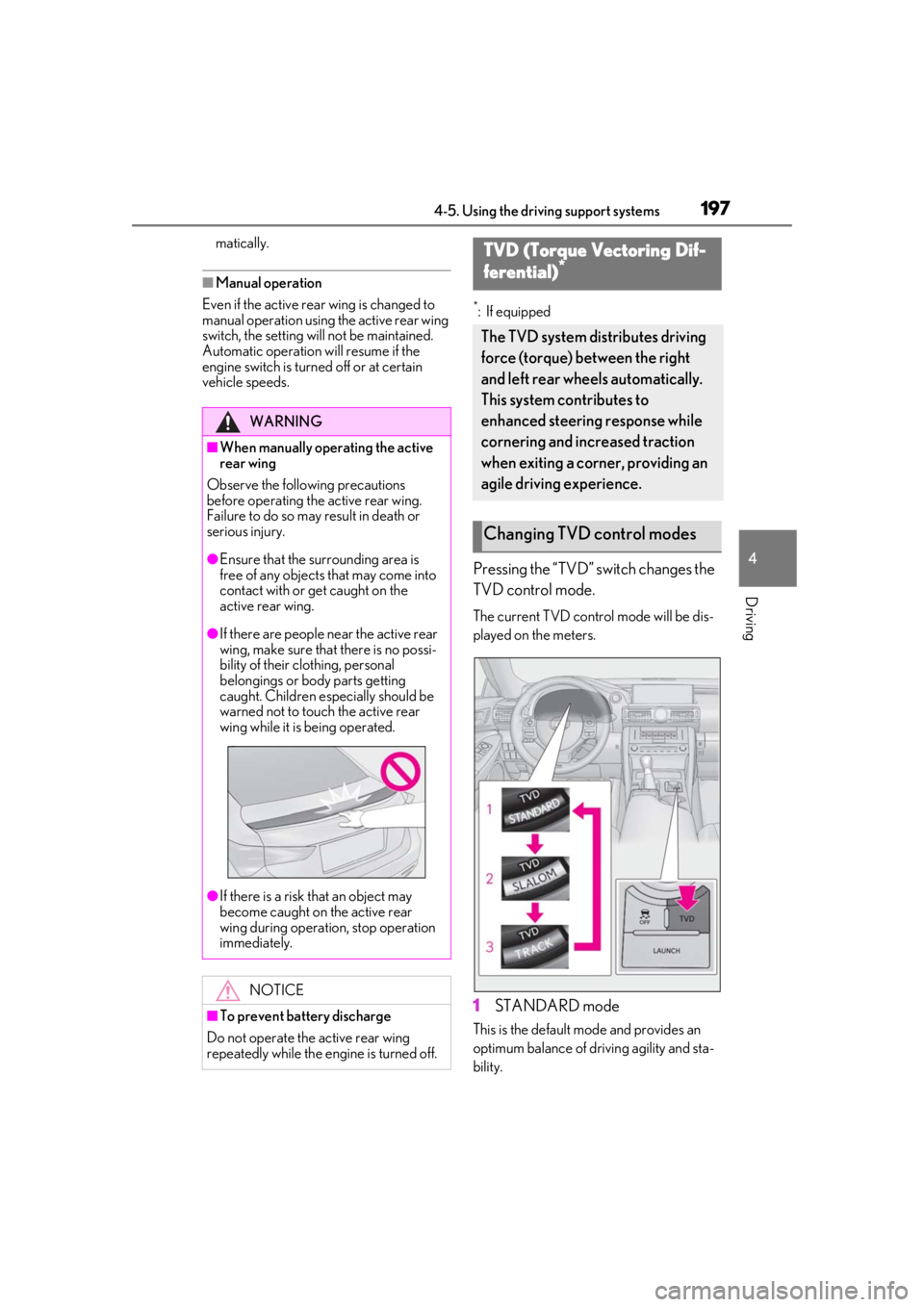
Pressing the “TVD” switch changes the
TVD control mode.
The current TVD control mode will be dis-
played on the meters.
1 STANDARD mode
This is the default mo de and provides an
optimum balance of driving agility and sta-
bility.
WARNING
■When manually operating the active
rear wing
Observe the following precautions
before operating the active rear wing.
Failure to do so may result in death or
serious injury.
●Ensure that the surrounding area is
free of any objects that may come into
contact with or get caught on the
active rear wing.
●If there are people near the active rear
wing, make sure that there is no possi-
bility of their clothing, personal
belongings or body parts getting
caught. Children especially should be
warned not to touch the active rear
wing while it is being operated.
●If there is a risk that an object may
become caught on the active rear
wing during operation, stop operation
immediately.
NOTICE
■To prevent battery discharge
Do not operate the active rear wing
repeatedly while the engine is turned off.
TVD (Torque Vectoring Dif-
ferential)*
The TVD system distributes driving
force (torque) between the right
and left rear wheels automatically.
This system contributes to
enhanced steering response while
cornering and increased traction
when exiting a corner, providing an
agile driving experience.
Changing TVD control modes
Page 198 of 408

1984-5. Using the driving support systems
2SLALOM mode
This mode emphasizes enhanced steering
response.
3TRACK mode
This mode emphasizes stability for high
speed sporty driving.
■Operating conditions
The engine switch is in IGNITION ON
mode.
■Automatic cancelation of the selected
TVD control mode
SLALOM and TRACK mode are canceled
when the engine switch is turned off. When
the engine switch is turned to IGNITION
ON mode, the TVD system will be in
STANDARD mode.
■Automatic disabling of the TVD system
If a malfunction is detected in the TVD sys-
tem, a warning message will be displayed
on the multi-information display ( P.311)
and the TVD system will be disabled auto-
matically. If the system is disabled, driving
force will not be distributed by the TVD but
through normal differential operation.
■To protect the system
The TVD fluid temperature may become
excessively high when driving for a long
time under extremely high load conditions.
In this case, a warnin g message will be dis-
played on the multi-information display.
( P.311)
The multi-information display shows the distribution of driving force
between the right and left rear wheels.
(
P.73)
WARNING
■Cautions regarding the use of the sys-
tem
The driver is solely responsible for safe
driving. Do not overly rely on the TVD
system. Always drive safely, taking care
to observe your surroundings.
TVD control status on the
multi-information display
Page 199 of 408
1994-5. Using the driving support systems
4
Driving
■ABS (Anti-lock Brake System)
Helps to prevent wheel lock when the
brakes are applied suddenly, or if the
brakes are applied while driving on a
slippery road surface
■Brake assist
Generates an increased level of brak-
ing force after the brake pedal is
depressed when the system detects a
panic stop situation
■VSC (Vehicle Stability Control)
Helps the driver to control skidding
when swerving sudden ly or turning on
slippery road surfaces
■Enhanced VSC (Enhanced Vehi-
cle Stability Control)
Provides cooperative control of the
ABS, TRAC, VSC and EPS.
Helps to maintain directional stability
when swerving on slippery road sur-
faces by controlling steering perfor-
mance.
■TRAC (Traction Control)
Helps to maintain drive power and pre-
vent the drive wheels from spinning
when starting the vehicle or accelerat-
ing on slippery roads
■Hill-start assist control
Helps to reduce the backward move-
ment of the vehicle when starting on an
uphill
■EPS (Electric Power Steering)
Employs an electric motor to reduce
the amount of effort needed to turn the
steering wheel
■Adaptive Variable Suspension Sys-
tem
By independently controlling the
damping force of th e shock absorbers
for each of the 4 wheels according to
the road and driving conditions, this
system combines riding comfort with
superior vehicle stability, and helps
good vehicle posture.
■VDIM (Vehicle Dynamics Inte-
grated Management)
Provides integrated control of the
ABS, brake assist, TRAC, VSC,
hill-start assist control and EPS systems
Helps to maintain vehicle stability when
swerving on slippery road surfaces by
controlling the brakes, engine output
and steering assist.
■When the TRAC/VSC systems are
operating
The slip indicator light will flash while the
TRAC/VSC systems are operating.
Driving assist systems
To keep enhance driving safety and
performance, the following systems
operate automatically in response
to various driving situations. Be
aware, however, that these systems
are supplementary and should not
be relied upon too heavily when
operating the vehicle.
Summary of the driving assist
systems
Page 201 of 408
2014-5. Using the driving support systems
4
Driving
cator light continues to remain on, contact
your Lexus dealer.
■Operating conditions of hill-start assist
control
When the following four conditions are met,
the hill-start assist control will operate:
●The shift lever is in a position other than P
or N (when starting off forward/back-
ward on an upward incline).
●The vehicle is stopped.
●The accelerator pedal is not depressed.
●The parking brake is not engaged.
■Automatic system cancelation of
hill-start assist control
The hill-start assist control will turn off in any
of the following situations:
●The shift lever is moved to P or N.
●The accelerator pedal is depressed.
●The parking brake is engaged.
●Approximately 2 seconds elapse after
the brake pedal is released.
■Sounds and vibrations caused by the
ABS, brake assist, VSC, TRAC and
hill-start assist control systems
●A sound may be heard from the engine
compartment when the brake pedal is
depressed repeatedly, when the engine is
started or just after the vehicle begins to
move. This sound does not indicate that a
malfunction has occurred in any of these
systems.
●Any of the following conditions may
occur when the above systems are oper-
ating. None of these indicates that a mal-
function has occurred.
• Vibrations may be felt through the vehicle
body and steering.
• A motor sound may be heard after the vehicle comes to a stop.
• The brake pedal may pulsate slightly after the ABS is activated.
• The brake pedal may move down slightly after the ABS is activated.
■EPS operation sound
When the steering wheel is operated, a
motor sound (whirring sound) may be
heard. This does not indicate a malfunction.
■Reactivation of the TRAC/VSC systems
Even after the TRAC /VSC systems have
been turned off, turning the engine off and
then on again will automatically reactivate
the TRAC/VSC systems.
■Reactivation of the TRAC system linked
to vehicle speed
When only the TRAC system is turned off,
the TRAC system will turn on when vehicle
speed increases. Ho wever, when both
TRAC/VSC systems are turned off, the sys-
tems will not turn on even when vehicle
speed increases.
■Reduced effectiveness of the EPS sys-
tem
The effectiveness of the EPS system is
reduced to prevent the system from over-
heating when there is frequent steering
input over an extended period of time. The
steering wheel may feel heavy as a result.
Should this occur, re frain from excessive
steering input or stop the vehicle and turn
the engine off. The EPS system should
return to normal within 10 minutes.
WARNING
■The ABS does not operate effectively
when
●The limits of tire gripping performance
have been exceeded (such as exces-
sively worn tires on a snow covered
road).
●The vehicle hydroplanes while driving
at high speed on wet or slick roads.
■Stopping distance when the ABS is
operating may exceed that of normal
conditions
The ABS is not designed to shorten the
vehicle’s stopping di stance. Always main-
tain a safe distance from the vehicle in
front of you, especially in the following
situations:
●When driving on dirt, gravel or
snow-covered roads
●When driving over bumps in the road
Page 207 of 408
207
5
5
Interior features
Interior features
.5-1. Remote Touch/DisplayRemote Touch ............................ 208
Center Display ............................ 210
5-2. Using the air conditioning system Automatic air conditioning system......................................................... 213
Heated steering wheel/seat heat- ers/seat ventilators ................. 221
5-3. Using the interior lights Interior lights list......................... 223
5-4. Using the storage features List of storage features............ 225
Trunk features............................. 227
5-5. Using the other interior features
Other interior features ........... 228
Garage door opener................ 231
Compass....................................... 236
Page 221 of 408
2215-2. Using the air conditioning system
5
Interior features
*:If equipped
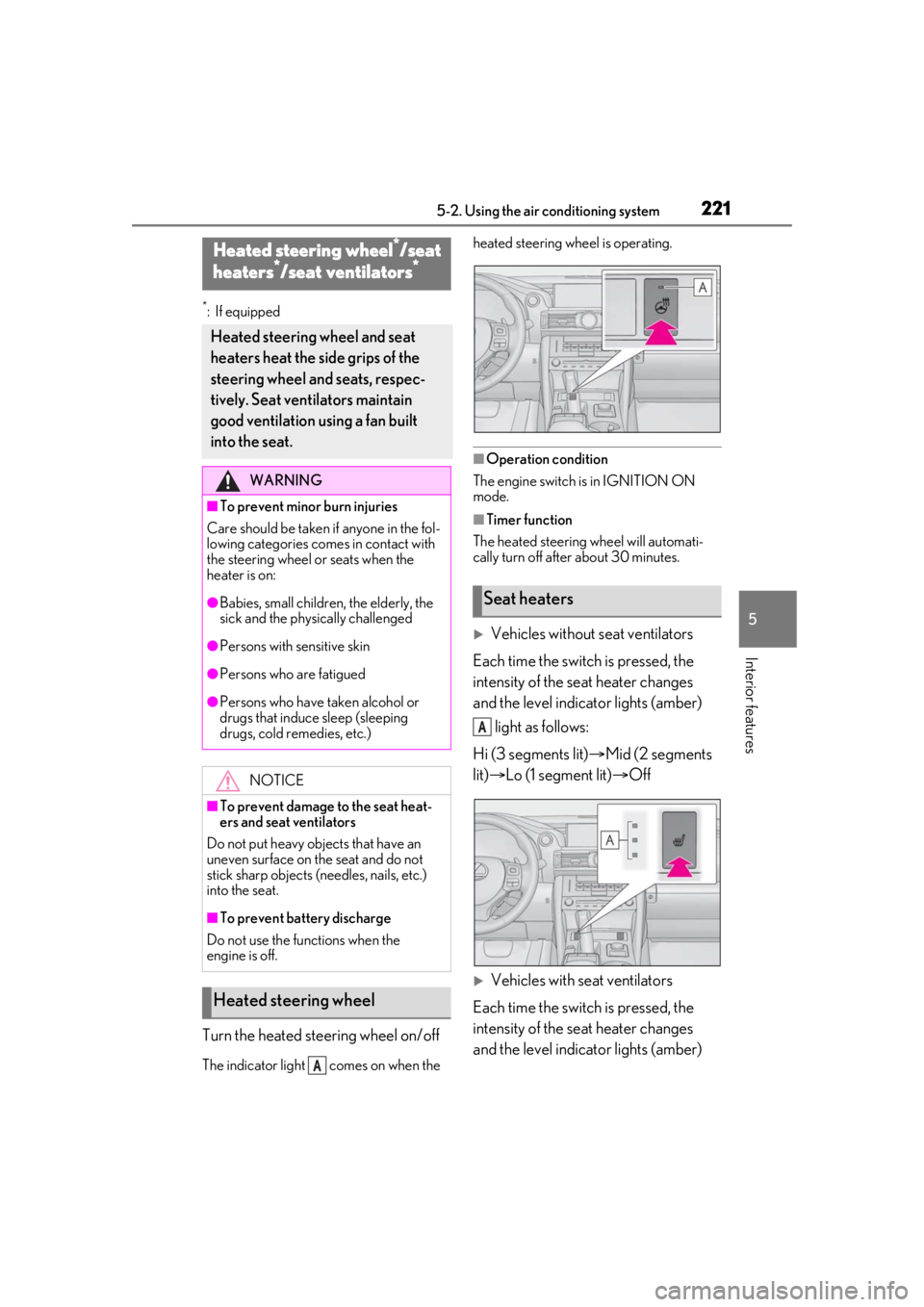
Turn the heated steering wheel on/off
The indicator light comes on when the heated steering wheel is operating.
■Operation condition
The engine switch is in IGNITION ON
mode.
■Timer function
The heated steering wheel will automati-
cally turn off after about 30 minutes.
Vehicles without seat ventilators
Each time the switch is pressed, the
intensity of the seat heater changes
and the level indicator lights (amber) light as follows:
Hi (3 segments lit) Mid (2 segments
lit) Lo (1 segment lit) Off
Vehicles with seat ventilators
Each time the switch is pressed, the
intensity of the seat heater changes
and the level indicator lights (amber)
Heated steering wheel*/seat
heaters*/seat ventilators*
Heated steering wheel and seat
heaters heat the side grips of the
steering wheel and seats, respec-
tively. Seat ventilators maintain
good ventilation using a fan built
into the seat.
WARNING
■To prevent minor burn injuries
Care should be taken if anyone in the fol-
lowing categories comes in contact with
the steering wheel or seats when the
heater is on:
●Babies, small children, the elderly, the
sick and the phys ically challenged
●Persons with sensitive skin
●Persons who are fatigued
●Persons who have taken alcohol or
drugs that induce sleep (sleeping
drugs, cold remedies, etc.)
NOTICE
■To prevent damage to the seat heat-
ers and seat ventilators
Do not put heavy objects that have an
uneven surface on the seat and do not
stick sharp objects (needles, nails, etc.)
into the seat.
■To prevent battery discharge
Do not use the functions when the
engine is off.
Heated steering wheel
A
Seat heaters
A
Page 260 of 408
2606-3. Maintenance
Seats• Do the seat controls operate properly?
Steering wheel
• Does the steering wheel rotate
smoothly?
• Does the steering wheel have the cor-
rect amount of free
play?
•There should not be any strange sounds
coming from the
steering wheel.
Vehicle exterior
ItemsCheck points
Doors/trunk• Do the doors/trunk operate smoothly?
Engine hood
•Does the engine hood lock system
work properly?
Fluid leaks
•There should not be any signs of fluid
leakage after the
vehicle has been
parked.
ItemsCheck points
Tires
• Is the tire inflation pressure correct?
• The tires should not be damaged or
excessively worn.
• Have the tires been rotated according to
the maintenance
schedule?
•The wheel nuts should not be loose.
Windshield wip-
ers
• The wiper blades should not show any
signs of cracking,
splitting, wear, con-
tamination or defor-
mation.
• The wiper blades should clear the
windshield without
streaking or skip-
ping.
ItemsCheck points
Page 295 of 408
2957-1. Essential information
7
When trouble arises
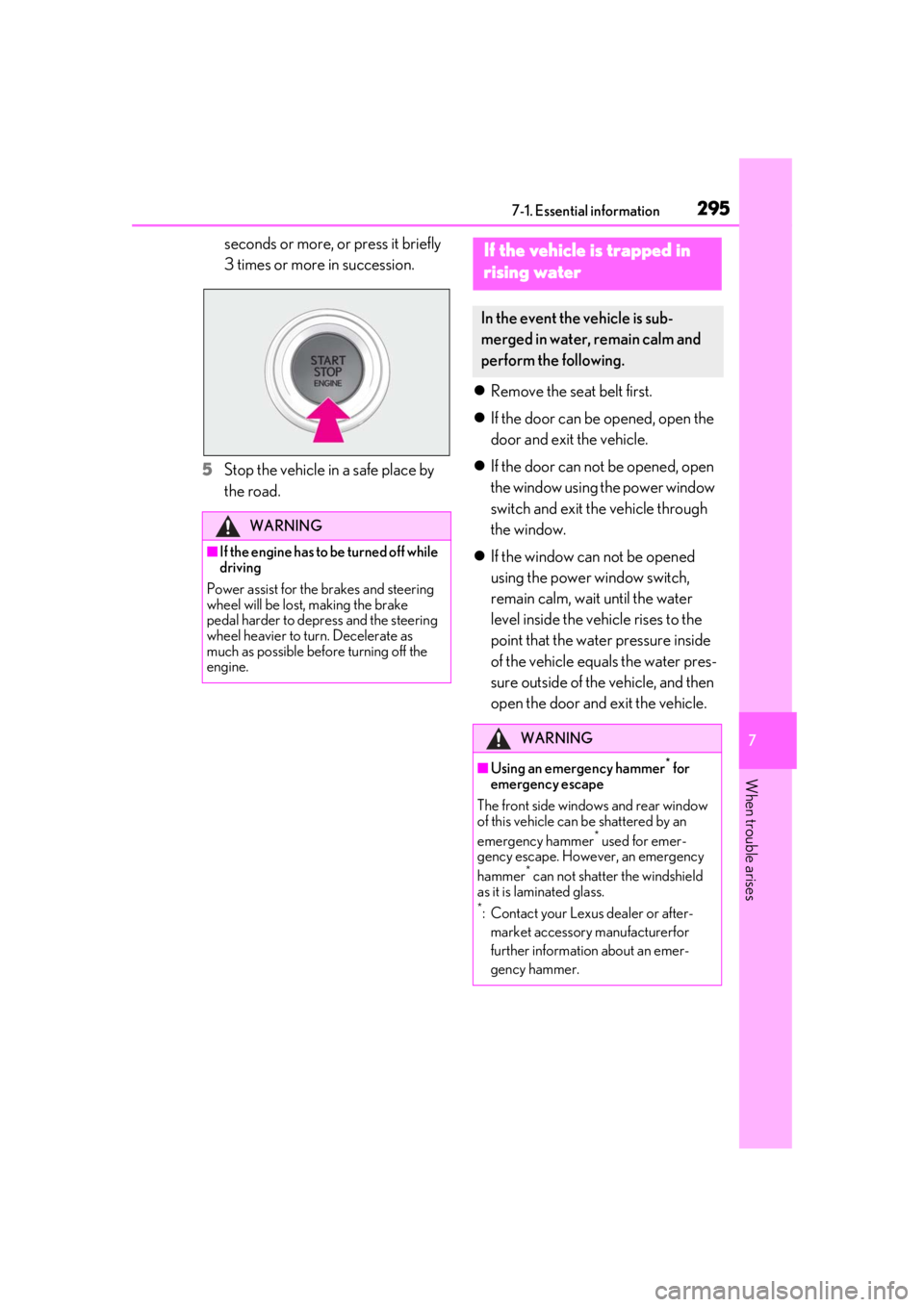
seconds or more, or press it briefly
3 times or more in succession.
5 Stop the vehicle in a safe place by
the road.
Remove the seat belt first.
If the door can be opened, open the
door and exit the vehicle.
If the door can not be opened, open
the window using the power window
switch and exit the vehicle through
the window.
If the window can not be opened
using the power window switch,
remain calm, wait until the water
level inside the vehicle rises to the
point that the water pressure inside
of the vehicle equals the water pres-
sure outside of the vehicle, and then
open the door and exit the vehicle.
WARNING
■If the engine has to be turned off while
driving
Power assist for the brakes and steering
wheel will be lost, making the brake
pedal harder to depress and the steering
wheel heavier to turn. Decelerate as
much as possible before turning off the
engine.
If the vehicle is trapped in
rising water
In the event the vehicle is sub-
merged in water, remain calm and
perform the following.
WARNING
■Using an emergency hammer* for
emergency escape
The front side window s and rear window
of this vehicle can be shattered by an
emergency hammer
* used for emer-
gency escape. However, an emergency
hammer
* can not shatter the windshield
as it is laminated glass.
*: Contact your Lexus dealer or after-
market accessory manufacturerfor
further information about an emer-
gency hammer.