tow LEXUS RCF 2021 Owner's Manual
[x] Cancel search | Manufacturer: LEXUS, Model Year: 2021, Model line: RCF, Model: LEXUS RCF 2021Pages: 408, PDF Size: 8.25 MB
Page 172 of 408
1724-5. Using the driving support systems
WARNING
■Cautions regarding the driving assist
systems
Observe the following precautions, as
there are limitations to the assistance
provided by the system.
Failure to do so may cause an accident
resulting in death or serious injury.
●Assisting the driver to measure follow-
ing distance
The dynamic radar cruise control is only
intended to help the driver in determin-
ing the following distance between the
driver’s own vehicle and a designated
vehicle traveling ahead. It is not a mecha-
nism that allows careless or inattentive
driving, and it is not a system that can
assist the driver in low-visibility condi-
tions. It is still necessary for driver to pay
close attention to the vehicle’s surround-
ings.
●Assisting the driver to judge proper
following distance
The dynamic radar cruise control deter-
mines whether the following distance
between the driver’s own vehicle and a
designated vehicle traveling ahead is
within a set range. It is not capable of
making any other type of judgement.
Therefore, it is abso lutely necessary for
the driver to remain vigilant and to deter-
mine whether or not there is a possibility
of danger in any given situation.
●Assisting the driver to operate the
vehicle
The dynamic radar cruise control has
limited capability to prevent or avoid a
collision with a vehicle traveling ahead.
Therefore, if there is ever any danger, the
driver must take immediate and direct
control of the vehicle and act appropri-
ately in order to ensure the safety of all
involved.
■Situations unsuitable for dynamic
radar cruise control
Do not use dynamic radar cruise control
in any of the following situations.
Doing so may result in inappropriate
speed control and could cause an acci-
dent resulting in death or serious injury.
●Roads where there are pedestrians,
cyclists, etc.
●In heavy traffic
●On roads with sharp bends
●On winding roads
●On slippery roads, such as those cov-
ered with rain, ice or snow
●On steep downhills, or where there
are sudden changes between sharp up
and down gradients
Vehicle speed may exceed the set
speed when driving down a steep hill.
●At entrances to freeways and highways
●When weather conditions are bad
enough that they may prevent the sen-
sors from detectin g correctly (fog,
snow, sandstorm, heavy rain, etc.)
●When there is rain, snow, etc. on the
front surface of th e radar sensor or
camera sensor
●In traffic conditions that require fre-
quent repeated acceleration and
deceleration
●During emergency towing
●When an approach warning buzzer is
heard often
Page 176 of 408
1764-5. Using the driving support systems
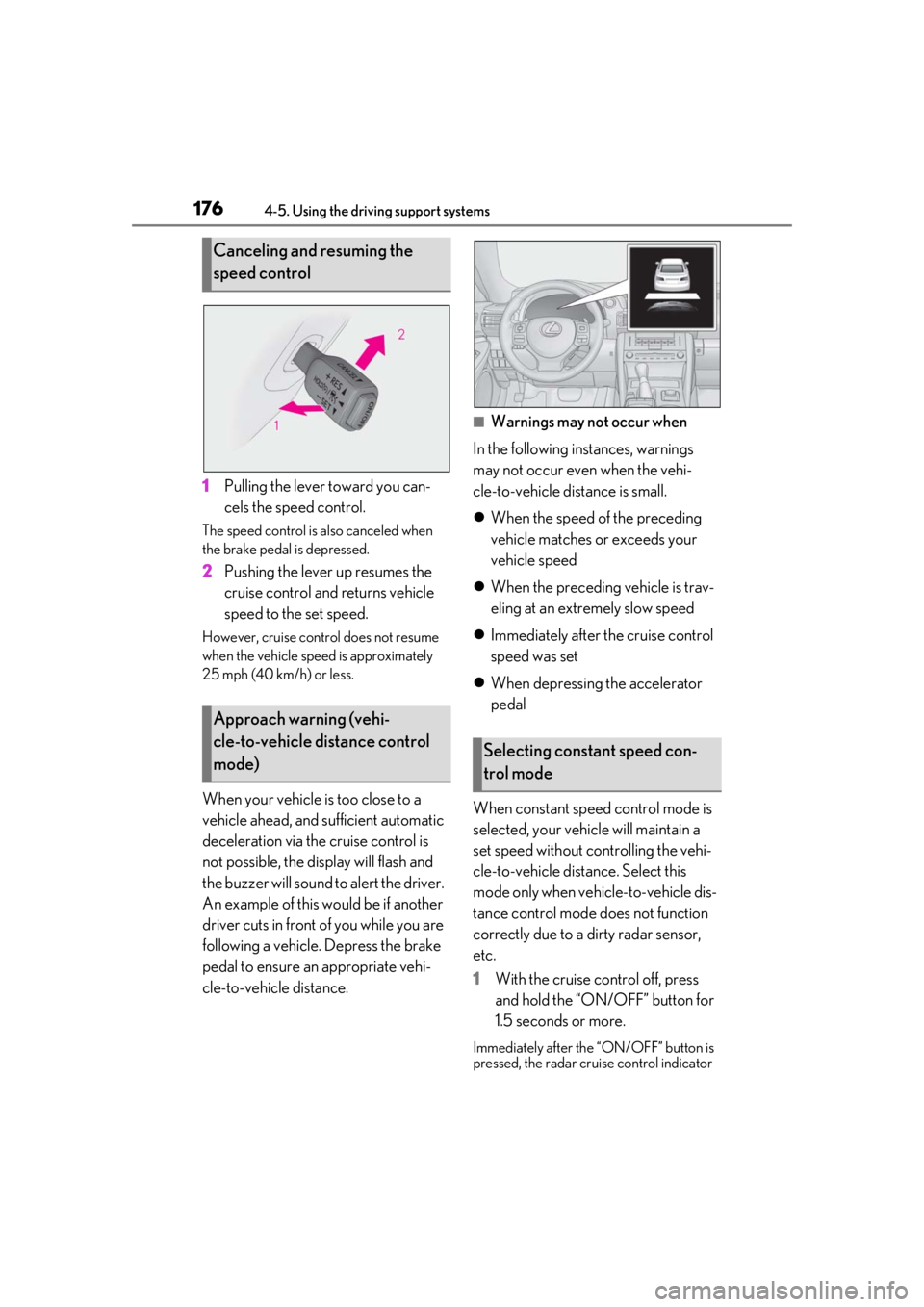
1Pulling the lever toward you can-
cels the speed control.
The speed control is also canceled when
the brake pedal is depressed.
2Pushing the lever up resumes the
cruise control and returns vehicle
speed to the set speed.
However, cruise control does not resume
when the vehicle speed is approximately
25 mph (40 km/h) or less.
When your vehicle is too close to a
vehicle ahead, and sufficient automatic
deceleration via the cruise control is
not possible, the display will flash and
the buzzer will sound to alert the driver.
An example of this would be if another
driver cuts in front of you while you are
following a vehicle. Depress the brake
pedal to ensure an appropriate vehi-
cle-to-vehicle distance.
■Warnings may not occur when
In the following instances, warnings
may not occur even when the vehi-
cle-to-vehicle distance is small.
When the speed of the preceding
vehicle matches or exceeds your
vehicle speed
When the preceding vehicle is trav-
eling at an extremely slow speed
Immediately after the cruise control
speed was set
When depressing the accelerator
pedal
When constant speed control mode is
selected, your vehicle will maintain a
set speed without controlling the vehi-
cle-to-vehicle distance. Select this
mode only when vehicle-to-vehicle dis-
tance control mode does not function
correctly due to a dirty radar sensor,
etc.
1 With the cruise control off, press
and hold the “ON/OFF” button for
1.5 seconds or more.
Immediately after the “ON/OFF” button is
pressed, the radar crui se control indicator
Canceling and resuming the
speed control
Approach warning (vehi-
cle-to-vehicle distance control
mode)
Selecting constant speed con-
trol mode
Page 179 of 408
1794-5. Using the driving support systems
4
Driving
*:If equipped
The Blind Spot Monitor is a system that
has 2 functions:
The BSM (Blind Spot Monitor) func-
tion
Assists the driver in making a deci-
sion when changing lanes
The RCTA (Rear Cross Traffic Alert)
function
Assists the driver when backing up
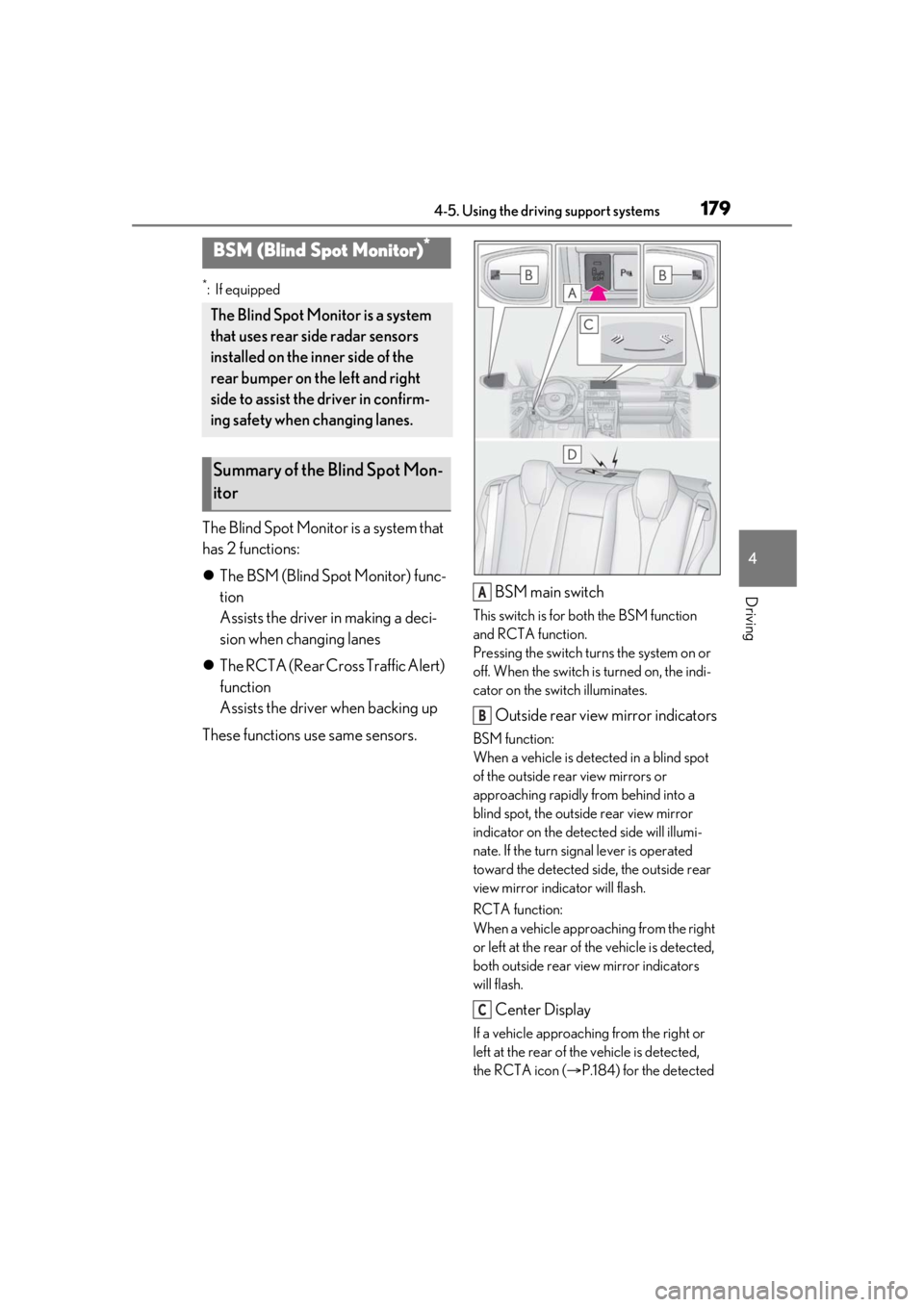
These functions use same sensors. BSM main switch
This switch is for both the BSM function
and RCTA function.
Pressing the switch turns the system on or
off. When the switch is turned on, the indi-
cator on the switch illuminates.
Outside rear view mirror indicators
BSM function:
When a vehicle is dete
cted in a blind spot
of the outside rear view mirrors or
approaching rapidly from behind into a
blind spot, the outside rear view mirror
indicator on the detected side will illumi-
nate. If the turn signal lever is operated
toward the detected side, the outside rear
view mirror indicator will flash.
RCTA function:
When a vehicle approaching from the right
or left at the rear of the vehicle is detected,
both outside rear view mirror indicators
will flash.
Center Display
If a vehicle approaching from the right or
left at the rear of th e vehicle is detected,
the RCTA icon ( P.184) for the detected
BSM (Blind Spot Monitor)*
The Blind Spot Monitor is a system
that uses rear side radar sensors
installed on the inner side of the
rear bumper on the left and right
side to assist the driver in confirm-
ing safety when changing lanes.
Summary of the Blind Spot Mon-
itor
A
B
C
Page 186 of 408

1864-5. Using the driving support systems
on the rear bumper
• When driving on a road surface that is wet with standing water during bad
weather, such as heavy rain, snow, or fog
• When multiple vehicles are approaching with only a small gap between each vehi-
cle
• When a vehicle is approaching at high speed
• When backing up on a slope with a sharp change in grade
• When backing out of a shallow angle parking spot
• Immediately after the BSM main switch is
turned on
• Immediately after the engine is started with the BSM main switch on
• When the sensors cannot detect a vehi-
cle due to obstructions
●Instances of the RCTA function unneces-
sarily detecting a vehicle and/or object
may increase in the following situations:
• When a vehicle passes by the side of your vehicle
• When the parking space faces a street
and vehicles are being driven on the
street
• When the distance between your vehicle and metal objects, such as a guardrail,
wall, sign, or parked vehicle, which may
reflect electrical waves toward the rear of
the vehicle, is short
Page 188 of 408
1884-5. Using the driving support systems
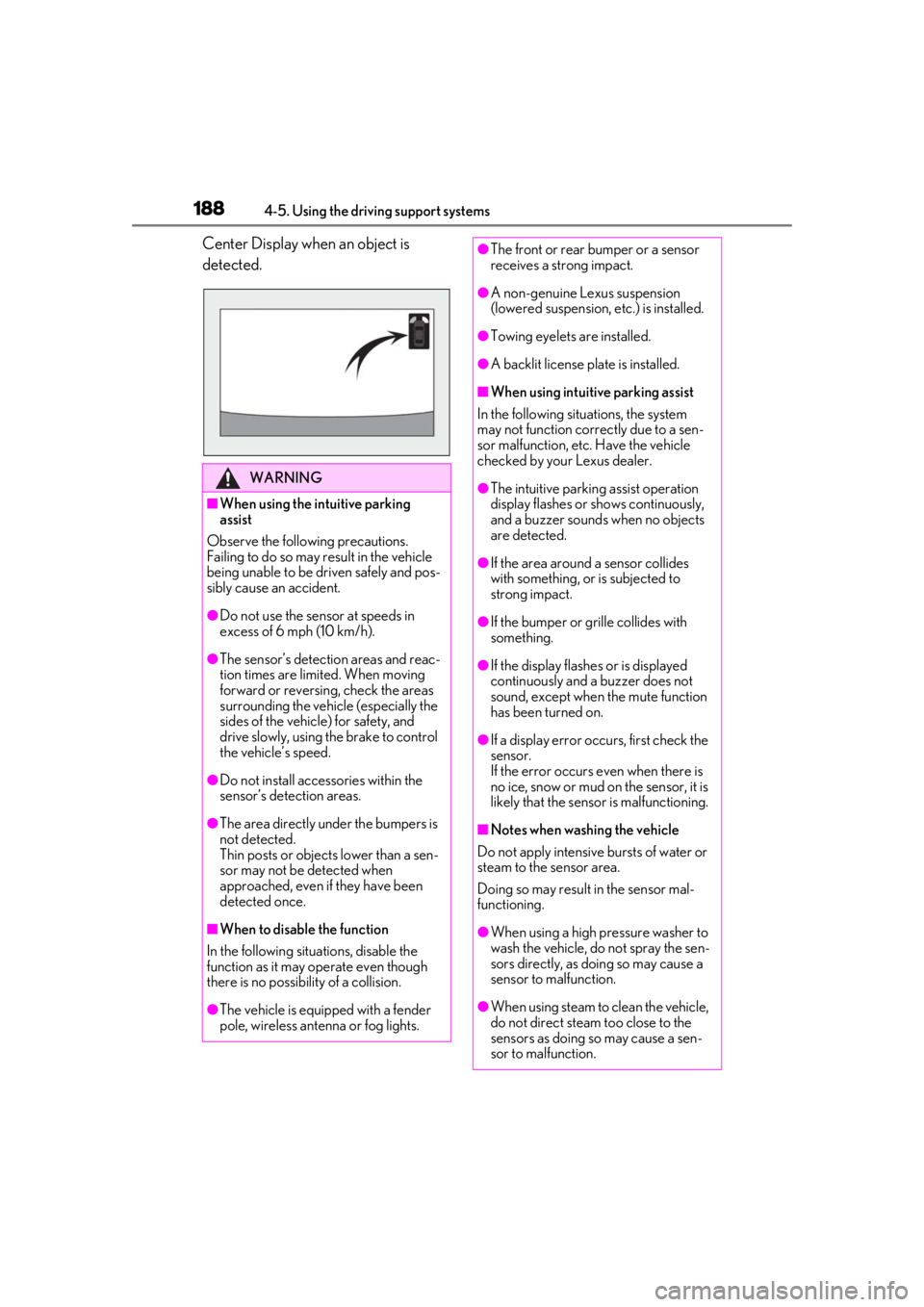
Center Display when an object is
detected.
WARNING
■When using the intuitive parking
assist
Observe the following precautions.
Failing to do so may result in the vehicle
being unable to be driven safely and pos-
sibly cause an accident.
●Do not use the sensor at speeds in
excess of 6 mph (10 km/h).
●The sensor’s detection areas and reac-
tion times are limited. When moving
forward or reversing, check the areas
surrounding the vehicle (especially the
sides of the vehicle) for safety, and
drive slowly, using the brake to control
the vehicle’s speed.
●Do not install accessories within the
sensor’s detection areas.
●The area directly under the bumpers is
not detected.
Thin posts or objects lower than a sen-
sor may not be detected when
approached, even if they have been
detected once.
■When to disable the function
In the following situations, disable the
function as it may operate even though
there is no possibility of a collision.
●The vehicle is equipped with a fender
pole, wireless antenna or fog lights.
●The front or rear bumper or a sensor
receives a strong impact.
●A non-genuine Lexus suspension
(lowered suspension, etc.) is installed.
●Towing eyelets are installed.
●A backlit license plate is installed.
■When using intuitive parking assist
In the following situations, the system
may not function correctly due to a sen-
sor malfunction, etc. Have the vehicle
checked by your Lexus dealer.
●The intuitive parking assist operation
display flashes or shows continuously,
and a buzzer sounds when no objects
are detected.
●If the area around a sensor collides
with something, or is subjected to
strong impact.
●If the bumper or grille collides with
something.
●If the display flashes or is displayed
continuously and a buzzer does not
sound, except when the mute function
has been turned on.
●If a display error oc curs, first check the
sensor.
If the error occurs even when there is
no ice, snow or mud on the sensor, it is
likely that the sensor is malfunctioning.
■Notes when washing the vehicle
Do not apply intensive bursts of water or
steam to the sensor area.
Doing so may result in the sensor mal-
functioning.
●When using a high pressure washer to
wash the vehicle, do not spray the sen-
sors directly, as doing so may cause a
sensor to malfunction.
●When using steam to clean the vehicle,
do not direct steam too close to the
sensors as doing so may cause a sen-
sor to malfunction.
Page 209 of 408
2095-1. Remote Touch/Display
5
Interior features
finger movements on the touchpad can
perform functions, such as scrolling list
screens.
Sub function button
When is displayed on the screen, a
function screen assigned to the screen can
be displayed.
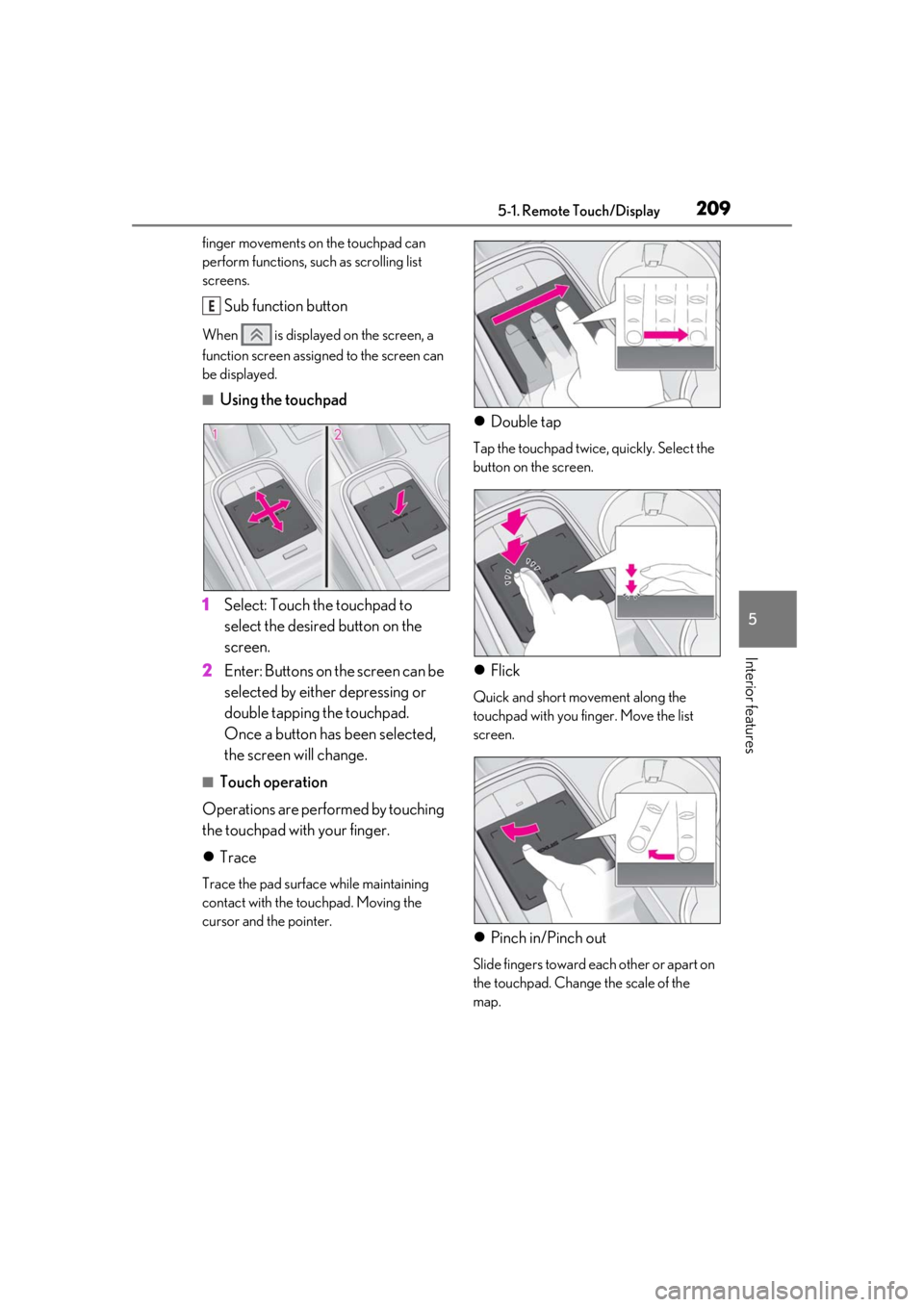
■Using the touchpad
1 Select: Touch the touchpad to
select the desired button on the
screen.
2 Enter: Buttons on the screen can be
selected by either depressing or
double tapping the touchpad.
Once a button has been selected,
the screen will change.
■Touch operation
Operations are performed by touching
the touchpad with your finger.
Trace
Trace the pad surface while maintaining
contact with the touchpad. Moving the
cursor and the pointer.
Double tap
Tap the touchpad twice, quickly. Select the
button on the screen.
Flick
Quick and short movement along the
touchpad with you finger. Move the list
screen.
Pinch in/Pinch out
Slide fingers toward e ach other or apart on
the touchpad. Change the scale of the
map.
E
Page 227 of 408
2275-4. Using the storage features
5
Interior features
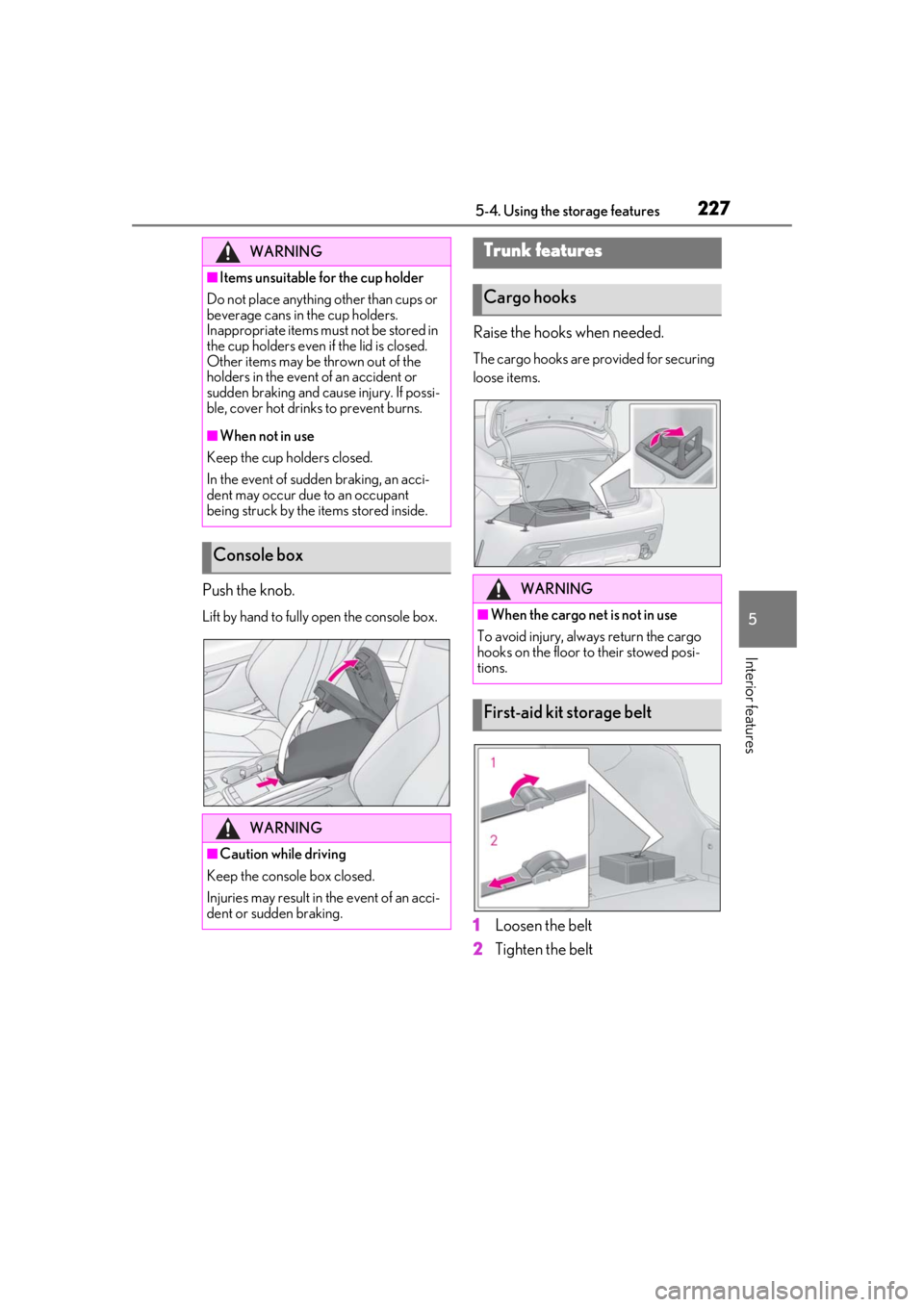
Push the knob.
Lift by hand to fully open the console box.
Raise the hooks when needed.
The cargo hooks are provided for securing
loose items.
1Loosen the belt
2 Tighten the belt
WARNING
■Items unsuitable for the cup holder
Do not place anything other than cups or
beverage cans in the cup holders.
Inappropriate items must not be stored in
the cup holders even if the lid is closed.
Other items may be thrown out of the
holders in the event of an accident or
sudden braking and cause injury. If possi-
ble, cover hot drinks to prevent burns.
■When not in use
Keep the cup holders closed.
In the event of sudden braking, an acci-
dent may occur due to an occupant
being struck by the items stored inside.
Console box
WARNING
■Caution while driving
Keep the console box closed.
Injuries may result in the event of an acci-
dent or sudden braking.
Trunk features
Cargo hooks
WARNING
■When the cargo net is not in use
To avoid injury, always return the cargo
hooks on the floor to their stowed posi-
tions.
First-aid kit storage belt
Page 236 of 408
2365-5. Using the other interior features
*:If equipped
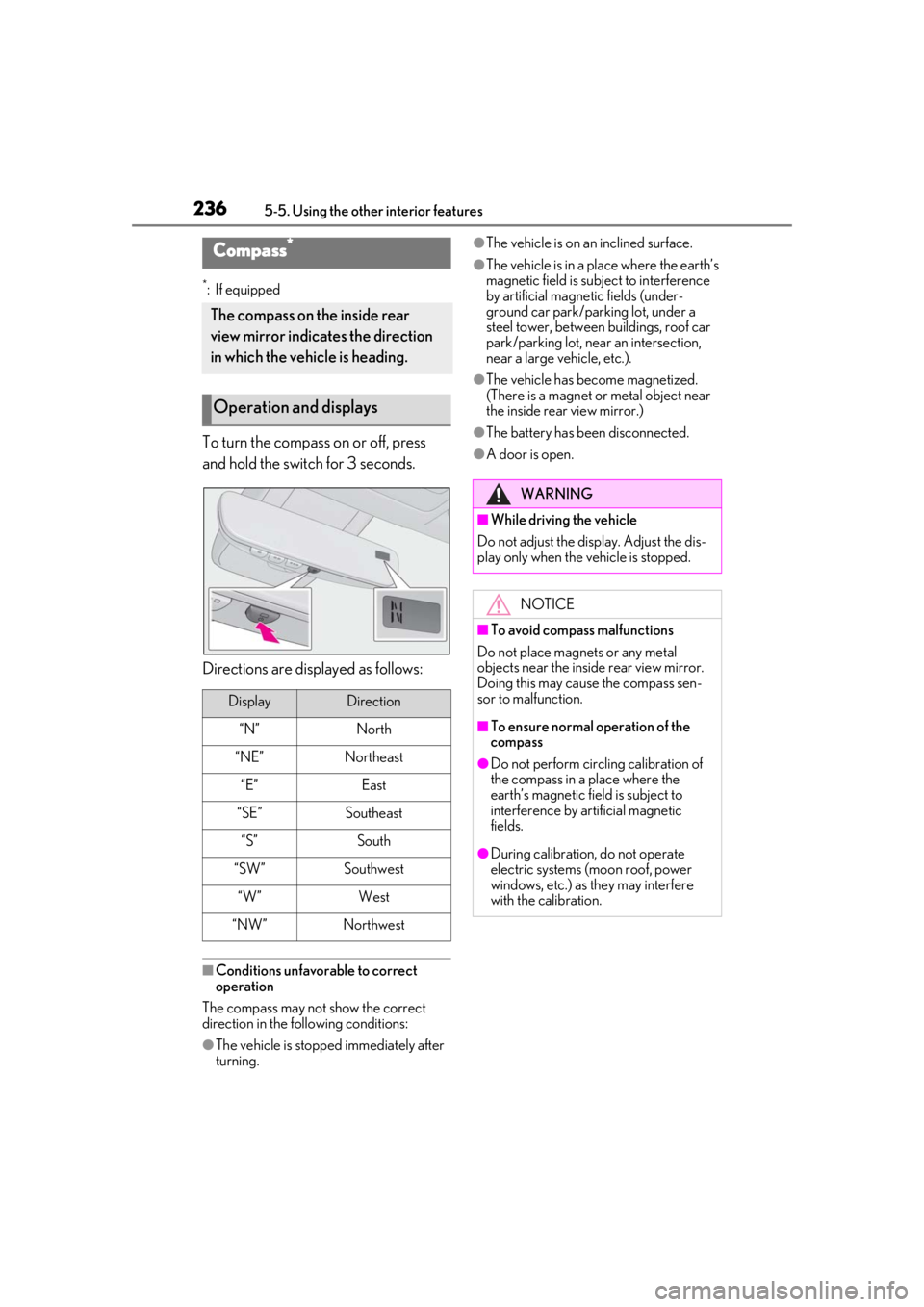
To turn the compass on or off, press
and hold the switch for 3 seconds.
Directions are displayed as follows:
■Conditions unfavorable to correct
operation
The compass may not show the correct
direction in the following conditions:
●The vehicle is stopped immediately after
turning.
●The vehicle is on an inclined surface.
●The vehicle is in a place where the earth’s
magnetic field is subject to interference
by artificial magnetic fields (under-
ground car park/parking lot, under a
steel tower, between buildings, roof car
park/parking lot, near an intersection,
near a large vehicle, etc.).
●The vehicle has become magnetized.
(There is a magnet or metal object near
the inside rear view mirror.)
●The battery has been disconnected.
●A door is open.
Compass*
The compass on the inside rear
view mirror indicates the direction
in which the vehicle is heading.
Operation and displays
DisplayDirection
“N”North
“NE”Northeast
“E”East
“SE”Southeast
“S”South
“SW”Southwest
“W”West
“NW”Northwest
WARNING
■While driving the vehicle
Do not adjust the display. Adjust the dis-
play only when the vehicle is stopped.
NOTICE
■To avoid compass malfunctions
Do not place magnets or any metal
objects near the inside rear view mirror.
Doing this may cause the compass sen-
sor to malfunction.
■To ensure normal operation of the
compass
●Do not perform circling calibration of
the compass in a place where the
earth’s magnetic field is subject to
interference by artificial magnetic
fields.
●During calibration, do not operate
electric systems (moon roof, power
windows, etc.) as they may interfere
with the calibration.
Page 262 of 408
2626-4. Do-it-yourself maintenance
6-4.Do-it-yourself maintenance
Do-it-yourself service pre-
cautions
If you perform maintenance by
yourself, be sure to follow the cor-
rect procedure as given in these
sections.
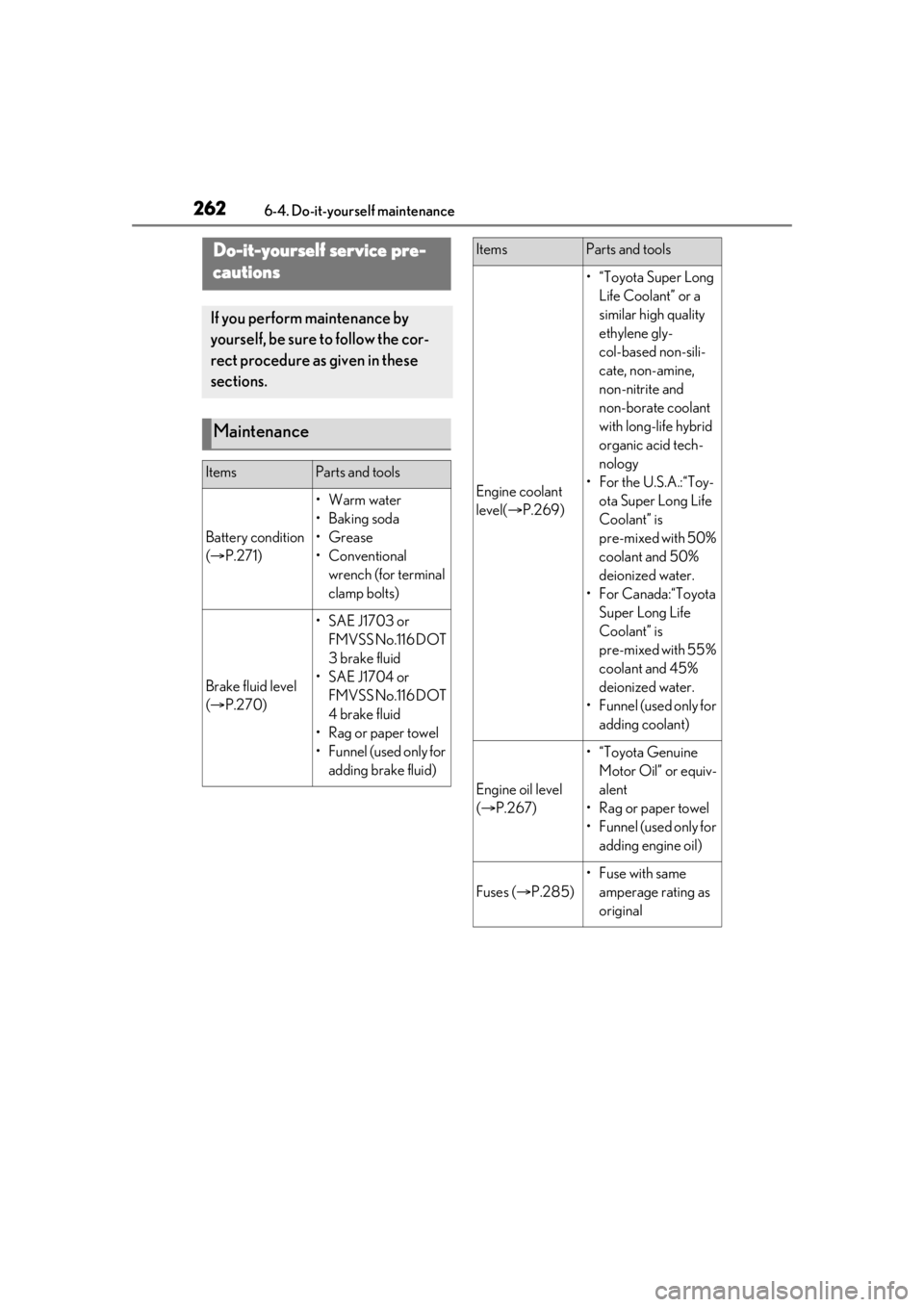
Maintenance
ItemsParts and tools
Battery condition
( P.271)
•Warm water
• Baking soda
•Grease
• Conventional
wrench (for terminal
clamp bolts)
Brake fluid level
( P.270)
• SAE J1703 or
FMVSS No.116 DOT
3 brake fluid
• SAE J1704 or FMVSS No.116 DOT
4 brake fluid
•Rag or paper towel
• Funnel (used only for adding brake fluid)
Engine coolant
level( P.269)
•“Toyota Super Long
Life Coolant” or a
similar high quality
ethylene gly-
col-based non-sili-
cate, non-amine,
non-nitrite and
non-borate coolant
with long-life hybrid
organic acid tech-
nology
• For the U.S.A.:“Toy- ota Super Long Life
Coolant” is
pre-mixed with 50%
coolant and 50%
deionized water.
•For Canada:“Toyota Super Long Life
Coolant” is
pre-mixed with 55%
coolant and 45%
deionized water.
•Funnel (used only for adding coolant)
Engine oil level
( P.267)
•“Toyota Genuine
Motor Oil” or equiv-
alent
• Rag or paper towel
•Funnel (used only for adding engine oil)
Fuses ( P.285)
•Fuse with same
amperage rating as
original
ItemsParts and tools
Page 275 of 408
2756-4. Do-it-yourself maintenance
6
Maintenance and care
Tires cannot be rotated.
Your vehicle is equipped with a tire
pressure warning system that uses tire
pressure warning valves and transmit-
ters to detect low tire inflation pressure
before serious problems arise.
The tire pressure detected by the
tire pressure warning system can be
displayed on the multi-information
display. ( P.73)
The illustration used is intended as an
example, and may differ from the image
that is actually displayed on the multi-infor-
mation display.
WARNING
■When inspecting or replacing tires
Observe the following precautions to
prevent accidents.
Failure to do so may cause damage to
parts of the drivetrain as well as danger-
ous handling characteristics, which may
lead to an accident resulting in death or
serious injury.
●Do not mix tires of different makes,
models or tread patterns.
Also, do not mix tires of remarkably
different treadwear.
●Do not use tire sizes other than those
recommended by Lexus.
●Do not mix differently constructed
tires (radial, bias-b elted or bias-ply
tires).
●Do not mix summer, all season and
snow tires.
●Do not use tires that have been used
on another vehicle.
Do not use tires if you do not know
how they were used previously.
●Vehicles with a spare tire: Do not tow if
your vehicle has a spare tire installed.
●Vehicles with an emergency tire punc-
ture repair kit: Do no t tow anything if a
tire that has been repaired using the
emergency tire puncture repair kit is
installed. The load on the tire may
cause unexpected damage to the tire.
NOTICE
■Low profile tires
Low profile tires may cause greater dam-
age than usual to the tire wheel when
sustaining impact from the road surface.
Therefore, pay attention to the following:
●Be sure to use proper tire inflation
pressure. If tires are under-inflated,
they may be damaged more severely.
●Avoid potholes, uneven pavement,
curbs and other road hazards. Failure
to do so may lead to severe tire and
wheel damage.
■If tire inflation pressure of each tire
becomes low while driving
Do not continue driving, or your tires
and/or wheels may be ruined.
■Driving on rough roads
Take particular care when driving on
roads with loose surfaces or potholes.
These conditions may cause losses in tire
inflation pressure, reducing the cushion-
ing ability of the tires. In addition, driving
on rough roads may cause damage to
the tires themselves, as well as the vehi-
cle’s wheels and body.
Tire rotation
Tire pressure warning system