ABS LEXUS RCF 2021 Owners Manual
[x] Cancel search | Manufacturer: LEXUS, Model Year: 2021, Model line: RCF, Model: LEXUS RCF 2021Pages: 408, PDF Size: 8.25 MB
Page 57 of 408
571-4. Theft deterrent system
1
For safety and security
1-4.Theft deterrent system
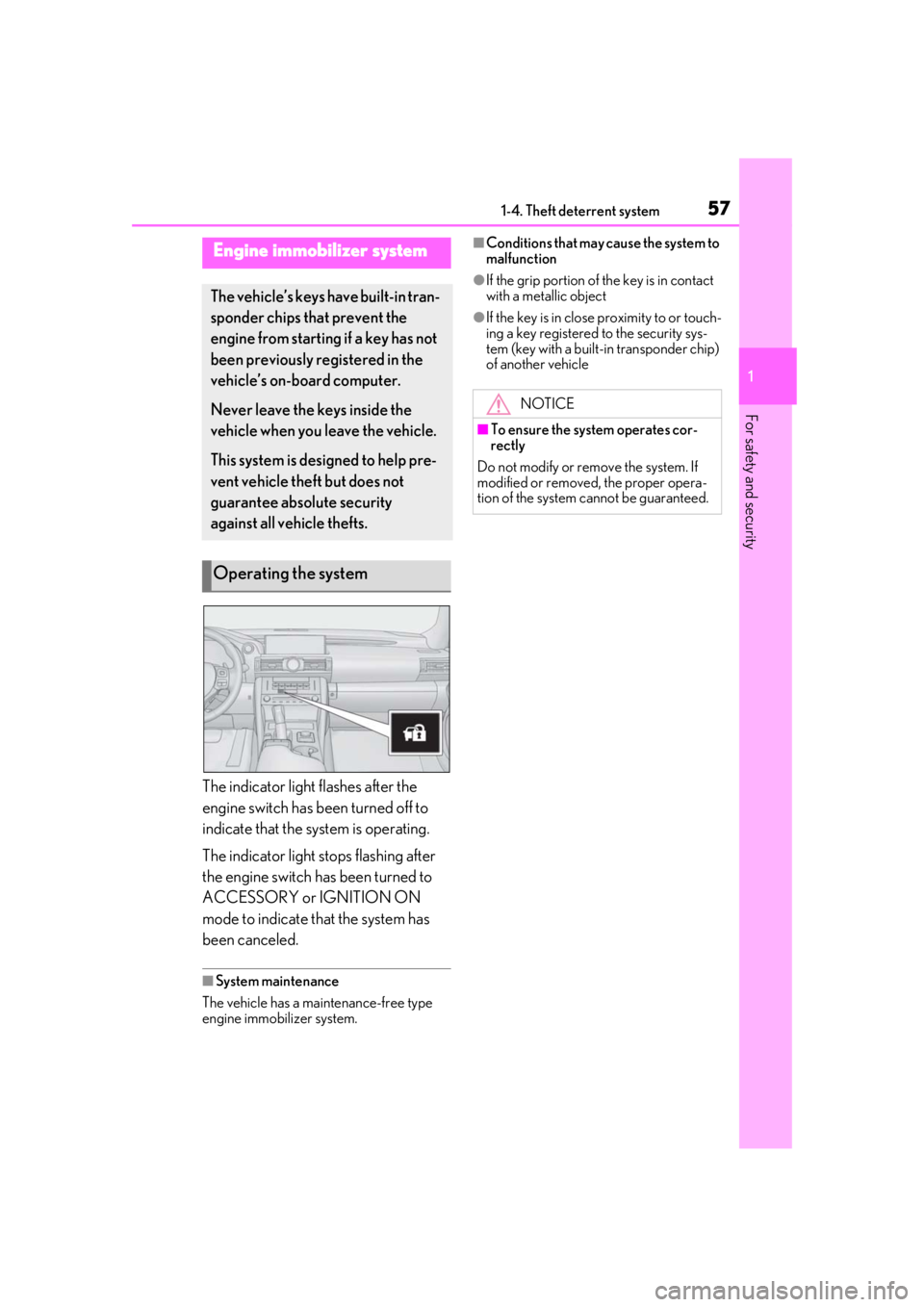
The indicator light flashes after the
engine switch has been turned off to
indicate that the system is operating.
The indicator light stops flashing after
the engine switch has been turned to
ACCESSORY or IGNITION ON
mode to indicate that the system has
been canceled.
■System maintenance
The vehicle has a maintenance-free type
engine immobilizer system.
■Conditions that may cause the system to
malfunction
●If the grip portion of the key is in contact
with a metallic object
●If the key is in close proximity to or touch-
ing a key registered to the security sys-
tem (key with a built-in transponder chip)
of another vehicle
Engine immobilizer system
The vehicle’s keys have built-in tran-
sponder chips that prevent the
engine from starting if a key has not
been previously registered in the
vehicle’s on-board computer.
Never leave the keys inside the
vehicle when you leave the vehicle.
This system is designed to help pre-
vent vehicle theft but does not
guarantee absolute security
against all vehicle thefts.
Operating the system
NOTICE
■To ensure the system operates cor-
rectly
Do not modify or remove the system. If
modified or removed, the proper opera-
tion of the system cannot be guaranteed.
Page 63 of 408
632-1. Instrument cluster
2
Vehicle status information and indicators
*1: These lights turn on when the engine switch is turned to IGNITION ON
mode to indicate that a system check is
being performed. They will turn off after
the engine is started, or after a few sec-
onds. There may be a malfunction in a
system if a light does not come on, or
turn off. Have the vehicle inspected by
your Lexus dealer.
*2: This light illuminates on the multi-infor-
mation display.
*3: This light illuminates on the center panel.
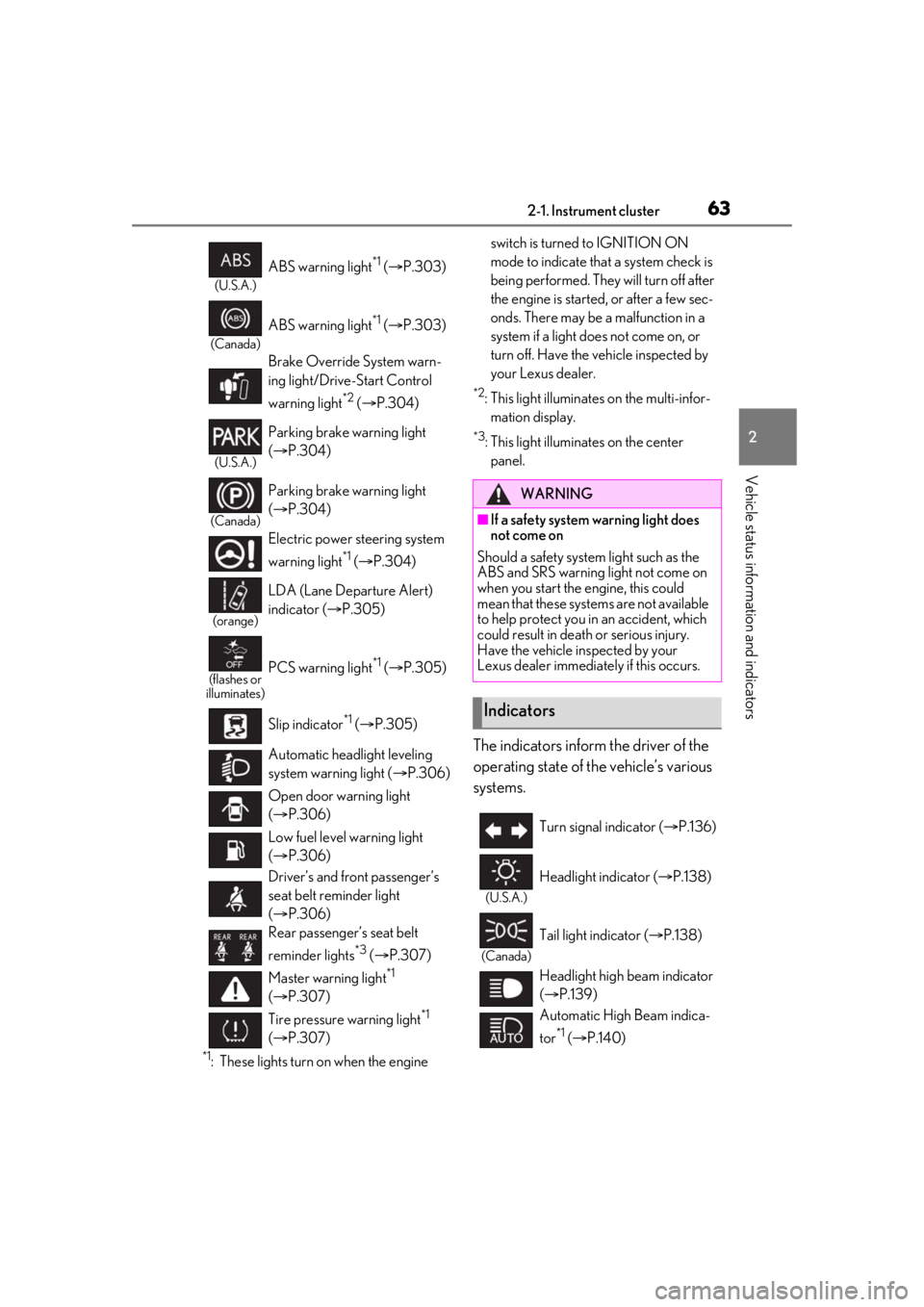
The indicators inform the driver of the
operating state of the vehicle’s various
systems.
(U.S.A.)
ABS warning light*1 ( P.303)
(Canada)
ABS warning light*1 ( P.303)
Brake Override System warn-
ing light/Drive-Start Control
warning light
*2 ( P.304)
(U.S.A.)
Parking brake warning light
( P.304)
(Canada)
Parking brake warning light
( P.304)
Electric power st eering system
warning light
*1 ( P.304)
(orange)
LDA (Lane Departure Alert)
indicator ( P.305)
(flashes or
illuminates)PCS warning light*1 ( P.305)
Slip indicator
*1 ( P.305)
Automatic headlight leveling
system warning light ( P.306)
Open door warning light
( P.306)
Low fuel level warning light
( P.306)
Driver’s and front passenger’s
seat belt reminder light
( P.306)
Rear passenger’s seat belt
reminder lights
*3 ( P.307)
Master warning light
*1
( P.307)
Tire pressure warning light
*1
( P.307)
WARNING
■If a safety system warning light does
not come on
Should a safety system light such as the
ABS and SRS warning light not come on
when you start the engine, this could
mean that these systems are not available
to help protect you in an accident, which
could result in death or serious injury.
Have the vehicle inspected by your
Lexus dealer immediately if this occurs.
Indicators
Turn signal indicator ( P.136)
(U.S.A.)
Headlight indicator ( P.138)
(Canada)
Tail light indicator ( P.138)
Headlight high beam indicator
( P.139)
Automatic High Beam indica-
tor
*1 ( P.140)
Page 157 of 408
1574-5. Using the driving support systems
4
Driving
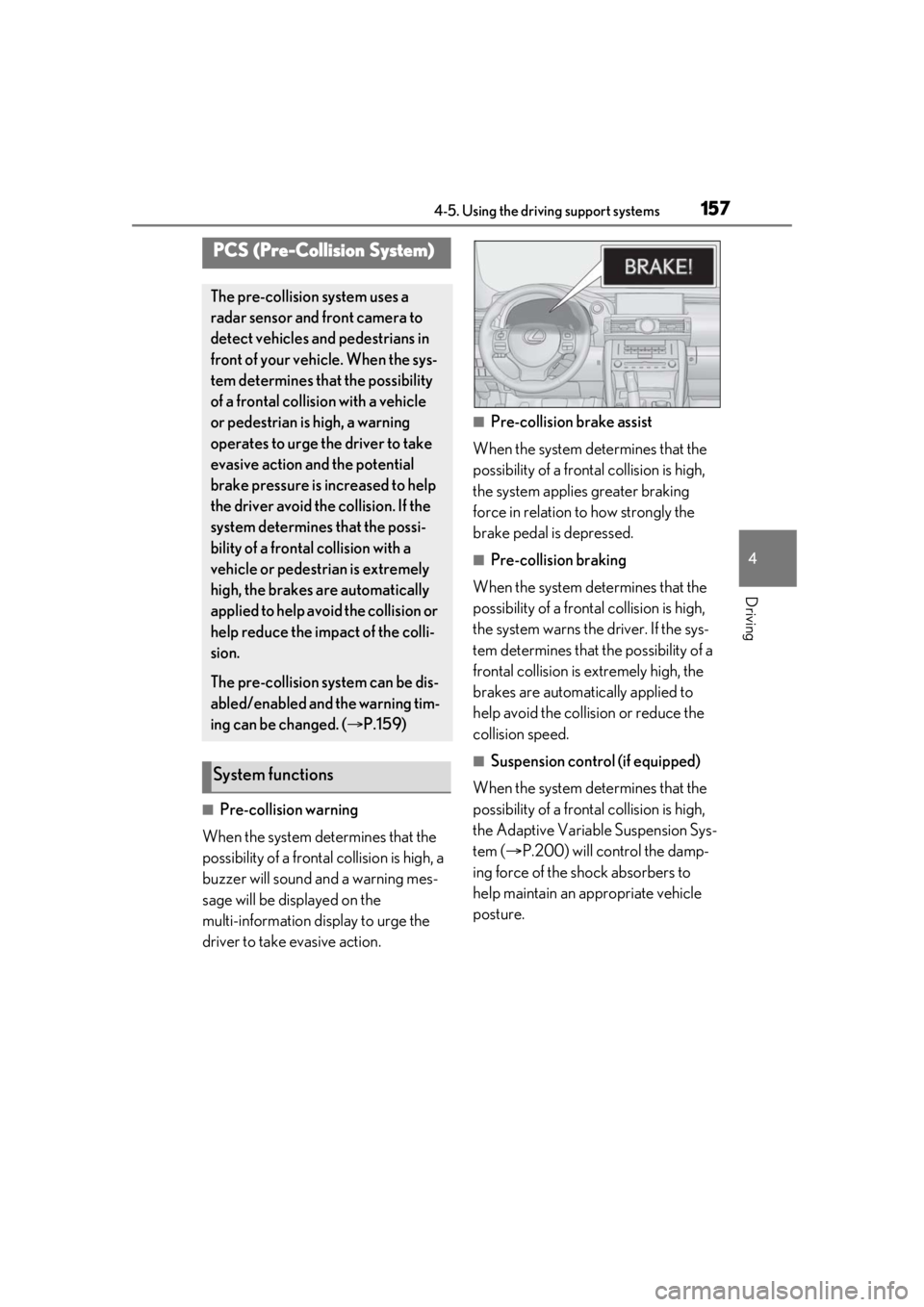
■Pre-collision warning
When the system determines that the
possibility of a frontal collision is high, a
buzzer will sound and a warning mes-
sage will be displayed on the
multi-information display to urge the
driver to take evasive action.
■Pre-collision brake assist
When the system determines that the
possibility of a frontal collision is high,
the system applies greater braking
force in relation to how strongly the
brake pedal is depressed.
■Pre-collision braking
When the system determines that the
possibility of a frontal collision is high,
the system warns the driver. If the sys-
tem determines that the possibility of a
frontal collision is extremely high, the
brakes are automatically applied to
help avoid the collision or reduce the
collision speed.
■Suspension control (if equipped)
When the system determines that the
possibility of a frontal collision is high,
the Adaptive Variable Suspension Sys-
tem ( P.200) will control the damp-
ing force of the shock absorbers to
help maintain an appropriate vehicle
posture.
PCS (Pre-Collision System)
The pre-collision system uses a
radar sensor and front camera to
detect vehicles and pedestrians in
front of your vehicle. When the sys-
tem determines that the possibility
of a frontal collision with a vehicle
or pedestrian is high, a warning
operates to urge the driver to take
evasive action and the potential
brake pressure is increased to help
the driver avoid the collision. If the
system determines that the possi-
bility of a frontal collision with a
vehicle or pedestrian is extremely
high, the brakes are automatically
applied to help avoid the collision or
help reduce the impact of the colli-
sion.
The pre-collision system can be dis-
abled/enabled and the warning tim-
ing can be changed. ( P.159)
System functions
Page 167 of 408

1674-5. Using the driving support systems
4
Driving
Lane departure alert function is operating.
Operation display of steering
wheel operation support
Indicates that steering wheel assistance of
the steering control function is operating.
Lane departure alert function dis-
play
Displayed when the mu lti-information dis-
play is switched to the driving assist system
information screen.
Inside of displayed white lines is
white
Indicates that the system is recognizing
white (yellow) lines. When the vehicle
departs from its lane , the white line dis-
played on the side the vehicle departs from
flashes orange.
Inside of displayed white lines is
black
Indicates that the system is not able to rec-
ognize white (yellow) lines or is temporar-
ily canceled.
■Operation conditions of each function
●Lane departure alert function
This function operates when all of the fol-
lowing conditions are met.
• LDA is turned on.
• Vehicle speed is approximately 32 mph (50 km/h) or more.
• System recognizes white (yellow) lines.
• Width of traffic lane is approximately 9.8 ft. (3 m) or more.
• Turn signal lever is not operated.
• Vehicle is driven on a straight road or around a gentle curve with a radius of
more than approximately 492 ft. (150 m).
• No system malfunctions are detected.
( P.169)
●Steering control function
This function operates when all of the fol-
lowing conditions are met in addition to the
operation conditions for the lane depar-
ture alert function.
• Setting for “Steering Assist” in of the multi-information display is set to “On”.
( P.73)
• Vehicle is not acceler ated or decelerated
by a certain amount or more.
• Steering wheel is not operated with a steering force level su itable for changing
lanes.
• ABS, VSC, TRAC and PCS are not oper- ating.
• TRAC or VSC is not turned off.
• Hands off steering wheel warning is not displayed. ( P.168)
●Vehicle sway warning function
This function operates when all of the fol-
lowing conditions are met.
• Setting for “Sway Warning” in of the multi-information display is set to “On”.
( P.73)
• Vehicle speed is approximately 32 mph
(50 km/h) or more.
• Width of traffic lane is approximately 9.8 ft. (3 m) or more.
• No system malfunctions are detected. ( P.169)
■Temporary cancellation of functions
When the operation conditions are no lon-
ger met, a function may be temporarily can-
B
C
Page 172 of 408
1724-5. Using the driving support systems
WARNING
■Cautions regarding the driving assist
systems
Observe the following precautions, as
there are limitations to the assistance
provided by the system.
Failure to do so may cause an accident
resulting in death or serious injury.
●Assisting the driver to measure follow-
ing distance
The dynamic radar cruise control is only
intended to help the driver in determin-
ing the following distance between the
driver’s own vehicle and a designated
vehicle traveling ahead. It is not a mecha-
nism that allows careless or inattentive
driving, and it is not a system that can
assist the driver in low-visibility condi-
tions. It is still necessary for driver to pay
close attention to the vehicle’s surround-
ings.
●Assisting the driver to judge proper
following distance
The dynamic radar cruise control deter-
mines whether the following distance
between the driver’s own vehicle and a
designated vehicle traveling ahead is
within a set range. It is not capable of
making any other type of judgement.
Therefore, it is abso lutely necessary for
the driver to remain vigilant and to deter-
mine whether or not there is a possibility
of danger in any given situation.
●Assisting the driver to operate the
vehicle
The dynamic radar cruise control has
limited capability to prevent or avoid a
collision with a vehicle traveling ahead.
Therefore, if there is ever any danger, the
driver must take immediate and direct
control of the vehicle and act appropri-
ately in order to ensure the safety of all
involved.
■Situations unsuitable for dynamic
radar cruise control
Do not use dynamic radar cruise control
in any of the following situations.
Doing so may result in inappropriate
speed control and could cause an acci-
dent resulting in death or serious injury.
●Roads where there are pedestrians,
cyclists, etc.
●In heavy traffic
●On roads with sharp bends
●On winding roads
●On slippery roads, such as those cov-
ered with rain, ice or snow
●On steep downhills, or where there
are sudden changes between sharp up
and down gradients
Vehicle speed may exceed the set
speed when driving down a steep hill.
●At entrances to freeways and highways
●When weather conditions are bad
enough that they may prevent the sen-
sors from detectin g correctly (fog,
snow, sandstorm, heavy rain, etc.)
●When there is rain, snow, etc. on the
front surface of th e radar sensor or
camera sensor
●In traffic conditions that require fre-
quent repeated acceleration and
deceleration
●During emergency towing
●When an approach warning buzzer is
heard often
Page 190 of 408
1904-5. Using the driving support systems
●The vehicle is approaching a tall or
curved curb.
●If objects draw too close to the sensor.
■Objects which may not be properly
detected
The shape of the object may prevent the
sensor from detecting it. Pay particular
attention to the following objects:
●Wires, fences, ropes, etc.
●Cotton, snow and other materials that
absorb sound waves
●Sharply-angled objects
●Low objects
●Tall objects with upper sections project-
ing outwards in the direction of your vehi-
cle
People may not be de tected if they are
wearing certain types of clothing.
■Customization
Settings can be changed. ( P.366)
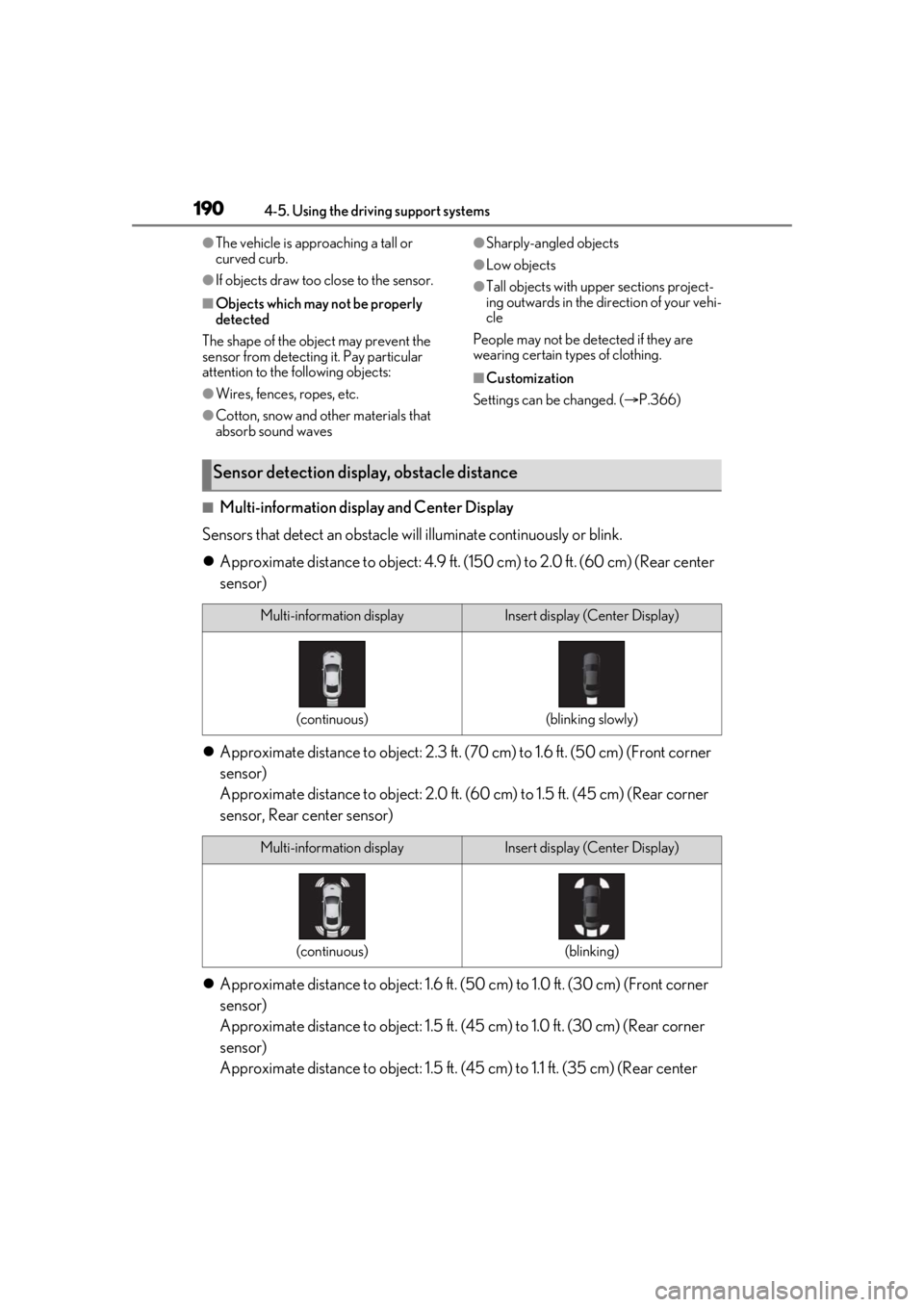
■Multi-information display and Center Display
Sensors that detect an obstacle will illuminate continuously or blink.
Approximate distance to object: 4.9 ft. (1 50 cm) to 2.0 ft. (60 cm) (Rear center
sensor)
Approximate distance to obje ct: 2.3 ft. (70 cm) to 1.6 ft. (50 cm) (Front corner
sensor)
Approximate distance to object: 2.0 ft. (60 cm) to 1.5 ft. (4 5 cm) (Rear corner
sensor, Rear center sensor)
Approximate distance to object: 1.6 ft. (5 0 cm) to 1.0 ft. (30 cm) (Front corner
sensor)
Approximate distance to object: 1.5 ft. (45 cm) to 1.0 ft. (30 cm) (Rear corner
sensor)
Approximate distance to object: 1.5 ft. (45 cm) to 1.1 ft. (35 cm) (Rear center
Sensor detection display, obstacle distance
Multi-information displayInsert display (Center Display)
(continuous)(blinking slowly)
Multi-information displayInsert display (Center Display)
(continuous)(blinking)
Page 199 of 408
1994-5. Using the driving support systems
4
Driving
■ABS (Anti-lock Brake System)
Helps to prevent wheel lock when the
brakes are applied suddenly, or if the
brakes are applied while driving on a
slippery road surface
■Brake assist
Generates an increased level of brak-
ing force after the brake pedal is
depressed when the system detects a
panic stop situation
■VSC (Vehicle Stability Control)
Helps the driver to control skidding
when swerving sudden ly or turning on
slippery road surfaces
■Enhanced VSC (Enhanced Vehi-
cle Stability Control)
Provides cooperative control of the
ABS, TRAC, VSC and EPS.
Helps to maintain directional stability
when swerving on slippery road sur-
faces by controlling steering perfor-
mance.
■TRAC (Traction Control)
Helps to maintain drive power and pre-
vent the drive wheels from spinning
when starting the vehicle or accelerat-
ing on slippery roads
■Hill-start assist control
Helps to reduce the backward move-
ment of the vehicle when starting on an
uphill
■EPS (Electric Power Steering)
Employs an electric motor to reduce
the amount of effort needed to turn the
steering wheel
■Adaptive Variable Suspension Sys-
tem
By independently controlling the
damping force of th e shock absorbers
for each of the 4 wheels according to
the road and driving conditions, this
system combines riding comfort with
superior vehicle stability, and helps
good vehicle posture.
■VDIM (Vehicle Dynamics Inte-
grated Management)
Provides integrated control of the
ABS, brake assist, TRAC, VSC,
hill-start assist control and EPS systems
Helps to maintain vehicle stability when
swerving on slippery road surfaces by
controlling the brakes, engine output
and steering assist.
■When the TRAC/VSC systems are
operating
The slip indicator light will flash while the
TRAC/VSC systems are operating.
Driving assist systems
To keep enhance driving safety and
performance, the following systems
operate automatically in response
to various driving situations. Be
aware, however, that these systems
are supplementary and should not
be relied upon too heavily when
operating the vehicle.
Summary of the driving assist
systems
Page 201 of 408
2014-5. Using the driving support systems
4
Driving
cator light continues to remain on, contact
your Lexus dealer.
■Operating conditions of hill-start assist
control
When the following four conditions are met,
the hill-start assist control will operate:
●The shift lever is in a position other than P
or N (when starting off forward/back-
ward on an upward incline).
●The vehicle is stopped.
●The accelerator pedal is not depressed.
●The parking brake is not engaged.
■Automatic system cancelation of
hill-start assist control
The hill-start assist control will turn off in any
of the following situations:
●The shift lever is moved to P or N.
●The accelerator pedal is depressed.
●The parking brake is engaged.
●Approximately 2 seconds elapse after
the brake pedal is released.
■Sounds and vibrations caused by the
ABS, brake assist, VSC, TRAC and
hill-start assist control systems
●A sound may be heard from the engine
compartment when the brake pedal is
depressed repeatedly, when the engine is
started or just after the vehicle begins to
move. This sound does not indicate that a
malfunction has occurred in any of these
systems.
●Any of the following conditions may
occur when the above systems are oper-
ating. None of these indicates that a mal-
function has occurred.
• Vibrations may be felt through the vehicle
body and steering.
• A motor sound may be heard after the vehicle comes to a stop.
• The brake pedal may pulsate slightly after the ABS is activated.
• The brake pedal may move down slightly after the ABS is activated.
■EPS operation sound
When the steering wheel is operated, a
motor sound (whirring sound) may be
heard. This does not indicate a malfunction.
■Reactivation of the TRAC/VSC systems
Even after the TRAC /VSC systems have
been turned off, turning the engine off and
then on again will automatically reactivate
the TRAC/VSC systems.
■Reactivation of the TRAC system linked
to vehicle speed
When only the TRAC system is turned off,
the TRAC system will turn on when vehicle
speed increases. Ho wever, when both
TRAC/VSC systems are turned off, the sys-
tems will not turn on even when vehicle
speed increases.
■Reduced effectiveness of the EPS sys-
tem
The effectiveness of the EPS system is
reduced to prevent the system from over-
heating when there is frequent steering
input over an extended period of time. The
steering wheel may feel heavy as a result.
Should this occur, re frain from excessive
steering input or stop the vehicle and turn
the engine off. The EPS system should
return to normal within 10 minutes.
WARNING
■The ABS does not operate effectively
when
●The limits of tire gripping performance
have been exceeded (such as exces-
sively worn tires on a snow covered
road).
●The vehicle hydroplanes while driving
at high speed on wet or slick roads.
■Stopping distance when the ABS is
operating may exceed that of normal
conditions
The ABS is not designed to shorten the
vehicle’s stopping di stance. Always main-
tain a safe distance from the vehicle in
front of you, especially in the following
situations:
●When driving on dirt, gravel or
snow-covered roads
●When driving over bumps in the road
Page 202 of 408
2024-5. Using the driving support systems
●When driving over roads with potholes
or uneven surfaces
■TRAC may not operate effectively
when
Directional control and power may not
be achievable while driving on slippery
road surfaces, even if the TRAC system is
operating. Drive the vehicle carefully in
conditions where stability and power
may be lost.
■Hill-start assist control does not oper-
ate effectively when
●Do not overly rely on hill-start assist
control. Hill-start assist control may
not operate effectively on steep
inclines and roads covered with ice.
●Unlike the parking brake, hill-start
assist control is not intended to hold
the vehicle stationary for an extended
period of time. Do not attempt to use
hill-start assist control to hold the vehi-
cle on an incline, as doing so may lead
to an accident.
■When the TRAC/VSC is activated
The slip indicator light flashes. Always
drive carefully. Re ckless driving may
cause an accident. Exercise particular
care when the indicator light flashes.
■When the TRAC/VSC systems are
turned off
Be especially careful and drive at a speed
appropriate to the road conditions. As
these are the system s to help ensure
vehicle stability and driving force, do not
turn the TRAC/VSC systems off unless
necessary.
■Expert mode precautions
●Do not use on public roads.
●Use only when the road conditions and
safety of the surrounding area can be
ensured.
WARNING
●Proper use of expert mode requires a
professional level of driving skill. When
using expert mode, always check the
road conditions and surrounding area
and drive more carefully than usual.
■Replacing tires
Make sure that all ti res are of the speci-
fied size, brand, tread pattern and total
load capacity. In addition, make sure that
the tires are inflated to the recom-
mended tire inflation pressure level.
The ABS, TRAC and VSC systems will
not function correctly if different tires are
installed on the vehicle.
Contact your Lexus dealer for further
information when replacing tires or
wheels.
■Handling of tires and the suspension
Using tires with any kind of problem or
modifying the suspensi on will affect the
driving assist systems, and may cause a
system to malfunction.
Page 270 of 408
2706-4. Do-it-yourself maintenance
If you cannot find a leak, have your Lexus
dealer test the cap and check for leaks in
the cooling system.
Check the radiator and condenser and
clear away any foreign objects.
If either of the above parts is extremely
dirty or you are not sure of their condi-
tion, have your vehicle inspected by
your Lexus dealer.
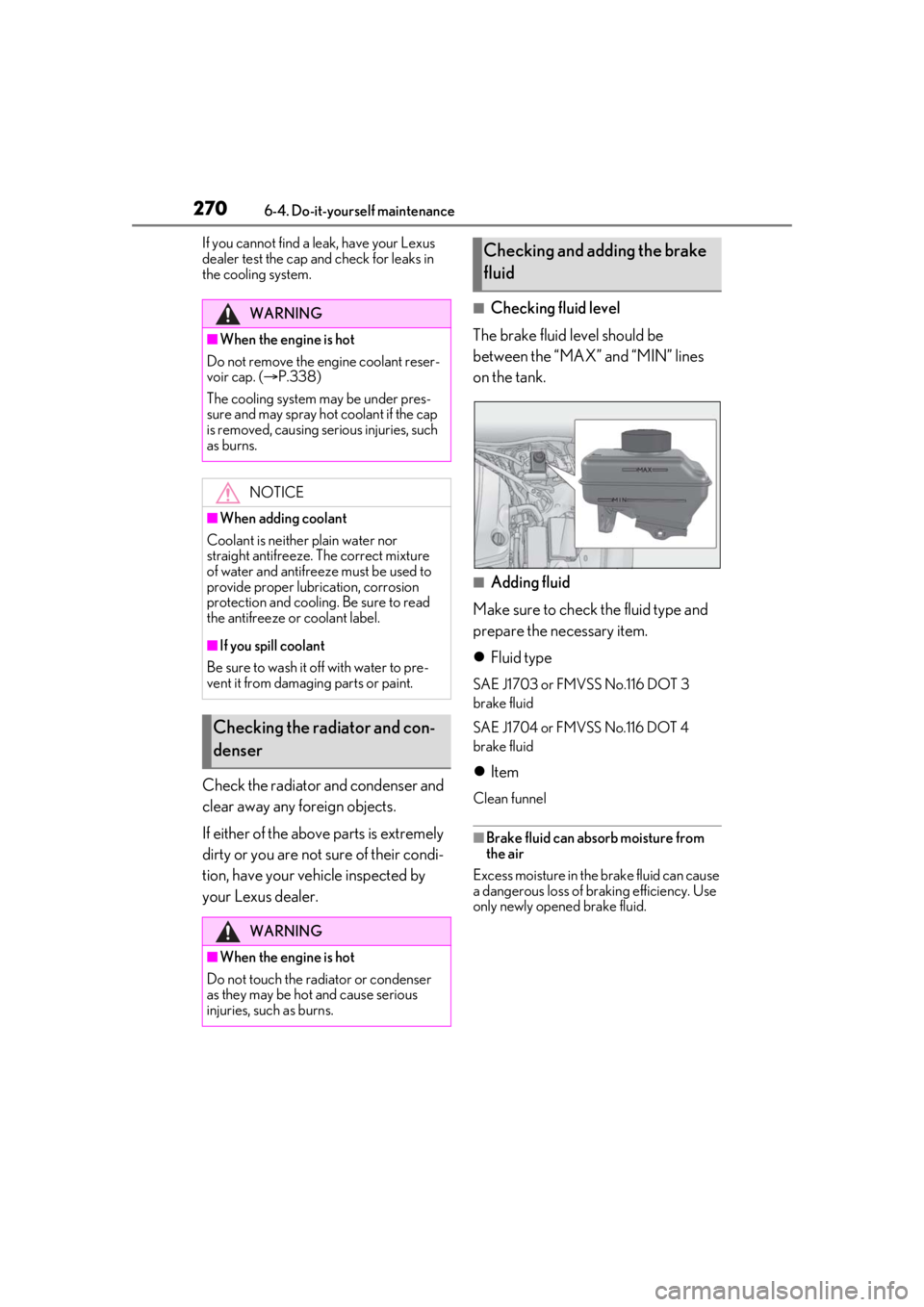
■Checking fluid level
The brake fluid level should be
between the “MAX” and “MIN” lines
on the tank.
■Adding fluid
Make sure to check the fluid type and
prepare the necessary item.
Fluid type
SAE J1703 or FMVSS No.116 DOT 3
brake fluid
SAE J1704 or FMVSS No.116 DOT 4
brake fluid
Item
Clean funnel
■Brake fluid can absorb moisture from
the air
Excess moisture in the brake fluid can cause
a dangerous loss of braking efficiency. Use
only newly opened brake fluid.
WARNING
■When the engine is hot
Do not remove the engine coolant reser-
voir cap. ( P.338)
The cooling system may be under pres-
sure and may spray hot coolant if the cap
is removed, causing serious injuries, such
as burns.
NOTICE
■When adding coolant
Coolant is neither plain water nor
straight antifreeze. The correct mixture
of water and antifreeze must be used to
provide proper lubrication, corrosion
protection and cooling. Be sure to read
the antifreeze or coolant label.
■If you spill coolant
Be sure to wash it off with water to pre-
vent it from damagi ng parts or paint.
Checking the radiator and con-
denser
WARNING
■When the engine is hot
Do not touch the radiator or condenser
as they may be hot and cause serious
injuries, such as burns.
Checking and adding the brake
fluid