light LEXUS RX200T 2017 Owners Manual
[x] Cancel search | Manufacturer: LEXUS, Model Year: 2017, Model line: RX200T, Model: LEXUS RX200T 2017Pages: 776, PDF Size: 44.51 MB
Page 286 of 776
2864-3. Operating the lights and wipers
RX350/RX200t_EE_OM48F32E
■The rear window wiper and washer can be operated when
The engine switch is in IGNITION ON mode.
■If no washer fluid sprays
Check that the washer nozzle is not blocked if there is washer fluid in the washer fluid
tank.
NOTICE
■When the rear window is dry
Do not use the wiper, as it may damage the rear window.
■When the washer fluid tank is empty
Do not operate the switch continually as the washer fluid pump may overheat.
■When a nozzle becomes blocked
In this case, contact any authorized Lexus de aler or repairer, or another duly qualified
and equipped professional. Do not try to clear it with a pin or other object. The nozzle will be damaged.
Page 289 of 776
2894-4. Refueling
4
Driving
RX350/RX200t_EE_OM48F32E
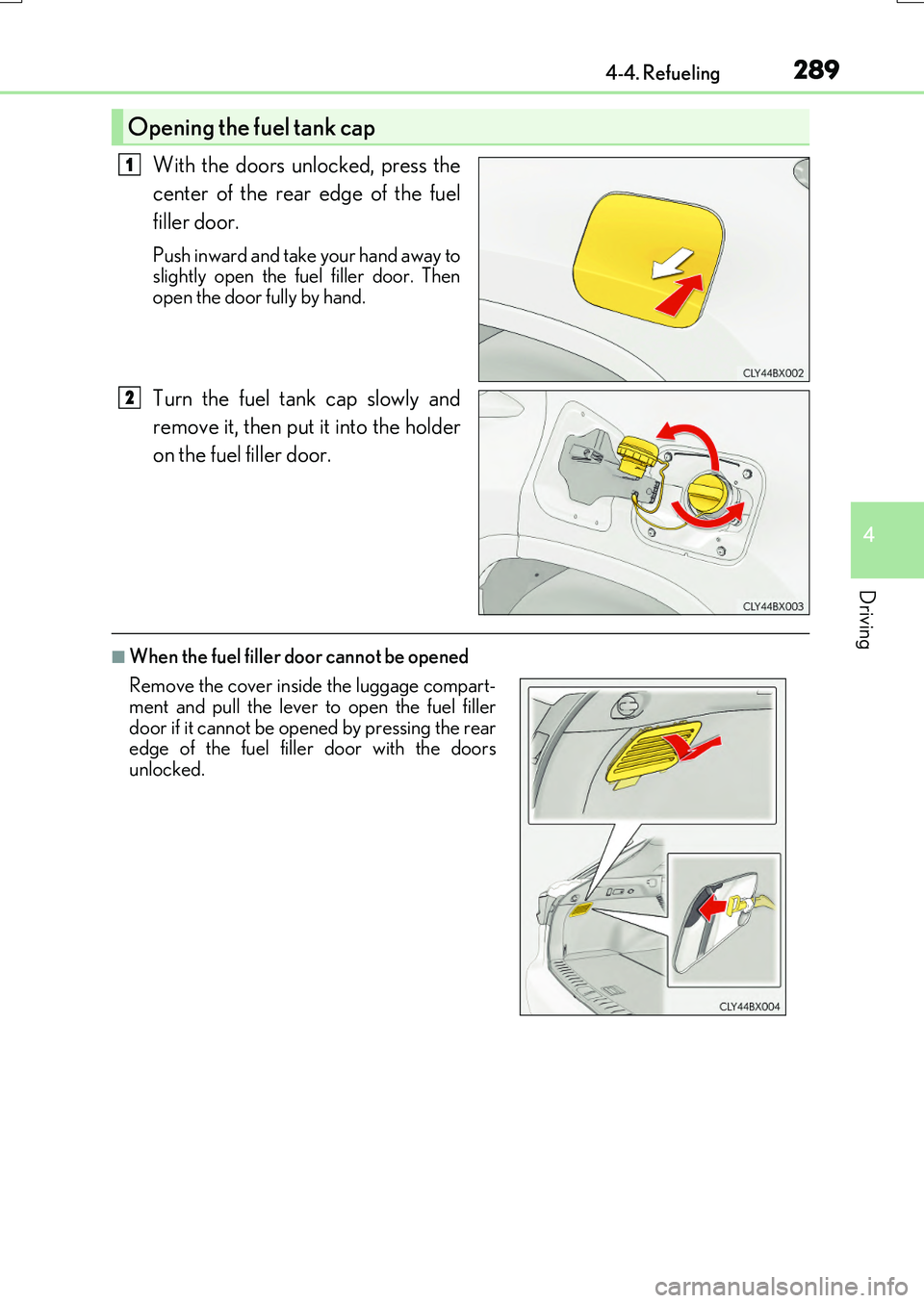
With the doors unlocked, press the
center of the rear edge of the fuel
filler door.
Push inward and take your hand away to slightly open the fuel filler door. Then
open the door fully by hand.
Turn the fuel tank cap slowly and
remove it, then put it into the holder
on the fuel filler door.
■When the fuel filler door cannot be opened
Opening the fuel tank cap
1
2
Remove the cover inside the luggage compart- ment and pull the lever to open the fuel filler
door if it cannot be opened by pressing the rear edge of the fuel filler door with the doorsunlocked.
Page 290 of 776
2904-4. Refueling
RX350/RX200t_EE_OM48F32E
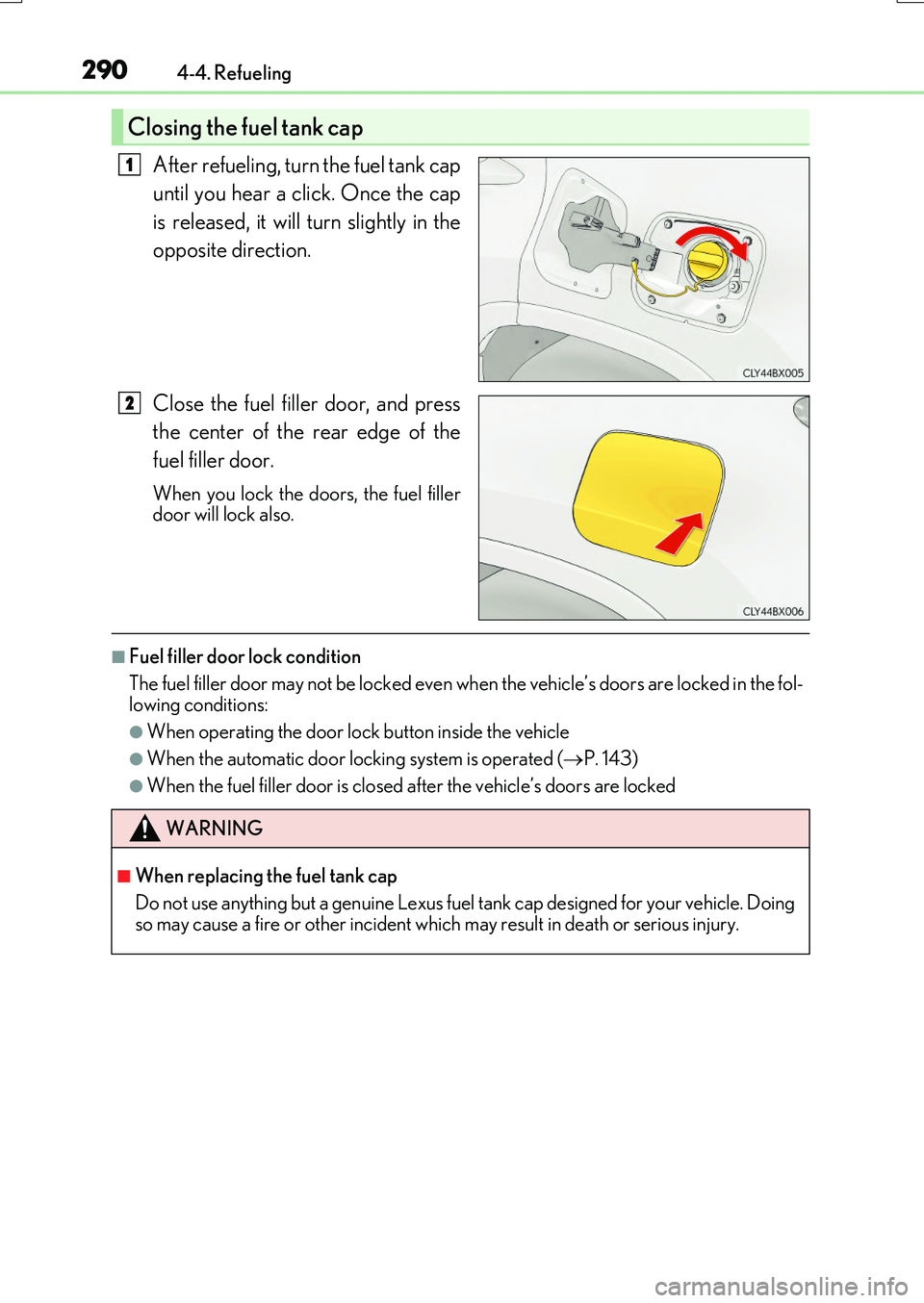
After refueling, turn the fuel tank cap
until you hear a click. Once the cap
is released, it will turn slightly in the
opposite direction.
Close the fuel filler door, and press
the center of the rear edge of the
fuel filler door.
When you lock the doors, the fuel filler door will lock also.
■Fuel filler door lock condition
The fuel filler door may not be locked even wh en the vehicle’s doors are locked in the fol- lowing conditions:
●When operating the door lock button inside the vehicle
●When the automatic door locking system is operated (P. 143)
●When the fuel filler door is closed after the vehicle’s doors are locked
Closing the fuel tank cap
1
2
WARNING
■When replacing the fuel tank cap
Do not use anything but a genuine Lexus fuel tank cap designed for your vehicle. Doing so may cause a fire or other incident which may result in death or serious injury.
Page 295 of 776
2954-5. Using the driving support systems
4
Driving
RX350/RX200t_EE_OM48F32E
WARNING
■To avoid malfunction of the camera sensor
Observe the following precautions.
Otherwise, the camera sensor may not oper ate properly, possibly leading to an acci-
dent resulting in death or serious injury.
●Keep the windshield clean at all times.
• If the windshield is dirty or covered with an oily film, water droplets, snow, etc.,
clear the windshield. • If a glass coating agent is applied to the windshield, it will still be necessary to use the windshield wipers to remove water dr oplets, etc. from the area of the wind-
shield in front of the camera sensor. • If the inner side of the windshield where th e camera sensor is installed is dirty, con- tact any authorized Lexus dealer or repairer, or another duly qualified and
equipped professional.
●If the part of the windshield in front of the camera sensor is fogged up or covered with condensation or ice, use the windshield de fogger to remove the fog, condensation or ice. ( P. 542)
●If water droplets cannot be properly removed from the area of the windshield in front of the camera sensor by the windshield wi pers, replace the wiper insert or wiper blade.
• To replace the wiper insert: P. 636 • If the wiper blades need to be replaced, contact any authorized Lexus dealer orrepairer, or another duly qualif ied and equipped professional.
●Do not attach window tinting to the windshield.
●Replace the windshield if it is damaged or cracked.
If the windshield needs to be replaced, contact any authorized Lexus dealer or repairer, or another duly qualified and equipped professional.
●Do not get the camera sensor wet.
●Do not allow bright lights to shine into the camera sensor.
●Do not dirty or damage the camera sensor. When cleaning the inside of the windshield, do not allow glass cleaner to contact the
lens. Also, do not touch the lens. If the lens is dirty or damaged, contact any authorized Lexus dealer or repairer, oranother duly qualified an d equipped professional.
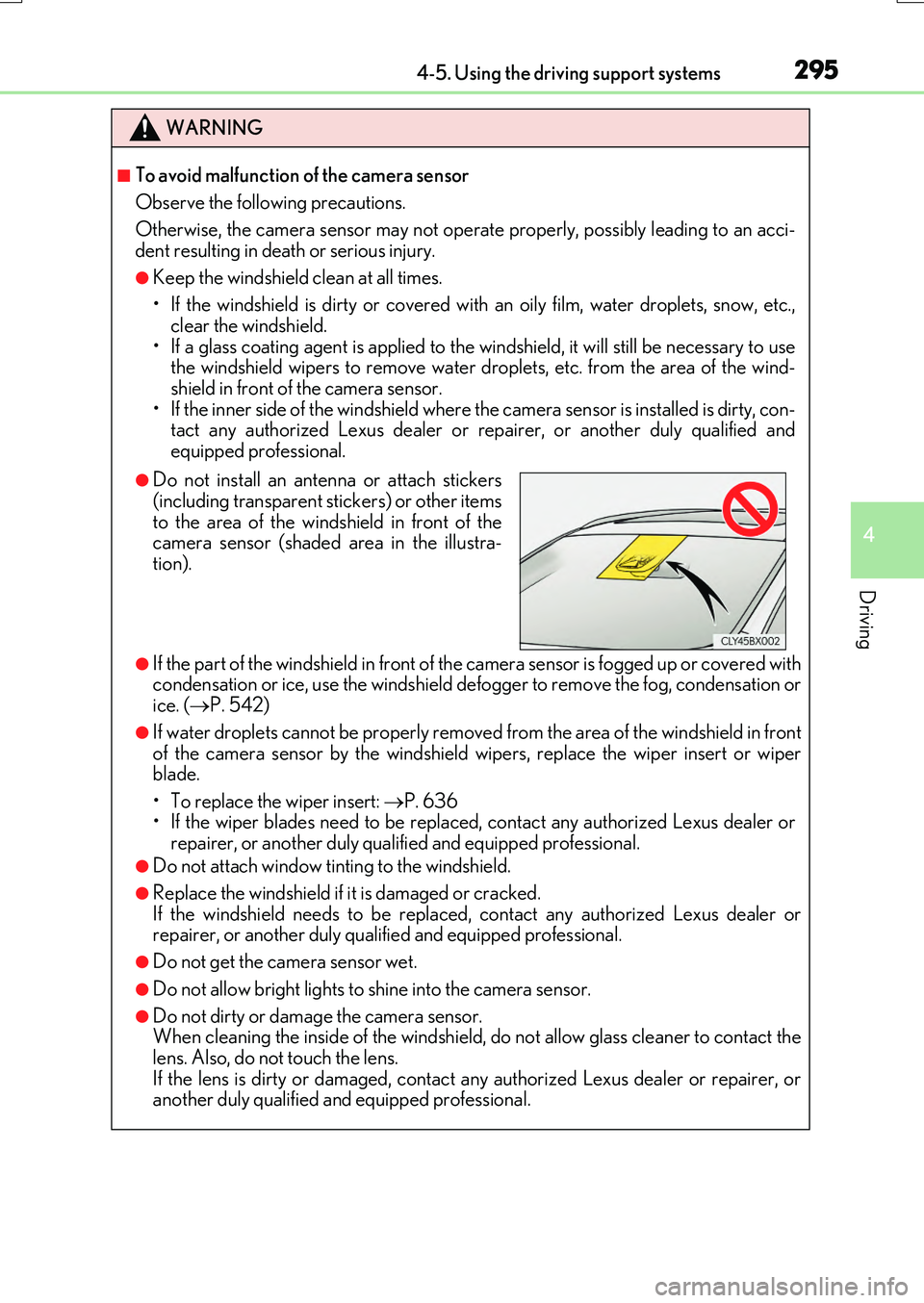
●Do not install an antenna or attach stickers
(including transparent stickers) or other items to the area of the windshield in front of thecamera sensor (shaded area in the illustra-
tion).
Page 296 of 776
2964-5. Using the driving support systems
RX350/RX200t_EE_OM48F32E
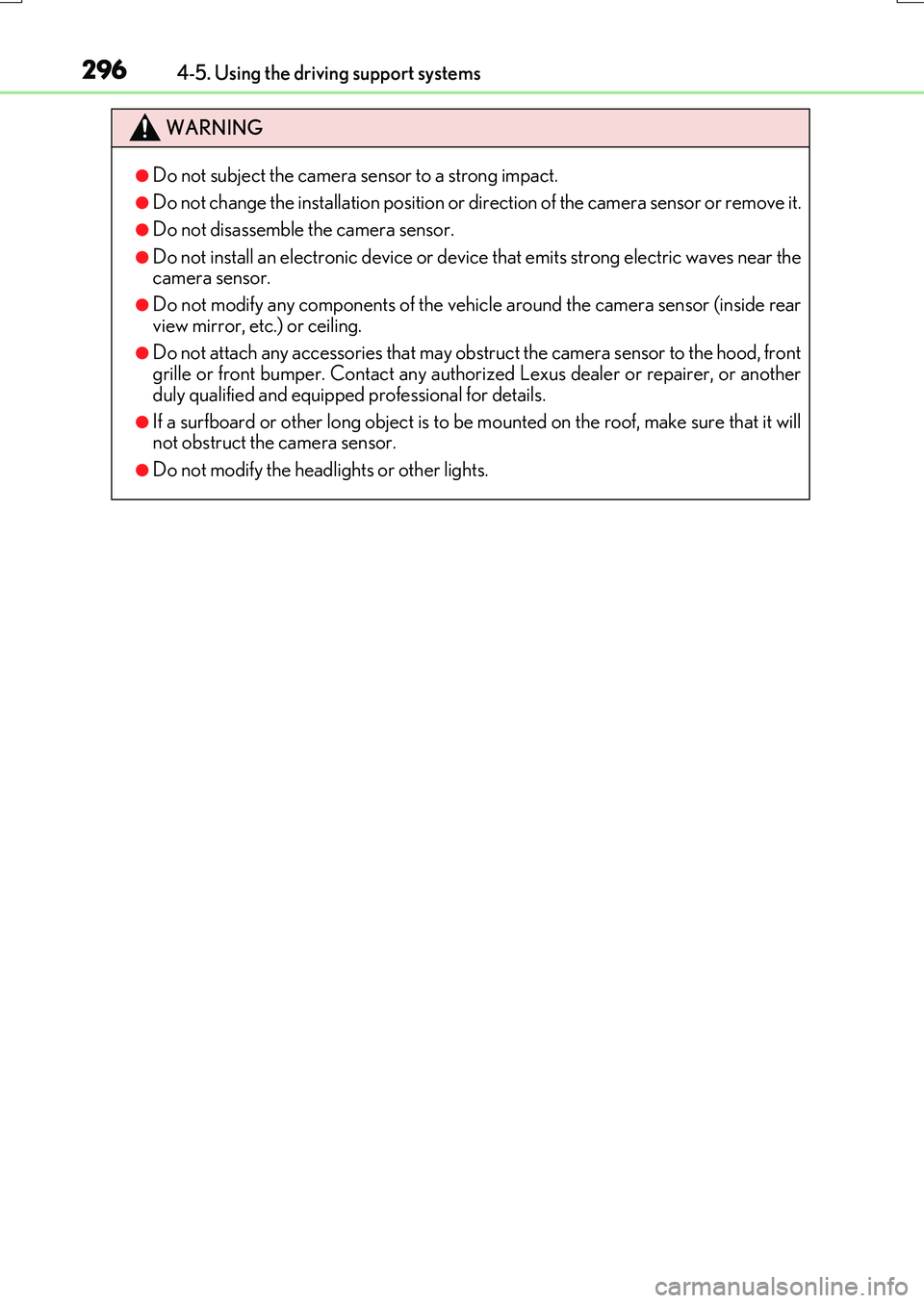
WARNING
●Do not subject the camera sensor to a strong impact.
●Do not change the installation position or direction of the camera sensor or remove it.
●Do not disassemble the camera sensor.
●Do not install an electronic device or device that emits strong electric waves near the camera sensor.
●Do not modify any components of the vehicl e around the camera sensor (inside rear
view mirror, etc.) or ceiling.
●Do not attach any accessories that may obstruct the camera sensor to the hood, front grille or front bumper. Contact any authoriz ed Lexus dealer or repairer, or another
duly qualified and equipped professional for details.
●If a surfboard or other long object is to be mounted on the roof, make sure that it will not obstruct the camera sensor.
●Do not modify the headlights or other lights.
Page 304 of 776
3044-5. Using the driving support systems
RX350/RX200t_EE_OM48F32E
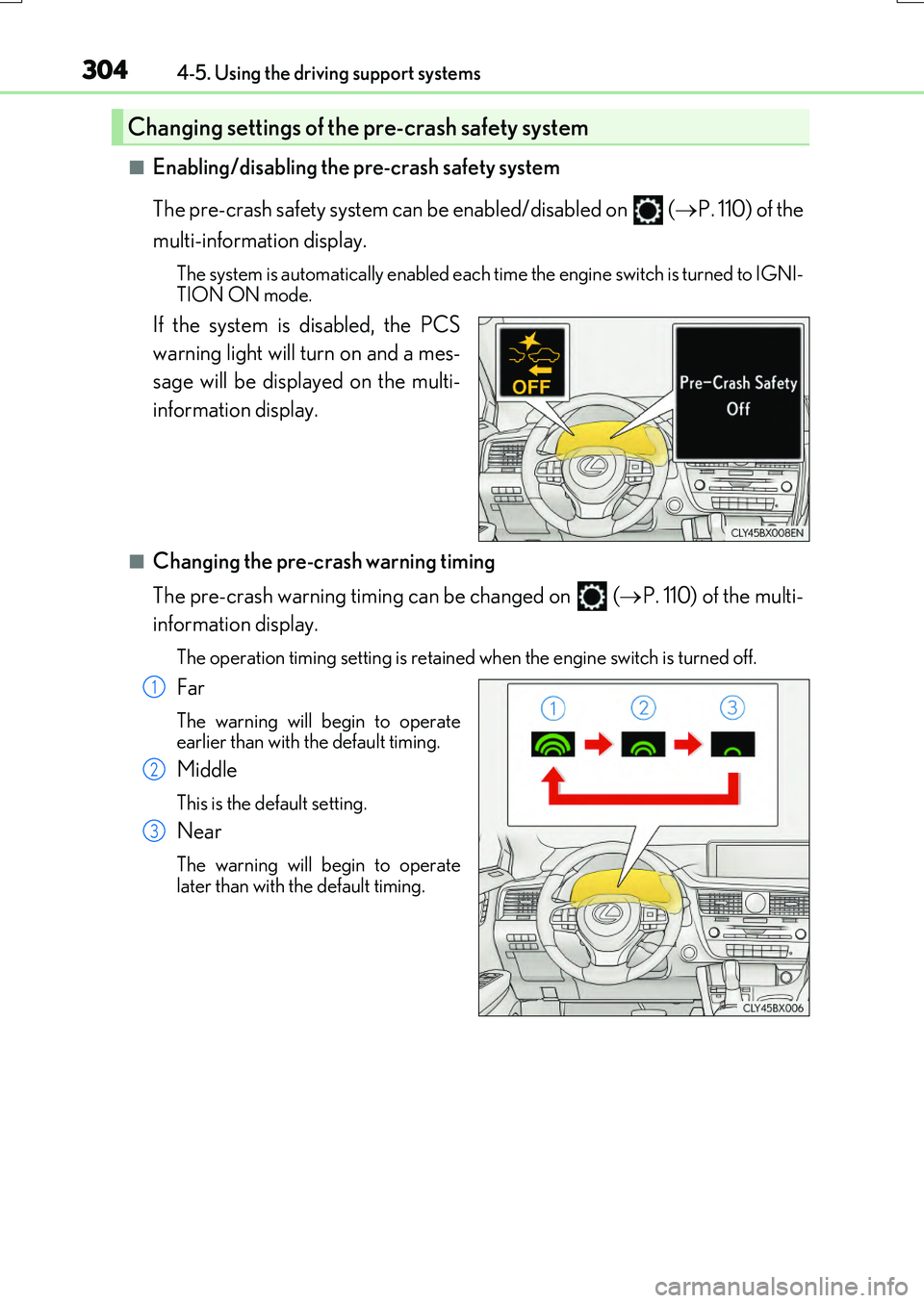
■Enabling/disabling the pre-crash safety system
The pre-crash safety system can be enabled/disabled on ( P. 110) of the
multi-information display.
The system is automatically enabled each time the engine switch is turned to IGNI-
TION ON mode.
If the system is disabled, the PCS
warning light will turn on and a mes-
sage will be displayed on the multi-
information display.
■Changing the pre-crash warning timing
The pre-crash warning timing can be changed on (P. 110) of the multi-
information display.
The operation timing setting is retained when the engine switch is turned off.
Far
The warning will begin to operate
earlier than with the default timing.
Middle
This is the default setting.
Near
The warning will begin to operate
later than with the default timing.
Changing settings of the pre-crash safety system
1
2
3
Page 305 of 776
3054-5. Using the driving support systems
4
Driving
RX350/RX200t_EE_OM48F32E
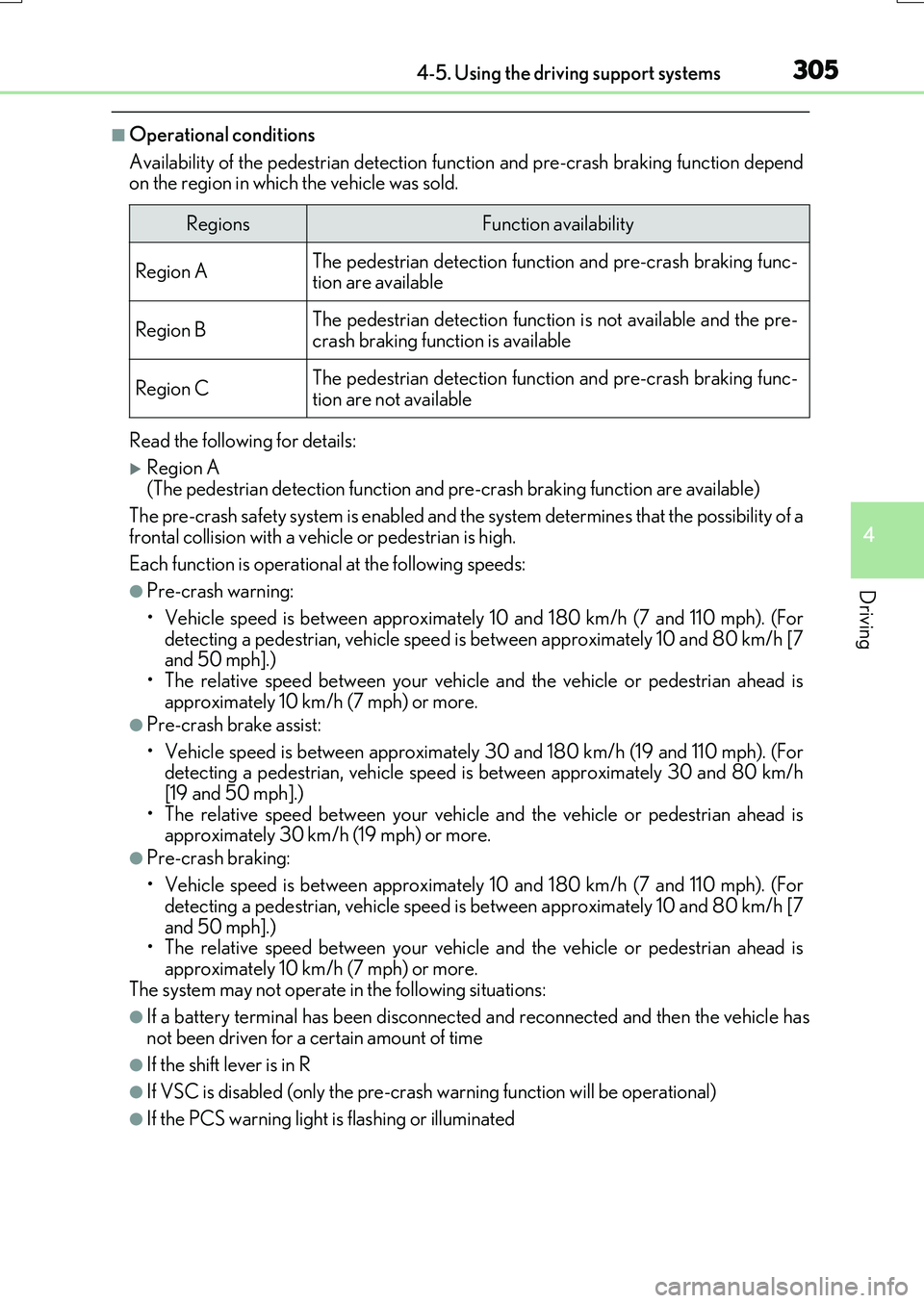
■Operational conditions
Availability of the pedestrian detection func tion and pre-crash braking function depend on the region in which the vehicle was sold.
Read the following for details:
Region A (The pedestrian detection function and pre-crash braking function are available)
The pre-crash safety system is enabled and th e system determines that the possibility of a
frontal collision with a vehicle or pedestrian is high.
Each function is operational at the following speeds:
●Pre-crash warning:
• Vehicle speed is between approximately 10 and 180 km/h (7 and 110 mph). (For detecting a pedestrian, vehicle speed is between approximately 10 and 80 km/h [7and 50 mph].)
• The relative speed between your vehicle and the vehicle or pedestrian ahead is approximately 10 km/h (7 mph) or more.
●Pre-crash brake assist:
• Vehicle speed is between approximately 30 and 180 km/h (19 and 110 mph). (For detecting a pedestrian, vehicle speed is between approximately 30 and 80 km/h
[19 and 50 mph].) • The relative speed between your vehicle and the vehicle or pedestrian ahead isapproximately 30 km/h (19 mph) or more.
●Pre-crash braking:
• Vehicle speed is between approximately 10 and 180 km/h (7 and 110 mph). (For
detecting a pedestrian, vehicle speed is between approximately 10 and 80 km/h [7 and 50 mph].)• The relative speed between your vehicle and the vehicle or pedestrian ahead is
approximately 10 km/h (7 mph) or more. The system may not operate in the following situations:
●If a battery terminal has been disconnected and reconnected and then the vehicle has
not been driven for a certain amount of time
●If the shift lever is in R
●If VSC is disabled (only the pre-cras h warning function will be operational)
●If the PCS warning light is flashing or illuminated
RegionsFunction availability
Region AThe pedestrian detection function and pre-crash braking func- tion are available
Region BThe pedestrian detection function is not available and the pre-crash braking function is available
Region CThe pedestrian detection function and pre-crash braking func-
tion are not available
Page 306 of 776
3064-5. Using the driving support systems
RX350/RX200t_EE_OM48F32E
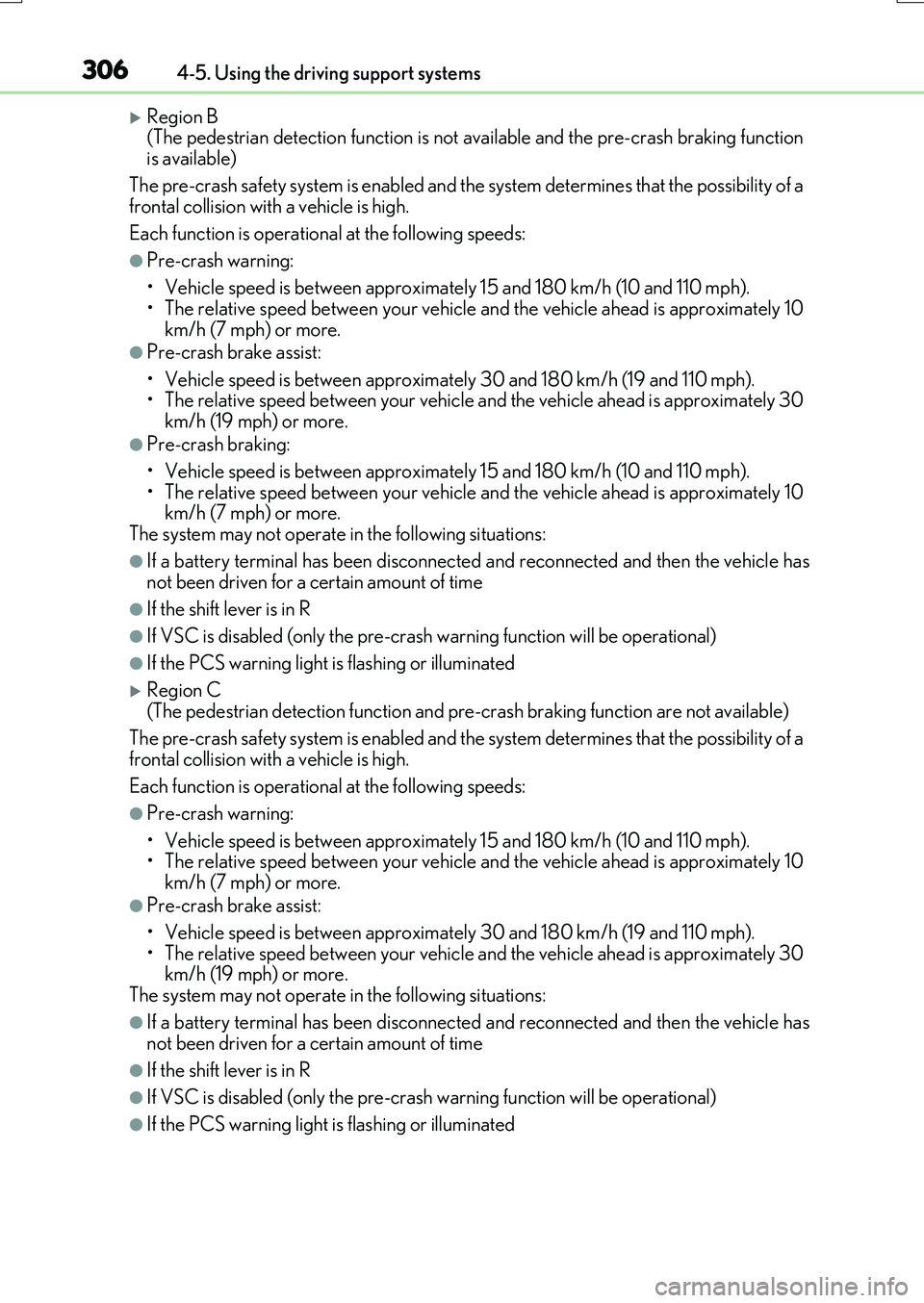
Region B (The pedestrian detection function is not available and the pre-crash braking functionis available)
The pre-crash safety system is enabled and th e system determines that the possibility of a frontal collision with a vehicle is high.
Each function is operational at the following speeds:
●Pre-crash warning:
• Vehicle speed is between approximately 15 and 180 km/h (10 and 110 mph). • The relative speed between your vehicle and the vehicle ahead is approximately 10
km/h (7 mph) or more.
●Pre-crash brake assist:
• Vehicle speed is between approximately 30 and 180 km/h (19 and 110 mph). • The relative speed between your vehicle and the vehicle ahead is approximately 30km/h (19 mph) or more.
●Pre-crash braking:
• Vehicle speed is between approximately 15 and 180 km/h (10 and 110 mph).
• The relative speed between your vehicle and the vehicle ahead is approximately 10 km/h (7 mph) or more.The system may not operate in the following situations:
●If a battery terminal has been disconnected and reconnected and then the vehicle hasnot been driven for a certain amount of time
●If the shift lever is in R
●If VSC is disabled (only the pre-cras h warning function will be operational)
●If the PCS warning light is flashing or illuminated
Region C
(The pedestrian detection function and pre-crash braking function are not available)
The pre-crash safety system is enabled and th e system determines that the possibility of a
frontal collision with a vehicle is high.
Each function is operational at the following speeds:
●Pre-crash warning:
• Vehicle speed is between approximately 15 and 180 km/h (10 and 110 mph). • The relative speed between your vehicle and the vehicle ahead is approximately 10km/h (7 mph) or more.
●Pre-crash brake assist:
• Vehicle speed is between approximately 30 and 180 km/h (19 and 110 mph).
• The relative speed between your vehicle and the vehicle ahead is approximately 30 km/h (19 mph) or more.The system may not operate in the following situations:
●If a battery terminal has been disconnected and reconnected and then the vehicle hasnot been driven for a certain amount of time
●If the shift lever is in R
●If VSC is disabled (only the pre-cras h warning function will be operational)
●If the PCS warning light is flashing or illuminated
Page 310 of 776
3104-5. Using the driving support systems
RX350/RX200t_EE_OM48F32E
■Situations in which the system may not operate properly
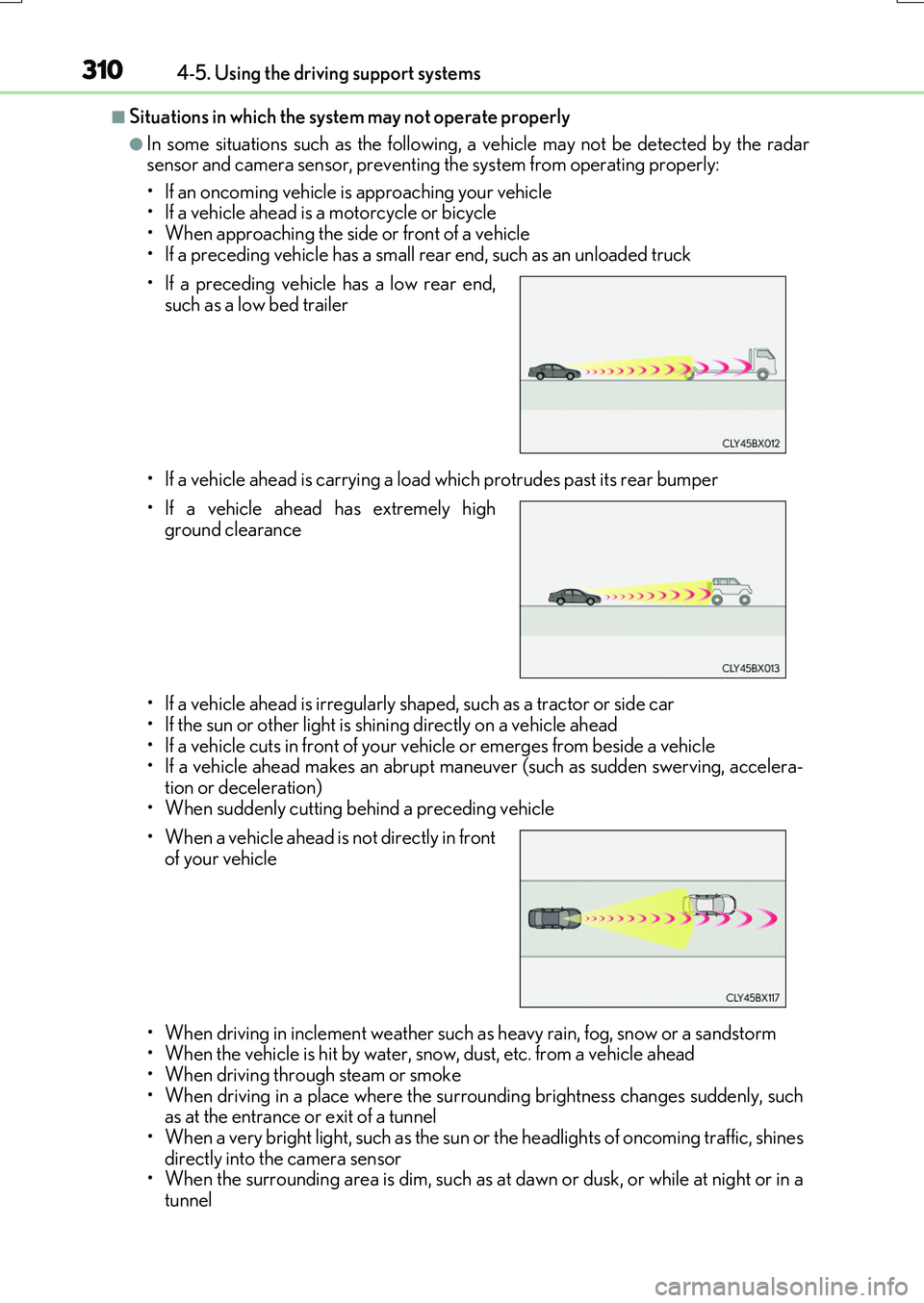
●In some situations such as the following, a vehicle may not be detected by the radar sensor and camera sensor, preventing the system from operating properly:
• If an oncoming vehicle is approaching your vehicle • If a vehicle ahead is a motorcycle or bicycle• When approaching the side or front of a vehicle
• If a preceding vehicle has a small rear end, such as an unloaded truck
• If a vehicle ahead is carrying a load which protrudes past its rear bumper
• If a vehicle ahead is irregularly sh aped, such as a tractor or side car
• If the sun or other light is shin ing directly on a vehicle ahead • If a vehicle cuts in front of your vehicle or emerges from beside a vehicle• If a vehicle ahead makes an abrupt mane uver (such as sudden swerving, accelera-
tion or deceleration) • When suddenly cutting behind a preceding vehicle
• When driving in inclement we ather such as heavy rain, fog, snow or a sandstorm • When the vehicle is hit by water, snow, dust, etc. from a vehicle ahead
• When driving through steam or smoke • When driving in a place where the surro unding brightness changes suddenly, such as at the entrance or exit of a tunnel
• When a very bright light, such as the sun or the headlights of oncoming traffic, shines directly into the camera sensor• When the surrounding area is dim, such as at dawn or dusk, or while at night or in a
tunnel
• If a preceding vehicle has a low rear end,
such as a low bed trailer
• If a vehicle ahead has extremely high
ground clearance
• When a vehicle ahead is not directly in front of your vehicle
Page 312 of 776
3124-5. Using the driving support systems
RX350/RX200t_EE_OM48F32E
●Some pedestrians such as the following may not be detected by the radar sensor and
camera sensor, preventing the system from operating properly*4:
• Pedestrians shorter than approximately 1 m (3 .2 ft.) or taller than approximately 2 m (6.5 ft.)
• Pedestrians wearing oversized clothing (a rain coat, long skirt, etc.), making their sil- houette obscure• Pedestrians who are carrying large baggage, holding an umbrella, etc., hiding part
of their body • Pedestrians who are bending forward or squatting• Pedestrians who are pushing a stroller , wheelchair, bicycle or other vehicle
• Groups of pedestrians which are close together • Pedestrians who are wearing white and look extremely bright• Pedestrians in the dark, such as at night or while in a tunnel
• Pedestrians whose clothing appears to be nearly the same color or brightness as their surroundings• Pedestrians near walls, fences, guardrails, or large objects
• Pedestrians who are on a metal object (manhole cover, steel plate, etc.) on the road • Pedestrians who are walking fast• Pedestrians who are changing speed abruptly
• Pedestrians running out from behi nd a vehicle or a large object • Pedestrians who are extremely close to the side of the vehicle (outside rear viewmirror, etc.)
*4: Depending on the region in which the vehicle was sold, the pedestrian detection
function may not be available.
■If the PCS warning light flashes and a warning message is displayed on the multi-infor- mation display
The pre-crash safety system may be temporar ily unavailable or there may be a malfunc-
tion in the system.
●In the following situations, the warning light will turn off, the message will disappear and the system will become operational when normal operating conditions return:
• When the radar sensor or camera sensor or the area around either sensor is hot, such as in the sun• When the radar sensor or camera sensor or the area around either sensor is cold,
such as in an extremely cold environment • When the radar sensor or front grille embl em is dirty or covered with snow, etc. • When the part of the windshield in front of the camera sensor is fogged up or cov-
ered with condensation or ice (Defogging the windshield: P. 542) • If the camera sensor is obstructed, such as when the hood is open or a sticker isattached to the windshield near the camera sensor
●If the PCS warning light continues to flash or the warning message does not disappear,the system may be malfunctioning. Have the vehicle inspected by any authorized Lexus
dealer or repairer, or another duly qua lified and equipped professional immediately.
■If VSC is disabled
●If VSC is disabled (P. 425), the pre-crash brake assist and pre-crash braking func-
tions are also disabled.
●The PCS warning light will tu rn on and “VSC Turned Off Pre-Crash Brake System Unavailable” will be displayed on the multi-information display.