light LEXUS RX200T 2017 Owners Manual
[x] Cancel search | Manufacturer: LEXUS, Model Year: 2017, Model line: RX200T, Model: LEXUS RX200T 2017Pages: 776, PDF Size: 44.51 MB
Page 553 of 776
5536-3. Using the interior lights
6
Interior features
RX350/RX200t_EE_OM48F32E
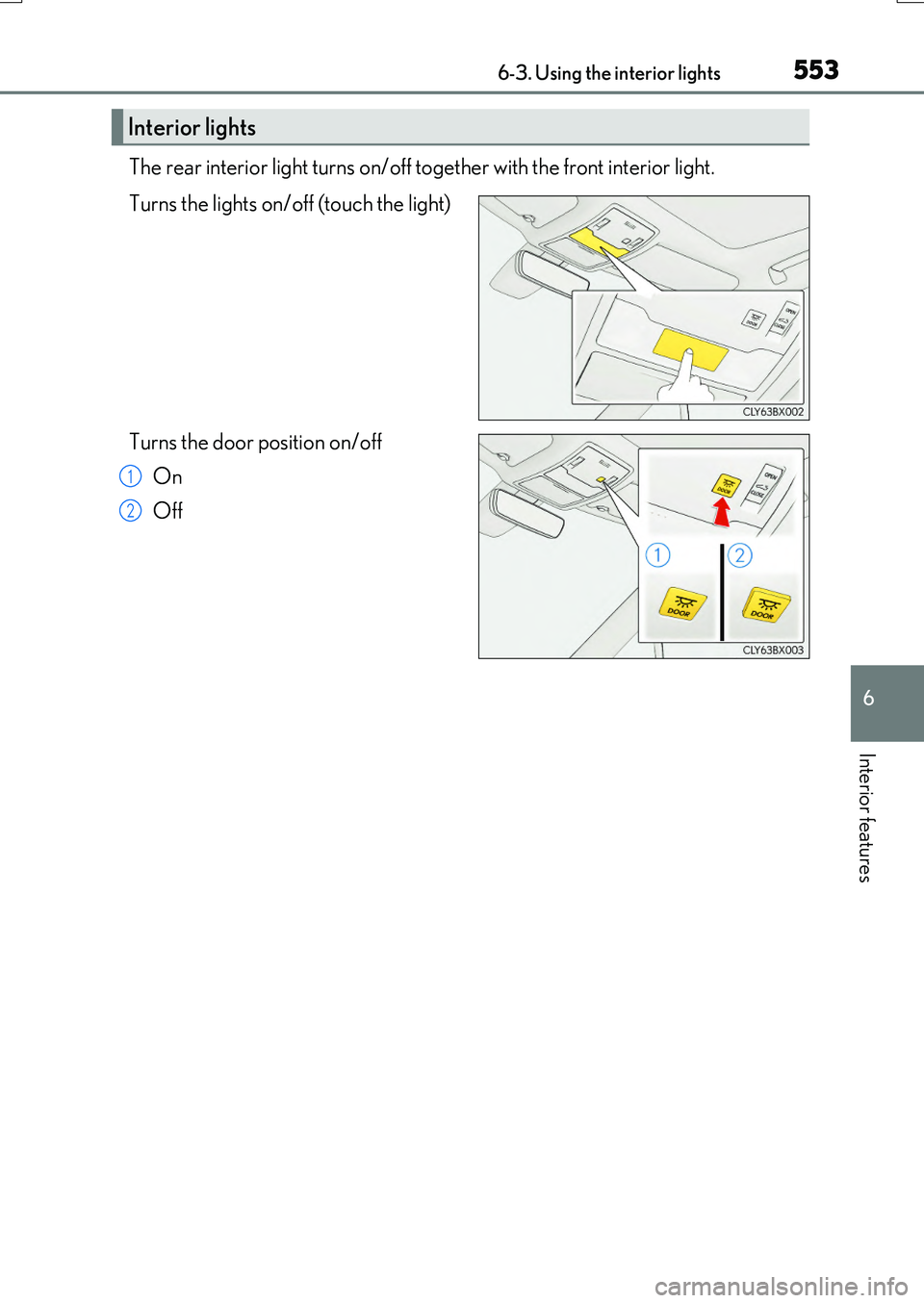
The rear interior light turns on/off together with the front interior light.
Turns the lights on/off (touch the light)
Turns the door position on/off
On
Off
Interior lights
1
2
Page 554 of 776
5546-3. Using the interior lights
RX350/RX200t_EE_OM48F32E
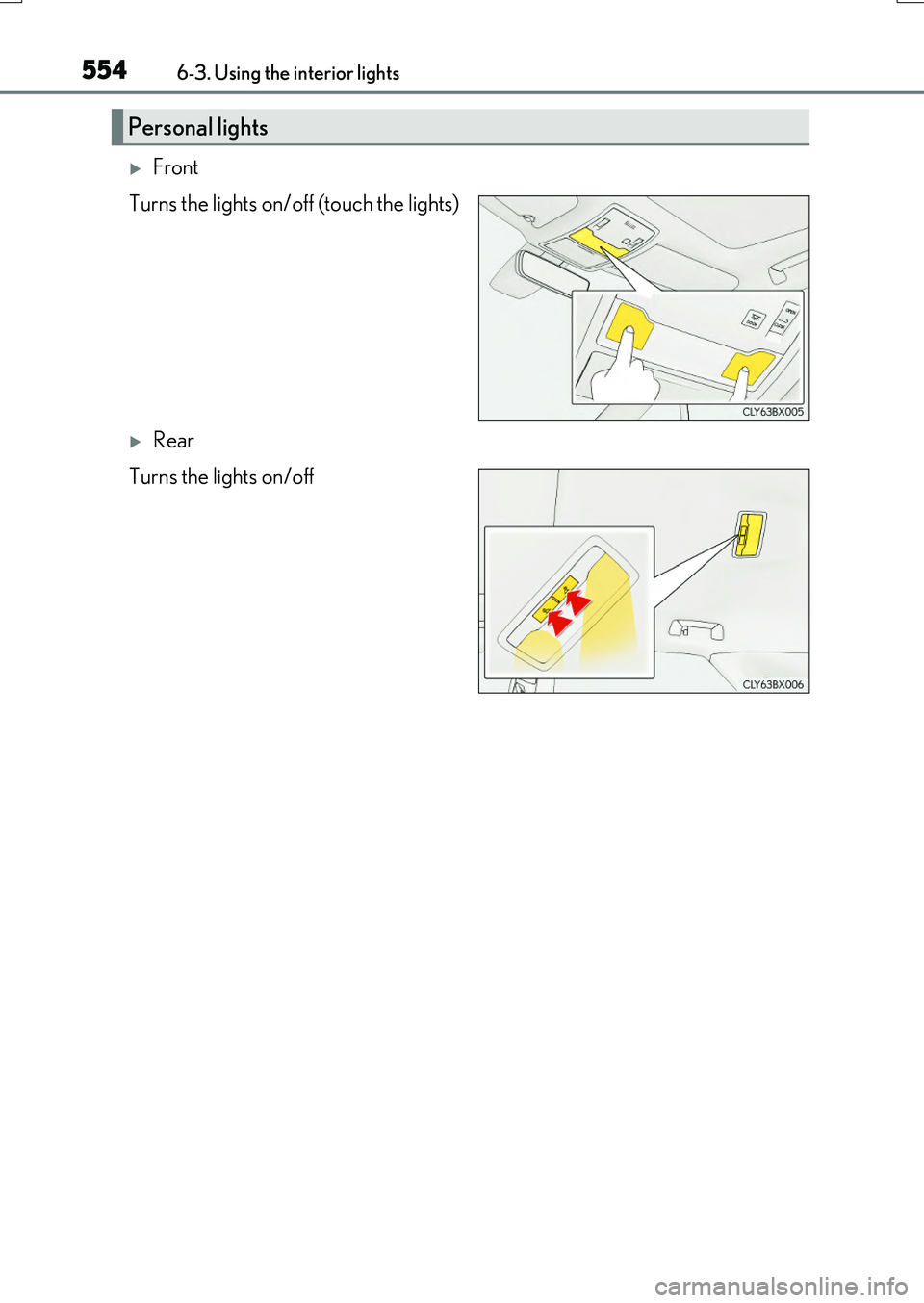
Front
Turns the lights on/off (touch the lights)
Rear
Turns the lights on/off
Personal lights
Page 555 of 776
5556-3. Using the interior lights
6
Interior features
RX350/RX200t_EE_OM48F32E
●Illuminated entry system: The lights automatically turn on/off according to engine switch mode, the presence of the electronic key, whether the doors are locked/unlocked, and whether the doors are opened/closed.
●If the interior lights remain on when the engine switch is turned off, the lights will go off automatically after 20 minutes.
●In the following cases, the interior lights and front personal lights may not respond as
normal.
• When water, dirt, etc., have adhered to the lens surface • When operated with a wet hand
• When wearing gloves, etc.
●Some functions can be customized. ( P. 740)
NOTICE
●Never remove the lens for the front interior light and front personal lights. Otherwise,
the lights will be damaged. If the lens ne ed to remove, contact any authorized Lexus dealer or repairer, or another duly qualified and equipped professional.
●To prevent battery discharge, do not leave the lights on longer than necessary when
the engine is off.
Page 556 of 776
556
RX350/RX200t_EE_OM48F32E
6-4. Using the storage features
List of storage features
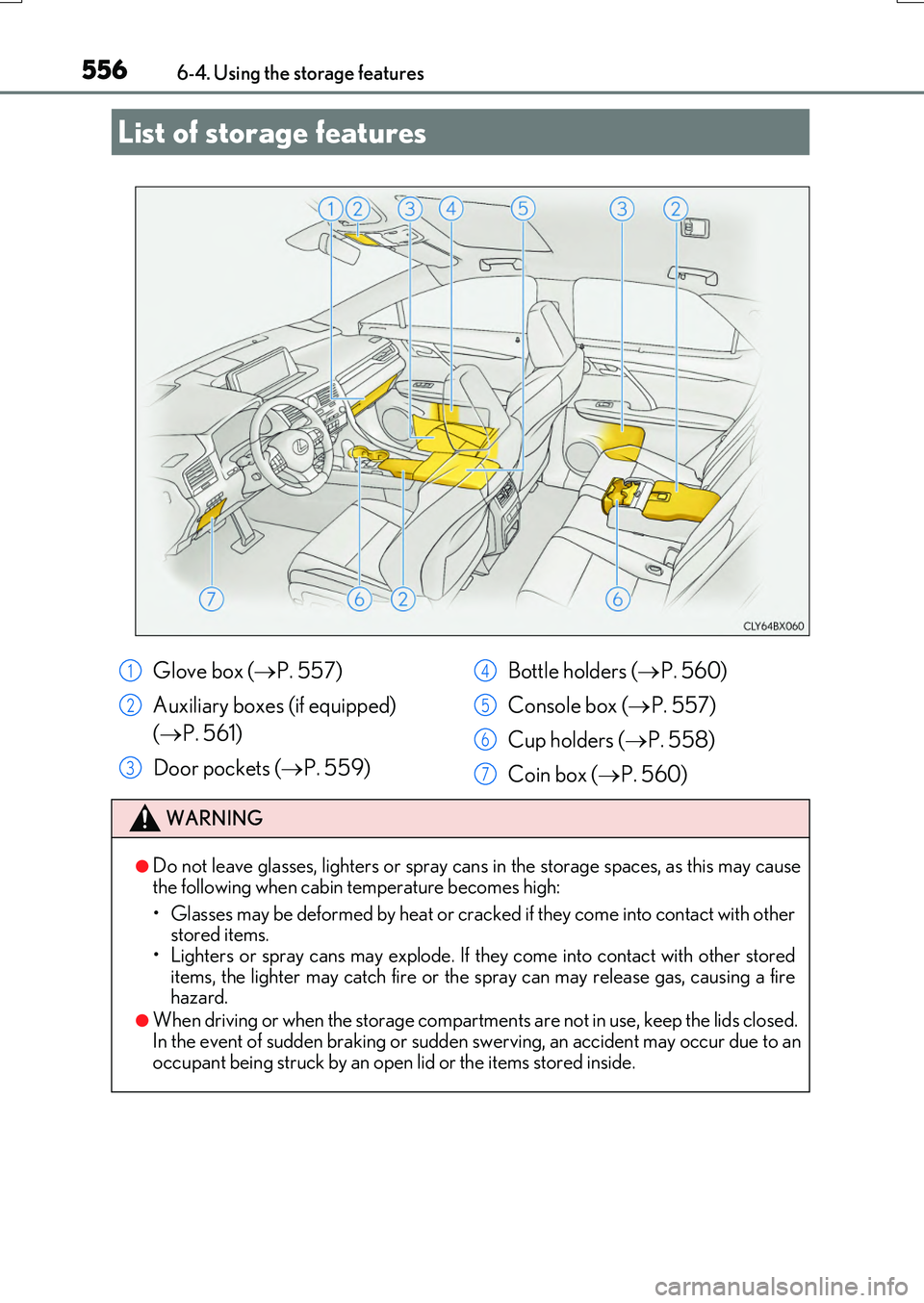
Glove box ( P. 557)
Auxiliary boxes (if equipped)
( P. 561)
Door pockets ( P. 559)
Bottle holders ( P. 560)
Console box ( P. 557)
Cup holders ( P. 558)
Coin box ( P. 560)
WARNING
●Do not leave glasses, lighters or spray cans in the storage spaces, as this may cause
the following when cabin temperature becomes high:
• Glasses may be deformed by heat or cracked if they come into contact with other stored items.
• Lighters or spray cans may explode. If they come into contact with other stored items, the lighter may catch fire or the spray can may release gas, causing a firehazard.
●When driving or when the storage compartmen ts are not in use, keep the lids closed. In the event of sudden braking or sudden swerving, an accident may occur due to an
occupant being struck by an open lid or the items stored inside.
1
2
3
4
5
6
7
Page 557 of 776
5576-4. Using the storage features
6
Interior features
RX350/RX200t_EE_OM48F32E
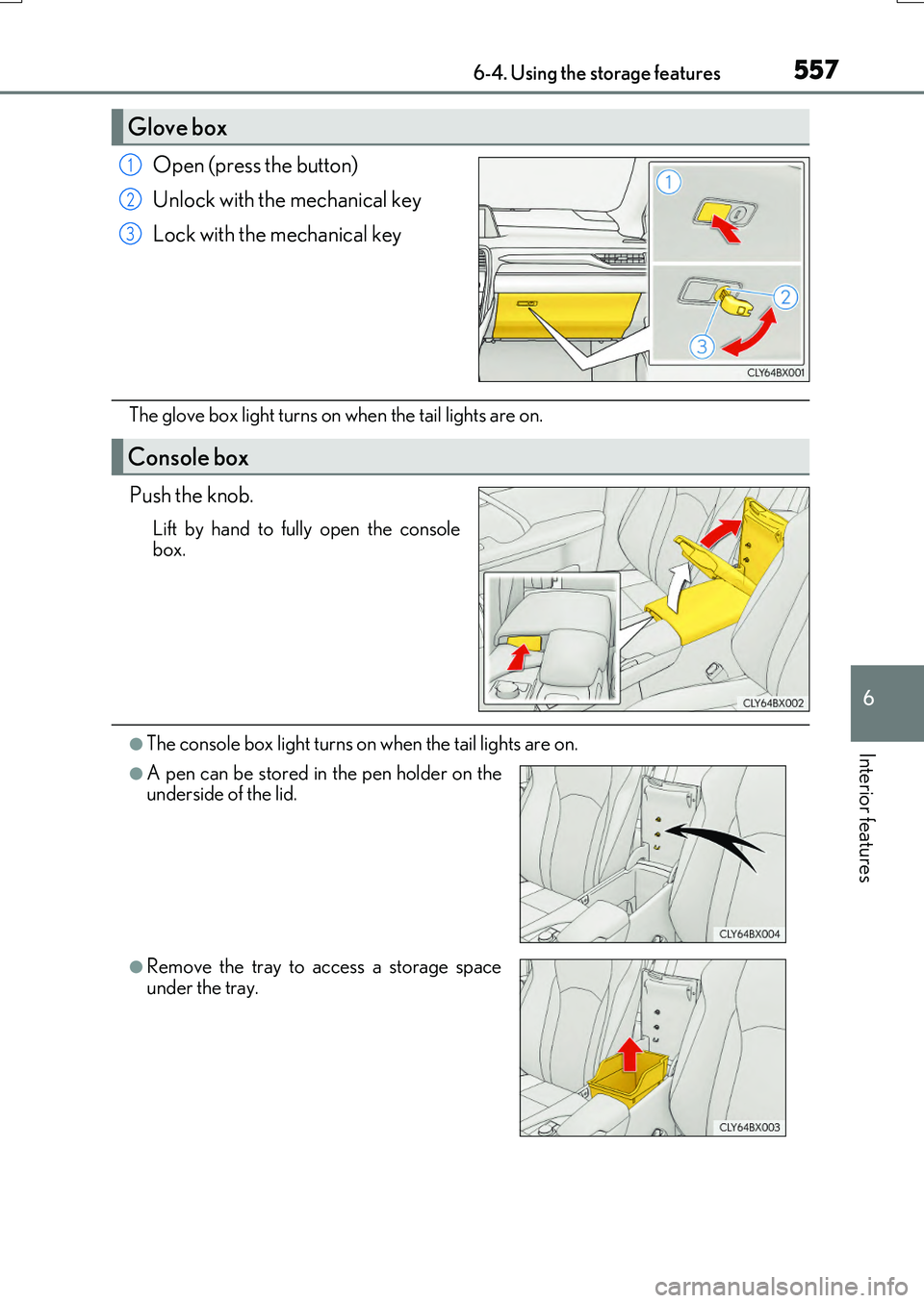
Open (press the button)
Unlock with the mechanical key
Lock with the mechanical key
The glove box light turns on when the tail lights are on.
Push the knob.
Lift by hand to fully open the console box.
●The console box light turns on when the tail lights are on.
Glove box
1
2
3
Console box
●A pen can be stored in the pen holder on theunderside of the lid.
●Remove the tray to access a storage space
under the tray.
Page 567 of 776
567
RX350/RX200t_EE_OM48F32E
6
Interior features
6-5. Using the other interior features
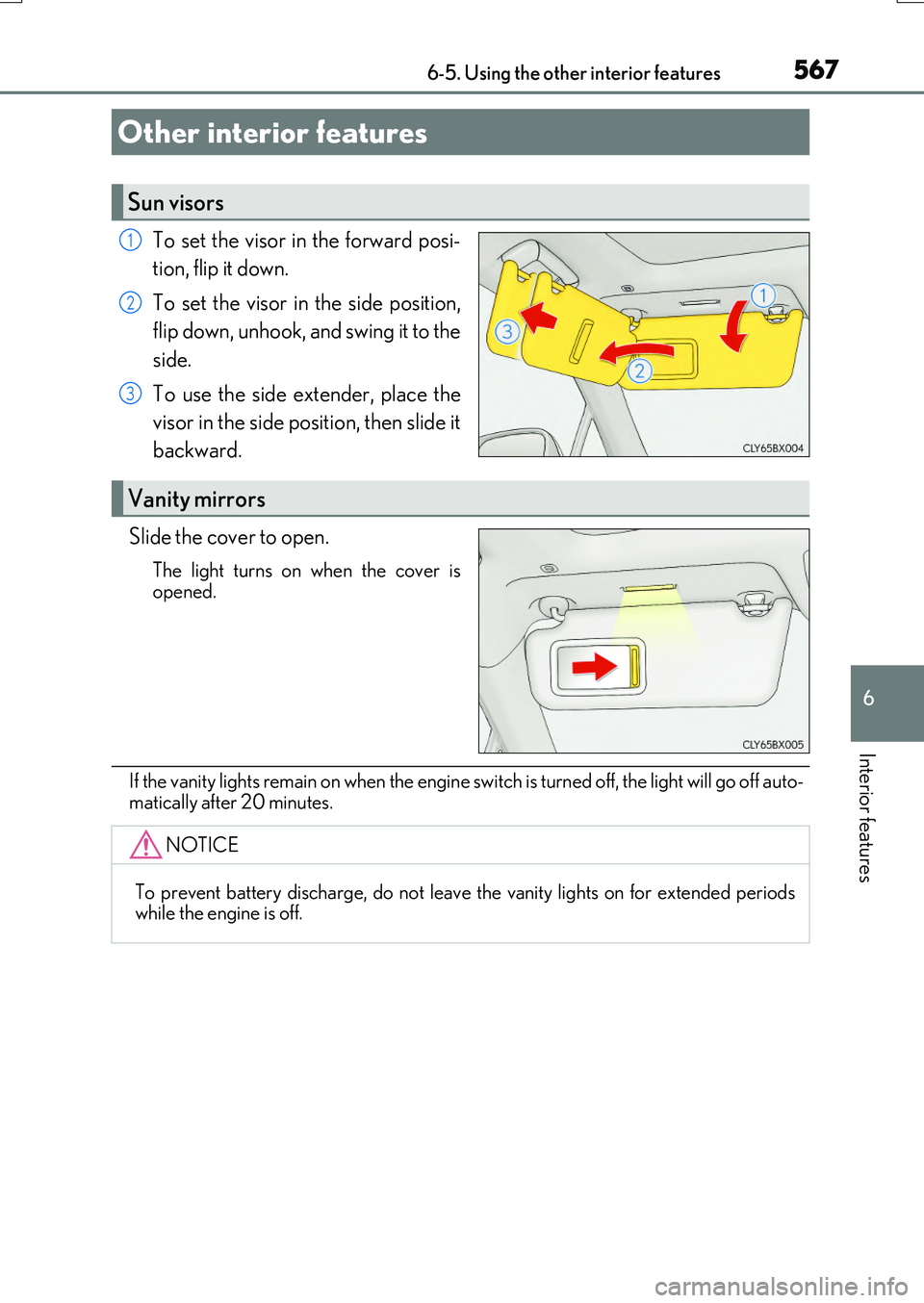
To set the visor in the forward posi-
tion, flip it down.
To set the visor in the side position,
flip down, unhook, and swing it to the
side.
To use the side extender, place the
visor in the side position, then slide it
backward.
Slide the cover to open.
The light turns on when the cover is
opened.
If the vanity lights remain on when the engine sw itch is turned off, the light will go off auto-
matically after 20 minutes.
Other interior features
Sun visors
1
2
3
Vanity mirrors
NOTICE
To prevent battery discharge, do not leave the vanity lights on for extended periods while the engine is off.
Page 569 of 776
5696-5. Using the other interior features
6
Interior features
RX350/RX200t_EE_OM48F32E
■Name for all parts
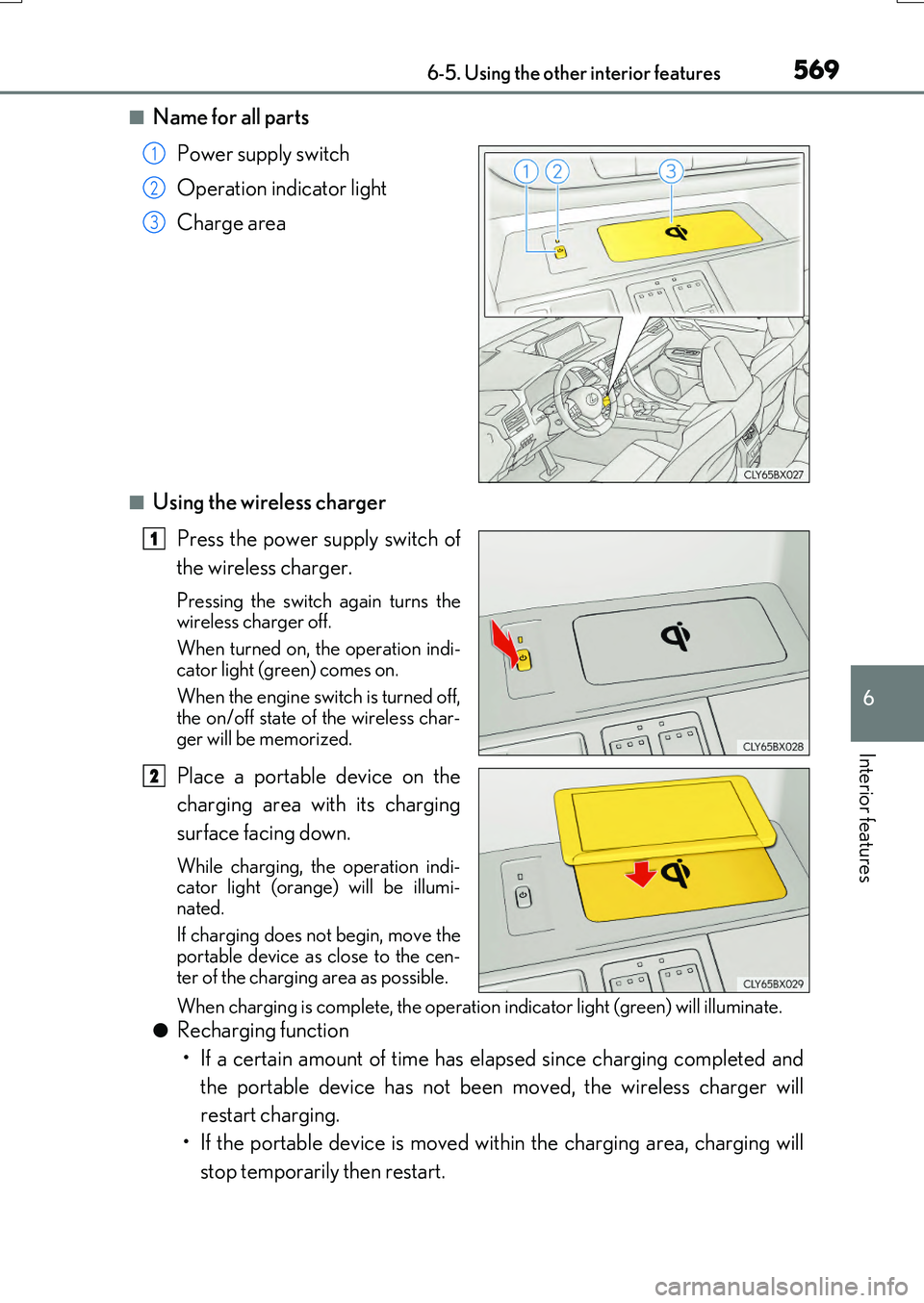
Power supply switch
Operation indicator light
Charge area
■Using the wireless charger
Press the power supply switch of
the wireless charger.
Pressing the switch again turns the wireless charger off.
When turned on, the operation indi-
cator light (green) comes on.
When the engine switch is turned off, the on/off state of the wireless char-
ger will be memorized.
Place a portable device on the
charging area with its charging
surface facing down.
While charging, the operation indi- cator light (orange) will be illumi-
nated.
If charging does not begin, move the portable device as close to the cen-
ter of the charging area as possible.
When charging is complete, the operatio n indicator light (green) will illuminate.
●Recharging function
• If a certain amount of time has elapsed since charging completed and
the portable device has not been moved, the wireless charger will
restart charging.
• If the portable device is moved within the charging area, charging will
stop temporarily then restart.
1
2
3
1
2
Page 570 of 776
5706-5. Using the other interior features
RX350/RX200t_EE_OM48F32E
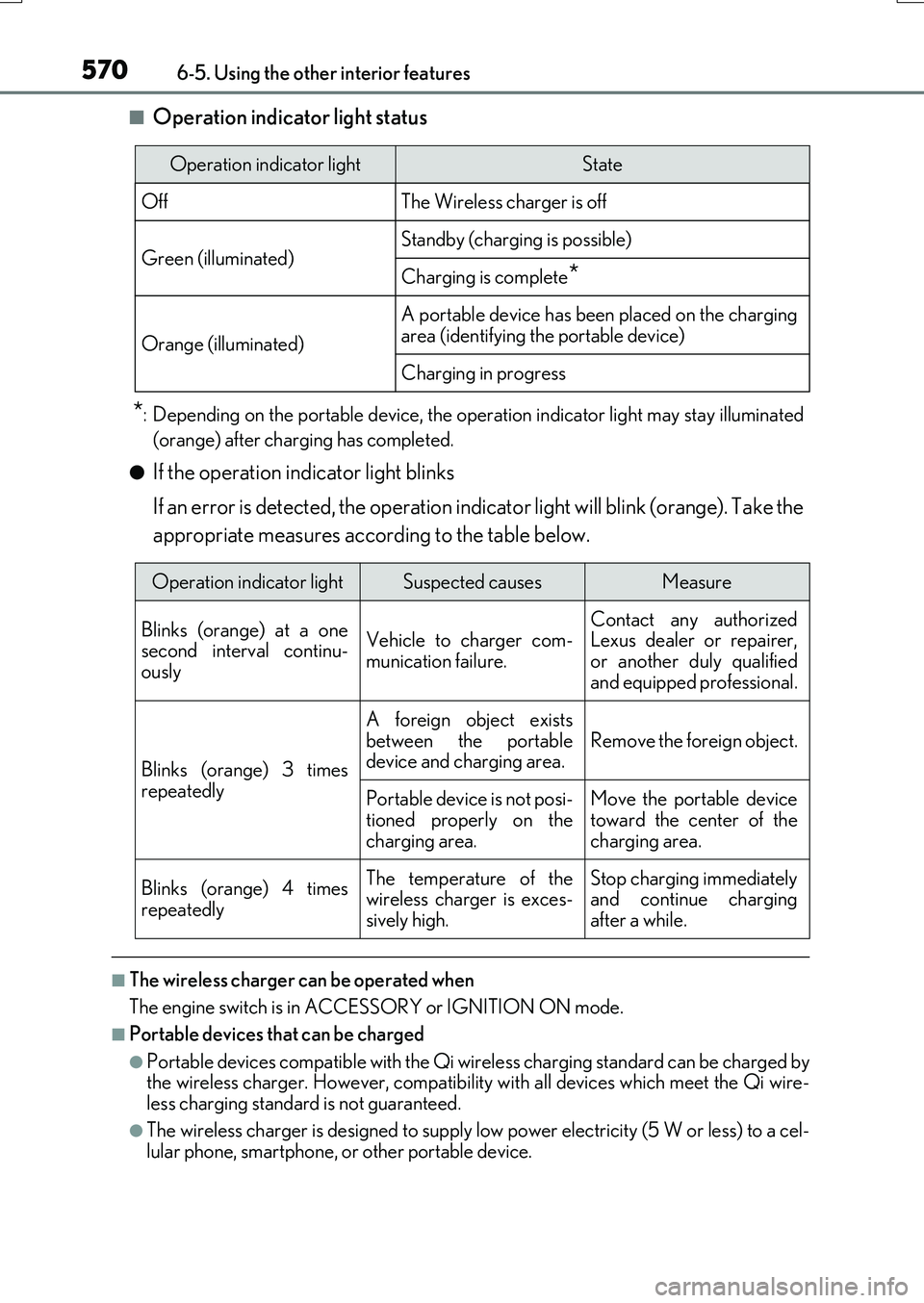
■Operation indicator light status
*: Depending on the portable device, the operation indicator light may stay illuminated
(orange) after charging has completed.
●If the operation indicator light blinks
If an error is detected, the operation indicator light will blink (orange). Take the
appropriate measures according to the table below.
■The wireless charger can be operated when
The engine switch is in ACCESSORY or IGNITION ON mode.
■Portable devices that can be charged
●Portable devices compatible with the Qi wireless charging standard can be charged by the wireless charger. However, compatibility with all devices which meet the Qi wire- less charging standard is not guaranteed.
●The wireless charger is designed to supply low power electricity (5 W or less) to a cel-lular phone, smartphone, or other portable device.
Operation indicator lightState
OffThe Wireless charger is off
Green (illuminated)Standby (charging is possible)
Charging is complete*
Orange (illuminated)
A portable device has been placed on the charging
area (identifying the portable device)
Charging in progress
Operation indicator lightSuspected causesMeasure
Blinks (orange) at a one second interval continu-ously
Vehicle to charger com-
munication failure.
Contact any authorized Lexus dealer or repairer,
or another duly qualified and equipped professional.
Blinks (orange) 3 times
repeatedly
A foreign object exists
between the portable device and charging area. Remove the foreign object.
Portable device is not posi- tioned properly on the
charging area.
Move the portable device toward the center of the
charging area.
Blinks (orange) 4 times
repeatedly
The temperature of the wireless charger is exces-sively high.
Stop charging immediately and continue chargingafter a while.
Page 571 of 776
5716-5. Using the other interior features
6
Interior features
RX350/RX200t_EE_OM48F32E
■If a cover or accessory is attached to the portable device
Do not charge a portable device if a cover or accessory which is not Qi compatible is attached. Depending on the type of cover and/or accessory attached, it may not be pos-
sible to charge the portable device. If the portable device is placed on the charging area and does not charge, remove the cover and/or accessories.
■If interference is heard in AM radio broadcasts while charging
Turn off the wireless charger and check if the noise is reduced. If noise is reduced, press and hold the power supply swit ch of the wireless charger for 2 seconds. The frequency of the wireless charger is changed and noise may be reduced. When the frequency is
changed, the operation indicator light will blink (orange) 2 times.
■Charging precautions
●If the electronic key cannot be detected in the cabin, charging cannot be performed.
When a door is opened and closed, ch arging may be temporarily suspended.
●While charging, the wireless charger and the portable device will become warm. This is not a malfunction.
If a portable device becomes warm while charging and charging stops due to the pro- tection function of the portable device, wait until the portable device cools down and charge it again.
■Sound generated during operation
When the power supply switch is turned on or while a portable device is being identified, operation sounds may be heard. This is not a malfunction.
■Cleaning the wireless charger
P. 590
Page 573 of 776
5736-5. Using the other interior features
6
Interior features
RX350/RX200t_EE_OM48F32E
NOTICE
■Conditions in which the wireless charger may not operate correctly
In the following situations, the wireless charger may not operate correctly:
●When a portable device is fully charged
●When there is a foreign object between the charging area and portable device
●When a portable device becomes hot while charging
●When a portable device is placed on the wireless area with its charging surface fac-
ing up
●When a portable device is not centered on the charging area
●When the vehicle is near a TV tower, electric power plant, gas station, radio station,
large display, airport or othe r facility that generates strong radio waves or electrical noise
●When the portable device is in contact wi th, or is covered by any of the following
metallic objects
• Cards to which aluminum foil is attached • Cigarette boxes that ha ve aluminum foil inside
• Metallic wallets or bags •Coins• Metal hand warmers
• Media such as CDs and DVDs
●When wireless keys (that emit radio waves) other than those of your vehicle are being
used nearby.
If in situations other than above the wireless charger does not operate properly or the operation indicator light is blinking, the wireless charger may be malfunctioning. Con-
tact any authorized Lexus dealer or repair er, or another duly qualified and equipped professional.
■To prevent failure or damage to data
●Do not bring magnetic cards, such as a credit card, or magnetic recording media,close to the wireless charger while chargi ng. Otherwise, data may be erased due to the influence of magnetism.
Additionally, do not bring precision instruments such as wrist watches, close to the wireless charger, as such objects may malfunction.
●Do not leave portable devices in the cabin. The temperature inside the cabin may
become high when parked in the su n, and cause damage to the device.
■To prevent battery discharge
Do not use the wireless charger for a long period of time with the engine is stopped.