start LEXUS RX200T 2017 Owners Manual
[x] Cancel search | Manufacturer: LEXUS, Model Year: 2017, Model line: RX200T, Model: LEXUS RX200T 2017Pages: 776, PDF Size: 44.51 MB
Page 482 of 776
482
RX350/RX200t_EE_OM48F32E
5-7. Connecting Bluetooth®
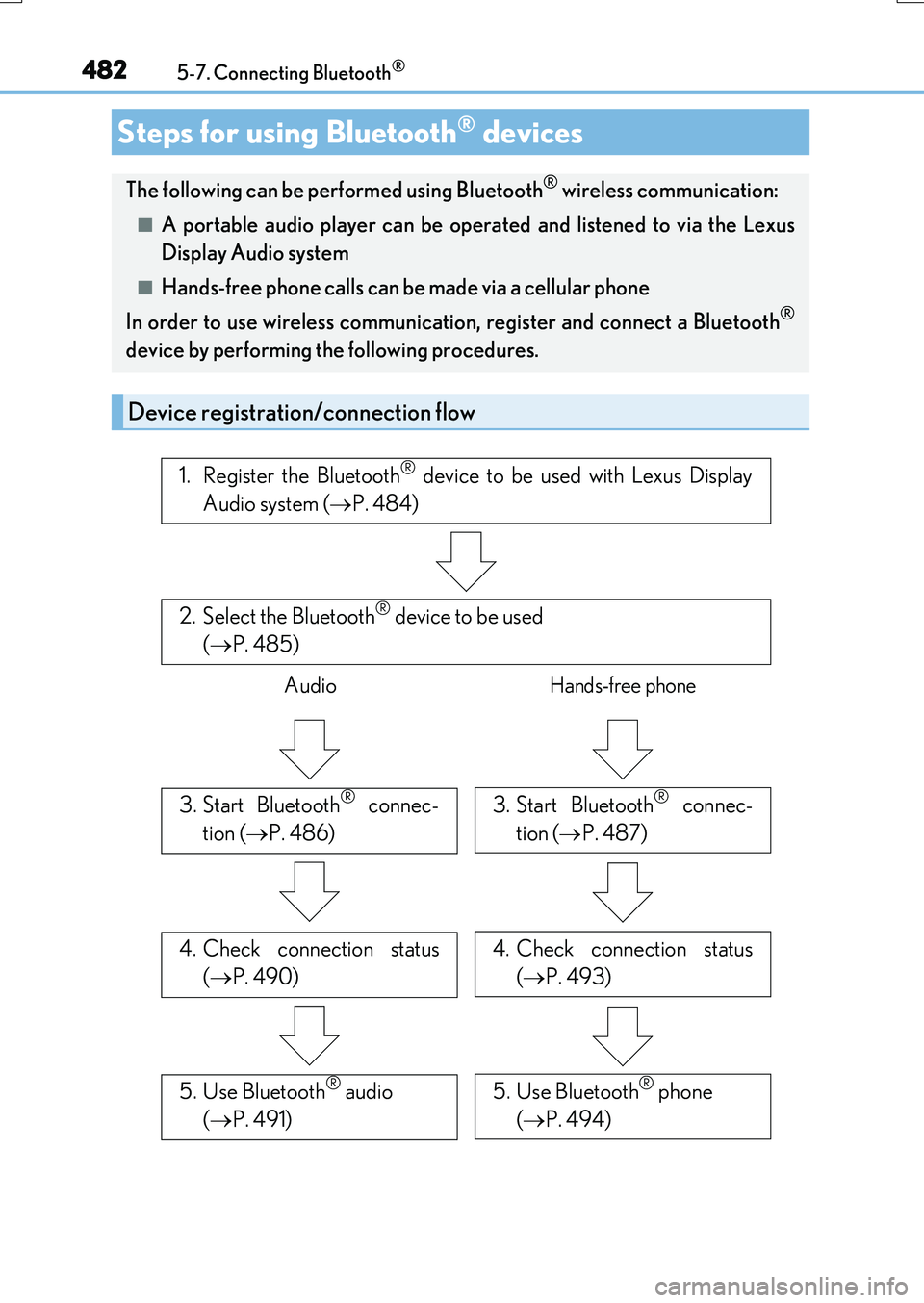
Steps for using Bluetooth® devices
The following can be performed using Bluetooth® wireless communication:
■A portable audio player can be op erated and listened to via the Lexus
Display Audio system
■Hands-free phone calls can be made via a cellular phone
In order to use wireless communication, register and connect a Bluetooth®
device by performing the following procedures.
Device registration/connection flow
1. Register the Bluetooth® device to be used with Lexus Display
Audio system ( P. 484)
2. Select the Bluetooth® device to be used
( P. 485)
AudioHands-free phone
3. Start Bluetooth® connec-
tion ( P. 486)
3. Start Bluetooth® connec-
tion ( P. 487)
4. Check connection status
( P. 490)
4. Check connection status
( P. 493)
5. Use Bluetooth® audio
( P. 491)
5. Use Bluetooth® phone
( P. 494)
Page 503 of 776
5035-9. Bluetooth® Phone
5
Lexus Display Audio system
RX350/RX200t_EE_OM48F32E
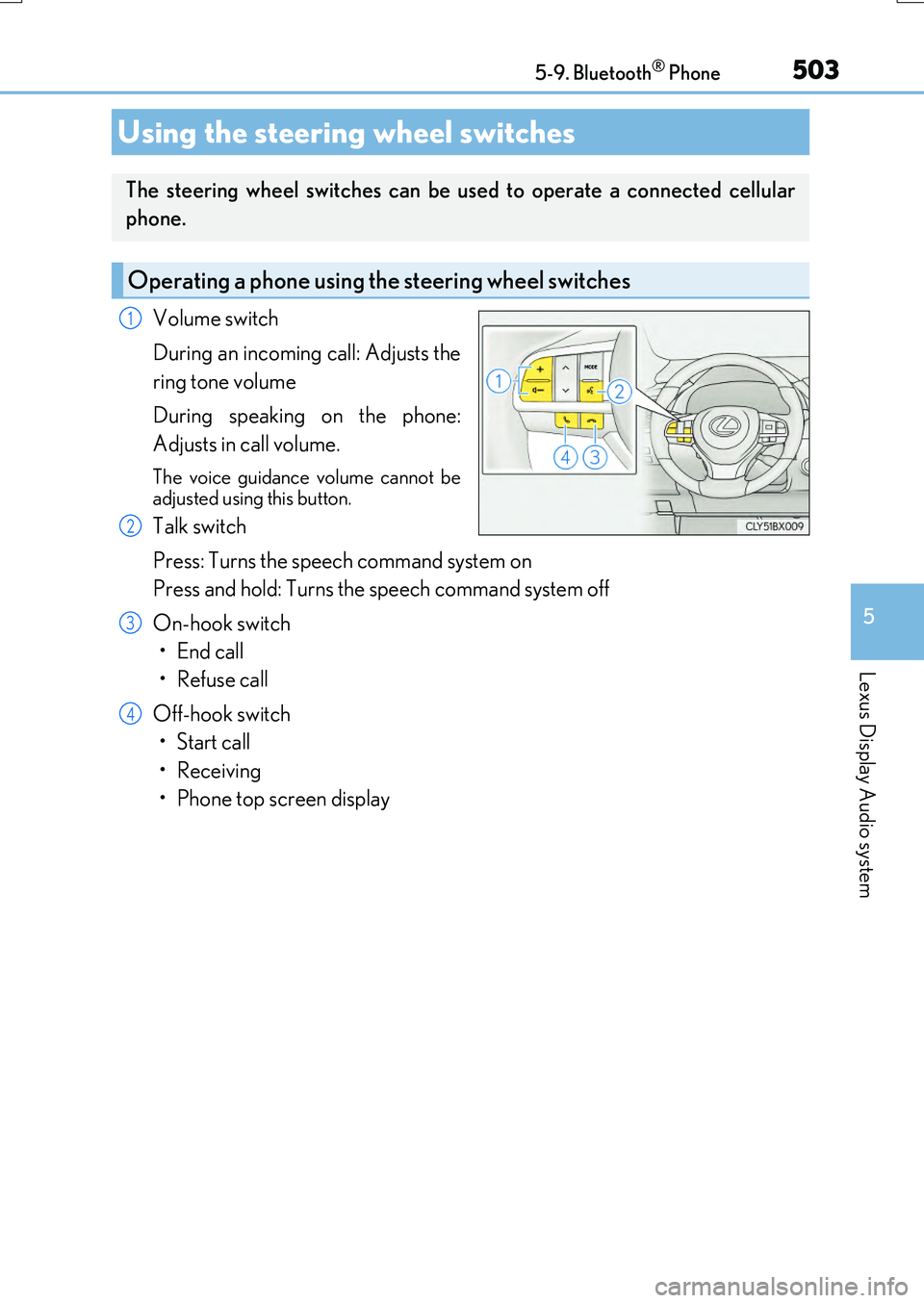
Volume switch
During an incoming call: Adjusts the
ring tone volume
During speaking on the phone:
Adjusts in call volume.
The voice guidance volume cannot be
adjusted using this button.
Talk switch
Press: Turns the speech command system on
Press and hold: Turns the speech command system off
On-hook switch
•End call
•Refuse call
Off-hook switch
• Start call
• Receiving
• Phone top screen display
Using the steering wheel switches
The steering wheel switches can be used to operate a connected cellular
phone.
Operating a phone using the steering wheel switches
1
2
3
4
Page 507 of 776
5075-10. Phonebook
5
Lexus Display Audio system
RX350/RX200t_EE_OM48F32E
Edit a contact (PBAP incompatible Bluetooth® phones, or compatible
phones with “Automatic transfer” off)
Select the desired contact to edit.
Delete contacts ( P. 508) (PBAP incompatible Bluetooth® phones, or
compatible phones with “Automatic transfer” off)
Edit a voice tag ( P. 526)
■Return to the default settings
Move the controller to the left and select “Defaults”.
You can transfer the phone numbers in your Bluetooth® phone to the system.
Operation methods differ between PBAP compatible and PBAP incompatible
Bluetooth® phones. If your cellular phone does not support either PBAP or
OPP services, you cannot transfer contacts.
Go to “Transfer contacts”: “MENU” button “Setup” “Telephone” “Con-
tact/call history settings” “Update contacts from telephone”
For PBAP compatible Bluetooth® phones when “Automatic transfer” is set to
on
Start the update automatically.
For PBAP compatible Bluetooth® phones when “Automatic transfer” is set to
off and PBAP incompatible Bluetooth® phones
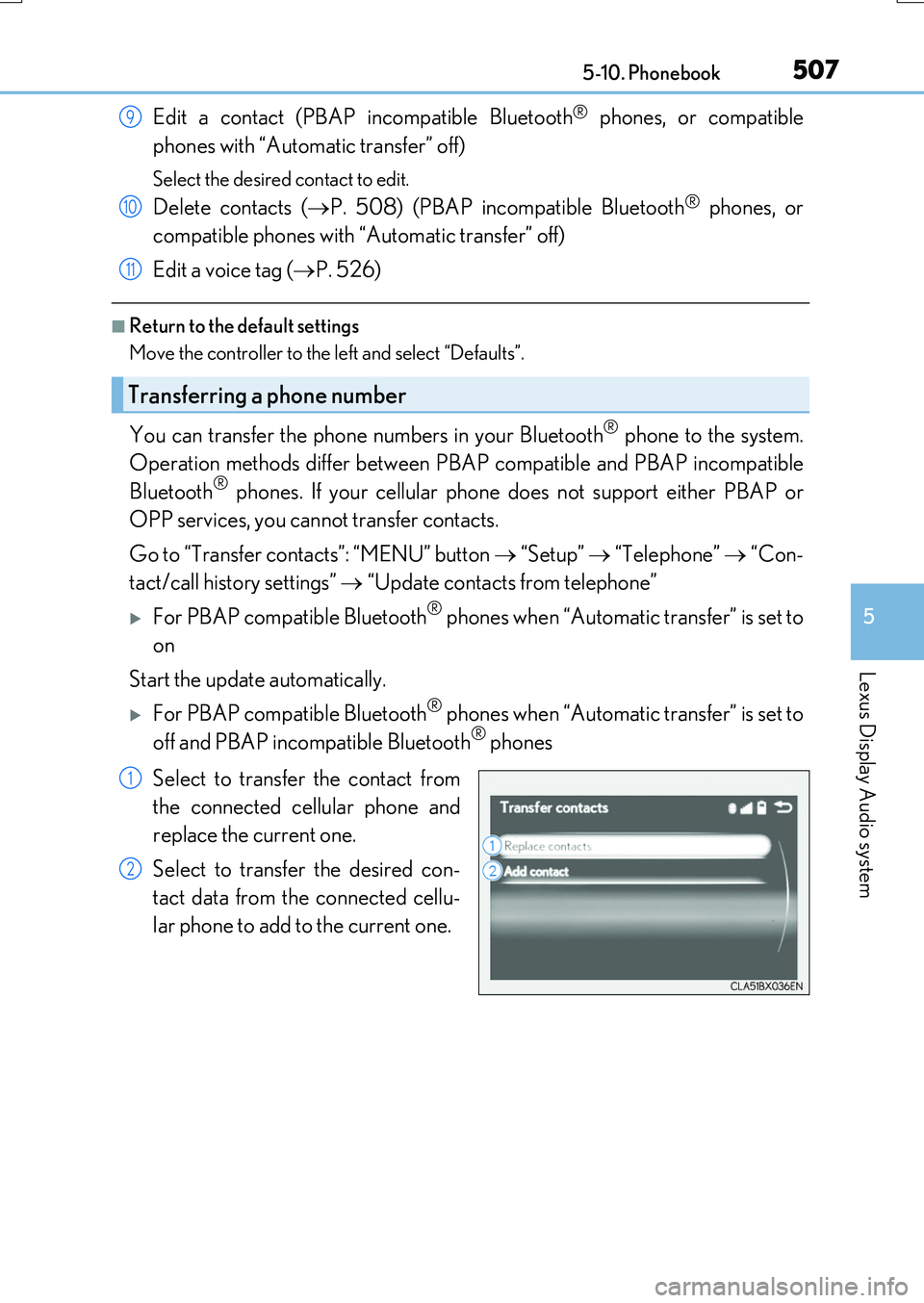
Select to transfer the contact from
the connected cellular phone and
replace the current one.
Select to transfer the desired con-
tact data from the connected cellu-
lar phone to add to the current one.
Transferring a phone number
9
10
11
1
2
Page 512 of 776
5125-11. Bluetooth®
RX350/RX200t_EE_OM48F32E
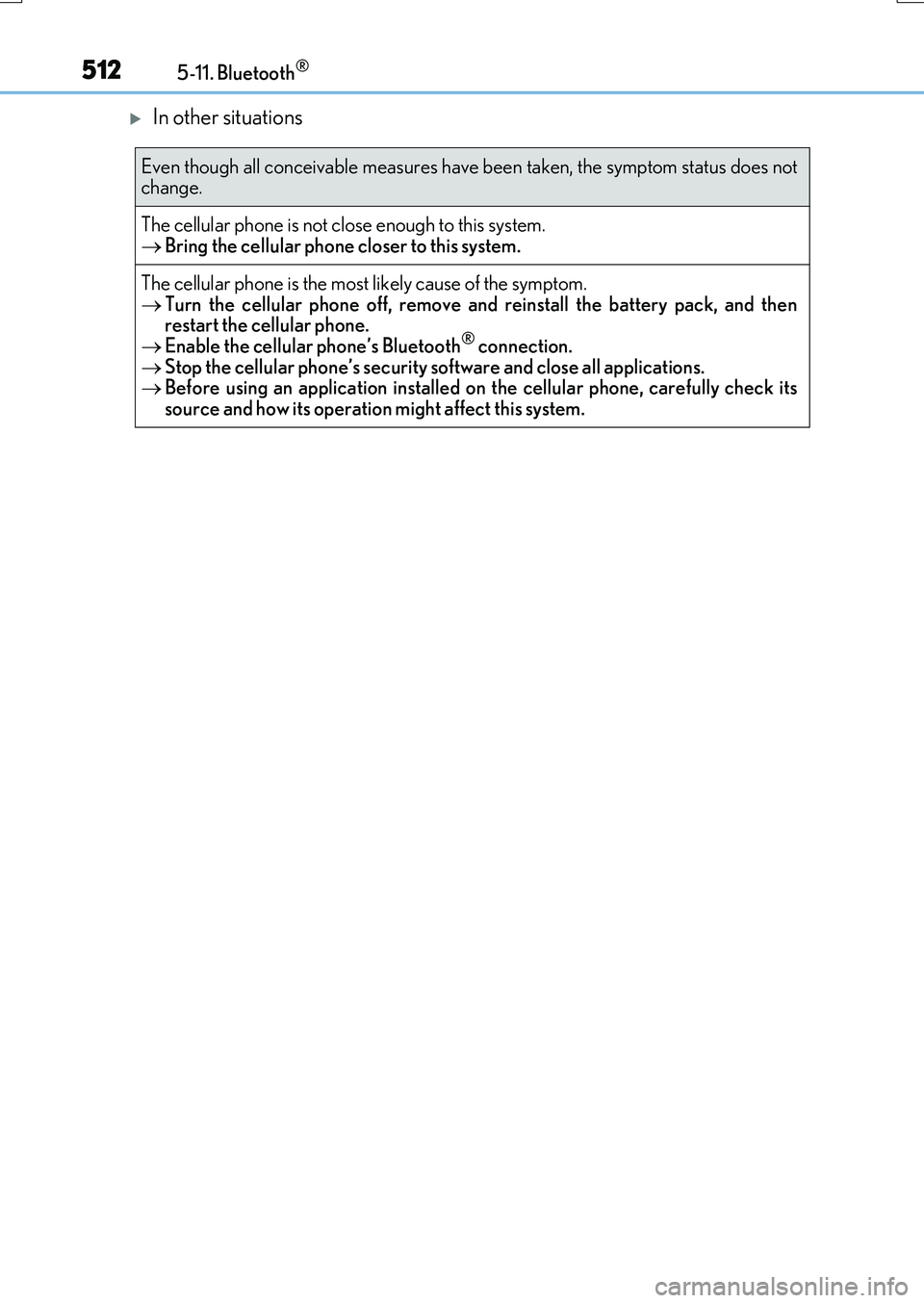
In other situations
Even though all conceivable measures have been taken, the symptom status does not change.
The cellular phone is not close enough to this system. Bring the cellular phone closer to this system.
The cellular phone is the most likely cause of the symptom.
Turn the cellular phone off, remove and reinstall the battery pack, and then restart the cellular phone. Enable the cellular phone’s Bluetooth® connection.
Stop the cellular phone’s security software and close all applications. Before using an application installed on the cellular phone, carefully check its source and how its operation might affect this system.
Page 522 of 776
5225-12. Other function
RX350/RX200t_EE_OM48F32E
■Operational conditions
●When MirrorLink™ is activated, previous applications, run with a USB, are closed, and vice versa.
●Compatible devices
Smartphones, which passed the Car Connectivity Consortium certification program ver1.1 or later. Confirm with the smartphone manufacture or the distributor for theMirrorLink™ compatibility.
●Compatible applications Applications, which are certified by Car Connectivity Consortium as MirrorLink™Base-Certified or Drive-Certified applications.
■About MirrorLink™
MirrorLink is a registered trademark of Car Connectivity Consortium, Inc.
■When using MirrorLink™
●Check that the smartphone screen is unlo cked. Unlock the smartphone screen before connecting it to the Lexus Display Audio system. (Some smartphones may not be able to be connected via MirrorLink™ if the screen is locked.)
●Make sure that the smartphone has been connected via Bluetooth®. (Some smart-phones may not be able to perform hands-free calls using the MirrorLink™ function if it has not been connected to the vehicle via Bluetooth®.
●If a MirrorLink™ application cannot be started, check that the MirrorLink™ applica-tion certificate has not expired. The certificates of MirrorLink™ applications have an expiration date. (An internet connection is required to automatically update the certifi-
cate.) If a MirrorLink™ application becomes unavailable, it may be due to the certifi- cate expiring. In this case, the certificat e must be updated manually. Check with the smartphone manufacturer or application developer for how to update the certificate.
●Make sure the volume of the smartphone is set to an appropriate level. If the Mirror-Link™ application volume is excessively low even when the volume of the Lexus Dis- play Audio system is increased, check the vo lume of the smartphone and increase it as
necessary.
WARNING
■While driving
Do not connect smartphone or operate the controls.
Page 524 of 776
5245-12. Other function
RX350/RX200t_EE_OM48F32E
Go to “USB photo”: “MENU” button “Info” “USB 1 photo” or “USB 2
photo”
P. 445
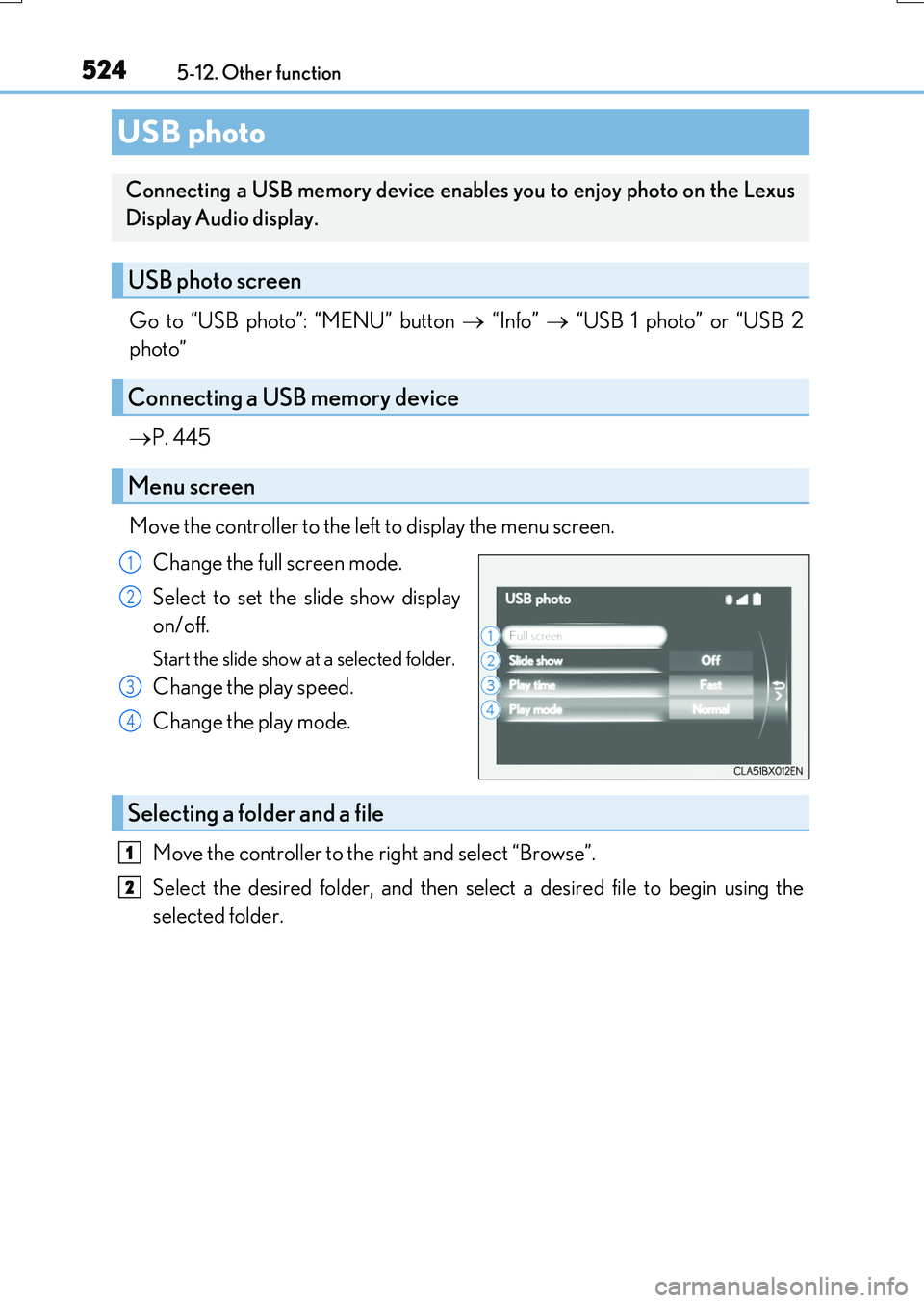
Move the controller to the left to display the menu screen.
Change the full screen mode.
Select to set the slide show display
on/off.
Start the slide show at a selected folder.
Change the play speed.
Change the play mode.
Move the controller to the right and select “Browse”.
Select the desired folder, and then select a desired file to begin using the
selected folder.
USB photo
Connecting a USB memory device enables you to enjoy photo on the Lexus
Display Audio display.
USB photo screen
Connecting a USB memory device
Menu screen
1
2
3
4
Selecting a folder and a file
1
2
Page 545 of 776
5456-2. Using the air conditioning system and defogger
6
Interior features
RX350/RX200t_EE_OM48F32E
■Registering air conditioning settings to electronic keys (vehicles with driving position
memory)
●Unlocking the vehicle using an electronic ke y and turning the engine switch to IGNI- TION ON mode will recall that key’s registered air conditioning settings.
●When the engine switch is turned off, the current air conditioning settings will automat- ically be registered to the electronic key that was used to unlock the vehicle.
●The system may not operate correctly if more than one electronic key is in the vicinity or
if the smart entry & start system is used to unlock a passenger door.
●The doors that can recall the air conditioni ng setting when unlocked using the smart entry & start system can be changed.* For details, contact any authorized Lexus dealer
or repairer, or another duly qu alified and equipped professional.
*: The doors that can recall the driving position memory are changed at the same time.
■Using automatic mode
Fan speed is adjusted automatically according to the temperature setting and the ambi-
ent conditions. Therefore, the fan may stop for a while until wa rm or cool air is ready to flow immediately after the “AUTO” button is pressed or “AUTO” is selected.
■Operation of S-FLOW mode
In automatic mode, S-FLOW mode will be turned off if a rear door has been opened and
closed. To activate S-FLOW mode again, press .
■Automatic mode for air intake control (if equipped)
In automatic mode, the system detects exhaust gas and other pollutants and automati-
cally switches between outside air and recirculated air modes.
When the dehumidification function is off, and the fan is operating, turning automatic mode on will activate the dehumidification function.
■Fogging up of the windows
●The windows will easily fog up when the humidi ty in the vehicle is high. Selecting “A/C” will dehumidify the air from the outlets and defog the windshield effectively.
●If you turn “A/C” off, the windows may fog up more easily.
●The windows may fog up if the recirculated air mode is used.
Page 546 of 776
5466-2. Using the air conditioning system and defogger
RX350/RX200t_EE_OM48F32E
■Outside/recirculated air mode
●When driving on dusty roads such as tunnels or in heavy traffic, set the outside/recircu- lated air mode button to the recirculated air mode. This is effective in preventing out-
side air from entering the vehicle interior . During cooling operation, setting the recirculated air mode will also cool the vehicle interior effectively.
●Outside/recirculated air mode may automatically switch depending on the tempera-
ture setting or the inside temperature.
■When the outside temperature is low
The dehumidification function may not operate even when “A/C” is selected.
■Operation of the air conditioning system in Eco drive mode
●In the Eco drive mode, the air conditioning system is controlled as follows to prioritize fuel efficiency
• Engine speed and compressor operation co ntrolled to restrict heating/cooling capacity• Fan speed restricted when automatic mode is selected
●To improve air conditioning performance, perform the following operations
• Adjust the fan speed
• Turn off Eco drive mode
■Ventilation and air conditioning odors
●To let fresh air in, set the air conditioning system to the outside air mode.
●During use, various odors from inside and outside the vehicle may enter into and accu- mulate in the air conditioning system. This may then cause odor to be emitted from the vents.
●To reduce potential odors from occurring:
• It is recommended that the air conditioning system be set to outside air mode prior
to turning the vehicle off. • The start timing of the blower may be dela yed for a short period of time immediately after the air conditioning system is started in automatic mode.
■When the Heated Windshield Defroster is operating (if equipped)
When the Heated Windshield Defroster is op erating, operation of the heated steering wheel, front passenger seat heater and rear seat heaters will be suspended.
Page 569 of 776
5696-5. Using the other interior features
6
Interior features
RX350/RX200t_EE_OM48F32E
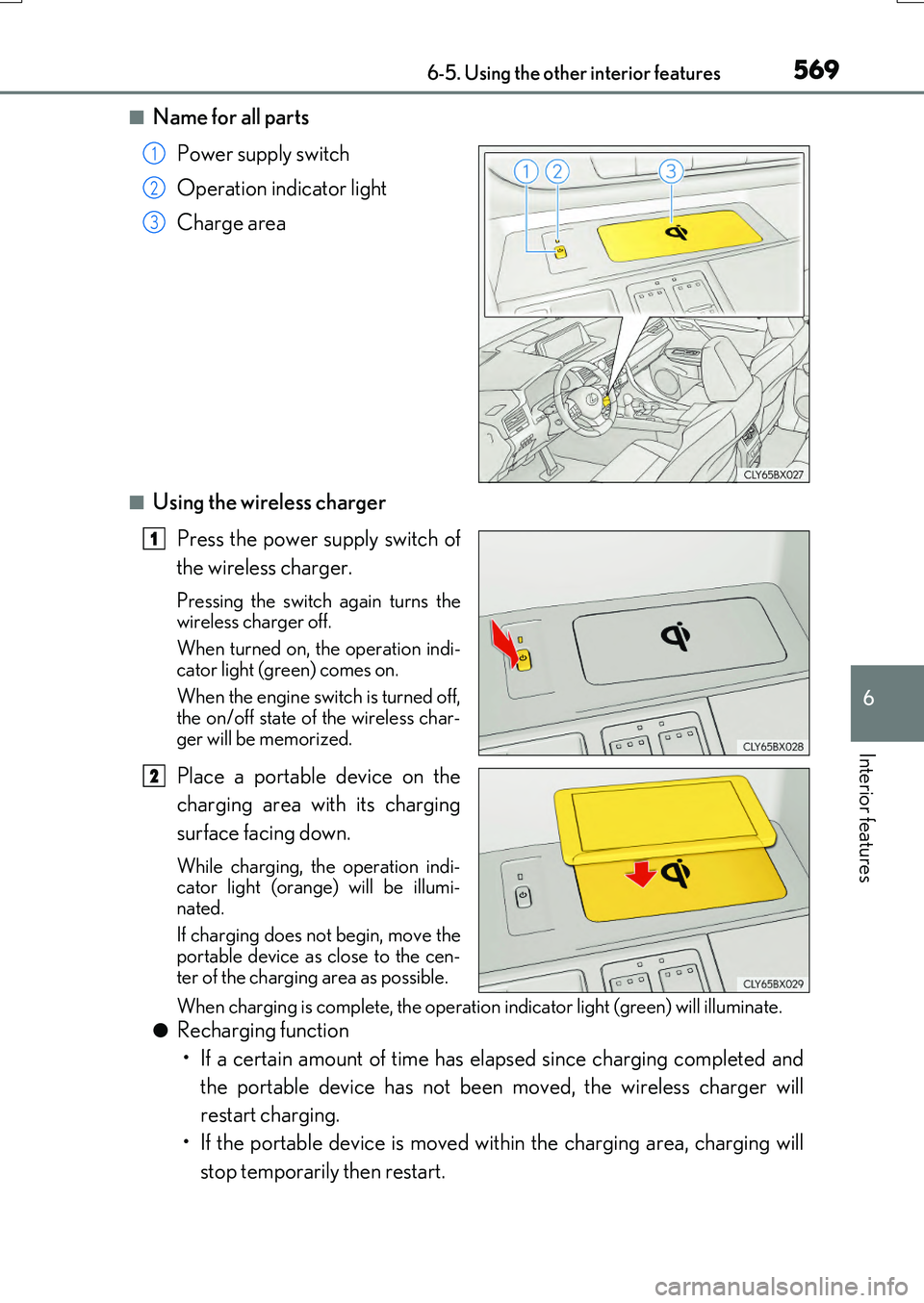
■Name for all parts
Power supply switch
Operation indicator light
Charge area
■Using the wireless charger
Press the power supply switch of
the wireless charger.
Pressing the switch again turns the wireless charger off.
When turned on, the operation indi-
cator light (green) comes on.
When the engine switch is turned off, the on/off state of the wireless char-
ger will be memorized.
Place a portable device on the
charging area with its charging
surface facing down.
While charging, the operation indi- cator light (orange) will be illumi-
nated.
If charging does not begin, move the portable device as close to the cen-
ter of the charging area as possible.
When charging is complete, the operatio n indicator light (green) will illuminate.
●Recharging function
• If a certain amount of time has elapsed since charging completed and
the portable device has not been moved, the wireless charger will
restart charging.
• If the portable device is moved within the charging area, charging will
stop temporarily then restart.
1
2
3
1
2
Page 575 of 776
5756-5. Using the other interior features
6
Interior features
RX350/RX200t_EE_OM48F32E
●The power outlets can be used when the engine switch is in ACCESSORY or IGNI- TION ON mode.
●RX200t: When the engine restarts after having been stopped by the Stop & Start sys-
tem, the power outlets may be temporarily unusable, but this is not a malfunction.
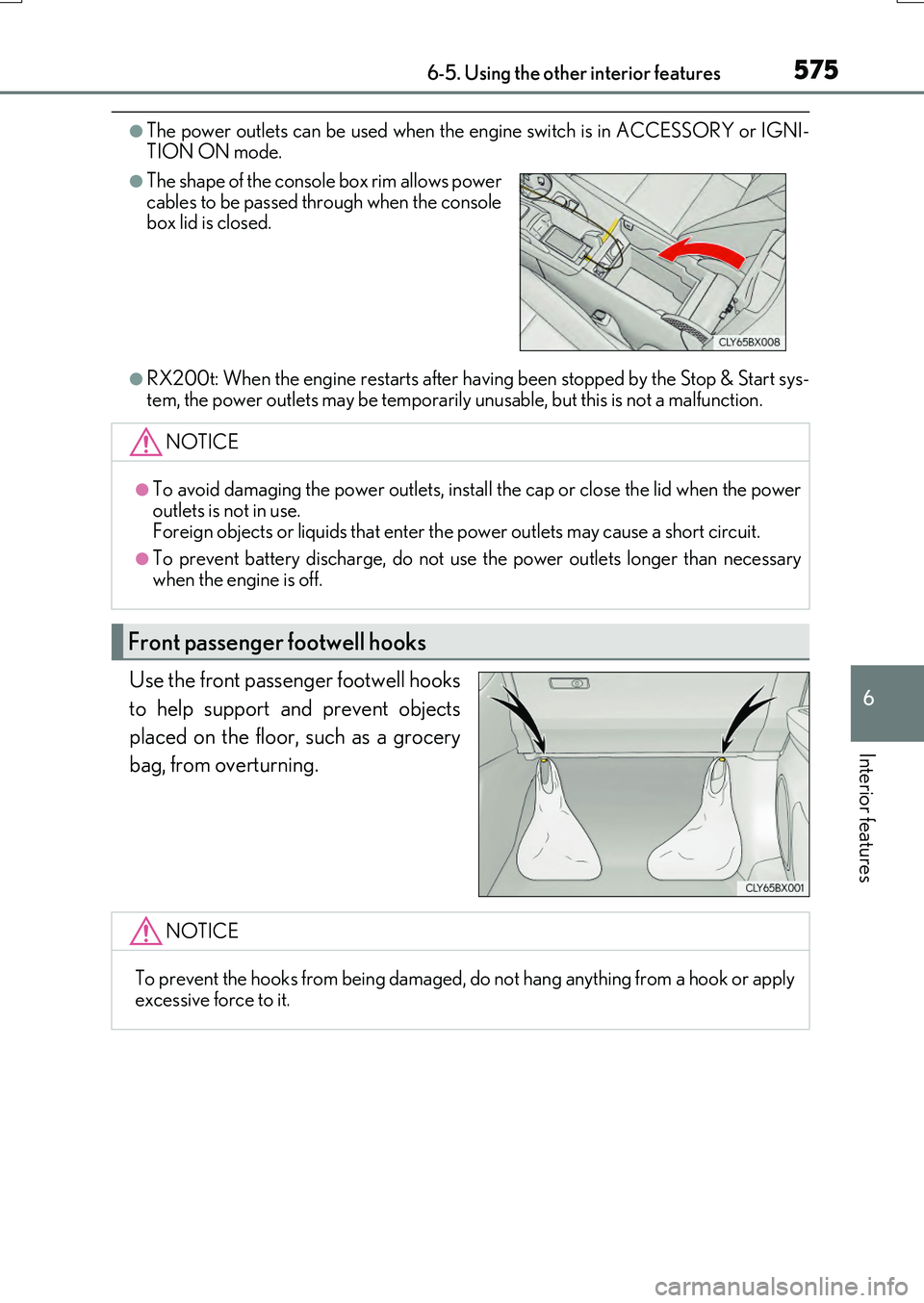
Use the front passenger footwell hooks
to help support and prevent objects
placed on the floor, such as a grocery
bag, from overturning.
●The shape of the console box rim allows power cables to be passed through when the consolebox lid is closed.
NOTICE
●To avoid damaging the power outlets, install the cap or close the lid when the power
outlets is not in use. Foreign objects or liquids that enter th e power outlets may cause a short circuit.
●To prevent battery discharge, do not use the power outlets longer than necessary
when the engine is off.
Front passenger footwell hooks
NOTICE
To prevent the hooks from being damaged, do not hang anything from a hook or apply excessive force to it.