start LEXUS RX200T 2017 Repair Manual
[x] Cancel search | Manufacturer: LEXUS, Model Year: 2017, Model line: RX200T, Model: LEXUS RX200T 2017Pages: 776, PDF Size: 44.51 MB
Page 246 of 776
246
RX350/RX200t_EE_OM48F32E
4-2. Driving procedures
Check that the parking brake is set.
Check that the shift lever is in P.
Firmly depress the brake pedal.
and a message will be displayed on the multi-information display.
If it is not displayed, the engine cannot be started.
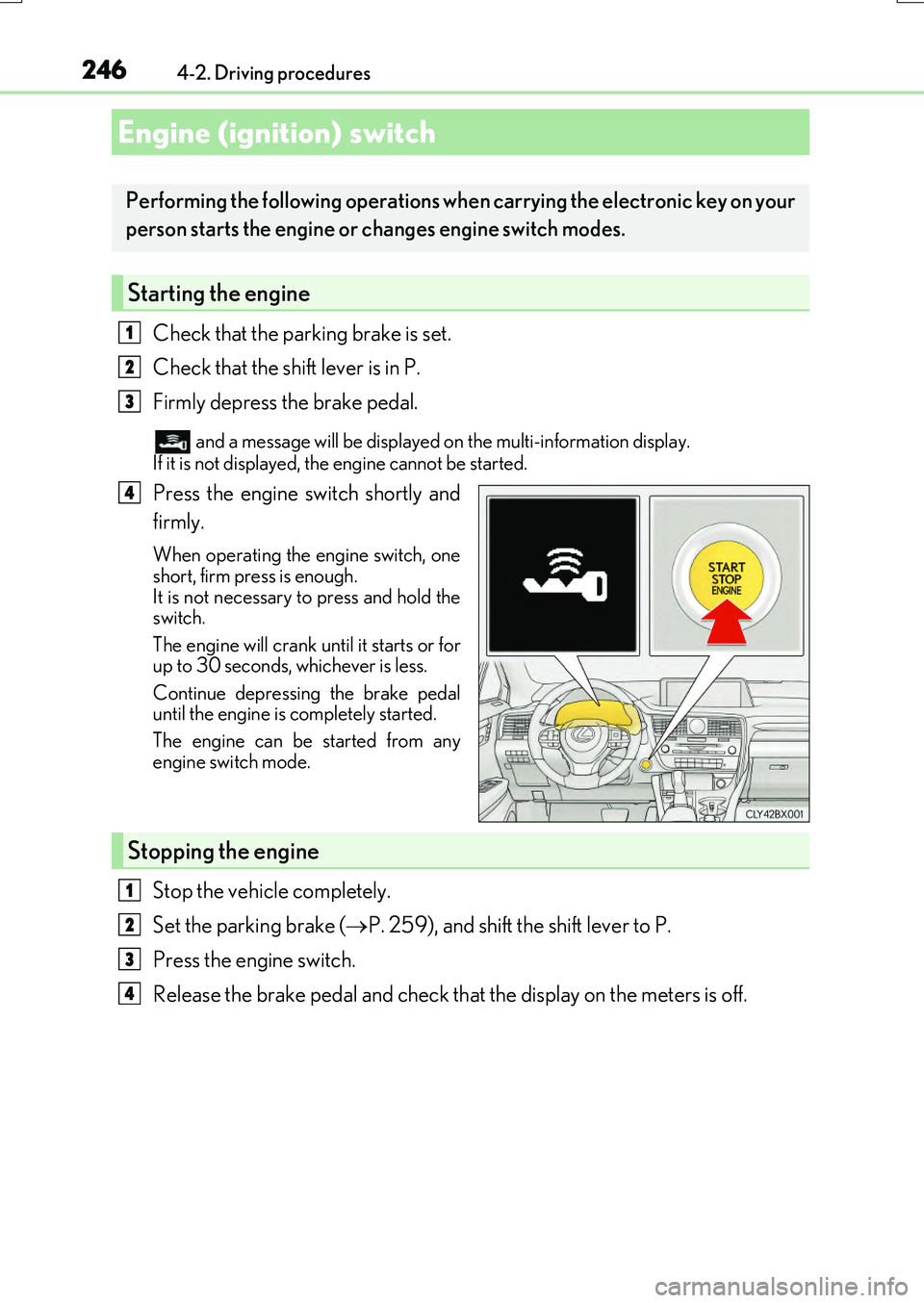
Press the engine switch shortly and
firmly.
When operating the engine switch, one
short, firm press is enough. It is not necessary to press and hold theswitch.
The engine will crank un til it starts or for up to 30 seconds, whichever is less.
Continue depressing the brake pedal until the engine is completely started.
The engine can be started from any
engine switch mode.
Stop the vehicle completely.
Set the parking brake ( P. 259), and shift the shift lever to P.
Press the engine switch.
Release the brake pedal and check that the display on the meters is off.
Engine (ignition) switch
Performing the following operations when carrying the electronic key on your
person starts the engine or changes engine switch modes.
Starting the engine
1
2
3
4
Stopping the engine
1
2
3
4
Page 248 of 776
2484-2. Driving procedures
RX350/RX200t_EE_OM48F32E
■Auto power off function
If the vehicle is left in ACCESSORY mode for more than 20 minutes or IGNITION ON mode (the engine is not running) for more than an hour with the shift lever in P, the engineswitch will automatically turn off. However, this function cannot entirely prevent battery
discharge. Do not leave the vehicle with the engine switch in ACCESSORY or IGNI- TION ON mode for long periods of time when the engine is not running.
■Electronic key battery depletion
P. 137
■Conditions affecting operation
P. 170
■Note for the entry function
P. 171
■If the engine does not start
●The engine immobilizer system may not have been deactivated. (P. 77) Contact any authorized Lexus dealer or repairer, or another duly qualified andequipped professional.
●Check that the shift lever is securely set in P. The engine may not start if the shift lever is displaced out of P. “To Start Vehicle, Put Shift Lever into P” will be displayed on themulti-information display.
■Steering lock
After turning the engine switch off and opening and closing the doors, the steering wheel will be locked due to the steering lock functi on. Operating the engine switch again auto-
matically cancels the steering lock.
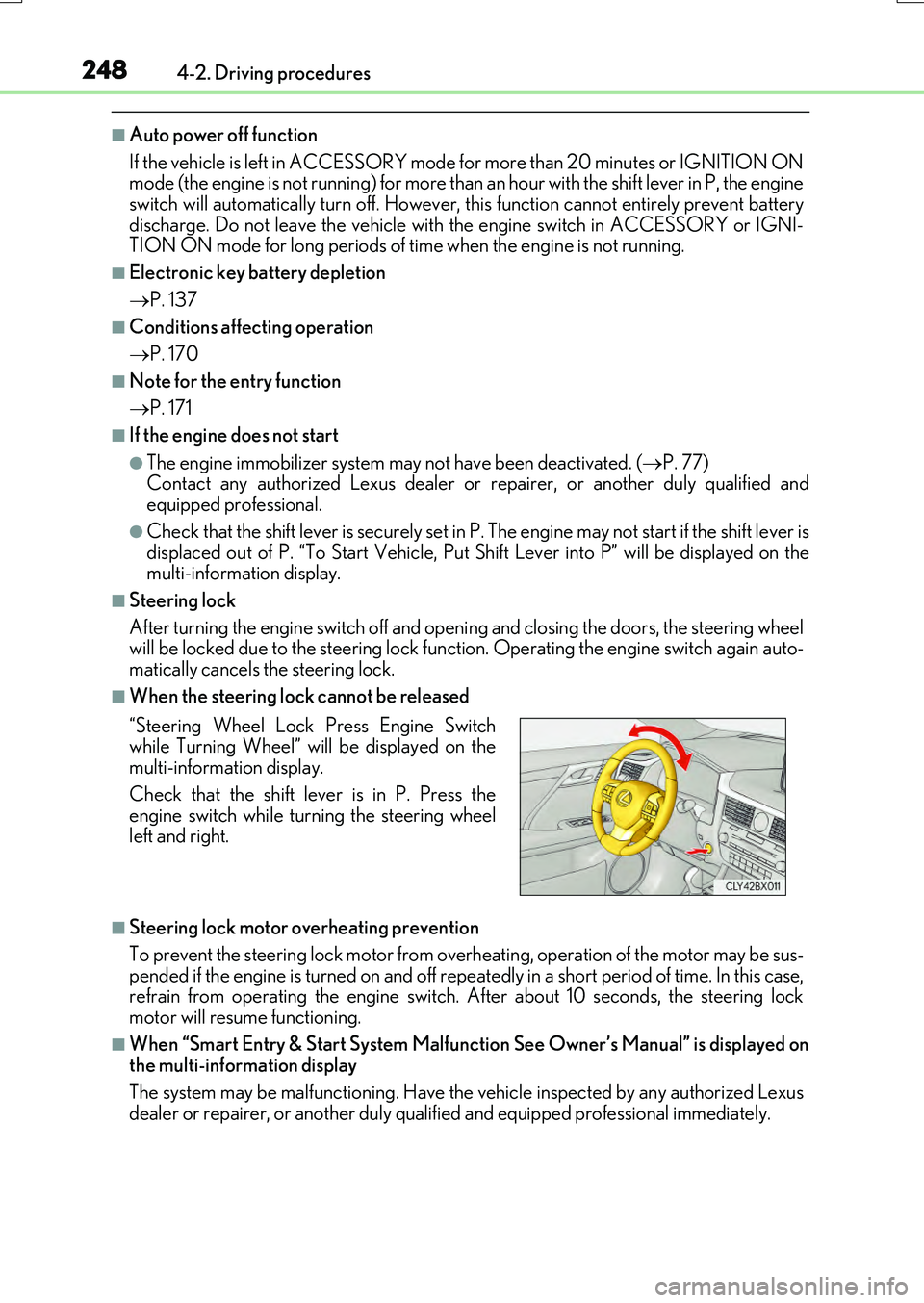
■When the steering lock cannot be released
■Steering lock motor overheating prevention
To prevent the steering lock motor from over heating, operation of the motor may be sus-
pended if the engine is turned on and off repeat edly in a short period of time. In this case, refrain from operating the engine switch. After about 10 seconds, the steering lockmotor will resume functioning.
■When “Smart Entry & Start System Malfunction See Owner’s Manual” is displayed onthe multi-information display
The system may be malfunctioning. Have the vehicle inspected by any authorized Lexus
dealer or repairer, or another duly qua lified and equipped professional immediately.
“Steering Wheel Lock Press Engine Switch while Turning Wheel” will be displayed on themulti-information display.
Check that the shift lever is in P. Press the engine switch while turning the steering wheelleft and right.
Page 249 of 776
2494-2. Driving procedures
4
Driving
RX350/RX200t_EE_OM48F32E
■If the electronic key battery is depleted
P. 638
■Operation of the engine switch
●If the switch is not pressed shortly and firmly, the engine switch mode may not change or the engine may not start.
●If attempting to restart the engine immediately after turning the engine switch off, the
engine may not start in some cases. After turning the engine switch off, please wait a few seconds before restarting the engine.
■If the smart entry & start system has been deactivated by a customized setting
P. 710
WARNING
■When starting the engine
Always start the engine while sitting in the driver’s seat. Do not depress the accelerator pedal while starting the engine under any circumstances.
Doing so may cause an accident resu lting in death or serious injury.
■Caution while driving
If engine failure occurs while the vehicle is moving, do not lock or open the doors until
the vehicle reaches a safe and complete stop. Activation of the steering lock in this cir- cumstance may lead to an accident, resulting in death or serious injury.
■Stopping the engine in an emergency
If you want to stop the engine in an emer gency while driving the vehicle, press and hold the engine switch for more than 2 seconds, or press it briefly 3 times or more in succes- sion. ( P. 657)
However, do not touch the engine switch while driving except in an emergency. Turning the engine off while driving will not cause loss of steering or braking control, but the power assist to these systems will be lost. Th is will make it more difficult to steer and
brake, so you should pull over and stop the vehicle as soon as it is safe to do so.
Page 250 of 776
2504-2. Driving procedures
RX350/RX200t_EE_OM48F32E
NOTICE
■To prevent battery discharge
●Do not leave the engine switch in ACCESSORY or IGNITION ON mode for long periods of time without the engine running on.
●If “ACCESSORY” or “IGNITION ON” is displayed on the meters while the engine isnot running, the engine switch is not off. Exit the vehicle after turning the engineswitch off.
●Do not stop the engine when the shift lever is in a position other than P. If the engine isstopped in another shift lever position, the engine switch will not be turned off butinstead be turned to ACCESSORY mode. If the vehicle is left in ACCESSORY
mode, battery discharge may occur.
■When starting the engine
●Do not race a cold engine.
●If the engine becomes difficult to start or stalls frequently, have your vehicle checked by any authorized Lexus dealer or repair er, or another duly qualified and equipped professional immediately.
■Symptoms indicating a malfun ction with the engine switch
If the engine switch seems to be operating s omewhat differently than usual, such as the switch sticking slightly, th ere may be a malfunction. Contact any authorized Lexus
dealer or repairer, or another duly qualif ied and equipped professional immediately.
Page 251 of 776
2514-2. Driving procedures
4
Driving
RX350/RX200t_EE_OM48F32E
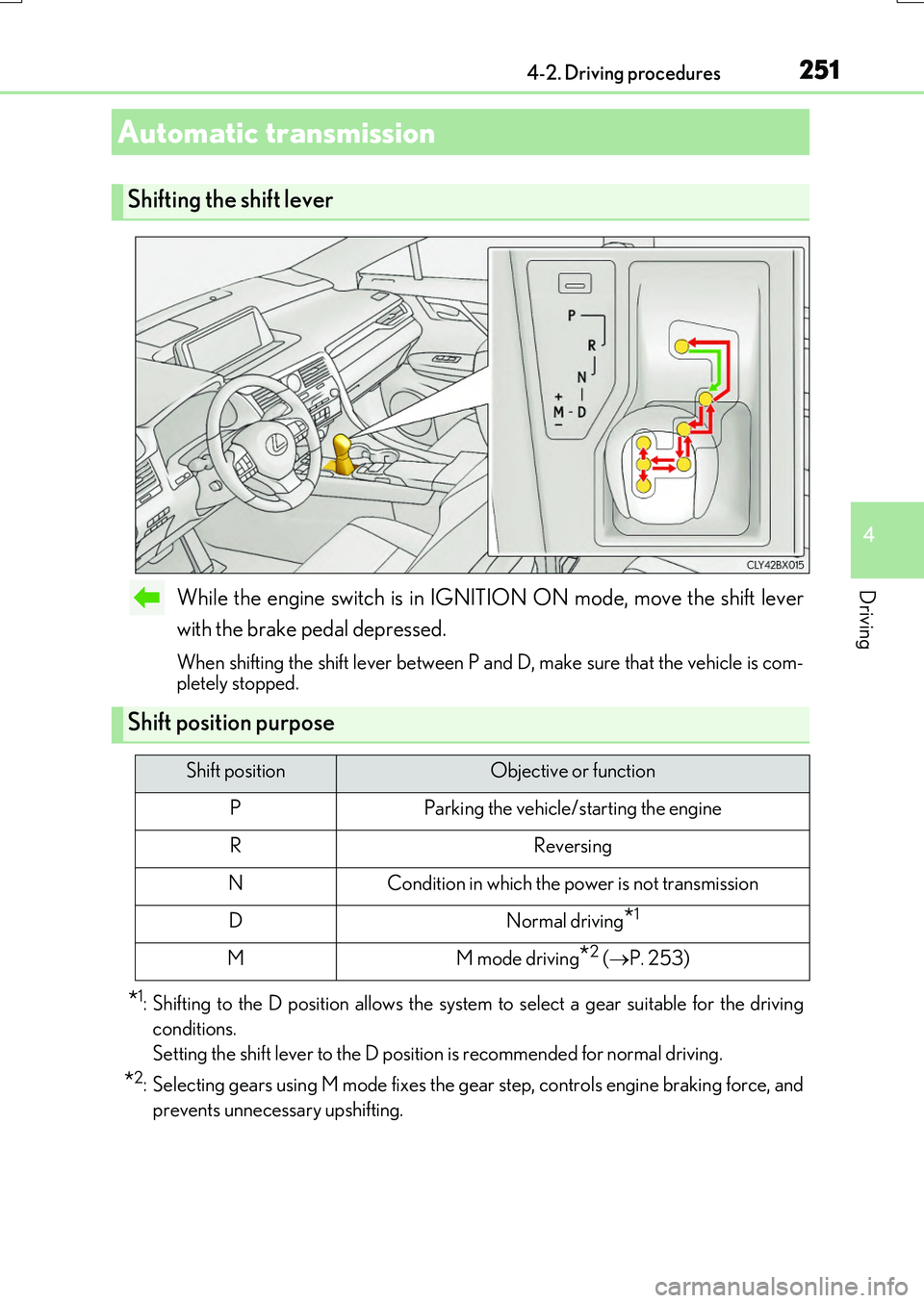
While the engine switch is in IGNITION ON mode, move the shift lever
with the brake pedal depressed.
When shifting the shift lever between P and D, make sure that the vehicle is com- pletely stopped.
*1: Shifting to the D position allows the system to select a gear suitable for the driving
conditions.
Setting the shift lever to the D position is recommended for normal driving.
*2: Selecting gears using M mode fixes the gear step, controls engine braking force, and
prevents unnecessary upshifting.
Automatic transmission
Shifting the shift lever
Shift position purpose
Shift positionObjective or function
PParking the vehicle/starting the engine
RReversing
NCondition in which the power is not transmission
DNormal driving*1
MM mode driving*2 ( P. 253)
Page 255 of 776
2554-2. Driving procedures
4
Driving
RX350/RX200t_EE_OM48F32E
■Automatic deactivation of shift range selection in the D position (vehicles with paddle
shift switches)
Shift range selection in the D position will be deactivated in the following situations:
●The “+” paddle shift switch is held down for a period of time
●When the vehicle comes to a stop
●If the accelerator pedal is depressed for more than a certain period of time
●When the shift lever is shifted to a position other than D
■To protect the automatic transmission
If the automatic transmission fluid temperat ure is high, “Transmission Fluid Temp High See Owner’s Manual” will be displayed on the multi-information display and the vehicle
will go into transmission protection mode automatically. Have the vehicle inspected by any authorized Lexus dealer or repairer, or another duly qualified and equipped profes-sional.
■Downshifting restri ction warning buzzer
To help ensure safety and driving performa nce, downshifting operation may sometimes be restricted. In some circumstances, down shifting may not be possible even when the
shift lever or paddle shift switch (if equipp ed) is operated. (A buzzer will sound twice.)
■When driving with cruise control or dynamic radar cruise control with full-speed range activated
Even when performing the following actions with the intent of enabling engine braking, engine braking will not activate because crui se control or dynamic radar cruise control with full-speed range will not be canceled.
●Vehicles with paddle shift switches (8-sp eed models): While driving in D position, downshifting to 7, 6, 5 or 4. ( P. 329, 341)
●Vehicles with paddle shift switches (6-speed models): While driving in D position,
downshifting to 5 or 4. ( P. 329, 341)
●When switching the driving mode to sport mode while driving in D position. (P. 417)
■Restraining sudden start (Drive-Start Control)
When the following unusual operation is performed, the engine output may be restrained.
●When the shift lever is shifted from R to D, D to R, N to R, P to D, or P to R (D includes
M) with the accelerator pedal depressed, a warning message appears on the multi- information display. If a warning message is shown on the multi-information display, read the message and follow the instructions.
●When the accelerator pedal is depressed too while the vehicle is in reverse.
■Shift lock system
The shift lock system is a system to prevent accidental operation of the shift lever in start- ing.The shift lever can be shifte d from P only when the engine switch is in IGNITION ON
mode and the brake pedal is being depressed.
Page 257 of 776
2574-2. Driving procedures
4
Driving
RX350/RX200t_EE_OM48F32E
WARNING
■When driving on slippery road surfaces
Be careful of downshifting and sudden acceler ation, as this could result in the vehicle skidding to the side or spinning.
■Gear Shift Indicator display (if equipped)
For safety, the driver should not look only at the display. Refer to the display when it is safe to do so while considering actual traffic and road conditions.
Failure to do so may lead to an accident.
■To prevent an accident wh en releasing the shift lock
Before pressing the shift lock override butt on, make sure to set the parking brake and
depress the brake pedal. If the accelerator pedal is accidentally depressed instead of the brake pedal when theshift lock override button is pressed and the shift lever is shifted out of P, the vehicle
may suddenly start, possibly leading to an accident resulting in death or serious injury.
Page 263 of 776
2634-2. Driving procedures
4
Driving
RX350/RX200t_EE_OM48F32E
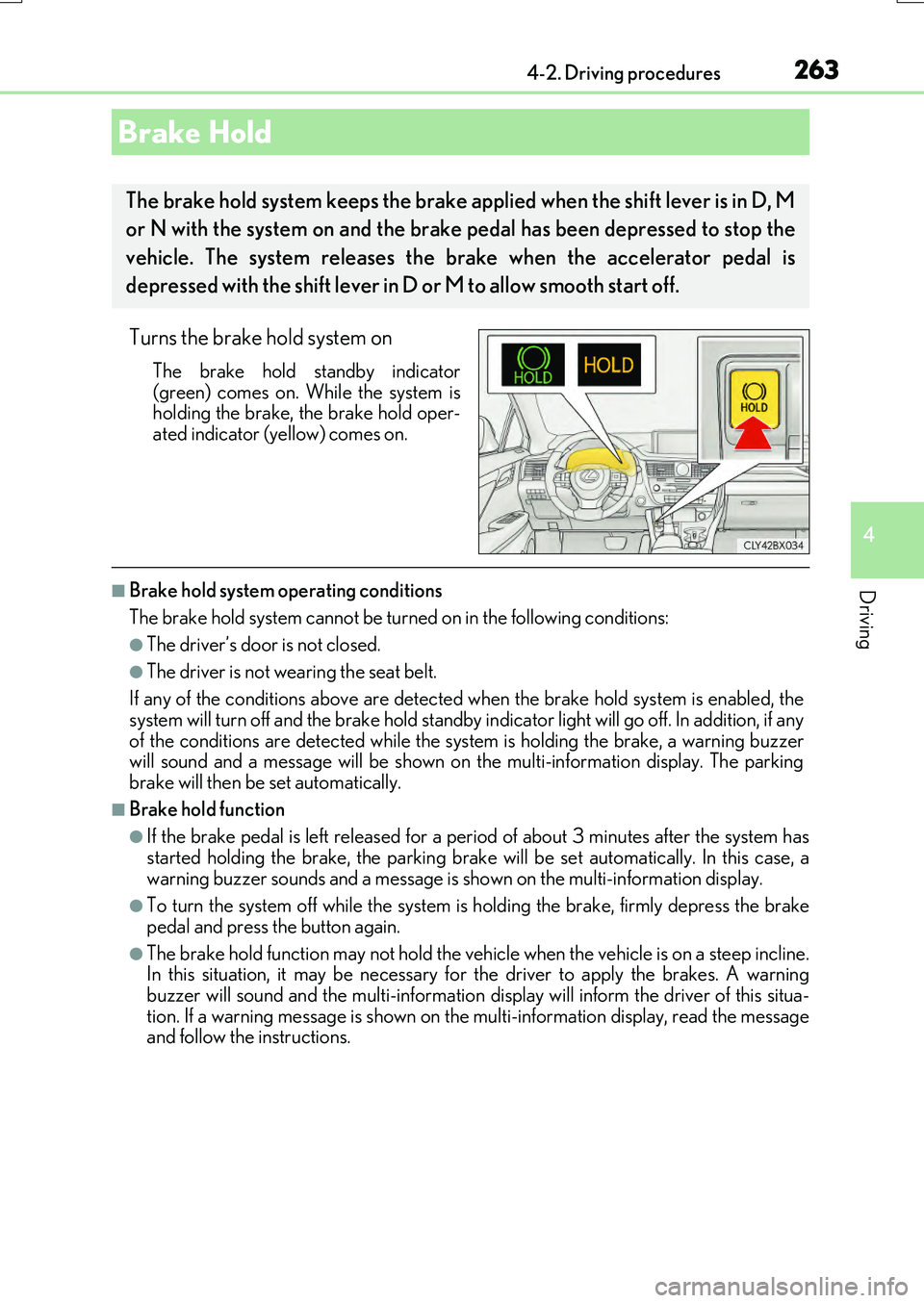
Turns the brake hold system on
The brake hold standby indicator
(green) comes on. While the system is holding the brake, the brake hold oper-ated indicator (yellow) comes on.
■Brake hold system operating conditions
The brake hold system cannot be turn ed on in the following conditions:
●The driver’s door is not closed.
●The driver is not wearing the seat belt.
If any of the conditions above are detected when the brake hold system is enabled, the
system will turn off and the brake hold standby indicator light will go off. In addition, if any of the conditions are detected while the sy stem is holding the brake, a warning buzzer will sound and a message will be shown on th e multi-information display. The parking
brake will then be set automatically.
■Brake hold function
●If the brake pedal is left released for a pe riod of about 3 minutes after the system has
started holding the brake, th e parking brake will be set automatically. In this case, a warning buzzer sounds and a message is shown on the multi-information display.
●To turn the system off while the system is holding the brake, firmly depress the brake
pedal and press the button again.
●The brake hold function may not hold the vehicle when the vehicle is on a steep incline. In this situation, it may be necessary for the driver to apply the brakes. A warning
buzzer will sound and the multi-information disp lay will inform the driver of this situa- tion. If a warning message is shown on the multi-information display, read the message and follow the instructions.
Brake Hold
The brake hold system keeps the brake a pplied when the shift lever is in D, M
or N with the system on and the brake pedal has been depressed to stop the
vehicle. The system releases the brake when the accelerator pedal is
depressed with the shift lever in D or M to allow smooth start off.
Page 267 of 776
2674-3. Operating the lights and wipers
4
Driving
RX350/RX200t_EE_OM48F32E
■Daytime running light system
To make your vehicle more visible to other drivers during daytime driving, the daytime
running lights turn on automatically whenev er the engine is started and the parking
brake is released with the headlight switch in position. (Illuminate brighter than
the front position lights.) Daytime running lights are not designed for use at night.
■Cornering lights (if equipped)
When the cornering lights are on for more than 30 minutes, they will turn off automati-
cally.
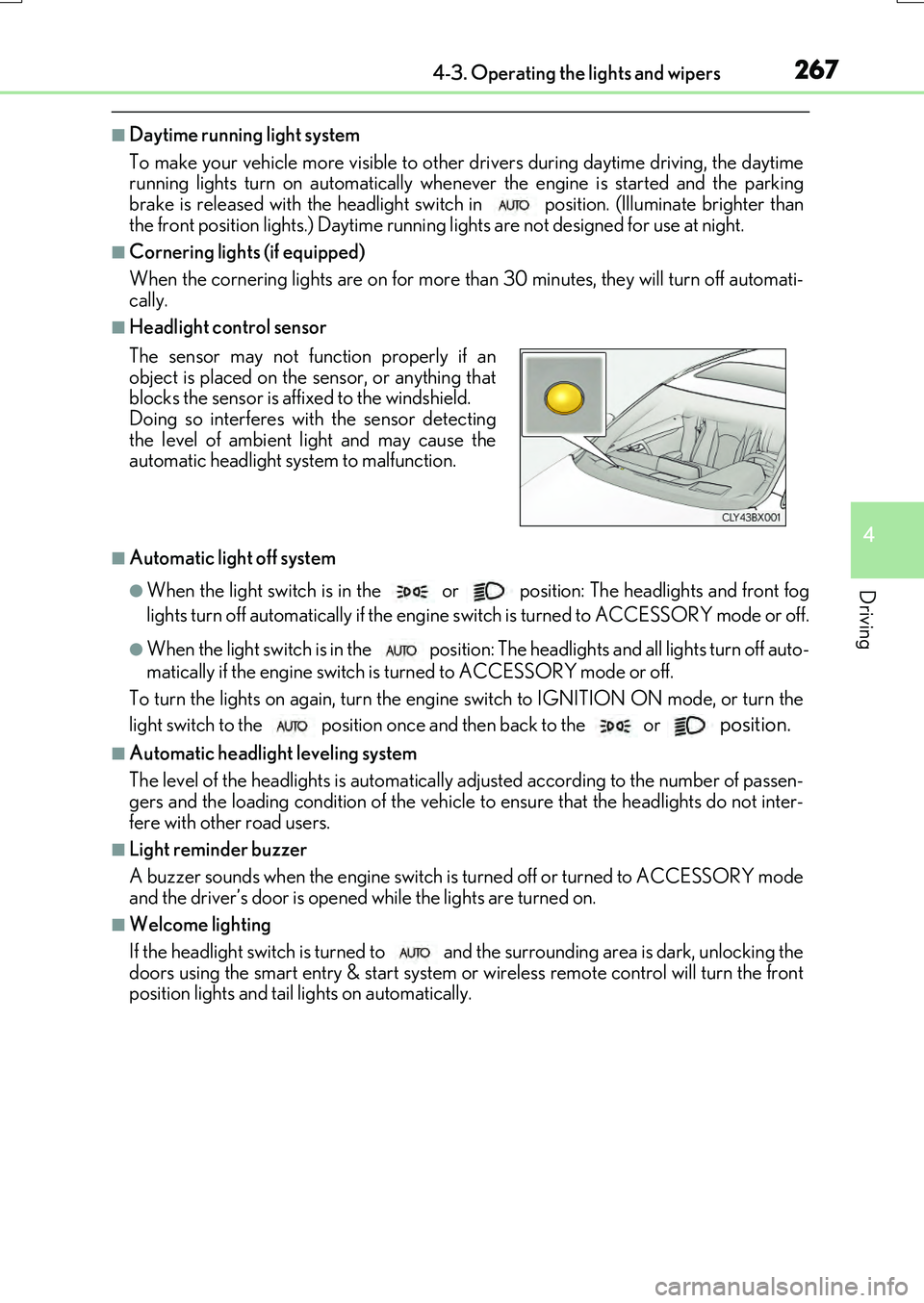
■Headlight control sensor
■Automatic light off system
●When the light switch is in the or position: The headlights and front fog
lights turn off automatically if the engine switch is turned to ACCESSORY mode or off.
●When the light switch is in the position: The headlights and all lights turn off auto-
matically if the engine switch is turned to ACCESSORY mode or off.
To turn the lights on again, turn the engine switch to IGNITION ON mode, or turn the
light switch to the
position once and then back to the or position.
■Automatic headlight leveling system
The level of the headlights is automatically ad justed according to the number of passen-
gers and the loading condition of the vehicle to ensure that the headlights do not inter-
fere with other road users.
■Light reminder buzzer
A buzzer sounds when the engine switch is turned off or turned to ACCESSORY mode
and the driver’s door is opened while the lights are turned on.
■Welcome lighting
If the headlight switch is turned to and the surrounding area is dark, unlocking the
doors using the smart entry & start system or wireless remote control will turn the front
position lights and tail lights on automatically.
The sensor may not function properly if an
object is placed on the sensor, or anything that
blocks the sensor is affixed to the windshield.
Doing so interferes with the sensor detecting
the level of ambient light and may cause the
automatic headlight system to malfunction.
Page 311 of 776
3114-5. Using the driving support systems
4
Driving
RX350/RX200t_EE_OM48F32E
• After the engine has started the vehicle has not been driven for a certain amount of time• While making a left/right turn and for a few seconds after making a left/right turn
• While driving on a curve and for a few seconds after driving on a curve • If your vehicle is skidding
• If the wheels are misaligned • If a wiper blade is blocking the camera sensor
• The vehicle is wobbling. • The vehicle is being driven at extremely high speeds.• When driving on a hill
• If the radar sensor or camera sensor is misaligned
●In some situations such as the following, sufficient braking force may not be obtained,
preventing the system from performing properly:
• If the braking functions cannot operate to their full extent, such as when the brake parts are extremely cold, extremely hot, or wet
• If the vehicle is not properly maintained (brakes or tires are excessively worn, improper tire inflation pressure, etc.)• When the vehicle is being driven on a gravel road or other slippery surface
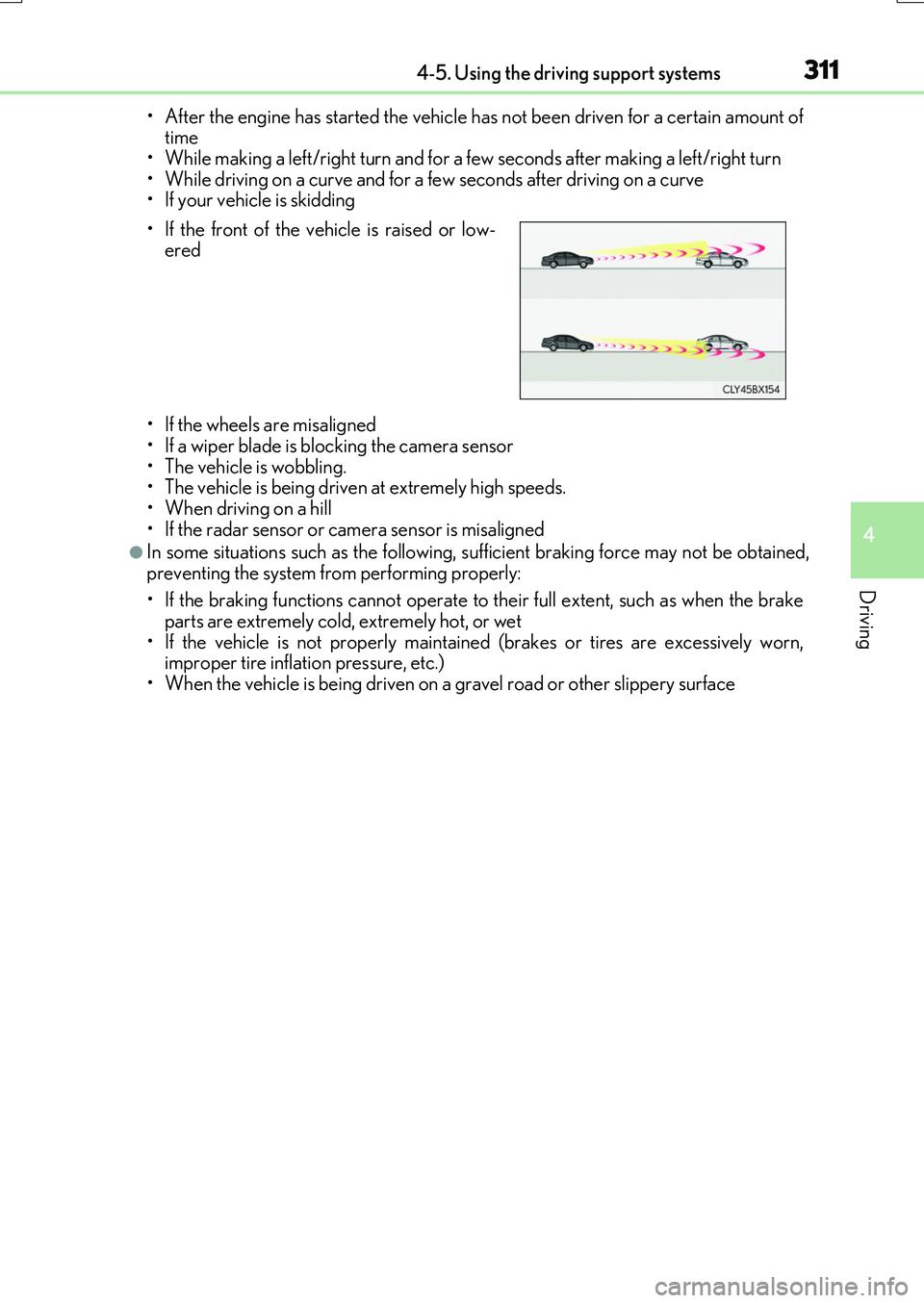
• If the front of the vehicle is raised or low- ered