audio LEXUS RX200T 2017 Owners Manual
[x] Cancel search | Manufacturer: LEXUS, Model Year: 2017, Model line: RX200T, Model: LEXUS RX200T 2017Pages: 776, PDF Size: 44.51 MB
Page 533 of 776
5336-1. Basic operation of the Remote Touch screen
6
Interior features
RX350/RX200t_EE_OM48F32E
■Full screen display
The following functions can be displayed full screen:
•Initial screen
•“Menu” screen ( P. 532)
•Map screen*
•Audio screen*
• Fuel consumption screen ( P. 128)
• Air conditioning control screen ( P. 536)
*: Refer to the “NAVIGATION SYSTEM OWNER’S MANUAL”.
■Split-screen display
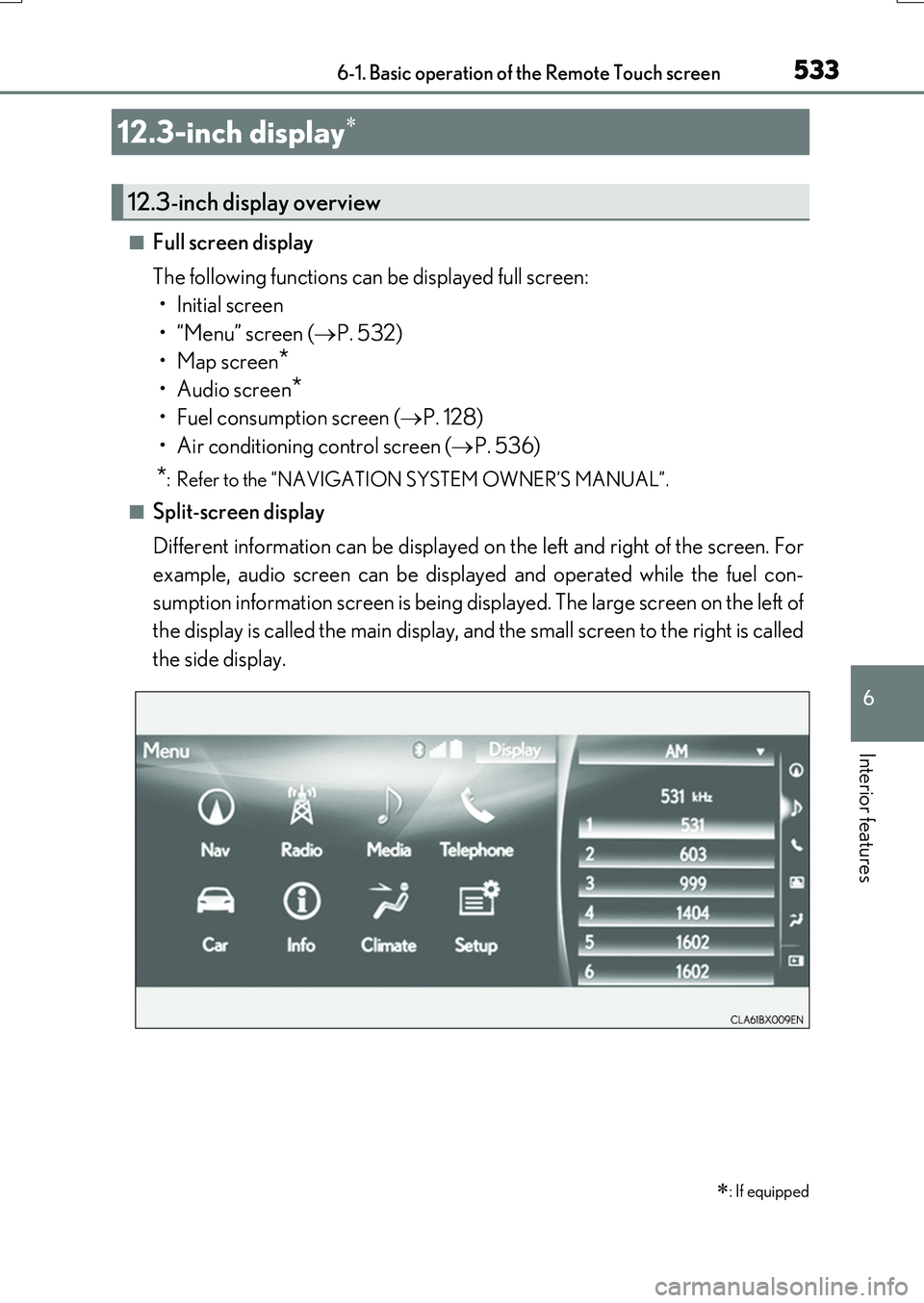
Different information can be displayed on the left and right of the screen. For
example, audio screen can be displayed and operated while the fuel con-
sumption information screen is being displayed. The large screen on the left of
the display is called the main display, and the small screen to the right is called
the side display.
12.3-inch display
: If equipped
12.3-inch display overview
Page 534 of 776
5346-1. Basic operation of the Remote Touch screen
RX350/RX200t_EE_OM48F32E
■Selecting the operation screen
When selecting the main display, move the Remote Touch knob to the left.
When selecting the side display, move the Remote Touch knob to the right.
■ Main display
For details about the functions and operation of the main display, refer to the
respective section and “NAVIGATION SYSTEM OWNER’S MANUAL”.
■Side display
Basic screens
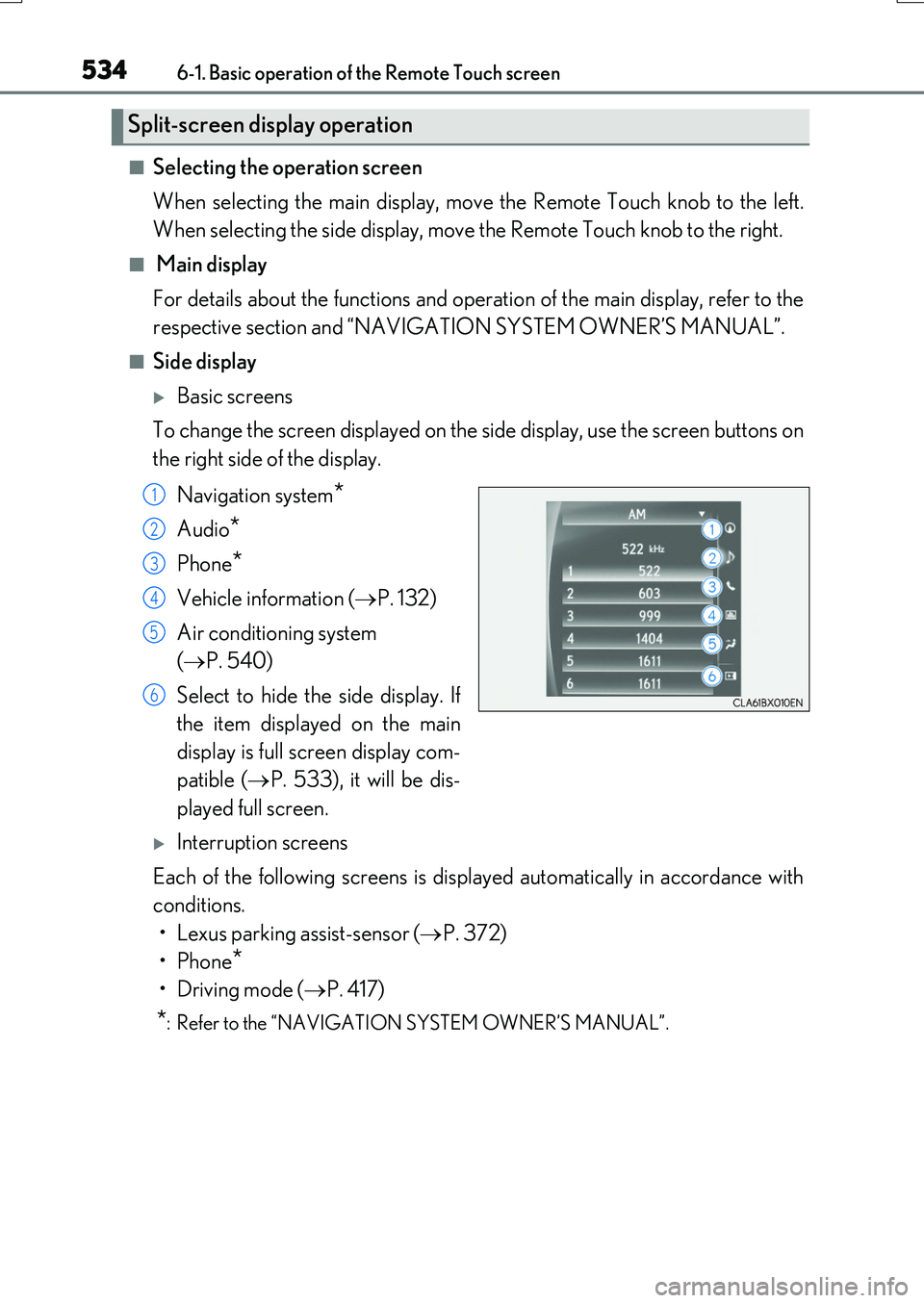
To change the screen displayed on the side display, use the screen buttons on
the right side of the display.
Navigation system*
Audio*
Phone*
Vehicle information ( P. 132)
Air conditioning system
( P. 540)
Select to hide the side display. If
the item displayed on the main
display is full screen display com-
patible ( P. 533), it will be dis-
played full screen.
Interruption screens
Each of the following screens is displayed automatically in accordance with
conditions.
• Lexus parking assist-sensor ( P. 372)
•Phone*
•Driving mode ( P. 417)
*: Refer to the “NAVIGATION SYSTEM OWNER’S MANUAL”.
Split-screen display operation
1
2
3
4
5
6
Page 536 of 776
5366-2. Using the air conditioning system and defogger
RX350/RX200t_EE_OM48F32E
Automatic air conditioning system
Air outlets and fan speed are automatically adjusted according to the tem-
perature setting.
Vehicles with a Lexus Display Audio system: Press the “MENU” button on the
Lexus Display Audio controller, then sele ct “Climate” to display the air condi-
tioning control screen.
For details on the Lexus Display Audio controller, refer to “Lexus Display
Audio controller” on P. 440.
Vehicles with a navigation system: Press the “MENU” button on the Remote
Touch, then select to display the air conditioning control screen.
The air conditioning system can be displayed and operated on the side display.
( P. 534)
For details on the Remote Touch, refer to the “NAVIGATION SYSTEM
OWNER’S MANUAL”.
The illustrations in this section are for left-hand drive vehicles.
The button positions and shapes will di ffer for right-hand drive vehicles.
Also, the display and button positions will differ depending on the type of the
system.
Page 538 of 776
5386-2. Using the air conditioning system and defogger
RX350/RX200t_EE_OM48F32E
■Change the airflow mode
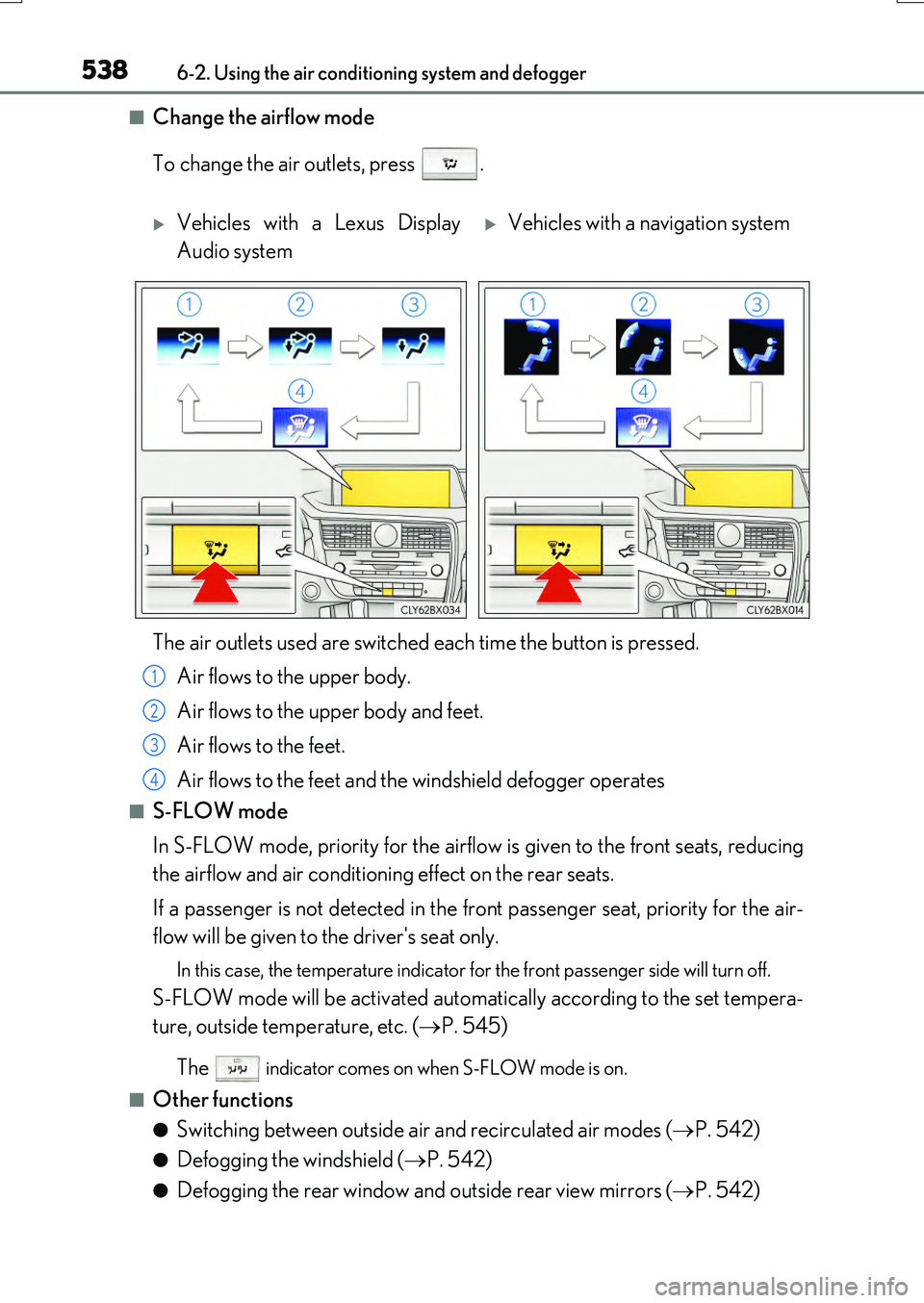
To change the air outlets, press .
■S-FLOW mode
In S-FLOW mode, priority for the airflow is given to the front seats, reducing
the airflow and air conditioning effect on the rear seats.
If a passenger is not detected in the front passenger seat, priority for the air-
flow will be given to the driver's seat only.
In this case, the temperature indicator for the front passenger side will turn off.
S-FLOW mode will be activated automatically according to the set tempera-
ture, outside temperature, etc. ( P. 545)
The indicator comes on when S-FLOW mode is on.
■Other functions
●Switching between outside air and recirculated air modes ( P. 542)
●Defogging the windshield (P. 542)
●Defogging the rear window and outside rear view mirrors (P. 542)
Vehicles with a Lexus Display
Audio system
Vehicles with a navigation system
The air outlets used are switched each time the button is pressed.
Air flows to the upper body.
Air flows to the upper body and feet.
Air flows to the feet.
Air flows to the feet and the windshield defogger operates
1
2
3
4
Page 539 of 776
5396-2. Using the air conditioning system and defogger
6
Interior features
RX350/RX200t_EE_OM48F32E
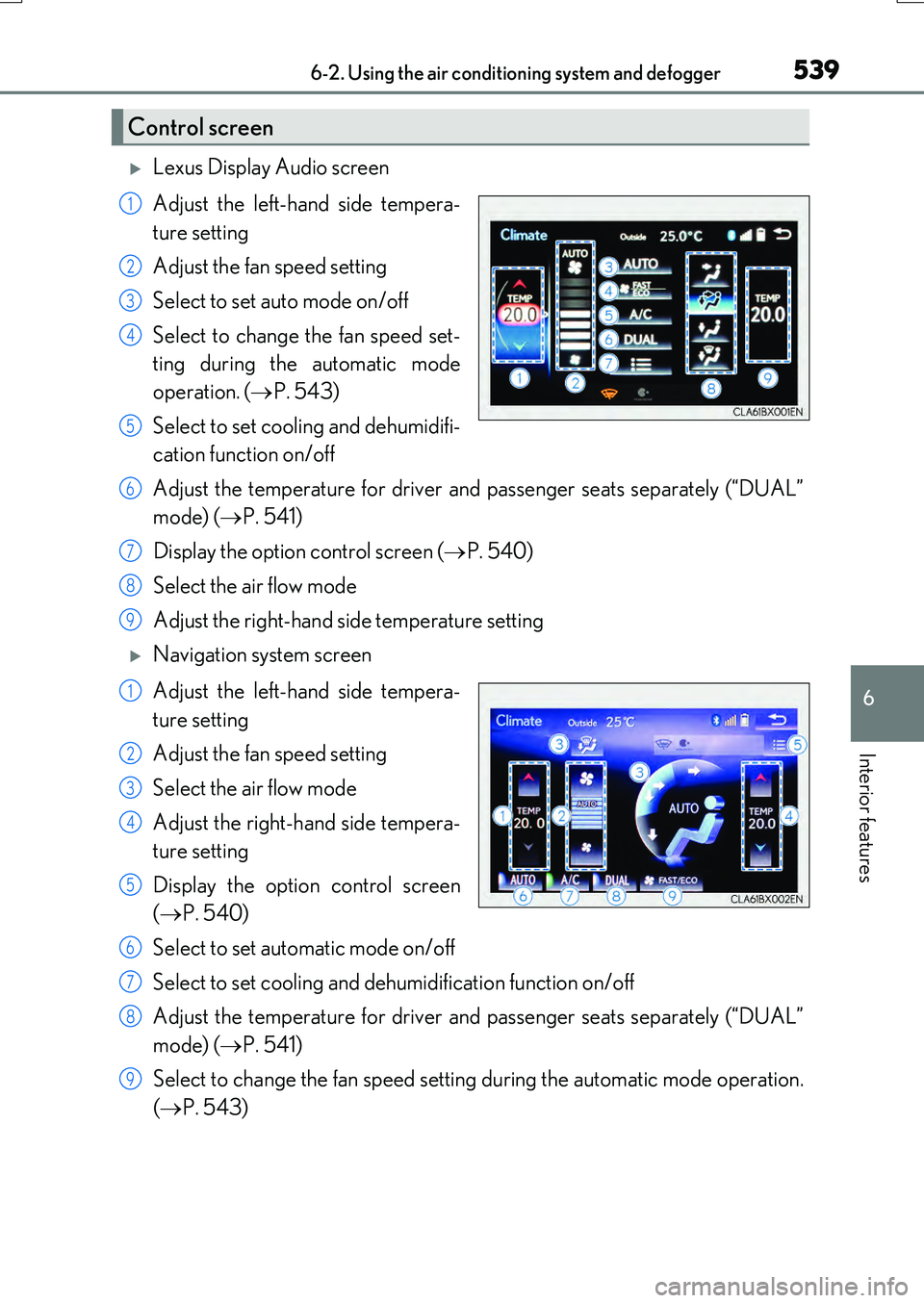
Lexus Display Audio screen
Adjust the left-hand side tempera-
ture setting
Adjust the fan speed setting
Select to set auto mode on/off
Select to change the fan speed set-
ting during the automatic mode
operation. ( P. 543)
Select to set cooling and dehumidifi-
cation function on/off
Adjust the temperature for driver and passenger seats separately (“DUAL”
mode) ( P. 541)
Display the option control screen ( P. 540)
Select the air flow mode
Adjust the right-hand side temperature setting
Navigation system screen
Adjust the left-hand side tempera-
ture setting
Adjust the fan speed setting
Select the air flow mode
Adjust the right-hand side tempera-
ture setting
Display the option control screen
( P. 540)
Select to set automatic mode on/off
Select to set cooling and dehumidification function on/off
Adjust the temperature for driver and passenger seats separately (“DUAL”
mode) ( P. 541)
Select to change the fan speed setting during the automatic mode operation.
( P. 543)
Control screen
1
2
3
4
5
6
7
8
9
1
2
3
4
5
6
7
8
9
Page 540 of 776
5406-2. Using the air conditioning system and defogger
RX350/RX200t_EE_OM48F32E
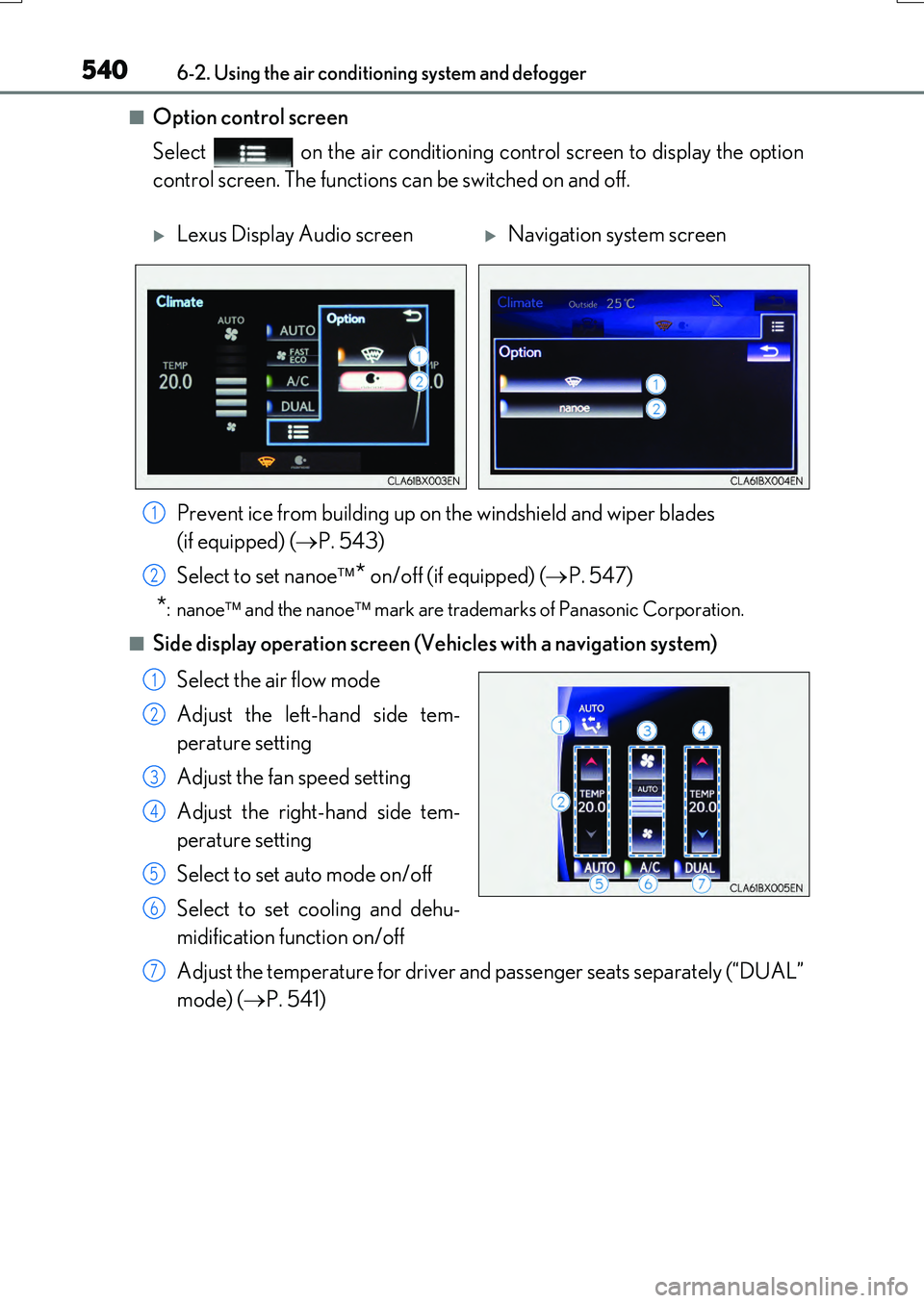
■Option control screen
Select on the air conditioning control screen to display the option
control screen. The functions can be switched on and off.
■Side display operation screen (Vehicles with a navigation system)
Select the air flow mode
Adjust the left-hand side tem-
perature setting
Adjust the fan speed setting
Adjust the right-hand side tem-
perature setting
Select to set auto mode on/off
Select to set cooling and dehu-
midification function on/off
Adjust the temperature for driver an d passenger seats separately (“DUAL”
mode) ( P. 541)
Lexus Display Audio screenNavigation system screen
Prevent ice from building up on the windshield and wiper blades
(if equipped) ( P. 543)
Select to set nanoe * on/off (if equipped) (P. 547)
*:nanoe and the nanoe mark are trademarks of Panasonic Corporation.
1
2
1
2
3
4
5
6
7
Page 568 of 776
5686-5. Using the other interior features
RX350/RX200t_EE_OM48F32E
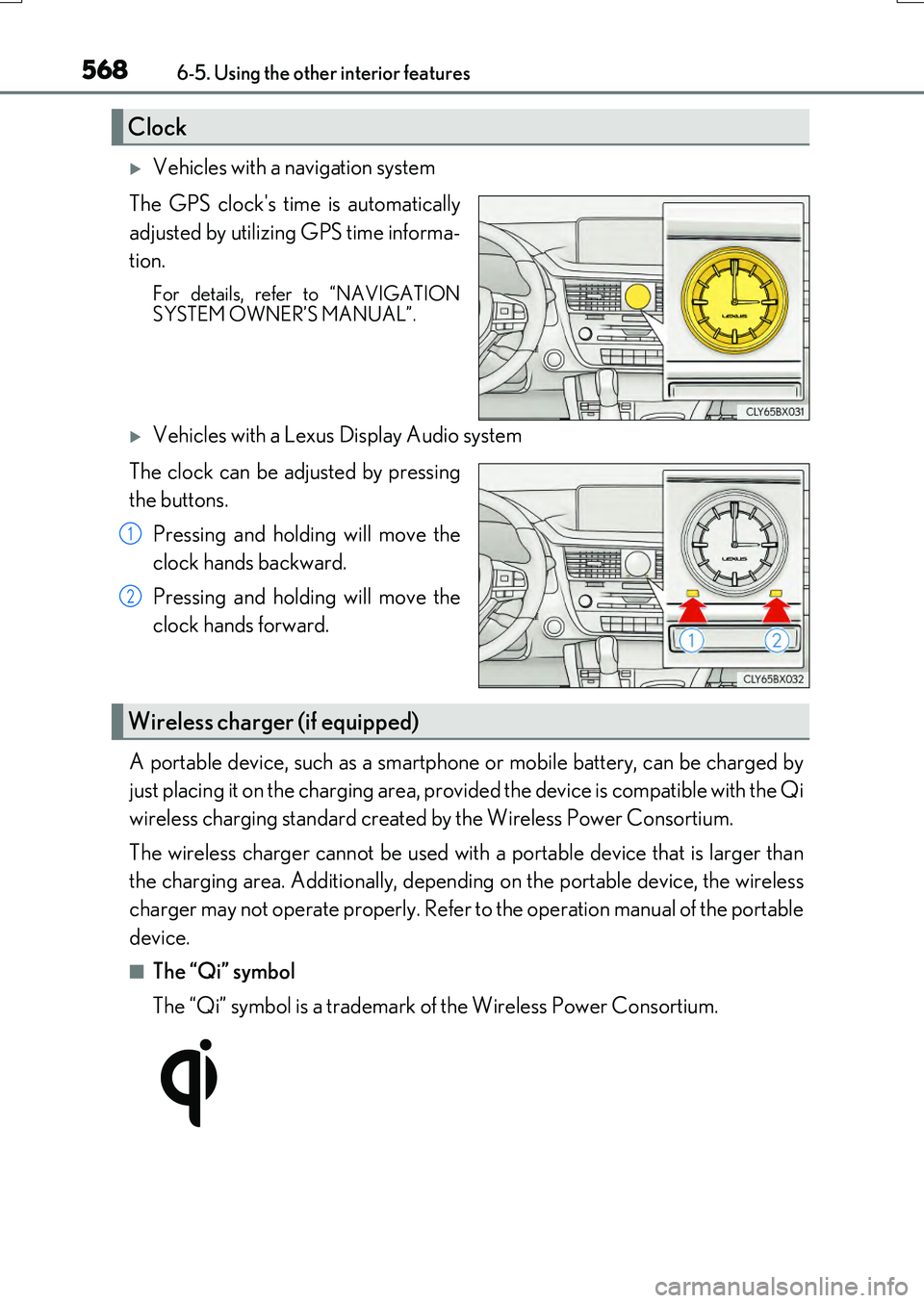
Vehicles with a navigation system
The GPS clock's time is automatically
adjusted by utilizing GPS time informa-
tion.
For details, refer to “NAVIGATION SYSTEM OWNER’S MANUAL”.
Vehicles with a Lexus Display Audio system
The clock can be adjusted by pressing
the buttons.
Pressing and holding will move the
clock hands backward.
Pressing and holding will move the
clock hands forward.
A portable device, such as a smartphone or mobile battery, can be charged by
just placing it on the charging area, provided the device is compatible with the Qi
wireless charging standard created by the Wireless Power Consortium.
The wireless charger cannot be used with a portable device that is larger than
the charging area. Additionally, dependin g on the portable device, the wireless
charger may not operate properly. Refer to the operation manual of the portable
device.
■The “Qi” symbol
The “Qi” symbol is a trademark of the Wireless Power Consortium.
Clock
1
2
Wireless charger (if equipped)
Page 591 of 776
5917-1. Maintenance and care
7
Maintenance and care
RX350/RX200t_EE_OM48F32E
NOTICE
■Cleaning detergents
●Do not use the following types of detergent, as they may discolor the vehicle interior or cause streaks or damage to painted surfaces:
• Non-seat portions: Organic substances su ch as benzene or gasoline, alkaline or acidic solutions, dye, and bleach• Seats: Alkaline or acidic solutions, such as thinner, benzene, and alcohol
●Do not use polish wax or polish cleaner. The instrument panel’s or other interior part’s painted surface may be damaged.
■Preventing damage to leather surfaces
Observe the following precautions to avoid damage to and deterioration of leather surfaces:
●Remove any dust or dirt from leather surfaces immediately.
●Do not expose the vehicle to direct sunlight for extended periods of time. Park the vehicle in the shade, especially during summer.
●Do not place items made of vinyl, plastic, or containing wax on the upholstery, as theymay stick to the leather surface if the vehicle interior heats up significantly.
■Water on the floor
Do not wash the vehicle floor with water. Vehicle systems such as the audio system may be damaged if water comes into contactwith electrical components such as the au dio system above or under the floor of the
vehicle. Water may also cause the body to rust.
■When cleaning the inside of the windshield (vehicles with Lexus Safety System+)
Do not allow glass cleaner to contact the lens. Also, do not touch the lens.
( P. 293)
■Cleaning the inside of the rear window
●Do not use a glass cleaner to clean the rear window, as this may cause damage to the
rear window defogger heater wires or antenna. Use a cloth dampened with luke- warm water to gently wipe the window clean. Wipe the window in strokes runningparallel to the heater wires or antenna.
●Be careful not to scratch or damage the heater wires or antenna.
Page 671 of 776
6718-2. Steps to take in an emergency
8
When trouble arises
RX350/RX200t_EE_OM48F32E
■When a tire is replaced with a spare tire
Vehicles with a compact spare tire: The comp act spare tire is not equipped with a tire pressure warning valve and transmitter. If a ti re goes flat, the tire pressure warning light
will not turn off even though th e flat tire has been replaced with the spare tire. Replace the spare tire with the repaired tire and adjust the tire inflation pressure. The tire pressurewarning light will go off after a few minutes.
Vehicles with a full-size spare tire: The spare tire is also equipped with a tire pressure warning valve and transmitter. The tire pressure warning light will turn on if the tire infla- tion pressure of the spare tire is low. If a ti re goes flat, the tire pressure warning light will
not turn off even though the flat tire has been replaced with the spare tire. Replace the spare tire with the repaired tire and adjust the tire inflation pressure. The tire pressure warning light will go off after a few minutes.
■Conditions that the tire pressure warning system may not function properly
P. 618
■Warning buzzer
In some cases, the buzzer may not be heard due to being in a noisy location or audio sound.
WARNING
■If both the ABS and the brake system warning lights remain on
Stop your vehicle in a safe place immediately and contact any authorized Lexus dealer
or repairer, or another duly qualified and equipped professional. The vehicle will become extremely unstable during braking, and the ABS system may fail, which couldcause an accident resulting in death or serious injury.
■When the electric power steering system warning light comes on
When the light comes on yellow, the assist to the power steering is restricted. When the light comes on red, the assist to the power steering is lost and handling operations of
the steering wheel become extremely heavy. When steering wheel operations are heavier than usual, grip the steering wheel firmly and operate it using more force than usual.
Page 716 of 776
7168-2. Steps to take in an emergency
RX350/RX200t_EE_OM48F32E
Start the engine of the second vehicle. Increase the engine speed slightly and
maintain at that level for approximately 5 minutes to recharge the battery of
your vehicle.
Open and close any of the doors of your vehicle with the engine switch off.
Maintain the engine speed of the second vehicle and start the engine of your
vehicle by turning the engine switch to IGNITION ON mode.
Once the vehicle’s engine has started, remove the jumper cables in the exact
reverse order from which they were connected.
Once the engine starts, have the vehicle inspected at any authorized Lexus
dealer or repairer, or another duly qualified and equipped professional as soon
as possible.
■Starting the engine when the battery is discharged
The engine cannot be started by push-starting.
■To prevent battery discharge
●Turn off the headlights and the audio system while the engine is stopped. (RX200t: Except when the engine is stopped by the Stop & Start system.)
●Turn off any unnecessary electrical components when the vehicle is running at a low
speed for an extended period, such as in heavy traffic.
■Charging the battery
The electricity stored in the battery will discharge gradually even when the vehicle is not
in use, due to natural discharge and the draining effects of certain electrical appliances. If the vehicle is left for a long time, the battery may discharge, and the engine may beunable to start. (The battery recharges automatically during driving.)
■When the battery is removed or discharged
●In some cases, it may not be possible to unlock the doors using the smart entry & startsystem when the battery is discharged. Us e the wireless remote control or the mechan-
ical key to lock or unlock the doors.
●The engine may not start on the first attempt after the battery has recharged but will start normally after the second attempt. This is not a malfunction.
●The engine switch mode is memorized by the vehicle. When the battery is recon-nected, the system will return to the mode it was in before the battery was discharged. Before disconnecting the battery, turn the engine switch off.
If you are unsure what mode the engine switch was in before the battery discharged, be especially careful when reconnecting the battery.
●Vehicles with power back door: The power back door must be initialized. (P. 159)
●RX200t: After the battery terminals have been disconnected then reconnected or the battery has been replaced, the Stop & Start system may not automatically stop theengine for approximately 5 to 60 minutes.
4
5
6
7