Low LEXUS RX200T 2017 Owners Manual
[x] Cancel search | Manufacturer: LEXUS, Model Year: 2017, Model line: RX200T, Model: LEXUS RX200T 2017Pages: 776, PDF Size: 44.51 MB
Page 259 of 776
2594-2. Driving procedures
4
Driving
RX350/RX200t_EE_OM48F32E
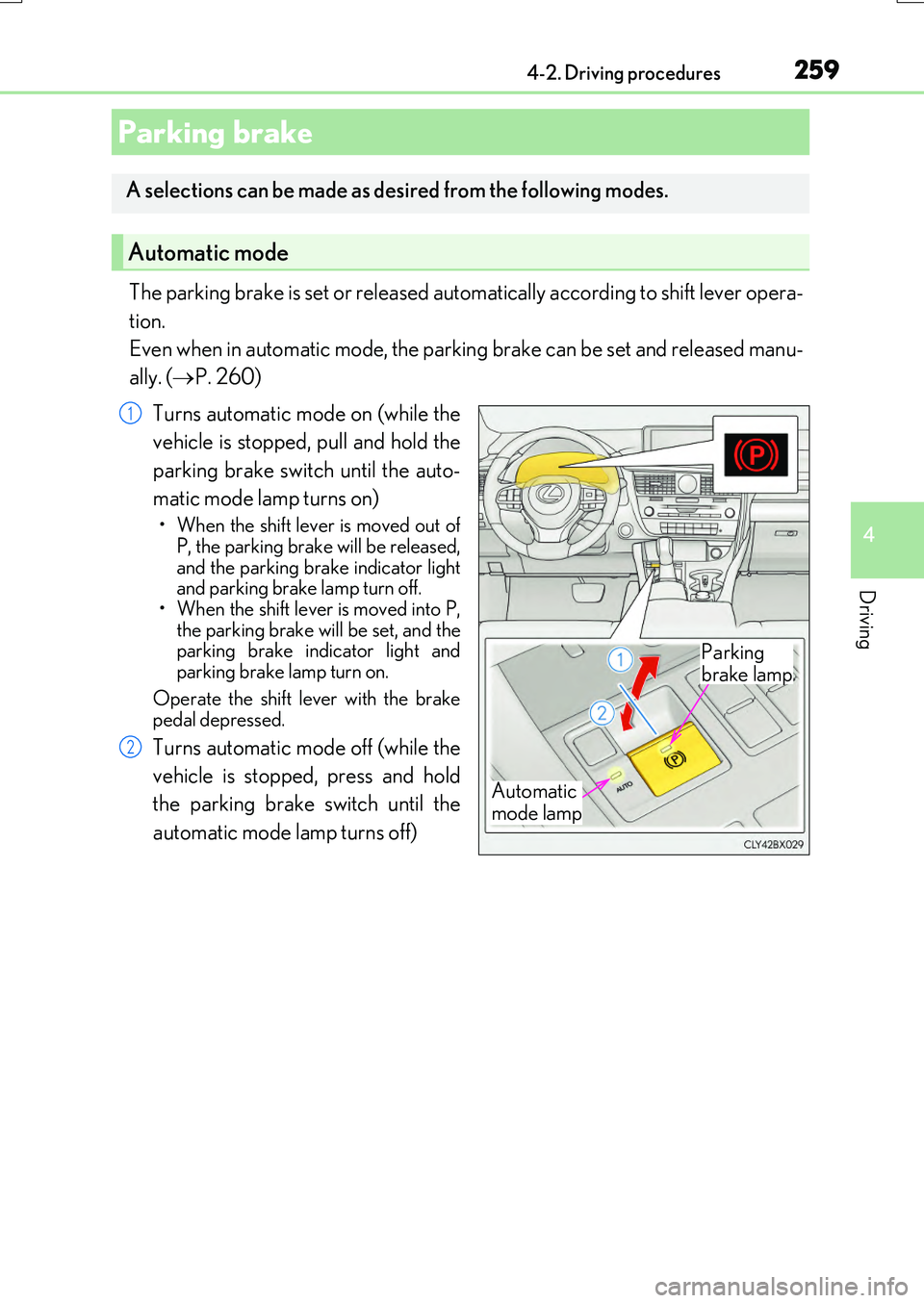
The parking brake is set or released automatically according to shift lever opera-
tion.
Even when in automatic mode, the parking brake can be set and released manu-
ally. ( P. 260)
Turns automatic mode on (while the
vehicle is stopped, pull and hold the
parking brake switch until the auto-
matic mode lamp turns on)
• When the shift lever is moved out of P, the parking brake will be released,
and the parking brake indicator light and parking brake lamp turn off.• When the shift lever is moved into P,
the parking brake will be set, and the parking brake indicator light andparking brake lamp turn on.
Operate the shift lever with the brake pedal depressed.
Turns automatic mode off (while the
vehicle is stopped, press and hold
the parking brake switch until the
automatic mode lamp turns off)
Parking brake
A selections can be made as desired from the following modes.
Automatic mode
Automatic
mode lamp
Parking
brake lamp
1
2
Page 261 of 776
2614-2. Driving procedures
4
Driving
RX350/RX200t_EE_OM48F32E
■Parking brake operation sound
When the parking brake operates, a motor so und (whirring sound) may be heard. This does not indicate a malfunction.
■Parking brake indicator light and parking brake lamp
●Depending on the engine switch mode, the parking brake indicator light and parking brake lamp will turn on and stay on as described below:
IGNITION ON mode: Comes on until the parking brake is released. Not in IGNITION ON mode: Stays on for approximately 15 seconds.
●When the engine switch is turned off with the parking brake set, the parking brake indi-
cator light and parking brake lamp will stay on for about 15 seconds. This does not indi- cate a malfunction.
■Changing the mode
When changing the automati c mode on/off, the message will be shown on the multi- information display and the buzzer sounds.
■Parking brake engaged warning buzzer
A buzzer will sound if the vehicle is driven with the parking brake engaged. “Release Parking Brake” is displayed on the multi-information display.
■Warning messages and buzzers
Warning messages and buzzers are used to indicate a system malfunction or to inform the driver of the need for caution. If a warn ing message is shown on the multi-information display, read the message and follow the instructions.
■If the brake system warning light comes on
P. 666
■Usage in winter time
P. 430
Page 263 of 776
2634-2. Driving procedures
4
Driving
RX350/RX200t_EE_OM48F32E
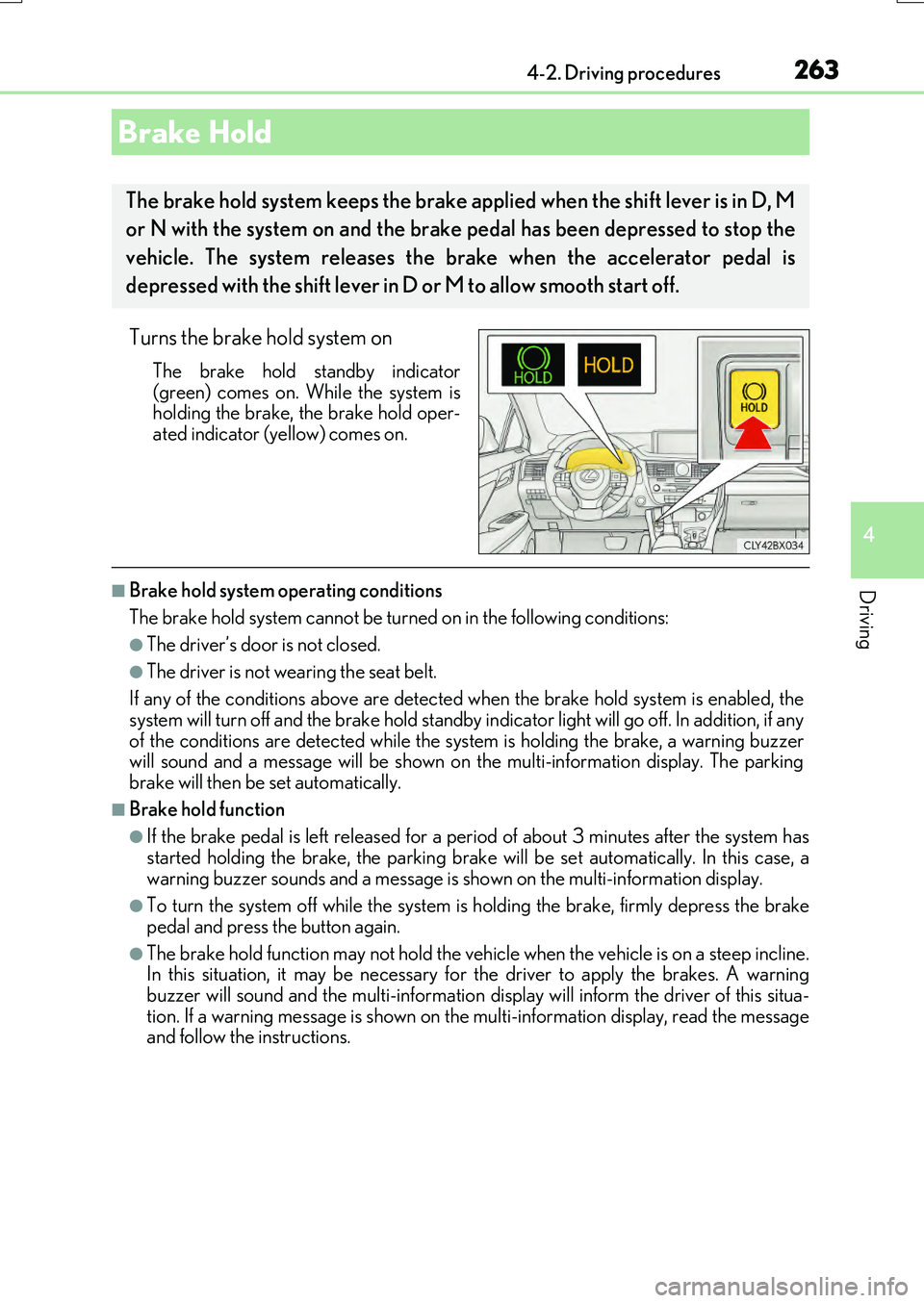
Turns the brake hold system on
The brake hold standby indicator
(green) comes on. While the system is holding the brake, the brake hold oper-ated indicator (yellow) comes on.
■Brake hold system operating conditions
The brake hold system cannot be turn ed on in the following conditions:
●The driver’s door is not closed.
●The driver is not wearing the seat belt.
If any of the conditions above are detected when the brake hold system is enabled, the
system will turn off and the brake hold standby indicator light will go off. In addition, if any of the conditions are detected while the sy stem is holding the brake, a warning buzzer will sound and a message will be shown on th e multi-information display. The parking
brake will then be set automatically.
■Brake hold function
●If the brake pedal is left released for a pe riod of about 3 minutes after the system has
started holding the brake, th e parking brake will be set automatically. In this case, a warning buzzer sounds and a message is shown on the multi-information display.
●To turn the system off while the system is holding the brake, firmly depress the brake
pedal and press the button again.
●The brake hold function may not hold the vehicle when the vehicle is on a steep incline. In this situation, it may be necessary for the driver to apply the brakes. A warning
buzzer will sound and the multi-information disp lay will inform the driver of this situa- tion. If a warning message is shown on the multi-information display, read the message and follow the instructions.
Brake Hold
The brake hold system keeps the brake a pplied when the shift lever is in D, M
or N with the system on and the brake pedal has been depressed to stop the
vehicle. The system releases the brake when the accelerator pedal is
depressed with the shift lever in D or M to allow smooth start off.
Page 264 of 776
2644-2. Driving procedures
RX350/RX200t_EE_OM48F32E
■When the parking brake is set automatically while the system is holding the brakes
The parking brake will not be released aut omatically. With the brake pedal depressed, release the parking brake by operating the pa rking brake switch, making sure that the
parking brake indicator light goes off. ( P. 259)
■If “Brake Hold Fault Depress Brake to Deactivate Visit Your Dealer” is displayed on the multi-information display
The system may be malfunctioning. Have the vehicle inspected by any authorized Lexus dealer or repairer, or another duly qua lified and equipped professional immediately.
■Warning messages and buzzers
Warning messages and buzzers are used to indicate a system malfunction or to inform the driver of the need for caution. If a warn ing message is shown on the multi-information display, read the message and follow the instructions.
■If the brake hold operated indicator flashes
P. 666
WARNING
■When the vehicle is on a steep incline
When using the brake hold system on a steep incline exercise caution. The brake hold
function may not hold the vehicle in such a situation.
■When stopped on a slippery road
The system cannot stop the vehicle when the gripping ability of the tires has been
exceeded. Do not use the system when stopped on a slippery road.
NOTICE
■When parking the vehicle
The brake hold system is not designed fo r use when parking the vehicle for a long period of time. Turning the en gine switch off while the system is holding the brake may
release the brake, which would cause the ve hicle to move. When operating the engine switch, depress the brake peda l, shift the shift lever to P and set the parking brake.
Page 265 of 776
265
4
Driving
RX350/RX200t_EE_OM48F32E
4-3. Operating the lights and wipers
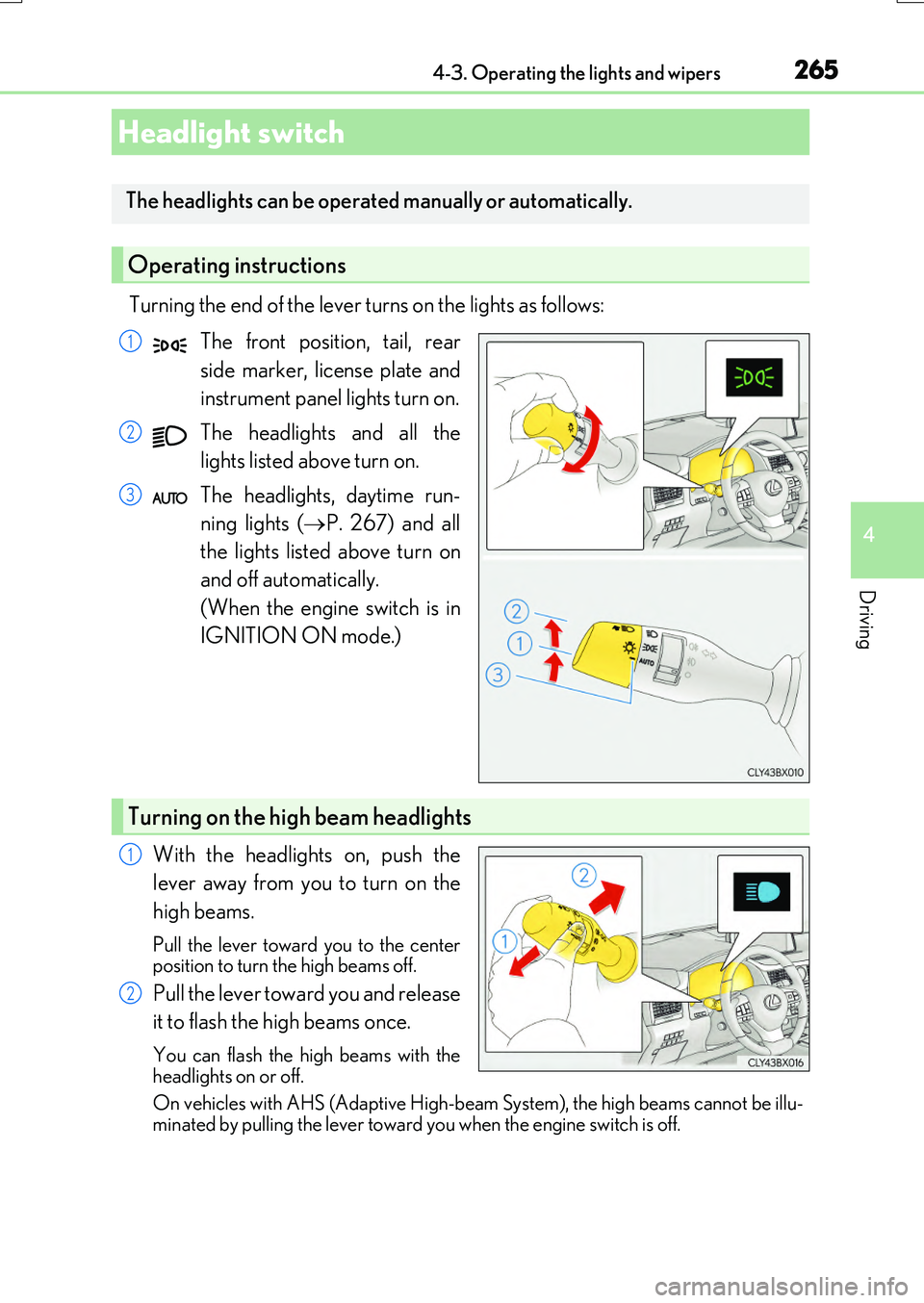
Turning the end of the lever turns on the lights as follows:
The front position, tail, rear
side marker, license plate and
instrument panel lights turn on.
The headlights and all the
lights listed above turn on.
The headlights, daytime run-
ning lights ( P. 267) and all
the lights listed above turn on
and off automatically.
(When the engine switch is in
IGNITION ON mode.)
With the headlights on, push the
lever away from you to turn on the
high beams.
Pull the lever toward you to the center position to turn the high beams off.
Pull the lever toward you and release
it to flash the high beams once.
You can flash the high beams with the
headlights on or off.
On vehicles with AHS (Adaptive High-bea m System), the high beams cannot be illu- minated by pulling the lever toward you when the engine switch is off.
Headlight switch
The headlights can be operated manually or automatically.
Operating instructions
1
2
3
Turning on the high beam headlights
1
2
Page 266 of 776
2664-3. Operating the lights and wipers
RX350/RX200t_EE_OM48F32E
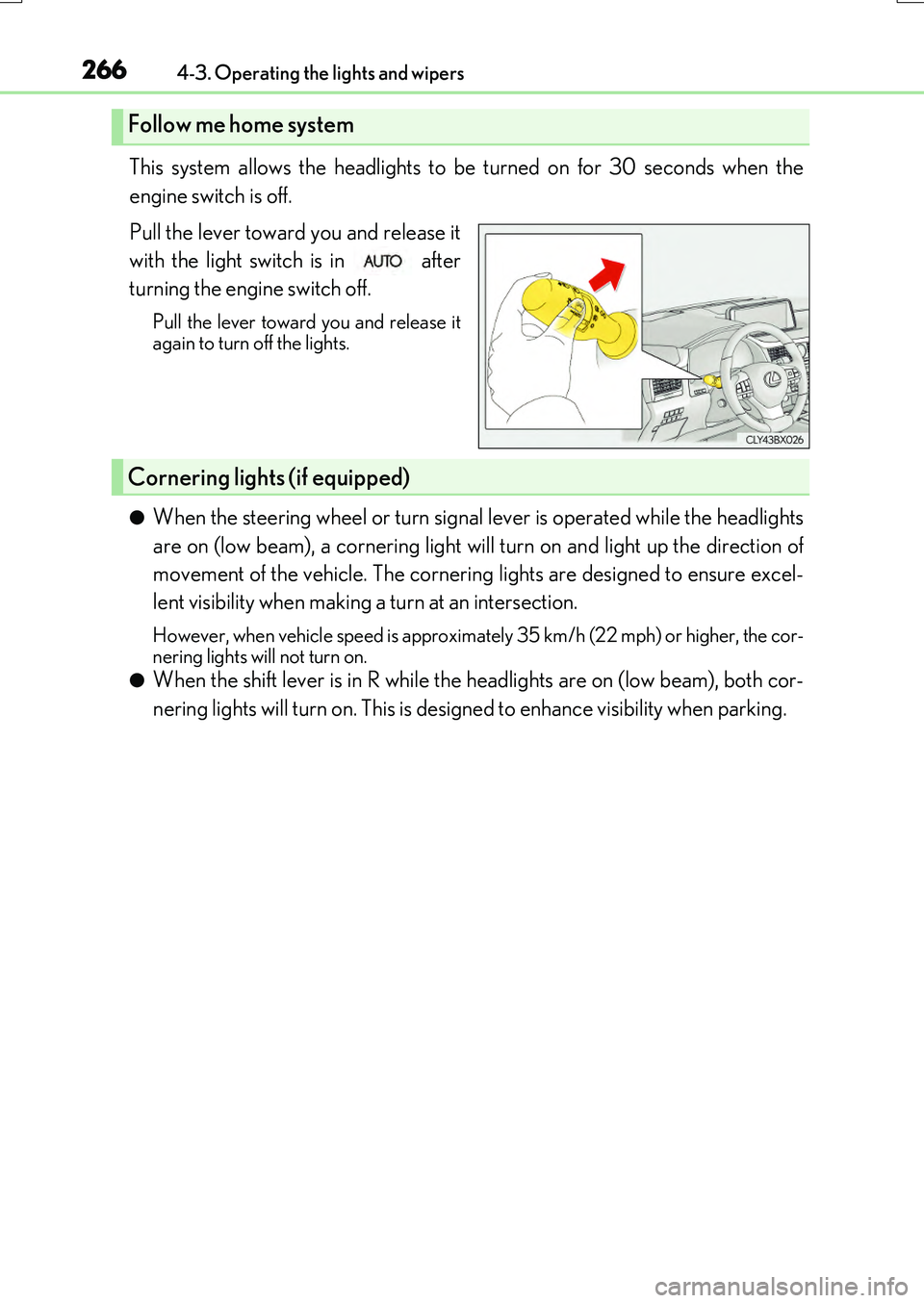
This system allows the headlights to be turned on for 30 seconds when the
engine switch is off.
Pull the lever toward you and release it
with the light switch is in after
turning the engine switch off.
Pull the lever toward you and release it again to turn off the lights.
●When the steering wheel or turn signal lever is operated while the headlights
are on (low beam), a cornering light will turn on and light up the direction of
movement of the vehicle. The cornering lights are designed to ensure excel-
lent visibility when making a turn at an intersection.
However, when vehicle speed is approximately 35 km/h (22 mph) or higher, the cor-
nering lights will not turn on.
●When the shift lever is in R while the headlights are on (low beam), both cor-
nering lights will turn on. This is designed to enhance visibility when parking.
Follow me home system
Cornering lights (if equipped)
Page 268 of 776
2684-3. Operating the lights and wipers
RX350/RX200t_EE_OM48F32E
■Windshield wiper linked headlight illumination
When driving during daytime with the headlig ht switch turned to , if the windshield
wipers are used, the headlights will turn on automatically after several seconds to help
enhance the visibility of your vehicle.
■Battery-saving function
In order to prevent the battery of the vehicle fr om discharging, if the light switch is in the
or position when the engine switch is turned off the battery saving function
will operate and automatically turn off all the lights after approximately 20 minutes.
When the engine switch is turned to IGNITION ON mode, the battery-saving function
will be disabled.
When any of the following are performed, the battery-saving function is canceled once
and then reactivated. All the lights will turn off automatically 20 minutes after the bat-
tery-saving function has been reactivated:
●When the headlight switch is operated
●When a door is opened or closed
■Customization
Some functions can be customized. ( P. 740)
NOTICE
■To prevent battery discharge
Do not leave the lights on longer than necessary when the engine is off.
Page 269 of 776
2694-3. Operating the lights and wipers
4
Driving
RX350/RX200t_EE_OM48F32E
●Adjusts the brightness and illuminated area of the high beams according to
the vehicle speed.
●Adjusts the intensity of the high beams, while driving on a curve, so that the
area in the direction that the vehicle is turning will be illuminated more brightly
than other areas.
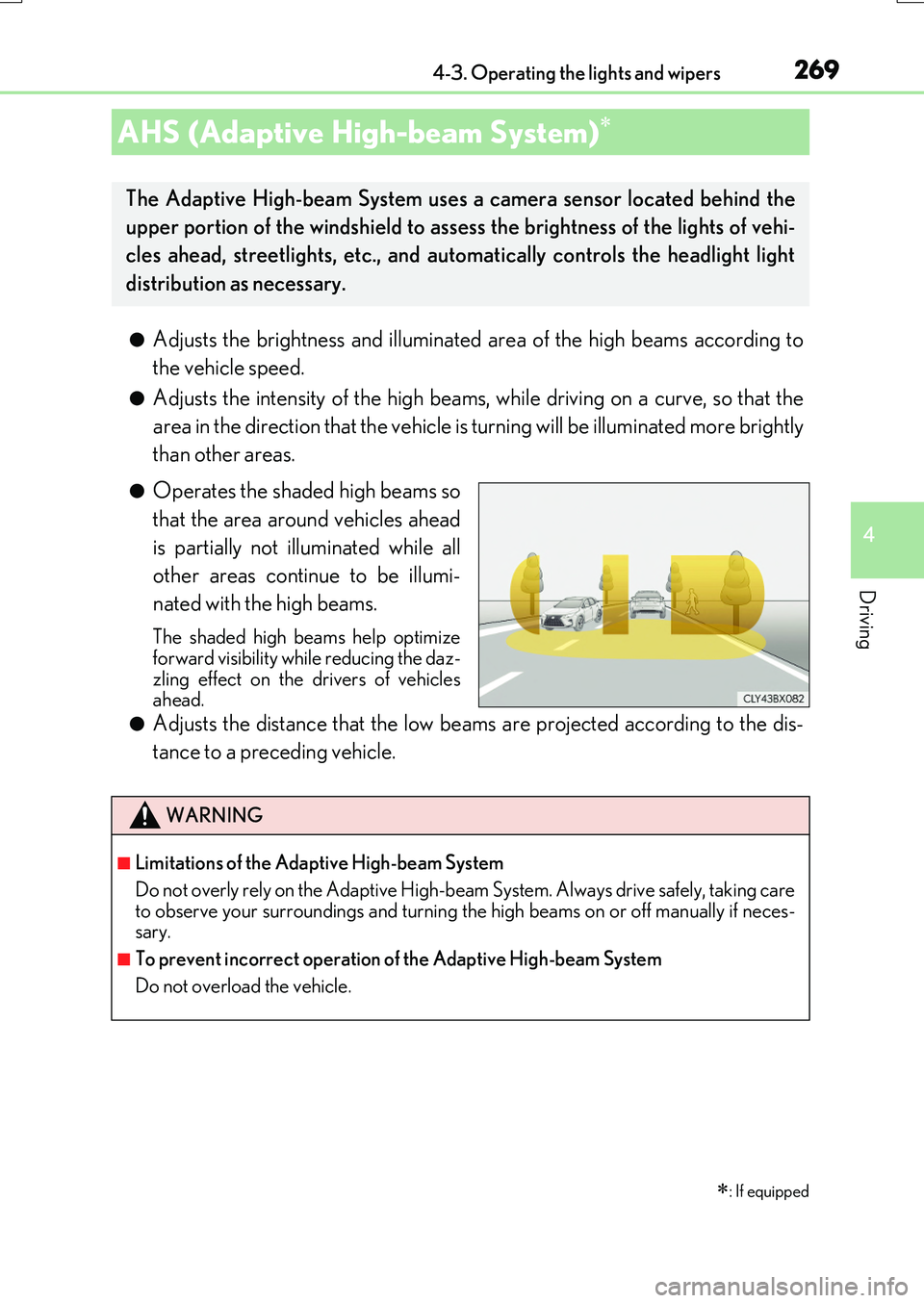
●Operates the shaded high beams so
that the area around vehicles ahead
is partially not illuminated while all
other areas continue to be illumi-
nated with the high beams.
The shaded high beams help optimize forward visibility while reducing the daz-
zling effect on the drivers of vehicles ahead.
●Adjusts the distance that the low beams are projected according to the dis-
tance to a preceding vehicle.
AHS (Adaptive High-beam System)
: If equipped
The Adaptive High-beam System uses a camera sensor located behind the
upper portion of the windshield to assess the brightness of the lights of vehi-
cles ahead, streetlights, etc., and automatically controls the headlight light
distribution as necessary.
WARNING
■Limitations of the Adaptive High-beam System
Do not overly rely on the Adaptive High-b eam System. Always drive safely, taking care to observe your surroundings and turning the high beams on or off manually if neces- sary.
■To prevent incorrect operation of the Adaptive High-beam System
Do not overload the vehicle.
Page 271 of 776
2714-3. Operating the lights and wipers
4
Driving
RX350/RX200t_EE_OM48F32E
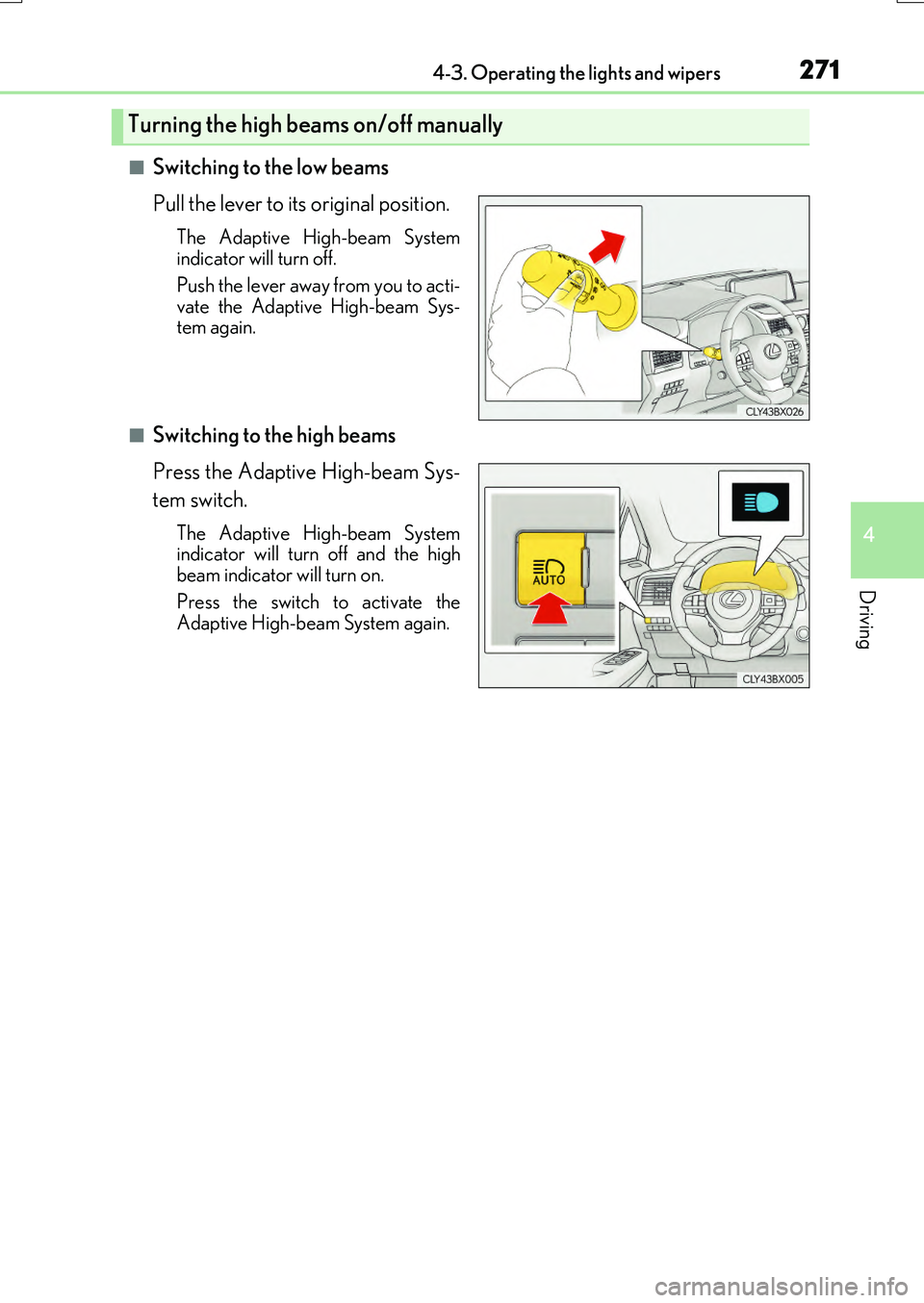
■Switching to the low beams
Pull the lever to its original position.
The Adaptive High-beam System
indicator will turn off.
Push the lever away from you to acti-
vate the Adaptive High-beam Sys-
tem again.
■Switching to the high beams
Press the Adaptive High-beam Sys-
tem switch.
The Adaptive High-beam System
indicator will turn off and the high
beam indicator will turn on.
Press the switch to activate the
Adaptive High-beam System again.
Turning the high beams on/off manually
Page 272 of 776
2724-3. Operating the lights and wipers
RX350/RX200t_EE_OM48F32E
■Conditions in which the light distribution control of the headlights changes automati-
cally
●When all of the following conditions are met, the high beams will be turned on automat- ically and the system will operate:
• The vehicle speed is approximately 60 km/h (38 mph) or more. • The area ahead of the vehicle is dark.
●When all of the following conditions are me t, the shaded high beams will turn on and the distance that the low beams are projecte d will be adjusted automatically, depending on the location of vehicles ahead:
• The vehicle speed is approximately 60 km/h (38 mph) or more. • The area ahead of the vehicle is dark.• There are vehicles ahead with headlights or tail lights turned on.
●If any of the following conditions is met, the high beams or shaded high beams will be changed to the low beams automatically:
• The vehicle speed is below approximately 60 km/h (38 mph). • The area ahead of the vehicle is not dark.• There are many vehicles ahead.
• Vehicles ahead are moving quickly and the high beams may blind the drivers of the other vehicles.
■Camera sensor detection information
●The high beams may not be automatically changed to the shaded high beams in the fol-lowing situations:
• When vehicles ahead suddenly appear from a curve
• When the vehicle is cut in front of by another vehicle • When vehicles ahead are hidden from sight du e to repeated curves, road dividers or roadside trees
• When vehicles ahead appear from the faraway lane on wide road • When vehicles ahead have no lights
●The high beams may be changed to the shad ed high beams if a vehicle ahead that is using fog lights without its head lights turned on is detected.
●House lights, street lights, traffic signals, and illuminated billboards or signs and other
reflective objects may cause the high beam s to change to the shaded high beams, cause the high beams not to change to the sh aded high beams, or change the area that is not illuminated.
●The following factors may affect the amount of time taken to turn the high beam on or off, or the speed by which the areas not illuminated change:
• The brightness of headlights, fog lig hts, and tail lights of vehicles ahead
• The movement and direction of vehicles ahead • When a vehicle ahead only has operational lights on one side
• When a vehicle ahead is a two-wheeled vehicle • The condition of the road (gradient, curve, condition of the road surface etc.)• The number of passengers and amount of luggage
●The light distribution control of the headlights may change unexpectedly.