brake light LEXUS RX200T 2017 User Guide
[x] Cancel search | Manufacturer: LEXUS, Model Year: 2017, Model line: RX200T, Model: LEXUS RX200T 2017Pages: 776, PDF Size: 44.51 MB
Page 229 of 776
2294-1. Before driving
4
Driving
RX350/RX200t_EE_OM48F32E
WARNING
Observe the following precautions. Failure to do so may result in death or serious injury.
■When starting the vehicle
Always keep your foot on the brake pedal while stopped with the engine running. This prevents the vehicle from creeping.
■When driving the vehicle
●Do not drive if you are unfamiliar with the location of the brake and accelerator ped-als to avoid depressing the wrong pedal.
• Accidentally depressing the accelerator pedal instead of the brake pedal will
result in sudden acceleration that may lead to an accident. • When backing up, you may twist your body around, leading to difficulty in operat- ing the pedals. Make sure to operate the pedals properly.
• Make sure to keep a correct driving posture even when moving the vehicle only slightly. This allows you to depress the brake and accelerator pedals properly.• Depress the brake pedal using your right foot. Depressing the brake pedal using
your left foot may delay response in an emergency, resulting in an accident.
●Do not drive the vehicle over or stop the vehicle near flammable materials.
The exhaust system and exhaust gases can be extremely hot. These hot parts may cause a fire if there is any flammable material nearby.
●During normal driving, do not turn off the engine. Turning the engine off while driving
will not cause loss of steering or braking control, but the power assist to these systems will be lost. This will make it more difficult to steer and brake, so you should pull over and stop the vehicle as soon as it is safe to do so.
However, in the event of an emergency, such as if it becomes impossible to stop the vehicle in the normal way: P. 657
●Use engine braking (downshift) to maintain a safe speed when driving down a steep
hill. Using the brakes continuously may caus e the brakes to overheat and lose effec- tiveness. ( P. 251)
●Do not adjust the positions of the steering wheel, the seat, or the inside or outside rear
view mirrors while driving. Doing so may result in a loss of vehicle control.
●Always check that all passengers’ arms, heads or other parts of their body are not
outside the vehicle.
●AWD models: Do not drive the vehicle off-road. This is not an AWD vehicle designed for o ff-road driving. Proceed with all due cau-
tion if it becomes unavoidable to drive off-road.
●Do not drive across a river or through other bodies of water. This may cause electric/electronic components to short circuit, damage the engine or
cause other serious damage to the vehicle.
Page 230 of 776
2304-1. Before driving
RX350/RX200t_EE_OM48F32E
WARNING
Observe the following precautions. Failure to do so may result in death or serious injury.
■When driving on slippery road surfaces
●Sudden braking, acceleration and steering may cause tire slippage and reduce your ability to control the vehicle.
●Sudden acceleration, engine braking due to shifting, or changes in engine speed
could cause the vehicle to skid.
●After driving through a puddle, lightly depress the brake pedal to make sure that the brakes are functioning properly. Wet brak e pads may prevent the brakes from func-
tioning properly. If the brakes on only one side are wet and not functioning properly, steering control may be affected.
■When shifting the shift lever
●Do not let the vehicle roll backward while the shift lever is in a driving position, or roll forward while the shift lever is in R. Doing so may cause the engine to stall or lead to poor brake and steering perfor-
mance, resulting in an accident or damage to the vehicle.
●Do not shift the shift lever to P while the vehicle is moving. Doing so can damage the transmission and may result in a loss of vehicle control.
●Do not shift the shift lever to R while the vehicle is moving forward. Doing so can damage the transmission and may result in a loss of vehicle control.
●Do not shift the shift lever to a driving position while the vehicle is moving backward.
Doing so can damage the transmission and may result in a loss of vehicle control.
●Shifting the shift lever to N while the vehicle is moving will disengage the engine. Engine braking is not available when N is selected.
●Be careful not to shift the shift lever with the accelerator pedal depressed. Shifting the shift lever to any position othe r than P or N may lead to unexpected rapid acceleration of the vehicle that may cause an accident and result in death or serious
injury.
Page 232 of 776
2324-1. Before driving
RX350/RX200t_EE_OM48F32E
WARNING
Observe the following precautions. Failure to do so may result in death or serious injury.
■When the vehicle is parked
●Do not leave glasses, cigarette lighters, spray cans, or soft drink cans in the vehiclewhen it is in the sun. Doing so may result in the following:
• Gas may leak from a cigarette lighter or spray can, and may lead to a fire. • The temperature inside the vehicle may cau se the plastic lenses and plastic mate- rial of glasses to deform or crack.
• Soft drink cans may fracture, causing the contents to spray over the interior of the vehicle, and may also cause a short circuit in the vehicle’s electrical components.
●Do not leave cigarette lighters in the vehicle. If a cigarette lighter is in a place such as the glove box or on the floor, it may be lit accidentally when luggage is loaded or the seat is adjusted, causing a fire.
●Do not attach adhesive discs to the windshield or windows. Do not place containerssuch as air fresheners on the instrument panel or dashboard. Adhesive discs or con- tainers may act as lenses, causing a fire in the vehicle.
●Do not leave a door or window open if the curved glass is coated with a metallizedfilm such as a silver-colored one. Reflected sunlight may cause the glass to act as alens, causing a fire.
●Always apply the parking brake, shift the shift lever to P, stop the engine and lock thevehicle.Do not leave the vehicle unattended while the engine is running.
If the vehicle is parked with the shift lever in P but the parking brake is not set, the vehicle may start to move, possibly leading to an accident.
●Do not touch the exhaust pipes while the engine is running or immediately after turn-
ing the engine off. Doing so may cause burns.
Page 245 of 776
2454-1. Before driving
4
Driving
RX350/RX200t_EE_OM48F32E
WARNING
Follow all the instructions described in this section. Failure to do so could cause an accident resulting in death or serious injury.
■Trailer towing precautions
When towing, make sure that none of the weight limits are exceeded. ( P. 239)
■To avoid accident or injury
●Vehicles with a compact spare tire: Do not tow a trailer when the compact spare tire is installed on your vehicle.
●Vehicles with the emergency tire puncture repair kit:
Do not tow a trailer when the tire installed is repaired with the emergency tire punc- ture repair kit.
●Do not use the following systems when trailer towing.
• Cruise control*• Dynamic radar cruise control with full-speed range*• LKA (Lane-Keeping Assist)*
• PCS (Pre-Crash Safety system)*• BSM (Blind Spot Monitor)*
*: If equipped
■Vehicle speed in towing
Observe the legal maximum sp eeds for trailer towing.
■Before descending hills or long declines
Reduce speed and downshift. However, never downshift suddenly while descending
steep or long downhill grades.
■Operation of the brake pedal
Do not hold the brake pedal depressed often or for long periods of time.
Doing so may result in the brake ov erheating or reduce braking effects.
NOTICE
■Do not directly splice trailer lights
Directly splicing trailer lights may damage yo ur vehicle’s electrical system and cause a malfunction.
Page 259 of 776
2594-2. Driving procedures
4
Driving
RX350/RX200t_EE_OM48F32E
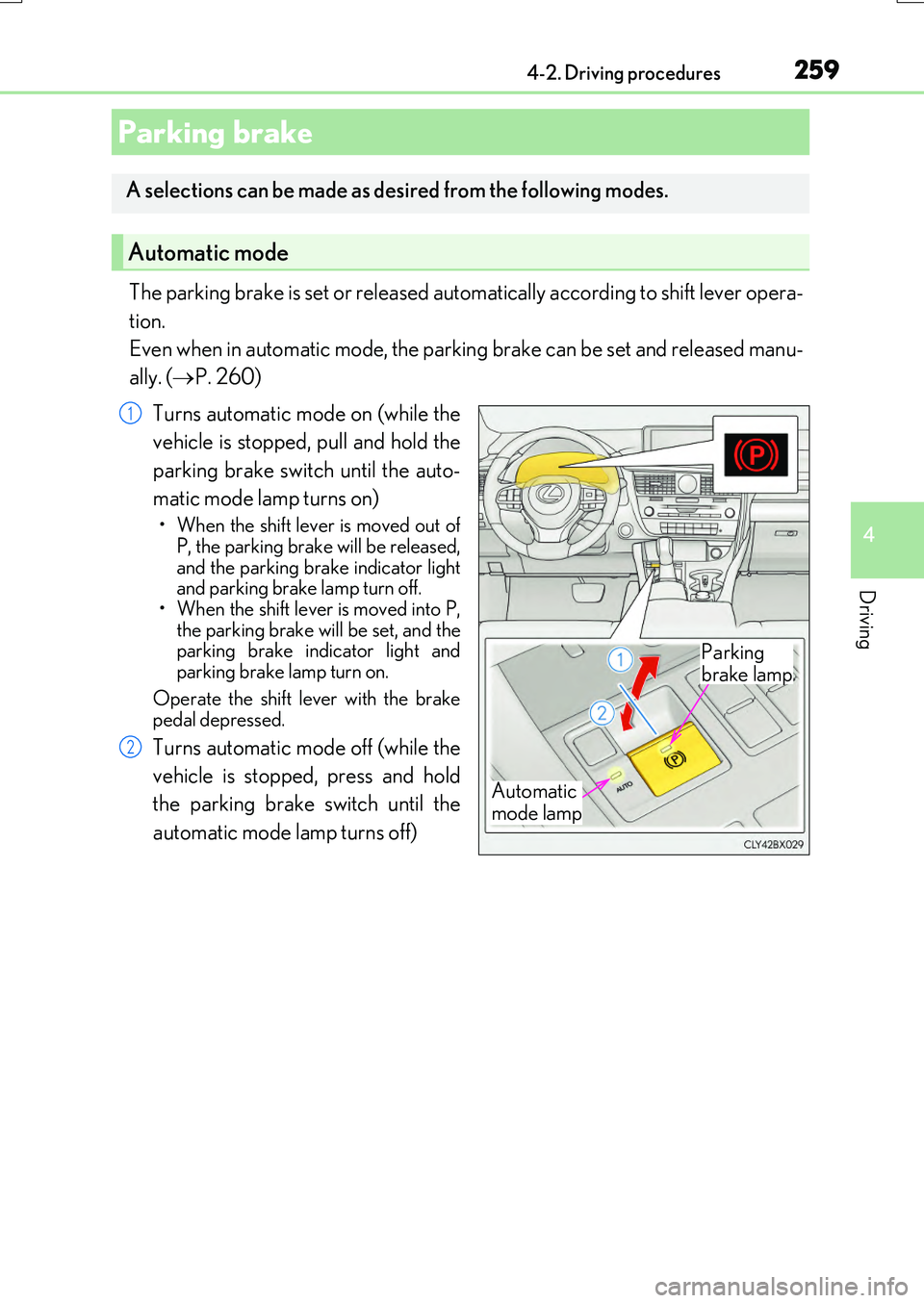
The parking brake is set or released automatically according to shift lever opera-
tion.
Even when in automatic mode, the parking brake can be set and released manu-
ally. ( P. 260)
Turns automatic mode on (while the
vehicle is stopped, pull and hold the
parking brake switch until the auto-
matic mode lamp turns on)
• When the shift lever is moved out of P, the parking brake will be released,
and the parking brake indicator light and parking brake lamp turn off.• When the shift lever is moved into P,
the parking brake will be set, and the parking brake indicator light andparking brake lamp turn on.
Operate the shift lever with the brake pedal depressed.
Turns automatic mode off (while the
vehicle is stopped, press and hold
the parking brake switch until the
automatic mode lamp turns off)
Parking brake
A selections can be made as desired from the following modes.
Automatic mode
Automatic
mode lamp
Parking
brake lamp
1
2
Page 260 of 776
2604-2. Driving procedures
RX350/RX200t_EE_OM48F32E
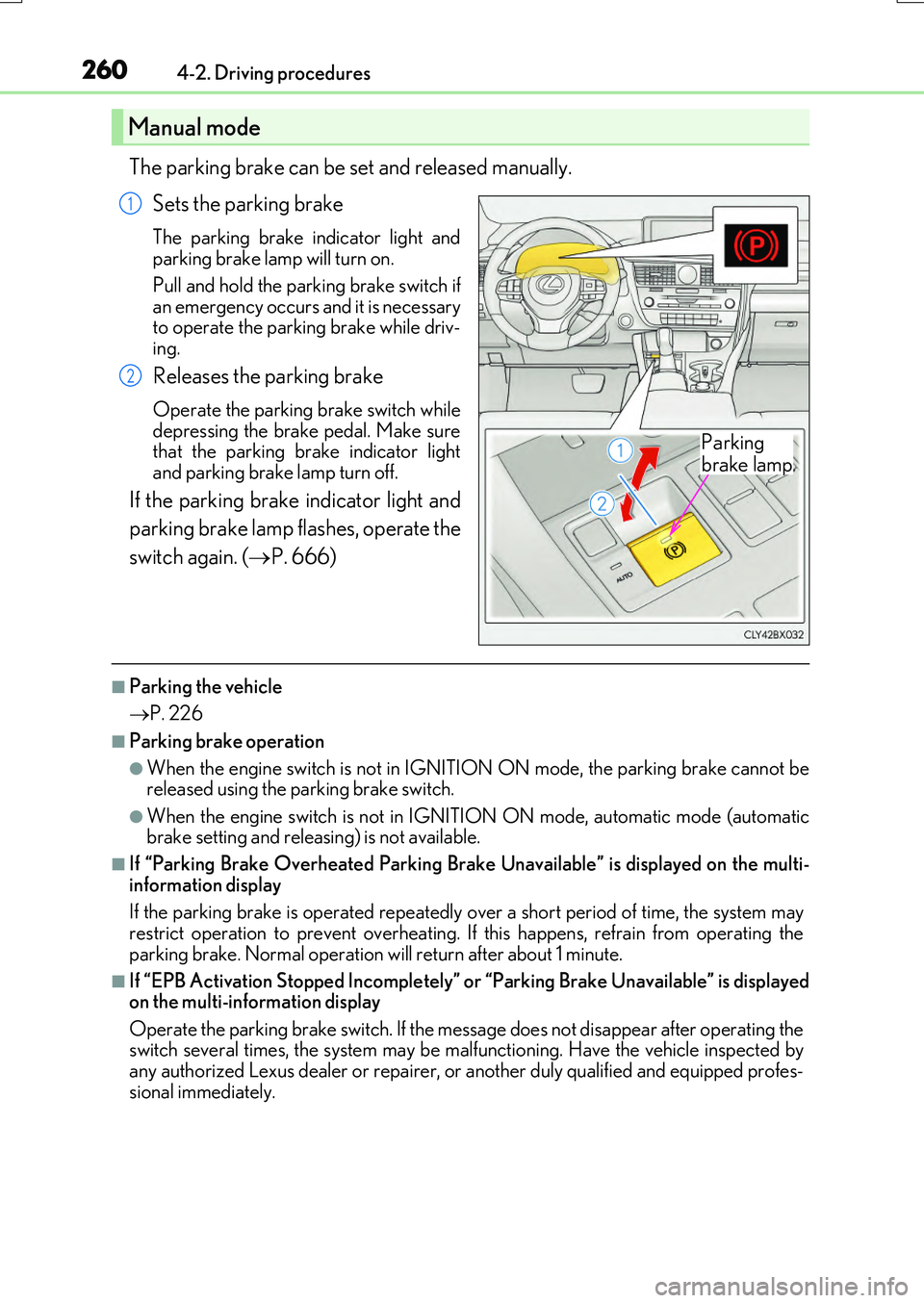
The parking brake can be set and released manually.
Sets the parking brake
The parking brake in dicator light and parking brake lamp will turn on.
Pull and hold the parking brake switch if an emergency occurs and it is necessaryto operate the parking brake while driv-
ing.
Releases the parking brake
Operate the parking brake switch while depressing the brake pedal. Make surethat the parking brake indicator light
and parking brake lamp turn off.
If the parking brake indicator light and
parking brake lamp flashes, operate the
switch again. ( P. 666)
■Parking the vehicle
P. 226
■Parking brake operation
●When the engine switch is not in IGNITION ON mode, the parking brake cannot be released using the parking brake switch.
●When the engine switch is not in IGNITION ON mode, automatic mode (automatic brake setting and releasing) is not available.
■If “Parking Brake Overheated Parking Brake Unavailable” is displayed on the multi-
information display
If the parking brake is operated repeatedly over a short period of time, the system may restrict operation to prevent overheating. If this happens, refrain from operating the
parking brake. Normal operation will return after about 1 minute.
■If “EPB Activation Stopped Incompletely” or “Parking Brake Unavailable” is displayed on the multi-information display
Operate the parking brake switch. If the message does not disappear after operating the switch several times, the system may be malfunctioning. Have the vehicle inspected byany authorized Lexus dealer or repairer, or another duly qualified and equipped profes-
sional immediately.
Manual mode
Parking
brake lamp
1
2
Page 261 of 776
2614-2. Driving procedures
4
Driving
RX350/RX200t_EE_OM48F32E
■Parking brake operation sound
When the parking brake operates, a motor so und (whirring sound) may be heard. This does not indicate a malfunction.
■Parking brake indicator light and parking brake lamp
●Depending on the engine switch mode, the parking brake indicator light and parking brake lamp will turn on and stay on as described below:
IGNITION ON mode: Comes on until the parking brake is released. Not in IGNITION ON mode: Stays on for approximately 15 seconds.
●When the engine switch is turned off with the parking brake set, the parking brake indi-
cator light and parking brake lamp will stay on for about 15 seconds. This does not indi- cate a malfunction.
■Changing the mode
When changing the automati c mode on/off, the message will be shown on the multi- information display and the buzzer sounds.
■Parking brake engaged warning buzzer
A buzzer will sound if the vehicle is driven with the parking brake engaged. “Release Parking Brake” is displayed on the multi-information display.
■Warning messages and buzzers
Warning messages and buzzers are used to indicate a system malfunction or to inform the driver of the need for caution. If a warn ing message is shown on the multi-information display, read the message and follow the instructions.
■If the brake system warning light comes on
P. 666
■Usage in winter time
P. 430
Page 263 of 776
2634-2. Driving procedures
4
Driving
RX350/RX200t_EE_OM48F32E
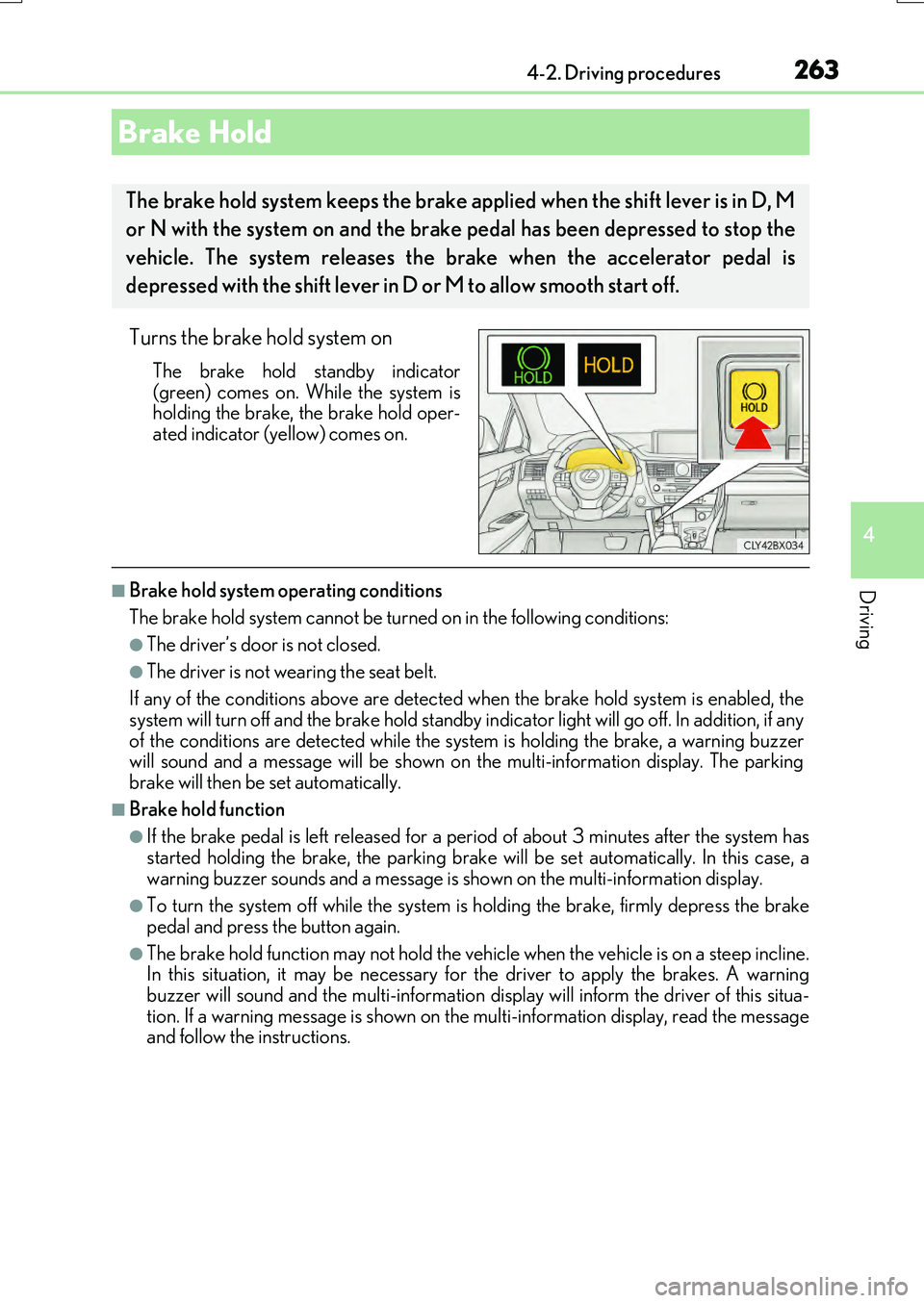
Turns the brake hold system on
The brake hold standby indicator
(green) comes on. While the system is holding the brake, the brake hold oper-ated indicator (yellow) comes on.
■Brake hold system operating conditions
The brake hold system cannot be turn ed on in the following conditions:
●The driver’s door is not closed.
●The driver is not wearing the seat belt.
If any of the conditions above are detected when the brake hold system is enabled, the
system will turn off and the brake hold standby indicator light will go off. In addition, if any of the conditions are detected while the sy stem is holding the brake, a warning buzzer will sound and a message will be shown on th e multi-information display. The parking
brake will then be set automatically.
■Brake hold function
●If the brake pedal is left released for a pe riod of about 3 minutes after the system has
started holding the brake, th e parking brake will be set automatically. In this case, a warning buzzer sounds and a message is shown on the multi-information display.
●To turn the system off while the system is holding the brake, firmly depress the brake
pedal and press the button again.
●The brake hold function may not hold the vehicle when the vehicle is on a steep incline. In this situation, it may be necessary for the driver to apply the brakes. A warning
buzzer will sound and the multi-information disp lay will inform the driver of this situa- tion. If a warning message is shown on the multi-information display, read the message and follow the instructions.
Brake Hold
The brake hold system keeps the brake a pplied when the shift lever is in D, M
or N with the system on and the brake pedal has been depressed to stop the
vehicle. The system releases the brake when the accelerator pedal is
depressed with the shift lever in D or M to allow smooth start off.
Page 264 of 776
2644-2. Driving procedures
RX350/RX200t_EE_OM48F32E
■When the parking brake is set automatically while the system is holding the brakes
The parking brake will not be released aut omatically. With the brake pedal depressed, release the parking brake by operating the pa rking brake switch, making sure that the
parking brake indicator light goes off. ( P. 259)
■If “Brake Hold Fault Depress Brake to Deactivate Visit Your Dealer” is displayed on the multi-information display
The system may be malfunctioning. Have the vehicle inspected by any authorized Lexus dealer or repairer, or another duly qua lified and equipped professional immediately.
■Warning messages and buzzers
Warning messages and buzzers are used to indicate a system malfunction or to inform the driver of the need for caution. If a warn ing message is shown on the multi-information display, read the message and follow the instructions.
■If the brake hold operated indicator flashes
P. 666
WARNING
■When the vehicle is on a steep incline
When using the brake hold system on a steep incline exercise caution. The brake hold
function may not hold the vehicle in such a situation.
■When stopped on a slippery road
The system cannot stop the vehicle when the gripping ability of the tires has been
exceeded. Do not use the system when stopped on a slippery road.
NOTICE
■When parking the vehicle
The brake hold system is not designed fo r use when parking the vehicle for a long period of time. Turning the en gine switch off while the system is holding the brake may
release the brake, which would cause the ve hicle to move. When operating the engine switch, depress the brake peda l, shift the shift lever to P and set the parking brake.
Page 267 of 776
2674-3. Operating the lights and wipers
4
Driving
RX350/RX200t_EE_OM48F32E
■Daytime running light system
To make your vehicle more visible to other drivers during daytime driving, the daytime
running lights turn on automatically whenev er the engine is started and the parking
brake is released with the headlight switch in position. (Illuminate brighter than
the front position lights.) Daytime running lights are not designed for use at night.
■Cornering lights (if equipped)
When the cornering lights are on for more than 30 minutes, they will turn off automati-
cally.
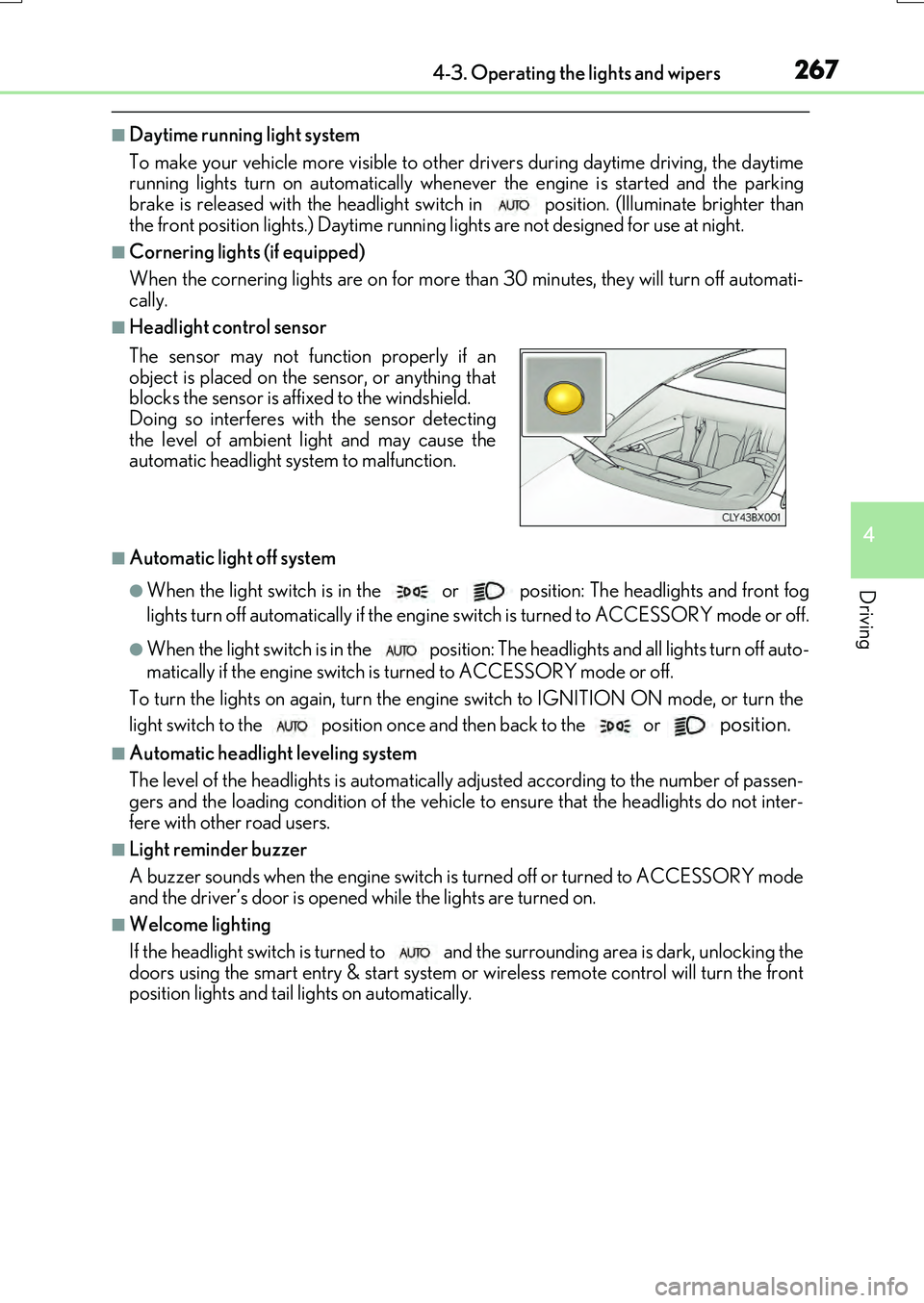
■Headlight control sensor
■Automatic light off system
●When the light switch is in the or position: The headlights and front fog
lights turn off automatically if the engine switch is turned to ACCESSORY mode or off.
●When the light switch is in the position: The headlights and all lights turn off auto-
matically if the engine switch is turned to ACCESSORY mode or off.
To turn the lights on again, turn the engine switch to IGNITION ON mode, or turn the
light switch to the
position once and then back to the or position.
■Automatic headlight leveling system
The level of the headlights is automatically ad justed according to the number of passen-
gers and the loading condition of the vehicle to ensure that the headlights do not inter-
fere with other road users.
■Light reminder buzzer
A buzzer sounds when the engine switch is turned off or turned to ACCESSORY mode
and the driver’s door is opened while the lights are turned on.
■Welcome lighting
If the headlight switch is turned to and the surrounding area is dark, unlocking the
doors using the smart entry & start system or wireless remote control will turn the front
position lights and tail lights on automatically.
The sensor may not function properly if an
object is placed on the sensor, or anything that
blocks the sensor is affixed to the windshield.
Doing so interferes with the sensor detecting
the level of ambient light and may cause the
automatic headlight system to malfunction.