change time LEXUS RX200T 2017 User Guide
[x] Cancel search | Manufacturer: LEXUS, Model Year: 2017, Model line: RX200T, Model: LEXUS RX200T 2017Pages: 776, PDF Size: 44.51 MB
Page 118 of 776
1182. Instrument cluster
RX350/RX200t_EE_OM48F32E
◆Display items
■Odometer
Displays the total distance the vehicle has been driven.
■Trip meter A/trip meter B
Displays the distance the vehicle has been driven since the meter was last
reset. Trip meters A and B can be used to record and display different dis-
tances independently.
To reset, display the desired trip meter and press and hold the “ODO/TRIP”
switch.
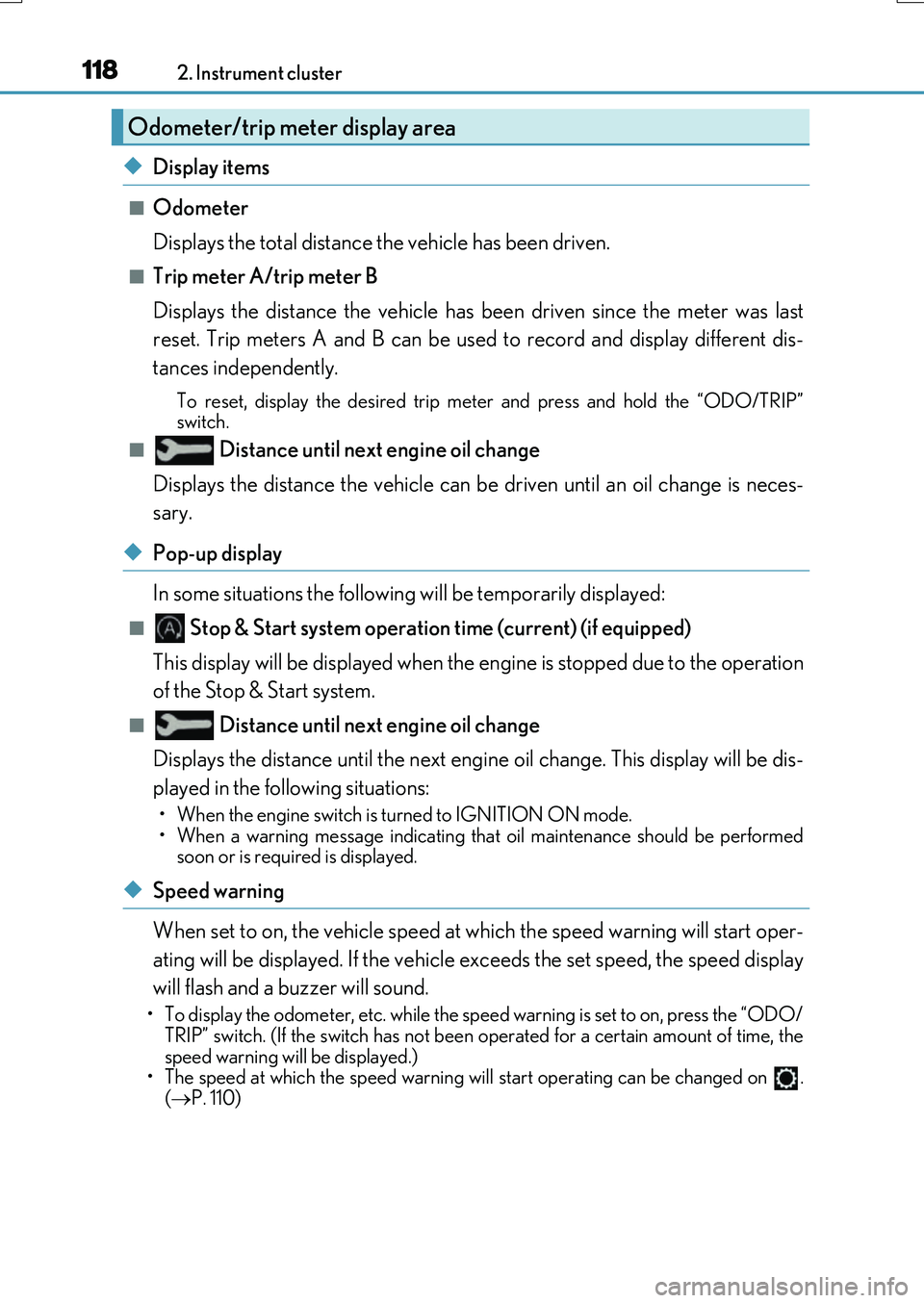
■ Distance until next engine oil change
Displays the distance the vehicle can be driven until an oil change is neces-
sary.
◆Pop-up display
In some situations the following will be temporarily displayed:
■ Stop & Start system operation time (current) (if equipped)
This display will be displayed when the engine is stopped due to the operation
of the Stop & Start system.
■ Distance until next engine oil change
Displays the distance until the next engine oil change. This display will be dis-
played in the following situations:
• When the engine switch is turned to IGNITION ON mode.
• When a warning message indicating that oil maintenance should be performed
soon or is required is displayed.
◆Speed warning
When set to on, the vehicle speed at which the speed warning will start oper-
ating will be displayed. If the vehicle exceeds the set speed, the speed display
will flash and a buzzer will sound.
• To display the odometer, etc. while the speed warning is set to on, press the “ODO/ TRIP” switch. (If the switch has not been operated for a certain amount of time, the
speed warning will be displayed.)
• The speed at which the speed warning w ill start operating can be changed on .
( P. 110)
Odometer/trip meter display area
Page 144 of 776
1443-2. Opening, closing and locking the doors
RX350/RX200t_EE_OM48F32E
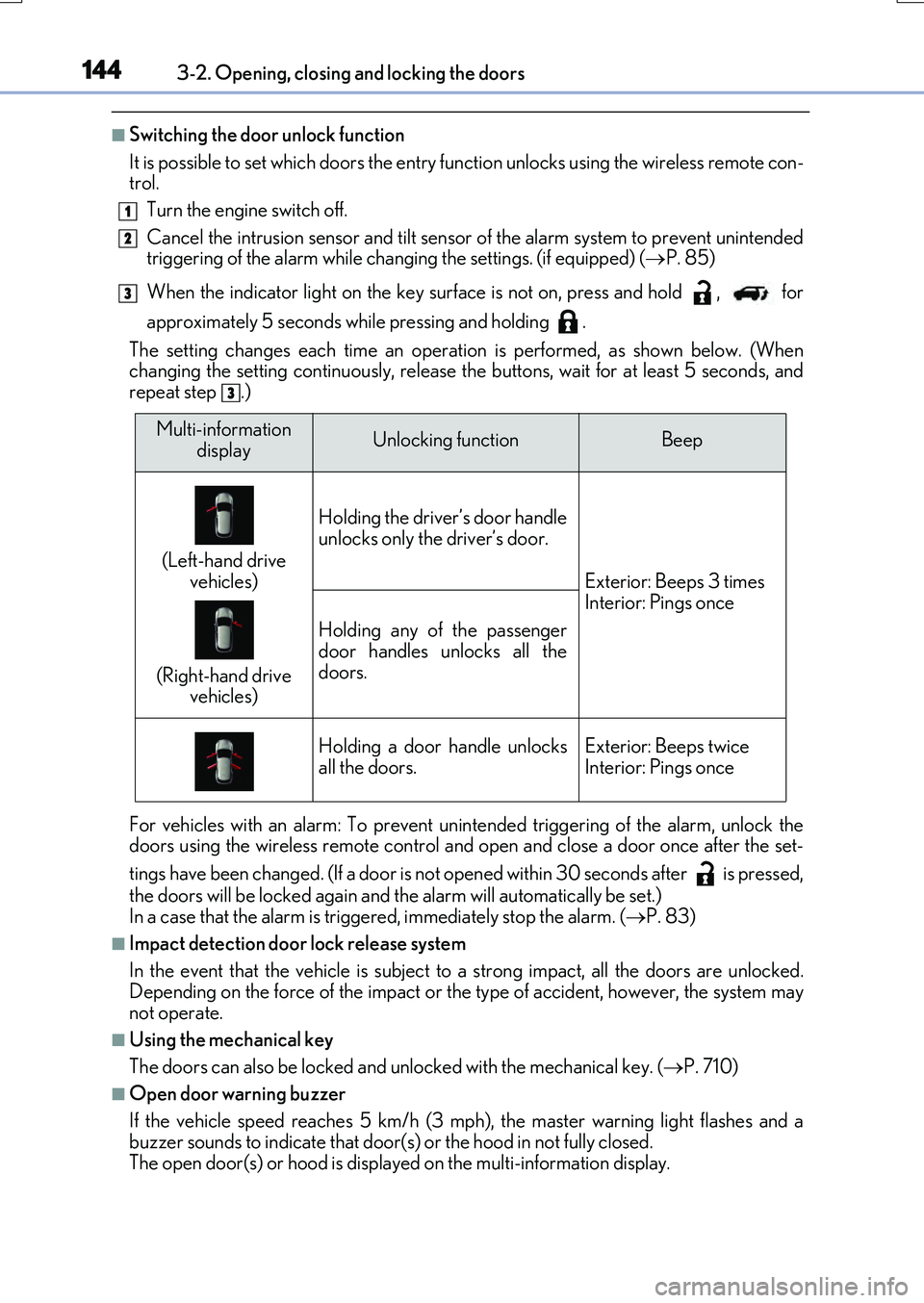
■Switching the door unlock function
It is possible to set which doors the entry function unlocks using the wireless remote con- trol.
Turn the engine switch off.
Cancel the intrusion sensor and tilt sensor of the alarm system to prevent unintended triggering of the alarm while changing the settings. (if equipped) ( P. 85)
When the indicator light on the key surface is not on, press and hold , for
approximately 5 seconds while pressing and holding .
The setting changes each time an operatio n is performed, as shown below. (When changing the setting continuously, release the buttons, wait for at least 5 seconds, andrepeat step .)
For vehicles with an alarm: To prevent unin tended triggering of the alarm, unlock the doors using the wireless remote control and op en and close a door once after the set-
tings have been changed. (If a door is not opened within 30 seconds after is pressed,
the doors will be locked again and the alarm will automatically be set.) In a case that the alarm is triggered, immediately stop the alarm. ( P. 83)
■Impact detection door lock release system
In the event that the vehicle is subject to a strong impact, all the doors are unlocked. Depending on the force of the impact or the type of accident, however, the system may
not operate.
■Using the mechanical key
The doors can also be locked and unlocked with the mechanical key. ( P. 710)
■Open door warning buzzer
If the vehicle speed reaches 5 km/h (3 mph), the master warning light flashes and a buzzer sounds to indicate that door (s) or the hood in not fully closed.
The open door(s) or hood is displa yed on the multi-information display.
1
2
3
3
Multi-information
displayUnlocking functionBeep
(Left-hand drive
vehicles)
(Right-hand drive vehicles)
Holding the driver’s door handle
unlocks only the driver’s door.
Exterior: Beeps 3 times Interior: Pings once
Holding any of the passenger
door handles unlocks all the doors.
Holding a door handle unlocksall the doors.Exterior: Beeps twiceInterior: Pings once
Page 155 of 776
1553-2. Opening, closing and locking the doors
3
Operation of each component
RX350/RX200t_EE_OM48F32E
The power back door settings can be changed on the multi-information display.
( P. 110)
The position at which the power back door will stop when opened automatically
can be changed.
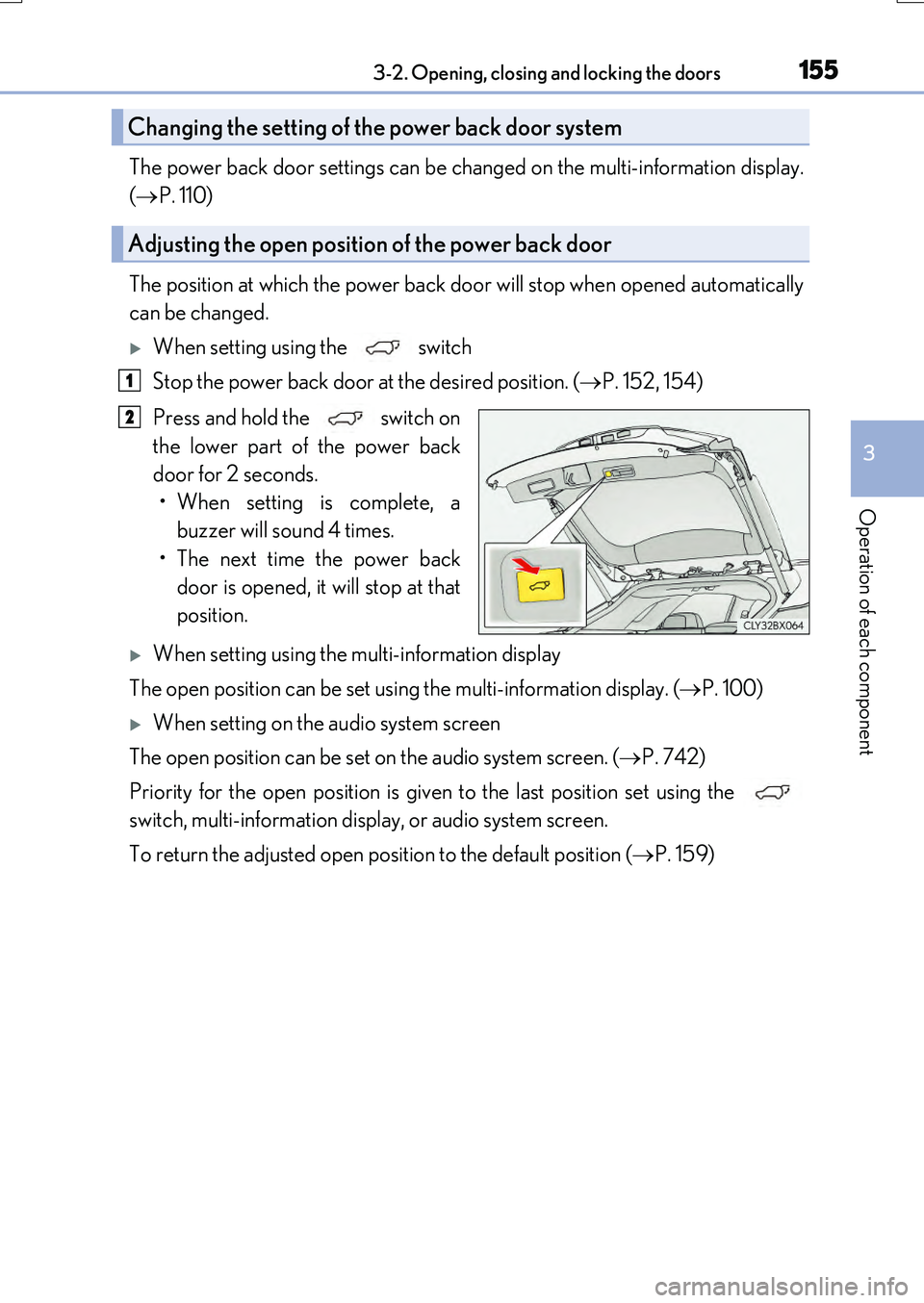
When setting using the switch
Stop the power back door at the desired position. ( P. 152, 154)
Press and hold the switch on
the lower part of the power back
door for 2 seconds.
• When setting is complete, a buzzer will sound 4 times.
• The next time the power back door is opened, it will stop at that
position.
When setting using the multi-information display
The open position can be set using the multi-information display. ( P. 100)
When setting on the audio system screen
The open position can be set on the audio system screen. ( P. 742)
Priority for the open position is given to the last position set using the
switch, multi-information display, or audio system screen.
To return the adjusted open position to the default position ( P. 159)
Changing the setting of the power back door system
Adjusting the open position of the power back door
1
2
Page 201 of 776
2013-3. Adjusting the seats
3
Operation of each component
RX350/RX200t_EE_OM48F32E
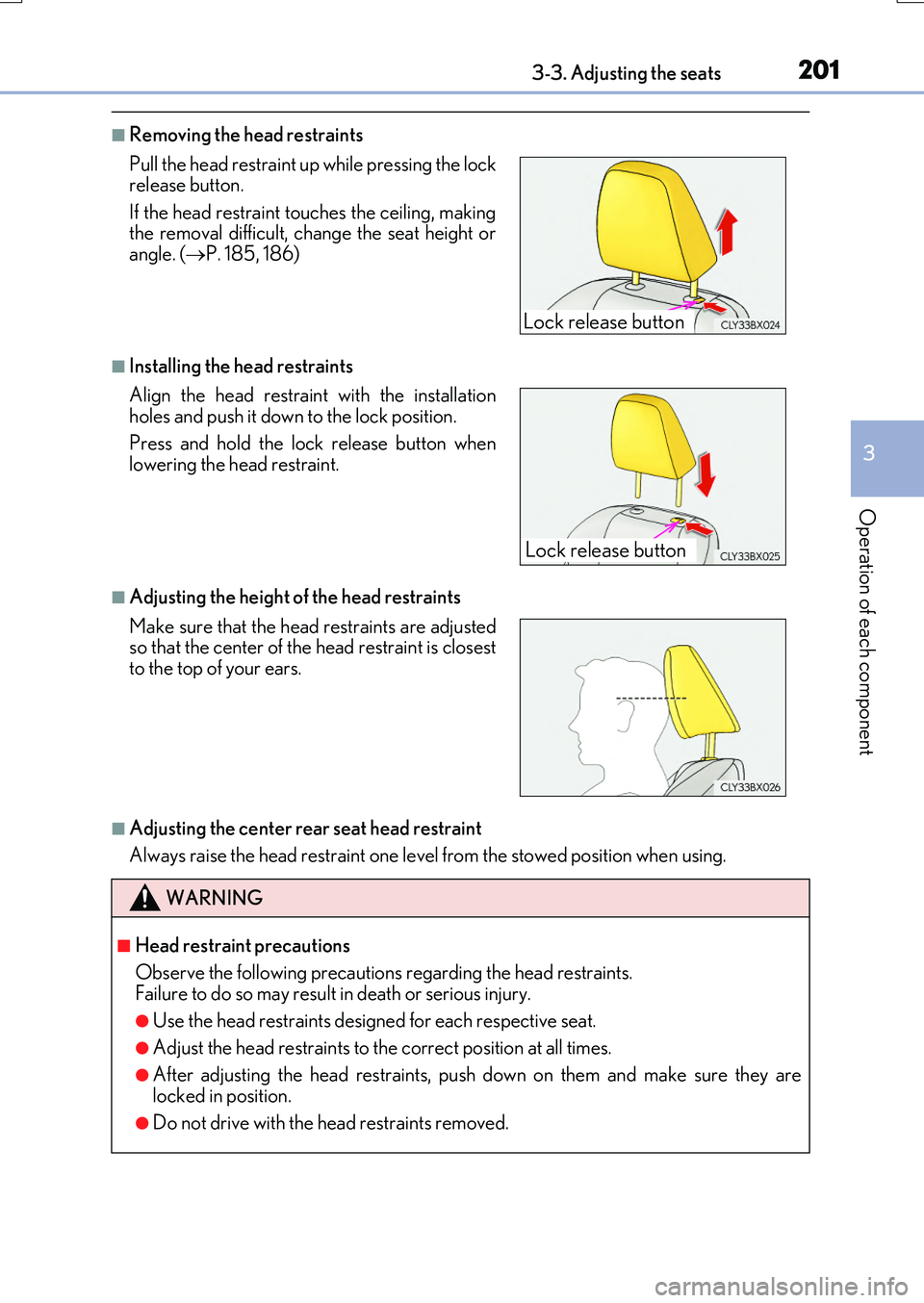
■Removing the head restraints
■Installing the head restraints
■Adjusting the height of the head restraints
■Adjusting the center rear seat head restraint
Always raise the head restraint one leve l from the stowed position when using.
Pull the head restraint up while pressing the lock release button.
If the head restraint to uches the ceiling, making the removal difficult, change the seat height orangle. ( P. 185, 186)
Align the head restraint with the installation holes and push it down to the lock position.
Press and hold the lock release button when lowering the head restraint.
Make sure that the head restraints are adjusted so that the center of the head restraint is closestto the top of your ears.
WARNING
■Head restraint precautions
Observe the following precautions regarding the head restraints.
Failure to do so may result in death or serious injury.
●Use the head restraints designed for each respective seat.
●Adjust the head restraints to the correct position at all times.
●After adjusting the head restraints, push down on them and make sure they are locked in position.
●Do not drive with the head restraints removed.
Lock release button
Lock release button
Page 208 of 776
2083-4. Adjusting the steering wheel and mirrors
RX350/RX200t_EE_OM48F32E
When the mirror select switch is in the “L” or “R” position, the outside rear view
mirrors will automatically angle downwa rds when the vehicle is reversing in
order to give a better view of the ground.
To disable this function, select neither “L” nor “R” of the mirror select switch.
■Adjusting the mirror angle when the vehicle is reversing
With the shift lever in R, adjust the mirror angle at a desired position.
The adjusted angle will be memorized and the mirror will automatically tilt to
the memorized angle whenever the shift lever is shifted to R from next time.
The memorized downward tilt position of the mirror is linked to the normal position (angle adjusted with the shif t lever in other than R). Therefore, if the normal posi- tion is changed after adjustment, th e tilt position will also change.
When the normal position is changed, readjust the angle in reversing.
■Mirror angle can be adjusted when
The engine switch is in ACCESSORY or IGNITION ON mode.
■When disconnecting and reconnecting battery terminals
The automatic folding/extending mirror function will return to off as default. To turn the
function on, press the switch again to select on.
■When the mirrors are fogged up
The outside rear view mirrors can be clea red using the mirror defoggers. Turn on the
rear window defogger to turn on the outside rear view mirror defoggers. ( P. 542)
■Automatic adjustment of the mirror angle (if equipped)
A desired mirror face angle can be entered to memory and recalled automatically by the
driving position memory. ( P. 195)
■Auto anti-glare function (if equipped)
When the anti-glare inside rear view mirror is set to automatic mode, the outside rear
view mirrors will activate in co njunction with the anti-glare inside rear view mirror to reduce reflected light. ( P. 204)
■Using automatic mode in cold weather
When automatic mode is used in cold weat her, the door mirror could freeze up and automatic stowing and return may not be possible. In this case, remove any ice and snowfrom the door mirror, then either operate the mirror using manual mode or move the mir-
ror by hand.
■Customization
Some functions can be customized. ( P. 740)
Linked mirror function when reversing
Page 234 of 776
2344-1. Before driving
RX350/RX200t_EE_OM48F32E
NOTICE
■When driving the vehicle
●Do not depress the accelerator and brake pedals at the same time during driving, as this may restrain driving torque.
●Do not use the accelerator pedal or depress the accelerator and brake pedals at thesame time to hold the vehicle on a hill.
■When parking the vehicle
Always set the parking brake, and shift the sh ift lever to P. Failure to do so may cause the vehicle to move or the vehicle may accelerate suddenly if the accelerator pedal isaccidentally depressed.
■Avoiding damage to vehicle parts
●Do not turn the steering wheel fully in either direction and hold it there for anextended period of time.
Doing so may damage the power steering motor.
●When driving over bumps in the road, driv e as slowly as possible to avoid damaging the wheels, underside of the vehicle, etc.
●RX200t: Make sure to idle the engine immediately after high speed driving or hillclimbing. Stop the engine only after the turbocharger has cooled down.Failure to do so may cause damage to the turbocharger.
■If you get a flat tire while driving
A flat or damaged tire may cause the following situations. Hold the steering wheel firmly and gradually depress the brake pedal to slow down the vehicle.
●It may be difficult to control your vehicle.
●The vehicle will make abnormal sounds or vibrations.
●The vehicle will lean abnormally.
Information on what to do in case of a flat tire ( P. 679, 693)
■When encountering flooded roads
Do not drive on a road that has flooded after heavy rain, etc. Doing so may cause the
following serious damage to the vehicle:
●Engine stalling
●Short in electrical components
●Engine damage caused by water immersion
In the event that you drive on a flooded road and the vehicle is flooded, be sure to have any authorized Lexus dealer or repairer, or another duly qualified and equipped pro-
fessional check the following:
●Brake function
●Changes in quantity and quality of oil and fluid used for the engine, transaxle, transfer
(AWD models), rear differential (AWD models), etc.
●Lubricant condition for the propeller shaft (AWD models), bearings and suspension joints (where possible), and the func tion of all joints, bearings, etc.
Page 247 of 776
2474-2. Driving procedures
4
Driving
RX350/RX200t_EE_OM48F32E
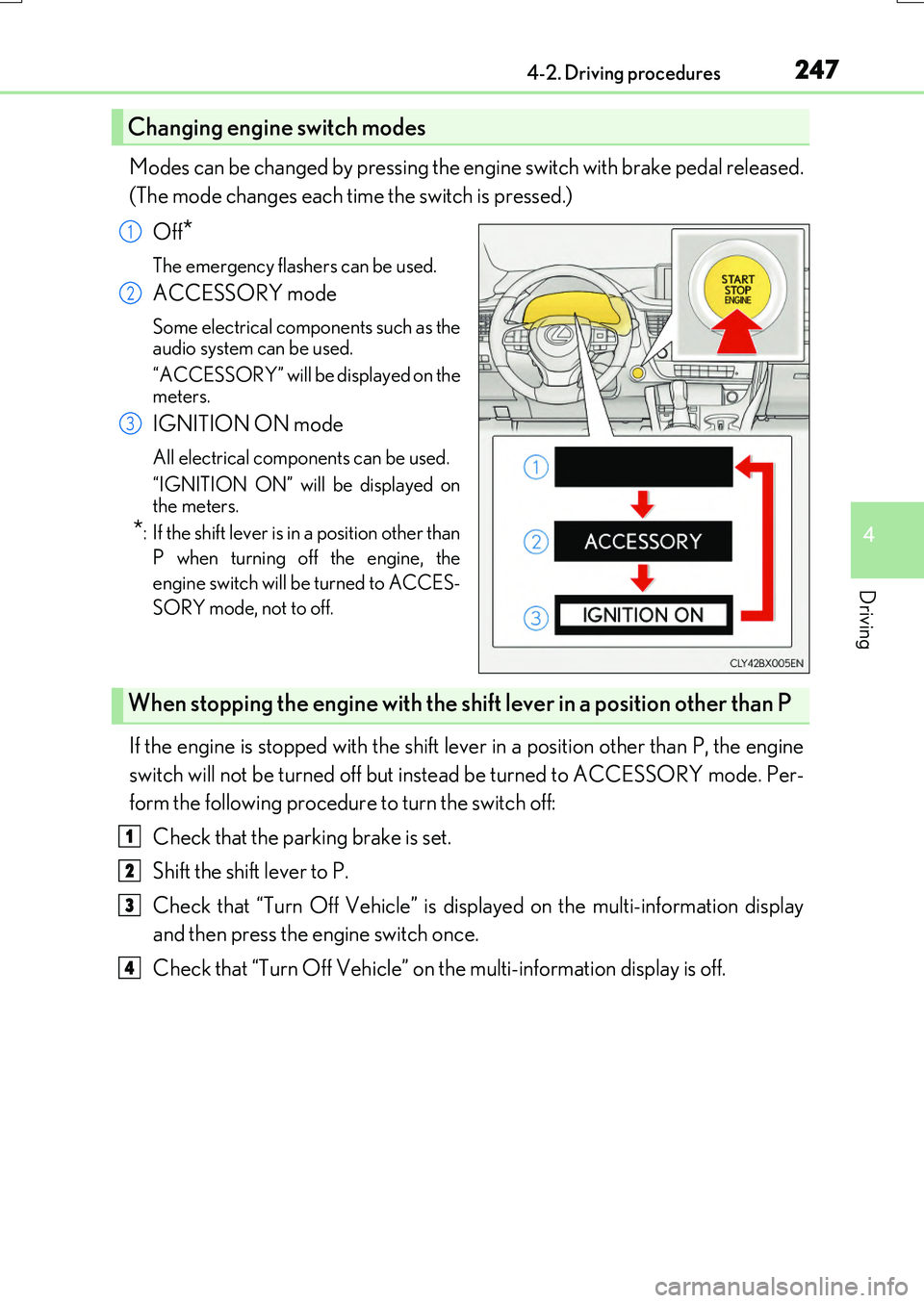
Modes can be changed by pressing the engine switch with brake pedal released.
(The mode changes each time the switch is pressed.)
Off*
The emergency flashers can be used.
ACCESSORY mode
Some electrical components such as the
audio system can be used.
“ACCESSORY” will be displayed on the meters.
IGNITION ON mode
All electrical components can be used.
“IGNITION ON” will be displayed on the meters.
*: If the shift lever is in a position other than
P when turning off the engine, the
engine switch will be turned to ACCES-
SORY mode, not to off.
If the engine is stopped with the shift lever in a position other than P, the engine
switch will not be turned off but inst ead be turned to ACCESSORY mode. Per-
form the following procedure to turn the switch off:
Check that the parking brake is set.
Shift the shift lever to P.
Check that “Turn Off Vehicle” is displayed on the multi-information display
and then press the engine switch once.
Check that “Turn Off Vehicle” on the multi-information display is off.
Changing engine switch modes
1
2
3
When stopping the engine with the shift lever in a position other than P
1
2
3
4
Page 249 of 776
2494-2. Driving procedures
4
Driving
RX350/RX200t_EE_OM48F32E
■If the electronic key battery is depleted
P. 638
■Operation of the engine switch
●If the switch is not pressed shortly and firmly, the engine switch mode may not change or the engine may not start.
●If attempting to restart the engine immediately after turning the engine switch off, the
engine may not start in some cases. After turning the engine switch off, please wait a few seconds before restarting the engine.
■If the smart entry & start system has been deactivated by a customized setting
P. 710
WARNING
■When starting the engine
Always start the engine while sitting in the driver’s seat. Do not depress the accelerator pedal while starting the engine under any circumstances.
Doing so may cause an accident resu lting in death or serious injury.
■Caution while driving
If engine failure occurs while the vehicle is moving, do not lock or open the doors until
the vehicle reaches a safe and complete stop. Activation of the steering lock in this cir- cumstance may lead to an accident, resulting in death or serious injury.
■Stopping the engine in an emergency
If you want to stop the engine in an emer gency while driving the vehicle, press and hold the engine switch for more than 2 seconds, or press it briefly 3 times or more in succes- sion. ( P. 657)
However, do not touch the engine switch while driving except in an emergency. Turning the engine off while driving will not cause loss of steering or braking control, but the power assist to these systems will be lost. Th is will make it more difficult to steer and
brake, so you should pull over and stop the vehicle as soon as it is safe to do so.
Page 253 of 776
2534-2. Driving procedures
4
Driving
RX350/RX200t_EE_OM48F32E
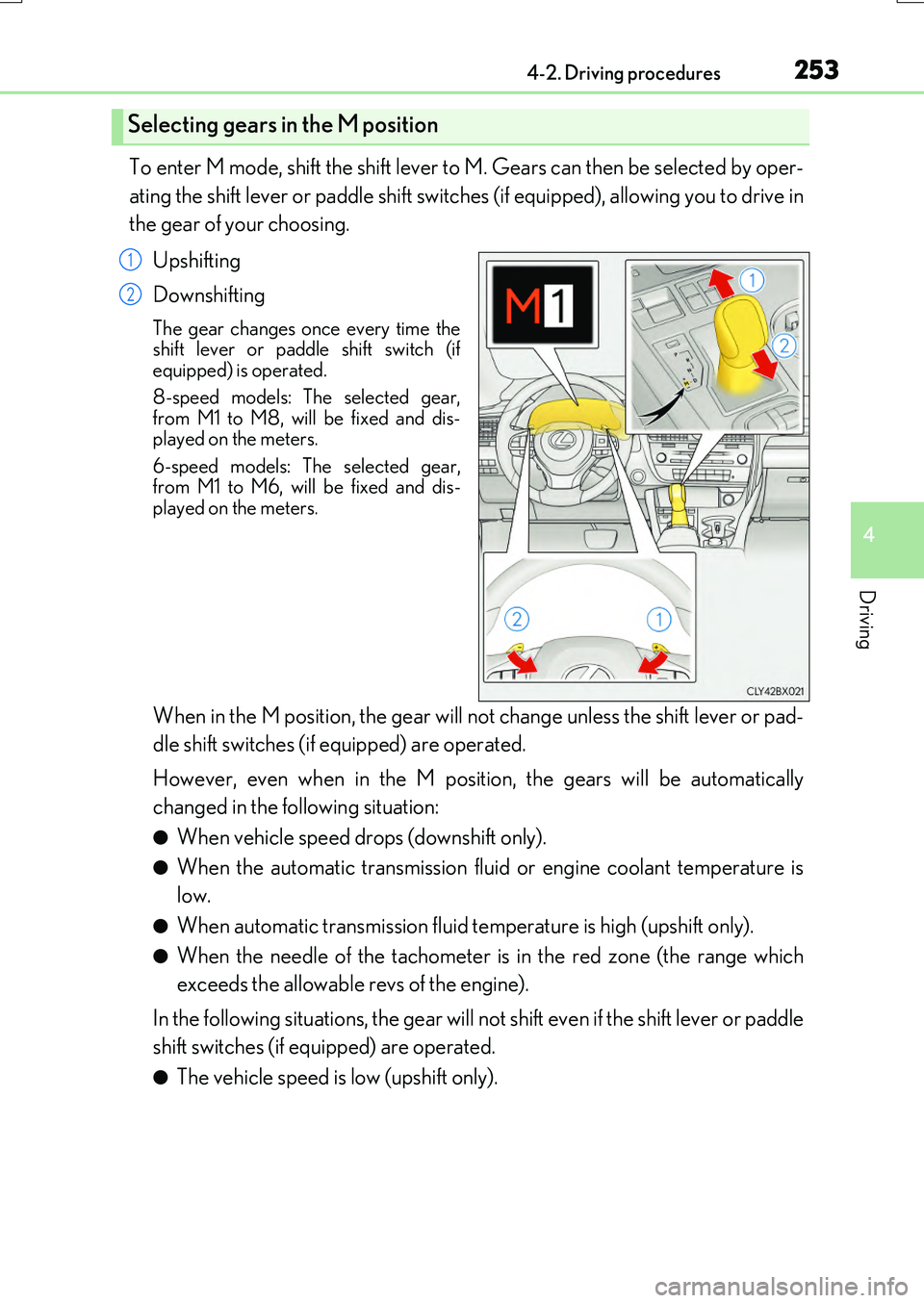
To enter M mode, shift the shift lever to M. Gears can then be selected by oper-
ating the shift lever or paddle shift switches (if equipped), allowing you to drive in
the gear of your choosing.
Upshifting
Downshifting
The gear changes once every time the shift lever or paddle shift switch (ifequipped) is operated.
8-speed models: The selected gear, from M1 to M8, will be fixed and dis-played on the meters.
6-speed models: The selected gear, from M1 to M6, will be fixed and dis-played on the meters.
When in the M position, the gear will not change unless the shift lever or pad-
dle shift switches (if equipped) are operated.
However, even when in the M position, the gears will be automatically
changed in the following situation:
●When vehicle speed drops (downshift only).
●When the automatic transmission flui d or engine coolant temperature is
low.
●When automatic transmission fluid temperature is high (upshift only).
●When the needle of the tachometer is in the red zone (the range which
exceeds the allowable revs of the engine).
In the following situations, the gear will not shift even if the shift lever or paddle
shift switches (if equipped) are operated.
●The vehicle speed is low (upshift only).
Selecting gears in the M position
1
2
Page 258 of 776
2584-2. Driving procedures
RX350/RX200t_EE_OM48F32E
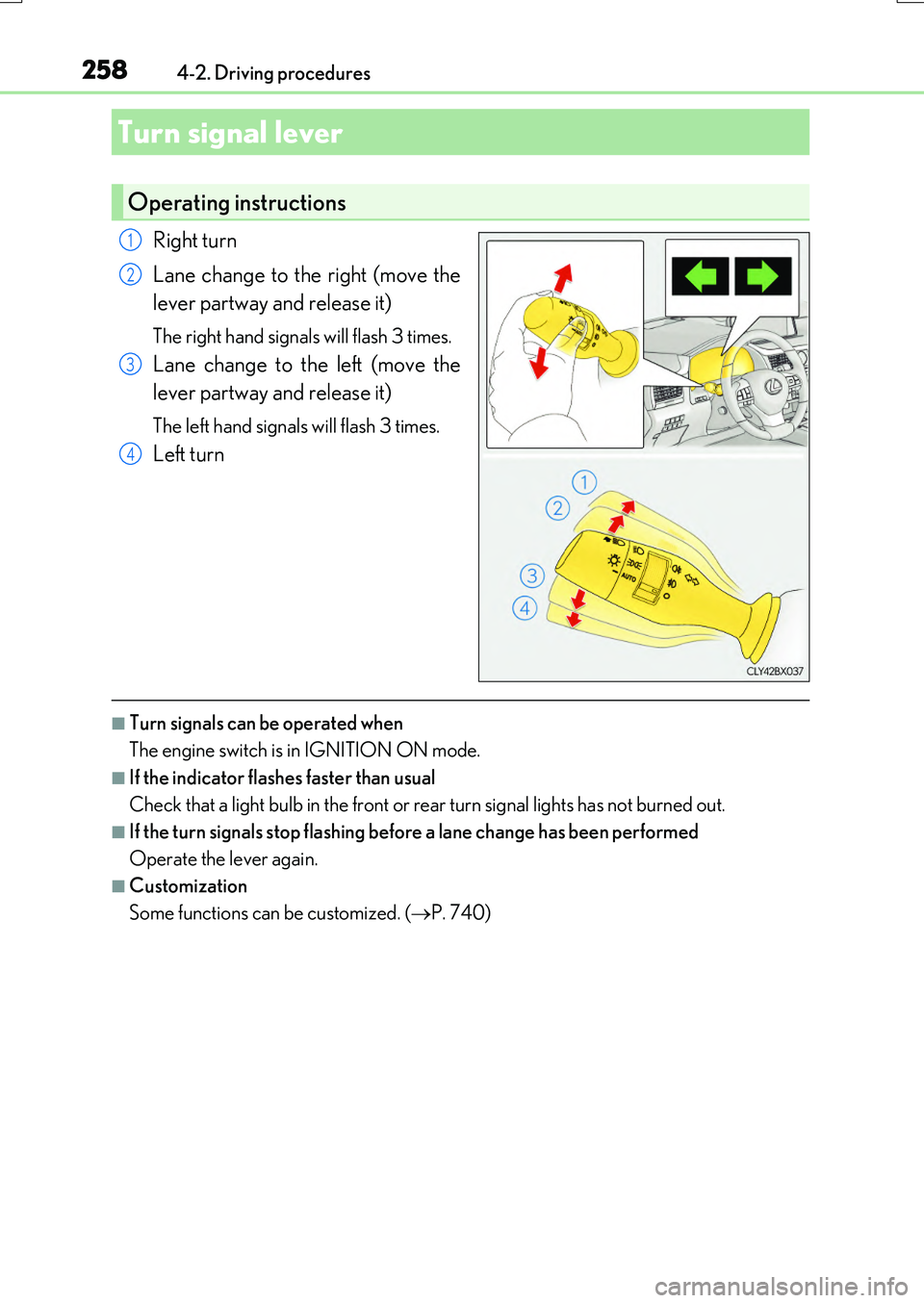
Right turn
Lane change to the right (move the
lever partway and release it)
The right hand signals will flash 3 times.
Lane change to the left (move the
lever partway and release it)
The left hand signals will flash 3 times.
Left turn
■Turn signals can be operated when
The engine switch is in IGNITION ON mode.
■If the indicator flashes faster than usual
Check that a light bulb in the front or rear turn signal lights has not burned out.
■If the turn signals stop flashing before a lane change has been performed
Operate the lever again.
■Customization
Some functions can be customized. ( P. 740)
Turn signal lever
Operating instructions
1
2
3
4