reset LEXUS RX200T 2017 User Guide
[x] Cancel search | Manufacturer: LEXUS, Model Year: 2017, Model line: RX200T, Model: LEXUS RX200T 2017Pages: 776, PDF Size: 44.51 MB
Page 129 of 776
1292. Instrument cluster
2
Instrument cluster
RX350/RX200t_EE_OM48F32E
Lexus Display Audio screen
Press the “MENU” button on the Lexus Display Audio controller, and then select
“Car” on the “MENU” screen.
If the “Trip information” screen does not appear, move the controller to the right and
select “Trip information”.
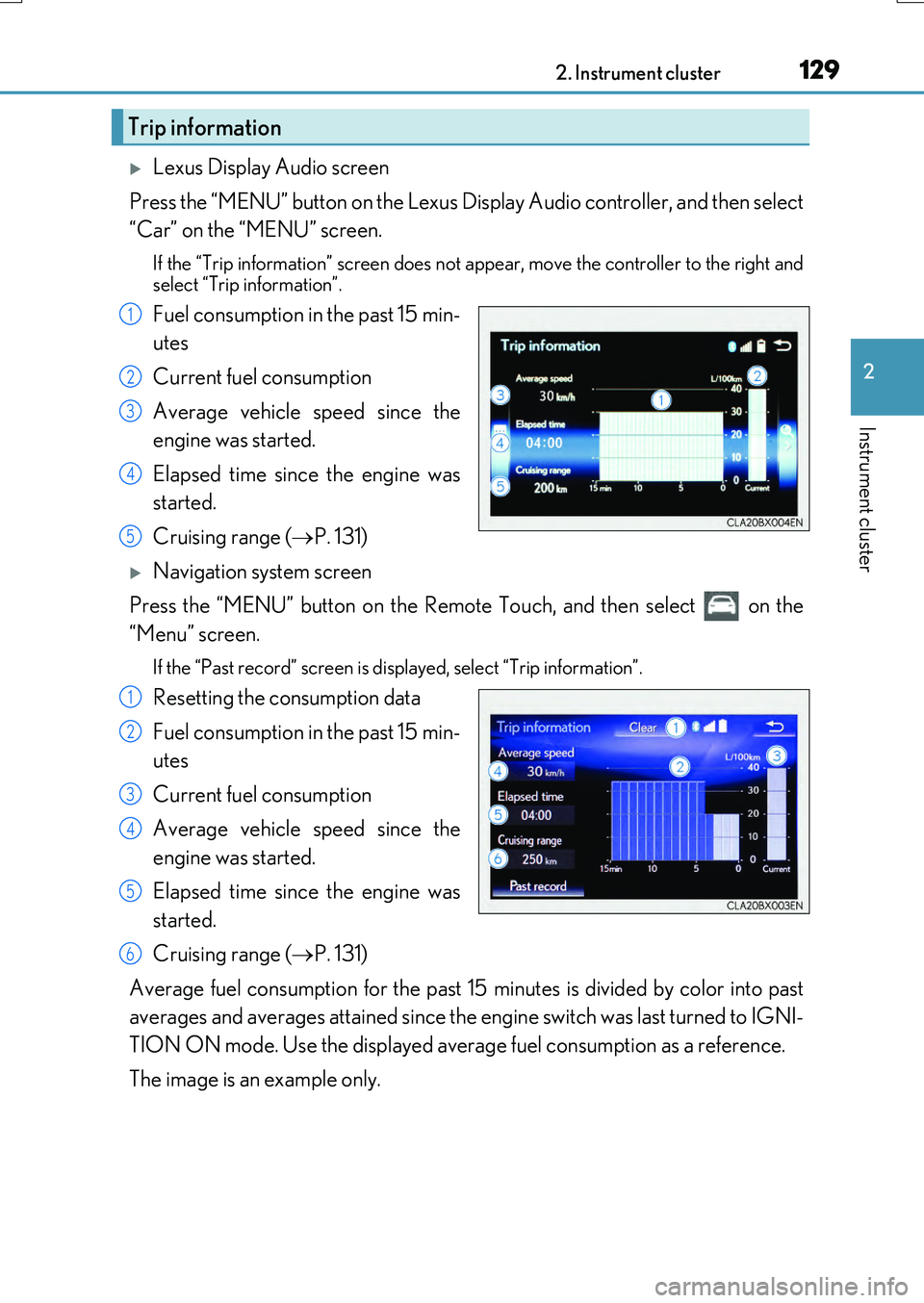
Fuel consumption in the past 15 min-
utes
Current fuel consumption
Average vehicle speed since the
engine was started.
Elapsed time since the engine was
started.
Cruising range ( P. 131)
Navigation system screen
Press the “MENU” button on the Remote Touch, and then select on the
“Menu” screen.
If the “Past record” screen is displayed, select “Trip information”.
Resetting the consumption data
Fuel consumption in the past 15 min-
utes
Current fuel consumption
Average vehicle speed since the
engine was started.
Elapsed time since the engine was
started.
Cruising range ( P. 131)
Average fuel consumption for the past 15 minutes is divided by color into past
averages and averages attained since the engine switch was last turned to IGNI-
TION ON mode. Use the displayed average fuel consumption as a reference.
The image is an example only.
Trip information
1
2
3
4
5
1
2
3
4
5
6
Page 130 of 776
1302. Instrument cluster
RX350/RX200t_EE_OM48F32E
Lexus Display Audio screen
Press the “MENU” button on the Lexus Display Audio controller, and then select
“Car” on the “MENU” screen.
If the “Past record” screen does not appear , move the controller to the right and select
“Past record”.
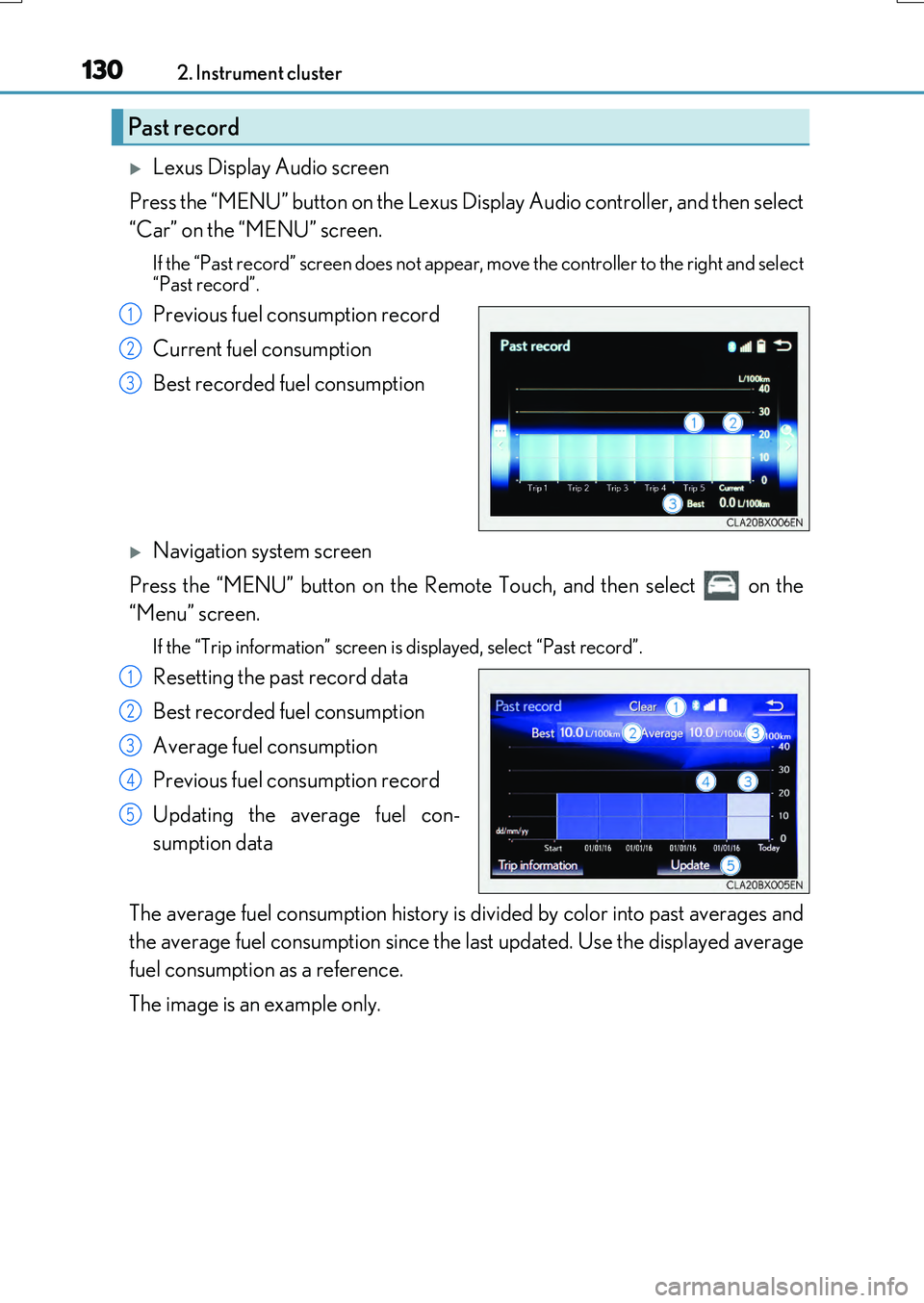
Previous fuel consumption record
Current fuel consumption
Best recorded fuel consumption
Navigation system screen
Press the “MENU” button on the Remote Touch, and then select on the
“Menu” screen.
If the “Trip information” screen is displayed, select “Past record”.
Resetting the past record data
Best recorded fuel consumption
Average fuel consumption
Previous fuel consumption record
Updating the average fuel con-
sumption data
The average fuel consumption history is di vided by color into past averages and
the average fuel consumption since the last updated. Use the displayed average
fuel consumption as a reference.
The image is an example only.
Past record
1
2
3
1
2
3
4
5
Page 131 of 776
1312. Instrument cluster
2
Instrument cluster
RX350/RX200t_EE_OM48F32E
■Updating the past record data
Vehicles with a Lexus Display Audio system
Update the average fuel consumption by moving the controller to the left and select “Update” to measure the current fuel consumption again.
Vehicles with a navigation system
Update the average fuel consumption by selecting “Update” to measure the current fuel consumption again.
■Resetting the data
Vehicles with a Lexus Display Audio system
The fuel consumption data can be deleted by moving the controller to the left and select
“Clear”.
Vehicles with a navigation system
The fuel consumption data can be deleted by selecting “Clear”.
■Cruising range
Displays the estimated maximum distance that can be driven with the quantity of fuel remaining.
This distance is computed based on your average fuel consumption. As a result, the actual distance that can be driven may differ from that displayed.
Page 196 of 776
1963-3. Adjusting the seats
RX350/RX200t_EE_OM48F32E
Your preferred driving position (the position of the driver’s seat, steering wheel
and outside rear view mirrors) can be recorded and recalled by pressing a but-
ton.
Three different driving positions can be recorded into memory.
■Recording procedure
Check that the shift lever is in P.
Turn the engine switch to IGNITION ON mode.
Adjust the driver’s seat, steering wheel, and outside rear view mirrors to the
desired positions.
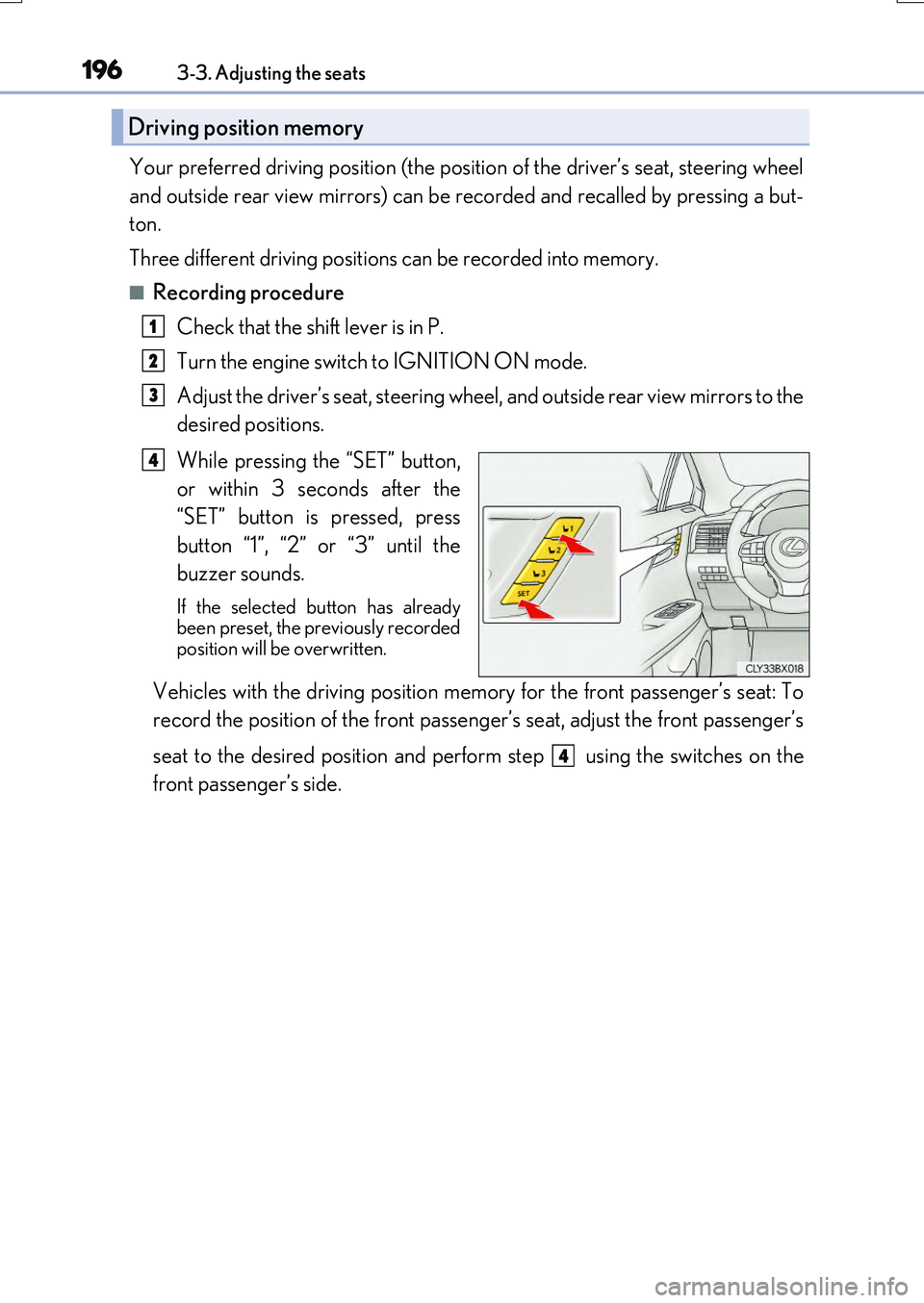
While pressing the “SET” button,
or within 3 seconds after the
“SET” button is pressed, press
button “1”, “2” or “3” until the
buzzer sounds.
If the selected button has already been preset, the previously recorded
position will be overwritten.
Vehicles with the driving position memory for the front passenger’s seat: To
record the position of the front passeng er’s seat, adjust the front passenger’s
seat to the desired position and perform step using the switches on the
front passenger’s side.
Driving position memory
1
2
3
4
4
Page 438 of 776
438
RX350/RX200t_EE_OM48F32E
5-1. Basic Operations
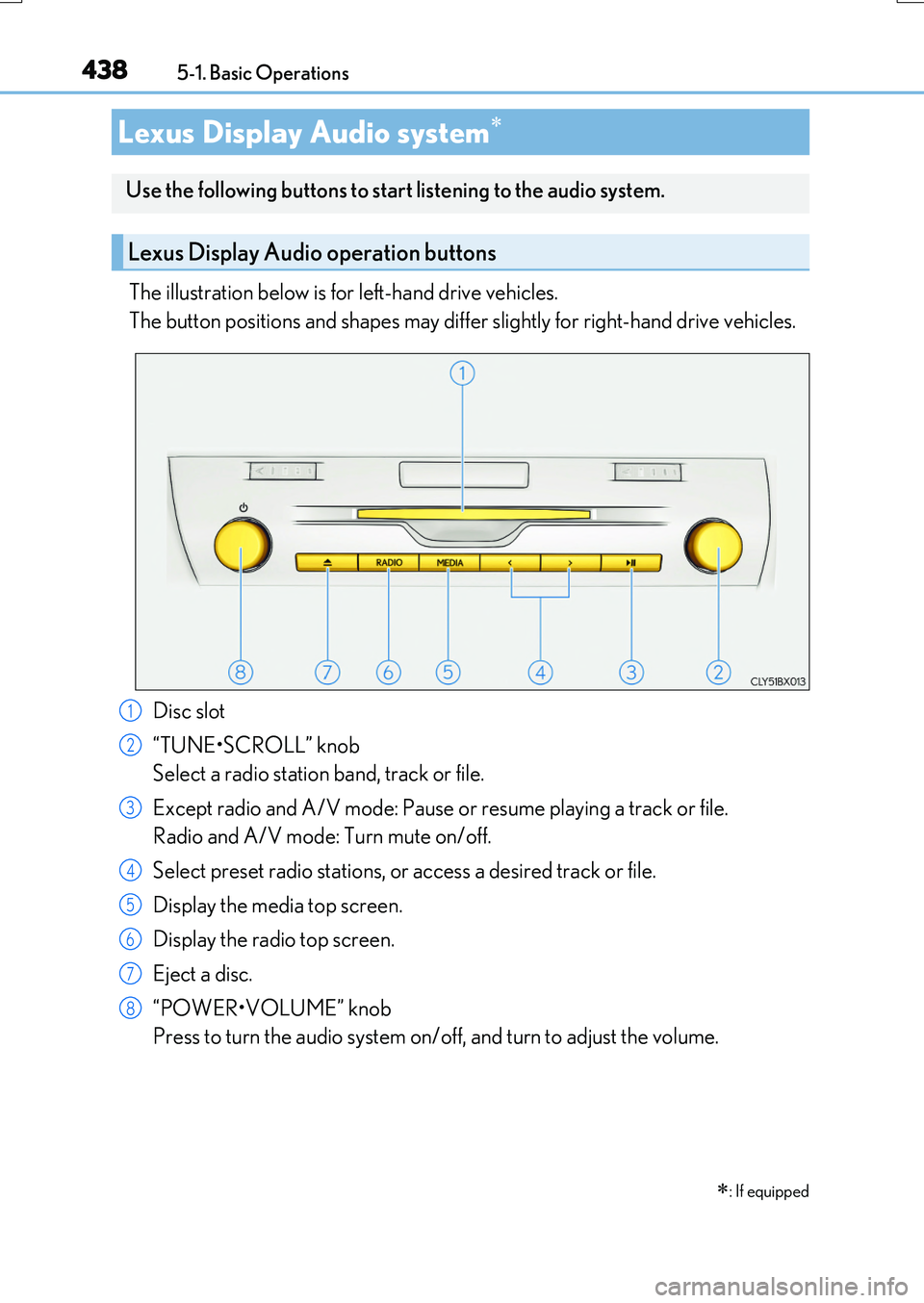
The illustration below is for left-hand drive vehicles.
The button positions and shapes may differ slightly for right-hand drive vehicles.
Disc slot
“TUNE•SCROLL” knob
Select a radio station band, track or file.
Except radio and A/V mode: Pause or resume playing a track or file.
Radio and A/V mode: Turn mute on/off.
Select preset radio stations, or access a desired track or file.
Display the media top screen.
Display the radio top screen.
Eject a disc.
“POWER•VOLUME” knob
Press to turn the audio system on/off, and turn to adjust the volume.
Lexus Display Audio system
: If equipped
Use the following buttons to start listening to the audio system.
Lexus Display Audio operation buttons
1
2
3
4
5
6
7
8
Page 458 of 776

4585-3. Using the audio system
RX350/RX200t_EE_OM48F32E
To display the radio settings screen in a different way, select “FM radio settings”
on the audio menu screen. ( P. 461)
Change the order of the station list
Select to set the traffic announce-
ment interrupt operation on/off
When traffic announcement is set to on, the radio will begin seeking a TP station.( P. 465)
Select to set the alternative fre-
quency network following operation
on/off
When alternative frequency is set to on, a station providing good reception is auto- matically selected if current reception worsens.
Select to set the region code change operation on/off
When region code change operation is se t to on, programs will switch over to a
broadcasting station within th e same local program network.
Select to set the FM Radio text feature on/off
To display the DAB settings screen in a different way, select “DAB settings” on
the audio menu screen. ( P. 461)
Update the DAB station list
Select to set the L-band on/off
When set to off, the physical channel range for tune operations is limited toBand III except preset operations.
When set to on, the physical channel range for tune operations is Band III andL-band.
Select to set traffic announcement
operation on/off
When traffic announcement is set to on, the tuner will automatically seek a station that regularly broadcasts traffic information and the station will broadcast when the traffic information program starts.
Select to set alternative frequency network following operation on/off
When alternative frequency is set to on, a station providing good reception is auto-matically selected if current reception worsens.
Select to set the DAB radio text feature on/off
Changing FM radio settings
1
2
3
Changing DAB settings (if equipped)
4
5
1
2
3
4
5
Page 464 of 776
464
RX350/RX200t_EE_OM48F32E
5-4. Using the radio
Pressing the “RADIO” button displays the radio top screen from any screen of
the selected source.
■Menu screen
P. 461
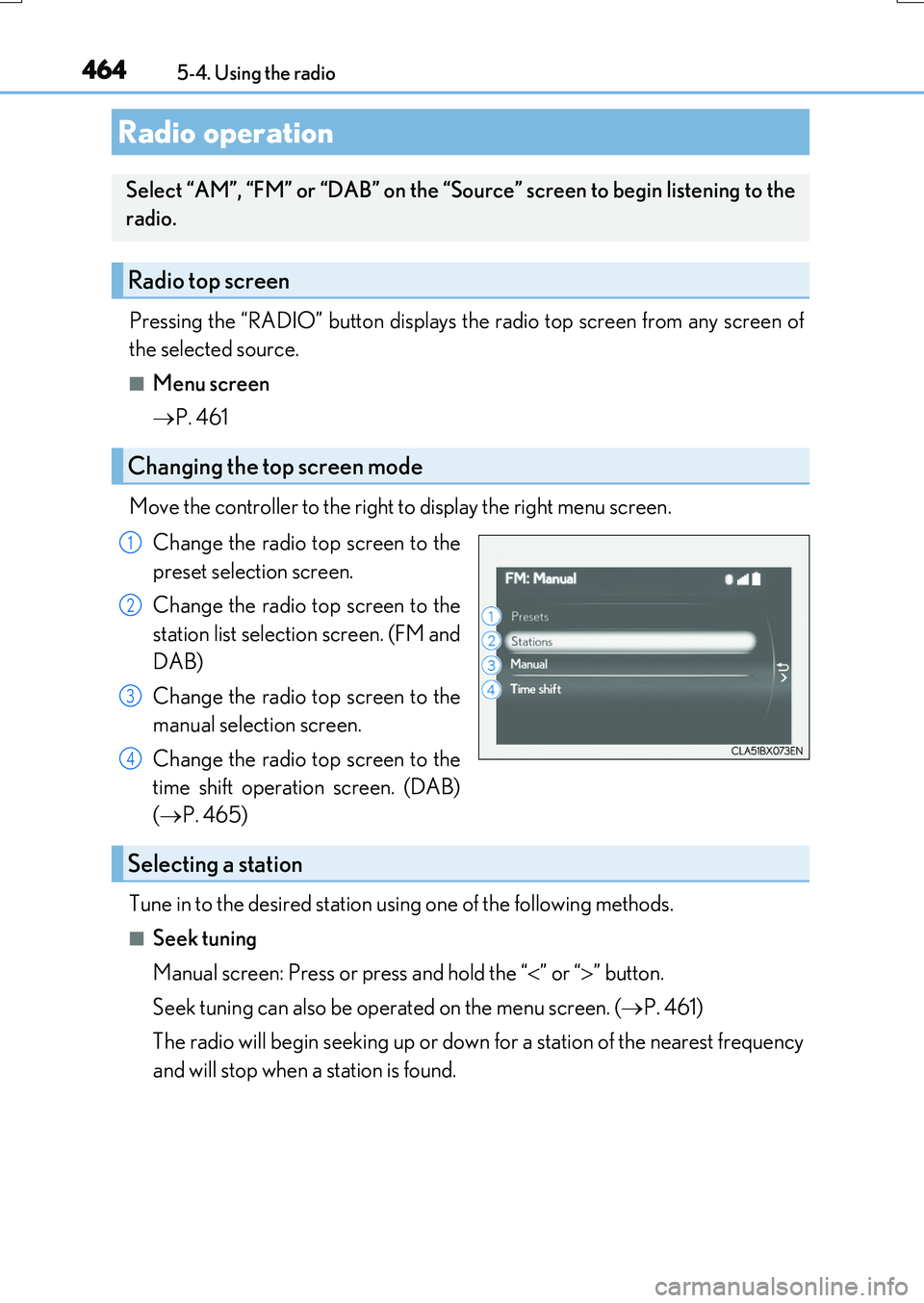
Move the controller to the right to display the right menu screen.
Change the radio top screen to the
preset selection screen.
Change the radio top screen to the
station list selection screen. (FM and
DAB)
Change the radio top screen to the
manual selection screen.
Change the radio top screen to the
time shift operation screen. (DAB)
( P. 465)
Tune in to the desired station using one of the following methods.
■Seek tuning
Manual screen: Press or press and hold the “ ” or “” button.
Seek tuning can also be operated on the menu screen. ( P. 461)
The radio will begin seeking up or down for a station of the nearest frequency
and will stop when a station is found.
Radio operation
Select “AM”, “FM” or “DAB” on the “Source” screen to begin listening to the
radio.
Radio top screen
Changing the top screen mode
1
2
3
4
Selecting a station
Page 465 of 776
4655-4. Using the radio
5
Lexus Display Audio system
RX350/RX200t_EE_OM48F32E
■Manual tuning (manual screen)
Turn the “TUNE•SCROLL” knob or turn the controller.
■Station list (preset or station list screen)
Select the desired station by pressi ng the “<” or “>” button, turn the
“TUNE•SCROLL” knob, or turning and pressing the controller.
Radio stations can be preset.
Search for desired stations.
Turn the controller to select one of the stations and then press the controller
until you hear a beep while on the preset selection screen.
The broadcast you are currently listening to can be re-listened to at any time.
Move the controller to the right and then select “Time shift”.
Turn the “TUNE•SCROLL” knob to set the desired offset.
An offset playback time can also be set on the menu screen. ( P. 461)
To cancel the time shift operation while in time shift mode, move the controller to the
left and select “Time shift off”. If the time shift display is left showing “-0’ 00”” for 6 seconds without any operation, the time shift operation will be canceled.
■Reception sensitivity
●Maintaining perfect radio recept ion at all times is difficult due to the continually chang- ing position of the antenna, differences in signal strength and surrounding objects, such
as trains, transmitters, etc.
●The radio antenna is mounted inside the rear window. To maintain clear radio reception, do not attach metallic window tinting or other metallic objects to the antenna wire
mounted inside the rear window.
■Traffic announcement operation
When traffic announcement is set to on, “TP” will appear on the screen and the radio will
begin seeking a TP station. If the radio seeks out a TP station, a pop-up massage is dis- played. To listen the program, select “Continue”. When the program ends, the initial
operation will resume.
Setting station presets (preset screen)
Time shift operation (DAB) (if equipped)
1
2
1
2
Page 475 of 776
4755-6. Using an external device
5
Lexus Display Audio system
RX350/RX200t_EE_OM48F32E
■iPod problems
To resolve most problems encountered when us ing your iPod, disconnect your iPod from the vehicle iPod connection and reset it. For instructions on how to reset your iPod, refer
to your iPod Owner’s Manual.
■Compatible models
The following iPod®, iPod nano®, iPod classic®, iPod touch® and iPhone® devices can
be used with this system.
●Made for
• iPod touch (5th generation)*
• iPod touch (4th generation) • iPod touch (3rd generation)• iPod touch (2nd generation)
•iPod touch (1st generation) • iPod classic•iPod with video
• iPod nano (7th generation)*• iPod nano (6th generation) • iPod nano (5th generation)
• iPod nano (4th generation) • iPod nano (3rd generation)• iPod nano (1st generation)
•iPhone 5s*
•iPhone 5c*•iPhone 5*
•iPhone 4S •iPhone 4•iPhone 3GS
•iPhone 3G •iPhone
*: iPod video not supported
Depending on differences between models or software versions, etc., some models might be incompatible with this system.
NOTICE
■To prevent damage to the iPod or its terminals
●Depending on the size and shape of the iPod that is connected to the system, the con-sole box may not close fully. In this case, do not forcibly close the console box as this
may damage the iPod or the terminal, etc.
●Do not leave the iPod in the vehicle. The temperature inside the vehicle may become high.
●Do not push down on or apply unnecessary pr essure to the iPod while it is connected.
●Do not insert foreign objects into the port.
Page 604 of 776
6047-3. Do-it-yourself maintenance
RX350/RX200t_EE_OM48F32E
■After changing the engine oil
The engine oil maintenance data should be reset. Perform the following procedures:
Select on the multi-information display. ( P. 110)
Press or of the meter control switch, select the “Vehicle Settings” then “Oil
Maintenance”. (To confirm setting, press .)
Select the “Yes” and push .
A message is displayed on th e multi-information display.
WARNING
■Used engine oil
●Used engine oil contains potentially harmful contaminants which may cause skin dis-
orders such as inflammation and skin cancer, so care should be taken to avoid pro-
longed and repeated contact. To remove used engine oil from your skin, wash
thoroughly with soap and water.
●Dispose of used oil and filters only in a safe and acceptable manner. Do not dispose of
used oil and filters in household trash, in sewers or onto the ground. Call any autho-
rized Lexus dealer or repairer, or anothe r duly qualified and equipped professional,
service station or auto parts store for information concerning recycling or disposal.
●Do not leave used engine oil within the reach of children.
NOTICE
■To prevent serious engine damage
Check the oil level on a regular basis.
■When replacing the engine oil
●Be careful not to spill engine oil on the vehicle components.
●Avoid overfilling, or the engine could be damaged.
●Check the oil level on the dipstick every time you refill the vehicle.
●Be sure the engine oil filler cap is properly tightened.
1
2
3
4