engine LEXUS RX200T 2017 Owner's Manual
[x] Cancel search | Manufacturer: LEXUS, Model Year: 2017, Model line: RX200T, Model: LEXUS RX200T 2017Pages: 776, PDF Size: 44.51 MB
Page 97 of 776
972. Instrument cluster
2
Instrument cluster
RX350/RX200t_EE_OM48F32E
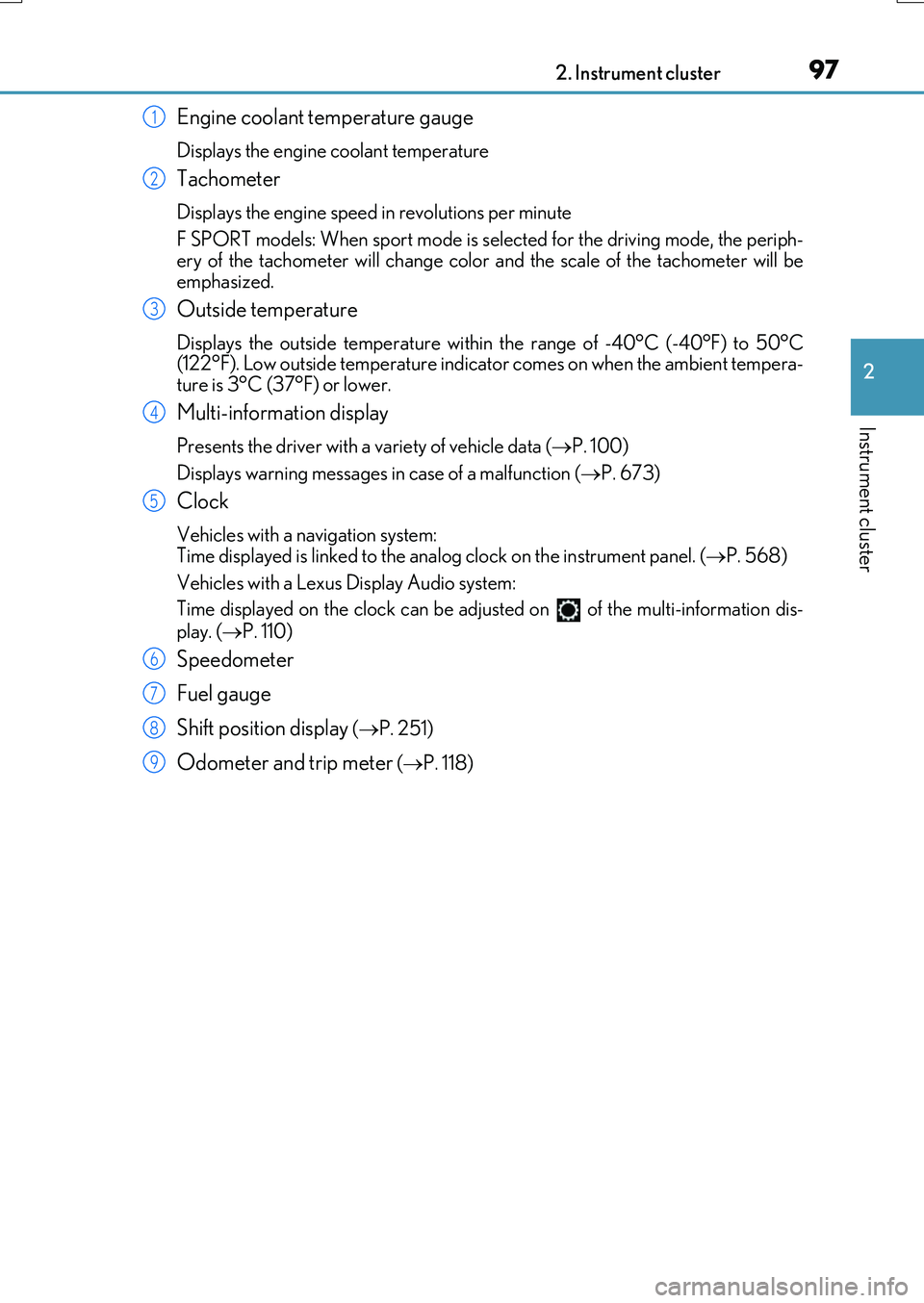
Engine coolant temperature gauge
Displays the engine coolant temperature
Tachometer
Displays the engine speed in revolutions per minute
F SPORT models: When sport mode is selected for the driving mode, the periph-
ery of the tachometer will change color and the scale of the tachometer will be emphasized.
Outside temperature
Displays the outside temperature within the range of -40°C (-40°F) to 50°C(122°F). Low outside temperature indicator comes on when the ambient tempera-
ture is 3°C (37°F) or lower.
Multi-information display
Presents the driver with a variety of vehicle data ( P. 100)
Displays warning messages in case of a malfunction ( P. 673)
Clock
Vehicles with a navigation system: Time displayed is linked to the analog clock on the instrument panel. (P. 568)
Vehicles with a Lexus Display Audio system:
Time displayed on the clock can be adju sted on of the multi-information dis-
play. ( P. 110)
Speedometer
Fuel gauge
Shift position display ( P. 251)
Odometer and trip meter (P. 118)
1
2
3
4
5
6
7
8
9
Page 98 of 776
982. Instrument cluster
RX350/RX200t_EE_OM48F32E
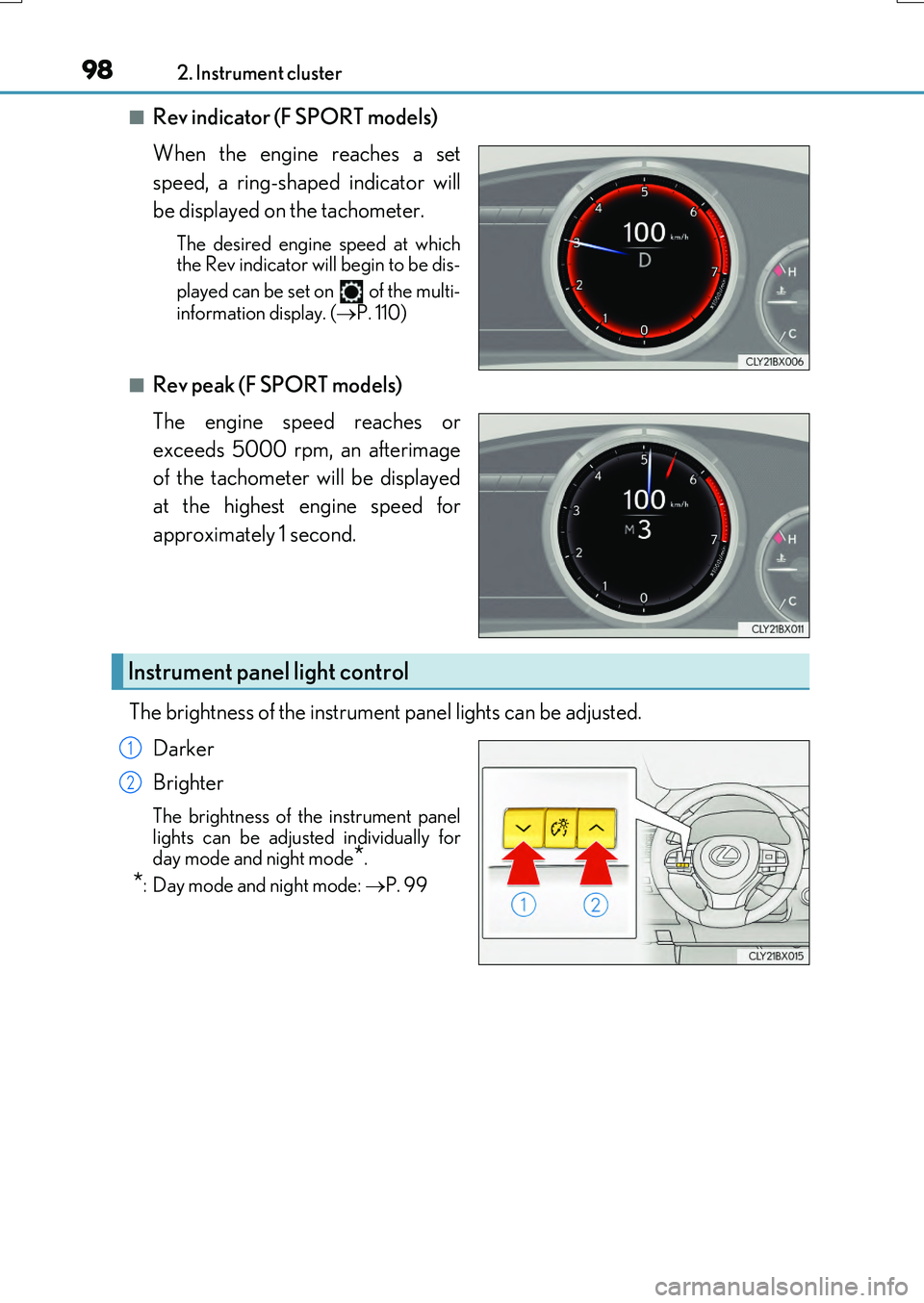
■Rev indicator (F SPORT models)
When the engine reaches a set
speed, a ring-shaped indicator will
be displayed on the tachometer.
The desired engine speed at which the Rev indicator will begin to be dis-
played can be set on of the multi-
information display. ( P. 110)
■Rev peak (F SPORT models)
The engine speed reaches or
exceeds 5000 rpm, an afterimage
of the tachometer will be displayed
at the highest engine speed for
approximately 1 second.
The brightness of the instrument panel lights can be adjusted.
Darker
Brighter
The brightness of the instrument panel lights can be adjusted individually for
day mode and night mode*.
*: Day mode and night mode: P. 99
Instrument panel light control
1
2
Page 99 of 776

992. Instrument cluster
2
Instrument cluster
RX350/RX200t_EE_OM48F32E
■The meters and display illuminate when
The engine switch is in IGNITION ON mode.
■Brightness of the meters (day mode and night mode)
The brightness of the meters is changed between day mode and night mode.
●Day mode: When the tail lights are off or wh en the tail lights are on but the surrounding area is bright
●Night mode: When the tail lights are on and the surrounding area is dark
■Outside temperature display
●In the following situations, the correct outside temperature may not be displayed, or thedisplay may take longer than normal to change.
• When stopped, or driving at low speeds (less than 20 km/h [12 mph]) • When the outside temperature has changed suddenly (at the entrance/exit of agarage, tunnel, etc.)
●When “ ” or “E” is displayed, the system may be malfunctioning. Take your vehicle to any authorized Lexus de aler or repairer, or another duly qualified
and equipped professional.
■Clock settings screen (vehicles with a navigation system only)
If the clock adjustment screen is displayed continuously when attempting to change the
clock settings, the system may be malfunctioning. Have the vehicle inspected by any authorized Lexus dealer or repairer, or another duly qualified and equipped professional.
■Customization
Some functions can be customized. ( P. 110)
NOTICE
■To prevent damage to the engine and its components
●Do not let the indicator needle of the tachometer enter the red zone, which indicates
the maximum engine speed.
●The engine may be overheating if the engine coolant temperature gauge is in the red zone (H). In this case, immediately stop the vehicle in a safe place, and check the
engine after it has cooled completely. ( P. 718)
Page 101 of 776
1012. Instrument cluster
2
Instrument cluster
RX350/RX200t_EE_OM48F32E
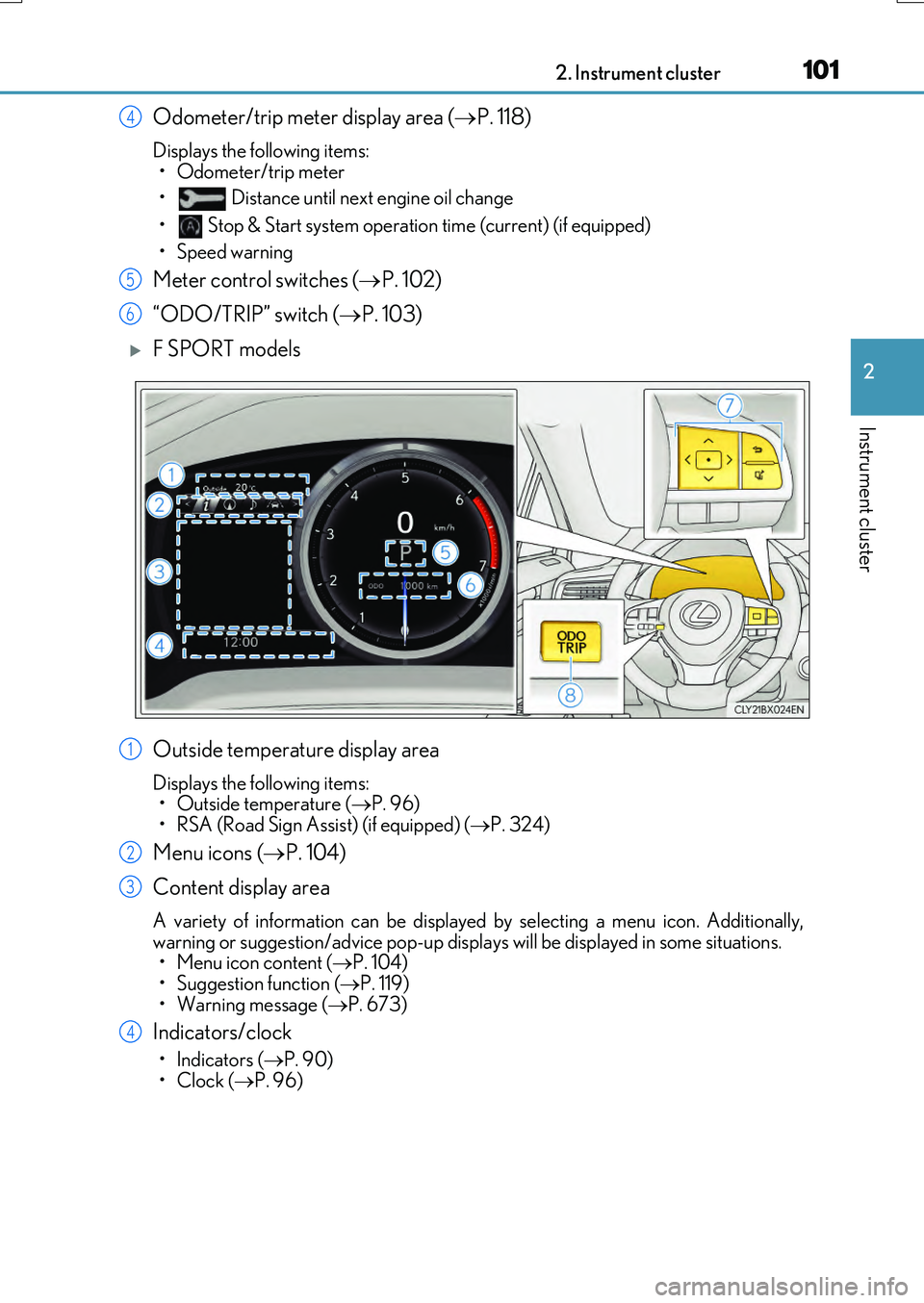
Odometer/trip meter display area (P. 118)
Displays the following items:
• Odometer/trip meter
• Distance until next engine oil change
• Stop & Start system operation time (current) (if equipped)
• Speed warning
Meter control switches ( P. 102)
“ODO/TRIP” switch ( P. 103)
F SPORT models
Outside temperature display area
Displays the following items: • Outside temperature ( P. 96)
• RSA (Road Sign Assist) (if equipped) ( P. 324)
Menu icons (P. 104)
Content display area
A variety of information can be displayed by selecting a menu icon. Additionally,
warning or suggestion/advice pop-up displa ys will be displayed in some situations. • Menu icon content ( P. 104) • Suggestion function ( P. 119)
• Warning message ( P. 673)
Indicators/clock
•Indicators (P. 90)
•Clock ( P. 96)
4
5
6
1
2
3
4
Page 102 of 776
1022. Instrument cluster
RX350/RX200t_EE_OM48F32E
Shift position display (P. 251)
Odometer/trip meter display area ( P. 118)
Displays the following items:
• Odometer/trip meter
• Distance until next engine oil change
• Stop & Start system operation time (current) (if equipped)
• Speed warning
Meter control switches ( P. 102)
“ODO/TRIP” switch ( P. 103)
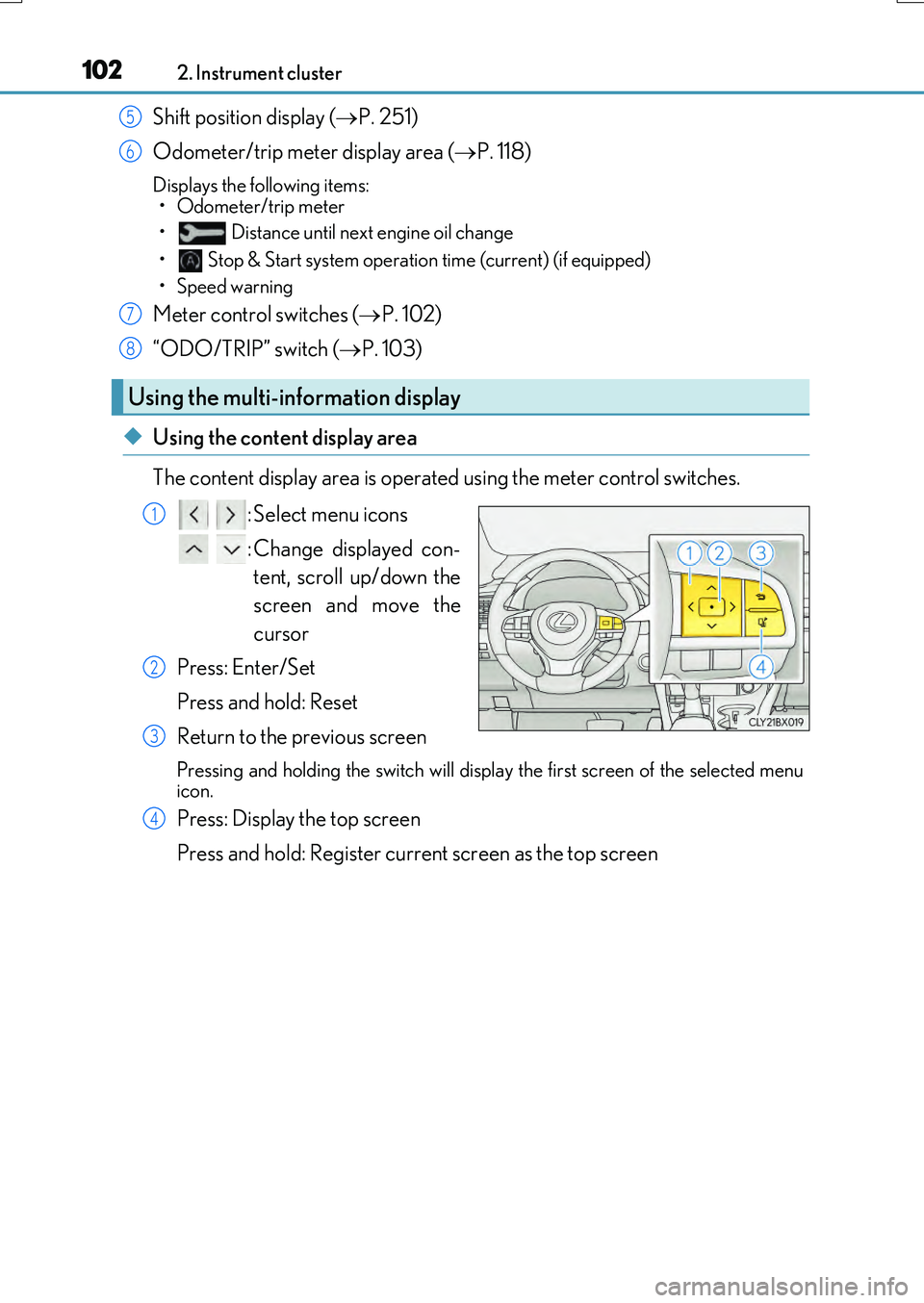
◆Using the content display area
The content display area is operated using the meter control switches. : Select menu icons
: Change displayed con- tent, scroll up/down the
screen and move the
cursor
Press: Enter/Set
Press and hold: Reset
Return to the previous screen
Pressing and holding the swit ch will display the first screen of the selected menu
icon.
Press: Display the top screen
Press and hold: Register current screen as the top screen
Using the multi-information display
5
6
7
8
1
2
3
4
Page 105 of 776
1052. Instrument cluster
2
Instrument cluster
RX350/RX200t_EE_OM48F32E
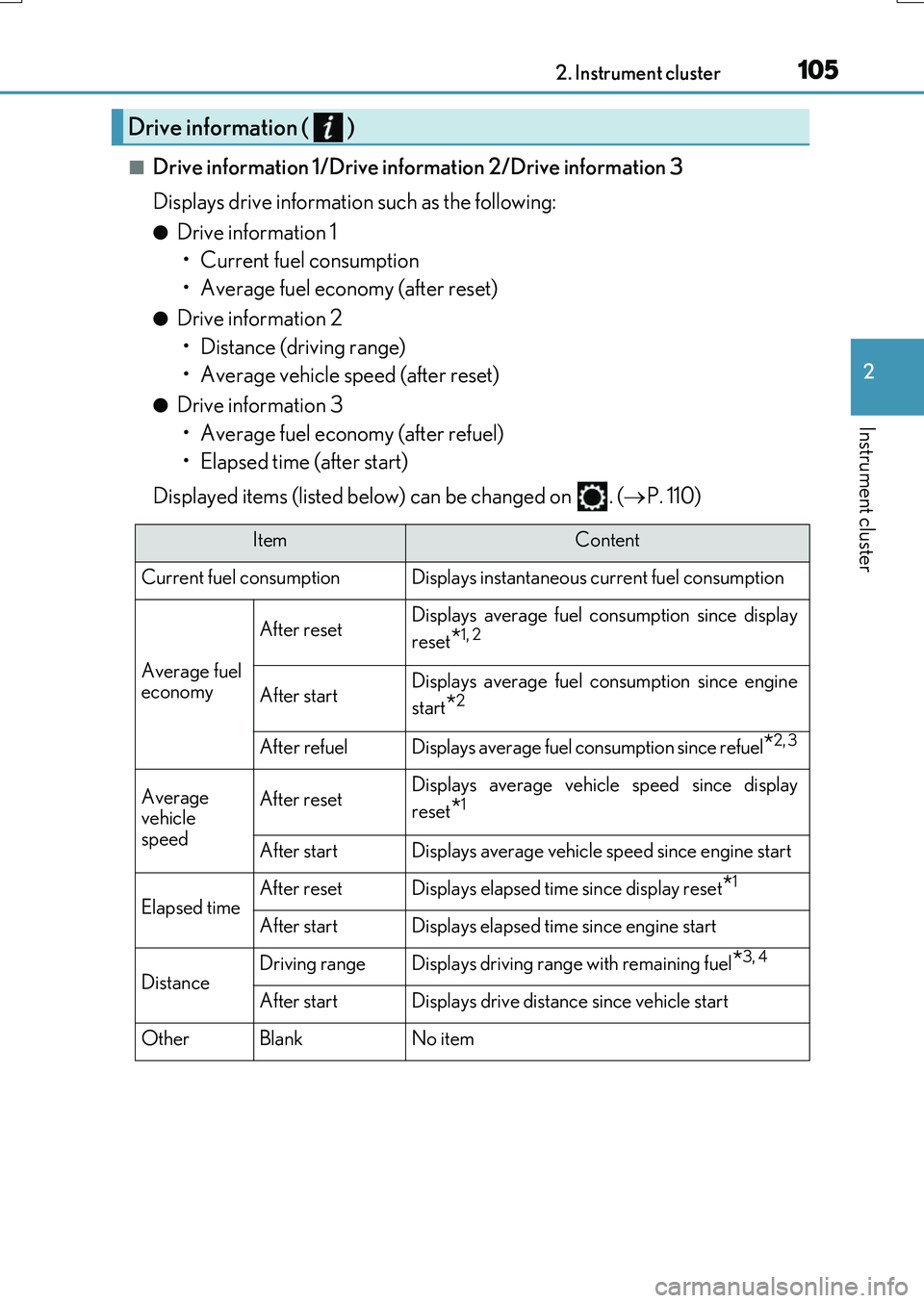
■Drive information 1/Drive information 2/Drive information 3
Displays drive information such as the following:
●Drive information 1 • Current fuel consumption
• Average fuel economy (after reset)
●Drive information 2 • Distance (driving range)
• Average vehicle speed (after reset)
●Drive information 3 • Average fuel economy (after refuel)
• Elapsed time (after start)
Displayed items (listed below) can be changed on . ( P. 110)
Drive information ( )
ItemContent
Current fuel consumption Displays instantaneous current fuel consumption
Average fuel
economy
After resetDisplays average fuel co nsumption since display
reset
*1, 2
After startDisplays average fuel consumption since engine
start
*2
After refuelDisplays average fuel consumption since refuel*2, 3
Average
vehicle
speedAfter resetDisplays average vehicle speed since display
reset
*1
After startDisplays average vehicle speed since engine start
Elapsed timeAfter resetDisplays elapsed time since display reset*1
After startDisplays elapsed time since engine start
DistanceDriving rangeDisplays driving range with remaining fuel*3, 4
After startDisplays drive distance since vehicle start
OtherBlankNo item
Page 106 of 776
1062. Instrument cluster
RX350/RX200t_EE_OM48F32E
*1: Resetting: P. 103
*2: Use the displayed fuel consumption as a reference.
*3: When only a small amount of fuel is added to the tank, the display may not be
updated.
When refueling, turn the engine switch off. If the vehicle is refueled without turning the
engine switch off, the display may not be updated.
*4: This distance is computed based on your average fuel consumption. As a result, the
actual distance that can be driven may differ from that displayed.
■Eco Driving Indicator
P. 120
■Sway warning (if equipped)
Detects the sway of the vehicle within a lane, which is often associated with a
decrease in the driver's attention level, and displays the decrease in attention
using a bar display.
The shorter the bar length, the more the driver may need to rest.
This display is a part of the LKA (Lan e-Keeping Assist) system. The display is
enabled when the operating conditions of the vehicle sway warning are met. ( P. 313)
■ AWD Control (if equipped)
Displays the driving force applied to each wheel using segments.
The greater the number of segments displayed, the greater the driving force
applied.
Page 107 of 776
1072. Instrument cluster
2
Instrument cluster
RX350/RX200t_EE_OM48F32E
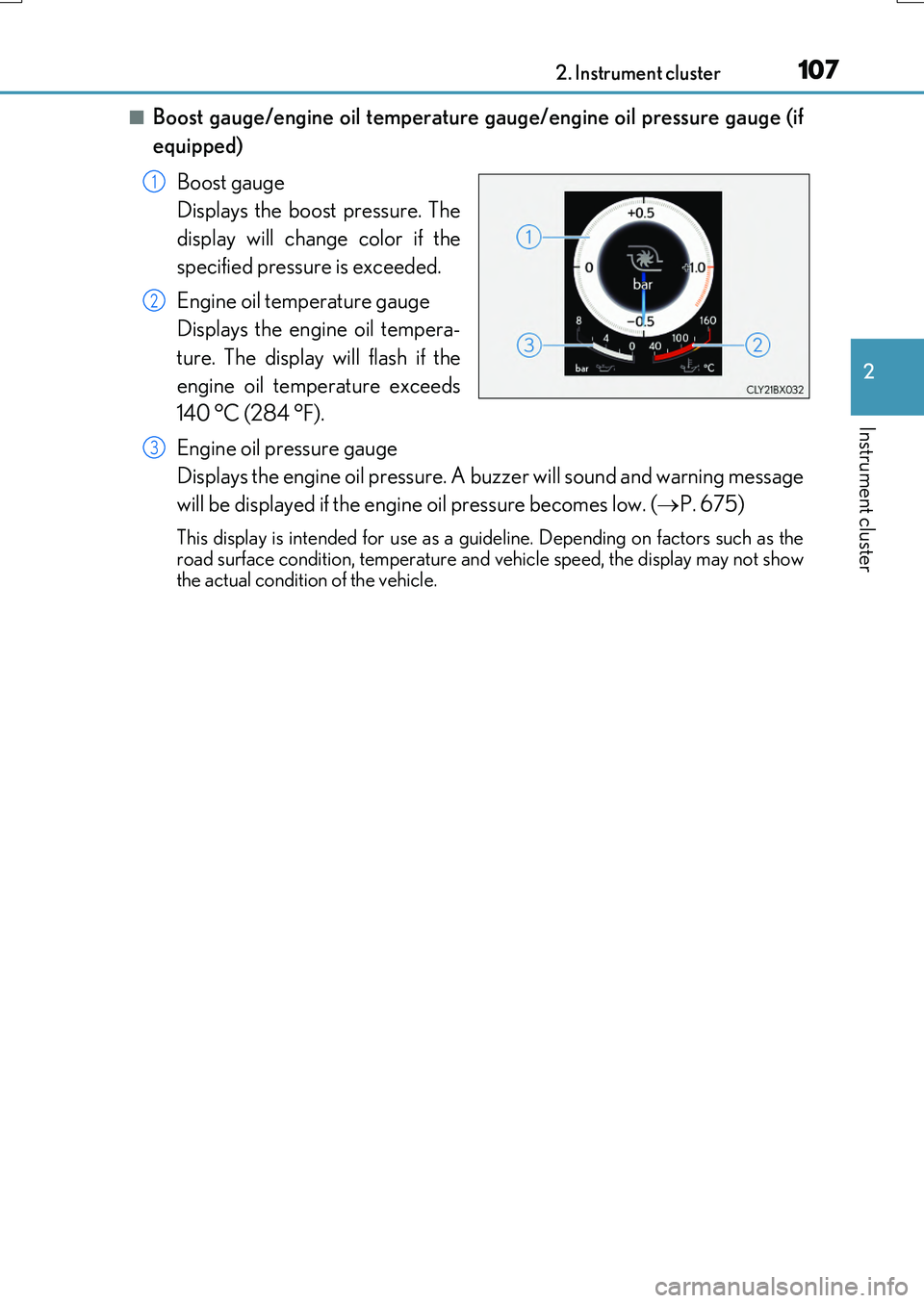
■Boost gauge/engine oil temperature gauge/engine oil pressure gauge (if
equipped)
Boost gauge
Displays the boost pressure. The
display will change color if the
specified pressure is exceeded.
Engine oil temperature gauge
Displays the engine oil tempera-
ture. The display will flash if the
engine oil temperature exceeds
140 °C (284 °F).
Engine oil pressure gauge
Displays the engine oil pressure. A buzzer will sound and warning message
will be displayed if the engine oil pressure becomes low. ( P. 675)
This display is intended for use as a guideline. Depending on factors such as the road surface condition, temperature and vehicle speed, the display may not show
the actual condition of the vehicle.
1
2
3
Page 109 of 776
1092. Instrument cluster
2
Instrument cluster
RX350/RX200t_EE_OM48F32E
■Stop & Start system operation time (current)/status notification
Displays the current amount of time the engine has been stopped due to the
operation of the Stop & Start system. Also shows the status of the Stop & Start
system with a pop-up display. ( P. 352)
■Stop & Start system total operation time/amount of fuel saved
Press or on the steering wheel to display the following items:
●Stop & Start system operation time (after start/after reset)
Displays the accumulated total of the following:
• Stop & Start system operation time since engine start
• Stop & Start system operation time since display was reset
●Amount of fuel saved (a fter start/after reset)
Displays the accumulated total of the following:
• Amount of fuel saved since engine start
• Amount of fuel saved since display was reset
Use the displayed amount of saved fuel for reference only.
■Stop & Start system settings
Press on the steering wheel to display the Stop & Start system settings
screen.
On this screen, the following operations can be performed:
● Stop & Start
The length of time the Stop & Start syst em will operate when the “A/C” switch of
the air conditioning system is on can be set to 2 different levels. This setting can
also be changed on .
●Reset
Select to reset the Stop & Start system operation time/amount of fuel saved dis-
play.
To reset, move the cursor to “Reset”, and then press and hold .
Stop & Start system information ( ) (if equipped)
Page 116 of 776
1162. Instrument cluster
RX350/RX200t_EE_OM48F32E
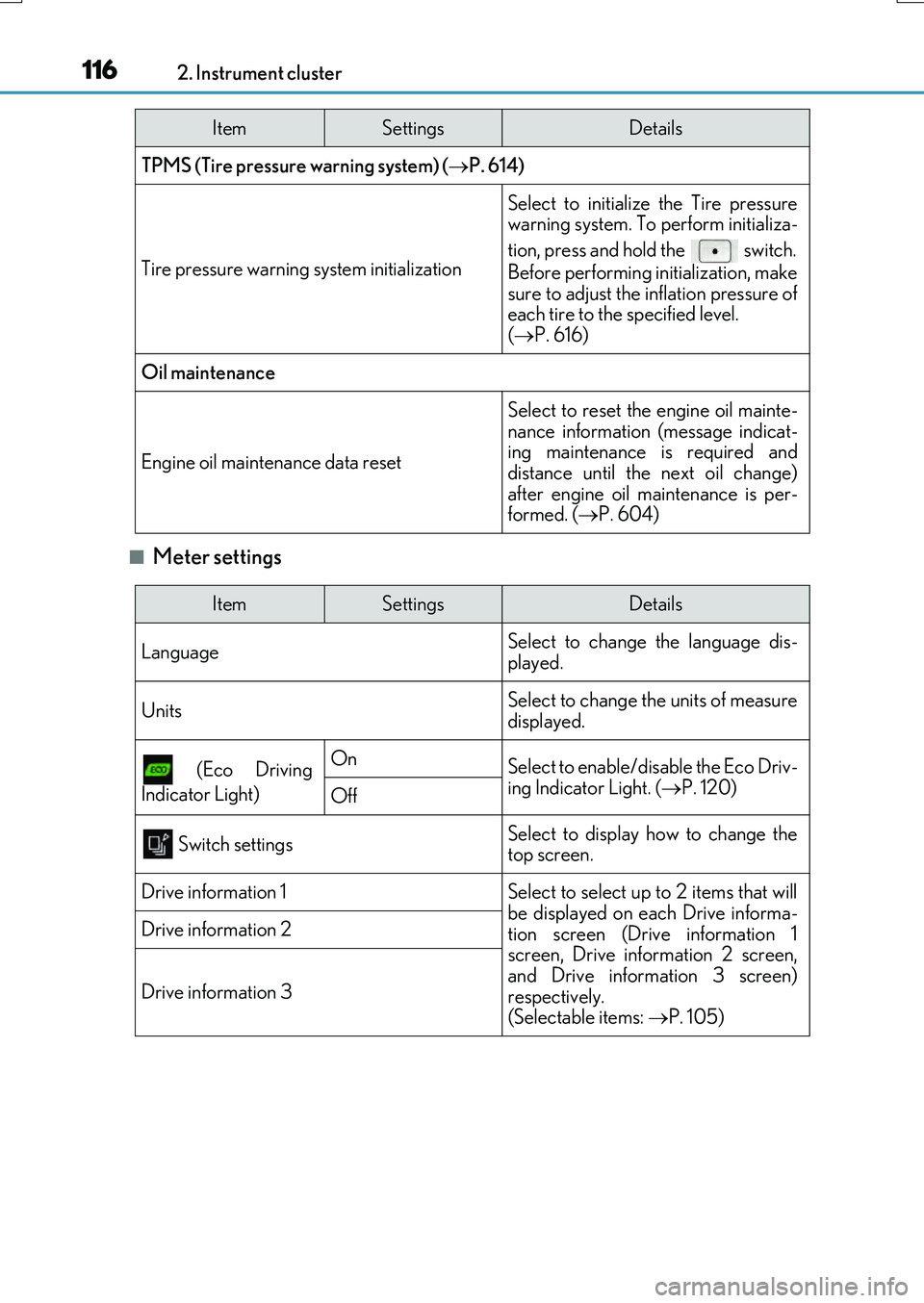
■Meter settings
TPMS (Tire pressure warning system) (P. 614)
Tire pressure warning system initialization
Select to initialize the Tire pressure warning system. To perform initializa-
tion, press and hold the switch.
Before performing initialization, make
sure to adjust the inflation pressure of each tire to the specified level. ( P. 616)
Oil maintenance
Engine oil maintenance data reset
Select to reset the engine oil mainte-
nance information (message indicat- ing maintenance is required anddistance until the next oil change)
after engine oil maintenance is per- formed. ( P. 604)
ItemSettingsDetails
ItemSettingsDetails
Language Select to change the language dis-
played.
UnitsSelect to change the units of measure displayed.
(Eco Driving
Indicator Light)
OnSelect to enable/disable the Eco Driv-
ing Indicator Light. ( P. 120)Off
Switch settingsSelect to display how to change the top screen.
Drive information 1Select to select up to 2 items that will
be displayed on each Drive informa- tion screen (Drive information 1screen, Drive information 2 screen,
and Drive information 3 screen) respectively. (Selectable items: P. 105)
Drive information 2
Drive information 3