USB port LEXUS RX200T 2017 Owners Manual
[x] Cancel search | Manufacturer: LEXUS, Model Year: 2017, Model line: RX200T, Model: LEXUS RX200T 2017Pages: 776, PDF Size: 44.51 MB
Page 4 of 776
TABLE OF CONTENTS4
RX350/RX200t_EE_OM48F32E
5-1. Basic Operations
Lexus Display Audio
system ......................................... 438
Steering wheel audio
switches....................................... 444
USB/AUX ports ........................445
5-2. Setup
Setup menu...................................448
General settings .........................449
Voice settings ..............................452
Display settings ...........................453
5-3. Using the audio system
Selecting the audio source.....455
Optimal use of the audio
system ..........................................456
Audio settings.............................. 457
Audio menu screen
operation ..................................... 461
5-4. Using the radio
Radio operation ..........................464
5-5. Playing an audio CD and
MP3/WMA/AAC discs
CD player operation ................466
5-6. Using an external device
Listening to an iPod ................... 472
Using USB memory
device........................................... 476
Using the AUX port .................. 481
5-7. Connecting Bluetooth®
Steps for using Bluetooth®
devices.........................................482
Registering a Bluetooth®
device...........................................484
Selecting a Bluetooth®
device.......................................... 485
Connecting a Bluetooth®
audio player...............................486
Connecting a Bluetooth®
phone ...........................................487
Displaying a Bluetooth®
device details ........................... 488
Detailed Bluetooth®
settings........................................ 489
5-8. Bluetooth® Audio
Listening to Bluetooth®
Audio............................................490
5Lexus Display Audio system
Page 436 of 776
436
RX350/RX200t_EE_OM48F32E
5-1. Basic Operations
Lexus Display Audio
system ..........................................438
Steering wheel audio
switches....................................... 444
USB/AUX ports ........................ 445
5-2. Setup
Setup menu ..................................448
General settings......................... 449
Voice settings.............................. 452
Display settings ........................... 453
5-3. Using the audio system
Selecting the audio
source ..........................................455
Optimal use of the audio
system .......................................... 456
Audio settings ............................. 457
Audio menu screen
operation ......................................461
5-4. Using the radio
Radio operation.......................... 464
5-5. Playing an audio CD and
MP3/WMA/AAC discs
CD player operation ................ 466
Page 437 of 776
437
5
Lexus Display
Audio system
RX350/RX200t_EE_OM48F32E
5-6. Using an external device
Listening to an iPod................... 472
Using USB memory
device........................................... 476
Using the AUX port .................. 481
5-7. Connecting Bluetooth®
Steps for using Bluetooth®
devices.........................................482
Registering a Bluetooth®
device...........................................484
Selecting a Bluetooth®
device.......................................... 485
Connecting a Bluetooth®
audio player ...............................486
Connecting a Bluetooth®
phone ...........................................487
Displaying a Bluetooth®
device details ........................... 488
Detailed Bluetooth®
settings........................................ 489
5-8. Bluetooth® Audio
Listening to Bluetooth®
Audio........................................... 490
5-9. Bluetooth® Phone
Using a Bluetooth®
Phone........................................... 492
Making a call................................ 494
Receiving a call ........................... 497
Speaking on the phone ...........498
Using a Bluetooth®
phone messages .................... 500
Using the steering wheel
switches.......................................503
Bluetooth® phone
settings ........................................504
5-10. Phonebook
Contact settings .........................506
Messaging setting .....................509
5-11. Bluetooth®
What to do if...
(Troubleshooting).................... 510
Bluetooth®.................................... 513
5-12. Other function
“Information” screen.................. 519
MirrorLink™ ................................520
USB photo .................................... 524
Speech command system ...... 526
Some of the functions cannot be operated while driving.
Page 445 of 776
4455-1. Basic Operations
5
Lexus Display Audio system
RX350/RX200t_EE_OM48F32E
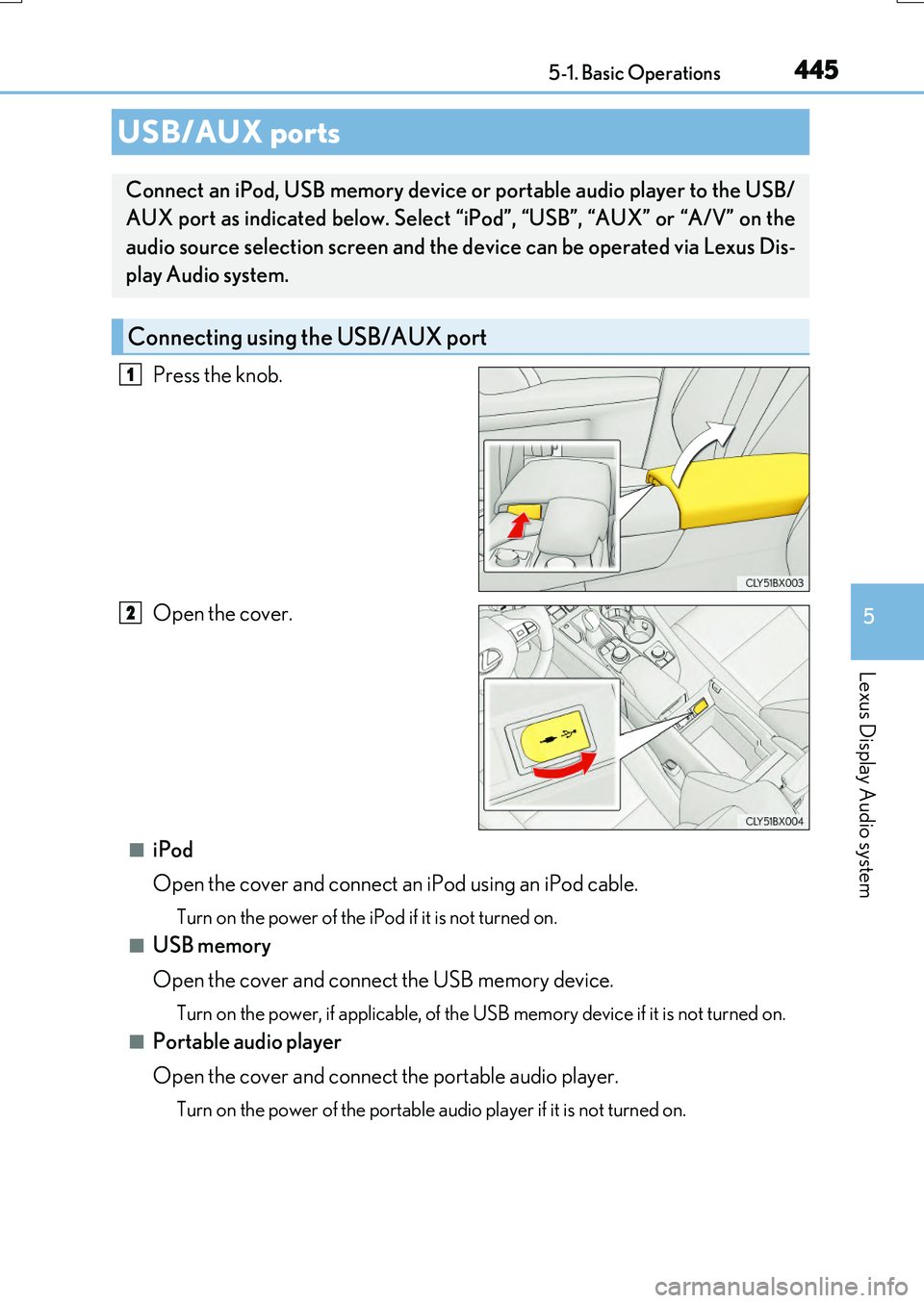
Press the knob.
Open the cover.
■iPod
Open the cover and connect an iPod using an iPod cable.
Turn on the power of the iPod if it is not turned on.
■USB memory
Open the cover and connect the USB memory device.
Turn on the power, if applicable, of the US B memory device if it is not turned on.
■Portable audio player
Open the cover and connect the portable audio player.
Turn on the power of the portable audio player if it is not turned on.
USB/AUX ports
Connect an iPod, USB memory device or portable audio player to the USB/
AUX port as indicated below. Select “iPod”, “USB”, “AUX” or “A/V” on the
audio source selection screen and the device can be operated via Lexus Dis-
play Audio system.
Connecting using the USB/AUX port
1
2
Page 446 of 776
4465-1. Basic Operations
RX350/RX200t_EE_OM48F32E
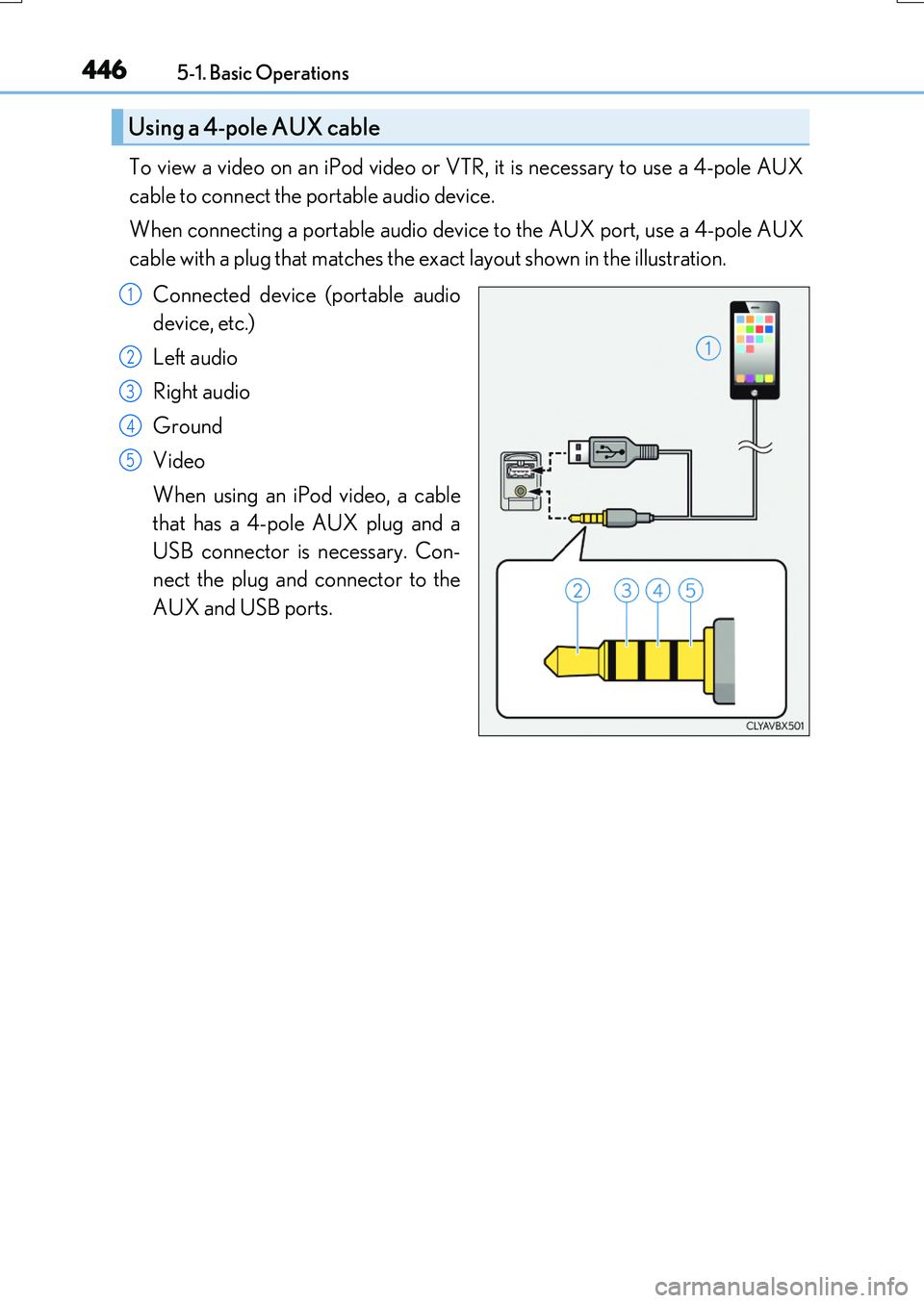
To view a video on an iPod video or VTR, it is necessary to use a 4-pole AUX
cable to connect the portable audio device.
When connecting a portable audio device to the AUX port, use a 4-pole AUX
cable with a plug that matches the exact layout shown in the illustration.
Connected device (portable audio
device, etc.)
Left audio
Right audio
Ground
Video
When using an iPod video, a cable
that has a 4-pole AUX plug and a
USB connector is necessary. Con-
nect the plug and connector to the
AUX and USB ports.
Using a 4-pole AUX cable
1
2
3
4
5
Page 447 of 776
4475-1. Basic Operations
5
Lexus Display Audio system
RX350/RX200t_EE_OM48F32E
■When using a 4-pole AUX cable
If a 4-pole AUX cable with a different layout is used, audio and/or video may not be out- put properly.
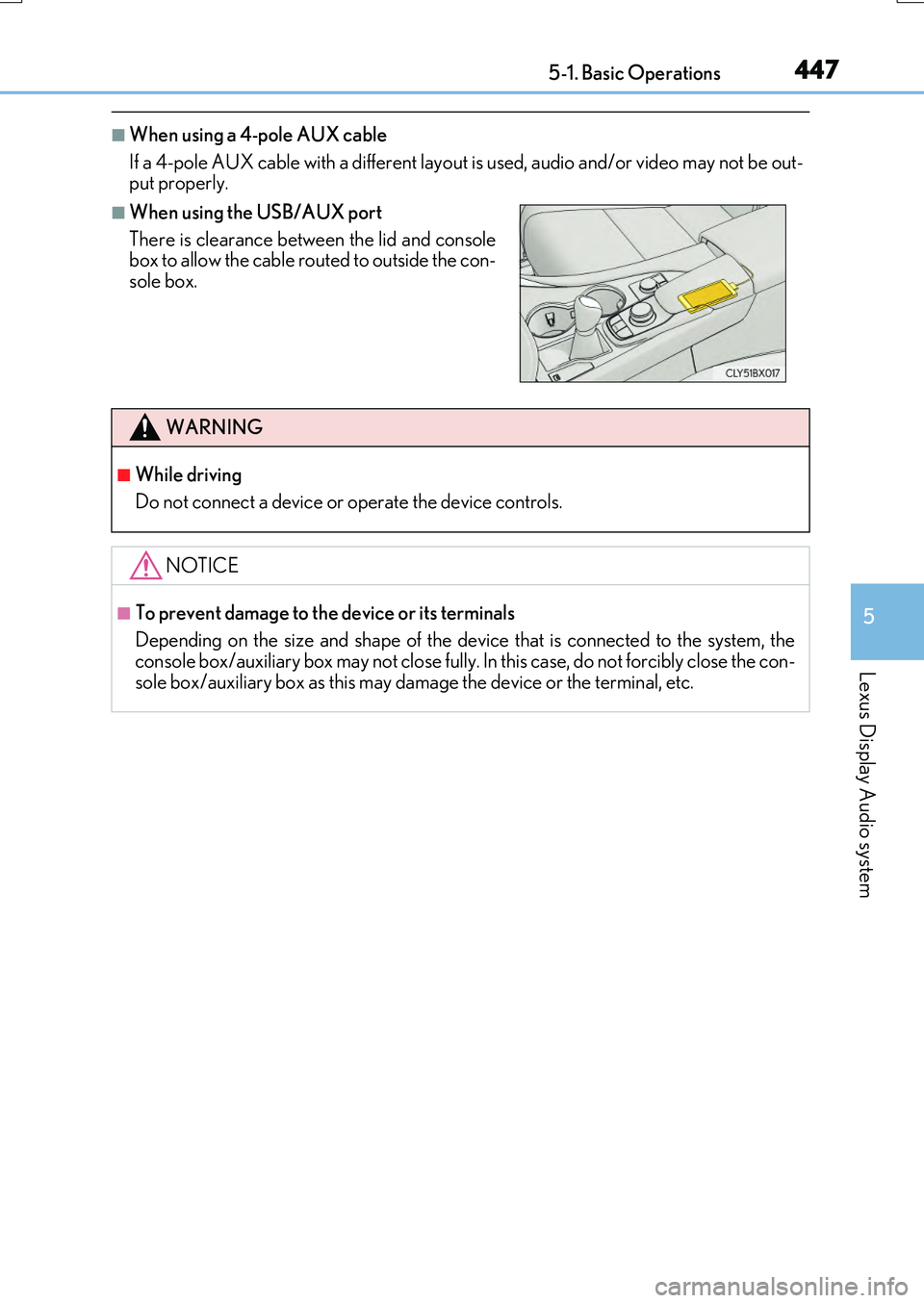
■When using the USB/AUX port
There is clearance between the lid and console box to allow the cable routed to outside the con-
sole box.
WARNING
■While driving
Do not connect a device or operate the device controls.
NOTICE
■To prevent damage to the device or its terminals
Depending on the size and shape of the device that is connected to the system, the console box/auxiliary box may not close fully. In this case, do not forcibly close the con-
sole box/auxiliary box as this may damage the device or the terminal, etc.
Page 459 of 776
4595-3. Using the audio system
5
Lexus Display Audio system
RX350/RX200t_EE_OM48F32E
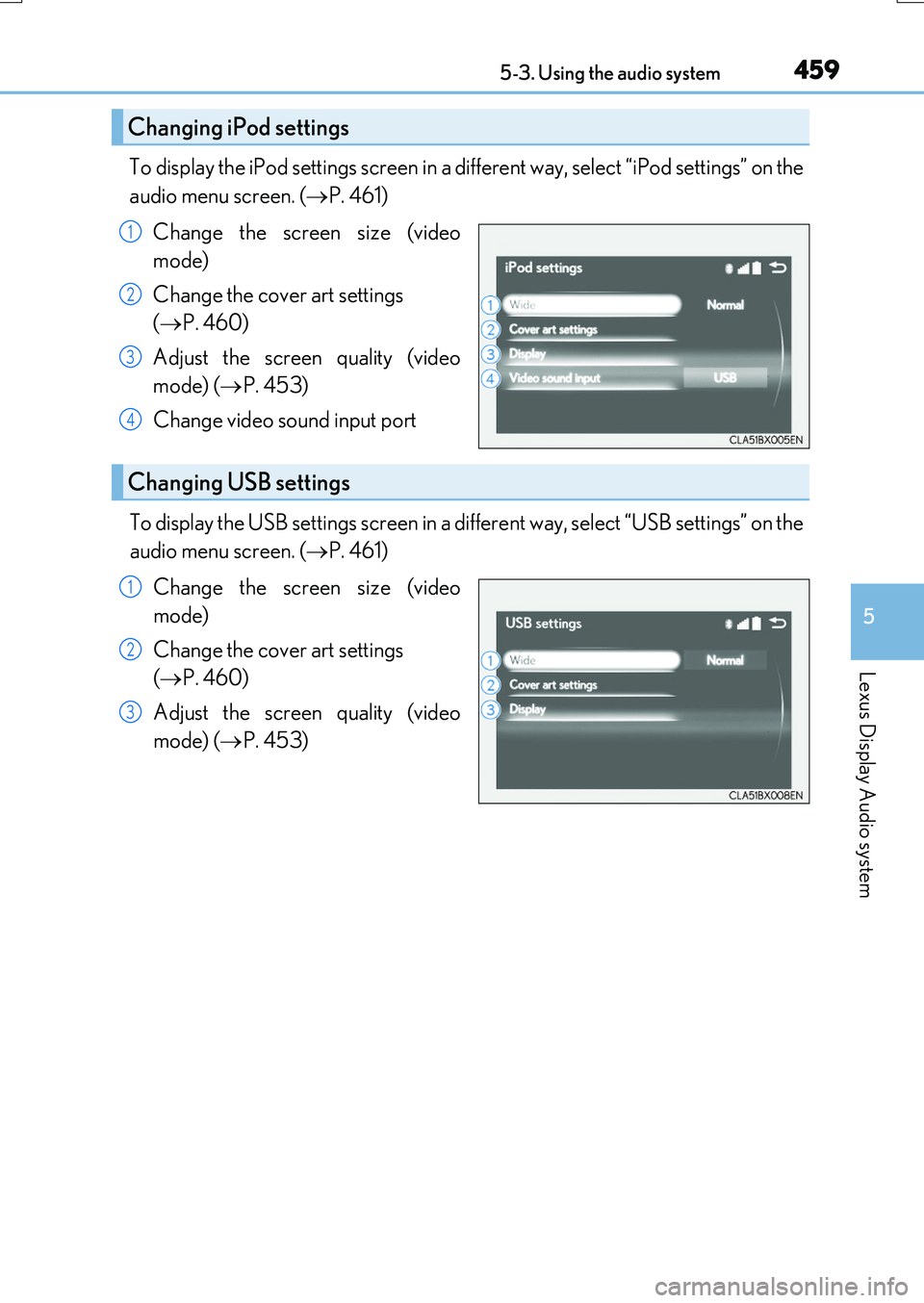
To display the iPod settings screen in a different way, select “iPod settings” on the
audio menu screen. ( P. 461)
Change the screen size (video
mode)
Change the cover art settings
( P. 460)
Adjust the screen quality (video
mode) ( P. 453)
Change video sound input port
To display the USB settings screen in a different way, select “USB settings” on the
audio menu screen. ( P. 461)
Change the screen size (video
mode)
Change the cover art settings
( P. 460)
Adjust the screen quality (video
mode) ( P. 453)
Changing iPod settings
1
2
3
4
Changing USB settings
1
2
3
Page 480 of 776
4805-6. Using an external device
RX350/RX200t_EE_OM48F32E
●MP3, WMA and AAC playback
• When a device containing MP3, WMA or AA C files is connected, all files in the USB memory device are checked. Once the file check is finished, the first MP3,
WMA or AAC file is played. To make the file check finish more quickly, we recom- mend that you do not include any files other than MP3, WMA or AAC files or cre-ate any unnecessary folders.
• When a USB memory device is connected and the audio source is changed to USB memory mode, the USB memory device will start playing the first file in the firstfolder. If the same device is removed and reconnected (and the contents have not
been changed), the USB memory device will resume play from the same point in which it was last used.
●Extensions
If the file extensions .mp3, .wma and .m4a are used for files other than MP3, WMA and AAC files, they will be skipped (not played).
●Playback
• To play MP3 files with steady sound quality, we recommend a fixed bit rate of at least 128 kbps and a sampling frequency of 44.1 kHz.
• There is a wide variety of freeware and other encoding software for MP3, WMA and AAC files on the market, and depending on the status of the encoding and thefile format, poor sound quality or noise at the start of playback may result. In some
cases, playback may not be possible at all. • Microsoft, Windows, and Windows Medi a are the registered trademarks of Microsoft Corporation in the U.S.A. and other countries.
NOTICE
■To prevent damage to the USB memory device or its terminals
●Depending on the size and shape of the USB memory that is connected to the sys-tem, the console box may not close fully. In this case, do not forcibly close the consolebox as this may damage the USB memory or the terminal, etc.
●Do not leave the USB memory device in the vehicle. The temperature inside the vehi-cle may become high.
●Do not push down on or apply unnecessary pressure to the USB memory device
while it is connected.
●Do not insert foreign objects into the port.
Page 520 of 776
5205-12. Other function
RX350/RX200t_EE_OM48F32E
P. 445
MirrorLink™
The MirrorLink™ function enables operations of some smartphone content
via the Lexus Display Audio system.
Depending on differences between models or software version etc., some
models might be incompatible with this system.
Connect a smartphone to US B port using a USB cable.
For safety reasons, the safe driving screen is displayed while driving depend-
ing on the application.
Connecting a smartphone
Page 759 of 776
759Alphabetical index
RX350/RX200t_EE_OM48F32E
Alarm ............................................................83
All-wheel drive lock mode................. 421
Anchor brackets ......................................58
Antenna
Radio ........................................................465
Smart entry & start system ............. 168
Anti-lock Brake System (ABS) ....... 422
Warning light ....................................... 667
Approach warning ............................... 336
Armrest ..................................................... 576
Assist grips .............................................. 577
Audio system (with Lexus
Display Audio System)....................438
Antenna ..................................................465
Audio input ........................................... 445
AUX port...............................................445
Bluetooth® audio ............................. 490
CD player ..............................................466
iPod........................................................... 472
MP3/WMA disc ...............................466
Optimal use ..........................................456
Portable music player....................... 481
Radio ........................................................ 464
Setup menu...........................................448
Steering wheel audio
switches............................................... 444
USB memory....................................... 476
Audio system
(with navigation system)*
Automatic air conditioning
system .................................................... 536
Air conditioning filter ....................... 633
Blower customization ..................... 543
S-FLOW mode ................................. 538
Automatic headlight leveling
system .....................................................267
Automatic High Beam ........................274
Automatic light control system....... 265
Automatic transmission .......................251
If the shift lever cannot be
shifted from P................................... 256
M mode.................................................. 253
Paddle shift switches............ 252, 253
AUX port................................................. 445
Auxiliary boxes ............................ 561, 565
*: Refer to the “NAVIGATION SYSTEM OWNER’S MANUAL”.