lock LEXUS RX200T 2017 Owner's Manual
[x] Cancel search | Manufacturer: LEXUS, Model Year: 2017, Model line: RX200T, Model: LEXUS RX200T 2017Pages: 776, PDF Size: 44.51 MB
Page 67 of 776
671-2. Child safety
1
For safety and security
RX350/RX200t_EE_OM48F32E
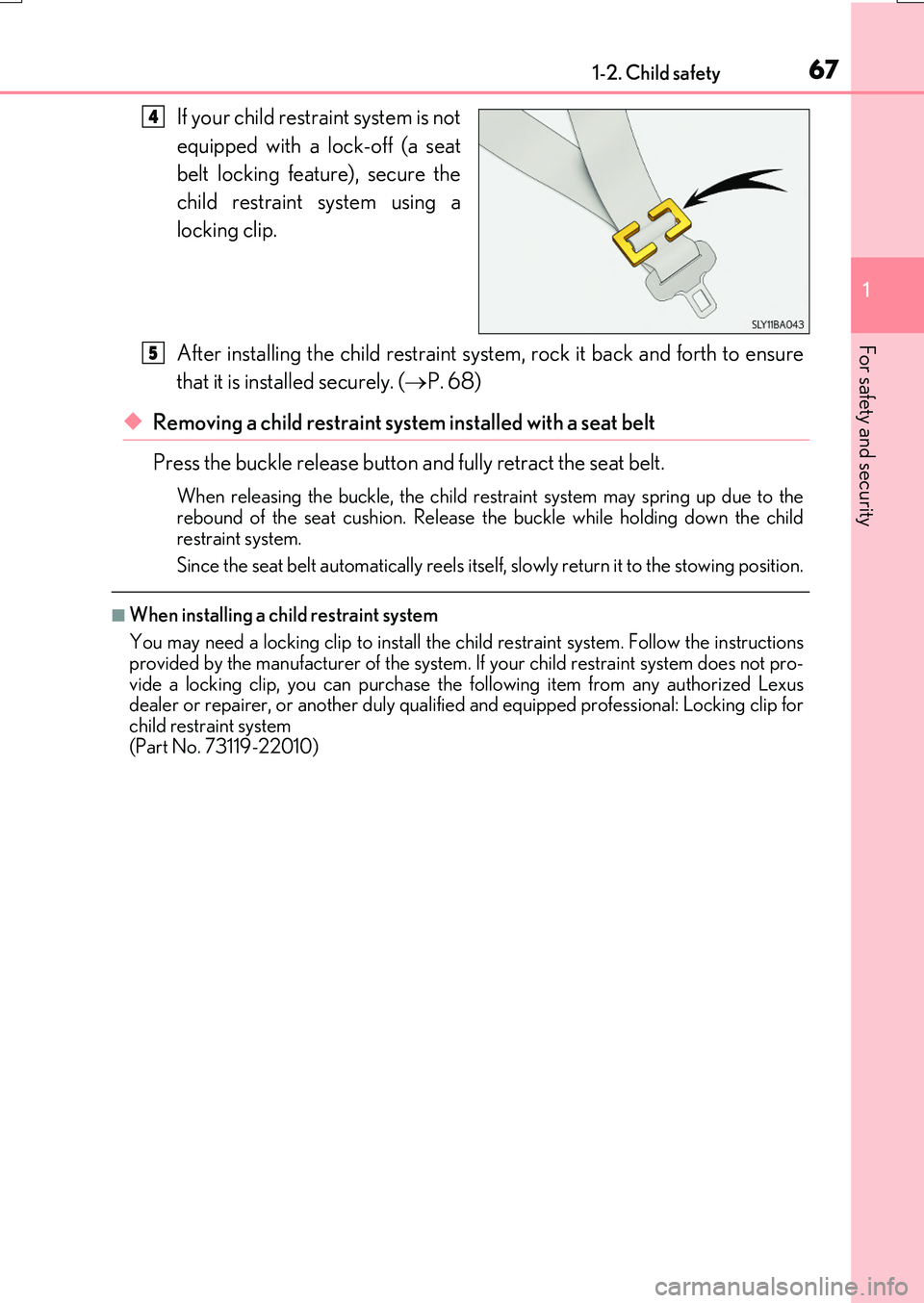
If your child restraint system is not
equipped with a lock-off (a seat
belt locking feature), secure the
child restraint system using a
locking clip.
After installing the child restraint system, rock it back and forth to ensure
that it is installed securely. ( P. 68)
◆Removing a child restraint system installed with a seat belt
Press the buckle release button and fully retract the seat belt.
When releasing the bu ckle, the child restraint system may spring up due to the rebound of the seat cushion. Release the buckle while holding down the child
restraint system.
Since the seat belt automatically reels itself , slowly return it to the stowing position.
■When installing a child restraint system
You may need a locking clip to install the child restraint system. Follow the instructions provided by the manufacturer of the system. If your child restraint system does not pro-
vide a locking clip, you can purchase the following item from any authorized Lexus dealer or repairer, or another duly qualified and equipped professional: Locking clip forchild restraint system
(Part No. 73119-22010)
4
5
Page 68 of 776
681-2. Child safety
RX350/RX200t_EE_OM48F32E
WARNING
■When installing a child restraint system
Observe the following precautions. Failure to do so may result in death or serious injury.
●Do not allow children to play with the seat belt. If the seat belt becomes twistedaround a child’s neck, it may lead to choking or other serious injuries that could resultin death.
If this occurs and the buckle cannot be unfastened, scissors should be used to cut the belt.
●Ensure that the belt and plate are securely locked and the seat belt is not twisted.
●Shake the child restraint system left and right, and forward and backward to ensure that it has been securely installed.
● After securing a child restrain t system, never adjust the seat.
●When a junior seat is installed, always ensure that the shoulder belt is positioned across the center of the child’s shoulder. Th e belt should be kept away from the child’s neck, but not so that it could fall off the child’s shoulder.
●Follow all installation instructions provided by the child restraint system manufacturer.
Page 72 of 776
721-2. Child safety
RX350/RX200t_EE_OM48F32E
Key of letters inserted in the above table:
X: Not suitable seat position for ISOFIX child restraint systems in this mass
group and/or size class.
IUF: Suitable for ISOFIX forward-facing child restraint systems of “universal”
category approved for use in this mass group.
IL: Suitable for ISOFIX child restraint systems of the categories for “specific
vehicles”, “restricted”, or “semi-universal”, approved for use in this mass
group.
*: If the head restraint interferes with your child restraint system, and the head restraint
can be removed, remove the head restraint. Otherwise, put the head restraint in the
upper most position.
When securing some types of child restrain t systems in second row seats, it may
not be possible to properly use the seat belts in positions next to the child
restraint without interfering with it or affecting seat belt effectiveness. Be sure
your seat belt fits snugly across your shoulder and low on your hips. If it does not,
or if it interferes with the child restraint, move to a different position. Failure to do
so may result in death or serious injury.
The child restraint systems mentioned in the table may not be available outside
the EU area.
●When installing a child restraint in the rear seats, adjust the front seat so that it
does not interfere with the child or child restraint system.
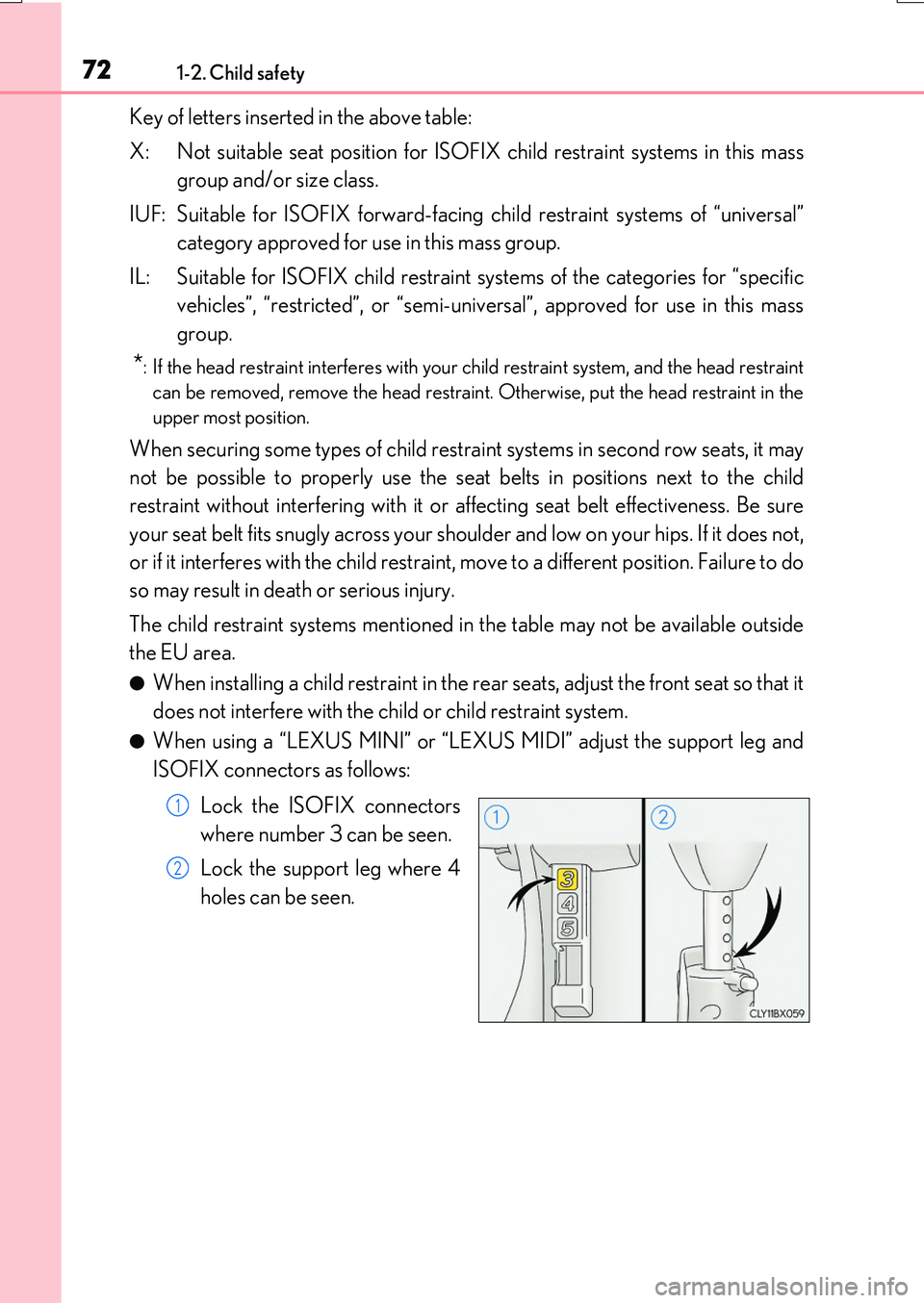
●When using a “LEXUS MINI” or “LEXUS MIDI” adjust the support leg and
ISOFIX connectors as follows:
Lock the ISOFIX connectors
where number 3 can be seen.
Lock the support leg where 4
holes can be seen.
1
2
Page 82 of 776

821-3. Theft deterrent system
RX350/RX200t_EE_OM48F32E
Vehicles employing this system have
labels on the side window of both front
doors.
Turn the engine switch off, have all the passengers exit the vehicle and ensure
that all the doors are closed.
Using the entry function:
Touch the sensor area on the outside door handle twice within 5 seconds.
Using the wireless remote control:
Press twice within 5 seconds.
Using the entry function: Hold the outs ide door handle, press the back door
opener button or hold your hand over th e rear emblem (vehicles with a touchless
power back door).
Using the wireless remote control: Press .
Double locking system
Unauthorized access to the vehicle is pr evented by disabling the door unlock-
ing function from both the interior and exterior of the vehicle.
Setting the double locking system
Canceling the double locking system
WARNING
■Double locking system precaution
Never activate the double locking system when there are people in the vehicle because all the doors cannot be opened from inside the vehicle.
Page 83 of 776

831-3. Theft deterrent system
1
For safety and security
RX350/RX200t_EE_OM48F32E
The alarm uses light and sound to give an alert when an intrusion is detected.
The alarm is triggered in the following situations when the alarm is set:
●A locked door is unlocked or opened in any way other than using the entry
function or wireless remote control. (The doors will lock again automatically.)
●The hood is opened.
●The intrusion sensor detects something moving inside the vehicle. (An
intruder gets in the vehicle.)
●The tilt sensor detects a change of vehicle inclination. (if equipped)
●Any of the windows are broken.
Close the doors and hood, and lock all
the doors using the entry function or
wireless remote control. The system will
be set automatically after 30 seconds.
The indicator light changes from being
on to flashing when the system is set.
Do one of the following to deactivate or stop the alarm.
●Unlock the doors using the entry function or wireless remote control.
●Start the engine. (The alarm will be deactivated or stopped after a few sec-
onds.)
Alarm
: If equipped
The alarm
Setting the alarm system
Deactivating or stopping the alarm
Page 84 of 776
841-3. Theft deterrent system
RX350/RX200t_EE_OM48F32E
■System maintenance
The vehicle has a maintenance-free type alarm system.
■Items to check before locking the vehicle
To prevent unexpected triggering of the alarm and vehicle theft, make sure of the follow-
ing.
●Nobody is in the vehicle.
●The windows and moon roof or panoramic m oon roof are closed before the alarm is
set.
●No valuables or other personal items are left in the vehicle.
■Triggering of the alarm
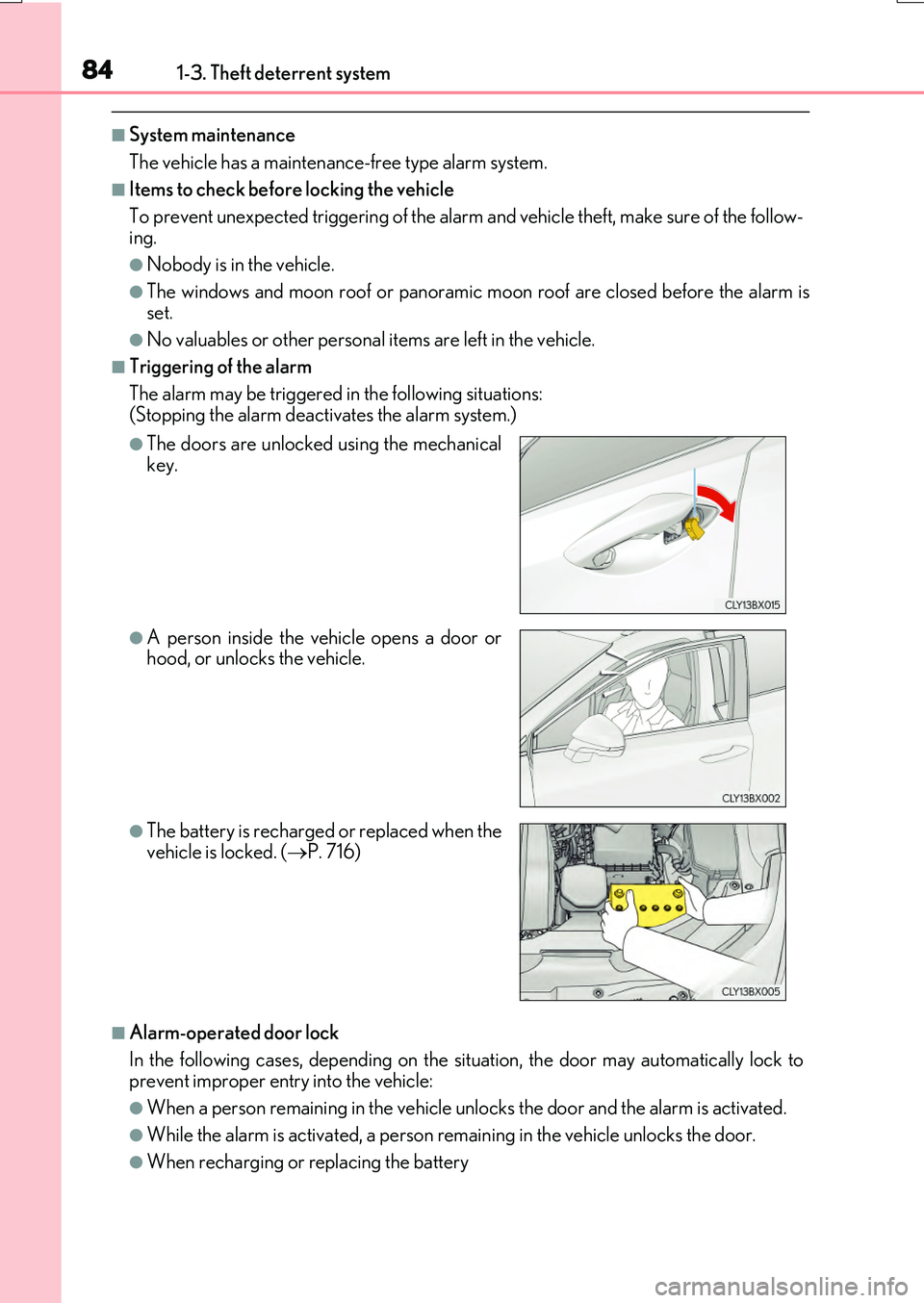
The alarm may be triggered in the following situations: (Stopping the alarm deactivates the alarm system.)
■Alarm-operated door lock
In the following cases, depending on the situation, the door may automatically lock to prevent improper entry into the vehicle:
●When a person remain ing in the vehicle unlocks the door and the alarm is activated.
●While the alarm is activated, a person remaining in the vehicle unlocks the door.
●When recharging or replacing the battery
●The doors are unlocked using the mechanical key.
●A person inside the vehicle opens a door orhood, or unlocks the vehicle.
●The battery is recharged or replaced when the
vehicle is locked. ( P. 716)
Page 86 of 776

861-3. Theft deterrent system
RX350/RX200t_EE_OM48F32E
■Canceling and automatic re-enabling of the intrusion sensor and tilt sensor
●The alarm will still be set even when the intrusion sensor and tilt sensor are canceled.
●After the intrusion sensor and tilt sensor are canceled, pressing the engine switch or unlocking the doors using the entry function or wireless remote control will re-enable
the intrusion sensor and tilt sensor.
●The intrusion sensor and tilt sensor will automatically be re-enabled when the alarm system is reactivated.
■Intrusion sensor dete ction considerations
The sensor may trigger the alarm in the following situations:
●People or pets are in the vehicle.
●A window or moon roof, panoramic moon roof is open.
In this case, the sensor may detect the follow-
ing:
• Wind or the movement of objects such as leaves and insects inside the vehicle
• Ultrasonic waves emitted from devices such as the intrusion sensors of other vehi-cles
• The movement of people outside the vehi- cle
●Unstable items, such as dangling accessories
or clothes hanging on the coat hooks, are in the vehicle.
Page 93 of 776
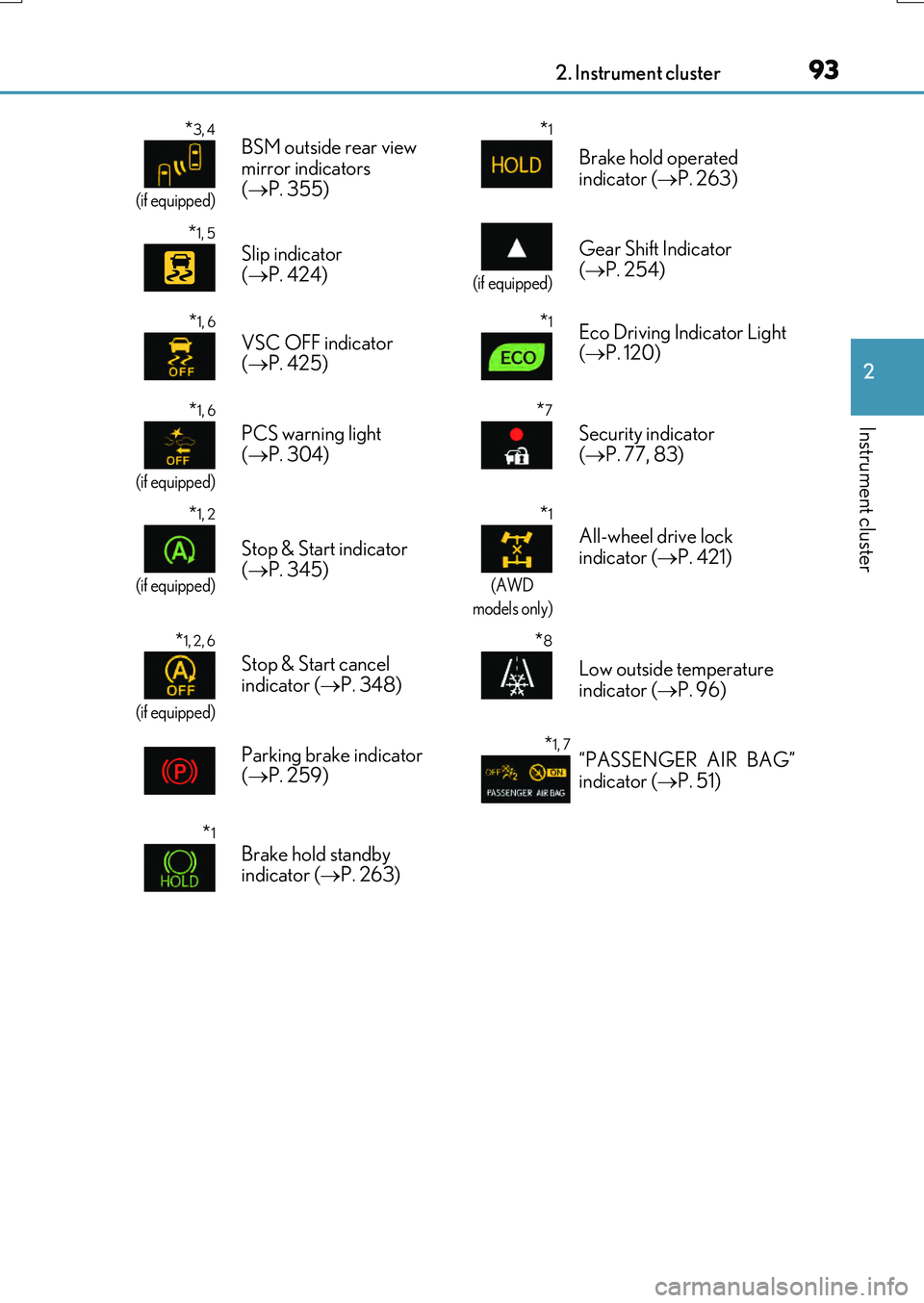
932. Instrument cluster
2
Instrument cluster
RX350/RX200t_EE_OM48F32E
*3, 4
(if equipped)
BSM outside rear view
mirror indicators
( P. 355)*1
Brake hold operated
indicator ( P. 263)
*1, 5
Slip indicator
( P. 424)
(if equipped)
Gear Shift Indicator
( P. 254)
*1, 6
VSC OFF indicator
( P. 425)*1Eco Driving Indicator Light
( P. 120)
*1, 6
(if equipped)
PCS warning light
( P. 304)
*7
Security indicator
( P. 77, 83)
*1, 2
(if equipped)
Stop & Start indicator
( P. 345)
*1
(AWD
models only)
All-wheel drive lock
indicator ( P. 421)
*1, 2, 6
(if equipped)
Stop & Start cancel
indicator ( P. 348)
*8
Low outside temperature
indicator ( P. 96)
Parking brake indicator
( P. 259)
*1, 7“PASSENGER AIR BAG”
indicator ( P. 51)
*1
Brake hold standby
indicator ( P. 263)
Page 97 of 776
972. Instrument cluster
2
Instrument cluster
RX350/RX200t_EE_OM48F32E
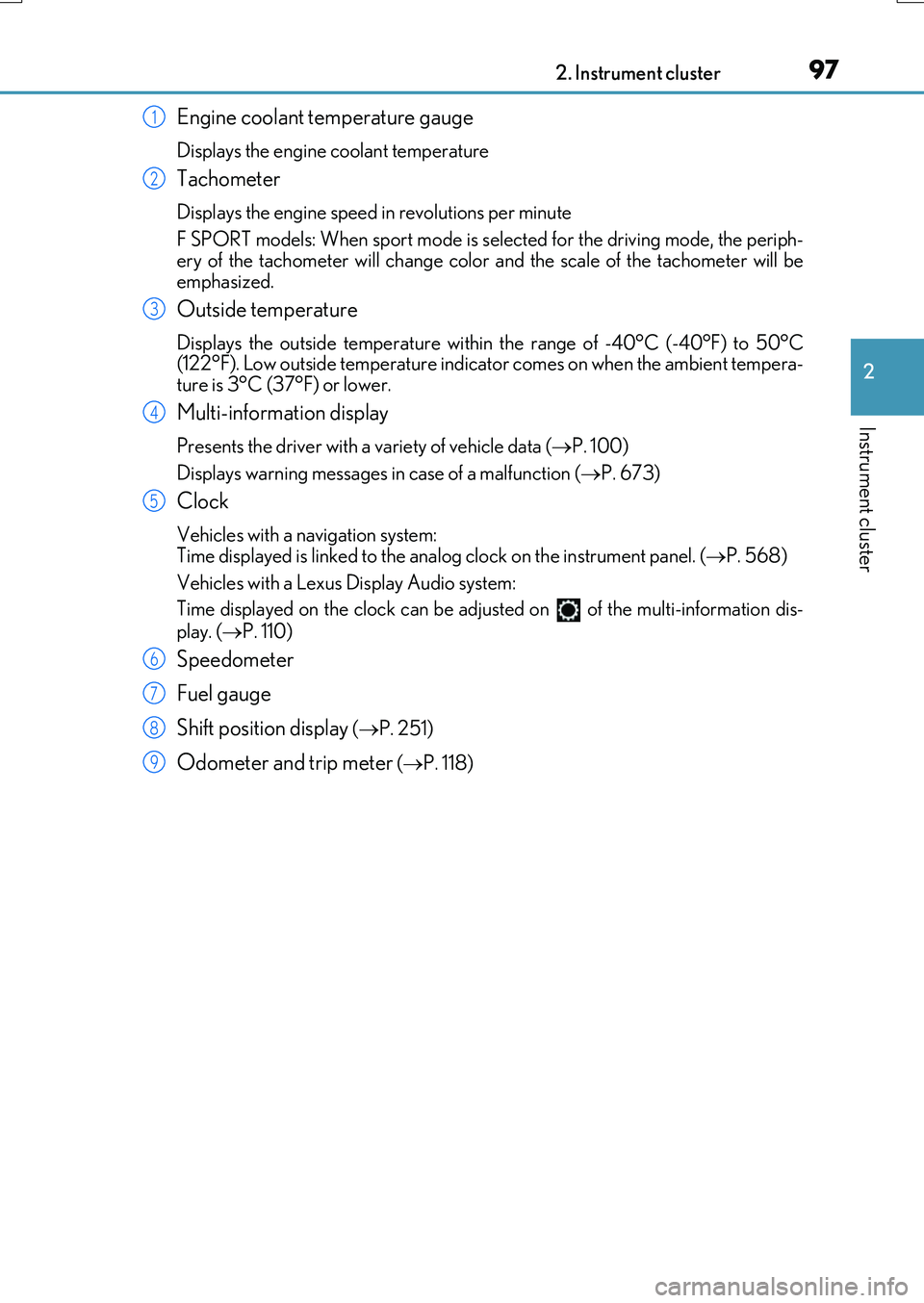
Engine coolant temperature gauge
Displays the engine coolant temperature
Tachometer
Displays the engine speed in revolutions per minute
F SPORT models: When sport mode is selected for the driving mode, the periph-
ery of the tachometer will change color and the scale of the tachometer will be emphasized.
Outside temperature
Displays the outside temperature within the range of -40°C (-40°F) to 50°C(122°F). Low outside temperature indicator comes on when the ambient tempera-
ture is 3°C (37°F) or lower.
Multi-information display
Presents the driver with a variety of vehicle data ( P. 100)
Displays warning messages in case of a malfunction ( P. 673)
Clock
Vehicles with a navigation system: Time displayed is linked to the analog clock on the instrument panel. (P. 568)
Vehicles with a Lexus Display Audio system:
Time displayed on the clock can be adju sted on of the multi-information dis-
play. ( P. 110)
Speedometer
Fuel gauge
Shift position display ( P. 251)
Odometer and trip meter (P. 118)
1
2
3
4
5
6
7
8
9
Page 99 of 776

992. Instrument cluster
2
Instrument cluster
RX350/RX200t_EE_OM48F32E
■The meters and display illuminate when
The engine switch is in IGNITION ON mode.
■Brightness of the meters (day mode and night mode)
The brightness of the meters is changed between day mode and night mode.
●Day mode: When the tail lights are off or wh en the tail lights are on but the surrounding area is bright
●Night mode: When the tail lights are on and the surrounding area is dark
■Outside temperature display
●In the following situations, the correct outside temperature may not be displayed, or thedisplay may take longer than normal to change.
• When stopped, or driving at low speeds (less than 20 km/h [12 mph]) • When the outside temperature has changed suddenly (at the entrance/exit of agarage, tunnel, etc.)
●When “ ” or “E” is displayed, the system may be malfunctioning. Take your vehicle to any authorized Lexus de aler or repairer, or another duly qualified
and equipped professional.
■Clock settings screen (vehicles with a navigation system only)
If the clock adjustment screen is displayed continuously when attempting to change the
clock settings, the system may be malfunctioning. Have the vehicle inspected by any authorized Lexus dealer or repairer, or another duly qualified and equipped professional.
■Customization
Some functions can be customized. ( P. 110)
NOTICE
■To prevent damage to the engine and its components
●Do not let the indicator needle of the tachometer enter the red zone, which indicates
the maximum engine speed.
●The engine may be overheating if the engine coolant temperature gauge is in the red zone (H). In this case, immediately stop the vehicle in a safe place, and check the
engine after it has cooled completely. ( P. 718)