air condition LEXUS RX200T 2017 Owner's Guide
[x] Cancel search | Manufacturer: LEXUS, Model Year: 2017, Model line: RX200T, Model: LEXUS RX200T 2017Pages: 776, PDF Size: 44.51 MB
Page 429 of 776
429
4
Driving
RX350/RX200t_EE_OM48F32E
4-6. Driving tips
●Use fluids that are appropriate to the prevailing outside temperatures.
•Engine oil
• Engine coolant
• Washer fluid
●Have a service technician inspect the condition of the battery.
●Have the vehicle fitted with four snow tires or purchase a set of tire chains for
the front tires.
Ensure that all tires are of the specified size and the same brand, and that chains match the size of the tires.
Perform the following according to the driving conditions:
●Do not try to forcibly open a window or move a wiper that is frozen. Pour
warm water over the frozen area to melt the ice. Wipe away the water imme-
diately to prevent it from freezing.
●To ensure proper operation of the climate control system fan, remove any
snow that has accumulated on the air inlet vents in front of the windshield.
●Check for and remove any excess ice or snow that may have accumulated on
the exterior lights, vehicle’s roof, chassi s, around the tires or on the brakes.
●Remove any snow or mud from the bottom of your shoes before getting in the
vehicle.
Winter driving tips
Carry out the necessary preparations and inspections before driving the vehi-
cle in winter. Always drive the vehicle in a manner appropriate to the prevail-
ing weather conditions.
Pre-winter preparations
Before driving the vehicle
Page 430 of 776
4304-6. Driving tips
RX350/RX200t_EE_OM48F32E
Accelerate the vehicle slowly, keep a safe distance between you and the vehicle
ahead, and drive at a reduced speed suitable to road conditions.
●Park the vehicle and move the shift lever to P without setting the parking
brake. The parking brake may freeze up, preventing it from being released. If
the vehicle is parked without setting the parking brake, make sure to block the
wheels.
Failure to do so may be dangerous because it may cause the vehicle to move
unexpectedly, possibly leading to an accident.
When the parking brake is in automatic mode, release the parking brake after shifting
the shift lever to P. ( P. 259)
●If the vehicle is parked without setting the parking brake, confirm that the shift
lever cannot be moved out of P*.
*: The shift lever will be locked if it is atte mpted to be shifted from P to any other posi-
tion without depressing the brake pedal. If the shift lever can be shifted from P, there
may be a problem with the shift lock system. Have the vehicle inspected by any
authorized Lexus dealer or repairer, or an other duly qualified and equipped profes-
sional immediately.
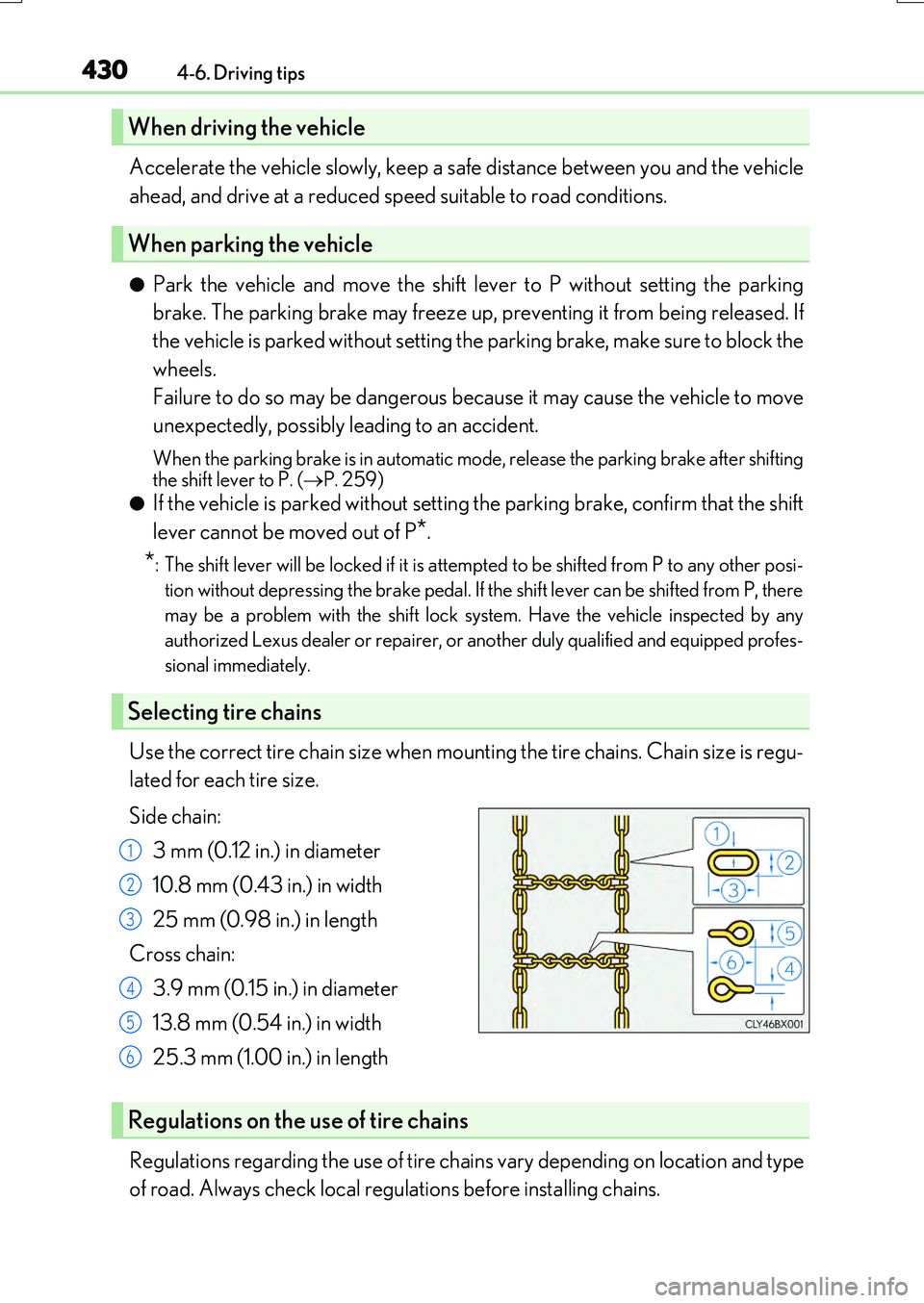
Use the correct tire chain size when mounting the tire chains. Chain size is regu-
lated for each tire size.
Side chain:
3 mm (0.12 in.) in diameter
10.8 mm (0.43 in.) in width
25 mm (0.98 in.) in length
Cross chain:
3.9 mm (0.15 in.) in diameter
13.8 mm (0.54 in.) in width
25.3 mm (1.00 in.) in length
Regulations regarding the use of tire chai ns vary depending on location and type
of road. Always check local regulations before installing chains.
When driving the vehicle
When parking the vehicle
Selecting tire chains
1
2
3
4
5
6
Regulations on the use of tire chains
Page 431 of 776
4314-6. Driving tips
4
Driving
RX350/RX200t_EE_OM48F32E
To enable the windshield wipers to be lifted when heavy snow or icy conditions
are expected, change the rest position of the windshield wipers from the
retracted position below the hood to the service position using the wiper lever.
( P. 283)
■Tire chain installation
Observe the following precautions wh en installing and removing chains:
●Install and remove tire chains in a safe location.
●Install tire chains on the front tires only. Do not install tire chains on the rear tires.
●Install tire chains on front tires as tightly as possible. Retighten chains after driving
0.5 - 1.0 km (1/4 - 1/2 mile).
●Install tire chains following the instru ctions provided with the tire chains.
Windshield wipers
WARNING
■Driving with snow tires
Observe the following precautions to reduce the risk of accidents. Failure to do so may result in a loss of vehicle control and cause death or serious injury.
●Use tires of the specified size.
●Maintain the recommended level of air pressure.
●Do not drive at speeds in excess of the speed limit or the speed limit specified for the
snow tires being used.
●Use snow tires on all, not just some wheels.
■Driving with tire chains
Observe the following precautions to reduce the risk of accidents. Failure to do so may result in the vehicle being unable to be driven safely, and may cause death or serious injury.
●Do not drive in excess of the speed limit sp ecified for the tire chains being used, or 50 km/h (30 mph), whichever is lower.
●Avoid driving on bumpy road surfaces or over potholes.
●Avoid sudden acceleration, abrupt steering, sudden braking and shifting operations that cause sudden engine braking.
●Slow down sufficiently before entering a curve to ensure that vehicle control is main-
tained.
●Do not use the LKA (Lane-Keeping Assist) system. (if equipped)
Page 439 of 776
4395-1. Basic Operations
5
Lexus Display Audio system
RX350/RX200t_EE_OM48F32E
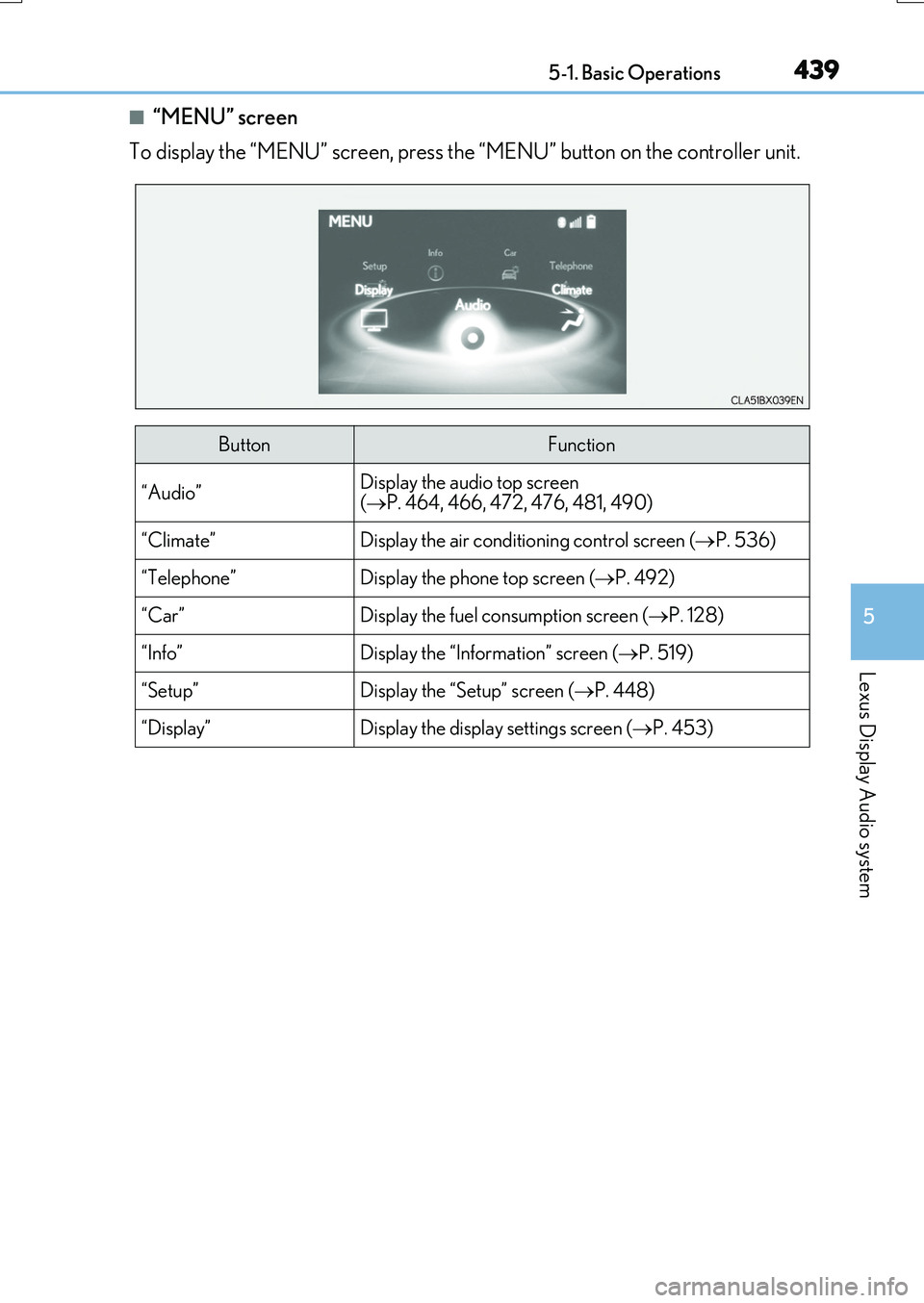
■“MENU” screen
To display the “MENU” screen, press the “MENU” button on the controller unit.
ButtonFunction
“Audio”Display the audio top screen ( P. 464, 466, 472, 476, 481, 490)
“Climate”Display the air conditioning control screen (P. 536)
“Telephone”Display the phone top screen (P. 492)
“Car” Display the fuel consumption screen (P. 128)
“Info”Display the “Information” screen (P. 519)
“Setup”Display the “Setup” screen (P. 448)
“Display”Display the display settings screen (P. 453)
Page 513 of 776
5135-11. Bluetooth®
5
Lexus Display Audio system
RX350/RX200t_EE_OM48F32E
■When using the Bluetooth® audio system
●In the following situations, the system may not function.
• If the portable audio player is turned off • If the portable audio player is not connected
• If the portable audio player’s battery is low
●There may be a delay if a cellular phone connection is made during Bluetooth® audio
play.
●Depending on the type of portable audio player that is connected to the system, opera- tion may differ slightly and certain functions may not be available.
■When using the hands-free system
●The audio system is muted when making a call.
●If both parties speak at the same time, it may be difficult to hear.
●If the received call volume is over ly loud, an echo may be heard. If the Bluetooth® phone is too close to the system, quality of the sound may deteriorate and connection status may deteriorate.
●In the following situations, it may be difficult to hear the other party:
• When driving on unpaved roads • When driving at high speeds
•If a window is open • If the air conditioning is blowing directly on the microphone• If there is interference from the network of the cellular phone
●Depending on the type phone, cert ain functions may not be available.
■Conditions under which the system will not operate
●If using a cellular phone that does not support Bluetooth®
●If the cellular phone is turned off
●If you are outside of cellular phone service coverage
●If the cellular phone is not connected
●If the cellular phone’s battery is low
●When outgoing calls are controlled, due to heavy traffic on phone lines, etc.
●When the cellular phone itself cannot be used
●When transferring phonebook data from the cellular phone
Bluetooth®
Page 529 of 776
529
6Interior features
RX350/RX200t_EE_OM48F32E
6-1. Basic operation of the
Remote Touch screen
Remote Touch ............................ 530
12.3-inch display.........................533
6-2. Using the air conditioning
system and defogger
Lexus Climate Concierge..... 535
Automatic air
conditioning system ...............536
Heated steering wheel/
seat heaters/
seat ventilators .........................549
6-3. Using the interior lights
Interior lights list..........................552
• Interior lights ......................... 553
• Personal lights .......................554
6-4. Using the storage
features
List of storage features ............556
• Glove box ...............................557
• Console box...........................557
• Cup holders .......................... 558
• Door pockets ........................ 559
• Bottle holders ....................... 560
• Coin box ................................. 560
• Auxiliary boxes ...................... 561
Luggage compartment
features........................................562
6-5. Using the other interior
features
Other interior features ............ 567
• Sun visors ................................ 567
• Vanity mirrors ....................... 567
• Clock ........................................568
• Wireless charger .................568
• Power outlets......................... 574
• Front passenger
footwell hooks ....................... 575
• Rear door sunshades ......... 576
• Armrest.................................... 576
• Assist grips ............................. 577
• Coat hooks ............................. 577
ERA-GLONASS ...................... 578
Page 532 of 776
5326-1. Basic operation of the Remote Touch screen
RX350/RX200t_EE_OM48F32E
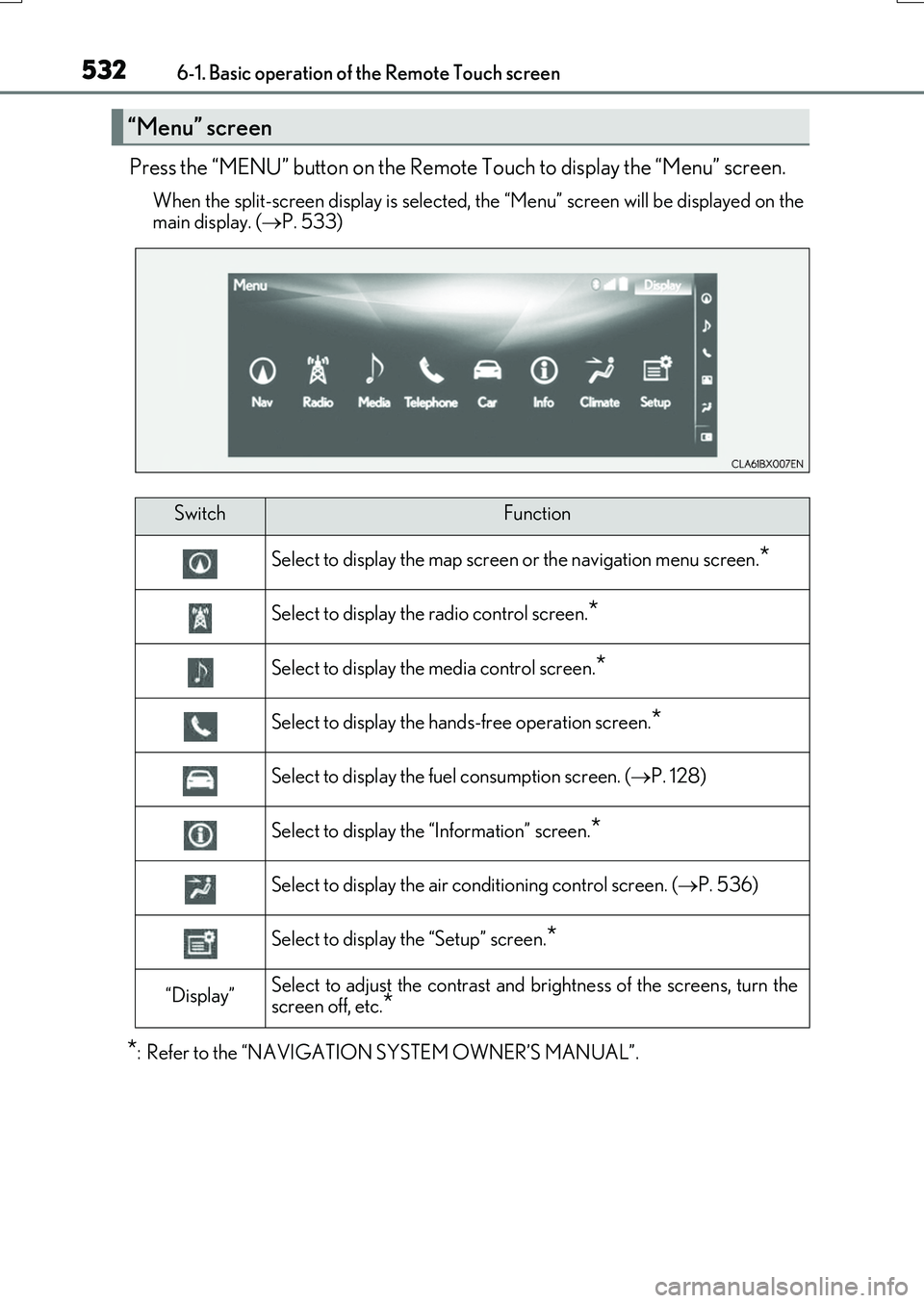
Press the “MENU” button on the Remote Touch to display the “Menu” screen.
When the split-screen display is selected, the “Menu” screen will be displayed on the
main display. ( P. 533)
*: Refer to the “NAVIGATION SYSTEM OWNER’S MANUAL”.
“Menu” screen
SwitchFunction
Select to display the map screen or the navigation menu screen.*
Select to display the radio control screen.*
Select to display the media control screen.*
Select to display the hands-free operation screen.*
Select to display the fuel consumption screen. (P. 128)
Select to display the “Information” screen.*
Select to display the air conditioning control screen. (P. 536)
Select to display the “Setup” screen.*
“Display”Select to adjust the contrast and brightness of the screens, turn the
screen off, etc.*
Page 533 of 776
5336-1. Basic operation of the Remote Touch screen
6
Interior features
RX350/RX200t_EE_OM48F32E
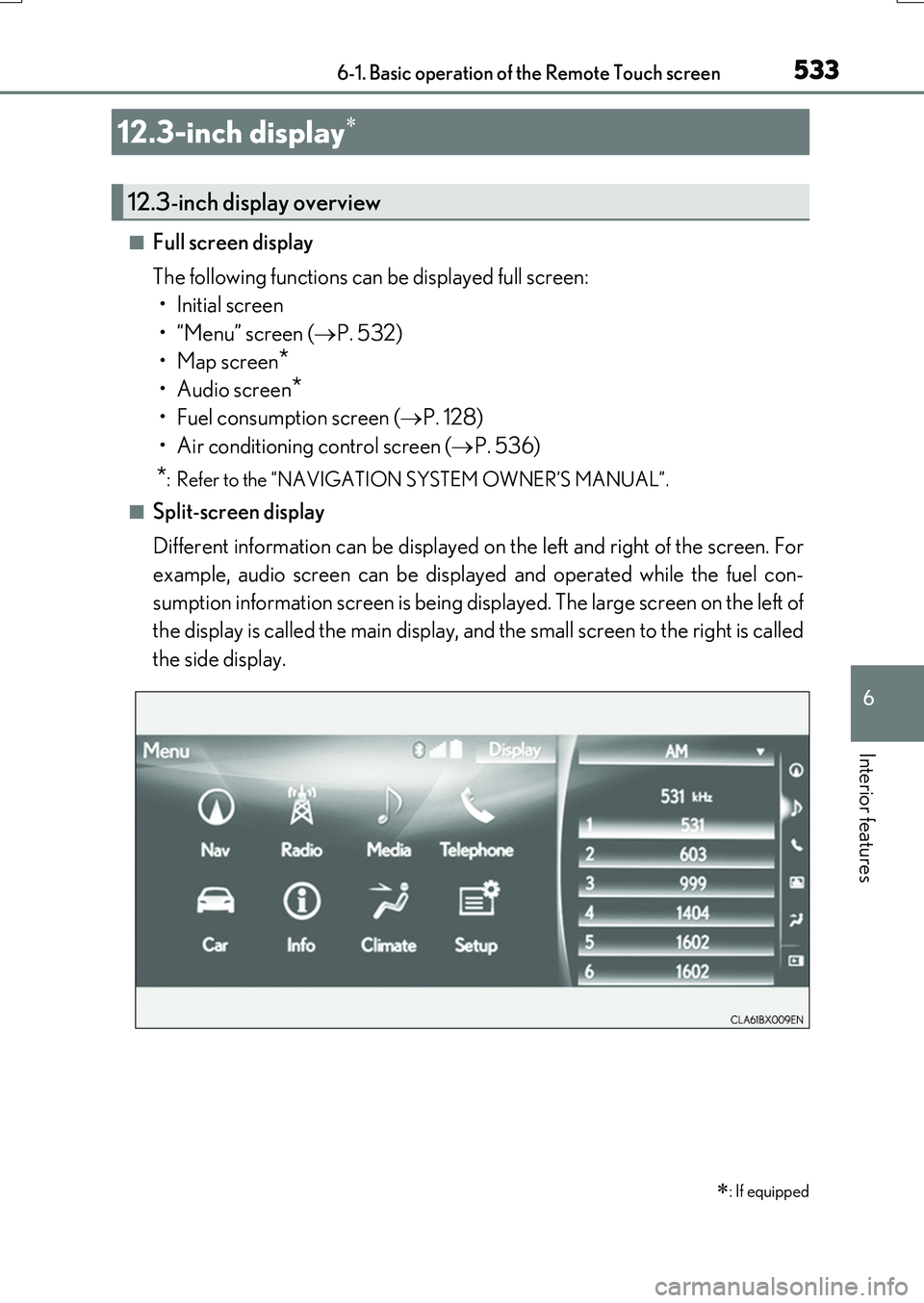
■Full screen display
The following functions can be displayed full screen:
•Initial screen
•“Menu” screen ( P. 532)
•Map screen*
•Audio screen*
• Fuel consumption screen ( P. 128)
• Air conditioning control screen ( P. 536)
*: Refer to the “NAVIGATION SYSTEM OWNER’S MANUAL”.
■Split-screen display
Different information can be displayed on the left and right of the screen. For
example, audio screen can be displayed and operated while the fuel con-
sumption information screen is being displayed. The large screen on the left of
the display is called the main display, and the small screen to the right is called
the side display.
12.3-inch display
: If equipped
12.3-inch display overview
Page 534 of 776
5346-1. Basic operation of the Remote Touch screen
RX350/RX200t_EE_OM48F32E
■Selecting the operation screen
When selecting the main display, move the Remote Touch knob to the left.
When selecting the side display, move the Remote Touch knob to the right.
■ Main display
For details about the functions and operation of the main display, refer to the
respective section and “NAVIGATION SYSTEM OWNER’S MANUAL”.
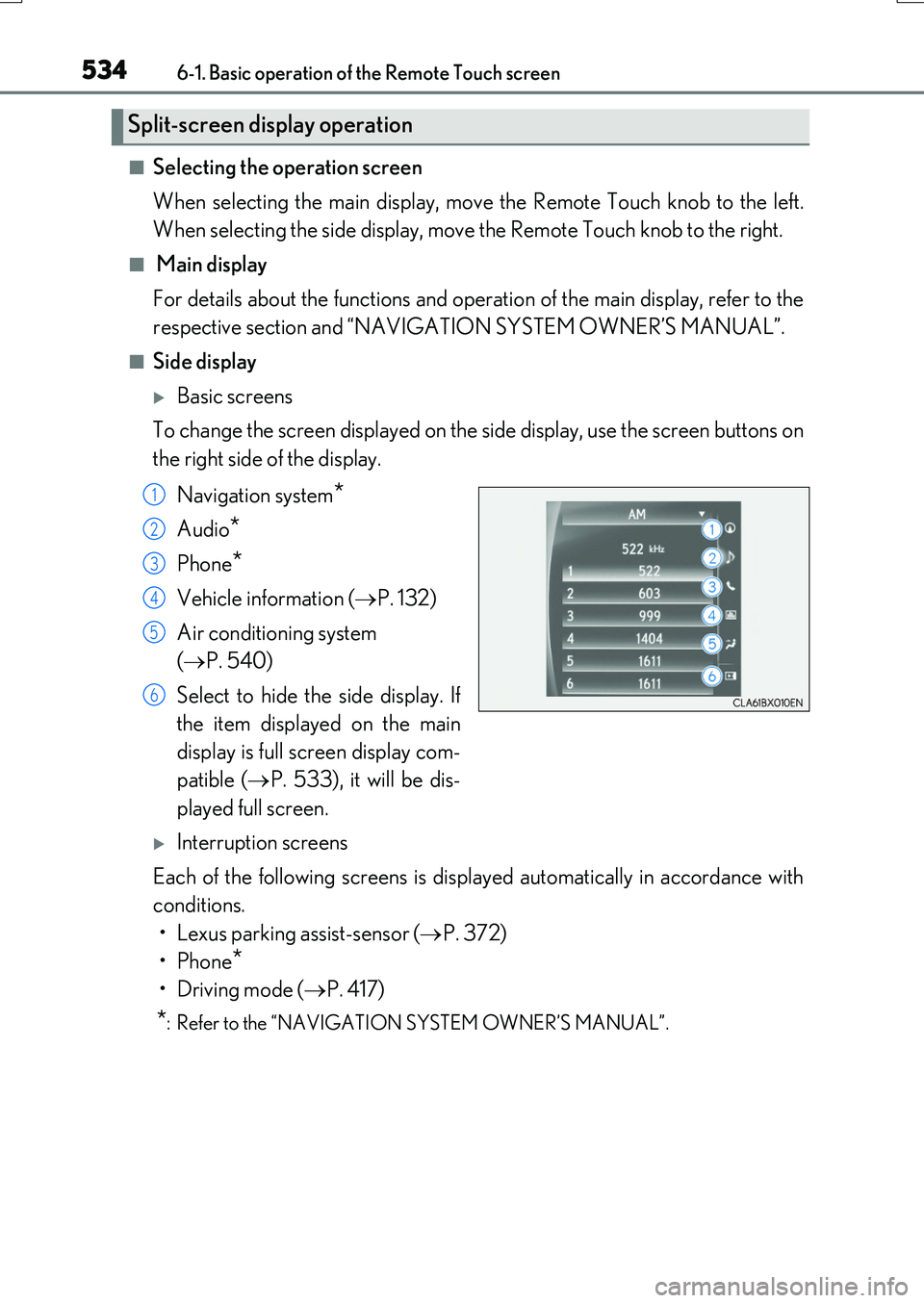
■Side display
Basic screens
To change the screen displayed on the side display, use the screen buttons on
the right side of the display.
Navigation system*
Audio*
Phone*
Vehicle information ( P. 132)
Air conditioning system
( P. 540)
Select to hide the side display. If
the item displayed on the main
display is full screen display com-
patible ( P. 533), it will be dis-
played full screen.
Interruption screens
Each of the following screens is displayed automatically in accordance with
conditions.
• Lexus parking assist-sensor ( P. 372)
•Phone*
•Driving mode ( P. 417)
*: Refer to the “NAVIGATION SYSTEM OWNER’S MANUAL”.
Split-screen display operation
1
2
3
4
5
6
Page 535 of 776
535
RX350/RX200t_EE_OM48F32E
6
Interior features
6-2. Using the air conditioning system and defogger
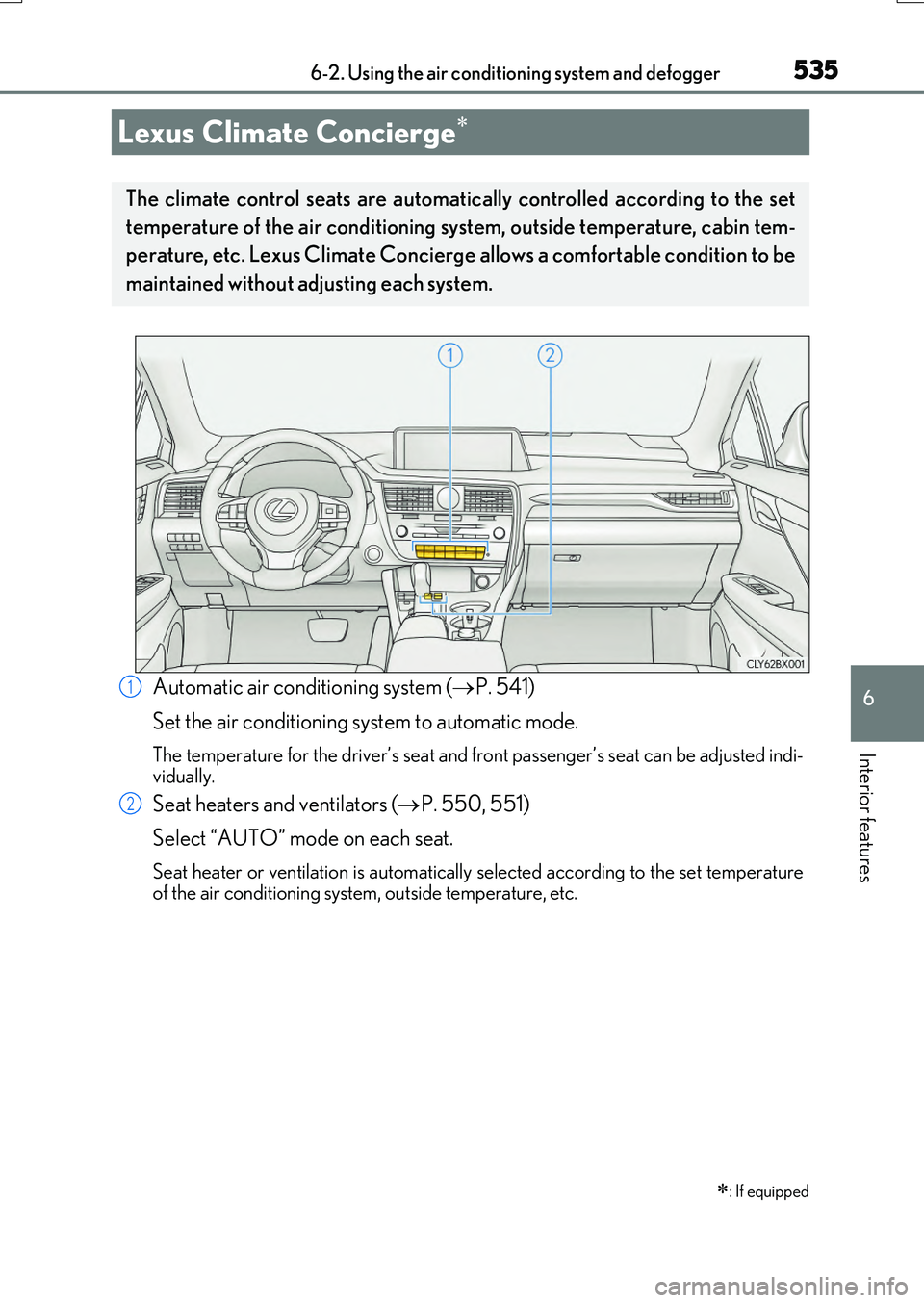
Automatic air conditioning system (P. 541)
Set the air conditioning system to automatic mode.
The temperature for the driver’s seat and front passenger’s seat can be adjusted indi-
vidually.
Seat heaters and ventilators ( P. 550, 551)
Select “AUTO” mode on each seat.
Seat heater or ventilation is automatically selected according to the set temperature of the air conditioning system, outside temperature, etc.
Lexus Climate Concierge
: If equipped
The climate control seats are automatical ly controlled according to the set
temperature of the air conditioning system, outside temperature, cabin tem-
perature, etc. Lexus Climate Concierge allows a comfortable condition to be
maintained without adjusting each system.
1
2