remote control LEXUS RX200T 2017 Owner's Guide
[x] Cancel search | Manufacturer: LEXUS, Model Year: 2017, Model line: RX200T, Model: LEXUS RX200T 2017Pages: 776, PDF Size: 44.51 MB
Page 267 of 776
2674-3. Operating the lights and wipers
4
Driving
RX350/RX200t_EE_OM48F32E
■Daytime running light system
To make your vehicle more visible to other drivers during daytime driving, the daytime
running lights turn on automatically whenev er the engine is started and the parking
brake is released with the headlight switch in position. (Illuminate brighter than
the front position lights.) Daytime running lights are not designed for use at night.
■Cornering lights (if equipped)
When the cornering lights are on for more than 30 minutes, they will turn off automati-
cally.
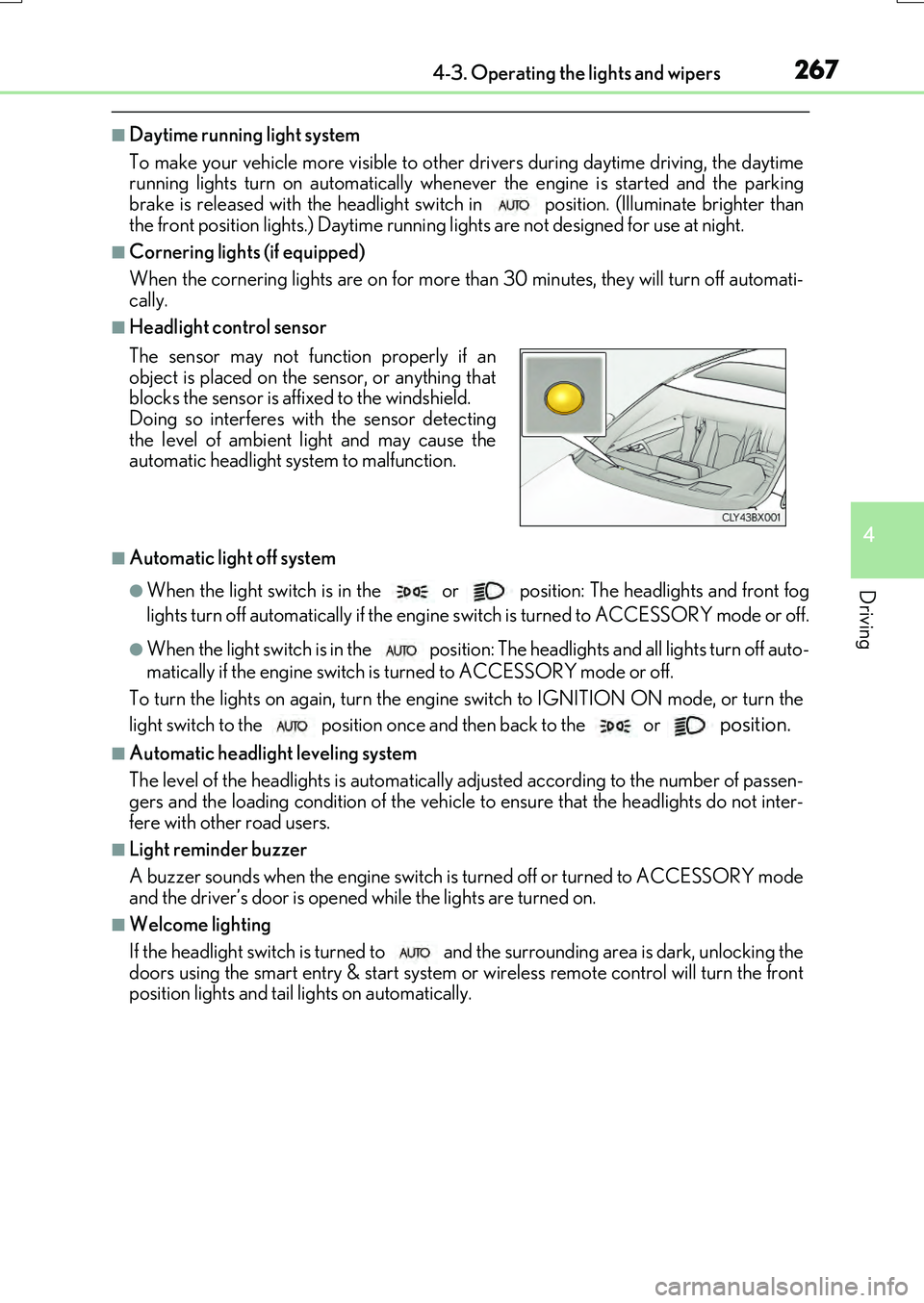
■Headlight control sensor
■Automatic light off system
●When the light switch is in the or position: The headlights and front fog
lights turn off automatically if the engine switch is turned to ACCESSORY mode or off.
●When the light switch is in the position: The headlights and all lights turn off auto-
matically if the engine switch is turned to ACCESSORY mode or off.
To turn the lights on again, turn the engine switch to IGNITION ON mode, or turn the
light switch to the
position once and then back to the or position.
■Automatic headlight leveling system
The level of the headlights is automatically ad justed according to the number of passen-
gers and the loading condition of the vehicle to ensure that the headlights do not inter-
fere with other road users.
■Light reminder buzzer
A buzzer sounds when the engine switch is turned off or turned to ACCESSORY mode
and the driver’s door is opened while the lights are turned on.
■Welcome lighting
If the headlight switch is turned to and the surrounding area is dark, unlocking the
doors using the smart entry & start system or wireless remote control will turn the front
position lights and tail lights on automatically.
The sensor may not function properly if an
object is placed on the sensor, or anything that
blocks the sensor is affixed to the windshield.
Doing so interferes with the sensor detecting
the level of ambient light and may cause the
automatic headlight system to malfunction.
Page 376 of 776
3764-5. Using the driving support systems
RX350/RX200t_EE_OM48F32E
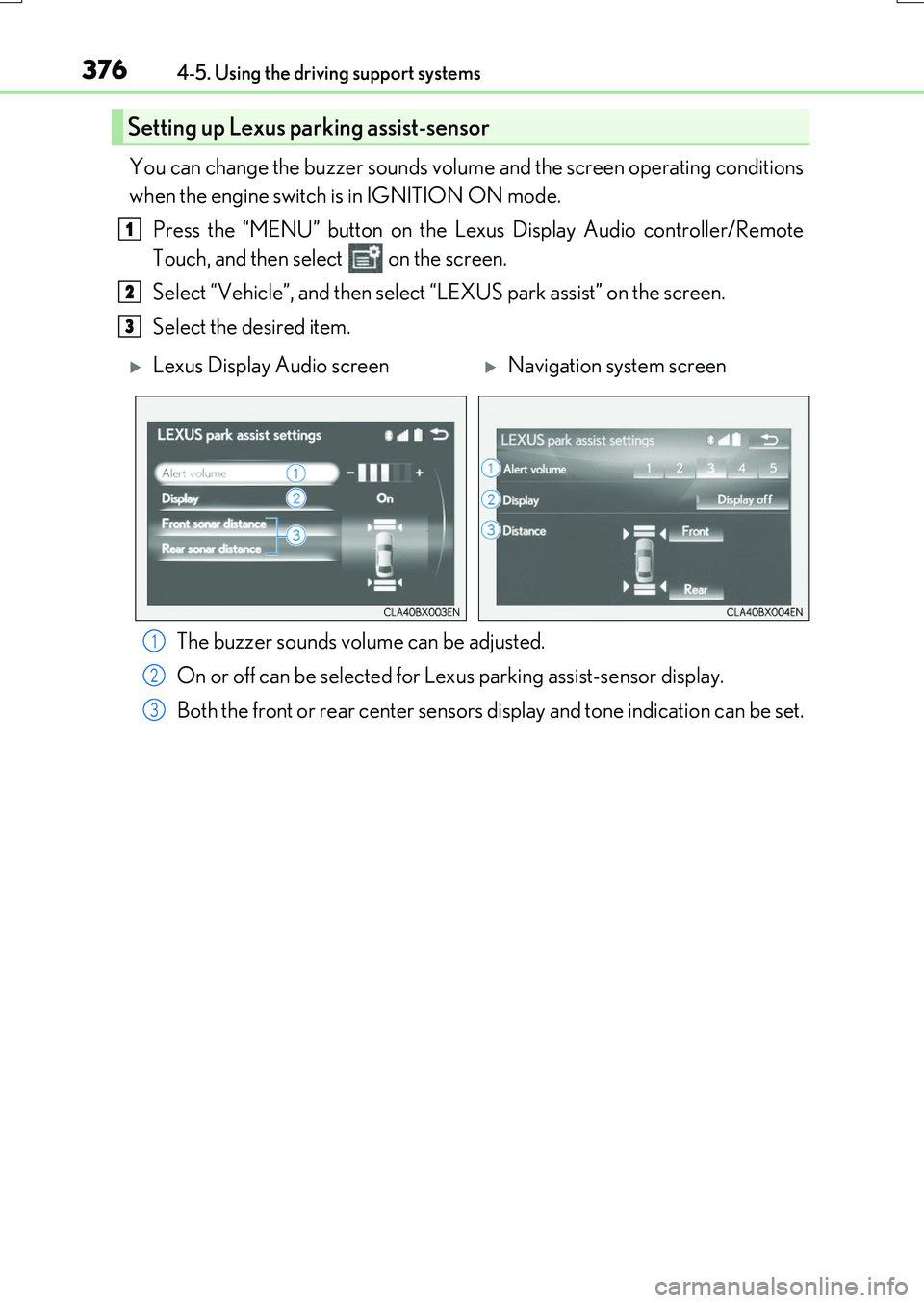
You can change the buzzer sounds volume and the screen operating conditions
when the engine switch is in IGNITION ON mode.
Press the “MENU” button on the Le xus Display Audio controller/Remote
Touch, and then select on the screen.
Select “Vehicle”, and then select “LEXUS park assist” on the screen.
Select the desired item.
The buzzer sounds volume can be adjusted.
On or off can be selected for Le xus parking assist-sensor display.
Both the front or rear ce nter sensors display and tone indication can be set.
Setting up Lexus parking assist-sensor
1
2
3
Lexus Display Audio screenNavigation system screen
1
2
3
Page 515 of 776
5155-11. Bluetooth®
5
Lexus Display Audio system
RX350/RX200t_EE_OM48F32E
■Compatible models
The Bluetooth® audio system supports portable audio players with the following specifi- cations
●Bluetooth® specifications: Ver. 2.0, or higher (Recommend ed: Ver. 3.0 +EDR or higher)
●Profiles:
• A2DP (Advanced Audio Distribution Profile) Ver. 1.0, or higher (Recommended: Ver. 1.2 or higher) This is a profile to transmit stereo audio or high quality sound to the audio system.
• AVRCP (Audio/Video Remote Control Profile) Ver. 1.0 or higher (Recommended: Ver. 1.4 or higher) This is a profile to allow remote control the A/V equipment.
However, please note that some functions may be limited depending on the type of por- table audio player connected.
The hands-free system supports cellular ph ones with the following specifications.
●Bluetooth® specification: Ver. 2.0 or higher (Recommended : Ver. 3.0 +EDR or higher)
●Profiles:
• HFP (Hands Free Profile) Ver. 1.0 or higher (Recommended: Ver. 1.6 or higher) This is a profile to allow hands-free phone calls using a cellular phone or head set. It has outgoing and incoming call functions.
• OPP (Object Push Profile) Ver. 1.1 or higher (Recommended: Ver. 1.2) This is a profile to transfer phonebook data. When a Bluetooth® compatible cellular phone has both PBAP and OPP, OPP cannot be used.
• PBAP (Phone Book Access Profile) Ver. 1.0 or higher (Recommended: Ver. 1.1) This is a profile to tr ansfer phonebook data.
• MAP (Message Access Profile) Ver.1.0 or higher This is a profile to using phone message.If the cellular phone does not support HFP, you cannot register it with the hands-free sys-
tem. OPP, PBAP or MAP services must be selected individually.
■Reconnecting the portable audio player
If the portable audio player is disconnect ed due to poor reception when the engine
switch is turned to ACCESSORY or IGNITION ON mode, the system automatically reconnects the portable audio player.
If you have switched off the portable audio player yourself, follow the instructions below
to reconnect:
●Select the portable audio player again
●Enter the portable audio player
■When you sell your car
Be sure to delete your personal data. ( P. 451)
Page 532 of 776
5326-1. Basic operation of the Remote Touch screen
RX350/RX200t_EE_OM48F32E
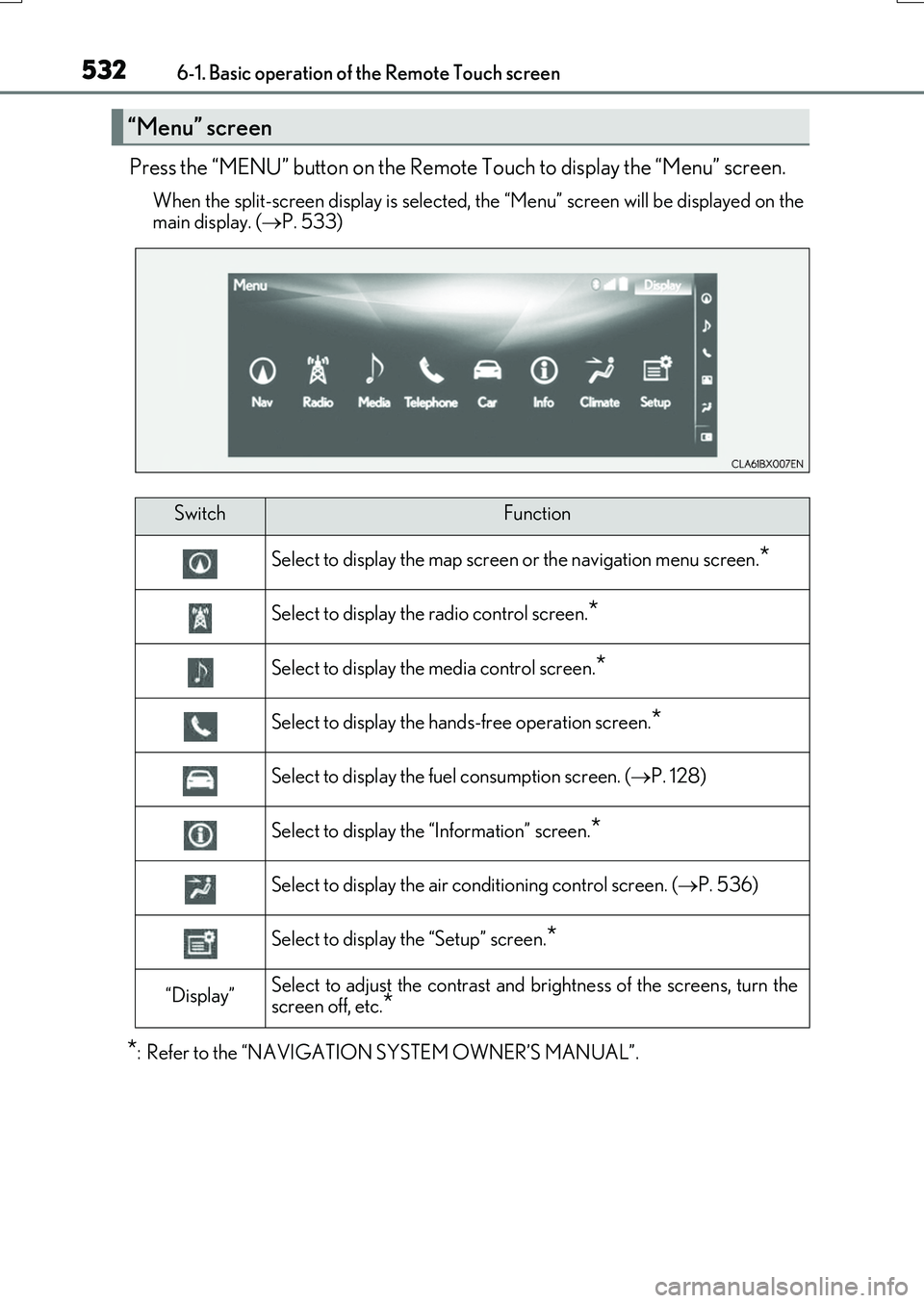
Press the “MENU” button on the Remote Touch to display the “Menu” screen.
When the split-screen display is selected, the “Menu” screen will be displayed on the
main display. ( P. 533)
*: Refer to the “NAVIGATION SYSTEM OWNER’S MANUAL”.
“Menu” screen
SwitchFunction
Select to display the map screen or the navigation menu screen.*
Select to display the radio control screen.*
Select to display the media control screen.*
Select to display the hands-free operation screen.*
Select to display the fuel consumption screen. (P. 128)
Select to display the “Information” screen.*
Select to display the air conditioning control screen. (P. 536)
Select to display the “Setup” screen.*
“Display”Select to adjust the contrast and brightness of the screens, turn the
screen off, etc.*
Page 533 of 776
5336-1. Basic operation of the Remote Touch screen
6
Interior features
RX350/RX200t_EE_OM48F32E
■Full screen display
The following functions can be displayed full screen:
•Initial screen
•“Menu” screen ( P. 532)
•Map screen*
•Audio screen*
• Fuel consumption screen ( P. 128)
• Air conditioning control screen ( P. 536)
*: Refer to the “NAVIGATION SYSTEM OWNER’S MANUAL”.
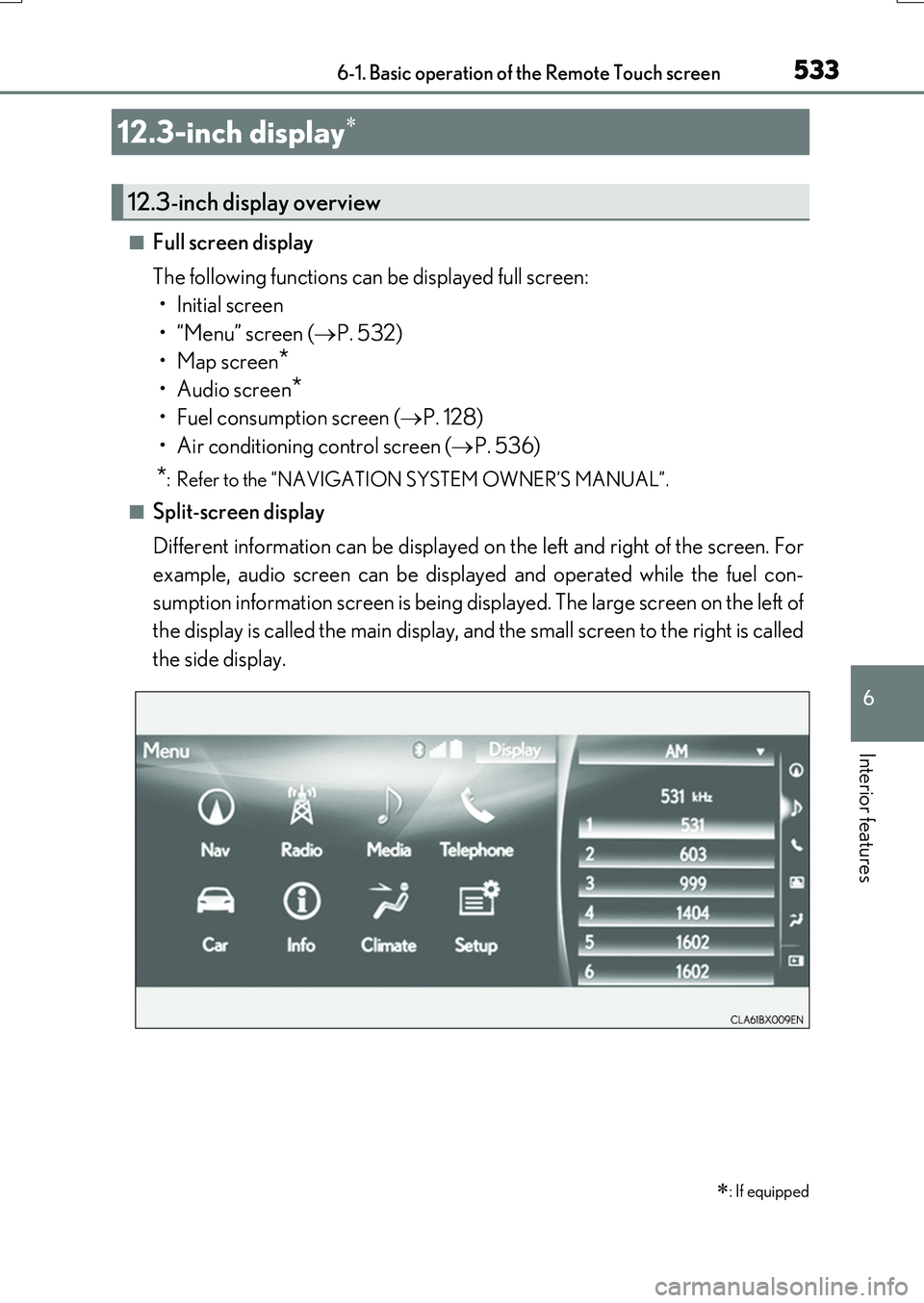
■Split-screen display
Different information can be displayed on the left and right of the screen. For
example, audio screen can be displayed and operated while the fuel con-
sumption information screen is being displayed. The large screen on the left of
the display is called the main display, and the small screen to the right is called
the side display.
12.3-inch display
: If equipped
12.3-inch display overview
Page 536 of 776
5366-2. Using the air conditioning system and defogger
RX350/RX200t_EE_OM48F32E
Automatic air conditioning system
Air outlets and fan speed are automatically adjusted according to the tem-
perature setting.
Vehicles with a Lexus Display Audio system: Press the “MENU” button on the
Lexus Display Audio controller, then sele ct “Climate” to display the air condi-
tioning control screen.
For details on the Lexus Display Audio controller, refer to “Lexus Display
Audio controller” on P. 440.
Vehicles with a navigation system: Press the “MENU” button on the Remote
Touch, then select to display the air conditioning control screen.
The air conditioning system can be displayed and operated on the side display.
( P. 534)
For details on the Remote Touch, refer to the “NAVIGATION SYSTEM
OWNER’S MANUAL”.
The illustrations in this section are for left-hand drive vehicles.
The button positions and shapes will di ffer for right-hand drive vehicles.
Also, the display and button positions will differ depending on the type of the
system.
Page 609 of 776
6097-3. Do-it-yourself maintenance
7
Maintenance and care
RX350/RX200t_EE_OM48F32E
■Before recharging
When recharging, the battery produces hydr ogen gas which is flammable and explosive. Therefore, observe the following precautions before recharging:
●If recharging with the battery installed on the vehicle, be sure to disconnect the ground
cable.
●Make sure the power switch on the charger is off when connecting and disconnecting the charger cables to the battery.
■After recharging/reconnecting the battery
●The engine may not start. Follow the pr ocedure below to initialize the system.
Shift the shift lever to P.
Open and close any of the doors.
Restart the engine.
●Unlocking the doors using the smart entry & start system may not be possible immedi-
ately after reconnecting the battery. If this happens, use the wireless remote control or the mechanical key to lock/unlock the doors.
●Start the engine with the engine switch in ACCESSORY mode. The engine may not
start with the engine switch turned off. However, the engine will operate normally from the second attempt.
●The engine switch mode is recorded by the vehicle. If the battery is disconnected and
reconnected, the vehicle will return the engi ne switch mode to the status it was in before the battery was disconnected. Make sure to turn off the engine switch beforedisconnecting the battery. Take extra care when connecting the battery if the engine
switch mode prior to the battery being disconnected is unknown.
If the system will not start even after multip le attempts at all the methods above, contact any authorized Lexus dealer or repairer, or another duly qualified and equipped profes-
sional.
1
2
3
Page 639 of 776
6397-3. Do-it-yourself maintenance
7
Maintenance and care
RX350/RX200t_EE_OM48F32E
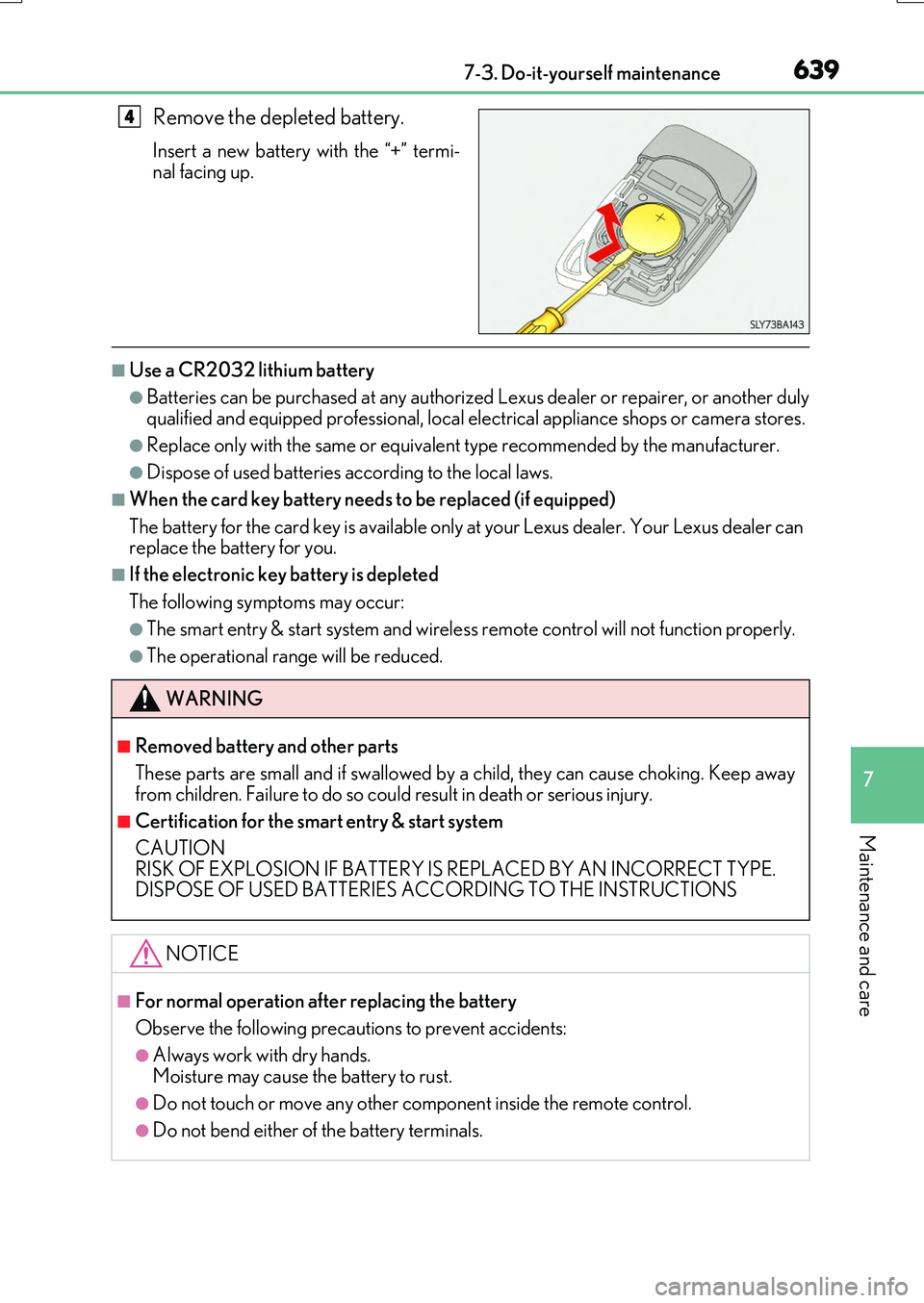
Remove the depleted battery.
Insert a new battery with the “+” termi-
nal facing up.
■Use a CR2032 lithium battery
●Batteries can be purchased at any authorized Lexus dealer or repairer, or another duly qualified and equipped professional, local electrical appliance shops or camera stores.
●Replace only with the same or equivalent type recommended by the manufacturer.
●Dispose of used batteries according to the local laws.
■When the card key battery needs to be replaced (if equipped)
The battery for the card key is available only at your Lexus dealer. Your Lexus dealer can replace the battery for you.
■If the electronic key battery is depleted
The following symptoms may occur:
●The smart entry & start system and wireless remote control will not function properly.
●The operational range will be reduced.
4
WARNING
■Removed battery and other parts
These parts are small and if swallowed by a child, they can cause choking. Keep away from children. Failure to do so could result in death or serious injury.
■Certification for the smart entry & start system
CAUTION RISK OF EXPLOSION IF BATTERY IS REPLACED BY AN INCORRECT TYPE.DISPOSE OF USED BATTERIES ACCORDING TO THE INSTRUCTIONS
NOTICE
■For normal operation after replacing the battery
Observe the following precautions to prevent accidents:
●Always work with dry hands. Moisture may cause the battery to rust.
●Do not touch or move any other component inside the remote control.
●Do not bend either of the battery terminals.
Page 710 of 776
7108-2. Steps to take in an emergency
RX350/RX200t_EE_OM48F32E
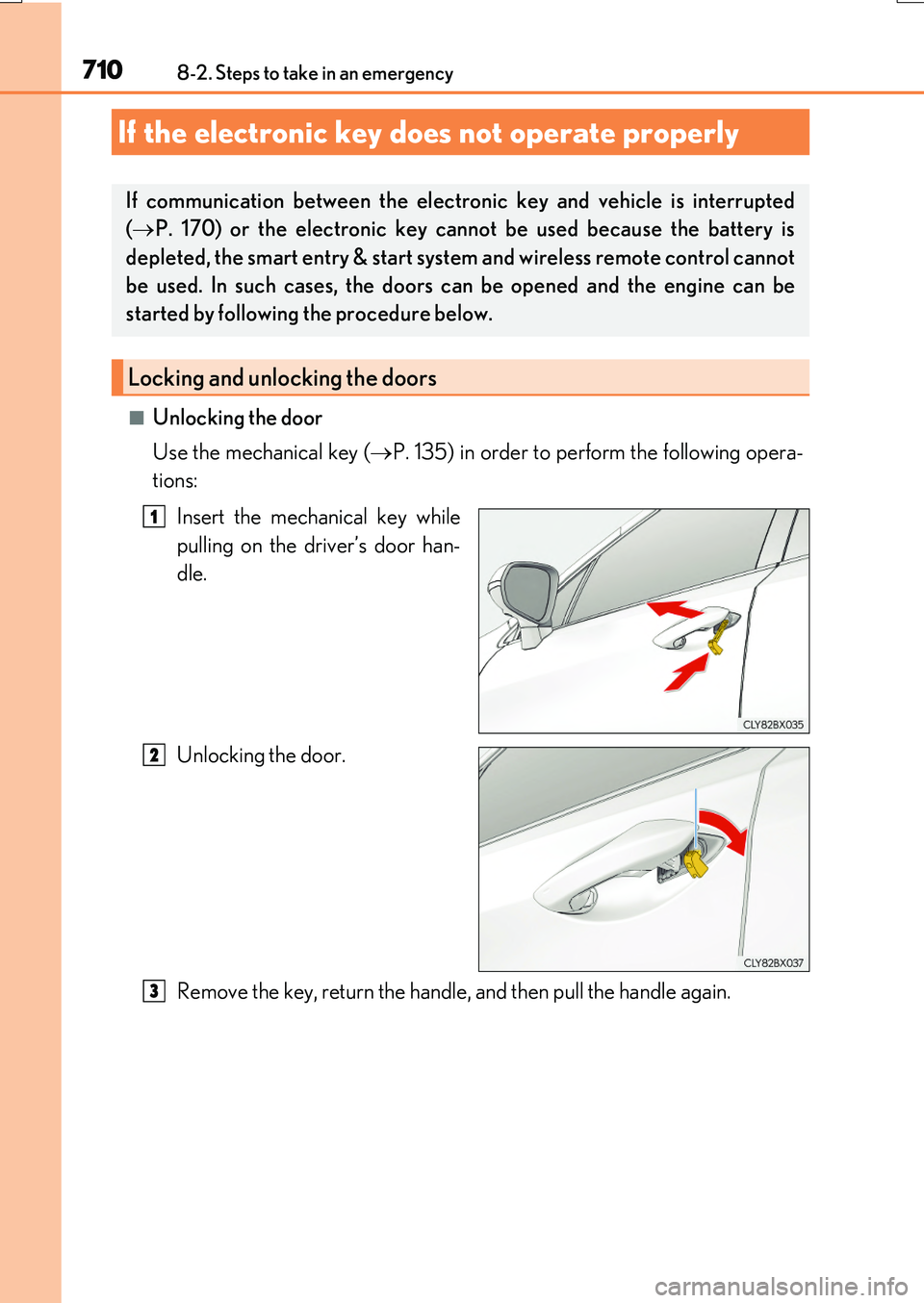
■Unlocking the door
Use the mechanical key ( P. 135) in order to perform the following opera-
tions:
Insert the mechanical key while
pulling on the driver’s door han-
dle.
Unlocking the door.
Remove the key, return the handle, and then pull the handle again.
If the electronic key does not operate properly
If communication between the electronic key and vehicle is interrupted
( P. 170) or the electronic key cannot be used because the battery is
depleted, the smart entry & start system and wireless remote control cannot
be used. In such cases, the doors can be opened and the engine can be
started by following the procedure below.
Locking and unlocking the doors
1
2
3
Page 716 of 776
7168-2. Steps to take in an emergency
RX350/RX200t_EE_OM48F32E
Start the engine of the second vehicle. Increase the engine speed slightly and
maintain at that level for approximately 5 minutes to recharge the battery of
your vehicle.
Open and close any of the doors of your vehicle with the engine switch off.
Maintain the engine speed of the second vehicle and start the engine of your
vehicle by turning the engine switch to IGNITION ON mode.
Once the vehicle’s engine has started, remove the jumper cables in the exact
reverse order from which they were connected.
Once the engine starts, have the vehicle inspected at any authorized Lexus
dealer or repairer, or another duly qualified and equipped professional as soon
as possible.
■Starting the engine when the battery is discharged
The engine cannot be started by push-starting.
■To prevent battery discharge
●Turn off the headlights and the audio system while the engine is stopped. (RX200t: Except when the engine is stopped by the Stop & Start system.)
●Turn off any unnecessary electrical components when the vehicle is running at a low
speed for an extended period, such as in heavy traffic.
■Charging the battery
The electricity stored in the battery will discharge gradually even when the vehicle is not
in use, due to natural discharge and the draining effects of certain electrical appliances. If the vehicle is left for a long time, the battery may discharge, and the engine may beunable to start. (The battery recharges automatically during driving.)
■When the battery is removed or discharged
●In some cases, it may not be possible to unlock the doors using the smart entry & startsystem when the battery is discharged. Us e the wireless remote control or the mechan-
ical key to lock or unlock the doors.
●The engine may not start on the first attempt after the battery has recharged but will start normally after the second attempt. This is not a malfunction.
●The engine switch mode is memorized by the vehicle. When the battery is recon-nected, the system will return to the mode it was in before the battery was discharged. Before disconnecting the battery, turn the engine switch off.
If you are unsure what mode the engine switch was in before the battery discharged, be especially careful when reconnecting the battery.
●Vehicles with power back door: The power back door must be initialized. (P. 159)
●RX200t: After the battery terminals have been disconnected then reconnected or the battery has been replaced, the Stop & Start system may not automatically stop theengine for approximately 5 to 60 minutes.
4
5
6
7