lights LEXUS RX200T 2017 Workshop Manual
[x] Cancel search | Manufacturer: LEXUS, Model Year: 2017, Model line: RX200T, Model: LEXUS RX200T 2017Pages: 776, PDF Size: 44.51 MB
Page 295 of 776
2954-5. Using the driving support systems
4
Driving
RX350/RX200t_EE_OM48F32E
WARNING
■To avoid malfunction of the camera sensor
Observe the following precautions.
Otherwise, the camera sensor may not oper ate properly, possibly leading to an acci-
dent resulting in death or serious injury.
●Keep the windshield clean at all times.
• If the windshield is dirty or covered with an oily film, water droplets, snow, etc.,
clear the windshield. • If a glass coating agent is applied to the windshield, it will still be necessary to use the windshield wipers to remove water dr oplets, etc. from the area of the wind-
shield in front of the camera sensor. • If the inner side of the windshield where th e camera sensor is installed is dirty, con- tact any authorized Lexus dealer or repairer, or another duly qualified and
equipped professional.
●If the part of the windshield in front of the camera sensor is fogged up or covered with condensation or ice, use the windshield de fogger to remove the fog, condensation or ice. ( P. 542)
●If water droplets cannot be properly removed from the area of the windshield in front of the camera sensor by the windshield wi pers, replace the wiper insert or wiper blade.
• To replace the wiper insert: P. 636 • If the wiper blades need to be replaced, contact any authorized Lexus dealer orrepairer, or another duly qualif ied and equipped professional.
●Do not attach window tinting to the windshield.
●Replace the windshield if it is damaged or cracked.
If the windshield needs to be replaced, contact any authorized Lexus dealer or repairer, or another duly qualified and equipped professional.
●Do not get the camera sensor wet.
●Do not allow bright lights to shine into the camera sensor.
●Do not dirty or damage the camera sensor. When cleaning the inside of the windshield, do not allow glass cleaner to contact the
lens. Also, do not touch the lens. If the lens is dirty or damaged, contact any authorized Lexus dealer or repairer, oranother duly qualified an d equipped professional.
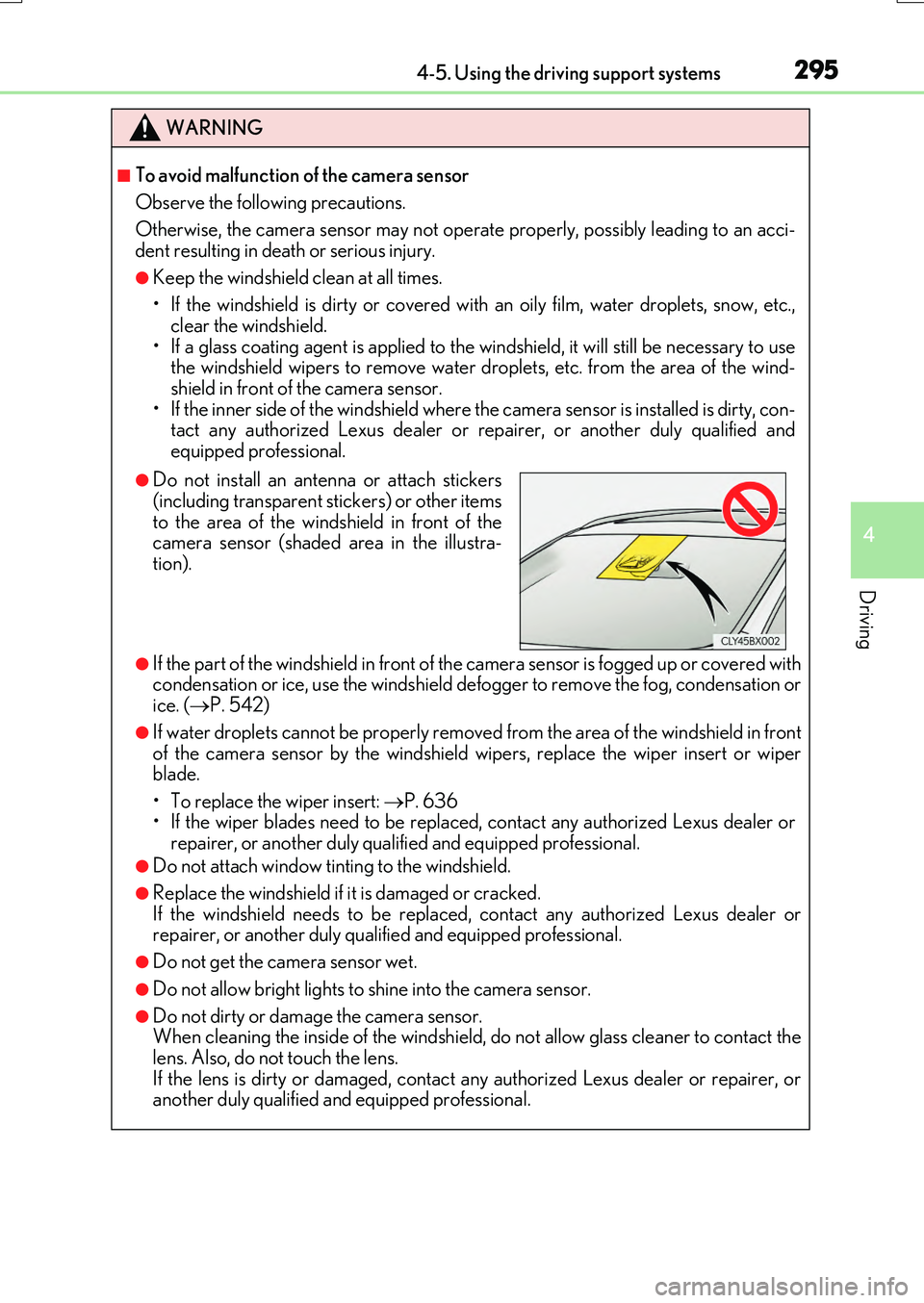
●Do not install an antenna or attach stickers
(including transparent stickers) or other items to the area of the windshield in front of thecamera sensor (shaded area in the illustra-
tion).
Page 296 of 776
2964-5. Using the driving support systems
RX350/RX200t_EE_OM48F32E
WARNING
●Do not subject the camera sensor to a strong impact.
●Do not change the installation position or direction of the camera sensor or remove it.
●Do not disassemble the camera sensor.
●Do not install an electronic device or device that emits strong electric waves near the camera sensor.
●Do not modify any components of the vehicl e around the camera sensor (inside rear
view mirror, etc.) or ceiling.
●Do not attach any accessories that may obstruct the camera sensor to the hood, front grille or front bumper. Contact any authoriz ed Lexus dealer or repairer, or another
duly qualified and equipped professional for details.
●If a surfboard or other long object is to be mounted on the roof, make sure that it will not obstruct the camera sensor.
●Do not modify the headlights or other lights.
Page 310 of 776
3104-5. Using the driving support systems
RX350/RX200t_EE_OM48F32E
■Situations in which the system may not operate properly
●In some situations such as the following, a vehicle may not be detected by the radar sensor and camera sensor, preventing the system from operating properly:
• If an oncoming vehicle is approaching your vehicle • If a vehicle ahead is a motorcycle or bicycle• When approaching the side or front of a vehicle
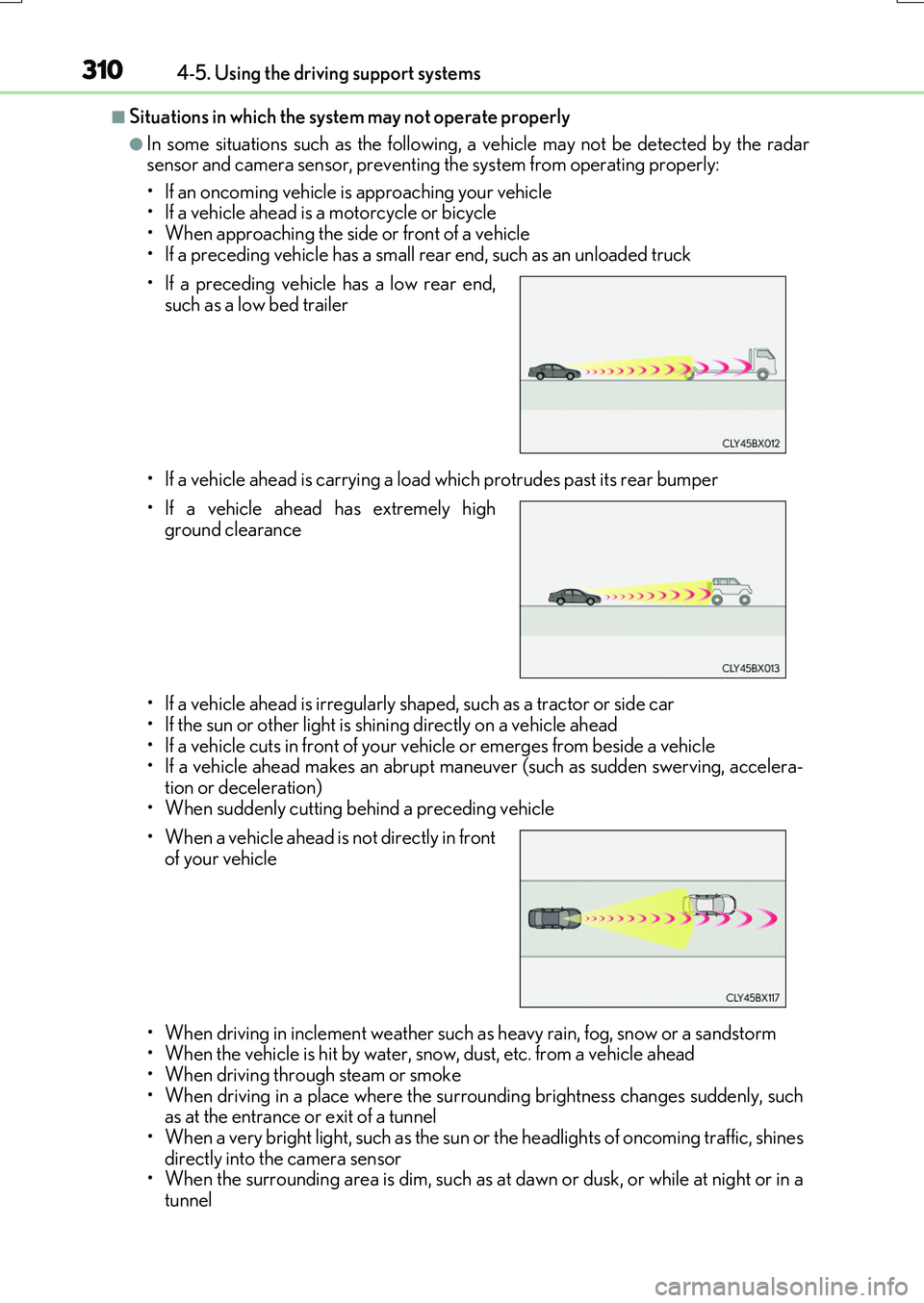
• If a preceding vehicle has a small rear end, such as an unloaded truck
• If a vehicle ahead is carrying a load which protrudes past its rear bumper
• If a vehicle ahead is irregularly sh aped, such as a tractor or side car
• If the sun or other light is shin ing directly on a vehicle ahead • If a vehicle cuts in front of your vehicle or emerges from beside a vehicle• If a vehicle ahead makes an abrupt mane uver (such as sudden swerving, accelera-
tion or deceleration) • When suddenly cutting behind a preceding vehicle
• When driving in inclement we ather such as heavy rain, fog, snow or a sandstorm • When the vehicle is hit by water, snow, dust, etc. from a vehicle ahead
• When driving through steam or smoke • When driving in a place where the surro unding brightness changes suddenly, such as at the entrance or exit of a tunnel
• When a very bright light, such as the sun or the headlights of oncoming traffic, shines directly into the camera sensor• When the surrounding area is dim, such as at dawn or dusk, or while at night or in a
tunnel
• If a preceding vehicle has a low rear end,
such as a low bed trailer
• If a vehicle ahead has extremely high
ground clearance
• When a vehicle ahead is not directly in front of your vehicle
Page 317 of 776
3174-5. Using the driving support systems
4
Driving
RX350/RX200t_EE_OM48F32E
WARNING
■Before using LKA system
Do not rely solely upon the LKA system. LKA is not a system which automatically drives the vehicle or reduces the amount of attention that must be paid to the area in
front of the vehicle. The driver must always assume full responsibility for driving safely by always paying careful attention to the surrounding conditions and operate the steer-ing wheel to correct the path of the vehicle. Also, make sure to take adequate breaks
when fatigued, such as from driv ing for a long period of time. Failure to perform appropriate driving operat ions and pay careful attention may lead to an accident, resulting in death or serious injury.
■To avoid operating LKA by mistake
When not using the LKA system, use the LKA switch to turn the system off.
■Situations unsuitable for LKA
Do not use the LKA system in the following situations. The system may not operate properly and le ad to an accident, resulting in death or serious injury.
●A spare tire, tire chains, etc., are equipped.
●When the tires have been excessively worn, or when the tire inflation pressure is low.
●Tires which differ by structure, manufacturer, brand or tread pattern are used.
●Objects or patterns that could be mistaken for white (yellow) lines are present on the side of the road (guardrails, cu rbs, reflective poles, etc.).
●Vehicle is driven on a snow-covered road.
●White (yellow) lines are difficult to see due to rain, snow, fog, dust, etc.
●Asphalt repair marks, white (yellow) line marks, etc., are present due to road repair.
●Vehicle is driven in a temporary lane or restricted lane due to construction work.
●Vehicle is driven on a road surface which is slippery due to rainy weather, fallen snow, freezing, etc.
●Vehicle is driven in traffic lanes other than on highways and freeways.
●Vehicle is driven in a construction zone.
●When your vehicle is towing a trailer or during emergency towing
■Preventing LKA system malfunctions and operations performed by mistake
●Do not modify the headlights or place stic kers, etc., on the surface of the lights.
●Do not modify the suspension etc. If the suspension etc. needs to be replaced, con- tact any authorized Lexus dealer or repair er, or another duly qualified and equipped
professional.
●Do not install or place anything on the hood or grille. Also, do not install a grille guard (bull bars, kangaroo bar, etc.).
●If your windshield needs repairs, contact any authorized Lexus dealer or repairer, oranother duly qualified an d equipped professional.
Page 322 of 776
3224-5. Using the driving support systems
RX350/RX200t_EE_OM48F32E
■Conditions in which functions may not operate properly
In the following situations, the camera sensor may not detect white (yellow) lines and var- ious functions may not operate normally.
●There are shadows on the road that run paralle l with, or cover, the white (yellow) lines.
●The vehicle is driven in an area without white (yellow) lines, such as in front of a tollgate or checkpoint, or at an intersection, etc.
●The white (yellow) lines are cracked, “Raised pavement marker” or stones are present.
●The white (yellow) lines cannot be seen or are difficult to see due to sand, etc.
●The vehicle is driven on a road surface that is wet due to rain, puddles, etc.
●The traffic lines are yellow (which may be more difficult to recognize than lines that are white).
●The white (yellow) lines cross over a curb, etc.
●The vehicle is driven on a bright surface, such as concrete.
●The vehicle is driven on a surface that is bright due to reflected light, etc.
●The vehicle is driven in an area where the brightness changes suddenly, such as at the
entrances and exits of tunnels, etc.
●Light from the headlights of an oncoming ve hicle, the sun, etc., enters the camera.
●The vehicle is driven where the road diverges, merges, etc.
●The vehicle is driven on a slope.
●The vehicle is driven on a road which tilts left or right, or a winding road.
●The vehicle is driven on an unpaved or rough road.
●The vehicle is driven around a sharp curve.
●The traffic lane is excessively narrow or wide.
●The vehicle is extremely tilted due to carrying heavy luggage or having improper tire pressure.
●The distance to the preceding vehicle is extremely short.
●The vehicle is moving up and down a large a mount due to road conditions during driv- ing (poor roads or road seams).
●The headlight lenses are dirty and emit a faint amount of light at night, or the beam axis
has deviated.
●The vehicle is struck by a crosswind.
●The vehicle has just changed lanes or crossed an intersection.
●Snow tires, etc., are equipped.
Page 332 of 776
3324-5. Using the driving support systems
RX350/RX200t_EE_OM48F32E
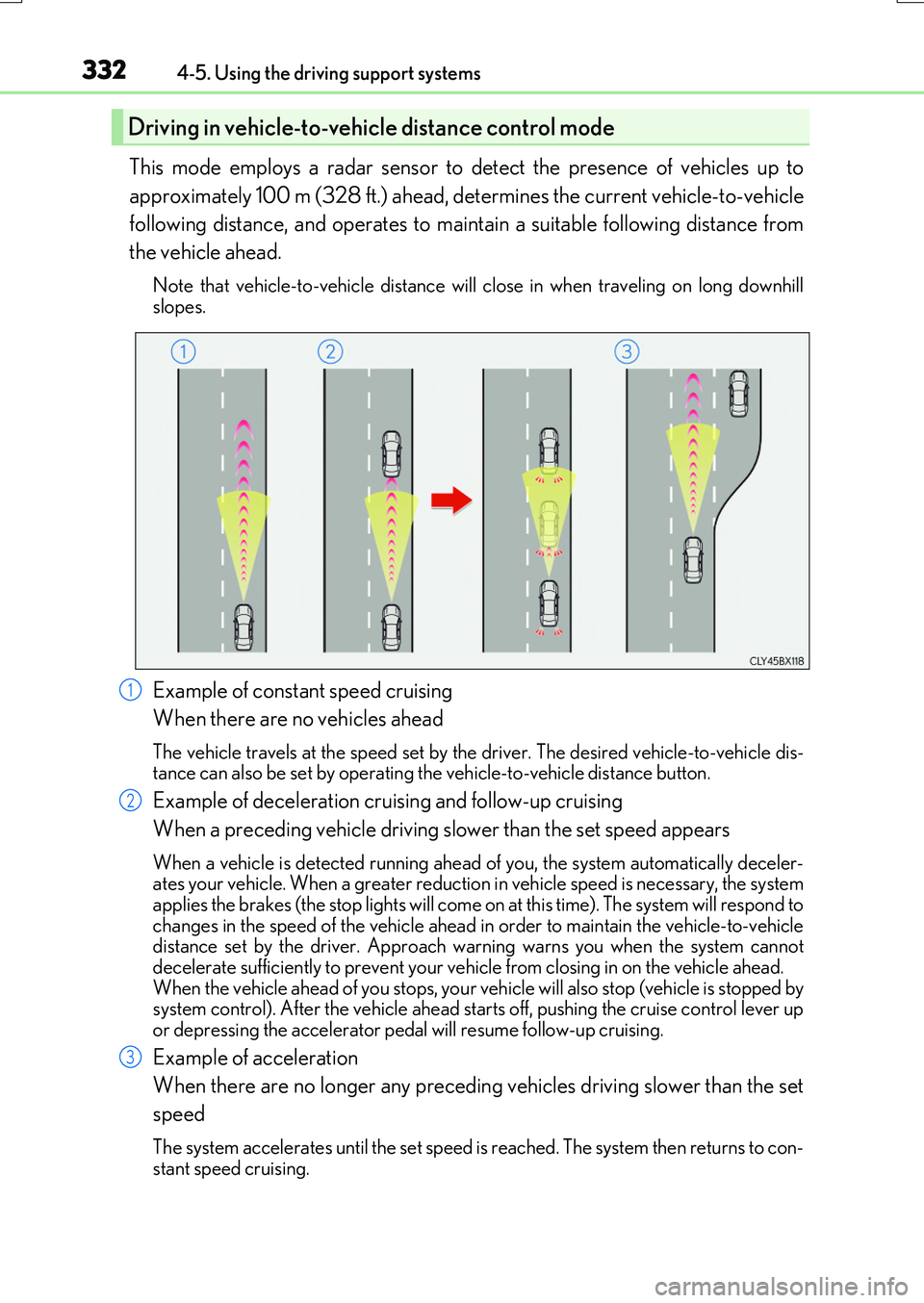
This mode employs a radar sensor to detect the presence of vehicles up to
approximately 100 m (328 ft.) ahead, determines the current vehicle-to-vehicle
following distance, and operates to maintain a suitable following distance from
the vehicle ahead.
Note that vehicle-to-vehicle distance will close in when traveling on long downhill slopes.
Example of constant speed cruising
When there are no vehicles ahead
The vehicle travels at the speed set by the driver. The desired vehicle-to-vehicle dis- tance can also be set by operating the vehicle-to-vehicle distance button.
Example of deceleration cruising and follow-up cruising
When a preceding vehicle driving slower than the set speed appears
When a vehicle is detected running ahead of you, the system automatically deceler- ates your vehicle. When a greater reductio n in vehicle speed is necessary, the system applies the brakes (the stop lights will come on at this time). The system will respond to
changes in the speed of the vehicle ahead in order to maintain the vehicle-to-vehicle distance set by the driver. Approach wa rning warns you when the system cannot decelerate sufficiently to prevent your vehicle from closing in on the vehicle ahead.
When the vehicle ahead of you stops, your ve hicle will also stop (vehicle is stopped by system control). After the vehicle ahead starts off, pushing the cruise control lever upor depressing the accelerator peda l will resume follow-up cruising.
Example of acceleration
When there are no longer any preceding vehicles driving slower than the set
speed
The system accelerates until the set speed is reached. The system then returns to con-
stant speed cruising.
Driving in vehicle-to-veh icle distance control mode
1
2
3
Page 389 of 776
3894-5. Using the driving support systems
4
Driving
RX350/RX200t_EE_OM48F32E
■Situations in which the Intelligent Clearance Sonar function may operate even if there is no possibility of a collision
In some situations such as the following, the Intelligent Clearance Sonar function may
operate even though there is no possibility of a collision.
●Vehicle surroundings
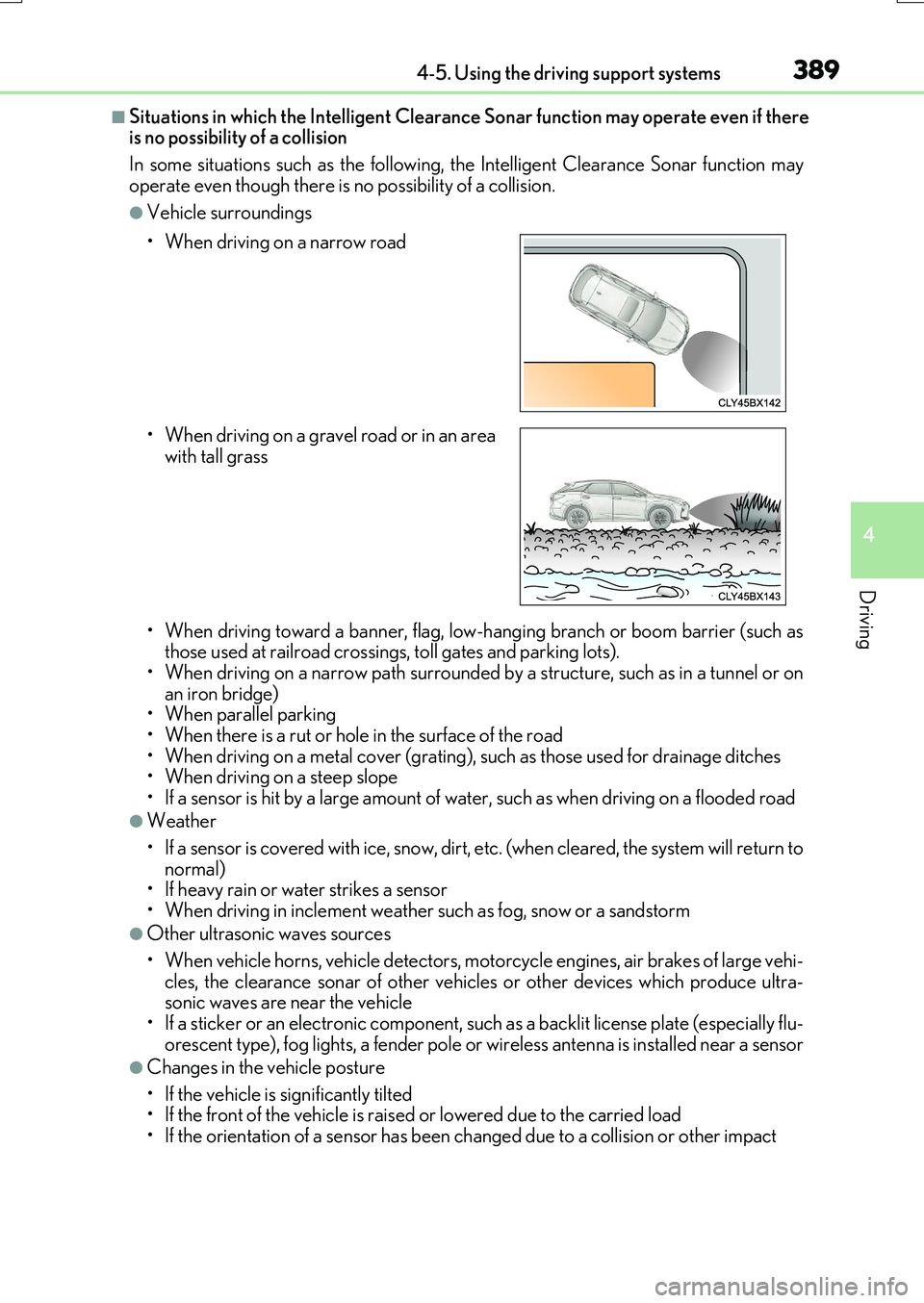
• When driving toward a banner, flag, low- hanging branch or boom barrier (such as those used at railroad crossings, toll gates and parking lots).• When driving on a narrow path surrounded by a structure, such as in a tunnel or on
an iron bridge) • When parallel parking• When there is a rut or hole in the surface of the road
• When driving on a metal cover (grating), such as those used for drainage ditches • When driving on a steep slope
• If a sensor is hit by a large amount of wa ter, such as when driving on a flooded road
●Weather
• If a sensor is covered with ice, snow, dirt, etc. (when cleared, the system will return to normal)• If heavy rain or water strikes a sensor
• When driving in inclement weather su ch as fog, snow or a sandstorm
●Other ultrasonic waves sources
• When vehicle horns, vehicle detectors, motorcycle engines, air brakes of large vehi- cles, the clearance sonar of other vehicles or other devices which produce ultra-sonic waves are near the vehicle
• If a sticker or an electronic component, such as a backlit license plate (especially flu- orescent type), fog lights, a fender pole or wireless antenna is installed near a sensor
●Changes in the vehicle posture
• If the vehicle is significantly tilted • If the front of the vehicle is raised or lowered due to the carried load
• If the orientation of a sensor has been changed due to a collision or other impact
• When driving on a narrow road
• When driving on a gravel road or in an area with tall grass
Page 390 of 776
3904-5. Using the driving support systems
RX350/RX200t_EE_OM48F32E
■If the Intelligent Clearance Sonar function operates unnecessarily such as at a railroad crossing
Even in the event that the Intelligent Cleara nce Sonar function operates unnecessarily,
such as at a railroad crossing, brake contro l will be canceled after approximately 2 sec- onds, allowing you to proceed forward and leave the area, Brake control can also be canceled by depressing the brake pedal. Depressing the accelerator pedal again will
allow you to proceed forward and leave the area.
■Situations in which the Intelligent Cleara nce Sonar Brake function may not operate properly
In some situations such as the following , this function may not operate properly.
●Weather
• If a sensor is covered with ice, snow, dirt, etc. (when cleared, the system will return to normal)
• If heavy rain or water strikes a sensor • When driving in inclement weather su ch as fog, snow or a sandstorm
●Vehicle surroundings
• When an object that cannot be detected is between the vehicle and a detected object
• If an object such as a vehicle, motorcycle, bicycle or pedestrian cuts in front of the vehicle or runs out from the side of the vehicle.
●Other ultrasonic waves sources
• When vehicle horns, vehicle detectors, motorcycle engines, air brakes of large vehi- cles, the clearance sonar of other vehicles or other devices which produce ultra-
sonic waves are near the vehicle • If a sticker or an electronic component, such as a backlit license plate (especially flu-orescent type), fog lights, a fender pole or wireless antenna is installed near a sensor
●Changes in the vehicle posture
• If the vehicle is significantly tilted
• If the front of the vehicle is raised or lowered due to the carried load • If the orientation of a sensor has been changed due to a collision or other impact
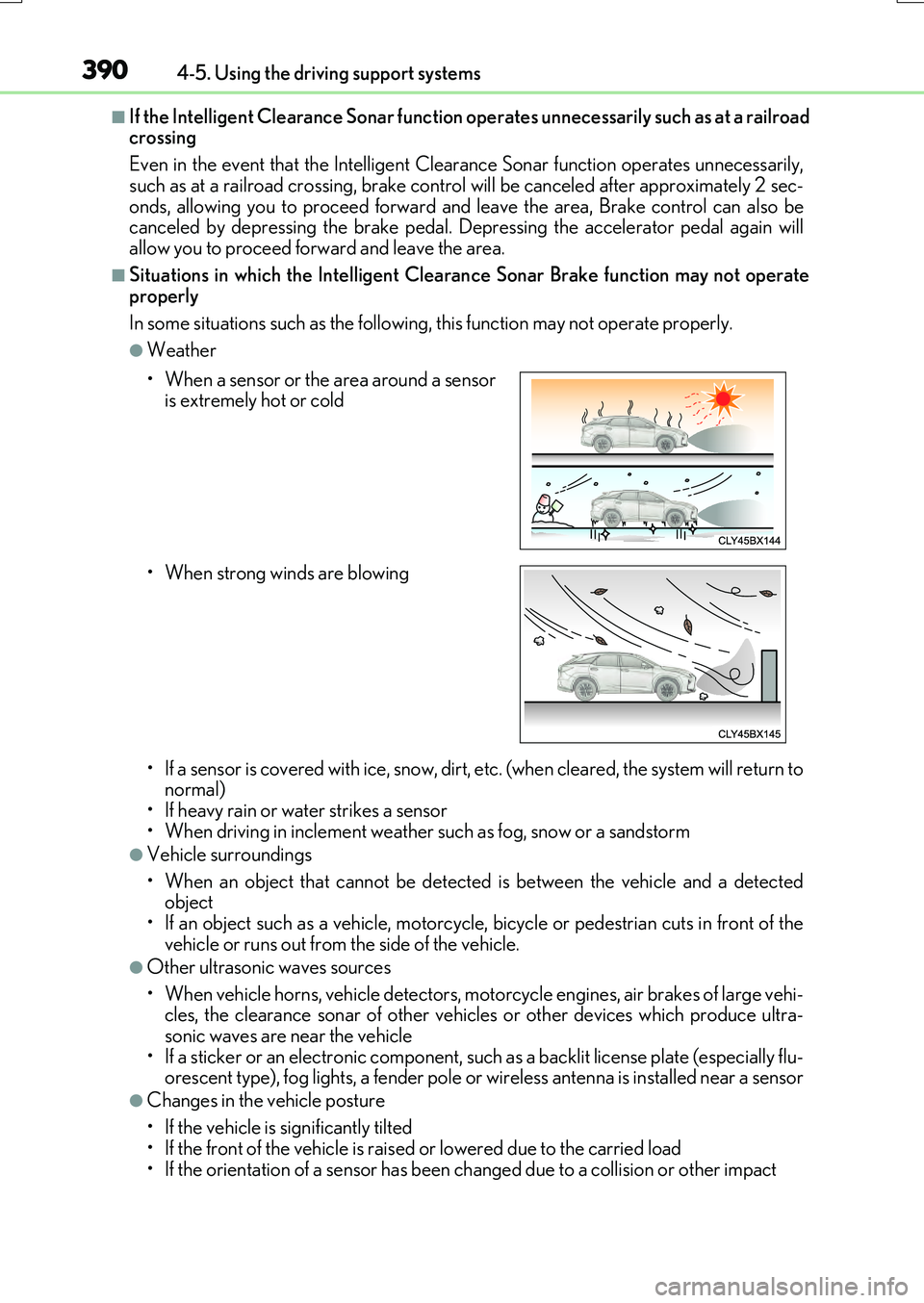
• When a sensor or the area around a sensor is extremely hot or cold
• When strong winds are blowing
Page 399 of 776
3994-5. Using the driving support systems
4
Driving
RX350/RX200t_EE_OM48F32E
■Situations in which the Rear Crossing Traffic Auto Brake function may not operate properly
In some situations such as the following , this function may not operate properly.
●Objects and vehicles which the radar sensors are not designed to detect
• Stationary objects • Vehicles which are moving away from your vehicle
• Pedestrians, motorcycles, bicycles, etc.*• Objects which are extremely close to a radar sensor • Vehicles which are approaching from the right or left at the rear of the vehicle at a
traveling speed of less than approximately 8 km/h (5 mph) • Vehicles which are approaching from the right or left at the rear of the vehicle at a traveling speed of more than a pproximately 24 km/h (15 mph)
*: Depending on conditions, detection of a vehicle and/or object may occur.
●Situations in which the radar sensors may not be able to detect an object
• When a sensor or the area around a sensor is extremely hot or cold • If the rear bumper is covered with ice, snow, dirt, etc.
• If heavy rain or water strikes the vehicle • When the detection area of a radar sensor is obstructed by an adjacent vehicle• If the vehicle is significantly tilted
• If towing eyelets are installed • If the suspension has been modified or ti res of a size other than specified are installed
• If the front of the vehicle is raised or lowered due to the carried load • If a sticker or an electronic component, such as a backlit license plate (especially flu-orescent type), fog lights, a fender pole or wireless antenna is installed near a radar
sensor • If the orientation of a radar sensor has been changed due to a collision or other
impact or removal and installation • When multiple vehicles are approaching wi th only a small gap between each vehicle • When a vehicle is approaching at high speed
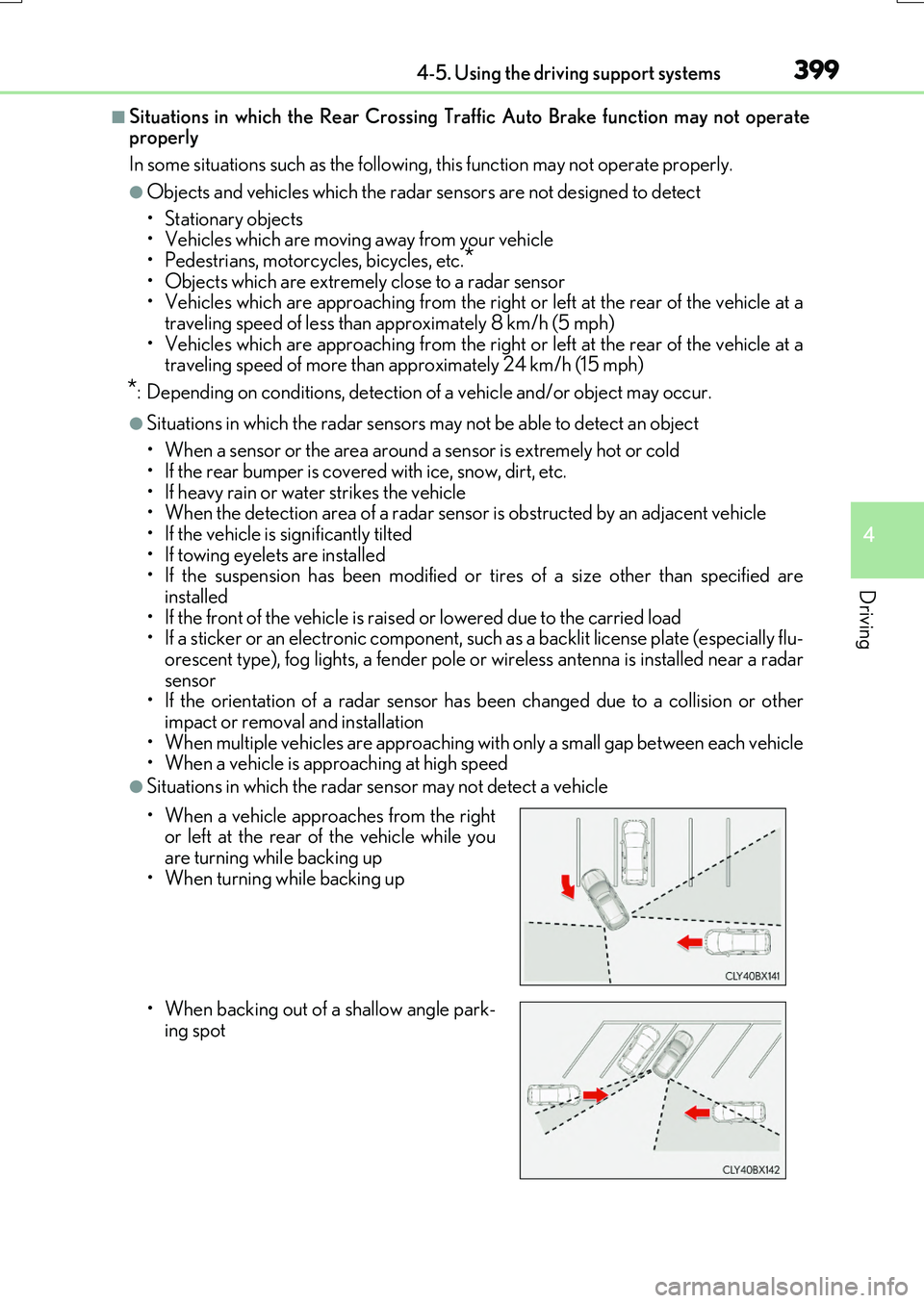
●Situations in which the radar sensor may not detect a vehicle
• When a vehicle approaches from the right or left at the rear of the vehicle while youare turning while backing up
• When turning while backing up
• When backing out of a shallow angle park-
ing spot
Page 413 of 776
4134-5. Using the driving support systems
4
Driving
RX350/RX200t_EE_OM48F32E
■If you notice any symptoms
If you notice any of the following symp toms, refer to the likely cause and the
solution, and re-check.
If the symptom is not resolved by the solution, have the vehicle inspected by
any authorized Lexus dealer or repairer, or another duly qualified and
equipped professional.
Things you should know
Likely causeSolution
The image is difficult to see
• The vehicle is in a dark area
• The temperature around the lens is either high or low• The outside temperature is low
• There are water droplets on the cam- era• It is raining or humid
• Foreign matter (mud, etc.) is adhering to the camera• There are scratches on the camera
• Sunlight or headlights are shining directly into the camera• The vehicle is under fluorescent lights,
sodium lights, mercury lights etc.
If this happens due to these causes, it does not indicate a malfunction.Back up while visually checking the vehi-
cle’s surroundings. (Use the monitor again once conditions have beenimproved.)
The image on the Lexus parking assist monitor system screen can be adjusted. ( P. 453)
The image is blurry
Dirt or foreign matter (such as water droplets, snow, mud, etc.) is adhering tothe camera.
Flush the camera with a large quantity ofwater and wipe the camera lens cleanwith a soft and wet cloth.
The image is out of alignment
The camera or surrounding area has received a strong impact.
Have the vehicle inspected by any autho-
rized Lexus dealer or repairer, or another duly qualified and equipped professional.
The guide lines are very far out of alignment
The camera position is out of alignment.Have the vehicle inspected by any autho- rized Lexus dealer or repairer, or another
duly qualified and equipped professional.
• The vehicle is tilted (there is a heavy load on the vehicle, tire pressure is lowdue to a tire puncture, etc.)
• The vehicle is used on an incline.
If this happens due to these causes, it does not indicate a malfunction.Back up while visually checking the vehi-
cle’s surroundings.