phone LEXUS RX200T 2017 Workshop Manual
[x] Cancel search | Manufacturer: LEXUS, Model Year: 2017, Model line: RX200T, Model: LEXUS RX200T 2017Pages: 776, PDF Size: 44.51 MB
Page 527 of 776
5275-12. Other function
5
Lexus Display Audio system
RX350/RX200t_EE_OM48F32E
■Microphone
P. 493
■Speech commands may not be recognized if:
●Spoken too quickly
●Spoken at a low or high volume
●Passengers are talking while speech commands are spoken
Page 534 of 776
5346-1. Basic operation of the Remote Touch screen
RX350/RX200t_EE_OM48F32E
■Selecting the operation screen
When selecting the main display, move the Remote Touch knob to the left.
When selecting the side display, move the Remote Touch knob to the right.
■ Main display
For details about the functions and operation of the main display, refer to the
respective section and “NAVIGATION SYSTEM OWNER’S MANUAL”.
■Side display
Basic screens
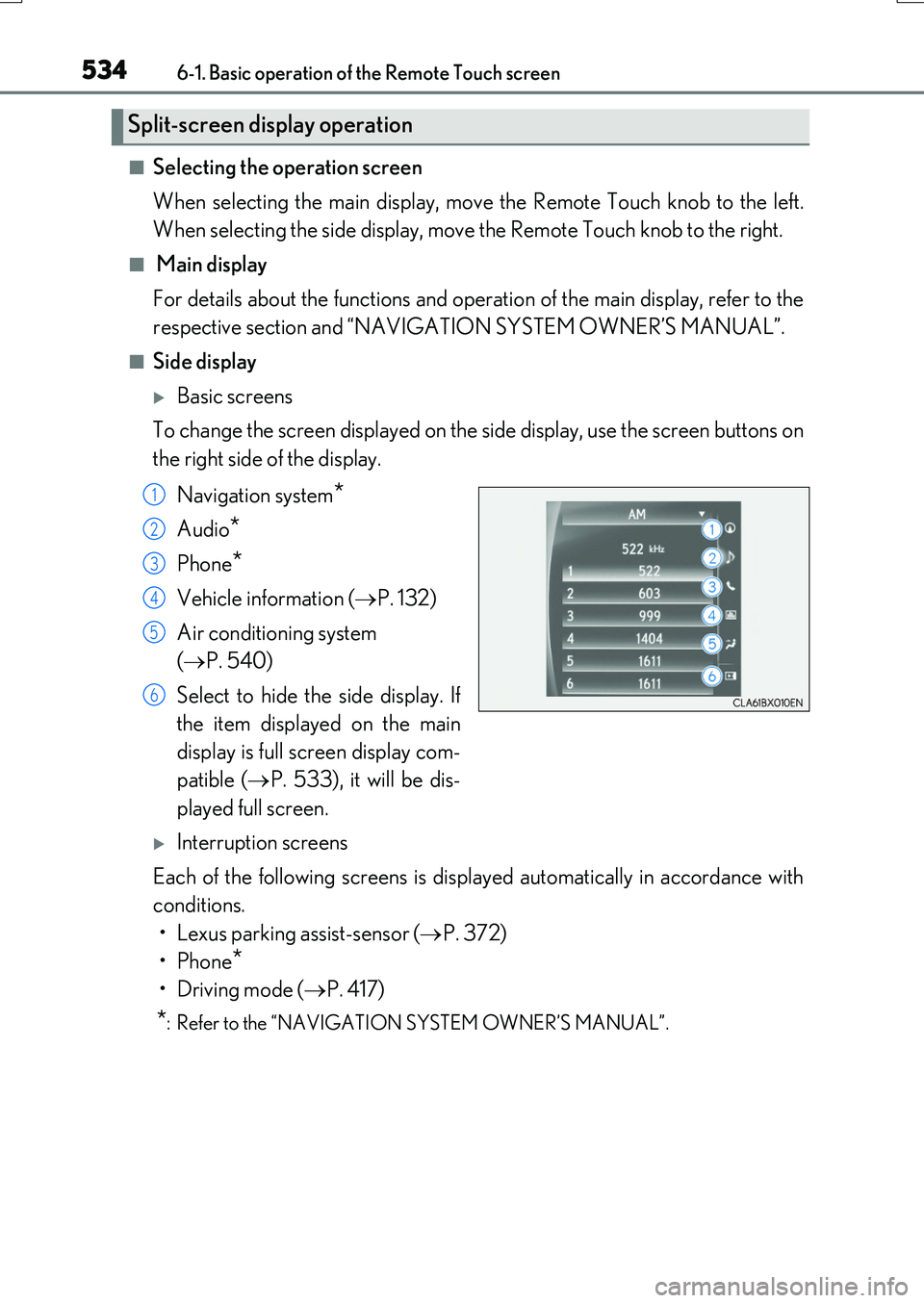
To change the screen displayed on the side display, use the screen buttons on
the right side of the display.
Navigation system*
Audio*
Phone*
Vehicle information ( P. 132)
Air conditioning system
( P. 540)
Select to hide the side display. If
the item displayed on the main
display is full screen display com-
patible ( P. 533), it will be dis-
played full screen.
Interruption screens
Each of the following screens is displayed automatically in accordance with
conditions.
• Lexus parking assist-sensor ( P. 372)
•Phone*
•Driving mode ( P. 417)
*: Refer to the “NAVIGATION SYSTEM OWNER’S MANUAL”.
Split-screen display operation
1
2
3
4
5
6
Page 568 of 776
5686-5. Using the other interior features
RX350/RX200t_EE_OM48F32E
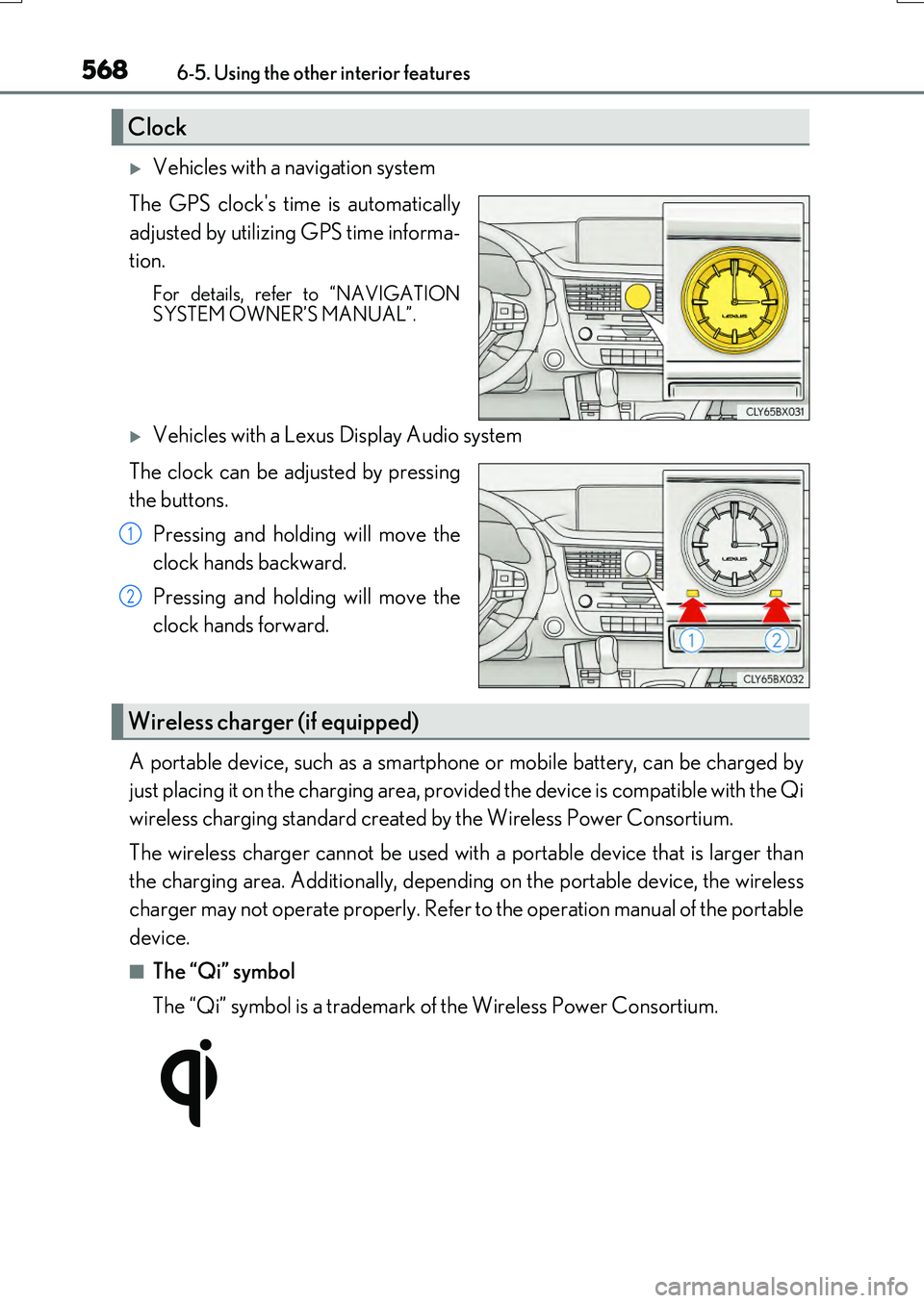
Vehicles with a navigation system
The GPS clock's time is automatically
adjusted by utilizing GPS time informa-
tion.
For details, refer to “NAVIGATION SYSTEM OWNER’S MANUAL”.
Vehicles with a Lexus Display Audio system
The clock can be adjusted by pressing
the buttons.
Pressing and holding will move the
clock hands backward.
Pressing and holding will move the
clock hands forward.
A portable device, such as a smartphone or mobile battery, can be charged by
just placing it on the charging area, provided the device is compatible with the Qi
wireless charging standard created by the Wireless Power Consortium.
The wireless charger cannot be used with a portable device that is larger than
the charging area. Additionally, dependin g on the portable device, the wireless
charger may not operate properly. Refer to the operation manual of the portable
device.
■The “Qi” symbol
The “Qi” symbol is a trademark of the Wireless Power Consortium.
Clock
1
2
Wireless charger (if equipped)
Page 570 of 776
5706-5. Using the other interior features
RX350/RX200t_EE_OM48F32E
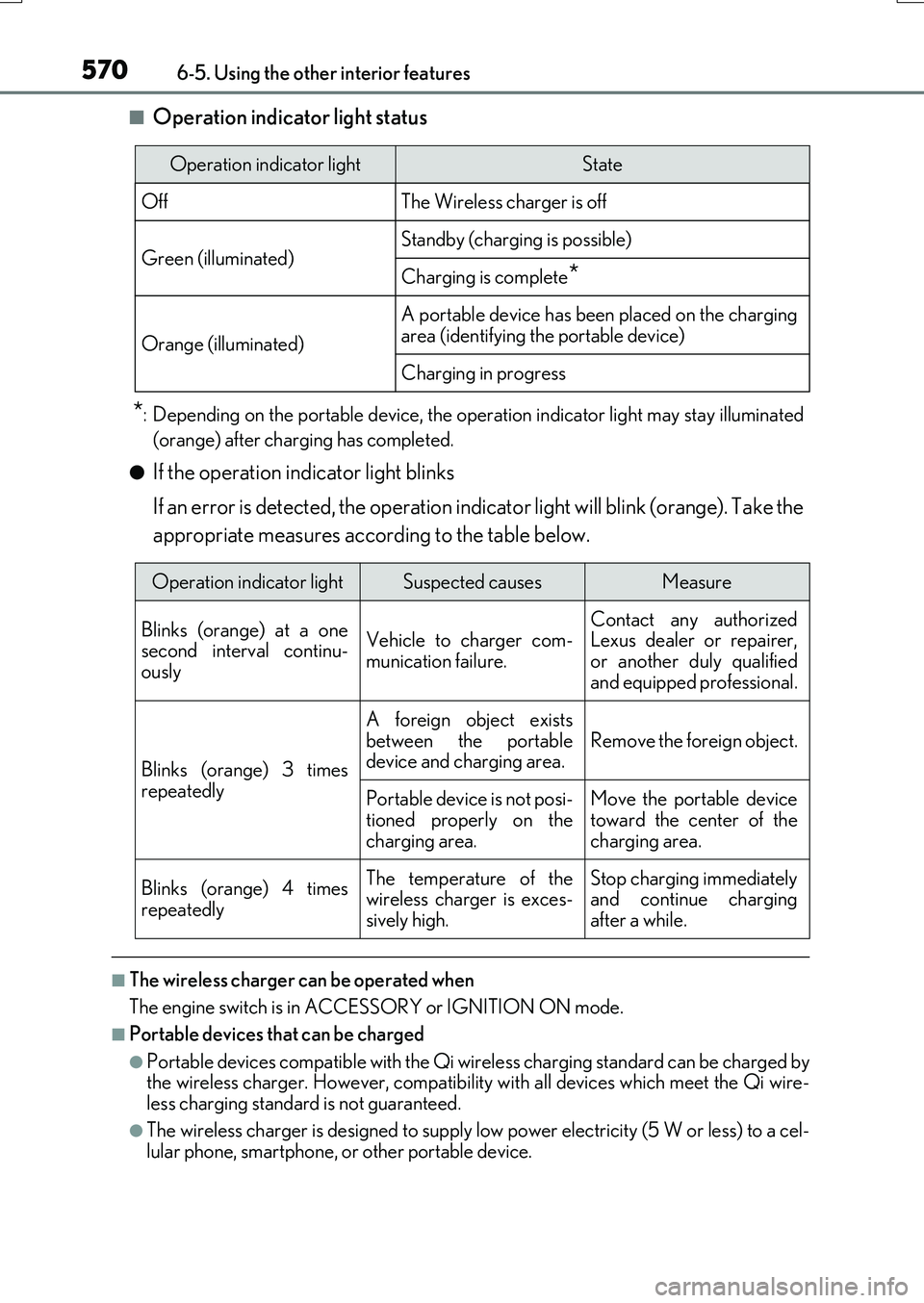
■Operation indicator light status
*: Depending on the portable device, the operation indicator light may stay illuminated
(orange) after charging has completed.
●If the operation indicator light blinks
If an error is detected, the operation indicator light will blink (orange). Take the
appropriate measures according to the table below.
■The wireless charger can be operated when
The engine switch is in ACCESSORY or IGNITION ON mode.
■Portable devices that can be charged
●Portable devices compatible with the Qi wireless charging standard can be charged by the wireless charger. However, compatibility with all devices which meet the Qi wire- less charging standard is not guaranteed.
●The wireless charger is designed to supply low power electricity (5 W or less) to a cel-lular phone, smartphone, or other portable device.
Operation indicator lightState
OffThe Wireless charger is off
Green (illuminated)Standby (charging is possible)
Charging is complete*
Orange (illuminated)
A portable device has been placed on the charging
area (identifying the portable device)
Charging in progress
Operation indicator lightSuspected causesMeasure
Blinks (orange) at a one second interval continu-ously
Vehicle to charger com-
munication failure.
Contact any authorized Lexus dealer or repairer,
or another duly qualified and equipped professional.
Blinks (orange) 3 times
repeatedly
A foreign object exists
between the portable device and charging area. Remove the foreign object.
Portable device is not posi- tioned properly on the
charging area.
Move the portable device toward the center of the
charging area.
Blinks (orange) 4 times
repeatedly
The temperature of the wireless charger is exces-sively high.
Stop charging immediately and continue chargingafter a while.
Page 578 of 776
5786-5. Using the other interior features
RX350/RX200t_EE_OM48F32E
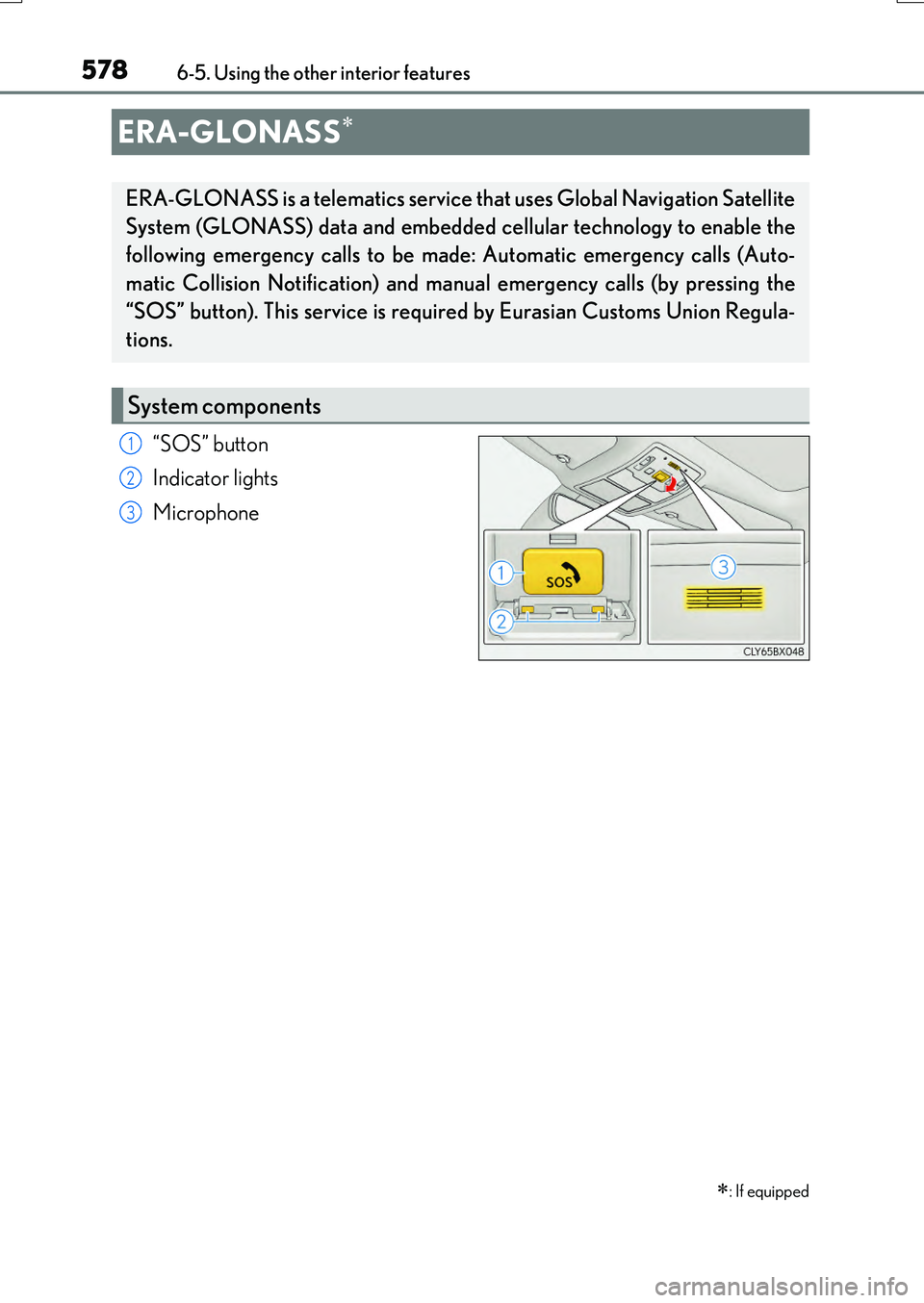
“SOS” button
Indicator lights
Microphone
ERA-GLONASS
: If equipped
ERA-GLONASS is a telematics service that uses Global Navigation Satellite
System (GLONASS) data and embedded cellular technology to enable the
following emergency calls to be made: Automatic emergency calls (Auto-
matic Collision Notification) and manual emergency calls (by pressing the
“SOS” button). This service is require d by Eurasian Customs Union Regula-
tions.
System components
1
2
3
Page 580 of 776
5806-5. Using the other interior features
RX350/RX200t_EE_OM48F32E
WARNING
■When the Emergency Call may not be made
●Any of the followings may occur. In such cases, report to the Public Safety Answering Point (PSAP) by other means such as nearby public phones.
• It may sometimes be difficult to connect to the public Safety Answering Point (PSAP) even in the reception area of the cellular phone due to the reception level,or if the line is busy. In such cases, you may not be able to connect to the Public
Safety Answering Point (PSAP) and thus w ill not be able to make emergency calls and report to the emergency departments even though the system tries to con-nect to the Public Safety Answering Point (PSAP).
• When the vehicle is out of the cellular phone service area, the Emergency Call cannot be made.• When any related equipment (such as th e “SOS” button panel, indicator lights,
microphone, speaker, DCM, antenna, or any wires connecting the equipment.) has an abnormality, is damaged or broken, the Emergency Call cannot be made.• During the Emergency Call, the system makes repeated attempts to connect to
the Public Safety Answering Point (PSAP). However, if it cannot connect to the Public Safety Answering Point (PSAP) due to poor radio wave reception, the sys- tem may not be able to connect to the cellular network and the call may finish with-
out connecting. The red indicator light w ill blink for approximately 30 seconds to indicate this disconnection.• This device may not function if a shock is applied to it.
●If the battery’s voltage decreases or there is a disconnection, the system may not be able to access the Public Safety Answering Point (PSAP).
■When replacing DCM to a new one
ERA-GLONASS have to be activated. Contact any authorized Lexus dealer or repairer, or another duly qualified and equipped professional.
Page 582 of 776
5826-5. Using the other interior features
RX350/RX200t_EE_OM48F32E
NOTICE
■To prevent damage
Do not pour any liquid on to the “SOS” button panel etc. and make any impact to it.
■If the “SOS” button panel malfunctions
It may not be able to make the Emergency Call or inform you of the correct condition of the system. If the “SOS” button panel has been broken, please consult any autho-rized Lexus dealer or repairer, or anothe r duly qualified and equipped professional.
■If there is any malfunction of the speaker or the microphone during the Emergency Call or the Manual Maintenance Check
You will not be able to communicate with the Public Safety Answering Point (PSAP)
operator.
If any of this equipment has been broken, please consult any authorized Lexus dealer or repairer, or another duly qualified and equipped professional.
Page 618 of 776
6187-3. Do-it-yourself maintenance
RX350/RX200t_EE_OM48F32E
■Situations in which the tire pressure warning system may not operate properly
●In the following cases, the tire pressure warning system may not operate properly.
• If non-genuine Lexus wheels are used.
• A tire has been replaced with a tire that is not an OE (Original Equipment) tire. • A tire has been replaced with a tire that is not of the specified size.• Tire chains, etc., are equipped.
• If a window tint that affects the radio wave signals is installed. • If there is a lot of snow or ice on the vehi cle, particularly around the wheels or wheel housings.
• If the tire inflation pressure is extr emely higher than the specified level. • If wheel without the tire pressure warning valve and transmitter is used.• If the ID code on the tire pressure warning valves and transmitters is not registered
in the tire pressure warning computer.
●Performance may be affected in the following situations.
• Near a TV tower, electric power plant, gas station, radio station, large display, air- port or other facility that generates st rong radio waves or electrical noise. • When carrying a portable radio, cellular phone, cordless phone or other wireless
communication device. If tire position information is not correctly displayed due to the radio wave conditions, the display may be corrected by driving and changing the radio wave conditions.
●When the vehicle is parked, the time taken for the warning to start or go off could beextended.
●When tire inflation pressure declines rapi dly for example when a tire has burst, the
warning may not function.
■The initialization operation
●Make sure to carry out initialization af ter adjusting the tire inflation pressure.
Also, make sure the tires are cold before carry ing out initialization or tire inflation pres- sure adjustment.
●If you have accidentally turned the engine swit ch off during initialization, it is not neces- sary to restart the initialization again as in itialization will restart automatically when the engine switch has been turned to IGNITION ON mode for the next time.
●If you accidentally restart the initialization when initialization is not necessary, adjust the tire inflation pressure to the specified leve l when the tires are cold, and conduct initial- ization again.
●While the position of each tire is being de termined and the inflation pressures are not being displayed on the multi-information display, if the inflation pressure of a tire drops, the tire pressure warning light will come on.
Page 760 of 776
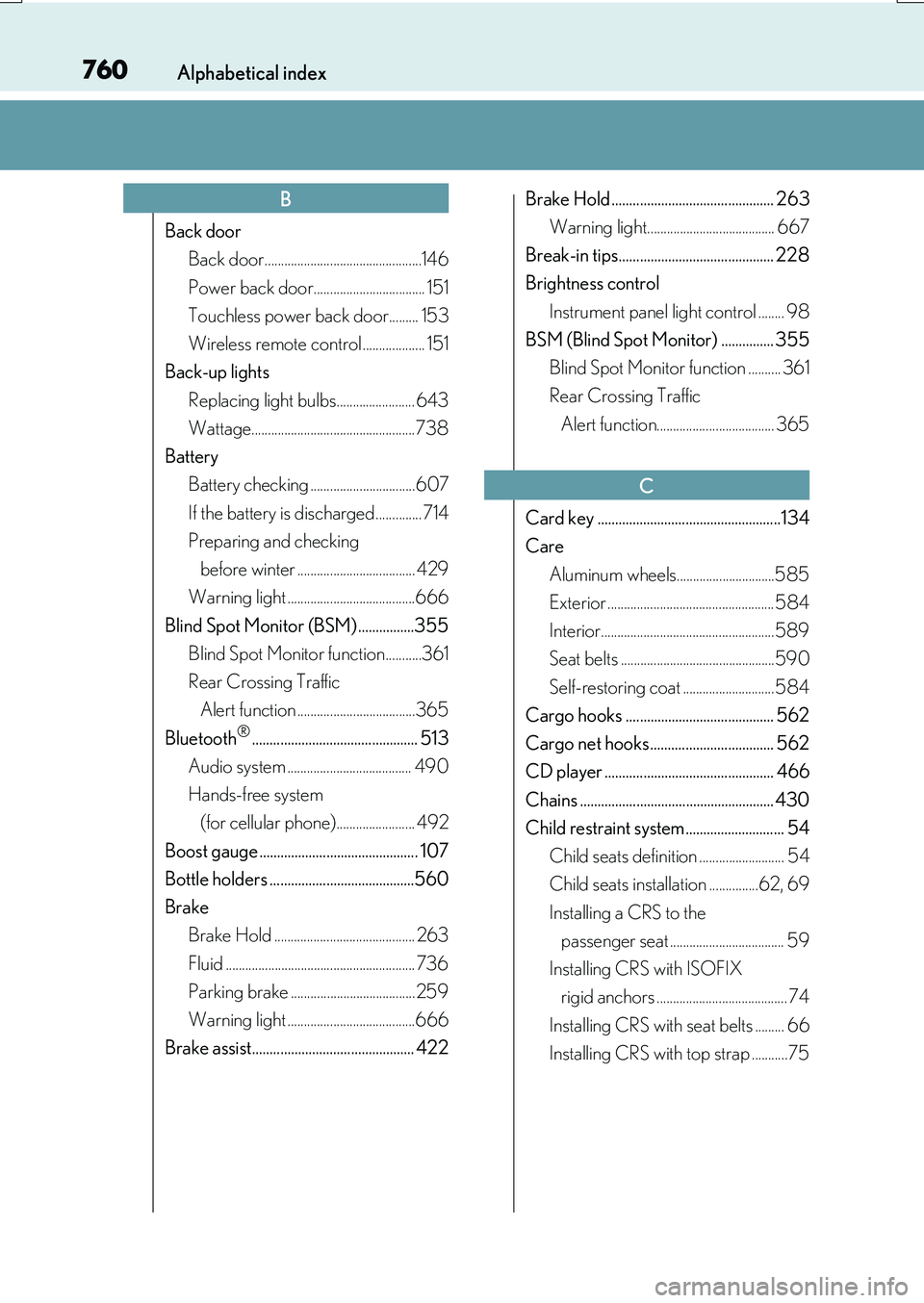
760Alphabetical index
RX350/RX200t_EE_OM48F32E
Back door
Back door................................................146
Power back door.................................. 151
Touchless power back door......... 153
Wireless remote control ................... 151
Back-up lights
Replacing light bulbs........................ 643
Wattage..................................................738
Battery
Battery checking ................................607
If the battery is discharged .............. 714
Preparing and checking
before winter .................................... 429
Warning light .......................................666
Blind Spot Monitor (BSM) ................355
Blind Spot Monitor function...........361
Rear Crossing Traffic
Alert function ....................................365
Bluetooth®............................................... 513
Audio system ...................................... 490
Hands-free system
(for cellular phone)........................ 492
Boost gauge ............................................. 107
Bottle holders .........................................560
Brake
Brake Hold ........................................... 263
Fluid .......................................................... 736
Parking brake ......................................259
Warning light .......................................666
Brake assist.............................................. 422
Brake Hold .............................................. 263
Warning light....................................... 667
Break-in tips............................................ 228
Brightness control
Instrument panel light control ........ 98
BSM (Blind Spot Monitor) ............... 355
Blind Spot Monitor function .......... 361
Rear Crossing Traffic
Alert function.................................... 365
Card key ....................................................134
Care
Aluminum wheels..............................585
Exterior ................................................... 584
Interior.....................................................589
Seat belts ...............................................590
Self-restoring coat ............................ 584
Cargo hooks .......................................... 562
Cargo net hooks................................... 562
CD player ................................................ 466
Chains ....................................................... 430
Child restraint system............................ 54
Child seats definition .......................... 54
Child seats installation ...............62, 69
Installing a CRS to the
passenger seat ................................... 59
Installing CRS with ISOFIX
rigid anchors ........................................ 74
Installing CRS with seat belts ......... 66
Installing CRS with top strap ...........75
B
C
Page 764 of 776

764Alphabetical index
RX350/RX200t_EE_OM48F32E
Front turn signal lights
Replacing light bulbs........................ 643
Turn signal lever .................................258
Wattage..................................................738
Fuel
Capacity ................................................. 729
Fuel gauge................................................ 96
Information ............................................ 739
Refueling ................................................ 287
Type .......................................................... 729
Fuel consumption information ......... 128
Fuel filler door ........................................ 287
Refueling ................................................ 287
When the fuel filler door
cannot be opened .........................289
Fuses ..........................................................640
Gauges ........................................................ 96
Glove box ................................................ 557
Grocery bag hooks .............................563
Hands-free system
(for cellular phone) ........................... 492
Head restraints ...................................... 200
Head-up display...................................... 122
Headlight cleaner................................. 279
Headlights ............................................... 265
Adaptive High-beam System ..... 269
Automatic headlight leveling........267
Automatic High Beam .................... 274
Follow me home system................ 266
Light switch........................................... 265
Replacing light bulbs ....................... 643
Wattage ................................................. 738
Windshield wiper linked
headlight illumination ................... 268
Heated steering wheel....................... 549
Heated Windshield Defroster ........ 543
Heaters
Automatic air conditioning
system.................................................. 536
Heated steering wheel ................... 549
Outside rear view mirrors ............ 542
Seat heaters............................... 550, 551
High mounted stoplight
Replacing............................................... 643
G
H