ECO mode LEXUS RX200T 2017 Repair Manual
[x] Cancel search | Manufacturer: LEXUS, Model Year: 2017, Model line: RX200T, Model: LEXUS RX200T 2017Pages: 776, PDF Size: 44.51 MB
Page 531 of 776
5316-1. Basic operation of the Remote Touch screen
6
Interior features
RX350/RX200t_EE_OM48F32E
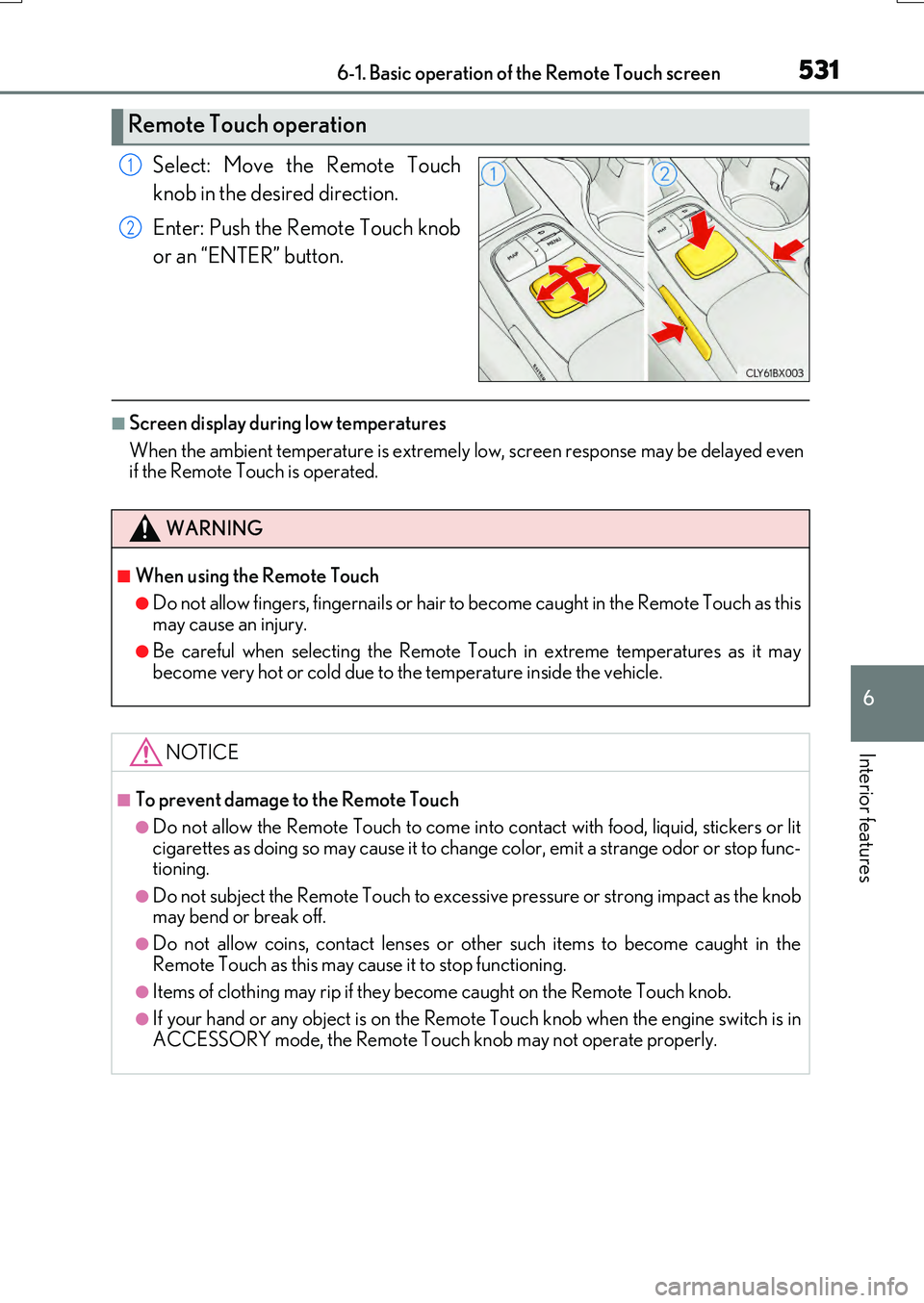
Select: Move the Remote Touch
knob in the desired direction.
Enter: Push the Remote Touch knob
or an “ENTER” button.
■Screen display during low temperatures
When the ambient temperature is extremely low, screen response may be delayed even if the Remote Touch is operated.
Remote Touch operation
1
2
WARNING
■When using the Remote Touch
●Do not allow fingers, fingernails or hair to become caught in the Remote Touch as this
may cause an injury.
●Be careful when selecting the Remote Touch in extreme temperatures as it may become very hot or cold due to the temperature inside the vehicle.
NOTICE
■To prevent damage to the Remote Touch
●Do not allow the Remote Touch to come into contact with food, liquid, stickers or lit
cigarettes as doing so may cause it to change color, emit a strange odor or stop func- tioning.
●Do not subject the Remote Touch to excessiv e pressure or strong impact as the knob may bend or break off.
●Do not allow coins, contact lenses or other such items to become caught in the
Remote Touch as this may cause it to stop functioning.
●Items of clothing may rip if they be come caught on the Remote Touch knob.
●If your hand or any object is on the Remote Touch knob when the engine switch is in
ACCESSORY mode, the Remote Touch knob may not operate properly.
Page 543 of 776
5436-2. Using the air conditioning system and defogger
6
Interior features
RX350/RX200t_EE_OM48F32E
■Windshield wiper de-icer (if equipped)
This feature is used to prevent ice from building up on the windshield and
wiper blades.
Select on the option control screen.
When the windshield wiper de-icer is on , is displayed on the air condition-
ing control screen.
The windshield wiper de-icer will automatically turn off after a period of time.
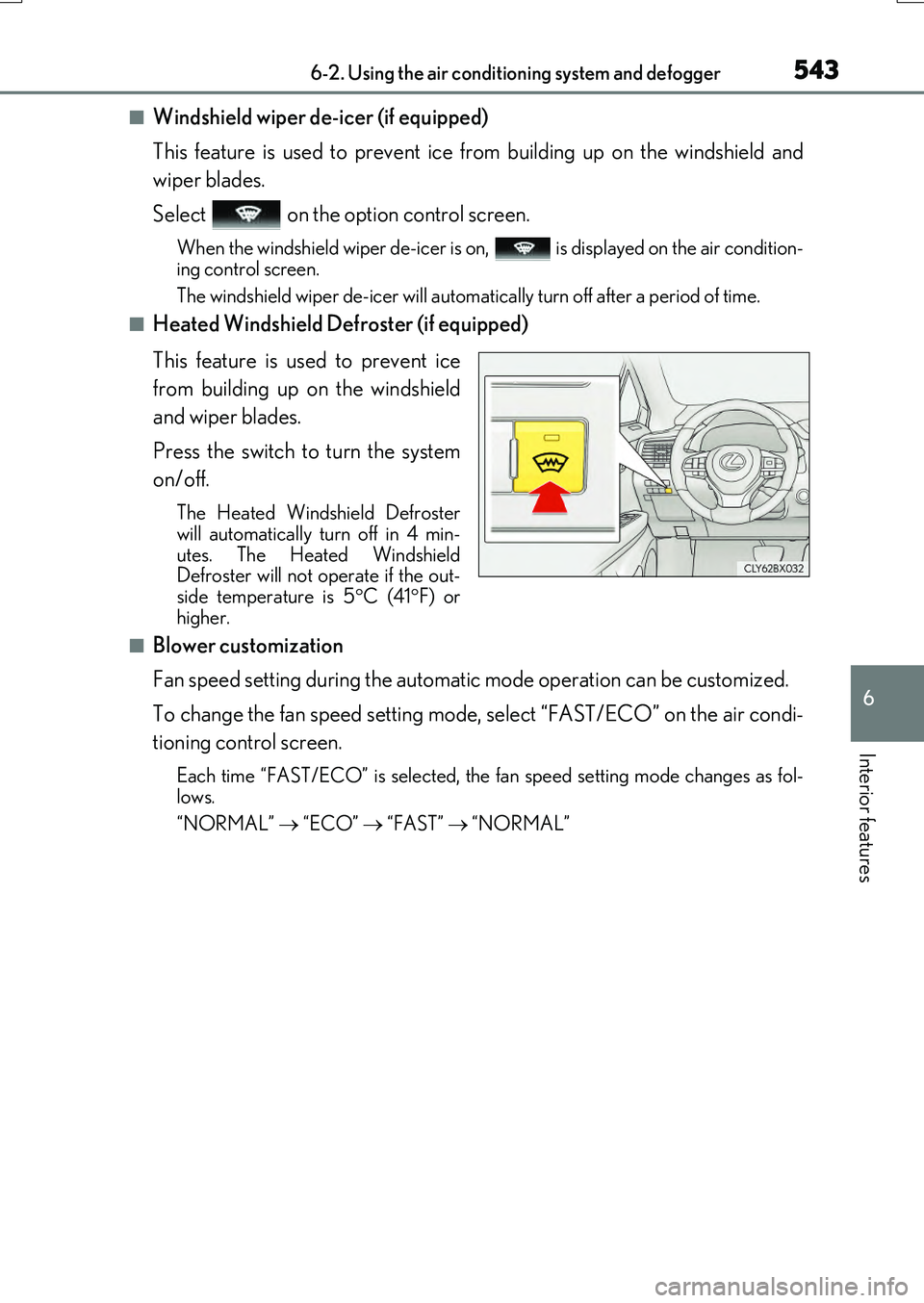
■Heated Windshield Defroster (if equipped)
This feature is used to prevent ice
from building up on the windshield
and wiper blades.
Press the switch to turn the system
on/off.
The Heated Windshield Defroster
will automatically turn off in 4 min-
utes. The Heated Windshield
Defroster will not operate if the out-
side temperature is 5 C (41 F) or
higher.
■Blower customization
Fan speed setting during the automatic mode operation can be customized.
To change the fan speed setting mode, select “FAST/ECO” on the air condi-
tioning control screen.
Each time “FAST/ECO” is selected, the fan speed setting mode changes as fol-
lows.
“NORMAL” “ECO” “FAST” “NORMAL”
Page 546 of 776
5466-2. Using the air conditioning system and defogger
RX350/RX200t_EE_OM48F32E
■Outside/recirculated air mode
●When driving on dusty roads such as tunnels or in heavy traffic, set the outside/recircu- lated air mode button to the recirculated air mode. This is effective in preventing out-
side air from entering the vehicle interior . During cooling operation, setting the recirculated air mode will also cool the vehicle interior effectively.
●Outside/recirculated air mode may automatically switch depending on the tempera-
ture setting or the inside temperature.
■When the outside temperature is low
The dehumidification function may not operate even when “A/C” is selected.
■Operation of the air conditioning system in Eco drive mode
●In the Eco drive mode, the air conditioning system is controlled as follows to prioritize fuel efficiency
• Engine speed and compressor operation co ntrolled to restrict heating/cooling capacity• Fan speed restricted when automatic mode is selected
●To improve air conditioning performance, perform the following operations
• Adjust the fan speed
• Turn off Eco drive mode
■Ventilation and air conditioning odors
●To let fresh air in, set the air conditioning system to the outside air mode.
●During use, various odors from inside and outside the vehicle may enter into and accu- mulate in the air conditioning system. This may then cause odor to be emitted from the vents.
●To reduce potential odors from occurring:
• It is recommended that the air conditioning system be set to outside air mode prior
to turning the vehicle off. • The start timing of the blower may be dela yed for a short period of time immediately after the air conditioning system is started in automatic mode.
■When the Heated Windshield Defroster is operating (if equipped)
When the Heated Windshield Defroster is op erating, operation of the heated steering wheel, front passenger seat heater and rear seat heaters will be suspended.
Page 570 of 776
5706-5. Using the other interior features
RX350/RX200t_EE_OM48F32E
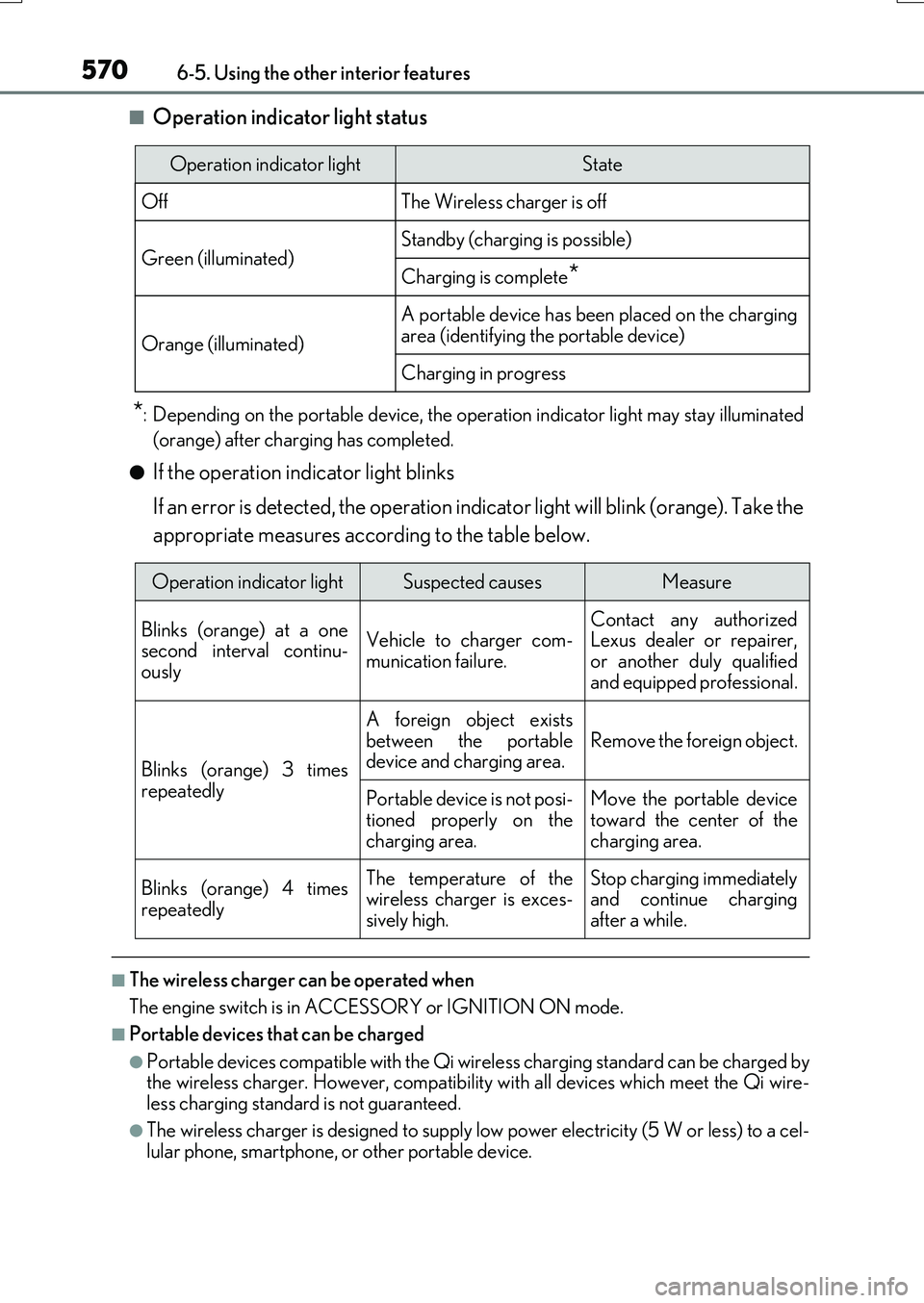
■Operation indicator light status
*: Depending on the portable device, the operation indicator light may stay illuminated
(orange) after charging has completed.
●If the operation indicator light blinks
If an error is detected, the operation indicator light will blink (orange). Take the
appropriate measures according to the table below.
■The wireless charger can be operated when
The engine switch is in ACCESSORY or IGNITION ON mode.
■Portable devices that can be charged
●Portable devices compatible with the Qi wireless charging standard can be charged by the wireless charger. However, compatibility with all devices which meet the Qi wire- less charging standard is not guaranteed.
●The wireless charger is designed to supply low power electricity (5 W or less) to a cel-lular phone, smartphone, or other portable device.
Operation indicator lightState
OffThe Wireless charger is off
Green (illuminated)Standby (charging is possible)
Charging is complete*
Orange (illuminated)
A portable device has been placed on the charging
area (identifying the portable device)
Charging in progress
Operation indicator lightSuspected causesMeasure
Blinks (orange) at a one second interval continu-ously
Vehicle to charger com-
munication failure.
Contact any authorized Lexus dealer or repairer,
or another duly qualified and equipped professional.
Blinks (orange) 3 times
repeatedly
A foreign object exists
between the portable device and charging area. Remove the foreign object.
Portable device is not posi- tioned properly on the
charging area.
Move the portable device toward the center of the
charging area.
Blinks (orange) 4 times
repeatedly
The temperature of the wireless charger is exces-sively high.
Stop charging immediately and continue chargingafter a while.
Page 579 of 776
5796-5. Using the other interior features
6
Interior features
RX350/RX200t_EE_OM48F32E
■Automatic Collision Notification
If any airbag deploys, the system is designed to automatically call the Public
Safety Answering Point (PSAP).* The responding agent receives the vehicle’s
location and attempts to speak with the vehicle occupants to assess the level
of emergency. If the occupants are unable to communicate, the agent auto-
matically treats the call as an emer gency, contacts the nearest emergency
services provider to describe the situation, and requests that assistance be
sent to the location.
*: In some cases, the call cannot be made.( P. 580)
■Emergency Assistance Button (“SOS”)
In the event of an emergency, push the “SOS” button to reach the Public
Safety Answering Point (PSAP). The answering agent will determine your
vehicle’s location, assess the emergency, and dispatch the necessary assis-
tance required.
If you accidentally press the “SOS” button, tell the agent that you are not experi-
encing an emergency.
When the engine switch is turned to IGNITION ON mode, the red indicator
light will illuminate for 10 seconds and then the green indicator light will illumi-
nate for 2 seconds, indicating that the syst em is enabled. The indicator lights indi-
cate the following:
●If the green indicator light illuminates and stays on, the system is enabled.
●If the green indicator light flashes, an emergency call is being made (either
automatically or manually).
●If no indicator lights illuminate, the system is not enabled.
●If the red indicator light illuminates any time other than immediately after the
engine switch is turned to IGNITION ON mode, the system may be malfunc-
tioning or the backup battery may be depleted. Contact any authorized Lexus
dealer or repairer, or another duly qualified and equipped professional.
The service life of the backup battery is 3 years or more.
Emergency Notification Services
Indicator lights
Page 585 of 776
5857-1. Maintenance and care
7
Maintenance and care
RX350/RX200t_EE_OM48F32E
■Note for a smart entry & start system
●If the door handle becomes wet while the electronic key is within the effective range, the door may lock and unlock repeatedly. Place the key in a position 2 m (6 ft.) or more
separate from the vehicle while the vehicle is being washed. (Take care to ensure that the key is not stolen.)
●If the electronic key is inside the vehicle and a door handle becomes wet during a car
wash, a buzzer will sound outside the vehicle. To turn off the alarm, lock all the doors.
●Set the electronic key to battery-saving mode to disable the smart entry & start system. ( P. 169)
■Aluminum wheels
●Remove any dirt immediately by using a neutral detergent. Do not use hard brushes or abrasive cleaners. Do not use strong or harsh chemical cleaners.
Use the same mild detergent as used on the paint.
●Do not use detergent on the wheels when th ey are hot, for example after driving for long distance in the hot weather.
●Wash detergent from the wheels immediately after use.
■Bumpers
Do not scrub with abrasive cleaners.
■Front side windows water-repellent coating
●The following precautions can extend the effectiveness of the water-repellent coating.
• Remove any dirt, etc., from the front side windows regularly.
• Do not allow dirt and dust to accumulate on the windows for a long period. Clean the windows with a soft, damp cloth as soon as possible.• Do not use wax or glass cleaners that co ntain abrasives when cleaning the windows.
• Do not use any metallic objects to remove condensation build up.
●When the water-repellent performance has become insufficient, the coating can be repaired. Contact any authorized Lexus dealer or repairer, or another duly qualified and equipped professional.
Page 596 of 776
5967-3. Do-it-yourself maintenance
RX350/RX200t_EE_OM48F32E
WARNING
The engine compartment contains many mechanisms and fluids that may move suddenly, become hot, or become electrically energize d. To avoid death or serious injury, observe the following precautions.
■When working on the engine compartment
●Keep hands, clothing and tools away from the moving fan and engine drive belt.
●Be careful not to touch the engine, radiator, exhaust manifold, etc., right after driving
as they may be hot. Oil and other fluids may also be hot.
●Do not leave anything that may burn easily, such as paper and rags, in the engine compartment.
●Do not smoke, cause sparks or expose an open flame to fuel or the battery. Fuel andbattery fumes are flammable.
●Be extremely cautious when working on the battery. It contains poisonous and corro-
sive sulfuric acid.
●Take care because brake fluid can harm your hands or eyes and damage painted sur- faces. If fluid gets on your hands or in your eyes, flush the affected area with clean
water immediately. If you still experience discomfort, consult a doctor.
■When working near the electric cooling fans or radiator grille
Be sure the engine switch is off.
With the engine switch in IGNITION ON mode, the electric cooling fans may auto- matically start to run if the air conditioning is on and/or the coolant temperature is high. ( P. 607)
■Safety glasses
Wear safety glasses to prevent flying or fa lling material, fluid spray, etc., from getting in your eyes.
NOTICE
■If you remove the air cleaner filter
Driving with the air cleaner filter removed may cause excessive engine wear due to dirt in the air.
■If the fluid level is low or high
It is normal for the brake fluid level to go down slightly as the brake pads wear or when the fluid level in the accumulator is high.If the reservoir needs frequent refillin g, it may indicate a serious problem.
Page 609 of 776
6097-3. Do-it-yourself maintenance
7
Maintenance and care
RX350/RX200t_EE_OM48F32E
■Before recharging
When recharging, the battery produces hydr ogen gas which is flammable and explosive. Therefore, observe the following precautions before recharging:
●If recharging with the battery installed on the vehicle, be sure to disconnect the ground
cable.
●Make sure the power switch on the charger is off when connecting and disconnecting the charger cables to the battery.
■After recharging/reconnecting the battery
●The engine may not start. Follow the pr ocedure below to initialize the system.
Shift the shift lever to P.
Open and close any of the doors.
Restart the engine.
●Unlocking the doors using the smart entry & start system may not be possible immedi-
ately after reconnecting the battery. If this happens, use the wireless remote control or the mechanical key to lock/unlock the doors.
●Start the engine with the engine switch in ACCESSORY mode. The engine may not
start with the engine switch turned off. However, the engine will operate normally from the second attempt.
●The engine switch mode is recorded by the vehicle. If the battery is disconnected and
reconnected, the vehicle will return the engi ne switch mode to the status it was in before the battery was disconnected. Make sure to turn off the engine switch beforedisconnecting the battery. Take extra care when connecting the battery if the engine
switch mode prior to the battery being disconnected is unknown.
If the system will not start even after multip le attempts at all the methods above, contact any authorized Lexus dealer or repairer, or another duly qualified and equipped profes-
sional.
1
2
3
Page 613 of 776
6137-3. Do-it-yourself maintenance
7
Maintenance and care
RX350/RX200t_EE_OM48F32E
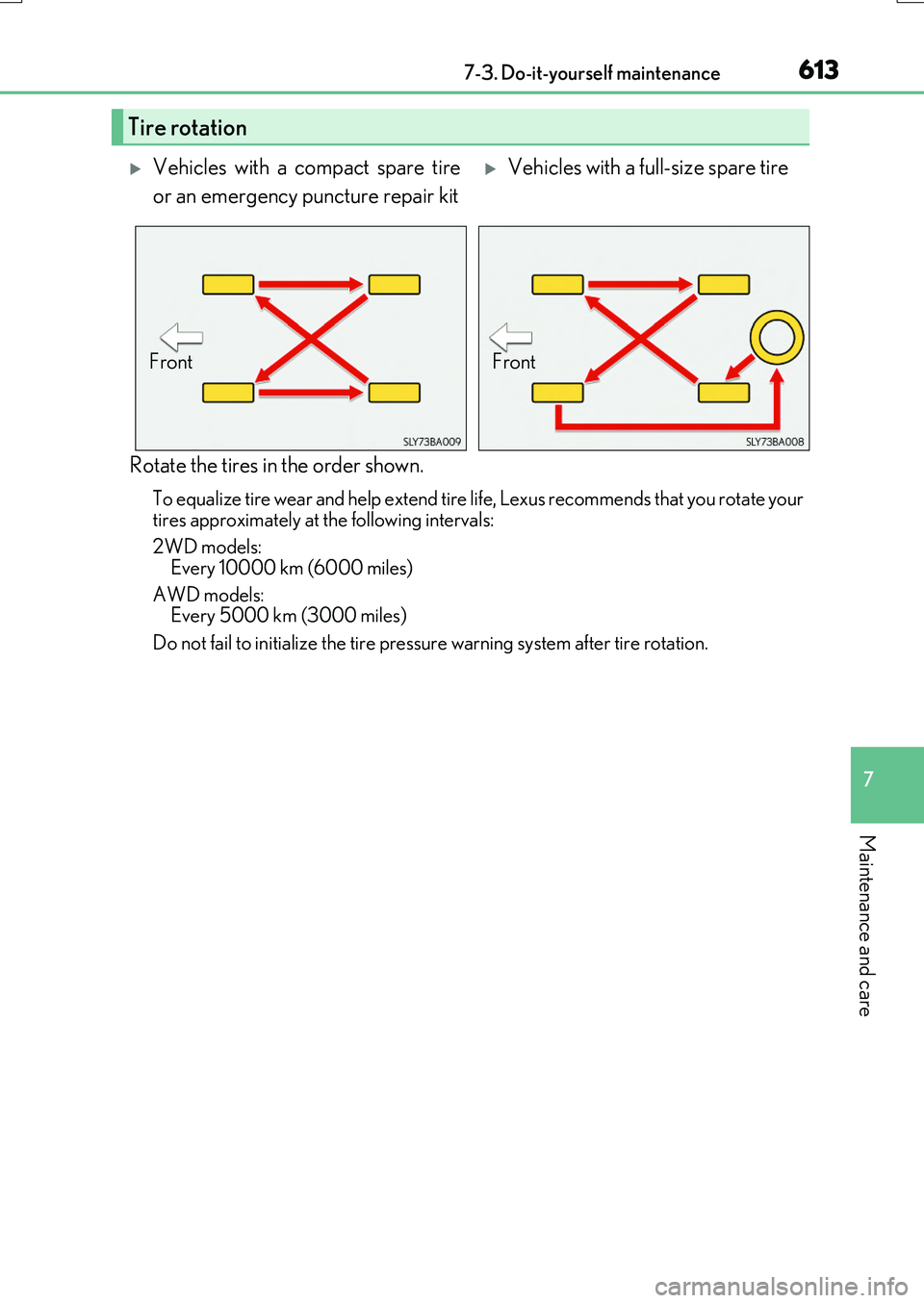
Rotate the tires in the order shown.
To equalize tire wear and help extend tire life, Lexus recommends that you rotate your tires approximately at the following intervals:
2WD models:
Every 10000 km (6000 miles)
AWD models: Every 5000 km (3000 miles)
Do not fail to initialize the tire pressure warning system after tire rotation.
Tire rotation
Vehicles with a compact spare tire
or an emergency puncture repair kit
Vehicles with a full-size spare tire
FrontFront
Page 616 of 776
6167-3. Do-it-yourself maintenance
RX350/RX200t_EE_OM48F32E
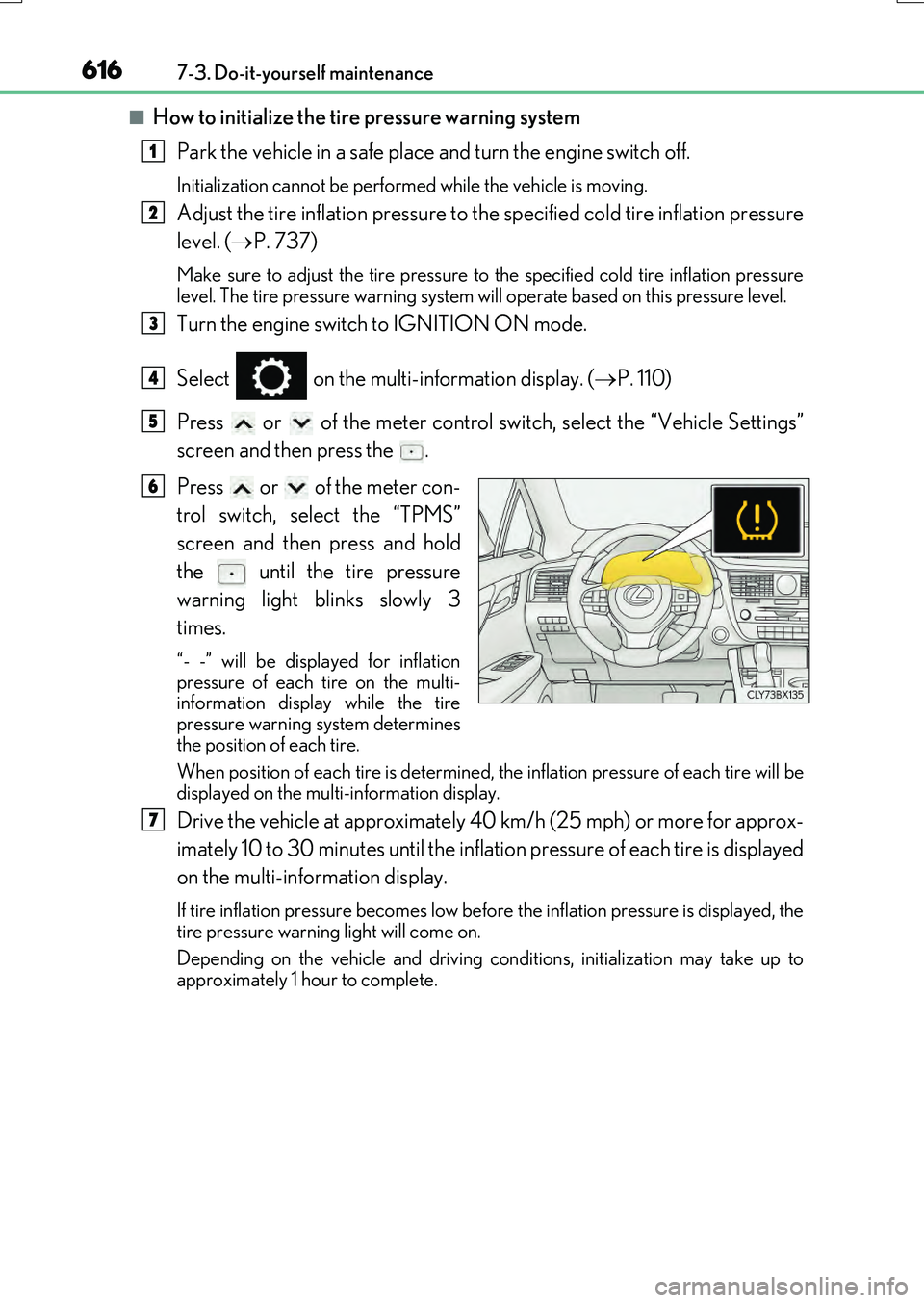
■How to initialize the tire pressure warning system
Park the vehicle in a safe place and turn the engine switch off.
Initialization cannot be perfor med while the vehicle is moving.
Adjust the tire inflation pressure to the specified cold tire inflation pressure
level. ( P. 737)
Make sure to adjust the tire pressure to the specified cold tire inflation pressure level. The tire pressure warning system will operate based on this pressure level.
Turn the engine switch to IGNITION ON mode.
Select on the multi-information display. ( P. 110)
Press or of the meter control switch, select the “Vehicle Settings”
screen and then press the .
Press or of the meter con-
trol switch, select the “TPMS”
screen and then press and hold
the until the tire pressure
warning light blinks slowly 3
times.
“- -” will be displayed for inflation pressure of each tire on the multi-information display while the tire
pressure warning system determines the position of each tire.
When position of each tire is determined, the inflation pressure of each tire will be
displayed on the multi-information display.
Drive the vehicle at approximately 40 km/h (25 mph) or more for approx-
imately 10 to 30 minutes until the inflation pressure of each tire is displayed
on the multi-information display.
If tire inflation pressure becomes low before the inflation pressure is displayed, the tire pressure warning light will come on.
Depending on the vehicle and driving co nditions, initialization may take up to
approximately 1 hour to complete.
1
2
3
4
5
6
7