power LEXUS RX200T 2017 Repair Manual
[x] Cancel search | Manufacturer: LEXUS, Model Year: 2017, Model line: RX200T, Model: LEXUS RX200T 2017Pages: 776, PDF Size: 44.51 MB
Page 421 of 776
4214-5. Using the driving support systems
4
Driving
RX350/RX200t_EE_OM48F32E
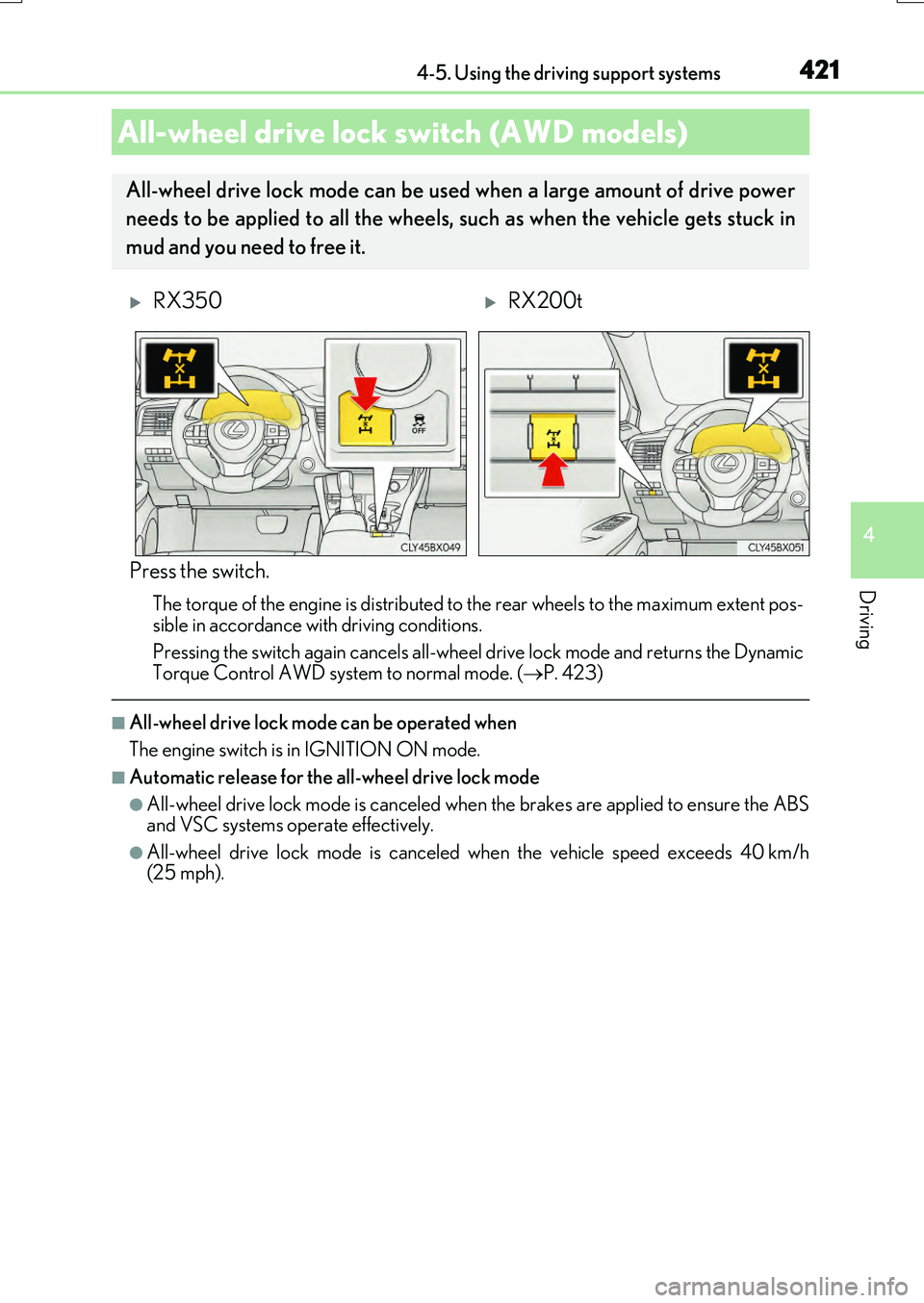
Press the switch.
The torque of the engine is distributed to the rear wheels to the maximum extent pos-
sible in accordance with driving conditions.
Pressing the switch again cancels all-wheel drive lock mode and returns the Dynamic Torque Control AWD system to normal mode. ( P. 423)
■All-wheel drive lock mode can be operated when
The engine switch is in IGNITION ON mode.
■Automatic release for the all-wheel drive lock mode
●All-wheel drive lock mode is canceled when the brakes are applied to ensure the ABS and VSC systems operate effectively.
●All-wheel drive lock mode is canceled when the vehicle speed exceeds 40 km/h(25 mph).
All-wheel drive lock switch (AWD models)
All-wheel drive lock mode can be used when a large amount of drive power
needs to be applied to all the wheels, such as when the vehicle gets stuck in
mud and you need to free it.
RX350RX200t
Page 422 of 776
4224-5. Using the driving support systems
RX350/RX200t_EE_OM48F32E
◆ABS (Anti-lock Brake System)
Helps to prevent wheel lock when the brakes are applied suddenly, or if the
brakes are applied while driving on a slippery road surface
◆Brake assist
Generates an increased level of braking force after the brake pedal is
depressed when the system detects a panic stop situation
◆VSC (Vehicle Stability Control)
Helps the driver to control skidding when swerving suddenly or turning on
slippery road surfaces.
◆VSC + (Vehicle Stability Control +)
Provides cooperative control of the ABS, TRC, VSC and EPS.
Helps to maintain directional stability when swerving on slippery road sur-
faces by controlling steering performance.
◆Trailer Sway Control
Helps the driver to control trailer sway by selectively applying brake pressure
for individual wheels and reducing driving torque when trailer sway is
detected.
◆TRC (Traction Control)
Helps to maintain drive power and prevent the drive wheels from spinning
when starting the vehicle or accelerating on slippery roads
◆Hill-start assist control
Helps to reduce the backward movement of the vehicle when starting on an
uphill
Driving assist systems
To help enhance driving safety and performance, the following systems oper-
ate automatically in response to various driving situations. Be aware, however,
that these systems are suppl ementary and should not be relied upon too heav-
ily when operating the vehicle.
Page 423 of 776
4234-5. Using the driving support systems
4
Driving
RX350/RX200t_EE_OM48F32E
◆EPS (Electric Power Steering)
Employs an electric motor to reduce the amount of effort needed to turn the
steering wheel
◆Dynamic Torque Control AWD system (AWD models)
Automatically switches from front-wheel drive to all-wheel drive (AWD)
according to the driving conditions, helping to ensure reliable handling and
stability. Examples of conditions where the system will switch to AWD are
when cornering, going uphill, starting off or accelerating, and when the road
surface is slippery due to snow, rain, etc.
◆Adaptive Variable Suspension System (if equipped)
Controls the damping force of the shock absorber of each wheel according to
the road and driving conditions, helping achieve a comfortable ride, excellent
driveability and a high level of stability.
If SPORT S+ mode is selected using the driving mode select switch, the
damping force will become more suitable for sporty driving. ( P. 418)
◆VDIM (Vehicle Dynamics Integrated Management) (if equipped)
Provides integrated control of the ABS, brake assist, TRC, VSC, hill-start
assist control and EPS systems
Helps to maintain vehicle stability when swerving on slippery road surfaces by
controlling the brakes and engine output
◆Emergency brake signal
When the brakes are applie d suddenly, the stop lights automatically flash to
alert the vehicle behind.
Page 424 of 776
4244-5. Using the driving support systems
RX350/RX200t_EE_OM48F32E
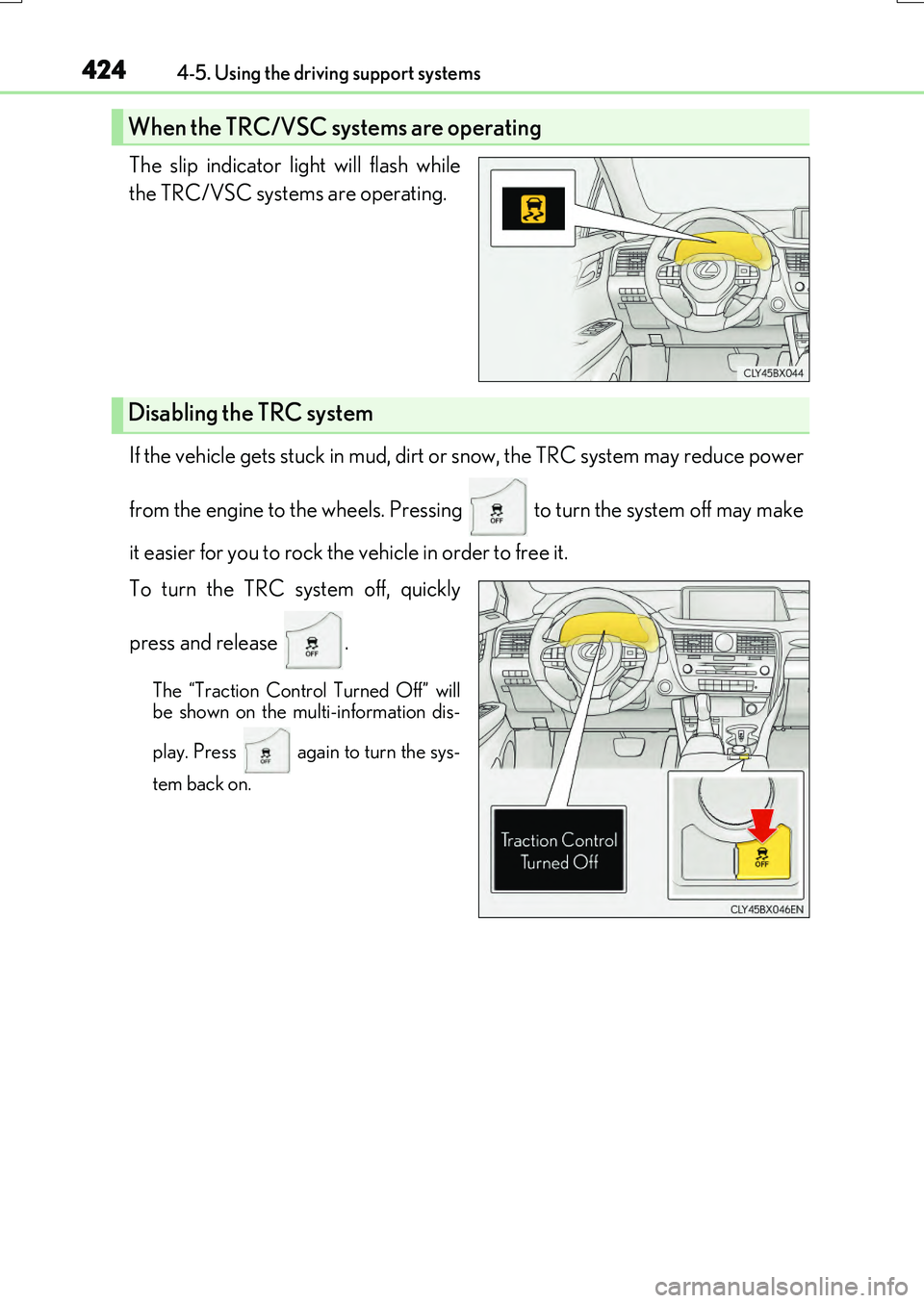
The slip indicator light will flash while
the TRC/VSC systems are operating.
If the vehicle gets stuck in mud, dirt or snow, the TRC system may reduce power
from the engine to the wheels. Pressing to turn the system off may make
it easier for you to rock the vehicle in order to free it.
To turn the TRC system off, quickly
press and release .
The “Traction Control Turned Off” will
be shown on the multi-information dis-
play. Press again to turn the sys-
tem back on.
When the TRC/VSC systems are operating
Disabling the TRC system
Page 427 of 776
4274-5. Using the driving support systems
4
Driving
RX350/RX200t_EE_OM48F32E
WARNING
■The ABS does not operate effectively when
●The limits of tire gripping performance have been exceeded (such as excessively worn tires on a snow covered road).
●The vehicle hydroplanes while driving at high speed on wet or slick roads.
■Stopping distance when the ABS is operating may exceed that of normal conditions
The ABS is not designed to shorten the vehicle’s stopping distance. Always maintain a
safe distance from the vehicle in front of you, especially in the following situations:
●When driving on dirt, gravel or snow-covered roads
●When driving with tire chains
●When driving over bumps in the road
●When driving over roads with potholes or uneven surfaces
■TRC/VSC may not operate effectively when
Directional control and power may not be achievable while driving on slippery road surfaces, even if the TRC/VSC system is operating. Drive the vehicle carefully in conditions where stability and power may be lost.
■Hill-start assist control does not operate effectively when
●Do not overly rely on hill-start assist control. Hill-start assist control may not operate effectively on steep inclines and roads covered with ice.
●Unlike the parking brake, hill-start assist co ntrol is not intended to hold the vehicle stationary for an extended period of time. Do not attempt to use hill-start assist con-trol to hold the vehicle on an incline, as doing so may lead to an accident.
■When the VSC is activated
The slip indicator light flashes. Always drive carefully. Reckless driving may cause an accident. Exercise particular care when the indicator light flashes.
■When the TRC/VSC systems are turned off
Be especially careful and drive at a speed appropriate to the road conditions. As these are the systems to help ensure vehicle stability and driving force, do not turn the TRC/
VSC systems off unless necessary. Trailer Sway Control is part of the VSC syst em and will not operate if VSC turned off or experiences a malfunction.
■Replacing tires
Make sure that all tires are of the specified size, brand, tread pattern and total load capacity. In addition, make sure that the tire s are inflated to the recommended tire infla-
tion pressure level.
The ABS, TRC and VSC systems will not function correctly if different tires are installed on the vehicle.
Contact any authorized Lexus dealer or repairer, or another duly qualified and equipped professional for further information when replacing tires or wheels.
Page 438 of 776
438
RX350/RX200t_EE_OM48F32E
5-1. Basic Operations
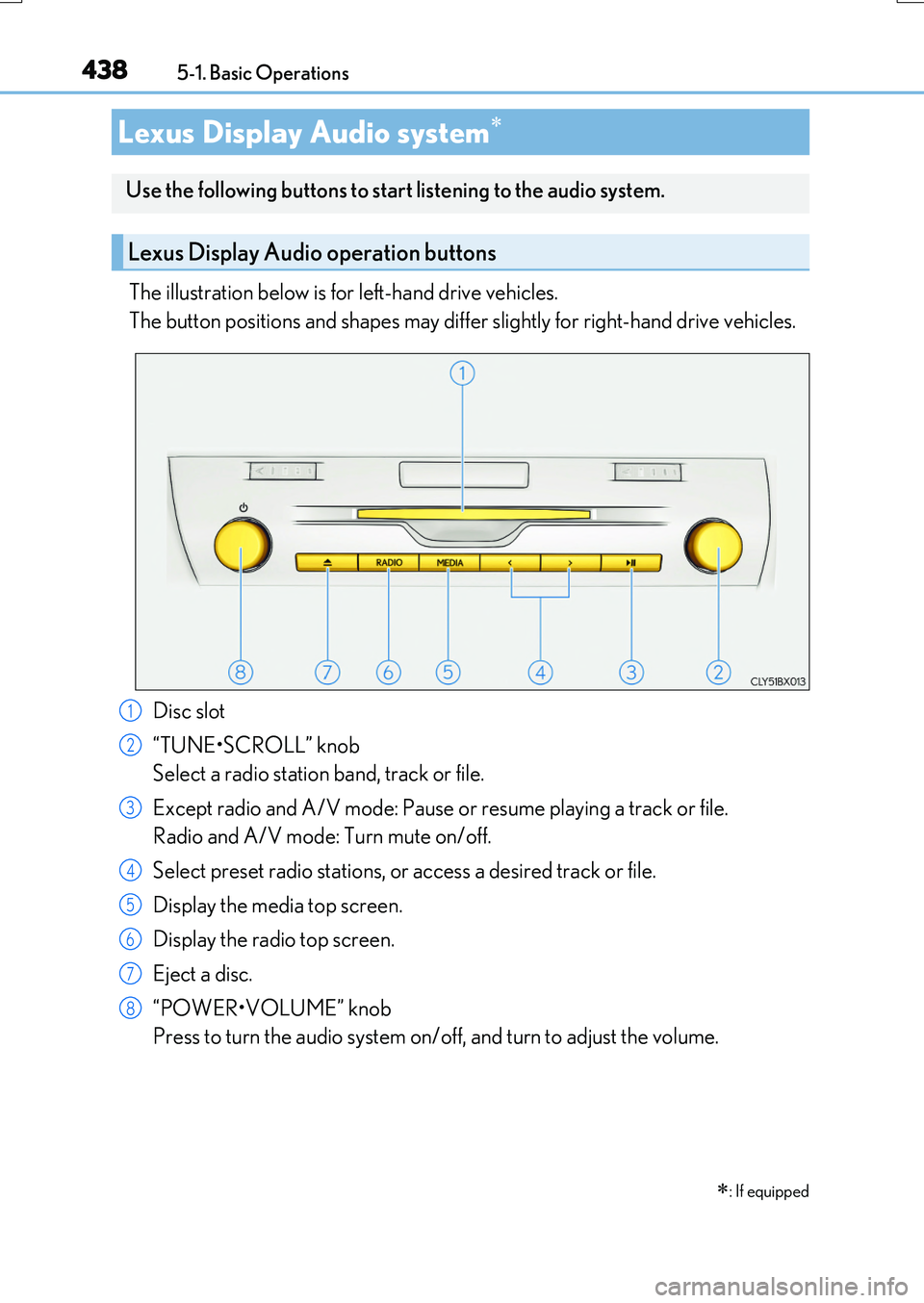
The illustration below is for left-hand drive vehicles.
The button positions and shapes may differ slightly for right-hand drive vehicles.
Disc slot
“TUNE•SCROLL” knob
Select a radio station band, track or file.
Except radio and A/V mode: Pause or resume playing a track or file.
Radio and A/V mode: Turn mute on/off.
Select preset radio stations, or access a desired track or file.
Display the media top screen.
Display the radio top screen.
Eject a disc.
“POWER•VOLUME” knob
Press to turn the audio system on/off, and turn to adjust the volume.
Lexus Display Audio system
: If equipped
Use the following buttons to start listening to the audio system.
Lexus Display Audio operation buttons
1
2
3
4
5
6
7
8
Page 444 of 776
4445-1. Basic Operations
RX350/RX200t_EE_OM48F32E
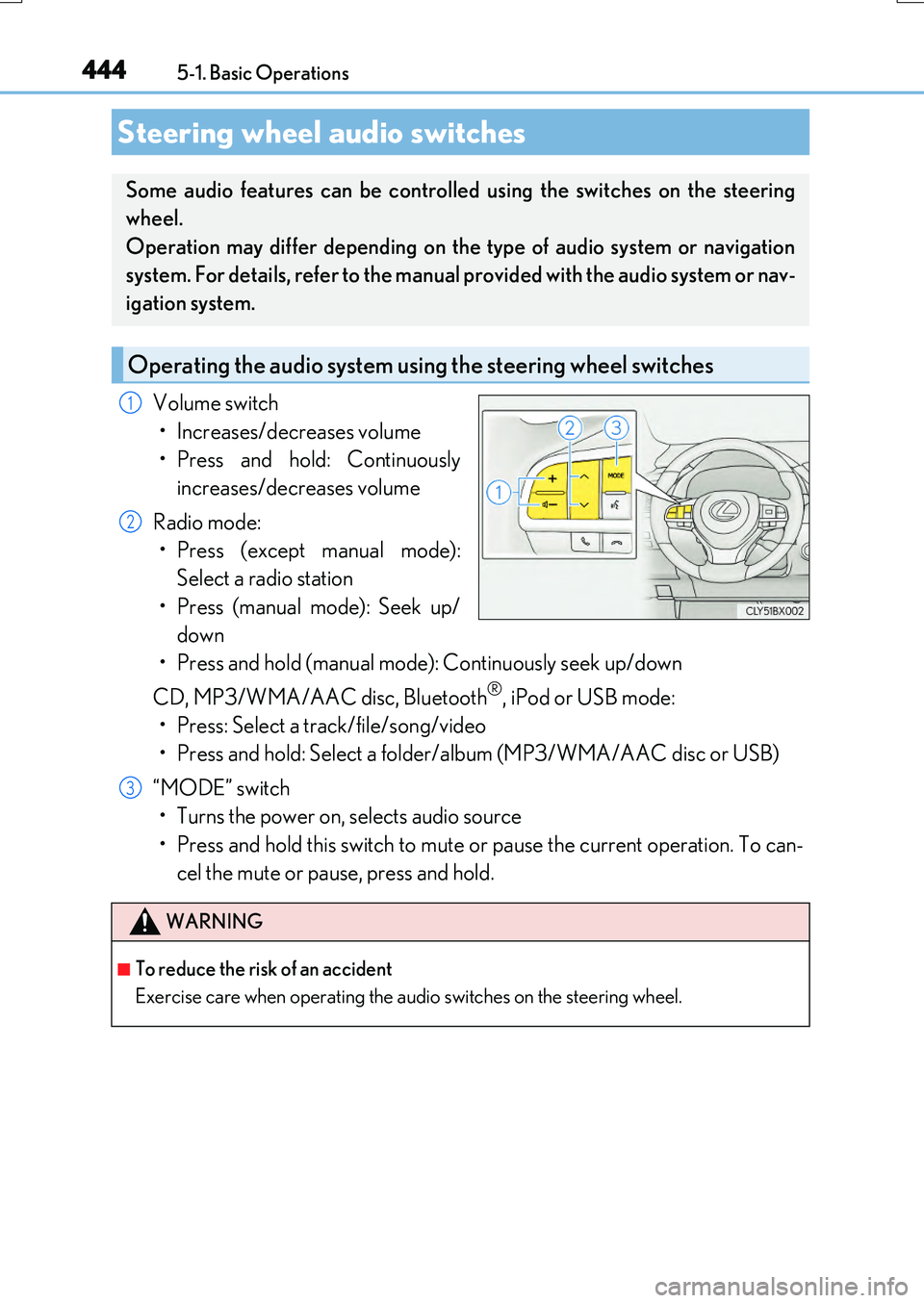
Volume switch
• Increases/decreases volume
• Press and hold: Continuously
increases/decreases volume
Radio mode:
• Press (except manual mode):
Select a radio station
• Press (manual mode): Seek up/
down
• Press and hold (manual mode): Continuously seek up/down
CD, MP3/WMA/AAC disc, Bluetooth®, iPod or USB mode:
• Press: Select a track/file/song/video
• Press and hold: Select a folder/album (MP3/WMA/AAC disc or USB)
“MODE” switch
• Turns the power on, selects audio source
• Press and hold this switch to mute or pause the current operation. To can-
cel the mute or pause, press and hold.
Steering wheel audio switches
Some audio features can be controlled using the switches on the steering
wheel.
Operation may differ depending on the type of audio system or navigation
system. For details, refer to the manual provided with the audio system or nav-
igation system.
Operating the audio system us ing the steering wheel switches
1
2
WARNING
■To reduce the risk of an accident
Exercise care when operating the audio switches on the steering wheel.
3
Page 445 of 776
4455-1. Basic Operations
5
Lexus Display Audio system
RX350/RX200t_EE_OM48F32E
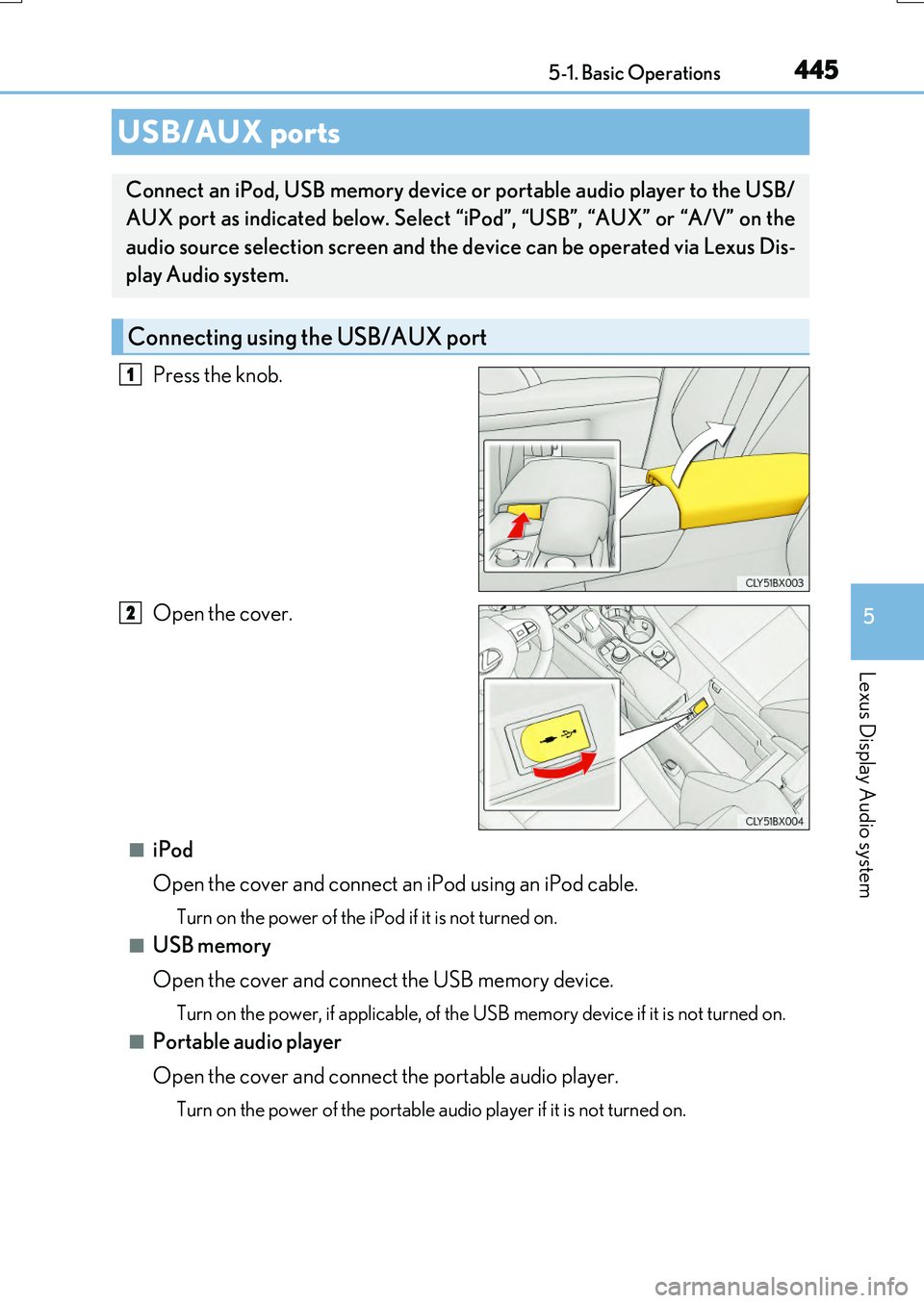
Press the knob.
Open the cover.
■iPod
Open the cover and connect an iPod using an iPod cable.
Turn on the power of the iPod if it is not turned on.
■USB memory
Open the cover and connect the USB memory device.
Turn on the power, if applicable, of the US B memory device if it is not turned on.
■Portable audio player
Open the cover and connect the portable audio player.
Turn on the power of the portable audio player if it is not turned on.
USB/AUX ports
Connect an iPod, USB memory device or portable audio player to the USB/
AUX port as indicated below. Select “iPod”, “USB”, “AUX” or “A/V” on the
audio source selection screen and the device can be operated via Lexus Dis-
play Audio system.
Connecting using the USB/AUX port
1
2
Page 470 of 776
4705-5. Playing an audio CD and MP3/WMA/AAC discs
RX350/RX200t_EE_OM48F32E
■The Gracenote® media database
●Gracenote, the Gracenote logo and logotype, “Powered by Gracenote”, MusicID,
Playlist Plus and MediaVOCS are either registered trademarks or trademarks of
Gracenote, Inc. in the United States
Page 481 of 776
4815-6. Using an external device
5
Lexus Display Audio system
RX350/RX200t_EE_OM48F32E
P. 445
Pressing the “MEDIA” button displays th e top screen from any screen of the
selected source.
■Menu screen
P. 461
■Operating portable players connected to the audio system
Volume can be adjusted using the vehicle’s audio controls. All other adjustments must be made on the portable player itself.
■When using a portable player connected to the power outlet
Noise may occur during playback. Use the power source of the portable player.
Using the AUX port
To use the AUX port, connect a portable player, press the “MEDIA” button or
select “AUX” or “A/V” on the “Source” screen.
Connecting a portable player
Top screen
NOTICE
■To prevent damage to the portable player or its terminal
●Depending on the size and shape of the portable player that is connected to the sys-
tem, the console box may not close fully. In this case, do not forcibly close the console box as this may damage the portable player or the terminal, etc.
●Do not leave portable player in the vehicle. The temperature inside the vehicle may
become high.
●Do not push down on or apply unnecessary pr essure to the portable player while it is connected.
●Do not insert foreign objects into the port.