ESP LEXUS RX270 2014 Owner's Manual
[x] Cancel search | Manufacturer: LEXUS, Model Year: 2014, Model line: RX270, Model: LEXUS RX270 2014Pages: 652, PDF Size: 48.98 MB
Page 307 of 652
307
2-5. Driving information
2
When driving
RX350/270_EE
Guidance
Your vehicle will handle differently when towing a trailer. In order to avoid
accident, death or serious injury, keep the following in mind when towing:
■Checking connections between trailer and lights
Stop the vehicle and check the operation of the connection between
the trailer and lights after driving for a brief period as well as before
starting off.
■Practicing driving with a coupled trailer
●Get the feel for turning, stopping and reversing with the trailer cou-
pled by practicing in an area with no or light traffic.
●When reversing with a coupled trailer, hold the section of the steer-
ing wheel nearest to you and rotate clockwise to turn the trailer left
or counterclockwise to turn it right. Always rotate a little at a time to
prevent steering error. Have someone guide you when reversing to
lessen the risk of an accident.
■Increasing vehicle-to-vehicle distance
At a speed of 10 km/h (6 mph), the distance to the vehicle running
ahead of you should be equivalent to or greater than the combined
length of your vehicle and trailer. Avoid sudden braking that may cause
skidding. Otherwise, the vehicle may spin out of control. This is espe-
cially true when driving on wet or slippery road surfaces.
■Sudden acceleration/steering input/cornering
Executing sharp turns when towing may result in the trailer colliding
with your vehicle. Decelerate well in advance when approaching turns
and take them slowly and carefully to avoid sudden braking.
RX350_270_EE_48D77E.book 307 ページ 2014年1月24日 金曜日 午前10時4分
Page 324 of 652
324
3-2. Using the audio system
RX350/270_EE
■Using mobile phones
Interference may be heard through the audio system’s speakers if a mobile phone is
being used inside or close to the vehicle while the audio system is operating.
Ti t l ePa g e
Using the radioP. 3 2 6
Using the CD playerP. 3 3 0
Playing MP3 and WMA discsP. 3 3 7
Operating an iPodP. 3 4 4
Operating a USB memoryP. 3 5 3
Bluetooth® audio systemP. 3 6 1
Optimal use of the audio systemP. 3 7 7
Using the AUX portP. 3 7 9
Using the steering wheel audio switchesP. 3 8 1
Hands-free system for mobile phonesP. 3 8 4
RX350_270_EE_48D77E.book 324 ページ 2014年1月24日 金曜日 午前10時4分
Page 349 of 652
349
3-2. Using the audio system
3
Interior features
RX350/270_EE
Adjusting sound quality and volume balance
Press to enter iPod menu mode.
Pressing changes sound modes. (→P. 3 7 7 )
■About iPod
●“Made for iPod” and “Made for iPhone” mean that an electronic accessory has
been designed to connect specifically to iPod, or iPhone, respectively, and has
been certified by the developer to meet Apple performance standards.
●Apple is not responsible for the operation of this device or its compliance with
safety and regulatory standards. Please note that the use of this accessory with
iPod or iPhone may affect wireless performance.
●iPhone, iPod, iPod classic, iPod nano and iPod touch are trademarks of Apple
Inc., registered in the U.S. and other countries.
STEP1
STEP2
RX350_270_EE_48D77E.book 349 ページ 2014年1月24日 金曜日 午前10時4分
Page 357 of 652
357
3-2. Using the audio system
3
Interior features
RX350/270_EE
■USB memory
●Compatible devices
USB memories that can be used for MP3 and WMA playback
●Compatible device formats
The following device formats can be used:
• USB communication formats: USB2.0 FS (12 mbps)
• File formats: FAT16/32 (Windows)
• Correspondence class: Mass storage class
MP3 and WMA files written in any format other than those listed above may not
play correctly, and their file names and folder names may not be displayed cor-
rectly.
Items related to standards and limitations are as follows:
• Maximum directory hierarchy: 8 levels
• Maximum number of folders in a device: 999 (including the root)
• Maximum number of files in a device: 65025
• Maximum number of files per folder: 255
●MP3 and WMA files
MP3 (MPEG Audio LAYER 3) is a standard audio compression format.
Files can be compressed to approximately 1 /10 of their original size using MP3
compression.
WMA (Windows Media Audio) is a Microsoft audio compression format.
This format compresses audio data to a size smaller than that of the MP3 format.
There is a limit to the MP3 and WMA file standards that can be used and to the
media/formats on which the files are recorded.
RX350_270_EE_48D77E.book 357 ページ 2014年1月24日 金曜日 午前10時4分
Page 362 of 652
362
3-2. Using the audio system
RX350/270_EE
■When transferring ownership of the vehicle
Be sure to initialize the system to prevent personal data from being improperly
accessed. (→P. 4 0 9 )
■About Bluetooth®
■Compatible models
●Bluetooth® specifications:
Ver. 1.1, or higher (Recommended: Ver. 1.2 or higher)
●Following profiles:
• A2DP (Advanced Audio Distribution Profile) Ver. 1.0, or higher (Conformed:
Ve r. 1 . 2
• AVRCP (Audio/Video Remote Control Profile) Ver. 1.0 or higher (Con-
formed: Ver. 1.3)
Portable players must correspond to the above specifications in order to be con-
nected to the Bluetooth
® audio system. However, please note that some functions
may be limited depending on the type of portable player.Bluetooth is a registered trademark of
Bluetooth SIG. Inc.
RX350_270_EE_48D77E.book 362 ページ 2014年1月24日 金曜日 午前10時4分
Page 385 of 652
385
3-2. Using the audio system
3
Interior features
RX350/270_EE
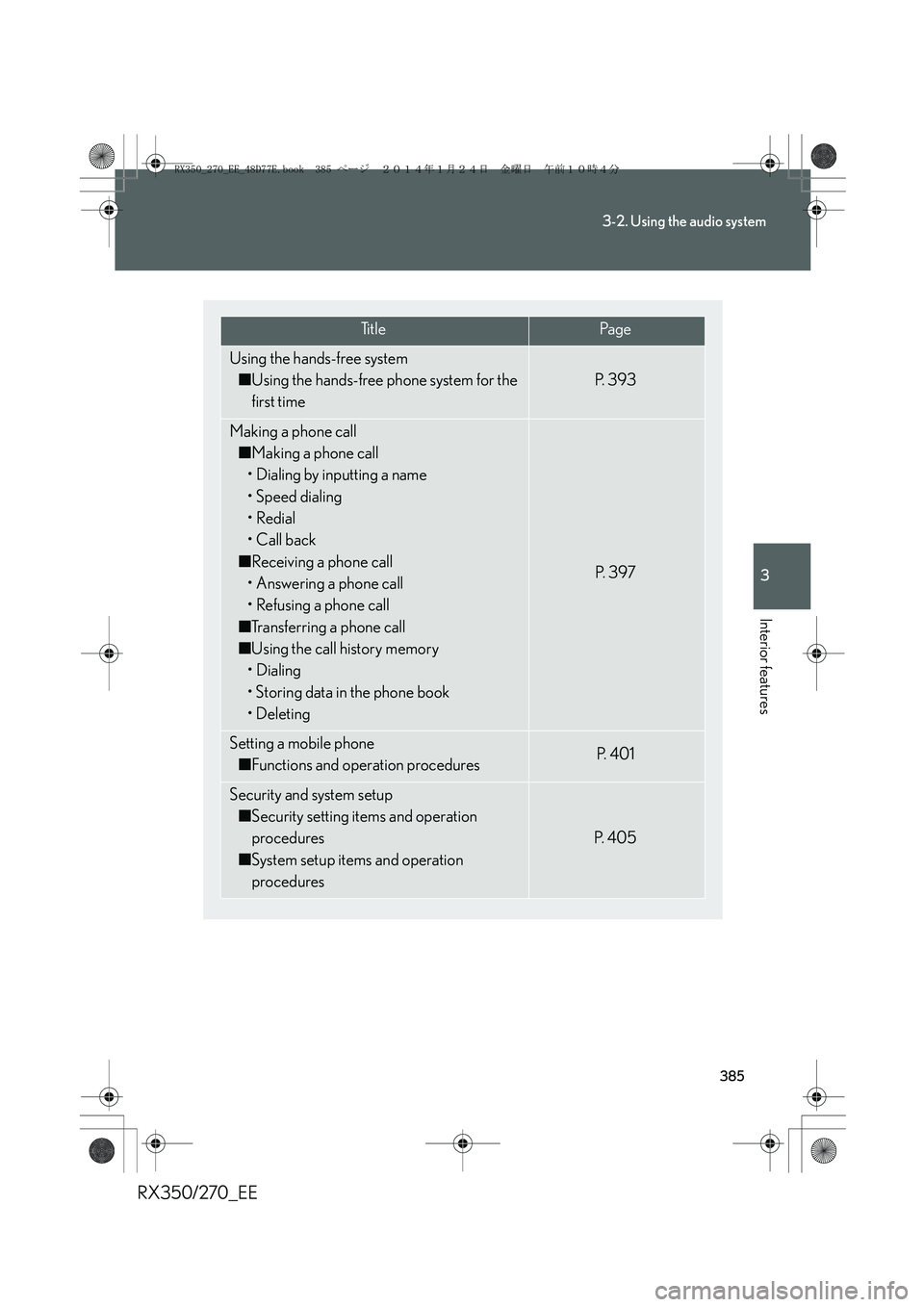
Ti t l ePa g e
Using the hands-free system
■Using the hands-free phone system for the
first time
P. 3 9 3
Making a phone call
■Making a phone call
• Dialing by inputting a name
• Speed dialing
•Redial
• Call back
■Receiving a phone call
• Answering a phone call
• Refusing a phone call
■Transferring a phone call
■Using the call history memory
• Dialing
• Storing data in the phone book
•Deleting
P. 3 9 7
Setting a mobile phone
■Functions and operation proceduresP. 4 0 1
Security and system setup
■Security setting items and operation
procedures
■System setup items and operation
procedures
P. 4 0 5
RX350_270_EE_48D77E.book 385 ページ 2014年1月24日 金曜日 午前10時4分
Page 445 of 652
445
3-5. Other interior features
3
Interior features
RX350/270_EE
CAUTION
Observe the following precautions.
Failure to do so may cause the driver's floor mat to slip, possibly interfering with the
pedals while driving. An unexpectedly high speed may result or it may become diffi-
cult to stop the vehicle, leading to a serious accident.
■When installing the driver's floor mat
●Do not use floor mats designed for other models or different model year vehicles,
even if they are Lexus Genuine floor mats.
●Only use floor mats designed for the driver's seat.
●Always install the floor mat securely using the retaining hooks (clips) provided.
●Do not use two or more floor mats on top of each other.
●Do not place the floor mat bottom-side up or upside-down.
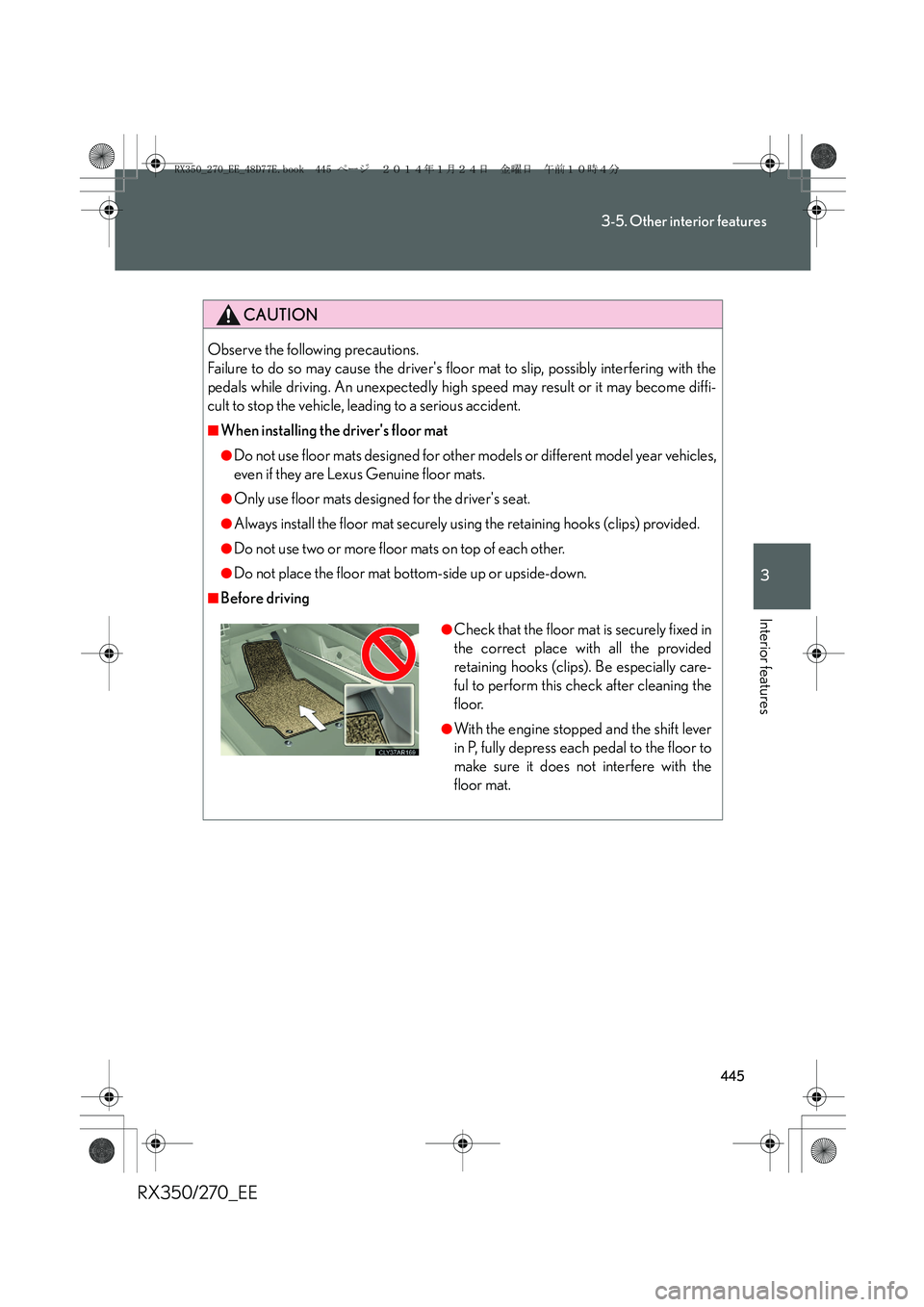
■Before driving
●Check that the floor mat is securely fixed in
the correct place with all the provided
retaining hooks (clips). Be especially care-
ful to perform this check after cleaning the
floor.
●With the engine stopped and the shift lever
in P, fully depress each pedal to the floor to
make sure it does not interfere with the
floor mat.
RX350_270_EE_48D77E.book 445 ページ 2014年1月24日 金曜日 午前10時4分
Page 456 of 652
456
4-1. Maintenance and care
RX350/270_EE
■Caring for leather areas
Lexus recommends cleaning the interior of the vehicle at least twice a year to main-
tain the quality of the vehicle’s interior.
■Shampooing the carpets
There are several commercial foaming-type cleaners available. Use a sponge or
brush to apply the foam. Rub in overlapping circles. Do not apply water. Excellent
results are obtained by keeping the carpet as dry as possible.
■Seat belts
Clean with mild soap and lukewarm water using a cloth or sponge. Also check the
belts periodically for excessive wear, fraying or cuts.
CAUTION
■Water in the vehicle
●Do not splash or spill liquid in the vehicle.
●Do not get any of the SRS components or wiring in the vehicle interior wet.
(→P. 1 3 2 )
An electrical malfunction may cause the airbags to deploy or not function prop-
erly, resulting in death or severe injury.
■Cleaning the interior (especially instrument panel)
Do not use polish wax or polish cleaner. The instrument panel may reflect off the
windshield, obstructing the driver's view and leading to an accident, resulting in
death or serious injury.
RX350_270_EE_48D77E.book 456 ページ 2014年1月24日 金曜日 午前10時4分
Page 457 of 652
457
4-1. Maintenance and care
4
Maintenance and care
RX350/270_EE
NOTICE
■Cleaning detergents
●Do not use the following types of detergent, as they may discolor the vehicle inte-
rior or cause streaks or damage to painted surfaces:
• Non-seat portions: Organic substances such as benzene or gasoline, alkaline
or acidic solutions, dye, or bleach
• Seats: Acidic solutions, such as thinner, benzene, or alcohol
●Do not use polish wax or polish cleaner. The instrument panel's or other interior
part’s painted surface may be damaged.
■Preventing damage to leather surfaces
Observe the following precautions to avoid damage to and deterioration of leather
surfaces:
●Remove any dust or dirt from leather surfaces immediately.
●Do not expose the vehicle to direct sunlight for extended periods of time. Park
the vehicle in the shade, especially during summer.
●Do not place items made of vinyl, plastic, or that contain wax on the upholstery, as
they may stick to the leather surface if the vehicle interior heats up significantly.
■Water on the floor
Do not wash the vehicle floor with water.
Vehicle systems such as the audio system may be damaged if water comes into
contact with electrical components under the floor of vehicle. Water may also
cause the body to rust.
■Cleaning the inside of the rear window
●Do not use glass cleaner to clean the rear window, as this may cause damage to
the rear window defogger heater wires or antenna. Use a cloth dampened with
lukewarm water to gently wipe the window clean. Wipe the window in strokes
running parallel to the heater wires or antenna.
●Be careful not to scratch or damage the heater wires or antenna.
RX350_270_EE_48D77E.book 457 ページ 2014年1月24日 金曜日 午前10時4分
Page 573 of 652
5
573
5-2. Steps to take in an emergency
When trouble arises
RX350/270_EE
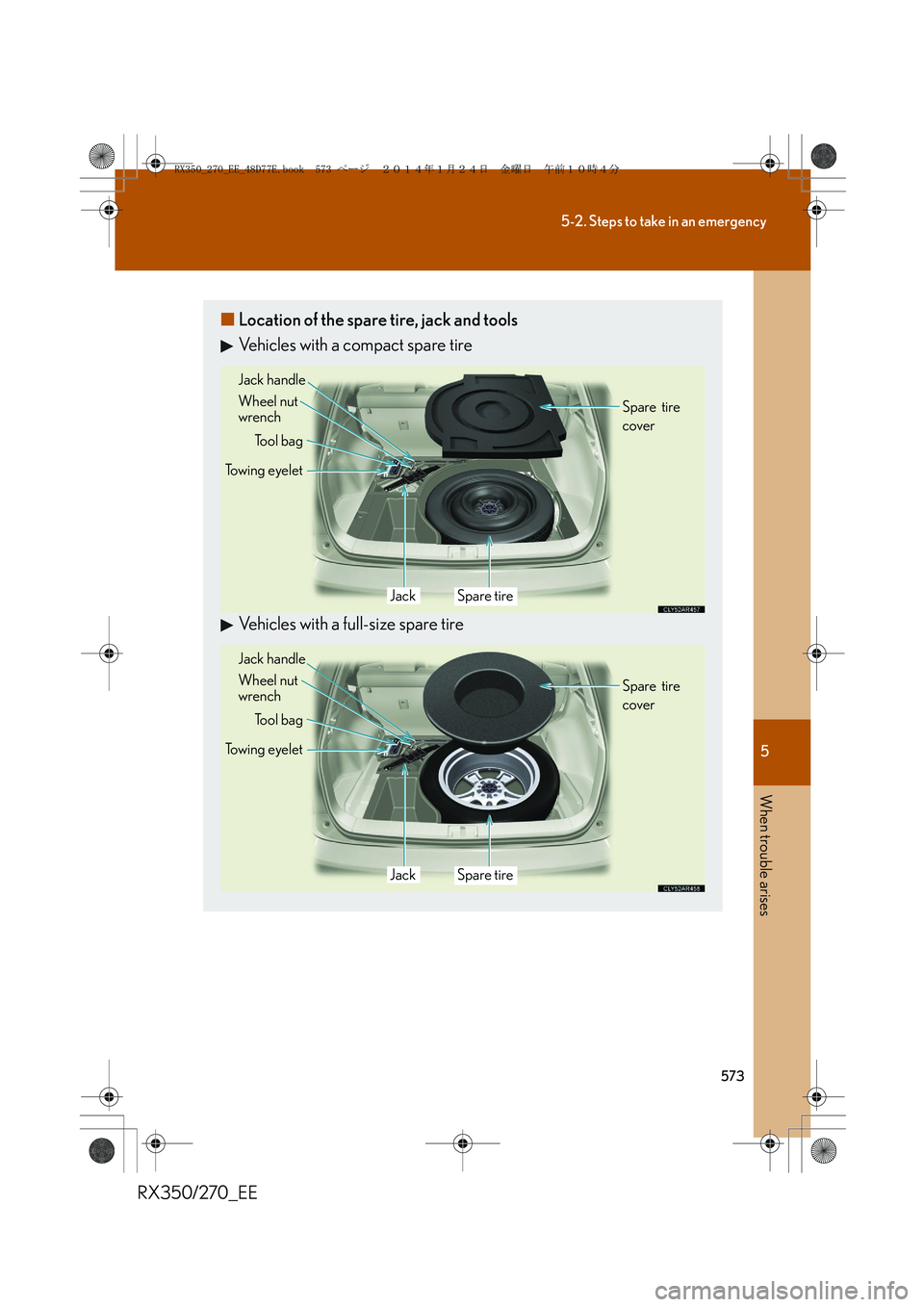
■Location of the spare tire, jack and tools
Vehicles with a compact spare tire
Vehicles with a full-size spare tire
Towing eyelet
Tool bag
Jack handle
Wheel nut
wrench
JackSpare tireSpare tire
cover
Towing eyelet
Tool bag
JackSpare tire Jack handle
Wheel nut
wrenchSpare tire
cover
RX350_270_EE_48D77E.book 573 ページ 2014年1月24日 金曜日 午前10時4分