light LEXUS RX270 2014 Workshop Manual
[x] Cancel search | Manufacturer: LEXUS, Model Year: 2014, Model line: RX270, Model: LEXUS RX270 2014Pages: 652, PDF Size: 48.98 MB
Page 201 of 652
201
2-2. Instrument cluster
2
When driving
RX350/270_EE
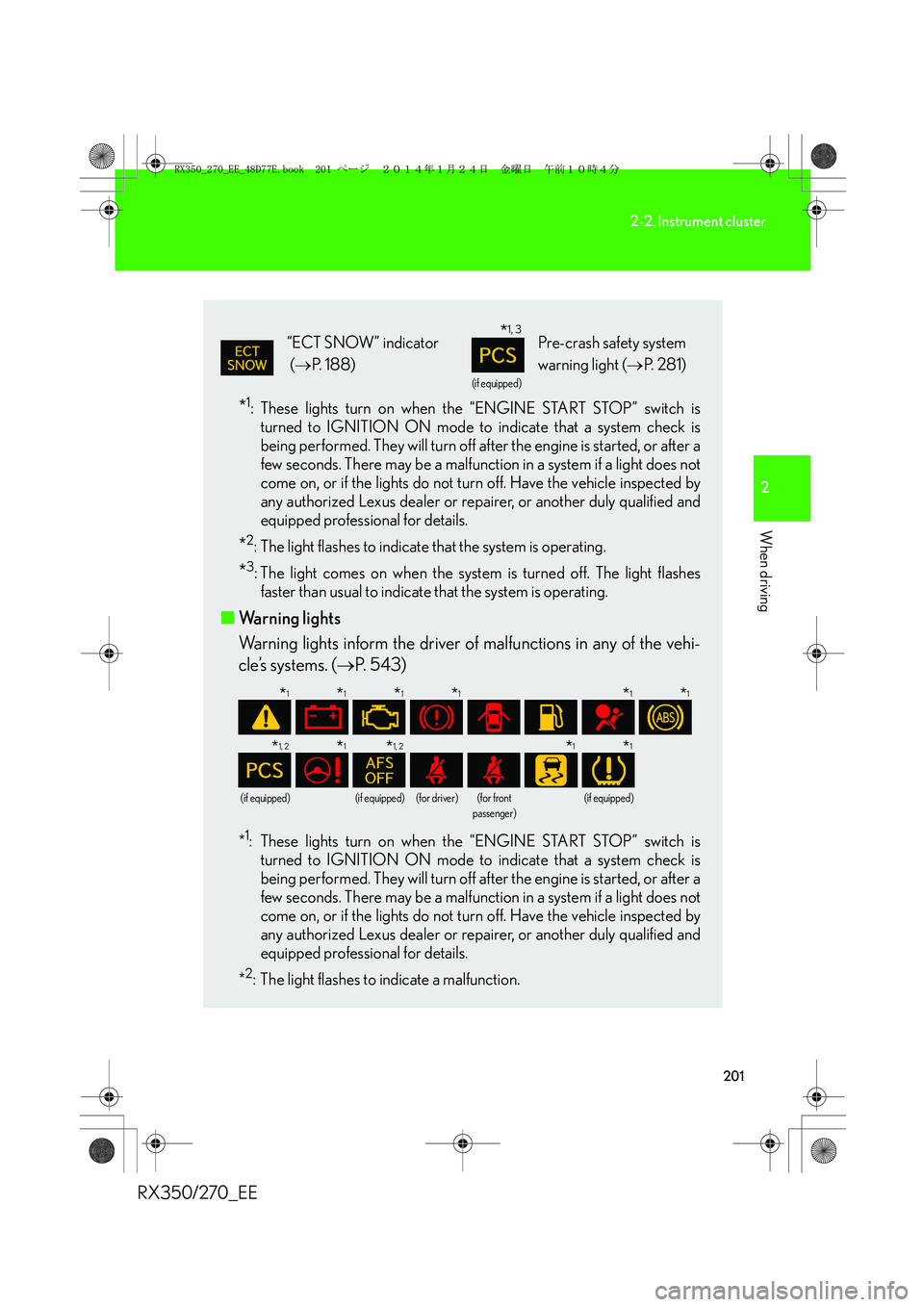
*1: These lights turn on when the “ENGINE START STOP” switch is
turned to IGNITION ON mode to indicate that a system check is
being performed. They will turn off after the engine is started, or after a
few seconds. There may be a malfunction in a system if a light does not
come on, or if the lights do not turn off. Have the vehicle inspected by
any authorized Lexus dealer or repairer, or another duly qualified and
equipped professional for details.
*2: The light flashes to indicate that the system is operating.
*3: The light comes on when the system is turned off. The light flashes
faster than usual to indicate that the system is operating.
■Warning lights
Warning lights inform the driver of malfunctions in any of the vehi-
cle’s systems. (→P. 543)
*1: These lights turn on when the “ENGINE START STOP” switch is
turned to IGNITION ON mode to indicate that a system check is
being performed. They will turn off after the engine is started, or after a
few seconds. There may be a malfunction in a system if a light does not
come on, or if the lights do not turn off. Have the vehicle inspected by
any authorized Lexus dealer or repairer, or another duly qualified and
equipped professional for details.
*
2: The light flashes to indicate a malfunction.
“ECT SNOW” indicator
(→P. 188)
(if equipped)
Pre-crash safety system
warning light (→P. 2 8 1 )
(if equipped)(if equipped)(for driver)(for front
passenger)(if equipped)
*1, 3
*1*1*1*1*1*1
*1, 2*1*1, 2*1*1
RX350_270_EE_48D77E.book 201 ページ 2014年1月24日 金曜日 午前10時4分
Page 202 of 652
202
2-2. Instrument cluster
RX350/270_EE
CAUTION
■If a safety system warning light does not come on
Should a safety system light such as the ABS and SRS airbag warning light not
come on when you start the engine, this could mean that these systems are not
available to help protect you in an accident, which could result in death or serious
injury. Have the vehicle inspected by any authorized Lexus dealer or repairer, or
another duly qualified and equipped professional immediately if this occurs.
RX350_270_EE_48D77E.book 202 ページ 2014年1月24日 金曜日 午前10時4分
Page 206 of 652
206
2-2. Instrument cluster
RX350/270_EE
Trip information
■Current fuel consumption
Displays the current rate of fuel consumption
■Average fuel consumption after refueling
Displays the average fuel consumption since the vehicle was last refu-
eled
Use the displayed average fuel consumption as a reference.
■Average fuel consumption
Displays the average fuel consumption since the function was reset
• The function can be reset by pushing the “ENTER” switch for longer than
one second when the average fuel consumption is displayed.
• Use the displayed average fuel consumption as a reference.
Other contentsDetails
Outside temperature Displays the outside temperature
Dynamic radar cruise control display
(if equipped) (→P. 2 3 4 )Automatically displayed when using
dynamic radar cruise control
Window close suggestion mode
(→P. 2 0 8 )
If you forget to close a window
before exiting the vehicle, a sugges-
tion to close all the windows is
shown.
Customization (→P. 622)
Settings of functions such as the
door lock and light illumination time
can be changed
Wa r n i n g m e s s a g e (→P. 552)
Automatically displayed when a mal-
function occurs in one of the vehi-
cle’s systems
RX350_270_EE_48D77E.book 206 ページ 2014年1月24日 金曜日 午前10時4分
Page 210 of 652
210
2-2. Instrument cluster
RX350/270_EE
●In the following situations, the window close operation will stop partway:
• The “ENGINE START STOP” switch is turned to IGNITION ON mode.
• The “ENTER” switch was pressed.
• The window lock switch was turned on.
• The jam protection function was activated.
• The windows were opened or closed by the wireless remote control.
If the power window switch of any of the door is operated while in windows close
suggestion mode, the windows close operation of that door will stop partway.
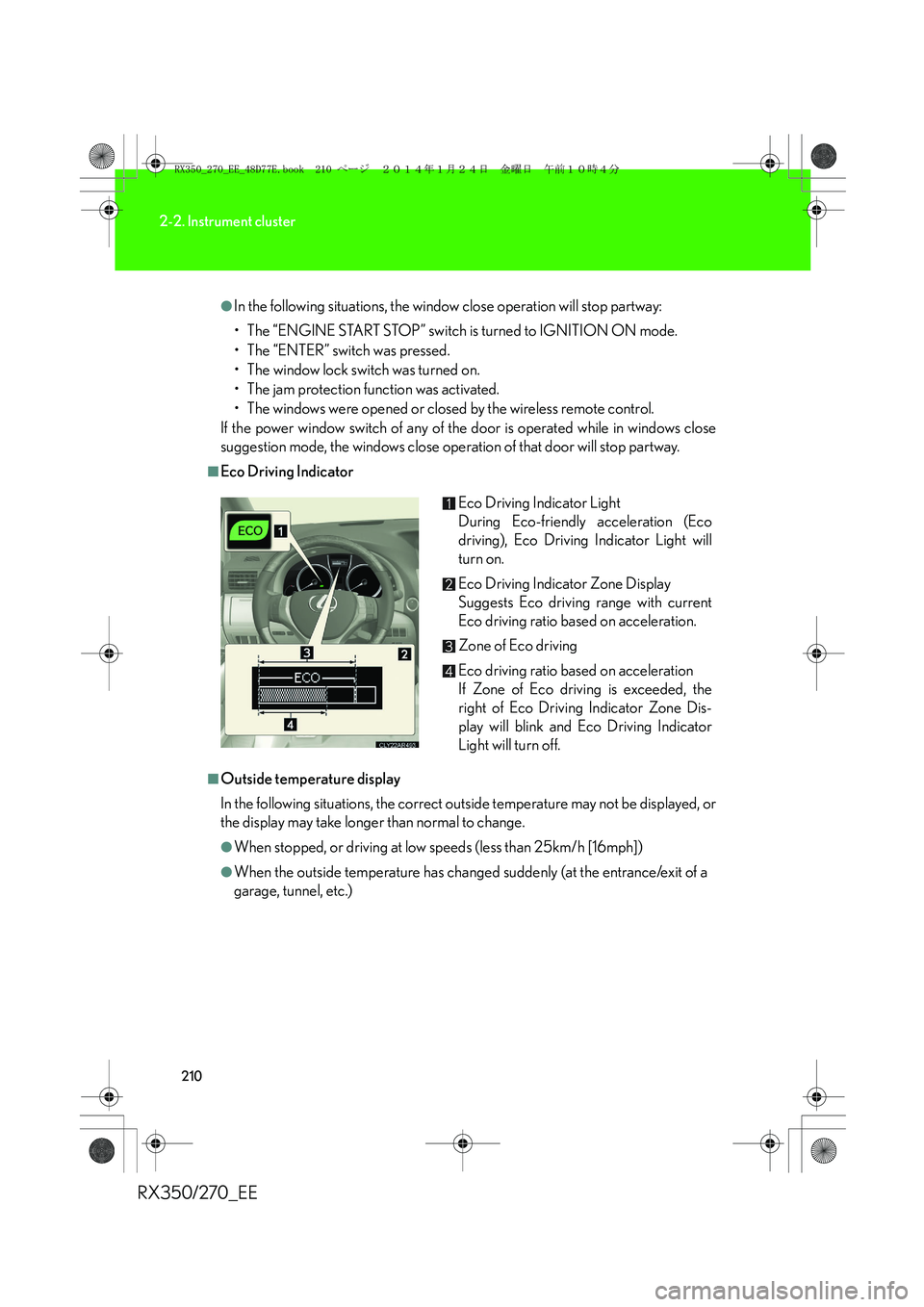
■Eco Driving Indicator
■Outside temperature display
In the following situations, the correct outside temperature may not be displayed, or
the display may take longer than normal to change.
●When stopped, or driving at low speeds (less than 25km/h [16mph])
●When the outside temperature has changed suddenly (at the entrance/exit of a
garage, tunnel, etc.)Eco Driving Indicator Light
During Eco-friendly acceleration (Eco
driving), Eco Driving Indicator Light will
turn on.
Eco Driving Indicator Zone Display
Suggests Eco driving range with current
Eco driving ratio based on acceleration.
Zone of Eco driving
Eco driving ratio based on acceleration
If Zone of Eco driving is exceeded, the
right of Eco Driving Indicator Zone Dis-
play will blink and Eco Driving Indicator
Light will turn off.
RX350_270_EE_48D77E.book 210 ページ 2014年1月24日 金曜日 午前10時4分
Page 215 of 652
215
2-2. Instrument cluster
2
When driving
RX350/270_EE
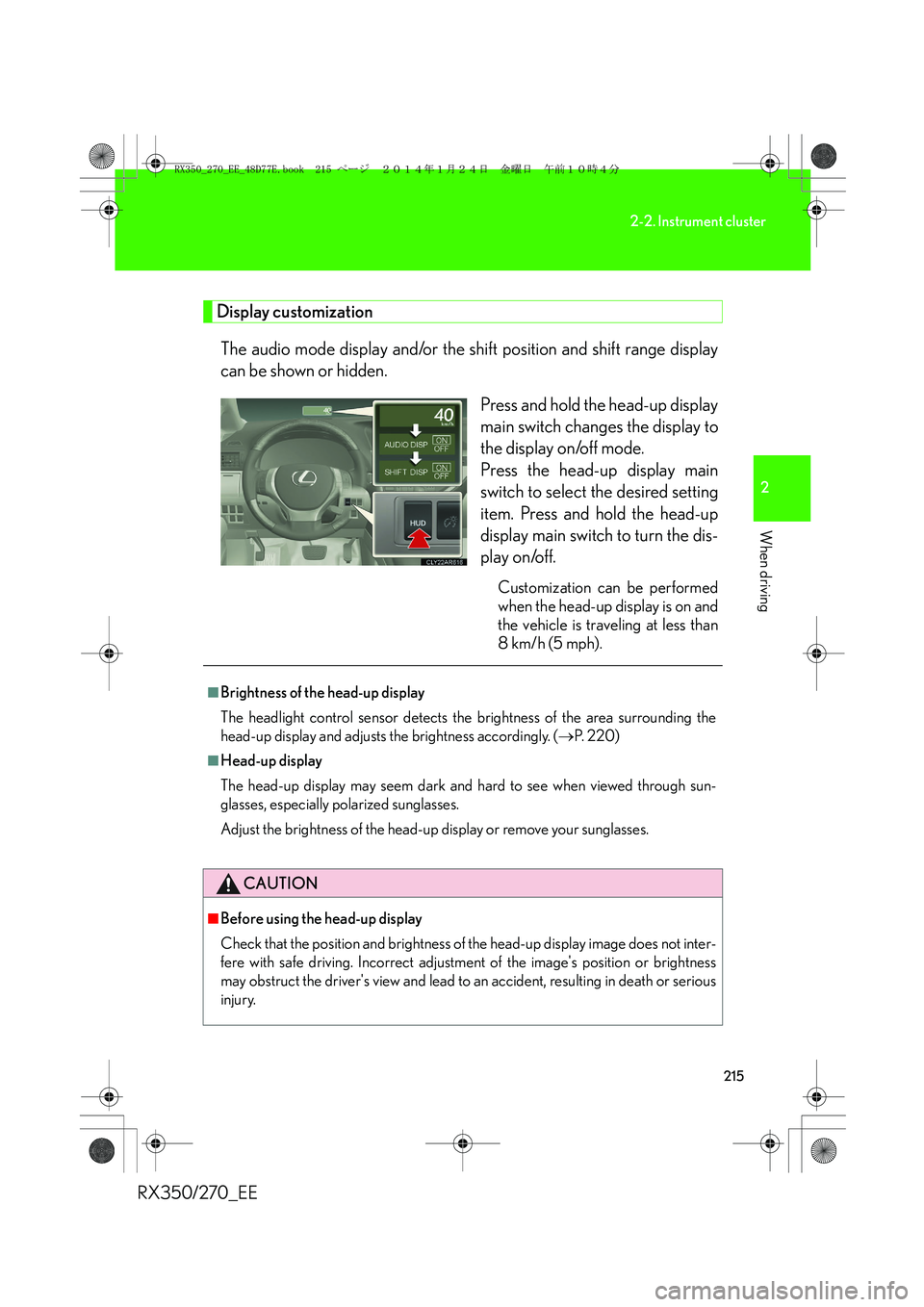
Display customization
The audio mode display and/or the shift position and shift range display
can be shown or hidden.
Press and hold the head-up display
main switch changes the display to
the display on/off mode.
Press the head-up display main
switch to select the desired setting
item. Press and hold the head-up
display main switch to turn the dis-
play on/off.
Customization can be performed
when the head-up display is on and
the vehicle is traveling at less than
8 km/h (5 mph).
■Brightness of the head-up display
The headlight control sensor detects the brightness of the area surrounding the
head-up display and adjusts the brightness accordingly. (→P. 220)
■Head-up display
The head-up display may seem dark and hard to see when viewed through sun-
glasses, especially polarized sunglasses.
Adjust the brightness of the head-up display or remove your sunglasses.
CAUTION
■Before using the head-up display
Check that the position and brightness of the head-up display image does not inter-
fere with safe driving. Incorrect adjustment of the image's position or brightness
may obstruct the driver's view and lead to an accident, resulting in death or serious
injury.
RX350_270_EE_48D77E.book 215 ページ 2014年1月24日 金曜日 午前10時4分
Page 217 of 652
217
2
When driving
RX350/270_EE
2-3. Operating the lights and windshield wipers
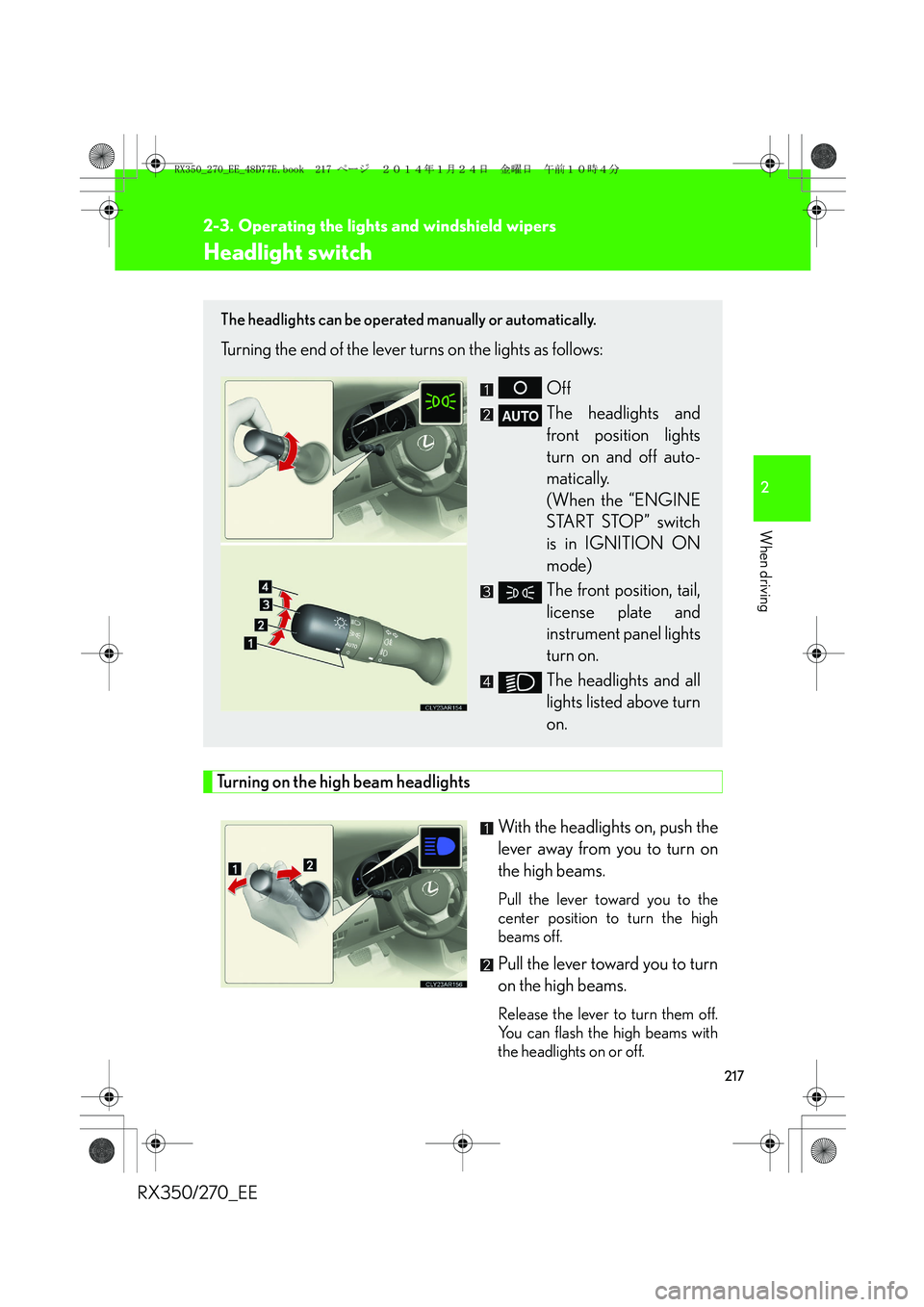
Headlight switch
Turning on the high beam headlights
With the headlights on, push the
lever away from you to turn on
the high beams.
Pull the lever toward you to the
center position to turn the high
beams off.
Pull the lever toward you to turn
on the high beams.
Release the lever to turn them off.
You can flash the high beams with
the headlights on or off.
The headlights can be operated manually or automatically.
Turning the end of the lever turns on the lights as follows:
Off
The headlights and
front position lights
turn on and off auto-
matically.
(When the “ENGINE
START STOP” switch
is in IGNITION ON
mode)
The front position, tail,
license plate and
instrument panel lights
turn on.
The headlights and all
lights listed above turn
on.
RX350_270_EE_48D77E.book 217 ページ 2014年1月24日 金曜日 午前10時4分
Page 218 of 652
218
2-3. Operating the lights and windshield wipers
RX350/270_EE
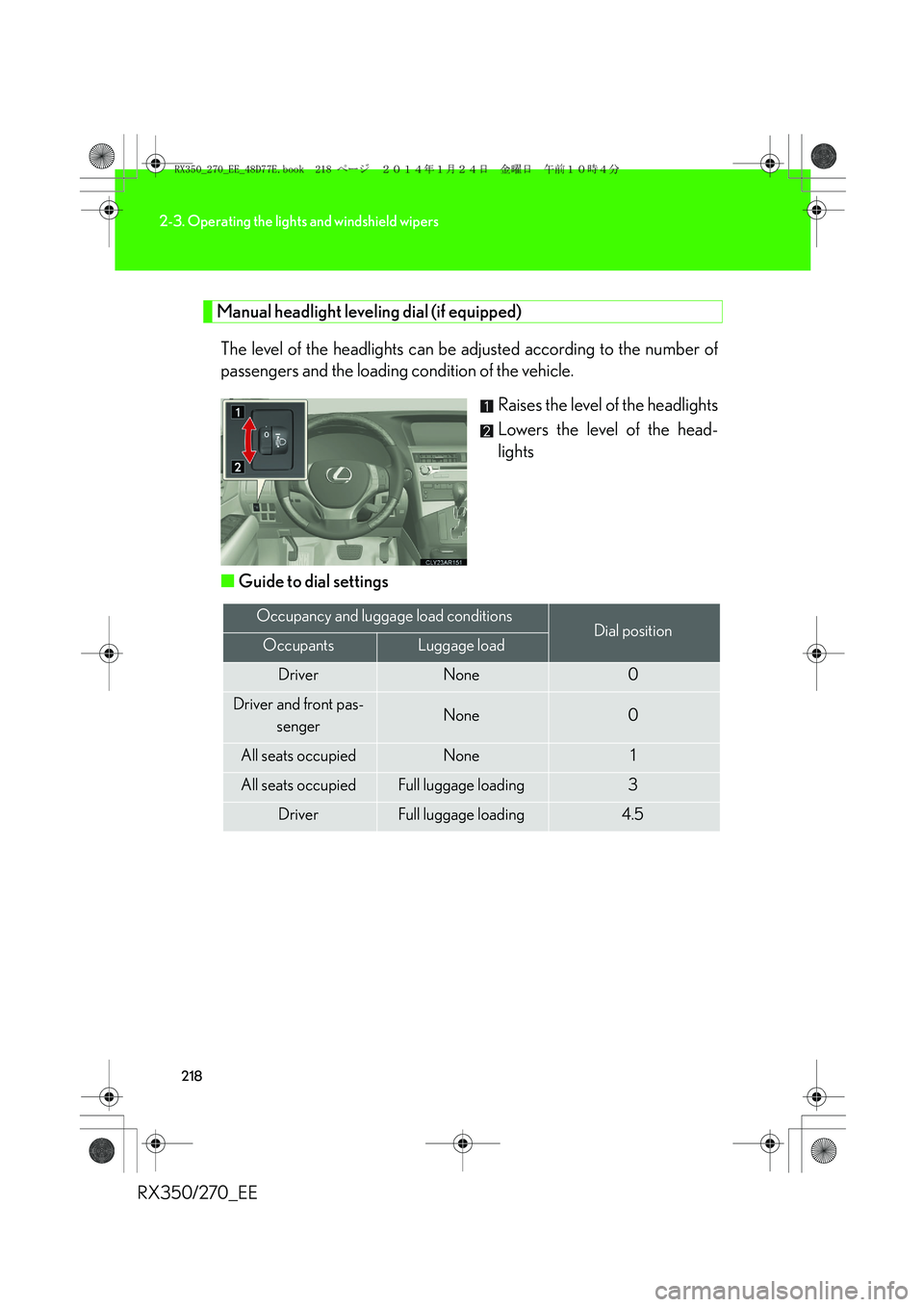
Manual headlight leveling dial (if equipped)
The level of the headlights can be adjusted according to the number of
passengers and the loading condition of the vehicle.
Raises the level of the headlights
Lowers the level of the head-
lights
■Guide to dial settings
Occupancy and luggage load conditionsDial positionOccupantsLuggage load
DriverNone0
Driver and front pas-
sengerNone0
All seats occupiedNone1
All seats occupiedFull luggage loading3
DriverFull luggage loading4.5
RX350_270_EE_48D77E.book 218 ページ 2014年1月24日 金曜日 午前10時4分
Page 219 of 652
219
2-3. Operating the lights and windshield wipers
2
When driving
RX350/270_EE
AFS (Adaptive Front-lighting system) (if equipped)
AFS (Adaptive Front-lighting System) improves visibility at intersections
and on curves by automatically adjusting the direction of the light axis of
the headlights according to vehicle speed and the degree of the tire
angle that are controlled by steering input.
AFS operates at speeds of 10 km/h (6 mph) or higher.
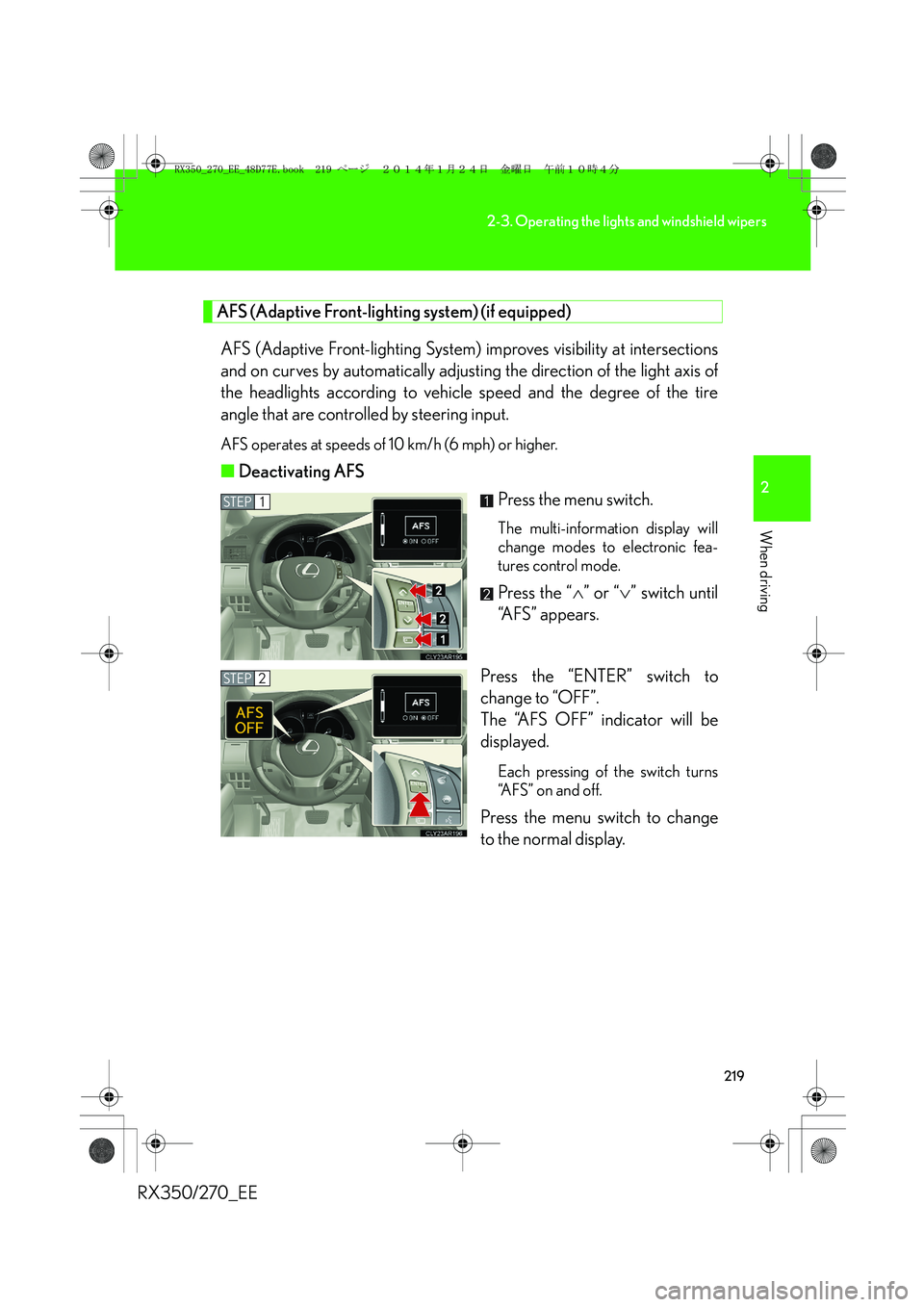
■Deactivating AFS
Press the menu switch.
The multi-information display will
change modes to electronic fea-
tures control mode.
Press the “∧” or “∨” switch until
“AFS” appears.
Press the “ENTER” switch to
change to “OFF”.
The “AFS OFF” indicator will be
displayed.
Each pressing of the switch turns
“AFS” on and off.
Press the menu switch to change
to the normal display.
STEP1
STEP2
RX350_270_EE_48D77E.book 219 ページ 2014年1月24日 金曜日 午前10時4分
Page 220 of 652
220
2-3. Operating the lights and windshield wipers
RX350/270_EE
■Daytime running light system
To make your vehicle more visible to other drivers, the daytime running lights turn
on automatically whenever the engine is started. Daytime running lights are not
designed for use at night.
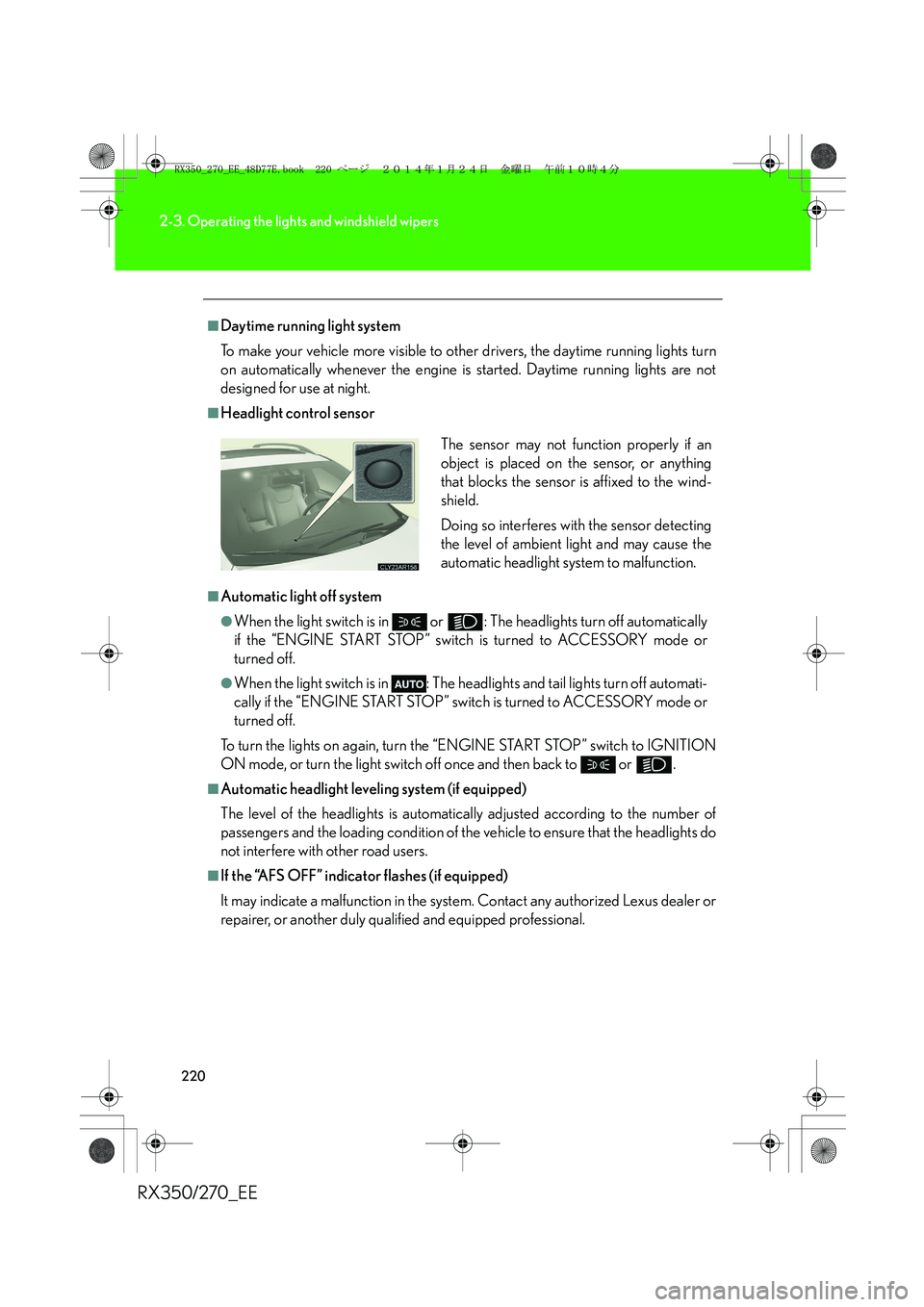
■Headlight control sensor
■Automatic light off system
●When the light switch is in or : The headlights turn off automatically
if the “ENGINE START STOP” switch is turned to ACCESSORY mode or
turned off.
●When the light switch is in : The headlights and tail lights turn off automati-
cally if the “ENGINE START STOP” switch is turned to ACCESSORY mode or
turned off.
To turn the lights on again, turn the “ENGINE START STOP” switch to IGNITION
ON mode, or turn the light switch off once and then back to or .
■Automatic headlight leveling system (if equipped)
The level of the headlights is automatically adjusted according to the number of
passengers and the loading condition of the vehicle to ensure that the headlights do
not interfere with other road users.
■If the “AFS OFF” indicator flashes (if equipped)
It may indicate a malfunction in the system. Contact any authorized Lexus dealer or
repairer, or another duly qualified and equipped professional.The sensor may not function properly if an
object is placed on the sensor, or anything
that blocks the sensor is affixed to the wind-
shield.
Doing so interferes with the sensor detecting
the level of ambient light and may cause the
automatic headlight system to malfunction.
RX350_270_EE_48D77E.book 220 ページ 2014年1月24日 金曜日 午前10時4分
Page 221 of 652
221
2-3. Operating the lights and windshield wipers
2
When driving
RX350/270_EE
■Light reminder buzzer
A buzzer sounds when the “ENGINE START STOP” switch is turned off or turned
to ACCESSORY mode and the driver's door is opened while the lights are turned
on.
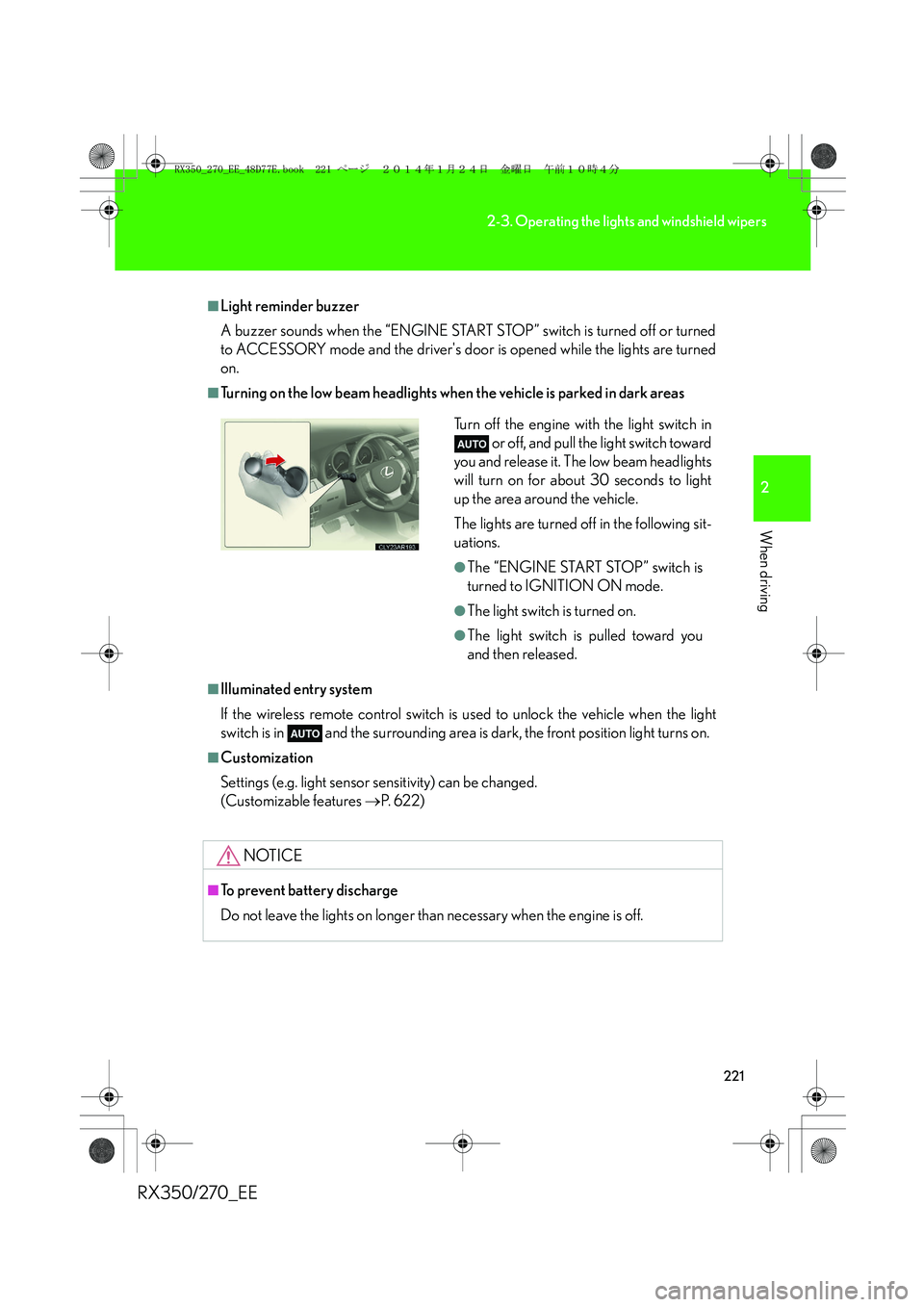
■Turning on the low beam headlights when the vehicle is parked in dark areas
■Illuminated entry system
If the wireless remote control switch is used to unlock the vehicle when the light
switch is in and the surrounding area is dark, the front position light turns on.
■Customization
Settings (e.g. light sensor sensitivity) can be changed.
(Customizable features →P. 6 2 2 )
NOTICE
■To prevent battery discharge
Do not leave the lights on longer than necessary when the engine is off.
Turn off the engine with the light switch in
or off, and pull the light switch toward
you and release it. The low beam headlights
will turn on for about 30 seconds to light
up the area around the vehicle.
The lights are turned off in the following sit-
uations.
●The “ENGINE START STOP” switch is
turned to IGNITION ON mode.
●The light switch is turned on.
●The light switch is pulled toward you
and then released.
RX350_270_EE_48D77E.book 221 ページ 2014年1月24日 金曜日 午前10時4分