engine LEXUS RX270 2014 Repair Manual
[x] Cancel search | Manufacturer: LEXUS, Model Year: 2014, Model line: RX270, Model: LEXUS RX270 2014Pages: 652, PDF Size: 48.98 MB
Page 192 of 652
192
2-1. Driving procedures
RX350/270_EE
■When driving with cruise control or radar cruise control activated
Even when performing the following actions with the intent of enabling engine
braking, engine braking will not activate while driving in S mode and downshifting
to 5 or 4 because cruise control or radar cruise control will not be canceled.
(→P. 230, 234)
■If the shift lever cannot be shifted from P
→P. 5 8 9
■If S does not come on or D comes on even after shifting the shift lever to S
This may indicate a malfunction in the automatic transmission system. Have the
vehicle inspected by any authorized Lexus dealer or repairer, or another duly quali-
fied and equipped professional immediately.
(In this situation, the transmission will operate in the same as manner as when the
shift lever is in D.)
■Downshift restriction warning buzzer
To help ensure safety and driving performance, downshifting operation may some-
times be restricted. In some circumstances, downshifting may not be possible even
when the shift lever or paddle shift switch is operated. (The warning buzzer will
sound twice.)
CAUTION
■When driving on slippery road surfaces
Do not accelerate or shift gears suddenly.
Sudden changes in engine braking may cause the vehicle to spin or skid, resulting in
an accident.
RX350_270_EE_48D77E.book 192 ページ 2014年1月24日 金曜日 午前10時4分
Page 193 of 652

193
2-1. Driving procedures
2
When driving
RX350/270_EE
Turn signal lever
■Turn signals can be operated when
The “ENGINE START STOP” switch is in IGNITION ON mode.
■If the indicators flash faster than usual
Check that a light bulb in the front or rear turn signal lights has not burned out.
■If the turn signals stop flashing before a lane change has been performed
Operate the lever again.
■To discontinue flashing of the turn signals during a lane change
Operate the lever in the opposite direction.
■Customization
The number of times the turn signals flash during a lane change can be changed.
(Customizable features →P. 6 2 2 )
The turn signal lever can be used to show the following intention of the
driver:
Right turn
Left turn
Lane change to the right
(move the lever partway and
release it)
The right hand signals will flash
3 times.
Lane change to the left (move
the lever partway and release
it)
The left hand signals will flash 3
times.
RX350_270_EE_48D77E.book 193 ページ 2014年1月24日 金曜日 午前10時4分
Page 196 of 652
196
RX350/270_EE
2-2. Instrument cluster
Gauges and meters
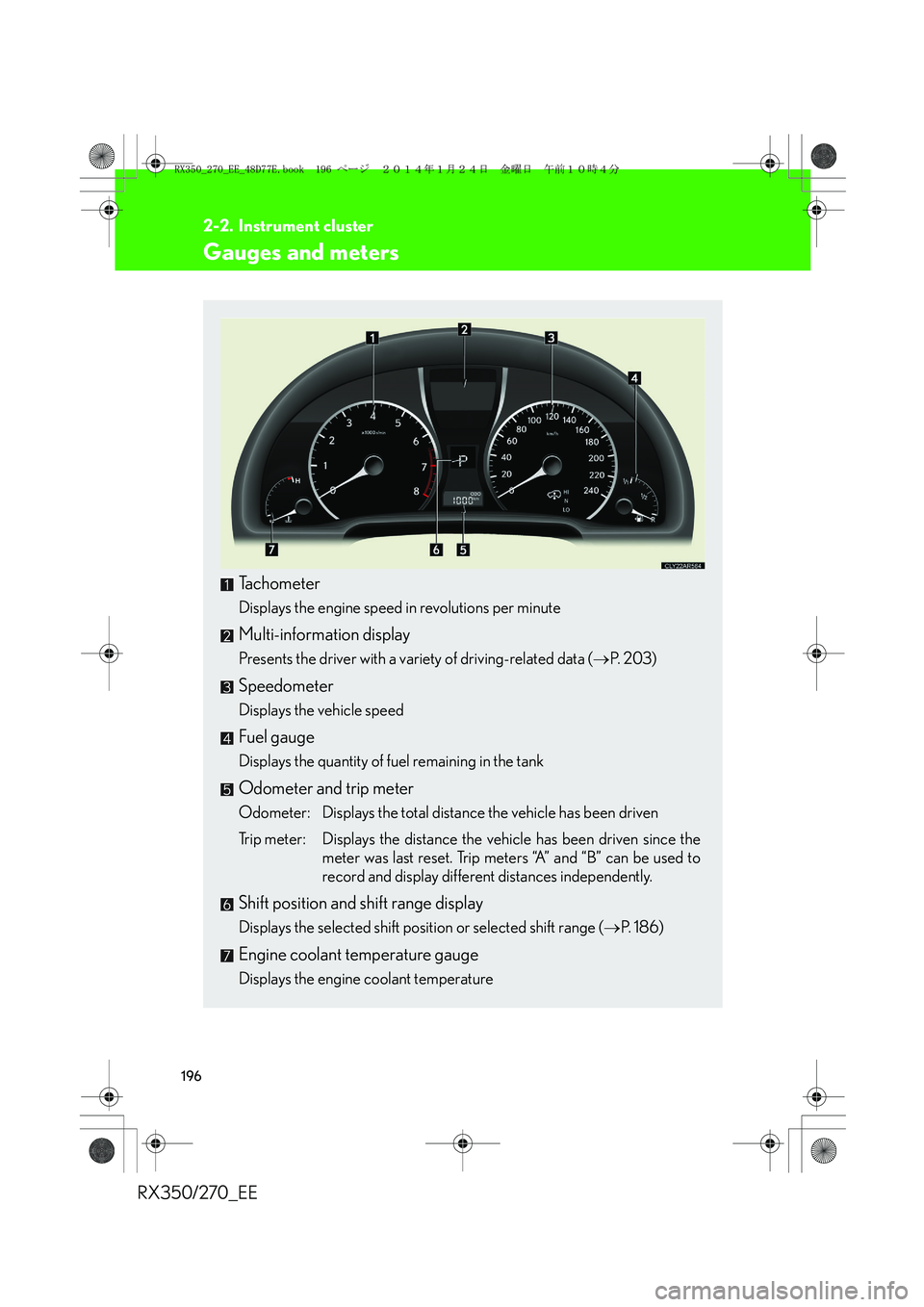
Tachometer
Displays the engine speed in revolutions per minute
Multi-information display
Presents the driver with a variety of driving-related data (→P. 2 0 3 )
Speedometer
Displays the vehicle speed
Fuel gauge
Displays the quantity of fuel remaining in the tank
Odometer and trip meter
Odometer: Displays the total distance the vehicle has been driven
Trip meter: Displays the distance the vehicle has been driven since the
meter was last reset. Trip meters “A” and “B” can be used to
record and display different distances independently.
Shift position and shift range display
Displays the selected shift position or selected shift range (→P. 1 8 6 )
Engine coolant temperature gauge
Displays the engine coolant temperature
RX350_270_EE_48D77E.book 196 ページ 2014年1月24日 金曜日 午前10時4分
Page 197 of 652
197
2-2. Instrument cluster
2
When driving
RX350/270_EE
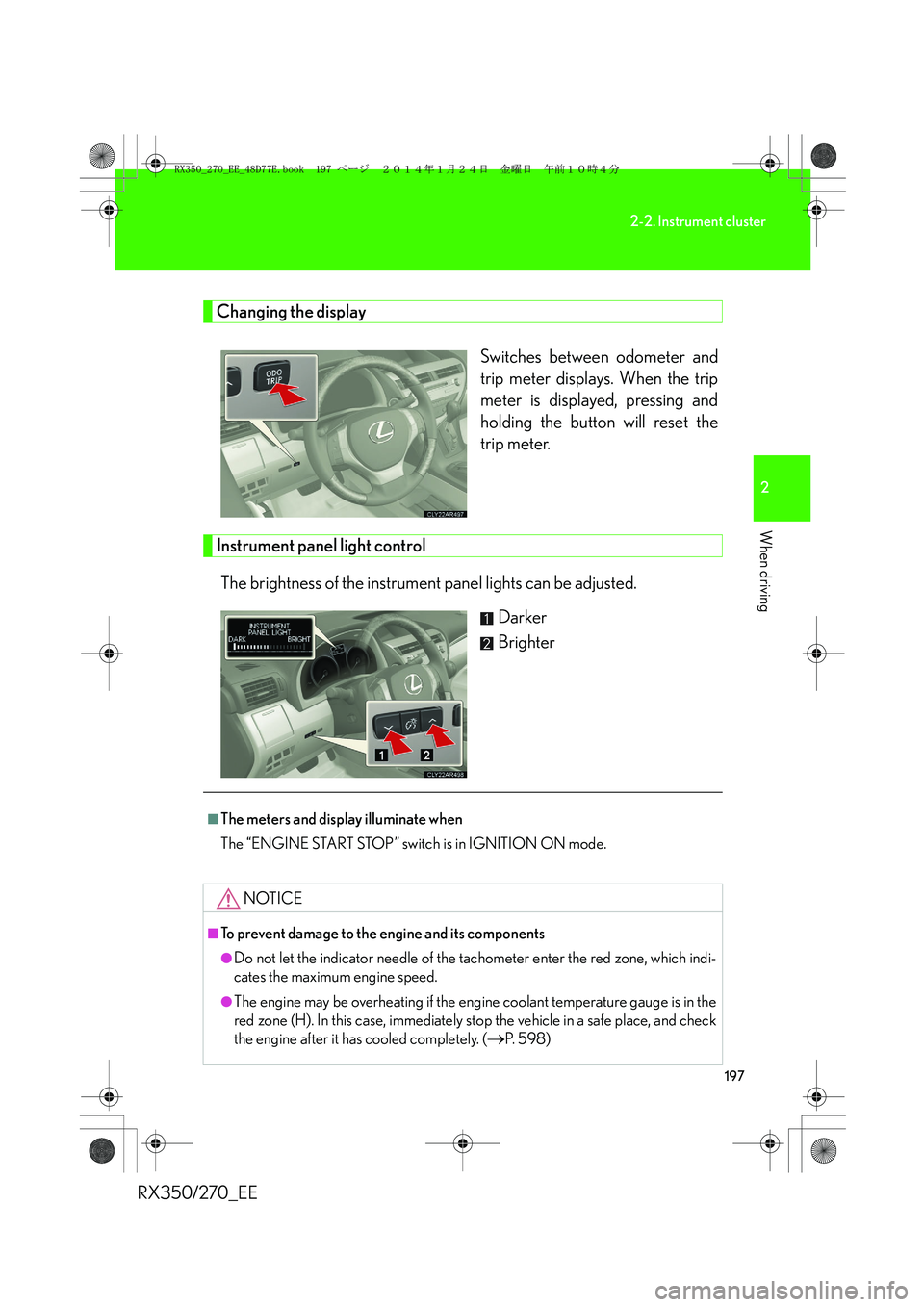
Changing the display
Switches between odometer and
trip meter displays. When the trip
meter is displayed, pressing and
holding the button will reset the
trip meter.
Instrument panel light control
The brightness of the instrument panel lights can be adjusted.
Darker
Brighter
■The meters and display illuminate when
The “ENGINE START STOP” switch is in IGNITION ON mode.
NOTICE
■To prevent damage to the engine and its components
●Do not let the indicator needle of the tachometer enter the red zone, which indi-
cates the maximum engine speed.
●The engine may be overheating if the engine coolant temperature gauge is in the
red zone (H). In this case, immediately stop the vehicle in a safe place, and check
the engine after it has cooled completely. (
→P. 5 9 8 )
RX350_270_EE_48D77E.book 197 ページ 2014年1月24日 金曜日 午前10時4分
Page 201 of 652
201
2-2. Instrument cluster
2
When driving
RX350/270_EE
*1: These lights turn on when the “ENGINE START STOP” switch is
turned to IGNITION ON mode to indicate that a system check is
being performed. They will turn off after the engine is started, or after a
few seconds. There may be a malfunction in a system if a light does not
come on, or if the lights do not turn off. Have the vehicle inspected by
any authorized Lexus dealer or repairer, or another duly qualified and
equipped professional for details.
*2: The light flashes to indicate that the system is operating.
*3: The light comes on when the system is turned off. The light flashes
faster than usual to indicate that the system is operating.
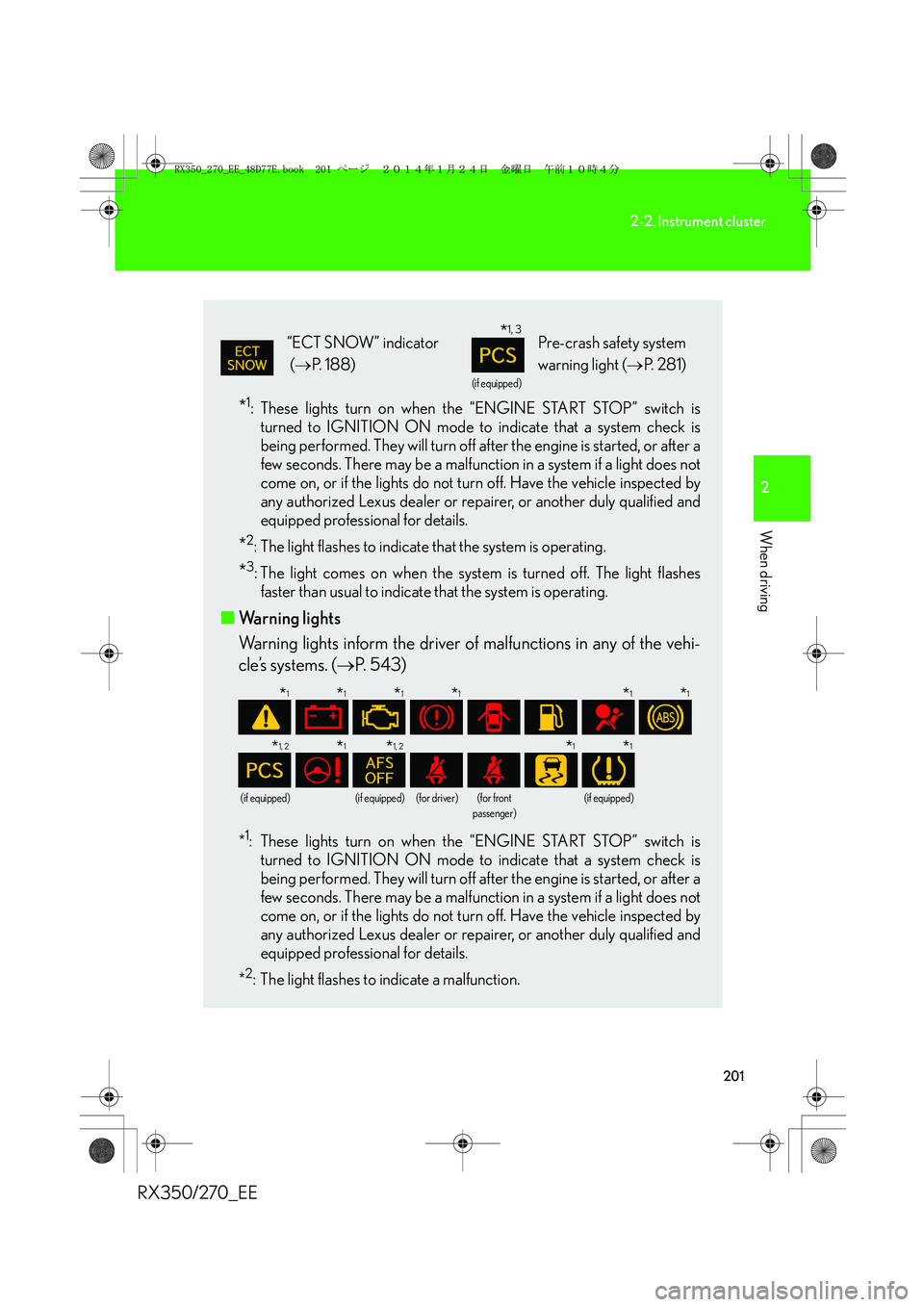
■Warning lights
Warning lights inform the driver of malfunctions in any of the vehi-
cle’s systems. (→P. 543)
*1: These lights turn on when the “ENGINE START STOP” switch is
turned to IGNITION ON mode to indicate that a system check is
being performed. They will turn off after the engine is started, or after a
few seconds. There may be a malfunction in a system if a light does not
come on, or if the lights do not turn off. Have the vehicle inspected by
any authorized Lexus dealer or repairer, or another duly qualified and
equipped professional for details.
*
2: The light flashes to indicate a malfunction.
“ECT SNOW” indicator
(→P. 188)
(if equipped)
Pre-crash safety system
warning light (→P. 2 8 1 )
(if equipped)(if equipped)(for driver)(for front
passenger)(if equipped)
*1, 3
*1*1*1*1*1*1
*1, 2*1*1, 2*1*1
RX350_270_EE_48D77E.book 201 ページ 2014年1月24日 金曜日 午前10時4分
Page 202 of 652
202
2-2. Instrument cluster
RX350/270_EE
CAUTION
■If a safety system warning light does not come on
Should a safety system light such as the ABS and SRS airbag warning light not
come on when you start the engine, this could mean that these systems are not
available to help protect you in an accident, which could result in death or serious
injury. Have the vehicle inspected by any authorized Lexus dealer or repairer, or
another duly qualified and equipped professional immediately if this occurs.
RX350_270_EE_48D77E.book 202 ページ 2014年1月24日 金曜日 午前10時4分
Page 207 of 652
207
2-2. Instrument cluster
2
When driving
RX350/270_EE■Average vehicle speed
Displays the average vehicle speed since the function was reset
The function can be reset by pushing the “ENTER” switch for longer than
one second when the average vehicle speed is displayed.
■Cruising range
Displays the estimated maximum distance that can be driven with the
quantity of fuel remaining
• This distance is computed based on your average fuel consumption. As a
result, the actual distance that can be driven may differ from that dis-
played.
• When only a small amount of fuel is added to the tank, the display may
not be updated.
When refueling, turn the “ENGINE START STOP” switch off. If the vehi-
cle is refueled without turning the “ENGINE START STOP” switch off,
the display may not be updated.
■Eco Driving Indicator Zone Display
→P. 210
RX350_270_EE_48D77E.book 207 ページ 2014年1月24日 金曜日 午前10時4分
Page 208 of 652
208
2-2. Instrument cluster
RX350/270_EE
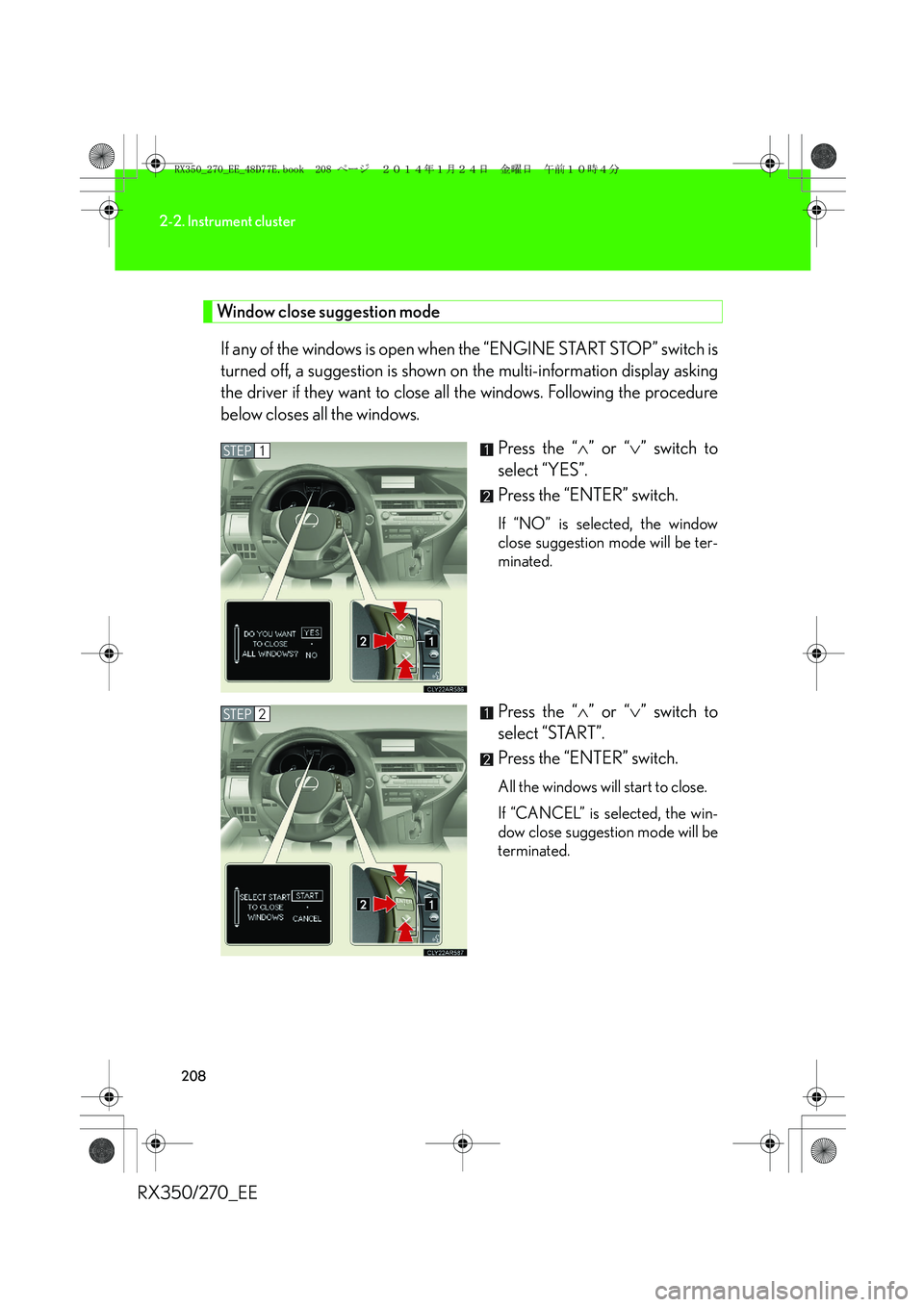
Window close suggestion mode
If any of the windows is open when the “ENGINE START STOP” switch is
turned off, a suggestion is shown on the multi-information display asking
the driver if they want to close all the windows. Following the procedure
below closes all the windows.
Press the “∧” or “∨” switch to
select “YES”.
Press the “ENTER” switch.
If “NO” is selected, the window
close suggestion mode will be ter-
minated.
Press the “∧” or “∨” switch to
select “START”.
Press the “ENTER” switch.
All the windows will start to close.
If “CANCEL” is selected, the win-
dow close suggestion mode will be
terminated.
STEP1
STEP2
RX350_270_EE_48D77E.book 208 ページ 2014年1月24日 金曜日 午前10時4分
Page 209 of 652
209
2-2. Instrument cluster
2
When driving
RX350/270_EE
■Electronic features control can be turned on/off when
The “ENGINE START STOP” switch is in IGNITION ON mode.
■Conditions for ending electronic features control
In the following situations, the electronic features control will end:
●The menu switch is pressed.
●The dynamic radar cruise control is operated (if equipped).
●Lexus parking assist-sensor starts operating (if equipped).
●No action is performed for some time after the electronic features control
screen is displayed.
●A warning message appears after the electronic features control screen is dis-
played.
■Window close suggestion mode
●In the following situations, the window close suggestion mode will not operate:
• A warning message appears on the multi-information display.
• The window lock switch is on.
• All the windows are closed.
• The window close suggestion mode has been disabled in the customized set-
tings.
• The driver's or front passenger's door is open.
●In the following situations, the window close suggestion mode will end:
• The “ENGINE START STOP” switch is turned to IGNITION ON mode.
• About 20 seconds have passed since the “ENGINE START STOP” switch
was turned off.
• A warning message appears on the multi-information display.
• All the windows are closed.
• The window lock switch is turned on.
• The menu switch is pressed.
• The driver's or front passenger's door is opened.
• The windows were opened or closed by the wireless remote control.
RX350_270_EE_48D77E.book 209 ページ 2014年1月24日 金曜日 午前10時4分
Page 210 of 652
210
2-2. Instrument cluster
RX350/270_EE
●In the following situations, the window close operation will stop partway:
• The “ENGINE START STOP” switch is turned to IGNITION ON mode.
• The “ENTER” switch was pressed.
• The window lock switch was turned on.
• The jam protection function was activated.
• The windows were opened or closed by the wireless remote control.
If the power window switch of any of the door is operated while in windows close
suggestion mode, the windows close operation of that door will stop partway.
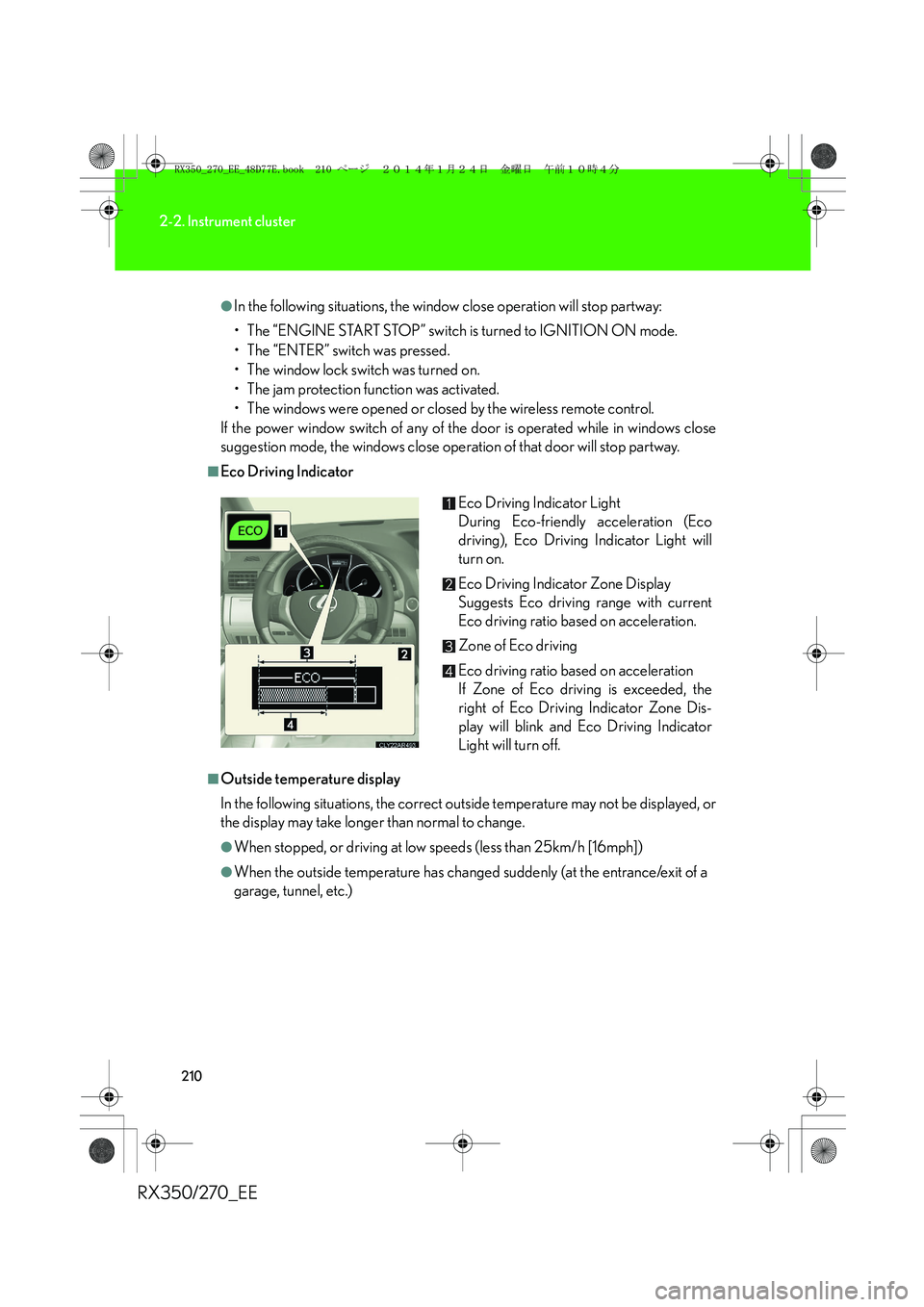
■Eco Driving Indicator
■Outside temperature display
In the following situations, the correct outside temperature may not be displayed, or
the display may take longer than normal to change.
●When stopped, or driving at low speeds (less than 25km/h [16mph])
●When the outside temperature has changed suddenly (at the entrance/exit of a
garage, tunnel, etc.)Eco Driving Indicator Light
During Eco-friendly acceleration (Eco
driving), Eco Driving Indicator Light will
turn on.
Eco Driving Indicator Zone Display
Suggests Eco driving range with current
Eco driving ratio based on acceleration.
Zone of Eco driving
Eco driving ratio based on acceleration
If Zone of Eco driving is exceeded, the
right of Eco Driving Indicator Zone Dis-
play will blink and Eco Driving Indicator
Light will turn off.
RX350_270_EE_48D77E.book 210 ページ 2014年1月24日 金曜日 午前10時4分