glove box LEXUS RX270 2014 Owners Manual
[x] Cancel search | Manufacturer: LEXUS, Model Year: 2014, Model line: RX270, Model: LEXUS RX270 2014Pages: 652, PDF Size: 48.98 MB
Page 5 of 652
1
2
3
4
5
6
RX350/270_EE
5
3-4. Using the storage features
List of storage features .............. 420
• Glove box ..................................... 421
• Bottle holders/
door pockets ............................... 422
• Cup holders................................. 423
• Console box................................ 426
• Coin holder ................................. 427
• Auxiliary box ............................... 428
• Under tray .................................... 429
3-5. Other interior features
Sun visors........................................ 430
Vanity mirror................................... 431
Clock................................................. 432
Outside temperature
display ............................................ 433
Multi-display light control......... 434
Power outlets ................................. 435
Heated steering wheel............... 437
Seat heaters and
ventilators ..................................... 439
Armrest ............................................. 441
Coat hooks ..................................... 442
Assist grips...................................... 443
Floor mat.......................................... 444
Luggage compartment
features.......................................... 4464-1. Maintenance and care
Cleaning and protecting
the vehicle exterior................... 452
Cleaning and protecting
the vehicle interior .................... 455
4-2. Maintenance
Maintenance
requirements.............................. 458
4-3. Do-it-yourself maintenance
Do-it-yourself service
precautions ................................... 461
Hood ................................................. 465
Positioning a floor jack............... 466
Engine compartment.................. 468
Tires ................................................... 483
Tire inflation pressure................. 495
Wheels ............................................. 497
Air conditioning filter.................. 499
Electronic key battery ................. 501
Checking and replacing
fuses ............................................... 504
Light bulbs ........................................ 516
4Maintenance and care
RX350_270_EE_48D77E.book 5 ページ 2014年1月24日 金曜日 午前10時4分
Page 14 of 652
RX350/270_EE
14
Pictorial indexInstrument panel
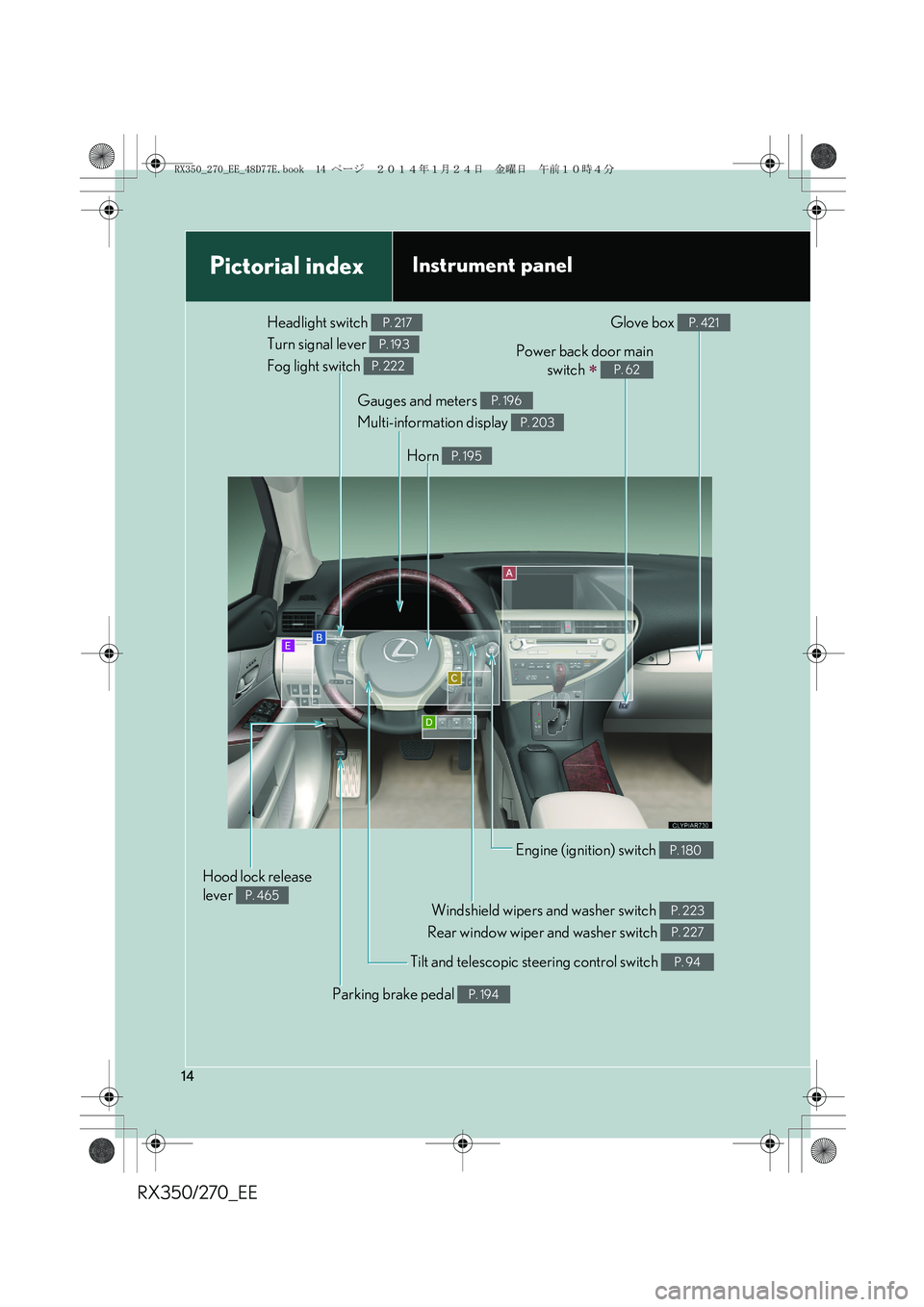
Headlight switch
Turn signal lever
Fog light switch P. 217
P. 193
P. 222
Windshield wipers and washer switch
Rear window wiper and washer switch P. 223
P. 227
Power back door main
switch
∗ P. 62
Tilt and telescopic steering control switch P. 94
Parking brake pedal P. 194
Hood lock release
lever
P. 465
Gauges and meters
Multi-information display P. 196
P. 203
Glove box P. 421
Horn P. 195
Engine (ignition) switch P. 180
RX350_270_EE_48D77E.book 14 ページ 2014年1月24日 金曜日 午前10時4分
Page 28 of 652
28
1-1. Key information
RX350/270_EE
●The card key is not waterproof.
■When required to leave the vehicle’s key with a parking attendant
Lock the glove box as circumstances demand. (→P. 4 2 1 )
Remove the mechanical key for your own use and provide the attendant with the
electronic key only.
■Key number plate
Keep the plate in a safe place such as your wallet, not in the vehicle. In the event that
a mechanical key is lost, a new key can be made by any authorized Lexus dealer or
repairer, or another duly qualified and equipped professional using the key number
plate. (→P. 5 9 0 )
■When riding in an aircraft
When bringing an electronic key onto an aircraft, make sure you do not press any
buttons on the electronic key while inside the aircraft cabin. If you are carrying an
electronic key in your bag etc., ensure that the buttons are not likely to be pressed
accidentally. Pressing a button may cause the electronic key to emit radio waves
that could interfere with the operation of the aircraft.
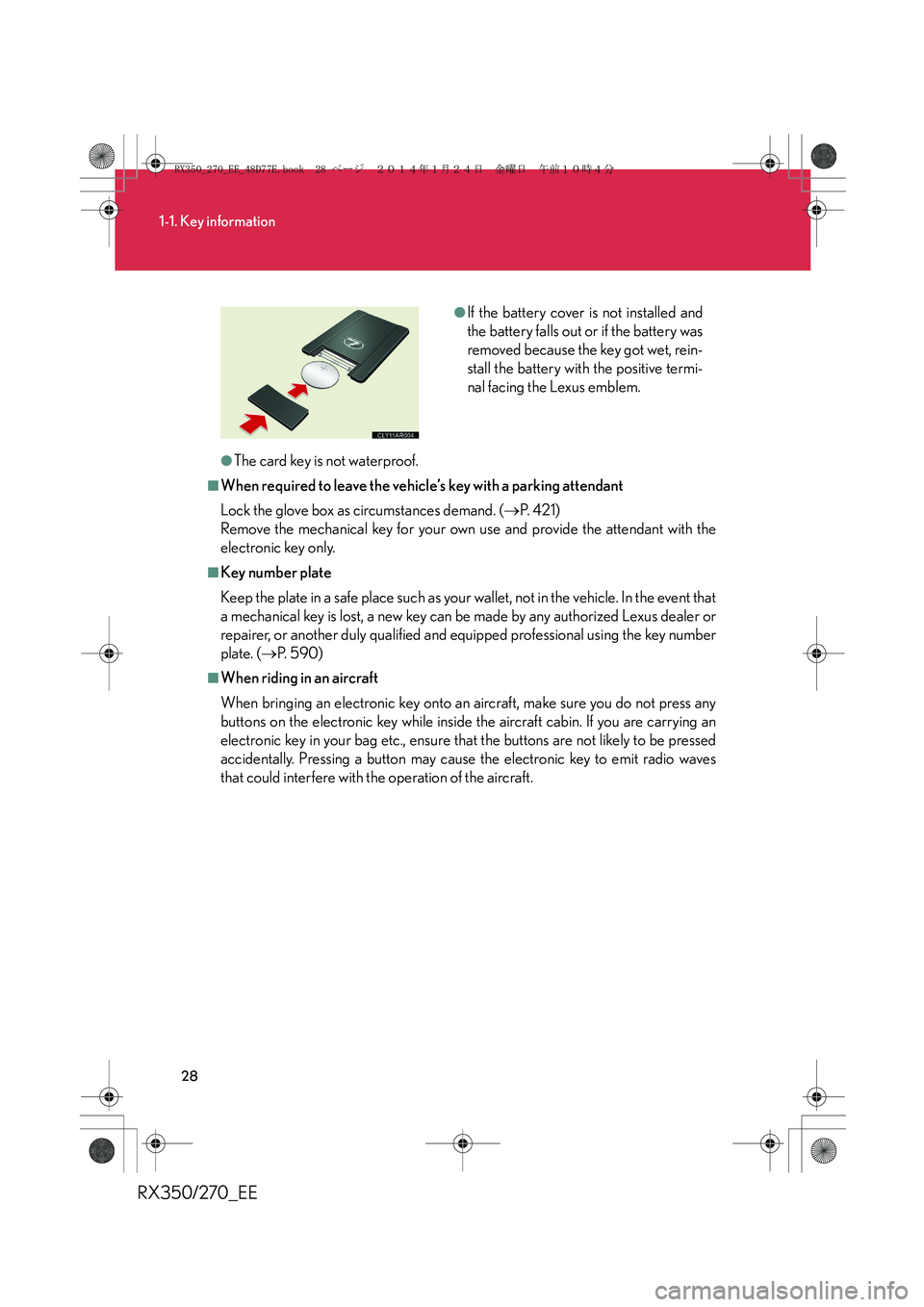
●If the battery cover is not installed and
the battery falls out or if the battery was
removed because the key got wet, rein-
stall the battery with the positive termi-
nal facing the Lexus emblem.
RX350_270_EE_48D77E.book 28 ページ 2014年1月24日 金曜日 午前10時4分
Page 38 of 652
38
1-2. Opening, closing and locking the doors
RX350/270_EE
■Note for the entry function
●Even when the electronic key is within the effective range (detection areas), the
system may not operate properly in the following cases:
• The electronic key is too close to the window or outside door handle, near the
ground, or in a high place when the doors are locked or unlocked.
• The electronic key is on the instrument panel, luggage cover or floor or in the
glove box.
●Do not leave the electronic key on top of the instrument panel or near the door
pockets when exiting the vehicle. Depending on the radio wave reception con-
ditions, it may be detected by the antenna outside the cabin and the door will
become lockable from the outside, possibly trapping the electronic key inside
the vehicle.
●As long as the electronic key is within the effective range, the doors may be
locked or unlocked by anyone. However, only the doors detecting the elec-
tronic key can be used to unlock the vehicle.
●The doors may lock or unlock if the electronic key is within the effective range
and a large amount of water splashes on the door handle, such as in the rain or
in a car wash. The doors will automatically be locked after approximately 30
seconds if a door is not opened and closed.
●If the wireless remote control is used to lock the doors when the electronic key
is near the vehicle, there is a possibility that the door may not be unlocked by the
entry function. (Use the wireless remote control to unlock the doors.)
RX350_270_EE_48D77E.book 38 ページ 2014年1月24日 金曜日 午前10時4分
Page 62 of 652
62
1-2. Opening, closing and locking the doors
RX350/270_EE
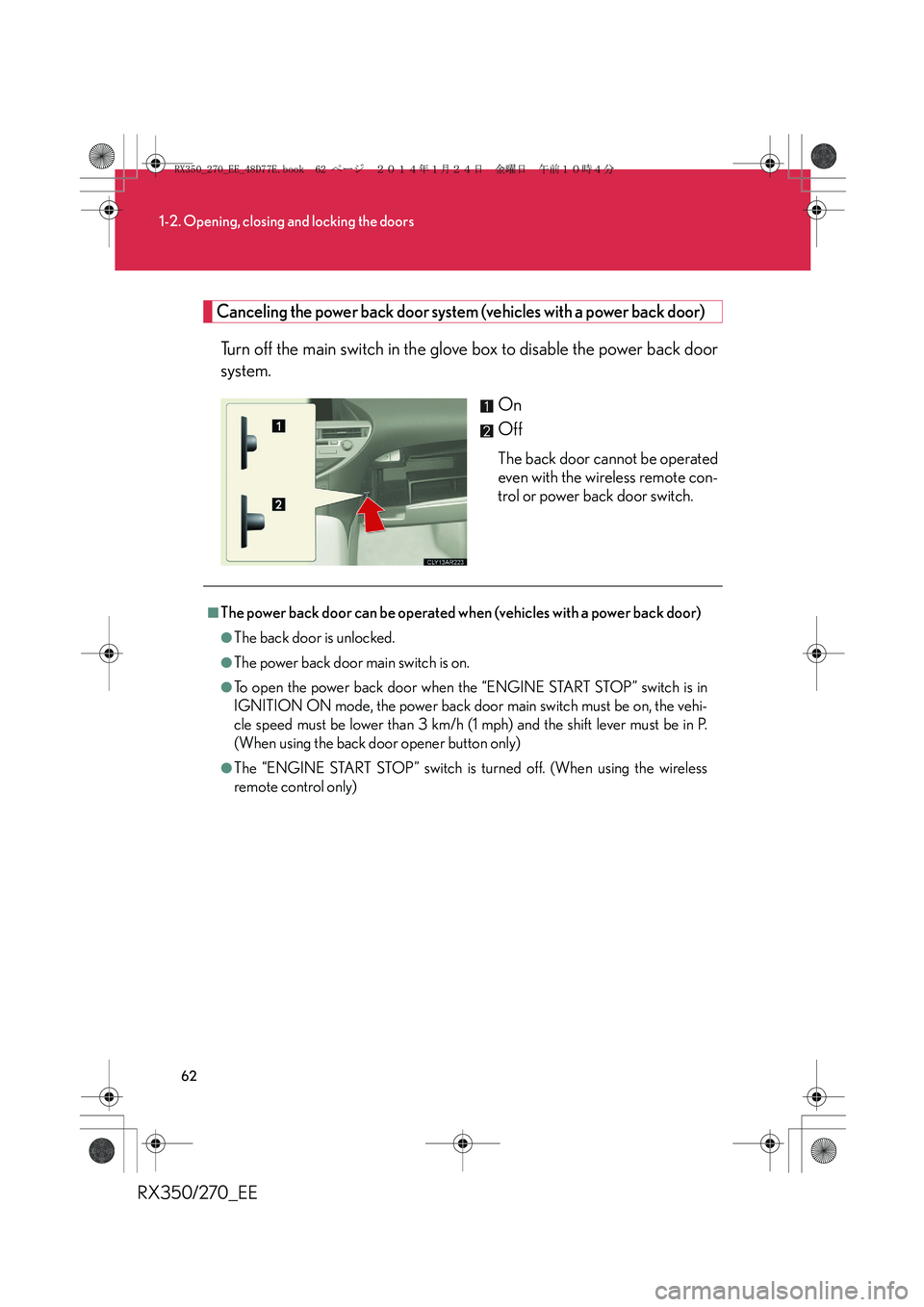
Canceling the power back door system (vehicles with a power back door)
Turn off the main switch in the glove box to disable the power back door
system.
On
Off
The back door cannot be operated
even with the wireless remote con-
trol or power back door switch.
■The power back door can be operated when (vehicles with a power back door)
●The back door is unlocked.
●The power back door main switch is on.
●To open the power back door when the “ENGINE START STOP” switch is in
IGNITION ON mode, the power back door main switch must be on, the vehi-
cle speed must be lower than 3 km/h (1 mph) and the shift lever must be in P.
(When using the back door opener button only)
●The “ENGINE START STOP” switch is turned off. (When using the wireless
remote control only)
RX350_270_EE_48D77E.book 62 ページ 2014年1月24日 金曜日 午前10時4分
Page 176 of 652
176
2-1. Driving procedures
RX350/270_EE
CAUTION
■When the vehicle is parked
●Do not leave glasses, cigarette lighters, spray cans, or soft drink cans in the vehi-
cle when it is in the sun.
Doing so may result in the following:
• Gas may leak from a cigarette lighter or spray can, and may lead to a fire.
• The temperature inside the vehicle may cause the plastic lenses and plastic
material of glasses to deform or crack.
• Soft drink cans may fracture, causing the contents to spray over the interior of
the vehicle, and may also cause a short circuit in the vehicle's electrical com-
ponents.
●Do not leave cigarette lighters in the vehicle. If a cigarette lighter is in a place such
as the glove box or on the floor, it may be lit accidentally when luggage is loaded
or the seat is adjusted, causing a fire.
●Do not attach adhesive discs to the windshield or windows. Do not place contain-
ers such as air fresheners on the instrument panel or dashboard. Adhesive discs
or containers may act as lenses, causing a fire in the vehicle.
●Do not leave a door or window open if the curved glass is coated with a metal-
lized film such as a silver-colored one. Reflected sunlight may cause the glass to
act as a lens, causing a fire.
●Always apply the parking brake, shift the shift lever to P, stop the engine and lock
the vehicle.
Do not leave the vehicle unattended while the engine is running.
●Do not touch the exhaust pipes while the engine is running or immediately after
turning the engine off.
Doing so may cause burns.
●Do not leave the engine running in an area with snow build-up, or where it is
snowing. If snowbanks build up around the vehicle while the engine is running,
exhaust gases may collect and enter the vehicle. This may lead to death or a seri-
ous health hazard.
RX350_270_EE_48D77E.book 176 ページ 2014年1月24日 金曜日 午前10時4分
Page 313 of 652
3Interior features
313
RX350/270_EE
Setting up a Bluetooth®
enabled portable
player...................................... 372
Bluetooth
® audio system
setup ........................................ 376
Optimal use of the audio
system...................................... 377
Using the AUX port............... 379
Using the steering wheel
audio switches....................... 381
Hands-free system
for mobile phones ............... 384
Using the hands-free
system (for mobile
phones) ................................... 391
Making a phone call............... 397
Setting a mobile phone ......... 401
Security and system
setup ....................................... 405
Using the phone book ............. 411
3-3. Using the interior lights
Interior lights list ...................... 417
• Interior lights .......................... 418
• Personal lights ....................... 4183-4. Using the storage
features
List of storage features ........ 420
• Glove box ................................421
• Bottle holders/
door pockets ......................... 422
• Cup holders .......................... 423
• Console box .......................... 426
• Coin holder ............................427
• Auxiliary box......................... 428
• Under tray ............................. 429
3-5. Other interior features
Sun visors ................................. 430
Vanity mirror............................. 431
Clock ........................................ 432
Outside temperature
display .................................... 433
Multi-display light
control.................................... 434
Power outlets........................... 435
Heated steering wheel ......... 437
Seat heaters and
ventilators ............................. 439
Armrest ...................................... 441
Coat hooks ............................... 442
Assist grips .............................. 443
Floor mat................................... 444
Luggage compartment
features .................................. 446
RX350_270_EE_48D77E.book 313 ページ 2014年1月24日 金曜日 午前10時4分
Page 361 of 652
361
3-2. Using the audio system
3
Interior features
RX350/270_EE
Bluetooth® audio system
■Conditions under which the system will not operate
●If using a portable player that does not support Bluetooth®
●If the portable player is switched off
●If the portable player is not connected
●If the portable player’s battery is low
●If the portable player is behind the seat or in the glove box or console box
●If metal is covering or touching the portable player
The Bluetooth® audio system enables you to enjoy music played on a por-
table digital audio player (portable player) from the vehicle speakers via
wireless communication.
This audio system supports Bluetooth
®, a wireless data system capable of
playing portable audio music without cables. If your portable player does
not support Bluetooth
®, the Bluetooth® audio system will not function.
Ti t l ePa g e
Using the Bluetooth® audio systemP. 3 6 6
Operating a Bluetooth® enabled portable playerP. 3 6 9
Setting up a Bluetooth® enabled portable playerP. 3 7 2
Bluetooth® audio system setupP. 3 76
RX350_270_EE_48D77E.book 361 ページ 2014年1月24日 金曜日 午前10時4分
Page 386 of 652
386
3-2. Using the audio system
RX350/270_EE
■Conditions under which the system will not operate
●If using a mobile phone that does not support Bluetooth®
●If the mobile phone is switched off
●If you are outside service range
●If the mobile phone is not connected
●If the mobile phone's battery is low
●If the mobile phone is behind the seat or in the glove box or console box
●If metal is covering or touching the phone
■When using the hands-free system
●The audio system and voice guidance are muted when making a call.
●If both parties speak at the same time, it may be difficult to hear.
●If the incoming call volume is overly loud, an echo may be heard.
●Try to face toward the microphone as much as possible when speaking.
●In the following circumstances, it may be difficult to hear the other party:
• When driving on unpaved roads
• When driving at high speeds
•When a window is open
• When the air conditioning is blowing directly on the microphone
• When the air conditioning is set to high
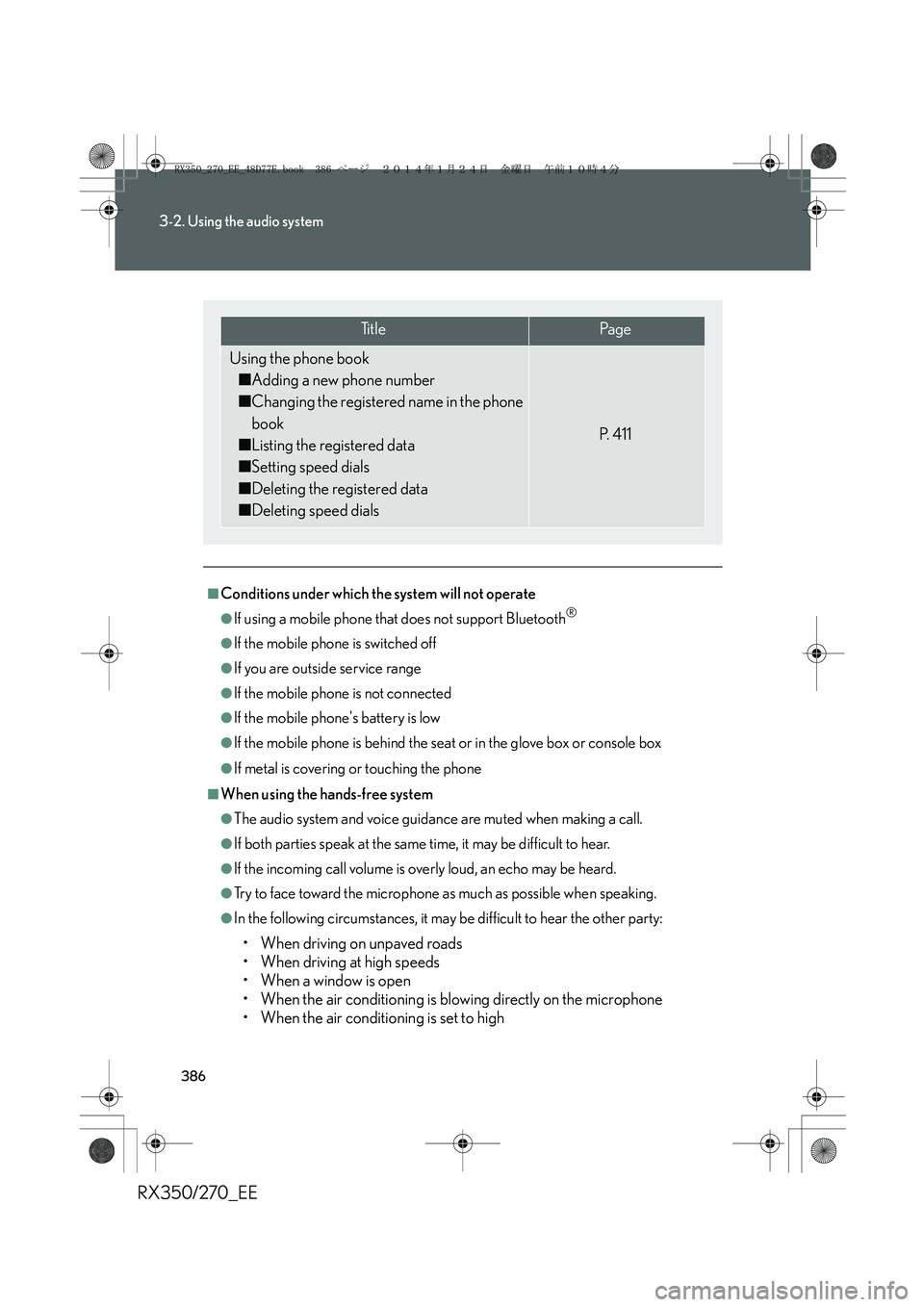
Ti t l ePa g e
Using the phone book
■Adding a new phone number
■Changing the registered name in the phone
book
■Listing the registered data
■Setting speed dials
■Deleting the registered data
■Deleting speed dials
P. 4 1 1
RX350_270_EE_48D77E.book 386 ページ 2014年1月24日 金曜日 午前10時4分
Page 420 of 652
420
RX350/270_EE
3-4. Using the storage features
List of storage features
CAUTION
■Items that should not be left in the storage spaces
Do not leave glasses, lighters or spray cans in the storage spaces, as this may cause
the following when cabin temperature becomes high:
●Glasses may be deformed by heat or cracked if they come into contact with
other stored items.
●Lighters or spray cans may explode. If they come into contact with other stored
items, the lighter may catch fire or the spray can may release gas, causing a fire
hazard.
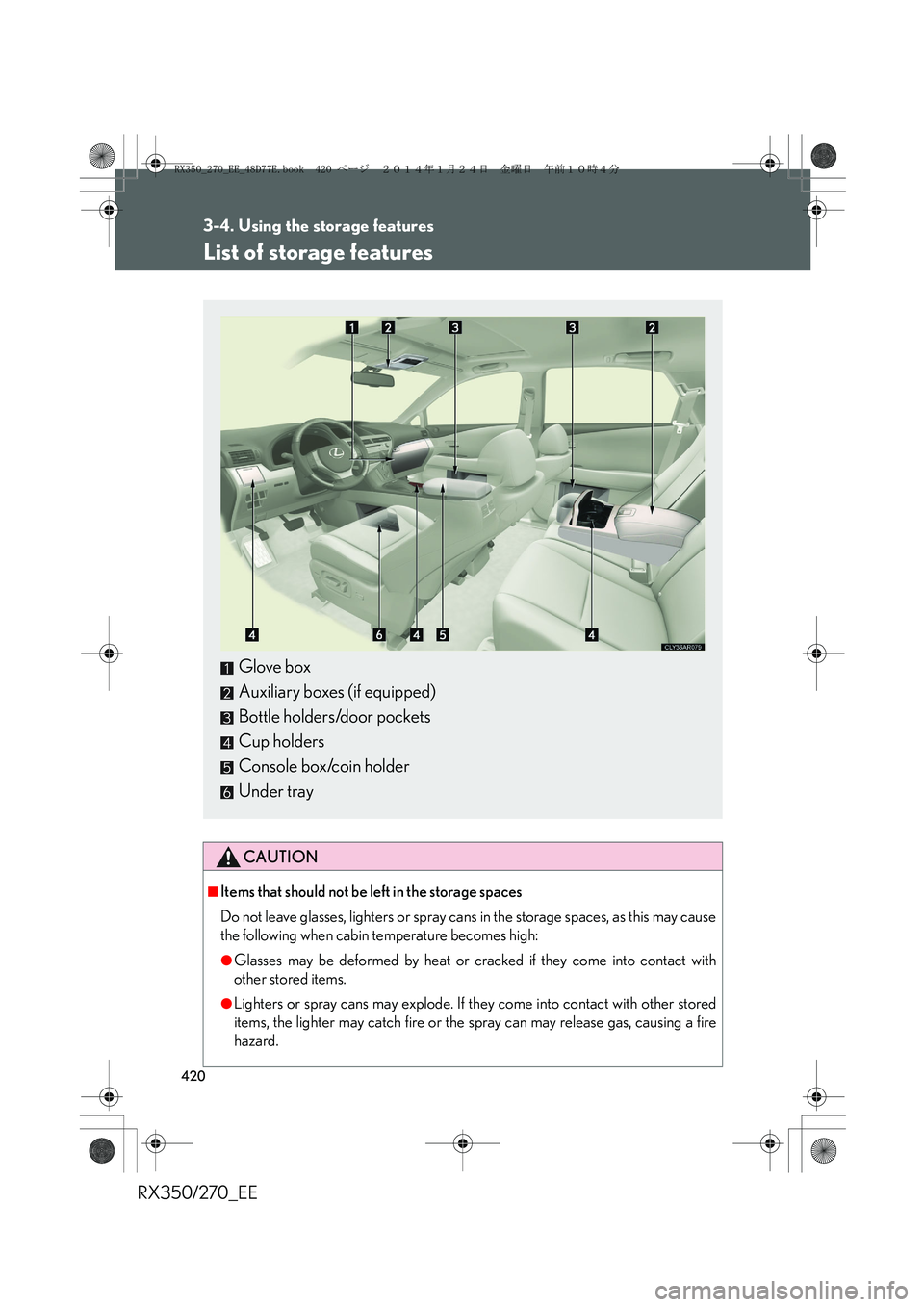
Glove box
Auxiliary boxes (if equipped)
Bottle holders/door pockets
Cup holders
Console box/coin holder
Under tray
RX350_270_EE_48D77E.book 420 ページ 2014年1月24日 金曜日 午前10時4分