lock LEXUS RX300H 2017 Owners Manual
[x] Cancel search | Manufacturer: LEXUS, Model Year: 2017, Model line: RX300H, Model: LEXUS RX300H 2017Pages: 640, PDF Size: 35.53 MB
Page 248 of 640
2484-3. Operating the lights and wipers
RC300h_EE(OM24740E)
WARNING
■Caution regarding the use of windshield wipers in AUTO mode
The windshield wipers may operate unexpectedly if the sensor is touched or the wind- shield is subject to vibration in AUTO mode. Take care that your fingers or anything
else do not become caught in the windshield wipers.
■Caution regarding the use of washer fluid
When it is cold, do not use the washer fluid until the windshield becomes warm. The
fluid may freeze on the windshield and cause low visibility. This may lead to an accident, resulting in death or serious injury.
NOTICE
■When the windshield is dry
Do not use the wipers, as they may damage the windshield.
■When there is no washer fluid spray from the nozzle
Damage to the washer fluid pump may be caused if the lever is pulled toward you and held continually.
■When a nozzle becomes blocked
In this case, contact any authorized Lexus de aler or repairer, or another duly qualified and equipped professional.
Do not try to clear it with a pin or other object. The nozzle will be damaged.
Page 251 of 640
2514-4. Refueling
4
Driving
RC300h_EE(OM24740E)
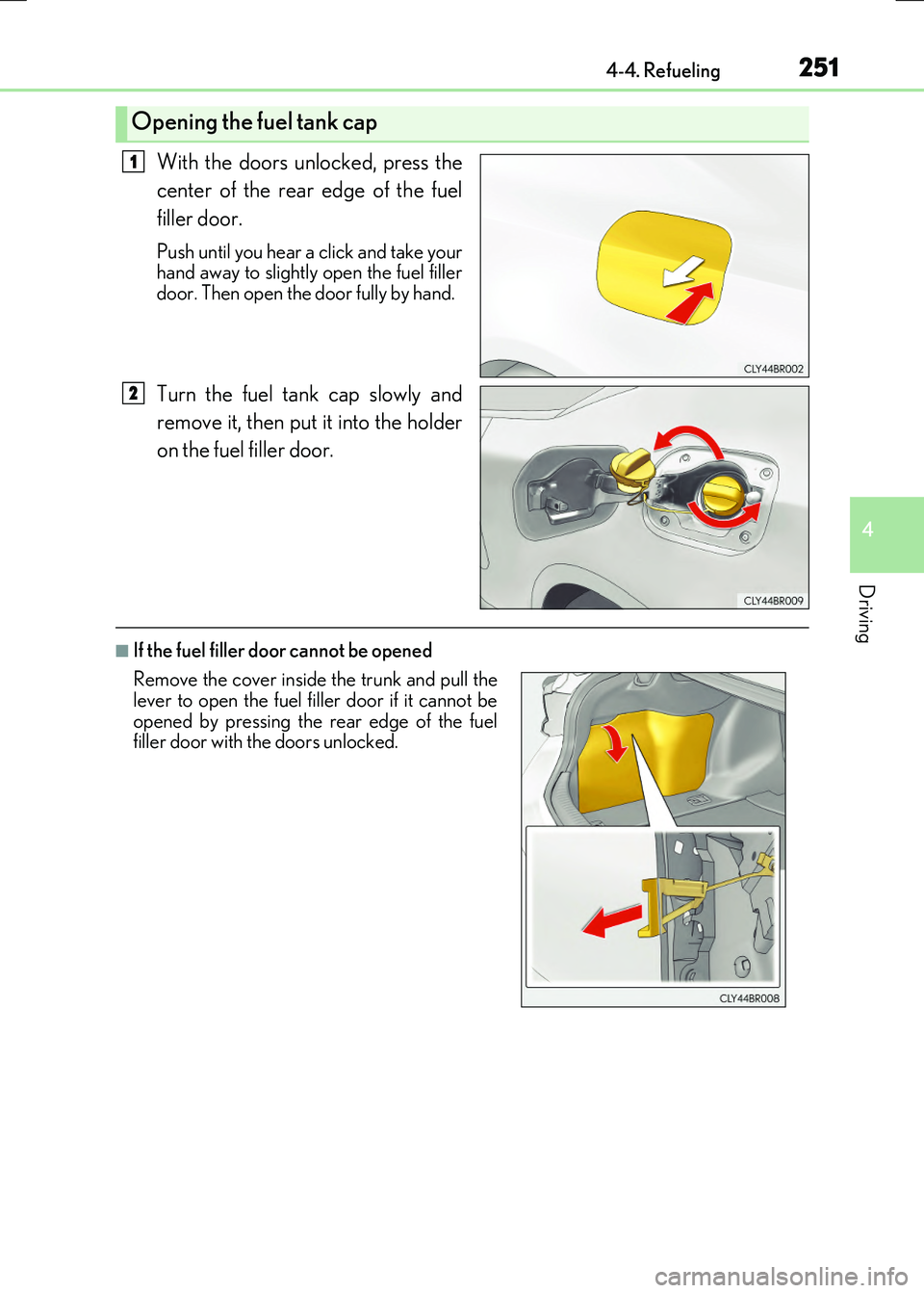
With the doors unlocked, press the
center of the rear edge of the fuel
filler door.
Push until you hear a click and take your hand away to slightly open the fuel filler
door. Then open the door fully by hand.
Turn the fuel tank cap slowly and
remove it, then put it into the holder
on the fuel filler door.
■If the fuel filler door cannot be opened
Opening the fuel tank cap
1
2
Remove the cover inside the trunk and pull the lever to open the fuel filler door if it cannot be
opened by pressing the rear edge of the fuel filler door with the doors unlocked.
Page 252 of 640
2524-4. Refueling
RC300h_EE(OM24740E)
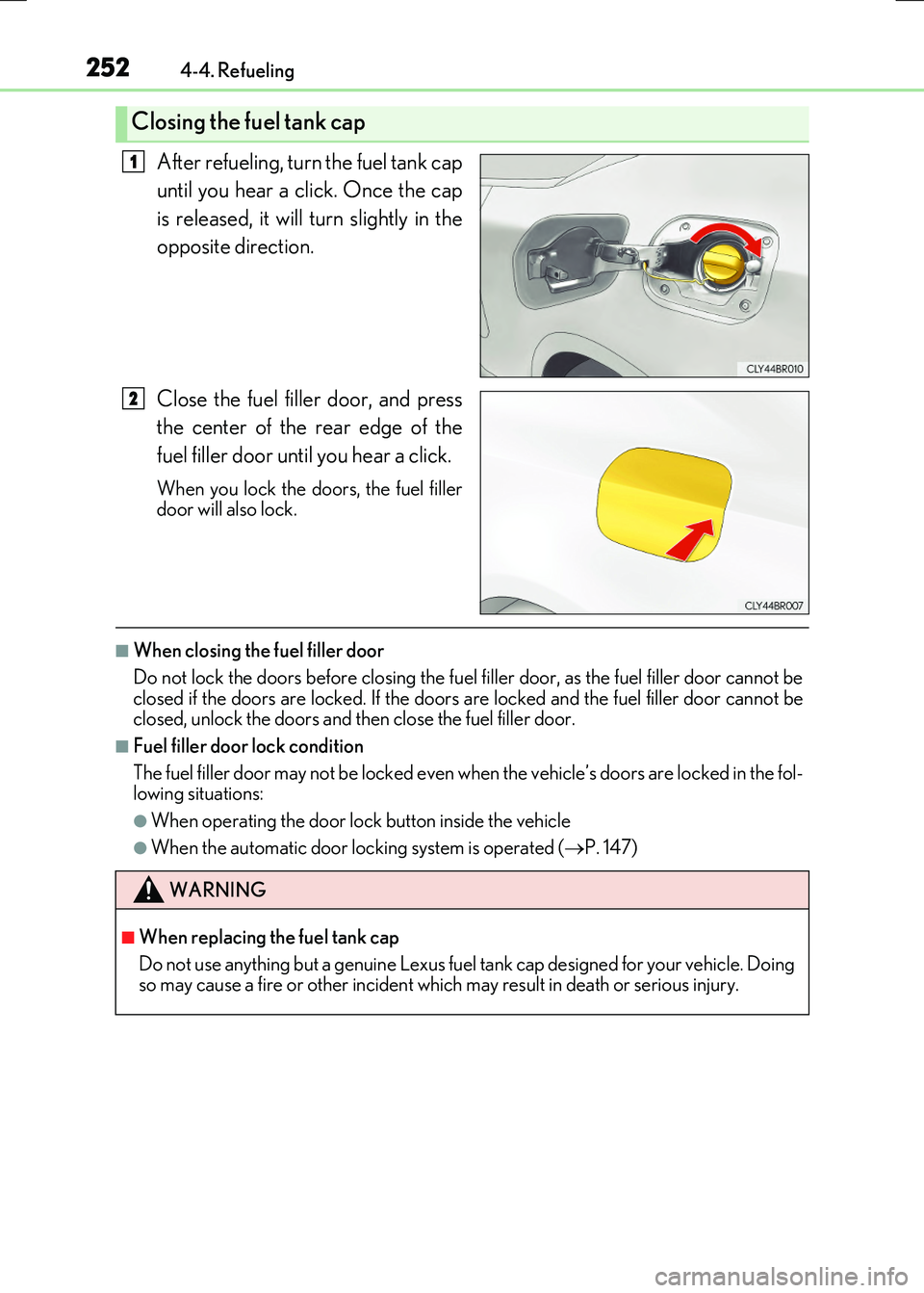
After refueling, turn the fuel tank cap
until you hear a click. Once the cap
is released, it will turn slightly in the
opposite direction.
Close the fuel filler door, and press
the center of the rear edge of the
fuel filler door until you hear a click.
When you lock the doors, the fuel filler door will also lock.
■When closing the fuel filler door
Do not lock the doors before closing the fuel filler door, as the fuel filler door cannot be closed if the doors are locked. If the doors are locked and the fuel filler door cannot be closed, unlock the doors and then close the fuel filler door.
■Fuel filler door lock condition
The fuel filler door may not be locked even wh en the vehicle’s doors are locked in the fol- lowing situations:
●When operating the door lock button inside the vehicle
●When the automatic door locking system is operated (P. 147)
Closing the fuel tank cap
1
2
WARNING
■When replacing the fuel tank cap
Do not use anything but a genuine Lexus fuel tank cap designed for your vehicle. Doing so may cause a fire or other incident which may result in death or serious injury.
Page 304 of 640
3044-5. Using the driving support systems
RC300h_EE(OM24740E)
◆ECB (Electronically Controlled Brake System)
The electronically controlled system generates braking force corresponding
to the brake operation
◆ABS (Anti-lock Brake System)
Helps to prevent wheel lock when the brakes are applied suddenly, or if the
brakes are applied while driving on a slippery road surface
◆Brake assist
Generates an increased level of braking force after the brake pedal is
depressed when the system detects a panic stop situation
◆VSC (Vehicle Stability Control)
Helps the driver to control skidding when swerving suddenly or turning on
slippery road surfaces
◆VSC+ (Vehicle Stability Control+)
Provides cooperative control of the ABS, TRC, VSC and EPS.
Helps to maintain directional stability when swerving on slippery road sur-
faces by controlling steering performance.
◆TRC (Traction Control)
Helps to maintain drive power and prevent the drive wheels from spinning
when starting the vehicle or accelerating on slippery roads
◆Hill-start assist control
Helps to prevent the vehicle from rolling backward when starting on an incline
or slippery slope
◆EPS (Electric Power Steering)
Employs an electric motor to reduce the amount of effort needed to turn the
steering wheel
Driving assist systems
To help enhance driving safety and performance, the following systems oper-
ate automatically in response to various driving situations. Be aware, however,
that these systems are suppl ementary and should not be relied upon too heav-
ily when operating the vehicle.
Page 338 of 640
3384-6. Driving tips
RC300h_EE(OM24740E)
Accelerate the vehicle slowly, keep a safe distance between you and the vehicle
ahead, and drive at a reduced speed suitable to road conditions.
●Park the vehicle and move the shift lever to P without setting the parking
brake. The parking brake may freeze up, preventing it from being released. If
the vehicle is parked without setting the parking brake, make sure to block the
wheels.
Failure to do so may be dangerous because it may cause the vehicle to move
unexpectedly, possibly leading to an accident.
●If the vehicle is parked without setting the parking brake, confirm that the shift
lever cannot be moved out of P*.
*: The shift lever will be locked if it is attempted to be shifted from P to any other posi-
tion without depressing the brake pedal. If the shift lever can be shifted from P,
there may be a problem with the shift lock system. Have the vehicle inspected by
your authorized Lexus retailer or Lexu s authorized repairer, or any reliable
repairer immediately.
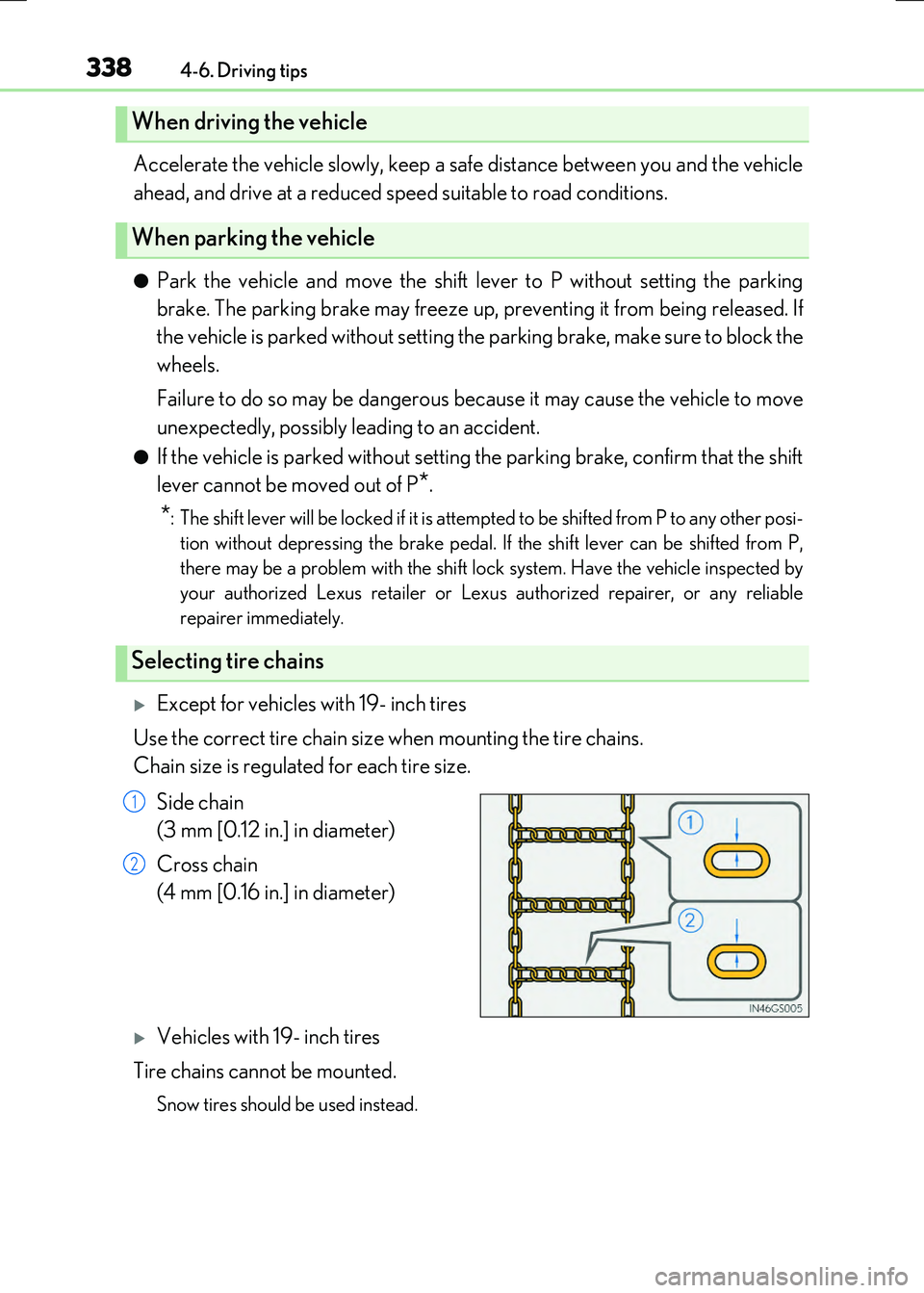
Except for vehicles with 19- inch tires
Use the correct tire chain size when mounting the tire chains.
Chain size is regulated for each tire size.
Side chain
(3 mm [0.12 in.] in diameter)
Cross chain
(4 mm [0.16 in.] in diameter)
Vehicles with 19- inch tires
Tire chains cannot be mounted.
Snow tires should be used instead.
When driving the vehicle
When parking the vehicle
Selecting tire chains
1
2
Page 359 of 640
3595-2. Setup
5
Lexus Display Audio system
RC300h_EE(OM24740E)
Select “General” or “Camera” on the “Display” screen or select “Display” on
each audio menu screen. ( P. 366)
Adjust the display as desired by turning the controller clockwise (+) or
counterclockwise (-).
To select “Contrast”, “Brightness”, “Colour” or “Tone”, move the controller to the left. (“Colour” and “Tone” are available when “Display” on each audio menu screen or theaudio settings screen for each audio source is selected.)
■Changing the sample image (when “General” is selected)
Move the controller to the right and select the desired sample image.
Adjusting the screen quality
1
2
Page 431 of 640
431
6Interior features
RC300h_EE(OM24740E)
6-1. Using the air conditioning
system
Automatic air conditioning
system .......................................... 432
Heated steering wheel/
seat heaters/
seat ventilators ......................... 444
6-2. Using the interior lights
Interior lights list ......................... 446
• Interior lights .......................... 447
• Personal lights .......................448
6-3. Using the storage features
List of storage features ............ 449
• Glove box ...............................450
• Console box ..........................450
• Cup holders ............................ 451
Trunk features ............................. 452
6-4. Using the other interior
features
Other interior features ............ 455
• Sun visors ................................455
• Vanity mirrors .......................455
• Clock ........................................ 456
• Power outlet........................... 456
• Assist grips ............................. 457
• Coat hooks .............................458
Page 441 of 640
4416-1. Using the air conditioning system
6
Interior features
RC300h_EE(OM24740E)
■Registering air conditioning settings to electronic keys (vehicles with driving position
memory)
●Unlocking the vehicle using an electronic key and turning the power switch to ON
mode will recall that key's registered air conditioning settings.
●When the power switch is turned off, the cu rrent air conditioning settings will automati-
cally be registered to the electronic key that was used to unlock the vehicle.
●The system may not operate correctly if more than one electronic key is in the vicinity or
if the smart entry & start system is used to unlock a passenger door.
●The doors that can recall the air conditioning setting* when unlocked using the smart
entry & start system can be changed. For details, contact any authorized Lexus dealer
or repairer, or another duly qu alified and equipped professional.
*: The doors that can recall the driving position memory are changed at the same time.
■Using automatic mode
Fan speed is adjusted automatically according to the temperature setting and the ambi-
ent conditions.
Therefore, the fan may stop for a while until wa rm or cool air is ready to flow immediately
after is pressed or “AUTO” is selected.
■Fogging up of the windows
The windows will easily fog up when the hu midity in the vehicle is high. Turning
(“A/C”) on will dehumidify the air from the ou tlets and defog the windshield effectively.
●If you turn (“A/C”) off, the windows may fog up more easily.
●The windows may fog up if the recirculated air mode is used.
■Outside/recirculated air mode
●When driving on dusty roads such as tunnels or in heavy traffic, set the outside/recircu-
lated air mode button to the recirculated air mode. This is effective in preventing out-
side air from entering the vehicle interior . During cooling operation, setting the
recirculated air mode will also cool the vehicle interior effectively.
●Outside/recirculated air mode may automati cally switch depending on the tempera-
ture setting or the inside temperature.
■Automatic mode for air intake control
In automatic mode, the system detects exhaust gas and other pollutants and automati-
cally switches between outside air and recirculated air modes.
When the dehumidification function is off, and the fan is operating, turning automatic
mode on will activate the dehumidification function.
■Operation of the air conditioning system in Eco drive mode
In Eco drive mode, the air conditioning system is controlled as follows to prioritize fuel
efficiency:
●Engine speed and compressor operation controlled to restrict heating/cooling capac-
ity
●Fan speed restricted when automatic mode is selected
To improve air conditioning performanc e, perform the following operations:
●Adjust the fan speed
●Turn off Eco drive mode
Page 442 of 640
4426-1. Using the air conditioning system
RC300h_EE(OM24740E)
■When the outside temperature falls to nearly 0C (32F)
The dehumidification function may not operate even when is pressed or “A/C” is
selected.
■Ventilation and air conditioning odors
●To let fresh air in, set the air conditioning system to the outside air mode.
●During use, various odors from inside and outside the vehicle may enter into and accu- mulate in the air conditioning system. This may then cause odor to be emitted from the
vents.
●To reduce potential odors from occurring:
• It is recommended that the air conditioning system be set to outside air mode prior
to turning the vehicle off. • The start timing of the blower may be dela yed for a short period of time immediately after the air conditioning system is started in automatic mode.
■Air conditioning filter
P. 509
■Customization
Settings (e.g. A/C auto switch operation) can be changed. (Customizable features P. 614)
WARNING
■To prevent the windshield from fogging up
●Do not use during cool air operation in extremely humid weather. The differ-
ence between the temperature of the outside air and that of the windshield can cause the outer surface of the windshield to fog up, blocking your vision.
■To prevent burns
●Do not touch the rear view mirror surfaces when the outside rear view mirror defog-gers are on.
●Do not touch the glass at lower part of the windshield or to the side of the front pillarswhen the windshield wiper de-icer is on.
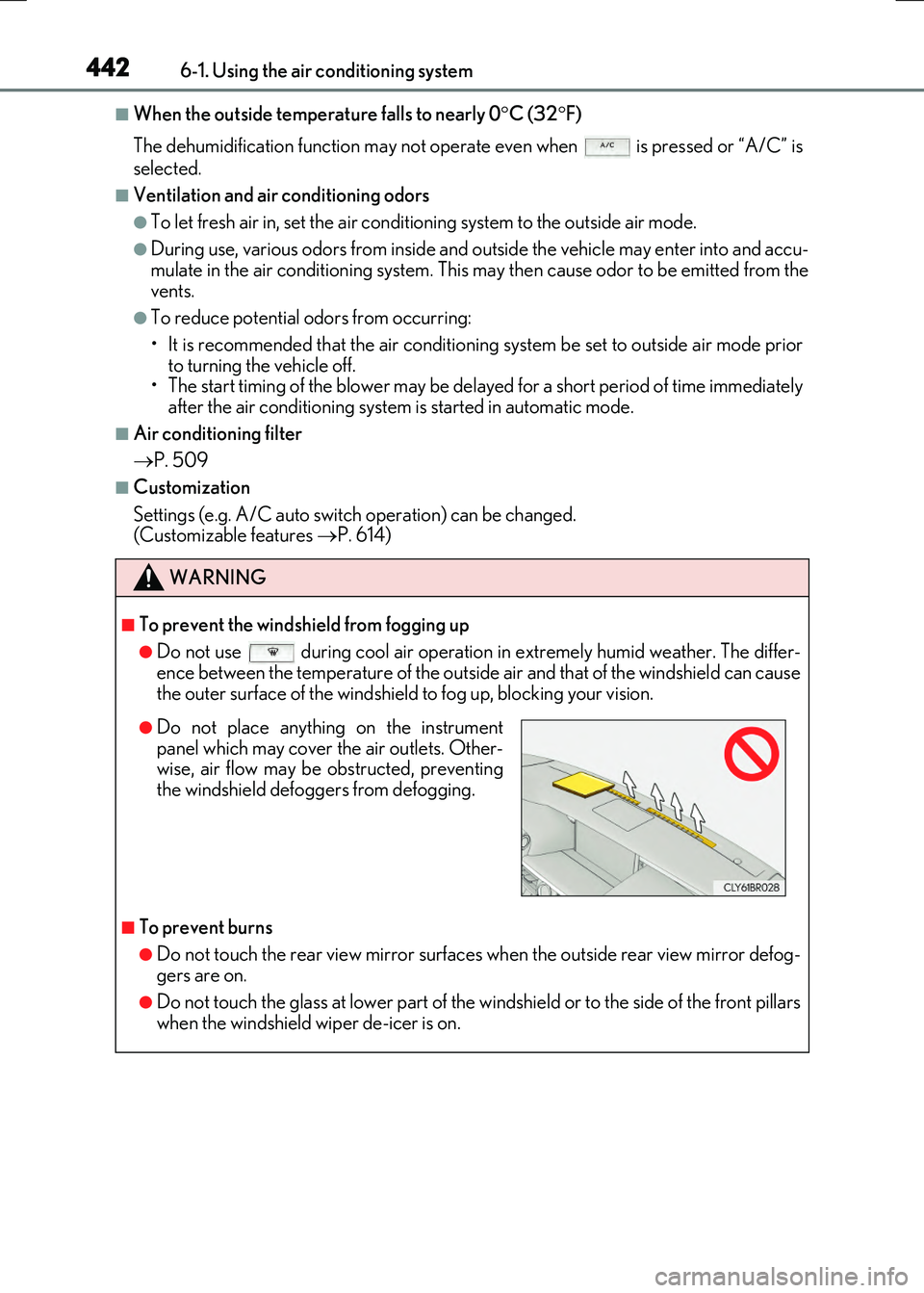
●Do not place anything on the instrumentpanel which may cover the air outlets. Other-wise, air flow may be obstructed, preventing
the windshield defoggers from defogging.
Page 448 of 640
4486-2. Using the interior lights
RC300h_EE(OM24740E)
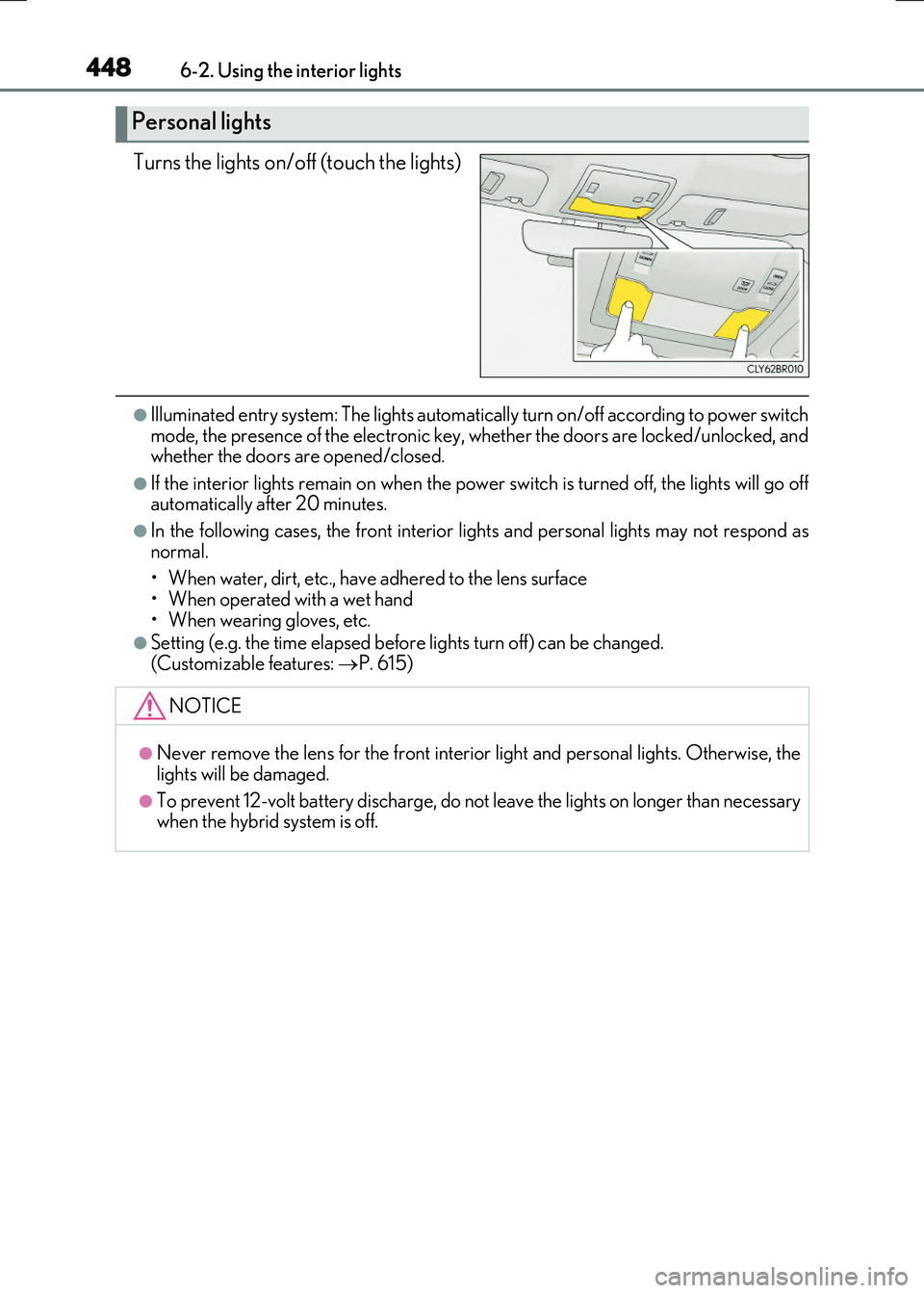
Turns the lights on/off (touch the lights)
●Illuminated entry system: The lights automatically turn on/off according to power switch mode, the presence of the electronic key, whether the doors are locked/unlocked, andwhether the doors are opened/closed.
●If the interior lights remain on when the powe r switch is turned off, the lights will go off automatically after 20 minutes.
●In the following cases, the front interior lights and personal lights may not respond as
normal.
• When water, dirt, etc., have adhered to the lens surface • When operated with a wet hand
• When wearing gloves, etc.
●Setting (e.g. the time elapsed before lights turn off) can be changed.
(Customizable features: P. 615)
Personal lights
NOTICE
●Never remove the lens for the front interior light and personal lights. Otherwise, the
lights will be damaged.
●To prevent 12-volt battery discharge, do not leave the lights on longer than necessary when the hybrid system is off.