lights LEXUS RX300H 2017 User Guide
[x] Cancel search | Manufacturer: LEXUS, Model Year: 2017, Model line: RX300H, Model: LEXUS RX300H 2017Pages: 640, PDF Size: 35.53 MB
Page 25 of 640
25Pictorial index
RC300h_EE(OM24740E)
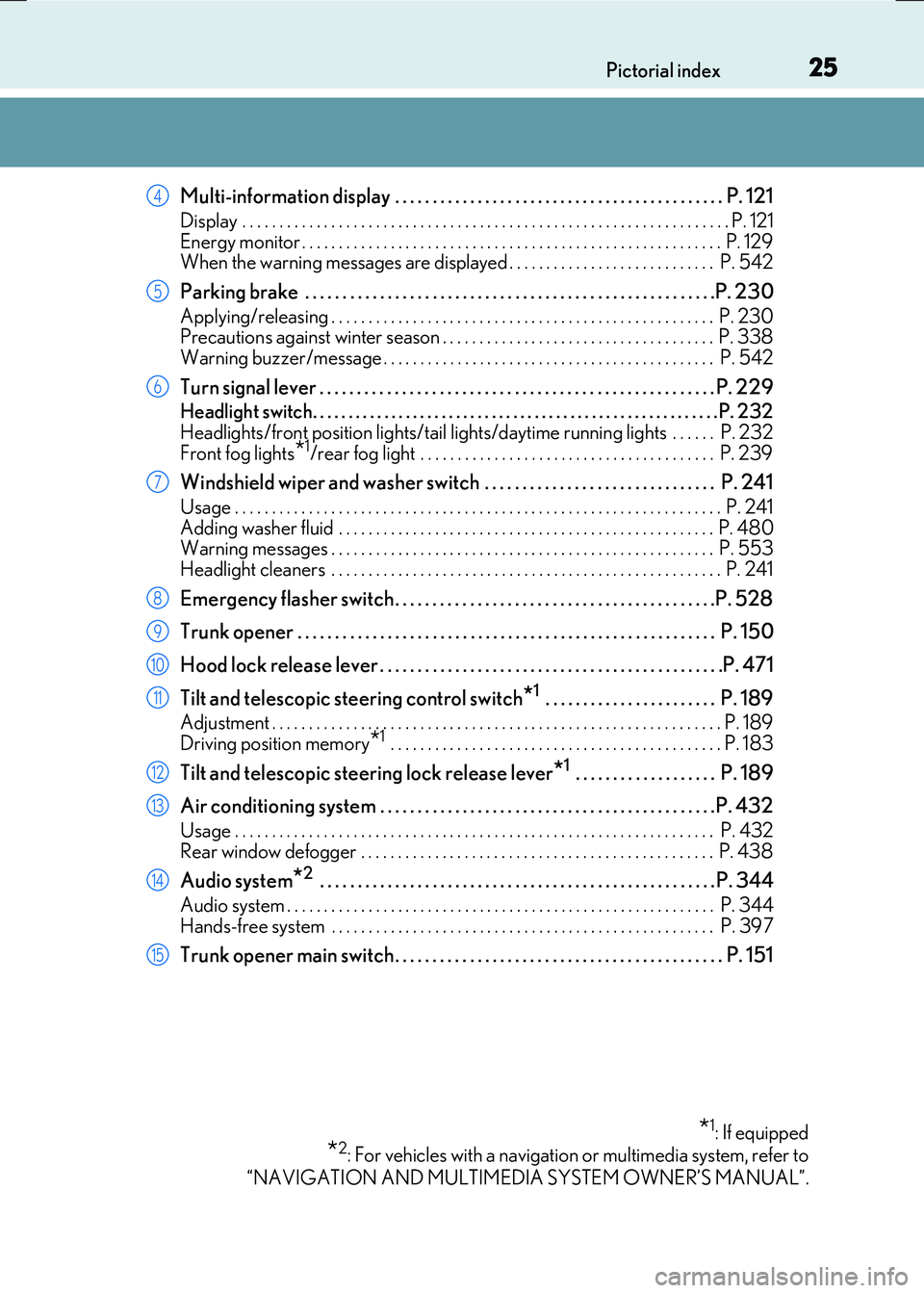
Multi-information display . . . . . . . . . . . . . . . . . . . . . . . . . . . . . . . . . . . . . . . . . . . . P. 121
Display . . . . . . . . . . . . . . . . . . . . . . . . . . . . . . . . . . . . . . . . . . . . . . . . . . . . . . . . . . . . . . . . . . P. 121
Energy monitor . . . . . . . . . . . . . . . . . . . . . . . . . . . . . . . . . . . . . . . . . . . . . . . . . . . . . . . . . P. 129 When the warning messages are displayed . . . . . . . . . . . . . . . . . . . . . . . . . . . . P. 542
Parking brake . . . . . . . . . . . . . . . . . . . . . . . . . . . . . . . . . . . . . . . . . . . . . . . . . . . . . . .P. 2 30
Applying/releasing . . . . . . . . . . . . . . . . . . . . . . . . . . . . . . . . . . . . . . . . . . . . . . . . . . . . P. 230 Precautions against winter season . . . . . . . . . . . . . . . . . . . . . . . . . . . . . . . . . . . . . P. 338Warning buzzer/message . . . . . . . . . . . . . . . . . . . . . . . . . . . . . . . . . . . . . . . . . . . . . P. 542
Turn signal lever . . . . . . . . . . . . . . . . . . . . . . . . . . . . . . . . . . . . . . . . . . . . . . . . . . . . . P. 2 29
Headlight switch. . . . . . . . . . . . . . . . . . . . . . . . . . . . . . . . . . . . . . . . . . . . . . . . . . . . . . . . .P. 232
Headlights/front position lights/tail lights/ daytime running lights . . . . . . P. 232 Front fog lights*1/rear fog light . . . . . . . . . . . . . . . . . . . . . . . . . . . . . . . . . . . . . . . . P. 239
Windshield wiper and washer switch . . . . . . . . . . . . . . . . . . . . . . . . . . . . . . . P. 241
Usage . . . . . . . . . . . . . . . . . . . . . . . . . . . . . . . . . . . . . . . . . . . . . . . . . . . . . . . . . . . . . . . . . . P. 241 Adding washer fluid . . . . . . . . . . . . . . . . . . . . . . . . . . . . . . . . . . . . . . . . . . . . . . . . . . . P. 48 0 Warning messages . . . . . . . . . . . . . . . . . . . . . . . . . . . . . . . . . . . . . . . . . . . . . . . . . . . . P. 553
Headlight cleaners . . . . . . . . . . . . . . . . . . . . . . . . . . . . . . . . . . . . . . . . . . . . . . . . . . . . . P. 241
Emergency flasher switch . . . . . . . . . . . . . . . . . . . . . . . . . . . . . . . . . . . . . . . . . . .P. 528
Trunk opener . . . . . . . . . . . . . . . . . . . . . . . . . . . . . . . . . . . . . . . . . . . . . . . . . . . . . . . . P. 150
Hood lock release lever . . . . . . . . . . . . . . . . . . . . . . . . . . . . . . . . . . . . . . . . . . . . . .P. 471
Tilt and telescopic steering control switch*1 . . . . . . . . . . . . . . . . . . . . . . . P. 189
Adjustment . . . . . . . . . . . . . . . . . . . . . . . . . . . . . . . . . . . . . . . . . . . . . . . . . . . . . . . . . . . . . P. 189
Driving position memory*1 . . . . . . . . . . . . . . . . . . . . . . . . . . . . . . . . . . . . . . . . . . . . . P. 183
Tilt and telescopic steering lock release lever*1 . . . . . . . . . . . . . . . . . . . P. 189
Air conditioning system . . . . . . . . . . . . . . . . . . . . . . . . . . . . . . . . . . . . . . . . . . . . .P. 432
Usage . . . . . . . . . . . . . . . . . . . . . . . . . . . . . . . . . . . . . . . . . . . . . . . . . . . . . . . . . . . . . . . . . P. 432 Rear window defogger . . . . . . . . . . . . . . . . . . . . . . . . . . . . . . . . . . . . . . . . . . . . . . . . P. 438
Audio system*2 . . . . . . . . . . . . . . . . . . . . . . . . . . . . . . . . . . . . . . . . . . . . . . . . . . . . . P. 344
Audio system . . . . . . . . . . . . . . . . . . . . . . . . . . . . . . . . . . . . . . . . . . . . . . . . . . . . . . . . . . P. 344 Hands-free system . . . . . . . . . . . . . . . . . . . . . . . . . . . . . . . . . . . . . . . . . . . . . . . . . . . . P. 39 7
Trunk opener main switch . . . . . . . . . . . . . . . . . . . . . . . . . . . . . . . . . . . . . . . . . . . . P. 151
*1: If equipped
*2: For vehicles with a navigation or multimedia system, refer to
“NAVIGATION AND MULTIMEDIA SYSTEM OWNER’S MANUAL”.
4
5
6
7
8
9
10
11
12
13
14
15
Page 31 of 640
31Pictorial index
RC300h_EE(OM24740E)
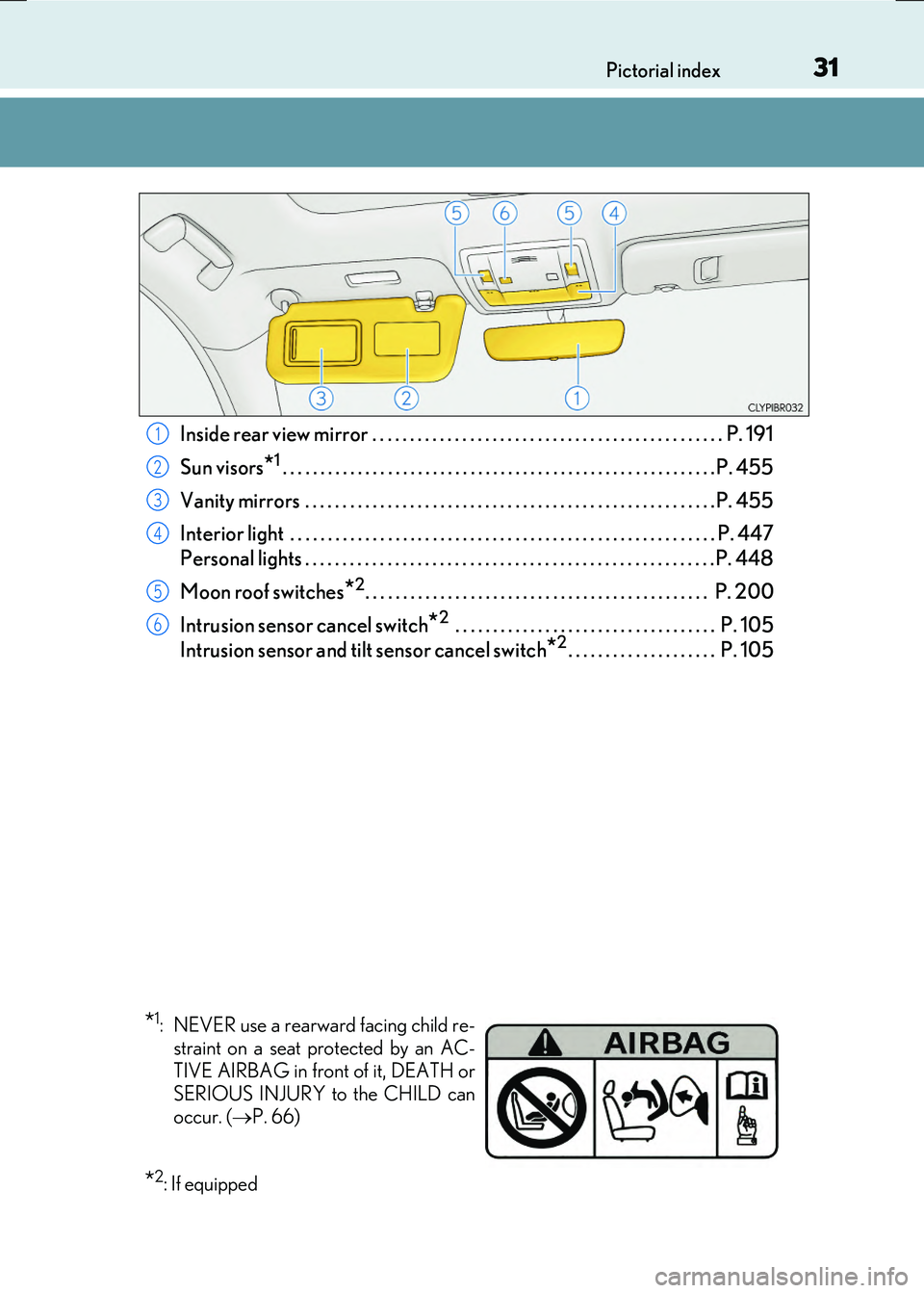
Inside rear view mirror . . . . . . . . . . . . . . . . . . . . . . . . . . . . . . . . . . . . . . . . . . . . . . . P. 191
Sun visors
*1. . . . . . . . . . . . . . . . . . . . . . . . . . . . . . . . . . . . . . . . . . . . . . . . . . . . . . . . . . P. 455
Vanity mirrors . . . . . . . . . . . . . . . . . . . . . . . . . . . . . . . . . . . . . . . . . . . . . . . . . . . . . . . P. 455
Interior light . . . . . . . . . . . . . . . . . . . . . . . . . . . . . . . . . . . . . . . . . . . . . . . . . . . . . . . . .P. 447
Personal lights . . . . . . . . . . . . . . . . . . . . . . . . . . . . . . . . . . . . . . . . . . . . . . . . . . . . . . .P. 448
Moon roof switches
*2. . . . . . . . . . . . . . . . . . . . . . . . . . . . . . . . . . . . . . . . . . . . . . P. 200
Intrusion sensor cancel switch
*2 . . . . . . . . . . . . . . . . . . . . . . . . . . . . . . . . . . . P. 105
Intrusion sensor and tilt sensor cancel switch
*2. . . . . . . . . . . . . . . . . . . . P. 105
1
2
3
4
5
6
*1: NEVER use a rearward facing child re- straint on a seat protected by an AC-
TIVE AIRBAG in front of it, DEATH or
SERIOUS INJURY to the CHILD can
occur. ( P. 66)
*2: If equipped
Page 44 of 640
441-1. For safe use
RC300h_EE(OM24740E)
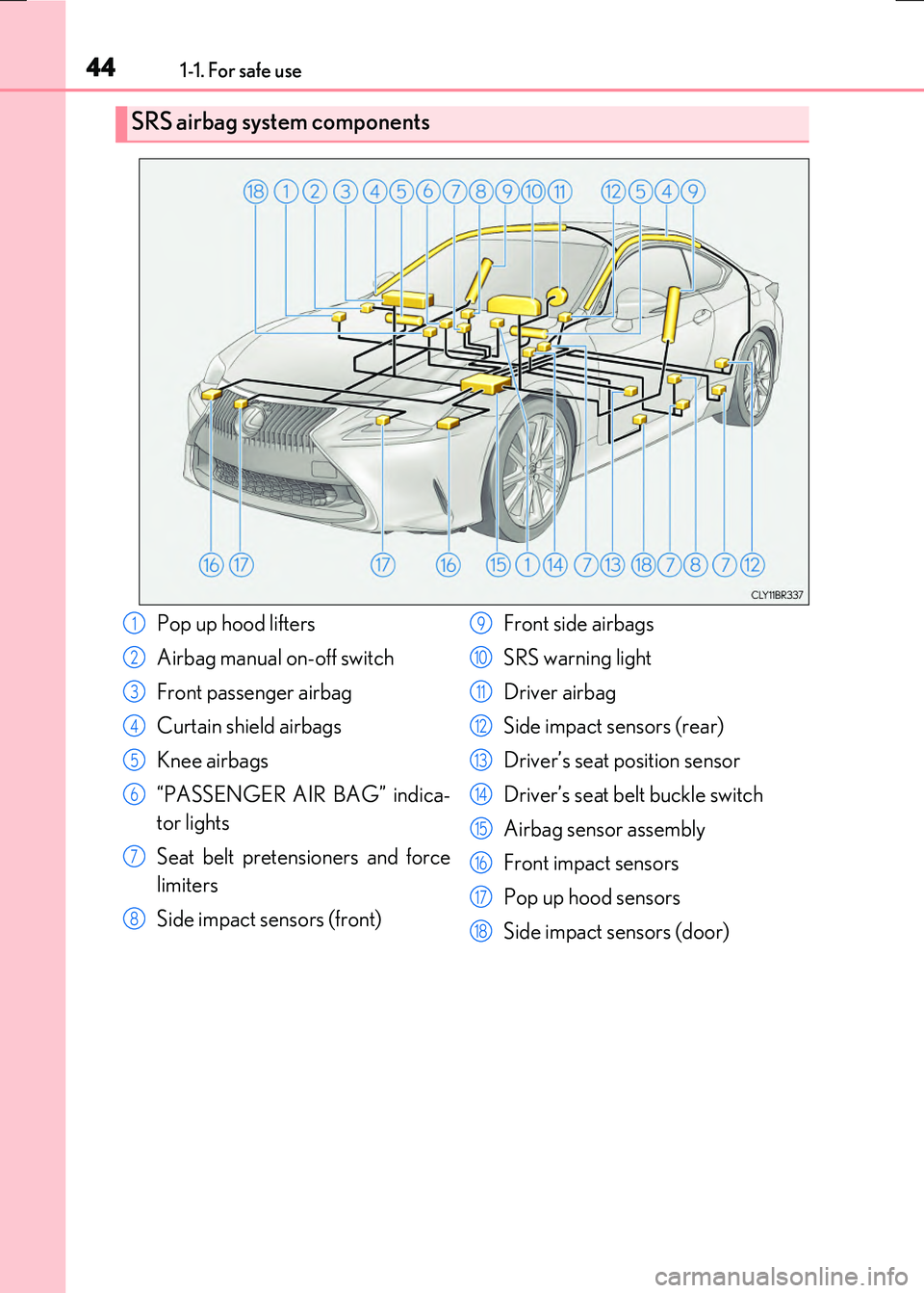
SRS airbag system components
Pop up hood lifters
Airbag manual on-off switch
Front passenger airbag
Curtain shield airbags
Knee airbags
“PASSENGER AIR BAG” indica-
tor lights
Seat belt pretensioners and force
limiters
Side impact sensors (front)
Front side airbags
SRS warning light
Driver airbag
Side impact sensors (rear)
Driver’s seat position sensor
Driver’s seat belt buckle switch
Airbag sensor assembly
Front impact sensors
Pop up hood sensors
Side impact sensors (door)
1
2
3
4
5
6
7
8
9
10
11
12
13
14
15
16
17
18
Page 109 of 640
109
2Instrument cluster
RC300h_EE(OM24740E)
2. Instrument cluster
Warning lights and
indicators.......................................110
Gauges and meters ..................... 115
Multi-information display .......... 121
Energy monitor/
consumption screen ................129
Page 110 of 640
110
RC300h_EE(OM24740E)
2. Instrument cluster
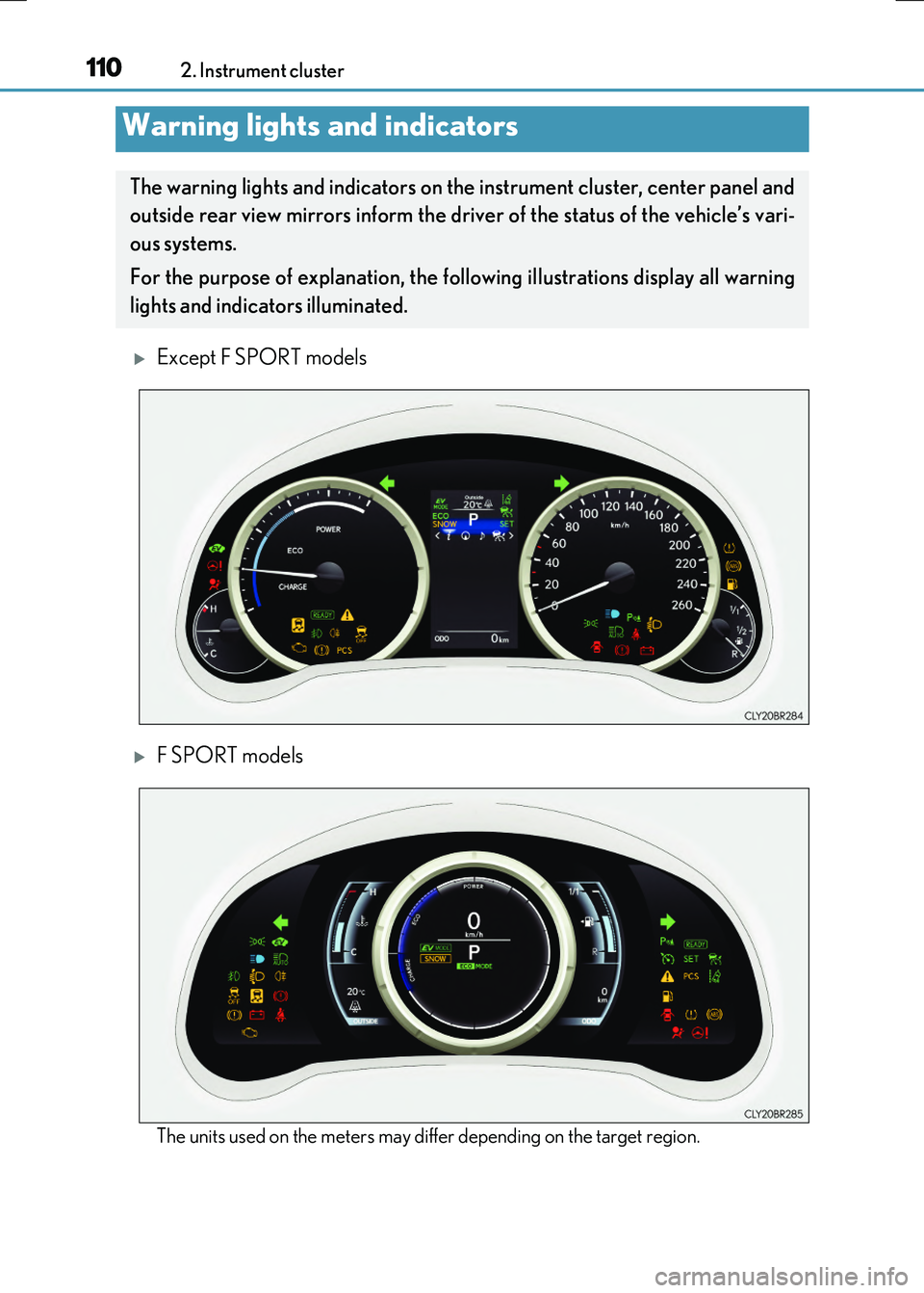
Except F SPORT models
F SPORT models
The units used on the meters may differ depending on the target region.
Warning lights and indicators
The warning lights and indicators on th e instrument cluster, center panel and
outside rear view mirrors inform the driver of the status of the vehicle’s vari-
ous systems.
For the purpose of explanation, the fo llowing illustrations display all warning
lights and indicators illuminated.
Page 111 of 640
1112. Instrument cluster
2
Instrument cluster
RC300h_EE(OM24740E)
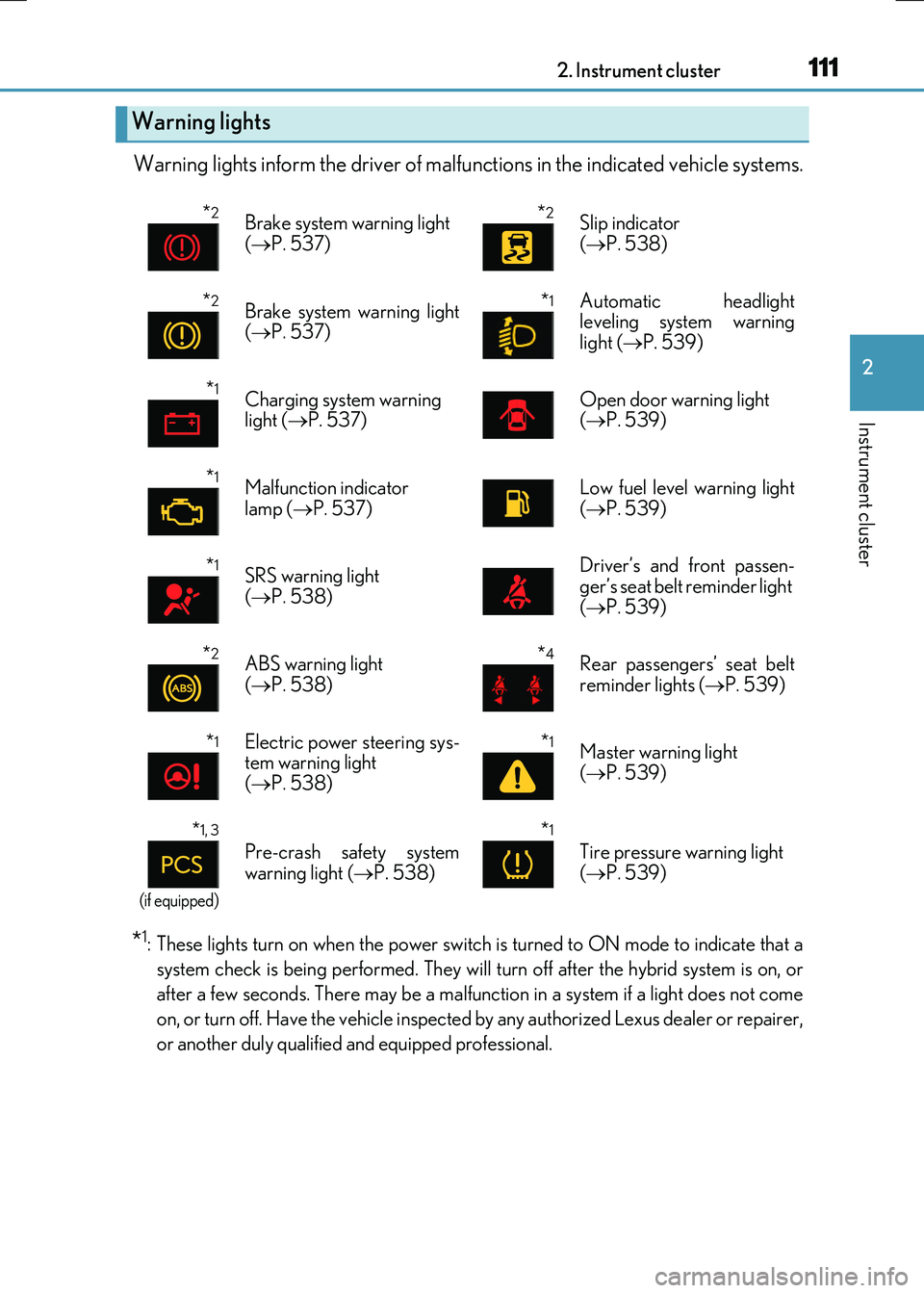
Warning lights inform the driver of malfunctions in the indicated vehicle systems.
*1: These lights turn on when the power switch is turned to ON mode to indicate that a
system check is being performed. They will turn off after the hybrid system is on, or
after a few seconds. There may be a malfunct ion in a system if a light does not come
on, or turn off. Have the vehicle inspected by any authorized Lexus dealer or repairer,
or another duly qualified and equipped professional.
Warning lights
*2Brake system warning light
( P. 537)
*2Slip indicator
( P. 538)
*2Brake system warning light ( P. 537)
*1 Automatic headlight leveling system warning
light ( P. 539)
*1Charging system warning light ( P. 537)Open door warning light ( P. 539)
*1Malfunction indicator
lamp ( P. 537)
Low fuel level warning light
( P. 539)
*1SRS warning light ( P. 538)
Driver’s and front passen- ger’s seat belt reminder light
( P. 539)
*2ABS warning light ( P. 538)
*4Rear passengers’ seat belt reminder lights ( P. 539)
*1Electric power steering sys- tem warning light( P. 538)
*1Master warning light
( P. 539)
*1, 3
(if equipped)
Pre-crash safety system
warning light ( P. 538)
*1
Tire pressure warning light
( P. 539)
Page 112 of 640
1122. Instrument cluster
RC300h_EE(OM24740E)
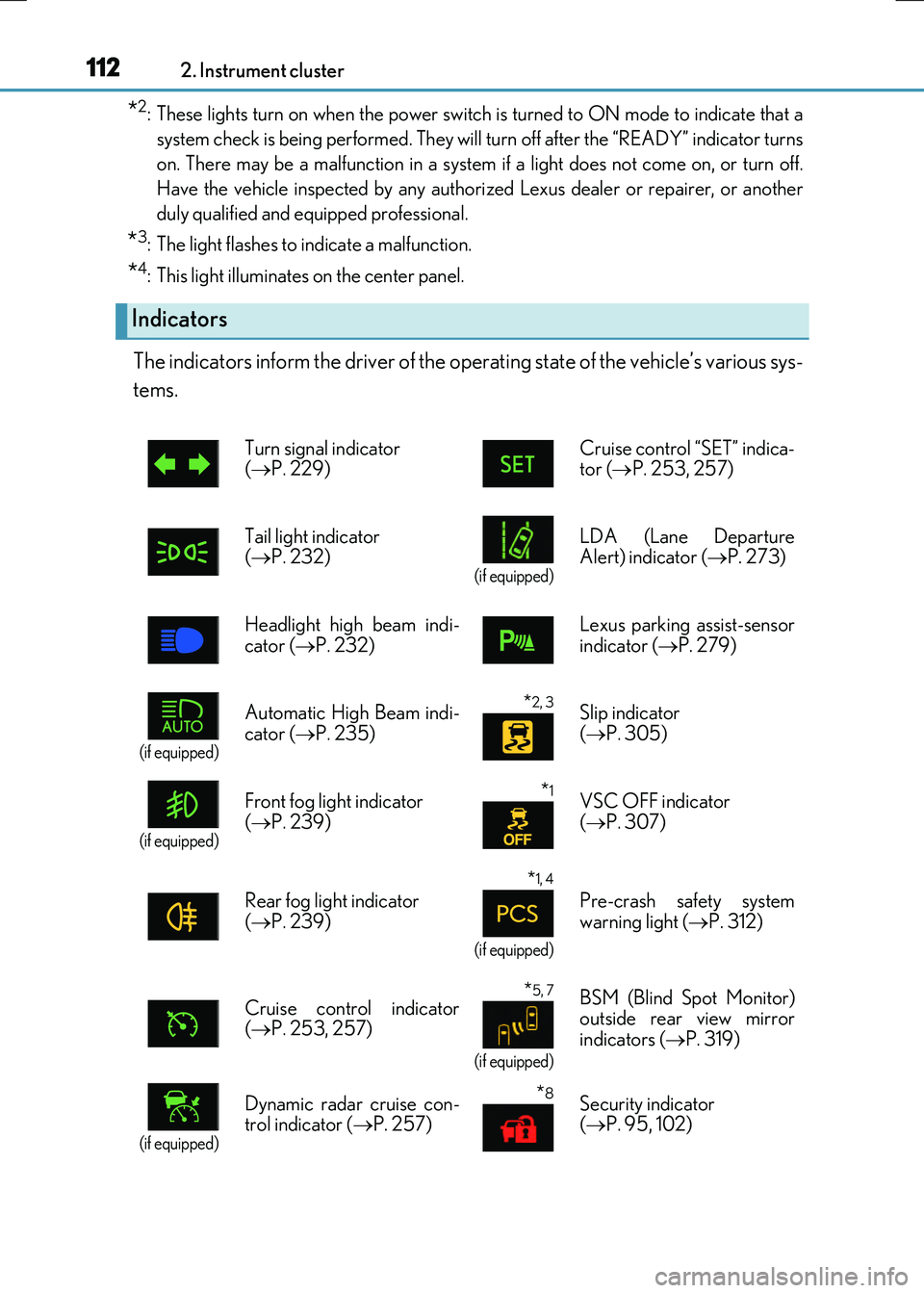
*2: These lights turn on when the power switch is turned to ON mode to indicate that a
system check is being perfor med. They will turn off after the “READY” indicator turns
on. There may be a malfunction in a system if a light does not come on, or turn off.
Have the vehicle inspected by any authorized Lexus dealer or repairer, or another
duly qualified and equipped professional.
*3: The light flashes to indicate a malfunction.
*4: This light illuminates on the center panel.
The indicators inform the driver of the operating state of the vehicle’s various sys-
tems.
Indicators
Turn signal indicator ( P. 229) Cruise control “SET” indica- tor ( P. 253, 257)
Tail light indicator ( P. 232) (if equipped)
LDA (Lane Departure Alert) indicator ( P. 273)
Headlight high beam indi-
cator ( P. 232)
Lexus parking assist-sensor
indicator ( P. 279)
(if equipped)
Automatic High Beam indi-
cator ( P. 235)
*2, 3 Slip indicator
( P. 305)
(if equipped)
Front fog light indicator
( P. 239)
*1VSC OFF indicator
( P. 307)
Rear fog light indicator ( P. 239)
*1, 4
(if equipped)
Pre-crash safety system warning light ( P. 312)
Cruise control indicator ( P. 253, 257)
*5, 7
(if equipped)
BSM (Blind Spot Monitor) outside rear view mirror
indicators ( P. 319)
(if equipped)
Dynamic radar cruise con- trol indicator ( P. 257)
*8Security indicator ( P. 95, 102)
Page 113 of 640
1132. Instrument cluster
2
Instrument cluster
RC300h_EE(OM24740E)
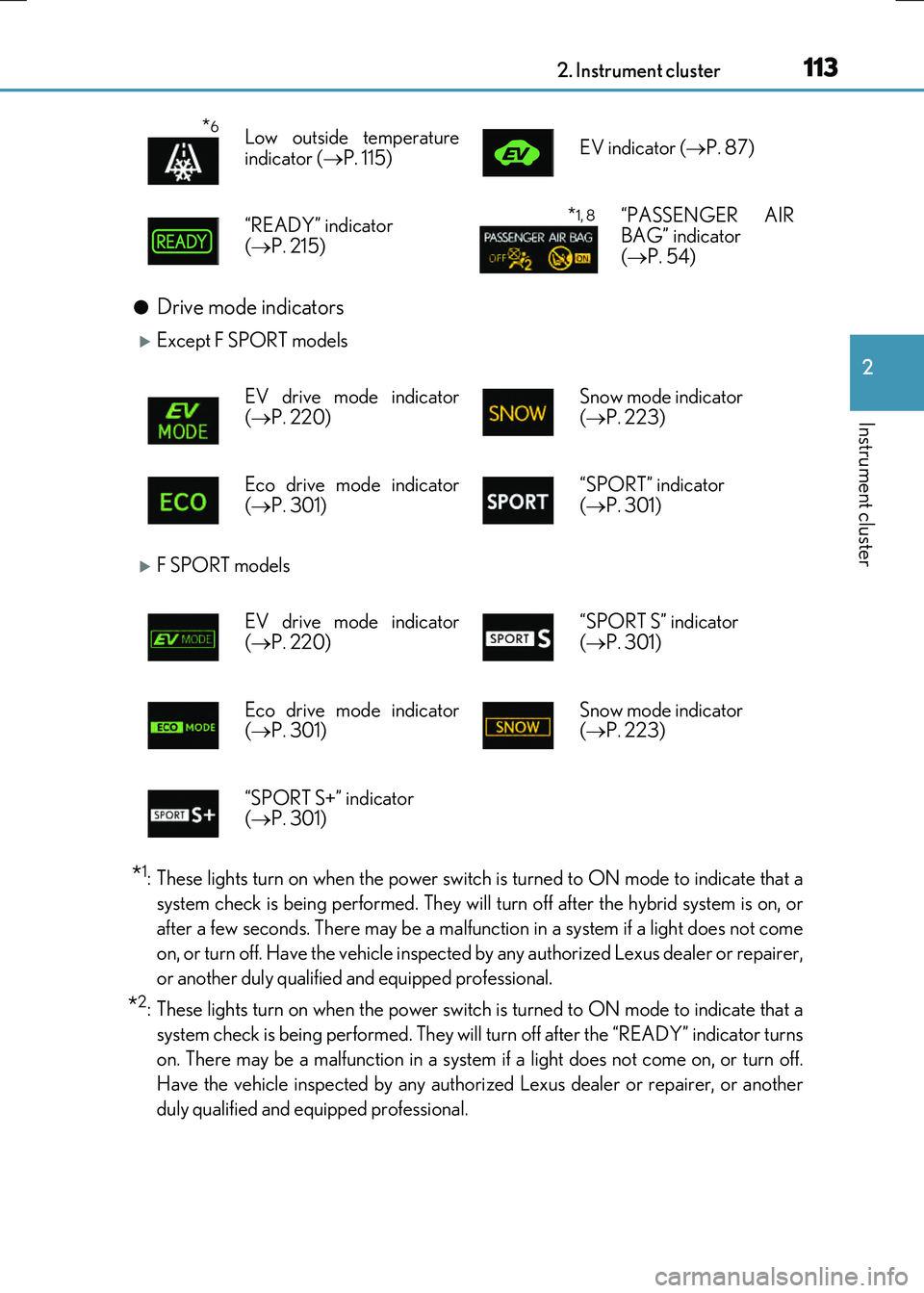
●Drive mode indicators
Except F SPORT models
F SPORT models
*1: These lights turn on when the power switch is turned to ON mode to indicate that a
system check is being performed. They will turn off after the hybrid system is on, or
after a few seconds. There may be a malfunct ion in a system if a light does not come
on, or turn off. Have the vehicle inspected by any authorized Lexus dealer or repairer,
or another duly qualified and equipped professional.
*2: These lights turn on when the power switch is turned to ON mode to indicate that a
system check is being perfor med. They will turn off after the “READY” indicator turns
on. There may be a malfunction in a system if a light does not come on, or turn off.
Have the vehicle inspected by any authorized Lexus dealer or repairer, or another
duly qualified and equipped professional.
*6Low outside temperature
indicator ( P. 115) EV indicator ( P. 87)
“READY” indicator
( P. 215)
*1, 8“PASSENGER AIR BAG” indicator ( P. 54)
EV drive mode indicator ( P. 220) Snow mode indicator ( P. 223)
Eco drive mode indicator
( P. 301)
“SPORT” indicator
( P. 301)
EV drive mode indicator
( P. 220)
“SPORT S” indicator
( P. 301)
Eco drive mode indicator ( P. 301) Snow mode indicator ( P. 223)
“SPORT S+” indicator ( P. 301)
Page 118 of 640
1182. Instrument cluster
RC300h_EE(OM24740E)
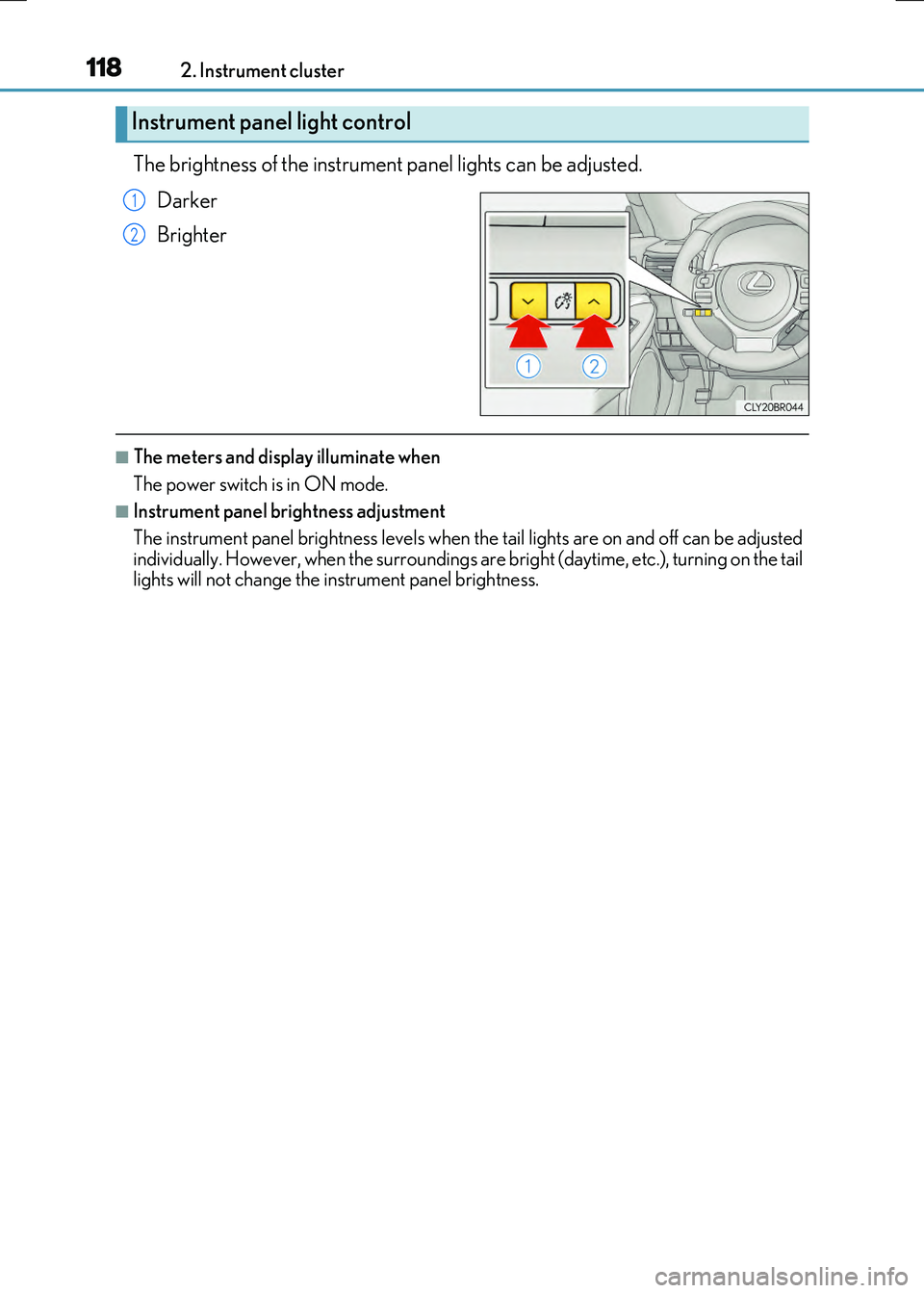
The brightness of the instrument panel lights can be adjusted.
Darker
Brighter
■The meters and display illuminate when
The power switch is in ON mode.
■Instrument panel brightness adjustment
The instrument panel brightness levels when th e tail lights are on and off can be adjusted
individually. However, when the surroundings ar e bright (daytime, etc.), turning on the tail lights will not change the in strument panel brightness.
Instrument panel light control
1
2
Page 145 of 640
1453-2. Opening, closing and locking the doors and trunk
3
Operation of each component
RC300h_EE(OM24740E)
■Operation signals
The emergency flashers flash to indicate th at the doors have been locked/unlocked. (Locked: once; Unlocked: twice)
A buzzer sounds to indicate that th e windows and moon roof are operating.
■Security feature
If a door is not opened within approximately 30 seconds after the vehicle is unlocked, the security feature automatically locks the vehicle again.
■Welcome light illumination control
The front position, tail and license plate lights automatically turn on at night when the doors are unlocked using the entry function or wireless remote control if the light switch
is in the “AUTO” position.
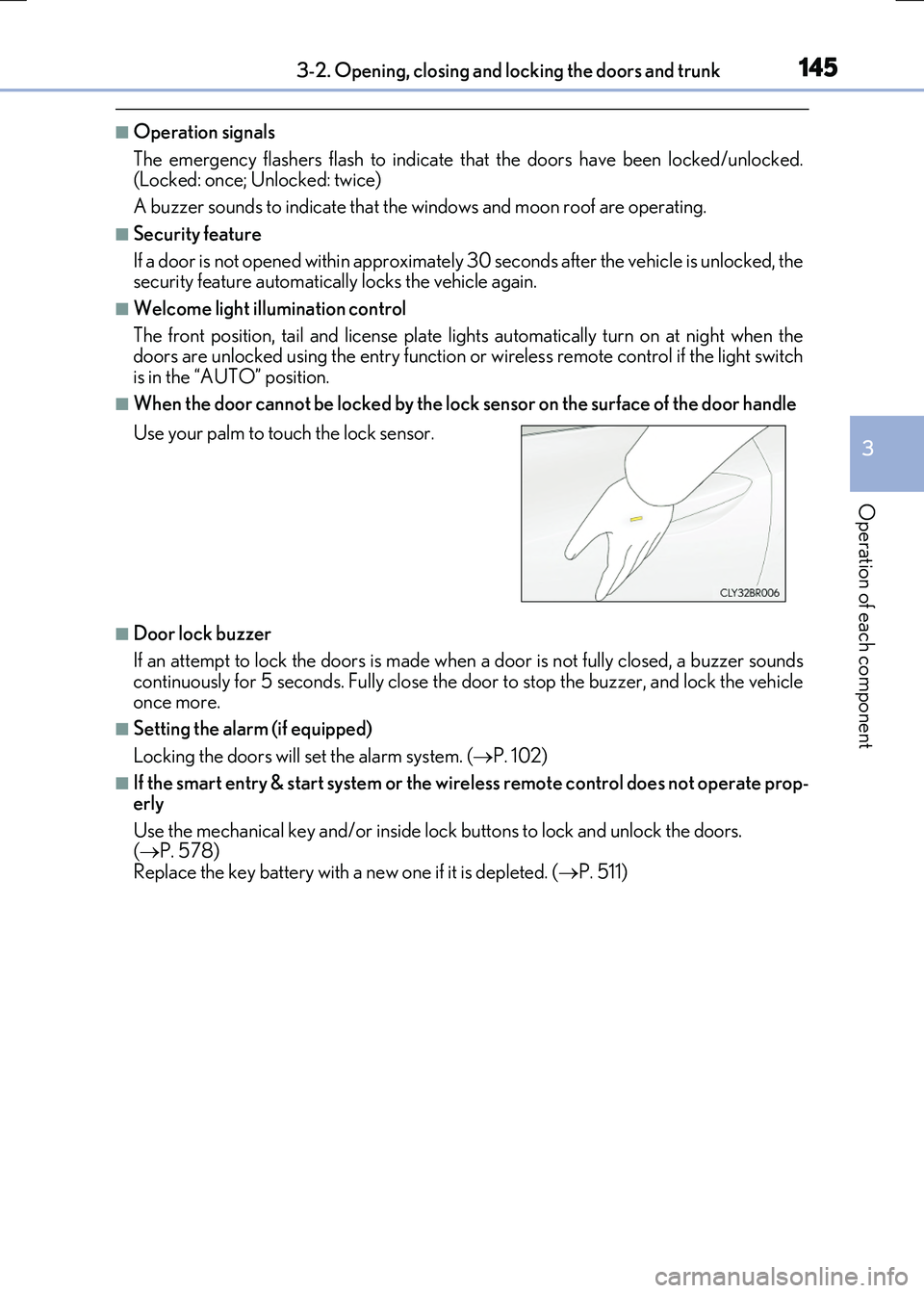
■When the door cannot be locked by the lock sensor on the surface of the door handle
■Door lock buzzer
If an attempt to lock the doors is made when a door is not fully closed, a buzzer sounds
continuously for 5 seconds. Fully close the door to stop the buzzer, and lock the vehicle once more.
■Setting the alarm (if equipped)
Locking the doors will set the alarm system. ( P. 102)
■If the smart entry & start system or the wireless remote control does not operate prop- erly
Use the mechanical key and/or inside lock buttons to lock and unlock the doors. ( P. 578) Replace the key battery with a new one if it is depleted. ( P. 511)
Use your palm to touch the lock sensor.